

Systems
Administration
BS Information System
Instructor: Mark John P. Lado
Key Terms
 DNS – Domain Name System
 GPO – Group Policy Object
 LDAP – Lightweight Directory Access Protocol
 NT – New Technology
What comes into your mind if we say
“DIRECTORY”?
Directory
 Is defined as an organizational unit, or container,
used to organize folders and files into a
hierarchical structure. A directory contains
bookkeeping information about files that are,
figuratively speaking, beneath them in the
hierarchy.
Directory
Expound the word “Domain” in
network terminologies.
Domain
 Domain names are used to identify one or more IP
addresses. For example, the domain name
microsoft.com represents about a dozen IP
addresses. Domain names are used in URLs to identify
particular Web pages. For example, in the URL
http://www.pcwebopedia.com/index.html,
the domain name is pcwebopedia.com.
Domain
Learning Topic
 DNS
 Two types of lookup in DNS
 Three types of zone in DNS the port no of DNS
 The port number of DNS
 Nslookup
 Active Directory And Domain
 LDAP
 Active Directory
 Group Policy
 Software publishing and assigning
Objectives
At the end of the lesson, the students will be able
to;
 A. know the system administrator – DNS, and active
directory and domain
 B. appreciate the role of system administration in terms
of DNS, and Active directory And Domain
 C. give meaning of each terminologies in system
administration in terms of DNS, and Active directory And
Domain
DNS
 Domain Name System, DNS is an Internet service
that translates domain names into IP addresses.
Because domain names are alphabetic, they're
easier to remember.
DNS
 A DNS server is a computer server that contains a
database of public IP addresses and their
associated hostnames, and in most cases serves to
resolve, or translate, those names to
IP addresses as requested. DNS servers run
special software and communicate with each
other using special protocols.
DNS
Two types of lookup in DNS
 Forward lookup : it converts Domain name to ip
address.
 Reverse lookup: it converts ip address to Domain
name.
Three types of zone in DNS
 Primary zone
 Secondary zone
 Stub zone
Primary zone
 A Primary DNS zone is the original Read-Write
Authoritative DNS zone of portion of
a DNS Namespace. When a DNS Server hosts
a primary zone, that DNS Server is considered as
the Authoritative DNS Server and it is
the primary source for information of that zone.
Primary zone
 A Secondary DNS Zone is Read-Only copy of a
Primary Zone, or another Secondary Zone, kept in
a Secondary DNS Server. A Secondary DNS Zone is
used to reduce the load on Primary DNS Servers
and also for preventing single point of failure.
Stub zone
 A stub zone is a copy of a zone that contains only
those resource records necessary to identify the
authoritative Domain Name System (DNS) servers
for that zone. A stub zone is used to resolve
names between separate DNS namespaces.
What is the port number of DNS?
 Most known and popular usage protocol of DNS
is UDP (User Datagram Protocol) 53. Most DNS
servers uses UDP 53 port which provides
simplicity and less resource usage.
What is Nslookup?
 Nslookup.exe is a command-line administrative
tool for testing and troubleshooting DNS servers.
This tool is installed along with the TCP/IP
protocol through Control Panel.
Nslookup
Active Directory
And
Domain
Active Directory And Domain
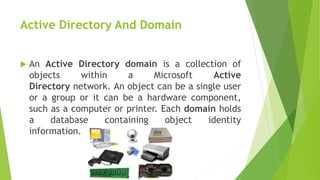
 An Active Directory domain is a collection of
objects within a Microsoft Active
Directory network. An object can be a single user
or a group or it can be a hardware component,
such as a computer or printer. Each domain holds
a database containing object identity
information.
What is LDAP?
 The Lightweight Directory Access Protocol is an
open, vendor-neutral, industry standard
application protocol for accessing and maintaining
distributed directory information services over an
Internet Protocol network.
Why it is used?
 LDAP is the Lightweight Directory Access Protocol.
Its an active directory protocol. Basically, it's a
protocol used to access data from a database.
(LDAP) Lightweight Directory Access
Protocol
What is Active Directory? Why it
used.
 Active Directory is a Directory Service created by
Microsoft. It is included with most Windows Server
operating systems.
What is Active Directory? Why it
used.
Active Directory is primarily used to
store directory objects like users and
groups and computers printers.
What is Active Directory? Why it
used.
Using Active Directory brings a number of
advantages to your network;
1. Centralized user account management
2. Centralized policy management (group
policy)
3. Better security management
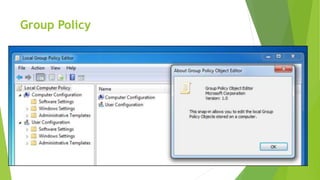
What is Group Policy?
 Group Policy is a feature of the Microsoft Windows
NT family of operating systems that control the
working environment of user accounts and
computer accounts. Group Policy provides the
centralized management and configuration of
operating systems, applications, and users'
settings in an Active Directory environment.
Group Policy
What is the order in which GPOs
are applied?
1. Local Group Policy object
2. Site
3. Domain
4. Organizational units.
The difference between software
publishing and assigning
 Assign Users
The software application is advertised when the
user logs on. It is installed when the user clicks on
the software application icon via the start menu, or
accesses a file that has been associated with
the software application.
The difference between software
publishing and assigning
 Assign Computers
The software application is advertised and
installed when it is safe to do so, such as when the
computer is next restarted.
The difference between software
publishing and assigning
 Publish to users
The software application does not appear on the
start menu or desktop. This means the user may not
know that the software is available. The software
application is made available via the Add/Remove
Programs option in control panel, or by clicking on a
file that has been associated with the application.
Published applications do not reinstall themselves in
the event of accidental deletion, and it is not
possible to publish to computers.
Wrapping up!
Enumerate a concise dialog about
DNS (Domain Name Server / System).
Wrapping up!
What are the two types of
lookup in DNS?
Wrapping up!
Enumerate the orders in which GPOs
are applied.
Assessment – Oral Recitation
Recite the key terms and give a brief dialog in each terms.
DNS
GPO
LDAP
NT
Assessment – Written Exam

Systems Administration - MARK JOHN LADO

  • 1.
  • 2.
    Key Terms  DNS– Domain Name System  GPO – Group Policy Object  LDAP – Lightweight Directory Access Protocol  NT – New Technology
  • 3.
    What comes intoyour mind if we say “DIRECTORY”?
  • 4.
    Directory  Is definedas an organizational unit, or container, used to organize folders and files into a hierarchical structure. A directory contains bookkeeping information about files that are, figuratively speaking, beneath them in the hierarchy.
  • 5.
  • 6.
    Expound the word“Domain” in network terminologies.
  • 7.
    Domain  Domain namesare used to identify one or more IP addresses. For example, the domain name microsoft.com represents about a dozen IP addresses. Domain names are used in URLs to identify particular Web pages. For example, in the URL http://www.pcwebopedia.com/index.html, the domain name is pcwebopedia.com.
  • 8.
  • 9.
    Learning Topic  DNS Two types of lookup in DNS  Three types of zone in DNS the port no of DNS  The port number of DNS  Nslookup  Active Directory And Domain  LDAP  Active Directory  Group Policy  Software publishing and assigning
  • 10.
    Objectives At the endof the lesson, the students will be able to;  A. know the system administrator – DNS, and active directory and domain  B. appreciate the role of system administration in terms of DNS, and Active directory And Domain  C. give meaning of each terminologies in system administration in terms of DNS, and Active directory And Domain
  • 12.
    DNS  Domain NameSystem, DNS is an Internet service that translates domain names into IP addresses. Because domain names are alphabetic, they're easier to remember.
  • 13.
    DNS  A DNSserver is a computer server that contains a database of public IP addresses and their associated hostnames, and in most cases serves to resolve, or translate, those names to IP addresses as requested. DNS servers run special software and communicate with each other using special protocols.
  • 14.
  • 15.
    Two types oflookup in DNS  Forward lookup : it converts Domain name to ip address.  Reverse lookup: it converts ip address to Domain name.
  • 16.
    Three types ofzone in DNS  Primary zone  Secondary zone  Stub zone
  • 17.
    Primary zone  APrimary DNS zone is the original Read-Write Authoritative DNS zone of portion of a DNS Namespace. When a DNS Server hosts a primary zone, that DNS Server is considered as the Authoritative DNS Server and it is the primary source for information of that zone.
  • 18.
    Primary zone  ASecondary DNS Zone is Read-Only copy of a Primary Zone, or another Secondary Zone, kept in a Secondary DNS Server. A Secondary DNS Zone is used to reduce the load on Primary DNS Servers and also for preventing single point of failure.
  • 19.
    Stub zone  Astub zone is a copy of a zone that contains only those resource records necessary to identify the authoritative Domain Name System (DNS) servers for that zone. A stub zone is used to resolve names between separate DNS namespaces.
  • 20.
    What is theport number of DNS?  Most known and popular usage protocol of DNS is UDP (User Datagram Protocol) 53. Most DNS servers uses UDP 53 port which provides simplicity and less resource usage.
  • 21.
    What is Nslookup? Nslookup.exe is a command-line administrative tool for testing and troubleshooting DNS servers. This tool is installed along with the TCP/IP protocol through Control Panel.
  • 22.
  • 23.
  • 24.
    Active Directory AndDomain  An Active Directory domain is a collection of objects within a Microsoft Active Directory network. An object can be a single user or a group or it can be a hardware component, such as a computer or printer. Each domain holds a database containing object identity information.
  • 25.
    What is LDAP? The Lightweight Directory Access Protocol is an open, vendor-neutral, industry standard application protocol for accessing and maintaining distributed directory information services over an Internet Protocol network.
  • 26.
    Why it isused?  LDAP is the Lightweight Directory Access Protocol. Its an active directory protocol. Basically, it's a protocol used to access data from a database.
  • 27.
  • 28.
    What is ActiveDirectory? Why it used.  Active Directory is a Directory Service created by Microsoft. It is included with most Windows Server operating systems.
  • 29.
    What is ActiveDirectory? Why it used. Active Directory is primarily used to store directory objects like users and groups and computers printers.
  • 30.
    What is ActiveDirectory? Why it used. Using Active Directory brings a number of advantages to your network; 1. Centralized user account management 2. Centralized policy management (group policy) 3. Better security management
  • 31.
    What is GroupPolicy?  Group Policy is a feature of the Microsoft Windows NT family of operating systems that control the working environment of user accounts and computer accounts. Group Policy provides the centralized management and configuration of operating systems, applications, and users' settings in an Active Directory environment.
  • 32.
  • 33.
    What is theorder in which GPOs are applied? 1. Local Group Policy object 2. Site 3. Domain 4. Organizational units.
  • 35.
    The difference betweensoftware publishing and assigning  Assign Users The software application is advertised when the user logs on. It is installed when the user clicks on the software application icon via the start menu, or accesses a file that has been associated with the software application.
  • 36.
    The difference betweensoftware publishing and assigning  Assign Computers The software application is advertised and installed when it is safe to do so, such as when the computer is next restarted.
  • 37.
    The difference betweensoftware publishing and assigning  Publish to users The software application does not appear on the start menu or desktop. This means the user may not know that the software is available. The software application is made available via the Add/Remove Programs option in control panel, or by clicking on a file that has been associated with the application. Published applications do not reinstall themselves in the event of accidental deletion, and it is not possible to publish to computers.
  • 38.
    Wrapping up! Enumerate aconcise dialog about DNS (Domain Name Server / System).
  • 39.
    Wrapping up! What arethe two types of lookup in DNS?
  • 40.
    Wrapping up! Enumerate theorders in which GPOs are applied.
  • 41.
    Assessment – OralRecitation Recite the key terms and give a brief dialog in each terms. DNS GPO LDAP NT
  • 42.