The information systems lifecycle Far more boring than you ever dreamed possible!
What prompts a new system? The current system may no longer be suitable for its purpose Technological developments may have made the current system redundant or outdated The current system may be too inflexible or expensive to maintain
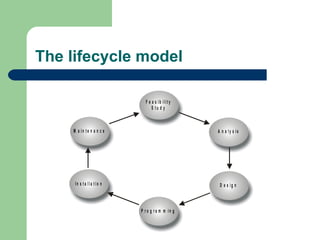
The lifecycle model
Feasibility study Technical feasibility  Economic feasibility  Legal feasibility  Operational feasibility  are the current work practices and procedures adequate to support the new system?  Schedule feasibility  how long will the system take to develop, or can it be done in a desired time-frame?
Requirements analysis Interviewing staff at different levels  from end-users to senior management Examining current business and systems documents and output may include current order documents, computer systems procedures and reports used by operations and senior management Sending out questionnaires  Observation of current procedures by spending time in various departments; a time and motion study can show where procedures could be more efficient, or to detect bottlenecks
System design  The hardware platform  which type of computer, network capabilities, input, storage and output devices The software programming language, package or database The outputs report layouts and screen designs The inputs documents, screen layouts, validation procedures The user interface  how users will interact with the computer system The modular design of each program in the application The test plan and test data Conversion plan how the new system is to be implemented Documentation  User Technical
Implementation Coding and testing of the system Acquisition of hardware and software  Installation of the new system  Installing the new hardware, which may involve extensive recabling and changes in office layouts; Training the users on the new system; Conversion of master files to the new system, or creation of new master files.
Methods of conversion Direct changeover The user stops using the old system one day and starts using the new system the next  Parallel conversion The old system continues alongside the new system for a few weeks or months  Phased conversion Used with larger systems that can be broken down into individual modules that can be implemented separately at different times Pilot conversion New system will first be used by only a portion of the organisation, for example at one branch or factory
System maintenance Perfective maintenance implies that while the system runs satisfactorily, there is still room for improvement Adaptive maintenance All systems will need to adapt to changing needs within a company Corrective maintenance Problems frequently surface after a system has been in use for a short time, however thoroughly it was tested
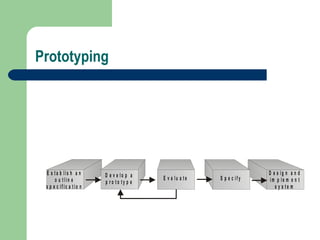
Prototyping
Benefits of prototyping  Misunderstandings between software developers and users can be identified; Missing functions may be detected; Incomplete or inconsistent user requirements may be detected; A prototype version will be quickly available to demonstrate the feasibility to management; The prototype can sometimes be used for training before the final system is delivered

Information Systems Lifecycle

  • 1.
    The information systemslifecycle Far more boring than you ever dreamed possible!
  • 2.
    What prompts anew system? The current system may no longer be suitable for its purpose Technological developments may have made the current system redundant or outdated The current system may be too inflexible or expensive to maintain
  • 3.
  • 4.
    Feasibility study Technicalfeasibility Economic feasibility Legal feasibility Operational feasibility are the current work practices and procedures adequate to support the new system? Schedule feasibility how long will the system take to develop, or can it be done in a desired time-frame?
  • 5.
    Requirements analysis Interviewingstaff at different levels from end-users to senior management Examining current business and systems documents and output may include current order documents, computer systems procedures and reports used by operations and senior management Sending out questionnaires Observation of current procedures by spending time in various departments; a time and motion study can show where procedures could be more efficient, or to detect bottlenecks
  • 6.
    System design The hardware platform which type of computer, network capabilities, input, storage and output devices The software programming language, package or database The outputs report layouts and screen designs The inputs documents, screen layouts, validation procedures The user interface how users will interact with the computer system The modular design of each program in the application The test plan and test data Conversion plan how the new system is to be implemented Documentation User Technical
  • 7.
    Implementation Coding andtesting of the system Acquisition of hardware and software Installation of the new system Installing the new hardware, which may involve extensive recabling and changes in office layouts; Training the users on the new system; Conversion of master files to the new system, or creation of new master files.
  • 8.
    Methods of conversionDirect changeover The user stops using the old system one day and starts using the new system the next Parallel conversion The old system continues alongside the new system for a few weeks or months Phased conversion Used with larger systems that can be broken down into individual modules that can be implemented separately at different times Pilot conversion New system will first be used by only a portion of the organisation, for example at one branch or factory
  • 9.
    System maintenance Perfectivemaintenance implies that while the system runs satisfactorily, there is still room for improvement Adaptive maintenance All systems will need to adapt to changing needs within a company Corrective maintenance Problems frequently surface after a system has been in use for a short time, however thoroughly it was tested
  • 10.
  • 11.
    Benefits of prototyping Misunderstandings between software developers and users can be identified; Missing functions may be detected; Incomplete or inconsistent user requirements may be detected; A prototype version will be quickly available to demonstrate the feasibility to management; The prototype can sometimes be used for training before the final system is delivered