1
Farooq Khan
Discovering
COmputer
& his
Team
Presented BY
CEO of office
JOB
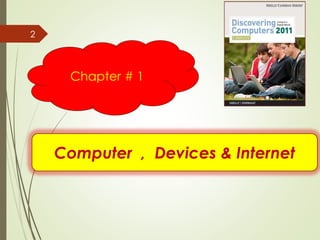
Computer , Devices & Internet
Chapter # 1
2
A World of Computers
3
What is computer literacy?
➢ Knowledge and understanding
of computers and their uses
➢ Computers are everywhere
What Is a Computer?
4
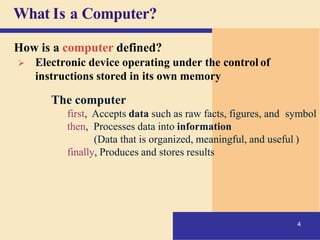
How is a computer defined?
➢ Electronic device operating under the control of
instructions stored in its own memory
The computer
first, Accepts data such as raw facts, figures, and symbol
then, Processes data into information
(Data that is organized, meaningful, and useful )
finally, Produces and stores results
Data Processing
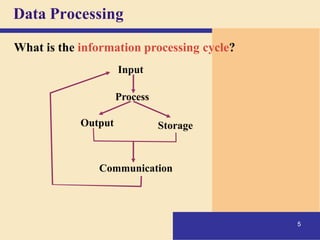
What is the information processing cycle?
Input
Process
Output Storage
Communication
5
The Components of a Computer
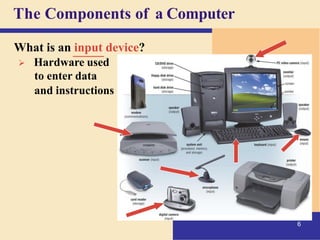
What is an input device?
➢ Hardware used
to enter data
and instructions
6
The Components of a Computer
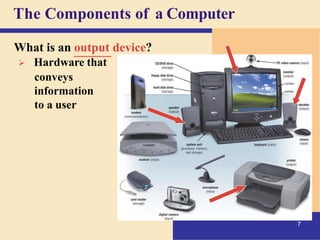
What is an output device?
➢ Hardware that
conveys
information
to a user
7
The Components of a Computer
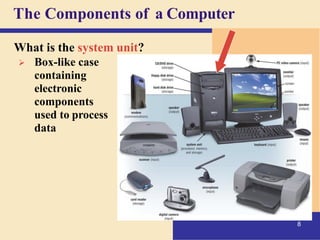
What is the system unit?
➢ Box-like case
containing
electronic
components
used to process
data
8
The Components of a Computer
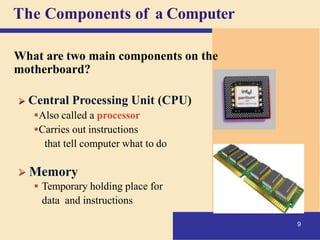
What are two main components on the
motherboard?
➢ Central Processing Unit (CPU)
▪Also called a processor
▪Carries out instructions
that tell computer what to do
➢ Memory
▪ Temporary holding place for
data and instructions
9
The Components of a Computer
What is storage?
➢ Holds data, instructions, and information
for future use
Storage media
Physical material on which data, instructions,
and information are stored
Storage device
Records and retrieves items to and from
a storage medium
10
Storage device
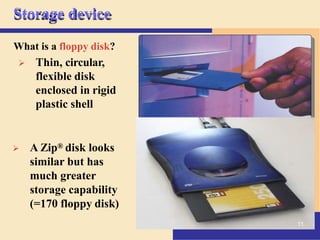
What is a floppy disk?
➢ Thin, circular,
flexible disk
enclosed in rigid
plastic shell
➢ A Zip® disk looks
similar but has
much greater
storage capability
(=170 floppy disk)
11
The Components of a Computer
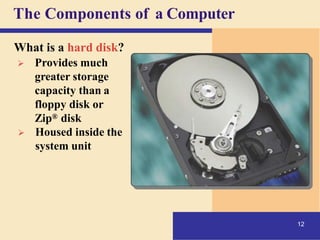
What is a hard disk?
➢ Provides much
greater storage
capacity than a
floppy disk or
Zip® disk
➢ Housed inside the
system unit
12
The Components of a Computer
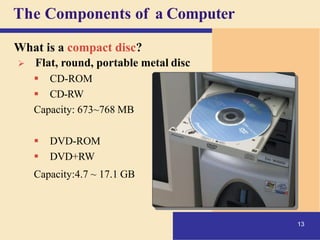
What is a compact disc?
➢ Flat, round, portable metal disc
▪ CD-ROM
▪ CD-RW
Capacity: 673~768 MB
▪ DVD-ROM
▪ DVD+RW
Capacity:4.7 ~ 17.1 GB
13
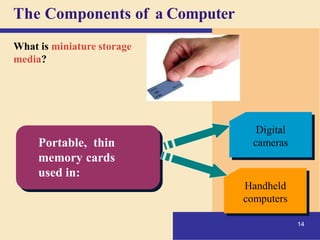
The Components of a Computer
What is miniature storage
media?
Digital
cameras
Handheld
computers
Portable, thin
memory cards
used in:
14
Why Is a Computer So Powerful?
15
What makes a computer powerful?
➢ Speed
➢ Reliability
➢ Accuracy
➢ Storage
➢ Communications
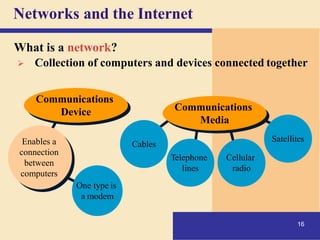
One type is
a modem
16
Networks and the Internet
Enables a
connection
between
computers
Cables
Cellular
radio
Telephone
lines
Satellites
Communications
Media
Communications
Device
What is a network?
➢ Collection of computers and devices connected together
Networks and the Internet
17
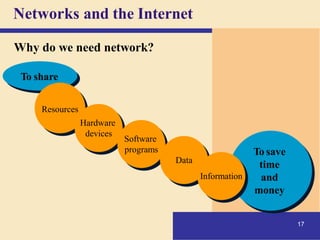
Why do we need network?
To share
Resources
Hardware
devices
Software
programs
Data
To save
time
and
money
Information
Networks and the Internet
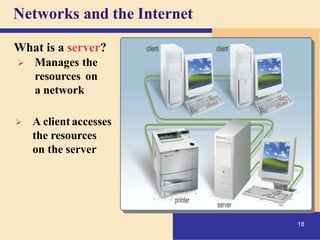
What is a server?
➢ Manages the
resources on
a network
➢ A client accesses
the resources
on the server
18
Networks and the Internet
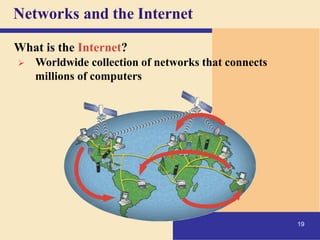
What is the Internet?
➢ Worldwide collection of networks that connects
millions of computers
19
Networks and the Internet
20
Why do users access the Internet?
1. Communications
2. Information
3. Shopping
4. Banking and Investing
5. Classes
6. Entertainment
Networks and the Internet
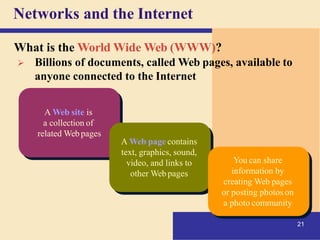
A Web site is
a collection of
related Webpages
21
A Web page contains
text, graphics, sound,
video, and links to
other Web pages
You can share
information by
creating Web pages
or posting photos on
a photo community
What is the World Wide Web (WWW)?
➢ Billions of documents, called Web pages, available to
anyone connected to the Internet
Computer Software
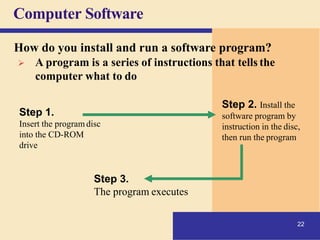
Step 1.
Insert the program disc
into the CD-ROM
drive
Step 2. Install the
software program by
instruction in the disc,
then run the program
Step 3.
The program executes
How do you install and run a software program?
➢ A program is a series of instructions that tells the
computer what to do
22
Computer Software
23
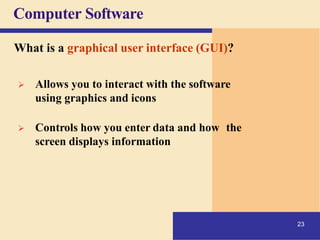
What is a graphical user interface (GUI)?
➢ Allows you to interact with the software
using graphics and icons
➢ Controls how you enter data and how the
screen displays information
Computer Software
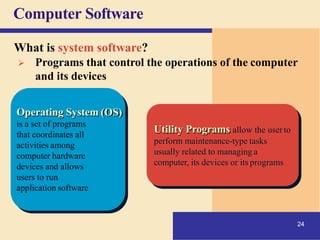
Operating System (OS)
is a set of programs
that coordinates all
activities among
computer hardware
devices and allows
users to run
application software
Utility Programs allow the userto
24
perform maintenance-type tasks
usually related to managing a
computer, its devices or its programs
What is system software?
➢ Programs that control the operations of the computer
and its devices
Computer Software
Presentation
Graphics
Spreadsheet
Database
Word
Processing
25
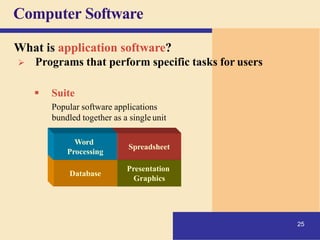
What is application software?
➢ Programs that perform specific tasks for users
▪ Suite
Popular software applications
bundled together as a single unit
Computer Software
26
What is a programmer?
➢ Someone who develops
application or system software
▪ Programmer writes instructions to
direct computer to process data
into information
Categories of Computers
27
What are the categories of computers?
➢Personal computers (desktop)
➢Mobile computers and mobile devices
➢Midrange servers
➢Mainframe computers
➢Supercomputers
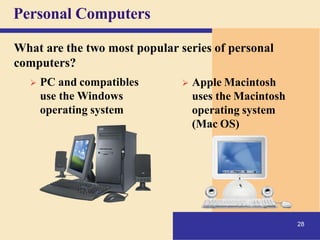
Personal Computers
What are the two most popular series of personal
computers?
➢ PC and compatibles
use the Windows
operating system
➢ Apple Macintosh
28
uses the Macintosh
operating system
(Mac OS)
Personal Computers
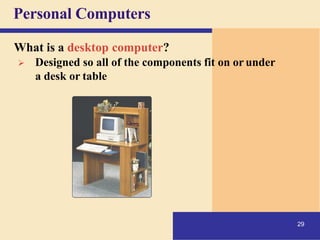
What is a desktop computer?
➢ Designed so all of the components fit on or under
a desk or table
29
Personal Computers
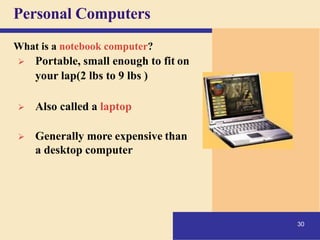
What is a notebook computer?
➢ Portable, small enough to fit on
your lap(2 lbs to 9 lbs )
➢ Also called a laptop
➢ Generally more expensive than
a desktop computer
30
Handheld Computers
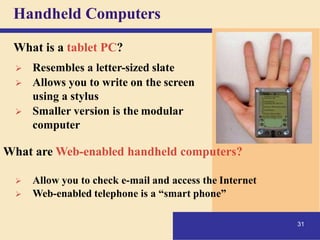
What is a tablet PC?
➢ Resembles a letter-sized slate
➢ Allows you to write on the screen
using a stylus
➢ Smaller version is the modular
computer
What are Web-enabled handheld computers?
➢ Allow you to check e-mail and access the Internet
➢ Web-enabled telephone is a “smart phone”
31
Handheld Computers
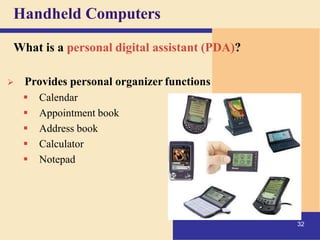
What is a personal digital assistant (PDA)?
➢ Provides personal organizer functions
▪ Calendar
▪ Appointment book
▪ Address book
▪ Calculator
▪ Notepad
32
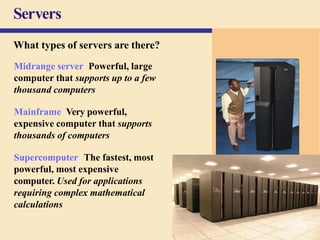
Servers
What types of servers are there?
Midrange server Powerful, large
computer that supports up to a few
thousand computers
Mainframe Very powerful,
expensive computer that supports
thousands of computers
Supercomputer The fastest, most
powerful, most expensive
computer. Used for applications
requiring complex mathematical
calculations
33
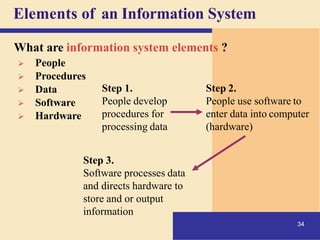
Elements of an Information System
What are information system elements ?
➢ People
➢ Procedures
➢ Data
➢ Software
➢ Hardware
Step 1.
People develop
procedures for
processing data
Step 2.
People use software to
enter data into computer
(hardware)
Step 3.
Software processes data
and directs hardware to
store and or output
information
34
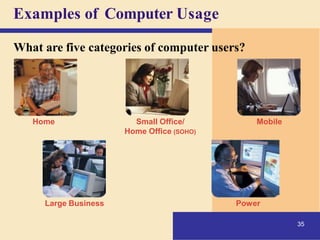
Examples of Computer Usage
What are five categories of computer users?
Home
35
Small Office/
Home Office (SOHO)
Mobile
Large Business Power
Examples of Computer Usage
36
What software is available for a home user?
• Web access
• Entertainment
• Communications
• Personal finance management
Examples of Computer Usage
What software is available for a small
office/home office (SOHO) user?
➢ Local area network (LAN)
➢ Productivity software
➢ Specialty software
➢ Web usage
➢ E-mail
37
Examples of Computer Usage
What is available for
a mobile user?
➢ Hardware
➢ Software
▪ Productivity
▪ Presentation
▪ Personal
information
manager
Notebook
computers
38
Handheld computers
Web-enabled
cellular phones
Examples of Computer Usage
39
What are the needs of the large business user?

➢ Web access
➢ Public kiosk
➢ Telecommuting
➢ Network
➢ Productivity software
➢ Scheduling
Examples of Computer Usage
40
What are the needs of a power user?
➢ Speed and large amounts of storage
➢ Types of power users
▪ Engineers
▪ Architects
▪ Desktop publishers
▪ Graphic artists
Computer Applications in Society
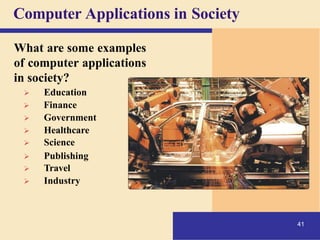
What are some examples
of computer applications
in society?
➢ Education
➢ Finance
➢ Government
➢ Healthcare
➢ Science
➢ Publishing
➢ Travel
➢ Industry
41
The Internet ,WWW & Media
Chapter # 2
42
The Internet
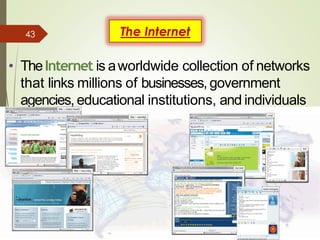
• TheInternet is aworldwide collection of networks
that links millions of businesses, government
agencies, educational institutions, and individuals
Discovering Computers 2012: Chapter2
2Page74
Figure2-1
43
Evolution of the Internet
• TheInternet originated asARPANETin September
1969 and had two maingoals:
Allow scientists at
different physical
locations to share
information andwork
together
Function even if partof
the network were
disabled or destroyed
by adisaster
Page75 3
44
Evolution of theInternet
Page76 4
• Eachorganization is responsible only for
maintaining its ownnetwork
– TheWorld Wide Web Consortium (W3C)oversees
research and sets guidelines and standards
• Internet2 connects more than 200universities
and 115 companies via ahigh-speed private
network
45
Evolution of theInternet
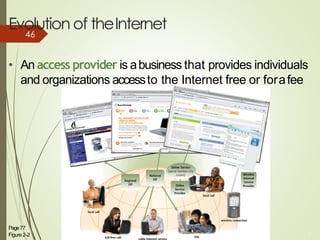
• An access provider is abusiness that provides individuals
and organizations accessto the Internet free or forafee
Page77
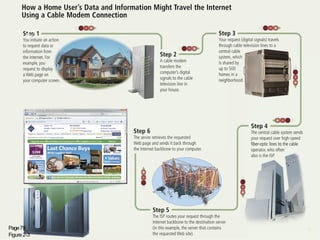
Figure2-2
4
6
46
Page79
Figure2-3
6
47
Evolution of theInternet
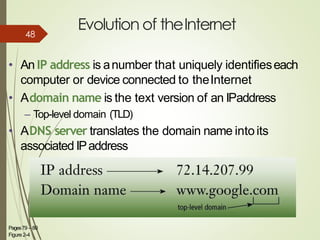
• An IP address is anumber that uniquely identifieseach
computer or device connected to theInternet
• Adomain name is the text version of an IPaddress
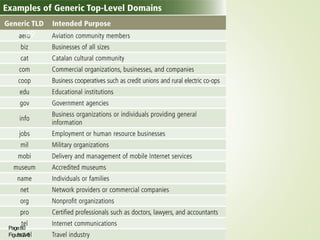
– Top-level domain (TLD)
• ADNS server translates the domain name intoits
associated IPaddress
Pages79 – 80
Figure 2-4
7
48
Page80
Figure2-5
8
49
The World Wide Web
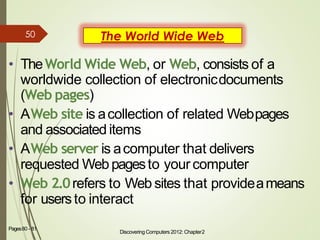
• TheWorld Wide Web, or Web, consists of a
worldwide collection of electronicdocuments
(Web pages)
• AWeb site is acollection of related Webpages
and associated items
• AWeb server is acomputer that delivers
requested Web pagesto your computer
• Web 2.0refers to Web sites that provideameans
for usersto interact
Discovering Computers 2012: Chapter2
9Pages80 - 81
50
TheWorld WideWeb
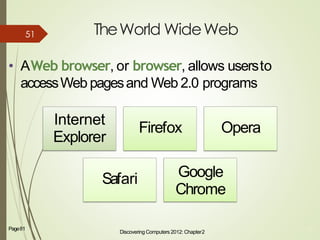
• AWeb browser, or browser, allows usersto
accessWeb pagesand Web 2.0 programs
Discovering Computers 2012: Chapter2
10Page81
Internet
Explorer
Safari
Firefox Opera
Google
Chrome
51
TheWorld WideWeb
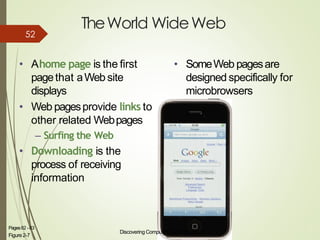
• Ahome page is the first
pagethat aWeb site
displays
• Web pagesprovide links to
other related Webpages
– Surfing the Web
• Downloading is the
process of receiving
information
Discovering Computers 2012: Chapter2
Figure2-7
11Pages82 -83
• SomeWeb pagesare
designed specifically for
microbrowsers
52
TheWorld WideWeb
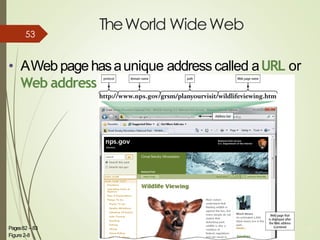
• AWeb page hasaunique address called aURL or
Web address
Discovering Computers 2012: Chapter2
12Pages82 – 83
Figure2-8
53
TheWorld WideWeb
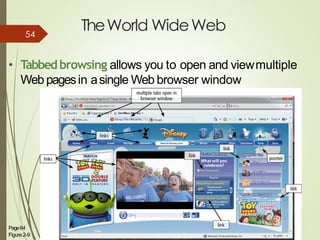
• Tabbedbrowsing allows you to open and viewmultiple
Web pagesin asingle Web browser window
Page84
Figure2-9
13
54
TheWorld WideWeb
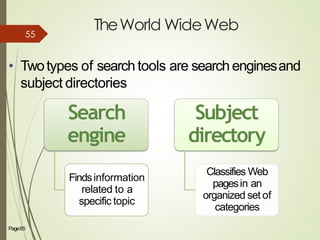
• Twotypes of search tools are search enginesand
subject directories
Search
engine
Findsinformation
related to a
specific topic
Subject
directory
Classifies Web
pagesin an
organized set of
categories
Page85 14
55
Discovering Computers 2012: Chapter2
15Page85
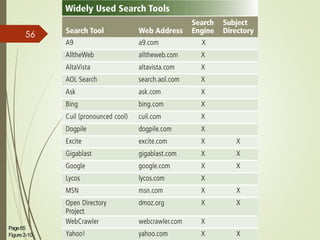
Figure2-10
56
TheWorld WideWeb
Discovering Computers 2012: Chapter2
16Page85
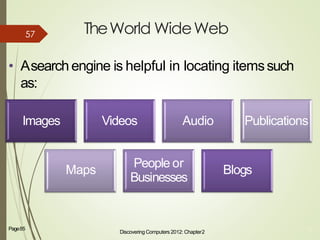
• Asearch engine is helpful in locating itemssuch
as:
Images Videos Audio Publications
Maps
People or
Businesses
Blogs
57
Pa
ge
58
Fig
ure
2-
11
17
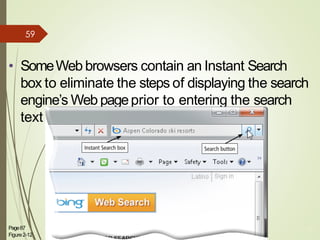
• SomeWeb browsers contain an Instant Search
box to eliminate the steps of displaying the search
engine’s Web pageprior to entering the search
text
Page87
Figure2-12
18
59
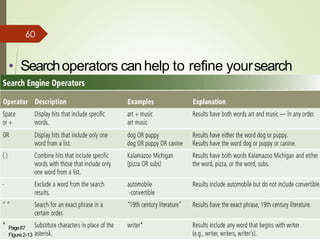
• Searchoperators canhelp to refine yoursearch
Page87
Figure2-13
19
60
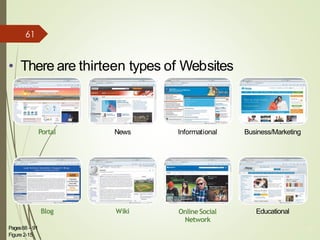
• There are thirteen types of Websites
Portal News Informational Business/Marketing
Blog Wiki OnlineSocial
Network
Educational
Pages88 – 91
Figure 2-15
20
61
TheWorld WideWeb
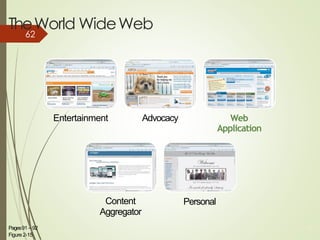
Entertainment Advocacy Web
Application
Content
Aggregator
Personal
Pages91 – 92
Figure 2-15
21
62
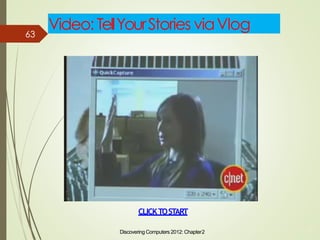
Video: TellYourStories viaVlog
Discovering Computers 2012: Chapter2
22
CLICKTOSTART
63
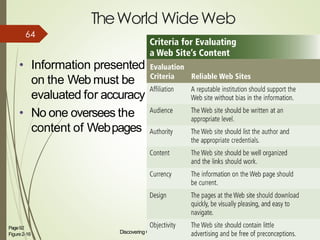
TheWorld WideWeb
• Information presented
on the Web must be
evaluated for accuracy
• No one oversees the
content of Webpages
Discovering Computers 2012: Chapter2
23Page92
Figure2-16
64
TheWorld WideWeb
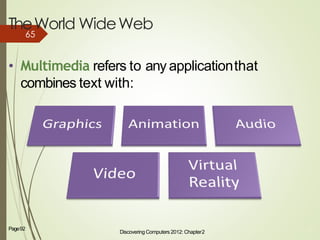
• Multimedia refers to any applicationthat
combines text with:
Discovering Computers 2012: Chapter2
24Page92
65
TheWorld WideWeb
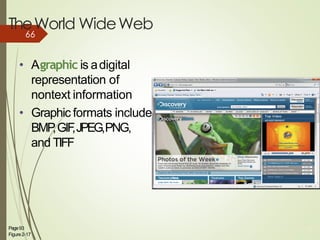
• Agraphic is adigital
representation of
nontext information
• Graphic formats include
BMP,GIF,JPEG,PNG,
and TIFF
Page93
Figure2-17
25
66
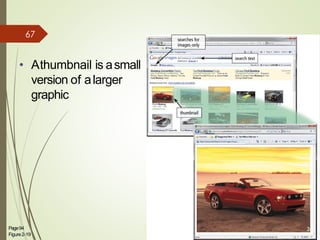
• Athumbnail is asmall
version of alarger
graphic
Page94
Figure2-19
26
67
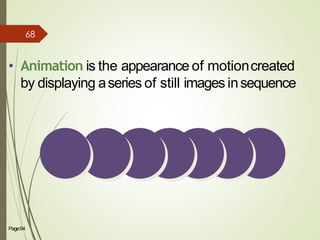
• Animation is the appearance of motioncreated
by displaying aseries of still images insequence
Page94 27
68
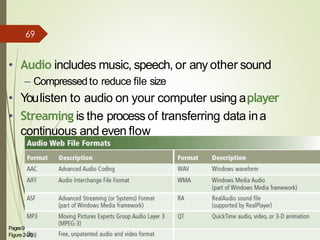
• Audio includes music, speech, or any other sound
– Compressedto reduce file size
• Youlisten to audio on your computer using aplayer
• Streaming is the process of transferring data ina
continuous and even flow
Discovering Computers 2012: Chapter2
28Pages94 – 95
Figure2-20
69
Pa
ge
70
Fig
ure
2-
11
29
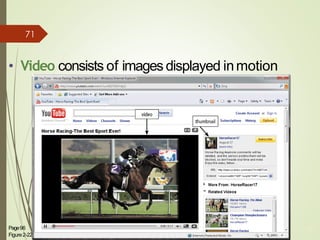
• Video consists of images displayed inmotion
Page96
Figure2-22
30
71
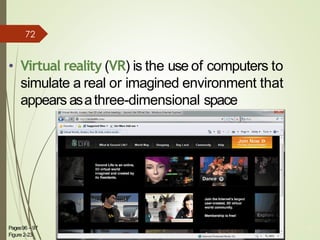
• Virtual reality (VR) is the use of computers to
simulate a real or imagined environment that
appears asathree-dimensional space
Pages96 – 97
Figure 2-23
31
72
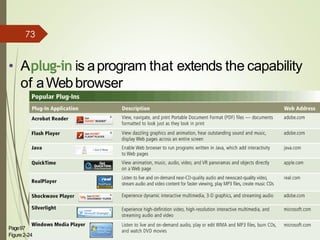
• Aplug-in is aprogram that extends the capability
of aWebbrowser
Discovering Computers 2012: Chapter2
32Page97
Figure2-24
73
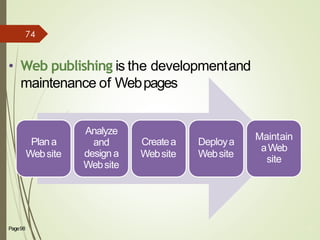
• Web publishing is the developmentand
maintenance of Webpages
Plana
Website
Analyze
and
designa
Website
Createa
Website
Deploya
Website
Maintain
aWeb
site
Page98 74
74
E-Commerce
Page98 75
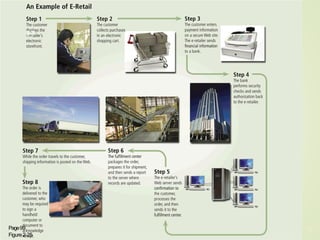
• E-commerce is abusinesstransaction that occurs
over an electronic network
– M-commerce identifies e-commerce that takesplace
using mobile devices
75
Discovering Computers 2012: Chapter2
35Pages98 - 99
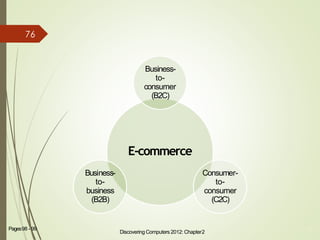
E-commerce
Business-
to-
consumer
(B2C)
Consumer-
to-
consumer
(C2C)
Business-
to-
business
(B2B)
76
Page99
Figure2-25
36
77
OtherInternetServices
Pa
ge
78
Fig
ure
2-
11
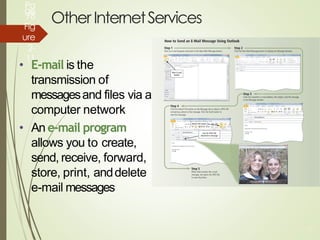
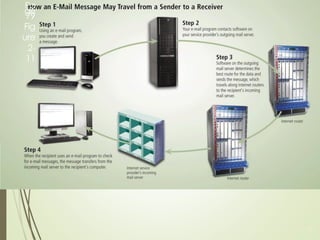
• E-mail is the
transmission of
messagesand files via a
computer network
• An e-mail program
allows you to create,
send, receive, forward,
store, print, anddelete
e-mail messages
38
Pa
ge
79
Fig
ure
2-
11
38
Pa
ge
80
Fig
ure
2-
11
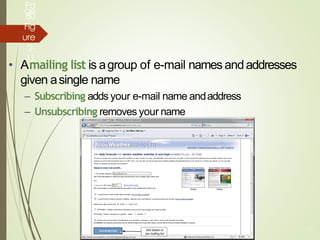
• Amailing list is agroup of e-mail names andaddresses
given asingle name
– Subscribing adds your e-mail name andaddress
– Unsubscribing removes your name
38
OtherInternetServices
Pa
ge
81
Fig
ure
2-
11
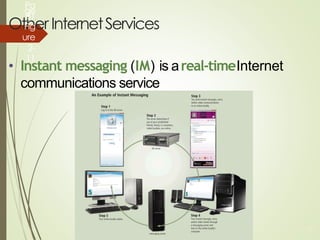
• Instant messaging (IM) is areal-timeInternet
communications service
38
Pa
ge
82
Fig
ure
2-
11
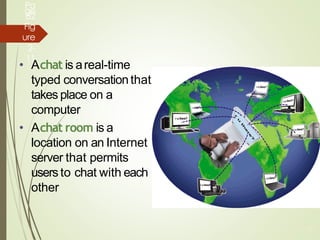
• Achat is areal-time
typed conversationthat
takes place on a
computer
• Achat room is a
location on an Internet
server that permits
usersto chat with each
other
38
Pa
ge
83
Fig
ure
2-
11
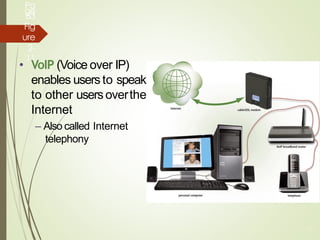
• VoIP (Voice over IP)
enables usersto speak
to other usersoverthe
Internet
– Also called Internet
telephony
38
Pa
ge
84
Fig
ure
2-
11
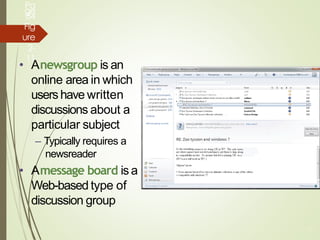
• Anewsgroup is an
online area in which
usershave written
discussions about a
particular subject
– Typically requires a
newsreader
• Amessage board is a
Web-based type of
discussion group
38
Page107 44
• FTP(File Transfer Protocol) is an Internet standard
that permits file uploading and downloading with
other computers on theInternet
• Many operating systemsinclude FTPcapabilities
• An FTPserver is a computer that allows users to
upload and/or download files usingFTP
85
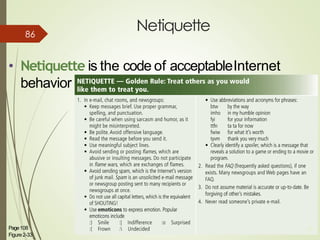
Netiquette
• Netiquette is the code of acceptableInternet
behavior
Page108
Figure2-33
45
86
Input and Display Technology
Chapter 7
Note : ‫ان‬slide ‫ں‬‫ی‬‫م‬ displaytechnology ‫ے‬‫ہ‬‫ک‬‫ت‬ Ja
ke mid tak kacourse ha
87
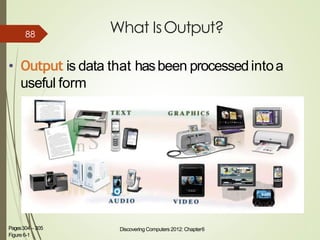
What IsOutput?
• Output is data that hasbeen processedintoa
useful form
Discovering Computers 2012: Chapter6 4Pages304 – 305
Figure6-1
88
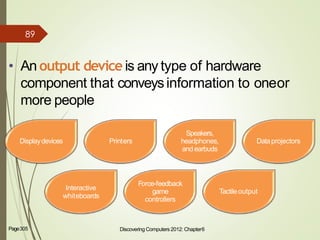
• An output device is any type of hardware
component that conveysinformation to oneor
more people
Discovering Computers 2012: Chapter6 5Page305
Displaydevices Printers
Speakers,
headphones,
andearbuds
Dataprojectors
Interactive
whiteboards
Force-feedback
game
controllers
Tactileoutput
89
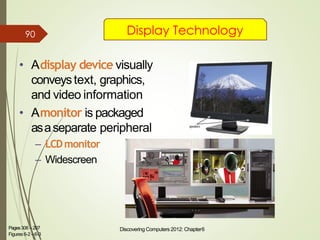
• Adisplay device visually
conveystext, graphics,
and video information
• Amonitor is packaged
asaseparate peripheral
– LCDmonitor
– Widescreen
Discovering Computers 2012: Chapter6 6Pages306 –207
Figures 6-2 –6-3
Display Technology90
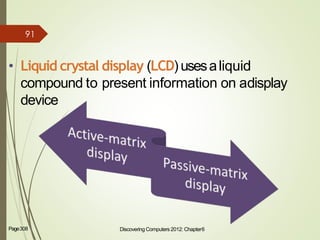
• Liquid crystal display (LCD) usesaliquid
compound to present information on adisplay
device
Discovering Computers 2012: Chapter6 7Page308
91
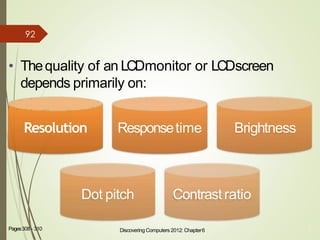
• Thequality of an LCDmonitor or LCDscreen
depends primarily on:
8Pages308 - 310
Resolution Responsetime Brightness
Dot pitch Contrast ratio
Discovering Computers 2012: Chapter6
92
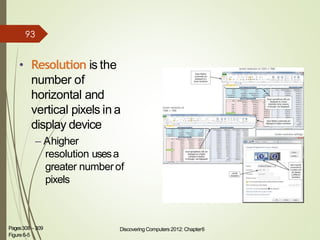
• Resolution is the
number of
horizontal and
vertical pixels in a
display device
– Ahigher
resolution usesa
greater numberof
pixels
Discovering Computers 2012: Chapter6 9Pages308 – 309
Figure6-5
93
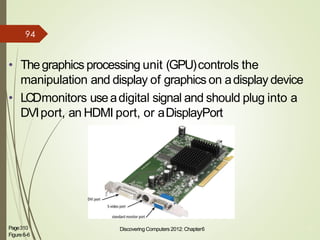
• Thegraphics processing unit (GPU)controls the
manipulation and display of graphics on adisplay device
• LCDmonitors useadigital signal and should plug into a
DVIport, an HDMI port, or aDisplayPort
Page310
Figure6-6
Discovering Computers 2012: Chapter6 10
94
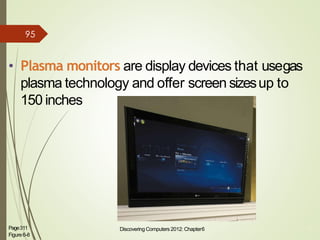
• Plasma monitors are display devices that usegas
plasma technology and offer screen sizesup to
150 inches
Page311
Figure6-8
Discovering Computers 2012: Chapter6 11
95
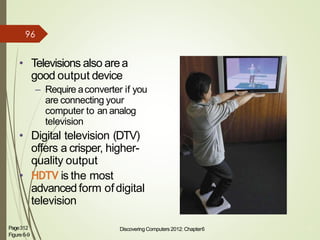
• Televisions also area
good output device
– Require aconverter if you
are connecting your
computer to an analog
television
• Digital television (DTV)
offers a crisper, higher-
quality output
• HDTV is the most
advanced form ofdigital
television
Page312
Figure6-9
Discovering Computers 2012: Chapter6 12
96
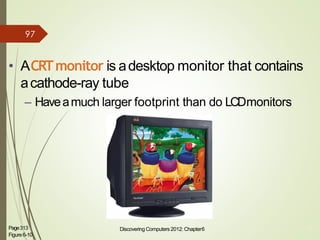
• ACRTmonitor is adesktop monitor that contains
acathode-ray tube
– Haveamuch larger footprint than do LCDmonitors
Page313
Figure6-10
Discovering Computers 2012: Chapter6 13
97
Green Computing
98
Extra Topics by
Mam
Introductio
n➢ Green Computing is “ Where organizations adopt
a policy of ensuring that the setup and
operations of Information Technology produces
the minimal carbon footprint” .
➢ Green computing is the term used to denote
efficient use of resources in computing , it is also
known as Green IT .
➢ Green computing is the study which emphasizes
on the operation of computers and its
peripherals in order to minimize the carbon
footprint. Green computing had given the
perspective to think in the direction that
technology is not only meant for
99
NECESSITY OF GREEN
COMPUTING
➢ Reduce energy consumption of computing
resources during peak operation
➢ Save energy during idle operation
➢ Use eco-friendly sources of energy
➢ Reduce harmful effects of computing
resources
➢ Reduce computing wastes
10
0
Eco Friendly Approach
➢ Electronics giants are about to roll out eco-
friendly range of computers (like desktops and
laptops) that aim at reducing the e-waste in the
environment.
➢ Energy-intensive manufacturing of computer
parts can be minimized by making
manufacturing process more energy efficient.
➢ Power-sucking displays can be replaced with
green light displays made of OLEDs, or organic
light-emitting diodes
➢ Landfills can be controlled by making best use of
the device by upgrading and repairing in time
with a need to make such processes (i.e., up
10
1
Eco Friendly Approach
 consuming at present) more effective by
recycling computer parts separately with an
option of reuse or resale.
 By replacing petroleum-filled plastic with bio
plastics—plant-based polymers— which require
less oil and energy to produce in comparison to
traditional plastics with a challenge to keep
these bio plastic computers cool .
➢ Use of toxic materials like lead
can be replacedby silver and copper making recycling of
computers (which is expensive and time
10
2
CHALLENGES IN GREEN
COMPUTING
➢ Equipment power density / Power and cooling
capacities.
➢ Increase in energy requirements for Data
Centers and growing energy cost.
➢ Control on increasing requirements of heat
removing equipment, which increases because
of increase in total power consumption by IT
equipment’s.
➢ Equipment Life cycle management – Cradle to
Grave.
➢ Disposal of Electronic Wastes.
10
3
FUTURE OF GREEN
COMPUTING
➢ Recyclable paper laptop :
➢ One of the most environmentally friendly
computers that you can think of purchasing is
the Recyclable Paper Laptop. This concept
laptop is crafted from papers that have been
recycled or pulp materials that are essentially
packed in layers.
➢ IMEC laptop :
➢ This unique laptop can be easily powered using
just two solar cells and encourages people to
understand the importance of solar energy or
alternative energy.
10
4
FUTURE OF GREEN
COMPUTING
➢ Life book Leaf multipurpose laptop :
➢ The idea of designing such a concept based
laptop came to designers Carl Burdick and
Laura Karnath who were competing for the
“Fujitsu Design Award - A life with future
computing”. Some of the other exciting features
of the gadget include OLED touch screen that
spreads out easily and can be conveniently
folded as a laptop. Its exterior is carved out of
polycarbonate, which is optically sensitive
material and shatterproof as well.
10
5
FUTURE OF GREEN
COMPUTINGLOOP-Ecofriendly desktop computer :
Better known as the
LOOP, you will have to place an order for this
system online so that it can be delivered to your
home directly.
EVO PC Concept :
The EVO PC that is made from
materials that are sustainable as well helps a great
deal when it comes to reducing carbon footprint in
comparison to the traditional computers.
10
6
FUTURE OF GREEN
COMPUTING
➢ Compaq EOS sustainable desktop :
➢ This gadget incorporates very few components
and offers basic computing power only. None of
the components in this system are fixed, which
makes it easy for the consumers to replace any
broken component with ease and thereby
reduce e-waste and promote recycling.
➢ Igglu modular PC concept :
➢ This system incorporates color coded and hot
swappable modules for optical drives, hard
drive, graphic cards, RAMS and PCI drives.
Users can easily replace these modules and
send them back to the company for recycling.
10
7
FUTURE OF GREEN
COMPUTING
➢ 'Bento' solar-powered concept :
➢ The credit for designing this solar powered
system goes to Rene Lee, an American product
designer. This system is essentially a
combination of notebook, Smart phone and
tablet computer that are all packed in a single
system.
➢ Solar Laptop Concept :
➢ The solar laptop concept is the brainchild of
designer Nikola Knezevic and is perfect for
safeguarding the environment as well as
minimizing your electric bill. The top half portion
of the laptop is attached to a solar panel that is
10
8
IP Addressing
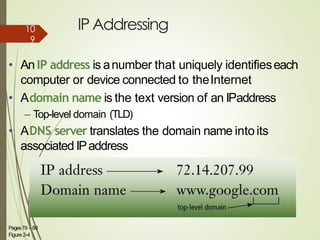
• An IP address is anumber that uniquely identifieseach
computer or device connected to theInternet
• Adomain name is the text version of an IPaddress
– Top-level domain (TLD)
• ADNS server translates the domain name intoits
associated IPaddress
Pages79 – 80
Figure 2-4
7
10
9
Media Sharing
Sites
YouTu
be➢ YouTubeisoneofthemostpopularmediasharingsites.Itis
usedby millionstouploadvideos.Thesevideosinclude:
Music videos
Video clips
Tv clips
Video blogging
Educational videos
Flick
r➢ Flickrisapicturesharingsite.Thissiteismainlyusedbyphoto
researchersandbloggers.
➢ Allimagesuploadedtoa“photostream”anddisplayedina
slideshow.
SlideShare
➢ SlideShareis a“presentation” sharing site. Youcan
upload powerpoint files to youraccount.
➢ Youcanupload asound file and marking points in the sound
file.
➢ RadioFrequency Identification(RFID) is one of themost
exciting technology that revolutionize the working practices
by increasing efficiencies and improvingprofitability.
➢ It is often presented asareplacement for today’sbarcodes
but the technologies hasmuch greater possibilities, suchas
individual serial numbers for eachitem and the possibility to
read these numbers at adistance of severalmeters.
INTRODUCTIONOFRFID
➢ Radio-frequency identification(RFID) is the use of wireless non contact system that
uses radio frequency electro magnetic fields to transfer data from a tag attached to
an object,for the purposes ofautomatic identification and tracking.
➢ RadioFrequencyidentification(RFID) is generic term that is used to describethat
transmits the identity of an object or person wirelessly,using radio waves.It’s
grouped under the broad category of automatic identification technologies.
➢ RFIDtags are usedin many industries.An RFIDattached to an automobile
during production canbe usedto track its process through assemblyline,RFID
identity cards cangive employees accessto locked areasof abuilding, and RF
transponders mounted in automobiles canbe usedto bill motorists for access
to toll roads orparking.
➢ RFIDis atechnology that incorporates the useof electromagnetic or electrostatic
coupling in the radio frequency portion of the electromagnetic spectrum uniquely
identify an object, animal or person it is an automatic identification
➢ method, relying on storing and remotely retrieving data whenever required
using devices called RFIDtags and transponder. It is also called dedicated
short range communication(DSRC).
Components o f RFID
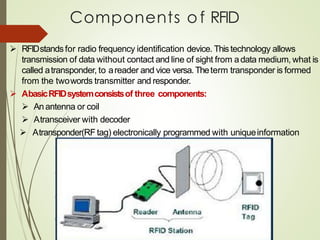
➢ RFIDstandsfor radio frequency identification device. Thistechnology allows
transmission of data without contact and line of sight from adata medium, what is
called atransponder, to areader and vice versa.Theterm transponder is formed
from the twowords transmitter and responder.
➢ AbasicRFIDsystemconsistsof three components:
➢ An antenna or coil
➢ Atransceiver with decoder
➢ Atransponder(RF tag) electronically programmed with uniqueinformation
Contd
….Basiccomponentsof RFID contain:
▪ Tags(chip+antenna)
An RFIDtag is an object that canbe stuck on or incorporated intoa
product, animal or aperson for the purpose of identification using radio waves
▪ Interrogators(antenna+reader)
Interrogators are useful to read the tags & in certain caseseven write on them.
Tagscanbe almostattachedto anything:
▪ Pallets or cases of products, Vehicles, Company assets or personnel, Items such
as apparel,luggage,laundry, People livestock or pets, High value electronics such
ascomputers, TV’s.
➢ ChipTagsconsistsof a microchip and a coupling element-an antenna. Most Tags
are only activated only when they are within interrogation zoneof the
interrogator; outside they “sleep". Chiptags containmemory.
➢ Thesizeof the tag dependson the sizeof the antenna, which increaseswith
range of tag and decreaseswithfrequency.
Types Of RFIDTags
Thereare two basictypesof RFID tags:
▪ Activetags
Active RFIDTagsare powered by an internal battery and are typical read/write i.e.Tag
data canbe rewritten and/ormodified.
• Transmits signal from the micro chip circuit through the power obtained from an
internal battery.
• Cansignal at defined time, Multiple tags canbe recorded atonce.
• High signal range and Largerin size.
▪ Passivetags
PassiveRFIDTagsoperates without aseparate external power source and obtain
operating power generated from the reader. Passivetags are consequentlymuch
lighter than active tags, lessexpensive and offer avirtually unlimited lifetime.
• Containsno power source, Obtains power from the reader.
• Low signal range, Cheaperand smaller than activetags.

Discovering computer slides share chapter # 1 and chapter #2

  • 1.
  • 2.
    Computer , Devices& Internet Chapter # 1 2
  • 3.
    A World ofComputers 3 What is computer literacy? ➢ Knowledge and understanding of computers and their uses ➢ Computers are everywhere
  • 4.
    What Is aComputer? 4 How is a computer defined? ➢ Electronic device operating under the control of instructions stored in its own memory The computer first, Accepts data such as raw facts, figures, and symbol then, Processes data into information (Data that is organized, meaningful, and useful ) finally, Produces and stores results
  • 5.
    Data Processing What isthe information processing cycle? Input Process Output Storage Communication 5
  • 6.
    The Components ofa Computer What is an input device? ➢ Hardware used to enter data and instructions 6
  • 7.
    The Components ofa Computer What is an output device? ➢ Hardware that conveys information to a user 7
  • 8.
    The Components ofa Computer What is the system unit? ➢ Box-like case containing electronic components used to process data 8
  • 9.
    The Components ofa Computer What are two main components on the motherboard? ➢ Central Processing Unit (CPU) ▪Also called a processor ▪Carries out instructions that tell computer what to do ➢ Memory ▪ Temporary holding place for data and instructions 9
  • 10.
    The Components ofa Computer What is storage? ➢ Holds data, instructions, and information for future use Storage media Physical material on which data, instructions, and information are stored Storage device Records and retrieves items to and from a storage medium 10
  • 11.
    Storage device What isa floppy disk? ➢ Thin, circular, flexible disk enclosed in rigid plastic shell ➢ A Zip® disk looks similar but has much greater storage capability (=170 floppy disk) 11
  • 12.
    The Components ofa Computer What is a hard disk? ➢ Provides much greater storage capacity than a floppy disk or Zip® disk ➢ Housed inside the system unit 12
  • 13.
    The Components ofa Computer What is a compact disc? ➢ Flat, round, portable metal disc ▪ CD-ROM ▪ CD-RW Capacity: 673~768 MB ▪ DVD-ROM ▪ DVD+RW Capacity:4.7 ~ 17.1 GB 13
  • 14.
    The Components ofa Computer What is miniature storage media? Digital cameras Handheld computers Portable, thin memory cards used in: 14
  • 15.
    Why Is aComputer So Powerful? 15 What makes a computer powerful? ➢ Speed ➢ Reliability ➢ Accuracy ➢ Storage ➢ Communications
  • 16.
    One type is amodem 16 Networks and the Internet Enables a connection between computers Cables Cellular radio Telephone lines Satellites Communications Media Communications Device What is a network? ➢ Collection of computers and devices connected together
  • 17.
    Networks and theInternet 17 Why do we need network? To share Resources Hardware devices Software programs Data To save time and money Information
  • 18.
    Networks and theInternet What is a server? ➢ Manages the resources on a network ➢ A client accesses the resources on the server 18
  • 19.
    Networks and theInternet What is the Internet? ➢ Worldwide collection of networks that connects millions of computers 19
  • 20.
    Networks and theInternet 20 Why do users access the Internet? 1. Communications 2. Information 3. Shopping 4. Banking and Investing 5. Classes 6. Entertainment
  • 21.
    Networks and theInternet A Web site is a collection of related Webpages 21 A Web page contains text, graphics, sound, video, and links to other Web pages You can share information by creating Web pages or posting photos on a photo community What is the World Wide Web (WWW)? ➢ Billions of documents, called Web pages, available to anyone connected to the Internet
  • 22.
    Computer Software Step 1. Insertthe program disc into the CD-ROM drive Step 2. Install the software program by instruction in the disc, then run the program Step 3. The program executes How do you install and run a software program? ➢ A program is a series of instructions that tells the computer what to do 22
  • 23.
    Computer Software 23 What isa graphical user interface (GUI)? ➢ Allows you to interact with the software using graphics and icons ➢ Controls how you enter data and how the screen displays information
  • 24.
    Computer Software Operating System(OS) is a set of programs that coordinates all activities among computer hardware devices and allows users to run application software Utility Programs allow the userto 24 perform maintenance-type tasks usually related to managing a computer, its devices or its programs What is system software? ➢ Programs that control the operations of the computer and its devices
  • 25.
    Computer Software Presentation Graphics Spreadsheet Database Word Processing 25 What isapplication software? ➢ Programs that perform specific tasks for users ▪ Suite Popular software applications bundled together as a single unit
  • 26.
    Computer Software 26 What isa programmer? ➢ Someone who develops application or system software ▪ Programmer writes instructions to direct computer to process data into information
  • 27.
    Categories of Computers 27 Whatare the categories of computers? ➢Personal computers (desktop) ➢Mobile computers and mobile devices ➢Midrange servers ➢Mainframe computers ➢Supercomputers
  • 28.
    Personal Computers What arethe two most popular series of personal computers? ➢ PC and compatibles use the Windows operating system ➢ Apple Macintosh 28 uses the Macintosh operating system (Mac OS)
  • 29.
    Personal Computers What isa desktop computer? ➢ Designed so all of the components fit on or under a desk or table 29
  • 30.
    Personal Computers What isa notebook computer? ➢ Portable, small enough to fit on your lap(2 lbs to 9 lbs ) ➢ Also called a laptop ➢ Generally more expensive than a desktop computer 30
  • 31.
    Handheld Computers What isa tablet PC? ➢ Resembles a letter-sized slate ➢ Allows you to write on the screen using a stylus ➢ Smaller version is the modular computer What are Web-enabled handheld computers? ➢ Allow you to check e-mail and access the Internet ➢ Web-enabled telephone is a “smart phone” 31
  • 32.
    Handheld Computers What isa personal digital assistant (PDA)? ➢ Provides personal organizer functions ▪ Calendar ▪ Appointment book ▪ Address book ▪ Calculator ▪ Notepad 32
  • 33.
    Servers What types ofservers are there? Midrange server Powerful, large computer that supports up to a few thousand computers Mainframe Very powerful, expensive computer that supports thousands of computers Supercomputer The fastest, most powerful, most expensive computer. Used for applications requiring complex mathematical calculations 33
  • 34.
    Elements of anInformation System What are information system elements ? ➢ People ➢ Procedures ➢ Data ➢ Software ➢ Hardware Step 1. People develop procedures for processing data Step 2. People use software to enter data into computer (hardware) Step 3. Software processes data and directs hardware to store and or output information 34
  • 35.
    Examples of ComputerUsage What are five categories of computer users? Home 35 Small Office/ Home Office (SOHO) Mobile Large Business Power
  • 36.
    Examples of ComputerUsage 36 What software is available for a home user? • Web access • Entertainment • Communications • Personal finance management
  • 37.
    Examples of ComputerUsage What software is available for a small office/home office (SOHO) user? ➢ Local area network (LAN) ➢ Productivity software ➢ Specialty software ➢ Web usage ➢ E-mail 37
  • 38.
    Examples of ComputerUsage What is available for a mobile user? ➢ Hardware ➢ Software ▪ Productivity ▪ Presentation ▪ Personal information manager Notebook computers 38 Handheld computers Web-enabled cellular phones
  • 39.
    Examples of ComputerUsage 39 What are the needs of the large business user? ➢ Web access ➢ Public kiosk ➢ Telecommuting ➢ Network ➢ Productivity software ➢ Scheduling
  • 40.
    Examples of ComputerUsage 40 What are the needs of a power user? ➢ Speed and large amounts of storage ➢ Types of power users ▪ Engineers ▪ Architects ▪ Desktop publishers ▪ Graphic artists
  • 41.
    Computer Applications inSociety What are some examples of computer applications in society? ➢ Education ➢ Finance ➢ Government ➢ Healthcare ➢ Science ➢ Publishing ➢ Travel ➢ Industry 41
  • 42.
    The Internet ,WWW& Media Chapter # 2 42
  • 43.
    The Internet • TheInternetis aworldwide collection of networks that links millions of businesses, government agencies, educational institutions, and individuals Discovering Computers 2012: Chapter2 2Page74 Figure2-1 43
  • 44.
    Evolution of theInternet • TheInternet originated asARPANETin September 1969 and had two maingoals: Allow scientists at different physical locations to share information andwork together Function even if partof the network were disabled or destroyed by adisaster Page75 3 44
  • 45.
    Evolution of theInternet Page764 • Eachorganization is responsible only for maintaining its ownnetwork – TheWorld Wide Web Consortium (W3C)oversees research and sets guidelines and standards • Internet2 connects more than 200universities and 115 companies via ahigh-speed private network 45
  • 46.
    Evolution of theInternet •An access provider is abusiness that provides individuals and organizations accessto the Internet free or forafee Page77 Figure2-2 4 6 46
  • 47.
  • 48.
    Evolution of theInternet •An IP address is anumber that uniquely identifieseach computer or device connected to theInternet • Adomain name is the text version of an IPaddress – Top-level domain (TLD) • ADNS server translates the domain name intoits associated IPaddress Pages79 – 80 Figure 2-4 7 48
  • 49.
  • 50.
    The World WideWeb • TheWorld Wide Web, or Web, consists of a worldwide collection of electronicdocuments (Web pages) • AWeb site is acollection of related Webpages and associated items • AWeb server is acomputer that delivers requested Web pagesto your computer • Web 2.0refers to Web sites that provideameans for usersto interact Discovering Computers 2012: Chapter2 9Pages80 - 81 50
  • 51.
    TheWorld WideWeb • AWebbrowser, or browser, allows usersto accessWeb pagesand Web 2.0 programs Discovering Computers 2012: Chapter2 10Page81 Internet Explorer Safari Firefox Opera Google Chrome 51
  • 52.
    TheWorld WideWeb • Ahomepage is the first pagethat aWeb site displays • Web pagesprovide links to other related Webpages – Surfing the Web • Downloading is the process of receiving information Discovering Computers 2012: Chapter2 Figure2-7 11Pages82 -83 • SomeWeb pagesare designed specifically for microbrowsers 52
  • 53.
    TheWorld WideWeb • AWebpage hasaunique address called aURL or Web address Discovering Computers 2012: Chapter2 12Pages82 – 83 Figure2-8 53
  • 54.
    TheWorld WideWeb • Tabbedbrowsingallows you to open and viewmultiple Web pagesin asingle Web browser window Page84 Figure2-9 13 54
  • 55.
    TheWorld WideWeb • Twotypesof search tools are search enginesand subject directories Search engine Findsinformation related to a specific topic Subject directory Classifies Web pagesin an organized set of categories Page85 14 55
  • 56.
    Discovering Computers 2012:Chapter2 15Page85 Figure2-10 56
  • 57.
    TheWorld WideWeb Discovering Computers2012: Chapter2 16Page85 • Asearch engine is helpful in locating itemssuch as: Images Videos Audio Publications Maps People or Businesses Blogs 57
  • 58.
  • 59.
    • SomeWeb browserscontain an Instant Search box to eliminate the steps of displaying the search engine’s Web pageprior to entering the search text Page87 Figure2-12 18 59
  • 60.
    • Searchoperators canhelpto refine yoursearch Page87 Figure2-13 19 60
  • 61.
    • There arethirteen types of Websites Portal News Informational Business/Marketing Blog Wiki OnlineSocial Network Educational Pages88 – 91 Figure 2-15 20 61
  • 62.
    TheWorld WideWeb Entertainment AdvocacyWeb Application Content Aggregator Personal Pages91 – 92 Figure 2-15 21 62
  • 63.
    Video: TellYourStories viaVlog DiscoveringComputers 2012: Chapter2 22 CLICKTOSTART 63
  • 64.
    TheWorld WideWeb • Informationpresented on the Web must be evaluated for accuracy • No one oversees the content of Webpages Discovering Computers 2012: Chapter2 23Page92 Figure2-16 64
  • 65.
    TheWorld WideWeb • Multimediarefers to any applicationthat combines text with: Discovering Computers 2012: Chapter2 24Page92 65
  • 66.
    TheWorld WideWeb • Agraphicis adigital representation of nontext information • Graphic formats include BMP,GIF,JPEG,PNG, and TIFF Page93 Figure2-17 25 66
  • 67.
    • Athumbnail isasmall version of alarger graphic Page94 Figure2-19 26 67
  • 68.
    • Animation isthe appearance of motioncreated by displaying aseries of still images insequence Page94 27 68
  • 69.
    • Audio includesmusic, speech, or any other sound – Compressedto reduce file size • Youlisten to audio on your computer using aplayer • Streaming is the process of transferring data ina continuous and even flow Discovering Computers 2012: Chapter2 28Pages94 – 95 Figure2-20 69
  • 70.
  • 71.
    • Video consistsof images displayed inmotion Page96 Figure2-22 30 71
  • 72.
    • Virtual reality(VR) is the use of computers to simulate a real or imagined environment that appears asathree-dimensional space Pages96 – 97 Figure 2-23 31 72
  • 73.
    • Aplug-in isaprogram that extends the capability of aWebbrowser Discovering Computers 2012: Chapter2 32Page97 Figure2-24 73
  • 74.
    • Web publishingis the developmentand maintenance of Webpages Plana Website Analyze and designa Website Createa Website Deploya Website Maintain aWeb site Page98 74 74
  • 75.
    E-Commerce Page98 75 • E-commerceis abusinesstransaction that occurs over an electronic network – M-commerce identifies e-commerce that takesplace using mobile devices 75
  • 76.
    Discovering Computers 2012:Chapter2 35Pages98 - 99 E-commerce Business- to- consumer (B2C) Consumer- to- consumer (C2C) Business- to- business (B2B) 76
  • 77.
  • 78.
    OtherInternetServices Pa ge 78 Fig ure 2- 11 • E-mail isthe transmission of messagesand files via a computer network • An e-mail program allows you to create, send, receive, forward, store, print, anddelete e-mail messages 38
  • 79.
  • 80.
    Pa ge 80 Fig ure 2- 11 • Amailing listis agroup of e-mail names andaddresses given asingle name – Subscribing adds your e-mail name andaddress – Unsubscribing removes your name 38
  • 81.
    OtherInternetServices Pa ge 81 Fig ure 2- 11 • Instant messaging(IM) is areal-timeInternet communications service 38
  • 82.
    Pa ge 82 Fig ure 2- 11 • Achat isareal-time typed conversationthat takes place on a computer • Achat room is a location on an Internet server that permits usersto chat with each other 38
  • 83.
    Pa ge 83 Fig ure 2- 11 • VoIP (Voiceover IP) enables usersto speak to other usersoverthe Internet – Also called Internet telephony 38
  • 84.
    Pa ge 84 Fig ure 2- 11 • Anewsgroup isan online area in which usershave written discussions about a particular subject – Typically requires a newsreader • Amessage board is a Web-based type of discussion group 38
  • 85.
    Page107 44 • FTP(FileTransfer Protocol) is an Internet standard that permits file uploading and downloading with other computers on theInternet • Many operating systemsinclude FTPcapabilities • An FTPserver is a computer that allows users to upload and/or download files usingFTP 85
  • 86.
    Netiquette • Netiquette isthe code of acceptableInternet behavior Page108 Figure2-33 45 86
  • 87.
    Input and DisplayTechnology Chapter 7 Note : ‫ان‬slide ‫ں‬‫ی‬‫م‬ displaytechnology ‫ے‬‫ہ‬‫ک‬‫ت‬ Ja ke mid tak kacourse ha 87
  • 88.
    What IsOutput? • Outputis data that hasbeen processedintoa useful form Discovering Computers 2012: Chapter6 4Pages304 – 305 Figure6-1 88
  • 89.
    • An outputdevice is any type of hardware component that conveysinformation to oneor more people Discovering Computers 2012: Chapter6 5Page305 Displaydevices Printers Speakers, headphones, andearbuds Dataprojectors Interactive whiteboards Force-feedback game controllers Tactileoutput 89
  • 90.
    • Adisplay devicevisually conveystext, graphics, and video information • Amonitor is packaged asaseparate peripheral – LCDmonitor – Widescreen Discovering Computers 2012: Chapter6 6Pages306 –207 Figures 6-2 –6-3 Display Technology90
  • 91.
    • Liquid crystaldisplay (LCD) usesaliquid compound to present information on adisplay device Discovering Computers 2012: Chapter6 7Page308 91
  • 92.
    • Thequality ofan LCDmonitor or LCDscreen depends primarily on: 8Pages308 - 310 Resolution Responsetime Brightness Dot pitch Contrast ratio Discovering Computers 2012: Chapter6 92
  • 93.
    • Resolution isthe number of horizontal and vertical pixels in a display device – Ahigher resolution usesa greater numberof pixels Discovering Computers 2012: Chapter6 9Pages308 – 309 Figure6-5 93
  • 94.
    • Thegraphics processingunit (GPU)controls the manipulation and display of graphics on adisplay device • LCDmonitors useadigital signal and should plug into a DVIport, an HDMI port, or aDisplayPort Page310 Figure6-6 Discovering Computers 2012: Chapter6 10 94
  • 95.
    • Plasma monitorsare display devices that usegas plasma technology and offer screen sizesup to 150 inches Page311 Figure6-8 Discovering Computers 2012: Chapter6 11 95
  • 96.
    • Televisions alsoarea good output device – Require aconverter if you are connecting your computer to an analog television • Digital television (DTV) offers a crisper, higher- quality output • HDTV is the most advanced form ofdigital television Page312 Figure6-9 Discovering Computers 2012: Chapter6 12 96
  • 97.
    • ACRTmonitor isadesktop monitor that contains acathode-ray tube – Haveamuch larger footprint than do LCDmonitors Page313 Figure6-10 Discovering Computers 2012: Chapter6 13 97
  • 98.
  • 99.
    Introductio n➢ Green Computingis “ Where organizations adopt a policy of ensuring that the setup and operations of Information Technology produces the minimal carbon footprint” . ➢ Green computing is the term used to denote efficient use of resources in computing , it is also known as Green IT . ➢ Green computing is the study which emphasizes on the operation of computers and its peripherals in order to minimize the carbon footprint. Green computing had given the perspective to think in the direction that technology is not only meant for 99
  • 100.
    NECESSITY OF GREEN COMPUTING ➢Reduce energy consumption of computing resources during peak operation ➢ Save energy during idle operation ➢ Use eco-friendly sources of energy ➢ Reduce harmful effects of computing resources ➢ Reduce computing wastes 10 0
  • 101.
    Eco Friendly Approach ➢Electronics giants are about to roll out eco- friendly range of computers (like desktops and laptops) that aim at reducing the e-waste in the environment. ➢ Energy-intensive manufacturing of computer parts can be minimized by making manufacturing process more energy efficient. ➢ Power-sucking displays can be replaced with green light displays made of OLEDs, or organic light-emitting diodes ➢ Landfills can be controlled by making best use of the device by upgrading and repairing in time with a need to make such processes (i.e., up 10 1
  • 102.
    Eco Friendly Approach consuming at present) more effective by recycling computer parts separately with an option of reuse or resale.  By replacing petroleum-filled plastic with bio plastics—plant-based polymers— which require less oil and energy to produce in comparison to traditional plastics with a challenge to keep these bio plastic computers cool . ➢ Use of toxic materials like lead can be replacedby silver and copper making recycling of computers (which is expensive and time 10 2
  • 103.
    CHALLENGES IN GREEN COMPUTING ➢Equipment power density / Power and cooling capacities. ➢ Increase in energy requirements for Data Centers and growing energy cost. ➢ Control on increasing requirements of heat removing equipment, which increases because of increase in total power consumption by IT equipment’s. ➢ Equipment Life cycle management – Cradle to Grave. ➢ Disposal of Electronic Wastes. 10 3
  • 104.
    FUTURE OF GREEN COMPUTING ➢Recyclable paper laptop : ➢ One of the most environmentally friendly computers that you can think of purchasing is the Recyclable Paper Laptop. This concept laptop is crafted from papers that have been recycled or pulp materials that are essentially packed in layers. ➢ IMEC laptop : ➢ This unique laptop can be easily powered using just two solar cells and encourages people to understand the importance of solar energy or alternative energy. 10 4
  • 105.
    FUTURE OF GREEN COMPUTING ➢Life book Leaf multipurpose laptop : ➢ The idea of designing such a concept based laptop came to designers Carl Burdick and Laura Karnath who were competing for the “Fujitsu Design Award - A life with future computing”. Some of the other exciting features of the gadget include OLED touch screen that spreads out easily and can be conveniently folded as a laptop. Its exterior is carved out of polycarbonate, which is optically sensitive material and shatterproof as well. 10 5
  • 106.
    FUTURE OF GREEN COMPUTINGLOOP-Ecofriendlydesktop computer : Better known as the LOOP, you will have to place an order for this system online so that it can be delivered to your home directly. EVO PC Concept : The EVO PC that is made from materials that are sustainable as well helps a great deal when it comes to reducing carbon footprint in comparison to the traditional computers. 10 6
  • 107.
    FUTURE OF GREEN COMPUTING ➢Compaq EOS sustainable desktop : ➢ This gadget incorporates very few components and offers basic computing power only. None of the components in this system are fixed, which makes it easy for the consumers to replace any broken component with ease and thereby reduce e-waste and promote recycling. ➢ Igglu modular PC concept : ➢ This system incorporates color coded and hot swappable modules for optical drives, hard drive, graphic cards, RAMS and PCI drives. Users can easily replace these modules and send them back to the company for recycling. 10 7
  • 108.
    FUTURE OF GREEN COMPUTING ➢'Bento' solar-powered concept : ➢ The credit for designing this solar powered system goes to Rene Lee, an American product designer. This system is essentially a combination of notebook, Smart phone and tablet computer that are all packed in a single system. ➢ Solar Laptop Concept : ➢ The solar laptop concept is the brainchild of designer Nikola Knezevic and is perfect for safeguarding the environment as well as minimizing your electric bill. The top half portion of the laptop is attached to a solar panel that is 10 8
  • 109.
    IP Addressing • AnIP address is anumber that uniquely identifieseach computer or device connected to theInternet • Adomain name is the text version of an IPaddress – Top-level domain (TLD) • ADNS server translates the domain name intoits associated IPaddress Pages79 – 80 Figure 2-4 7 10 9
  • 110.
  • 111.
  • 112.
  • 113.
    SlideShare ➢ SlideShareis a“presentation”sharing site. Youcan upload powerpoint files to youraccount. ➢ Youcanupload asound file and marking points in the sound file.
  • 114.
    ➢ RadioFrequency Identification(RFID)is one of themost exciting technology that revolutionize the working practices by increasing efficiencies and improvingprofitability. ➢ It is often presented asareplacement for today’sbarcodes but the technologies hasmuch greater possibilities, suchas individual serial numbers for eachitem and the possibility to read these numbers at adistance of severalmeters.
  • 115.
    INTRODUCTIONOFRFID ➢ Radio-frequency identification(RFID)is the use of wireless non contact system that uses radio frequency electro magnetic fields to transfer data from a tag attached to an object,for the purposes ofautomatic identification and tracking. ➢ RadioFrequencyidentification(RFID) is generic term that is used to describethat transmits the identity of an object or person wirelessly,using radio waves.It’s grouped under the broad category of automatic identification technologies. ➢ RFIDtags are usedin many industries.An RFIDattached to an automobile during production canbe usedto track its process through assemblyline,RFID identity cards cangive employees accessto locked areasof abuilding, and RF transponders mounted in automobiles canbe usedto bill motorists for access to toll roads orparking. ➢ RFIDis atechnology that incorporates the useof electromagnetic or electrostatic coupling in the radio frequency portion of the electromagnetic spectrum uniquely identify an object, animal or person it is an automatic identification ➢ method, relying on storing and remotely retrieving data whenever required using devices called RFIDtags and transponder. It is also called dedicated short range communication(DSRC).
  • 116.
    Components o fRFID ➢ RFIDstandsfor radio frequency identification device. Thistechnology allows transmission of data without contact and line of sight from adata medium, what is called atransponder, to areader and vice versa.Theterm transponder is formed from the twowords transmitter and responder. ➢ AbasicRFIDsystemconsistsof three components: ➢ An antenna or coil ➢ Atransceiver with decoder ➢ Atransponder(RF tag) electronically programmed with uniqueinformation
  • 117.
    Contd ….Basiccomponentsof RFID contain: ▪Tags(chip+antenna) An RFIDtag is an object that canbe stuck on or incorporated intoa product, animal or aperson for the purpose of identification using radio waves ▪ Interrogators(antenna+reader) Interrogators are useful to read the tags & in certain caseseven write on them. Tagscanbe almostattachedto anything: ▪ Pallets or cases of products, Vehicles, Company assets or personnel, Items such as apparel,luggage,laundry, People livestock or pets, High value electronics such ascomputers, TV’s. ➢ ChipTagsconsistsof a microchip and a coupling element-an antenna. Most Tags are only activated only when they are within interrogation zoneof the interrogator; outside they “sleep". Chiptags containmemory. ➢ Thesizeof the tag dependson the sizeof the antenna, which increaseswith range of tag and decreaseswithfrequency.
  • 118.
    Types Of RFIDTags Therearetwo basictypesof RFID tags: ▪ Activetags Active RFIDTagsare powered by an internal battery and are typical read/write i.e.Tag data canbe rewritten and/ormodified. • Transmits signal from the micro chip circuit through the power obtained from an internal battery. • Cansignal at defined time, Multiple tags canbe recorded atonce. • High signal range and Largerin size. ▪ Passivetags PassiveRFIDTagsoperates without aseparate external power source and obtain operating power generated from the reader. Passivetags are consequentlymuch lighter than active tags, lessexpensive and offer avirtually unlimited lifetime. • Containsno power source, Obtains power from the reader. • Low signal range, Cheaperand smaller than activetags.