RECOGNITION OF
OBJECTS
Group Members
ASHA SAJU LIYA C ANTO SANIYA CORREYA TINU PAUL
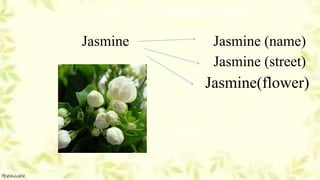
Jasmine Jasmine (name)
Jasmine (street)
Jasmine(flower)
Recognition problem hard with computer
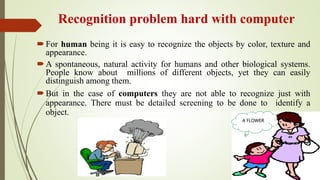
For human being it is easy to recognize the objects by color, texture and
appearance.
A spontaneous, natural activity for humans and other biological systems.
People know about millions of different objects, yet they can easily
distinguish among them.
But in the case of computers they are not able to recognize just with
appearance. There must be detailed screening to be done to identify a
object.
A FLOWER
Main problems faced by computer while
detecting objects
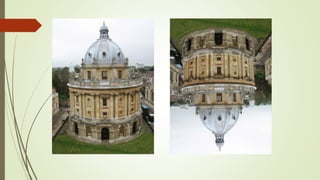
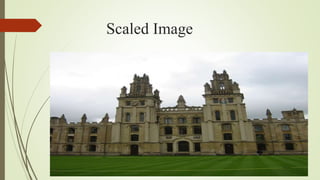
Scale and shape of the imaged object varies
with viewpoint
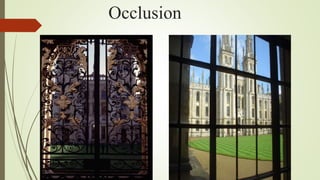
Occlusion (self- or by a foreground object)
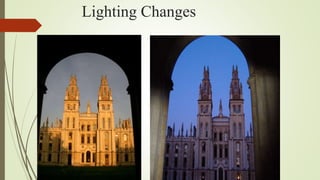
Lighting changes
Background “clutter”
Occlusion
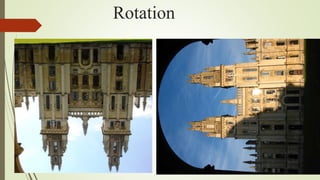
Rotation
Lighting Changes
Scaled Image
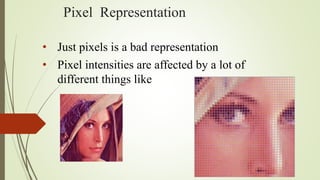
Pixel Representation
• Just pixels is a bad representation
• Pixel intensities are affected by a lot of
different things like
Why pixel matching is not a good method??
Rotation
 scaling
 perspective
Illumination changes
 Reordering of scenes
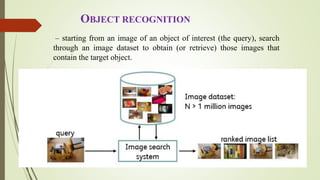
– starting from an image of an object of interest (the query), search
through an image dataset to obtain (or retrieve) those images that
contain the target object.
OBJECT RECOGNITION
Definition
• Object recognition is a task of finding and
identifying object in an image or video sequence.
• The goal of instance-level recognition is to match
(recognize) a specific object or scene.
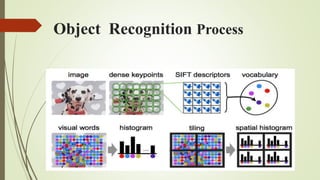
Object Recognition Process
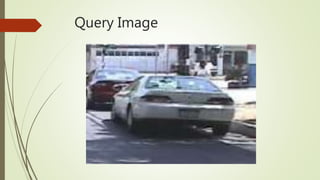
Query Image
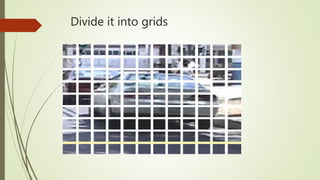
Divide it into grids
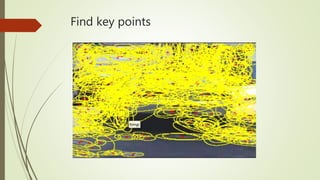
Find key points
How to Detect Key points
Key points are the features or points in an image
that doesn’t change their positions in the original
image even if the image is scaled, rotated or
translated.
These points remains fixed in all these cases.
Descriptors
 Each key point has many descriptions.
 Lowe's method for image feature generation transforms an image
into a large collection of feature vectors, each of which is
invariant to image translation,
invariant to scaling,
invariant to rotation.
How can we find descriptors??
Commonly used methods
SIFT
SURF
SIFT Descriptors
Scale Invariant Feature Transform
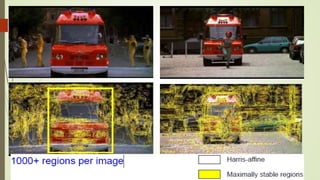
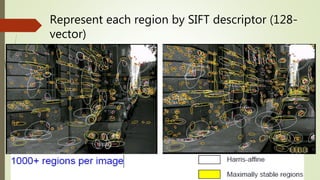
Compute regions in each image independently
“Label” each region by a vector of descriptors
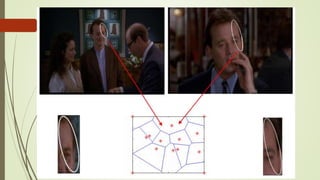
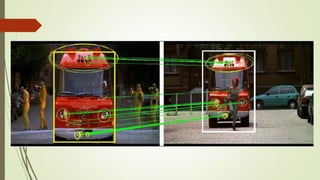
Find corresponding regions by matching to closest descriptor
vector
Score each frame in the database by the number of matches
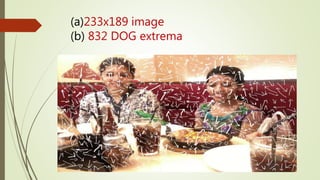
Difference of Gaussians function is applied in scale space to a
series of smoothed and re-sampled images.
(a)233x189 image
(b) 832 DOG extrema
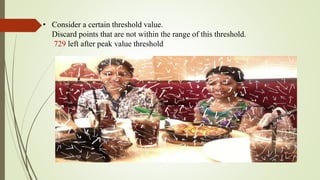
• Consider a certain threshold value.
Discard points that are not within the range of this threshold.
729 left after peak value threshold
Dominant orientations are assigned.
These steps ensure that the key points are more stable for matching and recognition.
536 left after testing ratio of principle curvatures
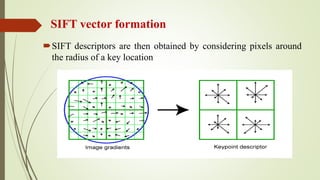
SIFT vector formation
SIFT descriptors are then obtained by considering pixels around
the radius of a key location
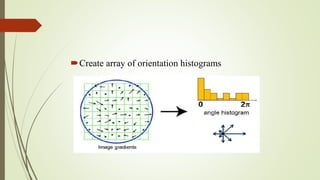
Create array of orientation histograms
SURF
 Speeded Up Robust Features
It is a high-performance scale and rotation-invariant
detector / descriptor
The standard version of SURF is several times faster than
SIFT and claimed by its authors to be more robust against
different image transformations than SIFT.
Feature matching using Nearest Neighbor
Next we will use the descriptor computed over each
detection to match the detections between images.
We will use the simplest matching scheme- the nearest
neighbor of descriptors
 The nearest neighbors are defined as the keypoints with
minimum Euclidean distance from the given descriptor
vector.
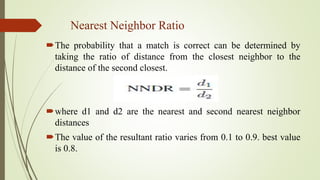
Nearest Neighbor Ratio
The probability that a match is correct can be determined by
taking the ratio of distance from the closest neighbor to the
distance of the second closest.
where d1 and d2 are the nearest and second nearest neighbor
distances
The value of the resultant ratio varies from 0.1 to 0.9. best value
is 0.8.
Represent each region by SIFT descriptor (128-
vector)
Clustering
There will be thousands of points. How to group them ?
The answer is use clustering method.
When clusters of features are found for an object, the
probability of the interpretation being correct is much
higher than for any single feature.
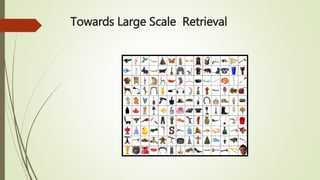
Towards Large Scale Retrieval
Large Scale Retrieval
 In large scale retrieval the goal is to match a query image to a large database of
images (for example the WWW or Wikipedia).
 The quality of a match is measured as the number of geometrically verified
feature correspondences between the query and a database image.
 While the techniques discussed in Part I and II are sufficient to do this, in practice
they require too much memory to store the SIFT descriptors for all the detections
in all the database images
 We explore next two key ideas: one to reduce the memory; the other to speed up
image retrieval.
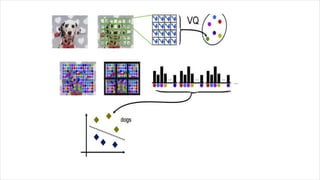
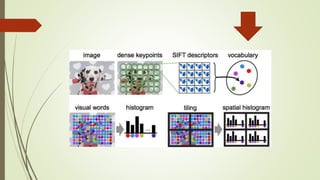
1. CREATING VISUAL WORDS
2. INVERTED INDEX
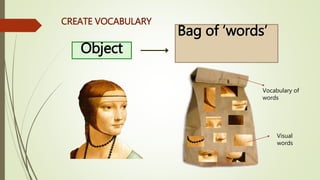
Object
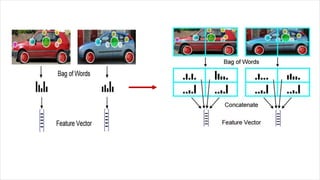
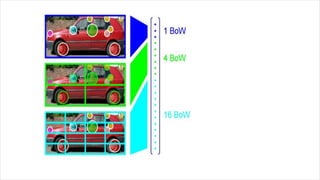
Bag of ‘words’
CREATE VOCABULARY
Vocabulary of
words
Visual
words
Bag of features
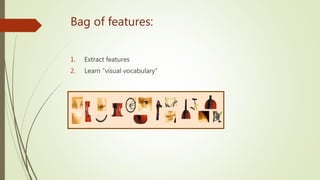
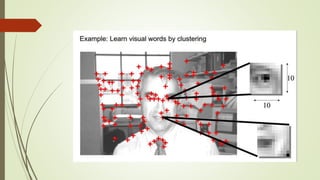
• First, take a bunch of images, extract features, and build up a “dictionary”
or “visual vocabulary” – a list of common features
• Visual words are the representation of the whole features extracted
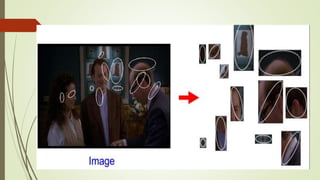
Bag of features: outline
1. Extract features
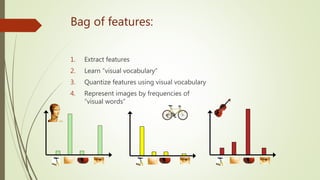
Bag of features:
1. Extract features
2. Learn “visual vocabulary”
Bag of features:
1. Extract features
2. Learn “visual vocabulary”
3. Quantize features using visual vocabulary
Bag of features:
1. Extract features
2. Learn “visual vocabulary”
3. Quantize features using visual vocabulary
4. Represent images by frequencies of
“visual words”
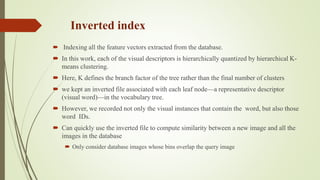
Inverted index
 Indexing all the feature vectors extracted from the database.
 In this work, each of the visual descriptors is hierarchically quantized by hierarchical K-
means clustering.
 Here, K defines the branch factor of the tree rather than the final number of clusters
 we kept an inverted file associated with each leaf node—a representative descriptor
(visual word)—in the vocabulary tree.
 However, we recorded not only the visual instances that contain the word, but also those
word IDs.
 Can quickly use the inverted file to compute similarity between a new image and all the
images in the database
 Only consider database images whose bins overlap the query image
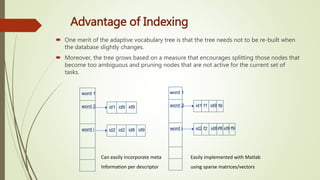
Advantage of Indexing
 One merit of the adaptive vocabulary tree is that the tree needs not to be re-built when
the database slightly changes.
 Moreover, the tree grows based on a measure that encourages splitting those nodes that
become too ambiguous and pruning nodes that are not active for the current set of
tasks.
word 1
word 2
word i id2 id2 id8 id9
id1 id9 id9
word 1
word 2
word i id2 id8 id9
id1 id9
Easily implemented with Matlab
using sparse matrices/vectors
f1 f9
f2 if8 f9
Can easily incorporate meta
Information per descriptor
APPLICATIONS
 Digital watermarking
 Face detection
 OCR
 Quality control and assembly in industrial plants.
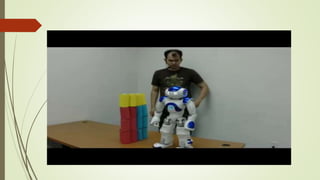
 Robot localization and navigation.
 Monitoring and surveillance.
 Automatic exploration of image databases
 Appearance Recognition
Digital watermarking
A digital watermark is a kind of marker embedded in a noise-
tolerant signal such as an audio, video or image data.
It is typically used to identify ownership of the copyright of
such signal.
 "Watermarking" is the process of hiding digital information in
a carrier signal; the hidden information should, but does not
need to, contain a relation to the carrier signal.
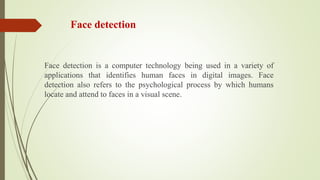
Face detection
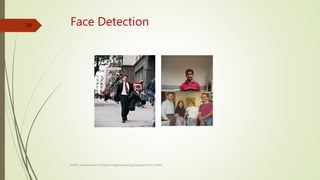
Face detection is a computer technology being used in a variety of
applications that identifies human faces in digital images. Face
detection also refers to the psychological process by which humans
locate and attend to faces in a visual scene.
Face Detection
EE465: Introduction to Digital Image Processing Copyright Xin Li'2003
59
OCR
 Optical character recognition (optical character reader) (OCR)
is the mechanical or electronic conversion of images of typed,
handwritten or printed text into machine-encoded text.
 It is widely used as a form of data entry from printed paper
data records, etc.
 It is a common method of digitizing printed texts so that it can
be electronically edited, searched, stored more compactly,
displayed on-line, and used in machine processes such as
machine translation, text-to-speech, key data and text mining.
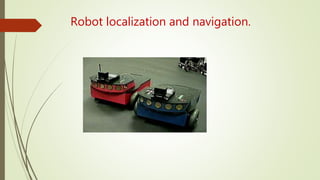
Robot localization and navigation.
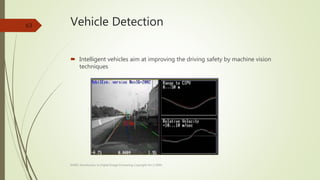
Vehicle Detection
 Intelligent vehicles aim at improving the driving safety by machine vision
techniques
EE465: Introduction to Digital Image Processing Copyright Xin Li'2003
63
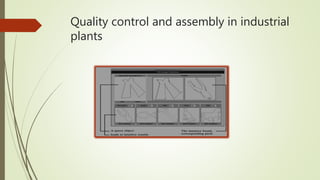
Quality control and assembly in industrial
plants
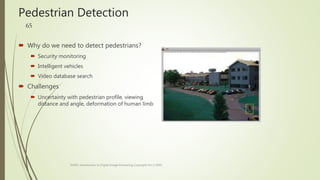
Pedestrian Detection
 Why do we need to detect pedestrians?
 Security monitoring
 Intelligent vehicles
 Video database search
 Challenges
 Uncertainty with pedestrian profile, viewing
distance and angle, deformation of human limb
EE465: Introduction to Digital Image Processing Copyright Xin Li'2003
65
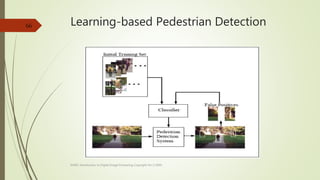
Learning-based Pedestrian Detection
EE465: Introduction to Digital Image Processing Copyright Xin Li'2003
66
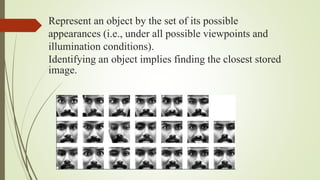
Represent an object by the set of its possible
appearances (i.e., under all possible viewpoints and
illumination conditions).
Identifying an object implies finding the closest stored
image.
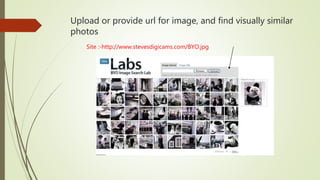
Upload or provide url for image, and find visually similar
photos
Site :-http://www.stevesdigicams.com/BYO.jpg
Conclusion
 Any information can be retrieved from the system
with accurate results.
 Many applications such as face detection, pattern
recognition is based on the technique object
recognition
QUESTIONS??

Object recognition

  • 1.
  • 2.
    Group Members ASHA SAJULIYA C ANTO SANIYA CORREYA TINU PAUL
  • 3.
    Jasmine Jasmine (name) Jasmine(street) Jasmine(flower)
  • 5.
    Recognition problem hardwith computer For human being it is easy to recognize the objects by color, texture and appearance. A spontaneous, natural activity for humans and other biological systems. People know about millions of different objects, yet they can easily distinguish among them. But in the case of computers they are not able to recognize just with appearance. There must be detailed screening to be done to identify a object. A FLOWER
  • 6.
    Main problems facedby computer while detecting objects Scale and shape of the imaged object varies with viewpoint Occlusion (self- or by a foreground object) Lighting changes Background “clutter”
  • 8.
  • 9.
  • 10.
  • 11.
  • 12.
    Pixel Representation • Justpixels is a bad representation • Pixel intensities are affected by a lot of different things like
  • 13.
    Why pixel matchingis not a good method?? Rotation  scaling  perspective Illumination changes  Reordering of scenes
  • 14.
    – starting froman image of an object of interest (the query), search through an image dataset to obtain (or retrieve) those images that contain the target object. OBJECT RECOGNITION
  • 15.
    Definition • Object recognitionis a task of finding and identifying object in an image or video sequence. • The goal of instance-level recognition is to match (recognize) a specific object or scene.
  • 16.
  • 17.
  • 18.
  • 19.
  • 20.
    How to DetectKey points Key points are the features or points in an image that doesn’t change their positions in the original image even if the image is scaled, rotated or translated. These points remains fixed in all these cases.
  • 21.
    Descriptors  Each keypoint has many descriptions.  Lowe's method for image feature generation transforms an image into a large collection of feature vectors, each of which is invariant to image translation, invariant to scaling, invariant to rotation.
  • 22.
    How can wefind descriptors?? Commonly used methods SIFT SURF
  • 23.
    SIFT Descriptors Scale InvariantFeature Transform Compute regions in each image independently “Label” each region by a vector of descriptors Find corresponding regions by matching to closest descriptor vector Score each frame in the database by the number of matches Difference of Gaussians function is applied in scale space to a series of smoothed and re-sampled images.
  • 25.
  • 26.
    • Consider acertain threshold value. Discard points that are not within the range of this threshold. 729 left after peak value threshold
  • 27.
    Dominant orientations areassigned. These steps ensure that the key points are more stable for matching and recognition. 536 left after testing ratio of principle curvatures
  • 28.
    SIFT vector formation SIFTdescriptors are then obtained by considering pixels around the radius of a key location
  • 29.
    Create array oforientation histograms
  • 30.
    SURF  Speeded UpRobust Features It is a high-performance scale and rotation-invariant detector / descriptor The standard version of SURF is several times faster than SIFT and claimed by its authors to be more robust against different image transformations than SIFT.
  • 32.
    Feature matching usingNearest Neighbor Next we will use the descriptor computed over each detection to match the detections between images. We will use the simplest matching scheme- the nearest neighbor of descriptors  The nearest neighbors are defined as the keypoints with minimum Euclidean distance from the given descriptor vector.
  • 33.
    Nearest Neighbor Ratio Theprobability that a match is correct can be determined by taking the ratio of distance from the closest neighbor to the distance of the second closest. where d1 and d2 are the nearest and second nearest neighbor distances The value of the resultant ratio varies from 0.1 to 0.9. best value is 0.8.
  • 34.
    Represent each regionby SIFT descriptor (128- vector)
  • 36.
    Clustering There will bethousands of points. How to group them ? The answer is use clustering method. When clusters of features are found for an object, the probability of the interpretation being correct is much higher than for any single feature.
  • 39.
  • 40.
    Large Scale Retrieval In large scale retrieval the goal is to match a query image to a large database of images (for example the WWW or Wikipedia).  The quality of a match is measured as the number of geometrically verified feature correspondences between the query and a database image.  While the techniques discussed in Part I and II are sufficient to do this, in practice they require too much memory to store the SIFT descriptors for all the detections in all the database images  We explore next two key ideas: one to reduce the memory; the other to speed up image retrieval.
  • 41.
    1. CREATING VISUALWORDS 2. INVERTED INDEX
  • 42.
    Object Bag of ‘words’ CREATEVOCABULARY Vocabulary of words Visual words
  • 43.
    Bag of features •First, take a bunch of images, extract features, and build up a “dictionary” or “visual vocabulary” – a list of common features • Visual words are the representation of the whole features extracted
  • 44.
    Bag of features:outline 1. Extract features
  • 46.
    Bag of features: 1.Extract features 2. Learn “visual vocabulary”
  • 48.
    Bag of features: 1.Extract features 2. Learn “visual vocabulary” 3. Quantize features using visual vocabulary
  • 50.
    Bag of features: 1.Extract features 2. Learn “visual vocabulary” 3. Quantize features using visual vocabulary 4. Represent images by frequencies of “visual words”
  • 54.
    Inverted index  Indexingall the feature vectors extracted from the database.  In this work, each of the visual descriptors is hierarchically quantized by hierarchical K- means clustering.  Here, K defines the branch factor of the tree rather than the final number of clusters  we kept an inverted file associated with each leaf node—a representative descriptor (visual word)—in the vocabulary tree.  However, we recorded not only the visual instances that contain the word, but also those word IDs.  Can quickly use the inverted file to compute similarity between a new image and all the images in the database  Only consider database images whose bins overlap the query image
  • 55.
    Advantage of Indexing One merit of the adaptive vocabulary tree is that the tree needs not to be re-built when the database slightly changes.  Moreover, the tree grows based on a measure that encourages splitting those nodes that become too ambiguous and pruning nodes that are not active for the current set of tasks. word 1 word 2 word i id2 id2 id8 id9 id1 id9 id9 word 1 word 2 word i id2 id8 id9 id1 id9 Easily implemented with Matlab using sparse matrices/vectors f1 f9 f2 if8 f9 Can easily incorporate meta Information per descriptor
  • 56.
    APPLICATIONS  Digital watermarking Face detection  OCR  Quality control and assembly in industrial plants.  Robot localization and navigation.  Monitoring and surveillance.  Automatic exploration of image databases  Appearance Recognition
  • 57.
    Digital watermarking A digitalwatermark is a kind of marker embedded in a noise- tolerant signal such as an audio, video or image data. It is typically used to identify ownership of the copyright of such signal.  "Watermarking" is the process of hiding digital information in a carrier signal; the hidden information should, but does not need to, contain a relation to the carrier signal.
  • 58.
    Face detection Face detectionis a computer technology being used in a variety of applications that identifies human faces in digital images. Face detection also refers to the psychological process by which humans locate and attend to faces in a visual scene.
  • 59.
    Face Detection EE465: Introductionto Digital Image Processing Copyright Xin Li'2003 59
  • 60.
    OCR  Optical characterrecognition (optical character reader) (OCR) is the mechanical or electronic conversion of images of typed, handwritten or printed text into machine-encoded text.  It is widely used as a form of data entry from printed paper data records, etc.  It is a common method of digitizing printed texts so that it can be electronically edited, searched, stored more compactly, displayed on-line, and used in machine processes such as machine translation, text-to-speech, key data and text mining.
  • 61.
  • 63.
    Vehicle Detection  Intelligentvehicles aim at improving the driving safety by machine vision techniques EE465: Introduction to Digital Image Processing Copyright Xin Li'2003 63
  • 64.
    Quality control andassembly in industrial plants
  • 65.
    Pedestrian Detection  Whydo we need to detect pedestrians?  Security monitoring  Intelligent vehicles  Video database search  Challenges  Uncertainty with pedestrian profile, viewing distance and angle, deformation of human limb EE465: Introduction to Digital Image Processing Copyright Xin Li'2003 65
  • 66.
    Learning-based Pedestrian Detection EE465:Introduction to Digital Image Processing Copyright Xin Li'2003 66
  • 67.
    Represent an objectby the set of its possible appearances (i.e., under all possible viewpoints and illumination conditions). Identifying an object implies finding the closest stored image.
  • 68.
    Upload or provideurl for image, and find visually similar photos Site :-http://www.stevesdigicams.com/BYO.jpg
  • 69.
    Conclusion  Any informationcan be retrieved from the system with accurate results.  Many applications such as face detection, pattern recognition is based on the technique object recognition
  • 71.