Digital shapes content-based
searching & retrieval
Web Science Course (Fall 2011)
Laura Papaleo
https://www.linkedin.com/in/laurapapaleo/
laura.papaleo@gmail.com
Outline
 Digital shapes definition
 Content-based retrieval basics
 Image retrieval
 Video retrieval
 3D model retrieval
2
Multimedia content
short introduction
Laura Papaleo | laura.papaleo@gmail.com
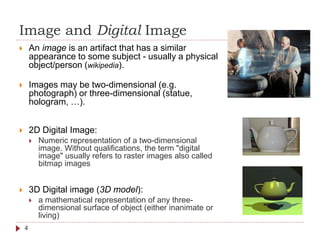
Image and Digital Image
 An image is an artifact that has a similar
appearance to some subject - usually a physical
object/person (wikipedia).
 Images may be two-dimensional (e.g.
photograph) or three-dimensional (statue,
hologram, …).
 2D Digital Image:
 Numeric representation of a two-dimensional
image. Without qualifications, the term "digital
image" usually refers to raster images also called
bitmap images
 3D Digital image (3D model):
 a mathematical representation of any three-
dimensional surface of object (either inanimate or
living)
4
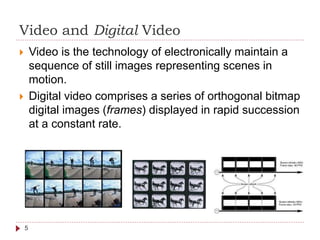
Video and Digital Video
 Video is the technology of electronically maintain a
sequence of still images representing scenes in
motion.
 Digital video comprises a series of orthogonal bitmap
digital images (frames) displayed in rapid succession
at a constant rate.
5
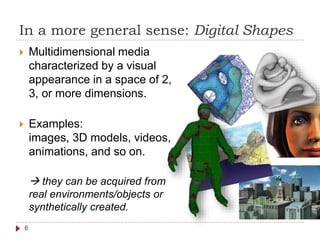
In a more general sense: Digital Shapes
6
 Multidimensional media
characterized by a visual
appearance in a space of 2,
3, or more dimensions.
 Examples:
images, 3D models, videos,
animations, and so on.
 they can be acquired from
real environments/objects or
synthetically created.
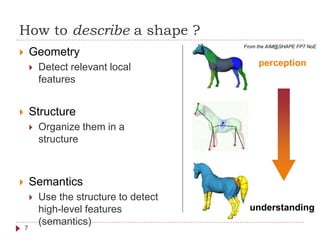
How to describe a shape ?
7
 Geometry
 Detect relevant local
features
 Structure
 Organize them in a
structure
 Semantics
 Use the structure to detect
high-level features
(semantics)
perception
understanding
From the AIM@SHAPE FP7 NoE
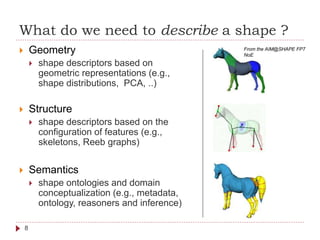
What do we need to describe a shape ?
8
 Geometry
 shape descriptors based on
geometric representations (e.g.,
shape distributions, PCA, ..)
 Structure
 shape descriptors based on the
configuration of features (e.g.,
skeletons, Reeb graphs)
 Semantics
 shape ontologies and domain
conceptualization (e.g., metadata,
ontology, reasoners and inference)
From the AIM@SHAPE FP7
NoE
Digital shapes searching
Basics
Laura Papaleo | laura.papaleo@gmail.com
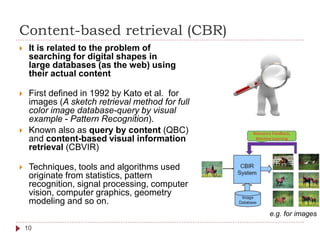
Content-based retrieval (CBR)
 It is related to the problem of
searching for digital shapes in
large databases (as the web) using
their actual content
 First defined in 1992 by Kato et al. for
images (A sketch retrieval method for full
color image database-query by visual
example - Pattern Recognition).
 Known also as query by content (QBC)
and content-based visual information
retrieval (CBVIR)
 Techniques, tools and algorithms used
originate from statistics, pattern
recognition, signal processing, computer
vision, computer graphics, geometry
modeling and so on.
e.g. for images
10
Content-based retrieval (CBR)
 Content-based:
 the search related to the contents
of the digital shapes rather than the
metadata (keywords, tags, and/or
descriptions associated).
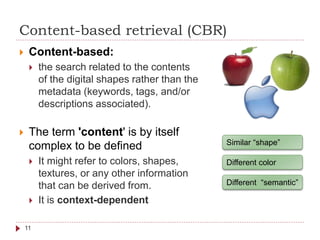
 The term 'content' is by itself
complex to be defined
 It might refer to colors, shapes,
textures, or any other information
that can be derived from.
 It is context-dependent
Similar “shape”
Different color
Different “semantic”
11
Why do we need efficient CBR systems?
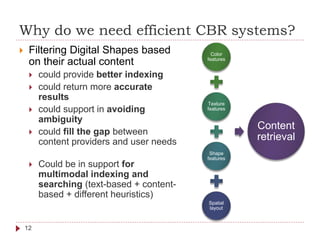
 Filtering Digital Shapes based
on their actual content
 could provide better indexing
 could return more accurate
results
 could support in avoiding
ambiguity
 could fill the gap between
content providers and user needs
 Could be in support for
multimodal indexing and
searching (text-based + content-
based + different heuristics)
Color
features
Texture
features
Shape
features
Spatial
layout
Content
retrieval
12
Why do we need efficient CBR systems?
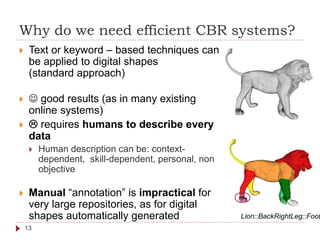
 Text or keyword – based techniques can
be applied to digital shapes
(standard approach)
  good results (as in many existing
online systems)
  requires humans to describe every
data
 Human description can be: context-
dependent, skill-dependent, personal, non
objective
 Manual “annotation” is impractical for
very large repositories, as for digital
shapes automatically generated Lion::BackRightLeg::Foot
13
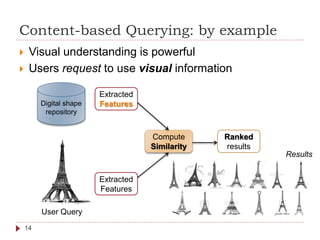
Content-based Querying: by example
 Visual understanding is powerful
 Users request to use visual information
Digital shape
repository
Extracted
Features
Compute
Similarity
User Query
Extracted
Features
Ranked
results
14
Results
Visual features, similarity, ranking…
15
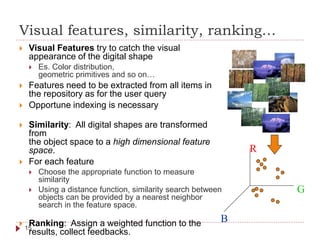
 Visual Features try to catch the visual
appearance of the digital shape
 Es. Color distribution,
geometric primitives and so on…
 Features need to be extracted from all items in
the repository as for the user query
 Opportune indexing is necessary
 Similarity: All digital shapes are transformed
from
the object space to a high dimensional feature
space.
 For each feature
 Choose the appropriate function to measure
similarity
 Using a distance function, similarity search between
objects can be provided by a nearest neighbor
search in the feature space.
 Ranking: Assign a weighted function to the
results, collect feedbacks.
R
B
G
Data Layer
Retrieval engine
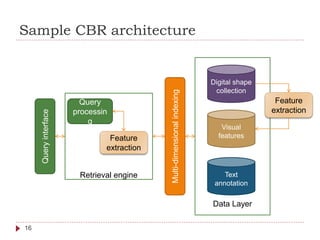
Sample CBR architecture
Digital shape
collection
Visual
features
Text
annotation
Multi-dimensionalindexing
Query
processin
g
Queryinterface
Feature
extraction
16
Feature
extraction
Other query methods
 Browsing by examples (multiple inputs)
 Browsing categories (customized/hierarchical)
 Querying by region (rather than the entire digital
shape)
 Querying by visual sketch
 Querying by specific features
 Multimodal queries (e.g. combining touch, voice,
etc.)
17
Image Searching & Retrieval Basics
Laura Papaleo | laura.papaleo@gmail.com
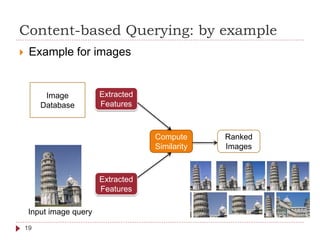
Content-based Querying: by example
 Example for images
Image
Database
Extracted
Features
Compute
Similarity
Input image query
Extracted
Features
Ranked
Images
19
Similarity measures for images
 Measures that must solely be based on the
information included in the digital representation of
the images.
 Common technique:
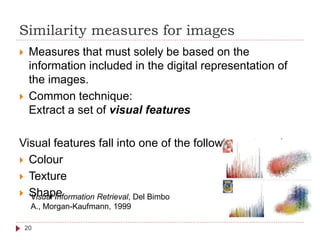
Extract a set of visual features
Visual features fall into one of the following categories
 Colour
 Texture
 ShapeVisual Information Retrieval, Del Bimbo
A., Morgan-Kaufmann, 1999
20
Similarity measures for images
 All images are transformed from the object space to a high
dimensional feature space.
 In this space every image is a point with the coordinate representing
its features characteristics
 Similar images are “near” in space
 The definition of an appropriate distance function is crucial for the
success of the feature transformation.
 Some examples for distance metrics are
 The Euclidean distance [Niblack 1993],
 The Manhattan distance [Stricker and Orengo 1995]
 The distance between two points measured along axes at right angles
 The maximum norm [Stricker and Orengo 1995],
 The quadratic function [Hafner et alii 1995],
 Earth Mover's Distance [Rubner, Tomasi, and Guibas 2000],
 Deformation Models [Keysers et alii 2007b].
21
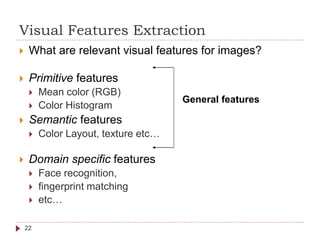
Visual Features Extraction
 What are relevant visual features for images?
 Primitive features
 Mean color (RGB)
 Color Histogram
 Semantic features
 Color Layout, texture etc…
 Domain specific features
 Face recognition,
 fingerprint matching
 etc…
General features
22
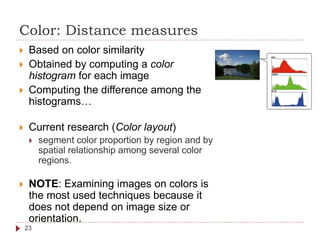
Color: Distance measures
 Based on color similarity
 Obtained by computing a color
histogram for each image
 Computing the difference among the
histograms…
 Current research (Color layout)
 segment color proportion by region and by
spatial relationship among several color
regions.
 NOTE: Examining images on colors is
the most used techniques because it
does not depend on image size or
orientation.
23
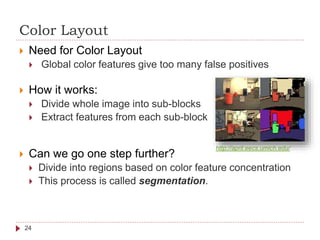
Color Layout
 Need for Color Layout
 Global color features give too many false positives
 How it works:
 Divide whole image into sub-blocks
 Extract features from each sub-block
 Can we go one step further?
 Divide into regions based on color feature concentration
 This process is called segmentation.
24
http://april.eecs.umich.edu/
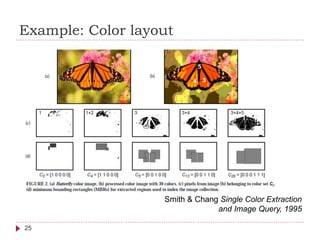
Example: Color layout
Smith & Chang Single Color Extraction
and Image Query, 1995
25
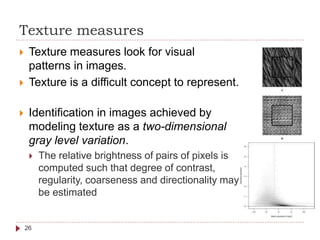
Texture measures
 Texture measures look for visual
patterns in images.
 Texture is a difficult concept to represent.
 Identification in images achieved by
modeling texture as a two-dimensional
gray level variation.
 The relative brightness of pairs of pixels is
computed such that degree of contrast,
regularity, coarseness and directionality may
be estimated
26
Texture classification
 Most accepted classification of textures based on
psychology studies – Tamura representation
 Coarseness
 relates to distances of notable spatial variations of grey levels, that
is, implicitly, to the size of the primitive elements (texels) forming
the texture
 Contrast
 measures how grey levels q; q = 0, 1, ..., qmax, vary in the
image g and to what extent their distribution is biased to black or
white
 Degree of directionality
 measured using the frequency distribution of oriented local edges
against their directional angles
 Linelikeness, Regularity & Roughness a combination of the
above three…
 http://www.cs.auckland.ac.nz/compsci708s1c/lectures/Glect-
html/topic4c708FSC.htm#tamura
H. Tamura, et al.. Texture features
corresponding to visual perception. IEEE
Transactions1978
27
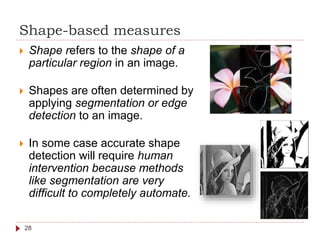
Shape-based measures
 Shape refers to the shape of a
particular region in an image.
 Shapes are often determined by
applying segmentation or edge
detection to an image.
 In some case accurate shape
detection will require human
intervention because methods
like segmentation are very
difficult to completely automate.
28
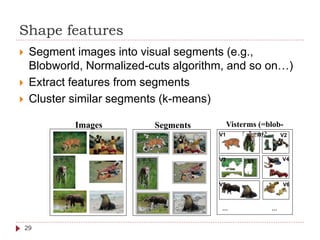
Shape features
 Segment images into visual segments (e.g.,
Blobworld, Normalized-cuts algorithm, and so on…)
 Extract features from segments
 Cluster similar segments (k-means)
Visterms (=blob-
tokens)
… …
Images Segments
V1 V2
V3 V4V1
V5 V6
29
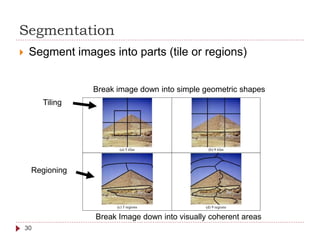
Segmentation
 Segment images into parts (tile or regions)
(a) 5 tiles (b) 9 tiles
(c) 5 regions (d) 9 regions
Tiling
Regioning
Break Image down into visually coherent areas
Break image down into simple geometric shapes
30
Image Indexing and Ranking
 It is important to determine the most similar efficiently
 The problem is usually solved by using some kind of
index structure for the content descriptors (feature
vectors) of the images (1)
 Thus:
 similarity metric influences the effectiveness of the retrieval
 index structure biases the efficiency of the retrieval
 Efficiency can also improve using algorithmic
optimization during query execution (2)
1. Managing Gigabytes: Compressing and Indexing Documents and Images Morgan
Kaufmann, 1999
2. Speeding Up IDM without Degradation of Retrieval Quality, CLEF 2007
31
Examples
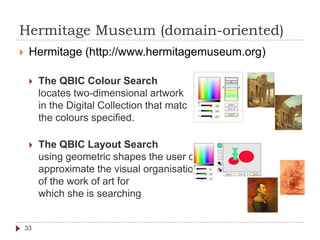
Hermitage Museum (domain-oriented)
 Hermitage (http://www.hermitagemuseum.org)
 The QBIC Colour Search
locates two-dimensional artwork
in the Digital Collection that match
the colours specified.
 The QBIC Layout Search
using geometric shapes the user can
approximate the visual organisation
of the work of art for
which she is searching
33
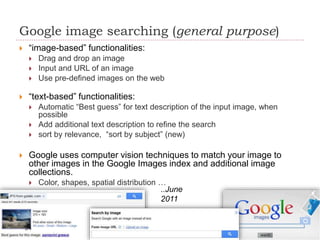
Google image searching (general purpose)
 “image-based” functionalities:
 Drag and drop an image
 Input and URL of an image
 Use pre-defined images on the web
 “text-based” functionalities:
 Automatic “Best guess” for text description of the input image, when
possible
 Add additional text description to refine the search
 sort by relevance, “sort by subject” (new)
 Google uses computer vision techniques to match your image to
other images in the Google Images index and additional image
collections.
 Color, shapes, spatial distribution …
..June
2011
34
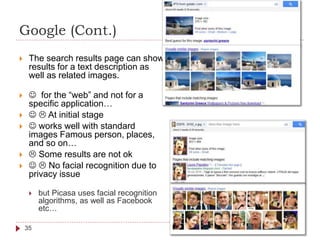
Google (Cont.)
 The search results page can show
results for a text description as
well as related images.
  for the “web” and not for a
specific application…
   At initial stage
  works well with standard
images Famous person, places,
and so on…
  Some results are not ok
   No facial recognition due to
privacy issue
 but Picasa uses facial recognition
algorithms, as well as Facebook
etc…
35
Content-Based Video Retrieval
Basics
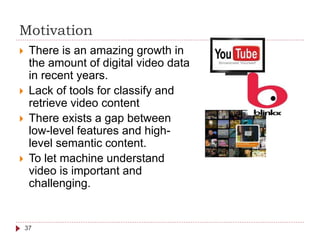
Motivation
 There is an amazing growth in
the amount of digital video data
in recent years.
 Lack of tools for classify and
retrieve video content
 There exists a gap between
low-level features and high-
level semantic content.
 To let machine understand
video is important and
challenging.
37
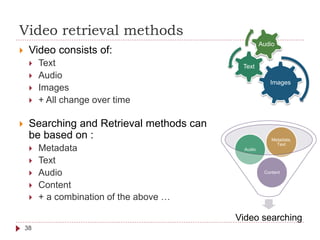
Video retrieval methods
 Video consists of:
 Text
 Audio
 Images
 + All change over time
 Searching and Retrieval methods can
be based on :
 Metadata
 Text
 Audio
 Content
 + a combination of the above …
Images
Text
Audio
Video searching
Content
Audio
Metadata,
Text
38
Metadata, Text & Audio-based Methods
 Metadata-based
 Video is indexed and retrieved based on structured metadata
information by using a traditional DBMS
 Metadata examples are the title, author, producer, director,
date, types of video.
 Text-based
 Video is indexed and retrieved based on associated subtitles
(text) using traditional IR techniques for text documents.
 Transcripts and subtitles are already exist in many types of
video such as news and movies, eliminating the need for
manual annotation.
 Audio-based
 Video indexed and retrieved based on associated soundtracks
using the methods for audio indexing and retrieval.
 Speech recognition is applied if necessary.
39
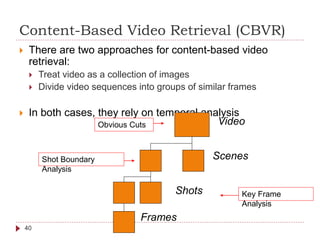
Content-Based Video Retrieval (CBVR)
 There are two approaches for content-based video
retrieval:
 Treat video as a collection of images
 Divide video sequences into groups of similar frames
 In both cases, they rely on temporal analysis
Video
Scenes
Shots
Frames
Key Frame
Analysis
Shot Boundary
Analysis
Obvious Cuts
40
Query by example for video
41
 Image query input
 Feature extraction according to the repository
 If video as a sequence of images, search for “similar
images” according to the extracted features
 If video as group of similar frames, search for “similar”
among the representative of each frames group
 Rank and return the results
 Video query input
 Analyse and extract feature characteristics
 For each representative image proceed as before
An example (research paper)
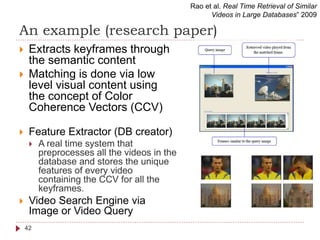
 Extracts keyframes through
the semantic content
 Matching is done via low
level visual content using
the concept of Color
Coherence Vectors (CCV)
 Feature Extractor (DB creator)
 A real time system that
preprocesses all the videos in the
database and stores the unique
features of every video
containing the CCV for all the
keyframes.
 Video Search Engine via
Image or Video Query
Rao et al. Real Time Retrieval of Similar
Videos in Large Databases” 2009
42
3D models searching & retrieval
Basics
Laura Papaleo | laura.papaleo@gmail.com
3D Model retrieval: Conceptual framework
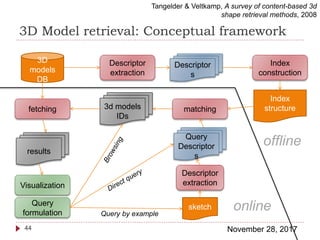
November 28, 201744
Tangelder & Veltkamp, A survey of content-based 3d
shape retrieval methods, 2008
3D
models
DB
Descriptor
extraction
Descriptor
s
Index
construction
Index
structurefetching matching
Query
formulation
sketch
Descriptor
extraction
Query
Descriptor
s
Visualization
results
3d models
IDs
online
offline
Query by example
3D models matching methods
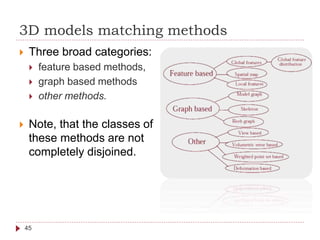
 Three broad categories:
 feature based methods,
 graph based methods
 other methods.
 Note, that the classes of
these methods are not
completely disjoined.
45
Feature-based methods
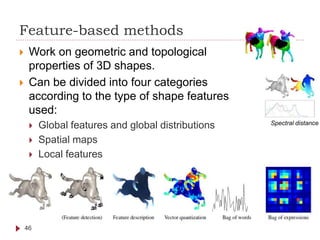
 Work on geometric and topological
properties of 3D shapes.
 Can be divided into four categories
according to the type of shape features
used:
 Global features and global distributions
 Spatial maps
 Local features
46
Spectral distance
Graph-based methods
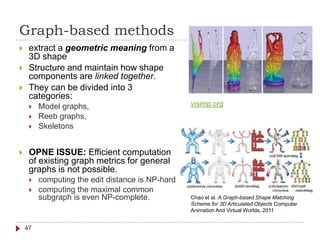
 extract a geometric meaning from a
3D shape
 Structure and maintain how shape
components are linked together.
 They can be divided into 3
categories:
 Model graphs,
 Reeb graphs,
 Skeletons
 OPNE ISSUE: Efficient computation
of existing graph metrics for general
graphs is not possible.
 computing the edit distance is NP-hard
 computing the maximal common
subgraph is even NP-complete.
47
Chao et al. A Graph-based Shape Matching
Scheme for 3D Articulated Objects Computer
Animation And Virtual Worlds, 2011
visimp.org
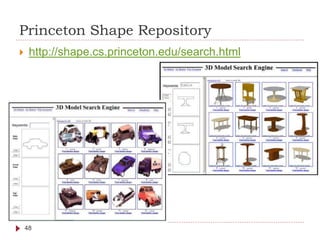
Princeton Shape Repository
 http://shape.cs.princeton.edu/search.html
48
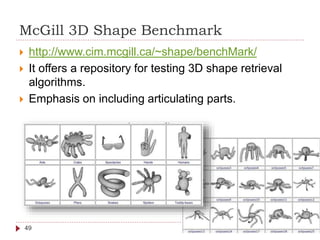
McGill 3D Shape Benchmark
49
 http://www.cim.mcgill.ca/~shape/benchMark/
 It offers a repository for testing 3D shape retrieval
algorithms.
 Emphasis on including articulating parts.
Observations & OPEN ISSUES
50
 Good literature for images
 Open research for video and 3D models
 CBS “usable” in domain specific application
 Open research for general purpose CBS (on the web)
 Open research for multimodal searching
 Ranking and feedback, new frontiers with the advent of
Web 2.0 and Web 3.0
 Cooperative environment could support the creation of a global
“well annotated digital world”
 Accountability problems
 Trusting
 History, provenance is important…
Observations & OPEN ISSUES
51
 Open research: Adaptive visualization of the results
according to the user’ needs
 Image and abstract could be useful in specific conditions
 3D model online browsing could be important in other
conditions
 Video preview? Or?
 The same for the querying interface… HCI issues…
 Web searching performances: open research in on-the-
fly indexing of videos and 3D models
 Open issue: relevant portions of result digital shapes
should be usable as new query simply by selecting a
portion (and then “find similar items”)
 Interactive selection of portions of images, video and 3D
models

Multimedia searching

  • 1.
    Digital shapes content-based searching& retrieval Web Science Course (Fall 2011) Laura Papaleo https://www.linkedin.com/in/laurapapaleo/ laura.papaleo@gmail.com
  • 2.
    Outline  Digital shapesdefinition  Content-based retrieval basics  Image retrieval  Video retrieval  3D model retrieval 2
  • 3.
    Multimedia content short introduction LauraPapaleo | laura.papaleo@gmail.com
  • 4.
    Image and DigitalImage  An image is an artifact that has a similar appearance to some subject - usually a physical object/person (wikipedia).  Images may be two-dimensional (e.g. photograph) or three-dimensional (statue, hologram, …).  2D Digital Image:  Numeric representation of a two-dimensional image. Without qualifications, the term "digital image" usually refers to raster images also called bitmap images  3D Digital image (3D model):  a mathematical representation of any three- dimensional surface of object (either inanimate or living) 4
  • 5.
    Video and DigitalVideo  Video is the technology of electronically maintain a sequence of still images representing scenes in motion.  Digital video comprises a series of orthogonal bitmap digital images (frames) displayed in rapid succession at a constant rate. 5
  • 6.
    In a moregeneral sense: Digital Shapes 6  Multidimensional media characterized by a visual appearance in a space of 2, 3, or more dimensions.  Examples: images, 3D models, videos, animations, and so on.  they can be acquired from real environments/objects or synthetically created.
  • 7.
    How to describea shape ? 7  Geometry  Detect relevant local features  Structure  Organize them in a structure  Semantics  Use the structure to detect high-level features (semantics) perception understanding From the AIM@SHAPE FP7 NoE
  • 8.
    What do weneed to describe a shape ? 8  Geometry  shape descriptors based on geometric representations (e.g., shape distributions, PCA, ..)  Structure  shape descriptors based on the configuration of features (e.g., skeletons, Reeb graphs)  Semantics  shape ontologies and domain conceptualization (e.g., metadata, ontology, reasoners and inference) From the AIM@SHAPE FP7 NoE
  • 9.
    Digital shapes searching Basics LauraPapaleo | laura.papaleo@gmail.com
  • 10.
    Content-based retrieval (CBR) It is related to the problem of searching for digital shapes in large databases (as the web) using their actual content  First defined in 1992 by Kato et al. for images (A sketch retrieval method for full color image database-query by visual example - Pattern Recognition).  Known also as query by content (QBC) and content-based visual information retrieval (CBVIR)  Techniques, tools and algorithms used originate from statistics, pattern recognition, signal processing, computer vision, computer graphics, geometry modeling and so on. e.g. for images 10
  • 11.
    Content-based retrieval (CBR) Content-based:  the search related to the contents of the digital shapes rather than the metadata (keywords, tags, and/or descriptions associated).  The term 'content' is by itself complex to be defined  It might refer to colors, shapes, textures, or any other information that can be derived from.  It is context-dependent Similar “shape” Different color Different “semantic” 11
  • 12.
    Why do weneed efficient CBR systems?  Filtering Digital Shapes based on their actual content  could provide better indexing  could return more accurate results  could support in avoiding ambiguity  could fill the gap between content providers and user needs  Could be in support for multimodal indexing and searching (text-based + content- based + different heuristics) Color features Texture features Shape features Spatial layout Content retrieval 12
  • 13.
    Why do weneed efficient CBR systems?  Text or keyword – based techniques can be applied to digital shapes (standard approach)   good results (as in many existing online systems)   requires humans to describe every data  Human description can be: context- dependent, skill-dependent, personal, non objective  Manual “annotation” is impractical for very large repositories, as for digital shapes automatically generated Lion::BackRightLeg::Foot 13
  • 14.
    Content-based Querying: byexample  Visual understanding is powerful  Users request to use visual information Digital shape repository Extracted Features Compute Similarity User Query Extracted Features Ranked results 14 Results
  • 15.
    Visual features, similarity,ranking… 15  Visual Features try to catch the visual appearance of the digital shape  Es. Color distribution, geometric primitives and so on…  Features need to be extracted from all items in the repository as for the user query  Opportune indexing is necessary  Similarity: All digital shapes are transformed from the object space to a high dimensional feature space.  For each feature  Choose the appropriate function to measure similarity  Using a distance function, similarity search between objects can be provided by a nearest neighbor search in the feature space.  Ranking: Assign a weighted function to the results, collect feedbacks. R B G
  • 16.
    Data Layer Retrieval engine SampleCBR architecture Digital shape collection Visual features Text annotation Multi-dimensionalindexing Query processin g Queryinterface Feature extraction 16 Feature extraction
  • 17.
    Other query methods Browsing by examples (multiple inputs)  Browsing categories (customized/hierarchical)  Querying by region (rather than the entire digital shape)  Querying by visual sketch  Querying by specific features  Multimodal queries (e.g. combining touch, voice, etc.) 17
  • 18.
    Image Searching &Retrieval Basics Laura Papaleo | laura.papaleo@gmail.com
  • 19.
    Content-based Querying: byexample  Example for images Image Database Extracted Features Compute Similarity Input image query Extracted Features Ranked Images 19
  • 20.
    Similarity measures forimages  Measures that must solely be based on the information included in the digital representation of the images.  Common technique: Extract a set of visual features Visual features fall into one of the following categories  Colour  Texture  ShapeVisual Information Retrieval, Del Bimbo A., Morgan-Kaufmann, 1999 20
  • 21.
    Similarity measures forimages  All images are transformed from the object space to a high dimensional feature space.  In this space every image is a point with the coordinate representing its features characteristics  Similar images are “near” in space  The definition of an appropriate distance function is crucial for the success of the feature transformation.  Some examples for distance metrics are  The Euclidean distance [Niblack 1993],  The Manhattan distance [Stricker and Orengo 1995]  The distance between two points measured along axes at right angles  The maximum norm [Stricker and Orengo 1995],  The quadratic function [Hafner et alii 1995],  Earth Mover's Distance [Rubner, Tomasi, and Guibas 2000],  Deformation Models [Keysers et alii 2007b]. 21
  • 22.
    Visual Features Extraction What are relevant visual features for images?  Primitive features  Mean color (RGB)  Color Histogram  Semantic features  Color Layout, texture etc…  Domain specific features  Face recognition,  fingerprint matching  etc… General features 22
  • 23.
    Color: Distance measures Based on color similarity  Obtained by computing a color histogram for each image  Computing the difference among the histograms…  Current research (Color layout)  segment color proportion by region and by spatial relationship among several color regions.  NOTE: Examining images on colors is the most used techniques because it does not depend on image size or orientation. 23
  • 24.
    Color Layout  Needfor Color Layout  Global color features give too many false positives  How it works:  Divide whole image into sub-blocks  Extract features from each sub-block  Can we go one step further?  Divide into regions based on color feature concentration  This process is called segmentation. 24 http://april.eecs.umich.edu/
  • 25.
    Example: Color layout Smith& Chang Single Color Extraction and Image Query, 1995 25
  • 26.
    Texture measures  Texturemeasures look for visual patterns in images.  Texture is a difficult concept to represent.  Identification in images achieved by modeling texture as a two-dimensional gray level variation.  The relative brightness of pairs of pixels is computed such that degree of contrast, regularity, coarseness and directionality may be estimated 26
  • 27.
    Texture classification  Mostaccepted classification of textures based on psychology studies – Tamura representation  Coarseness  relates to distances of notable spatial variations of grey levels, that is, implicitly, to the size of the primitive elements (texels) forming the texture  Contrast  measures how grey levels q; q = 0, 1, ..., qmax, vary in the image g and to what extent their distribution is biased to black or white  Degree of directionality  measured using the frequency distribution of oriented local edges against their directional angles  Linelikeness, Regularity & Roughness a combination of the above three…  http://www.cs.auckland.ac.nz/compsci708s1c/lectures/Glect- html/topic4c708FSC.htm#tamura H. Tamura, et al.. Texture features corresponding to visual perception. IEEE Transactions1978 27
  • 28.
    Shape-based measures  Shaperefers to the shape of a particular region in an image.  Shapes are often determined by applying segmentation or edge detection to an image.  In some case accurate shape detection will require human intervention because methods like segmentation are very difficult to completely automate. 28
  • 29.
    Shape features  Segmentimages into visual segments (e.g., Blobworld, Normalized-cuts algorithm, and so on…)  Extract features from segments  Cluster similar segments (k-means) Visterms (=blob- tokens) … … Images Segments V1 V2 V3 V4V1 V5 V6 29
  • 30.
    Segmentation  Segment imagesinto parts (tile or regions) (a) 5 tiles (b) 9 tiles (c) 5 regions (d) 9 regions Tiling Regioning Break Image down into visually coherent areas Break image down into simple geometric shapes 30
  • 31.
    Image Indexing andRanking  It is important to determine the most similar efficiently  The problem is usually solved by using some kind of index structure for the content descriptors (feature vectors) of the images (1)  Thus:  similarity metric influences the effectiveness of the retrieval  index structure biases the efficiency of the retrieval  Efficiency can also improve using algorithmic optimization during query execution (2) 1. Managing Gigabytes: Compressing and Indexing Documents and Images Morgan Kaufmann, 1999 2. Speeding Up IDM without Degradation of Retrieval Quality, CLEF 2007 31
  • 32.
  • 33.
    Hermitage Museum (domain-oriented) Hermitage (http://www.hermitagemuseum.org)  The QBIC Colour Search locates two-dimensional artwork in the Digital Collection that match the colours specified.  The QBIC Layout Search using geometric shapes the user can approximate the visual organisation of the work of art for which she is searching 33
  • 34.
    Google image searching(general purpose)  “image-based” functionalities:  Drag and drop an image  Input and URL of an image  Use pre-defined images on the web  “text-based” functionalities:  Automatic “Best guess” for text description of the input image, when possible  Add additional text description to refine the search  sort by relevance, “sort by subject” (new)  Google uses computer vision techniques to match your image to other images in the Google Images index and additional image collections.  Color, shapes, spatial distribution … ..June 2011 34
  • 35.
    Google (Cont.)  Thesearch results page can show results for a text description as well as related images.   for the “web” and not for a specific application…    At initial stage   works well with standard images Famous person, places, and so on…   Some results are not ok    No facial recognition due to privacy issue  but Picasa uses facial recognition algorithms, as well as Facebook etc… 35
  • 36.
  • 37.
    Motivation  There isan amazing growth in the amount of digital video data in recent years.  Lack of tools for classify and retrieve video content  There exists a gap between low-level features and high- level semantic content.  To let machine understand video is important and challenging. 37
  • 38.
    Video retrieval methods Video consists of:  Text  Audio  Images  + All change over time  Searching and Retrieval methods can be based on :  Metadata  Text  Audio  Content  + a combination of the above … Images Text Audio Video searching Content Audio Metadata, Text 38
  • 39.
    Metadata, Text &Audio-based Methods  Metadata-based  Video is indexed and retrieved based on structured metadata information by using a traditional DBMS  Metadata examples are the title, author, producer, director, date, types of video.  Text-based  Video is indexed and retrieved based on associated subtitles (text) using traditional IR techniques for text documents.  Transcripts and subtitles are already exist in many types of video such as news and movies, eliminating the need for manual annotation.  Audio-based  Video indexed and retrieved based on associated soundtracks using the methods for audio indexing and retrieval.  Speech recognition is applied if necessary. 39
  • 40.
    Content-Based Video Retrieval(CBVR)  There are two approaches for content-based video retrieval:  Treat video as a collection of images  Divide video sequences into groups of similar frames  In both cases, they rely on temporal analysis Video Scenes Shots Frames Key Frame Analysis Shot Boundary Analysis Obvious Cuts 40
  • 41.
    Query by examplefor video 41  Image query input  Feature extraction according to the repository  If video as a sequence of images, search for “similar images” according to the extracted features  If video as group of similar frames, search for “similar” among the representative of each frames group  Rank and return the results  Video query input  Analyse and extract feature characteristics  For each representative image proceed as before
  • 42.
    An example (researchpaper)  Extracts keyframes through the semantic content  Matching is done via low level visual content using the concept of Color Coherence Vectors (CCV)  Feature Extractor (DB creator)  A real time system that preprocesses all the videos in the database and stores the unique features of every video containing the CCV for all the keyframes.  Video Search Engine via Image or Video Query Rao et al. Real Time Retrieval of Similar Videos in Large Databases” 2009 42
  • 43.
    3D models searching& retrieval Basics Laura Papaleo | laura.papaleo@gmail.com
  • 44.
    3D Model retrieval:Conceptual framework November 28, 201744 Tangelder & Veltkamp, A survey of content-based 3d shape retrieval methods, 2008 3D models DB Descriptor extraction Descriptor s Index construction Index structurefetching matching Query formulation sketch Descriptor extraction Query Descriptor s Visualization results 3d models IDs online offline Query by example
  • 45.
    3D models matchingmethods  Three broad categories:  feature based methods,  graph based methods  other methods.  Note, that the classes of these methods are not completely disjoined. 45
  • 46.
    Feature-based methods  Workon geometric and topological properties of 3D shapes.  Can be divided into four categories according to the type of shape features used:  Global features and global distributions  Spatial maps  Local features 46 Spectral distance
  • 47.
    Graph-based methods  extracta geometric meaning from a 3D shape  Structure and maintain how shape components are linked together.  They can be divided into 3 categories:  Model graphs,  Reeb graphs,  Skeletons  OPNE ISSUE: Efficient computation of existing graph metrics for general graphs is not possible.  computing the edit distance is NP-hard  computing the maximal common subgraph is even NP-complete. 47 Chao et al. A Graph-based Shape Matching Scheme for 3D Articulated Objects Computer Animation And Virtual Worlds, 2011 visimp.org
  • 48.
    Princeton Shape Repository http://shape.cs.princeton.edu/search.html 48
  • 49.
    McGill 3D ShapeBenchmark 49  http://www.cim.mcgill.ca/~shape/benchMark/  It offers a repository for testing 3D shape retrieval algorithms.  Emphasis on including articulating parts.
  • 50.
    Observations & OPENISSUES 50  Good literature for images  Open research for video and 3D models  CBS “usable” in domain specific application  Open research for general purpose CBS (on the web)  Open research for multimodal searching  Ranking and feedback, new frontiers with the advent of Web 2.0 and Web 3.0  Cooperative environment could support the creation of a global “well annotated digital world”  Accountability problems  Trusting  History, provenance is important…
  • 51.
    Observations & OPENISSUES 51  Open research: Adaptive visualization of the results according to the user’ needs  Image and abstract could be useful in specific conditions  3D model online browsing could be important in other conditions  Video preview? Or?  The same for the querying interface… HCI issues…  Web searching performances: open research in on-the- fly indexing of videos and 3D models  Open issue: relevant portions of result digital shapes should be usable as new query simply by selecting a portion (and then “find similar items”)  Interactive selection of portions of images, video and 3D models