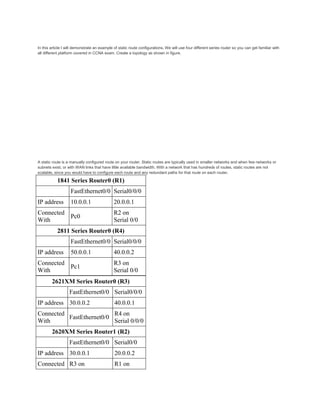
In this article I will demonstrate an example of static route configurations. We will use four different series router so you can get familiar with
all different platform covered in CCNA exam. Create a topology as shown in figure.
A static route is a manually configured route on your router. Static routes are typically used in smaller networks and when few networks or
subnets exist, or with WAN links that have little available bandwidth. With a network that has hundreds of routes, static routes are not
scalable, since you would have to configure each route and any redundant paths for that route on each router.
1841 Series Router0 (R1)
FastEthernet0/0 Serial0/0/0
IP address 10.0.0.1 20.0.0.1
Connected
With
Pc0
R2 on
Serial 0/0
2811 Series Router0 (R4)
FastEthernet0/0 Serial0/0/0
IP address 50.0.0.1 40.0.0.2
Connected
With
Pc1
R3 on
Serial 0/0
2621XM Series Router0 (R3)
FastEthernet0/0 Serial0/0/0
IP address 30.0.0.2 40.0.0.1
Connected
With
FastEthernet0/0
R4 on
Serial 0/0/0
2620XM Series Router1 (R2)
FastEthernet0/0 Serial0/0
IP address 30.0.0.1 20.0.0.2
Connected R3 on R1 on
With FastEthernet0/0 Serial 0/0/0
PC-PT PC0
FastEthernet0
Default
Gateway
IP address 10.0.0.2 10.0.0.1
Connected
With
R1 on
FastEthernet0/0
PC-PT PC1
FastEthernet0
Default
Gateway
IP address 50.0.0.2 50.0.0.1
Connected
With
R4 on
FastEthernet0/0
To configure any router double click on it and select CLI.To configure this topology use this step by step guide.
(1841Router0) Hostname R1
To configure and enable static routing on R1 follow these commands exactly.
Router>enable
Router#configure terminal
Enter configuration commands, one per line. End with CNTL/Z.
Router(config)#hostname R1
R1(config)#interface fastethernet 0/0
R1(config-if)#ip address 10.0.0.1 255.0.0.0
R1(config-if)#no shutdown
%LINK-5-CHANGED: Interface FastEthernet0/0, changed state to up
%LINEPROTO-5-UPDOWN: Line protocol on Interface FastEthernet0/0, changed
state to up
R1(config-if)#exit
R1(config)#interface serial 0/0/0
R1(config-if)#ip address 20.0.0.1 255.0.0.0
R1(config-if)#clock rate 64000
R1(config-if)#bandwidth 64
R1(config-if)#no shutdown
%LINK-5-CHANGED: Interface Serial0/0/0, changed state to down
R1(config-if)#exit
%LINK-5-CHANGED: Interface Serial0/0/0, changed state to up
R1(config)#ip route 30.0.0.0 255.0.0.0 20.0.0.2
R1(config)#ip route 40.0.0.0 255.0.0.0 20.0.0.2
R1(config)#ip route 50.0.0.0 255.0.0.0 20.0.0.2
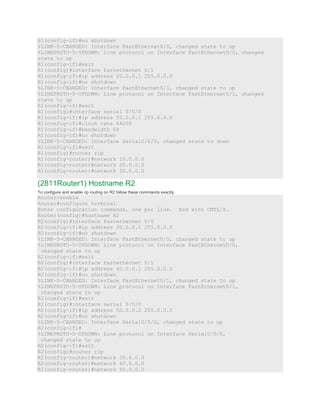
(2620XM-Router1) Hostname R2
To configure and enable static routing on R2 follow these commands exactly.
Router>enable
Router#configure terminal
Enter configuration commands, one per line. End with CNTL/Z.
Router(config)#hostname R2
R2(config)#interface serial 0/0
R2(config-if)#ip address 20.0.0.2 255.0.0.0
R2(config-if)#no shutdown
%LINK-5-CHANGED: Interface Serial0/0, changed state to up
%LINEPROTO-5-UPDOWN: Line protocol on Interface Serial0/0, changed state to
up
R2(config-if)#exit
R2(config)#interface fastethernet 0/0
R2(config-if)#ip address 30.0.0.1 255.0.0.0
R2(config-if)#no shutdown
%LINK-5-CHANGED: Interface FastEthernet0/0, changed state to up
R2(config-if)#exit
%LINEPROTO-5-UPDOWN: Line protocol on Interface FastEthernet0/0, changed
state to up
R2(config)#ip route 10.0.0.0 255.0.0.0 20.0.0.1
R2(config)#ip route 40.0.0.0 255.0.0.0 30.0.0.2
R2(config)#ip route 50.0.0.0 255.0.0.0 30.0.0.2
(2620XM-Router2)Hostname R3
To configure and enable static routing on R3 follow these commands exactly.
Router>enable
Router#configure terminal
Enter configuration commands, one per line. End with CNTL/Z.
Router(config)#hostname R3
R3(config)#interface fastethernet 0/0
R3(config-if)#ip address 30.0.0.2 255.0.0.0
R3(config-if)#no shutdown
%LINK-5-CHANGED: Interface FastEthernet0/0, changed state to up
%LINEPROTO-5-UPDOWN: Line protocol on Interface FastEthernet0/0, changed
state to up
R3(config-if)#interface serial 0/0
R3(config-if)#ip address 40.0.0.1 255.0.0.0
R3(config-if)#clock rate 64000
R3(config-if)#bandwidth 64
R3(config-if)#no shutdown
%LINK-5-CHANGED: Interface Serial0/0, changed state to down
R3(config-if)#exit
%LINK-5-CHANGED: Interface Serial0/0, changed state to up
%LINEPROTO-5-UPDOWN: Line protocol on Interface Serial0/0, changed state to
up
R3(config)#ip route 10.0.0.0 255.0.0.0 30.0.0.1
R3(config)#ip route 20.0.0.0 255.0.0.0 30.0.0.1
R3(config)#ip route 50.0.0.0 255.0.0.0 40.0.0.2
(2811Router3) Hostname R4
To configure and enable static routing on R4 follow these commands exactly.
Router>enable
Router#configure terminal
Enter configuration commands, one per line. End with CNTL/Z.
Router(config)#interface serial 0/0/0
Router(config-if)#ip address 40.0.0.2 255.0.0.0
Router(config-if)#no shutdown
%LINK-5-CHANGED: Interface Serial0/0/0, changed state to up
%LINEPROTO-5-UPDOWN: Line protocol on Interface Serial0/0/0, changed state to
up
Router(config-if)#exit
Router(config)#interface fastethernet 0/0
Router(config-if)#ip address 50.0.0.1 255.0.0.0
Router(config-if)#no shutdown
%LINK-5-CHANGED: Interface FastEthernet0/0, changed state to up
%LINEPROTO-5-UPDOWN: Line protocol on Interface FastEthernet0/0, changed
state to up
Router(config-if)#exit
Router(config)#ip route 10.0.0.0 255.0.0.0 40.0.0.1
Router(config)#ip route 20.0.0.0 255.0.0.0 40.0.0.1
Router(config)#ip route 30.0.0.0 255.0.0.0 40.0.0.1
PC-1
PC>ipconfig
IP Address......................: 10.0.0.2
Subnet Mask.....................: 255.0.0.0
Default Gateway.................: 10.0.0.1
PC>ping 50.0.0.2
Pinging 50.0.0.2 with 32 bytes of data:
Reply from 50.0.0.2: bytes=32 time=156ms TTL=124
Reply from 50.0.0.2: bytes=32 time=127ms TTL=124
Reply from 50.0.0.2: bytes=32 time=156ms TTL=124
Reply from 50.0.0.2: bytes=32 time=140ms TTL=124
Ping statistics for 50.0.0.2:
Packets: Sent = 4, Received = 4, Lost = 0 (0% loss),
Approximate round trip times in milli-seconds:
Minimum = 127ms, Maximum = 156ms, Average = 144ms
PC>
PC-2
PC>ipconfig
IP Address......................: 50.0.0.2
Subnet Mask.....................: 255.0.0.0
Default Gateway.................: 50.0.0.1
PC>ping 10.0.0.2
Pinging 10.0.0.2 with 32 bytes of data:
Reply from 10.0.0.2: bytes=32 time=140ms TTL=124
Reply from 10.0.0.2: bytes=32 time=141ms TTL=124
Reply from 10.0.0.2: bytes=32 time=157ms TTL=124
Reply from 10.0.0.2: bytes=32 time=156ms TTL=124
Ping statistics for 10.0.0.2:
Packets: Sent = 4, Received = 4, Lost = 0 (0% loss),
Approximate round trip times in milli-seconds:
Minimum = 140ms, Maximum = 157ms, Average = 148ms
We will use two router and four subnet. Create a topology as shown in figure on packet tracer.
Router FastEthernet 0/0 FastEthernet 0/1 Serial 0/0/0
R1 10.0.0.1 20.0.0.1 50.0.0.1
R2 30.0.0.1 40.0.0.1 50.0.0.2
PC IP Address PC IP Address
PC0 20.0.0.2 PC1 20.0.0.3
PC2 40.0.0.2 PC3 40.0.0.3
PC4 10.0.0.2 PC5 10.0.0.3
PC6 30.0.0.2 PC7 30.0.0.3
Assign ip address to PC. Select pc and double click on it. select ip configurations from desktop tab and set ip address given as in
table.
To configure router double click on it and select CLI.To configure this topology use this step by step guide.
(1841Router0) Hostname R1
To configure and enable rip routing on R1 follow these commands exactly.
Router>enable
Router#configure terminal
Enter configuration commands, one per line. End with CNTL/Z.
Router(config)#hostname R1
R1(config)#interface fastethernet 0/0
R1(config-if)#ip address 10.0.0.1 255.0.0.0
R1(config-if)#no shutdown
%LINK-5-CHANGED: Interface FastEthernet0/0, changed state to up
%LINEPROTO-5-UPDOWN: Line protocol on Interface FastEthernet0/0, changed
state to up
R1(config-if)#exit
R1(config)#interface fastethernet 0/1
R1(config-if)#ip address 20.0.0.1 255.0.0.0
R1(config-if)#no shutdown
%LINK-5-CHANGED: Interface FastEthernet0/1, changed state to up
%LINEPROTO-5-UPDOWN: Line protocol on Interface FastEthernet0/1, changed
state to up
R1(config-if)#exit
R1(config)#interface serial 0/0/0
R1(config-if)#ip address 50.0.0.1 255.0.0.0
R1(config-if)#clock rate 64000
R1(config-if)#bandwidth 64
R1(config-if)#no shutdown
%LINK-5-CHANGED: Interface Serial0/0/0, changed state to down
R1(config-if)#exit
R1(config)#router rip
R1(config-router)#network 10.0.0.0
R1(config-router)#network 20.0.0.0
R1(config-router)#network 50.0.0.0
(2811Router1) Hostname R2
To configure and enable rip routing on R2 follow these commands exactly.
Router>enable
Router#configure terminal
Enter configuration commands, one per line. End with CNTL/Z.
Router(config)#hostname R2
R2(config)#interface fastethernet 0/0
R2(config-if)#ip address 30.0.0.1 255.0.0.0
R2(config-if)#no shutdown
%LINK-5-CHANGED: Interface FastEthernet0/0, changed state to up
%LINEPROTO-5-UPDOWN: Line protocol on Interface FastEthernet0/0,
changed state to up
R2(config-if)#exit
R2(config)#interface fastethernet 0/1
R2(config-if)#ip address 40.0.0.1 255.0.0.0
R2(config-if)#no shutdown
%LINK-5-CHANGED: Interface FastEthernet0/1, changed state to up
%LINEPROTO-5-UPDOWN: Line protocol on Interface FastEthernet0/1,
changed state to up
R2(config-if)#exit
R2(config)#interface serial 0/0/0
R2(config-if)#ip address 50.0.0.2 255.0.0.0
R2(config-if)#no shutdown
%LINK-5-CHANGED: Interface Serial0/0/0, changed state to up
R2(config-if)#
%LINEPROTO-5-UPDOWN: Line protocol on Interface Serial0/0/0,
changed state to up
R2(config-if)#exit
R2(config)#router rip
R2(config-router)#network 30.0.0.0
R2(config-router)#network 40.0.0.0
R2(config-router)#network 50.0.0.0
R2(config-router)#exit
Network
28 March 2011
12 CCNA Network Devices Behavior (Network
Network Devices Behavior (Network
Network
Network devices
Hub
Hub
Hub device
device data communicate
security half duplex
device duplex ).
CCNA device physical
layer unmanageable
device , Hub settings
Hub Hub data
transmit data Hub device
Hub attach) device
collision domain Hub only one broadcast
domain collision domain
, Hub
data packet Hub data
packet Hub port device
broadcast
only one broadcast domain
data device
network Bandwidth ,
network
collision domain broadcast
domain collision domain broadcast
domain collision domain
broadcast domain Hub
, Hub data communicate
collision ( collision
Hub device
data send
Hub collision
Hub
Hub
Repeater multi port device
exam CSMA/CD
(Carrier Sense Multiple Access with Collision
Detection) access method Layer 2
Collision
Hub
Symbol
Switch
Switch security
Switch data transmit
full duplex device Collision
Switch data transmit
Switch port
dedicated) bandwidth
transmit data source
computer destination computer
Switch unicast multicast
device Switch broadcast
destination MAC address MAC address table
. manageable device ( configuration
Switch layer 2
device Switch Destination MAC address
MAC address table
, Switch MAC address table
source MAC address
A computer (MAC address 0260.8c01.1111) frame
C computer (MAC address 0260.8c01.2222 ) ,
frame A computer E0 port Switch
Switch buffer (
frame
source computer {A computer (MAC address
0260.8c01.1111)} MAC address Switch port
MAC address table
Switch MAC address table
Destination MAC address {C computer (MAC address
0260.8c01.2222 )} , Switch frame
port port frame
broadcast).
D computer C computer
frame , Switch
frame buffer source computer MAC
address ( 0260.8c01.4444) Switch port
MAC address table destination
MAC address MAC address table
frame port port frame
( MAC address
table address
E3: 0260.8c01.4444)
MAC address table MAC
address table data transmission
Unicast transmission Switch
Symbol Bridge
Router
Router network
broadcast Router network address
interfaces Routing table
Router network broadcast domain
Router packet
broadcast domain broadcast domain
Router layer 3
device CCNA
Router Router post
Router Symbol
device Network
CCNA exam
*****

1

  • 1.
    In this articleI will demonstrate an example of static route configurations. We will use four different series router so you can get familiar with all different platform covered in CCNA exam. Create a topology as shown in figure. A static route is a manually configured route on your router. Static routes are typically used in smaller networks and when few networks or subnets exist, or with WAN links that have little available bandwidth. With a network that has hundreds of routes, static routes are not scalable, since you would have to configure each route and any redundant paths for that route on each router. 1841 Series Router0 (R1) FastEthernet0/0 Serial0/0/0 IP address 10.0.0.1 20.0.0.1 Connected With Pc0 R2 on Serial 0/0 2811 Series Router0 (R4) FastEthernet0/0 Serial0/0/0 IP address 50.0.0.1 40.0.0.2 Connected With Pc1 R3 on Serial 0/0 2621XM Series Router0 (R3) FastEthernet0/0 Serial0/0/0 IP address 30.0.0.2 40.0.0.1 Connected With FastEthernet0/0 R4 on Serial 0/0/0 2620XM Series Router1 (R2) FastEthernet0/0 Serial0/0 IP address 30.0.0.1 20.0.0.2 Connected R3 on R1 on
  • 2.
    With FastEthernet0/0 Serial0/0/0 PC-PT PC0 FastEthernet0 Default Gateway IP address 10.0.0.2 10.0.0.1 Connected With R1 on FastEthernet0/0 PC-PT PC1 FastEthernet0 Default Gateway IP address 50.0.0.2 50.0.0.1 Connected With R4 on FastEthernet0/0 To configure any router double click on it and select CLI.To configure this topology use this step by step guide. (1841Router0) Hostname R1 To configure and enable static routing on R1 follow these commands exactly. Router>enable Router#configure terminal Enter configuration commands, one per line. End with CNTL/Z. Router(config)#hostname R1 R1(config)#interface fastethernet 0/0 R1(config-if)#ip address 10.0.0.1 255.0.0.0 R1(config-if)#no shutdown %LINK-5-CHANGED: Interface FastEthernet0/0, changed state to up %LINEPROTO-5-UPDOWN: Line protocol on Interface FastEthernet0/0, changed state to up R1(config-if)#exit R1(config)#interface serial 0/0/0 R1(config-if)#ip address 20.0.0.1 255.0.0.0 R1(config-if)#clock rate 64000 R1(config-if)#bandwidth 64 R1(config-if)#no shutdown %LINK-5-CHANGED: Interface Serial0/0/0, changed state to down R1(config-if)#exit %LINK-5-CHANGED: Interface Serial0/0/0, changed state to up R1(config)#ip route 30.0.0.0 255.0.0.0 20.0.0.2 R1(config)#ip route 40.0.0.0 255.0.0.0 20.0.0.2 R1(config)#ip route 50.0.0.0 255.0.0.0 20.0.0.2 (2620XM-Router1) Hostname R2 To configure and enable static routing on R2 follow these commands exactly. Router>enable Router#configure terminal Enter configuration commands, one per line. End with CNTL/Z. Router(config)#hostname R2 R2(config)#interface serial 0/0 R2(config-if)#ip address 20.0.0.2 255.0.0.0
  • 3.
    R2(config-if)#no shutdown %LINK-5-CHANGED: InterfaceSerial0/0, changed state to up %LINEPROTO-5-UPDOWN: Line protocol on Interface Serial0/0, changed state to up R2(config-if)#exit R2(config)#interface fastethernet 0/0 R2(config-if)#ip address 30.0.0.1 255.0.0.0 R2(config-if)#no shutdown %LINK-5-CHANGED: Interface FastEthernet0/0, changed state to up R2(config-if)#exit %LINEPROTO-5-UPDOWN: Line protocol on Interface FastEthernet0/0, changed state to up R2(config)#ip route 10.0.0.0 255.0.0.0 20.0.0.1 R2(config)#ip route 40.0.0.0 255.0.0.0 30.0.0.2 R2(config)#ip route 50.0.0.0 255.0.0.0 30.0.0.2 (2620XM-Router2)Hostname R3 To configure and enable static routing on R3 follow these commands exactly. Router>enable Router#configure terminal Enter configuration commands, one per line. End with CNTL/Z. Router(config)#hostname R3 R3(config)#interface fastethernet 0/0 R3(config-if)#ip address 30.0.0.2 255.0.0.0 R3(config-if)#no shutdown %LINK-5-CHANGED: Interface FastEthernet0/0, changed state to up %LINEPROTO-5-UPDOWN: Line protocol on Interface FastEthernet0/0, changed state to up R3(config-if)#interface serial 0/0 R3(config-if)#ip address 40.0.0.1 255.0.0.0 R3(config-if)#clock rate 64000 R3(config-if)#bandwidth 64 R3(config-if)#no shutdown %LINK-5-CHANGED: Interface Serial0/0, changed state to down R3(config-if)#exit %LINK-5-CHANGED: Interface Serial0/0, changed state to up %LINEPROTO-5-UPDOWN: Line protocol on Interface Serial0/0, changed state to up R3(config)#ip route 10.0.0.0 255.0.0.0 30.0.0.1 R3(config)#ip route 20.0.0.0 255.0.0.0 30.0.0.1 R3(config)#ip route 50.0.0.0 255.0.0.0 40.0.0.2 (2811Router3) Hostname R4 To configure and enable static routing on R4 follow these commands exactly. Router>enable Router#configure terminal Enter configuration commands, one per line. End with CNTL/Z. Router(config)#interface serial 0/0/0 Router(config-if)#ip address 40.0.0.2 255.0.0.0 Router(config-if)#no shutdown %LINK-5-CHANGED: Interface Serial0/0/0, changed state to up %LINEPROTO-5-UPDOWN: Line protocol on Interface Serial0/0/0, changed state to up Router(config-if)#exit Router(config)#interface fastethernet 0/0 Router(config-if)#ip address 50.0.0.1 255.0.0.0
  • 4.
    Router(config-if)#no shutdown %LINK-5-CHANGED: InterfaceFastEthernet0/0, changed state to up %LINEPROTO-5-UPDOWN: Line protocol on Interface FastEthernet0/0, changed state to up Router(config-if)#exit Router(config)#ip route 10.0.0.0 255.0.0.0 40.0.0.1 Router(config)#ip route 20.0.0.0 255.0.0.0 40.0.0.1 Router(config)#ip route 30.0.0.0 255.0.0.0 40.0.0.1 PC-1 PC>ipconfig IP Address......................: 10.0.0.2 Subnet Mask.....................: 255.0.0.0 Default Gateway.................: 10.0.0.1 PC>ping 50.0.0.2 Pinging 50.0.0.2 with 32 bytes of data: Reply from 50.0.0.2: bytes=32 time=156ms TTL=124 Reply from 50.0.0.2: bytes=32 time=127ms TTL=124 Reply from 50.0.0.2: bytes=32 time=156ms TTL=124 Reply from 50.0.0.2: bytes=32 time=140ms TTL=124 Ping statistics for 50.0.0.2: Packets: Sent = 4, Received = 4, Lost = 0 (0% loss), Approximate round trip times in milli-seconds: Minimum = 127ms, Maximum = 156ms, Average = 144ms PC> PC-2 PC>ipconfig IP Address......................: 50.0.0.2 Subnet Mask.....................: 255.0.0.0 Default Gateway.................: 50.0.0.1 PC>ping 10.0.0.2 Pinging 10.0.0.2 with 32 bytes of data: Reply from 10.0.0.2: bytes=32 time=140ms TTL=124 Reply from 10.0.0.2: bytes=32 time=141ms TTL=124 Reply from 10.0.0.2: bytes=32 time=157ms TTL=124 Reply from 10.0.0.2: bytes=32 time=156ms TTL=124 Ping statistics for 10.0.0.2: Packets: Sent = 4, Received = 4, Lost = 0 (0% loss), Approximate round trip times in milli-seconds: Minimum = 140ms, Maximum = 157ms, Average = 148ms
  • 7.
    We will usetwo router and four subnet. Create a topology as shown in figure on packet tracer. Router FastEthernet 0/0 FastEthernet 0/1 Serial 0/0/0 R1 10.0.0.1 20.0.0.1 50.0.0.1 R2 30.0.0.1 40.0.0.1 50.0.0.2 PC IP Address PC IP Address PC0 20.0.0.2 PC1 20.0.0.3 PC2 40.0.0.2 PC3 40.0.0.3 PC4 10.0.0.2 PC5 10.0.0.3 PC6 30.0.0.2 PC7 30.0.0.3 Assign ip address to PC. Select pc and double click on it. select ip configurations from desktop tab and set ip address given as in table. To configure router double click on it and select CLI.To configure this topology use this step by step guide. (1841Router0) Hostname R1 To configure and enable rip routing on R1 follow these commands exactly. Router>enable Router#configure terminal Enter configuration commands, one per line. End with CNTL/Z. Router(config)#hostname R1 R1(config)#interface fastethernet 0/0 R1(config-if)#ip address 10.0.0.1 255.0.0.0
  • 8.
    R1(config-if)#no shutdown %LINK-5-CHANGED: InterfaceFastEthernet0/0, changed state to up %LINEPROTO-5-UPDOWN: Line protocol on Interface FastEthernet0/0, changed state to up R1(config-if)#exit R1(config)#interface fastethernet 0/1 R1(config-if)#ip address 20.0.0.1 255.0.0.0 R1(config-if)#no shutdown %LINK-5-CHANGED: Interface FastEthernet0/1, changed state to up %LINEPROTO-5-UPDOWN: Line protocol on Interface FastEthernet0/1, changed state to up R1(config-if)#exit R1(config)#interface serial 0/0/0 R1(config-if)#ip address 50.0.0.1 255.0.0.0 R1(config-if)#clock rate 64000 R1(config-if)#bandwidth 64 R1(config-if)#no shutdown %LINK-5-CHANGED: Interface Serial0/0/0, changed state to down R1(config-if)#exit R1(config)#router rip R1(config-router)#network 10.0.0.0 R1(config-router)#network 20.0.0.0 R1(config-router)#network 50.0.0.0 (2811Router1) Hostname R2 To configure and enable rip routing on R2 follow these commands exactly. Router>enable Router#configure terminal Enter configuration commands, one per line. End with CNTL/Z. Router(config)#hostname R2 R2(config)#interface fastethernet 0/0 R2(config-if)#ip address 30.0.0.1 255.0.0.0 R2(config-if)#no shutdown %LINK-5-CHANGED: Interface FastEthernet0/0, changed state to up %LINEPROTO-5-UPDOWN: Line protocol on Interface FastEthernet0/0, changed state to up R2(config-if)#exit R2(config)#interface fastethernet 0/1 R2(config-if)#ip address 40.0.0.1 255.0.0.0 R2(config-if)#no shutdown %LINK-5-CHANGED: Interface FastEthernet0/1, changed state to up %LINEPROTO-5-UPDOWN: Line protocol on Interface FastEthernet0/1, changed state to up R2(config-if)#exit R2(config)#interface serial 0/0/0 R2(config-if)#ip address 50.0.0.2 255.0.0.0 R2(config-if)#no shutdown %LINK-5-CHANGED: Interface Serial0/0/0, changed state to up R2(config-if)# %LINEPROTO-5-UPDOWN: Line protocol on Interface Serial0/0/0, changed state to up R2(config-if)#exit R2(config)#router rip R2(config-router)#network 30.0.0.0 R2(config-router)#network 40.0.0.0 R2(config-router)#network 50.0.0.0
  • 9.
    R2(config-router)#exit Network 28 March 2011 12CCNA Network Devices Behavior (Network Network Devices Behavior (Network Network Network devices Hub
  • 10.
    Hub Hub device device datacommunicate security half duplex device duplex ). CCNA device physical layer unmanageable device , Hub settings Hub Hub data transmit data Hub device Hub attach) device collision domain Hub only one broadcast domain collision domain , Hub data packet Hub data packet Hub port device broadcast only one broadcast domain data device network Bandwidth , network collision domain broadcast domain collision domain broadcast domain collision domain broadcast domain Hub , Hub data communicate collision ( collision Hub device data send
  • 11.
    Hub collision Hub Hub Repeater multiport device exam CSMA/CD (Carrier Sense Multiple Access with Collision Detection) access method Layer 2 Collision Hub Symbol Switch
  • 12.
    Switch security Switch datatransmit full duplex device Collision Switch data transmit Switch port dedicated) bandwidth transmit data source computer destination computer Switch unicast multicast device Switch broadcast destination MAC address MAC address table . manageable device ( configuration Switch layer 2 device Switch Destination MAC address MAC address table , Switch MAC address table source MAC address A computer (MAC address 0260.8c01.1111) frame C computer (MAC address 0260.8c01.2222 ) ,
  • 13.
    frame A computerE0 port Switch Switch buffer ( frame source computer {A computer (MAC address 0260.8c01.1111)} MAC address Switch port MAC address table Switch MAC address table Destination MAC address {C computer (MAC address 0260.8c01.2222 )} , Switch frame port port frame broadcast). D computer C computer frame , Switch frame buffer source computer MAC address ( 0260.8c01.4444) Switch port MAC address table destination MAC address MAC address table frame port port frame ( MAC address table address E3: 0260.8c01.4444) MAC address table MAC address table data transmission
  • 14.
    Unicast transmission Switch SymbolBridge Router Router network broadcast Router network address interfaces Routing table Router network broadcast domain Router packet broadcast domain broadcast domain Router layer 3 device CCNA Router Router post Router Symbol device Network CCNA exam
  • 15.