TRAINER: SAGAR | www.NetworkJourney.com | www.youtube.com/c/NetworkJourney | CCNP Enterprise
CCNP ENTERPRISE 2020 LAB WORKBOOK|| TRAINER: SAGAR || WWW.YOUTUBE.COM/C/NETWORKJOURNEY
1April 24, 2020
CCNP ENTERPRISE 2020
ENCOR 350-401
ENARSI 300-410
WORKBOOK
For enrolling in Online “CCNP Enterprise 2020” batch
• Whatsapp me: https://wa.me/919739521088 (Mr. Sagar Dhawan, Core Trainer)
Whatsapp me: https://wa.me/919049852904 (Mr. Abdul Azeem, Lab Support)
• Email me: networkjourneydotcom@gmail.com
• Class#1: https://youtu.be/SKHYLoXnggE
• Class# 2: https://youtu.be/TzJHkwt5EqM
TRAINER: SAGAR | www.NetworkJourney.com | www.youtube.com/c/NetworkJourney | CCNP Enterprise
CCNP ENTERPRISE 2020 LAB WORKBOOK|| TRAINER: SAGAR || WWW.YOUTUBE.COM/C/NETWORKJOURNEY
2April 24, 2020
Table of Contents
Device Initial Configuration -Switches 7
CCNP LAB TOPOLOGY {FULL} 8
LAB #1 CREATE - VLAN, MANAGEMENT INTERFACE, TELNET & SSH 9
Configuration: 10
Verifications: 11
LAB #2 CONFIGURE - TRUNK and VTP version 2 13
Configuration: 13
Verifications: 16
LAB #3 CONFIGURE – VTP version 3 19
Configuration: 20
VERIFICATIONS: 21
LAB #4 CONFIGURE – STP, MANIPULATE PRIMARY ROOT SWITCH, PATH COST 23
CONFIGURATION FOR TASK#1: 24
CONFIGURATION FOR TASK#2: 26
Verifications: 29
LAB #5 CONFIGURE – RSTP, PORTFAST, BPDUGUARD, BPDUFILTER, ROOTGUARD,
LOOPGUARD 30
CONFIGURATION FOR TASK#1: 31
Enable RSTP on all switches: 31
Manipulating Root Bridge Switches: 33
CONFIGURATION FOR TASK#2: To configure & verify Portfast 35
TASK#2: To configure & verify BPDUGuard 38
TASK#3: To configure & verify BPDUFilter 41
TASK#4: To configure & verify RootGuard 44
LAB #6 CONFIGURE – MSTP 46
CONFIGURATION TASK#1,2 & 3: To configure & verify MST Region 1, Region 2 and
Interoperability 47
VERIFICATION TASK#1: To configure & verify MST Region 1 47
CONFIGURATION TASK#4: To manipulate “instance priority” in SCOTSW01, SCOTSW02 52
VERIFICATION TASK#4: To manipulate “instance priority” in SCOTSW01, SCOTSW02 52
TRAINER: SAGAR | www.NetworkJourney.com | www.youtube.com/c/NetworkJourney | CCNP Enterprise
CCNP ENTERPRISE 2020 LAB WORKBOOK|| TRAINER: SAGAR || WWW.YOUTUBE.COM/C/NETWORKJOURNEY
3April 24, 2020
CONFIGURATION TASK#5: To manipulate “port cost” between SCOTSW02_Gi0/2-3 <->
SCOTSW04_Gi0/2-3 53
CONFIGURATIONS: 53
VERIFICATION TASK#5 53
CONFIGURATION TASK#6: To manipulate “port priority” between SCOTSW02_Gi0/2-3 <->
SCOTSW04_Gi0/2-3 54
VERIFICATION TASK#6 54
CONFIGURATION TASK#7: To manipulate “hello timer” in MST switch SCOTSW02 54
VERIFICATION TASK#7: 54
CONFIGURATION TASK#8: To manipulate “forward timer” in MST switch SCOTSW02 54
VERIFICATION TASK#8: 55
CONFIGURATION TASK#9: To manipulate “max age timer” in MST switch SCOTSW02 55
VERIFICATION TASK#9: 55
IMPORTANT FACT!!! 55
LAB #7 CONFIGURE – DTP (DYNAMIC TRUNKING PROTOCOL) 56
CONFIGURATION TASK#1: Configure “DTP desirable-desirable” between SCOTSW01 <->
SCOTSW02 57
VERIFICATION TASK#1: 57
CONFIGURATION TASK#2: Configure “DTP auto-desirable” between SCOTSW01 <-> SCOTSW0358
VERIFICATION TASK#2: 58
CONFIGURATION TASK#3: Configure “DTP auto-auto” between SCOTSW03 <-> SCOTSW04 58
CONFIGURATION TASK#4: Configure DTP between SCOTSW02_Trunk Dot1Q <->
SCOTSW04_auto 59
CONFIGURATION TASK#5: Configure DTP between SCOTSW02_Trunk Dot1Q <->
SCOTSW04_desirable 60
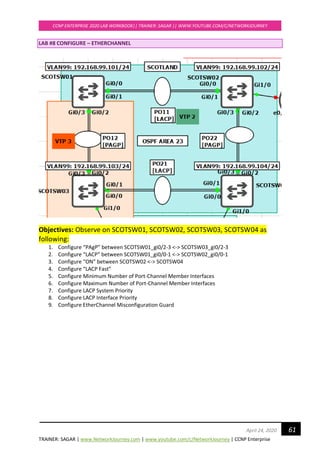
LAB #8 CONFIGURE – ETHERCHANNEL 61
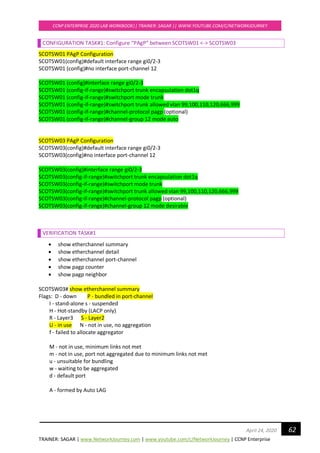
CONFIGURATION TASK#1: Configure “PAgP” between SCOTSW01 <-> SCOTSW03 62
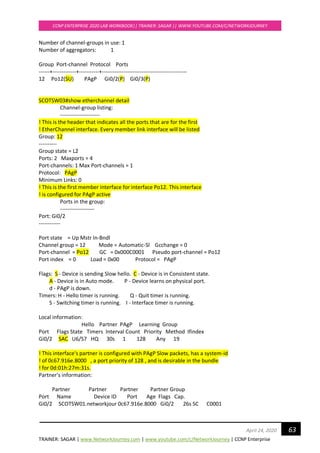
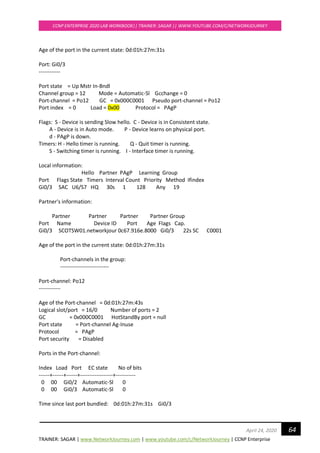
VERIFICATION TASK#1 62
CONFIGURATION TASK#2: “LACP” between SCOTSW01 <-> SCOTSW02 66
VERIFICATION TASK#2 66
CONFIGURATION TASK#3: “ON” between SCOTSW02 <-> SCOTSW04 70
VERIFICATION TASK#3 70
Advanced LACP Configuration Options 73
TRAINER: SAGAR | www.NetworkJourney.com | www.youtube.com/c/NetworkJourney | CCNP Enterprise
CCNP ENTERPRISE 2020 LAB WORKBOOK|| TRAINER: SAGAR || WWW.YOUTUBE.COM/C/NETWORKJOURNEY
4April 24, 2020
CONFIGURATION TASK#4: Configure “LACP Fast” 73
CONFIGURATION TASK#5: Minimum Number of Port-Channel Member Interfaces 74
CONFIGURATION TASK#6: Maximum Number of Port-Channel Member Interfaces 75
CONFIGURATION TASK#7: LACP System Priority 76
CONFIGURATION TASK#8: LACP Interface Priority 76
CONFIGURATION TASK#9: EtherChannel Misconfiguration Guard 77
LAB #9 CONFIGURE – HSRPv1 78
CONFIGURATION TASK#1: Configure “Initial config” on MOSCOWR19, MOSCOWR20,
MOSCOWSW01, MOSCOWSW02, PC10, PC19, PC11, PC12 79
VERIFICATIONS TASK#1: Configure “Initial config” on MOSCOWR19, MOSCOWR20,
MOSCOWSW01, MOSCOWSW02 81
CONFIGURATION TASK #2: Configure “HSRPv1” for “Vlan 1”, observe the behaviour. 84
VERIFICATION TASK #2: 84
CONFIGURATION TASK #3: Configure ”Priority 110” on MOSCOWR20 86
CONFIGURATION TASK #4: Configure “Load Sharing”. Vlan1 Active on MOSCOWR19 and Vlan40
Active on MOSCOWR20 86
CONFIGURATION TASK #5: Object-tracking (WAN side facing) 87
VERIFICATION TASK #5: 88
LAB #10 CONFIGURE – HSRPv2 90
Task#2 Configure “HSRPv2” for only Ethernet0/1.1 (Note: HSRPv1 still running on
Ethernet0/1.40) 91
VERIFICATION TASK #2: 91
VERIFICATION TASK #3: Validate Packet structure using Wireshark for HSRPv2 92
Task#4 Configure “HSRPv2” for Ethernet0/1.40 as well 93
Verification Task#4 Configure “HSRPv2” for Ethernet0/1.40 as well 93
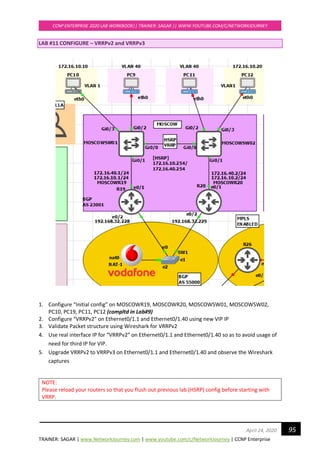
LAB #11 CONFIGURE – VRRPv2 and VRRPv3 95
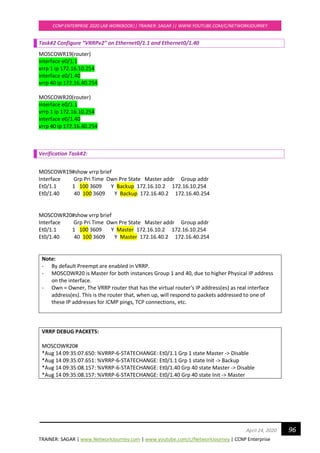
Task#2 Configure “VRRPv2” on Ethernet0/1.1 and Ethernet0/1.40 96
Verification Task#2: 96
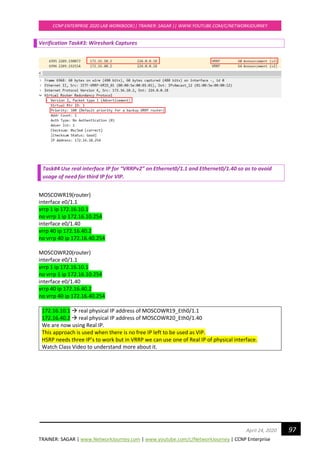
Verification Task#3: Wireshark Captures 97
Task#4 Use real interface IP for “VRRPv2” on Ethernet0/1.1 and Ethernet0/1.40 so as to avoid
usage of need for third IP for VIP. 97
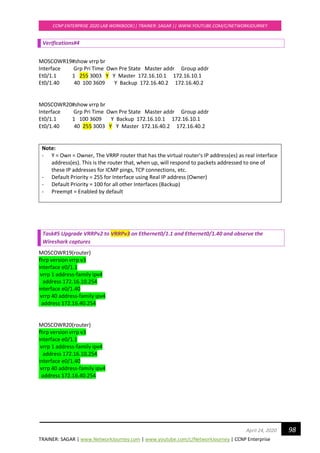
Verifications#4 98
TRAINER: SAGAR | www.NetworkJourney.com | www.youtube.com/c/NetworkJourney | CCNP Enterprise
CCNP ENTERPRISE 2020 LAB WORKBOOK|| TRAINER: SAGAR || WWW.YOUTUBE.COM/C/NETWORKJOURNEY
5April 24, 2020
Task#5 Upgrade VRRPv2 to VRRPv3 on Ethernet0/1.1 and Ethernet0/1.40 and observe the
Wireshark captures 98
Verifications#5 99
LAB #12 CONFIGURE – GLBP 101
Task#2 Configure “GLBP” on Ethernet0/1.1 and Ethernet0/1.40 using new VIP IP (172.16.10.254)
102
Verification Task#2 102
Task#3 Change AVP role by changing Priority and Prompt configurations 104
Verification Task#3 104
Task#4 Configure MD5 Authentication for Group 1 105
Verification Task#4 105
Task#5 Configure Tracking (object) on MOSCOWR20 Eth0/2 107
Verification Task#5 108
Task#6 Change Load-balancing Method to “Weighted” 109
Verification Task#6 109
LAB #14 CONFIGURE – OSPFv2 144
CONFIGURATION TASK #1: Initial Configs 145
CONFIGURATION TASK #2: Configure OSPF (single-area) 146
VERIFICATION TASKS#2 147
CONFIGURATION TASK #3: MANIPULATE DR/BDR ELECTION 148
VERIFICATION TASK #3: 149
CONFIGURATION TASK #4: MANIPULATE ROUTER-ID ELECTION 149
CONFIGURATION TASK #5: MANIPULATE HELLO/HOLD TIMER 149
CONFIGURATION TASK #6: CHANGE AREA ID 150
CONFIGURATION TASK #7: OSPF AUTHENTICATIION 150
CONFIGURATION TASK #8: OSPF AREA TYPE 151
CONFIGURATION TASK #9: OSPF MTU MISMATCH 151
VERIFICATION TASK #9: OSPF MTU MISMATCH 151
CONFIGURATION TASK #10: VERIFY OSPF MUTLICAST ADDRESS 224.0.0.6 and 224.0.0.5 152
VERIFICATIONS TASK#10 152
LAB #15 CONFIGURE – OSPFv2 ADVANCE TOPICS 154
CONFIGURATION TASK #1: INITIAL CONFIGS 155
TRAINER: SAGAR | www.NetworkJourney.com | www.youtube.com/c/NetworkJourney | CCNP Enterprise
CCNP ENTERPRISE 2020 LAB WORKBOOK|| TRAINER: SAGAR || WWW.YOUTUBE.COM/C/NETWORKJOURNEY
6April 24, 2020
CONFIGURATION TASK #2: CONFIGURE OSPF (Multi-area) VIA “INTERFACE” METHOD 157
VERIFICATION TASK #2: Error! Bookmark not defined.
TRAINER: SAGAR | www.NetworkJourney.com | www.youtube.com/c/NetworkJourney | CCNP Enterprise
CCNP ENTERPRISE 2020 LAB WORKBOOK|| TRAINER: SAGAR || WWW.YOUTUBE.COM/C/NETWORKJOURNEY
7April 24, 2020
Device Initial Configuration -Switches
To make switches usable for new/next labs.
If incase there are vlans or configs already present in the switches, clear all the configurations to
have brand new switch for your new/next lab.
Switch#erase /all nvram:
Erasing the nvram filesystem will remove all files! Continue? [confirm]
[OK]
Erase of nvram: complete
Switch#
Switch#reload
Proceed with reload? [confirm]
This will clear all the previous configs on the switch.
TRAINER: SAGAR | www.NetworkJourney.com | www.youtube.com/c/NetworkJourney | CCNP Enterprise
CCNP ENTERPRISE 2020 LAB WORKBOOK|| TRAINER: SAGAR || WWW.YOUTUBE.COM/C/NETWORKJOURNEY
8April 24, 2020
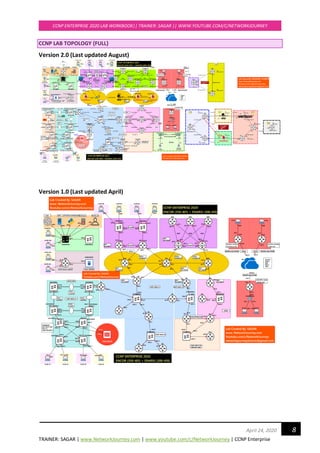
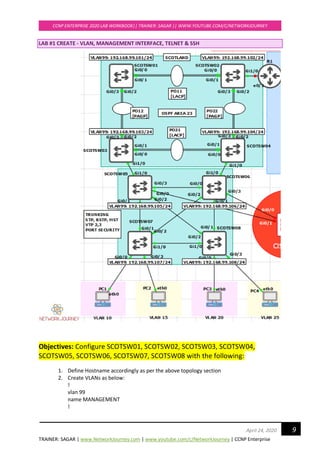
CCNP LAB TOPOLOGY {FULL}
Version 2.0 (Last updated August)
Version 1.0 (Last updated April)
TRAINER: SAGAR | www.NetworkJourney.com | www.youtube.com/c/NetworkJourney | CCNP Enterprise
CCNP ENTERPRISE 2020 LAB WORKBOOK|| TRAINER: SAGAR || WWW.YOUTUBE.COM/C/NETWORKJOURNEY
9April 24, 2020
LAB #1 CREATE - VLAN, MANAGEMENT INTERFACE, TELNET & SSH
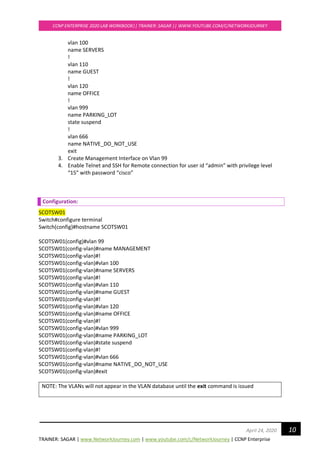
Objectives: Configure SCOTSW01, SCOTSW02, SCOTSW03, SCOTSW04,
SCOTSW05, SCOTSW06, SCOTSW07, SCOTSW08 with the following:
1. Define Hostname accordingly as per the above topology section
2. Create VLANs as below:
!
vlan 99
name MANAGEMENT
!
TRAINER: SAGAR | www.NetworkJourney.com | www.youtube.com/c/NetworkJourney | CCNP Enterprise
CCNP ENTERPRISE 2020 LAB WORKBOOK|| TRAINER: SAGAR || WWW.YOUTUBE.COM/C/NETWORKJOURNEY
10April 24, 2020
vlan 100
name SERVERS
!
vlan 110
name GUEST
!
vlan 120
name OFFICE
!
vlan 999
name PARKING_LOT
state suspend
!
vlan 666
name NATIVE_DO_NOT_USE
exit
3. Create Management Interface on Vlan 99
4. Enable Telnet and SSH for Remote connection for user id “admin” with privilege level
“15” with password “cisco”
Configuration:
SCOTSW01
Switch#configure terminal
Switch(config)#hostname SCOTSW01
SCOTSW01(config)#vlan 99
SCOTSW01(config-vlan)#name MANAGEMENT
SCOTSW01(config-vlan)#!
SCOTSW01(config-vlan)#vlan 100
SCOTSW01(config-vlan)#name SERVERS
SCOTSW01(config-vlan)#!
SCOTSW01(config-vlan)#vlan 110
SCOTSW01(config-vlan)#name GUEST
SCOTSW01(config-vlan)#!
SCOTSW01(config-vlan)#vlan 120
SCOTSW01(config-vlan)#name OFFICE
SCOTSW01(config-vlan)#!
SCOTSW01(config-vlan)#vlan 999
SCOTSW01(config-vlan)#name PARKING_LOT
SCOTSW01(config-vlan)#state suspend
SCOTSW01(config-vlan)#!
SCOTSW01(config-vlan)#vlan 666
SCOTSW01(config-vlan)#name NATIVE_DO_NOT_USE
SCOTSW01(config-vlan)#exit
NOTE: The VLANs will not appear in the VLAN database until the exit command is issued
TRAINER: SAGAR | www.NetworkJourney.com | www.youtube.com/c/NetworkJourney | CCNP Enterprise
CCNP ENTERPRISE 2020 LAB WORKBOOK|| TRAINER: SAGAR || WWW.YOUTUBE.COM/C/NETWORKJOURNEY
11April 24, 2020
To globally suspend a VLAN, use the state suspend command in the VLAN configuration mode.
This state is propagated by VTP to all other switches in the VTP domain if VTP is in use.
To locally shut down a VLAN, use the shutdown command in the VLAN configuration mode. This
setting is not propagated through VTP
SCOTSW01(config)#interface vlan 99
SCOTSW01(config-if)#ip address 192.168.99.101 255.255.255.0
SCOTSW01(config-if)#no shutdown
SCOTSW01(config-if)#exit
NOTE: Interface Vlan 99 will be initially Down as the Vlan 99 (broadcast) is not mapped with any
interface.
Wait for some time. We will make Trunking between inter-switch’s and allow Vlan 99
Create Telnet for remote connection:
SCOTSW01(config)#line vty 0 15
SCOTSW01(config-line)#login local
SCOTSW01(config-line)#transport input all
SCOTSW01(config)#username admin privilege 15 password cisco
NOTE: We are creating user “admin” with highest privilege of 15 level. Hence, no need to creating
“enable secret “ or “enable password “
Create SSH for remote connections:
SCOTSW01(config)#ip domain-name networkjourney.com
SCOTSW01(config)# crypto key zeroize
SCOTSW01(config)#crypto key generate rsa modulus 1024
Do not forget to configure above configurations on other Switches - SCOTSW02, SCOTSW03,
SCOTSW04, SCOTSW05, SCOTSW06, SCOTSW07, SCOTSW08 accordingly.
The Hostname, Management IP address will differ for each switch. So please refer the topology
for the right hostname and management IP address.
Verifications:
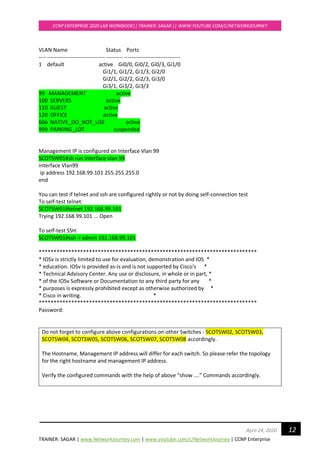
After configuring the VLANs, issue the show vtp status command and you will see that the all-
important configuration revision number has increased based on these changes to the VLAN
database. Note that the revision number you have when performing this lab may be different.
SCOTSW01#sh vtp status | i Revision
Configuration Revision : 6
SCOTSW01#show vlan brief
TRAINER: SAGAR | www.NetworkJourney.com | www.youtube.com/c/NetworkJourney | CCNP Enterprise
CCNP ENTERPRISE 2020 LAB WORKBOOK|| TRAINER: SAGAR || WWW.YOUTUBE.COM/C/NETWORKJOURNEY
12April 24, 2020
VLAN Name Status Ports
---- -------------------------------- --------- -------------------------------
1 default active Gi0/0, Gi0/2, Gi0/3, Gi1/0
Gi1/1, Gi1/2, Gi1/3, Gi2/0
Gi2/1, Gi2/2, Gi2/3, Gi3/0
Gi3/1, Gi3/2, Gi3/3
99 MANAGEMENT active
100 SERVERS active
110 GUEST active
120 OFFICE active
666 NATIVE_DO_NOT_USE active
999 PARKING_LOT suspended
Management IP is configured on Interface Vlan 99
SCOTSW01#sh run interface vlan 99
interface Vlan99
ip address 192.168.99.101 255.255.255.0
end
You can test if telnet and ssh are configured rightly or not by doing self-connection test
To self-test telnet:
SCOTSW01#telnet 192.168.99.101
Trying 192.168.99.101 ... Open
To self-test SSH:
SCOTSW01#ssh -l admin 192.168.99.101
**************************************************************************
* IOSv is strictly limited to use for evaluation, demonstration and IOS *
* education. IOSv is provided as-is and is not supported by Cisco's *
* Technical Advisory Center. Any use or disclosure, in whole or in part, *
* of the IOSv Software or Documentation to any third party for any *
* purposes is expressly prohibited except as otherwise authorized by *
* Cisco in writing. *
**************************************************************************
Password:
Do not forget to configure above configurations on other Switches - SCOTSW02, SCOTSW03,
SCOTSW04, SCOTSW05, SCOTSW06, SCOTSW07, SCOTSW08 accordingly.
The Hostname, Management IP address will differ for each switch. So please refer the topology
for the right hostname and management IP address.
Verify the configured commands with the help of above “show ….” Commands accordingly.
TRAINER: SAGAR | www.NetworkJourney.com | www.youtube.com/c/NetworkJourney | CCNP Enterprise
CCNP ENTERPRISE 2020 LAB WORKBOOK|| TRAINER: SAGAR || WWW.YOUTUBE.COM/C/NETWORKJOURNEY
13April 24, 2020
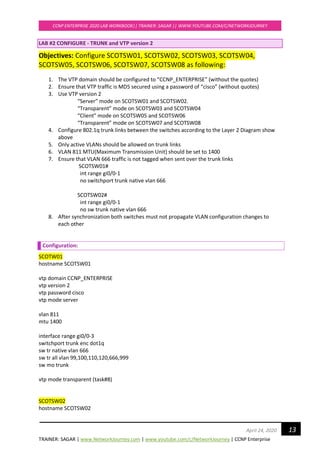
LAB #2 CONFIGURE - TRUNK and VTP version 2
Objectives: Configure SCOTSW01, SCOTSW02, SCOTSW03, SCOTSW04,
SCOTSW05, SCOTSW06, SCOTSW07, SCOTSW08 as following:
1. The VTP domain should be configured to “CCNP_ENTERPRISE” (without the quotes)
2. Ensure that VTP traffic is MD5 secured using a password of “cisco” (without quotes)
3. Use VTP version 2
“Server” mode on SCOTSW01 and SCOTSW02.
“Transparent” mode on SCOTSW03 and SCOTSW04
“Client” mode on SCOTSW05 and SCOTSW06
“Transparent” mode on SCOTSW07 and SCOTSW08
4. Configure 802.1q trunk links between the switches according to the Layer 2 Diagram show
above
5. Only active VLANs should be allowed on trunk links
6. VLAN 811 MTU(Maximum Transmission Unit) should be set to 1400
7. Ensure that VLAN 666 traffic is not tagged when sent over the trunk links
SCOTSW01#
int range gi0/0-1
no switchport trunk native vlan 666
SCOTSW02#
int range gi0/0-1
no sw trunk native vlan 666
8. After synchronization both switches must not propagate VLAN configuration changes to
each other
Configuration:
SCOTW01
hostname SCOTSW01
vtp domain CCNP_ENTERPRISE
vtp version 2
vtp password cisco
vtp mode server
vlan 811
mtu 1400
interface range gi0/0-3
switchport trunk enc dot1q
sw tr native vlan 666
sw tr all vlan 99,100,110,120,666,999
sw mo trunk
vtp mode transparent (task#8)
SCOTSW02
hostname SCOTSW02
TRAINER: SAGAR | www.NetworkJourney.com | www.youtube.com/c/NetworkJourney | CCNP Enterprise
CCNP ENTERPRISE 2020 LAB WORKBOOK|| TRAINER: SAGAR || WWW.YOUTUBE.COM/C/NETWORKJOURNEY
14April 24, 2020
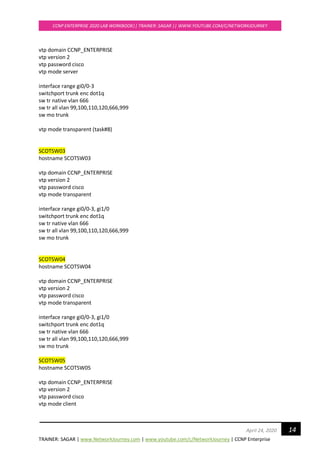
vtp domain CCNP_ENTERPRISE
vtp version 2
vtp password cisco
vtp mode server
interface range gi0/0-3
switchport trunk enc dot1q
sw tr native vlan 666
sw tr all vlan 99,100,110,120,666,999
sw mo trunk
vtp mode transparent (task#8)
SCOTSW03
hostname SCOTSW03
vtp domain CCNP_ENTERPRISE
vtp version 2
vtp password cisco
vtp mode transparent
interface range gi0/0-3, gi1/0
switchport trunk enc dot1q
sw tr native vlan 666
sw tr all vlan 99,100,110,120,666,999
sw mo trunk
SCOTSW04
hostname SCOTSW04
vtp domain CCNP_ENTERPRISE
vtp version 2
vtp password cisco
vtp mode transparent
interface range gi0/0-3, gi1/0
switchport trunk enc dot1q
sw tr native vlan 666
sw tr all vlan 99,100,110,120,666,999
sw mo trunk
SCOTSW05
hostname SCOTSW05
vtp domain CCNP_ENTERPRISE
vtp version 2
vtp password cisco
vtp mode client
TRAINER: SAGAR | www.NetworkJourney.com | www.youtube.com/c/NetworkJourney | CCNP Enterprise
CCNP ENTERPRISE 2020 LAB WORKBOOK|| TRAINER: SAGAR || WWW.YOUTUBE.COM/C/NETWORKJOURNEY
15April 24, 2020
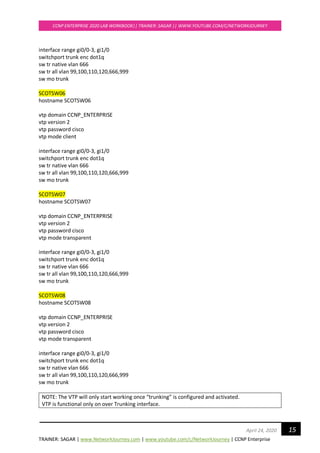
interface range gi0/0-3, gi1/0
switchport trunk enc dot1q
sw tr native vlan 666
sw tr all vlan 99,100,110,120,666,999
sw mo trunk
SCOTSW06
hostname SCOTSW06
vtp domain CCNP_ENTERPRISE
vtp version 2
vtp password cisco
vtp mode client
interface range gi0/0-3, gi1/0
switchport trunk enc dot1q
sw tr native vlan 666
sw tr all vlan 99,100,110,120,666,999
sw mo trunk
SCOTSW07
hostname SCOTSW07
vtp domain CCNP_ENTERPRISE
vtp version 2
vtp password cisco
vtp mode transparent
interface range gi0/0-3, gi1/0
switchport trunk enc dot1q
sw tr native vlan 666
sw tr all vlan 99,100,110,120,666,999
sw mo trunk
SCOTSW08
hostname SCOTSW08
vtp domain CCNP_ENTERPRISE
vtp version 2
vtp password cisco
vtp mode transparent
interface range gi0/0-3, gi1/0
switchport trunk enc dot1q
sw tr native vlan 666
sw tr all vlan 99,100,110,120,666,999
sw mo trunk
NOTE: The VTP will only start working once “trunking” is configured and activated.
VTP is functional only on over Trunking interface.
TRAINER: SAGAR | www.NetworkJourney.com | www.youtube.com/c/NetworkJourney | CCNP Enterprise
CCNP ENTERPRISE 2020 LAB WORKBOOK|| TRAINER: SAGAR || WWW.YOUTUBE.COM/C/NETWORKJOURNEY
16April 24, 2020
Verifications:
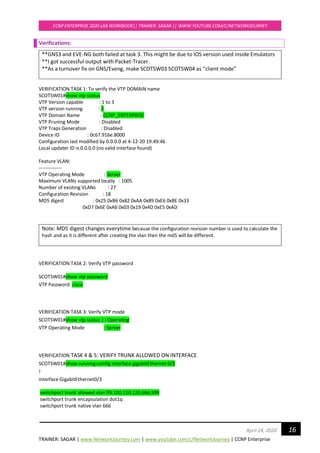
**GNS3 and EVE-NG both failed at task 3. This might be due to IOS version used inside Emulators
**I got successful output with Packet-Tracer.
**As a turnover fix on GNS/Eveng, make SCOTSW03 SCOTSW04 as “client mode”
VERIFICATION TASK 1: To verify the VTP DOMAIN name
SCOTSW01#show vtp status
VTP Version capable : 1 to 3
VTP version running : 2
VTP Domain Name : CCNP_ENTERPRISE
VTP Pruning Mode : Disabled
VTP Traps Generation : Disabled
Device ID : 0c67.916e.8000
Configuration last modified by 0.0.0.0 at 4-12-20 19:49:46
Local updater ID is 0.0.0.0 (no valid interface found)
Feature VLAN:
--------------
VTP Operating Mode : Server
Maximum VLANs supported locally : 1005
Number of existing VLANs : 27
Configuration Revision : 18
MD5 digest : 0x25 0xB6 0x82 0xAA 0x89 0xE6 0xBE 0x33
0xD7 0x6E 0xA6 0x03 0x19 0x4D 0xE5 0xAD
Note: MD5 digest changes everytime because the configuration revision number is used to calculate the
hash and as it is different after creating the vlan then the md5 will be different.
VERIFICATION TASK 2: Verify VTP password
SCOTSW01#show vtp password
VTP Password: cisco
VERIFICATION TASK 3: Verify VTP mode
SCOTSW01#show vtp status | i Operating
VTP Operating Mode : Server
VERIFICATION TASK 4 & 5: VERIFY TRUNK ALLOWED ON INTERFACE
SCOTSW01#show running-config interface gigabitEthernet 0/3
!
interface GigabitEthernet0/3
switchport trunk allowed vlan 99,100,110,120,666,999
switchport trunk encapsulation dot1q
switchport trunk native vlan 666
TRAINER: SAGAR | www.NetworkJourney.com | www.youtube.com/c/NetworkJourney | CCNP Enterprise
CCNP ENTERPRISE 2020 LAB WORKBOOK|| TRAINER: SAGAR || WWW.YOUTUBE.COM/C/NETWORKJOURNEY
17April 24, 2020
switchport mode trunk
media-type rj45
negotiation auto
end
Second way to check if the Trunking vlans allowed in switches
SCOTSW01#show interfaces trunk
Port Mode Encapsulation Status Native vlan
Gi0/0 on 802.1q trunking 666
Gi0/1 on 802.1q trunking 666
Gi0/2 on 802.1q trunking 666
Gi0/3 on 802.1q trunking 666
Port Vlans allowed on trunk
Gi0/0 99-100,110,120,666,999
Gi0/1 99-100,110,120,666,999
Gi0/2 99-100,110,120,666,999
Gi0/3 99-100,110,120,666,999
VERIFICATION TASK 6: Verify MTU size for VLAN 811
SCOTSW01#show vlan id 811
VLAN Name Status Ports
---- -------------------------------- --------- -------------------------------
811 VLAN0811 active
VLAN Type SAID MTU Parent RingNo BridgeNo Stp BrdgMode Trans1 Trans2
---- ----- ---------- ----- ------ ------ -------- ---- -------- ------ ------
811 enet 100811 1400 - - - - - 0 0
Remote SPAN VLAN
----------------
Disabled
Primary Secondary Type Ports
------- --------- ----------------- ------------------------------------------
VERIFICATION TASK 7: Verify Native VLAN behavior
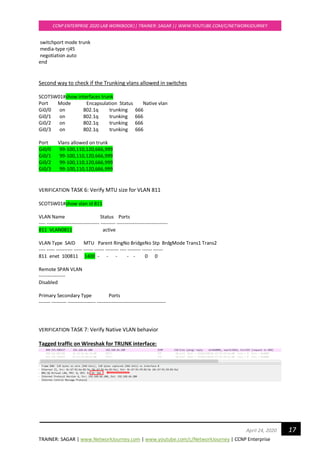
Tagged traffic on Wireshak for TRUNK interface:
TRAINER: SAGAR | www.NetworkJourney.com | www.youtube.com/c/NetworkJourney | CCNP Enterprise
CCNP ENTERPRISE 2020 LAB WORKBOOK|| TRAINER: SAGAR || WWW.YOUTUBE.COM/C/NETWORKJOURNEY
18April 24, 2020
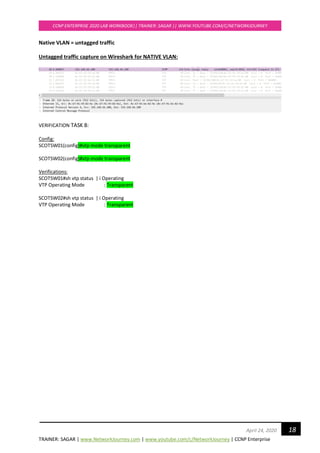
Native VLAN = untagged traffic
Untagged traffic capture on Wireshark for NATIVE VLAN:
VERIFICATION TASK 8:
Config:
SCOTSW01(config)#vtp mode transparent
SCOTSW02(config)#vtp mode transparent
Verifications:
SCOTSW01#sh vtp status | i Operating
VTP Operating Mode : Transparent
SCOTSW02#sh vtp status | i Operating
VTP Operating Mode : Transparent
TRAINER: SAGAR | www.NetworkJourney.com | www.youtube.com/c/NetworkJourney | CCNP Enterprise
CCNP ENTERPRISE 2020 LAB WORKBOOK|| TRAINER: SAGAR || WWW.YOUTUBE.COM/C/NETWORKJOURNEY
19April 24, 2020
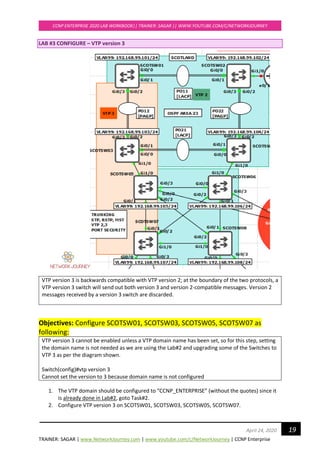
LAB #3 CONFIGURE – VTP version 3
VTP version 3 is backwards compatible with VTP version 2; at the boundary of the two protocols, a
VTP version 3 switch will send out both version 3 and version 2-compatible messages. Version 2
messages received by a version 3 switch are discarded.
Objectives: Configure SCOTSW01, SCOTSW03, SCOTSW05, SCOTSW07 as
following:
VTP version 3 cannot be enabled unless a VTP domain name has been set, so for this step, setting
the domain name is not needed as we are using the Lab#2 and upgrading some of the Switches to
VTP 3 as per the diagram shown.
Switch(config)#vtp version 3
Cannot set the version to 3 because domain name is not configured
1. The VTP domain should be configured to “CCNP_ENTERPRISE” (without the quotes) since it
is already done in Lab#2, goto Task#2.
2. Configure VTP version 3 on SCOTSW01, SCOTSW03, SCOTSW05, SCOTSW07.
TRAINER: SAGAR | www.NetworkJourney.com | www.youtube.com/c/NetworkJourney | CCNP Enterprise
CCNP ENTERPRISE 2020 LAB WORKBOOK|| TRAINER: SAGAR || WWW.YOUTUBE.COM/C/NETWORKJOURNEY
20April 24, 2020
3. Configure VTP version 3 on below switches
“Primary Server” mode on SCOTSW01
“Transparent” mode on SCOTSW03
"Server" mode on SCOTSW05
"Client" mode on SCOTSW07
4. Configure 802.1q trunk links between the switches according to the Layer 2 Diagram show
above, this is already done from Lab#2, goto next Task#5
5. Create new Vlan 444 and see the VTP 3 and VTP 2 advertisements on the borders.
Configuration:
SCOTW01
vtp version 3
SCOTSW01#vtp primary vlan [to be configured on user privilege mode]
This system is becoming primary server for feature vlan
No conflicting VTP3 devices found.
Do you want to continue? [confirm]
!
Vlan 444
exit
!
SCOTW03
SCOTSW03(config)#vtp version 3
SCOTSW03(config)#vtp mode transparent
SCOTW05
SCOTSW05(config)#vtp version 3
SCOTSW05(config)#vtp mode server
SCOTW07
SCOTSW07(config)#vtp version 3
SCOTSW07(config)#vtp mode client
Answer for #4
SCOTW01
!
Vlan 444
exit
!
TRAINER: SAGAR | www.NetworkJourney.com | www.youtube.com/c/NetworkJourney | CCNP Enterprise
CCNP ENTERPRISE 2020 LAB WORKBOOK|| TRAINER: SAGAR || WWW.YOUTUBE.COM/C/NETWORKJOURNEY
21April 24, 2020
VERIFICATIONS:
VERIFICATION TASK 1:
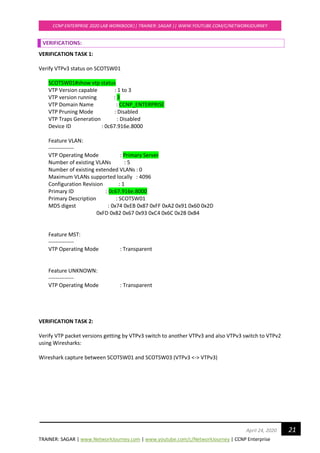
Verify VTPv3 status on SCOTSW01
SCOTSW01#show vtp status
VTP Version capable : 1 to 3
VTP version running : 3
VTP Domain Name : CCNP_ENTERPRISE
VTP Pruning Mode : Disabled
VTP Traps Generation : Disabled
Device ID : 0c67.916e.8000
Feature VLAN:
--------------
VTP Operating Mode : Primary Server
Number of existing VLANs : 5
Number of existing extended VLANs : 0
Maximum VLANs supported locally : 4096
Configuration Revision : 1
Primary ID : 0c67.916e.8000
Primary Description : SCOTSW01
MD5 digest : 0x74 0xEB 0x87 0xFF 0xA2 0x91 0x60 0x2D
0xFD 0x82 0x67 0x93 0xC4 0x6C 0x2B 0xB4
Feature MST:
--------------
VTP Operating Mode : Transparent
Feature UNKNOWN:
--------------
VTP Operating Mode : Transparent
VERIFICATION TASK 2:
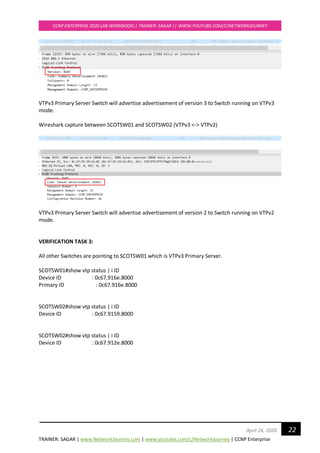
Verify VTP packet versions getting by VTPv3 switch to another VTPv3 and also VTPv3 switch to VTPv2
using Wiresharks:
Wireshark capture between SCOTSW01 and SCOTSW03 (VTPv3 <-> VTPv3)
TRAINER: SAGAR | www.NetworkJourney.com | www.youtube.com/c/NetworkJourney | CCNP Enterprise
CCNP ENTERPRISE 2020 LAB WORKBOOK|| TRAINER: SAGAR || WWW.YOUTUBE.COM/C/NETWORKJOURNEY
22April 24, 2020
VTPv3 Primary Server Switch will advertise advertisement of version 3 to Switch running on VTPv3
mode.
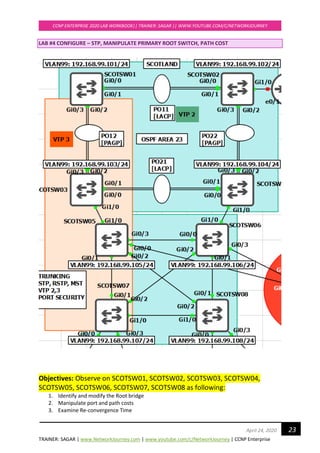
Wireshark capture between SCOTSW01 and SCOTSW02 (VTPv3 <-> VTPv2)
VTPv3 Primary Server Switch will advertise advertisement of version 2 to Switch running on VTPv2
mode.
VERIFICATION TASK 3:
All other Switches are pointing to SCOTSW01 which is VTPv3 Primary Server.
SCOTSW01#show vtp status | i ID
Device ID : 0c67.916e.8000
Primary ID : 0c67.916e.8000
SCOTSW02#show vtp status | i ID
Device ID : 0c67.9159.8000
SCOTSW02#show vtp status | i ID
Device ID : 0c67.912e.8000
TRAINER: SAGAR | www.NetworkJourney.com | www.youtube.com/c/NetworkJourney | CCNP Enterprise
CCNP ENTERPRISE 2020 LAB WORKBOOK|| TRAINER: SAGAR || WWW.YOUTUBE.COM/C/NETWORKJOURNEY
23April 24, 2020
LAB #4 CONFIGURE – STP, MANIPULATE PRIMARY ROOT SWITCH, PATH COST
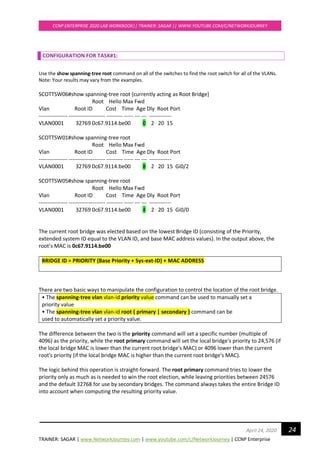
Objectives: Observe on SCOTSW01, SCOTSW02, SCOTSW03, SCOTSW04,
SCOTSW05, SCOTSW06, SCOTSW07, SCOTSW08 as following:
1. Identify and modify the Root bridge
2. Manipulate port and path costs
3. Examine Re-convergence Time
TRAINER: SAGAR | www.NetworkJourney.com | www.youtube.com/c/NetworkJourney | CCNP Enterprise
CCNP ENTERPRISE 2020 LAB WORKBOOK|| TRAINER: SAGAR || WWW.YOUTUBE.COM/C/NETWORKJOURNEY
24April 24, 2020
CONFIGURATION FOR TASK#1:
Use the show spanning-tree root command on all of the switches to find the root switch for all of the VLANs.
Note: Your results may vary from the examples.
SCOTTSW06#show spanning-tree root {currently acting as Root Bridge}
Root Hello Max Fwd
Vlan Root ID Cost Time Age Dly Root Port
---------------- -------------------- --------- ----- --- --- ------------
VLAN0001 32769 0c67.9114.be00 0 2 20 15
SCOTTSW01#show spanning-tree root
Root Hello Max Fwd
Vlan Root ID Cost Time Age Dly Root Port
---------------- -------------------- --------- ----- --- --- ------------
VLAN0001 32769 0c67.9114.be00 8 2 20 15 Gi0/2
SCOTTSW05#show spanning-tree root
Root Hello Max Fwd
Vlan Root ID Cost Time Age Dly Root Port
---------------- -------------------- --------- ----- --- --- ------------
VLAN0001 32769 0c67.9114.be00 4 2 20 15 Gi0/0
The current root bridge was elected based on the lowest Bridge ID (consisting of the Priority,
extended system ID equal to the VLAN ID, and base MAC address values). In the output above, the
root’s MAC is 0c67.9114.be00
BRIDGE ID = PRIORITY (Base Priority + Sys-ext-ID) + MAC ADDRESS
There are two basic ways to manipulate the configuration to control the location of the root bridge.
• The spanning-tree vlan vlan-id priority value command can be used to manually set a
priority value
• The spanning-tree vlan vlan-id root { primary | secondary } command can be
used to automatically set a priority value.
The difference between the two is the priority command will set a specific number (multiple of
4096) as the priority, while the root primary command will set the local bridge's priority to 24,576 (if
the local bridge MAC is lower than the current root bridge's MAC) or 4096 lower than the current
root's priority (if the local bridge MAC is higher than the current root bridge's MAC).
The logic behind this operation is straight-forward. The root primary command tries to lower the
priority only as much as is needed to win the root election, while leaving priorities between 24576
and the default 32768 for use by secondary bridges. The command always takes the entire Bridge ID
into account when computing the resulting priority value.
TRAINER: SAGAR | www.NetworkJourney.com | www.youtube.com/c/NetworkJourney | CCNP Enterprise
CCNP ENTERPRISE 2020 LAB WORKBOOK|| TRAINER: SAGAR || WWW.YOUTUBE.COM/C/NETWORKJOURNEY
25April 24, 2020
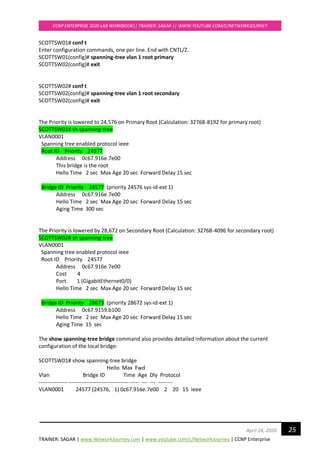
SCOTTSW01# conf t
Enter configuration commands, one per line. End with CNTL/Z.
SCOTTSW01(config)# spanning-tree vlan 1 root primary
SCOTTSW02(config)# exit
SCOTTSW02# conf t
SCOTTSW02(config)# spanning-tree vlan 1 root secondary
SCOTTSW02(config)# exit
The Priority is lowered to 24,576 on Primary Root (Calculation: 32768-8192 for primary root)
SCOTTSW01# sh spanning-tree
VLAN0001
Spanning tree enabled protocol ieee
Root ID Priority 24577
Address 0c67.916e.7e00
This bridge is the root
Hello Time 2 sec Max Age 20 sec Forward Delay 15 sec
Bridge ID Priority 24577 (priority 24576 sys-id-ext 1)
Address 0c67.916e.7e00
Hello Time 2 sec Max Age 20 sec Forward Delay 15 sec
Aging Time 300 sec
The Priority is lowered by 28,672 on Secondary Root (Calculation: 32768-4096 for secondary root)
SCOTTSW02# sh spanning-tree
VLAN0001
Spanning tree enabled protocol ieee
Root ID Priority 24577
Address 0c67.916e.7e00
Cost 4
Port 1 (GigabitEthernet0/0)
Hello Time 2 sec Max Age 20 sec Forward Delay 15 sec
Bridge ID Priority 28673 (priority 28672 sys-id-ext 1)
Address 0c67.9159.b100
Hello Time 2 sec Max Age 20 sec Forward Delay 15 sec
Aging Time 15 sec
The show spanning-tree bridge command also provides detailed information about the current
configuration of the local bridge:
SCOTTSW01# show spanning-tree bridge
Hello Max Fwd
Vlan Bridge ID Time Age Dly Protocol
---------------- --------------------------------- ----- --- --- --------
VLAN0001 24577 (24576, 1) 0c67.916e.7e00 2 20 15 ieee
TRAINER: SAGAR | www.NetworkJourney.com | www.youtube.com/c/NetworkJourney | CCNP Enterprise
CCNP ENTERPRISE 2020 LAB WORKBOOK|| TRAINER: SAGAR || WWW.YOUTUBE.COM/C/NETWORKJOURNEY
26April 24, 2020
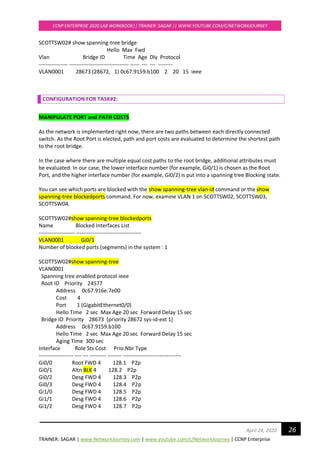
SCOTTSW02# show spanning-tree bridge
Hello Max Fwd
Vlan Bridge ID Time Age Dly Protocol
---------------- --------------------------------- ----- --- --- --------
VLAN0001 28673 (28672, 1) 0c67.9159.b100 2 20 15 ieee
CONFIGURATION FOR TASK#2:
MANIPULATE PORT and PATH COSTS
As the network is implemented right now, there are two paths between each directly connected
switch. As the Root Port is elected, path and port costs are evaluated to determine the shortest path
to the root bridge.
In the case where there are multiple equal cost paths to the root bridge, additional attributes must
be evaluated. In our case, the lower interface number (for example, Gi0/1) is chosen as the Root
Port, and the higher interface number (for example, Gi0/2) is put into a spanning tree Blocking state.
You can see which ports are blocked with the show spanning-tree vlan-id command or the show
spanning-tree blockedports command. For now, examine VLAN 1 on SCOTTSW02, SCOTTSW03,
SCOTTSW04.
SCOTTSW02#show spanning-tree blockedports
Name Blocked Interfaces List
-------------------- ------------------------------------
VLAN0001 Gi0/1
Number of blocked ports (segments) in the system : 1
SCOTTSW02#show spanning-tree
VLAN0001
Spanning tree enabled protocol ieee
Root ID Priority 24577
Address 0c67.916e.7e00
Cost 4
Port 1 (GigabitEthernet0/0)
Hello Time 2 sec Max Age 20 sec Forward Delay 15 sec
Bridge ID Priority 28673 (priority 28672 sys-id-ext 1)
Address 0c67.9159.b100
Hello Time 2 sec Max Age 20 sec Forward Delay 15 sec
Aging Time 300 sec
Interface Role Sts Cost Prio.Nbr Type
------------------- ---- --- --------- -------- --------------------------------
Gi0/0 Root FWD 4 128.1 P2p
Gi0/1 Altn BLK 4 128.2 P2p
Gi0/2 Desg FWD 4 128.3 P2p
Gi0/3 Desg FWD 4 128.4 P2p
Gi1/0 Desg FWD 4 128.5 P2p
Gi1/1 Desg FWD 4 128.6 P2p
Gi1/2 Desg FWD 4 128.7 P2p
TRAINER: SAGAR | www.NetworkJourney.com | www.youtube.com/c/NetworkJourney | CCNP Enterprise
CCNP ENTERPRISE 2020 LAB WORKBOOK|| TRAINER: SAGAR || WWW.YOUTUBE.COM/C/NETWORKJOURNEY
27April 24, 2020
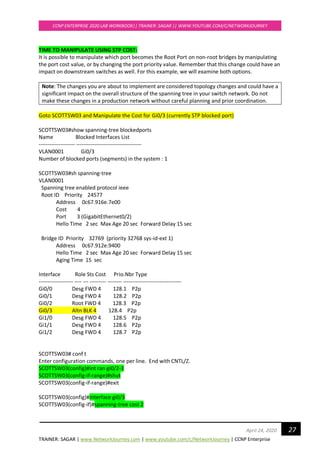
TIME TO MANIPULATE USING STP COST:
It is possible to manipulate which port becomes the Root Port on non-root bridges by manipulating
the port cost value, or by changing the port priority value. Remember that this change could have an
impact on downstream switches as well. For this example, we will examine both options.
Note: The changes you are about to implement are considered topology changes and could have a
significant impact on the overall structure of the spanning tree in your switch network. Do not
make these changes in a production network without careful planning and prior coordination.
Goto SCOTTSW03 and Manipulate the Cost for Gi0/3 (currently STP blocked port)
SCOTTSW03#show spanning-tree blockedports
Name Blocked Interfaces List
-------------------- ------------------------------------
VLAN0001 Gi0/3
Number of blocked ports (segments) in the system : 1
SCOTTSW03#sh spanning-tree
VLAN0001
Spanning tree enabled protocol ieee
Root ID Priority 24577
Address 0c67.916e.7e00
Cost 4
Port 3 (GigabitEthernet0/2)
Hello Time 2 sec Max Age 20 sec Forward Delay 15 sec
Bridge ID Priority 32769 (priority 32768 sys-id-ext 1)
Address 0c67.912e.9400
Hello Time 2 sec Max Age 20 sec Forward Delay 15 sec
Aging Time 15 sec
Interface Role Sts Cost Prio.Nbr Type
------------------- ---- --- --------- -------- --------------------------------
Gi0/0 Desg FWD 4 128.1 P2p
Gi0/1 Desg FWD 4 128.2 P2p
Gi0/2 Root FWD 4 128.3 P2p
Gi0/3 Altn BLK 4 128.4 P2p
Gi1/0 Desg FWD 4 128.5 P2p
Gi1/1 Desg FWD 4 128.6 P2p
Gi1/2 Desg FWD 4 128.7 P2p
SCOTTSW03# conf t
Enter configuration commands, one per line. End with CNTL/Z.
SCOTTSW03(config)#int ran gi0/2-3
SCOTTSW03(config-if-range)#shut
SCOTTSW03(config-if-range)#exit
SCOTTSW03(config)#interface gi0/3
SCOTTSW03(config-if)#spanning-tree cost 2
TRAINER: SAGAR | www.NetworkJourney.com | www.youtube.com/c/NetworkJourney | CCNP Enterprise
CCNP ENTERPRISE 2020 LAB WORKBOOK|| TRAINER: SAGAR || WWW.YOUTUBE.COM/C/NETWORKJOURNEY
28April 24, 2020
SCOTTSW03(config-if)#exit
SCOTTSW03(config)#int ran gi0/2-3
SCOTTSW03(config-if-range)#no shut
SCOTTSW03(config-if-range)#end
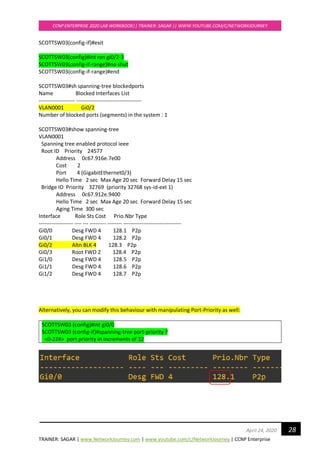
SCOTTSW03#sh spanning-tree blockedports
Name Blocked Interfaces List
-------------------- ------------------------------------
VLAN0001 Gi0/2
Number of blocked ports (segments) in the system : 1
SCOTTSW03#show spanning-tree
VLAN0001
Spanning tree enabled protocol ieee
Root ID Priority 24577
Address 0c67.916e.7e00
Cost 2
Port 4 (GigabitEthernet0/3)
Hello Time 2 sec Max Age 20 sec Forward Delay 15 sec
Bridge ID Priority 32769 (priority 32768 sys-id-ext 1)
Address 0c67.912e.9400
Hello Time 2 sec Max Age 20 sec Forward Delay 15 sec
Aging Time 300 sec
Interface Role Sts Cost Prio.Nbr Type
------------------- ---- --- --------- -------- --------------------------------
Gi0/0 Desg FWD 4 128.1 P2p
Gi0/1 Desg FWD 4 128.2 P2p
Gi0/2 Altn BLK 4 128.3 P2p
Gi0/3 Root FWD 2 128.4 P2p
Gi1/0 Desg FWD 4 128.5 P2p
Gi1/1 Desg FWD 4 128.6 P2p
Gi1/2 Desg FWD 4 128.7 P2p
Alternatively, you can modify this behaviour with manipulating Port-Priority as well:
SCOTTSW03 (config)#int gi0/0
SCOTTSW03 (config-if)#spanning-tree port-priority ?
<0-224> port priority in increments of 32
TRAINER: SAGAR | www.NetworkJourney.com | www.youtube.com/c/NetworkJourney | CCNP Enterprise
CCNP ENTERPRISE 2020 LAB WORKBOOK|| TRAINER: SAGAR || WWW.YOUTUBE.COM/C/NETWORKJOURNEY
29April 24, 2020
Verifications:
Examine Re-convergence Time:
Enable Debug STP command to see the convergence timers
SCOTTSW03#debug spanning-tree events
SCOTTSW03#
*Apr 20 13:13:57.732: STP: VLAN0001 Gi0/2 -> listening
*Apr 20 13:13:58.090: STP: VLAN0001 heard root 24577-0c67.916e.7e00 on Gi0/2
*Apr 20 13:13:58.091: supersedes 32769-0c67.9114.be00
*Apr 20 13:14:12.731: STP: VLAN0001 Gi0/2 -> learning
*Apr 20 13:14:27.738: STP[1]: Generating TC trap for port GigabitEthernet0/2
*Apr 20 13:14:27.740: STP: VLAN0001 sent Topology Change Notice on Gi0/2
*Apr 20 13:14:27.740: STP: VLAN0001 Gi0/2 -> forwarding
*Apr 20 13:14:29.156: STP: VLAN0001 Topology Change rcvd on Gi0/0
*Apr 20 13:14:29.158: STP: VLAN0001 sent Topology Change Notice on Gi0/2
TRAINER: SAGAR | www.NetworkJourney.com | www.youtube.com/c/NetworkJourney | CCNP Enterprise
CCNP ENTERPRISE 2020 LAB WORKBOOK|| TRAINER: SAGAR || WWW.YOUTUBE.COM/C/NETWORKJOURNEY
30April 24, 2020
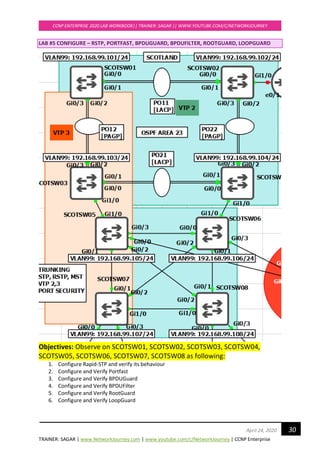
LAB #5 CONFIGURE – RSTP, PORTFAST, BPDUGUARD, BPDUFILTER, ROOTGUARD, LOOPGUARD
Objectives: Observe on SCOTSW01, SCOTSW02, SCOTSW03, SCOTSW04,
SCOTSW05, SCOTSW06, SCOTSW07, SCOTSW08 as following:
1. Configure Rapid-STP and verify its behaviour
2. Configure and Verify Portfast
3. Configure and Verify BPDUGuard
4. Configure and Verify BPDUFilter
5. Configure and Verify RootGuard
6. Configure and Verify LoopGuard
TRAINER: SAGAR | www.NetworkJourney.com | www.youtube.com/c/NetworkJourney | CCNP Enterprise
CCNP ENTERPRISE 2020 LAB WORKBOOK|| TRAINER: SAGAR || WWW.YOUTUBE.COM/C/NETWORKJOURNEY
31April 24, 2020
CONFIGURATION FOR TASK#1:
RSTP is backward compatible with legacy STP 802.1D
Enable RSTP on all switches:
SCOTSW01(config)#spanning-tree mode rapid-pvst
SCOTSW01(config)#end
SCOTSW02(config)#spanning-tree mode rapid-pvst
SCOTSW02(config)#end
SCOTSW03(config)#spanning-tree mode rapid-pvst
SCOTSW03(config)#end
SCOTSW04(config)#spanning-tree mode rapid-pvst
SCOTSW04(config)#end
SCOTSW05(config)#spanning-tree mode rapid-pvst
SCOTSW05(config)#end
SCOTSW06(config)#spanning-tree mode rapid-pvst
SCOTSW06(config)#end
SCOTSW07(config)#spanning-tree mode rapid-pvst
SCOTSW07(config)#end
SCOTSW08(config)#spanning-tree mode rapid-pvst
SCOTSW08(config)#end
Upon activating RSTP on every switch, you can see “proposal” and “agreements”
To enable debug for rstp
SCOTSW01#debug spanning-tree events
Debug Packets for RSTP on Root Bridge Switch
*Apr 21 20:46:00.427: RSTP(1): Gi2/2 fdwhile Expired
*Apr 21 20:46:00.445: STP[1]: Generating TC trap for port GigabitEthernet1/1
*Apr 21 20:46:00.446: STP[1]: Generating TC trap for port GigabitEthernet1/2
*Apr 21 20:46:00.447: STP[1]: Generating TC trap for port GigabitEthernet1/3
*Apr 21 20:46:00.505: RSTP(1): transmitting a proposal on Gi2/3
*Apr 21 20:46:00.506: RSTP(1): Gi2/3 fdwhile Expired
*Apr 21 20:46:00.509: RSTP(1): transmitting a proposal on Gi3/0
*Apr 21 20:46:00.512: RSTP(1): transmitting a proposal on Gi3/1
*Apr 21 20:46:00.515: RSTP(1): transmitting a proposal on Gi3/2
*Apr 21 20:46:00.519: RSTP(1): transmitting a proposal on Gi3/3
Debug Packets for RSTP on Non Root-bridge switch
*Apr 21 20:49:38.033: RSTP(1): Gi0/2 rcvd info expired
*Apr 21 20:49:38.033: RSTP(1): Gi0/2 is now designated
TRAINER: SAGAR | www.NetworkJourney.com | www.youtube.com/c/NetworkJourney | CCNP Enterprise
CCNP ENTERPRISE 2020 LAB WORKBOOK|| TRAINER: SAGAR || WWW.YOUTUBE.COM/C/NETWORKJOURNEY
32April 24, 2020
*Apr 21 20:49:38.054: RSTP(1): updt roles, received superior bpdu on Gi0/2
*Apr 21 20:49:38.055: RSTP(1): Gi0/2 is now alternate
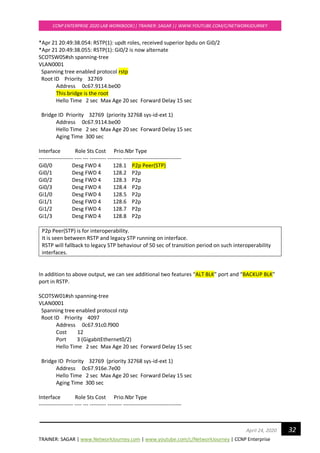
SCOTSW05#sh spanning-tree
VLAN0001
Spanning tree enabled protocol rstp
Root ID Priority 32769
Address 0c67.9114.be00
This bridge is the root
Hello Time 2 sec Max Age 20 sec Forward Delay 15 sec
Bridge ID Priority 32769 (priority 32768 sys-id-ext 1)
Address 0c67.9114.be00
Hello Time 2 sec Max Age 20 sec Forward Delay 15 sec
Aging Time 300 sec
Interface Role Sts Cost Prio.Nbr Type
------------------- ---- --- --------- -------- --------------------------------
Gi0/0 Desg FWD 4 128.1 P2p Peer(STP)
Gi0/1 Desg FWD 4 128.2 P2p
Gi0/2 Desg FWD 4 128.3 P2p
Gi0/3 Desg FWD 4 128.4 P2p
Gi1/0 Desg FWD 4 128.5 P2p
Gi1/1 Desg FWD 4 128.6 P2p
Gi1/2 Desg FWD 4 128.7 P2p
Gi1/3 Desg FWD 4 128.8 P2p
P2p Peer(STP) is for interoperability.
It is seen between RSTP and legacy STP running on interface.
RSTP will fallback to legacy STP behaviour of 50 sec of transition period on such interoperability
interfaces.
In addition to above output, we can see additional two features “ALT BLK” port and “BACKUP BLK”
port in RSTP.
SCOTSW01#sh spanning-tree
VLAN0001
Spanning tree enabled protocol rstp
Root ID Priority 4097
Address 0c67.91c0.f900
Cost 12
Port 3 (GigabitEthernet0/2)
Hello Time 2 sec Max Age 20 sec Forward Delay 15 sec
Bridge ID Priority 32769 (priority 32768 sys-id-ext 1)
Address 0c67.916e.7e00
Hello Time 2 sec Max Age 20 sec Forward Delay 15 sec
Aging Time 300 sec
Interface Role Sts Cost Prio.Nbr Type
------------------- ---- --- --------- -------- --------------------------------
TRAINER: SAGAR | www.NetworkJourney.com | www.youtube.com/c/NetworkJourney | CCNP Enterprise
CCNP ENTERPRISE 2020 LAB WORKBOOK|| TRAINER: SAGAR || WWW.YOUTUBE.COM/C/NETWORKJOURNEY
33April 24, 2020
<!output omitted>
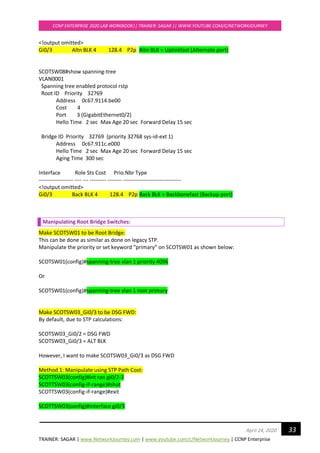
Gi0/3 Altn BLK 4 128.4 P2p Altn BLK = Uplinkfast (Alternate port)
SCOTSW08#show spanning-tree
VLAN0001
Spanning tree enabled protocol rstp
Root ID Priority 32769
Address 0c67.9114.be00
Cost 4
Port 3 (GigabitEthernet0/2)
Hello Time 2 sec Max Age 20 sec Forward Delay 15 sec
Bridge ID Priority 32769 (priority 32768 sys-id-ext 1)
Address 0c67.911c.e000
Hello Time 2 sec Max Age 20 sec Forward Delay 15 sec
Aging Time 300 sec
Interface Role Sts Cost Prio.Nbr Type
------------------- ---- --- --------- -------- --------------------------------
<!output omitted>
Gi0/3 Back BLK 4 128.4 P2p Back BLK = Backbonefast (Backup port)
Manipulating Root Bridge Switches:
Make SCOTSW01 to be Root Bridge:
This can be done as similar as done on legacy STP.
Manipulate the priority or set keyword “primary” on SCOTSW01 as shown below:
SCOTSW01(config)#spanning-tree vlan 1 priority 4096
Or
SCOTSW01(config)#spanning-tree vlan 1 root primary
Make SCOTSW03_Gi0/3 to be DSG FWD:
By default, due to STP calculations:
SCOTSW03_Gi0/2 = DSG FWD
SCOTSW03_Gi0/3 = ALT BLK
However, I want to make SCOTSW03_Gi0/3 as DSG FWD
Method 1: Manipulate using STP Path Cost:
SCOTTSW03(config)#int ran gi0/2-3
SCOTTSW03(config-if-range)#shut
SCOTTSW03(config-if-range)#exit
SCOTTSW03(config)#interface gi0/3
TRAINER: SAGAR | www.NetworkJourney.com | www.youtube.com/c/NetworkJourney | CCNP Enterprise
CCNP ENTERPRISE 2020 LAB WORKBOOK|| TRAINER: SAGAR || WWW.YOUTUBE.COM/C/NETWORKJOURNEY
34April 24, 2020
SCOTTSW03(config-if)#spanning-tree cost 2
SCOTTSW03(config-if)#exit
SCOTTSW03(config)#int ran gi0/2-3
SCOTTSW03(config-if-range)#no shut
SCOTTSW03(config-if-range)#end
Method 2: Alternatively, you can modify this behaviour with manipulating Port-Priority as well:
Switch(config)#int gi0/0
Switch(config-if)#spanning-tree port-priority ?
<0-224> port priority in increments of 32
TRAINER: SAGAR | www.NetworkJourney.com | www.youtube.com/c/NetworkJourney | CCNP Enterprise
CCNP ENTERPRISE 2020 LAB WORKBOOK|| TRAINER: SAGAR || WWW.YOUTUBE.COM/C/NETWORKJOURNEY
35April 24, 2020
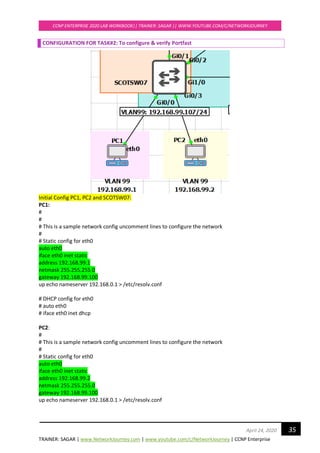
CONFIGURATION FOR TASK#2: To configure & verify Portfast
Initial Config PC1, PC2 and SCOTSW07:
PC1:
#
#
# This is a sample network config uncomment lines to configure the network
#
# Static config for eth0
auto eth0
iface eth0 inet static
address 192.168.99.1
netmask 255.255.255.0
gateway 192.168.99.100
up echo nameserver 192.168.0.1 > /etc/resolv.conf
# DHCP config for eth0
# auto eth0
# iface eth0 inet dhcp
PC2:
#
# This is a sample network config uncomment lines to configure the network
#
# Static config for eth0
auto eth0
iface eth0 inet static
address 192.168.99.2
netmask 255.255.255.0
gateway 192.168.99.100
up echo nameserver 192.168.0.1 > /etc/resolv.conf
TRAINER: SAGAR | www.NetworkJourney.com | www.youtube.com/c/NetworkJourney | CCNP Enterprise
CCNP ENTERPRISE 2020 LAB WORKBOOK|| TRAINER: SAGAR || WWW.YOUTUBE.COM/C/NETWORKJOURNEY
36April 24, 2020
# DHCP config for eth0
# auto eth0
# iface eth0 inet dhcp
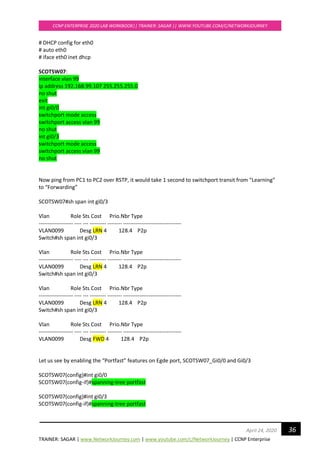
SCOTSW07:
interface vlan 99
ip address 192.168.99.107 255.255.255.0
no shut
exit
int gi0/0
switchport mode access
switchport access vlan 99
no shut
int gi0/3
switchport mode access
switchport access vlan 99
no shut
Now ping from PC1 to PC2 over RSTP, it would take 1 second to switchport transit from “Learning”
to “Forwarding”
SCOTSW07#sh span int gi0/3
Vlan Role Sts Cost Prio.Nbr Type
------------------- ---- --- --------- -------- --------------------------------
VLAN0099 Desg LRN 4 128.4 P2p
Switch#sh span int gi0/3
Vlan Role Sts Cost Prio.Nbr Type
------------------- ---- --- --------- -------- --------------------------------
VLAN0099 Desg LRN 4 128.4 P2p
Switch#sh span int gi0/3
Vlan Role Sts Cost Prio.Nbr Type
------------------- ---- --- --------- -------- --------------------------------
VLAN0099 Desg LRN 4 128.4 P2p
Switch#sh span int gi0/3
Vlan Role Sts Cost Prio.Nbr Type
------------------- ---- --- --------- -------- --------------------------------
VLAN0099 Desg FWD 4 128.4 P2p
Let us see by enabling the “Portfast” features on Egde port, SCOTSW07_Gi0/0 and Gi0/3
SCOTSW07(config)#int gi0/0
SCOTSW07(config-if)#spanning-tree portfast
SCOTSW07(config)#int gi0/3
SCOTSW07(config-if)#spanning-tree portfast
TRAINER: SAGAR | www.NetworkJourney.com | www.youtube.com/c/NetworkJourney | CCNP Enterprise
CCNP ENTERPRISE 2020 LAB WORKBOOK|| TRAINER: SAGAR || WWW.YOUTUBE.COM/C/NETWORKJOURNEY
37April 24, 2020
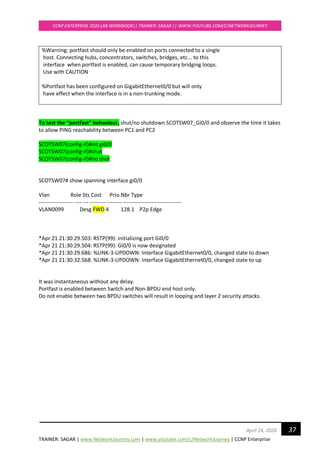
%Warning: portfast should only be enabled on ports connected to a single
host. Connecting hubs, concentrators, switches, bridges, etc... to this
interface when portfast is enabled, can cause temporary bridging loops.
Use with CAUTION
%Portfast has been configured on GigabitEthernet0/0 but will only
have effect when the interface is in a non-trunking mode.
To test the “portfast” behaviour, shut/no shutdown SCOTSW07_Gi0/0 and observe the time it takes
to allow PING reachability between PC1 and PC2
SCOTSW07(config-if)#int gi0/0
SCOTSW07(config-if)#shut
SCOTSW07(config-if)#no shut
SCOTSW07# show spanning interface gi0/0
Vlan Role Sts Cost Prio.Nbr Type
------------------- ---- --- --------- -------- --------------------------------
VLAN0099 Desg FWD 4 128.1 P2p Edge
*Apr 21 21:30:29.503: RSTP(99): initializing port Gi0/0
*Apr 21 21:30:29.504: RSTP(99): Gi0/0 is now designated
*Apr 21 21:30:29.686: %LINK-3-UPDOWN: Interface GigabitEthernet0/0, changed state to down
*Apr 21 21:30:32.568: %LINK-3-UPDOWN: Interface GigabitEthernet0/0, changed state to up
It was instantaneous without any delay.
Portfast is enabled between Switch and Non-BPDU end host only.
Do not enable between two BPDU switches will result in looping and layer 2 security attacks.
TRAINER: SAGAR | www.NetworkJourney.com | www.youtube.com/c/NetworkJourney | CCNP Enterprise
CCNP ENTERPRISE 2020 LAB WORKBOOK|| TRAINER: SAGAR || WWW.YOUTUBE.COM/C/NETWORKJOURNEY
38April 24, 2020
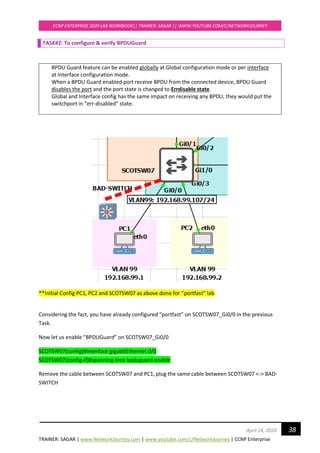
TASK#2: To configure & verify BPDUGuard
BPDU Guard feature can be enabled globally at Global configuration mode or per interface
at Interface configuration mode.
When a BPDU Guard enabled port receive BPDU from the connected device, BPDU Guard
disables the port and the port state is changed to Errdisable state.
Global and Interface config has the same impact on receiving any BPDU, they would put the
switchport in “err-disabled” state.
**Initial Config PC1, PC2 and SCOTSW07 as above done for “portfast” lab
Considering the fact, you have already configured “portfast” on SCOTSW07_Gi0/0 in the previous
Task.
Now let us enable “BPDUGuard” on SCOTSW07_Gi0/0
SCOTSW07(config)#interface gigabitEthernet 0/0
SCOTSW07(config-if)#spanning-tree bpduguard enable
Remove the cable between SCOTSW07 and PC1, plug the same cable between SCOTSW07 <-> BAD-
SWITCH
TRAINER: SAGAR | www.NetworkJourney.com | www.youtube.com/c/NetworkJourney | CCNP Enterprise
CCNP ENTERPRISE 2020 LAB WORKBOOK|| TRAINER: SAGAR || WWW.YOUTUBE.COM/C/NETWORKJOURNEY
39April 24, 2020
SCOTSW07(config-if)#
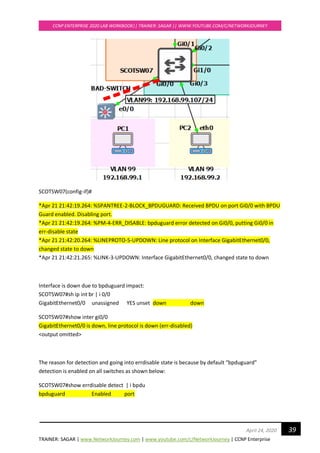
*Apr 21 21:42:19.264: %SPANTREE-2-BLOCK_BPDUGUARD: Received BPDU on port Gi0/0 with BPDU
Guard enabled. Disabling port.
*Apr 21 21:42:19.264: %PM-4-ERR_DISABLE: bpduguard error detected on Gi0/0, putting Gi0/0 in
err-disable state
*Apr 21 21:42:20.264: %LINEPROTO-5-UPDOWN: Line protocol on Interface GigabitEthernet0/0,
changed state to down
*Apr 21 21:42:21.265: %LINK-3-UPDOWN: Interface GigabitEthernet0/0, changed state to down
Interface is down due to bpduguard impact:
SCOTSW07#sh ip int br | i 0/0
GigabitEthernet0/0 unassigned YES unset down down
SCOTSW07#show inter gi0/0
GigabitEthernet0/0 is down, line protocol is down (err-disabled)
<output omitted>
The reason for detection and going into errdisable state is because by default “bpduguard”
detection is enabled on all switches as shown below:
SCOTSW07#show errdisable detect | i bpdu
bpduguard Enabled port
TRAINER: SAGAR | www.NetworkJourney.com | www.youtube.com/c/NetworkJourney | CCNP Enterprise
CCNP ENTERPRISE 2020 LAB WORKBOOK|| TRAINER: SAGAR || WWW.YOUTUBE.COM/C/NETWORKJOURNEY
40April 24, 2020
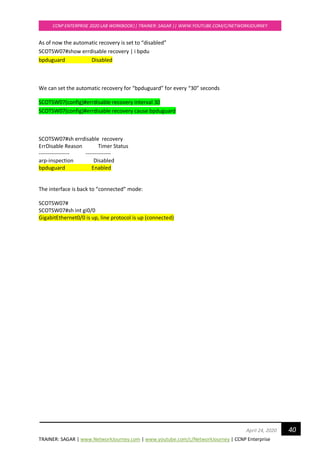
As of now the automatic recovery is set to “disabled”
SCOTSW07#show errdisable recovery | i bpdu
bpduguard Disabled
We can set the automatic recovery for “bpduguard” for every “30” seconds
SCOTSW07(config)#errdisable recovery interval 30
SCOTSW07(config)#errdisable recovery cause bpduguard
SCOTSW07#sh errdisable recovery
ErrDisable Reason Timer Status
----------------- --------------
arp-inspection Disabled
bpduguard Enabled
The interface is back to “connected” mode:
SCOTSW07#
SCOTSW07#sh int gi0/0
GigabitEthernet0/0 is up, line protocol is up (connected)
TRAINER: SAGAR | www.NetworkJourney.com | www.youtube.com/c/NetworkJourney | CCNP Enterprise
CCNP ENTERPRISE 2020 LAB WORKBOOK|| TRAINER: SAGAR || WWW.YOUTUBE.COM/C/NETWORKJOURNEY
41April 24, 2020
TASK#3: To configure & verify BPDUFilter
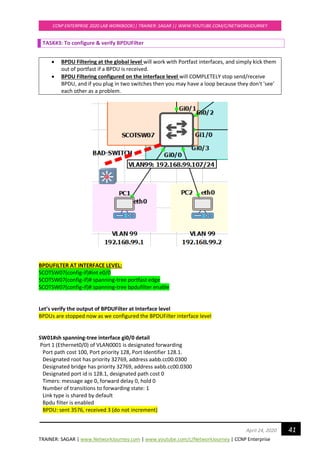
• BPDU Filtering at the global level will work with Portfast interfaces, and simply kick them
out of portfast if a BPDU is received.
• BPDU Filtering configured on the interface level will COMPLETELY stop send/receive
BPDU, and if you plug in two switches then you may have a loop because they don't 'see'
each other as a problem.
BPDUFILTER AT INTERFACE LEVEL:
SCOTSW07(config-if)#int e0/0
SCOTSW07(config-if)# spanning-tree portfast edge
SCOTSW07(config-if)# spanning-tree bpdufilter enable
Let’s verify the output of BPDUFilter at Interface level
BPDUs are stopped now as we configured the BPDUFilter interface level
SW01#sh spanning-tree interface gi0/0 detail
Port 1 (Ethernet0/0) of VLAN0001 is designated forwarding
Port path cost 100, Port priority 128, Port Identifier 128.1.
Designated root has priority 32769, address aabb.cc00.0300
Designated bridge has priority 32769, address aabb.cc00.0300
Designated port id is 128.1, designated path cost 0
Timers: message age 0, forward delay 0, hold 0
Number of transitions to forwarding state: 1
Link type is shared by default
Bpdu filter is enabled
BPDU: sent 3576, received 3 (do not increment)
TRAINER: SAGAR | www.NetworkJourney.com | www.youtube.com/c/NetworkJourney | CCNP Enterprise
CCNP ENTERPRISE 2020 LAB WORKBOOK|| TRAINER: SAGAR || WWW.YOUTUBE.COM/C/NETWORKJOURNEY
42April 24, 2020
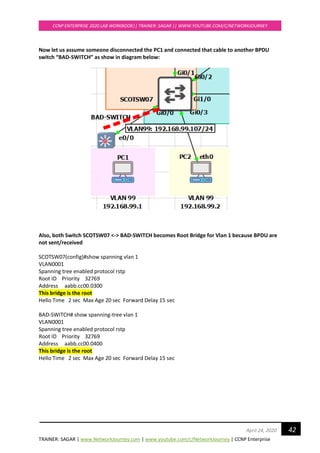
Now let us assume someone disconnected the PC1 and connected that cable to another BPDU
switch “BAD-SWITCH” as show in diagram below:
Also, both Switch SCOTSW07 <-> BAD-SWITCH becomes Root Bridge for Vlan 1 because BPDU are
not sent/received
SCOTSW07(config)#show spanning vlan 1
VLAN0001
Spanning tree enabled protocol rstp
Root ID Priority 32769
Address aabb.cc00.0300
This bridge is the root
Hello Time 2 sec Max Age 20 sec Forward Delay 15 sec
BAD-SWITCH# show spanning-tree vlan 1
VLAN0001
Spanning tree enabled protocol rstp
Root ID Priority 32769
Address aabb.cc00.0400
This bridge is the root
Hello Time 2 sec Max Age 20 sec Forward Delay 15 sec
TRAINER: SAGAR | www.NetworkJourney.com | www.youtube.com/c/NetworkJourney | CCNP Enterprise
CCNP ENTERPRISE 2020 LAB WORKBOOK|| TRAINER: SAGAR || WWW.YOUTUBE.COM/C/NETWORKJOURNEY
43April 24, 2020
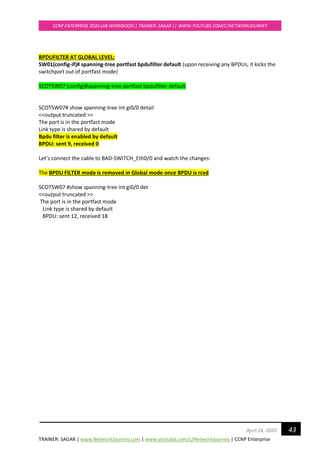
BPDUFILTER AT GLOBAL LEVEL:
SW01(config-if)# spanning-tree portfast bpdufilter default (upon receiving any BPDUs, it kicks the
switchport out of portfast mode)
SCOTSW07 (config)#spanning-tree portfast bpdufilter default
SCOTSW07# show spanning-tree int gi0/0 detail
<<output truncated >>
The port is in the portfast mode
Link type is shared by default
Bpdu filter is enabled by default
BPDU: sent 9, received 0
Let’s connect the cable to BAD-SWITCH_Eth0/0 and watch the changes:
The BPDU FILTER mode is removed in Global mode once BPDU is rcvd
SCOTSW07 #show spanning-tree int gi0/0 det
<<output truncated >>
The port is in the portfast mode
Link type is shared by default
BPDU: sent 12, received 18
TRAINER: SAGAR | www.NetworkJourney.com | www.youtube.com/c/NetworkJourney | CCNP Enterprise
CCNP ENTERPRISE 2020 LAB WORKBOOK|| TRAINER: SAGAR || WWW.YOUTUBE.COM/C/NETWORKJOURNEY
44April 24, 2020
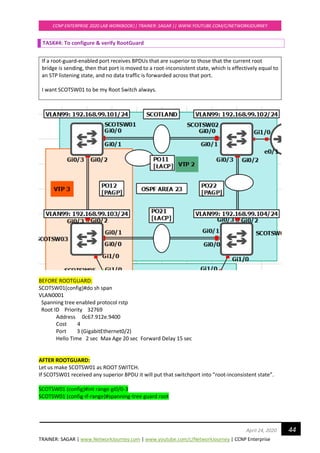
TASK#4: To configure & verify RootGuard
If a root-guard-enabled port receives BPDUs that are superior to those that the current root
bridge is sending, then that port is moved to a root-inconsistent state, which is effectively equal to
an STP listening state, and no data traffic is forwarded across that port.
I want SCOTSW01 to be my Root Switch always.
BEFORE ROOTGUARD:
SCOTSW01(config)#do sh span
VLAN0001
Spanning tree enabled protocol rstp
Root ID Priority 32769
Address 0c67.912e.9400
Cost 4
Port 3 (GigabitEthernet0/2)
Hello Time 2 sec Max Age 20 sec Forward Delay 15 sec
AFTER ROOTGUARD:
Let us make SCOTSW01 as ROOT SWITCH.
If SCOTSW01 received any superior BPDU it will put that switchport into “root-inconsistent state”.
SCOTSW01 (config)#int range gi0/0-3
SCOTSW01 (config-if-range)#spanning-tree guard root
TRAINER: SAGAR | www.NetworkJourney.com | www.youtube.com/c/NetworkJourney | CCNP Enterprise
CCNP ENTERPRISE 2020 LAB WORKBOOK|| TRAINER: SAGAR || WWW.YOUTUBE.COM/C/NETWORKJOURNEY
45April 24, 2020
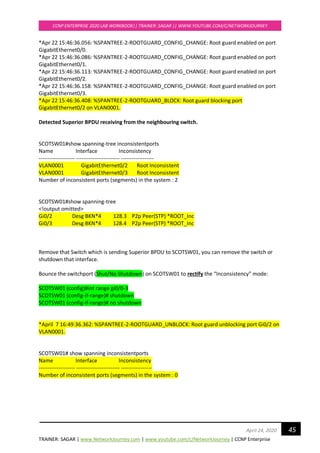
*Apr 22 15:46:36.056: %SPANTREE-2-ROOTGUARD_CONFIG_CHANGE: Root guard enabled on port
GigabitEthernet0/0.
*Apr 22 15:46:36.086: %SPANTREE-2-ROOTGUARD_CONFIG_CHANGE: Root guard enabled on port
GigabitEthernet0/1.
*Apr 22 15:46:36.113: %SPANTREE-2-ROOTGUARD_CONFIG_CHANGE: Root guard enabled on port
GigabitEthernet0/2.
*Apr 22 15:46:36.158: %SPANTREE-2-ROOTGUARD_CONFIG_CHANGE: Root guard enabled on port
GigabitEthernet0/3.
*Apr 22 15:46:36.408: %SPANTREE-2-ROOTGUARD_BLOCK: Root guard blocking port
GigabitEthernet0/2 on VLAN0001.
Detected Superior BPDU receiving from the neighbouring switch.
SCOTSW01#show spanning-tree inconsistentports
Name Interface Inconsistency
-------------------- ------------------------ ------------------
VLAN0001 GigabitEthernet0/2 Root Inconsistent
VLAN0001 GigabitEthernet0/3 Root Inconsistent
Number of inconsistent ports (segments) in the system : 2
SCOTSW01#show spanning-tree
<!output omitted>
Gi0/2 Desg BKN*4 128.3 P2p Peer(STP) *ROOT_Inc
Gi0/3 Desg BKN*4 128.4 P2p Peer(STP) *ROOT_Inc
Remove that Switch which is sending Superior BPDU to SCOTSW01, you can remove the switch or
shutdown that interface.
Bounce the switchport (Shut/No Shutdown) on SCOTSW01 to rectify the “Inconsistency” mode:
SCOTSW01 (config)#int range gi0/0-3
SCOTSW01 (config-if-range)# shutdown
SCOTSW01 (config-if-range)# no shutdown
*April 7 16:49:36.362: %SPANTREE-2-ROOTGUARD_UNBLOCK: Root guard unblocking port Gi0/2 on
VLAN0001.
SCOTSW01# show spanning inconsistentports
Name Interface Inconsistency
-------------------- ------------------------ -----------------
Number of inconsistent ports (segments) in the system : 0
TRAINER: SAGAR | www.NetworkJourney.com | www.youtube.com/c/NetworkJourney | CCNP Enterprise
CCNP ENTERPRISE 2020 LAB WORKBOOK|| TRAINER: SAGAR || WWW.YOUTUBE.COM/C/NETWORKJOURNEY
46April 24, 2020
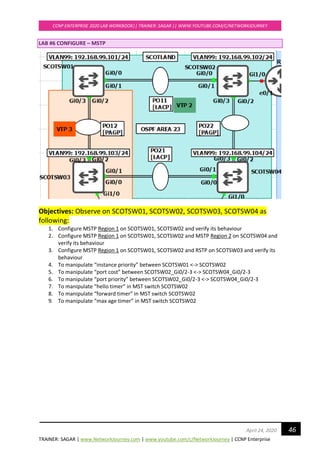
LAB #6 CONFIGURE – MSTP
Objectives: Observe on SCOTSW01, SCOTSW02, SCOTSW03, SCOTSW04 as
following:
1. Configure MSTP Region 1 on SCOTSW01, SCOTSW02 and verify its behaviour
2. Configure MSTP Region 1 on SCOTSW01, SCOTSW02 and MSTP Region 2 on SCOTSW04 and
verify its behaviour
3. Configure MSTP Region 1 on SCOTSW01, SCOTSW02 and RSTP on SCOTSW03 and verify its
behaviour
4. To manipulate “instance priority” between SCOTSW01 <-> SCOTSW02
5. To manipulate “port cost” between SCOTSW02_Gi0/2-3 <-> SCOTSW04_Gi0/2-3
6. To manipulate “port priority” between SCOTSW02_Gi0/2-3 <-> SCOTSW04_Gi0/2-3
7. To manipulate “hello timer” in MST switch SCOTSW02
8. To manipulate “forward timer” in MST switch SCOTSW02
9. To manipulate “max age timer” in MST switch SCOTSW02
TRAINER: SAGAR | www.NetworkJourney.com | www.youtube.com/c/NetworkJourney | CCNP Enterprise
CCNP ENTERPRISE 2020 LAB WORKBOOK|| TRAINER: SAGAR || WWW.YOUTUBE.COM/C/NETWORKJOURNEY
47April 24, 2020
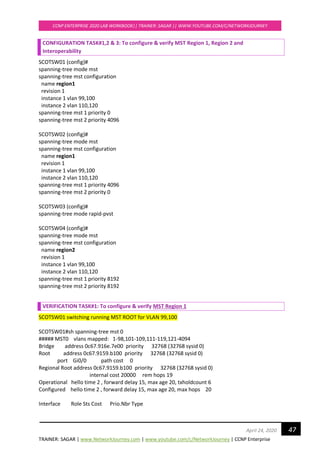
CONFIGURATION TASK#1,2 & 3: To configure & verify MST Region 1, Region 2 and
Interoperability
SCOTSW01 (config)#
spanning-tree mode mst
spanning-tree mst configuration
name region1
revision 1
instance 1 vlan 99,100
instance 2 vlan 110,120
spanning-tree mst 1 priority 0
spanning-tree mst 2 priority 4096
SCOTSW02 (config)#
spanning-tree mode mst
spanning-tree mst configuration
name region1
revision 1
instance 1 vlan 99,100
instance 2 vlan 110,120
spanning-tree mst 1 priority 4096
spanning-tree mst 2 priority 0
SCOTSW03 (config)#
spanning-tree mode rapid-pvst
SCOTSW04 (config)#
spanning-tree mode mst
spanning-tree mst configuration
name region2
revision 1
instance 1 vlan 99,100
instance 2 vlan 110,120
spanning-tree mst 1 priority 8192
spanning-tree mst 2 priority 8192
VERIFICATION TASK#1: To configure & verify MST Region 1
SCOTSW01 switching running MST ROOT for VLAN 99,100
SCOTSW01#sh spanning-tree mst 0
##### MST0 vlans mapped: 1-98,101-109,111-119,121-4094
Bridge address 0c67.916e.7e00 priority 32768 (32768 sysid 0)
Root address 0c67.9159.b100 priority 32768 (32768 sysid 0)
port Gi0/0 path cost 0
Regional Root address 0c67.9159.b100 priority 32768 (32768 sysid 0)
internal cost 20000 rem hops 19
Operational hello time 2 , forward delay 15, max age 20, txholdcount 6
Configured hello time 2 , forward delay 15, max age 20, max hops 20
Interface Role Sts Cost Prio.Nbr Type
TRAINER: SAGAR | www.NetworkJourney.com | www.youtube.com/c/NetworkJourney | CCNP Enterprise
CCNP ENTERPRISE 2020 LAB WORKBOOK|| TRAINER: SAGAR || WWW.YOUTUBE.COM/C/NETWORKJOURNEY
48April 24, 2020
---------------- ---- --- --------- -------- --------------------------------
Gi0/0 Root FWD 20000 128.1 P2p
Gi0/1 Altn BLK 20000 128.2 P2p
Gi0/2 Desg FWD 20000 128.3 P2p Bound(PVST)
Gi0/3 Desg FWD 20000 128.4 P2p Bound(PVST)
SCOTSW01#sh spanning-tree mst 1
##### MST1 vlans mapped: 99-100
Bridge address 0c67.916e.7e00 priority 1 (0 sysid 1)
Root this switch for MST1
Interface Role Sts Cost Prio.Nbr Type
---------------- ---- --- --------- -------- --------------------------------
Gi0/0 Desg FWD 20000 128.1 P2p
Gi0/1 Desg FWD 20000 128.2 P2p
Gi0/2 Desg FWD 20000 128.3 P2p Bound(PVST)
Gi0/3 Desg FWD 20000 128.4 P2p Bound(PVST)
SCOTSW01#sh spanning-tree mst 2
##### MST2 vlans mapped: 110,120
Bridge address 0c67.916e.7e00 priority 4098 (4096 sysid 2)
Root address 0c67.9159.b100 priority 2 (0 sysid 2)
port Gi0/0 cost 20000 rem hops 19
Interface Role Sts Cost Prio.Nbr Type
---------------- ---- --- --------- -------- --------------------------------
Gi0/0 Root FWD 20000 128.1 P2p
Gi0/1 Altn BLK 20000 128.2 P2p
Gi0/2 Desg FWD 20000 128.3 P2p Bound(PVST)
Gi0/3 Desg FWD 20000 128.4 P2p Bound(PVST)
SCOTSW02 running MST ROOT for VLAN 110, 120
SCOTSW02 elected AS IST MASTER = CIST due to superior BPDU [Bridge ID = PRI+MAC ADD]
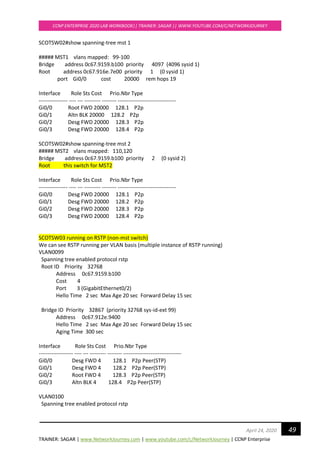
SCOTSW02#show spanning-tree mst 0
##### MST0 vlans mapped: 1-98,101-109,111-119,121-4094
Bridge address 0c67.9159.b100 priority 32768 (32768 sysid 0)
Root this switch for the CIST
Operational hello time 2 , forward delay 15, max age 20, txholdcount 6
Configured hello time 2 , forward delay 15, max age 20, max hops 20
Interface Role Sts Cost Prio.Nbr Type
---------------- ---- --- --------- -------- --------------------------------
Gi0/0 Desg FWD 20000 128.1 P2p
Gi0/1 Desg FWD 20000 128.2 P2p
Gi0/2 Desg FWD 20000 128.3 P2p
Gi0/3 Desg FWD 20000 128.4 P2p
TRAINER: SAGAR | www.NetworkJourney.com | www.youtube.com/c/NetworkJourney | CCNP Enterprise
CCNP ENTERPRISE 2020 LAB WORKBOOK|| TRAINER: SAGAR || WWW.YOUTUBE.COM/C/NETWORKJOURNEY
49April 24, 2020
SCOTSW02#show spanning-tree mst 1
##### MST1 vlans mapped: 99-100
Bridge address 0c67.9159.b100 priority 4097 (4096 sysid 1)
Root address 0c67.916e.7e00 priority 1 (0 sysid 1)
port Gi0/0 cost 20000 rem hops 19
Interface Role Sts Cost Prio.Nbr Type
---------------- ---- --- --------- -------- --------------------------------
Gi0/0 Root FWD 20000 128.1 P2p
Gi0/1 Altn BLK 20000 128.2 P2p
Gi0/2 Desg FWD 20000 128.3 P2p
Gi0/3 Desg FWD 20000 128.4 P2p
SCOTSW02#show spanning-tree mst 2
##### MST2 vlans mapped: 110,120
Bridge address 0c67.9159.b100 priority 2 (0 sysid 2)
Root this switch for MST2
Interface Role Sts Cost Prio.Nbr Type
---------------- ---- --- --------- -------- --------------------------------
Gi0/0 Desg FWD 20000 128.1 P2p
Gi0/1 Desg FWD 20000 128.2 P2p
Gi0/2 Desg FWD 20000 128.3 P2p
Gi0/3 Desg FWD 20000 128.4 P2p
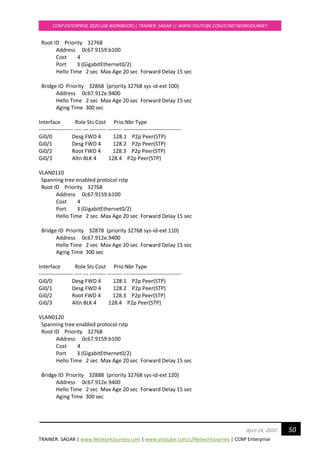
SCOTSW03 running on RSTP (non-mst switch)
We can see RSTP running per VLAN basis (multiple instance of RSTP running)
VLAN0099
Spanning tree enabled protocol rstp
Root ID Priority 32768
Address 0c67.9159.b100
Cost 4
Port 3 (GigabitEthernet0/2)
Hello Time 2 sec Max Age 20 sec Forward Delay 15 sec
Bridge ID Priority 32867 (priority 32768 sys-id-ext 99)
Address 0c67.912e.9400
Hello Time 2 sec Max Age 20 sec Forward Delay 15 sec
Aging Time 300 sec
Interface Role Sts Cost Prio.Nbr Type
------------------- ---- --- --------- -------- --------------------------------
Gi0/0 Desg FWD 4 128.1 P2p Peer(STP)
Gi0/1 Desg FWD 4 128.2 P2p Peer(STP)
Gi0/2 Root FWD 4 128.3 P2p Peer(STP)
Gi0/3 Altn BLK 4 128.4 P2p Peer(STP)
VLAN0100
Spanning tree enabled protocol rstp
TRAINER: SAGAR | www.NetworkJourney.com | www.youtube.com/c/NetworkJourney | CCNP Enterprise
CCNP ENTERPRISE 2020 LAB WORKBOOK|| TRAINER: SAGAR || WWW.YOUTUBE.COM/C/NETWORKJOURNEY
50April 24, 2020
Root ID Priority 32768
Address 0c67.9159.b100
Cost 4
Port 3 (GigabitEthernet0/2)
Hello Time 2 sec Max Age 20 sec Forward Delay 15 sec
Bridge ID Priority 32868 (priority 32768 sys-id-ext 100)
Address 0c67.912e.9400
Hello Time 2 sec Max Age 20 sec Forward Delay 15 sec
Aging Time 300 sec
Interface Role Sts Cost Prio.Nbr Type
------------------- ---- --- --------- -------- --------------------------------
Gi0/0 Desg FWD 4 128.1 P2p Peer(STP)
Gi0/1 Desg FWD 4 128.2 P2p Peer(STP)
Gi0/2 Root FWD 4 128.3 P2p Peer(STP)
Gi0/3 Altn BLK 4 128.4 P2p Peer(STP)
VLAN0110
Spanning tree enabled protocol rstp
Root ID Priority 32768
Address 0c67.9159.b100
Cost 4
Port 3 (GigabitEthernet0/2)
Hello Time 2 sec Max Age 20 sec Forward Delay 15 sec
Bridge ID Priority 32878 (priority 32768 sys-id-ext 110)
Address 0c67.912e.9400
Hello Time 2 sec Max Age 20 sec Forward Delay 15 sec
Aging Time 300 sec
Interface Role Sts Cost Prio.Nbr Type
------------------- ---- --- --------- -------- --------------------------------
Gi0/0 Desg FWD 4 128.1 P2p Peer(STP)
Gi0/1 Desg FWD 4 128.2 P2p Peer(STP)
Gi0/2 Root FWD 4 128.3 P2p Peer(STP)
Gi0/3 Altn BLK 4 128.4 P2p Peer(STP)
VLAN0120
Spanning tree enabled protocol rstp
Root ID Priority 32768
Address 0c67.9159.b100
Cost 4
Port 3 (GigabitEthernet0/2)
Hello Time 2 sec Max Age 20 sec Forward Delay 15 sec
Bridge ID Priority 32888 (priority 32768 sys-id-ext 120)
Address 0c67.912e.9400
Hello Time 2 sec Max Age 20 sec Forward Delay 15 sec
Aging Time 300 sec
TRAINER: SAGAR | www.NetworkJourney.com | www.youtube.com/c/NetworkJourney | CCNP Enterprise
CCNP ENTERPRISE 2020 LAB WORKBOOK|| TRAINER: SAGAR || WWW.YOUTUBE.COM/C/NETWORKJOURNEY
51April 24, 2020
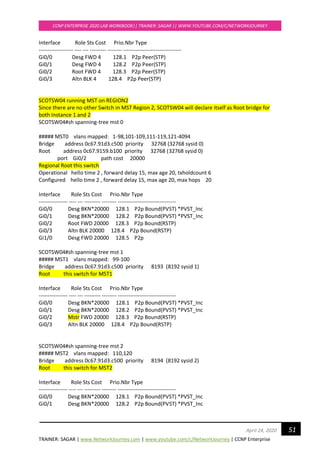
Interface Role Sts Cost Prio.Nbr Type
------------------- ---- --- --------- -------- --------------------------------
Gi0/0 Desg FWD 4 128.1 P2p Peer(STP)
Gi0/1 Desg FWD 4 128.2 P2p Peer(STP)
Gi0/2 Root FWD 4 128.3 P2p Peer(STP)
Gi0/3 Altn BLK 4 128.4 P2p Peer(STP)
SCOTSW04 running MST on REGION2
Since there are no other Switch in MST Region 2, SCOTSW04 will declare itself as Root bridge for
both Instance 1 and 2
SCOTSW04#sh spanning-tree mst 0
##### MST0 vlans mapped: 1-98,101-109,111-119,121-4094
Bridge address 0c67.91d3.c500 priority 32768 (32768 sysid 0)
Root address 0c67.9159.b100 priority 32768 (32768 sysid 0)
port Gi0/2 path cost 20000
Regional Root this switch
Operational hello time 2 , forward delay 15, max age 20, txholdcount 6
Configured hello time 2 , forward delay 15, max age 20, max hops 20
Interface Role Sts Cost Prio.Nbr Type
---------------- ---- --- --------- -------- --------------------------------
Gi0/0 Desg BKN*20000 128.1 P2p Bound(PVST) *PVST_Inc
Gi0/1 Desg BKN*20000 128.2 P2p Bound(PVST) *PVST_Inc
Gi0/2 Root FWD 20000 128.3 P2p Bound(RSTP)
Gi0/3 Altn BLK 20000 128.4 P2p Bound(RSTP)
Gi1/0 Desg FWD 20000 128.5 P2p
SCOTSW04#sh spanning-tree mst 1
##### MST1 vlans mapped: 99-100
Bridge address 0c67.91d3.c500 priority 8193 (8192 sysid 1)
Root this switch for MST1
Interface Role Sts Cost Prio.Nbr Type
---------------- ---- --- --------- -------- --------------------------------
Gi0/0 Desg BKN*20000 128.1 P2p Bound(PVST) *PVST_Inc
Gi0/1 Desg BKN*20000 128.2 P2p Bound(PVST) *PVST_Inc
Gi0/2 Mstr FWD 20000 128.3 P2p Bound(RSTP)
Gi0/3 Altn BLK 20000 128.4 P2p Bound(RSTP)
SCOTSW04#sh spanning-tree mst 2
##### MST2 vlans mapped: 110,120
Bridge address 0c67.91d3.c500 priority 8194 (8192 sysid 2)
Root this switch for MST2
Interface Role Sts Cost Prio.Nbr Type
---------------- ---- --- --------- -------- --------------------------------
Gi0/0 Desg BKN*20000 128.1 P2p Bound(PVST) *PVST_Inc
Gi0/1 Desg BKN*20000 128.2 P2p Bound(PVST) *PVST_Inc
TRAINER: SAGAR | www.NetworkJourney.com | www.youtube.com/c/NetworkJourney | CCNP Enterprise
CCNP ENTERPRISE 2020 LAB WORKBOOK|| TRAINER: SAGAR || WWW.YOUTUBE.COM/C/NETWORKJOURNEY
52April 24, 2020
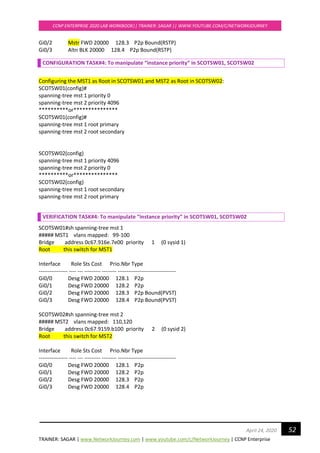
Gi0/2 Mstr FWD 20000 128.3 P2p Bound(RSTP)
Gi0/3 Altn BLK 20000 128.4 P2p Bound(RSTP)
CONFIGURATION TASK#4: To manipulate “instance priority” in SCOTSW01, SCOTSW02
Configuring the MST1 as Root in SCOTSW01 and MST2 as Root in SCOTSW02:
SCOTSW01(config)#
spanning-tree mst 1 priority 0
spanning-tree mst 2 priority 4096
**********or***************
SCOTSW01(config)#
spanning-tree mst 1 root primary
spanning-tree mst 2 root secondary
SCOTSW02(config)
spanning-tree mst 1 priority 4096
spanning-tree mst 2 priority 0
**********or***************
SCOTSW02(config)
spanning-tree mst 1 root secondary
spanning-tree mst 2 root primary
VERIFICATION TASK#4: To manipulate “instance priority” in SCOTSW01, SCOTSW02
SCOTSW01#sh spanning-tree mst 1
##### MST1 vlans mapped: 99-100
Bridge address 0c67.916e.7e00 priority 1 (0 sysid 1)
Root this switch for MST1
Interface Role Sts Cost Prio.Nbr Type
---------------- ---- --- --------- -------- --------------------------------
Gi0/0 Desg FWD 20000 128.1 P2p
Gi0/1 Desg FWD 20000 128.2 P2p
Gi0/2 Desg FWD 20000 128.3 P2p Bound(PVST)
Gi0/3 Desg FWD 20000 128.4 P2p Bound(PVST)
SCOTSW02#sh spanning-tree mst 2
##### MST2 vlans mapped: 110,120
Bridge address 0c67.9159.b100 priority 2 (0 sysid 2)
Root this switch for MST2
Interface Role Sts Cost Prio.Nbr Type
---------------- ---- --- --------- -------- --------------------------------
Gi0/0 Desg FWD 20000 128.1 P2p
Gi0/1 Desg FWD 20000 128.2 P2p
Gi0/2 Desg FWD 20000 128.3 P2p
Gi0/3 Desg FWD 20000 128.4 P2p
TRAINER: SAGAR | www.NetworkJourney.com | www.youtube.com/c/NetworkJourney | CCNP Enterprise
CCNP ENTERPRISE 2020 LAB WORKBOOK|| TRAINER: SAGAR || WWW.YOUTUBE.COM/C/NETWORKJOURNEY
53April 24, 2020
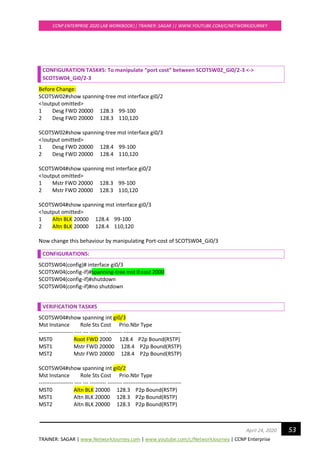
CONFIGURATION TASK#5: To manipulate “port cost” between SCOTSW02_Gi0/2-3 <->
SCOTSW04_Gi0/2-3
Before Change:
SCOTSW02#show spanning-tree mst interface gi0/2
<!output omitted>
1 Desg FWD 20000 128.3 99-100
2 Desg FWD 20000 128.3 110,120
SCOTSW02#show spanning-tree mst interface gi0/3
<!output omitted>
1 Desg FWD 20000 128.4 99-100
2 Desg FWD 20000 128.4 110,120
SCOTSW04#show spanning mst interface gi0/2
<!output omitted>
1 Mstr FWD 20000 128.3 99-100
2 Mstr FWD 20000 128.3 110,120
SCOTSW04#show spanning mst interface gi0/3
<!output omitted>
1 Altn BLK 20000 128.4 99-100
2 Altn BLK 20000 128.4 110,120
Now change this behaviour by manipulating Port-cost of SCOTSW04_Gi0/3
CONFIGURATIONS:
SCOTSW04(config)# interface gi0/3
SCOTSW04(config-if)#spanning-tree mst 0 cost 2000
SCOTSW04(config-if)#shutdown
SCOTSW04(config-if)#no shutdown
VERIFICATION TASK#5
SCOTSW04#show spanning int gi0/3
Mst Instance Role Sts Cost Prio.Nbr Type
------------------- ---- --- --------- -------- --------------------------------
MST0 Root FWD 2000 128.4 P2p Bound(RSTP)
MST1 Mstr FWD 20000 128.4 P2p Bound(RSTP)
MST2 Mstr FWD 20000 128.4 P2p Bound(RSTP)
SCOTSW04#show spanning int gi0/2
Mst Instance Role Sts Cost Prio.Nbr Type
------------------- ---- --- --------- -------- --------------------------------
MST0 Altn BLK 20000 128.3 P2p Bound(RSTP)
MST1 Altn BLK 20000 128.3 P2p Bound(RSTP)
MST2 Altn BLK 20000 128.3 P2p Bound(RSTP)
TRAINER: SAGAR | www.NetworkJourney.com | www.youtube.com/c/NetworkJourney | CCNP Enterprise
CCNP ENTERPRISE 2020 LAB WORKBOOK|| TRAINER: SAGAR || WWW.YOUTUBE.COM/C/NETWORKJOURNEY
54April 24, 2020
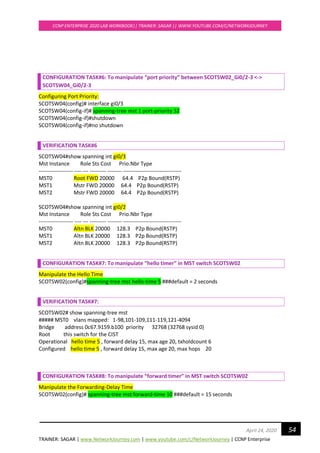
CONFIGURATION TASK#6: To manipulate “port priority” between SCOTSW02_Gi0/2-3 <->
SCOTSW04_Gi0/2-3
Configuring Port Priority:
SCOTSW04(config)# interface gi0/3
SCOTSW04(config-if)# spanning-tree mst 1 port-priority 32
SCOTSW04(config-if)#shutdown
SCOTSW04(config-if)#no shutdown
VERIFICATION TASK#6
SCOTSW04#show spanning int gi0/3
Mst Instance Role Sts Cost Prio.Nbr Type
------------------- ---- --- --------- -------- --------------------------------
MST0 Root FWD 20000 64.4 P2p Bound(RSTP)
MST1 Mstr FWD 20000 64.4 P2p Bound(RSTP)
MST2 Mstr FWD 20000 64.4 P2p Bound(RSTP)
SCOTSW04#show spanning int gi0/2
Mst Instance Role Sts Cost Prio.Nbr Type
------------------- ---- --- --------- -------- --------------------------------
MST0 Altn BLK 20000 128.3 P2p Bound(RSTP)
MST1 Altn BLK 20000 128.3 P2p Bound(RSTP)
MST2 Altn BLK 20000 128.3 P2p Bound(RSTP)
CONFIGURATION TASK#7: To manipulate “hello timer” in MST switch SCOTSW02
Manipulate the Hello Time
SCOTSW02(config)#spanning-tree mst hello-time 5 ###default = 2 seconds
VERIFICATION TASK#7:
SCOTSW02# show spanning-tree mst
##### MST0 vlans mapped: 1-98,101-109,111-119,121-4094
Bridge address 0c67.9159.b100 priority 32768 (32768 sysid 0)
Root this switch for the CIST
Operational hello time 5 , forward delay 15, max age 20, txholdcount 6
Configured hello time 5 , forward delay 15, max age 20, max hops 20
CONFIGURATION TASK#8: To manipulate “forward timer” in MST switch SCOTSW02
Manipulate the Forwarding-Delay Time
SCOTSW02(config)# spanning-tree mst forward-time 10 ###default = 15 seconds
TRAINER: SAGAR | www.NetworkJourney.com | www.youtube.com/c/NetworkJourney | CCNP Enterprise
CCNP ENTERPRISE 2020 LAB WORKBOOK|| TRAINER: SAGAR || WWW.YOUTUBE.COM/C/NETWORKJOURNEY
55April 24, 2020
The forward delay is the number of seconds a port waits before changing from its spanning-tree
learning and listening states to the forwarding state.
VERIFICATION TASK#8:
SCOTSW02# show spanning-tree mst
##### MST0 vlans mapped: 1-98,101-109,111-119,121-4094
Bridge address 0c67.9159.b100 priority 32768 (32768 sysid 0)
Root this switch for the CIST
Operational hello time 5 , forward delay 10, max age 20, txholdcount 6
Configured hello time 5 , forward delay 10, max age 20, max hops 20
CONFIGURATION TASK#9: To manipulate “max age timer” in MST switch SCOTSW02
Manipulating the Maximum-Aging Time
SCOTSW02(config)#spanning-tree mst max-age 30 ###default = 20 seconds
The maximum-aging time is the number of seconds a switch waits without receiving spanning-tree
configuration messages before attempting a reconfiguration.
VERIFICATION TASK#9:
SCOTSW02#show spanning-tree mst
##### MST0 vlans mapped: 1-98,101-109,111-119,121-4094
Bridge address 0c67.9159.b100 priority 32768 (32768 sysid 0)
Root this switch for the CIST
Operational hello time 2 , forward delay 10, max age 30, txholdcount 6
Configured hello time 2 , forward delay 10, max age 30, max hops 20
IMPORTANT FACT!!!
To restart the protocol migration process (force the renegotiation with neighboring switches) on
the switch, use the below command under privileged EXEC command.:
clear spanning-tree detected-protocols
TRAINER: SAGAR | www.NetworkJourney.com | www.youtube.com/c/NetworkJourney | CCNP Enterprise
CCNP ENTERPRISE 2020 LAB WORKBOOK|| TRAINER: SAGAR || WWW.YOUTUBE.COM/C/NETWORKJOURNEY
56April 24, 2020
LAB #7 CONFIGURE – DTP (DYNAMIC TRUNKING PROTOCOL)
Objectives: Observe on SCOTSW01, SCOTSW02, SCOTSW03, SCOTSW04 as
following:
1. Configure “DTP desirable-desirable” between SCOTSW01 <-> SCOTSW02
2. Configure “DTP auto-desriable” between SCOTSW01 <-> SCOTSW03
3. Configure “DTP auto-auto” between SCOTSW03 <-> SCOTSW04
4. Configure “DTP” between SCOTSW02_Trunk_Dot1Q <-> SCOTSW04_Auto
5. Configure DTP between SCOTSW02_Trunk Dot1Q <-> SCOTSW04_desirable
TRAINER: SAGAR | www.NetworkJourney.com | www.youtube.com/c/NetworkJourney | CCNP Enterprise
CCNP ENTERPRISE 2020 LAB WORKBOOK|| TRAINER: SAGAR || WWW.YOUTUBE.COM/C/NETWORKJOURNEY
57April 24, 2020
CONFIGURATION TASK#1: Configure “DTP desirable-desirable” between SCOTSW01 <-> SCOTSW02
SCOTSW01(config)#default interface range gi0/0-1
SCOTSW01(config)#interface range gigabitEthernet 0/0-1
SCOTSW01(config-if-range)#switchport mode dynamic desirable
SCOTSW02(config)#default interface range gi0/0-1
SCOTSW02(config)#interface range gigabitEthernet 0/0-1
SCOTSW02(config-if-range)#switchport mode dynamic desirable
VERIFICATION TASK#1:
SCOTSW01#show interfaces trunk
Port Mode Encapsulation Status Native vlan
Gi0/0 desirable n-isl trunking 1
Gi0/1 desirable n-isl trunking 1
<!—output omitted>
SCOTSW01#sh interfaces gi0/0 swi
Name: Gi0/0
Switchport: Enabled
Administrative Mode: dynamic desirable
Operational Mode: trunk
Administrative Trunking Encapsulation: negotiate
Operational Trunking Encapsulation: isl
Negotiation of Trunking: On
Access Mode VLAN: 1 (default)
Trunking Native Mode VLAN: 1 (default)
<!output omitted>
SCOTSW02#show interface trunk
Port Mode Encapsulation Status Native vlan
Gi0/0 desirable n-isl trunking 1
Gi0/1 desirable n-isl trunking 1
<!—output omitted>
SCOTSW02#show interfaces gi0/0 switchport
Name: Gi0/0
Switchport: Enabled
Administrative Mode: dynamic desirable
Operational Mode: trunk
Administrative Trunking Encapsulation: negotiate
Operational Trunking Encapsulation: isl
Negotiation of Trunking: On
Access Mode VLAN: 1 (default)
Trunking Native Mode VLAN: 1 (default)
Administrative Native VLAN tagging: enabled
<!output omitted>
TRAINER: SAGAR | www.NetworkJourney.com | www.youtube.com/c/NetworkJourney | CCNP Enterprise
CCNP ENTERPRISE 2020 LAB WORKBOOK|| TRAINER: SAGAR || WWW.YOUTUBE.COM/C/NETWORKJOURNEY
58April 24, 2020
DTP is cisco proprietary
DTP negotiation by default negotiate over “n-isl”
As we know ISL header carries “26 bytes” which is a drawback of DTP negotiations. The payload
(data) gets shrinked (or reduced) to accumulate extra ISL header size.
CONFIGURATION TASK#2: Configure “DTP auto-desirable” between SCOTSW01 <-> SCOTSW03
SCOTSW01(config)#default interface range gi0/2-3
SCOTSW01(config)#interface range gi0/2-3
SCOTSW01(config-if-range)#switchport mode dynamic auto
SCOTSW03(config)#default interface range gi0/2-3
SCOTSW03(config)#interface range gi0/2-3
SCOTSW03(config-if-range)#switchport mode dynamic desirable
VERIFICATION TASK#2:
SCOTSW01#show interfaces trunk
Port Mode Encapsulation Status Native vlan
Gi0/2 auto n-isl trunking 1
Gi0/3 auto n-isl trunking 1
<!—output omitted>
SCOTSW03#show interfaces trunk
Port Mode Encapsulation Status Native vlan
Gi0/2 desirable n-isl trunking 1
Gi0/3 desirable n-isl trunking 1
<!—output omitted>
CONFIGURATION TASK#3: Configure “DTP auto-auto” between SCOTSW03 <-> SCOTSW04
SCOTSW03(config)#default interface range gi0/0-1
SCOTSW03(config)#interface range gi0/0-1
SCOTSW03(config-if-range)#sw mo dynamic auto
SCOTSW04(config)#default interface range gi0/0-1
SCOTSW04(config)#interface range gi0/0-1
SCOTSW04(config-if-range)#sw mo dynamic auto
SCOTSW03#show inter gi0/1 trunk
Port Mode Encapsulation Status Native vlan
Gi0/1 auto negotiate not-trunking 1
TRAINER: SAGAR | www.NetworkJourney.com | www.youtube.com/c/NetworkJourney | CCNP Enterprise
CCNP ENTERPRISE 2020 LAB WORKBOOK|| TRAINER: SAGAR || WWW.YOUTUBE.COM/C/NETWORKJOURNEY
59April 24, 2020
Port Vlans allowed on trunk
Gi0/1 1
Port Vlans allowed and active in management domain
Gi0/1 1
Port Vlans in spanning tree forwarding state and not pruned
Gi0/1 1
SCOTSW03#show inter gi0/1 sw
SCOTSW03#show inter gi0/1 switchport
Name: Gi0/1
Switchport: Enabled
Administrative Mode: dynamic auto
Operational Mode: static access
Administrative Trunking Encapsulation: negotiate
Operational Trunking Encapsulation: native
Negotiation of Trunking: On
Access Mode VLAN: 1 (default)
Trunking Native Mode VLAN: 1 (default)
Administrative Native VLAN tagging: enabled
<!output omitted>
Dynamic AUTO on both sides will not bring up “n-Trunking”as shown here SCOTSW03_gi0/0-1 <->
SCOTSW04_gi0/0-1.
It is recommended statically make it “Trunking” and do not keep DTP auto negotiations.
Some IOS software comes by default with “Auto” enabled on switchports.
CONFIGURATION TASK#4: Configure DTP between SCOTSW02_Trunk Dot1Q <-> SCOTSW04_auto
SCOTSW02(config)#default interface range gi0/2-3
SCOTSW02(config)#interface range gi0/2-3
SCOTSW02(config-if-range)#sw trunk encapsulation dot1q
SCOTSW02(config-if-range)#sw mode trunk
SCOTSW04(config)#default inter range gi0/2-3
SCOTSW04(config)#interface range gi0/2-3
SCOTSW04(config-if-range)#sw mode dynamic auto
SCOTSW02#sh inter trunk
Port Mode Encapsulation Status Native vlan
Gi0/2 on 802.1q trunking 1
Gi0/3 on 802.1q trunking 1
TRAINER: SAGAR | www.NetworkJourney.com | www.youtube.com/c/NetworkJourney | CCNP Enterprise
CCNP ENTERPRISE 2020 LAB WORKBOOK|| TRAINER: SAGAR || WWW.YOUTUBE.COM/C/NETWORKJOURNEY
60April 24, 2020
SCOTSW04#sh inter trunk
Port Mode Encapsulation Status Native vlan
Gi0/2 desirable n-isl trunking 1
Gi0/3 desirable n-isl trunking 1
CONFIGURATION TASK#5: Configure DTP between SCOTSW02_Trunk Dot1Q <->
SCOTSW04_desirable
SCOTSW02(config)#default interface range gi0/2-3
SCOTSW02(config)#interface range gi0/2-3
SCOTSW02(config-if-range)#sw trunk encapsulation dot1q
SCOTSW02(config-if-range)#sw mo trunk
SCOTSW04(config)#default inter range gi0/2-3
SCOTSW04(config)#interface range gi0/2-3
SCOTSW04(config-if-range)#sw mode dynamic desirable
SCOTSW02#sh inter trunk
Port Mode Encapsulation Status Native vlan
Gi0/2 on 802.1q trunking 1
Gi0/3 on 802.1q trunking 1
SCOTSW04#sh inter trunk
Port Mode Encapsulation Status Native vlan
Gi0/2 auto n-isl trunking 1
Gi0/3 auto n-isl trunking 1
TRAINER: SAGAR | www.NetworkJourney.com | www.youtube.com/c/NetworkJourney | CCNP Enterprise
CCNP ENTERPRISE 2020 LAB WORKBOOK|| TRAINER: SAGAR || WWW.YOUTUBE.COM/C/NETWORKJOURNEY
61April 24, 2020
LAB #8 CONFIGURE – ETHERCHANNEL
Objectives: Observe on SCOTSW01, SCOTSW02, SCOTSW03, SCOTSW04 as
following:
1. Configure “PAgP” between SCOTSW01_gi0/2-3 <-> SCOTSW03_gi0/2-3
2. Configure “LACP” between SCOTSW01_gi0/0-1 <-> SCOTSW02_gi0/0-1
3. Configure “ON” between SCOTSW02 <-> SCOTSW04
4. Configure “LACP Fast”
5. Configure Minimum Number of Port-Channel Member Interfaces
6. Configure Maximum Number of Port-Channel Member Interfaces
7. Configure LACP System Priority
8. Configure LACP Interface Priority
9. Configure EtherChannel Misconfiguration Guard
TRAINER: SAGAR | www.NetworkJourney.com | www.youtube.com/c/NetworkJourney | CCNP Enterprise
CCNP ENTERPRISE 2020 LAB WORKBOOK|| TRAINER: SAGAR || WWW.YOUTUBE.COM/C/NETWORKJOURNEY
62April 24, 2020
CONFIGURATION TASK#1: Configure “PAgP” between SCOTSW01 <-> SCOTSW03
SCOTSW01 PAgP Configuration
SCOTSW01(config)#default interface range gi0/2-3
SCOTSW01 (config)#no interface port-channel 12
SCOTSW01 (config)#interface range gi0/2-3
SCOTSW01 (config-if-range)#switchport trunk encapsulation dot1q
SCOTSW01 (config-if-range)#switchport mode trunk
SCOTSW01 (config-if-range)#switchport trunk allowed vlan 99,100,110,120,666,999
SCOTSW01 (config-if-range)#channel-protocol pagp (optional)
SCOTSW01 (config-if-range)#channel-group 12 mode auto
SCOTSW03 PAgP Configuration
SCOTSW03(config)#default interface range gi0/2-3
SCOTSW03(config)#no interface port-channel 12
SCOTSW03(config)#interface range gi0/2-3
SCOTSW03(config-if-range)#switchport trunk encapsulation dot1q
SCOTSW03(config-if-range)#switchport mode trunk
SCOTSW03(config-if-range)#switchport trunk allowed vlan 99,100,110,120,666,999
SCOTSW03(config-if-range)#channel-protocol pagp (optional)
SCOTSW03(config-if-range)#channel-group 12 mode desirable
VERIFICATION TASK#1
• show etherchannel summary
• show etherchannel detail
• show etherchannel port-channel
• show pagp counter
• show pagp neighbor
SCOTSW03# show etherchannel summary
Flags: D - down P - bundled in port-channel
I - stand-alone s - suspended
H - Hot-standby (LACP only)
R - Layer3 S - Layer2
U - in use N - not in use, no aggregation
f - failed to allocate aggregator
M - not in use, minimum links not met
m - not in use, port not aggregated due to minimum links not met
u - unsuitable for bundling
w - waiting to be aggregated
d - default port
A - formed by Auto LAG
TRAINER: SAGAR | www.NetworkJourney.com | www.youtube.com/c/NetworkJourney | CCNP Enterprise
CCNP ENTERPRISE 2020 LAB WORKBOOK|| TRAINER: SAGAR || WWW.YOUTUBE.COM/C/NETWORKJOURNEY
63April 24, 2020
Number of channel-groups in use: 1
Number of aggregators: 1
Group Port-channel Protocol Ports
------+-------------+-----------+-----------------------------------------------
12 Po12(SU) PAgP Gi0/2(P) Gi0/3(P)
SCOTSW03#show etherchannel detail
Channel-group listing:
----------------------
! This is the header that indicates all the ports that are for the first
! EtherChannel interface. Every member link interface will be listed
Group: 12
----------
Group state = L2
Ports: 2 Maxports = 4
Port-channels: 1 Max Port-channels = 1
Protocol: PAgP
Minimum Links: 0
! This is the first member interface for interface Po12. This interface
! is configured for PAgP active
Ports in the group:
-------------------
Port: Gi0/2
------------
Port state = Up Mstr In-Bndl
Channel group = 12 Mode = Automatic-Sl Gcchange = 0
Port-channel = Po12 GC = 0x000C0001 Pseudo port-channel = Po12
Port index = 0 Load = 0x00 Protocol = PAgP
Flags: S - Device is sending Slow hello. C - Device is in Consistent state.
A - Device is in Auto mode. P - Device learns on physical port.
d - PAgP is down.
Timers: H - Hello timer is running. Q - Quit timer is running.
S - Switching timer is running. I - Interface timer is running.
Local information:
Hello Partner PAgP Learning Group
Port Flags State Timers Interval Count Priority Method Ifindex
Gi0/2 SAC U6/S7 HQ 30s 1 128 Any 19
! This interface's partner is configured with PAgP Slow packets, has a system-id
! of 0c67.916e.8000 , a port priority of 128 , and is desirable in the bundle
! for 0d:01h:27m:31s.
Partner's information:
Partner Partner Partner Partner Group
Port Name Device ID Port Age Flags Cap.
Gi0/2 SCOTSW01.networkjour 0c67.916e.8000 Gi0/2 26s SC C0001
TRAINER: SAGAR | www.NetworkJourney.com | www.youtube.com/c/NetworkJourney | CCNP Enterprise
CCNP ENTERPRISE 2020 LAB WORKBOOK|| TRAINER: SAGAR || WWW.YOUTUBE.COM/C/NETWORKJOURNEY
64April 24, 2020
Age of the port in the current state: 0d:01h:27m:31s
Port: Gi0/3
------------
Port state = Up Mstr In-Bndl
Channel group = 12 Mode = Automatic-Sl Gcchange = 0
Port-channel = Po12 GC = 0x000C0001 Pseudo port-channel = Po12
Port index = 0 Load = 0x00 Protocol = PAgP
Flags: S - Device is sending Slow hello. C - Device is in Consistent state.
A - Device is in Auto mode. P - Device learns on physical port.
d - PAgP is down.
Timers: H - Hello timer is running. Q - Quit timer is running.
S - Switching timer is running. I - Interface timer is running.
Local information:
Hello Partner PAgP Learning Group
Port Flags State Timers Interval Count Priority Method Ifindex
Gi0/3 SAC U6/S7 HQ 30s 1 128 Any 19
Partner's information:
Partner Partner Partner Partner Group
Port Name Device ID Port Age Flags Cap.
Gi0/3 SCOTSW01.networkjour 0c67.916e.8000 Gi0/3 22s SC C0001
Age of the port in the current state: 0d:01h:27m:31s
Port-channels in the group:
---------------------------
Port-channel: Po12
------------
Age of the Port-channel = 0d:01h:27m:43s
Logical slot/port = 16/0 Number of ports = 2
GC = 0x000C0001 HotStandBy port = null
Port state = Port-channel Ag-Inuse
Protocol = PAgP
Port security = Disabled
Ports in the Port-channel:
Index Load Port EC state No of bits
------+------+------+------------------+-----------
0 00 Gi0/2 Automatic-Sl 0
0 00 Gi0/3 Automatic-Sl 0
Time since last port bundled: 0d:01h:27m:31s Gi0/3
TRAINER: SAGAR | www.NetworkJourney.com | www.youtube.com/c/NetworkJourney | CCNP Enterprise
CCNP ENTERPRISE 2020 LAB WORKBOOK|| TRAINER: SAGAR || WWW.YOUTUBE.COM/C/NETWORKJOURNEY
65April 24, 2020
SCOTSW03#show etherchannel port-channel
Channel-group listing:
----------------------
Group: 12
----------
Port-channels in the group:
---------------------------
Port-channel: Po12
------------
Age of the Port-channel = 0d:01h:29m:57s
Logical slot/port = 16/0 Number of ports = 2
GC = 0x000C0001 HotStandBy port = null
Port state = Port-channel Ag-Inuse
Protocol = PAgP
Port security = Disabled
Ports in the Port-channel:
Index Load Port EC state No of bits
------+------+------+------------------+-----------
0 00 Gi0/2 Automatic-Sl 0
0 00 Gi0/3 Automatic-Sl 0
Time since last port bundled: 0d:01h:29m:45s Gi0/3
SCOTSW03# show pagp counters
Information Flush PAgP
Port Sent Recv Sent Recv Err Pkts
---------------------------------------------------
Channel group: 12
Gi0/2 198 200 0 0 0
Gi0/3 198 201 0 0 0
SCOTSW03#show pagp neighbor
Flags: S - Device is sending Slow hello. C - Device is in Consistent state.
A - Device is in Auto mode. P - Device learns on physical port.
Channel group 12 neighbors
Partner Partner Partner Partner Group
Port Name Device ID Port Age Flags Cap.
Gi0/2 SCOTSW01.networkjour 0c67.916e.8000 Gi0/2 8s SC C0001
Gi0/3 SCOTSW01.networkjour 0c67.916e.8000 Gi0/3 29s SC C0001
SCOTSW03#
TRAINER: SAGAR | www.NetworkJourney.com | www.youtube.com/c/NetworkJourney | CCNP Enterprise
CCNP ENTERPRISE 2020 LAB WORKBOOK|| TRAINER: SAGAR || WWW.YOUTUBE.COM/C/NETWORKJOURNEY
66April 24, 2020
When viewing the output of the show etherchannel summary command, the first thing that
should be checked is the EtherChannel status, which is listed in the Port-channel column. The
status should be SU
CONFIGURATION TASK#2: “LACP” between SCOTSW01 <-> SCOTSW02
SCOTSW01 LACP Configuration
SCOTSW01(config)#interface range gi0/0-1
SCOTSW01(config-if-range)#switchport trunk encapsulation dot1q
SCOTSW01(config-if-range)#switchport mode trunk
SCOTSW01(config-if-range)#switchport trunk allowed vlan 99,100,110,120,666,999
SCOTSW01(config-if-range)#channel-protocol lacp (optional)
SCOTSW01(config-if-range)#channel-group 11 mode active
SCOTSW02 LACP Configuration
SCOTSW02(config)#interface range gi0/0-1
SCOTSW02(config-if-range)#switchport trunk encapsulation dot1q
SCOTSW02(config-if-range)#switchport mode trunk
SCOTSW02(config-if-range)#channel-protocol lacp (optional)
SCOTSW02(config-if-range)#channel-group 11 mode passive
VERIFICATION TASK#2
• show etherchannel summary
• show etherchannel detail
• show etherchannel port-channel
• show spanning-tree vlan 1
• show lacp counters
• show lacp neighbor
SCOTSW02#show etherchannel summary
Flags: D - down P - bundled in port-channel
I - stand-alone s - suspended
H - Hot-standby (LACP only)
R - Layer3 S - Layer2
U - in use N - not in use, no aggregation
f - failed to allocate aggregator
M - not in use, minimum links not met
m - not in use, port not aggregated due to minimum links not met
u - unsuitable for bundling
w - waiting to be aggregated
d - default port
TRAINER: SAGAR | www.NetworkJourney.com | www.youtube.com/c/NetworkJourney | CCNP Enterprise
CCNP ENTERPRISE 2020 LAB WORKBOOK|| TRAINER: SAGAR || WWW.YOUTUBE.COM/C/NETWORKJOURNEY
67April 24, 2020
A - formed by Auto LAG
Number of channel-groups in use: 2
Number of aggregators: 2
Group Port-channel Protocol Ports
------+-------------+-----------+-----------------------------------------------
11 Po11(SU) LACP Gi0/0(P) Gi0/1(P)
SCOTSW02#show etherchannel detail
Channel-group listing:
----------------------
Group: 11
----------
Group state = L2
Ports: 2 Maxports = 4
Port-channels: 1 Max Port-channels = 4
Protocol: LACP
Minimum Links: 0
Ports in the group:
-------------------
Port: Gi0/0
------------
Port state = Up Mstr Assoc In-Bndl
Channel group = 11 Mode = Passive Gcchange = -
Port-channel = Po11 GC = - Pseudo port-channel = Po11
Port index = 0 Load = 0x00 Protocol = LACP
Flags: S - Device is sending Slow LACPDUs F - Device is sending fast LACPDUs.
A - Device is in active mode. P - Device is in passive mode.
Local information:
LACP port Admin Oper Port Port
Port Flags State Priority Key Key Number State
Gi0/0 SP bndl 32768 0xB 0xB 0x1 0x3C
Partner's information:
LACP port Admin Oper Port Port
Port Flags Priority Dev ID Age key Key Number State
Gi0/0 SA 32768 0c67.916e.8000 13s 0x0 0xB 0x1 0x3D
Age of the port in the current state: 0d:01h:21m:31s
Port: Gi0/1
------------
TRAINER: SAGAR | www.NetworkJourney.com | www.youtube.com/c/NetworkJourney | CCNP Enterprise
CCNP ENTERPRISE 2020 LAB WORKBOOK|| TRAINER: SAGAR || WWW.YOUTUBE.COM/C/NETWORKJOURNEY
68April 24, 2020
Port state = Up Mstr Assoc In-Bndl
Channel group = 11 Mode = Passive Gcchange = -
Port-channel = Po11 GC = - Pseudo port-channel = Po11
Port index = 0 Load = 0x00 Protocol = LACP
Flags: S - Device is sending Slow LACPDUs F - Device is sending fast LACPDUs.
A - Device is in active mode. P - Device is in passive mode.
Local information:
LACP port Admin Oper Port Port
Port Flags State Priority Key Key Number State
Gi0/1 SP bndl 32768 0xB 0xB 0x2 0x3C
Partner's information:
LACP port Admin Oper Port Port
Port Flags Priority Dev ID Age key Key Number State
Gi0/1 SA 32768 0c67.916e.8000 5s 0x0 0xB 0x2 0x3D
Age of the port in the current state: 0d:01h:15m:31s
Port-channels in the group:
---------------------------
Port-channel: Po11 (Primary Aggregator)
------------
Age of the Port-channel = 0d:01h:43m:38s
Logical slot/port = 16/0 Number of ports = 2
HotStandBy port = null
Port state = Port-channel Ag-Inuse
Protocol = LACP
Port security = Disabled
Ports in the Port-channel:
Index Load Port EC state No of bits
------+------+------+------------------+-----------
0 00 Gi0/0 Passive 0
0 00 Gi0/1 Passive 0
Time since last port bundled: 0d:01h:15m:31s Gi0/1
Time since last port Un-bundled: 0d:01h:15m:35s Gi0/1
SCOTSW02#sh spanning-tree vlan 99
VLAN0099
Spanning tree enabled protocol ieee
TRAINER: SAGAR | www.NetworkJourney.com | www.youtube.com/c/NetworkJourney | CCNP Enterprise
CCNP ENTERPRISE 2020 LAB WORKBOOK|| TRAINER: SAGAR || WWW.YOUTUBE.COM/C/NETWORKJOURNEY
69April 24, 2020
Root ID Priority 32867
Address 0c67.912e.9400
Cost 6
Port 65 (Port-channel11)
Hello Time 2 sec Max Age 20 sec Forward Delay 15 sec
Bridge ID Priority 32867 (priority 32768 sys-id-ext 99)
Address 0c67.9159.b100
Hello Time 2 sec Max Age 20 sec Forward Delay 15 sec
Aging Time 300 sec
Interface Role Sts Cost Prio.Nbr Type
------------------- ---- --- --------- -------- --------------------------------
Po11 Root FWD 3 128.65 P2p
SCOTSW02#show lacp counters
LACPDUs Marker Marker Response LACPDUs
Port Sent Recv Sent Recv Sent Recv Pkts Err
---------------------------------------------------------------------
Channel group: 11
Gi0/0 246 245 0 0 0 0 0
Gi0/1 256 256 0 0 0 0 0
SCOTSW02#show lacp neighbor
Flags: S - Device is requesting Slow LACPDUs
F - Device is requesting Fast LACPDUs
A - Device is in Active mode P - Device is in Passive mode
Channel group 11 neighbors
Partner's information:
LACP port Admin Oper Port Port
Port Flags Priority Dev ID Age key Key Number State
Gi0/0 SA 32768 0c67.916e.8000 25s 0x0 0xB 0x1 0x3D
Gi0/1 SA 32768 0c67.916e.8000 13s 0x0 0xB 0x2 0x3D
SCOTSW02#
The LACP counters can be cleared with the command clear lacp counters.
TRAINER: SAGAR | www.NetworkJourney.com | www.youtube.com/c/NetworkJourney | CCNP Enterprise
CCNP ENTERPRISE 2020 LAB WORKBOOK|| TRAINER: SAGAR || WWW.YOUTUBE.COM/C/NETWORKJOURNEY
70April 24, 2020
CONFIGURATION TASK#3: “ON” between SCOTSW02 <-> SCOTSW04
SCOTSW02 Etherchannel “On” Configuration
SCOTSW02(config)#default interface range gi0/2-3
SCOTSW02(config)#no interface port-channel 1
SCOTSW02(config)#interface range gi 0/2-3
SCOTSW02(config-if-range)#switchport trunk encapsulation dot1q
SCOTSW02(config-if-range)#switchport trunk allowed vlan 99,100,110,120,666,999
SCOTSW02(config-if-range)#switchport mode trunk
SCOTSW02(config-if-range)#channel-group 22 mode on
SCOTSW04 Etherchannel “On” Configuration
SCOTSW04(config)#default interface range gi0/2-3
SCOTSW04(config)#no interface port-channel 1
SCOTSW04(config)#interface range gi0/2-3
SCOTSW04(config-if-range)#switchport trunk encapsulation dot1q
SCOTSW04(config-if-range)#switchport trunk allowed vlan 99,100,110,120,666,999
SCOTSW04(config-if-range)#switchport mode trunk
SCOTSW04(config-if-range)#channel-group 22 mode on
VERIFICATION TASK#3
show etherchannel summary
show etherchannel detail
show etherchannel port-channel
show spanning-tree vlan 99
SCOTSW04#show etherchannel summary
Flags: D - down P - bundled in port-channel
I - stand-alone s - suspended
H - Hot-standby (LACP only)
TRAINER: SAGAR | www.NetworkJourney.com | www.youtube.com/c/NetworkJourney | CCNP Enterprise
CCNP ENTERPRISE 2020 LAB WORKBOOK|| TRAINER: SAGAR || WWW.YOUTUBE.COM/C/NETWORKJOURNEY
71April 24, 2020
R - Layer3 S - Layer2
U - in use N - not in use, no aggregation
f - failed to allocate aggregator
M - not in use, minimum links not met
m - not in use, port not aggregated due to minimum links not met
u - unsuitable for bundling
w - waiting to be aggregated
d - default port
A - formed by Auto LAG
Number of channel-groups in use: 1
Number of aggregators: 1
Group Port-channel Protocol Ports
------+-------------+-----------+-----------------------------------------------
22 Po22(SU) - Gi0/2(P) Gi0/3(P)
SCOTSW04#show etherchannel detail
Channel-group listing:
----------------------
Group: 22
----------
Group state = L2
Ports: 2 Maxports = 4
Port-channels: 1 Max Port-channels = 1
Protocol: -
Minimum Links: 0
Ports in the group:
-------------------
Port: Gi0/2
------------
Port state = Up Mstr In-Bndl
Channel group = 22 Mode = On Gcchange = -
Port-channel = Po22 GC = - Pseudo port-channel = Po22
Port index = 0 Load = 0x00 Protocol = -
Age of the port in the current state: 0d:01h:49m:48s
Port: Gi0/3
------------
Port state = Up Mstr In-Bndl
Channel group = 22 Mode = On Gcchange = -
TRAINER: SAGAR | www.NetworkJourney.com | www.youtube.com/c/NetworkJourney | CCNP Enterprise
CCNP ENTERPRISE 2020 LAB WORKBOOK|| TRAINER: SAGAR || WWW.YOUTUBE.COM/C/NETWORKJOURNEY
72April 24, 2020
Port-channel = Po22 GC = - Pseudo port-channel = Po22
Port index = 0 Load = 0x00 Protocol = -
Age of the port in the current state: 0d:01h:49m:48s
Port-channels in the group:
---------------------------
Port-channel: Po22
------------
Age of the Port-channel = 0d:01h:50m:28s
Logical slot/port = 16/0 Number of ports = 2
GC = 0x00000000 HotStandBy port = null
Port state = Port-channel Ag-Inuse
Protocol = -
Port security = Disabled
Ports in the Port-channel:
Index Load Port EC state No of bits
------+------+------+------------------+-----------
0 00 Gi0/2 On 0
0 00 Gi0/3 On 0
Time since last port bundled: 0d:01h:49m:48s Gi0/3
Time since last port Un-bundled: 0d:01h:50m:25s Gi0/3
SCOTSW04#show spanning-tree vlan 99
VLAN0099
Spanning tree enabled protocol ieee
Root ID Priority 32867
Address 0c67.912e.9400
Cost 4
Port 1 (GigabitEthernet0/0)
Hello Time 2 sec Max Age 20 sec Forward Delay 15 sec
Bridge ID Priority 32867 (priority 32768 sys-id-ext 99)
Address 0c67.91d3.c500
Hello Time 2 sec Max Age 20 sec Forward Delay 15 sec
Aging Time 300 sec
Interface Role Sts Cost Prio.Nbr Type
------------------- ---- --- --------- -------- --------------------------------
Po22 Desg FWD 3 128.65 P2p
TRAINER: SAGAR | www.NetworkJourney.com | www.youtube.com/c/NetworkJourney | CCNP Enterprise
CCNP ENTERPRISE 2020 LAB WORKBOOK|| TRAINER: SAGAR || WWW.YOUTUBE.COM/C/NETWORKJOURNEY
73April 24, 2020
Advanced LACP Configuration Options
CONFIGURATION TASK#4: Configure “LACP Fast”
LACP provides some additional tuning that is not available with PAgP.
LACP Fast:
The original LACP standards sent out LACP packets every 30 seconds. A link is deemed unusable if an
LACP packet is not received after three intervals, which results in a potential 90 seconds of packet
loss for a link before that member interface is removed from a port channel.
An amendment to the standards was made so that LACP packets are advertised every 1 second.
This is known as LACP fast because a link can be identified and removed in 3 seconds compared to
the 90 seconds specified in the initial LACP standard.
LACP fast is enabled on the member interfaces with the interface configuration command lacp rate
fast.
All the interfaces on both switches need to be configured the same—either using LACP fast or
LACP slow—for the EtherChannel to successfully come up.
SCOTSW01(config)# interface range gi0/1-2
SCOTSW01(config-if-range)# lacp rate fast
Remember: Best practice is to configure “lacp fast” on every Switch interface.
SCOTSW01# show lacp internal
Flags: S - Device is requesting Slow LACPDUs
F - Device is requesting Fast LACPDUs
A - Device is in Active mode P - Device is in Passive mode
Channel group 1
LACP port Admin Oper Port Port
Port Flags State Priority Key Key Number State
Gi1/0/1 FA bndl 32768 0x1 0x1 0x102 0x3F
Gi1/0/2 FA bndl 32768 0x1 0x1 0x103 0xF
TRAINER: SAGAR | www.NetworkJourney.com | www.youtube.com/c/NetworkJourney | CCNP Enterprise
CCNP ENTERPRISE 2020 LAB WORKBOOK|| TRAINER: SAGAR || WWW.YOUTUBE.COM/C/NETWORKJOURNEY
74April 24, 2020
CONFIGURATION TASK#5: Minimum Number of Port-Channel Member Interfaces
An EtherChannel interface becomes active and up when only one member interface successfully
forms an adjacency with a remote device.
In some design scenarios using LACP, a minimum number of adjacencies is required before a port-
channel interface becomes active. This option can be configured with the port-channel interface
command port-channel min-links min-links.
SCOTSW01(config)# interface port-channel 1
SCOTSW01(config-if)# port-channel min-links 2
Test the behaviour by shutting one of the physical member manually “shutdown”
SCOTSW01(config-if)# interface gi1/0/1
SCOTSW01(config-if)# shutdown
10:44:46.516: %ETC-5-MINLINKS_NOTMET: Port-channel Po1 is down bundled ports (1)
doesn't meet min-links
10:44:47.506: %LINEPROTO-5-UPDOWN: Line protocol on Interface Gigabit
Ethernet1/0/2, changed state to down
10:44:47.508: %LINEPROTO-5-UPDOWN: Line protocol on Interface Port-channel1,
changed state to down
10:44:48.499: %LINK-5-CHANGED: Interface GigabitEthernet1/0/1, changed state to
administratively down
10:44:48.515: %LINK-3-UPDOWN: Interface Port-channel1, changed state to down
SCOTSW01# show etherchannel summary
! Output Ommitted for Brevity
Flags: D - down P - bundled in port-channel
I - stand-alone s - suspended
H - Hot-standby (LACP only)
R - Layer3 S - Layer2
U - in use f - failed to allocate aggregator
M - not in use, minimum links not met
Group Port-channel Protocol Ports
------+-------------+-----------+-----------------------------------------------
1 Po1(SM) LACP Gi1/0/1(D) Gi1/0/2(P)
By default having only 1 active member interface will bring up “Etherchannel”.
Best practice is enable “min-links” and set to 2 so that unless we have 2 active physical member
the “Etherchannel” wouldn’t come up.
TRAINER: SAGAR | www.NetworkJourney.com | www.youtube.com/c/NetworkJourney | CCNP Enterprise
CCNP ENTERPRISE 2020 LAB WORKBOOK|| TRAINER: SAGAR || WWW.YOUTUBE.COM/C/NETWORKJOURNEY
75April 24, 2020
CONFIGURATION TASK#6: Maximum Number of Port-Channel Member Interfaces
An EtherChannel can be configured to have a specific maximum number of member interfaces in a
port channel.
This may be done to ensure that the active member interface count proceeds with powers of two
(for example, 2, 4, 8) to accommodate load-balancing hashes.
The maximum number of member interfaces in a port channel can be configured with the port-
channel interface command lacp max-bundle max-links.
SCOTSW01(config)# interface port-channel1
SCOTSW01(config-if)# lacp max-bundle 1
11:01:11.972: %LINEPROTO-5-UPDOWN: Line protocol on Interface Gigabit
Ethernet1/0/1, changed state to down
11:01:11.979: %LINEPROTO-5-UPDOWN: Line protocol on Interface Gigabit
Ethernet1/0/2, changed state to down
11:01:11.982: %LINEPROTO-5-UPDOWN: Line protocol on Interface Port-channel1,
changed state to down
11:01:13.850: %LINEPROTO-5-UPDOWN: Line protocol on Interface Gigabit
Ethernet1/0/1, changed state to up
11:01:13.989: %LINEPROTO-5-UPDOWN: Line protocol on Interface Port-channel1,
changed state to up
SCOTSW01# show etherchannel summary
! Output omitted for brevity
Flags: D - down P - bundled in port-channel
I - stand-alone s - suspended
H - Hot-standby (LACP only)
R - Layer3 S - Layer2
U - in use f - failed to allocate aggregator
M - not in use, minimum links not met
u - unsuitable for bundling
w - waiting to be aggregated
d - default port
A - formed by Auto LAG
Group Port-channel Protocol Ports
------+-------------+-----------+-----------------------------------------------
1 Po1(SU) LACP Gi1/0/1(P) Gi1/0/2(H)
The maximum number of port-channel member interfaces needs to be configured only on the
master switch for that port channel; however, configuring it on both switches is recommended to
accelerate troubleshooting and assist operational staff.
TRAINER: SAGAR | www.NetworkJourney.com | www.youtube.com/c/NetworkJourney | CCNP Enterprise
CCNP ENTERPRISE 2020 LAB WORKBOOK|| TRAINER: SAGAR || WWW.YOUTUBE.COM/C/NETWORKJOURNEY
76April 24, 2020
The port-channel master switch controls which member interfaces (and associated links) are active
by examining the LACP port priority. A lower port priority is preferred. If the port priority is the
same, then the lower interface number is preferred.
CONFIGURATION TASK#7: LACP System Priority
This identifies which switch is the master switch for a port channel.
The master switch on a port channel is responsible for choosing which member interfaces are
active in a port channel when there are more member interfaces than the maximum number of
member interfaces associated with a port-channel interface.
The switch with the lower system priority is preferred.
The LACP system priority can be changed with the command lacp system-priority priority.
PRE_CHECKS:
SCOTSW01# show lacp sys-id
32768, 0062.ec9d.c500
CONFIG:
SCOTSW01# configure terminal
Enter configuration commands, one per line. End with CNTL/Z.
SW1(config)# lacp system-priority 1
POST_CHECKS:
SCOTSW01# show lacp sys-id
1, 0062.ec9d.c50
CONFIGURATION TASK#8: LACP Interface Priority
LACP interface priority enables the master switch to choose which member interfaces are active in
a port channel when there are more member interfaces than the maximum number of member
interfaces for a port channel.
A port with a lower port priority is preferred.
The interface configuration command lacp port-priority priority sets the interface priority.
SCOTSW01 is the master switch for port channel 11, the Gi0/1 interface becomes active, and port
Gi0/1 becomes Hot-standby.
PRE_CHECKS:
SCOTSW01# show etherchannel summary | b Group
Group Port-channel Protocol Ports
TRAINER: SAGAR | www.NetworkJourney.com | www.youtube.com/c/NetworkJourney | CCNP Enterprise
CCNP ENTERPRISE 2020 LAB WORKBOOK|| TRAINER: SAGAR || WWW.YOUTUBE.COM/C/NETWORKJOURNEY
77April 24, 2020
------+-------------+-----------+-----------------------------------------------
11 Po1(SU) LACP Gi0/0(P) Gi0/1(H)
CONFIGS:
SCOTSW01(config)# interface gi0/1
SCOTSW01(config-if)# lacp port-priority 1
POST_CHECKS:
SCOTSW01# show etherchannel summary | b Group
Group Port-channel Protocol Ports
------+-------------+-----------+-----------------------------------------------
11 Po1(SU) LACP Gi0/0(H) Gi0/1(P)
CONFIGURATION TASK#9: EtherChannel Misconfiguration Guard
• EtherChannel Guard is a way of finding out error in the etherchannel port channel.
• Etherchannel guard finding if one end of the EtherChannel is not configured properly.
• This could be that there are some parameters not matching up such as duplex a speed.
SCOTSW01(config)#spanning-tree etherchannel guard misconfig
SCOTSW02(config)#spanning-tree etherchannel guard misconfig
SCOTSW01#show spanning-tree summary
SCOTSW02#show spanning-tree summary
SCOTSW01# show interfaces status err-disabled
SCOTSW01=2# show interfaces status err-disabled
TRAINER: SAGAR | www.NetworkJourney.com | www.youtube.com/c/NetworkJourney | CCNP Enterprise
CCNP ENTERPRISE 2020 LAB WORKBOOK|| TRAINER: SAGAR || WWW.YOUTUBE.COM/C/NETWORKJOURNEY
78April 24, 2020
LAB #9 CONFIGURE – HSRPv1
Objectives: Consider MOSCOWR19, MOSCOWR20, MOSCOWSW01, MOSCOWSW02, PC10, PC19,
PC11, PC12 as following:
1. Configure “Initial config” on MOSCOWR19, MOSCOWR20, MOSCOWSW01, MOSCOWSW02,
PC10, PC19, PC11, PC12
2. Configure “HSRPv1”, Preempt for “Vlan 1 and Vlan 40”, observe the behaviour (do not
configure the priority as of now)
3. From step#2, configure Priority110 on MOSCOWR20 and observe the behaviour
4. Try loadsharing, by making Vlan 1 “ACTIVE” on MOSCOWR19 and Vlan 40 “ACTIVE” on
MOSCOWR20, verify the patch adopted by ping/traceroute from PC10 (vlan1) and
PC9(vlan40) towards 8.8.8.8
5. Configure Tracking Object and verify the WAN link switchport failures.
TRAINER: SAGAR | www.NetworkJourney.com | www.youtube.com/c/NetworkJourney | CCNP Enterprise
CCNP ENTERPRISE 2020 LAB WORKBOOK|| TRAINER: SAGAR || WWW.YOUTUBE.COM/C/NETWORKJOURNEY
79April 24, 2020
CONFIGURATION TASK#1: Configure “Initial config” on MOSCOWR19, MOSCOWR20,
MOSCOWSW01, MOSCOWSW02, PC10, PC19, PC11, PC12
MOSCOWR19
interface e0/1
no shutdown
interface e0/1.1
encap dot 1
ip address 172.16.10.1 255.255.255.0
interface e0/1.40
encap dot 40
ip address 172.16.40.1 255.255.255.0
interface Ethernet0/2
ip address dhcp
end
MOSCOWR20
interface e0/1
no shut
interface e0/1.1
encap dot 1
ip address 172.16.10.2 255.255.255.0
interface e0/1.40
encap dot 40
ip address 172.16.40.2 255.255.255.0
interface Ethernet0/2
ip address dhcp
end
MOSCOWSW01
interface gi0/3
no shutdown
interface gi0/2
no shutdown
switchport mode access
switchport access vlan 40
interface range gi0/0-1
switchport tr enc dot1
switchport mode trunk
switchport trunk allowed vlan 1,40
MOSCOWSW02
interface gi0/3
no shutdown
interface gi0/2
no shutdown
switchport mode access
switchport access vlan 40
interface range gi0/0-1
switchport tr enc dot1
TRAINER: SAGAR | www.NetworkJourney.com | www.youtube.com/c/NetworkJourney | CCNP Enterprise
CCNP ENTERPRISE 2020 LAB WORKBOOK|| TRAINER: SAGAR || WWW.YOUTUBE.COM/C/NETWORKJOURNEY
80April 24, 2020
switchport mode trunk
switchport trunk allowed vlan 1,40
PC10
PC9
TRAINER: SAGAR | www.NetworkJourney.com | www.youtube.com/c/NetworkJourney | CCNP Enterprise
CCNP ENTERPRISE 2020 LAB WORKBOOK|| TRAINER: SAGAR || WWW.YOUTUBE.COM/C/NETWORKJOURNEY
81April 24, 2020
PC11
PC12
By default, all PC’s are pointing to their respective Gateway Ips
Once we have HSRP (standby) successfully configured, we shall change the gateway to HSRP
Virtual IP (VIP) for redundancy purpose.
VERIFICATIONS TASK#1: Configure “Initial config” on MOSCOWR19, MOSCOWR20,
MOSCOWSW01, MOSCOWSW02
MOSCOWR19#show ip int br | exclude unass
TRAINER: SAGAR | www.NetworkJourney.com | www.youtube.com/c/NetworkJourney | CCNP Enterprise
CCNP ENTERPRISE 2020 LAB WORKBOOK|| TRAINER: SAGAR || WWW.YOUTUBE.COM/C/NETWORKJOURNEY
82April 24, 2020
Interface IP-Address OK? Method Status Protocol
Ethernet0/1.1 172.16.10.1 YES NVRAM up up
Ethernet0/1.40 172.16.40.1 YES NVRAM up up
Ethernet0/2 192.168.32.228 YES DHCP up up
MOSCOWR19#ping 8.8.8.8
Type escape sequence to abort.
Sending 5, 100-byte ICMP Echos to 8.8.8.8, timeout is 2 seconds:
!!!!!
Success rate is 100 percent (5/5), round-trip min/avg/max = 47/72/91 ms
MOSCOWR19#
MOSCOWR20#show ip int brief | ex unass
Interface IP-Address OK? Method Status Protocol
Ethernet0/1.1 172.16.10.2 YES NVRAM up up
Ethernet0/1.40 172.16.40.2 YES NVRAM up up
Ethernet0/2 192.168.32.229 YES DHCP up up
MOSCOWR20#ping 8.8.8.8
Type escape sequence to abort.
Sending 5, 100-byte ICMP Echos to 8.8.8.8, timeout is 2 seconds:
!!!!!
Success rate is 100 percent (5/5), round-trip min/avg/max = 44/61/85 ms
MOSCOWR20#
MOSCOWSW01#show interfaces trunk
Port Mode Encapsulation Status Native vlan
Gi0/0 on 802.1q trunking 1
Gi0/1 on 802.1q trunking 1
Port Vlans allowed on trunk
Gi0/0 1,40
Gi0/1 1,40
Port Vlans allowed and active in management domain
Gi0/0 1,40
Gi0/1 1,40
Port Vlans in spanning tree forwarding state and not pruned
Gi0/0 1,40
Gi0/1 1,40
MOSCOWSW01#show run int gi0/2
interface GigabitEthernet0/2
switchport access vlan 40
switchport mode access
media-type rj45
negotiation auto
end
MOSCOWSW01#show run int gi0/3
interface GigabitEthernet0/3
media-type rj45
negotiation auto
TRAINER: SAGAR | www.NetworkJourney.com | www.youtube.com/c/NetworkJourney | CCNP Enterprise
CCNP ENTERPRISE 2020 LAB WORKBOOK|| TRAINER: SAGAR || WWW.YOUTUBE.COM/C/NETWORKJOURNEY
83April 24, 2020
end
MOSCOWSW02#show interfaces trunk
Port Mode Encapsulation Status Native vlan
Gi0/0 on 802.1q trunking 1
Gi0/1 on 802.1q trunking 1
Port Vlans allowed on trunk
Gi0/0 1,40
Gi0/1 1,40
Port Vlans allowed and active in management domain
Gi0/0 1,40
Gi0/1 1,40
Port Vlans in spanning tree forwarding state and not pruned
Gi0/0 1,40
Gi0/1 1,40
Ping initiated to internet from PC10
PC10 console is now available... Press RETURN to get started.
/ # ping 8.8.8.8
PING 8.8.8.8 (8.8.8.8): 56 data bytes
64 bytes from 8.8.8.8: seq=0 ttl=127 time=150.310 ms
64 bytes from 8.8.8.8: seq=1 ttl=127 time=170.947 ms
^C
--- 8.8.8.8 ping statistics ---
2 packets transmitted, 2 packets received, 0% packet loss
round-trip min/avg/max = 150.310/160.628/170.947 ms
/ # traceroute 8.8.8.8
traceroute to 8.8.8.8 (8.8.8.8), 30 hops max, 46 byte packets
1 172.16.10.1 (172.16.10.1) 4.968 ms 3.694 ms 4.079 ms →packet going via MOSCOWR19
2 192.168.32.2 (192.168.32.2) 5.946 ms 5.493 ms 6.467 ms
TRAINER: SAGAR | www.NetworkJourney.com | www.youtube.com/c/NetworkJourney | CCNP Enterprise
CCNP ENTERPRISE 2020 LAB WORKBOOK|| TRAINER: SAGAR || WWW.YOUTUBE.COM/C/NETWORKJOURNEY
84April 24, 2020
CONFIGURATION TASK #2: Configure “HSRPv1” for “Vlan 1”, observe the behaviour.
Configure HSRPv1
MOSCOWR19(router)
interface e0/1.1
standby 1 ip 172.16.10.254
standby 1 preempt
interface e0/1.40
standby 40 ip 172.16.40.254
MOSCOWR20(router)
interface e0/1.1
standby 1 ip 172.16.10.254
interface e0/1.40
standby 40 ip 172.16.40.254
standby 40 preempt
VERIFICATION TASK #2:
MOSCOWR19#sh stand br
P indicates configured to preempt.
|
Interface Grp Pri P State Active Standby Virtual IP
Et0/1.1 1 100 P Active local 172.16.10.2 172.16.10.254
Et0/1.40 40 100 Active local 172.16.40.2 172.16.40.254
MOSCOWR20#sh standby br
P indicates configured to preempt.
|
Interface Grp Pri P State Active Standby Virtual IP
Et0/1.1 1 100 Standby 172.16.10.1 local 172.16.10.254
Et0/1.40 40 100 P Standby 172.16.40.1 local 172.16.40.254
Observation:
1. By default, whenever there is no priority set on HSRP, the highest IP address wins the
election and takes up “ACTIVE” role so that way MOSCOWR20 should have been the
“ACTIVE” as it has highest IP on its interface.
2. However, here in our scenario, MOSCOWR19 is elected as “ACTIVE” because
“MOSCOWR19” was configured first and it declared itself as “ACTIVE” and when you
configure “MOSCOWR20” is it going to take “Standby” role.
3. Though we have “Preempt” configured under MOSCOWR20, it is not going to become
“ACTIVE” until “Priority” is set greater than 100 (default)
4. Please note, if you configure on both router at same time the HSRP election would pick
MOSCOWR20 to be “ACTIVE” being having highest interface IP address
MOSCOWR20# show stand brief
P indicates configured to preempt.
|
Interface Grp Pri P State Active Standby Virtual IP
Et0/1.1 1 100 Active local unknown 172.16.10.254
Et0/1.40 40 100 P Active local unknown 172.16.40.254
TRAINER: SAGAR | www.NetworkJourney.com | www.youtube.com/c/NetworkJourney | CCNP Enterprise
CCNP ENTERPRISE 2020 LAB WORKBOOK|| TRAINER: SAGAR || WWW.YOUTUBE.COM/C/NETWORKJOURNEY
85April 24, 2020
MOSCOWR19#show standby
Ethernet0/1.1 - Group 1
State is Standby
6 state changes, last state change 00:03:08
Virtual IP address is 172.16.10.254
Active virtual MAC address is 0000.0c07.ac01
Local virtual MAC address is 0000.0c07.ac01 (v1 default)
Hello time 3 sec, hold time 10 sec
Next hello sent in 1.296 secs
Preemption enabled
Active router is 172.16.10.2, priority 110 (expires in 9.456 sec)
Standby router is local
Priority 100 (default 100)
Group name is "hsrp-Et0/1.1-1" (default)
Ethernet0/1.40 - Group 40
State is Standby
6 state changes, last state change 00:18:41
Virtual IP address is 172.16.40.254
Active virtual MAC address is 0000.0c07.ac28
Local virtual MAC address is 0000.0c07.ac28 (v1 default)
Hello time 3 sec, hold time 10 sec
Next hello sent in 1.904 secs
Preemption disabled
Active router is 172.16.40.2, priority 110 (expires in 10.800 sec)
Standby router is local
Priority 100 (default 100)
Group name is "hsrp-Et0/1.40-40" (default)
MOSCOWR19#
MOSCOWR20#show standby
Ethernet0/1.1 - Group 1
State is Active
2 state changes, last state change 00:04:14
Virtual IP address is 172.16.10.254
Active virtual MAC address is 0000.0c07.ac01
Local virtual MAC address is 0000.0c07.ac01 (v1 default)
Hello time 3 sec, hold time 10 sec
Next hello sent in 0.704 secs
Preemption disabled
Active router is local
Standby router is 172.16.10.1, priority 100 (expires in 11.008 sec)
Priority 110 (configured 110)
Group name is "hsrp-Et0/1.1-1" (default)
Ethernet0/1.40 - Group 40
State is Active
2 state changes, last state change 00:19:32
Virtual IP address is 172.16.40.254
Active virtual MAC address is 0000.0c07.ac28
Local virtual MAC address is 0000.0c07.ac28 (v1 default)
TRAINER: SAGAR | www.NetworkJourney.com | www.youtube.com/c/NetworkJourney | CCNP Enterprise
CCNP ENTERPRISE 2020 LAB WORKBOOK|| TRAINER: SAGAR || WWW.YOUTUBE.COM/C/NETWORKJOURNEY
86April 24, 2020
Hello time 3 sec, hold time 10 sec
Next hello sent in 0.960 secs
Preemption enabled
Active router is local
Standby router is 172.16.40.1, priority 100 (expires in 10.032 sec)
Priority 110 (configured 110)
Group name is "hsrp-Et0/1.40-40" (default)
MOSCOWR20#
CONFIGURATION TASK #3: Configure ”Priority 110” on MOSCOWR20
MOSCOWR20(config)#interface e0/1.1
MOSCOWR20(config-subif)#standby 1 priority 110
MOSCOWR20(config)#interface e0/1.40
MOSCOWR20(config-subif)#standby 40 priority 110
MOSCOWR20#sh stand brief
P indicates configured to preempt.
|
Interface Grp Pri P State Active Standby Virtual IP
Et0/1.1 1 110 Active local unknown 172.16.10.254
Et0/1.40 40 110 P Active local 172.16.40.1 172.16.40.254
MOSCOWR19#sh stand br
P indicates configured to preempt.
|
Interface Grp Pri P State Active Standby Virtual IP
Et0/1.1 1 100 P Standby 172.16.10.2 local 172.16.10.254
Et0/1.40 40 100 Standby 172.16.40.2 local 172.16.40.254
Observation:
1. As soon as you configured the “priority 110” on MOSCOWR20, the “preempt” triggered
up the re-election, MOSCOWR20 is “ACTIVE” for both Vlan 1 and 40
CONFIGURATION TASK #4: Configure “Load Sharing”.
Vlan1 Active on MOSCOWR19 and Vlan40 Active on MOSCOWR20
MOSCOWR19(config)#
interface e0/1.1
standby 1 priority 120
TRAINER: SAGAR | www.NetworkJourney.com | www.youtube.com/c/NetworkJourney | CCNP Enterprise
CCNP ENTERPRISE 2020 LAB WORKBOOK|| TRAINER: SAGAR || WWW.YOUTUBE.COM/C/NETWORKJOURNEY
87April 24, 2020
MOSCOWR19#sh stand br
P indicates configured to preempt.
|
Interface Grp Pri P State Active Standby Virtual IP
Et0/1.1 1 120 P Active local unknown 172.16.10.254
Et0/1.40 40 100 Standby 172.16.40.2 local 172.16.40.254
MOSCOWR20#sh stand brief
P indicates configured to preempt.
|
Interface Grp Pri P State Active Standby Virtual IP
Et0/1.1 1 110 Standby 172.16.10.1 local 172.16.10.254
Et0/1.40 40 110 P Active local 172.16.40.1 172.16.40.254
Observation:
Nothing to be changed for Vlan40 as Vlan40 is already “Active” on MOSCOWR20.
CONFIGURATION TASK #5: Object-tracking (WAN side facing)
1. Let us assume MOSCOWR19_e0/2 goes Down.
Configure “HSRP Object-Tracking” so that the re-election takes place the traffic switchovers to
MOSCOWR20 router
Pre-checks
From PC10:
PC10/ # traceroute 8.8.8.8
traceroute to 8.8.8.8 (8.8.8.8), 30 hops max, 46 byte packets
1 172.16.10.1 (172.16.10.2) 7.521 ms 3.646 ms 7.701 ms →packet going via MOSCOWR19
2 192.168.32.2 (192.168.32.2) 5.977 ms 7.163 ms 6.677 ms
MOSCOWR19#show standby brief
Interface Grp Pri P State Active Standby Virtual IP
Et0/1.1 1 120 P Active local unknown 172.16.10.254
Et0/1.40 40 100 Standby 172.16.40.2 local 172.16.40.254
#configure prempt as this was not configured earlier
MOSCOWR20(router)
interface e0/1.1
standby 1 preempt
#configure object-tracking on WAN facing interface
MOSCOWR19(config)#
track 1 interface ethernet 0/2 line-protocol
exit
interface e0/1.1
standby 1 track 1 decrement 30
TRAINER: SAGAR | www.NetworkJourney.com | www.youtube.com/c/NetworkJourney | CCNP Enterprise
CCNP ENTERPRISE 2020 LAB WORKBOOK|| TRAINER: SAGAR || WWW.YOUTUBE.COM/C/NETWORKJOURNEY
88April 24, 2020
VERIFICATION TASK #5:
To verify the “object tracking” behaviour “shutdown” interface ethernet0/2 of MOSCOWR19
MOSCOWR19(config)#
interface e0/2
shut
*May 14 19:17:52.042: %TRACK-6-STATE: 1 interface Et0/2 line-protocol Up -> Down
*May 14 19:20:25.463: %HSRP-5-STATECHANGE: Ethernet0/1.1 Grp 1 state Active -> Speak
*May 14 19:20:36.203: %HSRP-5-STATECHANGE: Ethernet0/1.1 Grp 1 state Speak -> Standby
Post-checks:
MOSCOWR19#show standby brief
Interface Grp Pri P State Active Standby Virtual IP
Et0/1.1 1 90 P Standby 172.16.10.2 local 172.16.10.254
Et0/1.40 40 100 Standby 172.16.40.2 local 172.16.40.254
Observations:
Priority decreased by “30” as per the object-tracking command
We have set decrement of “30” incase of MOSCOWR19_Eth0/2 Line-protocol going “Down”
/ # traceroute 8.8.8.8
traceroute to 8.8.8.8 (8.8.8.8), 30 hops max, 46 byte packets
1 172.16.10.2 (172.16.10.2) 7.146 ms 4.018 ms 3.937 ms →now traffic goes over MOSCOWR20
2 192.168.32.2 (192.168.32.2) 7.994 ms 7.780 ms 7.122 ms
Gratuitous ARP:
The Gratuitous ARP is sent as a broadcast, as a way for a node to announce or update its IP to MAC mapping to
the entire network.
TRAINER: SAGAR | www.NetworkJourney.com | www.youtube.com/c/NetworkJourney | CCNP Enterprise
CCNP ENTERPRISE 2020 LAB WORKBOOK|| TRAINER: SAGAR || WWW.YOUTUBE.COM/C/NETWORKJOURNEY
89April 24, 2020
HSRPv1 HSRP Packet {Default Config}
TRAINER: SAGAR | www.NetworkJourney.com | www.youtube.com/c/NetworkJourney | CCNP Enterprise
CCNP ENTERPRISE 2020 LAB WORKBOOK|| TRAINER: SAGAR || WWW.YOUTUBE.COM/C/NETWORKJOURNEY
90April 24, 2020
LAB #10 CONFIGURE – HSRPv2
Objectives: Consider MOSCOWR19, MOSCOWR20, MOSCOWSW01, MOSCOWSW02, PC10, PC19,
PC11, PC12 as following:
1. Configure “Initial config” on MOSCOWR19, MOSCOWR20, MOSCOWSW01, MOSCOWSW02,
PC10, PC19, PC11, PC12 (compltd in Lab#9)
2. Configure “HSRPv2” for only Ethernet0/1.1 (Note:HSRPv1 still running on Ethernet0/1.40)
3. Validate Packet structure using Wireshark for HSRPv2
4. Configure “HSRPv2” for Ethernet0/1.40 as well
TRAINER: SAGAR | www.NetworkJourney.com | www.youtube.com/c/NetworkJourney | CCNP Enterprise
CCNP ENTERPRISE 2020 LAB WORKBOOK|| TRAINER: SAGAR || WWW.YOUTUBE.COM/C/NETWORKJOURNEY
91April 24, 2020
Task#2 Configure “HSRPv2” for only Ethernet0/1.1 (Note: HSRPv1 still running on
Ethernet0/1.40)
MOSCOWR19(router)
interface e0/1.1
standby 1 ip 172.16.10.254
standby 1 preempt
standby version 2
interface e0/1.40
standby 40 ip 172.16.40.254
MOSCOWR20(router)
interface e0/1.1
standby 1 ip 172.16.10.254
standby version 2
interface e0/1.40
standby 40 ip 172.16.40.254
standby 40 preempt
VERIFICATION TASK #2:
MOSCOWR19#sh standby
Ethernet0/1.1 - Group 1 (version 2)
State is Active
2 state changes, last state change 00:11:37
Virtual IP address is 172.16.10.254
Active virtual MAC address is 0000.0c9f.f001
Local virtual MAC address is 0000.0c9f.f001 (v2 default)
Hello time 3 sec, hold time 10 sec
Next hello sent in 1.664 secs
Preemption enabled
Active router is local
Standby router is 172.16.10.2, priority 100 (expires in 8.880 sec)
Priority 100 (default 100)
Group name is "hsrp-Et0/1.1-1" (default)
Ethernet0/1.40 - Group 40
State is Active
2 state changes, last state change 00:11:36
Virtual IP address is 172.16.40.254
Active virtual MAC address is 0000.0c07.ac28
Local virtual MAC address is 0000.0c07.ac28 (v1 default)
Hello time 3 sec, hold time 10 sec
Next hello sent in 0.416 secs
Preemption disabled
Active router is local
Standby router is 172.16.40.2, priority 100 (expires in 10.864 sec)
Priority 100 (default 100)
Group name is "hsrp-Et0/1.40-40" (default)
Note:
We are successfully running
TRAINER: SAGAR | www.NetworkJourney.com | www.youtube.com/c/NetworkJourney | CCNP Enterprise
CCNP ENTERPRISE 2020 LAB WORKBOOK|| TRAINER: SAGAR || WWW.YOUTUBE.COM/C/NETWORKJOURNEY
92April 24, 2020
HSRPv2 between MOSCOWR19_Eth0/1.1 <-> MOSCOWR20_Eth0/1.1
HSRPv1 between MOSCOWR19_Eth0/1.40 <-> MOSCOWR20_Eth0/1.40
It proves we can run two instances of HSRP versions on single physical interfaces over two
different sub-interfaces.
Wireshark Captures:
MOSCOWR19#show standby br
P indicates configured to preempt.
|
Interface Grp Pri P State Active Standby Virtual IP
Et0/1.1 1 100 P Active local 172.16.10.2 172.16.10.254 → running on HSRPv2
Et0/1.40 40 100 Active local 172.16.40.2 172.16.40.254 → running on HSRPv1
VERIFICATION TASK #3: Validate Packet structure using Wireshark for HSRPv2
TRAINER: SAGAR | www.NetworkJourney.com | www.youtube.com/c/NetworkJourney | CCNP Enterprise
CCNP ENTERPRISE 2020 LAB WORKBOOK|| TRAINER: SAGAR || WWW.YOUTUBE.COM/C/NETWORKJOURNEY
93April 24, 2020
Task#4 Configure “HSRPv2” for Ethernet0/1.40 as well
MOSCOWR19(router)
interface e0/1.1
standby 1 ip 172.16.10.254
standby 1 preempt
standby version 2
interface e0/1.40
standby 40 ip 172.16.40.254
standby version 2
MOSCOWR20(router)
interface e0/1.1
standby 1 ip 172.16.10.254
standby version 2
interface e0/1.40
standby 40 ip 172.16.40.254
standby 40 preempt
standby version 2
standby 40 priority 110
Verification Task#4 Configure “HSRPv2” for Ethernet0/1.40 as well
MOSCOWR19#show standby brief
Interface Grp Pri P State Active Standby Virtual IP
Et0/1.1 1 100 P Active local 172.16.10.2 172.16.10.254
Et0/1.40 40 100 Standby 172.16.40.2 local 172.16.40.254
MOSCOWR20#show standby brief
Interface Grp Pri P State Active Standby Virtual IP
Et0/1.1 1 100 Standby 172.16.10.1 local 172.16.10.254
Et0/1.40 40 110 P Active local 172.16.40.1 172.16.40.254
Observation:
MOSCOWR19 is Active HSRP for Vlan 1
MOSCOWR20 is Active HSRP for Vlan 40
This helps is load sharing.
Both are now running over HSRP version2.
MOSCOWR19#show standby
Ethernet0/1.1 - Group 1 (version 2)
State is Active
2 state changes, last state change 00:30:44
Virtual IP address is 172.16.10.254
Active virtual MAC address is 0000.0c9f.f001
TRAINER: SAGAR | www.NetworkJourney.com | www.youtube.com/c/NetworkJourney | CCNP Enterprise
CCNP ENTERPRISE 2020 LAB WORKBOOK|| TRAINER: SAGAR || WWW.YOUTUBE.COM/C/NETWORKJOURNEY
94April 24, 2020
Local virtual MAC address is 0000.0c9f.f001 (v2 default)
Hello time 3 sec, hold time 10 sec
Next hello sent in 2.736 secs
Preemption enabled
Active router is local
Standby router is 172.16.10.2, priority 100 (expires in 9.872 sec)
Priority 100 (default 100)
Group name is "hsrp-Et0/1.1-1" (default)
Ethernet0/1.40 - Group 40 (version 2)
State is Standby
6 state changes, last state change 00:02:28
Virtual IP address is 172.16.40.254
Active virtual MAC address is 0000.0c9f.f028
Local virtual MAC address is 0000.0c9f.f028 (v2 default)
Hello time 3 sec, hold time 10 sec
Next hello sent in 2.256 secs
Preemption disabled
Active router is 172.16.40.2, priority 110 (expires in 8.752 sec)
MAC address is aabb.cc00.1110
Standby router is local
Priority 100 (default 100)
Group name is "hsrp-Et0/1.40-40" (default)
TRAINER: SAGAR | www.NetworkJourney.com | www.youtube.com/c/NetworkJourney | CCNP Enterprise
CCNP ENTERPRISE 2020 LAB WORKBOOK|| TRAINER: SAGAR || WWW.YOUTUBE.COM/C/NETWORKJOURNEY
95April 24, 2020
LAB #11 CONFIGURE – VRRPv2 and VRRPv3
1. Configure “Initial config” on MOSCOWR19, MOSCOWR20, MOSCOWSW01, MOSCOWSW02,
PC10, PC19, PC11, PC12 (compltd in Lab#9)
2. Configure “VRRPv2” on Ethernet0/1.1 and Ethernet0/1.40 using new VIP IP
3. Validate Packet structure using Wireshark for VRRPv2
4. Use real interface IP for “VRRPv2” on Ethernet0/1.1 and Ethernet0/1.40 so as to avoid usage of
need for third IP for VIP.
5. Upgrade VRRPv2 to VRRPv3 on Ethernet0/1.1 and Ethernet0/1.40 and observe the Wireshark
captures
NOTE:
Please reload your routers so that you flush out previous lab (HSRP) config before starting with
VRRP.
TRAINER: SAGAR | www.NetworkJourney.com | www.youtube.com/c/NetworkJourney | CCNP Enterprise
CCNP ENTERPRISE 2020 LAB WORKBOOK|| TRAINER: SAGAR || WWW.YOUTUBE.COM/C/NETWORKJOURNEY
96April 24, 2020
Task#2 Configure “VRRPv2” on Ethernet0/1.1 and Ethernet0/1.40
MOSCOWR19(router)
interface e0/1.1
vrrp 1 ip 172.16.10.254
interface e0/1.40
vrrp 40 ip 172.16.40.254
MOSCOWR20(router)
interface e0/1.1
vrrp 1 ip 172.16.10.254
interface e0/1.40
vrrp 40 ip 172.16.40.254
Verification Task#2:
MOSCOWR19#show vrrp brief
Interface Grp Pri Time Own Pre State Master addr Group addr
Et0/1.1 1 100 3609 Y Backup 172.16.10.2 172.16.10.254
Et0/1.40 40 100 3609 Y Backup 172.16.40.2 172.16.40.254
MOSCOWR20#show vrrp brief
Interface Grp Pri Time Own Pre State Master addr Group addr
Et0/1.1 1 100 3609 Y Master 172.16.10.2 172.16.10.254
Et0/1.40 40 100 3609 Y Master 172.16.40.2 172.16.40.254
Note:
- By default Preempt are enabled in VRRP.
- MOSCOWR20 is Master for both instances Group 1 and 40, due to higher Physical IP address
on the interface.
- Own = Owner, The VRRP router that has the virtual router's IP address(es) as real interface
address(es). This is the router that, when up, will respond to packets addressed to one of
these IP addresses for ICMP pings, TCP connections, etc.
VRRP DEBUG PACKETS:
MOSCOWR20#
*Aug 14 09:35:07.650: %VRRP-6-STATECHANGE: Et0/1.1 Grp 1 state Master -> Disable
*Aug 14 09:35:07.651: %VRRP-6-STATECHANGE: Et0/1.1 Grp 1 state Init -> Backup
*Aug 14 09:35:08.157: %VRRP-6-STATECHANGE: Et0/1.40 Grp 40 state Master -> Disable
*Aug 14 09:35:08.157: %VRRP-6-STATECHANGE: Et0/1.40 Grp 40 state Init -> Master
TRAINER: SAGAR | www.NetworkJourney.com | www.youtube.com/c/NetworkJourney | CCNP Enterprise
CCNP ENTERPRISE 2020 LAB WORKBOOK|| TRAINER: SAGAR || WWW.YOUTUBE.COM/C/NETWORKJOURNEY
97April 24, 2020
Verification Task#3: Wireshark Captures
Task#4 Use real interface IP for “VRRPv2” on Ethernet0/1.1 and Ethernet0/1.40 so as to avoid
usage of need for third IP for VIP.
MOSCOWR19(router)
interface e0/1.1
vrrp 1 ip 172.16.10.1
no vrrp 1 ip 172.16.10.254
interface e0/1.40
vrrp 40 ip 172.16.40.2
no vrrp 40 ip 172.16.40.254
MOSCOWR20(router)
interface e0/1.1
vrrp 1 ip 172.16.10.1
no vrrp 1 ip 172.16.10.254
interface e0/1.40
vrrp 40 ip 172.16.40.2
no vrrp 40 ip 172.16.40.254
172.16.10.1 → real physical IP address of MOSCOWR19_Eth0/1.1
172.16.40.2 → real physical IP address of MOSCOWR20_Eth0/1.40
We are now using Real IP.
This approach is used when there is no free IP left to be used as VIP.
HSRP needs three IP’s to work but in VRRP we can use one of Real IP of physical interface.
Watch Class Video to understand more about it.
TRAINER: SAGAR | www.NetworkJourney.com | www.youtube.com/c/NetworkJourney | CCNP Enterprise
CCNP ENTERPRISE 2020 LAB WORKBOOK|| TRAINER: SAGAR || WWW.YOUTUBE.COM/C/NETWORKJOURNEY
98April 24, 2020
Verifications#4
MOSCOWR19#show vrrp br
Interface Grp Pri Time Own Pre State Master addr Group addr
Et0/1.1 1 255 3003 Y Y Master 172.16.10.1 172.16.10.1
Et0/1.40 40 100 3609 Y Backup 172.16.40.2 172.16.40.2
MOSCOWR20#show vrrp br
Interface Grp Pri Time Own Pre State Master addr Group addr
Et0/1.1 1 100 3609 Y Backup 172.16.10.1 172.16.10.1
Et0/1.40 40 255 3003 Y Y Master 172.16.40.2 172.16.40.2
Note:
- Y = Own = Owner, The VRRP router that has the virtual router's IP address(es) as real interface
address(es). This is the router that, when up, will respond to packets addressed to one of
these IP addresses for ICMP pings, TCP connections, etc.
- Default Priority = 255 for Interface using Real IP address (Owner)
- Default Priority = 100 for all other Interfaces (Backup)
- Preempt = Enabled by default
Task#5 Upgrade VRRPv2 to VRRPv3 on Ethernet0/1.1 and Ethernet0/1.40 and observe the
Wireshark captures
MOSCOWR19(router)
fhrp version vrrp v3
interface e0/1.1
vrrp 1 address-family ipv4
address 172.16.10.254
interface e0/1.40
vrrp 40 address-family ipv4
address 172.16.40.254
MOSCOWR20(router)
fhrp version vrrp v3
interface e0/1.1
vrrp 1 address-family ipv4
address 172.16.10.254
interface e0/1.40
vrrp 40 address-family ipv4
address 172.16.40.254
TRAINER: SAGAR | www.NetworkJourney.com | www.youtube.com/c/NetworkJourney | CCNP Enterprise
CCNP ENTERPRISE 2020 LAB WORKBOOK|| TRAINER: SAGAR || WWW.YOUTUBE.COM/C/NETWORKJOURNEY
99April 24, 2020
Verifications#5
MOSCOWR19#show vrrp br
Interface Grp A-F Pri Time Own Pre State Master addr/Group addr
Et0/1.1 1 IPv4 100 0 N Y MASTER 172.16.10.1(local) 172.16.10.254
Et0/1.40 40 IPv4 100 0 N Y MASTER 172.16.40.1(local) 172.16.40.254
MOSCOWR20#show vrrp brief
Interface Grp A-F Pri Time Own Pre State Master addr/Group addr
Et0/1.1 1 IPv4 100 3609 N Y BACKUP 172.16.10.1 172.16.10.254
Et0/1.40 40 IPv4 100 3609 N Y BACKUP 172.16.40.1 172.16.40.254
Own = Owner = No (Y = Yes only when Real IP address is used in VRRP)
Preempt = Y (by default enabled)
A-F = Address Family IPv4
MOSCOWR19#show vrrp detail
Ethernet0/1.1 - Group 1 - Address-Family IPv4
State is MASTER
State duration 8 mins 17.992 secs
Virtual IP address is 172.16.10.254
Virtual MAC address is 0000.5E00.0101
Advertisement interval is 1000 msec
Preemption enabled
Priority is 100
Master Router is 172.16.10.1 (local), priority is 100
Master Advertisement interval is 1000 msec (expires in 64 msec)
Master Down interval is unknown
VRRPv3 Advertisements: sent 548 (errors 0) - rcvd 0
VRRPv2 Advertisements: sent 0 (errors 0) - rcvd 0
Group Discarded Packets: 0
VRRPv2 incompatibility: 0
IP Address Owner conflicts: 0
Invalid address count: 0
IP address configuration mismatch : 0
Invalid Advert Interval: 0
Adverts received in Init state: 0
Invalid group other reason: 0
Group State transition:
Init to master: 0
Init to backup: 1 (Last change Fri Aug 14 09:53:09.437)
Backup to master: 1 (Last change Fri Aug 14 09:53:13.054)
Master to backup: 0
Master to init: 0
Backup to init: 0
Ethernet0/1.40 - Group 40 - Address-Family IPv4
State is MASTER
State duration 8 mins 16.933 secs
TRAINER: SAGAR | www.NetworkJourney.com | www.youtube.com/c/NetworkJourney | CCNP Enterprise
CCNP ENTERPRISE 2020 LAB WORKBOOK|| TRAINER: SAGAR || WWW.YOUTUBE.COM/C/NETWORKJOURNEY
100April 24, 2020
Virtual IP address is 172.16.40.254
Virtual MAC address is 0000.5E00.0128
Advertisement interval is 1000 msec
Preemption enabled
Priority is 100
Master Router is 172.16.40.1 (local), priority is 100
Master Advertisement interval is 1000 msec (expires in 99 msec)
Master Down interval is unknown
VRRPv3 Advertisements: sent 548 (errors 0) - rcvd 0
VRRPv2 Advertisements: sent 0 (errors 0) - rcvd 0
Group Discarded Packets: 0
VRRPv2 incompatibility: 0
IP Address Owner conflicts: 0
Invalid address count: 0
IP address configuration mismatch : 0
Invalid Advert Interval: 0
Adverts received in Init state: 0
Invalid group other reason: 0
Group State transition:
Init to master: 0
Init to backup: 1 (Last change Fri Aug 14 09:53:10.503)
Backup to master: 1 (Last change Fri Aug 14 09:53:14.113)
Master to backup: 0
Master to init: 0
Backup to init: 0
MOSCOWR19#show vrrp ipv4
Ethernet0/1.1 - Group 1 - Address-Family IPv4
State is MASTER
State duration 10 mins 1.119 secs
Virtual IP address is 172.16.10.254
Virtual MAC address is 0000.5E00.0101
Advertisement interval is 1000 msec
Preemption enabled
Priority is 100
Master Router is 172.16.10.1 (local), priority is 100
Master Advertisement interval is 1000 msec (expires in 761 msec)
Master Down interval is unknown
Ethernet0/1.40 - Group 40 - Address-Family IPv4
State is MASTER
State duration 10 mins 0.060 secs
Virtual IP address is 172.16.40.254
Virtual MAC address is 0000.5E00.0128
Advertisement interval is 1000 msec
Preemption enabled
Priority is 100
Master Router is 172.16.40.1 (local), priority is 100
Master Advertisement interval is 1000 msec (expires in 777 msec)
Master Down interval is unknown
TRAINER: SAGAR | www.NetworkJourney.com | www.youtube.com/c/NetworkJourney | CCNP Enterprise
CCNP ENTERPRISE 2020 LAB WORKBOOK|| TRAINER: SAGAR || WWW.YOUTUBE.COM/C/NETWORKJOURNEY
101April 24, 2020
LAB #12 CONFIGURE – GLBP
1. Configure “Initial config” on MOSCOWR19, MOSCOWR20, MOSCOWSW01, MOSCOWSW02,
PC10, PC19, PC11, PC12 (compltd in Lab#9)
2. Configure “GLBP” on Ethernet0/1.1 and Ethernet0/1.40 using new VIP IP (172.16.10.254)
3. Change AVP role by changing Priority and Prompt configurations
4. Configure MD5 Authentication for Group 1
5. Configure Tracking (object) on MOSCOWR20 Eth0/2
6. Change Load-balancing Method to “Weighted” for Group 1
TRAINER: SAGAR | www.NetworkJourney.com | www.youtube.com/c/NetworkJourney | CCNP Enterprise
CCNP ENTERPRISE 2020 LAB WORKBOOK|| TRAINER: SAGAR || WWW.YOUTUBE.COM/C/NETWORKJOURNEY
102April 24, 2020
Task#2 Configure “GLBP” on Ethernet0/1.1 and Ethernet0/1.40 using new VIP IP (172.16.10.254)
MOSCOWR19(router)
interface e0/1.1
glbp 1 ip 172.16.10.254
interface e0/1.40
glbp 40 ip 172.16.40.254
MOSCOWR20(router)
interface e0/1.1
glbp 1 ip 172.16.10.254
interface e0/1.40
glbp 40 ip 172.16.40.254
Verification Task#2
MOSCOWR19#show glbp brief
Interface Grp Fwd Pri State Address Active router Standby router
Et0/1.1 1 - 100 Active 172.16.10.254 local 172.16.10.2
Et0/1.1 1 1 - Active 0007.b400.0101 local -
Et0/1.1 1 2 - Listen 0007.b400.0102 172.16.10.2 -
Et0/1.40 40 - 100 Active 172.16.40.254 local 172.16.40.2
Et0/1.40 40 1 - Active 0007.b400.2801 local -
Et0/1.40 40 2 - Listen 0007.b400.2802 172.16.40.2 -
MOSCOWR20#show glbp brief
Interface Grp Fwd Pri State Address Active router Standby router
Et0/1.1 1 - 100 Standby 172.16.10.254 172.16.10.1 local
Et0/1.1 1 1 - Listen 0007.b400.0101 172.16.10.1 -
Et0/1.1 1 2 - Active 0007.b400.0102 local -
Et0/1.40 40 - 100 Standby 172.16.40.254 172.16.40.1 local
Et0/1.40 40 1 - Listen 0007.b400.2801 172.16.40.1 -
Et0/1.40 40 2 - Active 0007.b400.2802 local -
AVG = MOSCOWR19 for both Group 1 and 40
For Group 1 (VLan 1)
AVF = 0007.b400.0101 (virtual MAC address) MOSCOWR19
AVF = 0007.b400.0102 (virtual MAC address) MOSCOWR20
For Group 40 (Vlan 40)
AVF = 0007.b400.2801 (virtual MAC address) MOSCOWR19
AVF = 0007.b400.2802 (virtual MAC address) MOSCOWR20
virtual MAC address that GLBP uses is 0007.b400.XXYY (where X = GLBP group
number and Y = AVF number)
Hexadecimal of 40 = 28 in our case topology
GLBP Syslog Messages:
*Aug 14 14:04:02.198: %GLBP-6-STATECHANGE: Ethernet0/1.1 Grp 1 state Speak -> Active
TRAINER: SAGAR | www.NetworkJourney.com | www.youtube.com/c/NetworkJourney | CCNP Enterprise
CCNP ENTERPRISE 2020 LAB WORKBOOK|| TRAINER: SAGAR || WWW.YOUTUBE.COM/C/NETWORKJOURNEY
103April 24, 2020
*Aug 14 14:04:02.203: %GLBP-6-STATECHANGE: Ethernet0/1.40 Grp 40 state Speak -> Active
MOSCOWR19#
*Aug 14 14:04:12.262: %GLBP-6-FWDSTATECHANGE: Ethernet0/1.1 Grp 1 Fwd 1 state Listen ->
Active
MOSCOWR19#
*Aug 14 14:04:46.044: %GLBP-6-FWDSTATECHANGE: Ethernet0/1.40 Grp 40 Fwd 1 state Listen ->
Active
MOSCOWR19#
MOSCOWR19#show glbp
Ethernet0/1.1 - Group 1
State is Active
1 state change, last state change 00:09:09
Virtual IP address is 172.16.10.254
Hello time 3 sec, hold time 10 sec
Next hello sent in 2.496 secs
Redirect time 600 sec, forwarder timeout 14400 sec
Preemption disabled
Active is local
Standby is 172.16.10.2, priority 100 (expires in 8.736 sec)
Priority 100 (default)
Weighting 100 (default 100), thresholds: lower 1, upper 100
Load balancing: round-robin
Group members:
aabb.cc00.1010 (172.16.10.1) local
aabb.cc00.1110 (172.16.10.2)
There are 2 forwarders (1 active)
Forwarder 1
State is Active
1 state change, last state change 00:08:59
MAC address is 0007.b400.0101 (default)
Owner ID is aabb.cc00.1010
Redirection enabled
Preemption enabled, min delay 30 sec
Active is local, weighting 100
Forwarder 2
State is Listen
MAC address is 0007.b400.0102 (learnt)
Owner ID is aabb.cc00.1110
Redirection enabled, 598.752 sec remaining (maximum 600 sec)
Time to live: 14398.752 sec (maximum 14400 sec)
Preemption enabled, min delay 30 sec
Active is 172.16.10.2 (primary), weighting 100 (expires in 9.856 sec)
Ethernet0/1.40 - Group 40
State is Active
1 state change, last state change 00:09:09
Virtual IP address is 172.16.40.254
Hello time 3 sec, hold time 10 sec
Next hello sent in 1.984 secs
Redirect time 600 sec, forwarder timeout 14400 sec
TRAINER: SAGAR | www.NetworkJourney.com | www.youtube.com/c/NetworkJourney | CCNP Enterprise
CCNP ENTERPRISE 2020 LAB WORKBOOK|| TRAINER: SAGAR || WWW.YOUTUBE.COM/C/NETWORKJOURNEY
104April 24, 2020
Preemption disabled
Active is local
Standby is 172.16.40.2, priority 100 (expires in 9.120 sec)
Priority 100 (default)
Weighting 100 (default 100), thresholds: lower 1, upper 100
Load balancing: round-robin
Group members:
aabb.cc00.1010 (172.16.40.1) local
aabb.cc00.1110 (172.16.40.2)
There are 2 forwarders (1 active)
Forwarder 1
State is Active
1 state change, last state change 00:08:25
MAC address is 0007.b400.2801 (default)
Owner ID is aabb.cc00.1010
Redirection enabled
Preemption enabled, min delay 30 sec
Active is local, weighting 100
Forwarder 2
State is Listen
MAC address is 0007.b400.2802 (learnt)
Owner ID is aabb.cc00.1110
Redirection enabled, 599.136 sec remaining (maximum 600 sec)
Time to live: 14399.136 sec (maximum 14400 sec)
Preemption enabled, min delay 30 sec
Active is 172.16.40.2 (primary), weighting 100 (expires in 11.072 sec)
MOSCOWR19#
Task#3 Change AVP role by changing Priority and Prompt configurations
MOSCOWR20(config)#interface e0/1.1
MOSCOWR20(config-subif)#glbp 1 ip 172.16.10.254
MOSCOWR20(config-subif)#interface e0/1.40
MOSCOWR20(config-subif)#glbp 40 ip 172.16.40.254
MOSCOWR20(config-subif)#glbp 40 preempt
MOSCOWR20(config-subif)#glbp 40 priority 110
MOSCOWR20(config-subif)#end
*Aug 14 14:24:35.990: %GLBP-6-STATECHANGE: Ethernet0/1.40 Grp 40 state Standby -> Active
Verification Task#3
MOSCOWR19#show glbp brief
Interface Grp Fwd Pri State Address Active router Standby router
Et0/1.1 1 - 100 Active 172.16.10.254 local 172.16.10.2
Et0/1.1 1 1 - Active 0007.b400.0101 local -
TRAINER: SAGAR | www.NetworkJourney.com | www.youtube.com/c/NetworkJourney | CCNP Enterprise
CCNP ENTERPRISE 2020 LAB WORKBOOK|| TRAINER: SAGAR || WWW.YOUTUBE.COM/C/NETWORKJOURNEY
105April 24, 2020
Et0/1.1 1 2 - Listen 0007.b400.0102 172.16.10.2 -
Et0/1.40 40 - 100 Standby 172.16.40.254 172.16.40.2 local
Et0/1.40 40 1 - Active 0007.b400.2801 local -
Et0/1.40 40 2 - Listen 0007.b400.2802 172.16.40.2 -
MOSCOWR20#show glbp brief
Interface Grp Fwd Pri State Address Active router Standby router
Et0/1.1 1 - 100 Standby 172.16.10.254 172.16.10.1 local
Et0/1.1 1 1 - Listen 0007.b400.0101 172.16.10.1 -
Et0/1.1 1 2 - Active 0007.b400.0102 local -
Et0/1.40 40 - 110 Active 172.16.40.254 local 172.16.40.1
Et0/1.40 40 1 - Listen 0007.b400.2801 172.16.40.1 -
Et0/1.40 40 2 - Active 0007.b400.2802 local -
AVG = MOSCOWR19 for Group 1
(new) AVG = MOSCOWR20 for Group 40
Task#4 Configure MD5 Authentication for Group 1
MOSCOWR19(router)
interface e0/1.1
glbp 1 ip 172.16.10.254
glbp 1 authentication md5 key-string networkjourney
interface e0/1.40
glbp 40 ip 172.16.40.254
MOSCOWR20(router)
interface e0/1.1
glbp 1 ip 172.16.10.254
glbp 1 authentication md5 key-string networkjourney
interface e0/1.40
glbp 40 ip 172.16.40.254
glbp 40 preempt
glbp 40 priority 110
Verification Task#4
MOSCOWR20#show glbp
Ethernet0/1.1 - Group 1
State is Active
2 state changes, last state change 00:07:02
Virtual IP address is 172.16.10.254
Hello time 3 sec, hold time 10 sec
Next hello sent in 1.984 secs
TRAINER: SAGAR | www.NetworkJourney.com | www.youtube.com/c/NetworkJourney | CCNP Enterprise
CCNP ENTERPRISE 2020 LAB WORKBOOK|| TRAINER: SAGAR || WWW.YOUTUBE.COM/C/NETWORKJOURNEY
106April 24, 2020
Redirect time 600 sec, forwarder timeout 14400 sec
Authentication MD5, key-string
Preemption disabled
Active is local
Standby is 172.16.10.1, priority 100 (expires in 9.280 sec)
Priority 100 (default)
Weighting 100 (default 100), thresholds: lower 1, upper 100
Load balancing: round-robin
Group members:
aabb.cc00.1010 (172.16.10.1) authenticated
aabb.cc00.1110 (172.16.10.2) local
There are 2 forwarders (1 active)
Forwarder 1
State is Listen
2 state changes, last state change 00:06:59
MAC address is 0007.b400.0101 (learnt)
Owner ID is aabb.cc00.1010
Redirection enabled, 599.296 sec remaining (maximum 600 sec)
Time to live: 14399.296 sec (maximum 14400 sec)
Preemption enabled, min delay 30 sec
Active is 172.16.10.1 (primary), weighting 100 (expires in 9.600 sec)
Forwarder 2
State is Active
1 state change, last state change 00:36:19
MAC address is 0007.b400.0102 (default)
Owner ID is aabb.cc00.1110
Redirection enabled
Preemption enabled, min delay 30 sec
Active is local, weighting 100
Ethernet0/1.40 - Group 40
State is Active
2 state changes, last state change 00:16:01
Virtual IP address is 172.16.40.254
Hello time 3 sec, hold time 10 sec
Next hello sent in 2.336 secs
Redirect time 600 sec, forwarder timeout 14400 sec
Preemption enabled, min delay 0 sec
Active is local
Standby is 172.16.40.1, priority 100 (expires in 7.904 sec)
Priority 110 (configured)
Weighting 100 (default 100), thresholds: lower 1, upper 100
Load balancing: round-robin
Group members:
aabb.cc00.1010 (172.16.40.1)
aabb.cc00.1110 (172.16.40.2) local
There are 2 forwarders (1 active)
Forwarder 1
State is Listen
2 state changes, last state change 00:35:51
MAC address is 0007.b400.2801 (learnt)
Owner ID is aabb.cc00.1010
TRAINER: SAGAR | www.NetworkJourney.com | www.youtube.com/c/NetworkJourney | CCNP Enterprise
CCNP ENTERPRISE 2020 LAB WORKBOOK|| TRAINER: SAGAR || WWW.YOUTUBE.COM/C/NETWORKJOURNEY
107April 24, 2020
Redirection enabled, 597.920 sec remaining (maximum 600 sec)
Time to live: 14397.920 sec (maximum 14400 sec)
Preemption enabled, min delay 30 sec
Active is 172.16.40.1 (primary), weighting 100 (expires in 8.832 sec)
Forwarder 2
State is Active
1 state change, last state change 00:36:20
MAC address is 0007.b400.2802 (default)
Owner ID is aabb.cc00.1110
Redirection enabled
Preemption enabled, min delay 30 sec
Active is local, weighting 100
MOSCOWR20#
Task#5 Configure Tracking (object) on MOSCOWR20 Eth0/2
Interface tracking works differently for GLBP compared to HSRP or VRRP. HSRP/VRRP use a single
threshold to determine which router is active/master. If your priority decreases and becomes lower
than another device, you’ll lose the active/master state and someone else takes over. GLBP works
differently and has a weighting mechanism. Weighting will be used to determine if a device can be
AVF or not.
Pre-checks:
MOSCOWR20#show glbp | include weighting
Active is 172.16.10.1 (primary), weighting 100 (expires in 8.224 sec)
Active is local, weighting 100
Active is 172.16.40.1 (primary), weighting 100 (expires in 8.896 sec)
Active is local, weighting 100
MOSCOWR20(router)
interface e0/1.1
glbp 1 ip 172.16.10.254
glbp 1 authentication md5 key-string networkjourney
glbp 1 weighting track 2 decrement 40
glbp 1 weighting 100 lower 70 upper 90
interface e0/1.40
glbp 40 ip 172.16.40.254
glbp 40 preempt
glbp 40 priority 110
track 2 interface Eth 0/2 line-protocol
This is how we configure weighting; this is what it will do:
• The default weighting has a value of 100.
• Once we fall below a weighting value of 70 MOSCOWR20 will no longer be an AVF.
• Once the weighting gets above 90, we will become an AVF once again.
TRAINER: SAGAR | www.NetworkJourney.com | www.youtube.com/c/NetworkJourney | CCNP Enterprise
CCNP ENTERPRISE 2020 LAB WORKBOOK|| TRAINER: SAGAR || WWW.YOUTUBE.COM/C/NETWORKJOURNEY
108April 24, 2020
Verification Task#5
Let’s see it in action! Here are the values I just configured:
Post-checks:
MOSCOWR20#show glbp | include Weighting
Weighting 100 (configured 100), thresholds: lower 70, upper 90
Weighting 100 (default 100), thresholds: lower 1, upper 100
Let’s shut the Ethernet 0/2 interface:
MOSCOWR20 (config)#
interface Ethernet 0/2
shutdown
*Aug 14 14:52:21.271: %TRACK-6-STATE: 2 interface Et0/2 line-protocol Up -> Down
And check the new weighting value:
MOSCOWR20#show glbp | include Weighting
Weighting 60, low (configured 100), thresholds: lower 70, upper 90
Weighting 100 (default 100), thresholds: lower 1, upper 100
This will decrement our weighting 40 which should get our weighting to a value of 60. A few seconds
later, you’ll see this on the console:
*Aug 14 14:55:11.027: %GLBP-6-FWDSTATECHANGE: Ethernet0/1.1 Grp 1 Fwd 2 state Active ->
Listen
MOSCOWR20#
Our weighting is now 60 which lower than the “lower” value that we configured at 70. MOSCOWR20
is no longer an AVF for Group 1.
MOSCOWR20#show glbp brief
Interface Grp Fwd Pri State Address Active router Standby router
Et0/1.1 1 - 100 Active 172.16.10.254 local 172.16.10.1
Et0/1.1 1 1 - Listen 0007.b400.0101 172.16.10.1 -
Et0/1.1 1 2 - Listen 0007.b400.0102 172.16.10.1 -
Et0/1.40 40 - 110 Active 172.16.40.254 local 172.16.40.1
Et0/1.40 40 1 - Listen 0007.b400.2801 172.16.40.1 -
Et0/1.40 40 2 - Active 0007.b400.2802 local -
MOSCOWR19#show glbp brief
Interface Grp Fwd Pri State Address Active router Standby router
Et0/1.1 1 - 100 Standby 172.16.10.254 172.16.10.2 local
Et0/1.1 1 1 - Active 0007.b400.0101 local -
Et0/1.1 1 2 - Active 0007.b400.0102 local -
Et0/1.40 40 - 100 Standby 172.16.40.254 172.16.40.2 local
Et0/1.40 40 1 - Active 0007.b400.2801 local -
Et0/1.40 40 2 - Listen 0007.b400.2802 172.16.40.2 -
TRAINER: SAGAR | www.NetworkJourney.com | www.youtube.com/c/NetworkJourney | CCNP Enterprise
CCNP ENTERPRISE 2020 LAB WORKBOOK|| TRAINER: SAGAR || WWW.YOUTUBE.COM/C/NETWORKJOURNEY
109April 24, 2020
Let’s restore the Ethernet 0/2 interface:
MOSCOWR20(config)#int e0/2
MOSCOWR20(config-if)#no shutdown
*Aug 14 14:58:18.700: %TRACK-6-STATE: 2 interface Et0/2 line-protocol Down -> Up
MOSCOWR20#show glbp | include Weighting
Weighting 100 (configured 100), thresholds: lower 70, upper 90
Weighting 100 (default 100), thresholds: lower 1, upper 100
Now our weighting is back to 100 and we exceeded the upper value of 90. We are back in the game!
MOSCOWR20#show glbp br
Interface Grp Fwd Pri State Address Active router Standby router
Et0/1.1 1 - 100 Active 172.16.10.254 local 172.16.10.1
Et0/1.1 1 1 - Listen 0007.b400.0101 172.16.10.1 -
Et0/1.1 1 2 - Active 0007.b400.0102 local -
Et0/1.40 40 - 110 Active 172.16.40.254 local 172.16.40.1
Et0/1.40 40 1 - Listen 0007.b400.2801 172.16.40.1 -
Et0/1.40 40 2 - Active 0007.b400.2802 local -
MOSCOWR20#
*Aug 14 14:58:52.795: %GLBP-6-FWDSTATECHANGE: Ethernet0/1.1 Grp 1 Fwd 2 state Listen ->
Active
Task#6 Change Load-balancing Method to “Weighted”
MOSCOWR19(config)#
interface e0/1.1
glbp 1 load-balancing weighted
glbp 1 weighting 20
MOSCOWR20(config)#
interface e0/1.1
glbp 1 load-balancing weighted
glbp 1 weighting 80
Note:
Default Load-balancing Method in GLBP is Round Robin
Verification Task#6
MOSCOWR19#show glbp
Ethernet0/1.1 - Group 1
State is Standby
TRAINER: SAGAR | www.NetworkJourney.com | www.youtube.com/c/NetworkJourney | CCNP Enterprise
CCNP ENTERPRISE 2020 LAB WORKBOOK|| TRAINER: SAGAR || WWW.YOUTUBE.COM/C/NETWORKJOURNEY
110April 24, 2020
3 state changes, last state change 00:30:27
Virtual IP address is 172.16.10.254
Hello time 3 sec, hold time 10 sec
Next hello sent in 0.576 secs
Redirect time 600 sec, forwarder timeout 14400 sec
Authentication MD5, key-string
Preemption disabled
Active is 172.16.10.2, priority 100 (expires in 11.648 sec)
Standby is local
Priority 100 (default)
Weighting 20 (configured 20), thresholds: lower 1, upper 20
Load balancing: weighted
<!--output omitted--!>
MOSCOWR20#show glbp
Ethernet0/1.1 - Group 1
State is Active
2 state changes, last state change 00:31:51
Virtual IP address is 172.16.10.254
Hello time 3 sec, hold time 10 sec
Next hello sent in 1.152 secs
Redirect time 600 sec, forwarder timeout 14400 sec
Authentication MD5, key-string
Preemption disabled
Active is local
Standby is 172.16.10.1, priority 100 (expires in 9.344 sec)
Priority 100 (default)
Weighting 80 (configured 80), thresholds: lower 1, upper 80
Track object 2 state Up decrement 40
Load balancing: weighted
<!—output omitted--!>
TRAINER: SAGAR | www.NetworkJourney.com | www.youtube.com/c/NetworkJourney | CCNP Enterprise
CCNP ENTERPRISE 2020 LAB WORKBOOK|| TRAINER: SAGAR || WWW.YOUTUBE.COM/C/NETWORKJOURNEY
111April 24, 2020
LAB #12 CONFIGURE – EIGRP
Task#1 Configure EIGRP 64bit or named mode for IPv4
Task#2 Configure EIGRP classic mode for IPv4
Task#2 configure EIGRP Authentication
Task#3 Configure EIGRP Passive Interface
Task#4 Configure EIGRP Hold Time and Hello Packets
Task#5 Manipulate EIGRP Equal Cost Load Balancing
Task#5 Configure EIGRP Unequal Cost Load Balancing using Variance
Task#6 Configure EIGRP Manual Summarization
Task#7 Manipulate Path Selection using K-values
TRAINER: SAGAR | www.NetworkJourney.com | www.youtube.com/c/NetworkJourney | CCNP Enterprise
CCNP ENTERPRISE 2020 LAB WORKBOOK|| TRAINER: SAGAR || WWW.YOUTUBE.COM/C/NETWORKJOURNEY
112April 24, 2020
Configure Task#1 Configure EIGRP 64bit or named mode for IPv4
The Enhanced Interior Gateway Routing Protocol can be configured using either the classic mode
or the named mode. The classic mode is the old way of configuring EIGRP. In classic mode, EIGRP
configurations are scattered across the router mode and the interface mode. The named
mode is the new way of configuring EIGRP; this mode allows EIGRP configurations to be entered
in a hierarchical manner under the router mode.
Each named mode configuration can have multiple address families and autonomous system
number combinations. In the named mode, you can have similar configurations across IPv4 and
IPv6.
Step#1 Configure IPs on all the EIGRP participating interfaces:
TOKYOR7(config)#
hostname TOKYOR7
interface Ethernet0/1
ip address 192.168.10.1 255.255.255.0
no shut
interface Ethernet0/2
ip address 192.168.40.1 255.255.255.0
no shut
interface Ethernet0/3
ip address 192.168.20.1 255.255.255.0
no shut
interface Loopback1
ip address 1.1.1.1 255.255.255.0
no shut
TOKYOR10(config)#
hostname TOKYOR10
interface Ethernet0/1
ip address 192.168.10.2 255.255.255.0
no shut
interface Ethernet0/3
ip address 192.168.30.2 255.255.255.0
no shut
TOKYOR29(config)#
hostname TOKYOR29
interface Ethernet0/2
ip address 192.168.40.2 255.255.255.0
no shut
!
interface Ethernet0/0
ip address 192.168.50.2 255.255.255.0
no shut
TRAINER: SAGAR | www.NetworkJourney.com | www.youtube.com/c/NetworkJourney | CCNP Enterprise
CCNP ENTERPRISE 2020 LAB WORKBOOK|| TRAINER: SAGAR || WWW.YOUTUBE.COM/C/NETWORKJOURNEY
113April 24, 2020
TOKYOR12(config)#
hostname TOKYOR12
interface Ethernet0/3
ip address 192.168.20.2 255.255.255.0
no shut
!
interface Ethernet0/2
ip address 192.168.60.2 255.255.255.0
no shut
TOKYOR30(config)#
hostname TOKYOR30
!
interface Ethernet0/3
ip address 192.168.30.1 255.255.255.0
no shut
!
interface Ethernet0/0
ip address 192.168.50.1 255.255.255.0
no shut
!
interface Ethernet0/2
ip address 192.168.60.1 255.255.255.0
no shut
!
interface Loopback1
ip address 4.4.4.4 255.255.255.0
no shut
Step#2 Configure 64-bit Named EIGRP for name = “networkjourney” & AS = “150”
TOKYOR7(config)#
router eigrp networkjourney
address-family ipv4 unicast autonomous-system 150
network 192.168.10.0
network 192.168.40.0
network 192.168.20.0
exit-address-family
TOKYOR10(config)#
router eigrp networkjourney
address-family ipv4 unicast autonomous-system 150
network 192.168.10.0
network 192.168.30.0
exit-address-family
TOKYOR29(config)#
router eigrp networkjourney
TRAINER: SAGAR | www.NetworkJourney.com | www.youtube.com/c/NetworkJourney | CCNP Enterprise
CCNP ENTERPRISE 2020 LAB WORKBOOK|| TRAINER: SAGAR || WWW.YOUTUBE.COM/C/NETWORKJOURNEY
114April 24, 2020
address-family ipv4 unicast autonomous-system 150
network 192.168.40.0
network 192.168.50.0
exit-address-family
TOKYOR12(config)#
router eigrp networkjourney
address-family ipv4 unicast autonomous-system 150
network 192.168.20.0
network 192.168.60.0
exit-address-family
TOKYOR30(config)#
router eigrp networkjourney
address-family ipv4 unicast autonomous-system 150
network 192.168.30.0
network 192.168.50.0
network 192.168.60.0
network 4.4.4.0
exit-address-family
Verification Task#1 EIGRP 64bit or named mode for IPv4
TOKYOR7#show ip eigrp neighbors
EIGRP-IPv4 VR(networkjourney) Address-Family Neighbors for AS(150)
H Address Interface Hold Uptime SRTT RTO Q Seq
(sec) (ms) Cnt Num
2 192.168.20.2 Et0/3 14 00:01:49 2 100 0 9
1 192.168.40.2 Et0/2 13 00:01:57 9 100 0 10
0 192.168.10.2 Et0/1 13 00:02:05 8 100 0 11
TOKYOR7#
• H (Handle): Here you will find the order when the neighbor adjacency was established.
Your first neighbor will have a value of 0 and then 1
• Hold: (sec): this is the holddown timer per EIGRP neighbor. Once this timer expires we
will drop the neighbor adjacency. The default holddown timer is 15 seconds.
• Uptime: How long the neighbor has been up.
• SRTT (Smooth round-trip time): The number of milliseconds it takes to send an EIGRP
packet to your neighbor and receive an acknowledgment packet back.
• RTO (Retransmission timeout): The amount of time in milliseconds that EIGRP will
wait before retransmitting a packet from the retransmission queue to this neighbor.
• Q Cnt (Q count): The number of EIGRP packets (Update, Query or Reply) in the queue
that are awaiting transmission. This count is usually be zero only as all the packet
exchange is within msec only.
• Seq Num (Sequence number): This will show you the sequence number of the last
update,query or reply packet that you received from your EIGRP neighbor.
TOKYOR7#show ip eigrp topology
TRAINER: SAGAR | www.NetworkJourney.com | www.youtube.com/c/NetworkJourney | CCNP Enterprise
CCNP ENTERPRISE 2020 LAB WORKBOOK|| TRAINER: SAGAR || WWW.YOUTUBE.COM/C/NETWORKJOURNEY
115April 24, 2020
EIGRP-IPv4 VR(networkjourney) Topology Table for AS(150)/ID(1.1.1.1)
Codes: P - Passive, A - Active, U - Update, Q - Query, R - Reply,
r - reply Status, s - sia Status
P 192.168.10.0/24, 1 successors, FD is 131072000
via Connected, Ethernet0/1
P 192.168.30.0/24, 1 successors, FD is 196608000
via 192.168.10.2 (196608000/131072000), Ethernet0/1
P 192.168.40.0/24, 1 successors, FD is 131072000
via Connected, Ethernet0/2
P 192.168.50.0/24, 1 successors, FD is 196608000
via 192.168.40.2 (196608000/131072000), Ethernet0/2
P 192.168.60.0/24, 1 successors, FD is 196608000
via 192.168.20.2 (196608000/131072000), Ethernet0/3
P 4.4.4.0/24, 3 successors, FD is 196689920
via 192.168.10.2 (196689920/131153920), Ethernet0/1
via 192.168.20.2 (196689920/131153920), Ethernet0/3
via 192.168.40.2 (196689920/131153920), Ethernet0/2
P 192.168.20.0/24, 1 successors, FD is 131072000
via Connected, Ethernet0/3
• The topology table is used to store information about all known routes received from all neighbors.
If a neighbor is advertising a possible route, it must be using that route to forward packets to the
destination network.
• If the successor route goes away, DUAL will search the topology table for a backup route. The
topology table is where EIGRP stores the information for up to six alternate routes to a particular
network. The backup routes are called feasible successors.
• The feasible successors stored in the topology table are what makes it possible for EIGRP to
converge rapidly or even instantly. If there is no feasible successor in the table, a multicast is sent
out to find a new route
TOKYOR7#show ip route eigrp
Codes: L - local, C - connected, S - static, R - RIP, M - mobile, B - BGP
D - EIGRP, EX - EIGRP external, O - OSPF, IA - OSPF inter area
N1 - OSPF NSSA external type 1, N2 - OSPF NSSA external type 2
E1 - OSPF external type 1, E2 - OSPF external type 2
i - IS-IS, su - IS-IS summary, L1 - IS-IS level-1, L2 - IS-IS level-2
ia - IS-IS inter area, * - candidate default, U - per-user static route
o - ODR, P - periodic downloaded static route, H - NHRP, l - LISP
a - application route
+ - replicated route, % - next hop override
Gateway of last resort is not set
4.0.0.0/24 is subnetted, 1 subnets
D 4.4.4.0 [90/1536640] via 192.168.40.2, 00:03:17, Ethernet0/2
[90/1536640] via 192.168.20.2, 00:03:17, Ethernet0/3
[90/1536640] via 192.168.10.2, 00:03:17, Ethernet0/1
D 192.168.30.0/24 [90/1536000] via 192.168.10.2, 00:04:11, Ethernet0/1
TRAINER: SAGAR | www.NetworkJourney.com | www.youtube.com/c/NetworkJourney | CCNP Enterprise
CCNP ENTERPRISE 2020 LAB WORKBOOK|| TRAINER: SAGAR || WWW.YOUTUBE.COM/C/NETWORKJOURNEY
116April 24, 2020
D 192.168.50.0/24 [90/1536000] via 192.168.40.2, 00:04:11, Ethernet0/2
D 192.168.60.0/24 [90/1536000] via 192.168.20.2, 00:04:11, Ethernet0/3
TOKYOR7#
EIGRP AD value is 90 and EIGRP routes will be represented with ‘D’ and EIGRP also installs both the
paths in routing table with equal cost for achieving equal cost load balancing.
D Shows this is an EIGRP learnt route
4.0.0.0/24 Destination learn network and 24 is subnet mask.
90 90, is the Administrative Distance of EIGRP.
1536640 This is the metric, Total distance to get to the destination
192.168.40.2 The neighbor that advertised the route.
00:03:17 Time since the route was learnt.
Ethernet0/2 The outbound interface going towards the destination.
Best path is installed in Routing Table and Backup path is installed in topology table.
TRAINER: SAGAR | www.NetworkJourney.com | www.youtube.com/c/NetworkJourney | CCNP Enterprise
CCNP ENTERPRISE 2020 LAB WORKBOOK|| TRAINER: SAGAR || WWW.YOUTUBE.COM/C/NETWORKJOURNEY
117April 24, 2020
Configure Task#2 Configure EIGRP classic mode for IPv4
Step#1 Configure IPs on all the EIGRP participating interfaces:
TOKYOR7(config)#
hostname TOKYOR7
interface Ethernet0/1
ip address 192.168.10.1 255.255.255.0
no shut
interface Ethernet0/2
ip address 192.168.40.1 255.255.255.0
no shut
interface Ethernet0/3
ip address 192.168.20.1 255.255.255.0
no shut
interface Loopback1
ip address 1.1.1.1 255.255.255.0
no shut
TOKYOR10(config)#
hostname TOKYOR10
interface Ethernet0/1
ip address 192.168.10.2 255.255.255.0
no shut
TRAINER: SAGAR | www.NetworkJourney.com | www.youtube.com/c/NetworkJourney | CCNP Enterprise
CCNP ENTERPRISE 2020 LAB WORKBOOK|| TRAINER: SAGAR || WWW.YOUTUBE.COM/C/NETWORKJOURNEY
118April 24, 2020
interface Ethernet0/3
ip address 192.168.30.2 255.255.255.0
no shut
TOKYOR29(config)#
hostname TOKYOR29
interface Ethernet0/2
ip address 192.168.40.2 255.255.255.0
no shut
!
interface Ethernet0/0
ip address 192.168.50.2 255.255.255.0
no shut
TOKYOR12(config)#
hostname TOKYOR12
interface Ethernet0/3
ip address 192.168.20.2 255.255.255.0
no shut
!
interface Ethernet0/2
ip address 192.168.60.2 255.255.255.0
no shut
TOKYOR30(config)#
hostname TOKYOR30
!
interface Ethernet0/3
ip address 192.168.30.1 255.255.255.0
no shut
!
interface Ethernet0/0
ip address 192.168.50.1 255.255.255.0
no shut
!
interface Ethernet0/2
ip address 192.168.60.1 255.255.255.0
no shut
!
interface Loopback1
ip address 4.4.4.4 255.255.255.0
no shut
Step#2 Configure classic mode EIGRP for AS = “1”
TOKYOR7(config)#
router eigrp 1
network 192.168.10.0
network 192.168.40.0
TRAINER: SAGAR | www.NetworkJourney.com | www.youtube.com/c/NetworkJourney | CCNP Enterprise
CCNP ENTERPRISE 2020 LAB WORKBOOK|| TRAINER: SAGAR || WWW.YOUTUBE.COM/C/NETWORKJOURNEY
119April 24, 2020
network 192.168.20.0
exit
TOKYOR10(config)#
router eigrp 1
network 192.168.10.0
network 192.168.30.0
exit
TOKYOR29(config)#
router eigrp 1
network 192.168.40.0
network 192.168.50.0
exit
TOKYOR12(config)#
router eigrp 1
network 192.168.20.0
network 192.168.60.0
exit
TOKYOR30(config)#
router eigrp 1
network 192.168.30.0
network 192.168.50.0
network 192.168.60.0
network 4.4.4.0
exit
Verification Task#1 EIGRP classic mode for IPv4
TOKYOR7#sh ip eigrp neighbors
EIGRP-IPv4 VR(networkjourney) Address-Family Neighbors for AS(150)
H Address Interface Hold Uptime SRTT RTO Q Seq
(sec) (ms) Cnt Num
2 192.168.20.2 Et0/3 14 00:14:43 4 100 0 14
1 192.168.40.2 Et0/2 12 00:14:51 7 100 0 17
0 192.168.10.2 Et0/1 14 00:14:58 5 100 0 20
EIGRP-IPv4 Neighbors for AS(1)
H Address Interface Hold Uptime SRTT RTO Q Seq
(sec) (ms) Cnt Num
2 192.168.20.2 Et0/3 12 00:00:50 8 100 0 6
1 192.168.40.2 Et0/2 12 00:01:01 7 100 0 7
0 192.168.10.2 Et0/1 11 00:01:12 7 100 0 8
• You can exclude the EIGRP NAMED mode output here from our previous lab.
• Both Named mode and Classic mode Neighbors are shown in Topology table
TRAINER: SAGAR | www.NetworkJourney.com | www.youtube.com/c/NetworkJourney | CCNP Enterprise
CCNP ENTERPRISE 2020 LAB WORKBOOK|| TRAINER: SAGAR || WWW.YOUTUBE.COM/C/NETWORKJOURNEY
120April 24, 2020
TOKYOR7#sh ip eigrp topology
EIGRP-IPv4 VR(networkjourney) Topology Table for AS(150)/ID(1.1.1.1)
Codes: P - Passive, A - Active, U - Update, Q - Query, R - Reply,
r - reply Status, s - sia Status
P 192.168.10.0/24, 1 successors, FD is 131072000
via Connected, Ethernet0/1
P 192.168.30.0/24, 0 successors, FD is Infinity
via 192.168.10.2 (196608000/131072000), Ethernet0/1
P 192.168.40.0/24, 1 successors, FD is 131072000
via Connected, Ethernet0/2
P 192.168.50.0/24, 0 successors, FD is Infinity
via 192.168.40.2 (196608000/131072000), Ethernet0/2
P 192.168.60.0/24, 0 successors, FD is Infinity
via 192.168.20.2 (196608000/131072000), Ethernet0/3
P 4.4.4.0/24, 3 successors, FD is 196689920
via 192.168.10.2 (196689920/131153920), Ethernet0/1
via 192.168.20.2 (196689920/131153920), Ethernet0/3
via 192.168.40.2 (196689920/131153920), Ethernet0/2
P 192.168.20.0/24, 1 successors, FD is 131072000
via Connected, Ethernet0/3
EIGRP-IPv4 Topology Table for AS(1)/ID(1.1.1.1)
Codes: P - Passive, A - Active, U - Update, Q - Query, R - Reply,
r - reply Status, s - sia Status
P 192.168.10.0/24, 1 successors, FD is 281600
via Connected, Ethernet0/1
P 192.168.30.0/24, 1 successors, FD is 307200
via 192.168.10.2 (307200/281600), Ethernet0/1
P 192.168.40.0/24, 1 successors, FD is 281600
via Connected, Ethernet0/2
P 192.168.50.0/24, 1 successors, FD is 307200
via 192.168.40.2 (307200/281600), Ethernet0/2
P 192.168.60.0/24, 1 successors, FD is 307200
via 192.168.20.2 (307200/281600), Ethernet0/3
P 192.168.20.0/24, 1 successors, FD is 281600
via Connected, Ethernet0/3
Note:
In EIGRP, reachability is limited to only one AS that means in EIGRP one AS cannot communicate
with another AS number.
TRAINER: SAGAR | www.NetworkJourney.com | www.youtube.com/c/NetworkJourney | CCNP Enterprise
CCNP ENTERPRISE 2020 LAB WORKBOOK|| TRAINER: SAGAR || WWW.YOUTUBE.COM/C/NETWORKJOURNEY
121April 24, 2020
TOKYOR7#show ip route eigrp
Codes: L - local, C - connected, S - static, R - RIP, M - mobile, B - BGP
D - EIGRP, EX - EIGRP external, O - OSPF, IA - OSPF inter area
N1 - OSPF NSSA external type 1, N2 - OSPF NSSA external type 2
E1 - OSPF external type 1, E2 - OSPF external type 2
i - IS-IS, su - IS-IS summary, L1 - IS-IS level-1, L2 - IS-IS level-2
ia - IS-IS inter area, * - candidate default, U - per-user static route
o - ODR, P - periodic downloaded static route, H - NHRP, l - LISP
a - application route
+ - replicated route, % - next hop override
Gateway of last resort is not set
4.0.0.0/24 is subnetted, 1 subnets
D 4.4.4.0 [90/1536640] via 192.168.40.2, 00:17:52, Ethernet0/2
[90/1536640] via 192.168.20.2, 00:17:52, Ethernet0/3
[90/1536640] via 192.168.10.2, 00:17:52, Ethernet0/1
D 192.168.30.0/24 [90/307200] via 192.168.10.2, 00:04:56, Ethernet0/1
D 192.168.50.0/24 [90/307200] via 192.168.40.2, 00:04:56, Ethernet0/2
D 192.168.60.0/24 [90/307200] via 192.168.20.2, 00:04:56, Ethernet0/3
TOKYOR7#
TRAINER: SAGAR | www.NetworkJourney.com | www.youtube.com/c/NetworkJourney | CCNP Enterprise
CCNP ENTERPRISE 2020 LAB WORKBOOK|| TRAINER: SAGAR || WWW.YOUTUBE.COM/C/NETWORKJOURNEY
122April 24, 2020
Configure Task#3 Configure EIGRP Authentication
More Tips:
Routing protocols can be configured to prevent receiving false routing updates and EIGRP is no
exception. If you don’t use authentication and you are running EIGRP someone could try to form
an EIGRP neighbor adjacency with one of your routers and try to mess with your network…we
don’t want that to happen right?
EIGRP supports MD5 authentication and (since IOS 15.x) SHA authentication, there is no
plaintext authentication.
What does authentication offer us?
• Your router will authenticate the source of each routing update packet that it will receive.
• Prevents false routing updates from sources that are not approved.
• Ignore malicious routing updates.
A potential hacker could be sitting on your network with a laptop running GNS3 / Dynamips, boot
up a Cisco router and try the following things:
• Try to establish a neighbor adjacency with one of your routers and advertise junk routes.
• Send malicious packets and see if you can drop the neighbor adjacency of one of your
authorized routers.
In order to configure EIGRP authentication we need to do the following:
TRAINER: SAGAR | www.NetworkJourney.com | www.youtube.com/c/NetworkJourney | CCNP Enterprise
CCNP ENTERPRISE 2020 LAB WORKBOOK|| TRAINER: SAGAR || WWW.YOUTUBE.COM/C/NETWORKJOURNEY
123April 24, 2020
• Configure a key-chain
o Configure a key ID under the key-chain.
▪ Specify a password for the key ID.
▪ Optional: specify accept and expire lifetime for the key.
Step#1 Configure IPs on all the EIGRP participating interfaces:
TOKYOR7(config)#
hostname TOKYOR7
interface Ethernet0/1
ip address 192.168.10.1 255.255.255.0
no shut
interface Ethernet0/2
ip address 192.168.40.1 255.255.255.0
no shut
interface Ethernet0/3
ip address 192.168.20.1 255.255.255.0
no shut
interface Loopback1
ip address 1.1.1.1 255.255.255.0
no shut
TOKYOR10(config)#
hostname TOKYOR10
interface Ethernet0/1
ip address 192.168.10.2 255.255.255.0
no shut
interface Ethernet0/3
ip address 192.168.30.2 255.255.255.0
no shut
TOKYOR29(config)#
hostname TOKYOR29
interface Ethernet0/2
ip address 192.168.40.2 255.255.255.0
no shut
!
interface Ethernet0/0
ip address 192.168.50.2 255.255.255.0
no shut
TOKYOR12(config)#
hostname TOKYOR12
TRAINER: SAGAR | www.NetworkJourney.com | www.youtube.com/c/NetworkJourney | CCNP Enterprise
CCNP ENTERPRISE 2020 LAB WORKBOOK|| TRAINER: SAGAR || WWW.YOUTUBE.COM/C/NETWORKJOURNEY
124April 24, 2020
interface Ethernet0/3
ip address 192.168.20.2 255.255.255.0
no shut
!
interface Ethernet0/2
ip address 192.168.60.2 255.255.255.0
no shut
TOKYOR30(config)#
hostname TOKYOR30
!
interface Ethernet0/3
ip address 192.168.30.1 255.255.255.0
no shut
!
interface Ethernet0/0
ip address 192.168.50.1 255.255.255.0
no shut
!
interface Ethernet0/2
ip address 192.168.60.1 255.255.255.0
no shut
!
interface Loopback1
ip address 4.4.4.4 255.255.255.0
no shut
Step#2 Configure classic mode EIGRP for AS = “1”
TOKYOR7(config)#
router eigrp 1
network 192.168.10.0
network 192.168.40.0
network 192.168.20.0
exit
TOKYOR10(config)#
router eigrp 1
network 192.168.10.0
network 192.168.30.0
exit
TOKYOR29(config)#
router eigrp 1
network 192.168.40.0
network 192.168.50.0
exit
TOKYOR12(config)#
router eigrp 1
TRAINER: SAGAR | www.NetworkJourney.com | www.youtube.com/c/NetworkJourney | CCNP Enterprise
CCNP ENTERPRISE 2020 LAB WORKBOOK|| TRAINER: SAGAR || WWW.YOUTUBE.COM/C/NETWORKJOURNEY
125April 24, 2020
network 192.168.20.0
network 192.168.60.0
exit
TOKYOR30(config)#
router eigrp 1
network 192.168.30.0
network 192.168.50.0
network 192.168.60.0
network 4.4.4.0
exit
Step#3 Configure MD5 Authentication
TOKYOR7(config)#
key chain AUTH_KEY_CHAIN
key 1
key-string AUTH_KEY_STRING
!
interface range e0/1-3
ip authentication mode eigrp 1 md5
ip authentication key-chain eigrp 1 AUTH_KEY_CHAIN
!
TOKYOR10(config)#
key chain AUTH_KEY_CHAIN
key 1
key-string AUTH_KEY_STRING
!
interface e0/1
ip authentication mode eigrp 1 md5
ip authentication key-chain eigrp 1 AUTH_KEY_CHAIN
!
interface e0/3
ip authentication mode eigrp 1 md5
ip authentication key-chain eigrp 1 AUTH_KEY_CHAIN
!
TOKYOR29(config)#
key chain AUTH_KEY_CHAIN
key 1
key-string AUTH_KEY_STRING
!
interface e0/2
ip authentication mode eigrp 1 md5
ip authentication key-chain eigrp 1 AUTH_KEY_CHAIN
!
interface e0/0
ip authentication mode eigrp 1 md5
ip authentication key-chain eigrp 1 AUTH_KEY_CHAIN
TRAINER: SAGAR | www.NetworkJourney.com | www.youtube.com/c/NetworkJourney | CCNP Enterprise
CCNP ENTERPRISE 2020 LAB WORKBOOK|| TRAINER: SAGAR || WWW.YOUTUBE.COM/C/NETWORKJOURNEY
126April 24, 2020
!
TOKYOR12(config)#
key chain AUTH_KEY_CHAIN
key 1
key-string AUTH_KEY_STRING
!
interface e0/3
ip authentication mode eigrp 1 md5
ip authentication key-chain eigrp 1 AUTH_KEY_CHAIN
!
interface e0/2
ip authentication mode eigrp 1 md5
ip authentication key-chain eigrp 1 AUTH_KEY_CHAIN
!
TOKYOR30(config)#
key chain AUTH_KEY_CHAIN
key 1
key-string AUTH_KEY_STRING
!
interface e0/0
ip authentication mode eigrp 1 md5
ip authentication key-chain eigrp 1 AUTH_KEY_CHAIN
!
interface e0/2
ip authentication mode eigrp 1 md5
ip authentication key-chain eigrp 1 AUTH_KEY_CHAIN
!
interface e0/3
ip authentication mode eigrp 1 md5
ip authentication key-chain eigrp 1 AUTH_KEY_CHAIN
!
interface lo 1
ip authentication mode eigrp 1 md5
ip authentication key-chain eigrp 1 AUTH_KEY_CHAIN
!
NOTE:
1. We called “AUTH_KEY_CHAIN” but it can be different on every router, it doesn’t matter. The
Key ID is a value that has to match on every router and the key-string is the password which
has to match of course.
2. First you have to create the keychain and then you need to activate it on the interface. The
“1” is the AS number of EIGRP.
TRAINER: SAGAR | www.NetworkJourney.com | www.youtube.com/c/NetworkJourney | CCNP Enterprise
CCNP ENTERPRISE 2020 LAB WORKBOOK|| TRAINER: SAGAR || WWW.YOUTUBE.COM/C/NETWORKJOURNEY
127April 24, 2020
Verification Task#3 Configure EIGRP Authentication
You can check if your configuration is correct by using debug eigrp packets. You can see that we
received a packet with MD5 authentication.
TOKYOR7#debug eigrp packet
*Aug 28 13:02:55.884: EIGRP: Sending HELLO on Et0/2 - paklen 60
*Aug 28 13:02:55.884: AS 1, Flags 0x0:(NULL), Seq 0/0 interfaceQ 0/0 iidbQ un/rely 0/0
*Aug 28 13:02:56.163: EIGRP: received packet with MD5 authentication, key id = 1
*Aug 28 13:02:56.163: EIGRP: Received HELLO on Et0/2 - paklen 60 nbr 192.168.40.2
*Aug 28 13:02:56.163: AS 1, Flags 0x0:(NULL), Seq 0/0 interfaceQ 0/0 iidbQ un/rely 0/0 peerQ
un/rely 0/0
NOTE:
If you want to spice it up a bit you can set an accept and expire lifetime on keys. The idea behind
this is that you can have keys that are only valid for a day, a week, a month or something else. Do
you want to use this in real life? It might enhance security but it also makes maintenance a bit
more complex…
Before you configure keys with a limited lifetime make sure you set the correct time and date. You
can do this manually on each router but it’s better to use a NTP (Network Time Protocol) server so
all the routers have the same time/date.
TRAINER: SAGAR | www.NetworkJourney.com | www.youtube.com/c/NetworkJourney | CCNP Enterprise
CCNP ENTERPRISE 2020 LAB WORKBOOK|| TRAINER: SAGAR || WWW.YOUTUBE.COM/C/NETWORKJOURNEY
128April 24, 2020
Configure Task#4 Configure EIGRP Hold Time and Hello Packets
First, we will configure EIGRP on all routers, nothing special we just want to make sure we have a
neighbour adjacency. Refer Step#1 and Step#2 refer EIGRP TASK#2
Now we will increase the hold time so it doesn’t drop the neighbour adjacency so quickly. We’ll
set it to 1 hour:
TOKYOR7(config-if)#
interface range e0/1-3
ip hold-time eigrp 1 3600
!
When we take a look at TOKYOR10 you’ll see that it uses 3600 seconds as the hold time for EIGRP
routers:
TOKYOR10#show ip eigrp neighbors
EIGRP-IPv4 Neighbors for AS(1)
H Address Interface Hold Uptime SRTT RTO Q Seq
(sec) (ms) Cnt Num
1 192.168.30.1 Et0/3 14 00:29:16 1 100 0 7
0 192.168.10.1 Et0/1 3598 00:29:28 1023 5000 0 17
TRAINER: SAGAR | www.NetworkJourney.com | www.youtube.com/c/NetworkJourney | CCNP Enterprise
CCNP ENTERPRISE 2020 LAB WORKBOOK|| TRAINER: SAGAR || WWW.YOUTUBE.COM/C/NETWORKJOURNEY
129April 24, 2020
We have 3598 seconds and counting…
There is a common misconception that the Hello and Hold-down timers must match between
routers to form an adjacency but in fact they do not need to match at all in the EIGRP routing
protocol.
Now we will set the hello timer and still no drop in the neighborship table
TOKYOR7(config)#
interface fastEthernet 0/0
ip hello-interval eigrp 12 300
!
MORE TIPS:
EIGRP uses two separate timers to ensure neighbor relationships remain established. These timers
are called the “Hello timer” and the “Hold Down Timer”. If you’re familiar with the operation of
RIP then you should be able to make a very good guess as to what these timers are responsible
for.
The hello timer is the interval at which a router will send “hello” messages to neighboring routers
to let them know that the originating router is still online and the hold-down timer is the interval
at which to consider a neighbor dead if a hello message is not received during that time window.
The default hello timer for a high-speed broadcast network link is 5 seconds and the hold-down
timer is 15 seconds whereas the default timers for slow-speed NBMA link are 60 seconds hello
and 180 seconds dead. A slow-speed NBMA link is classified as any NBMA link with speeds equal
to or less than 1544Kbps (A single T1)
There is a common misconception that the Hello and Hold-down timers must match between
routers to form an adjacency but in fact they do not need to match at all. When a router sends a
hello packet to a neighboring router the hello packet includes the hold down timer which
essentially tells the receiving router “If you do not hear from me in this amount of time consider
me dead and get on with your router life.”
However…… There is one exception to this rule. If you have multiple routers on a network that
form adjacencies then all of those routers must have matching hello/dead timers or the
adjacencies will flap. This is a common problem with EIGRP in a frame-relay hub and spoke
topology where a single T1 NBMA PVC does not support broadcast. In this case the broadcast
PVC’s will use the hello/dead timers of 5/15 whereas the non-broadcast PVC will use 60/180. This
will cause the hub to have adjacencies with neighbors with different timers on the same physical
network thus causing flapping adjacencies.
TRAINER: SAGAR | www.NetworkJourney.com | www.youtube.com/c/NetworkJourney | CCNP Enterprise
CCNP ENTERPRISE 2020 LAB WORKBOOK|| TRAINER: SAGAR || WWW.YOUTUBE.COM/C/NETWORKJOURNEY
130April 24, 2020
Configure Task#5 Manipulate EIGRP Equal Cost Load Balancing
NOTE:
By default, EIGRP supports equal-cost load balancing over four links. Equal-cost means that
multiple routes must have the same metric to reach a destination, so that router can choose to
load balance across equal cost links.
o EIGRP take load balancing by default up-to 4 paths can configure up to 32.
From our previous Lab config, I see destination network 4.4.4.4 has three best paths to reach from
TOKYOR7, check below:
TOKYOR7#sh ip route eigrp
Gateway of last resort is not set
4.0.0.0/24 is subnetted, 1 subnets
D 4.4.4.0 [90/435200] via 192.168.40.2, 00:47:50, Ethernet0/2
[90/435200] via 192.168.20.2, 00:47:50, Ethernet0/3
[90/435200] via 192.168.10.2, 00:47:50, Ethernet0/1
D 192.168.30.0/24 [90/307200] via 192.168.10.2, 00:47:50, Ethernet0/1
D 192.168.50.0/24 [90/307200] via 192.168.40.2, 00:47:50, Ethernet0/2
D 192.168.60.0/24 [90/307200] via 192.168.20.2, 00:47:51, Ethernet0/3
TRAINER: SAGAR | www.NetworkJourney.com | www.youtube.com/c/NetworkJourney | CCNP Enterprise
CCNP ENTERPRISE 2020 LAB WORKBOOK|| TRAINER: SAGAR || WWW.YOUTUBE.COM/C/NETWORKJOURNEY
131April 24, 2020
Using maximum-path router configuration command, let us configure maximum paths to be only 2.
TOKYOR7(config)#
router eigrp 1
maximum-paths 2
Now load balancing is happening between 2 paths only:
TOKYOR7#show ip rout eigrp
4.0.0.0/24 is subnetted, 1 subnets
D 4.4.4.0 [90/435200] via 192.168.20.2, 00:00:52, Ethernet0/3
[90/435200] via 192.168.10.2, 00:00:52, Ethernet0/1
D 192.168.30.0/24 [90/307200] via 192.168.10.2, 00:00:52, Ethernet0/1
D 192.168.50.0/24 [90/307200] via 192.168.40.2, 00:00:52, Ethernet0/2
D 192.168.60.0/24 [90/307200] via 192.168.20.2, 00:00:52, Ethernet0/3
TOKYOR7#show ip route 4.4.4.4
Routing entry for 4.4.4.0/24
Known via "eigrp 1", distance 90, metric 435200, type internal
Redistributing via eigrp 1
Last update from 192.168.20.2 on Ethernet0/3, 00:04:42 ago
Routing Descriptor Blocks:
192.168.20.2, from 192.168.20.2, 00:04:42 ago, via Ethernet0/3
Route metric is 435200, traffic share count is 1
Total delay is 7000 microseconds, minimum bandwidth is 10000 Kbit
Reliability 255/255, minimum MTU 1500 bytes
Loading 1/255, Hops 2
* 192.168.10.2, from 192.168.10.2, 00:04:42 ago, via Ethernet0/1
Route metric is 435200, traffic share count is 1
Total delay is 7000 microseconds, minimum bandwidth is 10000 Kbit
Reliability 255/255, minimum MTU 1500 bytes
Loading 1/255, Hops 2
NOTE:
Set maximum-path to 1 to disable load balancing.
TRAINER: SAGAR | www.NetworkJourney.com | www.youtube.com/c/NetworkJourney | CCNP Enterprise
CCNP ENTERPRISE 2020 LAB WORKBOOK|| TRAINER: SAGAR || WWW.YOUTUBE.COM/C/NETWORKJOURNEY
132April 24, 2020
Configure Task#6 EIGRP Unequal Cost Load Balancing using Variance
First let us remove the config for maximum-paths 2 from previous lab we configured:
TOKYOR7(config)#
router eigrp 1
no maximum-paths 2
Now, let us see the paths from TOKYOR7 towards destination network 4.4.4.4
TOKYOR7#show ip eigrp topology | sec 4.4.4.0
P 4.4.4.0/24, 3 successors, FD is 435200
via 192.168.10.2 (435200/409600), Ethernet0/1
via 192.168.20.2 (435200/409600), Ethernet0/3
via 192.168.40.2 (435200/409600), Ethernet0/2
and Also, by default the Bandwidth of TOKYOR7_eth0/3 is:
TOKYOR7#show interface e0/3 | i BW
MTU 1500 bytes, BW 10000 Kbit/sec, DLY 1000 usec,
TRAINER: SAGAR | www.NetworkJourney.com | www.youtube.com/c/NetworkJourney | CCNP Enterprise
CCNP ENTERPRISE 2020 LAB WORKBOOK|| TRAINER: SAGAR || WWW.YOUTUBE.COM/C/NETWORKJOURNEY
133April 24, 2020
Let us decrease the bandwidth of TOKYOR7_eth0/3 and set new BW = 5000
TOKYOR7(config)#
int e0/3
bandwidth 5000
!
We know that in EIGRP the path is influenced whenever the Metric for Outgoing interfaces gets
manipulated.
We see now only two best paths to reach destination 4.4.4.4
TOKYOR7#show ip route eigrp | sec 4.4.4.0
D 4.4.4.0 [90/435200] via 192.168.40.2, 00:00:40, Ethernet0/2
[90/435200] via 192.168.10.2, 00:00:40, Ethernet0/1
However, we see all three paths (including backup path) inside EIGRP’s Topology table to reach
destination 4.4.4.4
TOKYOR7#show ip eigrp topology | sec 4.4.4.0
P 4.4.4.0/24, 2 successors, FD is 435200
via 192.168.10.2 (435200/409600), Ethernet0/1
via 192.168.40.2 (435200/409600), Ethernet0/2
via 192.168.20.2 (691200/409600), Ethernet0/3
435200 → FD Feasible Distance (local router’s metric of the best route to reach a specific
network)
409600 → AD Advertised Distance (the metric advertised by the neighbouring router for a specific
route)
691200 →FS Feasible Successor (metric for backup route)
We’ll view this topology from TOKYOR7’s perspective. Let’s fill in the successor, feasible successor,
advertised and feasible distance in a table:
Advertised Distance Feasible distance
TOKYOR10 409600 435200 SUCCESSOR
TOKYOR29 409600 435200 SUCCESSOR
TOKYOR12 409600 691200 FEASIBLE
SUCCESSOR
TRAINER: SAGAR | www.NetworkJourney.com | www.youtube.com/c/NetworkJourney | CCNP Enterprise
CCNP ENTERPRISE 2020 LAB WORKBOOK|| TRAINER: SAGAR || WWW.YOUTUBE.COM/C/NETWORKJOURNEY
134April 24, 2020
Now we are going to change things so we’ll see the feasible successor in the routing table as well so
it will load-balance.
So far so good, we found the TOKYOR10 & TOKYOR29 to be successor (435200) and we know that
TOKYOR12 is feasible successors (691200). If we want to enable load balancing, we have to use the
following formula:
FD of feasible successor < FD of successor * multiplier
You can make EIGRP to support unequal cost load-balancing by using the variance command. The
variance command works as a multiplier:
• Our successor has a feasible distance of 435200.
• Our feasible successor has a feasible distance of 691200
Variance = 691200 / 435200 = 1.588
This lab is to prove EIGRP supports unequal load-balancing.
We will configure the “variance” under EIGRP process:
TOKYOR7(config)#
router eigrp 1
variance 2
Let’s take a look at TOKYOR7 to see if this has any effect:
TOKYOR7# show ip route eigrp | sec 4.4.4.0
D 4.4.4.0 [90/435200] via 192.168.40.2, 00:00:10, Ethernet0/2
[90/691200] via 192.168.20.2, 00:00:10, Ethernet0/3
[90/435200] via 192.168.10.2, 00:00:10, Ethernet0/1
Above you can see that TOKYOR7 has installed the path through TOKYOR12 as well. EIGRP does
“unequal” cost load balancing and to see how it shares traffic among the interfaces we have to use
another command:
TOKYOR7#show ip route 4.4.4.4
Routing entry for 4.4.4.0/24
Known via "eigrp 1", distance 90, metric 435200, type internal
Redistributing via eigrp 1
Last update from 192.168.20.2 on Ethernet0/3, 00:01:20 ago
Routing Descriptor Blocks:
* 192.168.40.2, from 192.168.40.2, 00:01:20 ago, via Ethernet0/2
Route metric is 435200, traffic share count is 240
Total delay is 7000 microseconds, minimum bandwidth is 10000 Kbit
Reliability 255/255, minimum MTU 1500 bytes
Loading 1/255, Hops 2
192.168.20.2, from 192.168.20.2, 00:01:20 ago, via Ethernet0/3
Route metric is 691200, traffic share count is 151
TRAINER: SAGAR | www.NetworkJourney.com | www.youtube.com/c/NetworkJourney | CCNP Enterprise
CCNP ENTERPRISE 2020 LAB WORKBOOK|| TRAINER: SAGAR || WWW.YOUTUBE.COM/C/NETWORKJOURNEY
135April 24, 2020
Total delay is 7000 microseconds, minimum bandwidth is 5000 Kbit
Reliability 255/255, minimum MTU 1500 bytes
Loading 1/255, Hops 2
192.168.10.2, from 192.168.10.2, 00:01:20 ago, via Ethernet0/1
Route metric is 435200, traffic share count is 240
Total delay is 7000 microseconds, minimum bandwidth is 10000 Kbit
Reliability 255/255, minimum MTU 1500 bytes
Loading 1/255, Hops 2
As you can see EIGRP is sharing traffic in a 240:151:240 proportion as per Interface’s bandwidth.
Configure Task#7 EIGRP Manual Summarization
Auto Summarization is a feature, which allows Routing Protocols to summarize its routes to their
classful networks automatically. By default, EIGRP has auto summary feature enabled. Because of
this, routes are summarized to classful address at network boundaries in the routing updates.
This Lab is for testing Manual Summarization:
The manual summarization is a process of creating a summary route that will be used to represent
multiple routes and can be used to reduce the sizes of routing tables in a network.
TRAINER: SAGAR | www.NetworkJourney.com | www.youtube.com/c/NetworkJourney | CCNP Enterprise
CCNP ENTERPRISE 2020 LAB WORKBOOK|| TRAINER: SAGAR || WWW.YOUTUBE.COM/C/NETWORKJOURNEY
136April 24, 2020
The cool thing about EIGRP and manual summarization is that it’s easy to do and can be done on the
interface-level.
Let us advertise a new network 4.5.5.0/24 in TOKYOR30 which we would consider later on for
performing manual summarization:
TOKYOR30(config)#
router eigrp 1
network 4.5.5.0
!
interface loopback 2
ip add 4.5.5.1 255.255.255.0
no shut
!
Now we see the new advertised network 4.5.5.0/24 on TOKYOR7
TOKYOR7#show ip route | sec 4.0.0.0
4.0.0.0/24 is subnetted, 2 subnets
D 4.4.4.0 [90/435200] via 192.168.40.2, 00:10:11, Ethernet0/2
[90/691200] via 192.168.20.2, 00:10:11, Ethernet0/3
[90/435200] via 192.168.10.2, 00:10:11, Ethernet0/1
D 4.5.5.0 [90/435200] via 192.168.40.2, 00:00:57, Ethernet0/2
[90/691200] via 192.168.20.2, 00:00:57, Ethernet0/3
[90/435200] via 192.168.10.2, 00:00:57, Ethernet0/1
Let us manual summarize this:
In EIGRP we can summarize routes on every router that is participating in EIGRP network.
Manual summarization is configured on a per-interface basis on EIGRP.
TOKYOR7(config)#
interface e0/3
ip summary-address eigrp 1 4.0.0.0 255.0.0.0
*Aug 28 17:01:31.130: %DUAL-5-NBRCHANGE: EIGRP-IPv4 1: Neighbor 192.168.20.2
(Ethernet0/3) is resync: summary configured
Here is the summarized EIGRP routes:
TOKYOR7#show ip route | sec 4.0.0.0
4.0.0.0/8 is variably subnetted, 3 subnets, 2 masks
D 4.0.0.0/8 is a summary, 00:18:31, Null0
D 4.4.4.0/24 [90/435200] via 192.168.40.2, 01:19:33, Ethernet0/2
[90/691200] via 192.168.20.2, 01:19:33, Ethernet0/3
[90/435200] via 192.168.10.2, 01:19:33, Ethernet0/1
D 4.5.5.0/24 [90/435200] via 192.168.40.2, 01:10:19, Ethernet0/2
[90/691200] via 192.168.20.2, 01:10:19, Ethernet0/3
[90/435200] via 192.168.10.2, 01:10:19, Ethernet0/1
TRAINER: SAGAR | www.NetworkJourney.com | www.youtube.com/c/NetworkJourney | CCNP Enterprise
CCNP ENTERPRISE 2020 LAB WORKBOOK|| TRAINER: SAGAR || WWW.YOUTUBE.COM/C/NETWORKJOURNEY
137April 24, 2020
TOKYOR7#show ip eigrp topology | i 4.4|4.0|4.5
P 4.5.5.0/24, 3 successors, FD is 435200
via 192.168.10.2 (435200/409600), Ethernet0/1
via 192.168.40.2 (435200/409600), Ethernet0/2
P 4.0.0.0/8, 1 successors, FD is 435200
via Summary (435200/0), Null0
P 4.4.4.0/24, 3 successors, FD is 435200
via 192.168.10.2 (435200/409600), Ethernet0/1
via 192.168.40.2 (435200/409600), Ethernet0/2
via 192.168.40.2 (358400/332800), Ethernet0/2
via 192.168.10.2 (358400/332800), Ethernet0/1
Null0 is the interface where you send traffic that you want to black-hole. It’s called the Null
Adjacency.
Does this mean that all traffic to this network is lost? Nope. The null summary route is there to
prevent routing loops and wasting CPU cycles.
NOTE:
Null0 is the interface where you send traffic that you want to black-hole. It’s called the Null
Adjacency.
Does this mean that all traffic to this network is lost? Nope. The null summary route is there to
prevent routing loops and wasting CPU cycles.
Since we summarized the networks as 4.0.0.0/8 we are covering 4.6.x.x, 4.7.x.x and many more…
However, these networks don’t even exist! Instead of us forwarding traffic somewhere for these
networks, they go to the black-hole. If we were to route these somewhere and the packets return
to us, we would cause a routing loop (which would expire in transit but wastes cycles and
BW). Since the most exact route always wins, we know our packets for our real networks always
make it there. Routing traffic to NULL0 is very common, especially in BGP. If we somehow got
packets destined for e.g. 4.6.1.1, that traffic will be routed to us, and then sent to the Null
Adjacency, which drops it (This is done in hardware and doesn’t waste CPU cycles). If all of our
networks on the left somehow die or go away, the summary will still be alive assuming the
neighborship is. That is where the Null Adjacency can come in handy again.
TRAINER: SAGAR | www.NetworkJourney.com | www.youtube.com/c/NetworkJourney | CCNP Enterprise
CCNP ENTERPRISE 2020 LAB WORKBOOK|| TRAINER: SAGAR || WWW.YOUTUBE.COM/C/NETWORKJOURNEY
138April 24, 2020
Configure Task#8 Manipulate Path Selection using K-values
NOTE:
EIGRP uses different K values to determine the best path to each destination:
K1
K2
K3
K4
K5
These K values are only numbers to scale numbers in the metric calculation. The formula we use
for the metric calculation looks like this:
Metric = [K1*bandwidth + ((K2*bandwidth)/(256-load))+K3*delay]
If K5 is not equal to 0:
Metric = Metric*[K5/(reliability+K4)]
If you look at the formula, you can see that the bandwidth, load, delay, and reliability influence
the metric. We can see what K values are enabled or disabled by default:
TOKYOR7#sh ip protocols | i K
Metric weight K1=1, K2=0, K3=1, K4=0, K5=0
In this example where we used the show ip protocols command, you can see which K-values are
enabled by default. Only K1 and K3 are enabled by default.
TRAINER: SAGAR | www.NetworkJourney.com | www.youtube.com/c/NetworkJourney | CCNP Enterprise
CCNP ENTERPRISE 2020 LAB WORKBOOK|| TRAINER: SAGAR || WWW.YOUTUBE.COM/C/NETWORKJOURNEY
139April 24, 2020
Simplified EIGRP formula is:
Metric = [K1*bandwidth +K3*delay] * 256
Let’s walk through the different metric components to see what they are:
Bandwidth:
TOKYOR7#show interfaces e0/1 | i BW
MTU 1500 bytes, BW 10000 Kbit/sec, DLY 1000 usec,
If you use the show interface Ethernet 0/1 command you can see the interface information. The
example above only shows part of the output. You can see the bandwidth is 10000 Kbit which is a
10Mbit interface. We can change the bandwidth of an interface:
Router(config)#interface e0/0
Router(config-if)#bandwidth ?
<1-10000000> Bandwidth in kilobits
inherit Specify that bandwidth is inherited
receive Specify receive-side bandwidth
Router(config-if)#bandwidth 500
Load:
TOKYOR7#show interfaces e0/1 | i tx
reliability 255/255, txload 1/255, rxload 1/255
The load will show you how busy the interface is based on the packet rate and the bandwidth on
the interface. This is a value that can change over time so it’s a dynamic value.
Delay:
TOKYOR7#show interfaces e0/1 | i DLY
MTU 1500 bytes, BW 10000 Kbit/sec, DLY 1000 usec,
Delay reflects the time it will take for packets to cross the link and is a static value. Cisco IOS will
have default delay values for the different types of interface. An Ethernet interface has a default
delay of 1000 usec.
TOKYOR7(config)#
interface e0/1
delay 50
TRAINER: SAGAR | www.NetworkJourney.com | www.youtube.com/c/NetworkJourney | CCNP Enterprise
CCNP ENTERPRISE 2020 LAB WORKBOOK|| TRAINER: SAGAR || WWW.YOUTUBE.COM/C/NETWORKJOURNEY
140April 24, 2020
Reliability:
TOKYOR7#show interfaces e0/1 | i rel
reliability 255/255, txload 1/255, rxload 1/255
Reliability at 255/255 is 100%. This means that you don’t have issues on the physical or data-link
layer. If you are having issues this value will decrease. Since this is something that can change it’s
a dynamic value.
MTU:
TOKYOR7#show interfaces e0/1 | i MTU
MTU 1500 bytes, BW 10000 Kbit/sec, DLY 500 usec,
MTU or Maximum Transmission Unit is being exchanged between EIGRP neighbours but not used
for the metric calculation.
By default, only K1 and K3 are enabled and we don’t use K2 or K4. This means that only
bandwidth and delay are used in the formula.
Why not? Because loading and reliability are dynamic values and they can change over time. You
don’t want your EIGRP routers calculating 24/7 and sending updates to each other just because
the load or reliability of an interface has changed. We want routing protocols to be nice and quiet
and only base their routing decisions on static values like bandwidth and delay. If you only use
those two static values our EIGRP routers don’t have to do any recalculation unless an interface
goes down or a router died.
Since only K1 and K3 are enabled we can simplify the EIGRP formula:
Metric = bandwidth (slowest link) + delay (sum of delays)
• Bandwidth: [107
/ minimum bandwidth in the path] * 256.
• Delay: sums of delays in the path multiplied by 256 (in tens of microseconds).
So the formula looks like:
EIGRP Metric = [ (107
/ minimum bandwidth) + (sum of delays) ] * 256
The multiplication of 256 is done so EIGRP is compatible with IGRP (the predecessor of EIGRP).
Let us do some labbing now.
TRAINER: SAGAR | www.NetworkJourney.com | www.youtube.com/c/NetworkJourney | CCNP Enterprise
CCNP ENTERPRISE 2020 LAB WORKBOOK|| TRAINER: SAGAR || WWW.YOUTUBE.COM/C/NETWORKJOURNEY
141April 24, 2020
From our Pre-checks we see:
TOKYOR7#show ip protocols | i K
Metric weight K1=0, K2=0, K3=1, K4=0, K5=0
From the above diagram, we are now lowering the Bandwidth of TOKYOR7_eth0/3
TOKYOR7(config)#
interface e0/3
bandwidth 5000
exit
!
This results to
TOKYOR7#show ip route | sec 4.4.4.0
D 4.4.4.0 [90/435200] via 192.168.40.2, 00:08:45, Ethernet0/2
[90/435200] via 192.168.10.2, 00:08:45, Ethernet0/1
192.168.10.0/24 is variably subnetted, 2 subnets, 2 masks
Note: Path via 192.168.20.2 is taken out due to lower bandwidth set by us.
TOKYOR7#show ip eigrp topology | sec 4.4.4.0
P 4.4.4.0/24, 2 successors, FD is 435200
via 192.168.10.2 (435200/409600), Ethernet0/1
via 192.168.40.2 (435200/409600), Ethernet0/2
via 192.168.20.2 (691200/409600), Ethernet0/3
TRAINER: SAGAR | www.NetworkJourney.com | www.youtube.com/c/NetworkJourney | CCNP Enterprise
CCNP ENTERPRISE 2020 LAB WORKBOOK|| TRAINER: SAGAR || WWW.YOUTUBE.COM/C/NETWORKJOURNEY
142April 24, 2020
Note: Path via 192.168.20.2 is Feasible Successor (backup path) now.
Also with the help of “variance” we can enable EIGRP’s unequal load-balancing.
However, let us change “K” values and make “bandwidth” to be ineffective for path calculation
and see what is the new result.
Let us manipulate the K values.
TOKYOR7(config)#
router eigrp 1
metric weights 0 0 0 1 0 0
*Aug 28 18:25:54.119: %DUAL-5-NBRCHANGE: EIGRP-IPv4 1: Neighbor 192.168.20.2
(Ethernet0/3) is down: metric changed
*Aug 28 18:25:54.120: %DUAL-5-NBRCHANGE: EIGRP-IPv4 1: Neighbor 192.168.40.2
(Ethernet0/2) is down: metric changed
*Aug 28 18:25:54.120: %DUAL-5-NBRCHANGE: EIGRP-IPv4 1: Neighbor 192.168.10.2
(Ethernet0/1) is down: metric changed
*Aug 28 18:25:54.631: %DUAL-5-NBRCHANGE: EIGRP-IPv4 1: Neighbor 192.168.20.2
(Ethernet0/3) is down: K-value mismatch
*Aug 28 18:25:54.901: %DUAL-5-NBRCHANGE: EIGRP-IPv4 1: Neighbor 192.168.40.2
(Ethernet0/2) is down: K-value mismatch
NOTE:
The first value is for the TOS byte but as you can see it only supports a value of 0. The next values
are for the actual K values.
Let us enable the same K values on all the router and get them form “adjacencies”
TOKYOR10(config)#
router eigrp 1
metric weights 0 0 0 1 0 0
TOKYOR29 (config)#
router eigrp 1
metric weights 0 0 0 1 0 0
TOKYOR12(config)#
router eigrp 1
metric weights 0 0 0 1 0 0
TOKYOR30(config)#
router eigrp 1
metric weights 0 0 0 1 0 0
Let us check the routing table and topology table to understand how does K values influence the
path selection:
TRAINER: SAGAR | www.NetworkJourney.com | www.youtube.com/c/NetworkJourney | CCNP Enterprise
CCNP ENTERPRISE 2020 LAB WORKBOOK|| TRAINER: SAGAR || WWW.YOUTUBE.COM/C/NETWORKJOURNEY
143April 24, 2020
TOKYOR7#show ip route | sec 4.4.4.0
D 4.4.4.0 [90/179200] via 192.168.40.2, 00:07:11, Ethernet0/2
[90/179200] via 192.168.20.2, 00:07:11, Ethernet0/3
[90/179200] via 192.168.10.2, 00:07:11, Ethernet0/1
192.168.10.0/24 is variably subnetted, 2 subnets, 2 masks
TOKYOR7#show ip eigrp topology | sec 4.4.4.0
P 4.4.4.0/24, 3 successors, FD is 179200
via 192.168.10.2 (179200/153600), Ethernet0/1
via 192.168.20.2 (179200/153600), Ethernet0/3
via 192.168.40.2 (179200/153600), Ethernet0/2
TOKYOR7#show ip protocols | i K
Metric weight K1=0, K2=0, K3=1, K4=0, K5=0
NOTE:
So, you see on TOKYOR7, all three paths are preferred.
Even though we have TOKYOR7_eth0/3 configured to be 5000 kbps Bandwidth.
The reason for this path selection is we made K1 = 0 which makes bandwidth to be ineffective.
Wide EIGRP formula:
EIGRP METRIC = ([K1 * bandwidth + (K2 * bandwidth) / (256 - load) + K3 * delay] * [K5 / (reliability
+ K4)]) * 256
We made K1 = 0, so the metric formula simples to:
EIGRP METRIC = (K2 * bandwidth) * 256
Hence, we see all three paths to be best path inside routing table.
TOKYOR7#show ip route | sec 4.4.4.0
D 4.4.4.0 [90/179200] via 192.168.40.2, 00:07:11, Ethernet0/2
[90/179200] via 192.168.20.2, 00:07:11, Ethernet0/3
[90/179200] via 192.168.10.2, 00:07:11, Ethernet0/1
192.168.10.0/24 is variably subnetted, 2 subnets, 2 masks
Note:
179200 = (updated!) FD as per considering just DLY on interfaces.
Bandwidth of interface is no more considered until we have K1 = 0.
TRAINER: SAGAR | www.NetworkJourney.com | www.youtube.com/c/NetworkJourney | CCNP Enterprise
CCNP ENTERPRISE 2020 LAB WORKBOOK|| TRAINER: SAGAR || WWW.YOUTUBE.COM/C/NETWORKJOURNEY
144April 24, 2020
LAB #14 CONFIGURE – OSPFv2
FOR GNS3:
FOR EVENG:
NOTE:
Most of the students have received GNS3 topology from us and few EVENG. It is
one’s personal choice to have EVENG or GNS3. Both these emulators are ranked #1
by Networking students on its ease to use, design, UI and feature list.
To remove the dependency of using one and not other, we shall have both EVENG
and GNS included in our Workbook henceforth.
- The CLI commands are same for both GNS/EVENG
- But please do take care of Interface ID as it is different so please while copy
pasting be little careful and don’t make silly mistakes.
TRAINER: SAGAR | www.NetworkJourney.com | www.youtube.com/c/NetworkJourney | CCNP Enterprise
CCNP ENTERPRISE 2020 LAB WORKBOOK|| TRAINER: SAGAR || WWW.YOUTUBE.COM/C/NETWORKJOURNEY
145April 24, 2020
Objectives: Configure on MUMBAIR1, MUMBAIR2, MUMBAIR3, MUMBAIR4,
MUMBAIR7 as following:
1. Prepare the Initial Configs interface IP address, Loopback IP address on MUMBAIR1,
MUMBAIR2, MUMBAIR3, MUMBAIR4 and MUMBAIR7
2. Configure OSPF (single-area)
3. MANIPULATE DR/BDR ELECTION
4. MANIPULATE ROUTER-ID ELECTION
5. MANIPULATE HELLO/HOLD TIMER
6. CHANGE AREA ID
7. OSPF AUTHENTICATIION
8. OSPF AREA TYPE
9. OSPF MTU MISMATCH
10. VERIFY OSPF MUTLICAST ADDRESS 224.0.0.6 and 224.0.0.5
CONFIGURATION TASK #1: Initial Configs
MUMBAIR1(config)#
hostname MUMBAIR1
interface FastEthernet0/0
ip address 192.168.23.11 255.255.255.0
no shutdown
MUMBAIR2(config)#
hostname MUMBAIR2
interface FastEthernet0/0
ip address 192.168.23.13 255.255.255.0
no shutdown
interface FastEthernet1/0
ip address 33.33.33.1 255.255.255.0
no shutdown
MUMBAIR3(config)#
hostname MUMBAIR3
interface FastEthernet0/0
ip address 192.168.23.12 255.255.255.0
no shut
MUMBAIR4(config)#
hostname MUMBAIR4
interface FastEthernet0/0
ip address 192.168.23.14 255.255.255.0
no shut
interface FastEthernet1/0
ip address 10.100.100.1 255.255.255.0
no shutdown
MUMBAIR7(config)#
hostname MUMBAIR7
TRAINER: SAGAR | www.NetworkJourney.com | www.youtube.com/c/NetworkJourney | CCNP Enterprise
CCNP ENTERPRISE 2020 LAB WORKBOOK|| TRAINER: SAGAR || WWW.YOUTUBE.COM/C/NETWORKJOURNEY
146April 24, 2020
interface FastEthernet0/0
ip address 192.168.23.15 255.255.255.0
no shut
CONFIGURATION TASK #2: Configure OSPF (single-area)
MUMBAIR1(config)# #global OSPF configuration
router ospf 1
router-id 1.1.1.1
network 192.168.23.0 0.0.0.255 area 0
MUMBAIR2(config)# #global OSPF configuration
router ospf 1
router-id 2.2.2.2
network 192.168.23.0 0.0.0.255 area 0
MUMBAIR3(config)# #global OSPF configuration
router ospf 1
router-id 3.3.3.3
network 192.168.23.0 0.0.0.255 area 0
MUMBAIR7(config)# #global OSPF configuration
router ospf 1
router-id 7.7.7.7
network 192.168.23.0 0.0.0.255 area 0
MUMBAIR4(config)# #global OSPF configuration
router ospf 1
router-id 4.4.4.4
network 192.168.23.0 0.0.0.255 area 0
By default, any router can become DR, BDR, DROTHERS as per the configurations are done.
To make the rightful Router as DR and BDR based out of known formulae, DR = Priority+R-ID
Make use of CLI command “clear ip ospf process” → Reloads the ospf process so that re-election
happens.
MUMBAIR1#, MUMBAIR2#, MUMBAIR3#, MUMBAIR4#, MUMBAIR7#
clear ip ospf process
Reset ALL OSPF processes? [no]: yes
TRAINER: SAGAR | www.NetworkJourney.com | www.youtube.com/c/NetworkJourney | CCNP Enterprise
CCNP ENTERPRISE 2020 LAB WORKBOOK|| TRAINER: SAGAR || WWW.YOUTUBE.COM/C/NETWORKJOURNEY
147April 24, 2020
You can also enable the “debug” commands to see the packet captures:
----
#
DEBUG OSPF
----
MUMBAIR1#debug ip ospf packet
OSPF packet debugging is on
MUMBAIR1#debug ip ospf adj
OSPF adjacency debugging is on
VERIFICATION TASKS#2
MUMBAIR1#show ip ospf neighbor
Neighbor ID Pri State Dead Time Address Interface
2.2.2.2 1 FULL/DROTHER 00:00:30 192.168.23.13 Ethernet0/0
3.3.3.3 1 FULL/DR 00:00:32 192.168.23.12 Ethernet0/0
MUMBAIR1#
MUMBAIR1#show ip ospf database
OSPF Router with ID (1.1.1.1) (Process ID 100)
Router Link States (Area 0)
Link ID ADV Router Age Seq# Checksum Link count
1.1.1.1 1.1.1.1 1474 0x80000005 0x0035BB 2
2.2.2.2 2.2.2.2 365 0x8000000B 0x0033A9 2
3.3.3.3 3.3.3.3 1475 0x80000006 0x00F8DD 2
Net Link States (Area 0)
Link ID ADV Router Age Seq# Checksum
192.168.23.12 3.3.3.3 365 0x80000007 0x003649
MUMBAIR1#
MUMBAIR1#show ip route
<!-output omitted-!>
Gateway of last resort is not set
1.0.0.0/8 is variably subnetted, 2 subnets, 2 masks
C 1.1.1.0/24 is directly connected, Loopback1
L 1.1.1.1/32 is directly connected, Loopback1
2.0.0.0/32 is subnetted, 1 subnets
O 2.2.2.2 [110/11] via 192.168.23.13, 00:05:59, Ethernet0/0
3.0.0.0/32 is subnetted, 1 subnets
O 3.3.3.3 [110/11] via 192.168.23.12, 00:24:39, Ethernet0/0
192.168.23.0/24 is variably subnetted, 2 subnets, 2 masks
TRAINER: SAGAR | www.NetworkJourney.com | www.youtube.com/c/NetworkJourney | CCNP Enterprise
CCNP ENTERPRISE 2020 LAB WORKBOOK|| TRAINER: SAGAR || WWW.YOUTUBE.COM/C/NETWORKJOURNEY
148April 24, 2020
C 192.168.23.0/24 is directly connected, Ethernet0/0
L 192.168.23.11/32 is directly connected, Ethernet0/0
MUMBAIR3#show ip ospf interface ethernet0/0
Ethernet0/0 is up, line protocol is up
Internet Address 192.168.23.12/24, Area 0, Attached via Network Statement
Process ID 100, Router ID 3.3.3.3, Network Type BROADCAST, Cost: 10
Topology-MTID Cost Disabled Shutdown Topology Name
0 10 no no Base
Transmit Delay is 1 sec, State DR, Priority 1
Designated Router (ID) 3.3.3.3, Interface address 192.168.23.12
Backup Designated router (ID) 2.2.2.2, Interface address 192.168.23.13
Timer intervals configured, Hello 10, Dead 40, Wait 40, Retransmit 5
oob-resync timeout 40
Hello due in 00:00:04
Supports Link-local Signaling (LLS)
Cisco NSF helper support enabled
IETF NSF helper support enabled
Index 1/1, flood queue length 0
Next 0x0(0)/0x0(0)
Last flood scan length is 1, maximum is 3
Last flood scan time is 0 msec, maximum is 1 msec
Neighbor Count is 2, Adjacent neighbor count is 1
Adjacent with neighbor 2.2.2.2 (Backup Designated Router)
Suppress hello for 0 neighbor(s)
MUMBAIR3#
As we know:
DR/BDR = PRIORITY (DEFAULT=1) + ROUTER-ID (elected in 2-Way state)
MASTER/SLAVE = HIGHEST ROUTER-ID (elected in Extract state)
TROUBLESHOOTING OSPF:
CONFIGURATION TASK #3: MANIPULATE DR/BDR ELECTION
Make OSPF PRIORITY=0 for MUMBAIR3
Don't let MUMBAIR3 participate in DR/BDR election
MUMBAIR3(config)#
interface e0/0
ip ospf priority 0
TRAINER: SAGAR | www.NetworkJourney.com | www.youtube.com/c/NetworkJourney | CCNP Enterprise
CCNP ENTERPRISE 2020 LAB WORKBOOK|| TRAINER: SAGAR || WWW.YOUTUBE.COM/C/NETWORKJOURNEY
149April 24, 2020
VERIFICATION TASK #3:
MUMBAIR2#show ip ospf neighbor
3.3.3.3 0 FULL/DROTHER 00:00:36 192.168.23.12 Ethernet0/0
3.3.3.3 is now acting as DROTHER with OSPF Priority = 0
MUMBAIR3#show ip ospf interface e0/0
Ethernet0/0 is up, line protocol is up
Internet Address 192.168.23.12/24, Area 0, Attached via Network Statement
Process ID 100, Router ID 3.3.3.3, Network Type BROADCAST, Cost: 10
Topology-MTID Cost Disabled Shutdown Topology Name
0 10 no no Base
Transmit Delay is 1 sec, State DROTHER, Priority 0
Designated Router (ID) 2.2.2.2, Interface address 192.168.23.13
Backup Designated router (ID) 1.1.1.1, Interface address 192.168.23.11
Old designated Router (ID) 3.3.3.3, Interface address 192.168.23.12
CONFIGURATION TASK #4: MANIPULATE ROUTER-ID ELECTION
MUMBAIR1#(config)
router ospf 1
router-id 11.11.11.11
MUMBAIR2#(config)
router ospf 1
router-id 22.22.22.22
MUMBAIR3#(config)
router ospf 1
router-id 33.33.33.33
clear ip ospf process *
[yes]
This will re-elect the DR and BDR on updated Router-ID.
CONFIGURATION TASK #5: MANIPULATE HELLO/HOLD TIMER
MUMBAIR1#(config)
interface e0/0
ip ospf hello-timer 5
NOTE:
Hello Packet contains below parameters which are used for initial negotiation and must be
identical on both the sides:
1. Network ID
2. Area ID
TRAINER: SAGAR | www.NetworkJourney.com | www.youtube.com/c/NetworkJourney | CCNP Enterprise
CCNP ENTERPRISE 2020 LAB WORKBOOK|| TRAINER: SAGAR || WWW.YOUTUBE.COM/C/NETWORKJOURNEY
150April 24, 2020
3. Hello Timer
4. Dead Interval Timer
5. Authentication Flag
6. Stub Area Flag
Once the initial parameters exchanged, and both agrees to talk to each other than they
will proceed further in neighborship process.
CONFIGURATION TASK #6: CHANGE AREA ID
MUMBAIR1#(config)
router ospf 100
network 192.168.23.0 0.0.0.255 area 2 or network 192.168.23.0 0.0.0.255 area 0.0.0.2
DECIMAL TO IP FORMAT Conversion Online Tool:
Reference: https://www.browserling.com/tools/dec-to-ip
AREA MISMATCH OSPF MESSAGE:
*May 14 15:42:19.645: %OSPF-4-ERRRCV: Received invalid packet: mismatched area ID from
backbone area from 192.168.23.0, Ethernet0/0
CONFIGURATION TASK #7: OSPF AUTHENTICATIION
TWO WAYS TO CONFIGURE AUTHENTICATION - PLAIN & MD5
PLAIN TEXT METHOD:
2 Ways:
1. Global
2. Interface
1. Global way for PLAIN TEXT
MUMBAIR1(config)#
router ospf 100
area 0 authentication
int e0/0
ip ospf authentication-key 0 cisco
2. Interface way for PLAIN TEXT
MUMBAIR1(config)#
interface e0/0
ip ospf authentication
ip ospf authentication-key 0 cisco
Verification:
show ip ospf inter e0/0
----
MD5 METHOD
----
TRAINER: SAGAR | www.NetworkJourney.com | www.youtube.com/c/NetworkJourney | CCNP Enterprise
CCNP ENTERPRISE 2020 LAB WORKBOOK|| TRAINER: SAGAR || WWW.YOUTUBE.COM/C/NETWORKJOURNEY
151April 24, 2020
2 Ways:
1. Global
2. Interface
1.Global way for MD5
MUMBAIR1(config)#
router ospf 1
area 0.0.0.0 authentication message-digest
interface e0/0
ip ospf message-digest-key 1 md5 cisco
2. Interface way for MD5
MUMBAIR1(config)#
interface e0/0
ip ospf authentication message-digest
ip ospf message-digest-key 1 md5 0 cisco
CONFIGURATION TASK #8: OSPF AREA TYPE
MUMBAIR4(config)#
area 40 stub
or
MUMBAIR5(config)#
area 40 nssa
Note:
OSPF Area Type must match always.
To fix this both routers must be configured as
“area 40 stub” or “area 40 nssa”
CONFIGURATION TASK #9: OSPF MTU MISMATCH
MTU MISTMATCH (Stuck in Extract/Exchange State)
MUMBAIR2(config)#
int e0/0
ip mtu 1000
shutdown
no shutdown
VERIFICATION TASK #9: OSPF MTU MISMATCH
MUMBAIR2#
Neighbor ID Pri State Dead Time Address Interface
1.1.1.1 1 EXSTART/BDR 00:00:39 192.168.23.11 Ethernet0/0
TRAINER: SAGAR | www.NetworkJourney.com | www.youtube.com/c/NetworkJourney | CCNP Enterprise
CCNP ENTERPRISE 2020 LAB WORKBOOK|| TRAINER: SAGAR || WWW.YOUTUBE.COM/C/NETWORKJOURNEY
152April 24, 2020
3.3.3.3 1 EXSTART/DR 00:00:39 192.168.23.12 Ethernet0/0
MUMBAIR1#
Neighbor ID Pri State Dead Time Address Interface
2.2.2.2 1 EXCHANGE/DROTHER00:00:38 192.168.23.13 Ethernet0/0
3.3.3.3 1 FULL/DR 00:00:37 192.168.23.12 Ethernet0/0
There are two ways to fix MTU MISMATCH issue in OSPF
FIX1: (#temp fix)
MUMBAIR2(config)#
int e0/0
ip ospf mtu-ignore
FIX2: (#permanent fix)
MUMBAIR2(config)#
int e0/0
ip mtu 1500
shut
no shutdown
CONFIGURATION TASK #10: VERIFY OSPF MUTLICAST ADDRESS 224.0.0.6 and 224.0.0.5
MUMBAIR2(config)#
int loopback1
shutdown
>>Take Wireshark capture on MUMBAIR2 Router interface
Remember!!!
DROTHERS --> DR,BDR = 224.0.0.6 and
(only)DR -> BDR and DR -> DROTHER = 224.0.0.5
VERIFICATIONS TASK#10
MUMBAIR7# show ip interface ethernet0/0 DR
<!-output omitted-!>
Multicast reserved groups joined: 224.0.0.251 224.0.0.5 224.0.0.6
TRAINER: SAGAR | www.NetworkJourney.com | www.youtube.com/c/NetworkJourney | CCNP Enterprise
CCNP ENTERPRISE 2020 LAB WORKBOOK|| TRAINER: SAGAR || WWW.YOUTUBE.COM/C/NETWORKJOURNEY
153April 24, 2020
<!-output omitted-!>
MUMBAIR4# show ip interface ethernet0/0 BDR
<!-output omitted-!>
Multicast reserved groups joined: 224.0.0.251 224.0.0.5 224.0.0.6
<!-output omitted-!>
MUMBAIR3# show ip interface ethernet0/0 DROTHER
<!-output omitted-!>
Multicast reserved groups joined: 224.0.0.251 224.0.0.5
<!-output omitted-!>
TRAINER: SAGAR | www.NetworkJourney.com | www.youtube.com/c/NetworkJourney | CCNP Enterprise
CCNP ENTERPRISE 2020 LAB WORKBOOK|| TRAINER: SAGAR || WWW.YOUTUBE.COM/C/NETWORKJOURNEY
154April 24, 2020
LAB #15 CONFIGURE – OSPFv2 ADVANCE TOPICS
GNS TOPOLOGY
EVENG TOPOLOGY
TRAINER: SAGAR | www.NetworkJourney.com | www.youtube.com/c/NetworkJourney | CCNP Enterprise
CCNP ENTERPRISE 2020 LAB WORKBOOK|| TRAINER: SAGAR || WWW.YOUTUBE.COM/C/NETWORKJOURNEY
155April 24, 2020
Objectives: Configure on MUMBAIR1, MUMBAIR2, MUMBAIR3, MUMBAIR4,
MUMBAIR7 as following:
1. Prepare the initial Configs like interface IP address and loopback IP address on routers of
OSPF area 0, area 40, area 80, area 100 and EIGRP
2. Configure Multi-area OSPF between Area 0, Area 40 and Area 80
3. Configure “Point-to-Point” OSPF between MUMBAIR5_fa1/0 <-> MUMBAIR6_fa1/0
4. Configure Passive Interface
5. Configure STUB OSPF area between MUMBAIR2 <-> ROMER1
6. Configure NSSA between MUMBAIR2-MUMBAIR5
7. Configure Summarization of Routers
8. Configure Route Filtering
9. Configure Default Router Originate
10. Configure Virtual links between OSPF Area 100 <-> OSPF Area 0
CONFIGURATION TASK #11: INITIAL CONFIGS
(interface labels based out of “EVENG” topology)
MUMBAIR1(config)#
hostname MUMBAIR1
interface FastEthernet0/0
ip address 192.168.23.11 255.255.255.0
no shutdown
MUMBAIR2(config)#
hostname MUMBAIR2
interface FastEthernet0/0
ip address 192.168.23.13 255.255.255.0
no shutdown
interface FastEthernet1/0
ip address 33.33.33.1 255.255.255.0
no shutdown
MUMBAIR3(config)#
hostname MUMBAIR3
interface FastEthernet0/0
ip address 192.168.23.12 255.255.255.0
no shut
MUMBAIR4(config)#
hostname MUMBAIR4
interface FastEthernet0/0
ip address 192.168.23.14 255.255.255.0
no shut
interface FastEthernet1/0
ip address 10.100.100.1 255.255.255.0
no shutdown
MUMBAIR7(config)#
hostname MUMBAIR7
interface FastEthernet0/0
TRAINER: SAGAR | www.NetworkJourney.com | www.youtube.com/c/NetworkJourney | CCNP Enterprise
CCNP ENTERPRISE 2020 LAB WORKBOOK|| TRAINER: SAGAR || WWW.YOUTUBE.COM/C/NETWORKJOURNEY
156April 24, 2020
ip address 192.168.23.15 255.255.255.0
no shut
MUMBAIR5(config)#
hostname MUMBAIR5
interface fa0/0
ip address 10.100.100.2 255.255.255.0
no shutdown
interface fa1/0
ip address 172.16.23.1 255.255.255.252
no shutdown
MUMBAIR6(config)
hostname MUMBAIR6
interface fa0/0
ip address 10.100.100.3 255.255.255.0
no shutdown
interface fa1/0
ip address 172.16.23.2 255.255.255.252
no shutdown
interface fa2/0
ip add 113.113.113.1 255.255.255.0
no shut
MUMBAIR13(config)
hostname MUMBAIR13
interface FastEthernet3/0
ip address 10.100.100.4 255.255.255.0
no shutdown
interface FastEthernet0/0
ip address 47.47.47.1 255.255.255.0
no shutdown
ROMER1(config)
hostname ROMER1
interface FastEthernet1/0
ip address 33.33.33.2 255.255.255.0
no shutdown
interface loopback 1
ip address 34.34.34.1 255.255.255.0
no shutdown
VATICANR1(config)#
hostname VATICANR1
interface FastEthernet0/0
ip address 47.47.47.2 255.255.255.0
no shutdown
interface loopback 1
ip address 49.49.49.1 255.255.255.0
no shutdown
TRAINER: SAGAR | www.NetworkJourney.com | www.youtube.com/c/NetworkJourney | CCNP Enterprise
CCNP ENTERPRISE 2020 LAB WORKBOOK|| TRAINER: SAGAR || WWW.YOUTUBE.COM/C/NETWORKJOURNEY
157April 24, 2020
TOKYOR7(config)#
hostname TOKYOR7
interface FastEthernet2/0
ip address 113.113.113.2 255.255.255.0
no shutdown
interface loopback 1
ip address 114.114.114.1 255.255.255.0
no shutdown
CONFIGURATION TASK #12: CONFIGURE OSPF (Multi-area) between AREA 0, Area 40 and Area
80
MUMBAIR1(config)# #global OSPF configuration
router ospf 1
router-id 1.1.1.1
network 192.168.23.0 0.0.0.255 area 0
MUMBAIR2(config)# #global OSPF configuration
router ospf 1
router-id 2.2.2.2
network 192.168.23.0 0.0.0.255 area 0
network 33.33.33.0 0.0.0.255 area 80
MUMBAIR3(config)# #global OSPF configuration
router ospf 1
router-id 3.3.3.3
network 192.168.23.0 0.0.0.255 area 0
MUMBAIR7(config)# #global OSPF configuration
router ospf 1
router-id 7.7.7.7
network 192.168.23.0 0.0.0.255 area 0
MUMBAIR4(config)# #global OSPF configuration for Area 0 and OSPF configuration on basis of
interface for Area 40
router ospf 1
router-id 4.4.4.4
network 192.168.23.0 0.0.0.255 area 0
interface fa1/0
ip ospf 1 area 40
MUMBAIR5(config)# #OSPF configuration on basis of interface
interface fa0/0
ip ospf 1 area 40
interface fa1/0
ip ospf 1 area 40
router ospf 1
router-id 5.5.5.5
TRAINER: SAGAR | www.NetworkJourney.com | www.youtube.com/c/NetworkJourney | CCNP Enterprise
CCNP ENTERPRISE 2020 LAB WORKBOOK|| TRAINER: SAGAR || WWW.YOUTUBE.COM/C/NETWORKJOURNEY
158April 24, 2020
MUMBAIR6(config)# #OSPF configuration on basis of interface
interface fa0/0
ip ospf 1 area 40
interface fa1/0
ip ospf 1 area 40
router ospf 1
router-id 6.6.6.6
MUMBAIR13(config)# #OSPF configuration on basis of interface
interface fa3/0
ip ospf 1 area 40
interface fa0/0
ip ospf 1 area 100
router ospf 1
router-id 13.13.13.13
VATICANR1(config)# #OSPF configuration on basis of interface
interface fa0/0
ip ospf 1 area 100
interface loopback 1
ip ospf 1 area 100
router ospf 1
router-id 47.47.47.47
ROMER1(config)# #global OSPF configuration
router ospf 1
network 33.33.33.0 0.0.0.255 area 80
network 34.34.34.0 0.0.0.255 area 80
router ospf 1
router-id 33.33.33.33
NOTE:
Benefits of Enabling OSPFv2 on an Interface Basis
OSPF is enabled on an interface when the network address for the interface matches the range of
addresses that is specified by the network area command, which is entered in router
configuration mode. Alternatively, you can enable OSPFv2 explicitly on an interface by using the ip
ospf area command, which is entered in interface configuration mode. This capability simplifies
the configuration of unnumbered interfaces with different areas.
Because the ip ospf area command is configured explicitly for an interface, it supersedes the
effects of the network area command, which is entered at the network level to affect the
TRAINER: SAGAR | www.NetworkJourney.com | www.youtube.com/c/NetworkJourney | CCNP Enterprise
CCNP ENTERPRISE 2020 LAB WORKBOOK|| TRAINER: SAGAR || WWW.YOUTUBE.COM/C/NETWORKJOURNEY
159April 24, 2020
interfaces whose addresses fall within the address range specified for the network area
command.
If you later disable the ip ospf area command, the interface still will run OSPFv2 as long as its
network address matches the range of addresses that is specified by the network area command.
VERIFICATION TASK #12: OSPF (Multi-area) between AREA 0, Area 40 and Area 80
MUMBAIR1#show ip ospf neighbor
Neighbor ID Pri State Dead Time Address Interface
2.2.2.2 1 2WAY/DROTHER 00:00:37 192.168.23.13 FastEthernet0/0
3.3.3.3 1 2WAY/DROTHER 00:00:37 192.168.23.12 FastEthernet0/0
4.4.4.4 1 FULL/BDR 00:00:31 192.168.23.14 FastEthernet0/0
7.7.7.7 1 FULL/DR 00:00:33 192.168.23.15 FastEthernet0/0
MUMBAIR1#show ip ospf database
OSPF Router with ID (1.1.1.1) (Process ID 1)
Router Link States (Area 0)
Link ID ADV Router Age Seq# Checksum Link count
1.1.1.1 1.1.1.1 25 0x80000002 0x008589 1
2.2.2.2 2.2.2.2 26 0x80000002 0x0058AB 1
3.3.3.3 3.3.3.3 26 0x80000002 0x00FA03 1
4.4.4.4 4.4.4.4 16 0x80000002 0x00CD25 1
7.7.7.7 7.7.7.7 26 0x80000002 0x00F3E6 1
Net Link States (Area 0)
Link ID ADV Router Age Seq# Checksum
192.168.23.15 7.7.7.7 16 0x80000002 0x00C27A
Summary Net Link States (Area 0)
Link ID ADV Router Age Seq# Checksum
10.100.100.0 4.4.4.4 47 0x80000001 0x0093C5
33.33.33.0 2.2.2.2 66 0x80000001 0x00AE22
34.34.34.1 2.2.2.2 24 0x80000001 0x008A41
172.16.23.0 4.4.4.4 8 0x80000001 0x008FCA
MUMBAIR1#show ip route ospf | beg Gateway
Gateway of last resort is not set
10.0.0.0/24 is subnetted, 1 subnets
O IA 10.100.100.0 [110/2] via 192.168.23.14, 00:00:41, FastEthernet0/0
33.0.0.0/24 is subnetted, 1 subnets
O IA 33.33.33.0 [110/2] via 192.168.23.13, 00:00:41, FastEthernet0/0
34.0.0.0/32 is subnetted, 1 subnets
O IA 34.34.34.1 [110/3] via 192.168.23.13, 00:00:41, FastEthernet0/0
172.16.0.0/30 is subnetted, 1 subnets
O IA 172.16.23.0 [110/3] via 192.168.23.14, 00:00:37, FastEthernet0/0
TRAINER: SAGAR | www.NetworkJourney.com | www.youtube.com/c/NetworkJourney | CCNP Enterprise
CCNP ENTERPRISE 2020 LAB WORKBOOK|| TRAINER: SAGAR || WWW.YOUTUBE.COM/C/NETWORKJOURNEY
160April 24, 2020
** We can see LSA1, LSA2 and LSA3
MUMBAIR3#show ip ospf neighbor
Neighbor ID Pri State Dead Time Address Interface
1.1.1.1 1 2WAY/DROTHER 00:00:35 192.168.23.11 FastEthernet0/0
2.2.2.2 1 2WAY/DROTHER 00:00:33 192.168.23.13 FastEthernet0/0
4.4.4.4 1 FULL/BDR 00:00:38 192.168.23.14 FastEthernet0/0
7.7.7.7 1 FULL/DR 00:00:35 192.168.23.15 FastEthernet0/0
MUMBAIR3#show ip ospf database
OSPF Router with ID (3.3.3.3) (Process ID 1)
Router Link States (Area 0)
Link ID ADV Router Age Seq# Checksum Link count
1.1.1.1 1.1.1.1 166 0x80000002 0x008589 1
2.2.2.2 2.2.2.2 166 0x80000002 0x0058AB 1
3.3.3.3 3.3.3.3 164 0x80000002 0x00FA03 1
4.4.4.4 4.4.4.4 151 0x80000002 0x00CD25 1
7.7.7.7 7.7.7.7 165 0x80000002 0x00F3E6 1
Net Link States (Area 0)
Link ID ADV Router Age Seq# Checksum
192.168.23.15 7.7.7.7 151 0x80000002 0x00C27A
Summary Net Link States (Area 0)
Link ID ADV Router Age Seq# Checksum
10.100.100.0 4.4.4.4 181 0x80000001 0x0093C5
33.33.33.0 2.2.2.2 213 0x80000001 0x00AE22
34.34.34.1 2.2.2.2 115 0x80000001 0x008A41
172.16.23.0 4.4.4.4 105 0x80000001 0x008FCA
MUMBAIR3#show ip route ospf | beg Gateway
Gateway of last resort is not set
10.0.0.0/24 is subnetted, 1 subnets
O IA 10.100.100.0 [110/2] via 192.168.23.14, 00:40:50, FastEthernet0/0
33.0.0.0/24 is subnetted, 1 subnets
O IA 33.33.33.0 [110/2] via 192.168.23.13, 00:41:15, FastEthernet0/0
34.0.0.0/32 is subnetted, 1 subnets
O IA 34.34.34.1 [110/3] via 192.168.23.13, 00:29:40, FastEthernet0/0
172.16.0.0/30 is subnetted, 1 subnets
O IA 172.16.23.0 [110/3] via 192.168.23.14, 00:40:50, FastEthernet0/0
** We can see LSA1, LSA2 and LSA3
MUMBAIR7#show ip ospf neighbor
Neighbor ID Pri State Dead Time Address Interface
TRAINER: SAGAR | www.NetworkJourney.com | www.youtube.com/c/NetworkJourney | CCNP Enterprise
CCNP ENTERPRISE 2020 LAB WORKBOOK|| TRAINER: SAGAR || WWW.YOUTUBE.COM/C/NETWORKJOURNEY
161April 24, 2020
1.1.1.1 1 FULL/DROTHER 00:00:30 192.168.23.11 FastEthernet0/0
2.2.2.2 1 FULL/DROTHER 00:00:31 192.168.23.13 FastEthernet0/0
3.3.3.3 1 FULL/DROTHER 00:00:32 192.168.23.12 FastEthernet0/0
4.4.4.4 1 FULL/BDR 00:00:36 192.168.23.14 FastEthernet0/0
MUMBAIR7#show ip ospf database
OSPF Router with ID (7.7.7.7) (Process ID 1)
Router Link States (Area 0)
Link ID ADV Router Age Seq# Checksum Link count
1.1.1.1 1.1.1.1 436 0x80000002 0x008589 1
2.2.2.2 2.2.2.2 436 0x80000002 0x0058AB 1
3.3.3.3 3.3.3.3 436 0x80000002 0x00FA03 1
4.4.4.4 4.4.4.4 421 0x80000002 0x00CD25 1
7.7.7.7 7.7.7.7 435 0x80000002 0x00F3E6 1
Net Link States (Area 0)
Link ID ADV Router Age Seq# Checksum
192.168.23.15 7.7.7.7 421 0x80000002 0x00C27A
Summary Net Link States (Area 0)
Link ID ADV Router Age Seq# Checksum
10.100.100.0 4.4.4.4 452 0x80000001 0x0093C5
33.33.33.0 2.2.2.2 482 0x80000001 0x00AE22
34.34.34.1 2.2.2.2 384 0x80000001 0x008A41
172.16.23.0 4.4.4.4 376 0x80000001 0x008FCA
MUMBAIR7#show ip route ospf | beg Gateway
Gateway of last resort is not set
10.0.0.0/24 is subnetted, 1 subnets
O IA 10.100.100.0 [110/2] via 192.168.23.14, 00:07:00, FastEthernet0/0
33.0.0.0/24 is subnetted, 1 subnets
O IA 33.33.33.0 [110/2] via 192.168.23.13, 00:07:15, FastEthernet0/0
34.0.0.0/32 is subnetted, 1 subnets
O IA 34.34.34.1 [110/3] via 192.168.23.13, 00:06:28, FastEthernet0/0
172.16.0.0/30 is subnetted, 1 subnets
O IA 172.16.23.0 [110/3] via 192.168.23.14, 00:06:20, FastEthernet0/0
** We can see LSA1, LSA2 and LSA3
MUMBAIR2#show ip ospf neighbor
Neighbor ID Pri State Dead Time Address Interface
1.1.1.1 1 2WAY/DROTHER 00:00:33 192.168.23.11 FastEthernet0/0
3.3.3.3 1 2WAY/DROTHER 00:00:31 192.168.23.12 FastEthernet0/0
4.4.4.4 1 FULL/BDR 00:00:36 192.168.23.14 FastEthernet0/0
7.7.7.7 1 FULL/DR 00:00:38 192.168.23.15 FastEthernet0/0
33.33.33.33 1 FULL/DR 00:00:37 33.33.33.2 FastEthernet1/0
TRAINER: SAGAR | www.NetworkJourney.com | www.youtube.com/c/NetworkJourney | CCNP Enterprise
CCNP ENTERPRISE 2020 LAB WORKBOOK|| TRAINER: SAGAR || WWW.YOUTUBE.COM/C/NETWORKJOURNEY
162April 24, 2020
MUMBAIR2#show ip ospf database
OSPF Router with ID (2.2.2.2) (Process ID 1)
Router Link States (Area 0)
Link ID ADV Router Age Seq# Checksum Link count
1.1.1.1 1.1.1.1 761 0x80000002 0x008589 1
2.2.2.2 2.2.2.2 14 0x80000003 0x0056AC 1
3.3.3.3 3.3.3.3 761 0x80000002 0x00FA03 1
4.4.4.4 4.4.4.4 746 0x80000002 0x00CD25 1
7.7.7.7 7.7.7.7 760 0x80000002 0x00F3E6 1
Net Link States (Area 0)
Link ID ADV Router Age Seq# Checksum
192.168.23.15 7.7.7.7 746 0x80000002 0x00C27A
Summary Net Link States (Area 0)
Link ID ADV Router Age Seq# Checksum
10.100.100.0 4.4.4.4 777 0x80000001 0x0093C5
33.33.33.0 2.2.2.2 10 0x80000001 0x00AE22
34.34.34.1 2.2.2.2 10 0x80000001 0x008A41
172.16.23.0 4.4.4.4 701 0x80000001 0x008FCA
Router Link States (Area 80)
Link ID ADV Router Age Seq# Checksum Link count
2.2.2.2 2.2.2.2 14 0x80000003 0x00381E 1
33.33.33.33 33.33.33.33 20 0x80000003 0x00469E 2
Net Link States (Area 80)
Link ID ADV Router Age Seq# Checksum
33.33.33.2 33.33.33.33 20 0x80000001 0x00CBF7
Summary Net Link States (Area 80)
Link ID ADV Router Age Seq# Checksum
10.100.100.0 2.2.2.2 10 0x80000001 0x00D986
172.16.23.0 2.2.2.2 10 0x80000001 0x00D58B
192.168.23.0 2.2.2.2 10 0x80000001 0x00A70C
MUMBAIR2#show ip route | beg Gateway
Gateway of last resort is not set
10.0.0.0/24 is subnetted, 1 subnets
O IA 10.100.100.0 [110/2] via 192.168.23.14, 00:00:18, FastEthernet0/0
33.0.0.0/8 is variably subnetted, 2 subnets, 2 masks
C 33.33.33.0/24 is directly connected, FastEthernet1/0
L 33.33.33.1/32 is directly connected, FastEthernet1/0
34.0.0.0/32 is subnetted, 1 subnets
O 34.34.34.1 [110/2] via 33.33.33.2, 00:00:18, FastEthernet1/0
TRAINER: SAGAR | www.NetworkJourney.com | www.youtube.com/c/NetworkJourney | CCNP Enterprise
CCNP ENTERPRISE 2020 LAB WORKBOOK|| TRAINER: SAGAR || WWW.YOUTUBE.COM/C/NETWORKJOURNEY
163April 24, 2020
172.16.0.0/30 is subnetted, 1 subnets
O IA 172.16.23.0 [110/3] via 192.168.23.14, 00:00:18, FastEthernet0/0
192.168.23.0/24 is variably subnetted, 2 subnets, 2 masks
C 192.168.23.0/24 is directly connected, FastEthernet0/0
L 192.168.23.13/32 is directly connected, FastEthernet0/0
**MUMBAIR2 is ABR router between Area 0 and Area 80
**We can see LSA1, LSA2 and LSA3
**MUMBAIR2 has 2 DR in OSPF Neighbor table.
First DR state between MUMBAIR2_Fa0/0 AREA 0 <-> MUMBAIR7 AREA 0
Second DR state between MUMBAIR2_Fa1/0 AREA 80 <-> ROMER1 AREA 80
MUMBAIR4#show ip ospf neighbor
Neighbor ID Pri State Dead Time Address Interface
1.1.1.1 1 FULL/DROTHER 00:00:34 192.168.23.11 FastEthernet0/0
2.2.2.2 1 FULL/DROTHER 00:00:39 192.168.23.13 FastEthernet0/0
3.3.3.3 1 FULL/DROTHER 00:00:31 192.168.23.12 FastEthernet0/0
7.7.7.7 1 FULL/DR 00:00:35 192.168.23.15 FastEthernet0/0
5.5.5.5 1 2WAY/DROTHER 00:00:35 10.100.100.2 FastEthernet1/0
6.6.6.6 1 FULL/BDR 00:00:36 10.100.100.3 FastEthernet1/0
13.13.13.13 1 FULL/DR 00:00:38 10.100.100.4 FastEthernet1/0
MUMBAIR4#show ip ospf database
OSPF Router with ID (4.4.4.4) (Process ID 1)
Router Link States (Area 0)
Link ID ADV Router Age Seq# Checksum Link count
1.1.1.1 1.1.1.1 1624 0x80000002 0x008589 1
2.2.2.2 2.2.2.2 879 0x80000003 0x0056AC 1
3.3.3.3 3.3.3.3 1624 0x80000002 0x00FA03 1
4.4.4.4 4.4.4.4 1609 0x80000002 0x00CD25 1
7.7.7.7 7.7.7.7 1624 0x80000002 0x00F3E6 1
Net Link States (Area 0)
Link ID ADV Router Age Seq# Checksum
192.168.23.15 7.7.7.7 1610 0x80000002 0x00C27A
Summary Net Link States (Area 0)
Link ID ADV Router Age Seq# Checksum
10.100.100.0 4.4.4.4 1639 0x80000001 0x0093C5
33.33.33.0 2.2.2.2 874 0x80000001 0x00AE22
34.34.34.1 2.2.2.2 874 0x80000001 0x008A41
172.16.23.0 4.4.4.4 1563 0x80000001 0x008FCA
Router Link States (Area 40)
Link ID ADV Router Age Seq# Checksum Link count
TRAINER: SAGAR | www.NetworkJourney.com | www.youtube.com/c/NetworkJourney | CCNP Enterprise
CCNP ENTERPRISE 2020 LAB WORKBOOK|| TRAINER: SAGAR || WWW.YOUTUBE.COM/C/NETWORKJOURNEY
164April 24, 2020
4.4.4.4 4.4.4.4 1577 0x80000002 0x001F47 1
5.5.5.5 5.5.5.5 1578 0x80000003 0x00DDC4 2
6.6.6.6 6.6.6.6 1578 0x80000003 0x00B9DE 2
13.13.13.13 13.13.13.13 1579 0x80000002 0x009784 1
Net Link States (Area 40)
Link ID ADV Router Age Seq# Checksum
10.100.100.4 13.13.13.13 1579 0x80000001 0x003680
172.16.23.2 6.6.6.6 1591 0x80000001 0x00091A
Summary Net Link States (Area 40)
Link ID ADV Router Age Seq# Checksum
33.33.33.0 4.4.4.4 873 0x80000003 0x00784D
34.34.34.1 4.4.4.4 864 0x80000005 0x00506E
192.168.23.0 4.4.4.4 1639 0x80000001 0x006B40
MUMBAIR4#show ip route ospf | beg Gateway
Gateway of last resort is not set
33.0.0.0/24 is subnetted, 1 subnets
O IA 33.33.33.0 [110/2] via 192.168.23.13, 00:14:42, FastEthernet0/0
34.0.0.0/32 is subnetted, 1 subnets
O IA 34.34.34.1 [110/3] via 192.168.23.13, 00:14:42, FastEthernet0/0
172.16.0.0/30 is subnetted, 1 subnets
O 172.16.23.0 [110/2] via 10.100.100.3, 00:26:12, FastEthernet1/0
[110/2] via 10.100.100.2, 00:26:12, FastEthernet1/0
**MUMBAIR4 is ABR router between Area 0 and Area 40
** We can see LSA1, LSA2 and LSA3
**MUMBAIR4 has 2 DR in OSPF Neighbor table.
First DR state between MUMBAIR4_Fa0/0 AREA 0 <-> MUMBAIR7 AREA 0
Second DR state between MUMBAIR4_Fa1/0 AREA 40 <-> MUMBAIRR13 AREA 40
MUMBAIR5#show ip ospf neighbor
Neighbor ID Pri State Dead Time Address Interface
6.6.6.6 1 FULL/DR 00:00:39 172.16.23.2 FastEthernet1/0
4.4.4.4 1 2WAY/DROTHER 00:00:32 10.100.100.1 FastEthernet0/0
6.6.6.6 1 FULL/BDR 00:00:34 10.100.100.3 FastEthernet0/0
13.13.13.13 1 FULL/DR 00:00:38 10.100.100.4 FastEthernet0/0
MUMBAIR5#show ip ospf database
OSPF Router with ID (5.5.5.5) (Process ID 1)
Router Link States (Area 40)
Link ID ADV Router Age Seq# Checksum Link count
4.4.4.4 4.4.4.4 1875 0x80000002 0x001F47 1
5.5.5.5 5.5.5.5 1874 0x80000003 0x00DDC4 2
6.6.6.6 6.6.6.6 1875 0x80000003 0x00B9DE 2
13.13.13.13 13.13.13.13 1875 0x80000002 0x009784 1
TRAINER: SAGAR | www.NetworkJourney.com | www.youtube.com/c/NetworkJourney | CCNP Enterprise
CCNP ENTERPRISE 2020 LAB WORKBOOK|| TRAINER: SAGAR || WWW.YOUTUBE.COM/C/NETWORKJOURNEY
165April 24, 2020
Net Link States (Area 40)
Link ID ADV Router Age Seq# Checksum
10.100.100.4 13.13.13.13 1875 0x80000001 0x003680
172.16.23.2 6.6.6.6 1885 0x80000001 0x00091A
Summary Net Link States (Area 40)
Link ID ADV Router Age Seq# Checksum
33.33.33.0 4.4.4.4 1172 0x80000003 0x00784D
34.34.34.1 4.4.4.4 1162 0x80000005 0x00506E
192.168.23.0 4.4.4.4 1937 0x80000001 0x006B40
MUMBAIR5#show ip route | beg Gateway
Gateway of last resort is not set
10.0.0.0/8 is variably subnetted, 2 subnets, 2 masks
C 10.100.100.0/24 is directly connected, FastEthernet0/0
L 10.100.100.2/32 is directly connected, FastEthernet0/0
33.0.0.0/24 is subnetted, 1 subnets
O IA 33.33.33.0 [110/3] via 10.100.100.1, 00:19:37, FastEthernet0/0
34.0.0.0/32 is subnetted, 1 subnets
O IA 34.34.34.1 [110/4] via 10.100.100.1, 00:19:32, FastEthernet0/0
172.16.0.0/16 is variably subnetted, 2 subnets, 2 masks
C 172.16.23.0/30 is directly connected, FastEthernet1/0
L 172.16.23.1/32 is directly connected, FastEthernet1/0
O IA 192.168.23.0/24 [110/2] via 10.100.100.1, 00:31:07, FastEthernet0/0
**We can see LSA1, LSA2 and LSA3
**Something you need to be aware of is that the DR/BDR election is per multi-access
segment…not per area!).
**Most CCNA students think that this DR/BDR election is done per area but this is incorrect.
**Hence, we see 2 DR’s in AREA 40
MUMBAIR13 (RID = 13.13.13.13) is DR for Multiaccess Broadcast segment and,
MUMBAIR6 (RID=6.6.6.6) is DR for the segment network 172.16.23.0/24 between MUMBAIR6 <->
MUMBAIR5
MUMBAIR6#show ip ospf neighbor
Neighbor ID Pri State Dead Time Address Interface
5.5.5.5 1 FULL/BDR 00:00:35 172.16.23.1 FastEthernet1/0
4.4.4.4 1 FULL/DROTHER 00:00:38 10.100.100.1 FastEthernet0/0
5.5.5.5 1 FULL/DROTHER 00:00:30 10.100.100.2 FastEthernet0/0
13.13.13.13 1 FULL/DR 00:00:34 10.100.100.4 FastEthernet0/0
MUMBAIR6#show ip ospf database
OSPF Router with ID (6.6.6.6) (Process ID 1)
Router Link States (Area 40)
TRAINER: SAGAR | www.NetworkJourney.com | www.youtube.com/c/NetworkJourney | CCNP Enterprise
CCNP ENTERPRISE 2020 LAB WORKBOOK|| TRAINER: SAGAR || WWW.YOUTUBE.COM/C/NETWORKJOURNEY
166April 24, 2020
Link ID ADV Router Age Seq# Checksum Link count
4.4.4.4 4.4.4.4 1236 0x80000003 0x001D48 1
5.5.5.5 5.5.5.5 1250 0x80000004 0x00DBC5 2
6.6.6.6 6.6.6.6 1265 0x80000004 0x00B7DF 2
13.13.13.13 13.13.13.13 1198 0x80000003 0x009585 1
Net Link States (Area 40)
Link ID ADV Router Age Seq# Checksum
10.100.100.4 13.13.13.13 1198 0x80000002 0x003481
172.16.23.2 6.6.6.6 1265 0x80000002 0x00071B
Summary Net Link States (Area 40)
Link ID ADV Router Age Seq# Checksum
33.33.33.0 4.4.4.4 478 0x80000004 0x00764E
34.34.34.1 4.4.4.4 478 0x80000006 0x004E6F
192.168.23.0 4.4.4.4 1236 0x80000002 0x006941
MUMBAIR6#show ip route ospf | beg Gateway
Gateway of last resort is not set
33.0.0.0/24 is subnetted, 1 subnets
O IA 33.33.33.0 [110/3] via 10.100.100.1, 00:41:39, FastEthernet0/0
34.0.0.0/32 is subnetted, 1 subnets
O IA 34.34.34.1 [110/4] via 10.100.100.1, 00:41:30, FastEthernet0/0
O IA 192.168.23.0/24 [110/2] via 10.100.100.1, 00:53:09, FastEthernet0/0
** We can see LSA1, LSA2 and LSA3
**MUMBAIR6 see MUMBAIR5 as BDR for two times in the OSPF NEIGHBOR table
**First MUMBAIR6 -> MUMBAIR5 over MULTIACCESS Broadcast network
**Secondly MUMBAIR6 -> MUMBAIR5 over 172.16.23.0/24 segment
ROMER1#show ip ospf neighbor
Neighbor ID Pri State Dead Time Address Interface
2.2.2.2 1 FULL/BDR 00:00:36 33.33.33.1 FastEthernet1/0
ROMER1#show ip ospf database
OSPF Router with ID (33.33.33.33) (Process ID 1)
Router Link States (Area 80)
Link ID ADV Router Age Seq# Checksum Link count
2.2.2.2 2.2.2.2 1060 0x80000004 0x00361F 1
33.33.33.33 33.33.33.33 1277 0x80000004 0x00449F 2
TRAINER: SAGAR | www.NetworkJourney.com | www.youtube.com/c/NetworkJourney | CCNP Enterprise
CCNP ENTERPRISE 2020 LAB WORKBOOK|| TRAINER: SAGAR || WWW.YOUTUBE.COM/C/NETWORKJOURNEY
167April 24, 2020
Net Link States (Area 80)
Link ID ADV Router Age Seq# Checksum
33.33.33.2 33.33.33.33 1277 0x80000002 0x00C9F8
Summary Net Link States (Area 80)
Link ID ADV Router Age Seq# Checksum
10.100.100.0 2.2.2.2 1060 0x80000002 0x00D787
172.16.23.0 2.2.2.2 1060 0x80000002 0x00D38C
192.168.23.0 2.2.2.2 1060 0x80000002 0x00A50D
ROMER1#show ip route ospf | beg Gateway
Gateway of last resort is not set
10.0.0.0/24 is subnetted, 1 subnets
O IA 10.100.100.0 [110/3] via 33.33.33.1, 00:52:03, FastEthernet1/0
172.16.0.0/30 is subnetted, 1 subnets
O IA 172.16.23.0 [110/4] via 33.33.33.1, 00:52:03, FastEthernet1/0
O IA 192.168.23.0/24 [110/2] via 33.33.33.1, 00:52:03, FastEthernet1/0
** Rome is Area 80, however, directly connected to Area 0’s ABR (MUMBAIR2)
** We can see LSA1, LSA2 and LSA3
VATICANR1#sh ip osp nei
Neighbor ID Pri State Dead Time Address Interface
13.13.13.13 1 FULL/BDR 00:00:36 47.47.47.1 FastEthernet0/0
VATICANR1#show ip osp database
OSPF Router with ID (49.49.49.1) (Process ID 1)
Router Link States (Area 100)
Link ID ADV Router Age Seq# Checksum Link count
13.13.13.13 13.13.13.13 513 0x80000002 0x003B70 1
49.49.49.1 49.49.49.1 516 0x80000003 0x002D16 2
Net Link States (Area 100)
Link ID ADV Router Age Seq# Checksum
47.47.47.2 49.49.49.1 516 0x80000001 0x0079D3
** We can only LSA1 and LS2
** No OSPF LSA type 3 found because Area 100 is not connected to any of Area 0’s ABR router.
** It is always the Area 0’s ABR which generate LSA type 3.
** Hence, we need to construct virtual-link between Area 100 and Area 0 to generate LSA 3.
** We will see this lab (virtual links) in the later part of this workbook
TRAINER: SAGAR | www.NetworkJourney.com | www.youtube.com/c/NetworkJourney | CCNP Enterprise
CCNP ENTERPRISE 2020 LAB WORKBOOK|| TRAINER: SAGAR || WWW.YOUTUBE.COM/C/NETWORKJOURNEY
168April 24, 2020
VATICANR1#show ip route ospf
VATICANR1#
** no OSPF learnt routes
Let us see DR/BDR elections in Area 0.
Area 0 is multiaccess broadcast network type
Now Let us check which Router in Area 0 is acting is DR, BDR and DROTHER.
DR: DESIGNATED ROUTER
MUMBAIR7#show ip ospf interface f0/0
FastEthernet0/0 is up, line protocol is up
Internet Address 192.168.23.15/24, Area 0, Attached via Network Statement
Process ID 1, Router ID 7.7.7.7, Network Type BROADCAST, Cost: 1
Topology-MTID Cost Disabled Shutdown Topology Name
0 1 no no Base
Transmit Delay is 1 sec, State DR, Priority 1
Designated Router (ID) 7.7.7.7, Interface address 192.168.23.15
Backup Designated router (ID) 4.4.4.4, Interface address 192.168.23.14
Timer intervals configured, Hello 10, Dead 40, Wait 40, Retransmit 5
oob-resync timeout 40
Hello due in 00:00:04
Supports Link-local Signaling (LLS)
Cisco NSF helper support enabled
IETF NSF helper support enabled
Index 1/1, flood queue length 0
Next 0x0(0)/0x0(0)
Last flood scan length is 3, maximum is 3
Last flood scan time is 0 msec, maximum is 4 msec
Neighbor Count is 3, Adjacent neighbor count is 2
Adjacent with neighbor 2.2.2.2
Adjacent with neighbor 3.3.3.3
Suppress hello for 0 neighbor(s)
**MUMBAIR7 is elected as DR due to highest Router-ID in Area 0
BDR: BACKUP DESIGNATED ROUTER
MUMBAIR4#show ip ospf interface f0/0
FastEthernet0/0 is up, line protocol is up
Internet Address 192.168.23.14/24, Area 0, Attached via Network Statement
Process ID 1, Router ID 4.4.4.4, Network Type BROADCAST, Cost: 1
Topology-MTID Cost Disabled Shutdown Topology Name
0 1 no no Base
Transmit Delay is 1 sec, State BDR, Priority 1
Designated Router (ID) 7.7.7.7, Interface address 192.168.23.15
Backup Designated router (ID) 4.4.4.4, Interface address 192.168.23.14
Timer intervals configured, Hello 10, Dead 40, Wait 40, Retransmit 5
oob-resync timeout 40
TRAINER: SAGAR | www.NetworkJourney.com | www.youtube.com/c/NetworkJourney | CCNP Enterprise
CCNP ENTERPRISE 2020 LAB WORKBOOK|| TRAINER: SAGAR || WWW.YOUTUBE.COM/C/NETWORKJOURNEY
169April 24, 2020
Hello due in 00:00:02
Supports Link-local Signaling (LLS)
Cisco NSF helper support enabled
IETF NSF helper support enabled
Index 1/2, flood queue length 0
Next 0x0(0)/0x0(0)
Last flood scan length is 0, maximum is 3
Last flood scan time is 0 msec, maximum is 4 msec
Neighbor Count is 3, Adjacent neighbor count is 3
Adjacent with neighbor 2.2.2.2
Adjacent with neighbor 3.3.3.3
Adjacent with neighbor 7.7.7.7 (Designated Router)
Suppress hello for 0 neighbor(s)
**MUMBAIR4 is elected as BDR due to second highest Router-ID in Area 0
DROTHER:
MUMBAIR3#show ip ospf interface f0/0
FastEthernet0/0 is up, line protocol is up
Internet Address 192.168.23.12/24, Area 0, Attached via Network Statement
Process ID 1, Router ID 3.3.3.3, Network Type BROADCAST, Cost: 1
Topology-MTID Cost Disabled Shutdown Topology Name
0 1 no no Base
Transmit Delay is 1 sec, State DROTHER, Priority 1
Designated Router (ID) 2.2.2.2, Interface address 192.168.23.13
Backup Designated router (ID) 7.7.7.7, Interface address 192.168.23.15
Timer intervals configured, Hello 10, Dead 40, Wait 40, Retransmit 5
oob-resync timeout 40
Hello due in 00:00:07
Supports Link-local Signaling (LLS)
Cisco NSF helper support enabled
IETF NSF helper support enabled
Index 1/1, flood queue length 0
Next 0x0(0)/0x0(0)
Last flood scan length is 0, maximum is 1
Last flood scan time is 0 msec, maximum is 4 msec
Neighbor Count is 3, Adjacent neighbor count is 2
Adjacent with neighbor 2.2.2.2 (Designated Router)
Adjacent with neighbor 7.7.7.7 (Backup Designated Router)
Suppress hello for 0 neighbor(s)
**Rest all routers would be acting as DROTHER in Area 0
**DROTHER states are usually seen as 2WAY/DROTHER and FULL/DROTHER
2WAY/DROTHER is between two DROTHER <-> DROTHER
FULL/DROTHER is between DR ROUTER or BDR ROUTER <-> DROTHER
EXAMPLE:
MUMBAIR1#show ip ospf neighbor
2.2.2.2 2WAY/DROTHER
TRAINER: SAGAR | www.NetworkJourney.com | www.youtube.com/c/NetworkJourney | CCNP Enterprise
CCNP ENTERPRISE 2020 LAB WORKBOOK|| TRAINER: SAGAR || WWW.YOUTUBE.COM/C/NETWORKJOURNEY
170April 24, 2020
MUMBARI and MUMBAIR2 are two DROTHERS so they form each other 2WAY and they don’t
need to be having FULL ADJANCENCIES.
MUMBAIR7#show ip ospf neighbor
1.1.1.1 FULL/DROTHER
CONFIGURATION TASK #13: Configure “Point-to-Point” OSPF between MUMBAIR5_fa1/0 <->
MUMBAIR6_fa1/0
MUMBAIR5(config)# #OSPF configuration on basis of interface
interface fa0/0
ip ospf 1 area 40
shutdown
interface fa1/0
TRAINER: SAGAR | www.NetworkJourney.com | www.youtube.com/c/NetworkJourney | CCNP Enterprise
CCNP ENTERPRISE 2020 LAB WORKBOOK|| TRAINER: SAGAR || WWW.YOUTUBE.COM/C/NETWORKJOURNEY
171April 24, 2020
ip ospf 1 area 40
ip ospf network point-to-point
MUMBAIR6(config)# #OSPF configuration on basis of interface
interface fa0/0
ip ospf 1 area 40
shutdown
interface fa1/0
ip ospf 1 area 40
ip ospf network point-to-point
Verification TASK #13: “Point-to-Point” OSPF between MUMBAIR5_fa1/0 <-> MUMBAIR6_fa1/0
MUMBAIR5#show ip ospf neighbor
Neighbor ID Pri State Dead Time Address Interface
6.6.6.6 0 FULL/ - 00:00:38 172.16.23.2 FastEthernet1/0
MUMBAIR5#show ip ospf neighbor 6.6.6.6
Neighbor 6.6.6.6, interface address 172.16.23.2
In the area 40 via interface FastEthernet1/0
Neighbor priority is 0, State is FULL, 6 state changes
DR is 0.0.0.0 BDR is 0.0.0.0
Options is 0x12 in Hello (E-bit, L-bit)
Options is 0x52 in DBD (E-bit, L-bit, O-bit)
LLS Options is 0x1 (LR)
Dead timer due in 00:00:32
Neighbor is up for 00:01:37
Index 1/1, retransmission queue length 0, number of retransmission 0
First 0x0(0)/0x0(0) Next 0x0(0)/0x0(0)
Last retransmission scan length is 0, maximum is 0
Last retransmission scan time is 0 msec, maximum is 0 msec
MUMBAIR5#show ip ospf interface fa1/0
FastEthernet1/0 is up, line protocol is up
Internet Address 172.16.23.1/30, Area 40, Attached via Interface Enable
Process ID 1, Router ID 172.16.23.1, Network Type POINT_TO_POINT, Cost: 1
Topology-MTID Cost Disabled Shutdown Topology Name
0 1 no no Base
Enabled by interface config, including secondary ip addresses
Transmit Delay is 1 sec, State POINT_TO_POINT
Timer intervals configured, Hello 10, Dead 40, Wait 40, Retransmit 5
oob-resync timeout 40
Hello due in 00:00:03
Supports Link-local Signaling (LLS)
Cisco NSF helper support enabled
IETF NSF helper support enabled
TRAINER: SAGAR | www.NetworkJourney.com | www.youtube.com/c/NetworkJourney | CCNP Enterprise
CCNP ENTERPRISE 2020 LAB WORKBOOK|| TRAINER: SAGAR || WWW.YOUTUBE.COM/C/NETWORKJOURNEY
172April 24, 2020
Index 2/2, flood queue length 0
Next 0x0(0)/0x0(0)
Last flood scan length is 1, maximum is 2
Last flood scan time is 0 msec, maximum is 4 msec
Neighbor Count is 1, Adjacent neighbor count is 1
Adjacent with neighbor 6.6.6.6
Suppress hello for 0 neighbor(s)
**In this output you can find no DR elected with neighbour MUMBAIR5 & MUMBAIR6, as OSPF
neighborship is NOT formed in a POINT-TO-POINT network type.
**DR & BDR elects in broadcast domain to reduce quantity of LSAs. And it uses additional LSA Type 2
for it. You don't need this mechanism when the link has only two routers. Because it will only
increase LSA quantity
**In point-to-point network type we won’t have DR/BDR election, to avoid unnecessary LSA flooding
as well as no DR/BDR election will take place.
**We can consider this as best practice while running OSPF on point-to-point ethernet segments.
CONFIGURATION TASK #14: Configure “Passive Interface” on MumbaiR2_fa1/0
What is Passive interface in OSPF?
If an interface is configured as a passive interface, it does not participate in OSPF and does not
establish adjacencies or send routing updates. However, the interface is announced as part of the
routing network.
MUMBAIR2(config)#
router ospf 1
passive-interface f1/0
*Sep 12 11:36:08.863: %OSPF-5-ADJCHG: Process 1, Nbr 34.34.34.1 on FastEthernet1/0 from FULL
to DOWN, Neighbor Down: Interface down or detached
Verification TASK #14: “Passive interface” on MumbaiR2_fa1/0
MUMBAIR2#show ip ospf neighbor
Neighbor ID Pri State Dead Time Address Interface
3.3.3.3 1 2WAY/DROTHER 00:00:39 192.168.23.12 FastEthernet0/0
4.4.4.4 1 FULL/BDR 00:00:30 192.168.23.14 FastEthernet0/0
7.7.7.7 1 FULL/DR 00:00:38 192.168.23.15 FastEthernet0/0
**Neighborship with ROMER1 (34.34.34.1) is DOWN for interface MumbaiR2_Fa1/0
TRAINER: SAGAR | www.NetworkJourney.com | www.youtube.com/c/NetworkJourney | CCNP Enterprise
CCNP ENTERPRISE 2020 LAB WORKBOOK|| TRAINER: SAGAR || WWW.YOUTUBE.COM/C/NETWORKJOURNEY
173April 24, 2020
WIRESHARK CAPTURES:
What is Passive interface in OSPF?
If an interface is configured as a passive interface, it does not participate in OSPF and does not
establish adjacencies or send routing updates. However, the interface is announced as part of the
routing network.
MUMBAIR7#ping 33.33.33.1
Type escape sequence to abort.
Sending 5, 100-byte ICMP Echos to 33.33.33.1, timeout is 2 seconds:
!!!!!
Success rate is 100 percent (5/5), round-trip min/avg/max = 8/54/164 ms
MUMBAIR7#ping 33.33.33.2
Type escape sequence to abort.
Sending 5, 100-byte ICMP Echos to 33.33.33.2, timeout is 2 seconds:
.......
MUMBAIR7#show ip ospf database | beg 33.
33.33.33.0 2.2.2.2 1795 0x80000005 0x00A626
**33.33.33.x on interface MUMBAIR2_Fa1/0 is still advertised.
**However, OSPF packets (hello, update, LSR, LSU) are not processed any longer on
MUMBAIR2_Fa1/0 towards ROMER1_Fa1/0
TRAINER: SAGAR | www.NetworkJourney.com | www.youtube.com/c/NetworkJourney | CCNP Enterprise
CCNP ENTERPRISE 2020 LAB WORKBOOK|| TRAINER: SAGAR || WWW.YOUTUBE.COM/C/NETWORKJOURNEY
174April 24, 2020
CONFIGURATION TASK #15: CONFIGURE AREA 80 as STUB AREA
From the previous lab, first take out passive interface
MUMBAIR2(config)#
router ospf 1
no passive-interface fa1/0
*Sep 12 12:43:00.074: %OSPF-5-ADJCHG: Process 1, Nbr 34.34.34.1 on FastEthernet1/0 from
LOADING to FULL, Loading Done
MUMBAIR2#show ip ospf neighbor
34.34.34.1 1 FULL/DR 00:00:33 33.33.33.2 FastEthernet1/0
MUMBAIR2#
Now let us configure Area type: STUB
ROMER1(config-if)#
router ospf 1
area 80 stub
*Sep 12 12:54:05.226: %OSPF-5-ADJCHG: Process 1, Nbr 2.2.2.2 on FastEthernet1/0 from FULL to
DOWN, Neighbor Down: Adjacency forced to reset
MUMBAIR2(config)#
router ospf 1
area 80 stub
*Sep 12 12:55:00.542: %OSPF-5-ADJCHG: Process 1, Nbr 34.34.34.1 on FastEthernet1/0 from
LOADING to FULL, Loading Done
Verification TASK #15: STUB OSPF AREA
ROMER1#show ip ospf neighbor
Neighbor ID Pri State Dead Time Address Interface
2.2.2.2 1 FULL/BDR 00:00:31 33.33.33.1 FastEthernet1/0
ROMER1#show ip ospf database
OSPF Router with ID (34.34.34.1) (Process ID 1)
Router Link States (Area 80)
Link ID ADV Router Age Seq# Checksum Link count
2.2.2.2 2.2.2.2 375 0x8000000D 0x00420C 1
34.34.34.1 34.34.34.1 394 0x8000000E 0x001402 2
TRAINER: SAGAR | www.NetworkJourney.com | www.youtube.com/c/NetworkJourney | CCNP Enterprise
CCNP ENTERPRISE 2020 LAB WORKBOOK|| TRAINER: SAGAR || WWW.YOUTUBE.COM/C/NETWORKJOURNEY
175April 24, 2020
Net Link States (Area 80)
Link ID ADV Router Age Seq# Checksum
33.33.33.2 34.34.34.1 394 0x80000004 0x006399
Summary Net Link States (Area 80)
Link ID ADV Router Age Seq# Checksum
0.0.0.0 2.2.2.2 376 0x80000002 0x0073C1
10.100.100.0 2.2.2.2 1898 0x80000005 0x00EF6E
192.168.23.0 2.2.2.2 1898 0x80000005 0x00BDF3
ROMER1#show ip route ospf
Gateway of last resort is 33.33.33.1 to network 0.0.0.0
O*IA 0.0.0.0/0 [110/2] via 33.33.33.1, 00:36:51, FastEthernet1/0
10.0.0.0/24 is subnetted, 1 subnets
O IA 10.100.100.0 [110/3] via 33.33.33.1, 00:36:51, FastEthernet1/0
O IA 192.168.23.0/24 [110/2] via 33.33.33.1, 00:36:51, FastEthernet1/0
**default route (0.0.0.0/0) is added in ROUTING TABLE of OSPF AREA 80 pointing towards ABR in
order to reach external routes.
**LSA type 5 are suppressed in OSPF DATABASE TABLE of OSPF AREA 80
**Yet can reach external routes as inserted 0.0.0.0 in OSPF DATABASE TABLE pointing towards
ABR
NOTE:
A stub area is an area in which you do not allow advertisements of external routes, which thus
reduces the size of the database even more. Instead, a default summary route (0.0.0.0) is inserted
into the stub area in order to reach these external routes. If you have no external routes in your
network, then you have no need to define stub areas.
Stub areas are shielded from external routes but receive information about networks that belong
to other areas of the same OSPF domain.
TRAINER: SAGAR | www.NetworkJourney.com | www.youtube.com/c/NetworkJourney | CCNP Enterprise
CCNP ENTERPRISE 2020 LAB WORKBOOK|| TRAINER: SAGAR || WWW.YOUTUBE.COM/C/NETWORKJOURNEY
176April 24, 2020
WIRESHARK CAPTURE SHOWING “EXTERNAL ROUTING CAPABILITY” DISABLED FOR STUB AREA:
Let us now enable REDISTRIBUTION between MUMBAIR6_Fa2/0 <-> TOKYOR7_Fa2/0
MUMBAIR5(config)#
interface fa0/0
no shutdown
MUMBAIR6(config)#
interface fa0/0
no shutdown
MUMBAIR6(config)#
interface FastEthernet2/0
ip address 113.113.113.1 255.255.255.0
no shutdown
router ospf 1
router-id 6.6.6.6
network 10.100.100.0 0.0.0.255 area 40
network 172.16.23.0 0.0.0.255 area 40
TRAINER: SAGAR | www.NetworkJourney.com | www.youtube.com/c/NetworkJourney | CCNP Enterprise
CCNP ENTERPRISE 2020 LAB WORKBOOK|| TRAINER: SAGAR || WWW.YOUTUBE.COM/C/NETWORKJOURNEY
177April 24, 2020
redistribute eigrp 100 metric 10 subnets
router eigrp 100
network 113.113.113.0 0.0.0.255
redistribute ospf 1 metric 100000 100 255 255 1500
TOKYOR7(config)#
interface FastEthernet2/0
ip address 113.113.113.2 255.255.255.0
no shutdown
interface Loopback1
ip address 114.114.114.1 255.255.255.0
no shutdown
router eigrp 100
network 113.113.113.0 0.0.0.255
network 114.114.114.0 0.0.0.255
After enabling Redistribution, we can see the EXTERNAL routes (113.x.x.x and 114.x.x.x) are learnt
on AREA 40 and AREA 0. However, No EXTERNAL routers learnt in AREA 80 because it is
configured as STUB AREA
ROMER1#sh run | sec ospf
router ospf 1
router-id 33.33.33.33
area 80 stub
network 33.33.33.0 0.0.0.255 area 80
network 34.34.34.0 0.0.0.255 area 80
ROMER1#show ip ospf neighbor
Neighbor ID Pri State Dead Time Address Interface
2.2.2.2 1 FULL/BDR 00:00:31 33.33.33.1 FastEthernet1/0
ROMER1#show ip ospf database
OSPF Router with ID (33.33.33.33) (Process ID 1)
Router Link States (Area 80)
Link ID ADV Router Age Seq# Checksum Link count
2.2.2.2 2.2.2.2 271 0x80000009 0x004A08 1
33.33.33.33 33.33.33.33 274 0x80000009 0x005888 2
Net Link States (Area 80)
Link ID ADV Router Age Seq# Checksum
33.33.33.2 33.33.33.33 269 0x80000007 0x00DDE1
TRAINER: SAGAR | www.NetworkJourney.com | www.youtube.com/c/NetworkJourney | CCNP Enterprise
CCNP ENTERPRISE 2020 LAB WORKBOOK|| TRAINER: SAGAR || WWW.YOUTUBE.COM/C/NETWORKJOURNEY
178April 24, 2020
Summary Net Link States (Area 80)
Link ID ADV Router Age Seq# Checksum
0.0.0.0 2.2.2.2 276 0x80000001 0x0075C0
10.100.100.0 2.2.2.2 276 0x80000006 0x00ED6F
172.16.23.0 2.2.2.2 276 0x80000002 0x00F170
192.168.23.0 2.2.2.2 276 0x80000006 0x00BBF4
**STUB AREA does not support LSA 5 type (NO EXTERNAL ROUTE CAPABILTY in STUB AREA)
ROMER1#show ip route ospf | beg Gateway
Gateway of last resort is 33.33.33.1 to network 0.0.0.0
O*IA 0.0.0.0/0 [110/2] via 33.33.33.1, 00:04:29, FastEthernet1/0
10.0.0.0/24 is subnetted, 1 subnets
O IA 10.100.100.0 [110/3] via 33.33.33.1, 00:04:29, FastEthernet1/0
172.16.0.0/30 is subnetted, 1 subnets
O IA 172.16.23.0 [110/4] via 33.33.33.1, 00:04:29, FastEthernet1/0
O IA 192.168.23.0/24 [110/2] via 33.33.33.1, 00:04:29, FastEthernet1/0
NOTE:
A stub area is an area in which you do not allow advertisements of external routes, which thus
reduces the size of the database even more. Instead, a default summary route (0.0.0.0) is inserted
into the stub area in order to reach these external routes.
STUB AREA suppresses all LSA Type 5 and LSA Type 4 and inject Default Router (0.0.0.0/0)
pointing towards ABR (2.2.2.2 in our Example) so that we still have reachability to EXTERNAL
ROUTES (113.x.x.x and 114.x.x.x in our case)
Let us initiate PING and TRACEROUTE:
ROMER1#ping 114.114.114.1
Type escape sequence to abort.
Sending 5, 100-byte ICMP Echos to 114.114.114.1, timeout is 2 seconds:
!!!!!
Success rate is 100 percent (5/5), round-trip min/avg/max = 56/64/84 ms
ROMER1#traceroute 114.114.114.1
Type escape sequence to abort.
Tracing the route to 114.114.114.1
VRF info: (vrf in name/id, vrf out name/id)
1 33.33.33.1 4 msec 16 msec 24 msec
2 192.168.23.14 28 msec 36 msec 52 msec
3 10.100.100.3 36 msec 48 msec 40 msec
4 113.113.113.2 84 msec 64 msec *
TRAINER: SAGAR | www.NetworkJourney.com | www.youtube.com/c/NetworkJourney | CCNP Enterprise
CCNP ENTERPRISE 2020 LAB WORKBOOK|| TRAINER: SAGAR || WWW.YOUTUBE.COM/C/NETWORKJOURNEY
179April 24, 2020
ROMER1#show ip route 114.114.114.1
% Network not in table
Also, we can see in the Wireshark captures that AREA 80 has disabled EXTERNAL ROUTES
CAPABILITY (no LSA4 and no LSA5) in STUB AREA 80
NOTE:
During EXTERNAL routing (Redistribution), we see a special LSA type 4 is originated by ASBR
LSA TYPE 4: The type 4 summary LSA is injected into an area by an ABR (MUMBAIR4 in our case).
It tells other routers in the area how to get to the Redistributing router (MUMBAIR6 in our case)
directly to an external route.
Type 4 and TYPE 5 LSA are originated by the ASBR which perform Redistribution.
Do not be confused with the words “injected” and “originated”. Refer our OSPF Class Notes for
information on Each LSA TYPEs.
LSA 4 and LSA 5 are originated by ASBR. However, ABR will inject this LSA 4 into non-directly
connected routers whose AREAs are not directly connected to EXTERNAL NETWORKS.
We can see LSA 4 injected in routers belonging to AREA 0 (Not directly connected to External
Networks) and also LSA 5
MUMBAIR1#show ip ospf database | beg ASB
Summary ASB Link States (Area 0)
TRAINER: SAGAR | www.NetworkJourney.com | www.youtube.com/c/NetworkJourney | CCNP Enterprise
CCNP ENTERPRISE 2020 LAB WORKBOOK|| TRAINER: SAGAR || WWW.YOUTUBE.COM/C/NETWORKJOURNEY
180April 24, 2020
Link ID ADV Router Age Seq# Checksum
6.6.6.6 4.4.4.4 294 0x80000004 0x00F11E
Type-5 AS External Link States
Link ID ADV Router Age Seq# Checksum Tag
113.113.113.0 6.6.6.6 260 0x80000002 0x00D864 0
114.114.114.0 6.6.6.6 260 0x80000004 0x00B087 0
However, we do not need LSA 4 in AREA 80 as routers in AREA 80 already knows how to reach
ASBR (6.6.6.6) as they belong to same AREA 80
MUMBAIR5#sh ip ospf database | beg ASB
MUMBAIR5# → no LSA4
It only has LSA 5
MUMBAIR5#sh ip ospf database | beg Type
Type-5 AS External Link States
Link ID ADV Router Age Seq# Checksum Tag
113.113.113.0 6.6.6.6 367 0x80000002 0x00D864 0
114.114.114.0 6.6.6.6 367 0x80000004 0x00B087 0
CONCLUSION:
1. We checked LSA4 and LSA5 are suppressed inside STUB AREA by injecting default router
0.0.0.0/0 so that they can still PING/TRACEROUTE the external routes. We configure
STUB to suppress unwanted routes inside the Routing table and also to reduce the
quantity of LSA packets.
2. On Non-directly connected AREAs (in our case AREA 0), ABR (MUMBAIR4) will inject
LSA4 and LSA5 inside all the Routers of AREA 0. LSA4 will tell AREA 0 routers “to get to
this Router-ID(ASBR) go through Me (ABR)”
MUMBAIR1#show ip ospf database | beg ASB
Summary ASB Link States (Area 0)
Link ID ADV Router Age Seq# Checksum
6.6.6.6 4.4.4.4 294 0x80000004 0x00F11E
3. On directly connected AREAs with that of External’s, we do not LSA 4 as the routers
would be well aware of ASBR and do not need the support of LSA4 to reach ASBR.
TRAINER: SAGAR | www.NetworkJourney.com | www.youtube.com/c/NetworkJourney | CCNP Enterprise
CCNP ENTERPRISE 2020 LAB WORKBOOK|| TRAINER: SAGAR || WWW.YOUTUBE.COM/C/NETWORKJOURNEY
181April 24, 2020
CONFIGURATION TASK #16: CONFIGURE AREA 40 as STUB and then NSSA
MUMBAIR4(config)#
router ospf 1
area 40 stub
MUMBAIR13(config)#
router ospf 1
area 40 stub
MUMBAIR5(config)#
router ospf 1
area 40 stub
MUMBAIR6(config)#
router ospf 1
area 40 stub
TRAINER: SAGAR | www.NetworkJourney.com | www.youtube.com/c/NetworkJourney | CCNP Enterprise
CCNP ENTERPRISE 2020 LAB WORKBOOK|| TRAINER: SAGAR || WWW.YOUTUBE.COM/C/NETWORKJOURNEY
182April 24, 2020
TRAINER: SAGAR | www.NetworkJourney.com | www.youtube.com/c/NetworkJourney | CCNP Enterprise
CCNP ENTERPRISE 2020 LAB WORKBOOK|| TRAINER: SAGAR || WWW.YOUTUBE.COM/C/NETWORKJOURNEY
183April 24, 2020
LAB #16 CONFIGURE – BGP
GNS TOPOLOGY
EVENG TOPOLOGY
ATTR26 Fa2/0: 209.165.201.2/30
Loopback 1: 209.209.209.1
VODAFONER27 Fa2/0: 209.165.201.1/30
Fa1/0: 10.172.13.1/30
Loopback 1: 29.29.29.1
VODAFONER28 Fa1/0: 10.172.13.2/30
Loopback 1: 10.172.13.1
Objectives: Configure on MUMBAIR1, MUMBAIR2, MUMBAIR3, MUMBAIR4,
MUMBAIR7 as following:
1. Configure basic BGP lab and analyses the BGP tables and packets.
2. Verify Active/Passive BGP behavior
TRAINER: SAGAR | www.NetworkJourney.com | www.youtube.com/c/NetworkJourney | CCNP Enterprise
CCNP ENTERPRISE 2020 LAB WORKBOOK|| TRAINER: SAGAR || WWW.YOUTUBE.COM/C/NETWORKJOURNEY
184April 24, 2020
CONFIGURATION TASK #1: Configure basic BGP lab
ATTR26(config)#
hostname ATTR26
int f2/0
ip add 209.165.201.2 255.255.255.252
no shut
int loopback 1
ip add 209.209.209.1 255.255.255.0
no shut
router bgp 65000
neighbor 209.165.201.1 remote-as 65001
network 209.209.209.0 mask 255.255.255.0
VODAFONER27(config)#
hostname VODAFONER27
int f2/0
ip add 209.165.201.1 255.255.255.252
no shut
int fa1/0
ip add 10.172.13.1 255.255.255.0
no shut
int loopback 1
ip add 29.29.29.1 255.255.255.0
no shut
router bgp 65001
neighbor 209.165.201.2 remote-as 65000
neighbor 10.172.13.2 remote-as 65001
network 29.29.29.0 mask 255.255.255.0
VODAFONER28(config)#
hostname VODAFONER28
int fa1/0
ip add 10.172.13.2 255.255.255.0
no shut
int loopback 1
ip add 10.10.10.1 255.255.255.0
no shut
router bgp 65001
neighbor 10.172.13.1 remote-as 65001
network 10.10.10.0 mask 255.255.255.0
TRAINER: SAGAR | www.NetworkJourney.com | www.youtube.com/c/NetworkJourney | CCNP Enterprise
CCNP ENTERPRISE 2020 LAB WORKBOOK|| TRAINER: SAGAR || WWW.YOUTUBE.COM/C/NETWORKJOURNEY
185April 24, 2020
VERIFICATION TASK #1: Verify basic BGP lab
BGP NEIGHBOR TABLE:
ATTR26#sh ip bgp summary
BGP router identifier 209.209.209.1, local AS number 65000
BGP table version is 3, main routing table version 3
2 network entries using 288 bytes of memory
2 path entries using 160 bytes of memory
2/2 BGP path/bestpath attribute entries using 272 bytes of memory
1 BGP AS-PATH entries using 24 bytes of memory
0 BGP route-map cache entries using 0 bytes of memory
0 BGP filter-list cache entries using 0 bytes of memory
BGP using 744 total bytes of memory
BGP activity 2/0 prefixes, 2/0 paths, scan interval 60 secs
Neighbor V AS MsgRcvd MsgSent TblVer InQ OutQ Up/Down State/PfxRcd
209.165.201.1 4 65001 32 33 6 0 0 00:25:48 2
VODAFONER27#show ip bgp summary
BGP router identifier 29.29.29.1, local AS number 65001
BGP table version is 3, main routing table version 3
2 network entries using 288 bytes of memory
2 path entries using 160 bytes of memory
2/2 BGP path/bestpath attribute entries using 272 bytes of memory
1 BGP AS-PATH entries using 24 bytes of memory
0 BGP route-map cache entries using 0 bytes of memory
0 BGP filter-list cache entries using 0 bytes of memory
BGP using 744 total bytes of memory
BGP activity 2/0 prefixes, 2/0 paths, scan interval 60 secs
Neighbor V AS MsgRcvd MsgSent TblVer InQ OutQ Up/Down State/PfxRcd
10.172.13.2 4 65001 21 22 4 0 0 00:14:59 1
209.165.201.2 4 65000 32 31 4 0 0 00:24:57 1
VODAFONER28#show ip bgp summary
BGP router identifier 10.10.10.1, local AS number 65001
BGP table version is 2, main routing table version 2
2 network entries using 288 bytes of memory
2 path entries using 160 bytes of memory
2/1 BGP path/bestpath attribute entries using 272 bytes of memory
1 BGP AS-PATH entries using 24 bytes of memory
0 BGP route-map cache entries using 0 bytes of memory
0 BGP filter-list cache entries using 0 bytes of memory
BGP using 744 total bytes of memory
BGP activity 2/0 prefixes, 2/0 paths, scan interval 60 secs
Neighbor V AS MsgRcvd MsgSent TblVer InQ OutQ Up/Down State/PfxRcd
10.172.13.1 4 65001 20 18 2 0 0 00:12:47 2
TRAINER: SAGAR | www.NetworkJourney.com | www.youtube.com/c/NetworkJourney | CCNP Enterprise
CCNP ENTERPRISE 2020 LAB WORKBOOK|| TRAINER: SAGAR || WWW.YOUTUBE.COM/C/NETWORKJOURNEY
186April 24, 2020
BGP router identifier The IP address representing this router
Local AS number The local router’s Autonomous System Number
BGP table version Local BGP table increases when the BGP table changes
Main routing table version Last version of BGP database in the main routing table
Neighbor The IP address, used in the neighbor statement
V (Version) The version of BGP this router is running
AS (Autonomous System) The listed neighbor’s Autonomous System Number
MsgRcvd (Message Received) The number of BGP messages received from neighbor
MsgSent (Message Sent) The number of BGP messages sent to this neighbor
TblVer (Table Version) Last version of the BGP table that was sent to neighbor
InQ (In Queue) In Queue input messages in Queue
OutQ (Out Queue) Out Queue Output messages in Queue
Up/Down Time since BGP session was established
State The current state of the BGP session: active, idle etc
PfxRcd (Prefix Received) Number of BGP network entries received from this neighbor
BGP TABLE:
ATTR26#show ip bgp
BGP table version is 3, local router ID is 209.209.209.1
Status codes: s suppressed, d damped, h history, * valid, > best, i - internal,
r RIB-failure, S Stale, m multipath, b backup-path, f RT-Filter,
x best-external, a additional-path, c RIB-compressed,
Origin codes: i - IGP, e - EGP, ? - incomplete
RPKI validation codes: V valid, I invalid, N Not found
Network Next Hop Metric LocPrf Weight Path
*> 29.29.29.0/24 209.165.201.1 0 0 65001 i
*> 209.209.209.0 0.0.0.0 0 32768 i
BGP table version Local BGP table increases when the BGP table changes
Local router ID The IP address representing this router
Network Learn network with subnet masks
* This is a valid route and that BGP is able to use it
> This entry has been selected as the best path
Next Hop 0.0.0.0 means that this network originated on this router
R1 learn about this network from 192.168.12.2
Metric BGP attributes that are used to select the best path
LocPrf BGP attributes that are used to select the best path
Weight BGP attributes that are used to select the best path
Path A sequence of Autonomous Systems in the path from Left to Right
Path i Network was advertised using the network command
Path 2 AS path 2
TRAINER: SAGAR | www.NetworkJourney.com | www.youtube.com/c/NetworkJourney | CCNP Enterprise
CCNP ENTERPRISE 2020 LAB WORKBOOK|| TRAINER: SAGAR || WWW.YOUTUBE.COM/C/NETWORKJOURNEY
187April 24, 2020
Path ? Redistributed Networks
Weight = 32768 for LOCALLY ORIGINATED
Weight = 0 externally originated routes
BGP ROUTING TABLE:
ATTR26#show ip route bgp
Codes: L - local, C - connected, S - static, R - RIP, M - mobile, B - BGP
D - EIGRP, EX - EIGRP external, O - OSPF, IA - OSPF inter area
N1 - OSPF NSSA external type 1, N2 - OSPF NSSA external type 2
E1 - OSPF external type 1, E2 - OSPF external type 2
i - IS-IS, su - IS-IS summary, L1 - IS-IS level-1, L2 - IS-IS level-2
ia - IS-IS inter area, * - candidate default, U - per-user static route
o - ODR, P - periodic downloaded static route, H - NHRP, l - LISP
+ - replicated route, % - next hop override
Gateway of last resort is not set
29.0.0.0/24 is subnetted, 1 subnets
B 29.29.29.0 [20/0] via 209.165.201.1, 00:05:03
B This route was learned through BGP
29.29.29.0/24 Destination learn network and 24 is subnet mask
20 20 is the Administrative Distance of eBGP protocol
209.165.201.2 Next Hop IP Address where to send the traffic
00:05:03 Time since the route was learnt
Now let us take debug captures for BGP packets:
VODAFONER28# debug ip bgp topology *
*Sep 17 11:42:57.311: %BGP-5-ADJCHANGE: neighbor 10.172.13.1 Up
*Sep 17 11:43:02.431: BGP(0): 10.172.13.1 rcvd UPDATE w/ attr: nexthop 10.172.13.1, origin i,
localpref 100, metric 0
*Sep 17 11:43:02.435: BGP(0): 10.172.13.1 rcvd 29.29.29.0/24
*Sep 17 11:43:02.435: BGP(0): 10.172.13.1 rcvd UPDATE w/ attr: nexthop 209.165.201.2, origin i,
localpref 100, metric 0, merged path 65000, AS_PATH
*Sep 17 11:43:02.439: BGP(0): 10.172.13.1 rcvd 209.209.209.0/24
*Sep 17 11:43:03.359: BGP(0): no valid path for 209.209.209.0/24
*Sep 17 11:43:03.359: BGP(0): Revise route installing 1 of 1 routes for 29.29.29.0/24 ->
10.172.13.1(global) to main IP table
*Sep 17 11:43:03.359: BGP(0): no valid path for 209.209.209.0/24
*Sep 17 11:43:08.355: BGP(0): no valid path for 209.209.209.0/24
TRAINER: SAGAR | www.NetworkJourney.com | www.youtube.com/c/NetworkJourney | CCNP Enterprise
CCNP ENTERPRISE 2020 LAB WORKBOOK|| TRAINER: SAGAR || WWW.YOUTUBE.COM/C/NETWORKJOURNEY
188April 24, 2020
VODAFONER28# debug ip bgp
*Sep 17 11:51:44.571: BGP: Selected new router ID 10.10.10.1 for scope global
*Sep 17 11:51:44.603: BGP: nbr global 10.172.13.1 Open active delayed 12288ms (35000ms max,
60% jitter)nd
VODAFONER28#
*Sep 17 11:51:45.615: BGP: Sched timer-wheel running slow by 8 ticks
*Sep 17 11:51:46.251: %SYS-5-CONFIG_I: Configured from console by console
*Sep 17 11:51:49.783: BGP: 10.172.13.1 passive open to 10.172.13.2
*Sep 17 11:51:49.783: BGP: 10.172.13.1 passive went from Idle to Connect
*Sep 17 11:51:49.783: BGP: ses global 10.172.13.1 (0x67492780:0) pas Setting open delay timer to
60 seconds.
*Sep 17 11:51:49.783: BGP: 10.172.13.1 passive rcv message type 1, length (excl. header) 38
*Sep 17 11:51:49.783: BGP: ses global 10.172.13.1 (0x67492780:0) pas Receive OPEN
*Sep 17 11:51:49.783: BGP: 10.172.13.1 passive rcv OPEN, version 4, holdtime 180 seconds
*Sep 17 11:51:49.783: BGP: 10.172.13.1 passive rcv OPEN w/ OPTION parameter len: 28
*Sep 17 11:51:49.783: BGP: 10.172.13.1 passive rcvd OPEN w/ optional parameter type 2
(Capability) len 6
*Sep 17 11:51:49.783: BGP: 10.172.13.1 passive OPEN has CAPABILITY code: 1, length 4
*Sep 17 11:51:49.783: BGP: 10.172.13.1 passive OPEN has MP_EXT CAP for afi/safi: 1/1
*Sep 17 11:51:49.783: BGP: 10.172.13.1 passive rcvd OPEN w/ optional parameter type 2
(Capability) len 2
*Sep 17 11:51:49.783: BGP: 10.172.13.1 passive OPEN has CAPABILITY code: 128, length 0
*Sep 17 11:51:49.783: BGP: 10.172.13.1 passive OPEN has ROUTE-REFRESH capability(old) for all
address-families
*Sep 17 11:51:49.783: BGP: 10.172.13.1 passive rcvd OPEN w/ optional parameter type 2
(Capability) len 2
*Sep 17 11:51:49.783: BGP: 10.172.13.1 passive OPEN has CAPABILITY code: 2, length 0
*Sep 17 11:51:49.783: BGP: 10.172.13.1 passive OPEN has ROUTE-REFRESH capability(new) for all
address-families
*Sep 17 11:51:49.783: BGP: 10.172.13.1 passive rcvd OPEN w/ optional parameter type 2
(Capability) len 2
*Sep 17 11:51:49.783: BGP: 10.172.13.1 passive OPEN has CAPABILITY code: 70, length 0
*Sep 17 11:51:49.783: BGP: ses global 10.172.13.1 (0x67492780:0) pas Enhanced Refresh cap
received in open message
*Sep 17 11:51:49.783: BGP: 10.172.13.1 passive rcvd OPEN w/ optional parameter type 2
(Capability) len 6
*Sep 17 11:51:49.783: BGP: 10.172.13.1 passive OPEN has CAPABILITY code: 65, length 4
*Sep 17 11:51:49.783: BGP: 10.172.13.1 passive OPEN has 4-byte ASN CAP for: 65001
*Sep 17 11:51:49.783: BGP: nbr global 10.172.13.1 neighbor does not have IPv4 MDT topology
activated
*Sep 17 11:51:49.783: BGP: 10.172.13.1 passive rcvd OPEN w/ remote AS 65001, 4-byte remote AS
65001
*Sep 17 11:51:49.787: BGP: ses global 10.172.13.1 (0x67492780:0) pas Adding topology IPv4
Unicast:base
*Sep 17 11:51:49.787: BGP: ses global 10.172.13.1 (0x67492780:0) pas Send OPEN
*Sep 17 11:51:49.787: BGP: ses global 10.172.13.1 (0x67492780:0) pas Building Enhanced Refresh
capability
*Sep 17 11:51:49.787: BGP: 10.172.13.1 passive went from Connect to OpenSent
*Sep 17 11:51:49.787: BGP: 10.172.13.1 passive sending OPEN, version 4, my as: 65001, holdtime
180 seconds, ID A0A0A01
TRAINER: SAGAR | www.NetworkJourney.com | www.youtube.com/c/NetworkJourney | CCNP Enterprise
CCNP ENTERPRISE 2020 LAB WORKBOOK|| TRAINER: SAGAR || WWW.YOUTUBE.COM/C/NETWORKJOURNEY
189April 24, 2020
*Sep 17 11:51:49.787: BGP: 10.172.13.1 passive went from OpenSent to OpenConfirm
*Sep 17 11:51:49.803: BGP: 10.172.13.1 passive went from OpenConfirm to Established
*Sep 17 11:51:49.803: BGP: ses global 10.172.13.1 (0x67492780:1) pas Assigned ID
*Sep 17 11:51:49.803: BGP: nbr global 10.172.13.1 Stop Active Open timer as all topologies are
allocated
*Sep 17 11:51:49.803: BGP: ses global 10.172.13.1 (0x67492780:1) Up
*Sep 17 11:51:49.803: %BGP-5-ADJCHANGE: neighbor 10.172.13.1 Up
*Sep 17 11:51:50.735: BGP_Router: unhandled major event code 128, minor 0
NOTES:
Little bit on theory here.
BGP STATES:
For more information on BGP states, BGP messages please refer class notes.
You can see from the above debug message how the BGP states were changed and progressed.
*Sep 17 11:51:49.783: BGP: 10.172.13.1 passive open to 10.172.13.2
I took one of the BGP syslog message to show the word “passive”
Next lab we will see what is passive?
And how does it impact BGP neighborship selection?
TRAINER: SAGAR | www.NetworkJourney.com | www.youtube.com/c/NetworkJourney | CCNP Enterprise
CCNP ENTERPRISE 2020 LAB WORKBOOK|| TRAINER: SAGAR || WWW.YOUTUBE.COM/C/NETWORKJOURNEY
190April 24, 2020
CONFIGURATION TASK #2: Configure Active/Passive BGP behaviour
NOTES:
• Neighbor with lowest BGP RID will initialize BGP connection.
• Neighbor with lowest BGP RID elects as ACTIVE router and consist of Random Source Port
number always (>1023).
• Neighbor with highest BGP RID elects as PASSIVE router and always going to associate to only
TCP 179 Port number.
• It is always an ACTIVE BGP router that initiate the first TCP connections whereas Passive
routers are never going to initiate as they only Listens to others always.
IMPORTANT:
Remove LAB#1 configs or Reload both Routers so that previous labs configurations are
successfully removed and you can reconfigure to see the Active/Passive elections from scratch.
VODAFONER27(config)#
no router bgp 65001
VODAFONER27(config)#
no router bgp 65001
VODAFONER27(config)#
hostname VODAFONER27
int f2/0
ip add 209.165.201.1 255.255.255.252
no shut
int fa1/0
ip add 10.172.13.1 255.255.255.0
no shut
TRAINER: SAGAR | www.NetworkJourney.com | www.youtube.com/c/NetworkJourney | CCNP Enterprise
CCNP ENTERPRISE 2020 LAB WORKBOOK|| TRAINER: SAGAR || WWW.YOUTUBE.COM/C/NETWORKJOURNEY
191April 24, 2020
int loopback 1
ip add 29.29.29.1 255.255.255.0
no shut
router bgp 65001
neighbor 209.165.201.2 remote-as 65000
neighbor 10.172.13.2 remote-as 65001
network 29.29.29.0 mask 255.255.255.0
VODAFONER28(config)#
hostname VODAFONER28
int fa1/0
ip add 10.172.13.2 255.255.255.0
no shut
int loopback 1
ip add 10.10.10.1 255.255.255.0
no shut
router bgp 65001
neighbor 10.172.13.1 remote-as 65001
network 10.10.10.0 mask 255.255.255.0
VERIFICATION TASK #2: Verify Active/Passive BGP behaviour
Let us enable the debug on VODAFONER28 BGP router.
VODAFONER28# debug ip bgp
*Sep 17 21:54:16.524: BGP: 10.172.13.1 passive open to 10.172.13.2
*Sep 17 21:54:16.524: BGP: 10.172.13.1 passive went from Idle to Connect
*Sep 17 21:54:16.524: BGP: ses global 10.172.13.1 (0x68186B0C:0) pas Setting open delay timer
to 60 seconds.
*Sep 17 21:54:16.524: BGP: 10.172.13.1 passive rcv message type 1, length (excl. header) 38
*Sep 17 21:54:16.524: BGP: ses global 10.172.13.1 (0x68186B0C:0) pas Receive OPEN
*Sep 17 21:54:16.524: BGP: 10.172.13.1 passive rcv OPEN, version 4, holdtime 180 seconds
*Sep 17 21:54:16.524: BGP: 10.172.13.1 passive rcv OPEN w/ OPTION parameter len: 28
*Sep 17 21:54:16.524: BGP: 10.172.13.1 passive rcvd OPEN w/ optional parameter type 2
(Capability) len 6
*Sep 17 21:54:16.524: BGP: 10.172.13.1 passive OPEN has CAPABILITY code: 1, length 4
*Sep 17 21:54:16.524: BGP: 10.172.13.1 passive OPEN has MP_EXT CAP for afi/safi: 1/1
*Sep 17 21:54:16.524: BGP: 10.172.13.1 passive rcvd OPEN w/ optional parameter type 2
(Capability) len 2
*Sep 17 21:54:16.524: BGP: 10.172.13.1 passive OPEN has CAPABILITY code: 128, length 0
*Sep 17 21:54:16.524: BGP: 10.172.13.1 passive OPEN has ROUTE-REFRESH capability(old) for all
address-families
*Sep 17 21:54:16.524: BGP: 10.172.13.1 passive rcvd OPEN w/ optional parameter type 2
(Capability) len 2
TRAINER: SAGAR | www.NetworkJourney.com | www.youtube.com/c/NetworkJourney | CCNP Enterprise
CCNP ENTERPRISE 2020 LAB WORKBOOK|| TRAINER: SAGAR || WWW.YOUTUBE.COM/C/NETWORKJOURNEY
192April 24, 2020
*Sep 17 21:54:16.524: BGP: 10.172.13.1 passive OPEN has CAPABILITY code: 2, length 0
*Sep 17 21:54:16.524: BGP: 10.172.13.1 passive OPEN has ROUTE-REFRESH capability(new) for all
address-families
*Sep 17 21:54:16.524: BGP: 10.172.13.1 passive rcvd OPEN w/ optional parameter type 2
(Capability) len 2
*Sep 17 21:54:16.524: BGP: 10.172.13.1 passive OPEN has CAPABILITY code: 70, length 0
*Sep 17 21:54:16.524: BGP: ses global 10.172.13.1 (0x68186B0C:0) pas Enhanced Refresh cap
received in open message
*Sep 17 21:54:16.524: BGP: 10.172.13.1 passive rcvd OPEN w/ optional parameter type 2
(Capability) len 6
*Sep 17 21:54:16.524: BGP: 10.172.13.1 passive OPEN has CAPABILITY code: 65, length 4
*Sep 17 21:54:16.524: BGP: 10.172.13.1 passive OPEN has 4-byte ASN CAP for: 65001
*Sep 17 21:54:16.524: BGP: nbr global 10.172.13.1 neighbor does not have IPv4 MDT topology
activated
*Sep 17 21:54:16.524: BGP: 10.172.13.1 passive rcvd OPEN w/ remote AS 65001, 4-byte remote
AS 65001
*Sep 17 21:54:16.524: BGP: ses global 10.172.13.1 (0x68186B0C:0) pas Adding topology IPv4
Unicast:base
*Sep 17 21:54:16.524: BGP: ses global 10.172.13.1 (0x68186B0C:0) pas Send OPEN
*Sep 17 21:54:16.524: BGP: ses global 10.172.13.1 (0x68186B0C:0) pas Building Enhanced Refresh
capability
*Sep 17 21:54:16.524: BGP: 10.172.13.1 passive went from Connect to OpenSent
*Sep 17 21:54:16.524: BGP: 10.172.13.1 passive sending OPEN, version 4, my as: 65001, holdtime
180 seconds, ID A0A0A01
*Sep 17 21:54:16.524: BGP: 10.172.13.1 passive went from OpenSent to OpenConfirm
*Sep 17 21:54:16.544: BGP: 10.172.13.1 passive went from OpenConfirm to Established
*Sep 17 21:54:16.544: BGP: ses global 10.172.13.1 (0x68186B0C:1) pas Assigned ID
*Sep 17 21:54:16.544: BGP: nbr global 10.172.13.1 Stop Active Open timer as all topologies are
allocated
*Sep 17 21:54:16.544: BGP: ses global 10.172.13.1 (0x68186B0C:1) Up
*Sep 17 21:54:16.544: %BGP-5-ADJCHANGE: neighbor 10.172.13.1 Up
You can see the very first message started from VODAFONER27 who is acting as ACTIVE in nature.
VODAFONER27#show ip bgp neighbors 10.172.13.2 | i Local|Foreign
Local host: 10.172.13.1, Local port: 25846
Foreign host: 10.172.13.2, Foreign port: 179
VODAFONER28#show ip bgp neighbors 10.172.13.2 | i Local|Foreign
Local host: 10.172.13.2, Local port: 179
Foreign host: 10.172.13.1, Foreign port: 25846
NOTES:
• Neighbor with lowest BGP RID will initialize BGP connection.
• Neighbor with lowest BGP RID elects as ACTIVE router and consist of Random Source Port
number always (>1023).
• Neighbor with highest BGP RID elects as PASSIVE router and always going to associate to only
TCP 179 Port number.
TRAINER: SAGAR | www.NetworkJourney.com | www.youtube.com/c/NetworkJourney | CCNP Enterprise
CCNP ENTERPRISE 2020 LAB WORKBOOK|| TRAINER: SAGAR || WWW.YOUTUBE.COM/C/NETWORKJOURNEY
193April 24, 2020
• It is always an ACTIVE BGP router that initiate the first TCP connections whereas Passive
routers are never going to initiate as they only Listens to others always.
Here in our example, VODAFONER27 is elected as ACTIVE with any Random Source Port number
(>1023)
VODAFONER27 is going to first open 3-Way TCP handshake connection as shown below:
VODAFONER28#
*Sep 17 21:54:16.524: BGP: 10.172.13.1 passive open to 10.172.13.2
Below Wireshark shows VODAFONER27 (10.172.13.1) initialized 3-Way TCP connection with Passive
Router VODAFONER28 (10.172.13.2)
Below Wireshark shows VODAFONER27 (10.172.13.1) initialized OPEN message to Passive Router
VODAFONER28 (10.172.13.2)
TRAINER: SAGAR | www.NetworkJourney.com | www.youtube.com/c/NetworkJourney | CCNP Enterprise
CCNP ENTERPRISE 2020 LAB WORKBOOK|| TRAINER: SAGAR || WWW.YOUTUBE.COM/C/NETWORKJOURNEY
194April 24, 2020
Now, let us make VODAFONER27 act as PASSIVE and VODAFONER28 is the
new ACTIVE
VODAFONER27(config)#
router bgp 65001
neighbor 10.172.13.2 transport connection-mode passive
VODAFONER28(config)#
router bgp 65001
neighbor 10.172.13.1 transport connection-mode active
Do not forget to clear all the existing BGP peer connection to reflect the new changes:
VODAFONER27#
clear ip bgp *
VODAFONER27#
clear ip bgp *
We do see the new output shows as below:
VODAFONER27#show ip bgp neighbors 10.172.13.2 | i Local|Foreign
Local host: 10.172.13.1, Local port: 179
Foreign host: 10.172.13.2, Foreign port: 27820
VODAFONER28#show ip bgp neighbors 10.172.13.1 | i Local|Foreign
Local host: 10.172.13.2, Local port: 27820
Foreign host: 10.172.13.1, Foreign port: 179
VODAFONER27 is the new Passive router with a fixed TCP port number 179. VODAFONER27 is not
going to initialize any new TCP 3-way connection first. It is going to only Listen for incoming. Once it
hears the incoming TCP 3-ways connection, then it will start replying to them.
Below Wireshark captures shows it clearly, VODAFONER28 initialized the 3-way TCP connection with
Random Source Port associated to it (port number 27820 in our example)
TRAINER: SAGAR | www.NetworkJourney.com | www.youtube.com/c/NetworkJourney | CCNP Enterprise
CCNP ENTERPRISE 2020 LAB WORKBOOK|| TRAINER: SAGAR || WWW.YOUTUBE.COM/C/NETWORKJOURNEY
195April 24, 2020
When you make both VODAFONER27 & VODAFONER28 act as PASSIVE
What do you think?
Will there be BGP neighborship formation?
Let us check.
VODAFONER27(config)#
router bgp 65001
neighbor 10.172.13.2 transport connection-mode passive
VODAFONER28(config)#
router bgp 65001
neighbor 10.172.13.1 transport connection-mode passive
Do not forget to clear all the existing BGP peer connection to reflect the new changes:
VODAFONER27#
clear ip bgp *
VODAFONER27#
clear ip bgp *
Let us see which router elected as Active / Passive?
VODAFONER27#show ip bgp neighbors 10.172.13.2 | i Local|Foreign
VODAFONER27#
VODAFONER28#show ip bgp neighbors 10.172.13.1 | i Local|Foreign
VODAFONER28
Output is blank from the above command.
The reason is no router initiated a 3-way so there are no Active/Passive elections process.
Passive routers do not initiate any Open message by themselves for first time. They only listen and
then replies when they hear something.
VODAFONER27#show ip bgp sum
Neighbor V AS MsgRcvd MsgSent TblVer InQ OutQ Up/Down State/PfxRcd
10.172.13.2 4 65001 0 0 1 0 0 00:06:57 Idle
VODAFONER28#show ip bgp sum
Neighbor V AS MsgRcvd MsgSent TblVer InQ OutQ Up/Down State/PfxRcd
10.172.13.1 4 65001 0 0 1 0 0 00:07:23 Idle
TRAINER: SAGAR | www.NetworkJourney.com | www.youtube.com/c/NetworkJourney | CCNP Enterprise
CCNP ENTERPRISE 2020 LAB WORKBOOK|| TRAINER: SAGAR || WWW.YOUTUBE.COM/C/NETWORKJOURNEY
196April 24, 2020
Both routers are in IDLE state.
NOTES:
BGP “IDLE” state:
➢ IDLE: router is looking for neighbor
➢ The BGP process is administratively down.
➢ The BGP process is awaiting the next retry attempt.
➢ BGP is just configure on new neighbor.
➢ Already established BGP peering is reset.
Hence proved, we need to be careful that our both routers should not be acting as PASSIVE.
TRAINER: SAGAR | www.NetworkJourney.com | www.youtube.com/c/NetworkJourney | CCNP Enterprise
CCNP ENTERPRISE 2020 LAB WORKBOOK|| TRAINER: SAGAR || WWW.YOUTUBE.COM/C/NETWORKJOURNEY
197April 24, 2020
CONFIGURATION TASK #3: Manipulate BGP Timers
ATTR26(config)#
hostname ATTR26
int f2/0
ip add 209.165.201.2 255.255.255.252
no shut
int loopback 1
ip add 209.209.209.1 255.255.255.0
no shut
router bgp 65000
neighbor 209.165.201.1 remote-as 65001
network 209.209.209.0 mask 255.255.255.0
VODAFONER27(config)#
hostname VODAFONER27
int f2/0
ip add 209.165.201.1 255.255.255.252
no shut
int fa1/0
ip add 10.172.13.1 255.255.255.0
no shut
int loopback 1
ip add 29.29.29.1 255.255.255.0
no shut
router bgp 65001
neighbor 209.165.201.2 remote-as 65000
neighbor 10.172.13.2 remote-as 65001
network 29.29.29.0 mask 255.255.255.0
TRAINER: SAGAR | www.NetworkJourney.com | www.youtube.com/c/NetworkJourney | CCNP Enterprise
CCNP ENTERPRISE 2020 LAB WORKBOOK|| TRAINER: SAGAR || WWW.YOUTUBE.COM/C/NETWORKJOURNEY
198April 24, 2020
VODAFONER28(config)#
hostname VODAFONER28
int fa1/0
ip add 10.172.13.2 255.255.255.0
no shut
int loopback 1
ip add 10.10.10.1 255.255.255.0
no shut
router bgp 65001
neighbor 10.172.13.1 remote-as 65001
network 10.10.10.0 mask 255.255.255.0
VERIFICATION TASK #3: Verify BGP Timers
VODAFONER27#show ip bgp neighbors 10.172.13.2 | i hold|keepalive
Last read 00:00:27, last write 00:00:17, hold time is 180, keepalive interval is 60 seconds
NOTE:
In the OPEN message, BGP routers exchange the hold time they want to use.
Now, I am going to change the default BGP timers.
I will make Hold timer = 200sec.
Check below:
TRAINER: SAGAR | www.NetworkJourney.com | www.youtube.com/c/NetworkJourney | CCNP Enterprise
CCNP ENTERPRISE 2020 LAB WORKBOOK|| TRAINER: SAGAR || WWW.YOUTUBE.COM/C/NETWORKJOURNEY
199April 24, 2020
VODAFONER28(config)#
router bgp 65001
timers bgp 60 200
So, from the below Wireshark capture we can see VODAFONER28 is set at Hold timer = 200 secs
VODAFONER28#sh ip bgp neighbors 10.172.13.1 | i hold
Last read 00:00:34, last write 00:00:29, hold time is 180, keepalive interval is 60 seconds
Configured hold time is 200, keepalive interval is 60 seconds
and VODAFONER27 are on it default Hold timer = 180 secs.
VODAFONER27#sh ip bgp neighbors 10.172.13.2 | i hold
Last read 00:00:03, last write 00:00:03, hold time is 180, keepalive interval is 60 seconds
TRAINER: SAGAR | www.NetworkJourney.com | www.youtube.com/c/NetworkJourney | CCNP Enterprise
CCNP ENTERPRISE 2020 LAB WORKBOOK|| TRAINER: SAGAR || WWW.YOUTUBE.COM/C/NETWORKJOURNEY
200April 24, 2020
BGP neighborship will not flap due to mismatch in the Timers configured.
When the session establishes, then the lower of the two hold times announced by the two routers is
used by both.
You can have different timers on both sides. Keepalive and holdtime will settle down to the lowest
of both.
TWO WAYS TO CONFIGURE BGP TIMERS:
1. GLOBAL WAY
2. NEIGHBORSHIP BASIS
VODAFONER28(config)#
router bgp 65001
timers bgp 60 200
neighbor 10.172.13.1 timers 60 200
The timers bgp 60 200 command makes the VODAFONER28 router send keepalives every 60 seconds
and use a hold timer of 200 seconds by default.
For the session to neighbor 10.172.13.1 timers 60 200 a keepalive interval of 60 seconds is used, and
a hold time of 200 seconds. Limited to 10.172.13.1, other Neighbors will have by default 60/180
timers.
TRAINER: SAGAR | www.NetworkJourney.com | www.youtube.com/c/NetworkJourney | CCNP Enterprise
CCNP ENTERPRISE 2020 LAB WORKBOOK|| TRAINER: SAGAR || WWW.YOUTUBE.COM/C/NETWORKJOURNEY
201April 24, 2020
CONFIGURATION TASK #4: Configure BGP’s Next-Hop-Self
NOTE:
The BGP nexthop attribute is the next hop IP address that is going to be used to reach a certain
destination.
BGP is an autonomous system by autonomous system routing protocol, and next hop value of BGP
network updates that leave an AS, is the IP address of the router at the exit point from AS. Further,
that advertisement is sent through iBGP to neighbors, but next hop attribute remains the same.
Usually, a router inside AS, does not have a route to external IP address from next hop attribute.
To overcome this issue, use next-hop-self command. This command will change next hop attribute
for received updates to its own IP address.
ATTR26(config)#
hostname ATTR26
int f2/0
ip add 209.165.201.2 255.255.255.252
no shut
int loopback 1
ip add 209.209.209.1 255.255.255.0
no shut
router bgp 65000
neighbor 209.165.201.1 remote-as 65001
network 209.209.209.0 mask 255.255.255.0
VODAFONER27(config)#
hostname VODAFONER27
int f2/0
ip add 209.165.201.1 255.255.255.252
no shut
TRAINER: SAGAR | www.NetworkJourney.com | www.youtube.com/c/NetworkJourney | CCNP Enterprise
CCNP ENTERPRISE 2020 LAB WORKBOOK|| TRAINER: SAGAR || WWW.YOUTUBE.COM/C/NETWORKJOURNEY
202April 24, 2020
int fa1/0
ip add 10.172.13.1 255.255.255.0
no shut
int loopback 1
ip add 29.29.29.1 255.255.255.0
no shut
router bgp 65001
neighbor 209.165.201.2 remote-as 65000
neighbor 10.172.13.2 remote-as 65001
network 29.29.29.0 mask 255.255.255.0
VODAFONER28(config)#
hostname VODAFONER28
int fa1/0
ip add 10.172.13.2 255.255.255.0
no shut
int loopback 1
ip add 10.10.10.1 255.255.255.0
no shut
router bgp 65001
neighbor 10.172.13.1 remote-as 65001
network 10.10.10.0 mask 255.255.255.0
VERIFICATION TASK #4: Verify and Manipulate Next-hop-self behavior
- You see the default behavior of iBGP advertisement to its next iBGP peers.
- The Next_hop is still pointing to the eBGP advertising router now this makes a problematic
issue from iBGP peer point of view.
- Let us ping, traceroute and see ‘show ip route’ from iBGP to eBGP networks, they are
unknown/not reachable:
VODAFONER28#show ip bgp
BGP table version is 3, local router ID is 10.10.10.1
Status codes: s suppressed, d damped, h history, * valid, > best, i - internal,
r RIB-failure, S Stale, m multipath, b backup-path, f RT-Filter,
x best-external, a additional-path, c RIB-compressed,
Origin codes: i - IGP, e - EGP, ? - incomplete
RPKI validation codes: V valid, I invalid, N Not found
Network Next Hop Metric LocPrf Weight Path
*> 10.10.10.0/24 0.0.0.0 0 32768 i
*>i 29.29.29.0/24 10.172.13.1 0 100 0 i
* i 209.209.209.0 209.165.201.2 0 100 0 65000 i
*209.209.209.0 network is behind ATTR26 (eBGP) router and the Next Hop shown is
209.165.201.2 which is on ATTR26 (eBGP) router.
TRAINER: SAGAR | www.NetworkJourney.com | www.youtube.com/c/NetworkJourney | CCNP Enterprise
CCNP ENTERPRISE 2020 LAB WORKBOOK|| TRAINER: SAGAR || WWW.YOUTUBE.COM/C/NETWORKJOURNEY
203April 24, 2020
*This behavior is not good because If you ping/traceroute from VODAFONER28 (iBGP) router to
ATTR26 (eBGP) advertised networks are not reachable/not learnt.
*We need to modify this default behavior of Next Hop while advertising eBGP routes inside iBGP
region.
VODAFONER28#ping 209.209.209.1 source loopback 1
Type escape sequence to abort.
Sending 5, 100-byte ICMP Echos to 209.209.209.1, timeout is 2 seconds:
Packet sent with a source address of 10.10.10.1
.....
Success rate is 0 percent (0/5)
VODAFONER28#traceroute 209.209.209.1 source loopback 1
Type escape sequence to abort.
Tracing the route to 209.209.209.1
VRF info: (vrf in name/id, vrf out name/id)
1 * * *
2 * * *
3 * * *
4 * * *
VODAFONER28#show ip bgp 209.209.209.1
BGP routing table entry for 209.209.209.0/24, version 0
Paths: (1 available, no best path)
Flag: 0x820
Not advertised to any peer
Refresh Epoch 1
65000
209.165.201.2 (inaccessible) from 10.172.13.1 (29.29.29.1)
Origin IGP, metric 0, localpref 100, valid, internal
rx pathid: 0, tx pathid: 0
VODAFONER28#show ip route 209.209.209.1
% Network not in table
TRAINER: SAGAR | www.NetworkJourney.com | www.youtube.com/c/NetworkJourney | CCNP Enterprise
CCNP ENTERPRISE 2020 LAB WORKBOOK|| TRAINER: SAGAR || WWW.YOUTUBE.COM/C/NETWORKJOURNEY
204April 24, 2020
Let us configure the “next-hop-self” command on VODAFONER27 (iBGP):
VODAFONER27(config)#
router bgp 65001
neighbor 10.172.13.2 next-hop-self
end
Wireshark Captures:
Let us analyze the changes:
VODAFONER28#ping 209.209.209.1 source loopback 1
Type escape sequence to abort.
Sending 5, 100-byte ICMP Echos to 209.209.209.1, timeout is 2 seconds:
Packet sent with a source address of 10.10.10.1
!!!!!
Success rate is 100 percent (5/5), round-trip min/avg/max = 48/152/468 ms
VODAFONER28#traceroute 209.209.209.1 source loopback 1
Type escape sequence to abort.
Tracing the route to 209.209.209.1
VRF info: (vrf in name/id, vrf out name/id)
1 10.172.13.1 28 msec 736 msec 28 msec
2 209.165.201.2 92 msec 396 msec *
VODAFONER28#show ip bgp 209.209.209.1
BGP routing table entry for 209.209.209.0/24, version 4
Paths: (1 available, best #1, table default)
TRAINER: SAGAR | www.NetworkJourney.com | www.youtube.com/c/NetworkJourney | CCNP Enterprise
CCNP ENTERPRISE 2020 LAB WORKBOOK|| TRAINER: SAGAR || WWW.YOUTUBE.COM/C/NETWORKJOURNEY
205April 24, 2020
Not advertised to any peer
Refresh Epoch 1
65000
10.172.13.1 from 10.172.13.1 (29.29.29.1)
Origin IGP, metric 0, localpref 100, valid, internal, best
rx pathid: 0, tx pathid: 0x0
VODAFONER28#show ip route 209.209.209.1
Routing entry for 209.209.209.0/24
Known via "bgp 65001", distance 200, metric 0
Tag 65000, type internal
Last update from 10.172.13.1 00:05:18 ago
Routing Descriptor Blocks:
* 10.172.13.1, from 10.172.13.1, 00:05:18 ago
Route metric is 0, traffic share count is 1
AS Hops 1
Route tag 65000
MPLS label: none
*After configuring, next-hop-self, the VODAFONER27 (iBGP) is inserting its interface as NEXT_HOP
while forwarding the update packets to its iBGP peer and changing the behavior on how to reach
eBGP networks.
*10.172.13.1 is the new Next_Hop for all the iBGP routers (AS65001) to reach Prefixes behind
ATTR26 (eBGP)
TRAINER: SAGAR | www.NetworkJourney.com | www.youtube.com/c/NetworkJourney | CCNP Enterprise
CCNP ENTERPRISE 2020 LAB WORKBOOK|| TRAINER: SAGAR || WWW.YOUTUBE.COM/C/NETWORKJOURNEY
206April 24, 2020
CONFIGURATION TASK #5: Configure BGP Multihop & Update-source
GNS3 TOPOLOGY
EVENG TOPOLOGY
TASKS:
1. Configure multihop & update-source between eBGP peers ATTR26 <-> VODAFONER27
NOTE:
eBGP (external BGP) by default requires two Cisco IOS routers to be directly connected to each
other in order to establish a neighbor adjacency. This is because eBGP routers use a TTL of one for
their BGP packets. When the BGP neighbor is more than one hop away, the TTL will decrement to
0 and it will be discarded.
When these two routers are not directly connected then we can still make it work but we’ll have
to use multihop. This requirement does not apply to internal BGP.
TRAINER: SAGAR | www.NetworkJourney.com | www.youtube.com/c/NetworkJourney | CCNP Enterprise
CCNP ENTERPRISE 2020 LAB WORKBOOK|| TRAINER: SAGAR || WWW.YOUTUBE.COM/C/NETWORKJOURNEY
207April 24, 2020
Configure eBGP configs between ATTR26 <-> VODAFONER27’s physical interface and observe the
TTL (Time-To-Live):
ATTR26(config)#
hostname ATTR26
int f2/0
ip add 209.165.201.2 255.255.255.252
no shut
int loopback 1
ip add 209.209.209.1 255.255.255.0
no shut
router bgp 65000
neighbor 209.165.201.1 remote-as 65001
VODAFONER27(config)#
hostname VODAFONER27
int f2/0
ip add 209.165.201.1 255.255.255.252
no shut
int fa1/0
ip add 10.172.13.1 255.255.255.0
no shut
int loopback 1
ip add 29.29.29.1 255.255.255.0
no shut
router bgp 65001
neighbor 209.165.201.2 remote-as 65000
TRAINER: SAGAR | www.NetworkJourney.com | www.youtube.com/c/NetworkJourney | CCNP Enterprise
CCNP ENTERPRISE 2020 LAB WORKBOOK|| TRAINER: SAGAR || WWW.YOUTUBE.COM/C/NETWORKJOURNEY
208April 24, 2020
So, you see below the TTL is set = 1 in eBGP by default
Now, let us configure the eBGP between loopbacks and let’s see what happens:
ATTR26(config)#
hostname ATTR26
int f2/0
ip add 209.165.201.2 255.255.255.252
no shut
int loopback 1
ip add 209.209.209.1 255.255.255.0
no shut
router bgp 65000
no neighbor 209.165.201.1 remote-as 65001
neighbor 29.29.29.1 remote-as 65001
ip route 29.29.29.0 255.255.255.0 209.165.201.1
VODAFONER27(config)#
hostname VODAFONER27
int f2/0
ip add 209.165.201.1 255.255.255.252
no shut
int loopback 1
ip add 29.29.29.1 255.255.255.0
no shut
router bgp 65001
no neighbor 209.165.201.2 remote-as 65000
neighbor 209.209.209.1 remote-as 65000
TRAINER: SAGAR | www.NetworkJourney.com | www.youtube.com/c/NetworkJourney | CCNP Enterprise
CCNP ENTERPRISE 2020 LAB WORKBOOK|| TRAINER: SAGAR || WWW.YOUTUBE.COM/C/NETWORKJOURNEY
209April 24, 2020
ip route 209.209.209.0 255.255.255.0 209.165.201.2
NOTE:
- BGP session will not be initiated.
- The default TTL=1 is not enough to reach from ATTR26’s loopback to VODAFONER27’s
loopback.
- We need to increase the TTL to 2.
- Use the ebgp-multihop command to increase the TTL. Using a value of 2 is enough in our
example. VODAFONER27 will receive a packet with a TTL of 2, decrements it by 1 and
forwards it to Loopback 1. We can verify this change by looking at the show ip bgp neighbors
command:
ATTR26#sh ip bgp neig | i External
External BGP neighbor may be up to 2 hops away.
Let us configure the EBGP-MULTIHOP now:
NOTE: (update-source loopback)
Besides configuring the TTL to 2 with the ebgp-multihop command we also have to use
the update-source command to tell the routers to use the IP address on their loopback interface
as the source IP address for the eBGP neighbor adjacency.
By default, BGP will try to use the closest interface to the neighbor to establish the relationship.
Knowing this, what do you suppose would happen if we just used the command above to try to
establish a BGP neighbor relationship with VODAFONER27?
From VODAFONER27’s perspective it would be receiving packets from ATTR26, but the source
address would be ATTR26’s closest inteface–in this case either 209.165.201.2. Now, assuming that
the administrator correctly setup VODAFONER27 ahead of time, VODAFONER27 is expecting a
relationship with ATTR26, but only from the source address of 209.165.201.2 (ATTR26’s Fa2/0).
The reason for this is because the VODAFONER27 administrator has already typed in “neighbor
209.165.201.2 remote-as 65000” on his side.
When the BGP Open packet arrives from ATTR26, but not from 209.165.201.2, VODAFONER27 will
ignore it, so a relationship will never be formed! This is why the additional command of:
“neighbor 29.29.29.1 update source loopback0” is necessary. ATTR26 is being told, “Whenever
you talk to VODAFONER27 at 29.29.29.1, be sure to use the loopback interface as the packet
source.”
TRAINER: SAGAR | www.NetworkJourney.com | www.youtube.com/c/NetworkJourney | CCNP Enterprise
CCNP ENTERPRISE 2020 LAB WORKBOOK|| TRAINER: SAGAR || WWW.YOUTUBE.COM/C/NETWORKJOURNEY
210April 24, 2020
FINAL CONFIGS OF THIS LAB TASK:
ATTR26(config)#
hostname ATTR26
int f2/0
ip add 209.165.201.2 255.255.255.252
no shut
int loopback 1
ip add 209.209.209.1 255.255.255.0
no shut
router bgp 65000
no neighbor 209.165.201.1 remote-as 65001
neighbor 29.29.29.1 remote-as 65001
neighbor 29.29.29.1 ebgp-multihop 2
neighbor 29.29.29.1 update-source Loopback1
ip route 29.29.29.0 255.255.255.0 209.165.201.1
VODAFONER27(config)#
hostname VODAFONER27
int f2/0
ip add 209.165.201.1 255.255.255.252
no shut
int loopback 1
ip add 29.29.29.1 255.255.255.0
no shut
router bgp 65001
no neighbor 209.165.201.2 remote-as 65000
neighbor 209.209.209.1 remote-as 65000
neighbor 209.209.209.1 ebgp-multihop 2
neighbor 209.209.209.1 update-source Loopback1
ip route 209.209.209.0 255.255.255.0 209.165.201.2
TRAINER: SAGAR | www.NetworkJourney.com | www.youtube.com/c/NetworkJourney | CCNP Enterprise
CCNP ENTERPRISE 2020 LAB WORKBOOK|| TRAINER: SAGAR || WWW.YOUTUBE.COM/C/NETWORKJOURNEY
211April 24, 2020
VERIFICATION TASK #5: Verify ebgp-multihop and Update-source
ATTR26#show ip bgp summary
BGP router identifier 209.209.209.1, local AS number 65000
BGP table version is 1, main routing table version 1
Neighbor V AS MsgRcvd MsgSent TblVer InQ OutQ Up/Down State/PfxRcd
29.29.29.1 4 65001 34 32 1 0 0 00:26:52 0
VODAFONER27#show ip bgp summary
BGP router identifier 29.29.29.1, local AS number 65001
BGP table version is 1, main routing table version 1
Neighbor V AS MsgRcvd MsgSent TblVer InQ OutQ Up/Down State/PfxRcd
209.209.209.1 4 65000 36 37 1 0 0 00:30:01 0
So, the BGP neighborship is formed between two loopbacks
From the below Wireshark capture, we see the TTL set is 2.
Always count number of Routers for counting TTL value and not the links.
TRAINER: SAGAR | www.NetworkJourney.com | www.youtube.com/c/NetworkJourney | CCNP Enterprise
CCNP ENTERPRISE 2020 LAB WORKBOOK|| TRAINER: SAGAR || WWW.YOUTUBE.COM/C/NETWORKJOURNEY
212April 24, 2020
CONFIGURATION TASK #6: Configure BGP Peer Group:
GNS3 TOPOLOGY:
TASKS:
1. Configure BGP peer group between ATTR5 <-> VODAFONER6, R7, R8 ebgp routers
NOTE:
When you configure BGP on a router it’s possible that some of the BGP neighbors share the exact
same configuration. This can be annoying since you have to type in the exact same commands for
each of these neighbors. Also, when BGP prepares updates it does this separately for each
neighbor. This means that it has to use CPU resources to prepare the update for each neighbor.
To simplify the configuration of BGP and to reduce the number of updates BGP has to create, we
can use peer groups. We can add neighbors to a peer group and then apply all our configurations
to the peer group. BGP will prepare the updates for the peer group which requires less CPU
resources than preparing them for each neighbor separately.
TRAINER: SAGAR | www.NetworkJourney.com | www.youtube.com/c/NetworkJourney | CCNP Enterprise
CCNP ENTERPRISE 2020 LAB WORKBOOK|| TRAINER: SAGAR || WWW.YOUTUBE.COM/C/NETWORKJOURNEY
213April 24, 2020
Firstly, pre-req configurations like interface IP, loopback IP on every router
ATTR5(config)#
hostname ATTR5
int fa0/0
ip add 17.17.1.1 255.255.255.252
no shutdown
int fa1/0
ip add 18.18.1.1 255.255.255.252
no shutdown
int fa2/0
ip add 19.19.1.1 255.255.255.252
no shutdown
int lo 1
ip add 1.1.1.1 255.255.255.0
no shutdown
VODAFONER6(config)#
hostname VODAFONER6
int fa0/0
ip add 17.17.1.2 255.255.255.252
no shut
int lo 1
ip add 2.2.2.2 255.255.255.0
no shut
VODAFONER7(config)#
hostname VODAFONER7
int fa1/0
ip add 18.18.1.2 255.255.255.252
no shut
int lo 1
ip add 3.3.3.3 255.255.255.0
no shutdown
VODAFONER8(config)#
hostname VODAFONER8
int fa2/0
ip add 19.19.1.2 255.255.255.252
no shut
int lo 1
ip add 4.4.4.4 255.255.255.0
no shutdown
TRAINER: SAGAR | www.NetworkJourney.com | www.youtube.com/c/NetworkJourney | CCNP Enterprise
CCNP ENTERPRISE 2020 LAB WORKBOOK|| TRAINER: SAGAR || WWW.YOUTUBE.COM/C/NETWORKJOURNEY
214April 24, 2020
Secondly, let us configure eBGP Configurations without Peer group:
ATTR5(config)#
router bgp 1
neighbor 2.2.2.2 remote-as 2
neighbor 2.2.2.2 ebgp-multihop 2
neighbor 2.2.2.2 update-source lo 1
neighbor 3.3.3.3 remote-as 3
neighbor 3.3.3.3 ebgp-multihop 2
neighbor 3.3.3.3 update-source lo 1
neighbor 4.4.4.4 remote-as 4
neighbor 4.4.4.4 ebgp-multihop 2
neighbor 4.4.4.4 update-source lo 1
ip route 2.2.2.0 255.255.255.0 17.17.1.2
ip route 3.3.3.0 255.255.255.0 18.18.1.2
ip route 4.4.4.0 255.255.255.0 19.19.1.2
VODAFONER6(config)#
router bgp 2
neighbor 1.1.1.1 remote-as 1
neighbor 1.1.1.1 ebgp-multihop 2
neighbor 1.1.1.1 update-source lo 1
ip route 1.1.1.0 255.255.255.0 17.17.1.1
VODAFONER7(config)#
router bgp 3
neighbor 1.1.1.1 remote-as 1
neighbor 1.1.1.1 ebgp-multihop 2
neighbor 1.1.1.1 update-source lo 1
ip route 1.1.1.0 255.255.255.0 18.18.1.1
VODAFONER8(config)#
router bgp 4
neighbor 1.1.1.1 remote-as 1
neighbor 1.1.1.1 ebgp-multihop 2
neighbor 1.1.1.1 update-source lo 1
ip route 1.1.1.0 255.255.255.0 19.19.1.1
We can check for the eBGP neighborship status:
ATTR5#show ip bgp summary
BGP router identifier 1.1.1.1, local AS number 1
BGP table version is 1, main routing table version 1
Neighbor V AS MsgRcvd MsgSent TblVer InQ OutQ Up/Down State/PfxRcd
2.2.2.2 4 2 17 16 1 0 0 00:13:00 0
3.3.3.3 4 3 11 9 1 0 0 00:06:31 0
TRAINER: SAGAR | www.NetworkJourney.com | www.youtube.com/c/NetworkJourney | CCNP Enterprise
CCNP ENTERPRISE 2020 LAB WORKBOOK|| TRAINER: SAGAR || WWW.YOUTUBE.COM/C/NETWORKJOURNEY
215April 24, 2020
4.4.4.4 4 4 10 8 1 0 0 00:06:16 0
So, you see all three BGP neighbors are up
However, we had to type a lot of similar looking configurations for all 3 different eBGP neighbors.
In next section, I will show usage of BGP peer-group.
Finally, let us configure eBGP Configurations with Peer group:
Note:
Better if you could restart ATTR5 router.
The next few configs are meant only for ATTR5 and need not to restart other eBGP routers.
ATTR5(config)#
hostname ATTR5
int fa0/0
ip add 17.17.1.1 255.255.255.252
no shutdown
int fa1/0
ip add 18.18.1.1 255.255.255.252
no shutdown
int fa2/0
ip add 19.19.1.1 255.255.255.252
no shutdown
int lo 1
ip add 1.1.1.1 255.255.255.0
no shutdown
ip route 2.2.2.0 255.255.255.0 17.17.1.2
ip route 3.3.3.0 255.255.255.0 18.18.1.2
ip route 4.4.4.0 255.255.255.0 19.19.1.2
router bgp 1
neighbor 2.2.2.2 remote-as 2
neighbor 3.3.3.3 remote-as 3
neighbor 4.4.4.4 remote-as 4
neighbor peergroup123 peer-group
neighbor 2.2.2.2 peer-group peergroup123
neighbor 3.3.3.3 peer-group peergroup123
neighbor 4.4.4.4 peer-group peergroup123
neighbor peergroup123 update-source loopback 1
neighbor peergroup123 ebgp-multihop 2
TRAINER: SAGAR | www.NetworkJourney.com | www.youtube.com/c/NetworkJourney | CCNP Enterprise
CCNP ENTERPRISE 2020 LAB WORKBOOK|| TRAINER: SAGAR || WWW.YOUTUBE.COM/C/NETWORKJOURNEY
216April 24, 2020
VERIFICATION TASK #6: Verify BGP Peer-group
We see all three BGP neighbours are up and running even with peer-group
ATTR5#show ip bgp summary
BGP router identifier 1.1.1.1, local AS number 1
BGP table version is 1, main routing table version 1
Neighbor V AS MsgRcvd MsgSent TblVer InQ OutQ Up/Down State/PfxRcd
2.2.2.2 4 2 10 10 1 0 0 00:05:54 0
3.3.3.3 4 3 10 10 1 0 0 00:05:51 0
4.4.4.4 4 4 10 10 1 0 0 00:05:48 0
TRAINER: SAGAR | www.NetworkJourney.com | www.youtube.com/c/NetworkJourney | CCNP Enterprise
CCNP ENTERPRISE 2020 LAB WORKBOOK|| TRAINER: SAGAR || WWW.YOUTUBE.COM/C/NETWORKJOURNEY
217April 24, 2020
CONFIGURATION TASK #6: Manipulate BGP path using BGP attributes
NOTE:
BGP (Border Gateway Protocol) routers usually receive multiple paths to the same destination.
Like how our IGPs (RIP, EIGRP, OSPF) work, we need to select the best path to each destination.
IGPs select the path with the lowest metric. For example:
• RIP selects the path with the lowest hop count.
• OSPF selects the path with the lowest cost.
• EIGRP selects the path with the highest bandwidth and lowest delay (unless you change
the K values).
BGP however, selects the best path based on a list of attributes. On the Internet, it’s more
important that you have granular control over how you forward your traffic and to which
autonomous systems instead of just going for the shortest path based on a metric.
We will see by labbing:
BGP influencing INBOUND traffic
1. AS_path
2. MED Multi-exit discriminator
BGP influencing OUTBOUND traffic
1. Weight
2. Local_pref
TASK 6a: Influence Outgoing (outbound) traffic using BGP attribute “Weight” on router ATTR20
TASK 6b: Influence Outgoing (outbound) traffic using BGP attribute “Local_pref” on router CE2
TASK 6c: Influence Incoming (inbound) traffic using BGP attribute “AS_path” on router CE1
TASK 6d: Influence Incoming (inbound) traffic using BGP attribute “AS_path” on router PE1
TRAINER: SAGAR | www.NetworkJourney.com | www.youtube.com/c/NetworkJourney | CCNP Enterprise
CCNP ENTERPRISE 2020 LAB WORKBOOK|| TRAINER: SAGAR || WWW.YOUTUBE.COM/C/NETWORKJOURNEY
218April 24, 2020
For labbing Task 6a, we will use below Topology:
GNS3
EVENG
TRAINER: SAGAR | www.NetworkJourney.com | www.youtube.com/c/NetworkJourney | CCNP Enterprise
CCNP ENTERPRISE 2020 LAB WORKBOOK|| TRAINER: SAGAR || WWW.YOUTUBE.COM/C/NETWORKJOURNEY
219April 24, 2020
NOTE:
Weight is a Cisco proprietary BGP attributes that can be used to select a certain path. Here’s what
you need to know about weight:
• Weight is the first BGP attribute in the list.
• Cisco proprietary so you won’t find it on other vendor routers.
• Weight is not exchanged between BGP routers.
• Weight is only local on the router.
• The path with the highest weight is preferred.
Let us first configure basic BGP configurations like Interface IP, Loopback IP and Router bgp process
on ATTR20, VODAFONER21 and VODAFONER22:
ATTR20(conf t)#
hostname ATTR20
interface fa0/0
ip add 23.1.1.1 255.255.255.252
no shutdown
interface fa2/0
ip add 33.1.1.1 255.255.255.252
no shutdown
router bgp 1
neighbor 23.1.1.2 remote-as 2
neighbor 33.1.1.2 remote-as 2
VODAFONER21(conf t)#
int fa0/0
ip add 23.1.1.2 255.255.255.252
no shutdown
int fa1/0
ip add 12.168.1.1 255.255.255.0
no shutdown
int lo 1
ip add 1.1.1.1 255.255.255.0
no shutdown
router bgp 2
neighbor 23.1.1.1 remote-as 1
neighbor 192.168.1.2 remote-as 2
network 1.1.1.0 mask 255.255.255.0
VODAFONER22(conf t)#
int fa2/0
ip add 33.1.1.2 255.255.255.252
no shut
int fa1/0
ip add 192.168.1.2 255.255.255.0
int lo 1
TRAINER: SAGAR | www.NetworkJourney.com | www.youtube.com/c/NetworkJourney | CCNP Enterprise
CCNP ENTERPRISE 2020 LAB WORKBOOK|| TRAINER: SAGAR || WWW.YOUTUBE.COM/C/NETWORKJOURNEY
220April 24, 2020
ip add 1.1.1.1 255.255.255.0
no shut
router bgp 2
neighbor 33.1.1.1 remote-as 1
neighbor 192.168.1.1 remote-as 2
network 1.1.1.0 mask 255.255.255.0
Let us verify the path to reach destination prefix 1.1.1.1/24
ATTR20#traceroute 1.1.1.1 numeric
Type escape sequence to abort.
Tracing the route to 1.1.1.1
VRF info: (vrf in name/id, vrf out name/id)
1 23.1.1.2 20 msec * 12 msec
ATTR20#show ip bgp
BGP table version is 2, local router ID is 33.1.1.1
Status codes: s suppressed, d damped, h history, * valid, > best, i - internal,
r RIB-failure, S Stale, m multipath, b backup-path, f RT-Filter,
x best-external, a additional-path, c RIB-compressed,
Origin codes: i - IGP, e - EGP, ? - incomplete
RPKI validation codes: V valid, I invalid, N Not found
Network Next Hop Metric LocPrf Weight Path
* 1.1.1.0/24 33.1.1.2 0 0 2 i
*> 23.1.1.2 0 0 2 i
Here 23.1.1.2 is considered as preferable path to reach destination prefix 1.1.1.1. All the BGP
attributes are the same so it came down to the Neighbor ID to select a winner.
This decision was made because of lowest Neighbor ID of ATTR20 > VODAFONER21 > 1.1.1.1
When compared with ATTR20 > VODAFONER22 > 1.1.1.1
Let us change the direction of Outgoing traffic path now.
Let us make the desired path to be ATTR20 > VODAFONER22 > 1.1.1.1
Now let’s change this behaviour using the weight attribute…
ATTR20(conf t)#
router bgp 1
neighbor 33.1.1.2 weight 500
You can configure weight per neighbor using the weight command. All prefixes from this neighbor
will have a weight of 500.
ATTR20#
TRAINER: SAGAR | www.NetworkJourney.com | www.youtube.com/c/NetworkJourney | CCNP Enterprise
CCNP ENTERPRISE 2020 LAB WORKBOOK|| TRAINER: SAGAR || WWW.YOUTUBE.COM/C/NETWORKJOURNEY
221April 24, 2020
Clear ip bgp *
VERIFICATION TASK #5: Verify outgoing traffic manipulation using “Weight”
ATTR20#traceroute 1.1.1.1 numeric
Type escape sequence to abort.
Tracing the route to 1.1.1.1
VRF info: (vrf in name/id, vrf out name/id)
1 33.1.1.2 4 msec * 16 msec
ATTR20#show ip bgp
BGP table version is 2, local router ID is 33.1.1.1
Status codes: s suppressed, d damped, h history, * valid, > best, i - internal,
r RIB-failure, S Stale, m multipath, b backup-path, f RT-Filter,
x best-external, a additional-path, c RIB-compressed,
Origin codes: i - IGP, e - EGP, ? - incomplete
RPKI validation codes: V valid, I invalid, N Not found
Network Next Hop Metric LocPrf Weight Path
*> 1.1.1.0/24 33.1.1.2 0 500 2 i
* 23.1.1.2 0 0 2 i
See how the weight changed for network 1.1.1.0/24? You can also use route-maps to influence the
BGP attributes per neighbor/prefix.
TRAINER: SAGAR | www.NetworkJourney.com | www.youtube.com/c/NetworkJourney | CCNP Enterprise
CCNP ENTERPRISE 2020 LAB WORKBOOK|| TRAINER: SAGAR || WWW.YOUTUBE.COM/C/NETWORKJOURNEY
222April 24, 2020
For labbing Task 6b to 6d, we will use below Topology:
GNS3:
EVENG:
TASK 6b: Influence Outgoing (outbound) traffic using BGP attribute “Local_pref” on router CE2
TASK 6c: Influence Incoming (inbound) traffic using BGP attribute “AS_path” on router CE1
TASK 6d: Influence Incoming (inbound) traffic using BGP attribute “AS_path” on router PE1
TRAINER: SAGAR | www.NetworkJourney.com | www.youtube.com/c/NetworkJourney | CCNP Enterprise
CCNP ENTERPRISE 2020 LAB WORKBOOK|| TRAINER: SAGAR || WWW.YOUTUBE.COM/C/NETWORKJOURNEY
223April 24, 2020
NOTE:
BGP attribute local preference is the second BGP attribute and it can be used to
choose the exit path for an autonomous system. Here are the details:
• Local preference is the second BGP attribute.
• You can use local preference to choose the outbound external BGP path.
• Local preference is sent to all internal BGP routers in your autonomous
system.
• Not exchanged between external BGP routers.
• Local preference is a well-known and discretionary BGP attribute.
• Default value is 100.
• The path with the highest local preference is preferred.
Let us first configure basic BGP configurations like Interface IP, Loopback IP and Router BGP process
on CORE, CE1, CE2, PE1, PE2, PE3, PE4, PE5, GOOGLE-SERVER:
CORE(config t)#
hostname CORE
int gi0/0
ip add 192.168.12.1 255.255.255.0
no shut
int gi0/1
ip add 192.168.13.1 255.255.255.0
no shut
int lo 1
ip add 101.101.101.1 255.255.255.0
no shut
router bgp 1
neighbor 192.168.12.2 remote-as 1
neighbor 192.168.13.2 remote-as 1
network 101.101.101.0 mask 255.255.255.0
CE1(config t)#
hostname CE1
int gi0/0
ip add 192.168.12.2 255.255.255.0
no shut
int gi0/1
ip add 10.1.2.1 255.255.255.252
no shut
int lo 1
ip add 1.1.1.1 255.255.255.0
no shut
router bgp 1
neighbor 192.168.12.1 remote-as 1
neighbor 192.168.12.1 next-hop-self
neighbor 10.1.2.2 remote-as 2
network 1.1.1.0 mask 255.255.255.0
CE2(config t)#
TRAINER: SAGAR | www.NetworkJourney.com | www.youtube.com/c/NetworkJourney | CCNP Enterprise
CCNP ENTERPRISE 2020 LAB WORKBOOK|| TRAINER: SAGAR || WWW.YOUTUBE.COM/C/NETWORKJOURNEY
224April 24, 2020
hostname CE2
int gi0/1
ip add 192.168.13.2 255.255.255.0
no shutdown
int gi0/0
ip add 10.1.3.1 255.255.255.252
no shutdown
int lo 1
ip add 11.11.11.1 255.255.255.0
no shut
PE1(config t)#
hostname PE1
int gi0/1
ip add 10.1.2.2 255.255.255.252
no shut
int gi0/0
ip add 10.2.4.1 255.255.255.252
no shut
int lo 1
ip add 2.2.2.1 255.255.255.0
no shut
router bgp 2
neighbor 10.1.2.1 remote-as 1
neighbor 10.2.4.2 remote-as 4
network 2.2.2.0 mask 255.255.255.0
PE2(config t)#
hostname PE2
int gi0/0
ip add 10.1.3.2 255.255.255.252
no shutdown
int gi0/1
ip add 10.3.4.1 255.255.255.252
no shutdown
int lo 1
ip add 3.3.3.1 255.255.255.0
no shut
router bgp 3
neighbor 10.1.3.1 remote-as 1
neighbor 10.3.4.2 remote-as 4
network 3.3.3.0 mask 255.255.255.0
PE3(config t)#
hostname PE3
int gi0/0
ip add 10.2.4.2 255.255.255.252
no shut
int gi0/1
ip add 192.168.102.1 255.255.255.0
no shutdown
int lo 1
ip add 4.4.4.1 255.255.255.0
TRAINER: SAGAR | www.NetworkJourney.com | www.youtube.com/c/NetworkJourney | CCNP Enterprise
CCNP ENTERPRISE 2020 LAB WORKBOOK|| TRAINER: SAGAR || WWW.YOUTUBE.COM/C/NETWORKJOURNEY
225April 24, 2020
no shut
router bgp 4
neighbor 10.2.4.1 remote-as 2
neighbor 192.168.102.2 remote-as 4
neighbor 192.168.102.2 next-hop-self
network 4.4.4.0 mask 255.255.255.0
PE4(config t)#
hostname PE4
int gi0/1
ip add 10.3.4.2 255.255.255.252
no shutdown
int gi0/0
ip add 192.168.103.1 255.255.255.0
no shut
int lo 1
ip add 44.44.44.1 255.255.255.0
no shut
router bgp 4
neighbor 10.3.4.1 remote-as 3
neighbor 192.168.103.2 remote-as 4
neighbor 192.168.103.2 next-hop-self
network 44.44.44.0 mask 255.255.255.0
PE5(config t)#
hostname PE5
int gi0/1
ip add 192.168.102.2 255.255.255.0
no shutdown
int gi0/0
ip add 192.168.103.2 255.255.255.0
no shutdown
int gi0/2
ip add 10.4.5.1 255.255.255.252
no shutdown
int lo 1
ip add 55.55.55.1 255.255.255.0
no shut
router bgp 4
neighbor 192.168.102.1 remote-as 4
neighbor 192.168.102.1 next-hop-self
neighbor 192.168.103.1 next-hop-self
neighbor 192.168.103.1 remote-as 4
neighbor 10.4.5.2 remote-as 5
network 55.55.55.0 mask 255.255.255.0
GOOGLE-SERVER(config t)#
hostname GOOGLE-SERVER
int gi0/2
ip add 10.4.5.2 255.255.255.252
no shutdown
int lo 1
TRAINER: SAGAR | www.NetworkJourney.com | www.youtube.com/c/NetworkJourney | CCNP Enterprise
CCNP ENTERPRISE 2020 LAB WORKBOOK|| TRAINER: SAGAR || WWW.YOUTUBE.COM/C/NETWORKJOURNEY
226April 24, 2020
ip add 8.8.8.8 255.255.255.0
no shut
router bgp 5
neighbor 10.4.5.1 remote-as 4
network 8.8.8.0 mask 255.255.255.0
Let us verify few things before we manipulate any BGP attributes:
CORE#traceroute 8.8.8.8 source lo 1 numeric
Type escape sequence to abort.
Tracing the route to 8.8.8.8
VRF info: (vrf in name/id, vrf out name/id)
1 192.168.12.2 3 msec 4 msec 3 msec
2 10.1.2.2 4 msec 5 msec 4 msec
3 10.2.4.2 5 msec 6 msec 6 msec
4 192.168.102.2 7 msec 7 msec 6 msec
5 10.4.5.2 8 msec * 6 msec
CORE#ping 8.8.8.8 source lo 1
Type escape sequence to abort.
Sending 5, 100-byte ICMP Echos to 8.8.8.8, timeout is 2 seconds:
Packet sent with a source address of 101.101.101.1
!!!!!
Success rate is 100 percent (5/5), round-trip min/avg/max = 8/10/15 ms
CORE#show ip route 8.8.8.8
Routing entry for 8.8.8.0/24
Known via "bgp 1", distance 200, metric 0
Tag 2, type internal
Last update from 192.168.12.2 00:08:16 ago
Routing Descriptor Blocks:
* 192.168.12.2, from 192.168.12.2, 00:08:16 ago
Route metric is 0, traffic share count is 1
AS Hops 3
Route tag 2
MPLS label: none
CORE#show ip bgp
BGP table version is 12, local router ID is 101.101.101.1
Status codes: s suppressed, d damped, h history, * valid, > best, i - internal,
r RIB-failure, S Stale, m multipath, b backup-path, f RT-Filter,
x best-external, a additional-path, c RIB-compressed,
Origin codes: i - IGP, e - EGP, ? - incomplete
RPKI validation codes: V valid, I invalid, N Not found
Network Next Hop Metric LocPrf Weight Path
*>i 1.1.1.0/24 192.168.12.2 0 100 0 i
*>i 2.2.2.0/24 192.168.12.2 0 100 0 2 i
*>i 3.3.3.0/24 192.168.13.2 0 100 0 3 i
*>i 4.4.4.0/24 192.168.12.2 0 100 0 2 4 i
TRAINER: SAGAR | www.NetworkJourney.com | www.youtube.com/c/NetworkJourney | CCNP Enterprise
CCNP ENTERPRISE 2020 LAB WORKBOOK|| TRAINER: SAGAR || WWW.YOUTUBE.COM/C/NETWORKJOURNEY
227April 24, 2020
*>i 8.8.8.0/24 192.168.12.2 0 100 0 2 4 5 i
* i 192.168.13.2 0 100 0 3 4 5 i
*>i 11.11.11.0/24 192.168.13.2 0 100 0 i
*>i 44.44.44.0/24 192.168.13.2 0 100 0 3 4 i
*>i 55.55.55.0/24 192.168.12.2 0 100 0 2 4 i
* i 192.168.13.2 0 100 0 3 4 i
*> 101.101.101.0/24 0.0.0.0 0 32768 i
So, we see that all attributes are the same so it’s the lowest router ID/neighbor ID that
makes the decision. All traffic is sent to CE1 right now.
CORE > CE1 > PE1 > PE3 > PE5 > GOOGLE-SERVER
Let’s play with the local preference to influence this outgoing traffic…

Ccnp enterprise workbook v1.0 completed till weigth

  • 1.
    TRAINER: SAGAR |www.NetworkJourney.com | www.youtube.com/c/NetworkJourney | CCNP Enterprise CCNP ENTERPRISE 2020 LAB WORKBOOK|| TRAINER: SAGAR || WWW.YOUTUBE.COM/C/NETWORKJOURNEY 1April 24, 2020 CCNP ENTERPRISE 2020 ENCOR 350-401 ENARSI 300-410 WORKBOOK For enrolling in Online “CCNP Enterprise 2020” batch • Whatsapp me: https://wa.me/919739521088 (Mr. Sagar Dhawan, Core Trainer) Whatsapp me: https://wa.me/919049852904 (Mr. Abdul Azeem, Lab Support) • Email me: networkjourneydotcom@gmail.com • Class#1: https://youtu.be/SKHYLoXnggE • Class# 2: https://youtu.be/TzJHkwt5EqM
  • 2.
    TRAINER: SAGAR |www.NetworkJourney.com | www.youtube.com/c/NetworkJourney | CCNP Enterprise CCNP ENTERPRISE 2020 LAB WORKBOOK|| TRAINER: SAGAR || WWW.YOUTUBE.COM/C/NETWORKJOURNEY 2April 24, 2020 Table of Contents Device Initial Configuration -Switches 7 CCNP LAB TOPOLOGY {FULL} 8 LAB #1 CREATE - VLAN, MANAGEMENT INTERFACE, TELNET & SSH 9 Configuration: 10 Verifications: 11 LAB #2 CONFIGURE - TRUNK and VTP version 2 13 Configuration: 13 Verifications: 16 LAB #3 CONFIGURE – VTP version 3 19 Configuration: 20 VERIFICATIONS: 21 LAB #4 CONFIGURE – STP, MANIPULATE PRIMARY ROOT SWITCH, PATH COST 23 CONFIGURATION FOR TASK#1: 24 CONFIGURATION FOR TASK#2: 26 Verifications: 29 LAB #5 CONFIGURE – RSTP, PORTFAST, BPDUGUARD, BPDUFILTER, ROOTGUARD, LOOPGUARD 30 CONFIGURATION FOR TASK#1: 31 Enable RSTP on all switches: 31 Manipulating Root Bridge Switches: 33 CONFIGURATION FOR TASK#2: To configure & verify Portfast 35 TASK#2: To configure & verify BPDUGuard 38 TASK#3: To configure & verify BPDUFilter 41 TASK#4: To configure & verify RootGuard 44 LAB #6 CONFIGURE – MSTP 46 CONFIGURATION TASK#1,2 & 3: To configure & verify MST Region 1, Region 2 and Interoperability 47 VERIFICATION TASK#1: To configure & verify MST Region 1 47 CONFIGURATION TASK#4: To manipulate “instance priority” in SCOTSW01, SCOTSW02 52 VERIFICATION TASK#4: To manipulate “instance priority” in SCOTSW01, SCOTSW02 52
  • 3.
    TRAINER: SAGAR |www.NetworkJourney.com | www.youtube.com/c/NetworkJourney | CCNP Enterprise CCNP ENTERPRISE 2020 LAB WORKBOOK|| TRAINER: SAGAR || WWW.YOUTUBE.COM/C/NETWORKJOURNEY 3April 24, 2020 CONFIGURATION TASK#5: To manipulate “port cost” between SCOTSW02_Gi0/2-3 <-> SCOTSW04_Gi0/2-3 53 CONFIGURATIONS: 53 VERIFICATION TASK#5 53 CONFIGURATION TASK#6: To manipulate “port priority” between SCOTSW02_Gi0/2-3 <-> SCOTSW04_Gi0/2-3 54 VERIFICATION TASK#6 54 CONFIGURATION TASK#7: To manipulate “hello timer” in MST switch SCOTSW02 54 VERIFICATION TASK#7: 54 CONFIGURATION TASK#8: To manipulate “forward timer” in MST switch SCOTSW02 54 VERIFICATION TASK#8: 55 CONFIGURATION TASK#9: To manipulate “max age timer” in MST switch SCOTSW02 55 VERIFICATION TASK#9: 55 IMPORTANT FACT!!! 55 LAB #7 CONFIGURE – DTP (DYNAMIC TRUNKING PROTOCOL) 56 CONFIGURATION TASK#1: Configure “DTP desirable-desirable” between SCOTSW01 <-> SCOTSW02 57 VERIFICATION TASK#1: 57 CONFIGURATION TASK#2: Configure “DTP auto-desirable” between SCOTSW01 <-> SCOTSW0358 VERIFICATION TASK#2: 58 CONFIGURATION TASK#3: Configure “DTP auto-auto” between SCOTSW03 <-> SCOTSW04 58 CONFIGURATION TASK#4: Configure DTP between SCOTSW02_Trunk Dot1Q <-> SCOTSW04_auto 59 CONFIGURATION TASK#5: Configure DTP between SCOTSW02_Trunk Dot1Q <-> SCOTSW04_desirable 60 LAB #8 CONFIGURE – ETHERCHANNEL 61 CONFIGURATION TASK#1: Configure “PAgP” between SCOTSW01 <-> SCOTSW03 62 VERIFICATION TASK#1 62 CONFIGURATION TASK#2: “LACP” between SCOTSW01 <-> SCOTSW02 66 VERIFICATION TASK#2 66 CONFIGURATION TASK#3: “ON” between SCOTSW02 <-> SCOTSW04 70 VERIFICATION TASK#3 70 Advanced LACP Configuration Options 73
  • 4.
    TRAINER: SAGAR |www.NetworkJourney.com | www.youtube.com/c/NetworkJourney | CCNP Enterprise CCNP ENTERPRISE 2020 LAB WORKBOOK|| TRAINER: SAGAR || WWW.YOUTUBE.COM/C/NETWORKJOURNEY 4April 24, 2020 CONFIGURATION TASK#4: Configure “LACP Fast” 73 CONFIGURATION TASK#5: Minimum Number of Port-Channel Member Interfaces 74 CONFIGURATION TASK#6: Maximum Number of Port-Channel Member Interfaces 75 CONFIGURATION TASK#7: LACP System Priority 76 CONFIGURATION TASK#8: LACP Interface Priority 76 CONFIGURATION TASK#9: EtherChannel Misconfiguration Guard 77 LAB #9 CONFIGURE – HSRPv1 78 CONFIGURATION TASK#1: Configure “Initial config” on MOSCOWR19, MOSCOWR20, MOSCOWSW01, MOSCOWSW02, PC10, PC19, PC11, PC12 79 VERIFICATIONS TASK#1: Configure “Initial config” on MOSCOWR19, MOSCOWR20, MOSCOWSW01, MOSCOWSW02 81 CONFIGURATION TASK #2: Configure “HSRPv1” for “Vlan 1”, observe the behaviour. 84 VERIFICATION TASK #2: 84 CONFIGURATION TASK #3: Configure ”Priority 110” on MOSCOWR20 86 CONFIGURATION TASK #4: Configure “Load Sharing”. Vlan1 Active on MOSCOWR19 and Vlan40 Active on MOSCOWR20 86 CONFIGURATION TASK #5: Object-tracking (WAN side facing) 87 VERIFICATION TASK #5: 88 LAB #10 CONFIGURE – HSRPv2 90 Task#2 Configure “HSRPv2” for only Ethernet0/1.1 (Note: HSRPv1 still running on Ethernet0/1.40) 91 VERIFICATION TASK #2: 91 VERIFICATION TASK #3: Validate Packet structure using Wireshark for HSRPv2 92 Task#4 Configure “HSRPv2” for Ethernet0/1.40 as well 93 Verification Task#4 Configure “HSRPv2” for Ethernet0/1.40 as well 93 LAB #11 CONFIGURE – VRRPv2 and VRRPv3 95 Task#2 Configure “VRRPv2” on Ethernet0/1.1 and Ethernet0/1.40 96 Verification Task#2: 96 Verification Task#3: Wireshark Captures 97 Task#4 Use real interface IP for “VRRPv2” on Ethernet0/1.1 and Ethernet0/1.40 so as to avoid usage of need for third IP for VIP. 97 Verifications#4 98
  • 5.
    TRAINER: SAGAR |www.NetworkJourney.com | www.youtube.com/c/NetworkJourney | CCNP Enterprise CCNP ENTERPRISE 2020 LAB WORKBOOK|| TRAINER: SAGAR || WWW.YOUTUBE.COM/C/NETWORKJOURNEY 5April 24, 2020 Task#5 Upgrade VRRPv2 to VRRPv3 on Ethernet0/1.1 and Ethernet0/1.40 and observe the Wireshark captures 98 Verifications#5 99 LAB #12 CONFIGURE – GLBP 101 Task#2 Configure “GLBP” on Ethernet0/1.1 and Ethernet0/1.40 using new VIP IP (172.16.10.254) 102 Verification Task#2 102 Task#3 Change AVP role by changing Priority and Prompt configurations 104 Verification Task#3 104 Task#4 Configure MD5 Authentication for Group 1 105 Verification Task#4 105 Task#5 Configure Tracking (object) on MOSCOWR20 Eth0/2 107 Verification Task#5 108 Task#6 Change Load-balancing Method to “Weighted” 109 Verification Task#6 109 LAB #14 CONFIGURE – OSPFv2 144 CONFIGURATION TASK #1: Initial Configs 145 CONFIGURATION TASK #2: Configure OSPF (single-area) 146 VERIFICATION TASKS#2 147 CONFIGURATION TASK #3: MANIPULATE DR/BDR ELECTION 148 VERIFICATION TASK #3: 149 CONFIGURATION TASK #4: MANIPULATE ROUTER-ID ELECTION 149 CONFIGURATION TASK #5: MANIPULATE HELLO/HOLD TIMER 149 CONFIGURATION TASK #6: CHANGE AREA ID 150 CONFIGURATION TASK #7: OSPF AUTHENTICATIION 150 CONFIGURATION TASK #8: OSPF AREA TYPE 151 CONFIGURATION TASK #9: OSPF MTU MISMATCH 151 VERIFICATION TASK #9: OSPF MTU MISMATCH 151 CONFIGURATION TASK #10: VERIFY OSPF MUTLICAST ADDRESS 224.0.0.6 and 224.0.0.5 152 VERIFICATIONS TASK#10 152 LAB #15 CONFIGURE – OSPFv2 ADVANCE TOPICS 154 CONFIGURATION TASK #1: INITIAL CONFIGS 155
  • 6.
    TRAINER: SAGAR |www.NetworkJourney.com | www.youtube.com/c/NetworkJourney | CCNP Enterprise CCNP ENTERPRISE 2020 LAB WORKBOOK|| TRAINER: SAGAR || WWW.YOUTUBE.COM/C/NETWORKJOURNEY 6April 24, 2020 CONFIGURATION TASK #2: CONFIGURE OSPF (Multi-area) VIA “INTERFACE” METHOD 157 VERIFICATION TASK #2: Error! Bookmark not defined.
  • 7.
    TRAINER: SAGAR |www.NetworkJourney.com | www.youtube.com/c/NetworkJourney | CCNP Enterprise CCNP ENTERPRISE 2020 LAB WORKBOOK|| TRAINER: SAGAR || WWW.YOUTUBE.COM/C/NETWORKJOURNEY 7April 24, 2020 Device Initial Configuration -Switches To make switches usable for new/next labs. If incase there are vlans or configs already present in the switches, clear all the configurations to have brand new switch for your new/next lab. Switch#erase /all nvram: Erasing the nvram filesystem will remove all files! Continue? [confirm] [OK] Erase of nvram: complete Switch# Switch#reload Proceed with reload? [confirm] This will clear all the previous configs on the switch.
  • 8.
    TRAINER: SAGAR |www.NetworkJourney.com | www.youtube.com/c/NetworkJourney | CCNP Enterprise CCNP ENTERPRISE 2020 LAB WORKBOOK|| TRAINER: SAGAR || WWW.YOUTUBE.COM/C/NETWORKJOURNEY 8April 24, 2020 CCNP LAB TOPOLOGY {FULL} Version 2.0 (Last updated August) Version 1.0 (Last updated April)
  • 9.
    TRAINER: SAGAR |www.NetworkJourney.com | www.youtube.com/c/NetworkJourney | CCNP Enterprise CCNP ENTERPRISE 2020 LAB WORKBOOK|| TRAINER: SAGAR || WWW.YOUTUBE.COM/C/NETWORKJOURNEY 9April 24, 2020 LAB #1 CREATE - VLAN, MANAGEMENT INTERFACE, TELNET & SSH Objectives: Configure SCOTSW01, SCOTSW02, SCOTSW03, SCOTSW04, SCOTSW05, SCOTSW06, SCOTSW07, SCOTSW08 with the following: 1. Define Hostname accordingly as per the above topology section 2. Create VLANs as below: ! vlan 99 name MANAGEMENT !
  • 10.
    TRAINER: SAGAR |www.NetworkJourney.com | www.youtube.com/c/NetworkJourney | CCNP Enterprise CCNP ENTERPRISE 2020 LAB WORKBOOK|| TRAINER: SAGAR || WWW.YOUTUBE.COM/C/NETWORKJOURNEY 10April 24, 2020 vlan 100 name SERVERS ! vlan 110 name GUEST ! vlan 120 name OFFICE ! vlan 999 name PARKING_LOT state suspend ! vlan 666 name NATIVE_DO_NOT_USE exit 3. Create Management Interface on Vlan 99 4. Enable Telnet and SSH for Remote connection for user id “admin” with privilege level “15” with password “cisco” Configuration: SCOTSW01 Switch#configure terminal Switch(config)#hostname SCOTSW01 SCOTSW01(config)#vlan 99 SCOTSW01(config-vlan)#name MANAGEMENT SCOTSW01(config-vlan)#! SCOTSW01(config-vlan)#vlan 100 SCOTSW01(config-vlan)#name SERVERS SCOTSW01(config-vlan)#! SCOTSW01(config-vlan)#vlan 110 SCOTSW01(config-vlan)#name GUEST SCOTSW01(config-vlan)#! SCOTSW01(config-vlan)#vlan 120 SCOTSW01(config-vlan)#name OFFICE SCOTSW01(config-vlan)#! SCOTSW01(config-vlan)#vlan 999 SCOTSW01(config-vlan)#name PARKING_LOT SCOTSW01(config-vlan)#state suspend SCOTSW01(config-vlan)#! SCOTSW01(config-vlan)#vlan 666 SCOTSW01(config-vlan)#name NATIVE_DO_NOT_USE SCOTSW01(config-vlan)#exit NOTE: The VLANs will not appear in the VLAN database until the exit command is issued
  • 11.
    TRAINER: SAGAR |www.NetworkJourney.com | www.youtube.com/c/NetworkJourney | CCNP Enterprise CCNP ENTERPRISE 2020 LAB WORKBOOK|| TRAINER: SAGAR || WWW.YOUTUBE.COM/C/NETWORKJOURNEY 11April 24, 2020 To globally suspend a VLAN, use the state suspend command in the VLAN configuration mode. This state is propagated by VTP to all other switches in the VTP domain if VTP is in use. To locally shut down a VLAN, use the shutdown command in the VLAN configuration mode. This setting is not propagated through VTP SCOTSW01(config)#interface vlan 99 SCOTSW01(config-if)#ip address 192.168.99.101 255.255.255.0 SCOTSW01(config-if)#no shutdown SCOTSW01(config-if)#exit NOTE: Interface Vlan 99 will be initially Down as the Vlan 99 (broadcast) is not mapped with any interface. Wait for some time. We will make Trunking between inter-switch’s and allow Vlan 99 Create Telnet for remote connection: SCOTSW01(config)#line vty 0 15 SCOTSW01(config-line)#login local SCOTSW01(config-line)#transport input all SCOTSW01(config)#username admin privilege 15 password cisco NOTE: We are creating user “admin” with highest privilege of 15 level. Hence, no need to creating “enable secret “ or “enable password “ Create SSH for remote connections: SCOTSW01(config)#ip domain-name networkjourney.com SCOTSW01(config)# crypto key zeroize SCOTSW01(config)#crypto key generate rsa modulus 1024 Do not forget to configure above configurations on other Switches - SCOTSW02, SCOTSW03, SCOTSW04, SCOTSW05, SCOTSW06, SCOTSW07, SCOTSW08 accordingly. The Hostname, Management IP address will differ for each switch. So please refer the topology for the right hostname and management IP address. Verifications: After configuring the VLANs, issue the show vtp status command and you will see that the all- important configuration revision number has increased based on these changes to the VLAN database. Note that the revision number you have when performing this lab may be different. SCOTSW01#sh vtp status | i Revision Configuration Revision : 6 SCOTSW01#show vlan brief
  • 12.
    TRAINER: SAGAR |www.NetworkJourney.com | www.youtube.com/c/NetworkJourney | CCNP Enterprise CCNP ENTERPRISE 2020 LAB WORKBOOK|| TRAINER: SAGAR || WWW.YOUTUBE.COM/C/NETWORKJOURNEY 12April 24, 2020 VLAN Name Status Ports ---- -------------------------------- --------- ------------------------------- 1 default active Gi0/0, Gi0/2, Gi0/3, Gi1/0 Gi1/1, Gi1/2, Gi1/3, Gi2/0 Gi2/1, Gi2/2, Gi2/3, Gi3/0 Gi3/1, Gi3/2, Gi3/3 99 MANAGEMENT active 100 SERVERS active 110 GUEST active 120 OFFICE active 666 NATIVE_DO_NOT_USE active 999 PARKING_LOT suspended Management IP is configured on Interface Vlan 99 SCOTSW01#sh run interface vlan 99 interface Vlan99 ip address 192.168.99.101 255.255.255.0 end You can test if telnet and ssh are configured rightly or not by doing self-connection test To self-test telnet: SCOTSW01#telnet 192.168.99.101 Trying 192.168.99.101 ... Open To self-test SSH: SCOTSW01#ssh -l admin 192.168.99.101 ************************************************************************** * IOSv is strictly limited to use for evaluation, demonstration and IOS * * education. IOSv is provided as-is and is not supported by Cisco's * * Technical Advisory Center. Any use or disclosure, in whole or in part, * * of the IOSv Software or Documentation to any third party for any * * purposes is expressly prohibited except as otherwise authorized by * * Cisco in writing. * ************************************************************************** Password: Do not forget to configure above configurations on other Switches - SCOTSW02, SCOTSW03, SCOTSW04, SCOTSW05, SCOTSW06, SCOTSW07, SCOTSW08 accordingly. The Hostname, Management IP address will differ for each switch. So please refer the topology for the right hostname and management IP address. Verify the configured commands with the help of above “show ….” Commands accordingly.
  • 13.
    TRAINER: SAGAR |www.NetworkJourney.com | www.youtube.com/c/NetworkJourney | CCNP Enterprise CCNP ENTERPRISE 2020 LAB WORKBOOK|| TRAINER: SAGAR || WWW.YOUTUBE.COM/C/NETWORKJOURNEY 13April 24, 2020 LAB #2 CONFIGURE - TRUNK and VTP version 2 Objectives: Configure SCOTSW01, SCOTSW02, SCOTSW03, SCOTSW04, SCOTSW05, SCOTSW06, SCOTSW07, SCOTSW08 as following: 1. The VTP domain should be configured to “CCNP_ENTERPRISE” (without the quotes) 2. Ensure that VTP traffic is MD5 secured using a password of “cisco” (without quotes) 3. Use VTP version 2 “Server” mode on SCOTSW01 and SCOTSW02. “Transparent” mode on SCOTSW03 and SCOTSW04 “Client” mode on SCOTSW05 and SCOTSW06 “Transparent” mode on SCOTSW07 and SCOTSW08 4. Configure 802.1q trunk links between the switches according to the Layer 2 Diagram show above 5. Only active VLANs should be allowed on trunk links 6. VLAN 811 MTU(Maximum Transmission Unit) should be set to 1400 7. Ensure that VLAN 666 traffic is not tagged when sent over the trunk links SCOTSW01# int range gi0/0-1 no switchport trunk native vlan 666 SCOTSW02# int range gi0/0-1 no sw trunk native vlan 666 8. After synchronization both switches must not propagate VLAN configuration changes to each other Configuration: SCOTW01 hostname SCOTSW01 vtp domain CCNP_ENTERPRISE vtp version 2 vtp password cisco vtp mode server vlan 811 mtu 1400 interface range gi0/0-3 switchport trunk enc dot1q sw tr native vlan 666 sw tr all vlan 99,100,110,120,666,999 sw mo trunk vtp mode transparent (task#8) SCOTSW02 hostname SCOTSW02
  • 14.
    TRAINER: SAGAR |www.NetworkJourney.com | www.youtube.com/c/NetworkJourney | CCNP Enterprise CCNP ENTERPRISE 2020 LAB WORKBOOK|| TRAINER: SAGAR || WWW.YOUTUBE.COM/C/NETWORKJOURNEY 14April 24, 2020 vtp domain CCNP_ENTERPRISE vtp version 2 vtp password cisco vtp mode server interface range gi0/0-3 switchport trunk enc dot1q sw tr native vlan 666 sw tr all vlan 99,100,110,120,666,999 sw mo trunk vtp mode transparent (task#8) SCOTSW03 hostname SCOTSW03 vtp domain CCNP_ENTERPRISE vtp version 2 vtp password cisco vtp mode transparent interface range gi0/0-3, gi1/0 switchport trunk enc dot1q sw tr native vlan 666 sw tr all vlan 99,100,110,120,666,999 sw mo trunk SCOTSW04 hostname SCOTSW04 vtp domain CCNP_ENTERPRISE vtp version 2 vtp password cisco vtp mode transparent interface range gi0/0-3, gi1/0 switchport trunk enc dot1q sw tr native vlan 666 sw tr all vlan 99,100,110,120,666,999 sw mo trunk SCOTSW05 hostname SCOTSW05 vtp domain CCNP_ENTERPRISE vtp version 2 vtp password cisco vtp mode client
  • 15.
    TRAINER: SAGAR |www.NetworkJourney.com | www.youtube.com/c/NetworkJourney | CCNP Enterprise CCNP ENTERPRISE 2020 LAB WORKBOOK|| TRAINER: SAGAR || WWW.YOUTUBE.COM/C/NETWORKJOURNEY 15April 24, 2020 interface range gi0/0-3, gi1/0 switchport trunk enc dot1q sw tr native vlan 666 sw tr all vlan 99,100,110,120,666,999 sw mo trunk SCOTSW06 hostname SCOTSW06 vtp domain CCNP_ENTERPRISE vtp version 2 vtp password cisco vtp mode client interface range gi0/0-3, gi1/0 switchport trunk enc dot1q sw tr native vlan 666 sw tr all vlan 99,100,110,120,666,999 sw mo trunk SCOTSW07 hostname SCOTSW07 vtp domain CCNP_ENTERPRISE vtp version 2 vtp password cisco vtp mode transparent interface range gi0/0-3, gi1/0 switchport trunk enc dot1q sw tr native vlan 666 sw tr all vlan 99,100,110,120,666,999 sw mo trunk SCOTSW08 hostname SCOTSW08 vtp domain CCNP_ENTERPRISE vtp version 2 vtp password cisco vtp mode transparent interface range gi0/0-3, gi1/0 switchport trunk enc dot1q sw tr native vlan 666 sw tr all vlan 99,100,110,120,666,999 sw mo trunk NOTE: The VTP will only start working once “trunking” is configured and activated. VTP is functional only on over Trunking interface.
  • 16.
    TRAINER: SAGAR |www.NetworkJourney.com | www.youtube.com/c/NetworkJourney | CCNP Enterprise CCNP ENTERPRISE 2020 LAB WORKBOOK|| TRAINER: SAGAR || WWW.YOUTUBE.COM/C/NETWORKJOURNEY 16April 24, 2020 Verifications: **GNS3 and EVE-NG both failed at task 3. This might be due to IOS version used inside Emulators **I got successful output with Packet-Tracer. **As a turnover fix on GNS/Eveng, make SCOTSW03 SCOTSW04 as “client mode” VERIFICATION TASK 1: To verify the VTP DOMAIN name SCOTSW01#show vtp status VTP Version capable : 1 to 3 VTP version running : 2 VTP Domain Name : CCNP_ENTERPRISE VTP Pruning Mode : Disabled VTP Traps Generation : Disabled Device ID : 0c67.916e.8000 Configuration last modified by 0.0.0.0 at 4-12-20 19:49:46 Local updater ID is 0.0.0.0 (no valid interface found) Feature VLAN: -------------- VTP Operating Mode : Server Maximum VLANs supported locally : 1005 Number of existing VLANs : 27 Configuration Revision : 18 MD5 digest : 0x25 0xB6 0x82 0xAA 0x89 0xE6 0xBE 0x33 0xD7 0x6E 0xA6 0x03 0x19 0x4D 0xE5 0xAD Note: MD5 digest changes everytime because the configuration revision number is used to calculate the hash and as it is different after creating the vlan then the md5 will be different. VERIFICATION TASK 2: Verify VTP password SCOTSW01#show vtp password VTP Password: cisco VERIFICATION TASK 3: Verify VTP mode SCOTSW01#show vtp status | i Operating VTP Operating Mode : Server VERIFICATION TASK 4 & 5: VERIFY TRUNK ALLOWED ON INTERFACE SCOTSW01#show running-config interface gigabitEthernet 0/3 ! interface GigabitEthernet0/3 switchport trunk allowed vlan 99,100,110,120,666,999 switchport trunk encapsulation dot1q switchport trunk native vlan 666
  • 17.
    TRAINER: SAGAR |www.NetworkJourney.com | www.youtube.com/c/NetworkJourney | CCNP Enterprise CCNP ENTERPRISE 2020 LAB WORKBOOK|| TRAINER: SAGAR || WWW.YOUTUBE.COM/C/NETWORKJOURNEY 17April 24, 2020 switchport mode trunk media-type rj45 negotiation auto end Second way to check if the Trunking vlans allowed in switches SCOTSW01#show interfaces trunk Port Mode Encapsulation Status Native vlan Gi0/0 on 802.1q trunking 666 Gi0/1 on 802.1q trunking 666 Gi0/2 on 802.1q trunking 666 Gi0/3 on 802.1q trunking 666 Port Vlans allowed on trunk Gi0/0 99-100,110,120,666,999 Gi0/1 99-100,110,120,666,999 Gi0/2 99-100,110,120,666,999 Gi0/3 99-100,110,120,666,999 VERIFICATION TASK 6: Verify MTU size for VLAN 811 SCOTSW01#show vlan id 811 VLAN Name Status Ports ---- -------------------------------- --------- ------------------------------- 811 VLAN0811 active VLAN Type SAID MTU Parent RingNo BridgeNo Stp BrdgMode Trans1 Trans2 ---- ----- ---------- ----- ------ ------ -------- ---- -------- ------ ------ 811 enet 100811 1400 - - - - - 0 0 Remote SPAN VLAN ---------------- Disabled Primary Secondary Type Ports ------- --------- ----------------- ------------------------------------------ VERIFICATION TASK 7: Verify Native VLAN behavior Tagged traffic on Wireshak for TRUNK interface:
  • 18.
    TRAINER: SAGAR |www.NetworkJourney.com | www.youtube.com/c/NetworkJourney | CCNP Enterprise CCNP ENTERPRISE 2020 LAB WORKBOOK|| TRAINER: SAGAR || WWW.YOUTUBE.COM/C/NETWORKJOURNEY 18April 24, 2020 Native VLAN = untagged traffic Untagged traffic capture on Wireshark for NATIVE VLAN: VERIFICATION TASK 8: Config: SCOTSW01(config)#vtp mode transparent SCOTSW02(config)#vtp mode transparent Verifications: SCOTSW01#sh vtp status | i Operating VTP Operating Mode : Transparent SCOTSW02#sh vtp status | i Operating VTP Operating Mode : Transparent
  • 19.
    TRAINER: SAGAR |www.NetworkJourney.com | www.youtube.com/c/NetworkJourney | CCNP Enterprise CCNP ENTERPRISE 2020 LAB WORKBOOK|| TRAINER: SAGAR || WWW.YOUTUBE.COM/C/NETWORKJOURNEY 19April 24, 2020 LAB #3 CONFIGURE – VTP version 3 VTP version 3 is backwards compatible with VTP version 2; at the boundary of the two protocols, a VTP version 3 switch will send out both version 3 and version 2-compatible messages. Version 2 messages received by a version 3 switch are discarded. Objectives: Configure SCOTSW01, SCOTSW03, SCOTSW05, SCOTSW07 as following: VTP version 3 cannot be enabled unless a VTP domain name has been set, so for this step, setting the domain name is not needed as we are using the Lab#2 and upgrading some of the Switches to VTP 3 as per the diagram shown. Switch(config)#vtp version 3 Cannot set the version to 3 because domain name is not configured 1. The VTP domain should be configured to “CCNP_ENTERPRISE” (without the quotes) since it is already done in Lab#2, goto Task#2. 2. Configure VTP version 3 on SCOTSW01, SCOTSW03, SCOTSW05, SCOTSW07.
  • 20.
    TRAINER: SAGAR |www.NetworkJourney.com | www.youtube.com/c/NetworkJourney | CCNP Enterprise CCNP ENTERPRISE 2020 LAB WORKBOOK|| TRAINER: SAGAR || WWW.YOUTUBE.COM/C/NETWORKJOURNEY 20April 24, 2020 3. Configure VTP version 3 on below switches “Primary Server” mode on SCOTSW01 “Transparent” mode on SCOTSW03 "Server" mode on SCOTSW05 "Client" mode on SCOTSW07 4. Configure 802.1q trunk links between the switches according to the Layer 2 Diagram show above, this is already done from Lab#2, goto next Task#5 5. Create new Vlan 444 and see the VTP 3 and VTP 2 advertisements on the borders. Configuration: SCOTW01 vtp version 3 SCOTSW01#vtp primary vlan [to be configured on user privilege mode] This system is becoming primary server for feature vlan No conflicting VTP3 devices found. Do you want to continue? [confirm] ! Vlan 444 exit ! SCOTW03 SCOTSW03(config)#vtp version 3 SCOTSW03(config)#vtp mode transparent SCOTW05 SCOTSW05(config)#vtp version 3 SCOTSW05(config)#vtp mode server SCOTW07 SCOTSW07(config)#vtp version 3 SCOTSW07(config)#vtp mode client Answer for #4 SCOTW01 ! Vlan 444 exit !
  • 21.
    TRAINER: SAGAR |www.NetworkJourney.com | www.youtube.com/c/NetworkJourney | CCNP Enterprise CCNP ENTERPRISE 2020 LAB WORKBOOK|| TRAINER: SAGAR || WWW.YOUTUBE.COM/C/NETWORKJOURNEY 21April 24, 2020 VERIFICATIONS: VERIFICATION TASK 1: Verify VTPv3 status on SCOTSW01 SCOTSW01#show vtp status VTP Version capable : 1 to 3 VTP version running : 3 VTP Domain Name : CCNP_ENTERPRISE VTP Pruning Mode : Disabled VTP Traps Generation : Disabled Device ID : 0c67.916e.8000 Feature VLAN: -------------- VTP Operating Mode : Primary Server Number of existing VLANs : 5 Number of existing extended VLANs : 0 Maximum VLANs supported locally : 4096 Configuration Revision : 1 Primary ID : 0c67.916e.8000 Primary Description : SCOTSW01 MD5 digest : 0x74 0xEB 0x87 0xFF 0xA2 0x91 0x60 0x2D 0xFD 0x82 0x67 0x93 0xC4 0x6C 0x2B 0xB4 Feature MST: -------------- VTP Operating Mode : Transparent Feature UNKNOWN: -------------- VTP Operating Mode : Transparent VERIFICATION TASK 2: Verify VTP packet versions getting by VTPv3 switch to another VTPv3 and also VTPv3 switch to VTPv2 using Wiresharks: Wireshark capture between SCOTSW01 and SCOTSW03 (VTPv3 <-> VTPv3)
  • 22.
    TRAINER: SAGAR |www.NetworkJourney.com | www.youtube.com/c/NetworkJourney | CCNP Enterprise CCNP ENTERPRISE 2020 LAB WORKBOOK|| TRAINER: SAGAR || WWW.YOUTUBE.COM/C/NETWORKJOURNEY 22April 24, 2020 VTPv3 Primary Server Switch will advertise advertisement of version 3 to Switch running on VTPv3 mode. Wireshark capture between SCOTSW01 and SCOTSW02 (VTPv3 <-> VTPv2) VTPv3 Primary Server Switch will advertise advertisement of version 2 to Switch running on VTPv2 mode. VERIFICATION TASK 3: All other Switches are pointing to SCOTSW01 which is VTPv3 Primary Server. SCOTSW01#show vtp status | i ID Device ID : 0c67.916e.8000 Primary ID : 0c67.916e.8000 SCOTSW02#show vtp status | i ID Device ID : 0c67.9159.8000 SCOTSW02#show vtp status | i ID Device ID : 0c67.912e.8000
  • 23.
    TRAINER: SAGAR |www.NetworkJourney.com | www.youtube.com/c/NetworkJourney | CCNP Enterprise CCNP ENTERPRISE 2020 LAB WORKBOOK|| TRAINER: SAGAR || WWW.YOUTUBE.COM/C/NETWORKJOURNEY 23April 24, 2020 LAB #4 CONFIGURE – STP, MANIPULATE PRIMARY ROOT SWITCH, PATH COST Objectives: Observe on SCOTSW01, SCOTSW02, SCOTSW03, SCOTSW04, SCOTSW05, SCOTSW06, SCOTSW07, SCOTSW08 as following: 1. Identify and modify the Root bridge 2. Manipulate port and path costs 3. Examine Re-convergence Time
  • 24.
    TRAINER: SAGAR |www.NetworkJourney.com | www.youtube.com/c/NetworkJourney | CCNP Enterprise CCNP ENTERPRISE 2020 LAB WORKBOOK|| TRAINER: SAGAR || WWW.YOUTUBE.COM/C/NETWORKJOURNEY 24April 24, 2020 CONFIGURATION FOR TASK#1: Use the show spanning-tree root command on all of the switches to find the root switch for all of the VLANs. Note: Your results may vary from the examples. SCOTTSW06#show spanning-tree root {currently acting as Root Bridge} Root Hello Max Fwd Vlan Root ID Cost Time Age Dly Root Port ---------------- -------------------- --------- ----- --- --- ------------ VLAN0001 32769 0c67.9114.be00 0 2 20 15 SCOTTSW01#show spanning-tree root Root Hello Max Fwd Vlan Root ID Cost Time Age Dly Root Port ---------------- -------------------- --------- ----- --- --- ------------ VLAN0001 32769 0c67.9114.be00 8 2 20 15 Gi0/2 SCOTTSW05#show spanning-tree root Root Hello Max Fwd Vlan Root ID Cost Time Age Dly Root Port ---------------- -------------------- --------- ----- --- --- ------------ VLAN0001 32769 0c67.9114.be00 4 2 20 15 Gi0/0 The current root bridge was elected based on the lowest Bridge ID (consisting of the Priority, extended system ID equal to the VLAN ID, and base MAC address values). In the output above, the root’s MAC is 0c67.9114.be00 BRIDGE ID = PRIORITY (Base Priority + Sys-ext-ID) + MAC ADDRESS There are two basic ways to manipulate the configuration to control the location of the root bridge. • The spanning-tree vlan vlan-id priority value command can be used to manually set a priority value • The spanning-tree vlan vlan-id root { primary | secondary } command can be used to automatically set a priority value. The difference between the two is the priority command will set a specific number (multiple of 4096) as the priority, while the root primary command will set the local bridge's priority to 24,576 (if the local bridge MAC is lower than the current root bridge's MAC) or 4096 lower than the current root's priority (if the local bridge MAC is higher than the current root bridge's MAC). The logic behind this operation is straight-forward. The root primary command tries to lower the priority only as much as is needed to win the root election, while leaving priorities between 24576 and the default 32768 for use by secondary bridges. The command always takes the entire Bridge ID into account when computing the resulting priority value.
  • 25.
    TRAINER: SAGAR |www.NetworkJourney.com | www.youtube.com/c/NetworkJourney | CCNP Enterprise CCNP ENTERPRISE 2020 LAB WORKBOOK|| TRAINER: SAGAR || WWW.YOUTUBE.COM/C/NETWORKJOURNEY 25April 24, 2020 SCOTTSW01# conf t Enter configuration commands, one per line. End with CNTL/Z. SCOTTSW01(config)# spanning-tree vlan 1 root primary SCOTTSW02(config)# exit SCOTTSW02# conf t SCOTTSW02(config)# spanning-tree vlan 1 root secondary SCOTTSW02(config)# exit The Priority is lowered to 24,576 on Primary Root (Calculation: 32768-8192 for primary root) SCOTTSW01# sh spanning-tree VLAN0001 Spanning tree enabled protocol ieee Root ID Priority 24577 Address 0c67.916e.7e00 This bridge is the root Hello Time 2 sec Max Age 20 sec Forward Delay 15 sec Bridge ID Priority 24577 (priority 24576 sys-id-ext 1) Address 0c67.916e.7e00 Hello Time 2 sec Max Age 20 sec Forward Delay 15 sec Aging Time 300 sec The Priority is lowered by 28,672 on Secondary Root (Calculation: 32768-4096 for secondary root) SCOTTSW02# sh spanning-tree VLAN0001 Spanning tree enabled protocol ieee Root ID Priority 24577 Address 0c67.916e.7e00 Cost 4 Port 1 (GigabitEthernet0/0) Hello Time 2 sec Max Age 20 sec Forward Delay 15 sec Bridge ID Priority 28673 (priority 28672 sys-id-ext 1) Address 0c67.9159.b100 Hello Time 2 sec Max Age 20 sec Forward Delay 15 sec Aging Time 15 sec The show spanning-tree bridge command also provides detailed information about the current configuration of the local bridge: SCOTTSW01# show spanning-tree bridge Hello Max Fwd Vlan Bridge ID Time Age Dly Protocol ---------------- --------------------------------- ----- --- --- -------- VLAN0001 24577 (24576, 1) 0c67.916e.7e00 2 20 15 ieee
  • 26.
    TRAINER: SAGAR |www.NetworkJourney.com | www.youtube.com/c/NetworkJourney | CCNP Enterprise CCNP ENTERPRISE 2020 LAB WORKBOOK|| TRAINER: SAGAR || WWW.YOUTUBE.COM/C/NETWORKJOURNEY 26April 24, 2020 SCOTTSW02# show spanning-tree bridge Hello Max Fwd Vlan Bridge ID Time Age Dly Protocol ---------------- --------------------------------- ----- --- --- -------- VLAN0001 28673 (28672, 1) 0c67.9159.b100 2 20 15 ieee CONFIGURATION FOR TASK#2: MANIPULATE PORT and PATH COSTS As the network is implemented right now, there are two paths between each directly connected switch. As the Root Port is elected, path and port costs are evaluated to determine the shortest path to the root bridge. In the case where there are multiple equal cost paths to the root bridge, additional attributes must be evaluated. In our case, the lower interface number (for example, Gi0/1) is chosen as the Root Port, and the higher interface number (for example, Gi0/2) is put into a spanning tree Blocking state. You can see which ports are blocked with the show spanning-tree vlan-id command or the show spanning-tree blockedports command. For now, examine VLAN 1 on SCOTTSW02, SCOTTSW03, SCOTTSW04. SCOTTSW02#show spanning-tree blockedports Name Blocked Interfaces List -------------------- ------------------------------------ VLAN0001 Gi0/1 Number of blocked ports (segments) in the system : 1 SCOTTSW02#show spanning-tree VLAN0001 Spanning tree enabled protocol ieee Root ID Priority 24577 Address 0c67.916e.7e00 Cost 4 Port 1 (GigabitEthernet0/0) Hello Time 2 sec Max Age 20 sec Forward Delay 15 sec Bridge ID Priority 28673 (priority 28672 sys-id-ext 1) Address 0c67.9159.b100 Hello Time 2 sec Max Age 20 sec Forward Delay 15 sec Aging Time 300 sec Interface Role Sts Cost Prio.Nbr Type ------------------- ---- --- --------- -------- -------------------------------- Gi0/0 Root FWD 4 128.1 P2p Gi0/1 Altn BLK 4 128.2 P2p Gi0/2 Desg FWD 4 128.3 P2p Gi0/3 Desg FWD 4 128.4 P2p Gi1/0 Desg FWD 4 128.5 P2p Gi1/1 Desg FWD 4 128.6 P2p Gi1/2 Desg FWD 4 128.7 P2p
  • 27.
    TRAINER: SAGAR |www.NetworkJourney.com | www.youtube.com/c/NetworkJourney | CCNP Enterprise CCNP ENTERPRISE 2020 LAB WORKBOOK|| TRAINER: SAGAR || WWW.YOUTUBE.COM/C/NETWORKJOURNEY 27April 24, 2020 TIME TO MANIPULATE USING STP COST: It is possible to manipulate which port becomes the Root Port on non-root bridges by manipulating the port cost value, or by changing the port priority value. Remember that this change could have an impact on downstream switches as well. For this example, we will examine both options. Note: The changes you are about to implement are considered topology changes and could have a significant impact on the overall structure of the spanning tree in your switch network. Do not make these changes in a production network without careful planning and prior coordination. Goto SCOTTSW03 and Manipulate the Cost for Gi0/3 (currently STP blocked port) SCOTTSW03#show spanning-tree blockedports Name Blocked Interfaces List -------------------- ------------------------------------ VLAN0001 Gi0/3 Number of blocked ports (segments) in the system : 1 SCOTTSW03#sh spanning-tree VLAN0001 Spanning tree enabled protocol ieee Root ID Priority 24577 Address 0c67.916e.7e00 Cost 4 Port 3 (GigabitEthernet0/2) Hello Time 2 sec Max Age 20 sec Forward Delay 15 sec Bridge ID Priority 32769 (priority 32768 sys-id-ext 1) Address 0c67.912e.9400 Hello Time 2 sec Max Age 20 sec Forward Delay 15 sec Aging Time 15 sec Interface Role Sts Cost Prio.Nbr Type ------------------- ---- --- --------- -------- -------------------------------- Gi0/0 Desg FWD 4 128.1 P2p Gi0/1 Desg FWD 4 128.2 P2p Gi0/2 Root FWD 4 128.3 P2p Gi0/3 Altn BLK 4 128.4 P2p Gi1/0 Desg FWD 4 128.5 P2p Gi1/1 Desg FWD 4 128.6 P2p Gi1/2 Desg FWD 4 128.7 P2p SCOTTSW03# conf t Enter configuration commands, one per line. End with CNTL/Z. SCOTTSW03(config)#int ran gi0/2-3 SCOTTSW03(config-if-range)#shut SCOTTSW03(config-if-range)#exit SCOTTSW03(config)#interface gi0/3 SCOTTSW03(config-if)#spanning-tree cost 2
  • 28.
    TRAINER: SAGAR |www.NetworkJourney.com | www.youtube.com/c/NetworkJourney | CCNP Enterprise CCNP ENTERPRISE 2020 LAB WORKBOOK|| TRAINER: SAGAR || WWW.YOUTUBE.COM/C/NETWORKJOURNEY 28April 24, 2020 SCOTTSW03(config-if)#exit SCOTTSW03(config)#int ran gi0/2-3 SCOTTSW03(config-if-range)#no shut SCOTTSW03(config-if-range)#end SCOTTSW03#sh spanning-tree blockedports Name Blocked Interfaces List -------------------- ------------------------------------ VLAN0001 Gi0/2 Number of blocked ports (segments) in the system : 1 SCOTTSW03#show spanning-tree VLAN0001 Spanning tree enabled protocol ieee Root ID Priority 24577 Address 0c67.916e.7e00 Cost 2 Port 4 (GigabitEthernet0/3) Hello Time 2 sec Max Age 20 sec Forward Delay 15 sec Bridge ID Priority 32769 (priority 32768 sys-id-ext 1) Address 0c67.912e.9400 Hello Time 2 sec Max Age 20 sec Forward Delay 15 sec Aging Time 300 sec Interface Role Sts Cost Prio.Nbr Type ------------------- ---- --- --------- -------- -------------------------------- Gi0/0 Desg FWD 4 128.1 P2p Gi0/1 Desg FWD 4 128.2 P2p Gi0/2 Altn BLK 4 128.3 P2p Gi0/3 Root FWD 2 128.4 P2p Gi1/0 Desg FWD 4 128.5 P2p Gi1/1 Desg FWD 4 128.6 P2p Gi1/2 Desg FWD 4 128.7 P2p Alternatively, you can modify this behaviour with manipulating Port-Priority as well: SCOTTSW03 (config)#int gi0/0 SCOTTSW03 (config-if)#spanning-tree port-priority ? <0-224> port priority in increments of 32
  • 29.
    TRAINER: SAGAR |www.NetworkJourney.com | www.youtube.com/c/NetworkJourney | CCNP Enterprise CCNP ENTERPRISE 2020 LAB WORKBOOK|| TRAINER: SAGAR || WWW.YOUTUBE.COM/C/NETWORKJOURNEY 29April 24, 2020 Verifications: Examine Re-convergence Time: Enable Debug STP command to see the convergence timers SCOTTSW03#debug spanning-tree events SCOTTSW03# *Apr 20 13:13:57.732: STP: VLAN0001 Gi0/2 -> listening *Apr 20 13:13:58.090: STP: VLAN0001 heard root 24577-0c67.916e.7e00 on Gi0/2 *Apr 20 13:13:58.091: supersedes 32769-0c67.9114.be00 *Apr 20 13:14:12.731: STP: VLAN0001 Gi0/2 -> learning *Apr 20 13:14:27.738: STP[1]: Generating TC trap for port GigabitEthernet0/2 *Apr 20 13:14:27.740: STP: VLAN0001 sent Topology Change Notice on Gi0/2 *Apr 20 13:14:27.740: STP: VLAN0001 Gi0/2 -> forwarding *Apr 20 13:14:29.156: STP: VLAN0001 Topology Change rcvd on Gi0/0 *Apr 20 13:14:29.158: STP: VLAN0001 sent Topology Change Notice on Gi0/2
  • 30.
    TRAINER: SAGAR |www.NetworkJourney.com | www.youtube.com/c/NetworkJourney | CCNP Enterprise CCNP ENTERPRISE 2020 LAB WORKBOOK|| TRAINER: SAGAR || WWW.YOUTUBE.COM/C/NETWORKJOURNEY 30April 24, 2020 LAB #5 CONFIGURE – RSTP, PORTFAST, BPDUGUARD, BPDUFILTER, ROOTGUARD, LOOPGUARD Objectives: Observe on SCOTSW01, SCOTSW02, SCOTSW03, SCOTSW04, SCOTSW05, SCOTSW06, SCOTSW07, SCOTSW08 as following: 1. Configure Rapid-STP and verify its behaviour 2. Configure and Verify Portfast 3. Configure and Verify BPDUGuard 4. Configure and Verify BPDUFilter 5. Configure and Verify RootGuard 6. Configure and Verify LoopGuard
  • 31.
    TRAINER: SAGAR |www.NetworkJourney.com | www.youtube.com/c/NetworkJourney | CCNP Enterprise CCNP ENTERPRISE 2020 LAB WORKBOOK|| TRAINER: SAGAR || WWW.YOUTUBE.COM/C/NETWORKJOURNEY 31April 24, 2020 CONFIGURATION FOR TASK#1: RSTP is backward compatible with legacy STP 802.1D Enable RSTP on all switches: SCOTSW01(config)#spanning-tree mode rapid-pvst SCOTSW01(config)#end SCOTSW02(config)#spanning-tree mode rapid-pvst SCOTSW02(config)#end SCOTSW03(config)#spanning-tree mode rapid-pvst SCOTSW03(config)#end SCOTSW04(config)#spanning-tree mode rapid-pvst SCOTSW04(config)#end SCOTSW05(config)#spanning-tree mode rapid-pvst SCOTSW05(config)#end SCOTSW06(config)#spanning-tree mode rapid-pvst SCOTSW06(config)#end SCOTSW07(config)#spanning-tree mode rapid-pvst SCOTSW07(config)#end SCOTSW08(config)#spanning-tree mode rapid-pvst SCOTSW08(config)#end Upon activating RSTP on every switch, you can see “proposal” and “agreements” To enable debug for rstp SCOTSW01#debug spanning-tree events Debug Packets for RSTP on Root Bridge Switch *Apr 21 20:46:00.427: RSTP(1): Gi2/2 fdwhile Expired *Apr 21 20:46:00.445: STP[1]: Generating TC trap for port GigabitEthernet1/1 *Apr 21 20:46:00.446: STP[1]: Generating TC trap for port GigabitEthernet1/2 *Apr 21 20:46:00.447: STP[1]: Generating TC trap for port GigabitEthernet1/3 *Apr 21 20:46:00.505: RSTP(1): transmitting a proposal on Gi2/3 *Apr 21 20:46:00.506: RSTP(1): Gi2/3 fdwhile Expired *Apr 21 20:46:00.509: RSTP(1): transmitting a proposal on Gi3/0 *Apr 21 20:46:00.512: RSTP(1): transmitting a proposal on Gi3/1 *Apr 21 20:46:00.515: RSTP(1): transmitting a proposal on Gi3/2 *Apr 21 20:46:00.519: RSTP(1): transmitting a proposal on Gi3/3 Debug Packets for RSTP on Non Root-bridge switch *Apr 21 20:49:38.033: RSTP(1): Gi0/2 rcvd info expired *Apr 21 20:49:38.033: RSTP(1): Gi0/2 is now designated
  • 32.
    TRAINER: SAGAR |www.NetworkJourney.com | www.youtube.com/c/NetworkJourney | CCNP Enterprise CCNP ENTERPRISE 2020 LAB WORKBOOK|| TRAINER: SAGAR || WWW.YOUTUBE.COM/C/NETWORKJOURNEY 32April 24, 2020 *Apr 21 20:49:38.054: RSTP(1): updt roles, received superior bpdu on Gi0/2 *Apr 21 20:49:38.055: RSTP(1): Gi0/2 is now alternate SCOTSW05#sh spanning-tree VLAN0001 Spanning tree enabled protocol rstp Root ID Priority 32769 Address 0c67.9114.be00 This bridge is the root Hello Time 2 sec Max Age 20 sec Forward Delay 15 sec Bridge ID Priority 32769 (priority 32768 sys-id-ext 1) Address 0c67.9114.be00 Hello Time 2 sec Max Age 20 sec Forward Delay 15 sec Aging Time 300 sec Interface Role Sts Cost Prio.Nbr Type ------------------- ---- --- --------- -------- -------------------------------- Gi0/0 Desg FWD 4 128.1 P2p Peer(STP) Gi0/1 Desg FWD 4 128.2 P2p Gi0/2 Desg FWD 4 128.3 P2p Gi0/3 Desg FWD 4 128.4 P2p Gi1/0 Desg FWD 4 128.5 P2p Gi1/1 Desg FWD 4 128.6 P2p Gi1/2 Desg FWD 4 128.7 P2p Gi1/3 Desg FWD 4 128.8 P2p P2p Peer(STP) is for interoperability. It is seen between RSTP and legacy STP running on interface. RSTP will fallback to legacy STP behaviour of 50 sec of transition period on such interoperability interfaces. In addition to above output, we can see additional two features “ALT BLK” port and “BACKUP BLK” port in RSTP. SCOTSW01#sh spanning-tree VLAN0001 Spanning tree enabled protocol rstp Root ID Priority 4097 Address 0c67.91c0.f900 Cost 12 Port 3 (GigabitEthernet0/2) Hello Time 2 sec Max Age 20 sec Forward Delay 15 sec Bridge ID Priority 32769 (priority 32768 sys-id-ext 1) Address 0c67.916e.7e00 Hello Time 2 sec Max Age 20 sec Forward Delay 15 sec Aging Time 300 sec Interface Role Sts Cost Prio.Nbr Type ------------------- ---- --- --------- -------- --------------------------------
  • 33.
    TRAINER: SAGAR |www.NetworkJourney.com | www.youtube.com/c/NetworkJourney | CCNP Enterprise CCNP ENTERPRISE 2020 LAB WORKBOOK|| TRAINER: SAGAR || WWW.YOUTUBE.COM/C/NETWORKJOURNEY 33April 24, 2020 <!output omitted> Gi0/3 Altn BLK 4 128.4 P2p Altn BLK = Uplinkfast (Alternate port) SCOTSW08#show spanning-tree VLAN0001 Spanning tree enabled protocol rstp Root ID Priority 32769 Address 0c67.9114.be00 Cost 4 Port 3 (GigabitEthernet0/2) Hello Time 2 sec Max Age 20 sec Forward Delay 15 sec Bridge ID Priority 32769 (priority 32768 sys-id-ext 1) Address 0c67.911c.e000 Hello Time 2 sec Max Age 20 sec Forward Delay 15 sec Aging Time 300 sec Interface Role Sts Cost Prio.Nbr Type ------------------- ---- --- --------- -------- -------------------------------- <!output omitted> Gi0/3 Back BLK 4 128.4 P2p Back BLK = Backbonefast (Backup port) Manipulating Root Bridge Switches: Make SCOTSW01 to be Root Bridge: This can be done as similar as done on legacy STP. Manipulate the priority or set keyword “primary” on SCOTSW01 as shown below: SCOTSW01(config)#spanning-tree vlan 1 priority 4096 Or SCOTSW01(config)#spanning-tree vlan 1 root primary Make SCOTSW03_Gi0/3 to be DSG FWD: By default, due to STP calculations: SCOTSW03_Gi0/2 = DSG FWD SCOTSW03_Gi0/3 = ALT BLK However, I want to make SCOTSW03_Gi0/3 as DSG FWD Method 1: Manipulate using STP Path Cost: SCOTTSW03(config)#int ran gi0/2-3 SCOTTSW03(config-if-range)#shut SCOTTSW03(config-if-range)#exit SCOTTSW03(config)#interface gi0/3
  • 34.
    TRAINER: SAGAR |www.NetworkJourney.com | www.youtube.com/c/NetworkJourney | CCNP Enterprise CCNP ENTERPRISE 2020 LAB WORKBOOK|| TRAINER: SAGAR || WWW.YOUTUBE.COM/C/NETWORKJOURNEY 34April 24, 2020 SCOTTSW03(config-if)#spanning-tree cost 2 SCOTTSW03(config-if)#exit SCOTTSW03(config)#int ran gi0/2-3 SCOTTSW03(config-if-range)#no shut SCOTTSW03(config-if-range)#end Method 2: Alternatively, you can modify this behaviour with manipulating Port-Priority as well: Switch(config)#int gi0/0 Switch(config-if)#spanning-tree port-priority ? <0-224> port priority in increments of 32
  • 35.
    TRAINER: SAGAR |www.NetworkJourney.com | www.youtube.com/c/NetworkJourney | CCNP Enterprise CCNP ENTERPRISE 2020 LAB WORKBOOK|| TRAINER: SAGAR || WWW.YOUTUBE.COM/C/NETWORKJOURNEY 35April 24, 2020 CONFIGURATION FOR TASK#2: To configure & verify Portfast Initial Config PC1, PC2 and SCOTSW07: PC1: # # # This is a sample network config uncomment lines to configure the network # # Static config for eth0 auto eth0 iface eth0 inet static address 192.168.99.1 netmask 255.255.255.0 gateway 192.168.99.100 up echo nameserver 192.168.0.1 > /etc/resolv.conf # DHCP config for eth0 # auto eth0 # iface eth0 inet dhcp PC2: # # This is a sample network config uncomment lines to configure the network # # Static config for eth0 auto eth0 iface eth0 inet static address 192.168.99.2 netmask 255.255.255.0 gateway 192.168.99.100 up echo nameserver 192.168.0.1 > /etc/resolv.conf
  • 36.
    TRAINER: SAGAR |www.NetworkJourney.com | www.youtube.com/c/NetworkJourney | CCNP Enterprise CCNP ENTERPRISE 2020 LAB WORKBOOK|| TRAINER: SAGAR || WWW.YOUTUBE.COM/C/NETWORKJOURNEY 36April 24, 2020 # DHCP config for eth0 # auto eth0 # iface eth0 inet dhcp SCOTSW07: interface vlan 99 ip address 192.168.99.107 255.255.255.0 no shut exit int gi0/0 switchport mode access switchport access vlan 99 no shut int gi0/3 switchport mode access switchport access vlan 99 no shut Now ping from PC1 to PC2 over RSTP, it would take 1 second to switchport transit from “Learning” to “Forwarding” SCOTSW07#sh span int gi0/3 Vlan Role Sts Cost Prio.Nbr Type ------------------- ---- --- --------- -------- -------------------------------- VLAN0099 Desg LRN 4 128.4 P2p Switch#sh span int gi0/3 Vlan Role Sts Cost Prio.Nbr Type ------------------- ---- --- --------- -------- -------------------------------- VLAN0099 Desg LRN 4 128.4 P2p Switch#sh span int gi0/3 Vlan Role Sts Cost Prio.Nbr Type ------------------- ---- --- --------- -------- -------------------------------- VLAN0099 Desg LRN 4 128.4 P2p Switch#sh span int gi0/3 Vlan Role Sts Cost Prio.Nbr Type ------------------- ---- --- --------- -------- -------------------------------- VLAN0099 Desg FWD 4 128.4 P2p Let us see by enabling the “Portfast” features on Egde port, SCOTSW07_Gi0/0 and Gi0/3 SCOTSW07(config)#int gi0/0 SCOTSW07(config-if)#spanning-tree portfast SCOTSW07(config)#int gi0/3 SCOTSW07(config-if)#spanning-tree portfast
  • 37.
    TRAINER: SAGAR |www.NetworkJourney.com | www.youtube.com/c/NetworkJourney | CCNP Enterprise CCNP ENTERPRISE 2020 LAB WORKBOOK|| TRAINER: SAGAR || WWW.YOUTUBE.COM/C/NETWORKJOURNEY 37April 24, 2020 %Warning: portfast should only be enabled on ports connected to a single host. Connecting hubs, concentrators, switches, bridges, etc... to this interface when portfast is enabled, can cause temporary bridging loops. Use with CAUTION %Portfast has been configured on GigabitEthernet0/0 but will only have effect when the interface is in a non-trunking mode. To test the “portfast” behaviour, shut/no shutdown SCOTSW07_Gi0/0 and observe the time it takes to allow PING reachability between PC1 and PC2 SCOTSW07(config-if)#int gi0/0 SCOTSW07(config-if)#shut SCOTSW07(config-if)#no shut SCOTSW07# show spanning interface gi0/0 Vlan Role Sts Cost Prio.Nbr Type ------------------- ---- --- --------- -------- -------------------------------- VLAN0099 Desg FWD 4 128.1 P2p Edge *Apr 21 21:30:29.503: RSTP(99): initializing port Gi0/0 *Apr 21 21:30:29.504: RSTP(99): Gi0/0 is now designated *Apr 21 21:30:29.686: %LINK-3-UPDOWN: Interface GigabitEthernet0/0, changed state to down *Apr 21 21:30:32.568: %LINK-3-UPDOWN: Interface GigabitEthernet0/0, changed state to up It was instantaneous without any delay. Portfast is enabled between Switch and Non-BPDU end host only. Do not enable between two BPDU switches will result in looping and layer 2 security attacks.
  • 38.
    TRAINER: SAGAR |www.NetworkJourney.com | www.youtube.com/c/NetworkJourney | CCNP Enterprise CCNP ENTERPRISE 2020 LAB WORKBOOK|| TRAINER: SAGAR || WWW.YOUTUBE.COM/C/NETWORKJOURNEY 38April 24, 2020 TASK#2: To configure & verify BPDUGuard BPDU Guard feature can be enabled globally at Global configuration mode or per interface at Interface configuration mode. When a BPDU Guard enabled port receive BPDU from the connected device, BPDU Guard disables the port and the port state is changed to Errdisable state. Global and Interface config has the same impact on receiving any BPDU, they would put the switchport in “err-disabled” state. **Initial Config PC1, PC2 and SCOTSW07 as above done for “portfast” lab Considering the fact, you have already configured “portfast” on SCOTSW07_Gi0/0 in the previous Task. Now let us enable “BPDUGuard” on SCOTSW07_Gi0/0 SCOTSW07(config)#interface gigabitEthernet 0/0 SCOTSW07(config-if)#spanning-tree bpduguard enable Remove the cable between SCOTSW07 and PC1, plug the same cable between SCOTSW07 <-> BAD- SWITCH
  • 39.
    TRAINER: SAGAR |www.NetworkJourney.com | www.youtube.com/c/NetworkJourney | CCNP Enterprise CCNP ENTERPRISE 2020 LAB WORKBOOK|| TRAINER: SAGAR || WWW.YOUTUBE.COM/C/NETWORKJOURNEY 39April 24, 2020 SCOTSW07(config-if)# *Apr 21 21:42:19.264: %SPANTREE-2-BLOCK_BPDUGUARD: Received BPDU on port Gi0/0 with BPDU Guard enabled. Disabling port. *Apr 21 21:42:19.264: %PM-4-ERR_DISABLE: bpduguard error detected on Gi0/0, putting Gi0/0 in err-disable state *Apr 21 21:42:20.264: %LINEPROTO-5-UPDOWN: Line protocol on Interface GigabitEthernet0/0, changed state to down *Apr 21 21:42:21.265: %LINK-3-UPDOWN: Interface GigabitEthernet0/0, changed state to down Interface is down due to bpduguard impact: SCOTSW07#sh ip int br | i 0/0 GigabitEthernet0/0 unassigned YES unset down down SCOTSW07#show inter gi0/0 GigabitEthernet0/0 is down, line protocol is down (err-disabled) <output omitted> The reason for detection and going into errdisable state is because by default “bpduguard” detection is enabled on all switches as shown below: SCOTSW07#show errdisable detect | i bpdu bpduguard Enabled port
  • 40.
    TRAINER: SAGAR |www.NetworkJourney.com | www.youtube.com/c/NetworkJourney | CCNP Enterprise CCNP ENTERPRISE 2020 LAB WORKBOOK|| TRAINER: SAGAR || WWW.YOUTUBE.COM/C/NETWORKJOURNEY 40April 24, 2020 As of now the automatic recovery is set to “disabled” SCOTSW07#show errdisable recovery | i bpdu bpduguard Disabled We can set the automatic recovery for “bpduguard” for every “30” seconds SCOTSW07(config)#errdisable recovery interval 30 SCOTSW07(config)#errdisable recovery cause bpduguard SCOTSW07#sh errdisable recovery ErrDisable Reason Timer Status ----------------- -------------- arp-inspection Disabled bpduguard Enabled The interface is back to “connected” mode: SCOTSW07# SCOTSW07#sh int gi0/0 GigabitEthernet0/0 is up, line protocol is up (connected)
  • 41.
    TRAINER: SAGAR |www.NetworkJourney.com | www.youtube.com/c/NetworkJourney | CCNP Enterprise CCNP ENTERPRISE 2020 LAB WORKBOOK|| TRAINER: SAGAR || WWW.YOUTUBE.COM/C/NETWORKJOURNEY 41April 24, 2020 TASK#3: To configure & verify BPDUFilter • BPDU Filtering at the global level will work with Portfast interfaces, and simply kick them out of portfast if a BPDU is received. • BPDU Filtering configured on the interface level will COMPLETELY stop send/receive BPDU, and if you plug in two switches then you may have a loop because they don't 'see' each other as a problem. BPDUFILTER AT INTERFACE LEVEL: SCOTSW07(config-if)#int e0/0 SCOTSW07(config-if)# spanning-tree portfast edge SCOTSW07(config-if)# spanning-tree bpdufilter enable Let’s verify the output of BPDUFilter at Interface level BPDUs are stopped now as we configured the BPDUFilter interface level SW01#sh spanning-tree interface gi0/0 detail Port 1 (Ethernet0/0) of VLAN0001 is designated forwarding Port path cost 100, Port priority 128, Port Identifier 128.1. Designated root has priority 32769, address aabb.cc00.0300 Designated bridge has priority 32769, address aabb.cc00.0300 Designated port id is 128.1, designated path cost 0 Timers: message age 0, forward delay 0, hold 0 Number of transitions to forwarding state: 1 Link type is shared by default Bpdu filter is enabled BPDU: sent 3576, received 3 (do not increment)
  • 42.
    TRAINER: SAGAR |www.NetworkJourney.com | www.youtube.com/c/NetworkJourney | CCNP Enterprise CCNP ENTERPRISE 2020 LAB WORKBOOK|| TRAINER: SAGAR || WWW.YOUTUBE.COM/C/NETWORKJOURNEY 42April 24, 2020 Now let us assume someone disconnected the PC1 and connected that cable to another BPDU switch “BAD-SWITCH” as show in diagram below: Also, both Switch SCOTSW07 <-> BAD-SWITCH becomes Root Bridge for Vlan 1 because BPDU are not sent/received SCOTSW07(config)#show spanning vlan 1 VLAN0001 Spanning tree enabled protocol rstp Root ID Priority 32769 Address aabb.cc00.0300 This bridge is the root Hello Time 2 sec Max Age 20 sec Forward Delay 15 sec BAD-SWITCH# show spanning-tree vlan 1 VLAN0001 Spanning tree enabled protocol rstp Root ID Priority 32769 Address aabb.cc00.0400 This bridge is the root Hello Time 2 sec Max Age 20 sec Forward Delay 15 sec
  • 43.
    TRAINER: SAGAR |www.NetworkJourney.com | www.youtube.com/c/NetworkJourney | CCNP Enterprise CCNP ENTERPRISE 2020 LAB WORKBOOK|| TRAINER: SAGAR || WWW.YOUTUBE.COM/C/NETWORKJOURNEY 43April 24, 2020 BPDUFILTER AT GLOBAL LEVEL: SW01(config-if)# spanning-tree portfast bpdufilter default (upon receiving any BPDUs, it kicks the switchport out of portfast mode) SCOTSW07 (config)#spanning-tree portfast bpdufilter default SCOTSW07# show spanning-tree int gi0/0 detail <<output truncated >> The port is in the portfast mode Link type is shared by default Bpdu filter is enabled by default BPDU: sent 9, received 0 Let’s connect the cable to BAD-SWITCH_Eth0/0 and watch the changes: The BPDU FILTER mode is removed in Global mode once BPDU is rcvd SCOTSW07 #show spanning-tree int gi0/0 det <<output truncated >> The port is in the portfast mode Link type is shared by default BPDU: sent 12, received 18
  • 44.
    TRAINER: SAGAR |www.NetworkJourney.com | www.youtube.com/c/NetworkJourney | CCNP Enterprise CCNP ENTERPRISE 2020 LAB WORKBOOK|| TRAINER: SAGAR || WWW.YOUTUBE.COM/C/NETWORKJOURNEY 44April 24, 2020 TASK#4: To configure & verify RootGuard If a root-guard-enabled port receives BPDUs that are superior to those that the current root bridge is sending, then that port is moved to a root-inconsistent state, which is effectively equal to an STP listening state, and no data traffic is forwarded across that port. I want SCOTSW01 to be my Root Switch always. BEFORE ROOTGUARD: SCOTSW01(config)#do sh span VLAN0001 Spanning tree enabled protocol rstp Root ID Priority 32769 Address 0c67.912e.9400 Cost 4 Port 3 (GigabitEthernet0/2) Hello Time 2 sec Max Age 20 sec Forward Delay 15 sec AFTER ROOTGUARD: Let us make SCOTSW01 as ROOT SWITCH. If SCOTSW01 received any superior BPDU it will put that switchport into “root-inconsistent state”. SCOTSW01 (config)#int range gi0/0-3 SCOTSW01 (config-if-range)#spanning-tree guard root
  • 45.
    TRAINER: SAGAR |www.NetworkJourney.com | www.youtube.com/c/NetworkJourney | CCNP Enterprise CCNP ENTERPRISE 2020 LAB WORKBOOK|| TRAINER: SAGAR || WWW.YOUTUBE.COM/C/NETWORKJOURNEY 45April 24, 2020 *Apr 22 15:46:36.056: %SPANTREE-2-ROOTGUARD_CONFIG_CHANGE: Root guard enabled on port GigabitEthernet0/0. *Apr 22 15:46:36.086: %SPANTREE-2-ROOTGUARD_CONFIG_CHANGE: Root guard enabled on port GigabitEthernet0/1. *Apr 22 15:46:36.113: %SPANTREE-2-ROOTGUARD_CONFIG_CHANGE: Root guard enabled on port GigabitEthernet0/2. *Apr 22 15:46:36.158: %SPANTREE-2-ROOTGUARD_CONFIG_CHANGE: Root guard enabled on port GigabitEthernet0/3. *Apr 22 15:46:36.408: %SPANTREE-2-ROOTGUARD_BLOCK: Root guard blocking port GigabitEthernet0/2 on VLAN0001. Detected Superior BPDU receiving from the neighbouring switch. SCOTSW01#show spanning-tree inconsistentports Name Interface Inconsistency -------------------- ------------------------ ------------------ VLAN0001 GigabitEthernet0/2 Root Inconsistent VLAN0001 GigabitEthernet0/3 Root Inconsistent Number of inconsistent ports (segments) in the system : 2 SCOTSW01#show spanning-tree <!output omitted> Gi0/2 Desg BKN*4 128.3 P2p Peer(STP) *ROOT_Inc Gi0/3 Desg BKN*4 128.4 P2p Peer(STP) *ROOT_Inc Remove that Switch which is sending Superior BPDU to SCOTSW01, you can remove the switch or shutdown that interface. Bounce the switchport (Shut/No Shutdown) on SCOTSW01 to rectify the “Inconsistency” mode: SCOTSW01 (config)#int range gi0/0-3 SCOTSW01 (config-if-range)# shutdown SCOTSW01 (config-if-range)# no shutdown *April 7 16:49:36.362: %SPANTREE-2-ROOTGUARD_UNBLOCK: Root guard unblocking port Gi0/2 on VLAN0001. SCOTSW01# show spanning inconsistentports Name Interface Inconsistency -------------------- ------------------------ ----------------- Number of inconsistent ports (segments) in the system : 0
  • 46.
    TRAINER: SAGAR |www.NetworkJourney.com | www.youtube.com/c/NetworkJourney | CCNP Enterprise CCNP ENTERPRISE 2020 LAB WORKBOOK|| TRAINER: SAGAR || WWW.YOUTUBE.COM/C/NETWORKJOURNEY 46April 24, 2020 LAB #6 CONFIGURE – MSTP Objectives: Observe on SCOTSW01, SCOTSW02, SCOTSW03, SCOTSW04 as following: 1. Configure MSTP Region 1 on SCOTSW01, SCOTSW02 and verify its behaviour 2. Configure MSTP Region 1 on SCOTSW01, SCOTSW02 and MSTP Region 2 on SCOTSW04 and verify its behaviour 3. Configure MSTP Region 1 on SCOTSW01, SCOTSW02 and RSTP on SCOTSW03 and verify its behaviour 4. To manipulate “instance priority” between SCOTSW01 <-> SCOTSW02 5. To manipulate “port cost” between SCOTSW02_Gi0/2-3 <-> SCOTSW04_Gi0/2-3 6. To manipulate “port priority” between SCOTSW02_Gi0/2-3 <-> SCOTSW04_Gi0/2-3 7. To manipulate “hello timer” in MST switch SCOTSW02 8. To manipulate “forward timer” in MST switch SCOTSW02 9. To manipulate “max age timer” in MST switch SCOTSW02
  • 47.
    TRAINER: SAGAR |www.NetworkJourney.com | www.youtube.com/c/NetworkJourney | CCNP Enterprise CCNP ENTERPRISE 2020 LAB WORKBOOK|| TRAINER: SAGAR || WWW.YOUTUBE.COM/C/NETWORKJOURNEY 47April 24, 2020 CONFIGURATION TASK#1,2 & 3: To configure & verify MST Region 1, Region 2 and Interoperability SCOTSW01 (config)# spanning-tree mode mst spanning-tree mst configuration name region1 revision 1 instance 1 vlan 99,100 instance 2 vlan 110,120 spanning-tree mst 1 priority 0 spanning-tree mst 2 priority 4096 SCOTSW02 (config)# spanning-tree mode mst spanning-tree mst configuration name region1 revision 1 instance 1 vlan 99,100 instance 2 vlan 110,120 spanning-tree mst 1 priority 4096 spanning-tree mst 2 priority 0 SCOTSW03 (config)# spanning-tree mode rapid-pvst SCOTSW04 (config)# spanning-tree mode mst spanning-tree mst configuration name region2 revision 1 instance 1 vlan 99,100 instance 2 vlan 110,120 spanning-tree mst 1 priority 8192 spanning-tree mst 2 priority 8192 VERIFICATION TASK#1: To configure & verify MST Region 1 SCOTSW01 switching running MST ROOT for VLAN 99,100 SCOTSW01#sh spanning-tree mst 0 ##### MST0 vlans mapped: 1-98,101-109,111-119,121-4094 Bridge address 0c67.916e.7e00 priority 32768 (32768 sysid 0) Root address 0c67.9159.b100 priority 32768 (32768 sysid 0) port Gi0/0 path cost 0 Regional Root address 0c67.9159.b100 priority 32768 (32768 sysid 0) internal cost 20000 rem hops 19 Operational hello time 2 , forward delay 15, max age 20, txholdcount 6 Configured hello time 2 , forward delay 15, max age 20, max hops 20 Interface Role Sts Cost Prio.Nbr Type
  • 48.
    TRAINER: SAGAR |www.NetworkJourney.com | www.youtube.com/c/NetworkJourney | CCNP Enterprise CCNP ENTERPRISE 2020 LAB WORKBOOK|| TRAINER: SAGAR || WWW.YOUTUBE.COM/C/NETWORKJOURNEY 48April 24, 2020 ---------------- ---- --- --------- -------- -------------------------------- Gi0/0 Root FWD 20000 128.1 P2p Gi0/1 Altn BLK 20000 128.2 P2p Gi0/2 Desg FWD 20000 128.3 P2p Bound(PVST) Gi0/3 Desg FWD 20000 128.4 P2p Bound(PVST) SCOTSW01#sh spanning-tree mst 1 ##### MST1 vlans mapped: 99-100 Bridge address 0c67.916e.7e00 priority 1 (0 sysid 1) Root this switch for MST1 Interface Role Sts Cost Prio.Nbr Type ---------------- ---- --- --------- -------- -------------------------------- Gi0/0 Desg FWD 20000 128.1 P2p Gi0/1 Desg FWD 20000 128.2 P2p Gi0/2 Desg FWD 20000 128.3 P2p Bound(PVST) Gi0/3 Desg FWD 20000 128.4 P2p Bound(PVST) SCOTSW01#sh spanning-tree mst 2 ##### MST2 vlans mapped: 110,120 Bridge address 0c67.916e.7e00 priority 4098 (4096 sysid 2) Root address 0c67.9159.b100 priority 2 (0 sysid 2) port Gi0/0 cost 20000 rem hops 19 Interface Role Sts Cost Prio.Nbr Type ---------------- ---- --- --------- -------- -------------------------------- Gi0/0 Root FWD 20000 128.1 P2p Gi0/1 Altn BLK 20000 128.2 P2p Gi0/2 Desg FWD 20000 128.3 P2p Bound(PVST) Gi0/3 Desg FWD 20000 128.4 P2p Bound(PVST) SCOTSW02 running MST ROOT for VLAN 110, 120 SCOTSW02 elected AS IST MASTER = CIST due to superior BPDU [Bridge ID = PRI+MAC ADD] SCOTSW02#show spanning-tree mst 0 ##### MST0 vlans mapped: 1-98,101-109,111-119,121-4094 Bridge address 0c67.9159.b100 priority 32768 (32768 sysid 0) Root this switch for the CIST Operational hello time 2 , forward delay 15, max age 20, txholdcount 6 Configured hello time 2 , forward delay 15, max age 20, max hops 20 Interface Role Sts Cost Prio.Nbr Type ---------------- ---- --- --------- -------- -------------------------------- Gi0/0 Desg FWD 20000 128.1 P2p Gi0/1 Desg FWD 20000 128.2 P2p Gi0/2 Desg FWD 20000 128.3 P2p Gi0/3 Desg FWD 20000 128.4 P2p
  • 49.
    TRAINER: SAGAR |www.NetworkJourney.com | www.youtube.com/c/NetworkJourney | CCNP Enterprise CCNP ENTERPRISE 2020 LAB WORKBOOK|| TRAINER: SAGAR || WWW.YOUTUBE.COM/C/NETWORKJOURNEY 49April 24, 2020 SCOTSW02#show spanning-tree mst 1 ##### MST1 vlans mapped: 99-100 Bridge address 0c67.9159.b100 priority 4097 (4096 sysid 1) Root address 0c67.916e.7e00 priority 1 (0 sysid 1) port Gi0/0 cost 20000 rem hops 19 Interface Role Sts Cost Prio.Nbr Type ---------------- ---- --- --------- -------- -------------------------------- Gi0/0 Root FWD 20000 128.1 P2p Gi0/1 Altn BLK 20000 128.2 P2p Gi0/2 Desg FWD 20000 128.3 P2p Gi0/3 Desg FWD 20000 128.4 P2p SCOTSW02#show spanning-tree mst 2 ##### MST2 vlans mapped: 110,120 Bridge address 0c67.9159.b100 priority 2 (0 sysid 2) Root this switch for MST2 Interface Role Sts Cost Prio.Nbr Type ---------------- ---- --- --------- -------- -------------------------------- Gi0/0 Desg FWD 20000 128.1 P2p Gi0/1 Desg FWD 20000 128.2 P2p Gi0/2 Desg FWD 20000 128.3 P2p Gi0/3 Desg FWD 20000 128.4 P2p SCOTSW03 running on RSTP (non-mst switch) We can see RSTP running per VLAN basis (multiple instance of RSTP running) VLAN0099 Spanning tree enabled protocol rstp Root ID Priority 32768 Address 0c67.9159.b100 Cost 4 Port 3 (GigabitEthernet0/2) Hello Time 2 sec Max Age 20 sec Forward Delay 15 sec Bridge ID Priority 32867 (priority 32768 sys-id-ext 99) Address 0c67.912e.9400 Hello Time 2 sec Max Age 20 sec Forward Delay 15 sec Aging Time 300 sec Interface Role Sts Cost Prio.Nbr Type ------------------- ---- --- --------- -------- -------------------------------- Gi0/0 Desg FWD 4 128.1 P2p Peer(STP) Gi0/1 Desg FWD 4 128.2 P2p Peer(STP) Gi0/2 Root FWD 4 128.3 P2p Peer(STP) Gi0/3 Altn BLK 4 128.4 P2p Peer(STP) VLAN0100 Spanning tree enabled protocol rstp
  • 50.
    TRAINER: SAGAR |www.NetworkJourney.com | www.youtube.com/c/NetworkJourney | CCNP Enterprise CCNP ENTERPRISE 2020 LAB WORKBOOK|| TRAINER: SAGAR || WWW.YOUTUBE.COM/C/NETWORKJOURNEY 50April 24, 2020 Root ID Priority 32768 Address 0c67.9159.b100 Cost 4 Port 3 (GigabitEthernet0/2) Hello Time 2 sec Max Age 20 sec Forward Delay 15 sec Bridge ID Priority 32868 (priority 32768 sys-id-ext 100) Address 0c67.912e.9400 Hello Time 2 sec Max Age 20 sec Forward Delay 15 sec Aging Time 300 sec Interface Role Sts Cost Prio.Nbr Type ------------------- ---- --- --------- -------- -------------------------------- Gi0/0 Desg FWD 4 128.1 P2p Peer(STP) Gi0/1 Desg FWD 4 128.2 P2p Peer(STP) Gi0/2 Root FWD 4 128.3 P2p Peer(STP) Gi0/3 Altn BLK 4 128.4 P2p Peer(STP) VLAN0110 Spanning tree enabled protocol rstp Root ID Priority 32768 Address 0c67.9159.b100 Cost 4 Port 3 (GigabitEthernet0/2) Hello Time 2 sec Max Age 20 sec Forward Delay 15 sec Bridge ID Priority 32878 (priority 32768 sys-id-ext 110) Address 0c67.912e.9400 Hello Time 2 sec Max Age 20 sec Forward Delay 15 sec Aging Time 300 sec Interface Role Sts Cost Prio.Nbr Type ------------------- ---- --- --------- -------- -------------------------------- Gi0/0 Desg FWD 4 128.1 P2p Peer(STP) Gi0/1 Desg FWD 4 128.2 P2p Peer(STP) Gi0/2 Root FWD 4 128.3 P2p Peer(STP) Gi0/3 Altn BLK 4 128.4 P2p Peer(STP) VLAN0120 Spanning tree enabled protocol rstp Root ID Priority 32768 Address 0c67.9159.b100 Cost 4 Port 3 (GigabitEthernet0/2) Hello Time 2 sec Max Age 20 sec Forward Delay 15 sec Bridge ID Priority 32888 (priority 32768 sys-id-ext 120) Address 0c67.912e.9400 Hello Time 2 sec Max Age 20 sec Forward Delay 15 sec Aging Time 300 sec
  • 51.
    TRAINER: SAGAR |www.NetworkJourney.com | www.youtube.com/c/NetworkJourney | CCNP Enterprise CCNP ENTERPRISE 2020 LAB WORKBOOK|| TRAINER: SAGAR || WWW.YOUTUBE.COM/C/NETWORKJOURNEY 51April 24, 2020 Interface Role Sts Cost Prio.Nbr Type ------------------- ---- --- --------- -------- -------------------------------- Gi0/0 Desg FWD 4 128.1 P2p Peer(STP) Gi0/1 Desg FWD 4 128.2 P2p Peer(STP) Gi0/2 Root FWD 4 128.3 P2p Peer(STP) Gi0/3 Altn BLK 4 128.4 P2p Peer(STP) SCOTSW04 running MST on REGION2 Since there are no other Switch in MST Region 2, SCOTSW04 will declare itself as Root bridge for both Instance 1 and 2 SCOTSW04#sh spanning-tree mst 0 ##### MST0 vlans mapped: 1-98,101-109,111-119,121-4094 Bridge address 0c67.91d3.c500 priority 32768 (32768 sysid 0) Root address 0c67.9159.b100 priority 32768 (32768 sysid 0) port Gi0/2 path cost 20000 Regional Root this switch Operational hello time 2 , forward delay 15, max age 20, txholdcount 6 Configured hello time 2 , forward delay 15, max age 20, max hops 20 Interface Role Sts Cost Prio.Nbr Type ---------------- ---- --- --------- -------- -------------------------------- Gi0/0 Desg BKN*20000 128.1 P2p Bound(PVST) *PVST_Inc Gi0/1 Desg BKN*20000 128.2 P2p Bound(PVST) *PVST_Inc Gi0/2 Root FWD 20000 128.3 P2p Bound(RSTP) Gi0/3 Altn BLK 20000 128.4 P2p Bound(RSTP) Gi1/0 Desg FWD 20000 128.5 P2p SCOTSW04#sh spanning-tree mst 1 ##### MST1 vlans mapped: 99-100 Bridge address 0c67.91d3.c500 priority 8193 (8192 sysid 1) Root this switch for MST1 Interface Role Sts Cost Prio.Nbr Type ---------------- ---- --- --------- -------- -------------------------------- Gi0/0 Desg BKN*20000 128.1 P2p Bound(PVST) *PVST_Inc Gi0/1 Desg BKN*20000 128.2 P2p Bound(PVST) *PVST_Inc Gi0/2 Mstr FWD 20000 128.3 P2p Bound(RSTP) Gi0/3 Altn BLK 20000 128.4 P2p Bound(RSTP) SCOTSW04#sh spanning-tree mst 2 ##### MST2 vlans mapped: 110,120 Bridge address 0c67.91d3.c500 priority 8194 (8192 sysid 2) Root this switch for MST2 Interface Role Sts Cost Prio.Nbr Type ---------------- ---- --- --------- -------- -------------------------------- Gi0/0 Desg BKN*20000 128.1 P2p Bound(PVST) *PVST_Inc Gi0/1 Desg BKN*20000 128.2 P2p Bound(PVST) *PVST_Inc
  • 52.
    TRAINER: SAGAR |www.NetworkJourney.com | www.youtube.com/c/NetworkJourney | CCNP Enterprise CCNP ENTERPRISE 2020 LAB WORKBOOK|| TRAINER: SAGAR || WWW.YOUTUBE.COM/C/NETWORKJOURNEY 52April 24, 2020 Gi0/2 Mstr FWD 20000 128.3 P2p Bound(RSTP) Gi0/3 Altn BLK 20000 128.4 P2p Bound(RSTP) CONFIGURATION TASK#4: To manipulate “instance priority” in SCOTSW01, SCOTSW02 Configuring the MST1 as Root in SCOTSW01 and MST2 as Root in SCOTSW02: SCOTSW01(config)# spanning-tree mst 1 priority 0 spanning-tree mst 2 priority 4096 **********or*************** SCOTSW01(config)# spanning-tree mst 1 root primary spanning-tree mst 2 root secondary SCOTSW02(config) spanning-tree mst 1 priority 4096 spanning-tree mst 2 priority 0 **********or*************** SCOTSW02(config) spanning-tree mst 1 root secondary spanning-tree mst 2 root primary VERIFICATION TASK#4: To manipulate “instance priority” in SCOTSW01, SCOTSW02 SCOTSW01#sh spanning-tree mst 1 ##### MST1 vlans mapped: 99-100 Bridge address 0c67.916e.7e00 priority 1 (0 sysid 1) Root this switch for MST1 Interface Role Sts Cost Prio.Nbr Type ---------------- ---- --- --------- -------- -------------------------------- Gi0/0 Desg FWD 20000 128.1 P2p Gi0/1 Desg FWD 20000 128.2 P2p Gi0/2 Desg FWD 20000 128.3 P2p Bound(PVST) Gi0/3 Desg FWD 20000 128.4 P2p Bound(PVST) SCOTSW02#sh spanning-tree mst 2 ##### MST2 vlans mapped: 110,120 Bridge address 0c67.9159.b100 priority 2 (0 sysid 2) Root this switch for MST2 Interface Role Sts Cost Prio.Nbr Type ---------------- ---- --- --------- -------- -------------------------------- Gi0/0 Desg FWD 20000 128.1 P2p Gi0/1 Desg FWD 20000 128.2 P2p Gi0/2 Desg FWD 20000 128.3 P2p Gi0/3 Desg FWD 20000 128.4 P2p
  • 53.
    TRAINER: SAGAR |www.NetworkJourney.com | www.youtube.com/c/NetworkJourney | CCNP Enterprise CCNP ENTERPRISE 2020 LAB WORKBOOK|| TRAINER: SAGAR || WWW.YOUTUBE.COM/C/NETWORKJOURNEY 53April 24, 2020 CONFIGURATION TASK#5: To manipulate “port cost” between SCOTSW02_Gi0/2-3 <-> SCOTSW04_Gi0/2-3 Before Change: SCOTSW02#show spanning-tree mst interface gi0/2 <!output omitted> 1 Desg FWD 20000 128.3 99-100 2 Desg FWD 20000 128.3 110,120 SCOTSW02#show spanning-tree mst interface gi0/3 <!output omitted> 1 Desg FWD 20000 128.4 99-100 2 Desg FWD 20000 128.4 110,120 SCOTSW04#show spanning mst interface gi0/2 <!output omitted> 1 Mstr FWD 20000 128.3 99-100 2 Mstr FWD 20000 128.3 110,120 SCOTSW04#show spanning mst interface gi0/3 <!output omitted> 1 Altn BLK 20000 128.4 99-100 2 Altn BLK 20000 128.4 110,120 Now change this behaviour by manipulating Port-cost of SCOTSW04_Gi0/3 CONFIGURATIONS: SCOTSW04(config)# interface gi0/3 SCOTSW04(config-if)#spanning-tree mst 0 cost 2000 SCOTSW04(config-if)#shutdown SCOTSW04(config-if)#no shutdown VERIFICATION TASK#5 SCOTSW04#show spanning int gi0/3 Mst Instance Role Sts Cost Prio.Nbr Type ------------------- ---- --- --------- -------- -------------------------------- MST0 Root FWD 2000 128.4 P2p Bound(RSTP) MST1 Mstr FWD 20000 128.4 P2p Bound(RSTP) MST2 Mstr FWD 20000 128.4 P2p Bound(RSTP) SCOTSW04#show spanning int gi0/2 Mst Instance Role Sts Cost Prio.Nbr Type ------------------- ---- --- --------- -------- -------------------------------- MST0 Altn BLK 20000 128.3 P2p Bound(RSTP) MST1 Altn BLK 20000 128.3 P2p Bound(RSTP) MST2 Altn BLK 20000 128.3 P2p Bound(RSTP)
  • 54.
    TRAINER: SAGAR |www.NetworkJourney.com | www.youtube.com/c/NetworkJourney | CCNP Enterprise CCNP ENTERPRISE 2020 LAB WORKBOOK|| TRAINER: SAGAR || WWW.YOUTUBE.COM/C/NETWORKJOURNEY 54April 24, 2020 CONFIGURATION TASK#6: To manipulate “port priority” between SCOTSW02_Gi0/2-3 <-> SCOTSW04_Gi0/2-3 Configuring Port Priority: SCOTSW04(config)# interface gi0/3 SCOTSW04(config-if)# spanning-tree mst 1 port-priority 32 SCOTSW04(config-if)#shutdown SCOTSW04(config-if)#no shutdown VERIFICATION TASK#6 SCOTSW04#show spanning int gi0/3 Mst Instance Role Sts Cost Prio.Nbr Type ------------------- ---- --- --------- -------- -------------------------------- MST0 Root FWD 20000 64.4 P2p Bound(RSTP) MST1 Mstr FWD 20000 64.4 P2p Bound(RSTP) MST2 Mstr FWD 20000 64.4 P2p Bound(RSTP) SCOTSW04#show spanning int gi0/2 Mst Instance Role Sts Cost Prio.Nbr Type ------------------- ---- --- --------- -------- -------------------------------- MST0 Altn BLK 20000 128.3 P2p Bound(RSTP) MST1 Altn BLK 20000 128.3 P2p Bound(RSTP) MST2 Altn BLK 20000 128.3 P2p Bound(RSTP) CONFIGURATION TASK#7: To manipulate “hello timer” in MST switch SCOTSW02 Manipulate the Hello Time SCOTSW02(config)#spanning-tree mst hello-time 5 ###default = 2 seconds VERIFICATION TASK#7: SCOTSW02# show spanning-tree mst ##### MST0 vlans mapped: 1-98,101-109,111-119,121-4094 Bridge address 0c67.9159.b100 priority 32768 (32768 sysid 0) Root this switch for the CIST Operational hello time 5 , forward delay 15, max age 20, txholdcount 6 Configured hello time 5 , forward delay 15, max age 20, max hops 20 CONFIGURATION TASK#8: To manipulate “forward timer” in MST switch SCOTSW02 Manipulate the Forwarding-Delay Time SCOTSW02(config)# spanning-tree mst forward-time 10 ###default = 15 seconds
  • 55.
    TRAINER: SAGAR |www.NetworkJourney.com | www.youtube.com/c/NetworkJourney | CCNP Enterprise CCNP ENTERPRISE 2020 LAB WORKBOOK|| TRAINER: SAGAR || WWW.YOUTUBE.COM/C/NETWORKJOURNEY 55April 24, 2020 The forward delay is the number of seconds a port waits before changing from its spanning-tree learning and listening states to the forwarding state. VERIFICATION TASK#8: SCOTSW02# show spanning-tree mst ##### MST0 vlans mapped: 1-98,101-109,111-119,121-4094 Bridge address 0c67.9159.b100 priority 32768 (32768 sysid 0) Root this switch for the CIST Operational hello time 5 , forward delay 10, max age 20, txholdcount 6 Configured hello time 5 , forward delay 10, max age 20, max hops 20 CONFIGURATION TASK#9: To manipulate “max age timer” in MST switch SCOTSW02 Manipulating the Maximum-Aging Time SCOTSW02(config)#spanning-tree mst max-age 30 ###default = 20 seconds The maximum-aging time is the number of seconds a switch waits without receiving spanning-tree configuration messages before attempting a reconfiguration. VERIFICATION TASK#9: SCOTSW02#show spanning-tree mst ##### MST0 vlans mapped: 1-98,101-109,111-119,121-4094 Bridge address 0c67.9159.b100 priority 32768 (32768 sysid 0) Root this switch for the CIST Operational hello time 2 , forward delay 10, max age 30, txholdcount 6 Configured hello time 2 , forward delay 10, max age 30, max hops 20 IMPORTANT FACT!!! To restart the protocol migration process (force the renegotiation with neighboring switches) on the switch, use the below command under privileged EXEC command.: clear spanning-tree detected-protocols
  • 56.
    TRAINER: SAGAR |www.NetworkJourney.com | www.youtube.com/c/NetworkJourney | CCNP Enterprise CCNP ENTERPRISE 2020 LAB WORKBOOK|| TRAINER: SAGAR || WWW.YOUTUBE.COM/C/NETWORKJOURNEY 56April 24, 2020 LAB #7 CONFIGURE – DTP (DYNAMIC TRUNKING PROTOCOL) Objectives: Observe on SCOTSW01, SCOTSW02, SCOTSW03, SCOTSW04 as following: 1. Configure “DTP desirable-desirable” between SCOTSW01 <-> SCOTSW02 2. Configure “DTP auto-desriable” between SCOTSW01 <-> SCOTSW03 3. Configure “DTP auto-auto” between SCOTSW03 <-> SCOTSW04 4. Configure “DTP” between SCOTSW02_Trunk_Dot1Q <-> SCOTSW04_Auto 5. Configure DTP between SCOTSW02_Trunk Dot1Q <-> SCOTSW04_desirable
  • 57.
    TRAINER: SAGAR |www.NetworkJourney.com | www.youtube.com/c/NetworkJourney | CCNP Enterprise CCNP ENTERPRISE 2020 LAB WORKBOOK|| TRAINER: SAGAR || WWW.YOUTUBE.COM/C/NETWORKJOURNEY 57April 24, 2020 CONFIGURATION TASK#1: Configure “DTP desirable-desirable” between SCOTSW01 <-> SCOTSW02 SCOTSW01(config)#default interface range gi0/0-1 SCOTSW01(config)#interface range gigabitEthernet 0/0-1 SCOTSW01(config-if-range)#switchport mode dynamic desirable SCOTSW02(config)#default interface range gi0/0-1 SCOTSW02(config)#interface range gigabitEthernet 0/0-1 SCOTSW02(config-if-range)#switchport mode dynamic desirable VERIFICATION TASK#1: SCOTSW01#show interfaces trunk Port Mode Encapsulation Status Native vlan Gi0/0 desirable n-isl trunking 1 Gi0/1 desirable n-isl trunking 1 <!—output omitted> SCOTSW01#sh interfaces gi0/0 swi Name: Gi0/0 Switchport: Enabled Administrative Mode: dynamic desirable Operational Mode: trunk Administrative Trunking Encapsulation: negotiate Operational Trunking Encapsulation: isl Negotiation of Trunking: On Access Mode VLAN: 1 (default) Trunking Native Mode VLAN: 1 (default) <!output omitted> SCOTSW02#show interface trunk Port Mode Encapsulation Status Native vlan Gi0/0 desirable n-isl trunking 1 Gi0/1 desirable n-isl trunking 1 <!—output omitted> SCOTSW02#show interfaces gi0/0 switchport Name: Gi0/0 Switchport: Enabled Administrative Mode: dynamic desirable Operational Mode: trunk Administrative Trunking Encapsulation: negotiate Operational Trunking Encapsulation: isl Negotiation of Trunking: On Access Mode VLAN: 1 (default) Trunking Native Mode VLAN: 1 (default) Administrative Native VLAN tagging: enabled <!output omitted>
  • 58.
    TRAINER: SAGAR |www.NetworkJourney.com | www.youtube.com/c/NetworkJourney | CCNP Enterprise CCNP ENTERPRISE 2020 LAB WORKBOOK|| TRAINER: SAGAR || WWW.YOUTUBE.COM/C/NETWORKJOURNEY 58April 24, 2020 DTP is cisco proprietary DTP negotiation by default negotiate over “n-isl” As we know ISL header carries “26 bytes” which is a drawback of DTP negotiations. The payload (data) gets shrinked (or reduced) to accumulate extra ISL header size. CONFIGURATION TASK#2: Configure “DTP auto-desirable” between SCOTSW01 <-> SCOTSW03 SCOTSW01(config)#default interface range gi0/2-3 SCOTSW01(config)#interface range gi0/2-3 SCOTSW01(config-if-range)#switchport mode dynamic auto SCOTSW03(config)#default interface range gi0/2-3 SCOTSW03(config)#interface range gi0/2-3 SCOTSW03(config-if-range)#switchport mode dynamic desirable VERIFICATION TASK#2: SCOTSW01#show interfaces trunk Port Mode Encapsulation Status Native vlan Gi0/2 auto n-isl trunking 1 Gi0/3 auto n-isl trunking 1 <!—output omitted> SCOTSW03#show interfaces trunk Port Mode Encapsulation Status Native vlan Gi0/2 desirable n-isl trunking 1 Gi0/3 desirable n-isl trunking 1 <!—output omitted> CONFIGURATION TASK#3: Configure “DTP auto-auto” between SCOTSW03 <-> SCOTSW04 SCOTSW03(config)#default interface range gi0/0-1 SCOTSW03(config)#interface range gi0/0-1 SCOTSW03(config-if-range)#sw mo dynamic auto SCOTSW04(config)#default interface range gi0/0-1 SCOTSW04(config)#interface range gi0/0-1 SCOTSW04(config-if-range)#sw mo dynamic auto SCOTSW03#show inter gi0/1 trunk Port Mode Encapsulation Status Native vlan Gi0/1 auto negotiate not-trunking 1
  • 59.
    TRAINER: SAGAR |www.NetworkJourney.com | www.youtube.com/c/NetworkJourney | CCNP Enterprise CCNP ENTERPRISE 2020 LAB WORKBOOK|| TRAINER: SAGAR || WWW.YOUTUBE.COM/C/NETWORKJOURNEY 59April 24, 2020 Port Vlans allowed on trunk Gi0/1 1 Port Vlans allowed and active in management domain Gi0/1 1 Port Vlans in spanning tree forwarding state and not pruned Gi0/1 1 SCOTSW03#show inter gi0/1 sw SCOTSW03#show inter gi0/1 switchport Name: Gi0/1 Switchport: Enabled Administrative Mode: dynamic auto Operational Mode: static access Administrative Trunking Encapsulation: negotiate Operational Trunking Encapsulation: native Negotiation of Trunking: On Access Mode VLAN: 1 (default) Trunking Native Mode VLAN: 1 (default) Administrative Native VLAN tagging: enabled <!output omitted> Dynamic AUTO on both sides will not bring up “n-Trunking”as shown here SCOTSW03_gi0/0-1 <-> SCOTSW04_gi0/0-1. It is recommended statically make it “Trunking” and do not keep DTP auto negotiations. Some IOS software comes by default with “Auto” enabled on switchports. CONFIGURATION TASK#4: Configure DTP between SCOTSW02_Trunk Dot1Q <-> SCOTSW04_auto SCOTSW02(config)#default interface range gi0/2-3 SCOTSW02(config)#interface range gi0/2-3 SCOTSW02(config-if-range)#sw trunk encapsulation dot1q SCOTSW02(config-if-range)#sw mode trunk SCOTSW04(config)#default inter range gi0/2-3 SCOTSW04(config)#interface range gi0/2-3 SCOTSW04(config-if-range)#sw mode dynamic auto SCOTSW02#sh inter trunk Port Mode Encapsulation Status Native vlan Gi0/2 on 802.1q trunking 1 Gi0/3 on 802.1q trunking 1
  • 60.
    TRAINER: SAGAR |www.NetworkJourney.com | www.youtube.com/c/NetworkJourney | CCNP Enterprise CCNP ENTERPRISE 2020 LAB WORKBOOK|| TRAINER: SAGAR || WWW.YOUTUBE.COM/C/NETWORKJOURNEY 60April 24, 2020 SCOTSW04#sh inter trunk Port Mode Encapsulation Status Native vlan Gi0/2 desirable n-isl trunking 1 Gi0/3 desirable n-isl trunking 1 CONFIGURATION TASK#5: Configure DTP between SCOTSW02_Trunk Dot1Q <-> SCOTSW04_desirable SCOTSW02(config)#default interface range gi0/2-3 SCOTSW02(config)#interface range gi0/2-3 SCOTSW02(config-if-range)#sw trunk encapsulation dot1q SCOTSW02(config-if-range)#sw mo trunk SCOTSW04(config)#default inter range gi0/2-3 SCOTSW04(config)#interface range gi0/2-3 SCOTSW04(config-if-range)#sw mode dynamic desirable SCOTSW02#sh inter trunk Port Mode Encapsulation Status Native vlan Gi0/2 on 802.1q trunking 1 Gi0/3 on 802.1q trunking 1 SCOTSW04#sh inter trunk Port Mode Encapsulation Status Native vlan Gi0/2 auto n-isl trunking 1 Gi0/3 auto n-isl trunking 1
  • 61.
    TRAINER: SAGAR |www.NetworkJourney.com | www.youtube.com/c/NetworkJourney | CCNP Enterprise CCNP ENTERPRISE 2020 LAB WORKBOOK|| TRAINER: SAGAR || WWW.YOUTUBE.COM/C/NETWORKJOURNEY 61April 24, 2020 LAB #8 CONFIGURE – ETHERCHANNEL Objectives: Observe on SCOTSW01, SCOTSW02, SCOTSW03, SCOTSW04 as following: 1. Configure “PAgP” between SCOTSW01_gi0/2-3 <-> SCOTSW03_gi0/2-3 2. Configure “LACP” between SCOTSW01_gi0/0-1 <-> SCOTSW02_gi0/0-1 3. Configure “ON” between SCOTSW02 <-> SCOTSW04 4. Configure “LACP Fast” 5. Configure Minimum Number of Port-Channel Member Interfaces 6. Configure Maximum Number of Port-Channel Member Interfaces 7. Configure LACP System Priority 8. Configure LACP Interface Priority 9. Configure EtherChannel Misconfiguration Guard
  • 62.
    TRAINER: SAGAR |www.NetworkJourney.com | www.youtube.com/c/NetworkJourney | CCNP Enterprise CCNP ENTERPRISE 2020 LAB WORKBOOK|| TRAINER: SAGAR || WWW.YOUTUBE.COM/C/NETWORKJOURNEY 62April 24, 2020 CONFIGURATION TASK#1: Configure “PAgP” between SCOTSW01 <-> SCOTSW03 SCOTSW01 PAgP Configuration SCOTSW01(config)#default interface range gi0/2-3 SCOTSW01 (config)#no interface port-channel 12 SCOTSW01 (config)#interface range gi0/2-3 SCOTSW01 (config-if-range)#switchport trunk encapsulation dot1q SCOTSW01 (config-if-range)#switchport mode trunk SCOTSW01 (config-if-range)#switchport trunk allowed vlan 99,100,110,120,666,999 SCOTSW01 (config-if-range)#channel-protocol pagp (optional) SCOTSW01 (config-if-range)#channel-group 12 mode auto SCOTSW03 PAgP Configuration SCOTSW03(config)#default interface range gi0/2-3 SCOTSW03(config)#no interface port-channel 12 SCOTSW03(config)#interface range gi0/2-3 SCOTSW03(config-if-range)#switchport trunk encapsulation dot1q SCOTSW03(config-if-range)#switchport mode trunk SCOTSW03(config-if-range)#switchport trunk allowed vlan 99,100,110,120,666,999 SCOTSW03(config-if-range)#channel-protocol pagp (optional) SCOTSW03(config-if-range)#channel-group 12 mode desirable VERIFICATION TASK#1 • show etherchannel summary • show etherchannel detail • show etherchannel port-channel • show pagp counter • show pagp neighbor SCOTSW03# show etherchannel summary Flags: D - down P - bundled in port-channel I - stand-alone s - suspended H - Hot-standby (LACP only) R - Layer3 S - Layer2 U - in use N - not in use, no aggregation f - failed to allocate aggregator M - not in use, minimum links not met m - not in use, port not aggregated due to minimum links not met u - unsuitable for bundling w - waiting to be aggregated d - default port A - formed by Auto LAG
  • 63.
    TRAINER: SAGAR |www.NetworkJourney.com | www.youtube.com/c/NetworkJourney | CCNP Enterprise CCNP ENTERPRISE 2020 LAB WORKBOOK|| TRAINER: SAGAR || WWW.YOUTUBE.COM/C/NETWORKJOURNEY 63April 24, 2020 Number of channel-groups in use: 1 Number of aggregators: 1 Group Port-channel Protocol Ports ------+-------------+-----------+----------------------------------------------- 12 Po12(SU) PAgP Gi0/2(P) Gi0/3(P) SCOTSW03#show etherchannel detail Channel-group listing: ---------------------- ! This is the header that indicates all the ports that are for the first ! EtherChannel interface. Every member link interface will be listed Group: 12 ---------- Group state = L2 Ports: 2 Maxports = 4 Port-channels: 1 Max Port-channels = 1 Protocol: PAgP Minimum Links: 0 ! This is the first member interface for interface Po12. This interface ! is configured for PAgP active Ports in the group: ------------------- Port: Gi0/2 ------------ Port state = Up Mstr In-Bndl Channel group = 12 Mode = Automatic-Sl Gcchange = 0 Port-channel = Po12 GC = 0x000C0001 Pseudo port-channel = Po12 Port index = 0 Load = 0x00 Protocol = PAgP Flags: S - Device is sending Slow hello. C - Device is in Consistent state. A - Device is in Auto mode. P - Device learns on physical port. d - PAgP is down. Timers: H - Hello timer is running. Q - Quit timer is running. S - Switching timer is running. I - Interface timer is running. Local information: Hello Partner PAgP Learning Group Port Flags State Timers Interval Count Priority Method Ifindex Gi0/2 SAC U6/S7 HQ 30s 1 128 Any 19 ! This interface's partner is configured with PAgP Slow packets, has a system-id ! of 0c67.916e.8000 , a port priority of 128 , and is desirable in the bundle ! for 0d:01h:27m:31s. Partner's information: Partner Partner Partner Partner Group Port Name Device ID Port Age Flags Cap. Gi0/2 SCOTSW01.networkjour 0c67.916e.8000 Gi0/2 26s SC C0001
  • 64.
    TRAINER: SAGAR |www.NetworkJourney.com | www.youtube.com/c/NetworkJourney | CCNP Enterprise CCNP ENTERPRISE 2020 LAB WORKBOOK|| TRAINER: SAGAR || WWW.YOUTUBE.COM/C/NETWORKJOURNEY 64April 24, 2020 Age of the port in the current state: 0d:01h:27m:31s Port: Gi0/3 ------------ Port state = Up Mstr In-Bndl Channel group = 12 Mode = Automatic-Sl Gcchange = 0 Port-channel = Po12 GC = 0x000C0001 Pseudo port-channel = Po12 Port index = 0 Load = 0x00 Protocol = PAgP Flags: S - Device is sending Slow hello. C - Device is in Consistent state. A - Device is in Auto mode. P - Device learns on physical port. d - PAgP is down. Timers: H - Hello timer is running. Q - Quit timer is running. S - Switching timer is running. I - Interface timer is running. Local information: Hello Partner PAgP Learning Group Port Flags State Timers Interval Count Priority Method Ifindex Gi0/3 SAC U6/S7 HQ 30s 1 128 Any 19 Partner's information: Partner Partner Partner Partner Group Port Name Device ID Port Age Flags Cap. Gi0/3 SCOTSW01.networkjour 0c67.916e.8000 Gi0/3 22s SC C0001 Age of the port in the current state: 0d:01h:27m:31s Port-channels in the group: --------------------------- Port-channel: Po12 ------------ Age of the Port-channel = 0d:01h:27m:43s Logical slot/port = 16/0 Number of ports = 2 GC = 0x000C0001 HotStandBy port = null Port state = Port-channel Ag-Inuse Protocol = PAgP Port security = Disabled Ports in the Port-channel: Index Load Port EC state No of bits ------+------+------+------------------+----------- 0 00 Gi0/2 Automatic-Sl 0 0 00 Gi0/3 Automatic-Sl 0 Time since last port bundled: 0d:01h:27m:31s Gi0/3
  • 65.
    TRAINER: SAGAR |www.NetworkJourney.com | www.youtube.com/c/NetworkJourney | CCNP Enterprise CCNP ENTERPRISE 2020 LAB WORKBOOK|| TRAINER: SAGAR || WWW.YOUTUBE.COM/C/NETWORKJOURNEY 65April 24, 2020 SCOTSW03#show etherchannel port-channel Channel-group listing: ---------------------- Group: 12 ---------- Port-channels in the group: --------------------------- Port-channel: Po12 ------------ Age of the Port-channel = 0d:01h:29m:57s Logical slot/port = 16/0 Number of ports = 2 GC = 0x000C0001 HotStandBy port = null Port state = Port-channel Ag-Inuse Protocol = PAgP Port security = Disabled Ports in the Port-channel: Index Load Port EC state No of bits ------+------+------+------------------+----------- 0 00 Gi0/2 Automatic-Sl 0 0 00 Gi0/3 Automatic-Sl 0 Time since last port bundled: 0d:01h:29m:45s Gi0/3 SCOTSW03# show pagp counters Information Flush PAgP Port Sent Recv Sent Recv Err Pkts --------------------------------------------------- Channel group: 12 Gi0/2 198 200 0 0 0 Gi0/3 198 201 0 0 0 SCOTSW03#show pagp neighbor Flags: S - Device is sending Slow hello. C - Device is in Consistent state. A - Device is in Auto mode. P - Device learns on physical port. Channel group 12 neighbors Partner Partner Partner Partner Group Port Name Device ID Port Age Flags Cap. Gi0/2 SCOTSW01.networkjour 0c67.916e.8000 Gi0/2 8s SC C0001 Gi0/3 SCOTSW01.networkjour 0c67.916e.8000 Gi0/3 29s SC C0001 SCOTSW03#
  • 66.
    TRAINER: SAGAR |www.NetworkJourney.com | www.youtube.com/c/NetworkJourney | CCNP Enterprise CCNP ENTERPRISE 2020 LAB WORKBOOK|| TRAINER: SAGAR || WWW.YOUTUBE.COM/C/NETWORKJOURNEY 66April 24, 2020 When viewing the output of the show etherchannel summary command, the first thing that should be checked is the EtherChannel status, which is listed in the Port-channel column. The status should be SU CONFIGURATION TASK#2: “LACP” between SCOTSW01 <-> SCOTSW02 SCOTSW01 LACP Configuration SCOTSW01(config)#interface range gi0/0-1 SCOTSW01(config-if-range)#switchport trunk encapsulation dot1q SCOTSW01(config-if-range)#switchport mode trunk SCOTSW01(config-if-range)#switchport trunk allowed vlan 99,100,110,120,666,999 SCOTSW01(config-if-range)#channel-protocol lacp (optional) SCOTSW01(config-if-range)#channel-group 11 mode active SCOTSW02 LACP Configuration SCOTSW02(config)#interface range gi0/0-1 SCOTSW02(config-if-range)#switchport trunk encapsulation dot1q SCOTSW02(config-if-range)#switchport mode trunk SCOTSW02(config-if-range)#channel-protocol lacp (optional) SCOTSW02(config-if-range)#channel-group 11 mode passive VERIFICATION TASK#2 • show etherchannel summary • show etherchannel detail • show etherchannel port-channel • show spanning-tree vlan 1 • show lacp counters • show lacp neighbor SCOTSW02#show etherchannel summary Flags: D - down P - bundled in port-channel I - stand-alone s - suspended H - Hot-standby (LACP only) R - Layer3 S - Layer2 U - in use N - not in use, no aggregation f - failed to allocate aggregator M - not in use, minimum links not met m - not in use, port not aggregated due to minimum links not met u - unsuitable for bundling w - waiting to be aggregated d - default port
  • 67.
    TRAINER: SAGAR |www.NetworkJourney.com | www.youtube.com/c/NetworkJourney | CCNP Enterprise CCNP ENTERPRISE 2020 LAB WORKBOOK|| TRAINER: SAGAR || WWW.YOUTUBE.COM/C/NETWORKJOURNEY 67April 24, 2020 A - formed by Auto LAG Number of channel-groups in use: 2 Number of aggregators: 2 Group Port-channel Protocol Ports ------+-------------+-----------+----------------------------------------------- 11 Po11(SU) LACP Gi0/0(P) Gi0/1(P) SCOTSW02#show etherchannel detail Channel-group listing: ---------------------- Group: 11 ---------- Group state = L2 Ports: 2 Maxports = 4 Port-channels: 1 Max Port-channels = 4 Protocol: LACP Minimum Links: 0 Ports in the group: ------------------- Port: Gi0/0 ------------ Port state = Up Mstr Assoc In-Bndl Channel group = 11 Mode = Passive Gcchange = - Port-channel = Po11 GC = - Pseudo port-channel = Po11 Port index = 0 Load = 0x00 Protocol = LACP Flags: S - Device is sending Slow LACPDUs F - Device is sending fast LACPDUs. A - Device is in active mode. P - Device is in passive mode. Local information: LACP port Admin Oper Port Port Port Flags State Priority Key Key Number State Gi0/0 SP bndl 32768 0xB 0xB 0x1 0x3C Partner's information: LACP port Admin Oper Port Port Port Flags Priority Dev ID Age key Key Number State Gi0/0 SA 32768 0c67.916e.8000 13s 0x0 0xB 0x1 0x3D Age of the port in the current state: 0d:01h:21m:31s Port: Gi0/1 ------------
  • 68.
    TRAINER: SAGAR |www.NetworkJourney.com | www.youtube.com/c/NetworkJourney | CCNP Enterprise CCNP ENTERPRISE 2020 LAB WORKBOOK|| TRAINER: SAGAR || WWW.YOUTUBE.COM/C/NETWORKJOURNEY 68April 24, 2020 Port state = Up Mstr Assoc In-Bndl Channel group = 11 Mode = Passive Gcchange = - Port-channel = Po11 GC = - Pseudo port-channel = Po11 Port index = 0 Load = 0x00 Protocol = LACP Flags: S - Device is sending Slow LACPDUs F - Device is sending fast LACPDUs. A - Device is in active mode. P - Device is in passive mode. Local information: LACP port Admin Oper Port Port Port Flags State Priority Key Key Number State Gi0/1 SP bndl 32768 0xB 0xB 0x2 0x3C Partner's information: LACP port Admin Oper Port Port Port Flags Priority Dev ID Age key Key Number State Gi0/1 SA 32768 0c67.916e.8000 5s 0x0 0xB 0x2 0x3D Age of the port in the current state: 0d:01h:15m:31s Port-channels in the group: --------------------------- Port-channel: Po11 (Primary Aggregator) ------------ Age of the Port-channel = 0d:01h:43m:38s Logical slot/port = 16/0 Number of ports = 2 HotStandBy port = null Port state = Port-channel Ag-Inuse Protocol = LACP Port security = Disabled Ports in the Port-channel: Index Load Port EC state No of bits ------+------+------+------------------+----------- 0 00 Gi0/0 Passive 0 0 00 Gi0/1 Passive 0 Time since last port bundled: 0d:01h:15m:31s Gi0/1 Time since last port Un-bundled: 0d:01h:15m:35s Gi0/1 SCOTSW02#sh spanning-tree vlan 99 VLAN0099 Spanning tree enabled protocol ieee
  • 69.
    TRAINER: SAGAR |www.NetworkJourney.com | www.youtube.com/c/NetworkJourney | CCNP Enterprise CCNP ENTERPRISE 2020 LAB WORKBOOK|| TRAINER: SAGAR || WWW.YOUTUBE.COM/C/NETWORKJOURNEY 69April 24, 2020 Root ID Priority 32867 Address 0c67.912e.9400 Cost 6 Port 65 (Port-channel11) Hello Time 2 sec Max Age 20 sec Forward Delay 15 sec Bridge ID Priority 32867 (priority 32768 sys-id-ext 99) Address 0c67.9159.b100 Hello Time 2 sec Max Age 20 sec Forward Delay 15 sec Aging Time 300 sec Interface Role Sts Cost Prio.Nbr Type ------------------- ---- --- --------- -------- -------------------------------- Po11 Root FWD 3 128.65 P2p SCOTSW02#show lacp counters LACPDUs Marker Marker Response LACPDUs Port Sent Recv Sent Recv Sent Recv Pkts Err --------------------------------------------------------------------- Channel group: 11 Gi0/0 246 245 0 0 0 0 0 Gi0/1 256 256 0 0 0 0 0 SCOTSW02#show lacp neighbor Flags: S - Device is requesting Slow LACPDUs F - Device is requesting Fast LACPDUs A - Device is in Active mode P - Device is in Passive mode Channel group 11 neighbors Partner's information: LACP port Admin Oper Port Port Port Flags Priority Dev ID Age key Key Number State Gi0/0 SA 32768 0c67.916e.8000 25s 0x0 0xB 0x1 0x3D Gi0/1 SA 32768 0c67.916e.8000 13s 0x0 0xB 0x2 0x3D SCOTSW02# The LACP counters can be cleared with the command clear lacp counters.
  • 70.
    TRAINER: SAGAR |www.NetworkJourney.com | www.youtube.com/c/NetworkJourney | CCNP Enterprise CCNP ENTERPRISE 2020 LAB WORKBOOK|| TRAINER: SAGAR || WWW.YOUTUBE.COM/C/NETWORKJOURNEY 70April 24, 2020 CONFIGURATION TASK#3: “ON” between SCOTSW02 <-> SCOTSW04 SCOTSW02 Etherchannel “On” Configuration SCOTSW02(config)#default interface range gi0/2-3 SCOTSW02(config)#no interface port-channel 1 SCOTSW02(config)#interface range gi 0/2-3 SCOTSW02(config-if-range)#switchport trunk encapsulation dot1q SCOTSW02(config-if-range)#switchport trunk allowed vlan 99,100,110,120,666,999 SCOTSW02(config-if-range)#switchport mode trunk SCOTSW02(config-if-range)#channel-group 22 mode on SCOTSW04 Etherchannel “On” Configuration SCOTSW04(config)#default interface range gi0/2-3 SCOTSW04(config)#no interface port-channel 1 SCOTSW04(config)#interface range gi0/2-3 SCOTSW04(config-if-range)#switchport trunk encapsulation dot1q SCOTSW04(config-if-range)#switchport trunk allowed vlan 99,100,110,120,666,999 SCOTSW04(config-if-range)#switchport mode trunk SCOTSW04(config-if-range)#channel-group 22 mode on VERIFICATION TASK#3 show etherchannel summary show etherchannel detail show etherchannel port-channel show spanning-tree vlan 99 SCOTSW04#show etherchannel summary Flags: D - down P - bundled in port-channel I - stand-alone s - suspended H - Hot-standby (LACP only)
  • 71.
    TRAINER: SAGAR |www.NetworkJourney.com | www.youtube.com/c/NetworkJourney | CCNP Enterprise CCNP ENTERPRISE 2020 LAB WORKBOOK|| TRAINER: SAGAR || WWW.YOUTUBE.COM/C/NETWORKJOURNEY 71April 24, 2020 R - Layer3 S - Layer2 U - in use N - not in use, no aggregation f - failed to allocate aggregator M - not in use, minimum links not met m - not in use, port not aggregated due to minimum links not met u - unsuitable for bundling w - waiting to be aggregated d - default port A - formed by Auto LAG Number of channel-groups in use: 1 Number of aggregators: 1 Group Port-channel Protocol Ports ------+-------------+-----------+----------------------------------------------- 22 Po22(SU) - Gi0/2(P) Gi0/3(P) SCOTSW04#show etherchannel detail Channel-group listing: ---------------------- Group: 22 ---------- Group state = L2 Ports: 2 Maxports = 4 Port-channels: 1 Max Port-channels = 1 Protocol: - Minimum Links: 0 Ports in the group: ------------------- Port: Gi0/2 ------------ Port state = Up Mstr In-Bndl Channel group = 22 Mode = On Gcchange = - Port-channel = Po22 GC = - Pseudo port-channel = Po22 Port index = 0 Load = 0x00 Protocol = - Age of the port in the current state: 0d:01h:49m:48s Port: Gi0/3 ------------ Port state = Up Mstr In-Bndl Channel group = 22 Mode = On Gcchange = -
  • 72.
    TRAINER: SAGAR |www.NetworkJourney.com | www.youtube.com/c/NetworkJourney | CCNP Enterprise CCNP ENTERPRISE 2020 LAB WORKBOOK|| TRAINER: SAGAR || WWW.YOUTUBE.COM/C/NETWORKJOURNEY 72April 24, 2020 Port-channel = Po22 GC = - Pseudo port-channel = Po22 Port index = 0 Load = 0x00 Protocol = - Age of the port in the current state: 0d:01h:49m:48s Port-channels in the group: --------------------------- Port-channel: Po22 ------------ Age of the Port-channel = 0d:01h:50m:28s Logical slot/port = 16/0 Number of ports = 2 GC = 0x00000000 HotStandBy port = null Port state = Port-channel Ag-Inuse Protocol = - Port security = Disabled Ports in the Port-channel: Index Load Port EC state No of bits ------+------+------+------------------+----------- 0 00 Gi0/2 On 0 0 00 Gi0/3 On 0 Time since last port bundled: 0d:01h:49m:48s Gi0/3 Time since last port Un-bundled: 0d:01h:50m:25s Gi0/3 SCOTSW04#show spanning-tree vlan 99 VLAN0099 Spanning tree enabled protocol ieee Root ID Priority 32867 Address 0c67.912e.9400 Cost 4 Port 1 (GigabitEthernet0/0) Hello Time 2 sec Max Age 20 sec Forward Delay 15 sec Bridge ID Priority 32867 (priority 32768 sys-id-ext 99) Address 0c67.91d3.c500 Hello Time 2 sec Max Age 20 sec Forward Delay 15 sec Aging Time 300 sec Interface Role Sts Cost Prio.Nbr Type ------------------- ---- --- --------- -------- -------------------------------- Po22 Desg FWD 3 128.65 P2p
  • 73.
    TRAINER: SAGAR |www.NetworkJourney.com | www.youtube.com/c/NetworkJourney | CCNP Enterprise CCNP ENTERPRISE 2020 LAB WORKBOOK|| TRAINER: SAGAR || WWW.YOUTUBE.COM/C/NETWORKJOURNEY 73April 24, 2020 Advanced LACP Configuration Options CONFIGURATION TASK#4: Configure “LACP Fast” LACP provides some additional tuning that is not available with PAgP. LACP Fast: The original LACP standards sent out LACP packets every 30 seconds. A link is deemed unusable if an LACP packet is not received after three intervals, which results in a potential 90 seconds of packet loss for a link before that member interface is removed from a port channel. An amendment to the standards was made so that LACP packets are advertised every 1 second. This is known as LACP fast because a link can be identified and removed in 3 seconds compared to the 90 seconds specified in the initial LACP standard. LACP fast is enabled on the member interfaces with the interface configuration command lacp rate fast. All the interfaces on both switches need to be configured the same—either using LACP fast or LACP slow—for the EtherChannel to successfully come up. SCOTSW01(config)# interface range gi0/1-2 SCOTSW01(config-if-range)# lacp rate fast Remember: Best practice is to configure “lacp fast” on every Switch interface. SCOTSW01# show lacp internal Flags: S - Device is requesting Slow LACPDUs F - Device is requesting Fast LACPDUs A - Device is in Active mode P - Device is in Passive mode Channel group 1 LACP port Admin Oper Port Port Port Flags State Priority Key Key Number State Gi1/0/1 FA bndl 32768 0x1 0x1 0x102 0x3F Gi1/0/2 FA bndl 32768 0x1 0x1 0x103 0xF
  • 74.
    TRAINER: SAGAR |www.NetworkJourney.com | www.youtube.com/c/NetworkJourney | CCNP Enterprise CCNP ENTERPRISE 2020 LAB WORKBOOK|| TRAINER: SAGAR || WWW.YOUTUBE.COM/C/NETWORKJOURNEY 74April 24, 2020 CONFIGURATION TASK#5: Minimum Number of Port-Channel Member Interfaces An EtherChannel interface becomes active and up when only one member interface successfully forms an adjacency with a remote device. In some design scenarios using LACP, a minimum number of adjacencies is required before a port- channel interface becomes active. This option can be configured with the port-channel interface command port-channel min-links min-links. SCOTSW01(config)# interface port-channel 1 SCOTSW01(config-if)# port-channel min-links 2 Test the behaviour by shutting one of the physical member manually “shutdown” SCOTSW01(config-if)# interface gi1/0/1 SCOTSW01(config-if)# shutdown 10:44:46.516: %ETC-5-MINLINKS_NOTMET: Port-channel Po1 is down bundled ports (1) doesn't meet min-links 10:44:47.506: %LINEPROTO-5-UPDOWN: Line protocol on Interface Gigabit Ethernet1/0/2, changed state to down 10:44:47.508: %LINEPROTO-5-UPDOWN: Line protocol on Interface Port-channel1, changed state to down 10:44:48.499: %LINK-5-CHANGED: Interface GigabitEthernet1/0/1, changed state to administratively down 10:44:48.515: %LINK-3-UPDOWN: Interface Port-channel1, changed state to down SCOTSW01# show etherchannel summary ! Output Ommitted for Brevity Flags: D - down P - bundled in port-channel I - stand-alone s - suspended H - Hot-standby (LACP only) R - Layer3 S - Layer2 U - in use f - failed to allocate aggregator M - not in use, minimum links not met Group Port-channel Protocol Ports ------+-------------+-----------+----------------------------------------------- 1 Po1(SM) LACP Gi1/0/1(D) Gi1/0/2(P) By default having only 1 active member interface will bring up “Etherchannel”. Best practice is enable “min-links” and set to 2 so that unless we have 2 active physical member the “Etherchannel” wouldn’t come up.
  • 75.
    TRAINER: SAGAR |www.NetworkJourney.com | www.youtube.com/c/NetworkJourney | CCNP Enterprise CCNP ENTERPRISE 2020 LAB WORKBOOK|| TRAINER: SAGAR || WWW.YOUTUBE.COM/C/NETWORKJOURNEY 75April 24, 2020 CONFIGURATION TASK#6: Maximum Number of Port-Channel Member Interfaces An EtherChannel can be configured to have a specific maximum number of member interfaces in a port channel. This may be done to ensure that the active member interface count proceeds with powers of two (for example, 2, 4, 8) to accommodate load-balancing hashes. The maximum number of member interfaces in a port channel can be configured with the port- channel interface command lacp max-bundle max-links. SCOTSW01(config)# interface port-channel1 SCOTSW01(config-if)# lacp max-bundle 1 11:01:11.972: %LINEPROTO-5-UPDOWN: Line protocol on Interface Gigabit Ethernet1/0/1, changed state to down 11:01:11.979: %LINEPROTO-5-UPDOWN: Line protocol on Interface Gigabit Ethernet1/0/2, changed state to down 11:01:11.982: %LINEPROTO-5-UPDOWN: Line protocol on Interface Port-channel1, changed state to down 11:01:13.850: %LINEPROTO-5-UPDOWN: Line protocol on Interface Gigabit Ethernet1/0/1, changed state to up 11:01:13.989: %LINEPROTO-5-UPDOWN: Line protocol on Interface Port-channel1, changed state to up SCOTSW01# show etherchannel summary ! Output omitted for brevity Flags: D - down P - bundled in port-channel I - stand-alone s - suspended H - Hot-standby (LACP only) R - Layer3 S - Layer2 U - in use f - failed to allocate aggregator M - not in use, minimum links not met u - unsuitable for bundling w - waiting to be aggregated d - default port A - formed by Auto LAG Group Port-channel Protocol Ports ------+-------------+-----------+----------------------------------------------- 1 Po1(SU) LACP Gi1/0/1(P) Gi1/0/2(H) The maximum number of port-channel member interfaces needs to be configured only on the master switch for that port channel; however, configuring it on both switches is recommended to accelerate troubleshooting and assist operational staff.
  • 76.
    TRAINER: SAGAR |www.NetworkJourney.com | www.youtube.com/c/NetworkJourney | CCNP Enterprise CCNP ENTERPRISE 2020 LAB WORKBOOK|| TRAINER: SAGAR || WWW.YOUTUBE.COM/C/NETWORKJOURNEY 76April 24, 2020 The port-channel master switch controls which member interfaces (and associated links) are active by examining the LACP port priority. A lower port priority is preferred. If the port priority is the same, then the lower interface number is preferred. CONFIGURATION TASK#7: LACP System Priority This identifies which switch is the master switch for a port channel. The master switch on a port channel is responsible for choosing which member interfaces are active in a port channel when there are more member interfaces than the maximum number of member interfaces associated with a port-channel interface. The switch with the lower system priority is preferred. The LACP system priority can be changed with the command lacp system-priority priority. PRE_CHECKS: SCOTSW01# show lacp sys-id 32768, 0062.ec9d.c500 CONFIG: SCOTSW01# configure terminal Enter configuration commands, one per line. End with CNTL/Z. SW1(config)# lacp system-priority 1 POST_CHECKS: SCOTSW01# show lacp sys-id 1, 0062.ec9d.c50 CONFIGURATION TASK#8: LACP Interface Priority LACP interface priority enables the master switch to choose which member interfaces are active in a port channel when there are more member interfaces than the maximum number of member interfaces for a port channel. A port with a lower port priority is preferred. The interface configuration command lacp port-priority priority sets the interface priority. SCOTSW01 is the master switch for port channel 11, the Gi0/1 interface becomes active, and port Gi0/1 becomes Hot-standby. PRE_CHECKS: SCOTSW01# show etherchannel summary | b Group Group Port-channel Protocol Ports
  • 77.
    TRAINER: SAGAR |www.NetworkJourney.com | www.youtube.com/c/NetworkJourney | CCNP Enterprise CCNP ENTERPRISE 2020 LAB WORKBOOK|| TRAINER: SAGAR || WWW.YOUTUBE.COM/C/NETWORKJOURNEY 77April 24, 2020 ------+-------------+-----------+----------------------------------------------- 11 Po1(SU) LACP Gi0/0(P) Gi0/1(H) CONFIGS: SCOTSW01(config)# interface gi0/1 SCOTSW01(config-if)# lacp port-priority 1 POST_CHECKS: SCOTSW01# show etherchannel summary | b Group Group Port-channel Protocol Ports ------+-------------+-----------+----------------------------------------------- 11 Po1(SU) LACP Gi0/0(H) Gi0/1(P) CONFIGURATION TASK#9: EtherChannel Misconfiguration Guard • EtherChannel Guard is a way of finding out error in the etherchannel port channel. • Etherchannel guard finding if one end of the EtherChannel is not configured properly. • This could be that there are some parameters not matching up such as duplex a speed. SCOTSW01(config)#spanning-tree etherchannel guard misconfig SCOTSW02(config)#spanning-tree etherchannel guard misconfig SCOTSW01#show spanning-tree summary SCOTSW02#show spanning-tree summary SCOTSW01# show interfaces status err-disabled SCOTSW01=2# show interfaces status err-disabled
  • 78.
    TRAINER: SAGAR |www.NetworkJourney.com | www.youtube.com/c/NetworkJourney | CCNP Enterprise CCNP ENTERPRISE 2020 LAB WORKBOOK|| TRAINER: SAGAR || WWW.YOUTUBE.COM/C/NETWORKJOURNEY 78April 24, 2020 LAB #9 CONFIGURE – HSRPv1 Objectives: Consider MOSCOWR19, MOSCOWR20, MOSCOWSW01, MOSCOWSW02, PC10, PC19, PC11, PC12 as following: 1. Configure “Initial config” on MOSCOWR19, MOSCOWR20, MOSCOWSW01, MOSCOWSW02, PC10, PC19, PC11, PC12 2. Configure “HSRPv1”, Preempt for “Vlan 1 and Vlan 40”, observe the behaviour (do not configure the priority as of now) 3. From step#2, configure Priority110 on MOSCOWR20 and observe the behaviour 4. Try loadsharing, by making Vlan 1 “ACTIVE” on MOSCOWR19 and Vlan 40 “ACTIVE” on MOSCOWR20, verify the patch adopted by ping/traceroute from PC10 (vlan1) and PC9(vlan40) towards 8.8.8.8 5. Configure Tracking Object and verify the WAN link switchport failures.
  • 79.
    TRAINER: SAGAR |www.NetworkJourney.com | www.youtube.com/c/NetworkJourney | CCNP Enterprise CCNP ENTERPRISE 2020 LAB WORKBOOK|| TRAINER: SAGAR || WWW.YOUTUBE.COM/C/NETWORKJOURNEY 79April 24, 2020 CONFIGURATION TASK#1: Configure “Initial config” on MOSCOWR19, MOSCOWR20, MOSCOWSW01, MOSCOWSW02, PC10, PC19, PC11, PC12 MOSCOWR19 interface e0/1 no shutdown interface e0/1.1 encap dot 1 ip address 172.16.10.1 255.255.255.0 interface e0/1.40 encap dot 40 ip address 172.16.40.1 255.255.255.0 interface Ethernet0/2 ip address dhcp end MOSCOWR20 interface e0/1 no shut interface e0/1.1 encap dot 1 ip address 172.16.10.2 255.255.255.0 interface e0/1.40 encap dot 40 ip address 172.16.40.2 255.255.255.0 interface Ethernet0/2 ip address dhcp end MOSCOWSW01 interface gi0/3 no shutdown interface gi0/2 no shutdown switchport mode access switchport access vlan 40 interface range gi0/0-1 switchport tr enc dot1 switchport mode trunk switchport trunk allowed vlan 1,40 MOSCOWSW02 interface gi0/3 no shutdown interface gi0/2 no shutdown switchport mode access switchport access vlan 40 interface range gi0/0-1 switchport tr enc dot1
  • 80.
    TRAINER: SAGAR |www.NetworkJourney.com | www.youtube.com/c/NetworkJourney | CCNP Enterprise CCNP ENTERPRISE 2020 LAB WORKBOOK|| TRAINER: SAGAR || WWW.YOUTUBE.COM/C/NETWORKJOURNEY 80April 24, 2020 switchport mode trunk switchport trunk allowed vlan 1,40 PC10 PC9
  • 81.
    TRAINER: SAGAR |www.NetworkJourney.com | www.youtube.com/c/NetworkJourney | CCNP Enterprise CCNP ENTERPRISE 2020 LAB WORKBOOK|| TRAINER: SAGAR || WWW.YOUTUBE.COM/C/NETWORKJOURNEY 81April 24, 2020 PC11 PC12 By default, all PC’s are pointing to their respective Gateway Ips Once we have HSRP (standby) successfully configured, we shall change the gateway to HSRP Virtual IP (VIP) for redundancy purpose. VERIFICATIONS TASK#1: Configure “Initial config” on MOSCOWR19, MOSCOWR20, MOSCOWSW01, MOSCOWSW02 MOSCOWR19#show ip int br | exclude unass
  • 82.
    TRAINER: SAGAR |www.NetworkJourney.com | www.youtube.com/c/NetworkJourney | CCNP Enterprise CCNP ENTERPRISE 2020 LAB WORKBOOK|| TRAINER: SAGAR || WWW.YOUTUBE.COM/C/NETWORKJOURNEY 82April 24, 2020 Interface IP-Address OK? Method Status Protocol Ethernet0/1.1 172.16.10.1 YES NVRAM up up Ethernet0/1.40 172.16.40.1 YES NVRAM up up Ethernet0/2 192.168.32.228 YES DHCP up up MOSCOWR19#ping 8.8.8.8 Type escape sequence to abort. Sending 5, 100-byte ICMP Echos to 8.8.8.8, timeout is 2 seconds: !!!!! Success rate is 100 percent (5/5), round-trip min/avg/max = 47/72/91 ms MOSCOWR19# MOSCOWR20#show ip int brief | ex unass Interface IP-Address OK? Method Status Protocol Ethernet0/1.1 172.16.10.2 YES NVRAM up up Ethernet0/1.40 172.16.40.2 YES NVRAM up up Ethernet0/2 192.168.32.229 YES DHCP up up MOSCOWR20#ping 8.8.8.8 Type escape sequence to abort. Sending 5, 100-byte ICMP Echos to 8.8.8.8, timeout is 2 seconds: !!!!! Success rate is 100 percent (5/5), round-trip min/avg/max = 44/61/85 ms MOSCOWR20# MOSCOWSW01#show interfaces trunk Port Mode Encapsulation Status Native vlan Gi0/0 on 802.1q trunking 1 Gi0/1 on 802.1q trunking 1 Port Vlans allowed on trunk Gi0/0 1,40 Gi0/1 1,40 Port Vlans allowed and active in management domain Gi0/0 1,40 Gi0/1 1,40 Port Vlans in spanning tree forwarding state and not pruned Gi0/0 1,40 Gi0/1 1,40 MOSCOWSW01#show run int gi0/2 interface GigabitEthernet0/2 switchport access vlan 40 switchport mode access media-type rj45 negotiation auto end MOSCOWSW01#show run int gi0/3 interface GigabitEthernet0/3 media-type rj45 negotiation auto
  • 83.
    TRAINER: SAGAR |www.NetworkJourney.com | www.youtube.com/c/NetworkJourney | CCNP Enterprise CCNP ENTERPRISE 2020 LAB WORKBOOK|| TRAINER: SAGAR || WWW.YOUTUBE.COM/C/NETWORKJOURNEY 83April 24, 2020 end MOSCOWSW02#show interfaces trunk Port Mode Encapsulation Status Native vlan Gi0/0 on 802.1q trunking 1 Gi0/1 on 802.1q trunking 1 Port Vlans allowed on trunk Gi0/0 1,40 Gi0/1 1,40 Port Vlans allowed and active in management domain Gi0/0 1,40 Gi0/1 1,40 Port Vlans in spanning tree forwarding state and not pruned Gi0/0 1,40 Gi0/1 1,40 Ping initiated to internet from PC10 PC10 console is now available... Press RETURN to get started. / # ping 8.8.8.8 PING 8.8.8.8 (8.8.8.8): 56 data bytes 64 bytes from 8.8.8.8: seq=0 ttl=127 time=150.310 ms 64 bytes from 8.8.8.8: seq=1 ttl=127 time=170.947 ms ^C --- 8.8.8.8 ping statistics --- 2 packets transmitted, 2 packets received, 0% packet loss round-trip min/avg/max = 150.310/160.628/170.947 ms / # traceroute 8.8.8.8 traceroute to 8.8.8.8 (8.8.8.8), 30 hops max, 46 byte packets 1 172.16.10.1 (172.16.10.1) 4.968 ms 3.694 ms 4.079 ms →packet going via MOSCOWR19 2 192.168.32.2 (192.168.32.2) 5.946 ms 5.493 ms 6.467 ms
  • 84.
    TRAINER: SAGAR |www.NetworkJourney.com | www.youtube.com/c/NetworkJourney | CCNP Enterprise CCNP ENTERPRISE 2020 LAB WORKBOOK|| TRAINER: SAGAR || WWW.YOUTUBE.COM/C/NETWORKJOURNEY 84April 24, 2020 CONFIGURATION TASK #2: Configure “HSRPv1” for “Vlan 1”, observe the behaviour. Configure HSRPv1 MOSCOWR19(router) interface e0/1.1 standby 1 ip 172.16.10.254 standby 1 preempt interface e0/1.40 standby 40 ip 172.16.40.254 MOSCOWR20(router) interface e0/1.1 standby 1 ip 172.16.10.254 interface e0/1.40 standby 40 ip 172.16.40.254 standby 40 preempt VERIFICATION TASK #2: MOSCOWR19#sh stand br P indicates configured to preempt. | Interface Grp Pri P State Active Standby Virtual IP Et0/1.1 1 100 P Active local 172.16.10.2 172.16.10.254 Et0/1.40 40 100 Active local 172.16.40.2 172.16.40.254 MOSCOWR20#sh standby br P indicates configured to preempt. | Interface Grp Pri P State Active Standby Virtual IP Et0/1.1 1 100 Standby 172.16.10.1 local 172.16.10.254 Et0/1.40 40 100 P Standby 172.16.40.1 local 172.16.40.254 Observation: 1. By default, whenever there is no priority set on HSRP, the highest IP address wins the election and takes up “ACTIVE” role so that way MOSCOWR20 should have been the “ACTIVE” as it has highest IP on its interface. 2. However, here in our scenario, MOSCOWR19 is elected as “ACTIVE” because “MOSCOWR19” was configured first and it declared itself as “ACTIVE” and when you configure “MOSCOWR20” is it going to take “Standby” role. 3. Though we have “Preempt” configured under MOSCOWR20, it is not going to become “ACTIVE” until “Priority” is set greater than 100 (default) 4. Please note, if you configure on both router at same time the HSRP election would pick MOSCOWR20 to be “ACTIVE” being having highest interface IP address MOSCOWR20# show stand brief P indicates configured to preempt. | Interface Grp Pri P State Active Standby Virtual IP Et0/1.1 1 100 Active local unknown 172.16.10.254 Et0/1.40 40 100 P Active local unknown 172.16.40.254
  • 85.
    TRAINER: SAGAR |www.NetworkJourney.com | www.youtube.com/c/NetworkJourney | CCNP Enterprise CCNP ENTERPRISE 2020 LAB WORKBOOK|| TRAINER: SAGAR || WWW.YOUTUBE.COM/C/NETWORKJOURNEY 85April 24, 2020 MOSCOWR19#show standby Ethernet0/1.1 - Group 1 State is Standby 6 state changes, last state change 00:03:08 Virtual IP address is 172.16.10.254 Active virtual MAC address is 0000.0c07.ac01 Local virtual MAC address is 0000.0c07.ac01 (v1 default) Hello time 3 sec, hold time 10 sec Next hello sent in 1.296 secs Preemption enabled Active router is 172.16.10.2, priority 110 (expires in 9.456 sec) Standby router is local Priority 100 (default 100) Group name is "hsrp-Et0/1.1-1" (default) Ethernet0/1.40 - Group 40 State is Standby 6 state changes, last state change 00:18:41 Virtual IP address is 172.16.40.254 Active virtual MAC address is 0000.0c07.ac28 Local virtual MAC address is 0000.0c07.ac28 (v1 default) Hello time 3 sec, hold time 10 sec Next hello sent in 1.904 secs Preemption disabled Active router is 172.16.40.2, priority 110 (expires in 10.800 sec) Standby router is local Priority 100 (default 100) Group name is "hsrp-Et0/1.40-40" (default) MOSCOWR19# MOSCOWR20#show standby Ethernet0/1.1 - Group 1 State is Active 2 state changes, last state change 00:04:14 Virtual IP address is 172.16.10.254 Active virtual MAC address is 0000.0c07.ac01 Local virtual MAC address is 0000.0c07.ac01 (v1 default) Hello time 3 sec, hold time 10 sec Next hello sent in 0.704 secs Preemption disabled Active router is local Standby router is 172.16.10.1, priority 100 (expires in 11.008 sec) Priority 110 (configured 110) Group name is "hsrp-Et0/1.1-1" (default) Ethernet0/1.40 - Group 40 State is Active 2 state changes, last state change 00:19:32 Virtual IP address is 172.16.40.254 Active virtual MAC address is 0000.0c07.ac28 Local virtual MAC address is 0000.0c07.ac28 (v1 default)
  • 86.
    TRAINER: SAGAR |www.NetworkJourney.com | www.youtube.com/c/NetworkJourney | CCNP Enterprise CCNP ENTERPRISE 2020 LAB WORKBOOK|| TRAINER: SAGAR || WWW.YOUTUBE.COM/C/NETWORKJOURNEY 86April 24, 2020 Hello time 3 sec, hold time 10 sec Next hello sent in 0.960 secs Preemption enabled Active router is local Standby router is 172.16.40.1, priority 100 (expires in 10.032 sec) Priority 110 (configured 110) Group name is "hsrp-Et0/1.40-40" (default) MOSCOWR20# CONFIGURATION TASK #3: Configure ”Priority 110” on MOSCOWR20 MOSCOWR20(config)#interface e0/1.1 MOSCOWR20(config-subif)#standby 1 priority 110 MOSCOWR20(config)#interface e0/1.40 MOSCOWR20(config-subif)#standby 40 priority 110 MOSCOWR20#sh stand brief P indicates configured to preempt. | Interface Grp Pri P State Active Standby Virtual IP Et0/1.1 1 110 Active local unknown 172.16.10.254 Et0/1.40 40 110 P Active local 172.16.40.1 172.16.40.254 MOSCOWR19#sh stand br P indicates configured to preempt. | Interface Grp Pri P State Active Standby Virtual IP Et0/1.1 1 100 P Standby 172.16.10.2 local 172.16.10.254 Et0/1.40 40 100 Standby 172.16.40.2 local 172.16.40.254 Observation: 1. As soon as you configured the “priority 110” on MOSCOWR20, the “preempt” triggered up the re-election, MOSCOWR20 is “ACTIVE” for both Vlan 1 and 40 CONFIGURATION TASK #4: Configure “Load Sharing”. Vlan1 Active on MOSCOWR19 and Vlan40 Active on MOSCOWR20 MOSCOWR19(config)# interface e0/1.1 standby 1 priority 120
  • 87.
    TRAINER: SAGAR |www.NetworkJourney.com | www.youtube.com/c/NetworkJourney | CCNP Enterprise CCNP ENTERPRISE 2020 LAB WORKBOOK|| TRAINER: SAGAR || WWW.YOUTUBE.COM/C/NETWORKJOURNEY 87April 24, 2020 MOSCOWR19#sh stand br P indicates configured to preempt. | Interface Grp Pri P State Active Standby Virtual IP Et0/1.1 1 120 P Active local unknown 172.16.10.254 Et0/1.40 40 100 Standby 172.16.40.2 local 172.16.40.254 MOSCOWR20#sh stand brief P indicates configured to preempt. | Interface Grp Pri P State Active Standby Virtual IP Et0/1.1 1 110 Standby 172.16.10.1 local 172.16.10.254 Et0/1.40 40 110 P Active local 172.16.40.1 172.16.40.254 Observation: Nothing to be changed for Vlan40 as Vlan40 is already “Active” on MOSCOWR20. CONFIGURATION TASK #5: Object-tracking (WAN side facing) 1. Let us assume MOSCOWR19_e0/2 goes Down. Configure “HSRP Object-Tracking” so that the re-election takes place the traffic switchovers to MOSCOWR20 router Pre-checks From PC10: PC10/ # traceroute 8.8.8.8 traceroute to 8.8.8.8 (8.8.8.8), 30 hops max, 46 byte packets 1 172.16.10.1 (172.16.10.2) 7.521 ms 3.646 ms 7.701 ms →packet going via MOSCOWR19 2 192.168.32.2 (192.168.32.2) 5.977 ms 7.163 ms 6.677 ms MOSCOWR19#show standby brief Interface Grp Pri P State Active Standby Virtual IP Et0/1.1 1 120 P Active local unknown 172.16.10.254 Et0/1.40 40 100 Standby 172.16.40.2 local 172.16.40.254 #configure prempt as this was not configured earlier MOSCOWR20(router) interface e0/1.1 standby 1 preempt #configure object-tracking on WAN facing interface MOSCOWR19(config)# track 1 interface ethernet 0/2 line-protocol exit interface e0/1.1 standby 1 track 1 decrement 30
  • 88.
    TRAINER: SAGAR |www.NetworkJourney.com | www.youtube.com/c/NetworkJourney | CCNP Enterprise CCNP ENTERPRISE 2020 LAB WORKBOOK|| TRAINER: SAGAR || WWW.YOUTUBE.COM/C/NETWORKJOURNEY 88April 24, 2020 VERIFICATION TASK #5: To verify the “object tracking” behaviour “shutdown” interface ethernet0/2 of MOSCOWR19 MOSCOWR19(config)# interface e0/2 shut *May 14 19:17:52.042: %TRACK-6-STATE: 1 interface Et0/2 line-protocol Up -> Down *May 14 19:20:25.463: %HSRP-5-STATECHANGE: Ethernet0/1.1 Grp 1 state Active -> Speak *May 14 19:20:36.203: %HSRP-5-STATECHANGE: Ethernet0/1.1 Grp 1 state Speak -> Standby Post-checks: MOSCOWR19#show standby brief Interface Grp Pri P State Active Standby Virtual IP Et0/1.1 1 90 P Standby 172.16.10.2 local 172.16.10.254 Et0/1.40 40 100 Standby 172.16.40.2 local 172.16.40.254 Observations: Priority decreased by “30” as per the object-tracking command We have set decrement of “30” incase of MOSCOWR19_Eth0/2 Line-protocol going “Down” / # traceroute 8.8.8.8 traceroute to 8.8.8.8 (8.8.8.8), 30 hops max, 46 byte packets 1 172.16.10.2 (172.16.10.2) 7.146 ms 4.018 ms 3.937 ms →now traffic goes over MOSCOWR20 2 192.168.32.2 (192.168.32.2) 7.994 ms 7.780 ms 7.122 ms Gratuitous ARP: The Gratuitous ARP is sent as a broadcast, as a way for a node to announce or update its IP to MAC mapping to the entire network.
  • 89.
    TRAINER: SAGAR |www.NetworkJourney.com | www.youtube.com/c/NetworkJourney | CCNP Enterprise CCNP ENTERPRISE 2020 LAB WORKBOOK|| TRAINER: SAGAR || WWW.YOUTUBE.COM/C/NETWORKJOURNEY 89April 24, 2020 HSRPv1 HSRP Packet {Default Config}
  • 90.
    TRAINER: SAGAR |www.NetworkJourney.com | www.youtube.com/c/NetworkJourney | CCNP Enterprise CCNP ENTERPRISE 2020 LAB WORKBOOK|| TRAINER: SAGAR || WWW.YOUTUBE.COM/C/NETWORKJOURNEY 90April 24, 2020 LAB #10 CONFIGURE – HSRPv2 Objectives: Consider MOSCOWR19, MOSCOWR20, MOSCOWSW01, MOSCOWSW02, PC10, PC19, PC11, PC12 as following: 1. Configure “Initial config” on MOSCOWR19, MOSCOWR20, MOSCOWSW01, MOSCOWSW02, PC10, PC19, PC11, PC12 (compltd in Lab#9) 2. Configure “HSRPv2” for only Ethernet0/1.1 (Note:HSRPv1 still running on Ethernet0/1.40) 3. Validate Packet structure using Wireshark for HSRPv2 4. Configure “HSRPv2” for Ethernet0/1.40 as well
  • 91.
    TRAINER: SAGAR |www.NetworkJourney.com | www.youtube.com/c/NetworkJourney | CCNP Enterprise CCNP ENTERPRISE 2020 LAB WORKBOOK|| TRAINER: SAGAR || WWW.YOUTUBE.COM/C/NETWORKJOURNEY 91April 24, 2020 Task#2 Configure “HSRPv2” for only Ethernet0/1.1 (Note: HSRPv1 still running on Ethernet0/1.40) MOSCOWR19(router) interface e0/1.1 standby 1 ip 172.16.10.254 standby 1 preempt standby version 2 interface e0/1.40 standby 40 ip 172.16.40.254 MOSCOWR20(router) interface e0/1.1 standby 1 ip 172.16.10.254 standby version 2 interface e0/1.40 standby 40 ip 172.16.40.254 standby 40 preempt VERIFICATION TASK #2: MOSCOWR19#sh standby Ethernet0/1.1 - Group 1 (version 2) State is Active 2 state changes, last state change 00:11:37 Virtual IP address is 172.16.10.254 Active virtual MAC address is 0000.0c9f.f001 Local virtual MAC address is 0000.0c9f.f001 (v2 default) Hello time 3 sec, hold time 10 sec Next hello sent in 1.664 secs Preemption enabled Active router is local Standby router is 172.16.10.2, priority 100 (expires in 8.880 sec) Priority 100 (default 100) Group name is "hsrp-Et0/1.1-1" (default) Ethernet0/1.40 - Group 40 State is Active 2 state changes, last state change 00:11:36 Virtual IP address is 172.16.40.254 Active virtual MAC address is 0000.0c07.ac28 Local virtual MAC address is 0000.0c07.ac28 (v1 default) Hello time 3 sec, hold time 10 sec Next hello sent in 0.416 secs Preemption disabled Active router is local Standby router is 172.16.40.2, priority 100 (expires in 10.864 sec) Priority 100 (default 100) Group name is "hsrp-Et0/1.40-40" (default) Note: We are successfully running
  • 92.
    TRAINER: SAGAR |www.NetworkJourney.com | www.youtube.com/c/NetworkJourney | CCNP Enterprise CCNP ENTERPRISE 2020 LAB WORKBOOK|| TRAINER: SAGAR || WWW.YOUTUBE.COM/C/NETWORKJOURNEY 92April 24, 2020 HSRPv2 between MOSCOWR19_Eth0/1.1 <-> MOSCOWR20_Eth0/1.1 HSRPv1 between MOSCOWR19_Eth0/1.40 <-> MOSCOWR20_Eth0/1.40 It proves we can run two instances of HSRP versions on single physical interfaces over two different sub-interfaces. Wireshark Captures: MOSCOWR19#show standby br P indicates configured to preempt. | Interface Grp Pri P State Active Standby Virtual IP Et0/1.1 1 100 P Active local 172.16.10.2 172.16.10.254 → running on HSRPv2 Et0/1.40 40 100 Active local 172.16.40.2 172.16.40.254 → running on HSRPv1 VERIFICATION TASK #3: Validate Packet structure using Wireshark for HSRPv2
  • 93.
    TRAINER: SAGAR |www.NetworkJourney.com | www.youtube.com/c/NetworkJourney | CCNP Enterprise CCNP ENTERPRISE 2020 LAB WORKBOOK|| TRAINER: SAGAR || WWW.YOUTUBE.COM/C/NETWORKJOURNEY 93April 24, 2020 Task#4 Configure “HSRPv2” for Ethernet0/1.40 as well MOSCOWR19(router) interface e0/1.1 standby 1 ip 172.16.10.254 standby 1 preempt standby version 2 interface e0/1.40 standby 40 ip 172.16.40.254 standby version 2 MOSCOWR20(router) interface e0/1.1 standby 1 ip 172.16.10.254 standby version 2 interface e0/1.40 standby 40 ip 172.16.40.254 standby 40 preempt standby version 2 standby 40 priority 110 Verification Task#4 Configure “HSRPv2” for Ethernet0/1.40 as well MOSCOWR19#show standby brief Interface Grp Pri P State Active Standby Virtual IP Et0/1.1 1 100 P Active local 172.16.10.2 172.16.10.254 Et0/1.40 40 100 Standby 172.16.40.2 local 172.16.40.254 MOSCOWR20#show standby brief Interface Grp Pri P State Active Standby Virtual IP Et0/1.1 1 100 Standby 172.16.10.1 local 172.16.10.254 Et0/1.40 40 110 P Active local 172.16.40.1 172.16.40.254 Observation: MOSCOWR19 is Active HSRP for Vlan 1 MOSCOWR20 is Active HSRP for Vlan 40 This helps is load sharing. Both are now running over HSRP version2. MOSCOWR19#show standby Ethernet0/1.1 - Group 1 (version 2) State is Active 2 state changes, last state change 00:30:44 Virtual IP address is 172.16.10.254 Active virtual MAC address is 0000.0c9f.f001
  • 94.
    TRAINER: SAGAR |www.NetworkJourney.com | www.youtube.com/c/NetworkJourney | CCNP Enterprise CCNP ENTERPRISE 2020 LAB WORKBOOK|| TRAINER: SAGAR || WWW.YOUTUBE.COM/C/NETWORKJOURNEY 94April 24, 2020 Local virtual MAC address is 0000.0c9f.f001 (v2 default) Hello time 3 sec, hold time 10 sec Next hello sent in 2.736 secs Preemption enabled Active router is local Standby router is 172.16.10.2, priority 100 (expires in 9.872 sec) Priority 100 (default 100) Group name is "hsrp-Et0/1.1-1" (default) Ethernet0/1.40 - Group 40 (version 2) State is Standby 6 state changes, last state change 00:02:28 Virtual IP address is 172.16.40.254 Active virtual MAC address is 0000.0c9f.f028 Local virtual MAC address is 0000.0c9f.f028 (v2 default) Hello time 3 sec, hold time 10 sec Next hello sent in 2.256 secs Preemption disabled Active router is 172.16.40.2, priority 110 (expires in 8.752 sec) MAC address is aabb.cc00.1110 Standby router is local Priority 100 (default 100) Group name is "hsrp-Et0/1.40-40" (default)
  • 95.
    TRAINER: SAGAR |www.NetworkJourney.com | www.youtube.com/c/NetworkJourney | CCNP Enterprise CCNP ENTERPRISE 2020 LAB WORKBOOK|| TRAINER: SAGAR || WWW.YOUTUBE.COM/C/NETWORKJOURNEY 95April 24, 2020 LAB #11 CONFIGURE – VRRPv2 and VRRPv3 1. Configure “Initial config” on MOSCOWR19, MOSCOWR20, MOSCOWSW01, MOSCOWSW02, PC10, PC19, PC11, PC12 (compltd in Lab#9) 2. Configure “VRRPv2” on Ethernet0/1.1 and Ethernet0/1.40 using new VIP IP 3. Validate Packet structure using Wireshark for VRRPv2 4. Use real interface IP for “VRRPv2” on Ethernet0/1.1 and Ethernet0/1.40 so as to avoid usage of need for third IP for VIP. 5. Upgrade VRRPv2 to VRRPv3 on Ethernet0/1.1 and Ethernet0/1.40 and observe the Wireshark captures NOTE: Please reload your routers so that you flush out previous lab (HSRP) config before starting with VRRP.
  • 96.
    TRAINER: SAGAR |www.NetworkJourney.com | www.youtube.com/c/NetworkJourney | CCNP Enterprise CCNP ENTERPRISE 2020 LAB WORKBOOK|| TRAINER: SAGAR || WWW.YOUTUBE.COM/C/NETWORKJOURNEY 96April 24, 2020 Task#2 Configure “VRRPv2” on Ethernet0/1.1 and Ethernet0/1.40 MOSCOWR19(router) interface e0/1.1 vrrp 1 ip 172.16.10.254 interface e0/1.40 vrrp 40 ip 172.16.40.254 MOSCOWR20(router) interface e0/1.1 vrrp 1 ip 172.16.10.254 interface e0/1.40 vrrp 40 ip 172.16.40.254 Verification Task#2: MOSCOWR19#show vrrp brief Interface Grp Pri Time Own Pre State Master addr Group addr Et0/1.1 1 100 3609 Y Backup 172.16.10.2 172.16.10.254 Et0/1.40 40 100 3609 Y Backup 172.16.40.2 172.16.40.254 MOSCOWR20#show vrrp brief Interface Grp Pri Time Own Pre State Master addr Group addr Et0/1.1 1 100 3609 Y Master 172.16.10.2 172.16.10.254 Et0/1.40 40 100 3609 Y Master 172.16.40.2 172.16.40.254 Note: - By default Preempt are enabled in VRRP. - MOSCOWR20 is Master for both instances Group 1 and 40, due to higher Physical IP address on the interface. - Own = Owner, The VRRP router that has the virtual router's IP address(es) as real interface address(es). This is the router that, when up, will respond to packets addressed to one of these IP addresses for ICMP pings, TCP connections, etc. VRRP DEBUG PACKETS: MOSCOWR20# *Aug 14 09:35:07.650: %VRRP-6-STATECHANGE: Et0/1.1 Grp 1 state Master -> Disable *Aug 14 09:35:07.651: %VRRP-6-STATECHANGE: Et0/1.1 Grp 1 state Init -> Backup *Aug 14 09:35:08.157: %VRRP-6-STATECHANGE: Et0/1.40 Grp 40 state Master -> Disable *Aug 14 09:35:08.157: %VRRP-6-STATECHANGE: Et0/1.40 Grp 40 state Init -> Master
  • 97.
    TRAINER: SAGAR |www.NetworkJourney.com | www.youtube.com/c/NetworkJourney | CCNP Enterprise CCNP ENTERPRISE 2020 LAB WORKBOOK|| TRAINER: SAGAR || WWW.YOUTUBE.COM/C/NETWORKJOURNEY 97April 24, 2020 Verification Task#3: Wireshark Captures Task#4 Use real interface IP for “VRRPv2” on Ethernet0/1.1 and Ethernet0/1.40 so as to avoid usage of need for third IP for VIP. MOSCOWR19(router) interface e0/1.1 vrrp 1 ip 172.16.10.1 no vrrp 1 ip 172.16.10.254 interface e0/1.40 vrrp 40 ip 172.16.40.2 no vrrp 40 ip 172.16.40.254 MOSCOWR20(router) interface e0/1.1 vrrp 1 ip 172.16.10.1 no vrrp 1 ip 172.16.10.254 interface e0/1.40 vrrp 40 ip 172.16.40.2 no vrrp 40 ip 172.16.40.254 172.16.10.1 → real physical IP address of MOSCOWR19_Eth0/1.1 172.16.40.2 → real physical IP address of MOSCOWR20_Eth0/1.40 We are now using Real IP. This approach is used when there is no free IP left to be used as VIP. HSRP needs three IP’s to work but in VRRP we can use one of Real IP of physical interface. Watch Class Video to understand more about it.
  • 98.
    TRAINER: SAGAR |www.NetworkJourney.com | www.youtube.com/c/NetworkJourney | CCNP Enterprise CCNP ENTERPRISE 2020 LAB WORKBOOK|| TRAINER: SAGAR || WWW.YOUTUBE.COM/C/NETWORKJOURNEY 98April 24, 2020 Verifications#4 MOSCOWR19#show vrrp br Interface Grp Pri Time Own Pre State Master addr Group addr Et0/1.1 1 255 3003 Y Y Master 172.16.10.1 172.16.10.1 Et0/1.40 40 100 3609 Y Backup 172.16.40.2 172.16.40.2 MOSCOWR20#show vrrp br Interface Grp Pri Time Own Pre State Master addr Group addr Et0/1.1 1 100 3609 Y Backup 172.16.10.1 172.16.10.1 Et0/1.40 40 255 3003 Y Y Master 172.16.40.2 172.16.40.2 Note: - Y = Own = Owner, The VRRP router that has the virtual router's IP address(es) as real interface address(es). This is the router that, when up, will respond to packets addressed to one of these IP addresses for ICMP pings, TCP connections, etc. - Default Priority = 255 for Interface using Real IP address (Owner) - Default Priority = 100 for all other Interfaces (Backup) - Preempt = Enabled by default Task#5 Upgrade VRRPv2 to VRRPv3 on Ethernet0/1.1 and Ethernet0/1.40 and observe the Wireshark captures MOSCOWR19(router) fhrp version vrrp v3 interface e0/1.1 vrrp 1 address-family ipv4 address 172.16.10.254 interface e0/1.40 vrrp 40 address-family ipv4 address 172.16.40.254 MOSCOWR20(router) fhrp version vrrp v3 interface e0/1.1 vrrp 1 address-family ipv4 address 172.16.10.254 interface e0/1.40 vrrp 40 address-family ipv4 address 172.16.40.254
  • 99.
    TRAINER: SAGAR |www.NetworkJourney.com | www.youtube.com/c/NetworkJourney | CCNP Enterprise CCNP ENTERPRISE 2020 LAB WORKBOOK|| TRAINER: SAGAR || WWW.YOUTUBE.COM/C/NETWORKJOURNEY 99April 24, 2020 Verifications#5 MOSCOWR19#show vrrp br Interface Grp A-F Pri Time Own Pre State Master addr/Group addr Et0/1.1 1 IPv4 100 0 N Y MASTER 172.16.10.1(local) 172.16.10.254 Et0/1.40 40 IPv4 100 0 N Y MASTER 172.16.40.1(local) 172.16.40.254 MOSCOWR20#show vrrp brief Interface Grp A-F Pri Time Own Pre State Master addr/Group addr Et0/1.1 1 IPv4 100 3609 N Y BACKUP 172.16.10.1 172.16.10.254 Et0/1.40 40 IPv4 100 3609 N Y BACKUP 172.16.40.1 172.16.40.254 Own = Owner = No (Y = Yes only when Real IP address is used in VRRP) Preempt = Y (by default enabled) A-F = Address Family IPv4 MOSCOWR19#show vrrp detail Ethernet0/1.1 - Group 1 - Address-Family IPv4 State is MASTER State duration 8 mins 17.992 secs Virtual IP address is 172.16.10.254 Virtual MAC address is 0000.5E00.0101 Advertisement interval is 1000 msec Preemption enabled Priority is 100 Master Router is 172.16.10.1 (local), priority is 100 Master Advertisement interval is 1000 msec (expires in 64 msec) Master Down interval is unknown VRRPv3 Advertisements: sent 548 (errors 0) - rcvd 0 VRRPv2 Advertisements: sent 0 (errors 0) - rcvd 0 Group Discarded Packets: 0 VRRPv2 incompatibility: 0 IP Address Owner conflicts: 0 Invalid address count: 0 IP address configuration mismatch : 0 Invalid Advert Interval: 0 Adverts received in Init state: 0 Invalid group other reason: 0 Group State transition: Init to master: 0 Init to backup: 1 (Last change Fri Aug 14 09:53:09.437) Backup to master: 1 (Last change Fri Aug 14 09:53:13.054) Master to backup: 0 Master to init: 0 Backup to init: 0 Ethernet0/1.40 - Group 40 - Address-Family IPv4 State is MASTER State duration 8 mins 16.933 secs
  • 100.
    TRAINER: SAGAR |www.NetworkJourney.com | www.youtube.com/c/NetworkJourney | CCNP Enterprise CCNP ENTERPRISE 2020 LAB WORKBOOK|| TRAINER: SAGAR || WWW.YOUTUBE.COM/C/NETWORKJOURNEY 100April 24, 2020 Virtual IP address is 172.16.40.254 Virtual MAC address is 0000.5E00.0128 Advertisement interval is 1000 msec Preemption enabled Priority is 100 Master Router is 172.16.40.1 (local), priority is 100 Master Advertisement interval is 1000 msec (expires in 99 msec) Master Down interval is unknown VRRPv3 Advertisements: sent 548 (errors 0) - rcvd 0 VRRPv2 Advertisements: sent 0 (errors 0) - rcvd 0 Group Discarded Packets: 0 VRRPv2 incompatibility: 0 IP Address Owner conflicts: 0 Invalid address count: 0 IP address configuration mismatch : 0 Invalid Advert Interval: 0 Adverts received in Init state: 0 Invalid group other reason: 0 Group State transition: Init to master: 0 Init to backup: 1 (Last change Fri Aug 14 09:53:10.503) Backup to master: 1 (Last change Fri Aug 14 09:53:14.113) Master to backup: 0 Master to init: 0 Backup to init: 0 MOSCOWR19#show vrrp ipv4 Ethernet0/1.1 - Group 1 - Address-Family IPv4 State is MASTER State duration 10 mins 1.119 secs Virtual IP address is 172.16.10.254 Virtual MAC address is 0000.5E00.0101 Advertisement interval is 1000 msec Preemption enabled Priority is 100 Master Router is 172.16.10.1 (local), priority is 100 Master Advertisement interval is 1000 msec (expires in 761 msec) Master Down interval is unknown Ethernet0/1.40 - Group 40 - Address-Family IPv4 State is MASTER State duration 10 mins 0.060 secs Virtual IP address is 172.16.40.254 Virtual MAC address is 0000.5E00.0128 Advertisement interval is 1000 msec Preemption enabled Priority is 100 Master Router is 172.16.40.1 (local), priority is 100 Master Advertisement interval is 1000 msec (expires in 777 msec) Master Down interval is unknown
  • 101.
    TRAINER: SAGAR |www.NetworkJourney.com | www.youtube.com/c/NetworkJourney | CCNP Enterprise CCNP ENTERPRISE 2020 LAB WORKBOOK|| TRAINER: SAGAR || WWW.YOUTUBE.COM/C/NETWORKJOURNEY 101April 24, 2020 LAB #12 CONFIGURE – GLBP 1. Configure “Initial config” on MOSCOWR19, MOSCOWR20, MOSCOWSW01, MOSCOWSW02, PC10, PC19, PC11, PC12 (compltd in Lab#9) 2. Configure “GLBP” on Ethernet0/1.1 and Ethernet0/1.40 using new VIP IP (172.16.10.254) 3. Change AVP role by changing Priority and Prompt configurations 4. Configure MD5 Authentication for Group 1 5. Configure Tracking (object) on MOSCOWR20 Eth0/2 6. Change Load-balancing Method to “Weighted” for Group 1
  • 102.
    TRAINER: SAGAR |www.NetworkJourney.com | www.youtube.com/c/NetworkJourney | CCNP Enterprise CCNP ENTERPRISE 2020 LAB WORKBOOK|| TRAINER: SAGAR || WWW.YOUTUBE.COM/C/NETWORKJOURNEY 102April 24, 2020 Task#2 Configure “GLBP” on Ethernet0/1.1 and Ethernet0/1.40 using new VIP IP (172.16.10.254) MOSCOWR19(router) interface e0/1.1 glbp 1 ip 172.16.10.254 interface e0/1.40 glbp 40 ip 172.16.40.254 MOSCOWR20(router) interface e0/1.1 glbp 1 ip 172.16.10.254 interface e0/1.40 glbp 40 ip 172.16.40.254 Verification Task#2 MOSCOWR19#show glbp brief Interface Grp Fwd Pri State Address Active router Standby router Et0/1.1 1 - 100 Active 172.16.10.254 local 172.16.10.2 Et0/1.1 1 1 - Active 0007.b400.0101 local - Et0/1.1 1 2 - Listen 0007.b400.0102 172.16.10.2 - Et0/1.40 40 - 100 Active 172.16.40.254 local 172.16.40.2 Et0/1.40 40 1 - Active 0007.b400.2801 local - Et0/1.40 40 2 - Listen 0007.b400.2802 172.16.40.2 - MOSCOWR20#show glbp brief Interface Grp Fwd Pri State Address Active router Standby router Et0/1.1 1 - 100 Standby 172.16.10.254 172.16.10.1 local Et0/1.1 1 1 - Listen 0007.b400.0101 172.16.10.1 - Et0/1.1 1 2 - Active 0007.b400.0102 local - Et0/1.40 40 - 100 Standby 172.16.40.254 172.16.40.1 local Et0/1.40 40 1 - Listen 0007.b400.2801 172.16.40.1 - Et0/1.40 40 2 - Active 0007.b400.2802 local - AVG = MOSCOWR19 for both Group 1 and 40 For Group 1 (VLan 1) AVF = 0007.b400.0101 (virtual MAC address) MOSCOWR19 AVF = 0007.b400.0102 (virtual MAC address) MOSCOWR20 For Group 40 (Vlan 40) AVF = 0007.b400.2801 (virtual MAC address) MOSCOWR19 AVF = 0007.b400.2802 (virtual MAC address) MOSCOWR20 virtual MAC address that GLBP uses is 0007.b400.XXYY (where X = GLBP group number and Y = AVF number) Hexadecimal of 40 = 28 in our case topology GLBP Syslog Messages: *Aug 14 14:04:02.198: %GLBP-6-STATECHANGE: Ethernet0/1.1 Grp 1 state Speak -> Active
  • 103.
    TRAINER: SAGAR |www.NetworkJourney.com | www.youtube.com/c/NetworkJourney | CCNP Enterprise CCNP ENTERPRISE 2020 LAB WORKBOOK|| TRAINER: SAGAR || WWW.YOUTUBE.COM/C/NETWORKJOURNEY 103April 24, 2020 *Aug 14 14:04:02.203: %GLBP-6-STATECHANGE: Ethernet0/1.40 Grp 40 state Speak -> Active MOSCOWR19# *Aug 14 14:04:12.262: %GLBP-6-FWDSTATECHANGE: Ethernet0/1.1 Grp 1 Fwd 1 state Listen -> Active MOSCOWR19# *Aug 14 14:04:46.044: %GLBP-6-FWDSTATECHANGE: Ethernet0/1.40 Grp 40 Fwd 1 state Listen -> Active MOSCOWR19# MOSCOWR19#show glbp Ethernet0/1.1 - Group 1 State is Active 1 state change, last state change 00:09:09 Virtual IP address is 172.16.10.254 Hello time 3 sec, hold time 10 sec Next hello sent in 2.496 secs Redirect time 600 sec, forwarder timeout 14400 sec Preemption disabled Active is local Standby is 172.16.10.2, priority 100 (expires in 8.736 sec) Priority 100 (default) Weighting 100 (default 100), thresholds: lower 1, upper 100 Load balancing: round-robin Group members: aabb.cc00.1010 (172.16.10.1) local aabb.cc00.1110 (172.16.10.2) There are 2 forwarders (1 active) Forwarder 1 State is Active 1 state change, last state change 00:08:59 MAC address is 0007.b400.0101 (default) Owner ID is aabb.cc00.1010 Redirection enabled Preemption enabled, min delay 30 sec Active is local, weighting 100 Forwarder 2 State is Listen MAC address is 0007.b400.0102 (learnt) Owner ID is aabb.cc00.1110 Redirection enabled, 598.752 sec remaining (maximum 600 sec) Time to live: 14398.752 sec (maximum 14400 sec) Preemption enabled, min delay 30 sec Active is 172.16.10.2 (primary), weighting 100 (expires in 9.856 sec) Ethernet0/1.40 - Group 40 State is Active 1 state change, last state change 00:09:09 Virtual IP address is 172.16.40.254 Hello time 3 sec, hold time 10 sec Next hello sent in 1.984 secs Redirect time 600 sec, forwarder timeout 14400 sec
  • 104.
    TRAINER: SAGAR |www.NetworkJourney.com | www.youtube.com/c/NetworkJourney | CCNP Enterprise CCNP ENTERPRISE 2020 LAB WORKBOOK|| TRAINER: SAGAR || WWW.YOUTUBE.COM/C/NETWORKJOURNEY 104April 24, 2020 Preemption disabled Active is local Standby is 172.16.40.2, priority 100 (expires in 9.120 sec) Priority 100 (default) Weighting 100 (default 100), thresholds: lower 1, upper 100 Load balancing: round-robin Group members: aabb.cc00.1010 (172.16.40.1) local aabb.cc00.1110 (172.16.40.2) There are 2 forwarders (1 active) Forwarder 1 State is Active 1 state change, last state change 00:08:25 MAC address is 0007.b400.2801 (default) Owner ID is aabb.cc00.1010 Redirection enabled Preemption enabled, min delay 30 sec Active is local, weighting 100 Forwarder 2 State is Listen MAC address is 0007.b400.2802 (learnt) Owner ID is aabb.cc00.1110 Redirection enabled, 599.136 sec remaining (maximum 600 sec) Time to live: 14399.136 sec (maximum 14400 sec) Preemption enabled, min delay 30 sec Active is 172.16.40.2 (primary), weighting 100 (expires in 11.072 sec) MOSCOWR19# Task#3 Change AVP role by changing Priority and Prompt configurations MOSCOWR20(config)#interface e0/1.1 MOSCOWR20(config-subif)#glbp 1 ip 172.16.10.254 MOSCOWR20(config-subif)#interface e0/1.40 MOSCOWR20(config-subif)#glbp 40 ip 172.16.40.254 MOSCOWR20(config-subif)#glbp 40 preempt MOSCOWR20(config-subif)#glbp 40 priority 110 MOSCOWR20(config-subif)#end *Aug 14 14:24:35.990: %GLBP-6-STATECHANGE: Ethernet0/1.40 Grp 40 state Standby -> Active Verification Task#3 MOSCOWR19#show glbp brief Interface Grp Fwd Pri State Address Active router Standby router Et0/1.1 1 - 100 Active 172.16.10.254 local 172.16.10.2 Et0/1.1 1 1 - Active 0007.b400.0101 local -
  • 105.
    TRAINER: SAGAR |www.NetworkJourney.com | www.youtube.com/c/NetworkJourney | CCNP Enterprise CCNP ENTERPRISE 2020 LAB WORKBOOK|| TRAINER: SAGAR || WWW.YOUTUBE.COM/C/NETWORKJOURNEY 105April 24, 2020 Et0/1.1 1 2 - Listen 0007.b400.0102 172.16.10.2 - Et0/1.40 40 - 100 Standby 172.16.40.254 172.16.40.2 local Et0/1.40 40 1 - Active 0007.b400.2801 local - Et0/1.40 40 2 - Listen 0007.b400.2802 172.16.40.2 - MOSCOWR20#show glbp brief Interface Grp Fwd Pri State Address Active router Standby router Et0/1.1 1 - 100 Standby 172.16.10.254 172.16.10.1 local Et0/1.1 1 1 - Listen 0007.b400.0101 172.16.10.1 - Et0/1.1 1 2 - Active 0007.b400.0102 local - Et0/1.40 40 - 110 Active 172.16.40.254 local 172.16.40.1 Et0/1.40 40 1 - Listen 0007.b400.2801 172.16.40.1 - Et0/1.40 40 2 - Active 0007.b400.2802 local - AVG = MOSCOWR19 for Group 1 (new) AVG = MOSCOWR20 for Group 40 Task#4 Configure MD5 Authentication for Group 1 MOSCOWR19(router) interface e0/1.1 glbp 1 ip 172.16.10.254 glbp 1 authentication md5 key-string networkjourney interface e0/1.40 glbp 40 ip 172.16.40.254 MOSCOWR20(router) interface e0/1.1 glbp 1 ip 172.16.10.254 glbp 1 authentication md5 key-string networkjourney interface e0/1.40 glbp 40 ip 172.16.40.254 glbp 40 preempt glbp 40 priority 110 Verification Task#4 MOSCOWR20#show glbp Ethernet0/1.1 - Group 1 State is Active 2 state changes, last state change 00:07:02 Virtual IP address is 172.16.10.254 Hello time 3 sec, hold time 10 sec Next hello sent in 1.984 secs
  • 106.
    TRAINER: SAGAR |www.NetworkJourney.com | www.youtube.com/c/NetworkJourney | CCNP Enterprise CCNP ENTERPRISE 2020 LAB WORKBOOK|| TRAINER: SAGAR || WWW.YOUTUBE.COM/C/NETWORKJOURNEY 106April 24, 2020 Redirect time 600 sec, forwarder timeout 14400 sec Authentication MD5, key-string Preemption disabled Active is local Standby is 172.16.10.1, priority 100 (expires in 9.280 sec) Priority 100 (default) Weighting 100 (default 100), thresholds: lower 1, upper 100 Load balancing: round-robin Group members: aabb.cc00.1010 (172.16.10.1) authenticated aabb.cc00.1110 (172.16.10.2) local There are 2 forwarders (1 active) Forwarder 1 State is Listen 2 state changes, last state change 00:06:59 MAC address is 0007.b400.0101 (learnt) Owner ID is aabb.cc00.1010 Redirection enabled, 599.296 sec remaining (maximum 600 sec) Time to live: 14399.296 sec (maximum 14400 sec) Preemption enabled, min delay 30 sec Active is 172.16.10.1 (primary), weighting 100 (expires in 9.600 sec) Forwarder 2 State is Active 1 state change, last state change 00:36:19 MAC address is 0007.b400.0102 (default) Owner ID is aabb.cc00.1110 Redirection enabled Preemption enabled, min delay 30 sec Active is local, weighting 100 Ethernet0/1.40 - Group 40 State is Active 2 state changes, last state change 00:16:01 Virtual IP address is 172.16.40.254 Hello time 3 sec, hold time 10 sec Next hello sent in 2.336 secs Redirect time 600 sec, forwarder timeout 14400 sec Preemption enabled, min delay 0 sec Active is local Standby is 172.16.40.1, priority 100 (expires in 7.904 sec) Priority 110 (configured) Weighting 100 (default 100), thresholds: lower 1, upper 100 Load balancing: round-robin Group members: aabb.cc00.1010 (172.16.40.1) aabb.cc00.1110 (172.16.40.2) local There are 2 forwarders (1 active) Forwarder 1 State is Listen 2 state changes, last state change 00:35:51 MAC address is 0007.b400.2801 (learnt) Owner ID is aabb.cc00.1010
  • 107.
    TRAINER: SAGAR |www.NetworkJourney.com | www.youtube.com/c/NetworkJourney | CCNP Enterprise CCNP ENTERPRISE 2020 LAB WORKBOOK|| TRAINER: SAGAR || WWW.YOUTUBE.COM/C/NETWORKJOURNEY 107April 24, 2020 Redirection enabled, 597.920 sec remaining (maximum 600 sec) Time to live: 14397.920 sec (maximum 14400 sec) Preemption enabled, min delay 30 sec Active is 172.16.40.1 (primary), weighting 100 (expires in 8.832 sec) Forwarder 2 State is Active 1 state change, last state change 00:36:20 MAC address is 0007.b400.2802 (default) Owner ID is aabb.cc00.1110 Redirection enabled Preemption enabled, min delay 30 sec Active is local, weighting 100 MOSCOWR20# Task#5 Configure Tracking (object) on MOSCOWR20 Eth0/2 Interface tracking works differently for GLBP compared to HSRP or VRRP. HSRP/VRRP use a single threshold to determine which router is active/master. If your priority decreases and becomes lower than another device, you’ll lose the active/master state and someone else takes over. GLBP works differently and has a weighting mechanism. Weighting will be used to determine if a device can be AVF or not. Pre-checks: MOSCOWR20#show glbp | include weighting Active is 172.16.10.1 (primary), weighting 100 (expires in 8.224 sec) Active is local, weighting 100 Active is 172.16.40.1 (primary), weighting 100 (expires in 8.896 sec) Active is local, weighting 100 MOSCOWR20(router) interface e0/1.1 glbp 1 ip 172.16.10.254 glbp 1 authentication md5 key-string networkjourney glbp 1 weighting track 2 decrement 40 glbp 1 weighting 100 lower 70 upper 90 interface e0/1.40 glbp 40 ip 172.16.40.254 glbp 40 preempt glbp 40 priority 110 track 2 interface Eth 0/2 line-protocol This is how we configure weighting; this is what it will do: • The default weighting has a value of 100. • Once we fall below a weighting value of 70 MOSCOWR20 will no longer be an AVF. • Once the weighting gets above 90, we will become an AVF once again.
  • 108.
    TRAINER: SAGAR |www.NetworkJourney.com | www.youtube.com/c/NetworkJourney | CCNP Enterprise CCNP ENTERPRISE 2020 LAB WORKBOOK|| TRAINER: SAGAR || WWW.YOUTUBE.COM/C/NETWORKJOURNEY 108April 24, 2020 Verification Task#5 Let’s see it in action! Here are the values I just configured: Post-checks: MOSCOWR20#show glbp | include Weighting Weighting 100 (configured 100), thresholds: lower 70, upper 90 Weighting 100 (default 100), thresholds: lower 1, upper 100 Let’s shut the Ethernet 0/2 interface: MOSCOWR20 (config)# interface Ethernet 0/2 shutdown *Aug 14 14:52:21.271: %TRACK-6-STATE: 2 interface Et0/2 line-protocol Up -> Down And check the new weighting value: MOSCOWR20#show glbp | include Weighting Weighting 60, low (configured 100), thresholds: lower 70, upper 90 Weighting 100 (default 100), thresholds: lower 1, upper 100 This will decrement our weighting 40 which should get our weighting to a value of 60. A few seconds later, you’ll see this on the console: *Aug 14 14:55:11.027: %GLBP-6-FWDSTATECHANGE: Ethernet0/1.1 Grp 1 Fwd 2 state Active -> Listen MOSCOWR20# Our weighting is now 60 which lower than the “lower” value that we configured at 70. MOSCOWR20 is no longer an AVF for Group 1. MOSCOWR20#show glbp brief Interface Grp Fwd Pri State Address Active router Standby router Et0/1.1 1 - 100 Active 172.16.10.254 local 172.16.10.1 Et0/1.1 1 1 - Listen 0007.b400.0101 172.16.10.1 - Et0/1.1 1 2 - Listen 0007.b400.0102 172.16.10.1 - Et0/1.40 40 - 110 Active 172.16.40.254 local 172.16.40.1 Et0/1.40 40 1 - Listen 0007.b400.2801 172.16.40.1 - Et0/1.40 40 2 - Active 0007.b400.2802 local - MOSCOWR19#show glbp brief Interface Grp Fwd Pri State Address Active router Standby router Et0/1.1 1 - 100 Standby 172.16.10.254 172.16.10.2 local Et0/1.1 1 1 - Active 0007.b400.0101 local - Et0/1.1 1 2 - Active 0007.b400.0102 local - Et0/1.40 40 - 100 Standby 172.16.40.254 172.16.40.2 local Et0/1.40 40 1 - Active 0007.b400.2801 local - Et0/1.40 40 2 - Listen 0007.b400.2802 172.16.40.2 -
  • 109.
    TRAINER: SAGAR |www.NetworkJourney.com | www.youtube.com/c/NetworkJourney | CCNP Enterprise CCNP ENTERPRISE 2020 LAB WORKBOOK|| TRAINER: SAGAR || WWW.YOUTUBE.COM/C/NETWORKJOURNEY 109April 24, 2020 Let’s restore the Ethernet 0/2 interface: MOSCOWR20(config)#int e0/2 MOSCOWR20(config-if)#no shutdown *Aug 14 14:58:18.700: %TRACK-6-STATE: 2 interface Et0/2 line-protocol Down -> Up MOSCOWR20#show glbp | include Weighting Weighting 100 (configured 100), thresholds: lower 70, upper 90 Weighting 100 (default 100), thresholds: lower 1, upper 100 Now our weighting is back to 100 and we exceeded the upper value of 90. We are back in the game! MOSCOWR20#show glbp br Interface Grp Fwd Pri State Address Active router Standby router Et0/1.1 1 - 100 Active 172.16.10.254 local 172.16.10.1 Et0/1.1 1 1 - Listen 0007.b400.0101 172.16.10.1 - Et0/1.1 1 2 - Active 0007.b400.0102 local - Et0/1.40 40 - 110 Active 172.16.40.254 local 172.16.40.1 Et0/1.40 40 1 - Listen 0007.b400.2801 172.16.40.1 - Et0/1.40 40 2 - Active 0007.b400.2802 local - MOSCOWR20# *Aug 14 14:58:52.795: %GLBP-6-FWDSTATECHANGE: Ethernet0/1.1 Grp 1 Fwd 2 state Listen -> Active Task#6 Change Load-balancing Method to “Weighted” MOSCOWR19(config)# interface e0/1.1 glbp 1 load-balancing weighted glbp 1 weighting 20 MOSCOWR20(config)# interface e0/1.1 glbp 1 load-balancing weighted glbp 1 weighting 80 Note: Default Load-balancing Method in GLBP is Round Robin Verification Task#6 MOSCOWR19#show glbp Ethernet0/1.1 - Group 1 State is Standby
  • 110.
    TRAINER: SAGAR |www.NetworkJourney.com | www.youtube.com/c/NetworkJourney | CCNP Enterprise CCNP ENTERPRISE 2020 LAB WORKBOOK|| TRAINER: SAGAR || WWW.YOUTUBE.COM/C/NETWORKJOURNEY 110April 24, 2020 3 state changes, last state change 00:30:27 Virtual IP address is 172.16.10.254 Hello time 3 sec, hold time 10 sec Next hello sent in 0.576 secs Redirect time 600 sec, forwarder timeout 14400 sec Authentication MD5, key-string Preemption disabled Active is 172.16.10.2, priority 100 (expires in 11.648 sec) Standby is local Priority 100 (default) Weighting 20 (configured 20), thresholds: lower 1, upper 20 Load balancing: weighted <!--output omitted--!> MOSCOWR20#show glbp Ethernet0/1.1 - Group 1 State is Active 2 state changes, last state change 00:31:51 Virtual IP address is 172.16.10.254 Hello time 3 sec, hold time 10 sec Next hello sent in 1.152 secs Redirect time 600 sec, forwarder timeout 14400 sec Authentication MD5, key-string Preemption disabled Active is local Standby is 172.16.10.1, priority 100 (expires in 9.344 sec) Priority 100 (default) Weighting 80 (configured 80), thresholds: lower 1, upper 80 Track object 2 state Up decrement 40 Load balancing: weighted <!—output omitted--!>
  • 111.
    TRAINER: SAGAR |www.NetworkJourney.com | www.youtube.com/c/NetworkJourney | CCNP Enterprise CCNP ENTERPRISE 2020 LAB WORKBOOK|| TRAINER: SAGAR || WWW.YOUTUBE.COM/C/NETWORKJOURNEY 111April 24, 2020 LAB #12 CONFIGURE – EIGRP Task#1 Configure EIGRP 64bit or named mode for IPv4 Task#2 Configure EIGRP classic mode for IPv4 Task#2 configure EIGRP Authentication Task#3 Configure EIGRP Passive Interface Task#4 Configure EIGRP Hold Time and Hello Packets Task#5 Manipulate EIGRP Equal Cost Load Balancing Task#5 Configure EIGRP Unequal Cost Load Balancing using Variance Task#6 Configure EIGRP Manual Summarization Task#7 Manipulate Path Selection using K-values
  • 112.
    TRAINER: SAGAR |www.NetworkJourney.com | www.youtube.com/c/NetworkJourney | CCNP Enterprise CCNP ENTERPRISE 2020 LAB WORKBOOK|| TRAINER: SAGAR || WWW.YOUTUBE.COM/C/NETWORKJOURNEY 112April 24, 2020 Configure Task#1 Configure EIGRP 64bit or named mode for IPv4 The Enhanced Interior Gateway Routing Protocol can be configured using either the classic mode or the named mode. The classic mode is the old way of configuring EIGRP. In classic mode, EIGRP configurations are scattered across the router mode and the interface mode. The named mode is the new way of configuring EIGRP; this mode allows EIGRP configurations to be entered in a hierarchical manner under the router mode. Each named mode configuration can have multiple address families and autonomous system number combinations. In the named mode, you can have similar configurations across IPv4 and IPv6. Step#1 Configure IPs on all the EIGRP participating interfaces: TOKYOR7(config)# hostname TOKYOR7 interface Ethernet0/1 ip address 192.168.10.1 255.255.255.0 no shut interface Ethernet0/2 ip address 192.168.40.1 255.255.255.0 no shut interface Ethernet0/3 ip address 192.168.20.1 255.255.255.0 no shut interface Loopback1 ip address 1.1.1.1 255.255.255.0 no shut TOKYOR10(config)# hostname TOKYOR10 interface Ethernet0/1 ip address 192.168.10.2 255.255.255.0 no shut interface Ethernet0/3 ip address 192.168.30.2 255.255.255.0 no shut TOKYOR29(config)# hostname TOKYOR29 interface Ethernet0/2 ip address 192.168.40.2 255.255.255.0 no shut ! interface Ethernet0/0 ip address 192.168.50.2 255.255.255.0 no shut
  • 113.
    TRAINER: SAGAR |www.NetworkJourney.com | www.youtube.com/c/NetworkJourney | CCNP Enterprise CCNP ENTERPRISE 2020 LAB WORKBOOK|| TRAINER: SAGAR || WWW.YOUTUBE.COM/C/NETWORKJOURNEY 113April 24, 2020 TOKYOR12(config)# hostname TOKYOR12 interface Ethernet0/3 ip address 192.168.20.2 255.255.255.0 no shut ! interface Ethernet0/2 ip address 192.168.60.2 255.255.255.0 no shut TOKYOR30(config)# hostname TOKYOR30 ! interface Ethernet0/3 ip address 192.168.30.1 255.255.255.0 no shut ! interface Ethernet0/0 ip address 192.168.50.1 255.255.255.0 no shut ! interface Ethernet0/2 ip address 192.168.60.1 255.255.255.0 no shut ! interface Loopback1 ip address 4.4.4.4 255.255.255.0 no shut Step#2 Configure 64-bit Named EIGRP for name = “networkjourney” & AS = “150” TOKYOR7(config)# router eigrp networkjourney address-family ipv4 unicast autonomous-system 150 network 192.168.10.0 network 192.168.40.0 network 192.168.20.0 exit-address-family TOKYOR10(config)# router eigrp networkjourney address-family ipv4 unicast autonomous-system 150 network 192.168.10.0 network 192.168.30.0 exit-address-family TOKYOR29(config)# router eigrp networkjourney
  • 114.
    TRAINER: SAGAR |www.NetworkJourney.com | www.youtube.com/c/NetworkJourney | CCNP Enterprise CCNP ENTERPRISE 2020 LAB WORKBOOK|| TRAINER: SAGAR || WWW.YOUTUBE.COM/C/NETWORKJOURNEY 114April 24, 2020 address-family ipv4 unicast autonomous-system 150 network 192.168.40.0 network 192.168.50.0 exit-address-family TOKYOR12(config)# router eigrp networkjourney address-family ipv4 unicast autonomous-system 150 network 192.168.20.0 network 192.168.60.0 exit-address-family TOKYOR30(config)# router eigrp networkjourney address-family ipv4 unicast autonomous-system 150 network 192.168.30.0 network 192.168.50.0 network 192.168.60.0 network 4.4.4.0 exit-address-family Verification Task#1 EIGRP 64bit or named mode for IPv4 TOKYOR7#show ip eigrp neighbors EIGRP-IPv4 VR(networkjourney) Address-Family Neighbors for AS(150) H Address Interface Hold Uptime SRTT RTO Q Seq (sec) (ms) Cnt Num 2 192.168.20.2 Et0/3 14 00:01:49 2 100 0 9 1 192.168.40.2 Et0/2 13 00:01:57 9 100 0 10 0 192.168.10.2 Et0/1 13 00:02:05 8 100 0 11 TOKYOR7# • H (Handle): Here you will find the order when the neighbor adjacency was established. Your first neighbor will have a value of 0 and then 1 • Hold: (sec): this is the holddown timer per EIGRP neighbor. Once this timer expires we will drop the neighbor adjacency. The default holddown timer is 15 seconds. • Uptime: How long the neighbor has been up. • SRTT (Smooth round-trip time): The number of milliseconds it takes to send an EIGRP packet to your neighbor and receive an acknowledgment packet back. • RTO (Retransmission timeout): The amount of time in milliseconds that EIGRP will wait before retransmitting a packet from the retransmission queue to this neighbor. • Q Cnt (Q count): The number of EIGRP packets (Update, Query or Reply) in the queue that are awaiting transmission. This count is usually be zero only as all the packet exchange is within msec only. • Seq Num (Sequence number): This will show you the sequence number of the last update,query or reply packet that you received from your EIGRP neighbor. TOKYOR7#show ip eigrp topology
  • 115.
    TRAINER: SAGAR |www.NetworkJourney.com | www.youtube.com/c/NetworkJourney | CCNP Enterprise CCNP ENTERPRISE 2020 LAB WORKBOOK|| TRAINER: SAGAR || WWW.YOUTUBE.COM/C/NETWORKJOURNEY 115April 24, 2020 EIGRP-IPv4 VR(networkjourney) Topology Table for AS(150)/ID(1.1.1.1) Codes: P - Passive, A - Active, U - Update, Q - Query, R - Reply, r - reply Status, s - sia Status P 192.168.10.0/24, 1 successors, FD is 131072000 via Connected, Ethernet0/1 P 192.168.30.0/24, 1 successors, FD is 196608000 via 192.168.10.2 (196608000/131072000), Ethernet0/1 P 192.168.40.0/24, 1 successors, FD is 131072000 via Connected, Ethernet0/2 P 192.168.50.0/24, 1 successors, FD is 196608000 via 192.168.40.2 (196608000/131072000), Ethernet0/2 P 192.168.60.0/24, 1 successors, FD is 196608000 via 192.168.20.2 (196608000/131072000), Ethernet0/3 P 4.4.4.0/24, 3 successors, FD is 196689920 via 192.168.10.2 (196689920/131153920), Ethernet0/1 via 192.168.20.2 (196689920/131153920), Ethernet0/3 via 192.168.40.2 (196689920/131153920), Ethernet0/2 P 192.168.20.0/24, 1 successors, FD is 131072000 via Connected, Ethernet0/3 • The topology table is used to store information about all known routes received from all neighbors. If a neighbor is advertising a possible route, it must be using that route to forward packets to the destination network. • If the successor route goes away, DUAL will search the topology table for a backup route. The topology table is where EIGRP stores the information for up to six alternate routes to a particular network. The backup routes are called feasible successors. • The feasible successors stored in the topology table are what makes it possible for EIGRP to converge rapidly or even instantly. If there is no feasible successor in the table, a multicast is sent out to find a new route TOKYOR7#show ip route eigrp Codes: L - local, C - connected, S - static, R - RIP, M - mobile, B - BGP D - EIGRP, EX - EIGRP external, O - OSPF, IA - OSPF inter area N1 - OSPF NSSA external type 1, N2 - OSPF NSSA external type 2 E1 - OSPF external type 1, E2 - OSPF external type 2 i - IS-IS, su - IS-IS summary, L1 - IS-IS level-1, L2 - IS-IS level-2 ia - IS-IS inter area, * - candidate default, U - per-user static route o - ODR, P - periodic downloaded static route, H - NHRP, l - LISP a - application route + - replicated route, % - next hop override Gateway of last resort is not set 4.0.0.0/24 is subnetted, 1 subnets D 4.4.4.0 [90/1536640] via 192.168.40.2, 00:03:17, Ethernet0/2 [90/1536640] via 192.168.20.2, 00:03:17, Ethernet0/3 [90/1536640] via 192.168.10.2, 00:03:17, Ethernet0/1 D 192.168.30.0/24 [90/1536000] via 192.168.10.2, 00:04:11, Ethernet0/1
  • 116.
    TRAINER: SAGAR |www.NetworkJourney.com | www.youtube.com/c/NetworkJourney | CCNP Enterprise CCNP ENTERPRISE 2020 LAB WORKBOOK|| TRAINER: SAGAR || WWW.YOUTUBE.COM/C/NETWORKJOURNEY 116April 24, 2020 D 192.168.50.0/24 [90/1536000] via 192.168.40.2, 00:04:11, Ethernet0/2 D 192.168.60.0/24 [90/1536000] via 192.168.20.2, 00:04:11, Ethernet0/3 TOKYOR7# EIGRP AD value is 90 and EIGRP routes will be represented with ‘D’ and EIGRP also installs both the paths in routing table with equal cost for achieving equal cost load balancing. D Shows this is an EIGRP learnt route 4.0.0.0/24 Destination learn network and 24 is subnet mask. 90 90, is the Administrative Distance of EIGRP. 1536640 This is the metric, Total distance to get to the destination 192.168.40.2 The neighbor that advertised the route. 00:03:17 Time since the route was learnt. Ethernet0/2 The outbound interface going towards the destination. Best path is installed in Routing Table and Backup path is installed in topology table.
  • 117.
    TRAINER: SAGAR |www.NetworkJourney.com | www.youtube.com/c/NetworkJourney | CCNP Enterprise CCNP ENTERPRISE 2020 LAB WORKBOOK|| TRAINER: SAGAR || WWW.YOUTUBE.COM/C/NETWORKJOURNEY 117April 24, 2020 Configure Task#2 Configure EIGRP classic mode for IPv4 Step#1 Configure IPs on all the EIGRP participating interfaces: TOKYOR7(config)# hostname TOKYOR7 interface Ethernet0/1 ip address 192.168.10.1 255.255.255.0 no shut interface Ethernet0/2 ip address 192.168.40.1 255.255.255.0 no shut interface Ethernet0/3 ip address 192.168.20.1 255.255.255.0 no shut interface Loopback1 ip address 1.1.1.1 255.255.255.0 no shut TOKYOR10(config)# hostname TOKYOR10 interface Ethernet0/1 ip address 192.168.10.2 255.255.255.0 no shut
  • 118.
    TRAINER: SAGAR |www.NetworkJourney.com | www.youtube.com/c/NetworkJourney | CCNP Enterprise CCNP ENTERPRISE 2020 LAB WORKBOOK|| TRAINER: SAGAR || WWW.YOUTUBE.COM/C/NETWORKJOURNEY 118April 24, 2020 interface Ethernet0/3 ip address 192.168.30.2 255.255.255.0 no shut TOKYOR29(config)# hostname TOKYOR29 interface Ethernet0/2 ip address 192.168.40.2 255.255.255.0 no shut ! interface Ethernet0/0 ip address 192.168.50.2 255.255.255.0 no shut TOKYOR12(config)# hostname TOKYOR12 interface Ethernet0/3 ip address 192.168.20.2 255.255.255.0 no shut ! interface Ethernet0/2 ip address 192.168.60.2 255.255.255.0 no shut TOKYOR30(config)# hostname TOKYOR30 ! interface Ethernet0/3 ip address 192.168.30.1 255.255.255.0 no shut ! interface Ethernet0/0 ip address 192.168.50.1 255.255.255.0 no shut ! interface Ethernet0/2 ip address 192.168.60.1 255.255.255.0 no shut ! interface Loopback1 ip address 4.4.4.4 255.255.255.0 no shut Step#2 Configure classic mode EIGRP for AS = “1” TOKYOR7(config)# router eigrp 1 network 192.168.10.0 network 192.168.40.0
  • 119.
    TRAINER: SAGAR |www.NetworkJourney.com | www.youtube.com/c/NetworkJourney | CCNP Enterprise CCNP ENTERPRISE 2020 LAB WORKBOOK|| TRAINER: SAGAR || WWW.YOUTUBE.COM/C/NETWORKJOURNEY 119April 24, 2020 network 192.168.20.0 exit TOKYOR10(config)# router eigrp 1 network 192.168.10.0 network 192.168.30.0 exit TOKYOR29(config)# router eigrp 1 network 192.168.40.0 network 192.168.50.0 exit TOKYOR12(config)# router eigrp 1 network 192.168.20.0 network 192.168.60.0 exit TOKYOR30(config)# router eigrp 1 network 192.168.30.0 network 192.168.50.0 network 192.168.60.0 network 4.4.4.0 exit Verification Task#1 EIGRP classic mode for IPv4 TOKYOR7#sh ip eigrp neighbors EIGRP-IPv4 VR(networkjourney) Address-Family Neighbors for AS(150) H Address Interface Hold Uptime SRTT RTO Q Seq (sec) (ms) Cnt Num 2 192.168.20.2 Et0/3 14 00:14:43 4 100 0 14 1 192.168.40.2 Et0/2 12 00:14:51 7 100 0 17 0 192.168.10.2 Et0/1 14 00:14:58 5 100 0 20 EIGRP-IPv4 Neighbors for AS(1) H Address Interface Hold Uptime SRTT RTO Q Seq (sec) (ms) Cnt Num 2 192.168.20.2 Et0/3 12 00:00:50 8 100 0 6 1 192.168.40.2 Et0/2 12 00:01:01 7 100 0 7 0 192.168.10.2 Et0/1 11 00:01:12 7 100 0 8 • You can exclude the EIGRP NAMED mode output here from our previous lab. • Both Named mode and Classic mode Neighbors are shown in Topology table
  • 120.
    TRAINER: SAGAR |www.NetworkJourney.com | www.youtube.com/c/NetworkJourney | CCNP Enterprise CCNP ENTERPRISE 2020 LAB WORKBOOK|| TRAINER: SAGAR || WWW.YOUTUBE.COM/C/NETWORKJOURNEY 120April 24, 2020 TOKYOR7#sh ip eigrp topology EIGRP-IPv4 VR(networkjourney) Topology Table for AS(150)/ID(1.1.1.1) Codes: P - Passive, A - Active, U - Update, Q - Query, R - Reply, r - reply Status, s - sia Status P 192.168.10.0/24, 1 successors, FD is 131072000 via Connected, Ethernet0/1 P 192.168.30.0/24, 0 successors, FD is Infinity via 192.168.10.2 (196608000/131072000), Ethernet0/1 P 192.168.40.0/24, 1 successors, FD is 131072000 via Connected, Ethernet0/2 P 192.168.50.0/24, 0 successors, FD is Infinity via 192.168.40.2 (196608000/131072000), Ethernet0/2 P 192.168.60.0/24, 0 successors, FD is Infinity via 192.168.20.2 (196608000/131072000), Ethernet0/3 P 4.4.4.0/24, 3 successors, FD is 196689920 via 192.168.10.2 (196689920/131153920), Ethernet0/1 via 192.168.20.2 (196689920/131153920), Ethernet0/3 via 192.168.40.2 (196689920/131153920), Ethernet0/2 P 192.168.20.0/24, 1 successors, FD is 131072000 via Connected, Ethernet0/3 EIGRP-IPv4 Topology Table for AS(1)/ID(1.1.1.1) Codes: P - Passive, A - Active, U - Update, Q - Query, R - Reply, r - reply Status, s - sia Status P 192.168.10.0/24, 1 successors, FD is 281600 via Connected, Ethernet0/1 P 192.168.30.0/24, 1 successors, FD is 307200 via 192.168.10.2 (307200/281600), Ethernet0/1 P 192.168.40.0/24, 1 successors, FD is 281600 via Connected, Ethernet0/2 P 192.168.50.0/24, 1 successors, FD is 307200 via 192.168.40.2 (307200/281600), Ethernet0/2 P 192.168.60.0/24, 1 successors, FD is 307200 via 192.168.20.2 (307200/281600), Ethernet0/3 P 192.168.20.0/24, 1 successors, FD is 281600 via Connected, Ethernet0/3 Note: In EIGRP, reachability is limited to only one AS that means in EIGRP one AS cannot communicate with another AS number.
  • 121.
    TRAINER: SAGAR |www.NetworkJourney.com | www.youtube.com/c/NetworkJourney | CCNP Enterprise CCNP ENTERPRISE 2020 LAB WORKBOOK|| TRAINER: SAGAR || WWW.YOUTUBE.COM/C/NETWORKJOURNEY 121April 24, 2020 TOKYOR7#show ip route eigrp Codes: L - local, C - connected, S - static, R - RIP, M - mobile, B - BGP D - EIGRP, EX - EIGRP external, O - OSPF, IA - OSPF inter area N1 - OSPF NSSA external type 1, N2 - OSPF NSSA external type 2 E1 - OSPF external type 1, E2 - OSPF external type 2 i - IS-IS, su - IS-IS summary, L1 - IS-IS level-1, L2 - IS-IS level-2 ia - IS-IS inter area, * - candidate default, U - per-user static route o - ODR, P - periodic downloaded static route, H - NHRP, l - LISP a - application route + - replicated route, % - next hop override Gateway of last resort is not set 4.0.0.0/24 is subnetted, 1 subnets D 4.4.4.0 [90/1536640] via 192.168.40.2, 00:17:52, Ethernet0/2 [90/1536640] via 192.168.20.2, 00:17:52, Ethernet0/3 [90/1536640] via 192.168.10.2, 00:17:52, Ethernet0/1 D 192.168.30.0/24 [90/307200] via 192.168.10.2, 00:04:56, Ethernet0/1 D 192.168.50.0/24 [90/307200] via 192.168.40.2, 00:04:56, Ethernet0/2 D 192.168.60.0/24 [90/307200] via 192.168.20.2, 00:04:56, Ethernet0/3 TOKYOR7#
  • 122.
    TRAINER: SAGAR |www.NetworkJourney.com | www.youtube.com/c/NetworkJourney | CCNP Enterprise CCNP ENTERPRISE 2020 LAB WORKBOOK|| TRAINER: SAGAR || WWW.YOUTUBE.COM/C/NETWORKJOURNEY 122April 24, 2020 Configure Task#3 Configure EIGRP Authentication More Tips: Routing protocols can be configured to prevent receiving false routing updates and EIGRP is no exception. If you don’t use authentication and you are running EIGRP someone could try to form an EIGRP neighbor adjacency with one of your routers and try to mess with your network…we don’t want that to happen right? EIGRP supports MD5 authentication and (since IOS 15.x) SHA authentication, there is no plaintext authentication. What does authentication offer us? • Your router will authenticate the source of each routing update packet that it will receive. • Prevents false routing updates from sources that are not approved. • Ignore malicious routing updates. A potential hacker could be sitting on your network with a laptop running GNS3 / Dynamips, boot up a Cisco router and try the following things: • Try to establish a neighbor adjacency with one of your routers and advertise junk routes. • Send malicious packets and see if you can drop the neighbor adjacency of one of your authorized routers. In order to configure EIGRP authentication we need to do the following:
  • 123.
    TRAINER: SAGAR |www.NetworkJourney.com | www.youtube.com/c/NetworkJourney | CCNP Enterprise CCNP ENTERPRISE 2020 LAB WORKBOOK|| TRAINER: SAGAR || WWW.YOUTUBE.COM/C/NETWORKJOURNEY 123April 24, 2020 • Configure a key-chain o Configure a key ID under the key-chain. ▪ Specify a password for the key ID. ▪ Optional: specify accept and expire lifetime for the key. Step#1 Configure IPs on all the EIGRP participating interfaces: TOKYOR7(config)# hostname TOKYOR7 interface Ethernet0/1 ip address 192.168.10.1 255.255.255.0 no shut interface Ethernet0/2 ip address 192.168.40.1 255.255.255.0 no shut interface Ethernet0/3 ip address 192.168.20.1 255.255.255.0 no shut interface Loopback1 ip address 1.1.1.1 255.255.255.0 no shut TOKYOR10(config)# hostname TOKYOR10 interface Ethernet0/1 ip address 192.168.10.2 255.255.255.0 no shut interface Ethernet0/3 ip address 192.168.30.2 255.255.255.0 no shut TOKYOR29(config)# hostname TOKYOR29 interface Ethernet0/2 ip address 192.168.40.2 255.255.255.0 no shut ! interface Ethernet0/0 ip address 192.168.50.2 255.255.255.0 no shut TOKYOR12(config)# hostname TOKYOR12
  • 124.
    TRAINER: SAGAR |www.NetworkJourney.com | www.youtube.com/c/NetworkJourney | CCNP Enterprise CCNP ENTERPRISE 2020 LAB WORKBOOK|| TRAINER: SAGAR || WWW.YOUTUBE.COM/C/NETWORKJOURNEY 124April 24, 2020 interface Ethernet0/3 ip address 192.168.20.2 255.255.255.0 no shut ! interface Ethernet0/2 ip address 192.168.60.2 255.255.255.0 no shut TOKYOR30(config)# hostname TOKYOR30 ! interface Ethernet0/3 ip address 192.168.30.1 255.255.255.0 no shut ! interface Ethernet0/0 ip address 192.168.50.1 255.255.255.0 no shut ! interface Ethernet0/2 ip address 192.168.60.1 255.255.255.0 no shut ! interface Loopback1 ip address 4.4.4.4 255.255.255.0 no shut Step#2 Configure classic mode EIGRP for AS = “1” TOKYOR7(config)# router eigrp 1 network 192.168.10.0 network 192.168.40.0 network 192.168.20.0 exit TOKYOR10(config)# router eigrp 1 network 192.168.10.0 network 192.168.30.0 exit TOKYOR29(config)# router eigrp 1 network 192.168.40.0 network 192.168.50.0 exit TOKYOR12(config)# router eigrp 1
  • 125.
    TRAINER: SAGAR |www.NetworkJourney.com | www.youtube.com/c/NetworkJourney | CCNP Enterprise CCNP ENTERPRISE 2020 LAB WORKBOOK|| TRAINER: SAGAR || WWW.YOUTUBE.COM/C/NETWORKJOURNEY 125April 24, 2020 network 192.168.20.0 network 192.168.60.0 exit TOKYOR30(config)# router eigrp 1 network 192.168.30.0 network 192.168.50.0 network 192.168.60.0 network 4.4.4.0 exit Step#3 Configure MD5 Authentication TOKYOR7(config)# key chain AUTH_KEY_CHAIN key 1 key-string AUTH_KEY_STRING ! interface range e0/1-3 ip authentication mode eigrp 1 md5 ip authentication key-chain eigrp 1 AUTH_KEY_CHAIN ! TOKYOR10(config)# key chain AUTH_KEY_CHAIN key 1 key-string AUTH_KEY_STRING ! interface e0/1 ip authentication mode eigrp 1 md5 ip authentication key-chain eigrp 1 AUTH_KEY_CHAIN ! interface e0/3 ip authentication mode eigrp 1 md5 ip authentication key-chain eigrp 1 AUTH_KEY_CHAIN ! TOKYOR29(config)# key chain AUTH_KEY_CHAIN key 1 key-string AUTH_KEY_STRING ! interface e0/2 ip authentication mode eigrp 1 md5 ip authentication key-chain eigrp 1 AUTH_KEY_CHAIN ! interface e0/0 ip authentication mode eigrp 1 md5 ip authentication key-chain eigrp 1 AUTH_KEY_CHAIN
  • 126.
    TRAINER: SAGAR |www.NetworkJourney.com | www.youtube.com/c/NetworkJourney | CCNP Enterprise CCNP ENTERPRISE 2020 LAB WORKBOOK|| TRAINER: SAGAR || WWW.YOUTUBE.COM/C/NETWORKJOURNEY 126April 24, 2020 ! TOKYOR12(config)# key chain AUTH_KEY_CHAIN key 1 key-string AUTH_KEY_STRING ! interface e0/3 ip authentication mode eigrp 1 md5 ip authentication key-chain eigrp 1 AUTH_KEY_CHAIN ! interface e0/2 ip authentication mode eigrp 1 md5 ip authentication key-chain eigrp 1 AUTH_KEY_CHAIN ! TOKYOR30(config)# key chain AUTH_KEY_CHAIN key 1 key-string AUTH_KEY_STRING ! interface e0/0 ip authentication mode eigrp 1 md5 ip authentication key-chain eigrp 1 AUTH_KEY_CHAIN ! interface e0/2 ip authentication mode eigrp 1 md5 ip authentication key-chain eigrp 1 AUTH_KEY_CHAIN ! interface e0/3 ip authentication mode eigrp 1 md5 ip authentication key-chain eigrp 1 AUTH_KEY_CHAIN ! interface lo 1 ip authentication mode eigrp 1 md5 ip authentication key-chain eigrp 1 AUTH_KEY_CHAIN ! NOTE: 1. We called “AUTH_KEY_CHAIN” but it can be different on every router, it doesn’t matter. The Key ID is a value that has to match on every router and the key-string is the password which has to match of course. 2. First you have to create the keychain and then you need to activate it on the interface. The “1” is the AS number of EIGRP.
  • 127.
    TRAINER: SAGAR |www.NetworkJourney.com | www.youtube.com/c/NetworkJourney | CCNP Enterprise CCNP ENTERPRISE 2020 LAB WORKBOOK|| TRAINER: SAGAR || WWW.YOUTUBE.COM/C/NETWORKJOURNEY 127April 24, 2020 Verification Task#3 Configure EIGRP Authentication You can check if your configuration is correct by using debug eigrp packets. You can see that we received a packet with MD5 authentication. TOKYOR7#debug eigrp packet *Aug 28 13:02:55.884: EIGRP: Sending HELLO on Et0/2 - paklen 60 *Aug 28 13:02:55.884: AS 1, Flags 0x0:(NULL), Seq 0/0 interfaceQ 0/0 iidbQ un/rely 0/0 *Aug 28 13:02:56.163: EIGRP: received packet with MD5 authentication, key id = 1 *Aug 28 13:02:56.163: EIGRP: Received HELLO on Et0/2 - paklen 60 nbr 192.168.40.2 *Aug 28 13:02:56.163: AS 1, Flags 0x0:(NULL), Seq 0/0 interfaceQ 0/0 iidbQ un/rely 0/0 peerQ un/rely 0/0 NOTE: If you want to spice it up a bit you can set an accept and expire lifetime on keys. The idea behind this is that you can have keys that are only valid for a day, a week, a month or something else. Do you want to use this in real life? It might enhance security but it also makes maintenance a bit more complex… Before you configure keys with a limited lifetime make sure you set the correct time and date. You can do this manually on each router but it’s better to use a NTP (Network Time Protocol) server so all the routers have the same time/date.
  • 128.
    TRAINER: SAGAR |www.NetworkJourney.com | www.youtube.com/c/NetworkJourney | CCNP Enterprise CCNP ENTERPRISE 2020 LAB WORKBOOK|| TRAINER: SAGAR || WWW.YOUTUBE.COM/C/NETWORKJOURNEY 128April 24, 2020 Configure Task#4 Configure EIGRP Hold Time and Hello Packets First, we will configure EIGRP on all routers, nothing special we just want to make sure we have a neighbour adjacency. Refer Step#1 and Step#2 refer EIGRP TASK#2 Now we will increase the hold time so it doesn’t drop the neighbour adjacency so quickly. We’ll set it to 1 hour: TOKYOR7(config-if)# interface range e0/1-3 ip hold-time eigrp 1 3600 ! When we take a look at TOKYOR10 you’ll see that it uses 3600 seconds as the hold time for EIGRP routers: TOKYOR10#show ip eigrp neighbors EIGRP-IPv4 Neighbors for AS(1) H Address Interface Hold Uptime SRTT RTO Q Seq (sec) (ms) Cnt Num 1 192.168.30.1 Et0/3 14 00:29:16 1 100 0 7 0 192.168.10.1 Et0/1 3598 00:29:28 1023 5000 0 17
  • 129.
    TRAINER: SAGAR |www.NetworkJourney.com | www.youtube.com/c/NetworkJourney | CCNP Enterprise CCNP ENTERPRISE 2020 LAB WORKBOOK|| TRAINER: SAGAR || WWW.YOUTUBE.COM/C/NETWORKJOURNEY 129April 24, 2020 We have 3598 seconds and counting… There is a common misconception that the Hello and Hold-down timers must match between routers to form an adjacency but in fact they do not need to match at all in the EIGRP routing protocol. Now we will set the hello timer and still no drop in the neighborship table TOKYOR7(config)# interface fastEthernet 0/0 ip hello-interval eigrp 12 300 ! MORE TIPS: EIGRP uses two separate timers to ensure neighbor relationships remain established. These timers are called the “Hello timer” and the “Hold Down Timer”. If you’re familiar with the operation of RIP then you should be able to make a very good guess as to what these timers are responsible for. The hello timer is the interval at which a router will send “hello” messages to neighboring routers to let them know that the originating router is still online and the hold-down timer is the interval at which to consider a neighbor dead if a hello message is not received during that time window. The default hello timer for a high-speed broadcast network link is 5 seconds and the hold-down timer is 15 seconds whereas the default timers for slow-speed NBMA link are 60 seconds hello and 180 seconds dead. A slow-speed NBMA link is classified as any NBMA link with speeds equal to or less than 1544Kbps (A single T1) There is a common misconception that the Hello and Hold-down timers must match between routers to form an adjacency but in fact they do not need to match at all. When a router sends a hello packet to a neighboring router the hello packet includes the hold down timer which essentially tells the receiving router “If you do not hear from me in this amount of time consider me dead and get on with your router life.” However…… There is one exception to this rule. If you have multiple routers on a network that form adjacencies then all of those routers must have matching hello/dead timers or the adjacencies will flap. This is a common problem with EIGRP in a frame-relay hub and spoke topology where a single T1 NBMA PVC does not support broadcast. In this case the broadcast PVC’s will use the hello/dead timers of 5/15 whereas the non-broadcast PVC will use 60/180. This will cause the hub to have adjacencies with neighbors with different timers on the same physical network thus causing flapping adjacencies.
  • 130.
    TRAINER: SAGAR |www.NetworkJourney.com | www.youtube.com/c/NetworkJourney | CCNP Enterprise CCNP ENTERPRISE 2020 LAB WORKBOOK|| TRAINER: SAGAR || WWW.YOUTUBE.COM/C/NETWORKJOURNEY 130April 24, 2020 Configure Task#5 Manipulate EIGRP Equal Cost Load Balancing NOTE: By default, EIGRP supports equal-cost load balancing over four links. Equal-cost means that multiple routes must have the same metric to reach a destination, so that router can choose to load balance across equal cost links. o EIGRP take load balancing by default up-to 4 paths can configure up to 32. From our previous Lab config, I see destination network 4.4.4.4 has three best paths to reach from TOKYOR7, check below: TOKYOR7#sh ip route eigrp Gateway of last resort is not set 4.0.0.0/24 is subnetted, 1 subnets D 4.4.4.0 [90/435200] via 192.168.40.2, 00:47:50, Ethernet0/2 [90/435200] via 192.168.20.2, 00:47:50, Ethernet0/3 [90/435200] via 192.168.10.2, 00:47:50, Ethernet0/1 D 192.168.30.0/24 [90/307200] via 192.168.10.2, 00:47:50, Ethernet0/1 D 192.168.50.0/24 [90/307200] via 192.168.40.2, 00:47:50, Ethernet0/2 D 192.168.60.0/24 [90/307200] via 192.168.20.2, 00:47:51, Ethernet0/3
  • 131.
    TRAINER: SAGAR |www.NetworkJourney.com | www.youtube.com/c/NetworkJourney | CCNP Enterprise CCNP ENTERPRISE 2020 LAB WORKBOOK|| TRAINER: SAGAR || WWW.YOUTUBE.COM/C/NETWORKJOURNEY 131April 24, 2020 Using maximum-path router configuration command, let us configure maximum paths to be only 2. TOKYOR7(config)# router eigrp 1 maximum-paths 2 Now load balancing is happening between 2 paths only: TOKYOR7#show ip rout eigrp 4.0.0.0/24 is subnetted, 1 subnets D 4.4.4.0 [90/435200] via 192.168.20.2, 00:00:52, Ethernet0/3 [90/435200] via 192.168.10.2, 00:00:52, Ethernet0/1 D 192.168.30.0/24 [90/307200] via 192.168.10.2, 00:00:52, Ethernet0/1 D 192.168.50.0/24 [90/307200] via 192.168.40.2, 00:00:52, Ethernet0/2 D 192.168.60.0/24 [90/307200] via 192.168.20.2, 00:00:52, Ethernet0/3 TOKYOR7#show ip route 4.4.4.4 Routing entry for 4.4.4.0/24 Known via "eigrp 1", distance 90, metric 435200, type internal Redistributing via eigrp 1 Last update from 192.168.20.2 on Ethernet0/3, 00:04:42 ago Routing Descriptor Blocks: 192.168.20.2, from 192.168.20.2, 00:04:42 ago, via Ethernet0/3 Route metric is 435200, traffic share count is 1 Total delay is 7000 microseconds, minimum bandwidth is 10000 Kbit Reliability 255/255, minimum MTU 1500 bytes Loading 1/255, Hops 2 * 192.168.10.2, from 192.168.10.2, 00:04:42 ago, via Ethernet0/1 Route metric is 435200, traffic share count is 1 Total delay is 7000 microseconds, minimum bandwidth is 10000 Kbit Reliability 255/255, minimum MTU 1500 bytes Loading 1/255, Hops 2 NOTE: Set maximum-path to 1 to disable load balancing.
  • 132.
    TRAINER: SAGAR |www.NetworkJourney.com | www.youtube.com/c/NetworkJourney | CCNP Enterprise CCNP ENTERPRISE 2020 LAB WORKBOOK|| TRAINER: SAGAR || WWW.YOUTUBE.COM/C/NETWORKJOURNEY 132April 24, 2020 Configure Task#6 EIGRP Unequal Cost Load Balancing using Variance First let us remove the config for maximum-paths 2 from previous lab we configured: TOKYOR7(config)# router eigrp 1 no maximum-paths 2 Now, let us see the paths from TOKYOR7 towards destination network 4.4.4.4 TOKYOR7#show ip eigrp topology | sec 4.4.4.0 P 4.4.4.0/24, 3 successors, FD is 435200 via 192.168.10.2 (435200/409600), Ethernet0/1 via 192.168.20.2 (435200/409600), Ethernet0/3 via 192.168.40.2 (435200/409600), Ethernet0/2 and Also, by default the Bandwidth of TOKYOR7_eth0/3 is: TOKYOR7#show interface e0/3 | i BW MTU 1500 bytes, BW 10000 Kbit/sec, DLY 1000 usec,
  • 133.
    TRAINER: SAGAR |www.NetworkJourney.com | www.youtube.com/c/NetworkJourney | CCNP Enterprise CCNP ENTERPRISE 2020 LAB WORKBOOK|| TRAINER: SAGAR || WWW.YOUTUBE.COM/C/NETWORKJOURNEY 133April 24, 2020 Let us decrease the bandwidth of TOKYOR7_eth0/3 and set new BW = 5000 TOKYOR7(config)# int e0/3 bandwidth 5000 ! We know that in EIGRP the path is influenced whenever the Metric for Outgoing interfaces gets manipulated. We see now only two best paths to reach destination 4.4.4.4 TOKYOR7#show ip route eigrp | sec 4.4.4.0 D 4.4.4.0 [90/435200] via 192.168.40.2, 00:00:40, Ethernet0/2 [90/435200] via 192.168.10.2, 00:00:40, Ethernet0/1 However, we see all three paths (including backup path) inside EIGRP’s Topology table to reach destination 4.4.4.4 TOKYOR7#show ip eigrp topology | sec 4.4.4.0 P 4.4.4.0/24, 2 successors, FD is 435200 via 192.168.10.2 (435200/409600), Ethernet0/1 via 192.168.40.2 (435200/409600), Ethernet0/2 via 192.168.20.2 (691200/409600), Ethernet0/3 435200 → FD Feasible Distance (local router’s metric of the best route to reach a specific network) 409600 → AD Advertised Distance (the metric advertised by the neighbouring router for a specific route) 691200 →FS Feasible Successor (metric for backup route) We’ll view this topology from TOKYOR7’s perspective. Let’s fill in the successor, feasible successor, advertised and feasible distance in a table: Advertised Distance Feasible distance TOKYOR10 409600 435200 SUCCESSOR TOKYOR29 409600 435200 SUCCESSOR TOKYOR12 409600 691200 FEASIBLE SUCCESSOR
  • 134.
    TRAINER: SAGAR |www.NetworkJourney.com | www.youtube.com/c/NetworkJourney | CCNP Enterprise CCNP ENTERPRISE 2020 LAB WORKBOOK|| TRAINER: SAGAR || WWW.YOUTUBE.COM/C/NETWORKJOURNEY 134April 24, 2020 Now we are going to change things so we’ll see the feasible successor in the routing table as well so it will load-balance. So far so good, we found the TOKYOR10 & TOKYOR29 to be successor (435200) and we know that TOKYOR12 is feasible successors (691200). If we want to enable load balancing, we have to use the following formula: FD of feasible successor < FD of successor * multiplier You can make EIGRP to support unequal cost load-balancing by using the variance command. The variance command works as a multiplier: • Our successor has a feasible distance of 435200. • Our feasible successor has a feasible distance of 691200 Variance = 691200 / 435200 = 1.588 This lab is to prove EIGRP supports unequal load-balancing. We will configure the “variance” under EIGRP process: TOKYOR7(config)# router eigrp 1 variance 2 Let’s take a look at TOKYOR7 to see if this has any effect: TOKYOR7# show ip route eigrp | sec 4.4.4.0 D 4.4.4.0 [90/435200] via 192.168.40.2, 00:00:10, Ethernet0/2 [90/691200] via 192.168.20.2, 00:00:10, Ethernet0/3 [90/435200] via 192.168.10.2, 00:00:10, Ethernet0/1 Above you can see that TOKYOR7 has installed the path through TOKYOR12 as well. EIGRP does “unequal” cost load balancing and to see how it shares traffic among the interfaces we have to use another command: TOKYOR7#show ip route 4.4.4.4 Routing entry for 4.4.4.0/24 Known via "eigrp 1", distance 90, metric 435200, type internal Redistributing via eigrp 1 Last update from 192.168.20.2 on Ethernet0/3, 00:01:20 ago Routing Descriptor Blocks: * 192.168.40.2, from 192.168.40.2, 00:01:20 ago, via Ethernet0/2 Route metric is 435200, traffic share count is 240 Total delay is 7000 microseconds, minimum bandwidth is 10000 Kbit Reliability 255/255, minimum MTU 1500 bytes Loading 1/255, Hops 2 192.168.20.2, from 192.168.20.2, 00:01:20 ago, via Ethernet0/3 Route metric is 691200, traffic share count is 151
  • 135.
    TRAINER: SAGAR |www.NetworkJourney.com | www.youtube.com/c/NetworkJourney | CCNP Enterprise CCNP ENTERPRISE 2020 LAB WORKBOOK|| TRAINER: SAGAR || WWW.YOUTUBE.COM/C/NETWORKJOURNEY 135April 24, 2020 Total delay is 7000 microseconds, minimum bandwidth is 5000 Kbit Reliability 255/255, minimum MTU 1500 bytes Loading 1/255, Hops 2 192.168.10.2, from 192.168.10.2, 00:01:20 ago, via Ethernet0/1 Route metric is 435200, traffic share count is 240 Total delay is 7000 microseconds, minimum bandwidth is 10000 Kbit Reliability 255/255, minimum MTU 1500 bytes Loading 1/255, Hops 2 As you can see EIGRP is sharing traffic in a 240:151:240 proportion as per Interface’s bandwidth. Configure Task#7 EIGRP Manual Summarization Auto Summarization is a feature, which allows Routing Protocols to summarize its routes to their classful networks automatically. By default, EIGRP has auto summary feature enabled. Because of this, routes are summarized to classful address at network boundaries in the routing updates. This Lab is for testing Manual Summarization: The manual summarization is a process of creating a summary route that will be used to represent multiple routes and can be used to reduce the sizes of routing tables in a network.
  • 136.
    TRAINER: SAGAR |www.NetworkJourney.com | www.youtube.com/c/NetworkJourney | CCNP Enterprise CCNP ENTERPRISE 2020 LAB WORKBOOK|| TRAINER: SAGAR || WWW.YOUTUBE.COM/C/NETWORKJOURNEY 136April 24, 2020 The cool thing about EIGRP and manual summarization is that it’s easy to do and can be done on the interface-level. Let us advertise a new network 4.5.5.0/24 in TOKYOR30 which we would consider later on for performing manual summarization: TOKYOR30(config)# router eigrp 1 network 4.5.5.0 ! interface loopback 2 ip add 4.5.5.1 255.255.255.0 no shut ! Now we see the new advertised network 4.5.5.0/24 on TOKYOR7 TOKYOR7#show ip route | sec 4.0.0.0 4.0.0.0/24 is subnetted, 2 subnets D 4.4.4.0 [90/435200] via 192.168.40.2, 00:10:11, Ethernet0/2 [90/691200] via 192.168.20.2, 00:10:11, Ethernet0/3 [90/435200] via 192.168.10.2, 00:10:11, Ethernet0/1 D 4.5.5.0 [90/435200] via 192.168.40.2, 00:00:57, Ethernet0/2 [90/691200] via 192.168.20.2, 00:00:57, Ethernet0/3 [90/435200] via 192.168.10.2, 00:00:57, Ethernet0/1 Let us manual summarize this: In EIGRP we can summarize routes on every router that is participating in EIGRP network. Manual summarization is configured on a per-interface basis on EIGRP. TOKYOR7(config)# interface e0/3 ip summary-address eigrp 1 4.0.0.0 255.0.0.0 *Aug 28 17:01:31.130: %DUAL-5-NBRCHANGE: EIGRP-IPv4 1: Neighbor 192.168.20.2 (Ethernet0/3) is resync: summary configured Here is the summarized EIGRP routes: TOKYOR7#show ip route | sec 4.0.0.0 4.0.0.0/8 is variably subnetted, 3 subnets, 2 masks D 4.0.0.0/8 is a summary, 00:18:31, Null0 D 4.4.4.0/24 [90/435200] via 192.168.40.2, 01:19:33, Ethernet0/2 [90/691200] via 192.168.20.2, 01:19:33, Ethernet0/3 [90/435200] via 192.168.10.2, 01:19:33, Ethernet0/1 D 4.5.5.0/24 [90/435200] via 192.168.40.2, 01:10:19, Ethernet0/2 [90/691200] via 192.168.20.2, 01:10:19, Ethernet0/3 [90/435200] via 192.168.10.2, 01:10:19, Ethernet0/1
  • 137.
    TRAINER: SAGAR |www.NetworkJourney.com | www.youtube.com/c/NetworkJourney | CCNP Enterprise CCNP ENTERPRISE 2020 LAB WORKBOOK|| TRAINER: SAGAR || WWW.YOUTUBE.COM/C/NETWORKJOURNEY 137April 24, 2020 TOKYOR7#show ip eigrp topology | i 4.4|4.0|4.5 P 4.5.5.0/24, 3 successors, FD is 435200 via 192.168.10.2 (435200/409600), Ethernet0/1 via 192.168.40.2 (435200/409600), Ethernet0/2 P 4.0.0.0/8, 1 successors, FD is 435200 via Summary (435200/0), Null0 P 4.4.4.0/24, 3 successors, FD is 435200 via 192.168.10.2 (435200/409600), Ethernet0/1 via 192.168.40.2 (435200/409600), Ethernet0/2 via 192.168.40.2 (358400/332800), Ethernet0/2 via 192.168.10.2 (358400/332800), Ethernet0/1 Null0 is the interface where you send traffic that you want to black-hole. It’s called the Null Adjacency. Does this mean that all traffic to this network is lost? Nope. The null summary route is there to prevent routing loops and wasting CPU cycles. NOTE: Null0 is the interface where you send traffic that you want to black-hole. It’s called the Null Adjacency. Does this mean that all traffic to this network is lost? Nope. The null summary route is there to prevent routing loops and wasting CPU cycles. Since we summarized the networks as 4.0.0.0/8 we are covering 4.6.x.x, 4.7.x.x and many more… However, these networks don’t even exist! Instead of us forwarding traffic somewhere for these networks, they go to the black-hole. If we were to route these somewhere and the packets return to us, we would cause a routing loop (which would expire in transit but wastes cycles and BW). Since the most exact route always wins, we know our packets for our real networks always make it there. Routing traffic to NULL0 is very common, especially in BGP. If we somehow got packets destined for e.g. 4.6.1.1, that traffic will be routed to us, and then sent to the Null Adjacency, which drops it (This is done in hardware and doesn’t waste CPU cycles). If all of our networks on the left somehow die or go away, the summary will still be alive assuming the neighborship is. That is where the Null Adjacency can come in handy again.
  • 138.
    TRAINER: SAGAR |www.NetworkJourney.com | www.youtube.com/c/NetworkJourney | CCNP Enterprise CCNP ENTERPRISE 2020 LAB WORKBOOK|| TRAINER: SAGAR || WWW.YOUTUBE.COM/C/NETWORKJOURNEY 138April 24, 2020 Configure Task#8 Manipulate Path Selection using K-values NOTE: EIGRP uses different K values to determine the best path to each destination: K1 K2 K3 K4 K5 These K values are only numbers to scale numbers in the metric calculation. The formula we use for the metric calculation looks like this: Metric = [K1*bandwidth + ((K2*bandwidth)/(256-load))+K3*delay] If K5 is not equal to 0: Metric = Metric*[K5/(reliability+K4)] If you look at the formula, you can see that the bandwidth, load, delay, and reliability influence the metric. We can see what K values are enabled or disabled by default: TOKYOR7#sh ip protocols | i K Metric weight K1=1, K2=0, K3=1, K4=0, K5=0 In this example where we used the show ip protocols command, you can see which K-values are enabled by default. Only K1 and K3 are enabled by default.
  • 139.
    TRAINER: SAGAR |www.NetworkJourney.com | www.youtube.com/c/NetworkJourney | CCNP Enterprise CCNP ENTERPRISE 2020 LAB WORKBOOK|| TRAINER: SAGAR || WWW.YOUTUBE.COM/C/NETWORKJOURNEY 139April 24, 2020 Simplified EIGRP formula is: Metric = [K1*bandwidth +K3*delay] * 256 Let’s walk through the different metric components to see what they are: Bandwidth: TOKYOR7#show interfaces e0/1 | i BW MTU 1500 bytes, BW 10000 Kbit/sec, DLY 1000 usec, If you use the show interface Ethernet 0/1 command you can see the interface information. The example above only shows part of the output. You can see the bandwidth is 10000 Kbit which is a 10Mbit interface. We can change the bandwidth of an interface: Router(config)#interface e0/0 Router(config-if)#bandwidth ? <1-10000000> Bandwidth in kilobits inherit Specify that bandwidth is inherited receive Specify receive-side bandwidth Router(config-if)#bandwidth 500 Load: TOKYOR7#show interfaces e0/1 | i tx reliability 255/255, txload 1/255, rxload 1/255 The load will show you how busy the interface is based on the packet rate and the bandwidth on the interface. This is a value that can change over time so it’s a dynamic value. Delay: TOKYOR7#show interfaces e0/1 | i DLY MTU 1500 bytes, BW 10000 Kbit/sec, DLY 1000 usec, Delay reflects the time it will take for packets to cross the link and is a static value. Cisco IOS will have default delay values for the different types of interface. An Ethernet interface has a default delay of 1000 usec. TOKYOR7(config)# interface e0/1 delay 50
  • 140.
    TRAINER: SAGAR |www.NetworkJourney.com | www.youtube.com/c/NetworkJourney | CCNP Enterprise CCNP ENTERPRISE 2020 LAB WORKBOOK|| TRAINER: SAGAR || WWW.YOUTUBE.COM/C/NETWORKJOURNEY 140April 24, 2020 Reliability: TOKYOR7#show interfaces e0/1 | i rel reliability 255/255, txload 1/255, rxload 1/255 Reliability at 255/255 is 100%. This means that you don’t have issues on the physical or data-link layer. If you are having issues this value will decrease. Since this is something that can change it’s a dynamic value. MTU: TOKYOR7#show interfaces e0/1 | i MTU MTU 1500 bytes, BW 10000 Kbit/sec, DLY 500 usec, MTU or Maximum Transmission Unit is being exchanged between EIGRP neighbours but not used for the metric calculation. By default, only K1 and K3 are enabled and we don’t use K2 or K4. This means that only bandwidth and delay are used in the formula. Why not? Because loading and reliability are dynamic values and they can change over time. You don’t want your EIGRP routers calculating 24/7 and sending updates to each other just because the load or reliability of an interface has changed. We want routing protocols to be nice and quiet and only base their routing decisions on static values like bandwidth and delay. If you only use those two static values our EIGRP routers don’t have to do any recalculation unless an interface goes down or a router died. Since only K1 and K3 are enabled we can simplify the EIGRP formula: Metric = bandwidth (slowest link) + delay (sum of delays) • Bandwidth: [107 / minimum bandwidth in the path] * 256. • Delay: sums of delays in the path multiplied by 256 (in tens of microseconds). So the formula looks like: EIGRP Metric = [ (107 / minimum bandwidth) + (sum of delays) ] * 256 The multiplication of 256 is done so EIGRP is compatible with IGRP (the predecessor of EIGRP). Let us do some labbing now.
  • 141.
    TRAINER: SAGAR |www.NetworkJourney.com | www.youtube.com/c/NetworkJourney | CCNP Enterprise CCNP ENTERPRISE 2020 LAB WORKBOOK|| TRAINER: SAGAR || WWW.YOUTUBE.COM/C/NETWORKJOURNEY 141April 24, 2020 From our Pre-checks we see: TOKYOR7#show ip protocols | i K Metric weight K1=0, K2=0, K3=1, K4=0, K5=0 From the above diagram, we are now lowering the Bandwidth of TOKYOR7_eth0/3 TOKYOR7(config)# interface e0/3 bandwidth 5000 exit ! This results to TOKYOR7#show ip route | sec 4.4.4.0 D 4.4.4.0 [90/435200] via 192.168.40.2, 00:08:45, Ethernet0/2 [90/435200] via 192.168.10.2, 00:08:45, Ethernet0/1 192.168.10.0/24 is variably subnetted, 2 subnets, 2 masks Note: Path via 192.168.20.2 is taken out due to lower bandwidth set by us. TOKYOR7#show ip eigrp topology | sec 4.4.4.0 P 4.4.4.0/24, 2 successors, FD is 435200 via 192.168.10.2 (435200/409600), Ethernet0/1 via 192.168.40.2 (435200/409600), Ethernet0/2 via 192.168.20.2 (691200/409600), Ethernet0/3
  • 142.
    TRAINER: SAGAR |www.NetworkJourney.com | www.youtube.com/c/NetworkJourney | CCNP Enterprise CCNP ENTERPRISE 2020 LAB WORKBOOK|| TRAINER: SAGAR || WWW.YOUTUBE.COM/C/NETWORKJOURNEY 142April 24, 2020 Note: Path via 192.168.20.2 is Feasible Successor (backup path) now. Also with the help of “variance” we can enable EIGRP’s unequal load-balancing. However, let us change “K” values and make “bandwidth” to be ineffective for path calculation and see what is the new result. Let us manipulate the K values. TOKYOR7(config)# router eigrp 1 metric weights 0 0 0 1 0 0 *Aug 28 18:25:54.119: %DUAL-5-NBRCHANGE: EIGRP-IPv4 1: Neighbor 192.168.20.2 (Ethernet0/3) is down: metric changed *Aug 28 18:25:54.120: %DUAL-5-NBRCHANGE: EIGRP-IPv4 1: Neighbor 192.168.40.2 (Ethernet0/2) is down: metric changed *Aug 28 18:25:54.120: %DUAL-5-NBRCHANGE: EIGRP-IPv4 1: Neighbor 192.168.10.2 (Ethernet0/1) is down: metric changed *Aug 28 18:25:54.631: %DUAL-5-NBRCHANGE: EIGRP-IPv4 1: Neighbor 192.168.20.2 (Ethernet0/3) is down: K-value mismatch *Aug 28 18:25:54.901: %DUAL-5-NBRCHANGE: EIGRP-IPv4 1: Neighbor 192.168.40.2 (Ethernet0/2) is down: K-value mismatch NOTE: The first value is for the TOS byte but as you can see it only supports a value of 0. The next values are for the actual K values. Let us enable the same K values on all the router and get them form “adjacencies” TOKYOR10(config)# router eigrp 1 metric weights 0 0 0 1 0 0 TOKYOR29 (config)# router eigrp 1 metric weights 0 0 0 1 0 0 TOKYOR12(config)# router eigrp 1 metric weights 0 0 0 1 0 0 TOKYOR30(config)# router eigrp 1 metric weights 0 0 0 1 0 0 Let us check the routing table and topology table to understand how does K values influence the path selection:
  • 143.
    TRAINER: SAGAR |www.NetworkJourney.com | www.youtube.com/c/NetworkJourney | CCNP Enterprise CCNP ENTERPRISE 2020 LAB WORKBOOK|| TRAINER: SAGAR || WWW.YOUTUBE.COM/C/NETWORKJOURNEY 143April 24, 2020 TOKYOR7#show ip route | sec 4.4.4.0 D 4.4.4.0 [90/179200] via 192.168.40.2, 00:07:11, Ethernet0/2 [90/179200] via 192.168.20.2, 00:07:11, Ethernet0/3 [90/179200] via 192.168.10.2, 00:07:11, Ethernet0/1 192.168.10.0/24 is variably subnetted, 2 subnets, 2 masks TOKYOR7#show ip eigrp topology | sec 4.4.4.0 P 4.4.4.0/24, 3 successors, FD is 179200 via 192.168.10.2 (179200/153600), Ethernet0/1 via 192.168.20.2 (179200/153600), Ethernet0/3 via 192.168.40.2 (179200/153600), Ethernet0/2 TOKYOR7#show ip protocols | i K Metric weight K1=0, K2=0, K3=1, K4=0, K5=0 NOTE: So, you see on TOKYOR7, all three paths are preferred. Even though we have TOKYOR7_eth0/3 configured to be 5000 kbps Bandwidth. The reason for this path selection is we made K1 = 0 which makes bandwidth to be ineffective. Wide EIGRP formula: EIGRP METRIC = ([K1 * bandwidth + (K2 * bandwidth) / (256 - load) + K3 * delay] * [K5 / (reliability + K4)]) * 256 We made K1 = 0, so the metric formula simples to: EIGRP METRIC = (K2 * bandwidth) * 256 Hence, we see all three paths to be best path inside routing table. TOKYOR7#show ip route | sec 4.4.4.0 D 4.4.4.0 [90/179200] via 192.168.40.2, 00:07:11, Ethernet0/2 [90/179200] via 192.168.20.2, 00:07:11, Ethernet0/3 [90/179200] via 192.168.10.2, 00:07:11, Ethernet0/1 192.168.10.0/24 is variably subnetted, 2 subnets, 2 masks Note: 179200 = (updated!) FD as per considering just DLY on interfaces. Bandwidth of interface is no more considered until we have K1 = 0.
  • 144.
    TRAINER: SAGAR |www.NetworkJourney.com | www.youtube.com/c/NetworkJourney | CCNP Enterprise CCNP ENTERPRISE 2020 LAB WORKBOOK|| TRAINER: SAGAR || WWW.YOUTUBE.COM/C/NETWORKJOURNEY 144April 24, 2020 LAB #14 CONFIGURE – OSPFv2 FOR GNS3: FOR EVENG: NOTE: Most of the students have received GNS3 topology from us and few EVENG. It is one’s personal choice to have EVENG or GNS3. Both these emulators are ranked #1 by Networking students on its ease to use, design, UI and feature list. To remove the dependency of using one and not other, we shall have both EVENG and GNS included in our Workbook henceforth. - The CLI commands are same for both GNS/EVENG - But please do take care of Interface ID as it is different so please while copy pasting be little careful and don’t make silly mistakes.
  • 145.
    TRAINER: SAGAR |www.NetworkJourney.com | www.youtube.com/c/NetworkJourney | CCNP Enterprise CCNP ENTERPRISE 2020 LAB WORKBOOK|| TRAINER: SAGAR || WWW.YOUTUBE.COM/C/NETWORKJOURNEY 145April 24, 2020 Objectives: Configure on MUMBAIR1, MUMBAIR2, MUMBAIR3, MUMBAIR4, MUMBAIR7 as following: 1. Prepare the Initial Configs interface IP address, Loopback IP address on MUMBAIR1, MUMBAIR2, MUMBAIR3, MUMBAIR4 and MUMBAIR7 2. Configure OSPF (single-area) 3. MANIPULATE DR/BDR ELECTION 4. MANIPULATE ROUTER-ID ELECTION 5. MANIPULATE HELLO/HOLD TIMER 6. CHANGE AREA ID 7. OSPF AUTHENTICATIION 8. OSPF AREA TYPE 9. OSPF MTU MISMATCH 10. VERIFY OSPF MUTLICAST ADDRESS 224.0.0.6 and 224.0.0.5 CONFIGURATION TASK #1: Initial Configs MUMBAIR1(config)# hostname MUMBAIR1 interface FastEthernet0/0 ip address 192.168.23.11 255.255.255.0 no shutdown MUMBAIR2(config)# hostname MUMBAIR2 interface FastEthernet0/0 ip address 192.168.23.13 255.255.255.0 no shutdown interface FastEthernet1/0 ip address 33.33.33.1 255.255.255.0 no shutdown MUMBAIR3(config)# hostname MUMBAIR3 interface FastEthernet0/0 ip address 192.168.23.12 255.255.255.0 no shut MUMBAIR4(config)# hostname MUMBAIR4 interface FastEthernet0/0 ip address 192.168.23.14 255.255.255.0 no shut interface FastEthernet1/0 ip address 10.100.100.1 255.255.255.0 no shutdown MUMBAIR7(config)# hostname MUMBAIR7
  • 146.
    TRAINER: SAGAR |www.NetworkJourney.com | www.youtube.com/c/NetworkJourney | CCNP Enterprise CCNP ENTERPRISE 2020 LAB WORKBOOK|| TRAINER: SAGAR || WWW.YOUTUBE.COM/C/NETWORKJOURNEY 146April 24, 2020 interface FastEthernet0/0 ip address 192.168.23.15 255.255.255.0 no shut CONFIGURATION TASK #2: Configure OSPF (single-area) MUMBAIR1(config)# #global OSPF configuration router ospf 1 router-id 1.1.1.1 network 192.168.23.0 0.0.0.255 area 0 MUMBAIR2(config)# #global OSPF configuration router ospf 1 router-id 2.2.2.2 network 192.168.23.0 0.0.0.255 area 0 MUMBAIR3(config)# #global OSPF configuration router ospf 1 router-id 3.3.3.3 network 192.168.23.0 0.0.0.255 area 0 MUMBAIR7(config)# #global OSPF configuration router ospf 1 router-id 7.7.7.7 network 192.168.23.0 0.0.0.255 area 0 MUMBAIR4(config)# #global OSPF configuration router ospf 1 router-id 4.4.4.4 network 192.168.23.0 0.0.0.255 area 0 By default, any router can become DR, BDR, DROTHERS as per the configurations are done. To make the rightful Router as DR and BDR based out of known formulae, DR = Priority+R-ID Make use of CLI command “clear ip ospf process” → Reloads the ospf process so that re-election happens. MUMBAIR1#, MUMBAIR2#, MUMBAIR3#, MUMBAIR4#, MUMBAIR7# clear ip ospf process Reset ALL OSPF processes? [no]: yes
  • 147.
    TRAINER: SAGAR |www.NetworkJourney.com | www.youtube.com/c/NetworkJourney | CCNP Enterprise CCNP ENTERPRISE 2020 LAB WORKBOOK|| TRAINER: SAGAR || WWW.YOUTUBE.COM/C/NETWORKJOURNEY 147April 24, 2020 You can also enable the “debug” commands to see the packet captures: ---- # DEBUG OSPF ---- MUMBAIR1#debug ip ospf packet OSPF packet debugging is on MUMBAIR1#debug ip ospf adj OSPF adjacency debugging is on VERIFICATION TASKS#2 MUMBAIR1#show ip ospf neighbor Neighbor ID Pri State Dead Time Address Interface 2.2.2.2 1 FULL/DROTHER 00:00:30 192.168.23.13 Ethernet0/0 3.3.3.3 1 FULL/DR 00:00:32 192.168.23.12 Ethernet0/0 MUMBAIR1# MUMBAIR1#show ip ospf database OSPF Router with ID (1.1.1.1) (Process ID 100) Router Link States (Area 0) Link ID ADV Router Age Seq# Checksum Link count 1.1.1.1 1.1.1.1 1474 0x80000005 0x0035BB 2 2.2.2.2 2.2.2.2 365 0x8000000B 0x0033A9 2 3.3.3.3 3.3.3.3 1475 0x80000006 0x00F8DD 2 Net Link States (Area 0) Link ID ADV Router Age Seq# Checksum 192.168.23.12 3.3.3.3 365 0x80000007 0x003649 MUMBAIR1# MUMBAIR1#show ip route <!-output omitted-!> Gateway of last resort is not set 1.0.0.0/8 is variably subnetted, 2 subnets, 2 masks C 1.1.1.0/24 is directly connected, Loopback1 L 1.1.1.1/32 is directly connected, Loopback1 2.0.0.0/32 is subnetted, 1 subnets O 2.2.2.2 [110/11] via 192.168.23.13, 00:05:59, Ethernet0/0 3.0.0.0/32 is subnetted, 1 subnets O 3.3.3.3 [110/11] via 192.168.23.12, 00:24:39, Ethernet0/0 192.168.23.0/24 is variably subnetted, 2 subnets, 2 masks
  • 148.
    TRAINER: SAGAR |www.NetworkJourney.com | www.youtube.com/c/NetworkJourney | CCNP Enterprise CCNP ENTERPRISE 2020 LAB WORKBOOK|| TRAINER: SAGAR || WWW.YOUTUBE.COM/C/NETWORKJOURNEY 148April 24, 2020 C 192.168.23.0/24 is directly connected, Ethernet0/0 L 192.168.23.11/32 is directly connected, Ethernet0/0 MUMBAIR3#show ip ospf interface ethernet0/0 Ethernet0/0 is up, line protocol is up Internet Address 192.168.23.12/24, Area 0, Attached via Network Statement Process ID 100, Router ID 3.3.3.3, Network Type BROADCAST, Cost: 10 Topology-MTID Cost Disabled Shutdown Topology Name 0 10 no no Base Transmit Delay is 1 sec, State DR, Priority 1 Designated Router (ID) 3.3.3.3, Interface address 192.168.23.12 Backup Designated router (ID) 2.2.2.2, Interface address 192.168.23.13 Timer intervals configured, Hello 10, Dead 40, Wait 40, Retransmit 5 oob-resync timeout 40 Hello due in 00:00:04 Supports Link-local Signaling (LLS) Cisco NSF helper support enabled IETF NSF helper support enabled Index 1/1, flood queue length 0 Next 0x0(0)/0x0(0) Last flood scan length is 1, maximum is 3 Last flood scan time is 0 msec, maximum is 1 msec Neighbor Count is 2, Adjacent neighbor count is 1 Adjacent with neighbor 2.2.2.2 (Backup Designated Router) Suppress hello for 0 neighbor(s) MUMBAIR3# As we know: DR/BDR = PRIORITY (DEFAULT=1) + ROUTER-ID (elected in 2-Way state) MASTER/SLAVE = HIGHEST ROUTER-ID (elected in Extract state) TROUBLESHOOTING OSPF: CONFIGURATION TASK #3: MANIPULATE DR/BDR ELECTION Make OSPF PRIORITY=0 for MUMBAIR3 Don't let MUMBAIR3 participate in DR/BDR election MUMBAIR3(config)# interface e0/0 ip ospf priority 0
  • 149.
    TRAINER: SAGAR |www.NetworkJourney.com | www.youtube.com/c/NetworkJourney | CCNP Enterprise CCNP ENTERPRISE 2020 LAB WORKBOOK|| TRAINER: SAGAR || WWW.YOUTUBE.COM/C/NETWORKJOURNEY 149April 24, 2020 VERIFICATION TASK #3: MUMBAIR2#show ip ospf neighbor 3.3.3.3 0 FULL/DROTHER 00:00:36 192.168.23.12 Ethernet0/0 3.3.3.3 is now acting as DROTHER with OSPF Priority = 0 MUMBAIR3#show ip ospf interface e0/0 Ethernet0/0 is up, line protocol is up Internet Address 192.168.23.12/24, Area 0, Attached via Network Statement Process ID 100, Router ID 3.3.3.3, Network Type BROADCAST, Cost: 10 Topology-MTID Cost Disabled Shutdown Topology Name 0 10 no no Base Transmit Delay is 1 sec, State DROTHER, Priority 0 Designated Router (ID) 2.2.2.2, Interface address 192.168.23.13 Backup Designated router (ID) 1.1.1.1, Interface address 192.168.23.11 Old designated Router (ID) 3.3.3.3, Interface address 192.168.23.12 CONFIGURATION TASK #4: MANIPULATE ROUTER-ID ELECTION MUMBAIR1#(config) router ospf 1 router-id 11.11.11.11 MUMBAIR2#(config) router ospf 1 router-id 22.22.22.22 MUMBAIR3#(config) router ospf 1 router-id 33.33.33.33 clear ip ospf process * [yes] This will re-elect the DR and BDR on updated Router-ID. CONFIGURATION TASK #5: MANIPULATE HELLO/HOLD TIMER MUMBAIR1#(config) interface e0/0 ip ospf hello-timer 5 NOTE: Hello Packet contains below parameters which are used for initial negotiation and must be identical on both the sides: 1. Network ID 2. Area ID
  • 150.
    TRAINER: SAGAR |www.NetworkJourney.com | www.youtube.com/c/NetworkJourney | CCNP Enterprise CCNP ENTERPRISE 2020 LAB WORKBOOK|| TRAINER: SAGAR || WWW.YOUTUBE.COM/C/NETWORKJOURNEY 150April 24, 2020 3. Hello Timer 4. Dead Interval Timer 5. Authentication Flag 6. Stub Area Flag Once the initial parameters exchanged, and both agrees to talk to each other than they will proceed further in neighborship process. CONFIGURATION TASK #6: CHANGE AREA ID MUMBAIR1#(config) router ospf 100 network 192.168.23.0 0.0.0.255 area 2 or network 192.168.23.0 0.0.0.255 area 0.0.0.2 DECIMAL TO IP FORMAT Conversion Online Tool: Reference: https://www.browserling.com/tools/dec-to-ip AREA MISMATCH OSPF MESSAGE: *May 14 15:42:19.645: %OSPF-4-ERRRCV: Received invalid packet: mismatched area ID from backbone area from 192.168.23.0, Ethernet0/0 CONFIGURATION TASK #7: OSPF AUTHENTICATIION TWO WAYS TO CONFIGURE AUTHENTICATION - PLAIN & MD5 PLAIN TEXT METHOD: 2 Ways: 1. Global 2. Interface 1. Global way for PLAIN TEXT MUMBAIR1(config)# router ospf 100 area 0 authentication int e0/0 ip ospf authentication-key 0 cisco 2. Interface way for PLAIN TEXT MUMBAIR1(config)# interface e0/0 ip ospf authentication ip ospf authentication-key 0 cisco Verification: show ip ospf inter e0/0 ---- MD5 METHOD ----
  • 151.
    TRAINER: SAGAR |www.NetworkJourney.com | www.youtube.com/c/NetworkJourney | CCNP Enterprise CCNP ENTERPRISE 2020 LAB WORKBOOK|| TRAINER: SAGAR || WWW.YOUTUBE.COM/C/NETWORKJOURNEY 151April 24, 2020 2 Ways: 1. Global 2. Interface 1.Global way for MD5 MUMBAIR1(config)# router ospf 1 area 0.0.0.0 authentication message-digest interface e0/0 ip ospf message-digest-key 1 md5 cisco 2. Interface way for MD5 MUMBAIR1(config)# interface e0/0 ip ospf authentication message-digest ip ospf message-digest-key 1 md5 0 cisco CONFIGURATION TASK #8: OSPF AREA TYPE MUMBAIR4(config)# area 40 stub or MUMBAIR5(config)# area 40 nssa Note: OSPF Area Type must match always. To fix this both routers must be configured as “area 40 stub” or “area 40 nssa” CONFIGURATION TASK #9: OSPF MTU MISMATCH MTU MISTMATCH (Stuck in Extract/Exchange State) MUMBAIR2(config)# int e0/0 ip mtu 1000 shutdown no shutdown VERIFICATION TASK #9: OSPF MTU MISMATCH MUMBAIR2# Neighbor ID Pri State Dead Time Address Interface 1.1.1.1 1 EXSTART/BDR 00:00:39 192.168.23.11 Ethernet0/0
  • 152.
    TRAINER: SAGAR |www.NetworkJourney.com | www.youtube.com/c/NetworkJourney | CCNP Enterprise CCNP ENTERPRISE 2020 LAB WORKBOOK|| TRAINER: SAGAR || WWW.YOUTUBE.COM/C/NETWORKJOURNEY 152April 24, 2020 3.3.3.3 1 EXSTART/DR 00:00:39 192.168.23.12 Ethernet0/0 MUMBAIR1# Neighbor ID Pri State Dead Time Address Interface 2.2.2.2 1 EXCHANGE/DROTHER00:00:38 192.168.23.13 Ethernet0/0 3.3.3.3 1 FULL/DR 00:00:37 192.168.23.12 Ethernet0/0 There are two ways to fix MTU MISMATCH issue in OSPF FIX1: (#temp fix) MUMBAIR2(config)# int e0/0 ip ospf mtu-ignore FIX2: (#permanent fix) MUMBAIR2(config)# int e0/0 ip mtu 1500 shut no shutdown CONFIGURATION TASK #10: VERIFY OSPF MUTLICAST ADDRESS 224.0.0.6 and 224.0.0.5 MUMBAIR2(config)# int loopback1 shutdown >>Take Wireshark capture on MUMBAIR2 Router interface Remember!!! DROTHERS --> DR,BDR = 224.0.0.6 and (only)DR -> BDR and DR -> DROTHER = 224.0.0.5 VERIFICATIONS TASK#10 MUMBAIR7# show ip interface ethernet0/0 DR <!-output omitted-!> Multicast reserved groups joined: 224.0.0.251 224.0.0.5 224.0.0.6
  • 153.
    TRAINER: SAGAR |www.NetworkJourney.com | www.youtube.com/c/NetworkJourney | CCNP Enterprise CCNP ENTERPRISE 2020 LAB WORKBOOK|| TRAINER: SAGAR || WWW.YOUTUBE.COM/C/NETWORKJOURNEY 153April 24, 2020 <!-output omitted-!> MUMBAIR4# show ip interface ethernet0/0 BDR <!-output omitted-!> Multicast reserved groups joined: 224.0.0.251 224.0.0.5 224.0.0.6 <!-output omitted-!> MUMBAIR3# show ip interface ethernet0/0 DROTHER <!-output omitted-!> Multicast reserved groups joined: 224.0.0.251 224.0.0.5 <!-output omitted-!>
  • 154.
    TRAINER: SAGAR |www.NetworkJourney.com | www.youtube.com/c/NetworkJourney | CCNP Enterprise CCNP ENTERPRISE 2020 LAB WORKBOOK|| TRAINER: SAGAR || WWW.YOUTUBE.COM/C/NETWORKJOURNEY 154April 24, 2020 LAB #15 CONFIGURE – OSPFv2 ADVANCE TOPICS GNS TOPOLOGY EVENG TOPOLOGY
  • 155.
    TRAINER: SAGAR |www.NetworkJourney.com | www.youtube.com/c/NetworkJourney | CCNP Enterprise CCNP ENTERPRISE 2020 LAB WORKBOOK|| TRAINER: SAGAR || WWW.YOUTUBE.COM/C/NETWORKJOURNEY 155April 24, 2020 Objectives: Configure on MUMBAIR1, MUMBAIR2, MUMBAIR3, MUMBAIR4, MUMBAIR7 as following: 1. Prepare the initial Configs like interface IP address and loopback IP address on routers of OSPF area 0, area 40, area 80, area 100 and EIGRP 2. Configure Multi-area OSPF between Area 0, Area 40 and Area 80 3. Configure “Point-to-Point” OSPF between MUMBAIR5_fa1/0 <-> MUMBAIR6_fa1/0 4. Configure Passive Interface 5. Configure STUB OSPF area between MUMBAIR2 <-> ROMER1 6. Configure NSSA between MUMBAIR2-MUMBAIR5 7. Configure Summarization of Routers 8. Configure Route Filtering 9. Configure Default Router Originate 10. Configure Virtual links between OSPF Area 100 <-> OSPF Area 0 CONFIGURATION TASK #11: INITIAL CONFIGS (interface labels based out of “EVENG” topology) MUMBAIR1(config)# hostname MUMBAIR1 interface FastEthernet0/0 ip address 192.168.23.11 255.255.255.0 no shutdown MUMBAIR2(config)# hostname MUMBAIR2 interface FastEthernet0/0 ip address 192.168.23.13 255.255.255.0 no shutdown interface FastEthernet1/0 ip address 33.33.33.1 255.255.255.0 no shutdown MUMBAIR3(config)# hostname MUMBAIR3 interface FastEthernet0/0 ip address 192.168.23.12 255.255.255.0 no shut MUMBAIR4(config)# hostname MUMBAIR4 interface FastEthernet0/0 ip address 192.168.23.14 255.255.255.0 no shut interface FastEthernet1/0 ip address 10.100.100.1 255.255.255.0 no shutdown MUMBAIR7(config)# hostname MUMBAIR7 interface FastEthernet0/0
  • 156.
    TRAINER: SAGAR |www.NetworkJourney.com | www.youtube.com/c/NetworkJourney | CCNP Enterprise CCNP ENTERPRISE 2020 LAB WORKBOOK|| TRAINER: SAGAR || WWW.YOUTUBE.COM/C/NETWORKJOURNEY 156April 24, 2020 ip address 192.168.23.15 255.255.255.0 no shut MUMBAIR5(config)# hostname MUMBAIR5 interface fa0/0 ip address 10.100.100.2 255.255.255.0 no shutdown interface fa1/0 ip address 172.16.23.1 255.255.255.252 no shutdown MUMBAIR6(config) hostname MUMBAIR6 interface fa0/0 ip address 10.100.100.3 255.255.255.0 no shutdown interface fa1/0 ip address 172.16.23.2 255.255.255.252 no shutdown interface fa2/0 ip add 113.113.113.1 255.255.255.0 no shut MUMBAIR13(config) hostname MUMBAIR13 interface FastEthernet3/0 ip address 10.100.100.4 255.255.255.0 no shutdown interface FastEthernet0/0 ip address 47.47.47.1 255.255.255.0 no shutdown ROMER1(config) hostname ROMER1 interface FastEthernet1/0 ip address 33.33.33.2 255.255.255.0 no shutdown interface loopback 1 ip address 34.34.34.1 255.255.255.0 no shutdown VATICANR1(config)# hostname VATICANR1 interface FastEthernet0/0 ip address 47.47.47.2 255.255.255.0 no shutdown interface loopback 1 ip address 49.49.49.1 255.255.255.0 no shutdown
  • 157.
    TRAINER: SAGAR |www.NetworkJourney.com | www.youtube.com/c/NetworkJourney | CCNP Enterprise CCNP ENTERPRISE 2020 LAB WORKBOOK|| TRAINER: SAGAR || WWW.YOUTUBE.COM/C/NETWORKJOURNEY 157April 24, 2020 TOKYOR7(config)# hostname TOKYOR7 interface FastEthernet2/0 ip address 113.113.113.2 255.255.255.0 no shutdown interface loopback 1 ip address 114.114.114.1 255.255.255.0 no shutdown CONFIGURATION TASK #12: CONFIGURE OSPF (Multi-area) between AREA 0, Area 40 and Area 80 MUMBAIR1(config)# #global OSPF configuration router ospf 1 router-id 1.1.1.1 network 192.168.23.0 0.0.0.255 area 0 MUMBAIR2(config)# #global OSPF configuration router ospf 1 router-id 2.2.2.2 network 192.168.23.0 0.0.0.255 area 0 network 33.33.33.0 0.0.0.255 area 80 MUMBAIR3(config)# #global OSPF configuration router ospf 1 router-id 3.3.3.3 network 192.168.23.0 0.0.0.255 area 0 MUMBAIR7(config)# #global OSPF configuration router ospf 1 router-id 7.7.7.7 network 192.168.23.0 0.0.0.255 area 0 MUMBAIR4(config)# #global OSPF configuration for Area 0 and OSPF configuration on basis of interface for Area 40 router ospf 1 router-id 4.4.4.4 network 192.168.23.0 0.0.0.255 area 0 interface fa1/0 ip ospf 1 area 40 MUMBAIR5(config)# #OSPF configuration on basis of interface interface fa0/0 ip ospf 1 area 40 interface fa1/0 ip ospf 1 area 40 router ospf 1 router-id 5.5.5.5
  • 158.
    TRAINER: SAGAR |www.NetworkJourney.com | www.youtube.com/c/NetworkJourney | CCNP Enterprise CCNP ENTERPRISE 2020 LAB WORKBOOK|| TRAINER: SAGAR || WWW.YOUTUBE.COM/C/NETWORKJOURNEY 158April 24, 2020 MUMBAIR6(config)# #OSPF configuration on basis of interface interface fa0/0 ip ospf 1 area 40 interface fa1/0 ip ospf 1 area 40 router ospf 1 router-id 6.6.6.6 MUMBAIR13(config)# #OSPF configuration on basis of interface interface fa3/0 ip ospf 1 area 40 interface fa0/0 ip ospf 1 area 100 router ospf 1 router-id 13.13.13.13 VATICANR1(config)# #OSPF configuration on basis of interface interface fa0/0 ip ospf 1 area 100 interface loopback 1 ip ospf 1 area 100 router ospf 1 router-id 47.47.47.47 ROMER1(config)# #global OSPF configuration router ospf 1 network 33.33.33.0 0.0.0.255 area 80 network 34.34.34.0 0.0.0.255 area 80 router ospf 1 router-id 33.33.33.33 NOTE: Benefits of Enabling OSPFv2 on an Interface Basis OSPF is enabled on an interface when the network address for the interface matches the range of addresses that is specified by the network area command, which is entered in router configuration mode. Alternatively, you can enable OSPFv2 explicitly on an interface by using the ip ospf area command, which is entered in interface configuration mode. This capability simplifies the configuration of unnumbered interfaces with different areas. Because the ip ospf area command is configured explicitly for an interface, it supersedes the effects of the network area command, which is entered at the network level to affect the
  • 159.
    TRAINER: SAGAR |www.NetworkJourney.com | www.youtube.com/c/NetworkJourney | CCNP Enterprise CCNP ENTERPRISE 2020 LAB WORKBOOK|| TRAINER: SAGAR || WWW.YOUTUBE.COM/C/NETWORKJOURNEY 159April 24, 2020 interfaces whose addresses fall within the address range specified for the network area command. If you later disable the ip ospf area command, the interface still will run OSPFv2 as long as its network address matches the range of addresses that is specified by the network area command. VERIFICATION TASK #12: OSPF (Multi-area) between AREA 0, Area 40 and Area 80 MUMBAIR1#show ip ospf neighbor Neighbor ID Pri State Dead Time Address Interface 2.2.2.2 1 2WAY/DROTHER 00:00:37 192.168.23.13 FastEthernet0/0 3.3.3.3 1 2WAY/DROTHER 00:00:37 192.168.23.12 FastEthernet0/0 4.4.4.4 1 FULL/BDR 00:00:31 192.168.23.14 FastEthernet0/0 7.7.7.7 1 FULL/DR 00:00:33 192.168.23.15 FastEthernet0/0 MUMBAIR1#show ip ospf database OSPF Router with ID (1.1.1.1) (Process ID 1) Router Link States (Area 0) Link ID ADV Router Age Seq# Checksum Link count 1.1.1.1 1.1.1.1 25 0x80000002 0x008589 1 2.2.2.2 2.2.2.2 26 0x80000002 0x0058AB 1 3.3.3.3 3.3.3.3 26 0x80000002 0x00FA03 1 4.4.4.4 4.4.4.4 16 0x80000002 0x00CD25 1 7.7.7.7 7.7.7.7 26 0x80000002 0x00F3E6 1 Net Link States (Area 0) Link ID ADV Router Age Seq# Checksum 192.168.23.15 7.7.7.7 16 0x80000002 0x00C27A Summary Net Link States (Area 0) Link ID ADV Router Age Seq# Checksum 10.100.100.0 4.4.4.4 47 0x80000001 0x0093C5 33.33.33.0 2.2.2.2 66 0x80000001 0x00AE22 34.34.34.1 2.2.2.2 24 0x80000001 0x008A41 172.16.23.0 4.4.4.4 8 0x80000001 0x008FCA MUMBAIR1#show ip route ospf | beg Gateway Gateway of last resort is not set 10.0.0.0/24 is subnetted, 1 subnets O IA 10.100.100.0 [110/2] via 192.168.23.14, 00:00:41, FastEthernet0/0 33.0.0.0/24 is subnetted, 1 subnets O IA 33.33.33.0 [110/2] via 192.168.23.13, 00:00:41, FastEthernet0/0 34.0.0.0/32 is subnetted, 1 subnets O IA 34.34.34.1 [110/3] via 192.168.23.13, 00:00:41, FastEthernet0/0 172.16.0.0/30 is subnetted, 1 subnets O IA 172.16.23.0 [110/3] via 192.168.23.14, 00:00:37, FastEthernet0/0
  • 160.
    TRAINER: SAGAR |www.NetworkJourney.com | www.youtube.com/c/NetworkJourney | CCNP Enterprise CCNP ENTERPRISE 2020 LAB WORKBOOK|| TRAINER: SAGAR || WWW.YOUTUBE.COM/C/NETWORKJOURNEY 160April 24, 2020 ** We can see LSA1, LSA2 and LSA3 MUMBAIR3#show ip ospf neighbor Neighbor ID Pri State Dead Time Address Interface 1.1.1.1 1 2WAY/DROTHER 00:00:35 192.168.23.11 FastEthernet0/0 2.2.2.2 1 2WAY/DROTHER 00:00:33 192.168.23.13 FastEthernet0/0 4.4.4.4 1 FULL/BDR 00:00:38 192.168.23.14 FastEthernet0/0 7.7.7.7 1 FULL/DR 00:00:35 192.168.23.15 FastEthernet0/0 MUMBAIR3#show ip ospf database OSPF Router with ID (3.3.3.3) (Process ID 1) Router Link States (Area 0) Link ID ADV Router Age Seq# Checksum Link count 1.1.1.1 1.1.1.1 166 0x80000002 0x008589 1 2.2.2.2 2.2.2.2 166 0x80000002 0x0058AB 1 3.3.3.3 3.3.3.3 164 0x80000002 0x00FA03 1 4.4.4.4 4.4.4.4 151 0x80000002 0x00CD25 1 7.7.7.7 7.7.7.7 165 0x80000002 0x00F3E6 1 Net Link States (Area 0) Link ID ADV Router Age Seq# Checksum 192.168.23.15 7.7.7.7 151 0x80000002 0x00C27A Summary Net Link States (Area 0) Link ID ADV Router Age Seq# Checksum 10.100.100.0 4.4.4.4 181 0x80000001 0x0093C5 33.33.33.0 2.2.2.2 213 0x80000001 0x00AE22 34.34.34.1 2.2.2.2 115 0x80000001 0x008A41 172.16.23.0 4.4.4.4 105 0x80000001 0x008FCA MUMBAIR3#show ip route ospf | beg Gateway Gateway of last resort is not set 10.0.0.0/24 is subnetted, 1 subnets O IA 10.100.100.0 [110/2] via 192.168.23.14, 00:40:50, FastEthernet0/0 33.0.0.0/24 is subnetted, 1 subnets O IA 33.33.33.0 [110/2] via 192.168.23.13, 00:41:15, FastEthernet0/0 34.0.0.0/32 is subnetted, 1 subnets O IA 34.34.34.1 [110/3] via 192.168.23.13, 00:29:40, FastEthernet0/0 172.16.0.0/30 is subnetted, 1 subnets O IA 172.16.23.0 [110/3] via 192.168.23.14, 00:40:50, FastEthernet0/0 ** We can see LSA1, LSA2 and LSA3 MUMBAIR7#show ip ospf neighbor Neighbor ID Pri State Dead Time Address Interface
  • 161.
    TRAINER: SAGAR |www.NetworkJourney.com | www.youtube.com/c/NetworkJourney | CCNP Enterprise CCNP ENTERPRISE 2020 LAB WORKBOOK|| TRAINER: SAGAR || WWW.YOUTUBE.COM/C/NETWORKJOURNEY 161April 24, 2020 1.1.1.1 1 FULL/DROTHER 00:00:30 192.168.23.11 FastEthernet0/0 2.2.2.2 1 FULL/DROTHER 00:00:31 192.168.23.13 FastEthernet0/0 3.3.3.3 1 FULL/DROTHER 00:00:32 192.168.23.12 FastEthernet0/0 4.4.4.4 1 FULL/BDR 00:00:36 192.168.23.14 FastEthernet0/0 MUMBAIR7#show ip ospf database OSPF Router with ID (7.7.7.7) (Process ID 1) Router Link States (Area 0) Link ID ADV Router Age Seq# Checksum Link count 1.1.1.1 1.1.1.1 436 0x80000002 0x008589 1 2.2.2.2 2.2.2.2 436 0x80000002 0x0058AB 1 3.3.3.3 3.3.3.3 436 0x80000002 0x00FA03 1 4.4.4.4 4.4.4.4 421 0x80000002 0x00CD25 1 7.7.7.7 7.7.7.7 435 0x80000002 0x00F3E6 1 Net Link States (Area 0) Link ID ADV Router Age Seq# Checksum 192.168.23.15 7.7.7.7 421 0x80000002 0x00C27A Summary Net Link States (Area 0) Link ID ADV Router Age Seq# Checksum 10.100.100.0 4.4.4.4 452 0x80000001 0x0093C5 33.33.33.0 2.2.2.2 482 0x80000001 0x00AE22 34.34.34.1 2.2.2.2 384 0x80000001 0x008A41 172.16.23.0 4.4.4.4 376 0x80000001 0x008FCA MUMBAIR7#show ip route ospf | beg Gateway Gateway of last resort is not set 10.0.0.0/24 is subnetted, 1 subnets O IA 10.100.100.0 [110/2] via 192.168.23.14, 00:07:00, FastEthernet0/0 33.0.0.0/24 is subnetted, 1 subnets O IA 33.33.33.0 [110/2] via 192.168.23.13, 00:07:15, FastEthernet0/0 34.0.0.0/32 is subnetted, 1 subnets O IA 34.34.34.1 [110/3] via 192.168.23.13, 00:06:28, FastEthernet0/0 172.16.0.0/30 is subnetted, 1 subnets O IA 172.16.23.0 [110/3] via 192.168.23.14, 00:06:20, FastEthernet0/0 ** We can see LSA1, LSA2 and LSA3 MUMBAIR2#show ip ospf neighbor Neighbor ID Pri State Dead Time Address Interface 1.1.1.1 1 2WAY/DROTHER 00:00:33 192.168.23.11 FastEthernet0/0 3.3.3.3 1 2WAY/DROTHER 00:00:31 192.168.23.12 FastEthernet0/0 4.4.4.4 1 FULL/BDR 00:00:36 192.168.23.14 FastEthernet0/0 7.7.7.7 1 FULL/DR 00:00:38 192.168.23.15 FastEthernet0/0 33.33.33.33 1 FULL/DR 00:00:37 33.33.33.2 FastEthernet1/0
  • 162.
    TRAINER: SAGAR |www.NetworkJourney.com | www.youtube.com/c/NetworkJourney | CCNP Enterprise CCNP ENTERPRISE 2020 LAB WORKBOOK|| TRAINER: SAGAR || WWW.YOUTUBE.COM/C/NETWORKJOURNEY 162April 24, 2020 MUMBAIR2#show ip ospf database OSPF Router with ID (2.2.2.2) (Process ID 1) Router Link States (Area 0) Link ID ADV Router Age Seq# Checksum Link count 1.1.1.1 1.1.1.1 761 0x80000002 0x008589 1 2.2.2.2 2.2.2.2 14 0x80000003 0x0056AC 1 3.3.3.3 3.3.3.3 761 0x80000002 0x00FA03 1 4.4.4.4 4.4.4.4 746 0x80000002 0x00CD25 1 7.7.7.7 7.7.7.7 760 0x80000002 0x00F3E6 1 Net Link States (Area 0) Link ID ADV Router Age Seq# Checksum 192.168.23.15 7.7.7.7 746 0x80000002 0x00C27A Summary Net Link States (Area 0) Link ID ADV Router Age Seq# Checksum 10.100.100.0 4.4.4.4 777 0x80000001 0x0093C5 33.33.33.0 2.2.2.2 10 0x80000001 0x00AE22 34.34.34.1 2.2.2.2 10 0x80000001 0x008A41 172.16.23.0 4.4.4.4 701 0x80000001 0x008FCA Router Link States (Area 80) Link ID ADV Router Age Seq# Checksum Link count 2.2.2.2 2.2.2.2 14 0x80000003 0x00381E 1 33.33.33.33 33.33.33.33 20 0x80000003 0x00469E 2 Net Link States (Area 80) Link ID ADV Router Age Seq# Checksum 33.33.33.2 33.33.33.33 20 0x80000001 0x00CBF7 Summary Net Link States (Area 80) Link ID ADV Router Age Seq# Checksum 10.100.100.0 2.2.2.2 10 0x80000001 0x00D986 172.16.23.0 2.2.2.2 10 0x80000001 0x00D58B 192.168.23.0 2.2.2.2 10 0x80000001 0x00A70C MUMBAIR2#show ip route | beg Gateway Gateway of last resort is not set 10.0.0.0/24 is subnetted, 1 subnets O IA 10.100.100.0 [110/2] via 192.168.23.14, 00:00:18, FastEthernet0/0 33.0.0.0/8 is variably subnetted, 2 subnets, 2 masks C 33.33.33.0/24 is directly connected, FastEthernet1/0 L 33.33.33.1/32 is directly connected, FastEthernet1/0 34.0.0.0/32 is subnetted, 1 subnets O 34.34.34.1 [110/2] via 33.33.33.2, 00:00:18, FastEthernet1/0
  • 163.
    TRAINER: SAGAR |www.NetworkJourney.com | www.youtube.com/c/NetworkJourney | CCNP Enterprise CCNP ENTERPRISE 2020 LAB WORKBOOK|| TRAINER: SAGAR || WWW.YOUTUBE.COM/C/NETWORKJOURNEY 163April 24, 2020 172.16.0.0/30 is subnetted, 1 subnets O IA 172.16.23.0 [110/3] via 192.168.23.14, 00:00:18, FastEthernet0/0 192.168.23.0/24 is variably subnetted, 2 subnets, 2 masks C 192.168.23.0/24 is directly connected, FastEthernet0/0 L 192.168.23.13/32 is directly connected, FastEthernet0/0 **MUMBAIR2 is ABR router between Area 0 and Area 80 **We can see LSA1, LSA2 and LSA3 **MUMBAIR2 has 2 DR in OSPF Neighbor table. First DR state between MUMBAIR2_Fa0/0 AREA 0 <-> MUMBAIR7 AREA 0 Second DR state between MUMBAIR2_Fa1/0 AREA 80 <-> ROMER1 AREA 80 MUMBAIR4#show ip ospf neighbor Neighbor ID Pri State Dead Time Address Interface 1.1.1.1 1 FULL/DROTHER 00:00:34 192.168.23.11 FastEthernet0/0 2.2.2.2 1 FULL/DROTHER 00:00:39 192.168.23.13 FastEthernet0/0 3.3.3.3 1 FULL/DROTHER 00:00:31 192.168.23.12 FastEthernet0/0 7.7.7.7 1 FULL/DR 00:00:35 192.168.23.15 FastEthernet0/0 5.5.5.5 1 2WAY/DROTHER 00:00:35 10.100.100.2 FastEthernet1/0 6.6.6.6 1 FULL/BDR 00:00:36 10.100.100.3 FastEthernet1/0 13.13.13.13 1 FULL/DR 00:00:38 10.100.100.4 FastEthernet1/0 MUMBAIR4#show ip ospf database OSPF Router with ID (4.4.4.4) (Process ID 1) Router Link States (Area 0) Link ID ADV Router Age Seq# Checksum Link count 1.1.1.1 1.1.1.1 1624 0x80000002 0x008589 1 2.2.2.2 2.2.2.2 879 0x80000003 0x0056AC 1 3.3.3.3 3.3.3.3 1624 0x80000002 0x00FA03 1 4.4.4.4 4.4.4.4 1609 0x80000002 0x00CD25 1 7.7.7.7 7.7.7.7 1624 0x80000002 0x00F3E6 1 Net Link States (Area 0) Link ID ADV Router Age Seq# Checksum 192.168.23.15 7.7.7.7 1610 0x80000002 0x00C27A Summary Net Link States (Area 0) Link ID ADV Router Age Seq# Checksum 10.100.100.0 4.4.4.4 1639 0x80000001 0x0093C5 33.33.33.0 2.2.2.2 874 0x80000001 0x00AE22 34.34.34.1 2.2.2.2 874 0x80000001 0x008A41 172.16.23.0 4.4.4.4 1563 0x80000001 0x008FCA Router Link States (Area 40) Link ID ADV Router Age Seq# Checksum Link count
  • 164.
    TRAINER: SAGAR |www.NetworkJourney.com | www.youtube.com/c/NetworkJourney | CCNP Enterprise CCNP ENTERPRISE 2020 LAB WORKBOOK|| TRAINER: SAGAR || WWW.YOUTUBE.COM/C/NETWORKJOURNEY 164April 24, 2020 4.4.4.4 4.4.4.4 1577 0x80000002 0x001F47 1 5.5.5.5 5.5.5.5 1578 0x80000003 0x00DDC4 2 6.6.6.6 6.6.6.6 1578 0x80000003 0x00B9DE 2 13.13.13.13 13.13.13.13 1579 0x80000002 0x009784 1 Net Link States (Area 40) Link ID ADV Router Age Seq# Checksum 10.100.100.4 13.13.13.13 1579 0x80000001 0x003680 172.16.23.2 6.6.6.6 1591 0x80000001 0x00091A Summary Net Link States (Area 40) Link ID ADV Router Age Seq# Checksum 33.33.33.0 4.4.4.4 873 0x80000003 0x00784D 34.34.34.1 4.4.4.4 864 0x80000005 0x00506E 192.168.23.0 4.4.4.4 1639 0x80000001 0x006B40 MUMBAIR4#show ip route ospf | beg Gateway Gateway of last resort is not set 33.0.0.0/24 is subnetted, 1 subnets O IA 33.33.33.0 [110/2] via 192.168.23.13, 00:14:42, FastEthernet0/0 34.0.0.0/32 is subnetted, 1 subnets O IA 34.34.34.1 [110/3] via 192.168.23.13, 00:14:42, FastEthernet0/0 172.16.0.0/30 is subnetted, 1 subnets O 172.16.23.0 [110/2] via 10.100.100.3, 00:26:12, FastEthernet1/0 [110/2] via 10.100.100.2, 00:26:12, FastEthernet1/0 **MUMBAIR4 is ABR router between Area 0 and Area 40 ** We can see LSA1, LSA2 and LSA3 **MUMBAIR4 has 2 DR in OSPF Neighbor table. First DR state between MUMBAIR4_Fa0/0 AREA 0 <-> MUMBAIR7 AREA 0 Second DR state between MUMBAIR4_Fa1/0 AREA 40 <-> MUMBAIRR13 AREA 40 MUMBAIR5#show ip ospf neighbor Neighbor ID Pri State Dead Time Address Interface 6.6.6.6 1 FULL/DR 00:00:39 172.16.23.2 FastEthernet1/0 4.4.4.4 1 2WAY/DROTHER 00:00:32 10.100.100.1 FastEthernet0/0 6.6.6.6 1 FULL/BDR 00:00:34 10.100.100.3 FastEthernet0/0 13.13.13.13 1 FULL/DR 00:00:38 10.100.100.4 FastEthernet0/0 MUMBAIR5#show ip ospf database OSPF Router with ID (5.5.5.5) (Process ID 1) Router Link States (Area 40) Link ID ADV Router Age Seq# Checksum Link count 4.4.4.4 4.4.4.4 1875 0x80000002 0x001F47 1 5.5.5.5 5.5.5.5 1874 0x80000003 0x00DDC4 2 6.6.6.6 6.6.6.6 1875 0x80000003 0x00B9DE 2 13.13.13.13 13.13.13.13 1875 0x80000002 0x009784 1
  • 165.
    TRAINER: SAGAR |www.NetworkJourney.com | www.youtube.com/c/NetworkJourney | CCNP Enterprise CCNP ENTERPRISE 2020 LAB WORKBOOK|| TRAINER: SAGAR || WWW.YOUTUBE.COM/C/NETWORKJOURNEY 165April 24, 2020 Net Link States (Area 40) Link ID ADV Router Age Seq# Checksum 10.100.100.4 13.13.13.13 1875 0x80000001 0x003680 172.16.23.2 6.6.6.6 1885 0x80000001 0x00091A Summary Net Link States (Area 40) Link ID ADV Router Age Seq# Checksum 33.33.33.0 4.4.4.4 1172 0x80000003 0x00784D 34.34.34.1 4.4.4.4 1162 0x80000005 0x00506E 192.168.23.0 4.4.4.4 1937 0x80000001 0x006B40 MUMBAIR5#show ip route | beg Gateway Gateway of last resort is not set 10.0.0.0/8 is variably subnetted, 2 subnets, 2 masks C 10.100.100.0/24 is directly connected, FastEthernet0/0 L 10.100.100.2/32 is directly connected, FastEthernet0/0 33.0.0.0/24 is subnetted, 1 subnets O IA 33.33.33.0 [110/3] via 10.100.100.1, 00:19:37, FastEthernet0/0 34.0.0.0/32 is subnetted, 1 subnets O IA 34.34.34.1 [110/4] via 10.100.100.1, 00:19:32, FastEthernet0/0 172.16.0.0/16 is variably subnetted, 2 subnets, 2 masks C 172.16.23.0/30 is directly connected, FastEthernet1/0 L 172.16.23.1/32 is directly connected, FastEthernet1/0 O IA 192.168.23.0/24 [110/2] via 10.100.100.1, 00:31:07, FastEthernet0/0 **We can see LSA1, LSA2 and LSA3 **Something you need to be aware of is that the DR/BDR election is per multi-access segment…not per area!). **Most CCNA students think that this DR/BDR election is done per area but this is incorrect. **Hence, we see 2 DR’s in AREA 40 MUMBAIR13 (RID = 13.13.13.13) is DR for Multiaccess Broadcast segment and, MUMBAIR6 (RID=6.6.6.6) is DR for the segment network 172.16.23.0/24 between MUMBAIR6 <-> MUMBAIR5 MUMBAIR6#show ip ospf neighbor Neighbor ID Pri State Dead Time Address Interface 5.5.5.5 1 FULL/BDR 00:00:35 172.16.23.1 FastEthernet1/0 4.4.4.4 1 FULL/DROTHER 00:00:38 10.100.100.1 FastEthernet0/0 5.5.5.5 1 FULL/DROTHER 00:00:30 10.100.100.2 FastEthernet0/0 13.13.13.13 1 FULL/DR 00:00:34 10.100.100.4 FastEthernet0/0 MUMBAIR6#show ip ospf database OSPF Router with ID (6.6.6.6) (Process ID 1) Router Link States (Area 40)
  • 166.
    TRAINER: SAGAR |www.NetworkJourney.com | www.youtube.com/c/NetworkJourney | CCNP Enterprise CCNP ENTERPRISE 2020 LAB WORKBOOK|| TRAINER: SAGAR || WWW.YOUTUBE.COM/C/NETWORKJOURNEY 166April 24, 2020 Link ID ADV Router Age Seq# Checksum Link count 4.4.4.4 4.4.4.4 1236 0x80000003 0x001D48 1 5.5.5.5 5.5.5.5 1250 0x80000004 0x00DBC5 2 6.6.6.6 6.6.6.6 1265 0x80000004 0x00B7DF 2 13.13.13.13 13.13.13.13 1198 0x80000003 0x009585 1 Net Link States (Area 40) Link ID ADV Router Age Seq# Checksum 10.100.100.4 13.13.13.13 1198 0x80000002 0x003481 172.16.23.2 6.6.6.6 1265 0x80000002 0x00071B Summary Net Link States (Area 40) Link ID ADV Router Age Seq# Checksum 33.33.33.0 4.4.4.4 478 0x80000004 0x00764E 34.34.34.1 4.4.4.4 478 0x80000006 0x004E6F 192.168.23.0 4.4.4.4 1236 0x80000002 0x006941 MUMBAIR6#show ip route ospf | beg Gateway Gateway of last resort is not set 33.0.0.0/24 is subnetted, 1 subnets O IA 33.33.33.0 [110/3] via 10.100.100.1, 00:41:39, FastEthernet0/0 34.0.0.0/32 is subnetted, 1 subnets O IA 34.34.34.1 [110/4] via 10.100.100.1, 00:41:30, FastEthernet0/0 O IA 192.168.23.0/24 [110/2] via 10.100.100.1, 00:53:09, FastEthernet0/0 ** We can see LSA1, LSA2 and LSA3 **MUMBAIR6 see MUMBAIR5 as BDR for two times in the OSPF NEIGHBOR table **First MUMBAIR6 -> MUMBAIR5 over MULTIACCESS Broadcast network **Secondly MUMBAIR6 -> MUMBAIR5 over 172.16.23.0/24 segment ROMER1#show ip ospf neighbor Neighbor ID Pri State Dead Time Address Interface 2.2.2.2 1 FULL/BDR 00:00:36 33.33.33.1 FastEthernet1/0 ROMER1#show ip ospf database OSPF Router with ID (33.33.33.33) (Process ID 1) Router Link States (Area 80) Link ID ADV Router Age Seq# Checksum Link count 2.2.2.2 2.2.2.2 1060 0x80000004 0x00361F 1 33.33.33.33 33.33.33.33 1277 0x80000004 0x00449F 2
  • 167.
    TRAINER: SAGAR |www.NetworkJourney.com | www.youtube.com/c/NetworkJourney | CCNP Enterprise CCNP ENTERPRISE 2020 LAB WORKBOOK|| TRAINER: SAGAR || WWW.YOUTUBE.COM/C/NETWORKJOURNEY 167April 24, 2020 Net Link States (Area 80) Link ID ADV Router Age Seq# Checksum 33.33.33.2 33.33.33.33 1277 0x80000002 0x00C9F8 Summary Net Link States (Area 80) Link ID ADV Router Age Seq# Checksum 10.100.100.0 2.2.2.2 1060 0x80000002 0x00D787 172.16.23.0 2.2.2.2 1060 0x80000002 0x00D38C 192.168.23.0 2.2.2.2 1060 0x80000002 0x00A50D ROMER1#show ip route ospf | beg Gateway Gateway of last resort is not set 10.0.0.0/24 is subnetted, 1 subnets O IA 10.100.100.0 [110/3] via 33.33.33.1, 00:52:03, FastEthernet1/0 172.16.0.0/30 is subnetted, 1 subnets O IA 172.16.23.0 [110/4] via 33.33.33.1, 00:52:03, FastEthernet1/0 O IA 192.168.23.0/24 [110/2] via 33.33.33.1, 00:52:03, FastEthernet1/0 ** Rome is Area 80, however, directly connected to Area 0’s ABR (MUMBAIR2) ** We can see LSA1, LSA2 and LSA3 VATICANR1#sh ip osp nei Neighbor ID Pri State Dead Time Address Interface 13.13.13.13 1 FULL/BDR 00:00:36 47.47.47.1 FastEthernet0/0 VATICANR1#show ip osp database OSPF Router with ID (49.49.49.1) (Process ID 1) Router Link States (Area 100) Link ID ADV Router Age Seq# Checksum Link count 13.13.13.13 13.13.13.13 513 0x80000002 0x003B70 1 49.49.49.1 49.49.49.1 516 0x80000003 0x002D16 2 Net Link States (Area 100) Link ID ADV Router Age Seq# Checksum 47.47.47.2 49.49.49.1 516 0x80000001 0x0079D3 ** We can only LSA1 and LS2 ** No OSPF LSA type 3 found because Area 100 is not connected to any of Area 0’s ABR router. ** It is always the Area 0’s ABR which generate LSA type 3. ** Hence, we need to construct virtual-link between Area 100 and Area 0 to generate LSA 3. ** We will see this lab (virtual links) in the later part of this workbook
  • 168.
    TRAINER: SAGAR |www.NetworkJourney.com | www.youtube.com/c/NetworkJourney | CCNP Enterprise CCNP ENTERPRISE 2020 LAB WORKBOOK|| TRAINER: SAGAR || WWW.YOUTUBE.COM/C/NETWORKJOURNEY 168April 24, 2020 VATICANR1#show ip route ospf VATICANR1# ** no OSPF learnt routes Let us see DR/BDR elections in Area 0. Area 0 is multiaccess broadcast network type Now Let us check which Router in Area 0 is acting is DR, BDR and DROTHER. DR: DESIGNATED ROUTER MUMBAIR7#show ip ospf interface f0/0 FastEthernet0/0 is up, line protocol is up Internet Address 192.168.23.15/24, Area 0, Attached via Network Statement Process ID 1, Router ID 7.7.7.7, Network Type BROADCAST, Cost: 1 Topology-MTID Cost Disabled Shutdown Topology Name 0 1 no no Base Transmit Delay is 1 sec, State DR, Priority 1 Designated Router (ID) 7.7.7.7, Interface address 192.168.23.15 Backup Designated router (ID) 4.4.4.4, Interface address 192.168.23.14 Timer intervals configured, Hello 10, Dead 40, Wait 40, Retransmit 5 oob-resync timeout 40 Hello due in 00:00:04 Supports Link-local Signaling (LLS) Cisco NSF helper support enabled IETF NSF helper support enabled Index 1/1, flood queue length 0 Next 0x0(0)/0x0(0) Last flood scan length is 3, maximum is 3 Last flood scan time is 0 msec, maximum is 4 msec Neighbor Count is 3, Adjacent neighbor count is 2 Adjacent with neighbor 2.2.2.2 Adjacent with neighbor 3.3.3.3 Suppress hello for 0 neighbor(s) **MUMBAIR7 is elected as DR due to highest Router-ID in Area 0 BDR: BACKUP DESIGNATED ROUTER MUMBAIR4#show ip ospf interface f0/0 FastEthernet0/0 is up, line protocol is up Internet Address 192.168.23.14/24, Area 0, Attached via Network Statement Process ID 1, Router ID 4.4.4.4, Network Type BROADCAST, Cost: 1 Topology-MTID Cost Disabled Shutdown Topology Name 0 1 no no Base Transmit Delay is 1 sec, State BDR, Priority 1 Designated Router (ID) 7.7.7.7, Interface address 192.168.23.15 Backup Designated router (ID) 4.4.4.4, Interface address 192.168.23.14 Timer intervals configured, Hello 10, Dead 40, Wait 40, Retransmit 5 oob-resync timeout 40
  • 169.
    TRAINER: SAGAR |www.NetworkJourney.com | www.youtube.com/c/NetworkJourney | CCNP Enterprise CCNP ENTERPRISE 2020 LAB WORKBOOK|| TRAINER: SAGAR || WWW.YOUTUBE.COM/C/NETWORKJOURNEY 169April 24, 2020 Hello due in 00:00:02 Supports Link-local Signaling (LLS) Cisco NSF helper support enabled IETF NSF helper support enabled Index 1/2, flood queue length 0 Next 0x0(0)/0x0(0) Last flood scan length is 0, maximum is 3 Last flood scan time is 0 msec, maximum is 4 msec Neighbor Count is 3, Adjacent neighbor count is 3 Adjacent with neighbor 2.2.2.2 Adjacent with neighbor 3.3.3.3 Adjacent with neighbor 7.7.7.7 (Designated Router) Suppress hello for 0 neighbor(s) **MUMBAIR4 is elected as BDR due to second highest Router-ID in Area 0 DROTHER: MUMBAIR3#show ip ospf interface f0/0 FastEthernet0/0 is up, line protocol is up Internet Address 192.168.23.12/24, Area 0, Attached via Network Statement Process ID 1, Router ID 3.3.3.3, Network Type BROADCAST, Cost: 1 Topology-MTID Cost Disabled Shutdown Topology Name 0 1 no no Base Transmit Delay is 1 sec, State DROTHER, Priority 1 Designated Router (ID) 2.2.2.2, Interface address 192.168.23.13 Backup Designated router (ID) 7.7.7.7, Interface address 192.168.23.15 Timer intervals configured, Hello 10, Dead 40, Wait 40, Retransmit 5 oob-resync timeout 40 Hello due in 00:00:07 Supports Link-local Signaling (LLS) Cisco NSF helper support enabled IETF NSF helper support enabled Index 1/1, flood queue length 0 Next 0x0(0)/0x0(0) Last flood scan length is 0, maximum is 1 Last flood scan time is 0 msec, maximum is 4 msec Neighbor Count is 3, Adjacent neighbor count is 2 Adjacent with neighbor 2.2.2.2 (Designated Router) Adjacent with neighbor 7.7.7.7 (Backup Designated Router) Suppress hello for 0 neighbor(s) **Rest all routers would be acting as DROTHER in Area 0 **DROTHER states are usually seen as 2WAY/DROTHER and FULL/DROTHER 2WAY/DROTHER is between two DROTHER <-> DROTHER FULL/DROTHER is between DR ROUTER or BDR ROUTER <-> DROTHER EXAMPLE: MUMBAIR1#show ip ospf neighbor 2.2.2.2 2WAY/DROTHER
  • 170.
    TRAINER: SAGAR |www.NetworkJourney.com | www.youtube.com/c/NetworkJourney | CCNP Enterprise CCNP ENTERPRISE 2020 LAB WORKBOOK|| TRAINER: SAGAR || WWW.YOUTUBE.COM/C/NETWORKJOURNEY 170April 24, 2020 MUMBARI and MUMBAIR2 are two DROTHERS so they form each other 2WAY and they don’t need to be having FULL ADJANCENCIES. MUMBAIR7#show ip ospf neighbor 1.1.1.1 FULL/DROTHER CONFIGURATION TASK #13: Configure “Point-to-Point” OSPF between MUMBAIR5_fa1/0 <-> MUMBAIR6_fa1/0 MUMBAIR5(config)# #OSPF configuration on basis of interface interface fa0/0 ip ospf 1 area 40 shutdown interface fa1/0
  • 171.
    TRAINER: SAGAR |www.NetworkJourney.com | www.youtube.com/c/NetworkJourney | CCNP Enterprise CCNP ENTERPRISE 2020 LAB WORKBOOK|| TRAINER: SAGAR || WWW.YOUTUBE.COM/C/NETWORKJOURNEY 171April 24, 2020 ip ospf 1 area 40 ip ospf network point-to-point MUMBAIR6(config)# #OSPF configuration on basis of interface interface fa0/0 ip ospf 1 area 40 shutdown interface fa1/0 ip ospf 1 area 40 ip ospf network point-to-point Verification TASK #13: “Point-to-Point” OSPF between MUMBAIR5_fa1/0 <-> MUMBAIR6_fa1/0 MUMBAIR5#show ip ospf neighbor Neighbor ID Pri State Dead Time Address Interface 6.6.6.6 0 FULL/ - 00:00:38 172.16.23.2 FastEthernet1/0 MUMBAIR5#show ip ospf neighbor 6.6.6.6 Neighbor 6.6.6.6, interface address 172.16.23.2 In the area 40 via interface FastEthernet1/0 Neighbor priority is 0, State is FULL, 6 state changes DR is 0.0.0.0 BDR is 0.0.0.0 Options is 0x12 in Hello (E-bit, L-bit) Options is 0x52 in DBD (E-bit, L-bit, O-bit) LLS Options is 0x1 (LR) Dead timer due in 00:00:32 Neighbor is up for 00:01:37 Index 1/1, retransmission queue length 0, number of retransmission 0 First 0x0(0)/0x0(0) Next 0x0(0)/0x0(0) Last retransmission scan length is 0, maximum is 0 Last retransmission scan time is 0 msec, maximum is 0 msec MUMBAIR5#show ip ospf interface fa1/0 FastEthernet1/0 is up, line protocol is up Internet Address 172.16.23.1/30, Area 40, Attached via Interface Enable Process ID 1, Router ID 172.16.23.1, Network Type POINT_TO_POINT, Cost: 1 Topology-MTID Cost Disabled Shutdown Topology Name 0 1 no no Base Enabled by interface config, including secondary ip addresses Transmit Delay is 1 sec, State POINT_TO_POINT Timer intervals configured, Hello 10, Dead 40, Wait 40, Retransmit 5 oob-resync timeout 40 Hello due in 00:00:03 Supports Link-local Signaling (LLS) Cisco NSF helper support enabled IETF NSF helper support enabled
  • 172.
    TRAINER: SAGAR |www.NetworkJourney.com | www.youtube.com/c/NetworkJourney | CCNP Enterprise CCNP ENTERPRISE 2020 LAB WORKBOOK|| TRAINER: SAGAR || WWW.YOUTUBE.COM/C/NETWORKJOURNEY 172April 24, 2020 Index 2/2, flood queue length 0 Next 0x0(0)/0x0(0) Last flood scan length is 1, maximum is 2 Last flood scan time is 0 msec, maximum is 4 msec Neighbor Count is 1, Adjacent neighbor count is 1 Adjacent with neighbor 6.6.6.6 Suppress hello for 0 neighbor(s) **In this output you can find no DR elected with neighbour MUMBAIR5 & MUMBAIR6, as OSPF neighborship is NOT formed in a POINT-TO-POINT network type. **DR & BDR elects in broadcast domain to reduce quantity of LSAs. And it uses additional LSA Type 2 for it. You don't need this mechanism when the link has only two routers. Because it will only increase LSA quantity **In point-to-point network type we won’t have DR/BDR election, to avoid unnecessary LSA flooding as well as no DR/BDR election will take place. **We can consider this as best practice while running OSPF on point-to-point ethernet segments. CONFIGURATION TASK #14: Configure “Passive Interface” on MumbaiR2_fa1/0 What is Passive interface in OSPF? If an interface is configured as a passive interface, it does not participate in OSPF and does not establish adjacencies or send routing updates. However, the interface is announced as part of the routing network. MUMBAIR2(config)# router ospf 1 passive-interface f1/0 *Sep 12 11:36:08.863: %OSPF-5-ADJCHG: Process 1, Nbr 34.34.34.1 on FastEthernet1/0 from FULL to DOWN, Neighbor Down: Interface down or detached Verification TASK #14: “Passive interface” on MumbaiR2_fa1/0 MUMBAIR2#show ip ospf neighbor Neighbor ID Pri State Dead Time Address Interface 3.3.3.3 1 2WAY/DROTHER 00:00:39 192.168.23.12 FastEthernet0/0 4.4.4.4 1 FULL/BDR 00:00:30 192.168.23.14 FastEthernet0/0 7.7.7.7 1 FULL/DR 00:00:38 192.168.23.15 FastEthernet0/0 **Neighborship with ROMER1 (34.34.34.1) is DOWN for interface MumbaiR2_Fa1/0
  • 173.
    TRAINER: SAGAR |www.NetworkJourney.com | www.youtube.com/c/NetworkJourney | CCNP Enterprise CCNP ENTERPRISE 2020 LAB WORKBOOK|| TRAINER: SAGAR || WWW.YOUTUBE.COM/C/NETWORKJOURNEY 173April 24, 2020 WIRESHARK CAPTURES: What is Passive interface in OSPF? If an interface is configured as a passive interface, it does not participate in OSPF and does not establish adjacencies or send routing updates. However, the interface is announced as part of the routing network. MUMBAIR7#ping 33.33.33.1 Type escape sequence to abort. Sending 5, 100-byte ICMP Echos to 33.33.33.1, timeout is 2 seconds: !!!!! Success rate is 100 percent (5/5), round-trip min/avg/max = 8/54/164 ms MUMBAIR7#ping 33.33.33.2 Type escape sequence to abort. Sending 5, 100-byte ICMP Echos to 33.33.33.2, timeout is 2 seconds: ....... MUMBAIR7#show ip ospf database | beg 33. 33.33.33.0 2.2.2.2 1795 0x80000005 0x00A626 **33.33.33.x on interface MUMBAIR2_Fa1/0 is still advertised. **However, OSPF packets (hello, update, LSR, LSU) are not processed any longer on MUMBAIR2_Fa1/0 towards ROMER1_Fa1/0
  • 174.
    TRAINER: SAGAR |www.NetworkJourney.com | www.youtube.com/c/NetworkJourney | CCNP Enterprise CCNP ENTERPRISE 2020 LAB WORKBOOK|| TRAINER: SAGAR || WWW.YOUTUBE.COM/C/NETWORKJOURNEY 174April 24, 2020 CONFIGURATION TASK #15: CONFIGURE AREA 80 as STUB AREA From the previous lab, first take out passive interface MUMBAIR2(config)# router ospf 1 no passive-interface fa1/0 *Sep 12 12:43:00.074: %OSPF-5-ADJCHG: Process 1, Nbr 34.34.34.1 on FastEthernet1/0 from LOADING to FULL, Loading Done MUMBAIR2#show ip ospf neighbor 34.34.34.1 1 FULL/DR 00:00:33 33.33.33.2 FastEthernet1/0 MUMBAIR2# Now let us configure Area type: STUB ROMER1(config-if)# router ospf 1 area 80 stub *Sep 12 12:54:05.226: %OSPF-5-ADJCHG: Process 1, Nbr 2.2.2.2 on FastEthernet1/0 from FULL to DOWN, Neighbor Down: Adjacency forced to reset MUMBAIR2(config)# router ospf 1 area 80 stub *Sep 12 12:55:00.542: %OSPF-5-ADJCHG: Process 1, Nbr 34.34.34.1 on FastEthernet1/0 from LOADING to FULL, Loading Done Verification TASK #15: STUB OSPF AREA ROMER1#show ip ospf neighbor Neighbor ID Pri State Dead Time Address Interface 2.2.2.2 1 FULL/BDR 00:00:31 33.33.33.1 FastEthernet1/0 ROMER1#show ip ospf database OSPF Router with ID (34.34.34.1) (Process ID 1) Router Link States (Area 80) Link ID ADV Router Age Seq# Checksum Link count 2.2.2.2 2.2.2.2 375 0x8000000D 0x00420C 1 34.34.34.1 34.34.34.1 394 0x8000000E 0x001402 2
  • 175.
    TRAINER: SAGAR |www.NetworkJourney.com | www.youtube.com/c/NetworkJourney | CCNP Enterprise CCNP ENTERPRISE 2020 LAB WORKBOOK|| TRAINER: SAGAR || WWW.YOUTUBE.COM/C/NETWORKJOURNEY 175April 24, 2020 Net Link States (Area 80) Link ID ADV Router Age Seq# Checksum 33.33.33.2 34.34.34.1 394 0x80000004 0x006399 Summary Net Link States (Area 80) Link ID ADV Router Age Seq# Checksum 0.0.0.0 2.2.2.2 376 0x80000002 0x0073C1 10.100.100.0 2.2.2.2 1898 0x80000005 0x00EF6E 192.168.23.0 2.2.2.2 1898 0x80000005 0x00BDF3 ROMER1#show ip route ospf Gateway of last resort is 33.33.33.1 to network 0.0.0.0 O*IA 0.0.0.0/0 [110/2] via 33.33.33.1, 00:36:51, FastEthernet1/0 10.0.0.0/24 is subnetted, 1 subnets O IA 10.100.100.0 [110/3] via 33.33.33.1, 00:36:51, FastEthernet1/0 O IA 192.168.23.0/24 [110/2] via 33.33.33.1, 00:36:51, FastEthernet1/0 **default route (0.0.0.0/0) is added in ROUTING TABLE of OSPF AREA 80 pointing towards ABR in order to reach external routes. **LSA type 5 are suppressed in OSPF DATABASE TABLE of OSPF AREA 80 **Yet can reach external routes as inserted 0.0.0.0 in OSPF DATABASE TABLE pointing towards ABR NOTE: A stub area is an area in which you do not allow advertisements of external routes, which thus reduces the size of the database even more. Instead, a default summary route (0.0.0.0) is inserted into the stub area in order to reach these external routes. If you have no external routes in your network, then you have no need to define stub areas. Stub areas are shielded from external routes but receive information about networks that belong to other areas of the same OSPF domain.
  • 176.
    TRAINER: SAGAR |www.NetworkJourney.com | www.youtube.com/c/NetworkJourney | CCNP Enterprise CCNP ENTERPRISE 2020 LAB WORKBOOK|| TRAINER: SAGAR || WWW.YOUTUBE.COM/C/NETWORKJOURNEY 176April 24, 2020 WIRESHARK CAPTURE SHOWING “EXTERNAL ROUTING CAPABILITY” DISABLED FOR STUB AREA: Let us now enable REDISTRIBUTION between MUMBAIR6_Fa2/0 <-> TOKYOR7_Fa2/0 MUMBAIR5(config)# interface fa0/0 no shutdown MUMBAIR6(config)# interface fa0/0 no shutdown MUMBAIR6(config)# interface FastEthernet2/0 ip address 113.113.113.1 255.255.255.0 no shutdown router ospf 1 router-id 6.6.6.6 network 10.100.100.0 0.0.0.255 area 40 network 172.16.23.0 0.0.0.255 area 40
  • 177.
    TRAINER: SAGAR |www.NetworkJourney.com | www.youtube.com/c/NetworkJourney | CCNP Enterprise CCNP ENTERPRISE 2020 LAB WORKBOOK|| TRAINER: SAGAR || WWW.YOUTUBE.COM/C/NETWORKJOURNEY 177April 24, 2020 redistribute eigrp 100 metric 10 subnets router eigrp 100 network 113.113.113.0 0.0.0.255 redistribute ospf 1 metric 100000 100 255 255 1500 TOKYOR7(config)# interface FastEthernet2/0 ip address 113.113.113.2 255.255.255.0 no shutdown interface Loopback1 ip address 114.114.114.1 255.255.255.0 no shutdown router eigrp 100 network 113.113.113.0 0.0.0.255 network 114.114.114.0 0.0.0.255 After enabling Redistribution, we can see the EXTERNAL routes (113.x.x.x and 114.x.x.x) are learnt on AREA 40 and AREA 0. However, No EXTERNAL routers learnt in AREA 80 because it is configured as STUB AREA ROMER1#sh run | sec ospf router ospf 1 router-id 33.33.33.33 area 80 stub network 33.33.33.0 0.0.0.255 area 80 network 34.34.34.0 0.0.0.255 area 80 ROMER1#show ip ospf neighbor Neighbor ID Pri State Dead Time Address Interface 2.2.2.2 1 FULL/BDR 00:00:31 33.33.33.1 FastEthernet1/0 ROMER1#show ip ospf database OSPF Router with ID (33.33.33.33) (Process ID 1) Router Link States (Area 80) Link ID ADV Router Age Seq# Checksum Link count 2.2.2.2 2.2.2.2 271 0x80000009 0x004A08 1 33.33.33.33 33.33.33.33 274 0x80000009 0x005888 2 Net Link States (Area 80) Link ID ADV Router Age Seq# Checksum 33.33.33.2 33.33.33.33 269 0x80000007 0x00DDE1
  • 178.
    TRAINER: SAGAR |www.NetworkJourney.com | www.youtube.com/c/NetworkJourney | CCNP Enterprise CCNP ENTERPRISE 2020 LAB WORKBOOK|| TRAINER: SAGAR || WWW.YOUTUBE.COM/C/NETWORKJOURNEY 178April 24, 2020 Summary Net Link States (Area 80) Link ID ADV Router Age Seq# Checksum 0.0.0.0 2.2.2.2 276 0x80000001 0x0075C0 10.100.100.0 2.2.2.2 276 0x80000006 0x00ED6F 172.16.23.0 2.2.2.2 276 0x80000002 0x00F170 192.168.23.0 2.2.2.2 276 0x80000006 0x00BBF4 **STUB AREA does not support LSA 5 type (NO EXTERNAL ROUTE CAPABILTY in STUB AREA) ROMER1#show ip route ospf | beg Gateway Gateway of last resort is 33.33.33.1 to network 0.0.0.0 O*IA 0.0.0.0/0 [110/2] via 33.33.33.1, 00:04:29, FastEthernet1/0 10.0.0.0/24 is subnetted, 1 subnets O IA 10.100.100.0 [110/3] via 33.33.33.1, 00:04:29, FastEthernet1/0 172.16.0.0/30 is subnetted, 1 subnets O IA 172.16.23.0 [110/4] via 33.33.33.1, 00:04:29, FastEthernet1/0 O IA 192.168.23.0/24 [110/2] via 33.33.33.1, 00:04:29, FastEthernet1/0 NOTE: A stub area is an area in which you do not allow advertisements of external routes, which thus reduces the size of the database even more. Instead, a default summary route (0.0.0.0) is inserted into the stub area in order to reach these external routes. STUB AREA suppresses all LSA Type 5 and LSA Type 4 and inject Default Router (0.0.0.0/0) pointing towards ABR (2.2.2.2 in our Example) so that we still have reachability to EXTERNAL ROUTES (113.x.x.x and 114.x.x.x in our case) Let us initiate PING and TRACEROUTE: ROMER1#ping 114.114.114.1 Type escape sequence to abort. Sending 5, 100-byte ICMP Echos to 114.114.114.1, timeout is 2 seconds: !!!!! Success rate is 100 percent (5/5), round-trip min/avg/max = 56/64/84 ms ROMER1#traceroute 114.114.114.1 Type escape sequence to abort. Tracing the route to 114.114.114.1 VRF info: (vrf in name/id, vrf out name/id) 1 33.33.33.1 4 msec 16 msec 24 msec 2 192.168.23.14 28 msec 36 msec 52 msec 3 10.100.100.3 36 msec 48 msec 40 msec 4 113.113.113.2 84 msec 64 msec *
  • 179.
    TRAINER: SAGAR |www.NetworkJourney.com | www.youtube.com/c/NetworkJourney | CCNP Enterprise CCNP ENTERPRISE 2020 LAB WORKBOOK|| TRAINER: SAGAR || WWW.YOUTUBE.COM/C/NETWORKJOURNEY 179April 24, 2020 ROMER1#show ip route 114.114.114.1 % Network not in table Also, we can see in the Wireshark captures that AREA 80 has disabled EXTERNAL ROUTES CAPABILITY (no LSA4 and no LSA5) in STUB AREA 80 NOTE: During EXTERNAL routing (Redistribution), we see a special LSA type 4 is originated by ASBR LSA TYPE 4: The type 4 summary LSA is injected into an area by an ABR (MUMBAIR4 in our case). It tells other routers in the area how to get to the Redistributing router (MUMBAIR6 in our case) directly to an external route. Type 4 and TYPE 5 LSA are originated by the ASBR which perform Redistribution. Do not be confused with the words “injected” and “originated”. Refer our OSPF Class Notes for information on Each LSA TYPEs. LSA 4 and LSA 5 are originated by ASBR. However, ABR will inject this LSA 4 into non-directly connected routers whose AREAs are not directly connected to EXTERNAL NETWORKS. We can see LSA 4 injected in routers belonging to AREA 0 (Not directly connected to External Networks) and also LSA 5 MUMBAIR1#show ip ospf database | beg ASB Summary ASB Link States (Area 0)
  • 180.
    TRAINER: SAGAR |www.NetworkJourney.com | www.youtube.com/c/NetworkJourney | CCNP Enterprise CCNP ENTERPRISE 2020 LAB WORKBOOK|| TRAINER: SAGAR || WWW.YOUTUBE.COM/C/NETWORKJOURNEY 180April 24, 2020 Link ID ADV Router Age Seq# Checksum 6.6.6.6 4.4.4.4 294 0x80000004 0x00F11E Type-5 AS External Link States Link ID ADV Router Age Seq# Checksum Tag 113.113.113.0 6.6.6.6 260 0x80000002 0x00D864 0 114.114.114.0 6.6.6.6 260 0x80000004 0x00B087 0 However, we do not need LSA 4 in AREA 80 as routers in AREA 80 already knows how to reach ASBR (6.6.6.6) as they belong to same AREA 80 MUMBAIR5#sh ip ospf database | beg ASB MUMBAIR5# → no LSA4 It only has LSA 5 MUMBAIR5#sh ip ospf database | beg Type Type-5 AS External Link States Link ID ADV Router Age Seq# Checksum Tag 113.113.113.0 6.6.6.6 367 0x80000002 0x00D864 0 114.114.114.0 6.6.6.6 367 0x80000004 0x00B087 0 CONCLUSION: 1. We checked LSA4 and LSA5 are suppressed inside STUB AREA by injecting default router 0.0.0.0/0 so that they can still PING/TRACEROUTE the external routes. We configure STUB to suppress unwanted routes inside the Routing table and also to reduce the quantity of LSA packets. 2. On Non-directly connected AREAs (in our case AREA 0), ABR (MUMBAIR4) will inject LSA4 and LSA5 inside all the Routers of AREA 0. LSA4 will tell AREA 0 routers “to get to this Router-ID(ASBR) go through Me (ABR)” MUMBAIR1#show ip ospf database | beg ASB Summary ASB Link States (Area 0) Link ID ADV Router Age Seq# Checksum 6.6.6.6 4.4.4.4 294 0x80000004 0x00F11E 3. On directly connected AREAs with that of External’s, we do not LSA 4 as the routers would be well aware of ASBR and do not need the support of LSA4 to reach ASBR.
  • 181.
    TRAINER: SAGAR |www.NetworkJourney.com | www.youtube.com/c/NetworkJourney | CCNP Enterprise CCNP ENTERPRISE 2020 LAB WORKBOOK|| TRAINER: SAGAR || WWW.YOUTUBE.COM/C/NETWORKJOURNEY 181April 24, 2020 CONFIGURATION TASK #16: CONFIGURE AREA 40 as STUB and then NSSA MUMBAIR4(config)# router ospf 1 area 40 stub MUMBAIR13(config)# router ospf 1 area 40 stub MUMBAIR5(config)# router ospf 1 area 40 stub MUMBAIR6(config)# router ospf 1 area 40 stub
  • 182.
    TRAINER: SAGAR |www.NetworkJourney.com | www.youtube.com/c/NetworkJourney | CCNP Enterprise CCNP ENTERPRISE 2020 LAB WORKBOOK|| TRAINER: SAGAR || WWW.YOUTUBE.COM/C/NETWORKJOURNEY 182April 24, 2020
  • 183.
    TRAINER: SAGAR |www.NetworkJourney.com | www.youtube.com/c/NetworkJourney | CCNP Enterprise CCNP ENTERPRISE 2020 LAB WORKBOOK|| TRAINER: SAGAR || WWW.YOUTUBE.COM/C/NETWORKJOURNEY 183April 24, 2020 LAB #16 CONFIGURE – BGP GNS TOPOLOGY EVENG TOPOLOGY ATTR26 Fa2/0: 209.165.201.2/30 Loopback 1: 209.209.209.1 VODAFONER27 Fa2/0: 209.165.201.1/30 Fa1/0: 10.172.13.1/30 Loopback 1: 29.29.29.1 VODAFONER28 Fa1/0: 10.172.13.2/30 Loopback 1: 10.172.13.1 Objectives: Configure on MUMBAIR1, MUMBAIR2, MUMBAIR3, MUMBAIR4, MUMBAIR7 as following: 1. Configure basic BGP lab and analyses the BGP tables and packets. 2. Verify Active/Passive BGP behavior
  • 184.
    TRAINER: SAGAR |www.NetworkJourney.com | www.youtube.com/c/NetworkJourney | CCNP Enterprise CCNP ENTERPRISE 2020 LAB WORKBOOK|| TRAINER: SAGAR || WWW.YOUTUBE.COM/C/NETWORKJOURNEY 184April 24, 2020 CONFIGURATION TASK #1: Configure basic BGP lab ATTR26(config)# hostname ATTR26 int f2/0 ip add 209.165.201.2 255.255.255.252 no shut int loopback 1 ip add 209.209.209.1 255.255.255.0 no shut router bgp 65000 neighbor 209.165.201.1 remote-as 65001 network 209.209.209.0 mask 255.255.255.0 VODAFONER27(config)# hostname VODAFONER27 int f2/0 ip add 209.165.201.1 255.255.255.252 no shut int fa1/0 ip add 10.172.13.1 255.255.255.0 no shut int loopback 1 ip add 29.29.29.1 255.255.255.0 no shut router bgp 65001 neighbor 209.165.201.2 remote-as 65000 neighbor 10.172.13.2 remote-as 65001 network 29.29.29.0 mask 255.255.255.0 VODAFONER28(config)# hostname VODAFONER28 int fa1/0 ip add 10.172.13.2 255.255.255.0 no shut int loopback 1 ip add 10.10.10.1 255.255.255.0 no shut router bgp 65001 neighbor 10.172.13.1 remote-as 65001 network 10.10.10.0 mask 255.255.255.0
  • 185.
    TRAINER: SAGAR |www.NetworkJourney.com | www.youtube.com/c/NetworkJourney | CCNP Enterprise CCNP ENTERPRISE 2020 LAB WORKBOOK|| TRAINER: SAGAR || WWW.YOUTUBE.COM/C/NETWORKJOURNEY 185April 24, 2020 VERIFICATION TASK #1: Verify basic BGP lab BGP NEIGHBOR TABLE: ATTR26#sh ip bgp summary BGP router identifier 209.209.209.1, local AS number 65000 BGP table version is 3, main routing table version 3 2 network entries using 288 bytes of memory 2 path entries using 160 bytes of memory 2/2 BGP path/bestpath attribute entries using 272 bytes of memory 1 BGP AS-PATH entries using 24 bytes of memory 0 BGP route-map cache entries using 0 bytes of memory 0 BGP filter-list cache entries using 0 bytes of memory BGP using 744 total bytes of memory BGP activity 2/0 prefixes, 2/0 paths, scan interval 60 secs Neighbor V AS MsgRcvd MsgSent TblVer InQ OutQ Up/Down State/PfxRcd 209.165.201.1 4 65001 32 33 6 0 0 00:25:48 2 VODAFONER27#show ip bgp summary BGP router identifier 29.29.29.1, local AS number 65001 BGP table version is 3, main routing table version 3 2 network entries using 288 bytes of memory 2 path entries using 160 bytes of memory 2/2 BGP path/bestpath attribute entries using 272 bytes of memory 1 BGP AS-PATH entries using 24 bytes of memory 0 BGP route-map cache entries using 0 bytes of memory 0 BGP filter-list cache entries using 0 bytes of memory BGP using 744 total bytes of memory BGP activity 2/0 prefixes, 2/0 paths, scan interval 60 secs Neighbor V AS MsgRcvd MsgSent TblVer InQ OutQ Up/Down State/PfxRcd 10.172.13.2 4 65001 21 22 4 0 0 00:14:59 1 209.165.201.2 4 65000 32 31 4 0 0 00:24:57 1 VODAFONER28#show ip bgp summary BGP router identifier 10.10.10.1, local AS number 65001 BGP table version is 2, main routing table version 2 2 network entries using 288 bytes of memory 2 path entries using 160 bytes of memory 2/1 BGP path/bestpath attribute entries using 272 bytes of memory 1 BGP AS-PATH entries using 24 bytes of memory 0 BGP route-map cache entries using 0 bytes of memory 0 BGP filter-list cache entries using 0 bytes of memory BGP using 744 total bytes of memory BGP activity 2/0 prefixes, 2/0 paths, scan interval 60 secs Neighbor V AS MsgRcvd MsgSent TblVer InQ OutQ Up/Down State/PfxRcd 10.172.13.1 4 65001 20 18 2 0 0 00:12:47 2
  • 186.
    TRAINER: SAGAR |www.NetworkJourney.com | www.youtube.com/c/NetworkJourney | CCNP Enterprise CCNP ENTERPRISE 2020 LAB WORKBOOK|| TRAINER: SAGAR || WWW.YOUTUBE.COM/C/NETWORKJOURNEY 186April 24, 2020 BGP router identifier The IP address representing this router Local AS number The local router’s Autonomous System Number BGP table version Local BGP table increases when the BGP table changes Main routing table version Last version of BGP database in the main routing table Neighbor The IP address, used in the neighbor statement V (Version) The version of BGP this router is running AS (Autonomous System) The listed neighbor’s Autonomous System Number MsgRcvd (Message Received) The number of BGP messages received from neighbor MsgSent (Message Sent) The number of BGP messages sent to this neighbor TblVer (Table Version) Last version of the BGP table that was sent to neighbor InQ (In Queue) In Queue input messages in Queue OutQ (Out Queue) Out Queue Output messages in Queue Up/Down Time since BGP session was established State The current state of the BGP session: active, idle etc PfxRcd (Prefix Received) Number of BGP network entries received from this neighbor BGP TABLE: ATTR26#show ip bgp BGP table version is 3, local router ID is 209.209.209.1 Status codes: s suppressed, d damped, h history, * valid, > best, i - internal, r RIB-failure, S Stale, m multipath, b backup-path, f RT-Filter, x best-external, a additional-path, c RIB-compressed, Origin codes: i - IGP, e - EGP, ? - incomplete RPKI validation codes: V valid, I invalid, N Not found Network Next Hop Metric LocPrf Weight Path *> 29.29.29.0/24 209.165.201.1 0 0 65001 i *> 209.209.209.0 0.0.0.0 0 32768 i BGP table version Local BGP table increases when the BGP table changes Local router ID The IP address representing this router Network Learn network with subnet masks * This is a valid route and that BGP is able to use it > This entry has been selected as the best path Next Hop 0.0.0.0 means that this network originated on this router R1 learn about this network from 192.168.12.2 Metric BGP attributes that are used to select the best path LocPrf BGP attributes that are used to select the best path Weight BGP attributes that are used to select the best path Path A sequence of Autonomous Systems in the path from Left to Right Path i Network was advertised using the network command Path 2 AS path 2
  • 187.
    TRAINER: SAGAR |www.NetworkJourney.com | www.youtube.com/c/NetworkJourney | CCNP Enterprise CCNP ENTERPRISE 2020 LAB WORKBOOK|| TRAINER: SAGAR || WWW.YOUTUBE.COM/C/NETWORKJOURNEY 187April 24, 2020 Path ? Redistributed Networks Weight = 32768 for LOCALLY ORIGINATED Weight = 0 externally originated routes BGP ROUTING TABLE: ATTR26#show ip route bgp Codes: L - local, C - connected, S - static, R - RIP, M - mobile, B - BGP D - EIGRP, EX - EIGRP external, O - OSPF, IA - OSPF inter area N1 - OSPF NSSA external type 1, N2 - OSPF NSSA external type 2 E1 - OSPF external type 1, E2 - OSPF external type 2 i - IS-IS, su - IS-IS summary, L1 - IS-IS level-1, L2 - IS-IS level-2 ia - IS-IS inter area, * - candidate default, U - per-user static route o - ODR, P - periodic downloaded static route, H - NHRP, l - LISP + - replicated route, % - next hop override Gateway of last resort is not set 29.0.0.0/24 is subnetted, 1 subnets B 29.29.29.0 [20/0] via 209.165.201.1, 00:05:03 B This route was learned through BGP 29.29.29.0/24 Destination learn network and 24 is subnet mask 20 20 is the Administrative Distance of eBGP protocol 209.165.201.2 Next Hop IP Address where to send the traffic 00:05:03 Time since the route was learnt Now let us take debug captures for BGP packets: VODAFONER28# debug ip bgp topology * *Sep 17 11:42:57.311: %BGP-5-ADJCHANGE: neighbor 10.172.13.1 Up *Sep 17 11:43:02.431: BGP(0): 10.172.13.1 rcvd UPDATE w/ attr: nexthop 10.172.13.1, origin i, localpref 100, metric 0 *Sep 17 11:43:02.435: BGP(0): 10.172.13.1 rcvd 29.29.29.0/24 *Sep 17 11:43:02.435: BGP(0): 10.172.13.1 rcvd UPDATE w/ attr: nexthop 209.165.201.2, origin i, localpref 100, metric 0, merged path 65000, AS_PATH *Sep 17 11:43:02.439: BGP(0): 10.172.13.1 rcvd 209.209.209.0/24 *Sep 17 11:43:03.359: BGP(0): no valid path for 209.209.209.0/24 *Sep 17 11:43:03.359: BGP(0): Revise route installing 1 of 1 routes for 29.29.29.0/24 -> 10.172.13.1(global) to main IP table *Sep 17 11:43:03.359: BGP(0): no valid path for 209.209.209.0/24 *Sep 17 11:43:08.355: BGP(0): no valid path for 209.209.209.0/24
  • 188.
    TRAINER: SAGAR |www.NetworkJourney.com | www.youtube.com/c/NetworkJourney | CCNP Enterprise CCNP ENTERPRISE 2020 LAB WORKBOOK|| TRAINER: SAGAR || WWW.YOUTUBE.COM/C/NETWORKJOURNEY 188April 24, 2020 VODAFONER28# debug ip bgp *Sep 17 11:51:44.571: BGP: Selected new router ID 10.10.10.1 for scope global *Sep 17 11:51:44.603: BGP: nbr global 10.172.13.1 Open active delayed 12288ms (35000ms max, 60% jitter)nd VODAFONER28# *Sep 17 11:51:45.615: BGP: Sched timer-wheel running slow by 8 ticks *Sep 17 11:51:46.251: %SYS-5-CONFIG_I: Configured from console by console *Sep 17 11:51:49.783: BGP: 10.172.13.1 passive open to 10.172.13.2 *Sep 17 11:51:49.783: BGP: 10.172.13.1 passive went from Idle to Connect *Sep 17 11:51:49.783: BGP: ses global 10.172.13.1 (0x67492780:0) pas Setting open delay timer to 60 seconds. *Sep 17 11:51:49.783: BGP: 10.172.13.1 passive rcv message type 1, length (excl. header) 38 *Sep 17 11:51:49.783: BGP: ses global 10.172.13.1 (0x67492780:0) pas Receive OPEN *Sep 17 11:51:49.783: BGP: 10.172.13.1 passive rcv OPEN, version 4, holdtime 180 seconds *Sep 17 11:51:49.783: BGP: 10.172.13.1 passive rcv OPEN w/ OPTION parameter len: 28 *Sep 17 11:51:49.783: BGP: 10.172.13.1 passive rcvd OPEN w/ optional parameter type 2 (Capability) len 6 *Sep 17 11:51:49.783: BGP: 10.172.13.1 passive OPEN has CAPABILITY code: 1, length 4 *Sep 17 11:51:49.783: BGP: 10.172.13.1 passive OPEN has MP_EXT CAP for afi/safi: 1/1 *Sep 17 11:51:49.783: BGP: 10.172.13.1 passive rcvd OPEN w/ optional parameter type 2 (Capability) len 2 *Sep 17 11:51:49.783: BGP: 10.172.13.1 passive OPEN has CAPABILITY code: 128, length 0 *Sep 17 11:51:49.783: BGP: 10.172.13.1 passive OPEN has ROUTE-REFRESH capability(old) for all address-families *Sep 17 11:51:49.783: BGP: 10.172.13.1 passive rcvd OPEN w/ optional parameter type 2 (Capability) len 2 *Sep 17 11:51:49.783: BGP: 10.172.13.1 passive OPEN has CAPABILITY code: 2, length 0 *Sep 17 11:51:49.783: BGP: 10.172.13.1 passive OPEN has ROUTE-REFRESH capability(new) for all address-families *Sep 17 11:51:49.783: BGP: 10.172.13.1 passive rcvd OPEN w/ optional parameter type 2 (Capability) len 2 *Sep 17 11:51:49.783: BGP: 10.172.13.1 passive OPEN has CAPABILITY code: 70, length 0 *Sep 17 11:51:49.783: BGP: ses global 10.172.13.1 (0x67492780:0) pas Enhanced Refresh cap received in open message *Sep 17 11:51:49.783: BGP: 10.172.13.1 passive rcvd OPEN w/ optional parameter type 2 (Capability) len 6 *Sep 17 11:51:49.783: BGP: 10.172.13.1 passive OPEN has CAPABILITY code: 65, length 4 *Sep 17 11:51:49.783: BGP: 10.172.13.1 passive OPEN has 4-byte ASN CAP for: 65001 *Sep 17 11:51:49.783: BGP: nbr global 10.172.13.1 neighbor does not have IPv4 MDT topology activated *Sep 17 11:51:49.783: BGP: 10.172.13.1 passive rcvd OPEN w/ remote AS 65001, 4-byte remote AS 65001 *Sep 17 11:51:49.787: BGP: ses global 10.172.13.1 (0x67492780:0) pas Adding topology IPv4 Unicast:base *Sep 17 11:51:49.787: BGP: ses global 10.172.13.1 (0x67492780:0) pas Send OPEN *Sep 17 11:51:49.787: BGP: ses global 10.172.13.1 (0x67492780:0) pas Building Enhanced Refresh capability *Sep 17 11:51:49.787: BGP: 10.172.13.1 passive went from Connect to OpenSent *Sep 17 11:51:49.787: BGP: 10.172.13.1 passive sending OPEN, version 4, my as: 65001, holdtime 180 seconds, ID A0A0A01
  • 189.
    TRAINER: SAGAR |www.NetworkJourney.com | www.youtube.com/c/NetworkJourney | CCNP Enterprise CCNP ENTERPRISE 2020 LAB WORKBOOK|| TRAINER: SAGAR || WWW.YOUTUBE.COM/C/NETWORKJOURNEY 189April 24, 2020 *Sep 17 11:51:49.787: BGP: 10.172.13.1 passive went from OpenSent to OpenConfirm *Sep 17 11:51:49.803: BGP: 10.172.13.1 passive went from OpenConfirm to Established *Sep 17 11:51:49.803: BGP: ses global 10.172.13.1 (0x67492780:1) pas Assigned ID *Sep 17 11:51:49.803: BGP: nbr global 10.172.13.1 Stop Active Open timer as all topologies are allocated *Sep 17 11:51:49.803: BGP: ses global 10.172.13.1 (0x67492780:1) Up *Sep 17 11:51:49.803: %BGP-5-ADJCHANGE: neighbor 10.172.13.1 Up *Sep 17 11:51:50.735: BGP_Router: unhandled major event code 128, minor 0 NOTES: Little bit on theory here. BGP STATES: For more information on BGP states, BGP messages please refer class notes. You can see from the above debug message how the BGP states were changed and progressed. *Sep 17 11:51:49.783: BGP: 10.172.13.1 passive open to 10.172.13.2 I took one of the BGP syslog message to show the word “passive” Next lab we will see what is passive? And how does it impact BGP neighborship selection?
  • 190.
    TRAINER: SAGAR |www.NetworkJourney.com | www.youtube.com/c/NetworkJourney | CCNP Enterprise CCNP ENTERPRISE 2020 LAB WORKBOOK|| TRAINER: SAGAR || WWW.YOUTUBE.COM/C/NETWORKJOURNEY 190April 24, 2020 CONFIGURATION TASK #2: Configure Active/Passive BGP behaviour NOTES: • Neighbor with lowest BGP RID will initialize BGP connection. • Neighbor with lowest BGP RID elects as ACTIVE router and consist of Random Source Port number always (>1023). • Neighbor with highest BGP RID elects as PASSIVE router and always going to associate to only TCP 179 Port number. • It is always an ACTIVE BGP router that initiate the first TCP connections whereas Passive routers are never going to initiate as they only Listens to others always. IMPORTANT: Remove LAB#1 configs or Reload both Routers so that previous labs configurations are successfully removed and you can reconfigure to see the Active/Passive elections from scratch. VODAFONER27(config)# no router bgp 65001 VODAFONER27(config)# no router bgp 65001 VODAFONER27(config)# hostname VODAFONER27 int f2/0 ip add 209.165.201.1 255.255.255.252 no shut int fa1/0 ip add 10.172.13.1 255.255.255.0 no shut
  • 191.
    TRAINER: SAGAR |www.NetworkJourney.com | www.youtube.com/c/NetworkJourney | CCNP Enterprise CCNP ENTERPRISE 2020 LAB WORKBOOK|| TRAINER: SAGAR || WWW.YOUTUBE.COM/C/NETWORKJOURNEY 191April 24, 2020 int loopback 1 ip add 29.29.29.1 255.255.255.0 no shut router bgp 65001 neighbor 209.165.201.2 remote-as 65000 neighbor 10.172.13.2 remote-as 65001 network 29.29.29.0 mask 255.255.255.0 VODAFONER28(config)# hostname VODAFONER28 int fa1/0 ip add 10.172.13.2 255.255.255.0 no shut int loopback 1 ip add 10.10.10.1 255.255.255.0 no shut router bgp 65001 neighbor 10.172.13.1 remote-as 65001 network 10.10.10.0 mask 255.255.255.0 VERIFICATION TASK #2: Verify Active/Passive BGP behaviour Let us enable the debug on VODAFONER28 BGP router. VODAFONER28# debug ip bgp *Sep 17 21:54:16.524: BGP: 10.172.13.1 passive open to 10.172.13.2 *Sep 17 21:54:16.524: BGP: 10.172.13.1 passive went from Idle to Connect *Sep 17 21:54:16.524: BGP: ses global 10.172.13.1 (0x68186B0C:0) pas Setting open delay timer to 60 seconds. *Sep 17 21:54:16.524: BGP: 10.172.13.1 passive rcv message type 1, length (excl. header) 38 *Sep 17 21:54:16.524: BGP: ses global 10.172.13.1 (0x68186B0C:0) pas Receive OPEN *Sep 17 21:54:16.524: BGP: 10.172.13.1 passive rcv OPEN, version 4, holdtime 180 seconds *Sep 17 21:54:16.524: BGP: 10.172.13.1 passive rcv OPEN w/ OPTION parameter len: 28 *Sep 17 21:54:16.524: BGP: 10.172.13.1 passive rcvd OPEN w/ optional parameter type 2 (Capability) len 6 *Sep 17 21:54:16.524: BGP: 10.172.13.1 passive OPEN has CAPABILITY code: 1, length 4 *Sep 17 21:54:16.524: BGP: 10.172.13.1 passive OPEN has MP_EXT CAP for afi/safi: 1/1 *Sep 17 21:54:16.524: BGP: 10.172.13.1 passive rcvd OPEN w/ optional parameter type 2 (Capability) len 2 *Sep 17 21:54:16.524: BGP: 10.172.13.1 passive OPEN has CAPABILITY code: 128, length 0 *Sep 17 21:54:16.524: BGP: 10.172.13.1 passive OPEN has ROUTE-REFRESH capability(old) for all address-families *Sep 17 21:54:16.524: BGP: 10.172.13.1 passive rcvd OPEN w/ optional parameter type 2 (Capability) len 2
  • 192.
    TRAINER: SAGAR |www.NetworkJourney.com | www.youtube.com/c/NetworkJourney | CCNP Enterprise CCNP ENTERPRISE 2020 LAB WORKBOOK|| TRAINER: SAGAR || WWW.YOUTUBE.COM/C/NETWORKJOURNEY 192April 24, 2020 *Sep 17 21:54:16.524: BGP: 10.172.13.1 passive OPEN has CAPABILITY code: 2, length 0 *Sep 17 21:54:16.524: BGP: 10.172.13.1 passive OPEN has ROUTE-REFRESH capability(new) for all address-families *Sep 17 21:54:16.524: BGP: 10.172.13.1 passive rcvd OPEN w/ optional parameter type 2 (Capability) len 2 *Sep 17 21:54:16.524: BGP: 10.172.13.1 passive OPEN has CAPABILITY code: 70, length 0 *Sep 17 21:54:16.524: BGP: ses global 10.172.13.1 (0x68186B0C:0) pas Enhanced Refresh cap received in open message *Sep 17 21:54:16.524: BGP: 10.172.13.1 passive rcvd OPEN w/ optional parameter type 2 (Capability) len 6 *Sep 17 21:54:16.524: BGP: 10.172.13.1 passive OPEN has CAPABILITY code: 65, length 4 *Sep 17 21:54:16.524: BGP: 10.172.13.1 passive OPEN has 4-byte ASN CAP for: 65001 *Sep 17 21:54:16.524: BGP: nbr global 10.172.13.1 neighbor does not have IPv4 MDT topology activated *Sep 17 21:54:16.524: BGP: 10.172.13.1 passive rcvd OPEN w/ remote AS 65001, 4-byte remote AS 65001 *Sep 17 21:54:16.524: BGP: ses global 10.172.13.1 (0x68186B0C:0) pas Adding topology IPv4 Unicast:base *Sep 17 21:54:16.524: BGP: ses global 10.172.13.1 (0x68186B0C:0) pas Send OPEN *Sep 17 21:54:16.524: BGP: ses global 10.172.13.1 (0x68186B0C:0) pas Building Enhanced Refresh capability *Sep 17 21:54:16.524: BGP: 10.172.13.1 passive went from Connect to OpenSent *Sep 17 21:54:16.524: BGP: 10.172.13.1 passive sending OPEN, version 4, my as: 65001, holdtime 180 seconds, ID A0A0A01 *Sep 17 21:54:16.524: BGP: 10.172.13.1 passive went from OpenSent to OpenConfirm *Sep 17 21:54:16.544: BGP: 10.172.13.1 passive went from OpenConfirm to Established *Sep 17 21:54:16.544: BGP: ses global 10.172.13.1 (0x68186B0C:1) pas Assigned ID *Sep 17 21:54:16.544: BGP: nbr global 10.172.13.1 Stop Active Open timer as all topologies are allocated *Sep 17 21:54:16.544: BGP: ses global 10.172.13.1 (0x68186B0C:1) Up *Sep 17 21:54:16.544: %BGP-5-ADJCHANGE: neighbor 10.172.13.1 Up You can see the very first message started from VODAFONER27 who is acting as ACTIVE in nature. VODAFONER27#show ip bgp neighbors 10.172.13.2 | i Local|Foreign Local host: 10.172.13.1, Local port: 25846 Foreign host: 10.172.13.2, Foreign port: 179 VODAFONER28#show ip bgp neighbors 10.172.13.2 | i Local|Foreign Local host: 10.172.13.2, Local port: 179 Foreign host: 10.172.13.1, Foreign port: 25846 NOTES: • Neighbor with lowest BGP RID will initialize BGP connection. • Neighbor with lowest BGP RID elects as ACTIVE router and consist of Random Source Port number always (>1023). • Neighbor with highest BGP RID elects as PASSIVE router and always going to associate to only TCP 179 Port number.
  • 193.
    TRAINER: SAGAR |www.NetworkJourney.com | www.youtube.com/c/NetworkJourney | CCNP Enterprise CCNP ENTERPRISE 2020 LAB WORKBOOK|| TRAINER: SAGAR || WWW.YOUTUBE.COM/C/NETWORKJOURNEY 193April 24, 2020 • It is always an ACTIVE BGP router that initiate the first TCP connections whereas Passive routers are never going to initiate as they only Listens to others always. Here in our example, VODAFONER27 is elected as ACTIVE with any Random Source Port number (>1023) VODAFONER27 is going to first open 3-Way TCP handshake connection as shown below: VODAFONER28# *Sep 17 21:54:16.524: BGP: 10.172.13.1 passive open to 10.172.13.2 Below Wireshark shows VODAFONER27 (10.172.13.1) initialized 3-Way TCP connection with Passive Router VODAFONER28 (10.172.13.2) Below Wireshark shows VODAFONER27 (10.172.13.1) initialized OPEN message to Passive Router VODAFONER28 (10.172.13.2)
  • 194.
    TRAINER: SAGAR |www.NetworkJourney.com | www.youtube.com/c/NetworkJourney | CCNP Enterprise CCNP ENTERPRISE 2020 LAB WORKBOOK|| TRAINER: SAGAR || WWW.YOUTUBE.COM/C/NETWORKJOURNEY 194April 24, 2020 Now, let us make VODAFONER27 act as PASSIVE and VODAFONER28 is the new ACTIVE VODAFONER27(config)# router bgp 65001 neighbor 10.172.13.2 transport connection-mode passive VODAFONER28(config)# router bgp 65001 neighbor 10.172.13.1 transport connection-mode active Do not forget to clear all the existing BGP peer connection to reflect the new changes: VODAFONER27# clear ip bgp * VODAFONER27# clear ip bgp * We do see the new output shows as below: VODAFONER27#show ip bgp neighbors 10.172.13.2 | i Local|Foreign Local host: 10.172.13.1, Local port: 179 Foreign host: 10.172.13.2, Foreign port: 27820 VODAFONER28#show ip bgp neighbors 10.172.13.1 | i Local|Foreign Local host: 10.172.13.2, Local port: 27820 Foreign host: 10.172.13.1, Foreign port: 179 VODAFONER27 is the new Passive router with a fixed TCP port number 179. VODAFONER27 is not going to initialize any new TCP 3-way connection first. It is going to only Listen for incoming. Once it hears the incoming TCP 3-ways connection, then it will start replying to them. Below Wireshark captures shows it clearly, VODAFONER28 initialized the 3-way TCP connection with Random Source Port associated to it (port number 27820 in our example)
  • 195.
    TRAINER: SAGAR |www.NetworkJourney.com | www.youtube.com/c/NetworkJourney | CCNP Enterprise CCNP ENTERPRISE 2020 LAB WORKBOOK|| TRAINER: SAGAR || WWW.YOUTUBE.COM/C/NETWORKJOURNEY 195April 24, 2020 When you make both VODAFONER27 & VODAFONER28 act as PASSIVE What do you think? Will there be BGP neighborship formation? Let us check. VODAFONER27(config)# router bgp 65001 neighbor 10.172.13.2 transport connection-mode passive VODAFONER28(config)# router bgp 65001 neighbor 10.172.13.1 transport connection-mode passive Do not forget to clear all the existing BGP peer connection to reflect the new changes: VODAFONER27# clear ip bgp * VODAFONER27# clear ip bgp * Let us see which router elected as Active / Passive? VODAFONER27#show ip bgp neighbors 10.172.13.2 | i Local|Foreign VODAFONER27# VODAFONER28#show ip bgp neighbors 10.172.13.1 | i Local|Foreign VODAFONER28 Output is blank from the above command. The reason is no router initiated a 3-way so there are no Active/Passive elections process. Passive routers do not initiate any Open message by themselves for first time. They only listen and then replies when they hear something. VODAFONER27#show ip bgp sum Neighbor V AS MsgRcvd MsgSent TblVer InQ OutQ Up/Down State/PfxRcd 10.172.13.2 4 65001 0 0 1 0 0 00:06:57 Idle VODAFONER28#show ip bgp sum Neighbor V AS MsgRcvd MsgSent TblVer InQ OutQ Up/Down State/PfxRcd 10.172.13.1 4 65001 0 0 1 0 0 00:07:23 Idle
  • 196.
    TRAINER: SAGAR |www.NetworkJourney.com | www.youtube.com/c/NetworkJourney | CCNP Enterprise CCNP ENTERPRISE 2020 LAB WORKBOOK|| TRAINER: SAGAR || WWW.YOUTUBE.COM/C/NETWORKJOURNEY 196April 24, 2020 Both routers are in IDLE state. NOTES: BGP “IDLE” state: ➢ IDLE: router is looking for neighbor ➢ The BGP process is administratively down. ➢ The BGP process is awaiting the next retry attempt. ➢ BGP is just configure on new neighbor. ➢ Already established BGP peering is reset. Hence proved, we need to be careful that our both routers should not be acting as PASSIVE.
  • 197.
    TRAINER: SAGAR |www.NetworkJourney.com | www.youtube.com/c/NetworkJourney | CCNP Enterprise CCNP ENTERPRISE 2020 LAB WORKBOOK|| TRAINER: SAGAR || WWW.YOUTUBE.COM/C/NETWORKJOURNEY 197April 24, 2020 CONFIGURATION TASK #3: Manipulate BGP Timers ATTR26(config)# hostname ATTR26 int f2/0 ip add 209.165.201.2 255.255.255.252 no shut int loopback 1 ip add 209.209.209.1 255.255.255.0 no shut router bgp 65000 neighbor 209.165.201.1 remote-as 65001 network 209.209.209.0 mask 255.255.255.0 VODAFONER27(config)# hostname VODAFONER27 int f2/0 ip add 209.165.201.1 255.255.255.252 no shut int fa1/0 ip add 10.172.13.1 255.255.255.0 no shut int loopback 1 ip add 29.29.29.1 255.255.255.0 no shut router bgp 65001 neighbor 209.165.201.2 remote-as 65000 neighbor 10.172.13.2 remote-as 65001 network 29.29.29.0 mask 255.255.255.0
  • 198.
    TRAINER: SAGAR |www.NetworkJourney.com | www.youtube.com/c/NetworkJourney | CCNP Enterprise CCNP ENTERPRISE 2020 LAB WORKBOOK|| TRAINER: SAGAR || WWW.YOUTUBE.COM/C/NETWORKJOURNEY 198April 24, 2020 VODAFONER28(config)# hostname VODAFONER28 int fa1/0 ip add 10.172.13.2 255.255.255.0 no shut int loopback 1 ip add 10.10.10.1 255.255.255.0 no shut router bgp 65001 neighbor 10.172.13.1 remote-as 65001 network 10.10.10.0 mask 255.255.255.0 VERIFICATION TASK #3: Verify BGP Timers VODAFONER27#show ip bgp neighbors 10.172.13.2 | i hold|keepalive Last read 00:00:27, last write 00:00:17, hold time is 180, keepalive interval is 60 seconds NOTE: In the OPEN message, BGP routers exchange the hold time they want to use. Now, I am going to change the default BGP timers. I will make Hold timer = 200sec. Check below:
  • 199.
    TRAINER: SAGAR |www.NetworkJourney.com | www.youtube.com/c/NetworkJourney | CCNP Enterprise CCNP ENTERPRISE 2020 LAB WORKBOOK|| TRAINER: SAGAR || WWW.YOUTUBE.COM/C/NETWORKJOURNEY 199April 24, 2020 VODAFONER28(config)# router bgp 65001 timers bgp 60 200 So, from the below Wireshark capture we can see VODAFONER28 is set at Hold timer = 200 secs VODAFONER28#sh ip bgp neighbors 10.172.13.1 | i hold Last read 00:00:34, last write 00:00:29, hold time is 180, keepalive interval is 60 seconds Configured hold time is 200, keepalive interval is 60 seconds and VODAFONER27 are on it default Hold timer = 180 secs. VODAFONER27#sh ip bgp neighbors 10.172.13.2 | i hold Last read 00:00:03, last write 00:00:03, hold time is 180, keepalive interval is 60 seconds
  • 200.
    TRAINER: SAGAR |www.NetworkJourney.com | www.youtube.com/c/NetworkJourney | CCNP Enterprise CCNP ENTERPRISE 2020 LAB WORKBOOK|| TRAINER: SAGAR || WWW.YOUTUBE.COM/C/NETWORKJOURNEY 200April 24, 2020 BGP neighborship will not flap due to mismatch in the Timers configured. When the session establishes, then the lower of the two hold times announced by the two routers is used by both. You can have different timers on both sides. Keepalive and holdtime will settle down to the lowest of both. TWO WAYS TO CONFIGURE BGP TIMERS: 1. GLOBAL WAY 2. NEIGHBORSHIP BASIS VODAFONER28(config)# router bgp 65001 timers bgp 60 200 neighbor 10.172.13.1 timers 60 200 The timers bgp 60 200 command makes the VODAFONER28 router send keepalives every 60 seconds and use a hold timer of 200 seconds by default. For the session to neighbor 10.172.13.1 timers 60 200 a keepalive interval of 60 seconds is used, and a hold time of 200 seconds. Limited to 10.172.13.1, other Neighbors will have by default 60/180 timers.
  • 201.
    TRAINER: SAGAR |www.NetworkJourney.com | www.youtube.com/c/NetworkJourney | CCNP Enterprise CCNP ENTERPRISE 2020 LAB WORKBOOK|| TRAINER: SAGAR || WWW.YOUTUBE.COM/C/NETWORKJOURNEY 201April 24, 2020 CONFIGURATION TASK #4: Configure BGP’s Next-Hop-Self NOTE: The BGP nexthop attribute is the next hop IP address that is going to be used to reach a certain destination. BGP is an autonomous system by autonomous system routing protocol, and next hop value of BGP network updates that leave an AS, is the IP address of the router at the exit point from AS. Further, that advertisement is sent through iBGP to neighbors, but next hop attribute remains the same. Usually, a router inside AS, does not have a route to external IP address from next hop attribute. To overcome this issue, use next-hop-self command. This command will change next hop attribute for received updates to its own IP address. ATTR26(config)# hostname ATTR26 int f2/0 ip add 209.165.201.2 255.255.255.252 no shut int loopback 1 ip add 209.209.209.1 255.255.255.0 no shut router bgp 65000 neighbor 209.165.201.1 remote-as 65001 network 209.209.209.0 mask 255.255.255.0 VODAFONER27(config)# hostname VODAFONER27 int f2/0 ip add 209.165.201.1 255.255.255.252 no shut
  • 202.
    TRAINER: SAGAR |www.NetworkJourney.com | www.youtube.com/c/NetworkJourney | CCNP Enterprise CCNP ENTERPRISE 2020 LAB WORKBOOK|| TRAINER: SAGAR || WWW.YOUTUBE.COM/C/NETWORKJOURNEY 202April 24, 2020 int fa1/0 ip add 10.172.13.1 255.255.255.0 no shut int loopback 1 ip add 29.29.29.1 255.255.255.0 no shut router bgp 65001 neighbor 209.165.201.2 remote-as 65000 neighbor 10.172.13.2 remote-as 65001 network 29.29.29.0 mask 255.255.255.0 VODAFONER28(config)# hostname VODAFONER28 int fa1/0 ip add 10.172.13.2 255.255.255.0 no shut int loopback 1 ip add 10.10.10.1 255.255.255.0 no shut router bgp 65001 neighbor 10.172.13.1 remote-as 65001 network 10.10.10.0 mask 255.255.255.0 VERIFICATION TASK #4: Verify and Manipulate Next-hop-self behavior - You see the default behavior of iBGP advertisement to its next iBGP peers. - The Next_hop is still pointing to the eBGP advertising router now this makes a problematic issue from iBGP peer point of view. - Let us ping, traceroute and see ‘show ip route’ from iBGP to eBGP networks, they are unknown/not reachable: VODAFONER28#show ip bgp BGP table version is 3, local router ID is 10.10.10.1 Status codes: s suppressed, d damped, h history, * valid, > best, i - internal, r RIB-failure, S Stale, m multipath, b backup-path, f RT-Filter, x best-external, a additional-path, c RIB-compressed, Origin codes: i - IGP, e - EGP, ? - incomplete RPKI validation codes: V valid, I invalid, N Not found Network Next Hop Metric LocPrf Weight Path *> 10.10.10.0/24 0.0.0.0 0 32768 i *>i 29.29.29.0/24 10.172.13.1 0 100 0 i * i 209.209.209.0 209.165.201.2 0 100 0 65000 i *209.209.209.0 network is behind ATTR26 (eBGP) router and the Next Hop shown is 209.165.201.2 which is on ATTR26 (eBGP) router.
  • 203.
    TRAINER: SAGAR |www.NetworkJourney.com | www.youtube.com/c/NetworkJourney | CCNP Enterprise CCNP ENTERPRISE 2020 LAB WORKBOOK|| TRAINER: SAGAR || WWW.YOUTUBE.COM/C/NETWORKJOURNEY 203April 24, 2020 *This behavior is not good because If you ping/traceroute from VODAFONER28 (iBGP) router to ATTR26 (eBGP) advertised networks are not reachable/not learnt. *We need to modify this default behavior of Next Hop while advertising eBGP routes inside iBGP region. VODAFONER28#ping 209.209.209.1 source loopback 1 Type escape sequence to abort. Sending 5, 100-byte ICMP Echos to 209.209.209.1, timeout is 2 seconds: Packet sent with a source address of 10.10.10.1 ..... Success rate is 0 percent (0/5) VODAFONER28#traceroute 209.209.209.1 source loopback 1 Type escape sequence to abort. Tracing the route to 209.209.209.1 VRF info: (vrf in name/id, vrf out name/id) 1 * * * 2 * * * 3 * * * 4 * * * VODAFONER28#show ip bgp 209.209.209.1 BGP routing table entry for 209.209.209.0/24, version 0 Paths: (1 available, no best path) Flag: 0x820 Not advertised to any peer Refresh Epoch 1 65000 209.165.201.2 (inaccessible) from 10.172.13.1 (29.29.29.1) Origin IGP, metric 0, localpref 100, valid, internal rx pathid: 0, tx pathid: 0 VODAFONER28#show ip route 209.209.209.1 % Network not in table
  • 204.
    TRAINER: SAGAR |www.NetworkJourney.com | www.youtube.com/c/NetworkJourney | CCNP Enterprise CCNP ENTERPRISE 2020 LAB WORKBOOK|| TRAINER: SAGAR || WWW.YOUTUBE.COM/C/NETWORKJOURNEY 204April 24, 2020 Let us configure the “next-hop-self” command on VODAFONER27 (iBGP): VODAFONER27(config)# router bgp 65001 neighbor 10.172.13.2 next-hop-self end Wireshark Captures: Let us analyze the changes: VODAFONER28#ping 209.209.209.1 source loopback 1 Type escape sequence to abort. Sending 5, 100-byte ICMP Echos to 209.209.209.1, timeout is 2 seconds: Packet sent with a source address of 10.10.10.1 !!!!! Success rate is 100 percent (5/5), round-trip min/avg/max = 48/152/468 ms VODAFONER28#traceroute 209.209.209.1 source loopback 1 Type escape sequence to abort. Tracing the route to 209.209.209.1 VRF info: (vrf in name/id, vrf out name/id) 1 10.172.13.1 28 msec 736 msec 28 msec 2 209.165.201.2 92 msec 396 msec * VODAFONER28#show ip bgp 209.209.209.1 BGP routing table entry for 209.209.209.0/24, version 4 Paths: (1 available, best #1, table default)
  • 205.
    TRAINER: SAGAR |www.NetworkJourney.com | www.youtube.com/c/NetworkJourney | CCNP Enterprise CCNP ENTERPRISE 2020 LAB WORKBOOK|| TRAINER: SAGAR || WWW.YOUTUBE.COM/C/NETWORKJOURNEY 205April 24, 2020 Not advertised to any peer Refresh Epoch 1 65000 10.172.13.1 from 10.172.13.1 (29.29.29.1) Origin IGP, metric 0, localpref 100, valid, internal, best rx pathid: 0, tx pathid: 0x0 VODAFONER28#show ip route 209.209.209.1 Routing entry for 209.209.209.0/24 Known via "bgp 65001", distance 200, metric 0 Tag 65000, type internal Last update from 10.172.13.1 00:05:18 ago Routing Descriptor Blocks: * 10.172.13.1, from 10.172.13.1, 00:05:18 ago Route metric is 0, traffic share count is 1 AS Hops 1 Route tag 65000 MPLS label: none *After configuring, next-hop-self, the VODAFONER27 (iBGP) is inserting its interface as NEXT_HOP while forwarding the update packets to its iBGP peer and changing the behavior on how to reach eBGP networks. *10.172.13.1 is the new Next_Hop for all the iBGP routers (AS65001) to reach Prefixes behind ATTR26 (eBGP)
  • 206.
    TRAINER: SAGAR |www.NetworkJourney.com | www.youtube.com/c/NetworkJourney | CCNP Enterprise CCNP ENTERPRISE 2020 LAB WORKBOOK|| TRAINER: SAGAR || WWW.YOUTUBE.COM/C/NETWORKJOURNEY 206April 24, 2020 CONFIGURATION TASK #5: Configure BGP Multihop & Update-source GNS3 TOPOLOGY EVENG TOPOLOGY TASKS: 1. Configure multihop & update-source between eBGP peers ATTR26 <-> VODAFONER27 NOTE: eBGP (external BGP) by default requires two Cisco IOS routers to be directly connected to each other in order to establish a neighbor adjacency. This is because eBGP routers use a TTL of one for their BGP packets. When the BGP neighbor is more than one hop away, the TTL will decrement to 0 and it will be discarded. When these two routers are not directly connected then we can still make it work but we’ll have to use multihop. This requirement does not apply to internal BGP.
  • 207.
    TRAINER: SAGAR |www.NetworkJourney.com | www.youtube.com/c/NetworkJourney | CCNP Enterprise CCNP ENTERPRISE 2020 LAB WORKBOOK|| TRAINER: SAGAR || WWW.YOUTUBE.COM/C/NETWORKJOURNEY 207April 24, 2020 Configure eBGP configs between ATTR26 <-> VODAFONER27’s physical interface and observe the TTL (Time-To-Live): ATTR26(config)# hostname ATTR26 int f2/0 ip add 209.165.201.2 255.255.255.252 no shut int loopback 1 ip add 209.209.209.1 255.255.255.0 no shut router bgp 65000 neighbor 209.165.201.1 remote-as 65001 VODAFONER27(config)# hostname VODAFONER27 int f2/0 ip add 209.165.201.1 255.255.255.252 no shut int fa1/0 ip add 10.172.13.1 255.255.255.0 no shut int loopback 1 ip add 29.29.29.1 255.255.255.0 no shut router bgp 65001 neighbor 209.165.201.2 remote-as 65000
  • 208.
    TRAINER: SAGAR |www.NetworkJourney.com | www.youtube.com/c/NetworkJourney | CCNP Enterprise CCNP ENTERPRISE 2020 LAB WORKBOOK|| TRAINER: SAGAR || WWW.YOUTUBE.COM/C/NETWORKJOURNEY 208April 24, 2020 So, you see below the TTL is set = 1 in eBGP by default Now, let us configure the eBGP between loopbacks and let’s see what happens: ATTR26(config)# hostname ATTR26 int f2/0 ip add 209.165.201.2 255.255.255.252 no shut int loopback 1 ip add 209.209.209.1 255.255.255.0 no shut router bgp 65000 no neighbor 209.165.201.1 remote-as 65001 neighbor 29.29.29.1 remote-as 65001 ip route 29.29.29.0 255.255.255.0 209.165.201.1 VODAFONER27(config)# hostname VODAFONER27 int f2/0 ip add 209.165.201.1 255.255.255.252 no shut int loopback 1 ip add 29.29.29.1 255.255.255.0 no shut router bgp 65001 no neighbor 209.165.201.2 remote-as 65000 neighbor 209.209.209.1 remote-as 65000
  • 209.
    TRAINER: SAGAR |www.NetworkJourney.com | www.youtube.com/c/NetworkJourney | CCNP Enterprise CCNP ENTERPRISE 2020 LAB WORKBOOK|| TRAINER: SAGAR || WWW.YOUTUBE.COM/C/NETWORKJOURNEY 209April 24, 2020 ip route 209.209.209.0 255.255.255.0 209.165.201.2 NOTE: - BGP session will not be initiated. - The default TTL=1 is not enough to reach from ATTR26’s loopback to VODAFONER27’s loopback. - We need to increase the TTL to 2. - Use the ebgp-multihop command to increase the TTL. Using a value of 2 is enough in our example. VODAFONER27 will receive a packet with a TTL of 2, decrements it by 1 and forwards it to Loopback 1. We can verify this change by looking at the show ip bgp neighbors command: ATTR26#sh ip bgp neig | i External External BGP neighbor may be up to 2 hops away. Let us configure the EBGP-MULTIHOP now: NOTE: (update-source loopback) Besides configuring the TTL to 2 with the ebgp-multihop command we also have to use the update-source command to tell the routers to use the IP address on their loopback interface as the source IP address for the eBGP neighbor adjacency. By default, BGP will try to use the closest interface to the neighbor to establish the relationship. Knowing this, what do you suppose would happen if we just used the command above to try to establish a BGP neighbor relationship with VODAFONER27? From VODAFONER27’s perspective it would be receiving packets from ATTR26, but the source address would be ATTR26’s closest inteface–in this case either 209.165.201.2. Now, assuming that the administrator correctly setup VODAFONER27 ahead of time, VODAFONER27 is expecting a relationship with ATTR26, but only from the source address of 209.165.201.2 (ATTR26’s Fa2/0). The reason for this is because the VODAFONER27 administrator has already typed in “neighbor 209.165.201.2 remote-as 65000” on his side. When the BGP Open packet arrives from ATTR26, but not from 209.165.201.2, VODAFONER27 will ignore it, so a relationship will never be formed! This is why the additional command of: “neighbor 29.29.29.1 update source loopback0” is necessary. ATTR26 is being told, “Whenever you talk to VODAFONER27 at 29.29.29.1, be sure to use the loopback interface as the packet source.”
  • 210.
    TRAINER: SAGAR |www.NetworkJourney.com | www.youtube.com/c/NetworkJourney | CCNP Enterprise CCNP ENTERPRISE 2020 LAB WORKBOOK|| TRAINER: SAGAR || WWW.YOUTUBE.COM/C/NETWORKJOURNEY 210April 24, 2020 FINAL CONFIGS OF THIS LAB TASK: ATTR26(config)# hostname ATTR26 int f2/0 ip add 209.165.201.2 255.255.255.252 no shut int loopback 1 ip add 209.209.209.1 255.255.255.0 no shut router bgp 65000 no neighbor 209.165.201.1 remote-as 65001 neighbor 29.29.29.1 remote-as 65001 neighbor 29.29.29.1 ebgp-multihop 2 neighbor 29.29.29.1 update-source Loopback1 ip route 29.29.29.0 255.255.255.0 209.165.201.1 VODAFONER27(config)# hostname VODAFONER27 int f2/0 ip add 209.165.201.1 255.255.255.252 no shut int loopback 1 ip add 29.29.29.1 255.255.255.0 no shut router bgp 65001 no neighbor 209.165.201.2 remote-as 65000 neighbor 209.209.209.1 remote-as 65000 neighbor 209.209.209.1 ebgp-multihop 2 neighbor 209.209.209.1 update-source Loopback1 ip route 209.209.209.0 255.255.255.0 209.165.201.2
  • 211.
    TRAINER: SAGAR |www.NetworkJourney.com | www.youtube.com/c/NetworkJourney | CCNP Enterprise CCNP ENTERPRISE 2020 LAB WORKBOOK|| TRAINER: SAGAR || WWW.YOUTUBE.COM/C/NETWORKJOURNEY 211April 24, 2020 VERIFICATION TASK #5: Verify ebgp-multihop and Update-source ATTR26#show ip bgp summary BGP router identifier 209.209.209.1, local AS number 65000 BGP table version is 1, main routing table version 1 Neighbor V AS MsgRcvd MsgSent TblVer InQ OutQ Up/Down State/PfxRcd 29.29.29.1 4 65001 34 32 1 0 0 00:26:52 0 VODAFONER27#show ip bgp summary BGP router identifier 29.29.29.1, local AS number 65001 BGP table version is 1, main routing table version 1 Neighbor V AS MsgRcvd MsgSent TblVer InQ OutQ Up/Down State/PfxRcd 209.209.209.1 4 65000 36 37 1 0 0 00:30:01 0 So, the BGP neighborship is formed between two loopbacks From the below Wireshark capture, we see the TTL set is 2. Always count number of Routers for counting TTL value and not the links.
  • 212.
    TRAINER: SAGAR |www.NetworkJourney.com | www.youtube.com/c/NetworkJourney | CCNP Enterprise CCNP ENTERPRISE 2020 LAB WORKBOOK|| TRAINER: SAGAR || WWW.YOUTUBE.COM/C/NETWORKJOURNEY 212April 24, 2020 CONFIGURATION TASK #6: Configure BGP Peer Group: GNS3 TOPOLOGY: TASKS: 1. Configure BGP peer group between ATTR5 <-> VODAFONER6, R7, R8 ebgp routers NOTE: When you configure BGP on a router it’s possible that some of the BGP neighbors share the exact same configuration. This can be annoying since you have to type in the exact same commands for each of these neighbors. Also, when BGP prepares updates it does this separately for each neighbor. This means that it has to use CPU resources to prepare the update for each neighbor. To simplify the configuration of BGP and to reduce the number of updates BGP has to create, we can use peer groups. We can add neighbors to a peer group and then apply all our configurations to the peer group. BGP will prepare the updates for the peer group which requires less CPU resources than preparing them for each neighbor separately.
  • 213.
    TRAINER: SAGAR |www.NetworkJourney.com | www.youtube.com/c/NetworkJourney | CCNP Enterprise CCNP ENTERPRISE 2020 LAB WORKBOOK|| TRAINER: SAGAR || WWW.YOUTUBE.COM/C/NETWORKJOURNEY 213April 24, 2020 Firstly, pre-req configurations like interface IP, loopback IP on every router ATTR5(config)# hostname ATTR5 int fa0/0 ip add 17.17.1.1 255.255.255.252 no shutdown int fa1/0 ip add 18.18.1.1 255.255.255.252 no shutdown int fa2/0 ip add 19.19.1.1 255.255.255.252 no shutdown int lo 1 ip add 1.1.1.1 255.255.255.0 no shutdown VODAFONER6(config)# hostname VODAFONER6 int fa0/0 ip add 17.17.1.2 255.255.255.252 no shut int lo 1 ip add 2.2.2.2 255.255.255.0 no shut VODAFONER7(config)# hostname VODAFONER7 int fa1/0 ip add 18.18.1.2 255.255.255.252 no shut int lo 1 ip add 3.3.3.3 255.255.255.0 no shutdown VODAFONER8(config)# hostname VODAFONER8 int fa2/0 ip add 19.19.1.2 255.255.255.252 no shut int lo 1 ip add 4.4.4.4 255.255.255.0 no shutdown
  • 214.
    TRAINER: SAGAR |www.NetworkJourney.com | www.youtube.com/c/NetworkJourney | CCNP Enterprise CCNP ENTERPRISE 2020 LAB WORKBOOK|| TRAINER: SAGAR || WWW.YOUTUBE.COM/C/NETWORKJOURNEY 214April 24, 2020 Secondly, let us configure eBGP Configurations without Peer group: ATTR5(config)# router bgp 1 neighbor 2.2.2.2 remote-as 2 neighbor 2.2.2.2 ebgp-multihop 2 neighbor 2.2.2.2 update-source lo 1 neighbor 3.3.3.3 remote-as 3 neighbor 3.3.3.3 ebgp-multihop 2 neighbor 3.3.3.3 update-source lo 1 neighbor 4.4.4.4 remote-as 4 neighbor 4.4.4.4 ebgp-multihop 2 neighbor 4.4.4.4 update-source lo 1 ip route 2.2.2.0 255.255.255.0 17.17.1.2 ip route 3.3.3.0 255.255.255.0 18.18.1.2 ip route 4.4.4.0 255.255.255.0 19.19.1.2 VODAFONER6(config)# router bgp 2 neighbor 1.1.1.1 remote-as 1 neighbor 1.1.1.1 ebgp-multihop 2 neighbor 1.1.1.1 update-source lo 1 ip route 1.1.1.0 255.255.255.0 17.17.1.1 VODAFONER7(config)# router bgp 3 neighbor 1.1.1.1 remote-as 1 neighbor 1.1.1.1 ebgp-multihop 2 neighbor 1.1.1.1 update-source lo 1 ip route 1.1.1.0 255.255.255.0 18.18.1.1 VODAFONER8(config)# router bgp 4 neighbor 1.1.1.1 remote-as 1 neighbor 1.1.1.1 ebgp-multihop 2 neighbor 1.1.1.1 update-source lo 1 ip route 1.1.1.0 255.255.255.0 19.19.1.1 We can check for the eBGP neighborship status: ATTR5#show ip bgp summary BGP router identifier 1.1.1.1, local AS number 1 BGP table version is 1, main routing table version 1 Neighbor V AS MsgRcvd MsgSent TblVer InQ OutQ Up/Down State/PfxRcd 2.2.2.2 4 2 17 16 1 0 0 00:13:00 0 3.3.3.3 4 3 11 9 1 0 0 00:06:31 0
  • 215.
    TRAINER: SAGAR |www.NetworkJourney.com | www.youtube.com/c/NetworkJourney | CCNP Enterprise CCNP ENTERPRISE 2020 LAB WORKBOOK|| TRAINER: SAGAR || WWW.YOUTUBE.COM/C/NETWORKJOURNEY 215April 24, 2020 4.4.4.4 4 4 10 8 1 0 0 00:06:16 0 So, you see all three BGP neighbors are up However, we had to type a lot of similar looking configurations for all 3 different eBGP neighbors. In next section, I will show usage of BGP peer-group. Finally, let us configure eBGP Configurations with Peer group: Note: Better if you could restart ATTR5 router. The next few configs are meant only for ATTR5 and need not to restart other eBGP routers. ATTR5(config)# hostname ATTR5 int fa0/0 ip add 17.17.1.1 255.255.255.252 no shutdown int fa1/0 ip add 18.18.1.1 255.255.255.252 no shutdown int fa2/0 ip add 19.19.1.1 255.255.255.252 no shutdown int lo 1 ip add 1.1.1.1 255.255.255.0 no shutdown ip route 2.2.2.0 255.255.255.0 17.17.1.2 ip route 3.3.3.0 255.255.255.0 18.18.1.2 ip route 4.4.4.0 255.255.255.0 19.19.1.2 router bgp 1 neighbor 2.2.2.2 remote-as 2 neighbor 3.3.3.3 remote-as 3 neighbor 4.4.4.4 remote-as 4 neighbor peergroup123 peer-group neighbor 2.2.2.2 peer-group peergroup123 neighbor 3.3.3.3 peer-group peergroup123 neighbor 4.4.4.4 peer-group peergroup123 neighbor peergroup123 update-source loopback 1 neighbor peergroup123 ebgp-multihop 2
  • 216.
    TRAINER: SAGAR |www.NetworkJourney.com | www.youtube.com/c/NetworkJourney | CCNP Enterprise CCNP ENTERPRISE 2020 LAB WORKBOOK|| TRAINER: SAGAR || WWW.YOUTUBE.COM/C/NETWORKJOURNEY 216April 24, 2020 VERIFICATION TASK #6: Verify BGP Peer-group We see all three BGP neighbours are up and running even with peer-group ATTR5#show ip bgp summary BGP router identifier 1.1.1.1, local AS number 1 BGP table version is 1, main routing table version 1 Neighbor V AS MsgRcvd MsgSent TblVer InQ OutQ Up/Down State/PfxRcd 2.2.2.2 4 2 10 10 1 0 0 00:05:54 0 3.3.3.3 4 3 10 10 1 0 0 00:05:51 0 4.4.4.4 4 4 10 10 1 0 0 00:05:48 0
  • 217.
    TRAINER: SAGAR |www.NetworkJourney.com | www.youtube.com/c/NetworkJourney | CCNP Enterprise CCNP ENTERPRISE 2020 LAB WORKBOOK|| TRAINER: SAGAR || WWW.YOUTUBE.COM/C/NETWORKJOURNEY 217April 24, 2020 CONFIGURATION TASK #6: Manipulate BGP path using BGP attributes NOTE: BGP (Border Gateway Protocol) routers usually receive multiple paths to the same destination. Like how our IGPs (RIP, EIGRP, OSPF) work, we need to select the best path to each destination. IGPs select the path with the lowest metric. For example: • RIP selects the path with the lowest hop count. • OSPF selects the path with the lowest cost. • EIGRP selects the path with the highest bandwidth and lowest delay (unless you change the K values). BGP however, selects the best path based on a list of attributes. On the Internet, it’s more important that you have granular control over how you forward your traffic and to which autonomous systems instead of just going for the shortest path based on a metric. We will see by labbing: BGP influencing INBOUND traffic 1. AS_path 2. MED Multi-exit discriminator BGP influencing OUTBOUND traffic 1. Weight 2. Local_pref TASK 6a: Influence Outgoing (outbound) traffic using BGP attribute “Weight” on router ATTR20 TASK 6b: Influence Outgoing (outbound) traffic using BGP attribute “Local_pref” on router CE2 TASK 6c: Influence Incoming (inbound) traffic using BGP attribute “AS_path” on router CE1 TASK 6d: Influence Incoming (inbound) traffic using BGP attribute “AS_path” on router PE1
  • 218.
    TRAINER: SAGAR |www.NetworkJourney.com | www.youtube.com/c/NetworkJourney | CCNP Enterprise CCNP ENTERPRISE 2020 LAB WORKBOOK|| TRAINER: SAGAR || WWW.YOUTUBE.COM/C/NETWORKJOURNEY 218April 24, 2020 For labbing Task 6a, we will use below Topology: GNS3 EVENG
  • 219.
    TRAINER: SAGAR |www.NetworkJourney.com | www.youtube.com/c/NetworkJourney | CCNP Enterprise CCNP ENTERPRISE 2020 LAB WORKBOOK|| TRAINER: SAGAR || WWW.YOUTUBE.COM/C/NETWORKJOURNEY 219April 24, 2020 NOTE: Weight is a Cisco proprietary BGP attributes that can be used to select a certain path. Here’s what you need to know about weight: • Weight is the first BGP attribute in the list. • Cisco proprietary so you won’t find it on other vendor routers. • Weight is not exchanged between BGP routers. • Weight is only local on the router. • The path with the highest weight is preferred. Let us first configure basic BGP configurations like Interface IP, Loopback IP and Router bgp process on ATTR20, VODAFONER21 and VODAFONER22: ATTR20(conf t)# hostname ATTR20 interface fa0/0 ip add 23.1.1.1 255.255.255.252 no shutdown interface fa2/0 ip add 33.1.1.1 255.255.255.252 no shutdown router bgp 1 neighbor 23.1.1.2 remote-as 2 neighbor 33.1.1.2 remote-as 2 VODAFONER21(conf t)# int fa0/0 ip add 23.1.1.2 255.255.255.252 no shutdown int fa1/0 ip add 12.168.1.1 255.255.255.0 no shutdown int lo 1 ip add 1.1.1.1 255.255.255.0 no shutdown router bgp 2 neighbor 23.1.1.1 remote-as 1 neighbor 192.168.1.2 remote-as 2 network 1.1.1.0 mask 255.255.255.0 VODAFONER22(conf t)# int fa2/0 ip add 33.1.1.2 255.255.255.252 no shut int fa1/0 ip add 192.168.1.2 255.255.255.0 int lo 1
  • 220.
    TRAINER: SAGAR |www.NetworkJourney.com | www.youtube.com/c/NetworkJourney | CCNP Enterprise CCNP ENTERPRISE 2020 LAB WORKBOOK|| TRAINER: SAGAR || WWW.YOUTUBE.COM/C/NETWORKJOURNEY 220April 24, 2020 ip add 1.1.1.1 255.255.255.0 no shut router bgp 2 neighbor 33.1.1.1 remote-as 1 neighbor 192.168.1.1 remote-as 2 network 1.1.1.0 mask 255.255.255.0 Let us verify the path to reach destination prefix 1.1.1.1/24 ATTR20#traceroute 1.1.1.1 numeric Type escape sequence to abort. Tracing the route to 1.1.1.1 VRF info: (vrf in name/id, vrf out name/id) 1 23.1.1.2 20 msec * 12 msec ATTR20#show ip bgp BGP table version is 2, local router ID is 33.1.1.1 Status codes: s suppressed, d damped, h history, * valid, > best, i - internal, r RIB-failure, S Stale, m multipath, b backup-path, f RT-Filter, x best-external, a additional-path, c RIB-compressed, Origin codes: i - IGP, e - EGP, ? - incomplete RPKI validation codes: V valid, I invalid, N Not found Network Next Hop Metric LocPrf Weight Path * 1.1.1.0/24 33.1.1.2 0 0 2 i *> 23.1.1.2 0 0 2 i Here 23.1.1.2 is considered as preferable path to reach destination prefix 1.1.1.1. All the BGP attributes are the same so it came down to the Neighbor ID to select a winner. This decision was made because of lowest Neighbor ID of ATTR20 > VODAFONER21 > 1.1.1.1 When compared with ATTR20 > VODAFONER22 > 1.1.1.1 Let us change the direction of Outgoing traffic path now. Let us make the desired path to be ATTR20 > VODAFONER22 > 1.1.1.1 Now let’s change this behaviour using the weight attribute… ATTR20(conf t)# router bgp 1 neighbor 33.1.1.2 weight 500 You can configure weight per neighbor using the weight command. All prefixes from this neighbor will have a weight of 500. ATTR20#
  • 221.
    TRAINER: SAGAR |www.NetworkJourney.com | www.youtube.com/c/NetworkJourney | CCNP Enterprise CCNP ENTERPRISE 2020 LAB WORKBOOK|| TRAINER: SAGAR || WWW.YOUTUBE.COM/C/NETWORKJOURNEY 221April 24, 2020 Clear ip bgp * VERIFICATION TASK #5: Verify outgoing traffic manipulation using “Weight” ATTR20#traceroute 1.1.1.1 numeric Type escape sequence to abort. Tracing the route to 1.1.1.1 VRF info: (vrf in name/id, vrf out name/id) 1 33.1.1.2 4 msec * 16 msec ATTR20#show ip bgp BGP table version is 2, local router ID is 33.1.1.1 Status codes: s suppressed, d damped, h history, * valid, > best, i - internal, r RIB-failure, S Stale, m multipath, b backup-path, f RT-Filter, x best-external, a additional-path, c RIB-compressed, Origin codes: i - IGP, e - EGP, ? - incomplete RPKI validation codes: V valid, I invalid, N Not found Network Next Hop Metric LocPrf Weight Path *> 1.1.1.0/24 33.1.1.2 0 500 2 i * 23.1.1.2 0 0 2 i See how the weight changed for network 1.1.1.0/24? You can also use route-maps to influence the BGP attributes per neighbor/prefix.
  • 222.
    TRAINER: SAGAR |www.NetworkJourney.com | www.youtube.com/c/NetworkJourney | CCNP Enterprise CCNP ENTERPRISE 2020 LAB WORKBOOK|| TRAINER: SAGAR || WWW.YOUTUBE.COM/C/NETWORKJOURNEY 222April 24, 2020 For labbing Task 6b to 6d, we will use below Topology: GNS3: EVENG: TASK 6b: Influence Outgoing (outbound) traffic using BGP attribute “Local_pref” on router CE2 TASK 6c: Influence Incoming (inbound) traffic using BGP attribute “AS_path” on router CE1 TASK 6d: Influence Incoming (inbound) traffic using BGP attribute “AS_path” on router PE1
  • 223.
    TRAINER: SAGAR |www.NetworkJourney.com | www.youtube.com/c/NetworkJourney | CCNP Enterprise CCNP ENTERPRISE 2020 LAB WORKBOOK|| TRAINER: SAGAR || WWW.YOUTUBE.COM/C/NETWORKJOURNEY 223April 24, 2020 NOTE: BGP attribute local preference is the second BGP attribute and it can be used to choose the exit path for an autonomous system. Here are the details: • Local preference is the second BGP attribute. • You can use local preference to choose the outbound external BGP path. • Local preference is sent to all internal BGP routers in your autonomous system. • Not exchanged between external BGP routers. • Local preference is a well-known and discretionary BGP attribute. • Default value is 100. • The path with the highest local preference is preferred. Let us first configure basic BGP configurations like Interface IP, Loopback IP and Router BGP process on CORE, CE1, CE2, PE1, PE2, PE3, PE4, PE5, GOOGLE-SERVER: CORE(config t)# hostname CORE int gi0/0 ip add 192.168.12.1 255.255.255.0 no shut int gi0/1 ip add 192.168.13.1 255.255.255.0 no shut int lo 1 ip add 101.101.101.1 255.255.255.0 no shut router bgp 1 neighbor 192.168.12.2 remote-as 1 neighbor 192.168.13.2 remote-as 1 network 101.101.101.0 mask 255.255.255.0 CE1(config t)# hostname CE1 int gi0/0 ip add 192.168.12.2 255.255.255.0 no shut int gi0/1 ip add 10.1.2.1 255.255.255.252 no shut int lo 1 ip add 1.1.1.1 255.255.255.0 no shut router bgp 1 neighbor 192.168.12.1 remote-as 1 neighbor 192.168.12.1 next-hop-self neighbor 10.1.2.2 remote-as 2 network 1.1.1.0 mask 255.255.255.0 CE2(config t)#
  • 224.
    TRAINER: SAGAR |www.NetworkJourney.com | www.youtube.com/c/NetworkJourney | CCNP Enterprise CCNP ENTERPRISE 2020 LAB WORKBOOK|| TRAINER: SAGAR || WWW.YOUTUBE.COM/C/NETWORKJOURNEY 224April 24, 2020 hostname CE2 int gi0/1 ip add 192.168.13.2 255.255.255.0 no shutdown int gi0/0 ip add 10.1.3.1 255.255.255.252 no shutdown int lo 1 ip add 11.11.11.1 255.255.255.0 no shut PE1(config t)# hostname PE1 int gi0/1 ip add 10.1.2.2 255.255.255.252 no shut int gi0/0 ip add 10.2.4.1 255.255.255.252 no shut int lo 1 ip add 2.2.2.1 255.255.255.0 no shut router bgp 2 neighbor 10.1.2.1 remote-as 1 neighbor 10.2.4.2 remote-as 4 network 2.2.2.0 mask 255.255.255.0 PE2(config t)# hostname PE2 int gi0/0 ip add 10.1.3.2 255.255.255.252 no shutdown int gi0/1 ip add 10.3.4.1 255.255.255.252 no shutdown int lo 1 ip add 3.3.3.1 255.255.255.0 no shut router bgp 3 neighbor 10.1.3.1 remote-as 1 neighbor 10.3.4.2 remote-as 4 network 3.3.3.0 mask 255.255.255.0 PE3(config t)# hostname PE3 int gi0/0 ip add 10.2.4.2 255.255.255.252 no shut int gi0/1 ip add 192.168.102.1 255.255.255.0 no shutdown int lo 1 ip add 4.4.4.1 255.255.255.0
  • 225.
    TRAINER: SAGAR |www.NetworkJourney.com | www.youtube.com/c/NetworkJourney | CCNP Enterprise CCNP ENTERPRISE 2020 LAB WORKBOOK|| TRAINER: SAGAR || WWW.YOUTUBE.COM/C/NETWORKJOURNEY 225April 24, 2020 no shut router bgp 4 neighbor 10.2.4.1 remote-as 2 neighbor 192.168.102.2 remote-as 4 neighbor 192.168.102.2 next-hop-self network 4.4.4.0 mask 255.255.255.0 PE4(config t)# hostname PE4 int gi0/1 ip add 10.3.4.2 255.255.255.252 no shutdown int gi0/0 ip add 192.168.103.1 255.255.255.0 no shut int lo 1 ip add 44.44.44.1 255.255.255.0 no shut router bgp 4 neighbor 10.3.4.1 remote-as 3 neighbor 192.168.103.2 remote-as 4 neighbor 192.168.103.2 next-hop-self network 44.44.44.0 mask 255.255.255.0 PE5(config t)# hostname PE5 int gi0/1 ip add 192.168.102.2 255.255.255.0 no shutdown int gi0/0 ip add 192.168.103.2 255.255.255.0 no shutdown int gi0/2 ip add 10.4.5.1 255.255.255.252 no shutdown int lo 1 ip add 55.55.55.1 255.255.255.0 no shut router bgp 4 neighbor 192.168.102.1 remote-as 4 neighbor 192.168.102.1 next-hop-self neighbor 192.168.103.1 next-hop-self neighbor 192.168.103.1 remote-as 4 neighbor 10.4.5.2 remote-as 5 network 55.55.55.0 mask 255.255.255.0 GOOGLE-SERVER(config t)# hostname GOOGLE-SERVER int gi0/2 ip add 10.4.5.2 255.255.255.252 no shutdown int lo 1
  • 226.
    TRAINER: SAGAR |www.NetworkJourney.com | www.youtube.com/c/NetworkJourney | CCNP Enterprise CCNP ENTERPRISE 2020 LAB WORKBOOK|| TRAINER: SAGAR || WWW.YOUTUBE.COM/C/NETWORKJOURNEY 226April 24, 2020 ip add 8.8.8.8 255.255.255.0 no shut router bgp 5 neighbor 10.4.5.1 remote-as 4 network 8.8.8.0 mask 255.255.255.0 Let us verify few things before we manipulate any BGP attributes: CORE#traceroute 8.8.8.8 source lo 1 numeric Type escape sequence to abort. Tracing the route to 8.8.8.8 VRF info: (vrf in name/id, vrf out name/id) 1 192.168.12.2 3 msec 4 msec 3 msec 2 10.1.2.2 4 msec 5 msec 4 msec 3 10.2.4.2 5 msec 6 msec 6 msec 4 192.168.102.2 7 msec 7 msec 6 msec 5 10.4.5.2 8 msec * 6 msec CORE#ping 8.8.8.8 source lo 1 Type escape sequence to abort. Sending 5, 100-byte ICMP Echos to 8.8.8.8, timeout is 2 seconds: Packet sent with a source address of 101.101.101.1 !!!!! Success rate is 100 percent (5/5), round-trip min/avg/max = 8/10/15 ms CORE#show ip route 8.8.8.8 Routing entry for 8.8.8.0/24 Known via "bgp 1", distance 200, metric 0 Tag 2, type internal Last update from 192.168.12.2 00:08:16 ago Routing Descriptor Blocks: * 192.168.12.2, from 192.168.12.2, 00:08:16 ago Route metric is 0, traffic share count is 1 AS Hops 3 Route tag 2 MPLS label: none CORE#show ip bgp BGP table version is 12, local router ID is 101.101.101.1 Status codes: s suppressed, d damped, h history, * valid, > best, i - internal, r RIB-failure, S Stale, m multipath, b backup-path, f RT-Filter, x best-external, a additional-path, c RIB-compressed, Origin codes: i - IGP, e - EGP, ? - incomplete RPKI validation codes: V valid, I invalid, N Not found Network Next Hop Metric LocPrf Weight Path *>i 1.1.1.0/24 192.168.12.2 0 100 0 i *>i 2.2.2.0/24 192.168.12.2 0 100 0 2 i *>i 3.3.3.0/24 192.168.13.2 0 100 0 3 i *>i 4.4.4.0/24 192.168.12.2 0 100 0 2 4 i
  • 227.
    TRAINER: SAGAR |www.NetworkJourney.com | www.youtube.com/c/NetworkJourney | CCNP Enterprise CCNP ENTERPRISE 2020 LAB WORKBOOK|| TRAINER: SAGAR || WWW.YOUTUBE.COM/C/NETWORKJOURNEY 227April 24, 2020 *>i 8.8.8.0/24 192.168.12.2 0 100 0 2 4 5 i * i 192.168.13.2 0 100 0 3 4 5 i *>i 11.11.11.0/24 192.168.13.2 0 100 0 i *>i 44.44.44.0/24 192.168.13.2 0 100 0 3 4 i *>i 55.55.55.0/24 192.168.12.2 0 100 0 2 4 i * i 192.168.13.2 0 100 0 3 4 i *> 101.101.101.0/24 0.0.0.0 0 32768 i So, we see that all attributes are the same so it’s the lowest router ID/neighbor ID that makes the decision. All traffic is sent to CE1 right now. CORE > CE1 > PE1 > PE3 > PE5 > GOOGLE-SERVER Let’s play with the local preference to influence this outgoing traffic…