Jai, 2004
Incident Response &
Computer Forensics
Chapter 5
Live Data Collection from
Windows System
Information Networking Security and Assurance Lab
National Chung Cheng University
Outline
Preface
Creating a Response Toolkit
Storing Information Obtained during the
Initial Response
Obtaining Volatile Data
Performing an In-Depth Live Response
Information Networking Security and Assurance Lab
National Chung Cheng University
Outline
Preface
Creating a Response Toolkit
Storing Information Obtained during the
Initial Response
Obtaining Volatile Data
Performing an In-Depth Live Response
Information Networking Security and Assurance Lab
National Chung Cheng University
Preface
The goal of an initial response:
 Confirm there is an incident
 Retrieve the system’s volatile data
OS:
 Windows NT/2000/XP
Information Networking Security and Assurance Lab
National Chung Cheng University
Outline
Preface
Creating a Response Toolkit
Storing Information Obtained during the
Initial Response
Obtaining Volatile Data
Performing an In-Depth Live Response
Information Networking Security and Assurance Lab
National Chung Cheng University
Preface
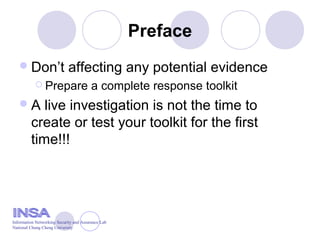
Don’t affecting any potential evidence
 Prepare a complete response toolkit
A live investigation is not the time to
create or test your toolkit for the first
time!!!
Information Networking Security and Assurance Lab
National Chung Cheng University
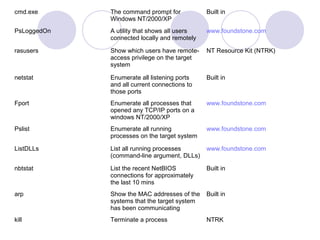
cmd.exe The command prompt for
Windows NT/2000/XP
Built in
PsLoggedOn A utility that shows all users
connected locally and remotely
www.foundstone.com
rasusers Show which users have remote-
access privilege on the target
system
NT Resource Kit (NTRK)
netstat Enumerate all listening ports
and all current connections to
those ports
Built in
Fport Enumerate all processes that
opened any TCP/IP ports on a
windows NT/2000/XP
www.foundstone.com
Pslist Enumerate all running
processes on the target system
www.foundstone.com
ListDLLs List all running processes
(command-line argument, DLLs)
www.foundstone.com
nbtstat List the recent NetBIOS
connections for approximately
the last 10 mins
Built in
arp Show the MAC addresses of the
systems that the target system
has been communicating
Built in
kill Terminate a process NTRK
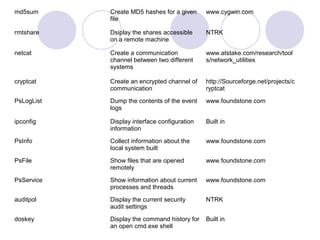
md5sum Create MD5 hashes for a given
file
www.cygwin.com
rmtshare Dsiplay the shares accessible
on a remote machine
NTRK
netcat Create a communication
channel between two different
systems
www.atstake.com/research/tool
s/network_utilities
cryptcat Create an encrypted channel of
communication
http://Sourceforge.net/projects/c
ryptcat
PsLogList Dump the contents of the event
logs
www.foundstone.com
ipconfig Display interface configuration
information
Built in
PsInfo Collect information about the
local system built
www.foundstone.com
PsFile Show files that are opened
remotely
www.foundstone.com
PsService Show information about current
processes and threads
www.foundstone.com
auditpol Display the current security
audit settings
NTRK
doskey Display the command history for
an open cmd.exe shell
Built in
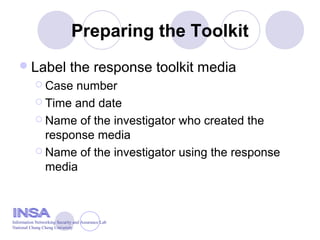
Preparing the Toolkit
Label the response toolkit media
 Case number
 Time and date
 Name of the investigator who created the
response media
 Name of the investigator using the response
media
Information Networking Security and Assurance Lab
National Chung Cheng University
Preparing the toolkit
Check for dependencies with Filemon
 Determine which DLLs and files your response
tools depend on
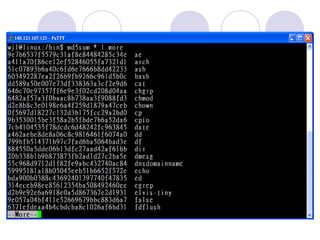
Create a checksum for the response
toolkit
 md5sum
Write-protect any toolkit floppies
Information Networking Security and Assurance Lab
National Chung Cheng University
Outline
Preface
Creating a Response Toolkit
Storing Information Obtained during the
Initial Response
Obtaining Volatile Data
Performing an In-Depth Live Response
Information Networking Security and Assurance Lab
National Chung Cheng University
Preface
“live”: power on
Four options when retrieving information
from a live system
 The hard drive of the target system
 In a notebook
 Response floppy disk or other removable media
 Remote forensic system using netcat or
cryptcat
Information Networking Security and Assurance Lab
National Chung Cheng University
Transferring Data with netcat
Two advantage
 Get on and off the target system quickly
 Perform an offline review
Information Networking Security and Assurance Lab
National Chung Cheng University
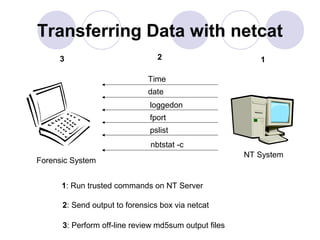
Transferring Data with netcat
NT System
Forensic System
Time
date
loggedon
fport
pslist
nbtstat -c
123
1: Run trusted commands on NT Server
2: Send output to forensics box via netcat
3: Perform off-line review md5sum output files
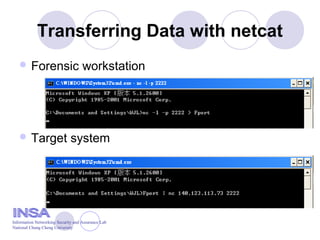
Transferring Data with netcat
 Forensic workstation
 Target system
Information Networking Security and Assurance Lab
National Chung Cheng University
Encrypting Data with cryptcat
Has the same syntax and functions as the
netcat command
 Sniffer cannot compromise the information you
obtain
 Eliminates the risk of contamination or injection
of data
Two-man integrity rule
Information Networking Security and Assurance Lab
National Chung Cheng University
Outline
Preface
Creating a Response Toolkit
Storing Information Obtained during the
Initial Response
Obtaining Volatile Data
Performing an In-Depth Live Response
Information Networking Security and Assurance Lab
National Chung Cheng University
Preface
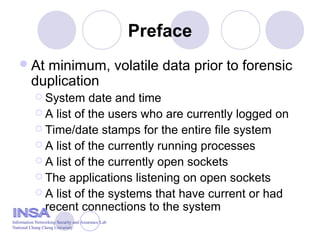
At minimum, volatile data prior to forensic
duplication
 System date and time
 A list of the users who are currently logged on
 Time/date stamps for the entire file system
 A list of the currently running processes
 A list of the currently open sockets
 The applications listening on open sockets
 A list of the systems that have current or had
recent connections to the system
Information Networking Security and Assurance Lab
National Chung Cheng University
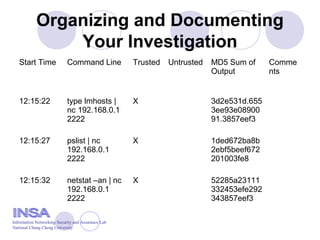
Organizing and Documenting
Your Investigation
Start Time Command Line Trusted Untrusted MD5 Sum of
Output
Comme
nts
12:15:22 type lmhosts |
nc 192.168.0.1
2222
X 3d2e531d.655
3ee93e08900
91.3857eef3
12:15:27 pslist | nc
192.168.0.1
2222
X 1ded672ba8b
2ebf5beef672
201003fe8
12:15:32 netstat –an | nc
192.168.0.1
2222
X 52285a23111
332453efe292
343857eef3
Information Networking Security and Assurance Lab
National Chung Cheng University
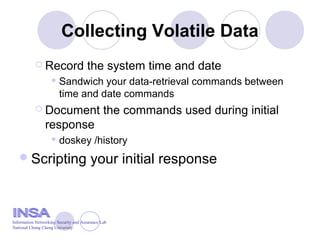
Collecting Volatile Data
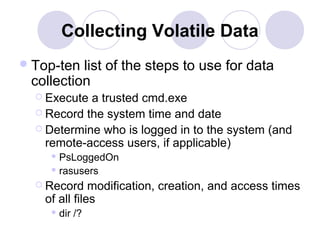
Top-ten list of the steps to use for data
collection
 Execute a trusted cmd.exe
 Record the system time and date
 Determine who is logged in to the system (and
remote-access users, if applicable)
 PsLoggedOn
 rasusers
 Record modification, creation, and access times
of all files
 dir /?
Collecting Volatile Data
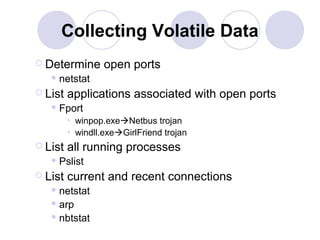
 Determine open ports
 netstat
 List applications associated with open ports
 Fport
• winpop.exeNetbus trojan
• windll.exeGirlFriend trojan
 List all running processes
 Pslist
 List current and recent connections
 netstat
 arp
 nbtstat
Collecting Volatile Data
 Record the system time and date
 Sandwich your data-retrieval commands between
time and date commands
 Document the commands used during initial
response
 doskey /history
Scripting your initial response
Information Networking Security and Assurance Lab
National Chung Cheng University
Outline
Preface
Creating a Response Toolkit
Storing Information Obtained during the
Initial Response
Obtaining Volatile Data
Performing an In-Depth Live Response
Preface
Find evidence and properly remove rogue
programs without disrupting any services
Information Networking Security and Assurance Lab
National Chung Cheng University
Creating an In-Depth Response
Toolkit
auditpol Determin the audit policy on a
system
NTRK
reg Dump specific information
(keys) within the NT/2000
Registry
NTRK
regdump Dump the Registry as a text file NTRK
pwdump3e Dump the SAM database so
that the passwords can be
cracked
www.polivec.com/pwdump3.htm
l
NTLast Monitor successful and failed
logons to a system
www.foundstone.com
Sfind Detect files hidden within NTFS
file streams
www.foundstone.com
Afind Search a file system to
determine files accessed during
specific timeframes
www.foundstone.com
dumpel Dump the NT/2000 event logs NTRK
Collecting Live Response Data
Two key sources of evidence on Windows
NT/2000
 The event logs
 The Registry
Four approach to obtain quite a bit of
information
 Review the event logs
 Review the Registry
 Obtain system passwords
 Dump system RAM
Review the event logs
auditpol
NTLast
dumpel
Information Networking Security and Assurance Lab
National Chung Cheng University
Successful logons
Information Networking Security and Assurance Lab
National Chung Cheng University
Enumerate failed console logons
Information Networking Security and Assurance Lab
National Chung Cheng University
List all successful logons from remote systems
Information Networking Security and Assurance Lab
National Chung Cheng University
Review the Registry
regdump
 Create an enormous text file of the Registry
reg query
 Extract just the Registry key values of interest
Information Networking Security and Assurance Lab
National Chung Cheng University
Obtaining System Passwords
pwdump3e
 Dump the passwords from the Security
Accounts Manager (SAM) database
Information Networking Security and Assurance Lab
National Chung Cheng University
Dumping System RAM
userdump.exe (MS OEM Support Tools)
Two types of memory
 User mode (application) memory
 Full-system memory
Information Networking Security and Assurance Lab
National Chung Cheng University

Live data collection_from_windows_system

  • 1.
    Jai, 2004 Incident Response& Computer Forensics Chapter 5 Live Data Collection from Windows System Information Networking Security and Assurance Lab National Chung Cheng University
  • 2.
    Outline Preface Creating a ResponseToolkit Storing Information Obtained during the Initial Response Obtaining Volatile Data Performing an In-Depth Live Response Information Networking Security and Assurance Lab National Chung Cheng University
  • 3.
    Outline Preface Creating a ResponseToolkit Storing Information Obtained during the Initial Response Obtaining Volatile Data Performing an In-Depth Live Response Information Networking Security and Assurance Lab National Chung Cheng University
  • 4.
    Preface The goal ofan initial response:  Confirm there is an incident  Retrieve the system’s volatile data OS:  Windows NT/2000/XP Information Networking Security and Assurance Lab National Chung Cheng University
  • 5.
    Outline Preface Creating a ResponseToolkit Storing Information Obtained during the Initial Response Obtaining Volatile Data Performing an In-Depth Live Response Information Networking Security and Assurance Lab National Chung Cheng University
  • 6.
    Preface Don’t affecting anypotential evidence  Prepare a complete response toolkit A live investigation is not the time to create or test your toolkit for the first time!!! Information Networking Security and Assurance Lab National Chung Cheng University
  • 7.
    cmd.exe The commandprompt for Windows NT/2000/XP Built in PsLoggedOn A utility that shows all users connected locally and remotely www.foundstone.com rasusers Show which users have remote- access privilege on the target system NT Resource Kit (NTRK) netstat Enumerate all listening ports and all current connections to those ports Built in Fport Enumerate all processes that opened any TCP/IP ports on a windows NT/2000/XP www.foundstone.com Pslist Enumerate all running processes on the target system www.foundstone.com ListDLLs List all running processes (command-line argument, DLLs) www.foundstone.com nbtstat List the recent NetBIOS connections for approximately the last 10 mins Built in arp Show the MAC addresses of the systems that the target system has been communicating Built in kill Terminate a process NTRK
  • 8.
    md5sum Create MD5hashes for a given file www.cygwin.com rmtshare Dsiplay the shares accessible on a remote machine NTRK netcat Create a communication channel between two different systems www.atstake.com/research/tool s/network_utilities cryptcat Create an encrypted channel of communication http://Sourceforge.net/projects/c ryptcat PsLogList Dump the contents of the event logs www.foundstone.com ipconfig Display interface configuration information Built in PsInfo Collect information about the local system built www.foundstone.com PsFile Show files that are opened remotely www.foundstone.com PsService Show information about current processes and threads www.foundstone.com auditpol Display the current security audit settings NTRK doskey Display the command history for an open cmd.exe shell Built in
  • 9.
    Preparing the Toolkit Labelthe response toolkit media  Case number  Time and date  Name of the investigator who created the response media  Name of the investigator using the response media Information Networking Security and Assurance Lab National Chung Cheng University
  • 10.
    Preparing the toolkit Checkfor dependencies with Filemon  Determine which DLLs and files your response tools depend on Create a checksum for the response toolkit  md5sum Write-protect any toolkit floppies Information Networking Security and Assurance Lab National Chung Cheng University
  • 12.
    Outline Preface Creating a ResponseToolkit Storing Information Obtained during the Initial Response Obtaining Volatile Data Performing an In-Depth Live Response Information Networking Security and Assurance Lab National Chung Cheng University
  • 13.
    Preface “live”: power on Fouroptions when retrieving information from a live system  The hard drive of the target system  In a notebook  Response floppy disk or other removable media  Remote forensic system using netcat or cryptcat Information Networking Security and Assurance Lab National Chung Cheng University
  • 14.
    Transferring Data withnetcat Two advantage  Get on and off the target system quickly  Perform an offline review Information Networking Security and Assurance Lab National Chung Cheng University
  • 15.
    Transferring Data withnetcat NT System Forensic System Time date loggedon fport pslist nbtstat -c 123 1: Run trusted commands on NT Server 2: Send output to forensics box via netcat 3: Perform off-line review md5sum output files
  • 16.
    Transferring Data withnetcat  Forensic workstation  Target system Information Networking Security and Assurance Lab National Chung Cheng University
  • 17.
    Encrypting Data withcryptcat Has the same syntax and functions as the netcat command  Sniffer cannot compromise the information you obtain  Eliminates the risk of contamination or injection of data Two-man integrity rule Information Networking Security and Assurance Lab National Chung Cheng University
  • 18.
    Outline Preface Creating a ResponseToolkit Storing Information Obtained during the Initial Response Obtaining Volatile Data Performing an In-Depth Live Response Information Networking Security and Assurance Lab National Chung Cheng University
  • 19.
    Preface At minimum, volatiledata prior to forensic duplication  System date and time  A list of the users who are currently logged on  Time/date stamps for the entire file system  A list of the currently running processes  A list of the currently open sockets  The applications listening on open sockets  A list of the systems that have current or had recent connections to the system Information Networking Security and Assurance Lab National Chung Cheng University
  • 20.
    Organizing and Documenting YourInvestigation Start Time Command Line Trusted Untrusted MD5 Sum of Output Comme nts 12:15:22 type lmhosts | nc 192.168.0.1 2222 X 3d2e531d.655 3ee93e08900 91.3857eef3 12:15:27 pslist | nc 192.168.0.1 2222 X 1ded672ba8b 2ebf5beef672 201003fe8 12:15:32 netstat –an | nc 192.168.0.1 2222 X 52285a23111 332453efe292 343857eef3 Information Networking Security and Assurance Lab National Chung Cheng University
  • 21.
    Collecting Volatile Data Top-tenlist of the steps to use for data collection  Execute a trusted cmd.exe  Record the system time and date  Determine who is logged in to the system (and remote-access users, if applicable)  PsLoggedOn  rasusers  Record modification, creation, and access times of all files  dir /?
  • 22.
    Collecting Volatile Data Determine open ports  netstat  List applications associated with open ports  Fport • winpop.exeNetbus trojan • windll.exeGirlFriend trojan  List all running processes  Pslist  List current and recent connections  netstat  arp  nbtstat
  • 23.
    Collecting Volatile Data Record the system time and date  Sandwich your data-retrieval commands between time and date commands  Document the commands used during initial response  doskey /history Scripting your initial response Information Networking Security and Assurance Lab National Chung Cheng University
  • 24.
    Outline Preface Creating a ResponseToolkit Storing Information Obtained during the Initial Response Obtaining Volatile Data Performing an In-Depth Live Response
  • 25.
    Preface Find evidence andproperly remove rogue programs without disrupting any services Information Networking Security and Assurance Lab National Chung Cheng University
  • 26.
    Creating an In-DepthResponse Toolkit auditpol Determin the audit policy on a system NTRK reg Dump specific information (keys) within the NT/2000 Registry NTRK regdump Dump the Registry as a text file NTRK pwdump3e Dump the SAM database so that the passwords can be cracked www.polivec.com/pwdump3.htm l NTLast Monitor successful and failed logons to a system www.foundstone.com Sfind Detect files hidden within NTFS file streams www.foundstone.com Afind Search a file system to determine files accessed during specific timeframes www.foundstone.com dumpel Dump the NT/2000 event logs NTRK
  • 27.
    Collecting Live ResponseData Two key sources of evidence on Windows NT/2000  The event logs  The Registry Four approach to obtain quite a bit of information  Review the event logs  Review the Registry  Obtain system passwords  Dump system RAM
  • 28.
    Review the eventlogs auditpol NTLast dumpel Information Networking Security and Assurance Lab National Chung Cheng University
  • 29.
    Successful logons Information NetworkingSecurity and Assurance Lab National Chung Cheng University
  • 30.
    Enumerate failed consolelogons Information Networking Security and Assurance Lab National Chung Cheng University
  • 31.
    List all successfullogons from remote systems Information Networking Security and Assurance Lab National Chung Cheng University
  • 32.
    Review the Registry regdump Create an enormous text file of the Registry reg query  Extract just the Registry key values of interest Information Networking Security and Assurance Lab National Chung Cheng University
  • 33.
    Obtaining System Passwords pwdump3e Dump the passwords from the Security Accounts Manager (SAM) database Information Networking Security and Assurance Lab National Chung Cheng University
  • 34.
    Dumping System RAM userdump.exe(MS OEM Support Tools) Two types of memory  User mode (application) memory  Full-system memory Information Networking Security and Assurance Lab National Chung Cheng University