New Technologies File System
NTFS
Brian Carrier
And http://www.ntfs.com/
Acknowledgments
Dr. David Dampier and the
Center for Computer Security Research (CCSR)
2
What does NTFS offer?
 NTFS offers what FAT does not:
 Performance
 Reliability
 Compatibility
 It was designed to quickly perform standard file
operations as:
 Reading
 Writing
 Searching
 ...and File system recovery on very large hard disks
FAT vs. NTFS
 FAT will still exist in mobile and small storage
devices, but NTFS more likely for Windows
 NTFS is more complex and more scalable
 FAT retrieves a file by searching the chain of
allocation units directory entries, NTFS finds
files more directly
Chapter 1
NTFS and Operating Systems
 Designed by Microsoft and is the default file
system for:
 Windows NT
 Windows 2000
 Windows XP
 Also used for some implementations of UNIX
NTFS Volumes
 The first information on the volume is the
Partition Boot Sector which starts at Sector 0
and can be up to 16 sectors long
 The first file on an NTFS volume is a Master
File Table (MFT)
 The MFT holds information about all files and
folders on the volume
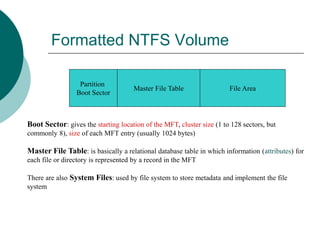
Formatted NTFS Volume
Partition
Boot Sector
Master File Table File Area
Boot Sector: gives the starting location of the MFT, cluster size (1 to 128 sectors, but
commonly 8), size of each MFT entry (usually 1024 bytes)
Master File Table: is basically a relational database table in which information (attributes) for
each file or directory is represented by a record in the MFT
There are also System Files: used by file system to store metadata and implement the file
system
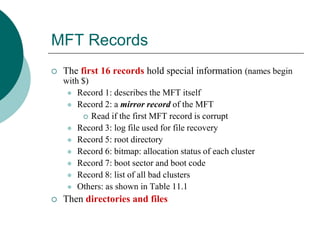
MFT Records
 The first 16 records hold special information (names begin
with $)
 Record 1: describes the MFT itself
 Record 2: a mirror record of the MFT
 Read if the first MFT record is corrupt
 Record 3: log file used for file recovery
 Record 5: root directory
 Record 6: bitmap: allocation status of each cluster
 Record 7: boot sector and boot code
 Record 8: list of all bad clusters
 Others: as shown in Table 11.1
 Then directories and files
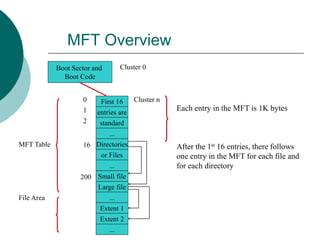
MFT Overview
First 16
entries are
...
standard
...
or Files
Directories
...
Large file
0
Boot Sector and
Boot Code
1
2
16
200 Small file
Extent 1
Extent 2
Each entry in the MFT is 1K bytes
After the 1st 16 entries, there follows
one entry in the MFT for each file and
for each directory
Cluster 0
MFT Table
File Area
...
Cluster n
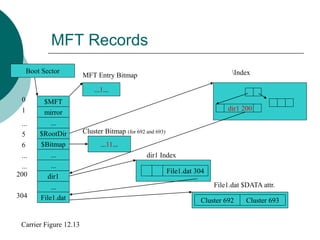
MFT Records
$MFT
mirror
$RootDir
...
...
dir1
...
$Bitmap
File1.dat
...
0
...
200
304
Boot Sector
File1.dat 304
Cluster 692 Cluster 693
File1.dat $DATA attr.
dir1 Index
...11...
Cluster Bitmap (for 692 and 693)
...1...
MFT Entry Bitmap
Carrier Figure 12.13
dir1 200
Index
6
...
1
5
...
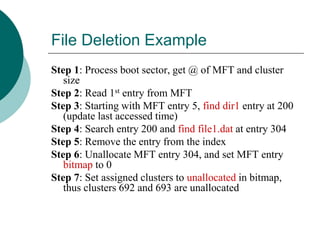
File Deletion Example
Step 1: Process boot sector, get @ of MFT and cluster
size
Step 2: Read 1st entry from MFT
Step 3: Starting with MFT entry 5, find dir1 entry at 200
(update last accessed time)
Step 4: Search entry 200 and find file1.dat at entry 304
Step 5: Remove the entry from the index
Step 6: Unallocate MFT entry 304, and set MFT entry
bitmap to 0
Step 7: Set assigned clusters to unallocated in bitmap,
thus clusters 692 and 693 are unallocated
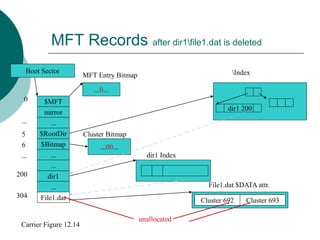
MFT Records after dir1file1.dat is deleted
$MFT
mirror
$RootDir
...
...
dir1
...
$Bitmap
File1.dat
...
0
...
200
304
Boot Sector
Cluster 692 Cluster 693
File1.dat $DATA attr.
dir1 Index
...00...
Cluster Bitmap
...0...
MFT Entry Bitmap
Carrier Figure 12.14
dir1 200
Index
unallocated
5
6
...
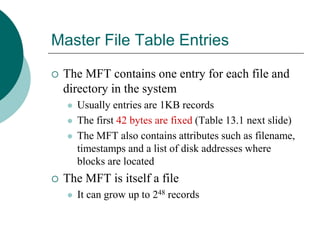
Master File Table Entries
 The MFT contains one entry for each file and
directory in the system
 Usually entries are 1KB records
 The first 42 bytes are fixed (Table 13.1 next slide)
 The MFT also contains attributes such as filename,
timestamps and a list of disk addresses where
blocks are located
 The MFT is itself a file
 It can grow up to 248 records
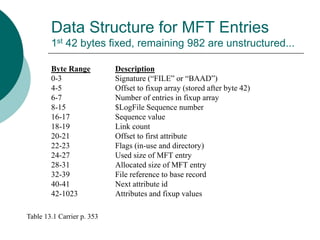
Data Structure for MFT Entries
1st 42 bytes fixed, remaining 982 are unstructured...
Byte Range Description
0-3 Signature (“FILE” or “BAAD”)
4-5 Offset to fixup array (stored after byte 42)
6-7 Number of entries in fixup array
8-15 $LogFile Sequence number
16-17 Sequence value
18-19 Link count
20-21 Offset to first attribute
22-23 Flags (in-use and directory)
24-27 Used size of MFT entry
28-31 Allocated size of MFT entry
32-39 File reference to base record
40-41 Next attribute id
42-1023 Attributes and fixup values
Table 13.1 Carrier p. 353
Attributes
 Most of an MFT entry is used to store
attributes
 Name
 Time and date
 Content
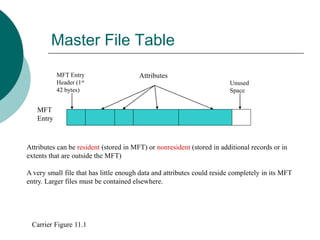
Master File Table
MFT
Entry
Attributes
MFT Entry
Header (1st
42 bytes)
Unused
Space
Carrier Figure 11.1
Attributes can be resident (stored in MFT) or nonresident (stored in additional records or in
extents that are outside the MFT)
A very small file that has little enough data and attributes could reside completely in its MFT
entry. Larger files must be contained elsewhere.
Adding to the MFT
 As more files are added to the file system, more
records are added to the MFT
 Storing the entries contiguously on disk improves
performance, so the operating system reserves
~12.5% of the disk space that immediately follows
the MFT, called the MFT Zone
 This space will only be used when necessary
 If it continues to grow larger, the MFT may be
fragmented (and cannot generally be defrag’d)
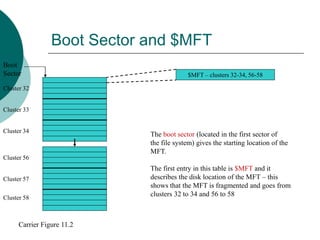
Boot Sector and $MFT
Boot
Sector
Cluster 32
Cluster 33
Cluster 58
Cluster 57
Cluster 56
Cluster 34
$MFT – clusters 32-34, 56-58
The boot sector (located in the first sector of
the file system) gives the starting location of the
MFT.
The first entry in this table is $MFT and it
describes the disk location of the MFT – this
shows that the MFT is fragmented and goes from
clusters 32 to 34 and 56 to 58
Carrier Figure 11.2
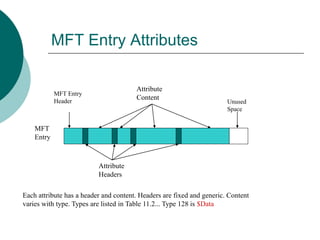
MFT Entry Attributes
MFT
Entry
Attribute
Content
MFT Entry
Header Unused
Space
Attribute
Headers
Each attribute has a header and content. Headers are fixed and generic. Content
varies with type. Types are listed in Table 11.2... Type 128 is $Data
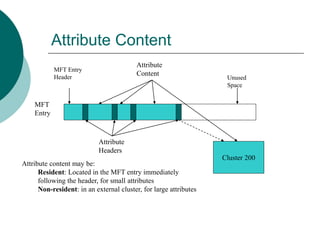
Attribute Content
MFT
Entry
Attribute
Content
MFT Entry
Header Unused
Space
Attribute
Headers
Cluster 200
Attribute content may be:
Resident: Located in the MFT entry immediately
following the header, for small attributes
Non-resident: in an external cluster, for large attributes
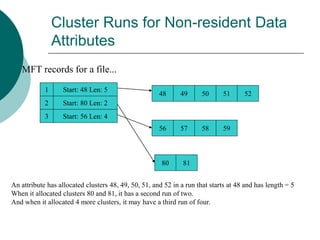
Cluster Runs for Non-resident Data
Attributes
MFT records for a file...
1
3
2
Start: 48 Len: 5
Start: 80 Len: 2
Start: 56 Len: 4
48 49 50 51 52
57
56 59
58
81
80
An attribute has allocated clusters 48, 49, 50, 51, and 52 in a run that starts at 48 and has length = 5
When it allocated clusters 80 and 81, it has a second run of two.
And when it allocated 4 more clusters, it may have a third run of four.
Attributes
 Attributes may be:
 Sparse – clusters that are all zeroes are not written
to disk
 Compressed – reduces amount of space used
 Encrypted – file or directory content, not headers
 Stored in sorted order as indexes
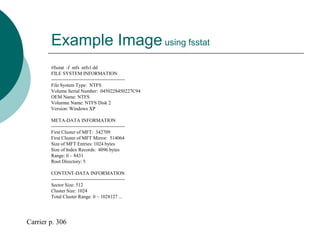
Example Imageusing fsstat
#fsstat -f ntfs ntfs1.dd
FILE SYSTEM INFORMATION
----------------------------------------------
File System Type: NTFS
Volume Serial Number: 0450228450227C94
OEM Name: NTFS
Volumne Name: NTFS Disk 2
Version: Windows XP
META-DATA INFORMATION
----------------------------------------------
First Cluster of MFT: 342709
First Cluster of MFT Mirror: 514064
Size of MFT Entries: 1024 bytes
Size of Index Records: 4096 bytes
Range: 0 – 8431
Root Directory: 5
CONTENT-DATA INFORMATION
----------------------------------------------
Sector Size: 512
Cluster Size: 1024
Total Cluster Range: 0 – 1028127 ...
Carrier p. 306
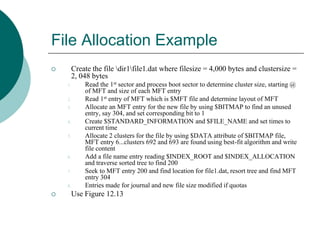
File Allocation Example
 Create the file dir1file1.dat where filesize = 4,000 bytes and clustersize =
2, 048 bytes
1. Read the 1st sector and process boot sector to determine cluster size, starting @
of MFT and size of each MFT entry
2. Read 1st entry of MFT which is $MFT file and determine layout of MFT
3. Allocate an MFT entry for the new file by using $BITMAP to find an unused
entry, say 304, and set corresponding bit to 1
4. Create $STANDARD_INFORMATION and $FILE_NAME and set times to
current time
5. Allocate 2 clusters for the file by using $DATA attribute of $BITMAP file,
MFT entry 6...clusters 692 and 693 are found using best-fit algorithm and write
file content
6. Add a file name entry reading $INDEX_ROOT and $INDEX_ALLOCATION
and traverse sorted tree to find 200
7. Seek to MFT entry 200 and find location for file1.dat, resort tree and find MFT
entry 304
8. Entries made for journal and new file size modified if quotas
 Use Figure 12.13
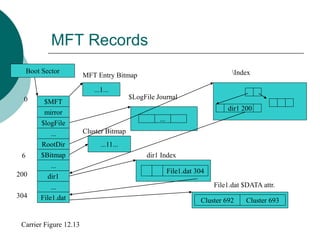
MFT Records
$MFT
mirror
...
$logFile
...
dir1
$Bitmap
RootDir
File1.dat
...
0
6
200
304
Boot Sector
...
$LogFile Journal
File1.dat 304
Cluster 692 Cluster 693
File1.dat $DATA attr.
dir1 Index
...11...
Cluster Bitmap
...1...
MFT Entry Bitmap
Carrier Figure 12.13
dir1 200
Index
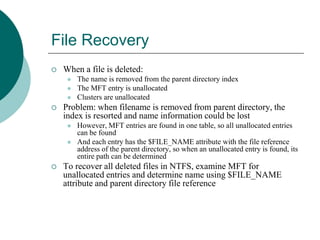
File Recovery
 When a file is deleted:
 The name is removed from the parent directory index
 The MFT entry is unallocated
 Clusters are unallocated
 Problem: when filename is removed from parent directory, the
index is resorted and name information could be lost
 However, MFT entries are found in one table, so all unallocated entries
can be found
 And each entry has the $FILE_NAME attribute with the file reference
address of the parent directory, so when an unallocated entry is found, its
entire path can be determined
 To recover all deleted files in NTFS, examine MFT for
unallocated entries and determine name using $FILE_NAME
attribute and parent directory file reference
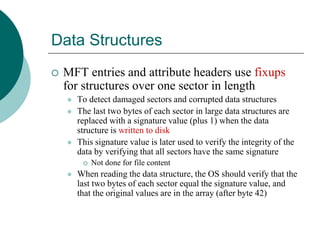
Data Structures
 MFT entries and attribute headers use fixups
for structures over one sector in length
 To detect damaged sectors and corrupted data structures
 The last two bytes of each sector in large data structures are
replaced with a signature value (plus 1) when the data
structure is written to disk
 This signature value is later used to verify the integrity of the
data by verifying that all sectors have the same signature
 Not done for file content
 When reading the data structure, the OS should verify that the
last two bytes of each sector equal the signature value, and
that the original values are in the array (after byte 42)
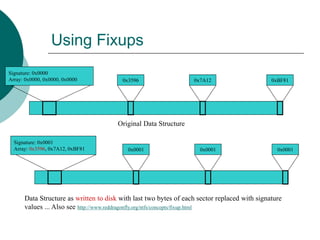
Using Fixups
Signature: 0x0000
Array: 0x0000, 0x0000, 0x0000 0x3596 0x7A12 0xBF81
Original Data Structure
Signature: 0x0001
Array: 0x3596, 0x7A12, 0xBF81 0x0001 0x0001 0x0001
Data Structure as written to disk with last two bytes of each sector replaced with signature
values ... Also see http://www.reddragonfly.org/ntfs/concepts/fixup.html
MFT Entries
 Viewing the MFT using icat tool
#icat -f ntfs ntfs1.dd 0-128 | xxd
0000000: 4649 4c45 3000 0300 4ba7 6401 0000 0000 FILE0...K.d.....
0000016: 0100 0100 3800 0100 b801 0000 0004 0000 ....8...........
0000032: 0000 0000 0000 0000 0600 0000 0000 0000 .................
0000048: 5800 0000 0000 0000 1000 0000 6000 0000 X..............
[REMOVED]
0000496: 3101 b43a 0500 0000 ffff ffff 0000 5800 1...:...........X.
0000512: 0000 0000 0000 0000 0000 0000 0000 0000 .................
[REMOVED]
0001008: 0000 0000 0000 0000 0000 0000 0000 5800 ................X.
Bytes 6-7: array has 3 values
Bytes 16-17: sequence value is 1 (first time this entry has been used)
Bytes 18-19: link count = 1, so it has only one name
Bytes 20-21: 1st attribute located at byte offset 56 (0x0038)
Bytes 48-49: signature value 0x0058 also at last two bytes of each sector: 510-511 and 1022-1023
#icat –f ntfs ntfs1.dd 0 | dd bs=1024 skip=1234 count=1 | xxd ; for entry 1234
Carrier p. 354
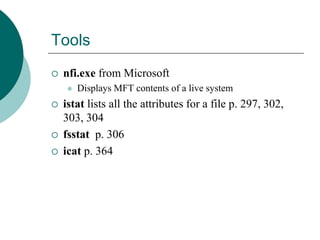
Tools
 nfi.exe from Microsoft
 Displays MFT contents of a live system
 istat lists all the attributes for a file p. 297, 302,
303, 304
 fsstat p. 306
 icat p. 364
Analysis Scenario
 During an investigation we acquire a disk
 There are bad sectors in a disk including the first sector
with partition table
 We check to see if a partition started in sector 63 where
the 1st partition typically starts and determine its size and
type
 We think it might use an NTFS file system
 Zeroes are written to bad sectors
Carrier p. 308
Analysis Scenario
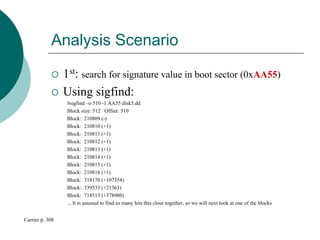
 1st: search for signature value in boot sector (0xAA55)
 Using sigfind:
#sigfind –o 510 -1 AA55 disk5.dd
Block size: 512 Offset: 510
Block: 210809 (-)
Block: 210810 (+1)
Block: 210811 (+1)
Block: 210812 (+1)
Block: 210813 (+1)
Block: 210814 (+1)
Block: 210815 (+1)
Block: 210816 (+1)
Block: 318170 (+107354)
Block: 339533 (+21363)
Block: 718513 (+378980)
... It is unusual to find so many hits this close together, so we will next look at one of the blocks
Carrier p. 308
Analysis Scenario
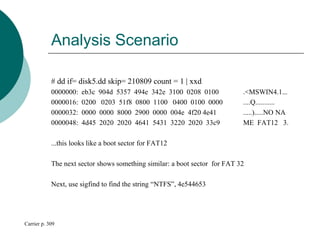
# dd if= disk5.dd skip= 210809 count = 1 | xxd
0000000: eb3c 904d 5357 494e 342e 3100 0208 0100 .<MSWIN4.1...
0000016: 0200 0203 51f8 0800 1100 0400 0100 0000 ....Q...........
0000032: 0000 0000 8000 2900 0000 004e 4f20 4e41 .....).....NO NA
0000048: 4d45 2020 2020 4641 5431 3220 2020 33c9 ME FAT12 3.
...this looks like a boot sector for FAT12
The next sector shows something similar: a boot sector for FAT 32
Next, use sigfind to find the string “NTFS”, 4e544653
Carrier p. 309
File System Category
 $MFT
 Has an entry for each file and directory
 Its $DATA attribute contains clusters used by MFT
 Starts small and grows as files/directories added
 $MFTMirr allocates clusters in the middle of the file
system and saves copies of at least the 1st 4 MFT entries p. 303
 $Boot like FAT has signature of 0xAA55, contains cluster
size, # of sectors, starting cluster address of MFT, size of each
MFT entry, and boot code
 $Volume contains name of the volume and NTFS version
Content Category
 Clusters
 An NTFS file is a collection of attributes, some resident, some
nonresident
 A cluster is a group of consecutive sectors and the number of
sectors per cluster is a power of 2
 Each cluster has an address, starting with 0
 To convert a cluster address to a sector address, multiply it by
the number of sectors in a cluster
 $BOOT always resides in the first cluster
 $BITMAP has a $DATA attribute that has one bit for every
cluster in the file system
 If the bit = 1 the cluster is allocated, if the bit=0 it is unallocated
Content Category CONTINUED
 Allocation Algorithms
 It appears that Windows XP uses the best-fit
algorithm (fits size, not 1st or next)
 See figure 12.1
 File system layout
 Windows creates MFT as small as possible and
only expands it when there are more entries
 To decrease the possibility of fragmentation, NTFS
uses the MFT Zone (12.5% of the file system
allocated to MFT)
Content Category CONTINUED
 Analysis Techniques
 Finding a cluster: The first cluster is at the
start of the file system, and the cluster size is
given in the first sector
 Allocation status of a cluster: Locate the
$BITMAP file and process its $DATA
attribute
 Extracting unallocated space: Again, use the
$BITMAP file
Content Category CONTINUED
 Analysis Situation
 Goal: Locate cluster 9,900,009
 Step 1: Determine cluster size
 A sector is 512 bytes and a cluster is 8 sectors ⇨ 4,096 bytes
 Step 2: Determine sector address
 Cluster 0 in NTFS starts with sector 0, thus the sector address of
our cluster is 792,000,072
 Step 3: Determine byte location
 Multiply the sector address by 512 and get byte 40,550,436,864
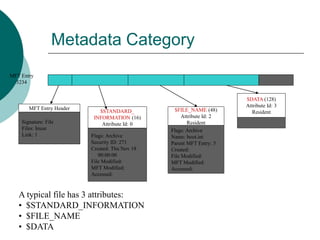
Metadata Category
MFT Entry Header
Signature: File
Files: Inuse
Link: 1
MFT Entry
3234
Flags: Archive
Security ID: 271
Created: Thu Nov 18
00:00:00
File Modified:
MFT Modified:
Accessed:
$STANDARD_
INFORMATION (16)
Attribute Id: 0
$FILE_NAME (48)
Attribute Id: 2
Resident
Flags: Archive
Name: boot.ini
Parent MFT Entry: 5
Created:
File Modified:
MFT Modified:
Accessed:
$DATA (128)
Attribute Id: 3
Resident
A typical file has 3 attributes:
• $STANDARD_INFORMATION
• $FILE_NAME
• $DATA
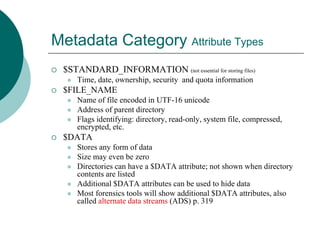
Metadata Category Attribute Types
 $STANDARD_INFORMATION (not essential for storing files)
 Time, date, ownership, security and quota information
 $FILE_NAME
 Name of file encoded in UTF-16 unicode
 Address of parent directory
 Flags identifying: directory, read-only, system file, compressed,
encrypted, etc.
 $DATA
 Stores any form of data
 Size may even be zero
 Directories can have a $DATA attribute; not shown when directory
contents are listed
 Additional $DATA attributes can be used to hide data
 Most forensics tools will show additional $DATA attributes, also
called alternate data streams (ADS) p. 319
Metadata Category Allocation Algorithms
 Allocation of MFT Entries
 First available starting with entry 24
 Entries 0-15 are reserved and set to allocated even if not being
used
 Entries 16-23 are typically not used
 When an entry is allocated it is wiped and the values from
previous files are deleted
 Allocation of space for attributes in MFT entries
 Microsoft sorts the entries based on attribute type and packs
them in one after another
 Time Value updating
 Temporal values (dealing with time): MFT modified time
is set when an attribute is changed, and when a file is
renamed or moved in the same volume... and others
Metadata Category Analysis
 Data is analyzed to learn more about a specific
file or directory
 We first locate an MFT entry by locating the
MFT using the starting address in the boot
sector
 We then seek to the specific table entry
 Then we can process the entry’s attributes
 Analysis Scenario p. 330
Filename Category
 Issue: linking a file name with its
contents
 Allocation Algorithms
 An index is used to store attributes in a
sorted order
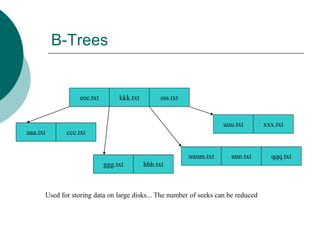
 NTFS indexes use B-trees
 When a file is created it is inserted into its
correct location within the index
Large files use an index structure for
storing data
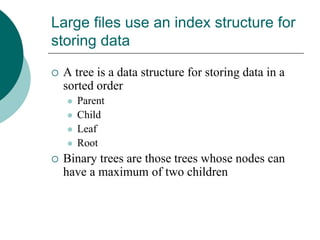
 A tree is a data structure for storing data in a
sorted order
 Parent
 Child
 Leaf
 Root
 Binary trees are those trees whose nodes can
have a maximum of two children
B-Trees
eee.txt
ccc.txt
kkk.txt
hhh.txt
aaa.txt
ggg.txt
nnn.txt
mmm.txt
sss.txt
uuu.txt xxx.txt
qqq.txt
Used for storing data on large disks... The number of seeks can be reduced
Filename Lookup
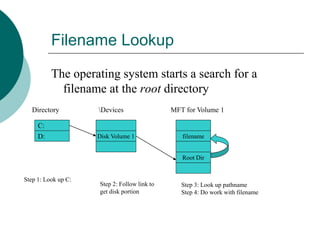
The operating system starts a search for a
filename at the root directory
C:
D:
Directory Devices
Disk Volume 1 filename
Root Dir
MFT for Volume 1
Step 1: Look up C:
Step 2: Follow link to
get disk portion
Step 3: Look up pathname
Step 4: Do work with filename
Application Category
 NTFS provides support for nonessential
application-level features
 Disk quotas: limits the space a user has
 Logging (journaling): recording of changes
to metadata before updates occur so that a
previous state can be recovered (see figure
8.18)
 Change journal: records changes to files and
directories

NTFS.ppt

  • 1.
    New Technologies FileSystem NTFS Brian Carrier And http://www.ntfs.com/
  • 2.
    Acknowledgments Dr. David Dampierand the Center for Computer Security Research (CCSR) 2
  • 3.
    What does NTFSoffer?  NTFS offers what FAT does not:  Performance  Reliability  Compatibility  It was designed to quickly perform standard file operations as:  Reading  Writing  Searching  ...and File system recovery on very large hard disks
  • 4.
    FAT vs. NTFS FAT will still exist in mobile and small storage devices, but NTFS more likely for Windows  NTFS is more complex and more scalable  FAT retrieves a file by searching the chain of allocation units directory entries, NTFS finds files more directly
  • 5.
    Chapter 1 NTFS andOperating Systems  Designed by Microsoft and is the default file system for:  Windows NT  Windows 2000  Windows XP  Also used for some implementations of UNIX
  • 6.
    NTFS Volumes  Thefirst information on the volume is the Partition Boot Sector which starts at Sector 0 and can be up to 16 sectors long  The first file on an NTFS volume is a Master File Table (MFT)  The MFT holds information about all files and folders on the volume
  • 7.
    Formatted NTFS Volume Partition BootSector Master File Table File Area Boot Sector: gives the starting location of the MFT, cluster size (1 to 128 sectors, but commonly 8), size of each MFT entry (usually 1024 bytes) Master File Table: is basically a relational database table in which information (attributes) for each file or directory is represented by a record in the MFT There are also System Files: used by file system to store metadata and implement the file system
  • 8.
    MFT Records  Thefirst 16 records hold special information (names begin with $)  Record 1: describes the MFT itself  Record 2: a mirror record of the MFT  Read if the first MFT record is corrupt  Record 3: log file used for file recovery  Record 5: root directory  Record 6: bitmap: allocation status of each cluster  Record 7: boot sector and boot code  Record 8: list of all bad clusters  Others: as shown in Table 11.1  Then directories and files
  • 9.
    MFT Overview First 16 entriesare ... standard ... or Files Directories ... Large file 0 Boot Sector and Boot Code 1 2 16 200 Small file Extent 1 Extent 2 Each entry in the MFT is 1K bytes After the 1st 16 entries, there follows one entry in the MFT for each file and for each directory Cluster 0 MFT Table File Area ... Cluster n
  • 10.
    MFT Records $MFT mirror $RootDir ... ... dir1 ... $Bitmap File1.dat ... 0 ... 200 304 Boot Sector File1.dat304 Cluster 692 Cluster 693 File1.dat $DATA attr. dir1 Index ...11... Cluster Bitmap (for 692 and 693) ...1... MFT Entry Bitmap Carrier Figure 12.13 dir1 200 Index 6 ... 1 5 ...
  • 11.
    File Deletion Example Step1: Process boot sector, get @ of MFT and cluster size Step 2: Read 1st entry from MFT Step 3: Starting with MFT entry 5, find dir1 entry at 200 (update last accessed time) Step 4: Search entry 200 and find file1.dat at entry 304 Step 5: Remove the entry from the index Step 6: Unallocate MFT entry 304, and set MFT entry bitmap to 0 Step 7: Set assigned clusters to unallocated in bitmap, thus clusters 692 and 693 are unallocated
  • 12.
    MFT Records afterdir1file1.dat is deleted $MFT mirror $RootDir ... ... dir1 ... $Bitmap File1.dat ... 0 ... 200 304 Boot Sector Cluster 692 Cluster 693 File1.dat $DATA attr. dir1 Index ...00... Cluster Bitmap ...0... MFT Entry Bitmap Carrier Figure 12.14 dir1 200 Index unallocated 5 6 ...
  • 13.
    Master File TableEntries  The MFT contains one entry for each file and directory in the system  Usually entries are 1KB records  The first 42 bytes are fixed (Table 13.1 next slide)  The MFT also contains attributes such as filename, timestamps and a list of disk addresses where blocks are located  The MFT is itself a file  It can grow up to 248 records
  • 14.
    Data Structure forMFT Entries 1st 42 bytes fixed, remaining 982 are unstructured... Byte Range Description 0-3 Signature (“FILE” or “BAAD”) 4-5 Offset to fixup array (stored after byte 42) 6-7 Number of entries in fixup array 8-15 $LogFile Sequence number 16-17 Sequence value 18-19 Link count 20-21 Offset to first attribute 22-23 Flags (in-use and directory) 24-27 Used size of MFT entry 28-31 Allocated size of MFT entry 32-39 File reference to base record 40-41 Next attribute id 42-1023 Attributes and fixup values Table 13.1 Carrier p. 353
  • 15.
    Attributes  Most ofan MFT entry is used to store attributes  Name  Time and date  Content
  • 16.
    Master File Table MFT Entry Attributes MFTEntry Header (1st 42 bytes) Unused Space Carrier Figure 11.1 Attributes can be resident (stored in MFT) or nonresident (stored in additional records or in extents that are outside the MFT) A very small file that has little enough data and attributes could reside completely in its MFT entry. Larger files must be contained elsewhere.
  • 17.
    Adding to theMFT  As more files are added to the file system, more records are added to the MFT  Storing the entries contiguously on disk improves performance, so the operating system reserves ~12.5% of the disk space that immediately follows the MFT, called the MFT Zone  This space will only be used when necessary  If it continues to grow larger, the MFT may be fragmented (and cannot generally be defrag’d)
  • 18.
    Boot Sector and$MFT Boot Sector Cluster 32 Cluster 33 Cluster 58 Cluster 57 Cluster 56 Cluster 34 $MFT – clusters 32-34, 56-58 The boot sector (located in the first sector of the file system) gives the starting location of the MFT. The first entry in this table is $MFT and it describes the disk location of the MFT – this shows that the MFT is fragmented and goes from clusters 32 to 34 and 56 to 58 Carrier Figure 11.2
  • 19.
    MFT Entry Attributes MFT Entry Attribute Content MFTEntry Header Unused Space Attribute Headers Each attribute has a header and content. Headers are fixed and generic. Content varies with type. Types are listed in Table 11.2... Type 128 is $Data
  • 20.
    Attribute Content MFT Entry Attribute Content MFT Entry HeaderUnused Space Attribute Headers Cluster 200 Attribute content may be: Resident: Located in the MFT entry immediately following the header, for small attributes Non-resident: in an external cluster, for large attributes
  • 21.
    Cluster Runs forNon-resident Data Attributes MFT records for a file... 1 3 2 Start: 48 Len: 5 Start: 80 Len: 2 Start: 56 Len: 4 48 49 50 51 52 57 56 59 58 81 80 An attribute has allocated clusters 48, 49, 50, 51, and 52 in a run that starts at 48 and has length = 5 When it allocated clusters 80 and 81, it has a second run of two. And when it allocated 4 more clusters, it may have a third run of four.
  • 22.
    Attributes  Attributes maybe:  Sparse – clusters that are all zeroes are not written to disk  Compressed – reduces amount of space used  Encrypted – file or directory content, not headers  Stored in sorted order as indexes
  • 23.
    Example Imageusing fsstat #fsstat-f ntfs ntfs1.dd FILE SYSTEM INFORMATION ---------------------------------------------- File System Type: NTFS Volume Serial Number: 0450228450227C94 OEM Name: NTFS Volumne Name: NTFS Disk 2 Version: Windows XP META-DATA INFORMATION ---------------------------------------------- First Cluster of MFT: 342709 First Cluster of MFT Mirror: 514064 Size of MFT Entries: 1024 bytes Size of Index Records: 4096 bytes Range: 0 – 8431 Root Directory: 5 CONTENT-DATA INFORMATION ---------------------------------------------- Sector Size: 512 Cluster Size: 1024 Total Cluster Range: 0 – 1028127 ... Carrier p. 306
  • 24.
    File Allocation Example Create the file dir1file1.dat where filesize = 4,000 bytes and clustersize = 2, 048 bytes 1. Read the 1st sector and process boot sector to determine cluster size, starting @ of MFT and size of each MFT entry 2. Read 1st entry of MFT which is $MFT file and determine layout of MFT 3. Allocate an MFT entry for the new file by using $BITMAP to find an unused entry, say 304, and set corresponding bit to 1 4. Create $STANDARD_INFORMATION and $FILE_NAME and set times to current time 5. Allocate 2 clusters for the file by using $DATA attribute of $BITMAP file, MFT entry 6...clusters 692 and 693 are found using best-fit algorithm and write file content 6. Add a file name entry reading $INDEX_ROOT and $INDEX_ALLOCATION and traverse sorted tree to find 200 7. Seek to MFT entry 200 and find location for file1.dat, resort tree and find MFT entry 304 8. Entries made for journal and new file size modified if quotas  Use Figure 12.13
  • 25.
    MFT Records $MFT mirror ... $logFile ... dir1 $Bitmap RootDir File1.dat ... 0 6 200 304 Boot Sector ... $LogFileJournal File1.dat 304 Cluster 692 Cluster 693 File1.dat $DATA attr. dir1 Index ...11... Cluster Bitmap ...1... MFT Entry Bitmap Carrier Figure 12.13 dir1 200 Index
  • 26.
    File Recovery  Whena file is deleted:  The name is removed from the parent directory index  The MFT entry is unallocated  Clusters are unallocated  Problem: when filename is removed from parent directory, the index is resorted and name information could be lost  However, MFT entries are found in one table, so all unallocated entries can be found  And each entry has the $FILE_NAME attribute with the file reference address of the parent directory, so when an unallocated entry is found, its entire path can be determined  To recover all deleted files in NTFS, examine MFT for unallocated entries and determine name using $FILE_NAME attribute and parent directory file reference
  • 27.
    Data Structures  MFTentries and attribute headers use fixups for structures over one sector in length  To detect damaged sectors and corrupted data structures  The last two bytes of each sector in large data structures are replaced with a signature value (plus 1) when the data structure is written to disk  This signature value is later used to verify the integrity of the data by verifying that all sectors have the same signature  Not done for file content  When reading the data structure, the OS should verify that the last two bytes of each sector equal the signature value, and that the original values are in the array (after byte 42)
  • 28.
    Using Fixups Signature: 0x0000 Array:0x0000, 0x0000, 0x0000 0x3596 0x7A12 0xBF81 Original Data Structure Signature: 0x0001 Array: 0x3596, 0x7A12, 0xBF81 0x0001 0x0001 0x0001 Data Structure as written to disk with last two bytes of each sector replaced with signature values ... Also see http://www.reddragonfly.org/ntfs/concepts/fixup.html
  • 29.
    MFT Entries  Viewingthe MFT using icat tool #icat -f ntfs ntfs1.dd 0-128 | xxd 0000000: 4649 4c45 3000 0300 4ba7 6401 0000 0000 FILE0...K.d..... 0000016: 0100 0100 3800 0100 b801 0000 0004 0000 ....8........... 0000032: 0000 0000 0000 0000 0600 0000 0000 0000 ................. 0000048: 5800 0000 0000 0000 1000 0000 6000 0000 X.............. [REMOVED] 0000496: 3101 b43a 0500 0000 ffff ffff 0000 5800 1...:...........X. 0000512: 0000 0000 0000 0000 0000 0000 0000 0000 ................. [REMOVED] 0001008: 0000 0000 0000 0000 0000 0000 0000 5800 ................X. Bytes 6-7: array has 3 values Bytes 16-17: sequence value is 1 (first time this entry has been used) Bytes 18-19: link count = 1, so it has only one name Bytes 20-21: 1st attribute located at byte offset 56 (0x0038) Bytes 48-49: signature value 0x0058 also at last two bytes of each sector: 510-511 and 1022-1023 #icat –f ntfs ntfs1.dd 0 | dd bs=1024 skip=1234 count=1 | xxd ; for entry 1234 Carrier p. 354
  • 30.
    Tools  nfi.exe fromMicrosoft  Displays MFT contents of a live system  istat lists all the attributes for a file p. 297, 302, 303, 304  fsstat p. 306  icat p. 364
  • 31.
    Analysis Scenario  Duringan investigation we acquire a disk  There are bad sectors in a disk including the first sector with partition table  We check to see if a partition started in sector 63 where the 1st partition typically starts and determine its size and type  We think it might use an NTFS file system  Zeroes are written to bad sectors Carrier p. 308
  • 32.
    Analysis Scenario  1st:search for signature value in boot sector (0xAA55)  Using sigfind: #sigfind –o 510 -1 AA55 disk5.dd Block size: 512 Offset: 510 Block: 210809 (-) Block: 210810 (+1) Block: 210811 (+1) Block: 210812 (+1) Block: 210813 (+1) Block: 210814 (+1) Block: 210815 (+1) Block: 210816 (+1) Block: 318170 (+107354) Block: 339533 (+21363) Block: 718513 (+378980) ... It is unusual to find so many hits this close together, so we will next look at one of the blocks Carrier p. 308
  • 33.
    Analysis Scenario # ddif= disk5.dd skip= 210809 count = 1 | xxd 0000000: eb3c 904d 5357 494e 342e 3100 0208 0100 .<MSWIN4.1... 0000016: 0200 0203 51f8 0800 1100 0400 0100 0000 ....Q........... 0000032: 0000 0000 8000 2900 0000 004e 4f20 4e41 .....).....NO NA 0000048: 4d45 2020 2020 4641 5431 3220 2020 33c9 ME FAT12 3. ...this looks like a boot sector for FAT12 The next sector shows something similar: a boot sector for FAT 32 Next, use sigfind to find the string “NTFS”, 4e544653 Carrier p. 309
  • 34.
    File System Category $MFT  Has an entry for each file and directory  Its $DATA attribute contains clusters used by MFT  Starts small and grows as files/directories added  $MFTMirr allocates clusters in the middle of the file system and saves copies of at least the 1st 4 MFT entries p. 303  $Boot like FAT has signature of 0xAA55, contains cluster size, # of sectors, starting cluster address of MFT, size of each MFT entry, and boot code  $Volume contains name of the volume and NTFS version
  • 35.
    Content Category  Clusters An NTFS file is a collection of attributes, some resident, some nonresident  A cluster is a group of consecutive sectors and the number of sectors per cluster is a power of 2  Each cluster has an address, starting with 0  To convert a cluster address to a sector address, multiply it by the number of sectors in a cluster  $BOOT always resides in the first cluster  $BITMAP has a $DATA attribute that has one bit for every cluster in the file system  If the bit = 1 the cluster is allocated, if the bit=0 it is unallocated
  • 36.
    Content Category CONTINUED Allocation Algorithms  It appears that Windows XP uses the best-fit algorithm (fits size, not 1st or next)  See figure 12.1  File system layout  Windows creates MFT as small as possible and only expands it when there are more entries  To decrease the possibility of fragmentation, NTFS uses the MFT Zone (12.5% of the file system allocated to MFT)
  • 37.
    Content Category CONTINUED Analysis Techniques  Finding a cluster: The first cluster is at the start of the file system, and the cluster size is given in the first sector  Allocation status of a cluster: Locate the $BITMAP file and process its $DATA attribute  Extracting unallocated space: Again, use the $BITMAP file
  • 38.
    Content Category CONTINUED Analysis Situation  Goal: Locate cluster 9,900,009  Step 1: Determine cluster size  A sector is 512 bytes and a cluster is 8 sectors ⇨ 4,096 bytes  Step 2: Determine sector address  Cluster 0 in NTFS starts with sector 0, thus the sector address of our cluster is 792,000,072  Step 3: Determine byte location  Multiply the sector address by 512 and get byte 40,550,436,864
  • 39.
    Metadata Category MFT EntryHeader Signature: File Files: Inuse Link: 1 MFT Entry 3234 Flags: Archive Security ID: 271 Created: Thu Nov 18 00:00:00 File Modified: MFT Modified: Accessed: $STANDARD_ INFORMATION (16) Attribute Id: 0 $FILE_NAME (48) Attribute Id: 2 Resident Flags: Archive Name: boot.ini Parent MFT Entry: 5 Created: File Modified: MFT Modified: Accessed: $DATA (128) Attribute Id: 3 Resident A typical file has 3 attributes: • $STANDARD_INFORMATION • $FILE_NAME • $DATA
  • 40.
    Metadata Category AttributeTypes  $STANDARD_INFORMATION (not essential for storing files)  Time, date, ownership, security and quota information  $FILE_NAME  Name of file encoded in UTF-16 unicode  Address of parent directory  Flags identifying: directory, read-only, system file, compressed, encrypted, etc.  $DATA  Stores any form of data  Size may even be zero  Directories can have a $DATA attribute; not shown when directory contents are listed  Additional $DATA attributes can be used to hide data  Most forensics tools will show additional $DATA attributes, also called alternate data streams (ADS) p. 319
  • 41.
    Metadata Category AllocationAlgorithms  Allocation of MFT Entries  First available starting with entry 24  Entries 0-15 are reserved and set to allocated even if not being used  Entries 16-23 are typically not used  When an entry is allocated it is wiped and the values from previous files are deleted  Allocation of space for attributes in MFT entries  Microsoft sorts the entries based on attribute type and packs them in one after another  Time Value updating  Temporal values (dealing with time): MFT modified time is set when an attribute is changed, and when a file is renamed or moved in the same volume... and others
  • 42.
    Metadata Category Analysis Data is analyzed to learn more about a specific file or directory  We first locate an MFT entry by locating the MFT using the starting address in the boot sector  We then seek to the specific table entry  Then we can process the entry’s attributes  Analysis Scenario p. 330
  • 43.
    Filename Category  Issue:linking a file name with its contents  Allocation Algorithms  An index is used to store attributes in a sorted order  NTFS indexes use B-trees  When a file is created it is inserted into its correct location within the index
  • 44.
    Large files usean index structure for storing data  A tree is a data structure for storing data in a sorted order  Parent  Child  Leaf  Root  Binary trees are those trees whose nodes can have a maximum of two children
  • 45.
  • 46.
    Filename Lookup The operatingsystem starts a search for a filename at the root directory C: D: Directory Devices Disk Volume 1 filename Root Dir MFT for Volume 1 Step 1: Look up C: Step 2: Follow link to get disk portion Step 3: Look up pathname Step 4: Do work with filename
  • 47.
    Application Category  NTFSprovides support for nonessential application-level features  Disk quotas: limits the space a user has  Logging (journaling): recording of changes to metadata before updates occur so that a previous state can be recovered (see figure 8.18)  Change journal: records changes to files and directories