Shri


Few More Aspects of Forensics
                       Boonlia Prince Komal


             Gmail : boonlia@gmail.com
             Facebook:
             http://www.facebook.com/home.php?#!/profile.ph
             p?id=1701055902 or search for my mail id
             boonliasecurity@gmail.com
             Twitter: http://twitter.com/boonlia
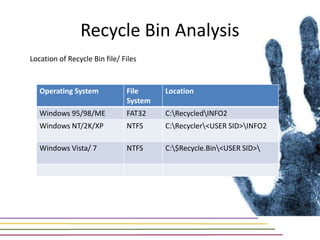
Recycle Bin Analysis
Location of Recycle Bin file/ Files


   Operating System            File     Location
                               System
   Windows 95/98/ME            FAT32    C:RecycledINFO2
   Windows NT/2K/XP            NTFS     C:Recycler<USER SID>INFO2

   Windows Vista/ 7            NTFS     C:$Recycle.Bin<USER SID>
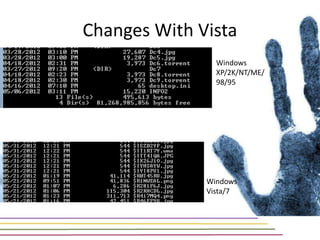
Changes With Vista
                Windows
                XP/2K/NT/ME/
                98/95


              Windows
              Vista/7
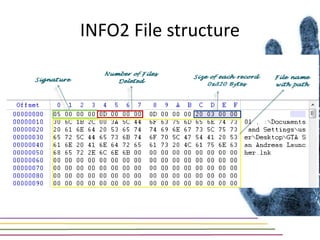
INFO2 File structure
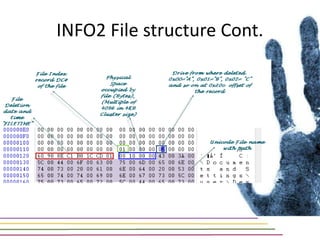
INFO2 File structure Cont.
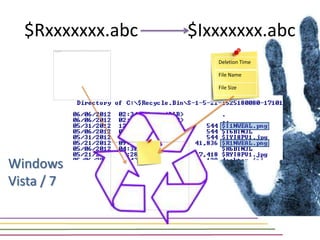
$Rxxxxxxx.abc   $Ixxxxxxx.abc
                     Deletion Time

                     File Name

                     File Size


Windows
Vista / 7
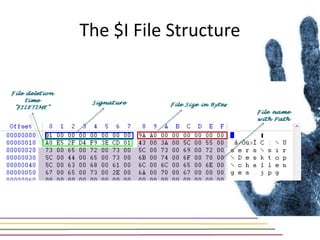
The $I File Structure
Windows Prefetching
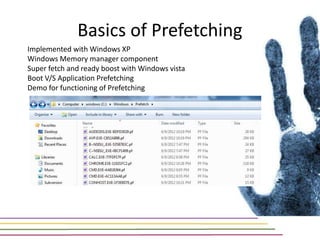
Basics of Prefetching
Implemented with Windows XP
Windows Memory manager component
Super fetch and ready boost with Windows vista
Boot V/S Application Prefetching
Demo for functioning of Prefetching
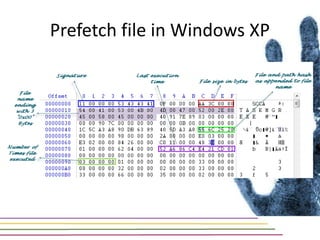
Prefetch file in Windows XP
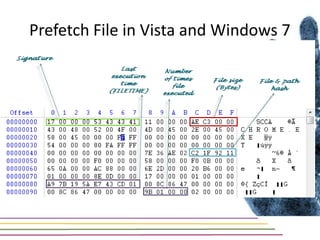
Prefetch File in Vista and Windows 7
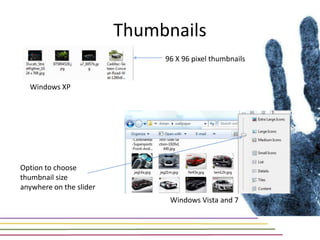
Thumbnails
                              96 X 96 pixel thumbnails


  Windows XP


Option to choose
thumbnail size
anywhere on the slider
                               Windows Vista and 7
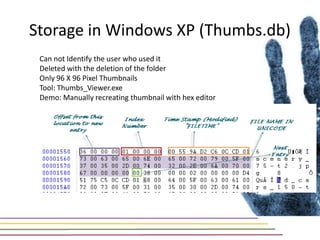
Storage in Windows XP (Thumbs.db)
 Can not Identify the user who used it
 Deleted with the deletion of the folder
 Only 96 X 96 Pixel Thumbnails
 Tool: Thumbs_Viewer.exe
 Demo: Manually recreating thumbnail with hex editor
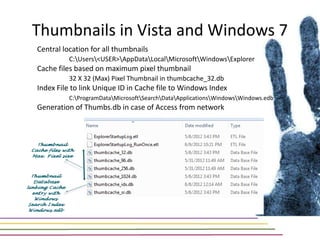
Thumbnails in Vista and Windows 7
Central location for all thumbnails
          C:Users<USER>AppDataLocalMicrosoftWindowsExplorer
Cache files based on maximum pixel thumbnail
          32 X 32 (Max) Pixel Thumbnail in thumbcache_32.db
Index File to link Unique ID in Cache file to Windows Index
          C:ProgramDataMicrosoftSearchDataApplicationsWindowsWindows.edb
Generation of Thumbs.db in case of Access from network
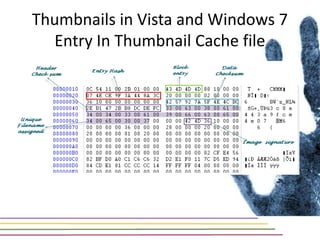
Thumbnails in Vista and Windows 7
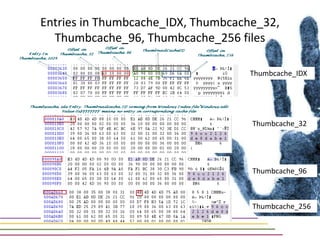
  Entry In Thumbnail Cache file
Entries in Thumbcache_IDX, Thumbcache_32,
  Thumbcache_96, Thumbcache_256 files

                                   Thumbcache_IDX


                                    Thumbcache_32


                                    Thumbcache_96


                                    Thumbcache_256
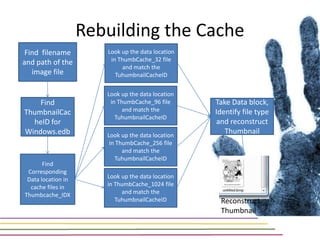
Rebuilding the Cache
 Find filename         Look up the data location
and path of the         in ThumbCache_32 file
                             and match the
   image file             TuhumbnailCacheID

                       Look up the data location
    Find                in ThumbCache_96 file      Take Data block,
ThumbnailCac                 and match the         Identify file type
                          TuhumbnailCacheID
  heID for                                         and reconstruct
Windows.edb            Look up the data location
                                                      Thumbnail
                        in ThumbCache_256 file
                             and match the
                          TuhumbnailCacheID
       Find
 Corresponding
 Data location in      Look up the data location
  cache files in       in ThumbCache_1024 file
Thumbcache_IDX              and match the
                          TuhumbnailCacheID         Reconstruct
                                                    Thumbnail
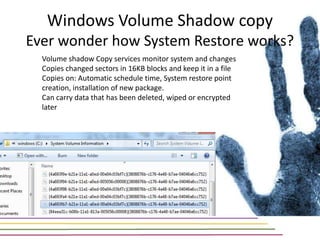
Windows Volume Shadow copy
Ever wonder how System Restore works?
  Volume shadow Copy services monitor system and changes
  Copies changed sectors in 16KB blocks and keep it in a file
  Copies on: Automatic schedule time, System restore point
  creation, installation of new package.
  Can carry data that has been deleted, wiped or encrypted
  later
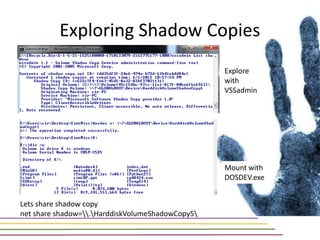
Exploring Shadow Copies
                                                  Explore
                                                  with
                                                  VSSadmin


                                                  Mount with
                                                  DOSDEV.exe


Lets share shadow copy
net share shadow=.HarddiskVolumeShadowCopy5
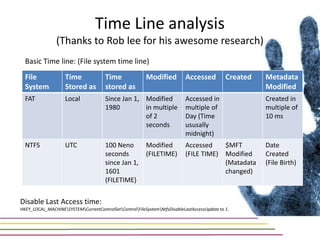
Time Line analysis
                (Thanks to Rob lee for his awesome research)
  Basic Time line: (File system time line)
  File              Time               Time              Modified          Accessed           Created   Metadata
  System            Stored as          stored as                                                        Modified
  FAT               Local              Since Jan 1, Modified               Accessed in                  Created in
                                       1980         in multiple            multiple of                  multiple of
                                                    of 2                   Day (Time                    10 ms
                                                    seconds                ususally
                                                                           midnight)
  NTFS              UTC                100 Neno          Modified          Accessed    $MFT             Date
                                       seconds           (FILETIME)        (FILE TIME) Modified         Created
                                       since Jan 1,                                    (Matadata        (File Birth)
                                       1601                                            changed)
                                       (FILETIME)


Disable Last Access time:
HKEY_LOCAL_MACHINESYSTEMCurrentControlSetControlFileSystemNtfsDisableLastAccessUpdate to 1.
Why Timeline analysis
Extremely difficult for a malware to handle all times
Almost impossible for attacker not to hide the time line evidences
Spread across system and multiple of time lines
Helps in presenting the entire picture of all the happenings on the system
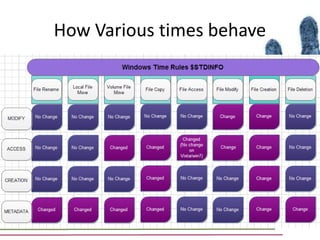
How Various times behave
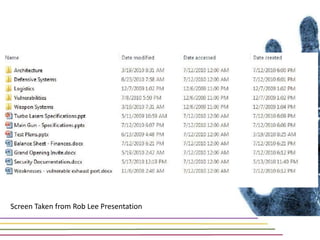
Screen Taken from Rob Lee Presentation
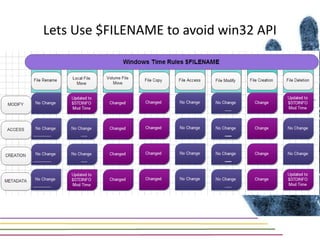
Lets Use $FILENAME to avoid win32 API
File Timeline         MRU
                            File Download    Browser History
                                                                   analysis      (Open/Save/Run)
                                                                                                      Mail analysis      Malware analysis     Log Analysis

Conducting an examination
                               Program          Prefetch       Open/RunMRU          Run MRU            User Assist
                              Execution


                                                                 Thumbnail         Recycle Bin
                            File Existance     Search MRU
                                                                  analysis          analysis
                                                                                                    Browser artifacts     Shadow Copy


                                                                First and last                                            Volume name
                              USB Keys         USB Serials
                                                                  time used
                                                                                 User who used it     Path in MRU
                                                                                                                         and Drive letter


                            File Creation                                                                                 Thumbnails for
                                                Time line
                                                               Shadow copy       Recent file MRUs   Lnk file analysis    image and other
                            and change           analysis
                                                                                                                              files


                               Was A                                                                                        Security
                                                                  Regedit
                             Registry key     Registry slack
                                                                 execution
                                                                                 Regedit Prefetch     Shadow file         descriptor on
                                                                                                                            the keys
                              deleted?

                                               Unallocated      Recycle Bin      Volume Shadow       Recent file list
                            File deletion        space           analysis             copy              and lnk
                                                                                                                          Various MRUs          Strings


                             Time stamp         Time line       Execution of     Check for neno     Volume Shadow
                              tempering          analysis         program         second value           copy


                              System                                                Backdoor
                                                Network        Super time line                        Connection
                                                                                  presence and
                            compromise?         forensics         analysis                             analysis
                                                                                     analysis


                             Encryption                                                                                  Temp locations
                                                                                                    Page file analysis                          Various
                                             Memory analysis   Rainbow tables    LM Hash attack                           for decrypted
                               attacks                                                              for key presence                        password attacks
                                                                                                                               files
Questions?


Gmail : boonlia@gmail.com
Facebook:
http://www.facebook.com/home.php?#!/profile.ph
p?id=1701055902 or search for my mail id
boonliasecurity@gmail.com
Twitter: http://twitter.com/boonlia

Windows Forensics

  • 1.
    Shri Few More Aspectsof Forensics Boonlia Prince Komal Gmail : boonlia@gmail.com Facebook: http://www.facebook.com/home.php?#!/profile.ph p?id=1701055902 or search for my mail id boonliasecurity@gmail.com Twitter: http://twitter.com/boonlia
  • 2.
    Recycle Bin Analysis Locationof Recycle Bin file/ Files Operating System File Location System Windows 95/98/ME FAT32 C:RecycledINFO2 Windows NT/2K/XP NTFS C:Recycler<USER SID>INFO2 Windows Vista/ 7 NTFS C:$Recycle.Bin<USER SID>
  • 3.
    Changes With Vista Windows XP/2K/NT/ME/ 98/95 Windows Vista/7
  • 4.
  • 5.
  • 6.
    $Rxxxxxxx.abc $Ixxxxxxx.abc Deletion Time File Name File Size Windows Vista / 7
  • 7.
    The $I FileStructure
  • 8.
  • 9.
    Basics of Prefetching Implementedwith Windows XP Windows Memory manager component Super fetch and ready boost with Windows vista Boot V/S Application Prefetching Demo for functioning of Prefetching
  • 10.
    Prefetch file inWindows XP
  • 11.
    Prefetch File inVista and Windows 7
  • 12.
    Thumbnails 96 X 96 pixel thumbnails Windows XP Option to choose thumbnail size anywhere on the slider Windows Vista and 7
  • 13.
    Storage in WindowsXP (Thumbs.db) Can not Identify the user who used it Deleted with the deletion of the folder Only 96 X 96 Pixel Thumbnails Tool: Thumbs_Viewer.exe Demo: Manually recreating thumbnail with hex editor
  • 14.
    Thumbnails in Vistaand Windows 7 Central location for all thumbnails C:Users<USER>AppDataLocalMicrosoftWindowsExplorer Cache files based on maximum pixel thumbnail 32 X 32 (Max) Pixel Thumbnail in thumbcache_32.db Index File to link Unique ID in Cache file to Windows Index C:ProgramDataMicrosoftSearchDataApplicationsWindowsWindows.edb Generation of Thumbs.db in case of Access from network
  • 15.
    Thumbnails in Vistaand Windows 7 Entry In Thumbnail Cache file
  • 16.
    Entries in Thumbcache_IDX,Thumbcache_32, Thumbcache_96, Thumbcache_256 files Thumbcache_IDX Thumbcache_32 Thumbcache_96 Thumbcache_256
  • 17.
    Rebuilding the Cache Find filename Look up the data location and path of the in ThumbCache_32 file and match the image file TuhumbnailCacheID Look up the data location Find in ThumbCache_96 file Take Data block, ThumbnailCac and match the Identify file type TuhumbnailCacheID heID for and reconstruct Windows.edb Look up the data location Thumbnail in ThumbCache_256 file and match the TuhumbnailCacheID Find Corresponding Data location in Look up the data location cache files in in ThumbCache_1024 file Thumbcache_IDX and match the TuhumbnailCacheID Reconstruct Thumbnail
  • 18.
    Windows Volume Shadowcopy Ever wonder how System Restore works? Volume shadow Copy services monitor system and changes Copies changed sectors in 16KB blocks and keep it in a file Copies on: Automatic schedule time, System restore point creation, installation of new package. Can carry data that has been deleted, wiped or encrypted later
  • 19.
    Exploring Shadow Copies Explore with VSSadmin Mount with DOSDEV.exe Lets share shadow copy net share shadow=.HarddiskVolumeShadowCopy5
  • 20.
    Time Line analysis (Thanks to Rob lee for his awesome research) Basic Time line: (File system time line) File Time Time Modified Accessed Created Metadata System Stored as stored as Modified FAT Local Since Jan 1, Modified Accessed in Created in 1980 in multiple multiple of multiple of of 2 Day (Time 10 ms seconds ususally midnight) NTFS UTC 100 Neno Modified Accessed $MFT Date seconds (FILETIME) (FILE TIME) Modified Created since Jan 1, (Matadata (File Birth) 1601 changed) (FILETIME) Disable Last Access time: HKEY_LOCAL_MACHINESYSTEMCurrentControlSetControlFileSystemNtfsDisableLastAccessUpdate to 1.
  • 21.
    Why Timeline analysis Extremelydifficult for a malware to handle all times Almost impossible for attacker not to hide the time line evidences Spread across system and multiple of time lines Helps in presenting the entire picture of all the happenings on the system
  • 22.
  • 23.
    Screen Taken fromRob Lee Presentation
  • 24.
    Lets Use $FILENAMEto avoid win32 API
  • 25.
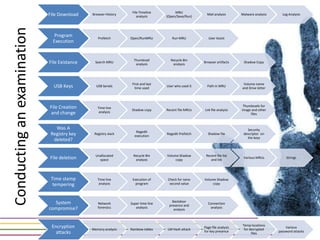
    File Timeline MRU File Download Browser History analysis (Open/Save/Run) Mail analysis Malware analysis Log Analysis Conducting an examination Program Prefetch Open/RunMRU Run MRU User Assist Execution Thumbnail Recycle Bin File Existance Search MRU analysis analysis Browser artifacts Shadow Copy First and last Volume name USB Keys USB Serials time used User who used it Path in MRU and Drive letter File Creation Thumbnails for Time line Shadow copy Recent file MRUs Lnk file analysis image and other and change analysis files Was A Security Regedit Registry key Registry slack execution Regedit Prefetch Shadow file descriptor on the keys deleted? Unallocated Recycle Bin Volume Shadow Recent file list File deletion space analysis copy and lnk Various MRUs Strings Time stamp Time line Execution of Check for neno Volume Shadow tempering analysis program second value copy System Backdoor Network Super time line Connection presence and compromise? forensics analysis analysis analysis Encryption Temp locations Page file analysis Various Memory analysis Rainbow tables LM Hash attack for decrypted attacks for key presence password attacks files
  • 26.
    Questions? Gmail : boonlia@gmail.com Facebook: http://www.facebook.com/home.php?#!/profile.ph p?id=1701055902or search for my mail id boonliasecurity@gmail.com Twitter: http://twitter.com/boonlia