Initial Response and Forensic
Duplication
Dr R Jegadeesan Prof-CSE
Jyothishmathi Institute of Technology
and Science, Karimnagar
Initial Response and Forensic Duplication
Initial Response
2
• One of the first steps of any preliminary investigation is to
obtain enough information to determine an appropriate
response.
• The goal of an initial response is twofold: Confirm there is an
incident, and then retrieve the system’s volatile data that will
no longer be there after you power off the system.
• Initial response is an investigative as well as a technical
process
Initial Response and Forensic Duplication
CREATING A RESPONSE TOOLKIT
3
• For an initial response, you need to plan your approach to
obtain all the information.
• Without affecting any potential evidence, you will be issuing
commands with administrator rights on the victim system, you
need to be particularly careful not to destroy or alter the
evidence.
• The best way to meet this goal is to prepare a complete
response toolkit.
Initial Response and Forensic Duplication
GATHERING-THE-TOOLS
4
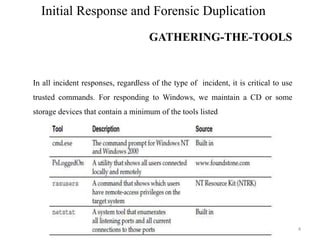
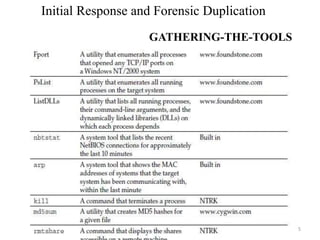
In all incident responses, regardless of the type of incident, it is critical to use
trusted commands. For responding to Windows, we maintain a CD or some
storage devices that contain a minimum of the tools listed
Initial Response and Forensic Duplication
GATHERING-THE-TOOLS
5
In all incident responses, regardless of the type
of incident, it is critical to use trusted
commands. For responding to Windows, we
maintain aCDor two floppy disks that contain a
minimum of the tools listed
Initial Response and Forensic Duplication
Preparing the Toolkit
6
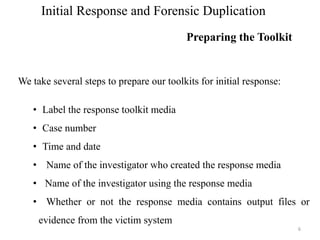
We take several steps to prepare our toolkits for initial response:
• Label the response toolkit media
• Case number
• Time and date
• Name of the investigator who created the response media
• Name of the investigator using the response media
• Whether or not the response media contains output files or
evidence from the victim system
Initial Response and Forensic Duplication
OBTAINING VOLATILE DATA
7
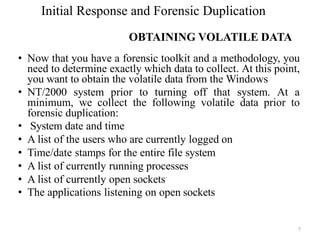
• Now that you have a forensic toolkit and a methodology, you
need to determine exactly which data to collect. At this point,
you want to obtain the volatile data from the Windows
• NT/2000 system prior to turning off that system. At a
minimum, we collect the following volatile data prior to
forensic duplication:
• System date and time
• A list of the users who are currently logged on
• Time/date stamps for the entire file system
• A list of currently running processes
• A list of currently open sockets
• The applications listening on open sockets
Initial Response and Forensic Duplication
VOLATILE DATA COLLECTION FROM
WINDOWS SYSTEM
8
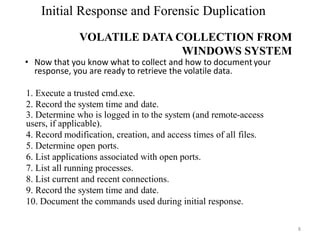
• Now that you know what to collect and how to document your
response, you are ready to retrieve the volatile data.
1. Execute a trusted cmd.exe.
2. Record the system time and date.
3. Determine who is logged in to the system (and remote-access
users, if applicable).
4. Record modification, creation, and access times of all files.
5. Determine open ports.
6. List applications associated with open ports.
7. List all running processes.
8. List current and recent connections.
9. Record the system time and date.
10. Document the commands used during initial response.
Initial Response and Forensic Duplication
Collecting Volatile Data from a Linux System
9
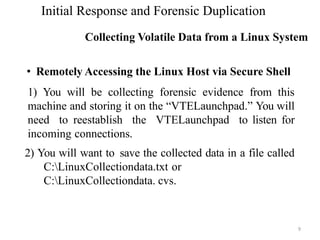
• Remotely Accessing the Linux Host via Secure Shell
1) You will be collecting forensic evidence from this
machine and storing it on the “VTELaunchpad.” You will
need to reestablish the VTELaunchpad to listen for
incoming connections.
2) You will want to save the collected data in a file called
C:LinuxCollectiondata.txt or
C:LinuxCollectiondata. cvs.
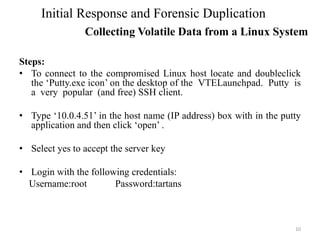
Steps:
• To connect to the compromised Linux host locate and doubleclick
the ‘Putty.exe icon’ on the desktop of the VTELaunchpad. Putty is
a very popular (and free) SSH client.
• Type ‘10.0.4.51’ in the host name (IP address) box with in the putty
application and then click ‘open’ .
• Select yes to accept the server key
• Login with the following credentials:
Username:root Password:tartans
10
Initial Response and Forensic Duplication
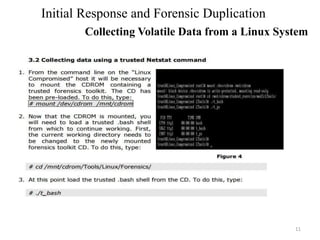
Collecting Volatile Data from a Linux System
11
Initial Response and Forensic Duplication
Collecting Volatile Data from a Linux System
12
Initial Response and Forensic Duplication
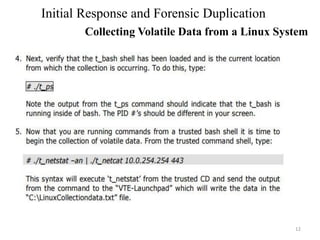
Collecting Volatile Data from a Linux System
13
Initial Response and Forensic Duplication
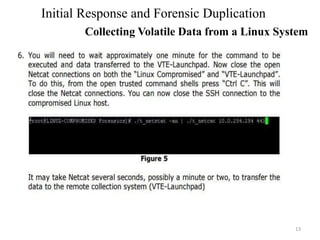
Collecting Volatile Data from a Linux System
• Definition: File that contains every bit of information from
the source in a raw bit stream format. A 5GB hard drive
would result in a 5GB forensic duplicate. No extra data is
stored within the file, except in the case where errors
occurred in a read operation from the original.
• The forensic duplication of the target media provides the
mirror image of the target system. This methodology
provides due diligence when handling critical incidents.
• Generally, if the incident is severe or deleted material may
need to be recovered, a forensic duplication is warranted.
14
Initial Response and Forensic Duplication
FORENSIC DUPLICATION
• Law enforcement generally prefers forensic “bit-for-bit,
byte-for-byte” duplicates of target systems. If you are
responding to an incident that can evolve into a
corporate-wide issue with grave consequences, you may
want to perform a forensic duplication.
• It is a good idea to have some policy that addresses
when full duplication of a system is required.
• Eg: consider an investigation that can lead to the firing or
demotion of an employee as grave enough to perform
forensic duplication.
15
Initial Response and Forensic Duplication
FORENSIC DUPLICATION
• Federal Rules of Evidence §1002 requires an original to
prove the content of a writing, record, or photograph.
• Follows from the best evidence rule:
Copying can introduce errors.
• F.R.E. §1001
If data are stored in a computer or similar device, any
printout or other output readable by sight, shown to reflect
the data accurately, is an "original".
16
Initial Response and Forensic Duplication
Forensics Duplicates as Admissible Evidence
• Federal Rules of Evidence § 1003
A duplicate is admissible to the same extent as an original unless a
genuine question is raised to the authenticity of the original or in
the circumstances it would be unfair to admit the duplicate in lieu of
the original.
• As familiarity with digital data increases, behavior of the judicial
system will increase in rationality.
17
Initial Response and Forensic Duplication
Forensics Duplicates as Admissible Evidence
• A qualified forensic duplicate is a file that contains
every bit of information from the source, but may be
stored in an altered form. Two examples of altered
forms are in-band hashes and empty sector
compression.
• Some tools will read in a number of sectors from the
source, generate a hash from that group of sectors,
and write the sector group, followed by the hash
value to the output file.
18
Initial Response and Forensic Duplication
QUALIFIED FORENSIC DUPLICATE
• This method works very well if something goes wrong
during the duplication or restoration of the duplicate.
• Empty sector compression is a common method for
minimizing the size of the output file. If the tool comes
across 500 sectors, all filled with zeros, it will make a
special entry in the output file that the restoration
program will recognize.
19
Initial Response and Forensic Duplication
QUALIFIED FORENSIC DUPLICATE
• RESTORED IMAGE
A restored image is what you get when you restore a forensic
duplicate or a qualified forensic duplicate to another storage
medium. The restoration process is more complicated than it
sounds.
• For eg: sector-to sector copy of file from source hard drive to
destination hard drive.
• Case I: If the destination hard drive is the same as the original
hard drive, everything will work fine. The information in the
partition table will match the geometry of the hard drive.
Partition tables will be accurate; if the table says that partition 2
starts on cylinder 20, head 3, sector 0, that is where the data
actually resides.
20
Initial Response and Forensic Duplication
QUALIFIED FORENSIC DUPLICATE
Case II:
• Destination hard drive is not the same as the original
hard drive.
• If you restore the forensic duplicate of a 2.1GB drive
to a 20GB drive, for example, the geometries do not
match. In fact, all of the data from the original drive
may occupy only three cylinders of the 20GB
destination drive. The partition that started on
cylinder 20, head 3, sector 0 on the original drive
may actually start on cylinder 2, head 9, and sector 0.
• The software would look in the wrong location and
give inaccurate results.
21
Initial Response and Forensic Duplication
QUALIFIED FORENSIC DUPLICATE
• The tool must have the ability to image every bit of data on the
storage medium. The tool must create a forensic duplicate or
mirror image of the original storage medium.
• The tool must handle read errors in a robust and graceful manner.
If a process fails after repeated attempts, the error is noted and
the imaging process continues. A placeholder may be put in the
output file with the same dimensions as the portion of the input
with errors. The contents of this placeholder must be
documented in the tool’s documentation.
• The tool must not make any changes to the source medium.
• The tool must have the ability to be held up to scientific and peer
review.
• Results must be repeatable and verifiable by a third party, if
necessary.
22
Initial Response and Forensic Duplication
FORENSIC DUPLICATION TOOL REQUIREMENTS
• The most common tools used for obtaining a true forensic duplicate are built
to run in a Unix operating environment.
• One tool, dd, is part of the GNU software suite. This was improved upon by
programmers at the DoD Computer Forensics Lab and re-released as dcfldd.
The command-line parameters for dd and dcfldd are nearly identical, and the
core data transfer code has not been altered. If your team has validated the
operation of dd, very little work will be required to validate the new features.
• Another tool that we will look at here is the Open Data Duplicator from
openforensics.org. One of the strong points of this new Unix tool is that it
allows an investigator to perform multiple functions as the image is being
created.
23
Initial Response and Forensic Duplication
FORENSIC DUPLICATION TOOL REQUIREMENTS
❖The Open Data Duplicator (ODD) is a new open-source tool.
This tool follows a client/ server model that allows the
investigator to perform forensic duplications on a number of
computer systems simultaneously over a local LAN.
❖There are three portions of the ODD package:
✓ Bootable CD-ROMs These are similar to the Trinux Linux distribution.
✓ Server-side application The server will perform most of the processing
of the duplicate image, including the calculation of hashes, string
searches, and the storage of the true forensic duplication.
✓ Client-side application This portion may be run locally if you are
duplicating drives on a forensic workstation.
24
Initial Response and Forensic Duplication
DUPLICATING WITH THE OpenDataDuplicator (ODD)
• One of the first things that a beginning examiner
must learn is to never boot from the evidence drive.
• Many items on the evidence media can be altered,
starting from the moment the BIOS executes the
boot block on the hard drive.
• During the initial boot process, file access
timestamps, partition information, the Registry,
configuration files, and essential log files may be
changed in a matter of seconds.
25
Initial Response and Forensic Duplication
A QUALIFIED FORENSIC DUPLICATE OF A HARD
DRIVE
• Imaging a system requires a clean operating environment. When
imaging drives using a DOS application, such as SafeBack or
EnCase, this means that you must create an MS DOS boot disk.
Using MS DOS 6.22 or Windows 95/98, the following
command will format and copy the system files to a floppy:
C:format a: /s
• The first file processed by the computer is IO.SYS. The code in
IO.SYS loads the contents of MSDOS.SYS and begins to
initialize device drivers, tests and resets the hardware, and
loads the command interpreter, COMMAND.COM.
26
Initial Response and Forensic Duplication
CREATING A BOOT DISK
• During the process of loading device drivers, if a
disk or partition connected to the machine uses
compression software, such as DriveSpace or
DoubleSpace, IO.SYS loads the DRVSPACE.BIN
driver file.
• You do not want this to happen when performing a
forensic duplication. As the driver loads,it will
mount the compressed volume and present the
operating system with an uncompressed view of the
file system.
• When it mounts the compressed volume, it changes
the time/date stamps on the compressed file, which
27
Initial Response and Forensic Duplication
CREATING A BOOT DISK
• SafeBack, offered by New Technologies Inc. (NTI), can make a
qualified forensic duplicate of any hard drive that is accessible
through a system’s drive controllers.
• Creating a duplicate of a computer system with SafeBack is
fairly straightforward. It offers four modes of operation.
• The Backup function produces a forensically sound image file
of the source media.
• The Restore function restores forensically sound image files.
• The Verify function verifies the checksum values within an
image file.
• The Copy function performs the Backup and Restore operations
in one action.
28
Initial Response and Forensic Duplication
CREATING A QUALIFIED FORENSIC DUPLICATE WITH
SAFEBACK
• Most popular forensic tool suite available
commercially.
• Its popularity is based primarily on the easy- to-
navigate GUI interface.
• A flexible scripting language is included, allowing
the examiner to customize the types of searches
performed by the tool.
• Perhaps the most valuable feature is the preview
option.
29
Initial Response and Forensic Duplication
CREATING A QUALIFIED FORENSIC DUPLICATE WITH
ENCASE
• During the first stages of an investigation, you can use
the preview function to quickly ascertain whether a
computer system is material to the issue being
investigated.
• To use the preview option, boot the suspect computer
system with an EnCase boot disk.
• Instead of acquiring an image, you connect to the
suspect computer through a parallel cable or a network
connection with a copy of EnCase running on your
forensic workstation.
• Once the connection is established, the analysis process
is the same as if you were working on an EnCase image
30
Initial Response and Forensic Duplication
CREATING A QUALIFIED FORENSIC DUPLICATE WITH
ENCASE
• EnCase will present you with a series of options and
text-entry fields that will be placed in the header of the
qualified forensic duplicate.
• You will be asked for the following information:
• Location of the qualified duplicate
• Case number
• Examiner’s name
• Evidence number
• Description of the evidence being acquired
• Verification of the current date and time
• Any other notes or comments 31
Initial Response and Forensic Duplication
CREATING A QUALIFIED FORENSIC DUPLICATE WITH
ENCASE
Thank you
32

Initial Response and Forensic Duplication

  • 1.
    Initial Response andForensic Duplication Dr R Jegadeesan Prof-CSE Jyothishmathi Institute of Technology and Science, Karimnagar
  • 2.
    Initial Response andForensic Duplication Initial Response 2 • One of the first steps of any preliminary investigation is to obtain enough information to determine an appropriate response. • The goal of an initial response is twofold: Confirm there is an incident, and then retrieve the system’s volatile data that will no longer be there after you power off the system. • Initial response is an investigative as well as a technical process
  • 3.
    Initial Response andForensic Duplication CREATING A RESPONSE TOOLKIT 3 • For an initial response, you need to plan your approach to obtain all the information. • Without affecting any potential evidence, you will be issuing commands with administrator rights on the victim system, you need to be particularly careful not to destroy or alter the evidence. • The best way to meet this goal is to prepare a complete response toolkit.
  • 4.
    Initial Response andForensic Duplication GATHERING-THE-TOOLS 4 In all incident responses, regardless of the type of incident, it is critical to use trusted commands. For responding to Windows, we maintain a CD or some storage devices that contain a minimum of the tools listed
  • 5.
    Initial Response andForensic Duplication GATHERING-THE-TOOLS 5 In all incident responses, regardless of the type of incident, it is critical to use trusted commands. For responding to Windows, we maintain aCDor two floppy disks that contain a minimum of the tools listed
  • 6.
    Initial Response andForensic Duplication Preparing the Toolkit 6 We take several steps to prepare our toolkits for initial response: • Label the response toolkit media • Case number • Time and date • Name of the investigator who created the response media • Name of the investigator using the response media • Whether or not the response media contains output files or evidence from the victim system
  • 7.
    Initial Response andForensic Duplication OBTAINING VOLATILE DATA 7 • Now that you have a forensic toolkit and a methodology, you need to determine exactly which data to collect. At this point, you want to obtain the volatile data from the Windows • NT/2000 system prior to turning off that system. At a minimum, we collect the following volatile data prior to forensic duplication: • System date and time • A list of the users who are currently logged on • Time/date stamps for the entire file system • A list of currently running processes • A list of currently open sockets • The applications listening on open sockets
  • 8.
    Initial Response andForensic Duplication VOLATILE DATA COLLECTION FROM WINDOWS SYSTEM 8 • Now that you know what to collect and how to document your response, you are ready to retrieve the volatile data. 1. Execute a trusted cmd.exe. 2. Record the system time and date. 3. Determine who is logged in to the system (and remote-access users, if applicable). 4. Record modification, creation, and access times of all files. 5. Determine open ports. 6. List applications associated with open ports. 7. List all running processes. 8. List current and recent connections. 9. Record the system time and date. 10. Document the commands used during initial response.
  • 9.
    Initial Response andForensic Duplication Collecting Volatile Data from a Linux System 9 • Remotely Accessing the Linux Host via Secure Shell 1) You will be collecting forensic evidence from this machine and storing it on the “VTELaunchpad.” You will need to reestablish the VTELaunchpad to listen for incoming connections. 2) You will want to save the collected data in a file called C:LinuxCollectiondata.txt or C:LinuxCollectiondata. cvs.
  • 10.
    Steps: • To connectto the compromised Linux host locate and doubleclick the ‘Putty.exe icon’ on the desktop of the VTELaunchpad. Putty is a very popular (and free) SSH client. • Type ‘10.0.4.51’ in the host name (IP address) box with in the putty application and then click ‘open’ . • Select yes to accept the server key • Login with the following credentials: Username:root Password:tartans 10 Initial Response and Forensic Duplication Collecting Volatile Data from a Linux System
  • 11.
    11 Initial Response andForensic Duplication Collecting Volatile Data from a Linux System
  • 12.
    12 Initial Response andForensic Duplication Collecting Volatile Data from a Linux System
  • 13.
    13 Initial Response andForensic Duplication Collecting Volatile Data from a Linux System
  • 14.
    • Definition: Filethat contains every bit of information from the source in a raw bit stream format. A 5GB hard drive would result in a 5GB forensic duplicate. No extra data is stored within the file, except in the case where errors occurred in a read operation from the original. • The forensic duplication of the target media provides the mirror image of the target system. This methodology provides due diligence when handling critical incidents. • Generally, if the incident is severe or deleted material may need to be recovered, a forensic duplication is warranted. 14 Initial Response and Forensic Duplication FORENSIC DUPLICATION
  • 15.
    • Law enforcementgenerally prefers forensic “bit-for-bit, byte-for-byte” duplicates of target systems. If you are responding to an incident that can evolve into a corporate-wide issue with grave consequences, you may want to perform a forensic duplication. • It is a good idea to have some policy that addresses when full duplication of a system is required. • Eg: consider an investigation that can lead to the firing or demotion of an employee as grave enough to perform forensic duplication. 15 Initial Response and Forensic Duplication FORENSIC DUPLICATION
  • 16.
    • Federal Rulesof Evidence §1002 requires an original to prove the content of a writing, record, or photograph. • Follows from the best evidence rule: Copying can introduce errors. • F.R.E. §1001 If data are stored in a computer or similar device, any printout or other output readable by sight, shown to reflect the data accurately, is an "original". 16 Initial Response and Forensic Duplication Forensics Duplicates as Admissible Evidence
  • 17.
    • Federal Rulesof Evidence § 1003 A duplicate is admissible to the same extent as an original unless a genuine question is raised to the authenticity of the original or in the circumstances it would be unfair to admit the duplicate in lieu of the original. • As familiarity with digital data increases, behavior of the judicial system will increase in rationality. 17 Initial Response and Forensic Duplication Forensics Duplicates as Admissible Evidence
  • 18.
    • A qualifiedforensic duplicate is a file that contains every bit of information from the source, but may be stored in an altered form. Two examples of altered forms are in-band hashes and empty sector compression. • Some tools will read in a number of sectors from the source, generate a hash from that group of sectors, and write the sector group, followed by the hash value to the output file. 18 Initial Response and Forensic Duplication QUALIFIED FORENSIC DUPLICATE
  • 19.
    • This methodworks very well if something goes wrong during the duplication or restoration of the duplicate. • Empty sector compression is a common method for minimizing the size of the output file. If the tool comes across 500 sectors, all filled with zeros, it will make a special entry in the output file that the restoration program will recognize. 19 Initial Response and Forensic Duplication QUALIFIED FORENSIC DUPLICATE
  • 20.
    • RESTORED IMAGE Arestored image is what you get when you restore a forensic duplicate or a qualified forensic duplicate to another storage medium. The restoration process is more complicated than it sounds. • For eg: sector-to sector copy of file from source hard drive to destination hard drive. • Case I: If the destination hard drive is the same as the original hard drive, everything will work fine. The information in the partition table will match the geometry of the hard drive. Partition tables will be accurate; if the table says that partition 2 starts on cylinder 20, head 3, sector 0, that is where the data actually resides. 20 Initial Response and Forensic Duplication QUALIFIED FORENSIC DUPLICATE
  • 21.
    Case II: • Destinationhard drive is not the same as the original hard drive. • If you restore the forensic duplicate of a 2.1GB drive to a 20GB drive, for example, the geometries do not match. In fact, all of the data from the original drive may occupy only three cylinders of the 20GB destination drive. The partition that started on cylinder 20, head 3, sector 0 on the original drive may actually start on cylinder 2, head 9, and sector 0. • The software would look in the wrong location and give inaccurate results. 21 Initial Response and Forensic Duplication QUALIFIED FORENSIC DUPLICATE
  • 22.
    • The toolmust have the ability to image every bit of data on the storage medium. The tool must create a forensic duplicate or mirror image of the original storage medium. • The tool must handle read errors in a robust and graceful manner. If a process fails after repeated attempts, the error is noted and the imaging process continues. A placeholder may be put in the output file with the same dimensions as the portion of the input with errors. The contents of this placeholder must be documented in the tool’s documentation. • The tool must not make any changes to the source medium. • The tool must have the ability to be held up to scientific and peer review. • Results must be repeatable and verifiable by a third party, if necessary. 22 Initial Response and Forensic Duplication FORENSIC DUPLICATION TOOL REQUIREMENTS
  • 23.
    • The mostcommon tools used for obtaining a true forensic duplicate are built to run in a Unix operating environment. • One tool, dd, is part of the GNU software suite. This was improved upon by programmers at the DoD Computer Forensics Lab and re-released as dcfldd. The command-line parameters for dd and dcfldd are nearly identical, and the core data transfer code has not been altered. If your team has validated the operation of dd, very little work will be required to validate the new features. • Another tool that we will look at here is the Open Data Duplicator from openforensics.org. One of the strong points of this new Unix tool is that it allows an investigator to perform multiple functions as the image is being created. 23 Initial Response and Forensic Duplication FORENSIC DUPLICATION TOOL REQUIREMENTS
  • 24.
    ❖The Open DataDuplicator (ODD) is a new open-source tool. This tool follows a client/ server model that allows the investigator to perform forensic duplications on a number of computer systems simultaneously over a local LAN. ❖There are three portions of the ODD package: ✓ Bootable CD-ROMs These are similar to the Trinux Linux distribution. ✓ Server-side application The server will perform most of the processing of the duplicate image, including the calculation of hashes, string searches, and the storage of the true forensic duplication. ✓ Client-side application This portion may be run locally if you are duplicating drives on a forensic workstation. 24 Initial Response and Forensic Duplication DUPLICATING WITH THE OpenDataDuplicator (ODD)
  • 25.
    • One ofthe first things that a beginning examiner must learn is to never boot from the evidence drive. • Many items on the evidence media can be altered, starting from the moment the BIOS executes the boot block on the hard drive. • During the initial boot process, file access timestamps, partition information, the Registry, configuration files, and essential log files may be changed in a matter of seconds. 25 Initial Response and Forensic Duplication A QUALIFIED FORENSIC DUPLICATE OF A HARD DRIVE
  • 26.
    • Imaging asystem requires a clean operating environment. When imaging drives using a DOS application, such as SafeBack or EnCase, this means that you must create an MS DOS boot disk. Using MS DOS 6.22 or Windows 95/98, the following command will format and copy the system files to a floppy: C:format a: /s • The first file processed by the computer is IO.SYS. The code in IO.SYS loads the contents of MSDOS.SYS and begins to initialize device drivers, tests and resets the hardware, and loads the command interpreter, COMMAND.COM. 26 Initial Response and Forensic Duplication CREATING A BOOT DISK
  • 27.
    • During theprocess of loading device drivers, if a disk or partition connected to the machine uses compression software, such as DriveSpace or DoubleSpace, IO.SYS loads the DRVSPACE.BIN driver file. • You do not want this to happen when performing a forensic duplication. As the driver loads,it will mount the compressed volume and present the operating system with an uncompressed view of the file system. • When it mounts the compressed volume, it changes the time/date stamps on the compressed file, which 27 Initial Response and Forensic Duplication CREATING A BOOT DISK
  • 28.
    • SafeBack, offeredby New Technologies Inc. (NTI), can make a qualified forensic duplicate of any hard drive that is accessible through a system’s drive controllers. • Creating a duplicate of a computer system with SafeBack is fairly straightforward. It offers four modes of operation. • The Backup function produces a forensically sound image file of the source media. • The Restore function restores forensically sound image files. • The Verify function verifies the checksum values within an image file. • The Copy function performs the Backup and Restore operations in one action. 28 Initial Response and Forensic Duplication CREATING A QUALIFIED FORENSIC DUPLICATE WITH SAFEBACK
  • 29.
    • Most popularforensic tool suite available commercially. • Its popularity is based primarily on the easy- to- navigate GUI interface. • A flexible scripting language is included, allowing the examiner to customize the types of searches performed by the tool. • Perhaps the most valuable feature is the preview option. 29 Initial Response and Forensic Duplication CREATING A QUALIFIED FORENSIC DUPLICATE WITH ENCASE
  • 30.
    • During thefirst stages of an investigation, you can use the preview function to quickly ascertain whether a computer system is material to the issue being investigated. • To use the preview option, boot the suspect computer system with an EnCase boot disk. • Instead of acquiring an image, you connect to the suspect computer through a parallel cable or a network connection with a copy of EnCase running on your forensic workstation. • Once the connection is established, the analysis process is the same as if you were working on an EnCase image 30 Initial Response and Forensic Duplication CREATING A QUALIFIED FORENSIC DUPLICATE WITH ENCASE
  • 31.
    • EnCase willpresent you with a series of options and text-entry fields that will be placed in the header of the qualified forensic duplicate. • You will be asked for the following information: • Location of the qualified duplicate • Case number • Examiner’s name • Evidence number • Description of the evidence being acquired • Verification of the current date and time • Any other notes or comments 31 Initial Response and Forensic Duplication CREATING A QUALIFIED FORENSIC DUPLICATE WITH ENCASE
  • 32.