
Network Security
CS:2
(Security at the Application Layer & Transport Layer )
By: Mr. Ganesh Ingle
Session-2 objective
CS-2 Revision Previous Session revision
CS-2 E-Mail System Architecture
CS-2 CS-2 PGP, MIME and MIME Headers
CS -2 Review of SSL protocol
CS-2 Secure Shell (SSH) Protocol for Secure Remote Login
SUMMARY
3
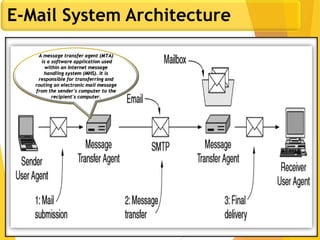
E-Mail System Architecture
A message transfer agent (MTA)
is a software application used
within an Internet message
handling system (MHS). It is
responsible for transferring and
routing an electronic mail message
from the sender's computer to the
recipient's computer.
4
PGP
There are two main schemes which are especially designed to provide
confidentiality and authentication for electronic mail systems. These
are:
1. PGP :Pretty Good Privacy
2. S/MIME :Secure/Multipurpose Internet Mail Extension
5
PGP
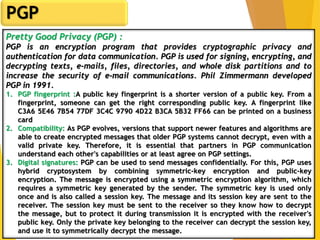
Pretty Good Privacy (PGP) :
PGP is an encryption program that provides cryptographic privacy and
authentication for data communication. PGP is used for signing, encrypting, and
decrypting texts, e-mails, files, directories, and whole disk partitions and to
increase the security of e-mail communications. Phil Zimmermann developed
PGP in 1991.
1. PGP fingerprint :A public key fingerprint is a shorter version of a public key. From a
fingerprint, someone can get the right corresponding public key. A fingerprint like
C3A6 5E46 7B54 77DF 3C4C 9790 4D22 B3CA 5B32 FF66 can be printed on a business
card
2. Compatibility: As PGP evolves, versions that support newer features and algorithms are
able to create encrypted messages that older PGP systems cannot decrypt, even with a
valid private key. Therefore, it is essential that partners in PGP communication
understand each other's capabilities or at least agree on PGP settings.
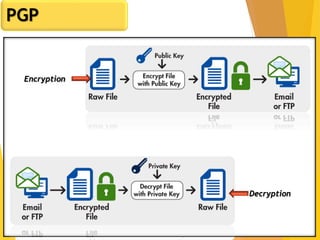
3. Digital signatures: PGP can be used to send messages confidentially. For this, PGP uses
hybrid cryptosystem by combining symmetric-key encryption and public-key
encryption. The message is encrypted using a symmetric encryption algorithm, which
requires a symmetric key generated by the sender. The symmetric key is used only
once and is also called a session key. The message and its session key are sent to the
receiver. The session key must be sent to the receiver so they know how to decrypt
the message, but to protect it during transmission it is encrypted with the receiver's
public key. Only the private key belonging to the receiver can decrypt the session key,
and use it to symmetrically decrypt the message.
6
PGP
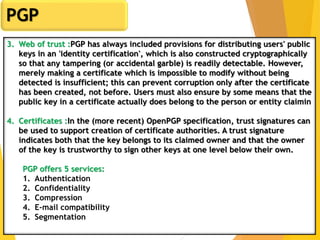
3. Web of trust :PGP has always included provisions for distributing users' public
keys in an 'identity certification', which is also constructed cryptographically
so that any tampering (or accidental garble) is readily detectable. However,
merely making a certificate which is impossible to modify without being
detected is insufficient; this can prevent corruption only after the certificate
has been created, not before. Users must also ensure by some means that the
public key in a certificate actually does belong to the person or entity claimin
4. Certificates :In the (more recent) OpenPGP specification, trust signatures can
be used to support creation of certificate authorities. A trust signature
indicates both that the key belongs to its claimed owner and that the owner
of the key is trustworthy to sign other keys at one level below their own.
PGP offers 5 services:
1. Authentication
2. Confidentiality
3. Compression
4. E-mail compatibility
5. Segmentation
7
PGP
Encryption
Decryption
8
Multipurpose Internet Mail Extension(MIME)
1. Multipurpose Internet Mail Extension (MIME) is a standard which was proposed
by Bell Communications in 1991 in order to expand limited capabilities of
email.
2. MIME is a kind of add on or a supplementary protocol which allows non-ASCII
data to be sent through SMTP. It allows the users to exchange different kinds
of data files on the Internet: audio, video, images, application programs as
well.
Why do we need MIME?:Limitations of Simple Mail Transfer Protocol (SMTP):
1. SMTP has a very simple structure
2. It’s simplicity however comes with a price as it only send messages in NVT 7-
bit ASCII format.
3. It cannot be used for languages that do not support 7-bit ASCII format such as-
French, German, Russian, Chinese and Japanese, etc. so it cannot be
transmitted using SMTP. So, in order to make SMTP more broad we use MIME.
4. It cannot be used to send binary files or video or audio data.
9
MIME Header
MIME with SMTP and POP –
1. SMTP transfers the mail being a message transfer agent from senders side to
the mailbox of receiver side and stores it and MIME header is added to the
original header and provides additional information. while POP being the
message access agent organizes the mails from the mail server to the
receivers computer. POP allows user agent to connect with the message
transfer agent.
It is added to the original e-mail header section to define transformation. There
are five headers which we add to the original header:
1. MIME Version – Defines version of MIME protocol. It must have the parameter
Value 1.0, which indicates that message is formatted using MIME.
2. Content Type – Type of data used in the body of message. They are of
different types like text data (plain, HTML), audio content or video content.
3. Content Type/Transfer Encoding – It defines the method used for encoding the
message. Like 7-bit encoding, 8-bit encoding, etc.
4. Content Id – It is used for uniquely identifying the message.
5. Content description – It defines whether the body is actually image, video or
audio.
10
Secure Multipurpose Internet Mail Extension(S/MIME)
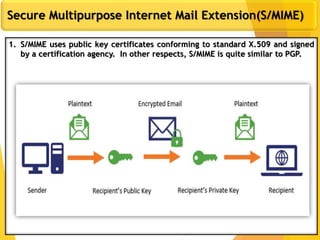
1. S/MIME uses public key certificates conforming to standard X.509 and signed
by a certification agency. In other respects, S/MIME is quite similar to PGP.
11
Secure Multipurpose Internet Mail Extension(S/MIME)
S/MIME incorporates three public-key algorithms:
1. DSS for digital signatures,
2. Diffie-Hellman for encrypting session keys, or RSA.
3. It uses SHA1 or MD5 for calculating digests, and
4. Three-key triple DES for message encryption. In an ideal situation,
Certification :
The crux of any secure email system is the distribution of public / private key pairs and
certification. S/MIME is very liberal about certification. There are public certifiers, such as
Verisign and VISA that distribute certificates at various levels of security. There are mail
products that include certification authorities to be used within an organization. These
products can be configured to accept these certificates.
Finally, S/MIME is most frequently used without a directory for storing certificates and
without a need for trusted certifiers. If Alice wants to sent an encrypted message to Bob,
he first has to send her a signed message. The signed message contains his certificate that
she accepts into her address book.
12
Web Security - Threats, Challenges and Solutions.
1. Scenario of Security Attacks
Let us consider a web application hosted on a server and no HTTPS ( HTTP over SSL ) enabled for the
application. And a end user e.g. Bob is surfing the Web and arrives at the shopping cart application, web
site, which is selling goods. For simplicity, I take a single form, let us consider a single form, shopping
site displays a form in which Bob is supposed to enter the type of item and quantity, his address, and his
payment card number. Bob enters this information, clicks on submit, and expects to receive the goods.
Once Bob submitted, form information flow from client to server via HTTP protocol, assuming no SSL
enable. What happened?
2. Security Attack Possibilities
There could be a chances of any of the possible security attacks. These are the common day-to-day
scenarios. The question is, how can we over come these scenarios. The different security Attack are:
1. Attack on Confidentiality:
2. Attack on Integrity:
3. Attack on Availability:
4. Attack on Authenticity:
Solution : Use of SSL
13
Introduction to SSL
1. SSL was first developed by Netscape in 1994 and became an internet
standard in 1996 ( RFC 2246 – TLS V1.0)
2. SSL is a cryptographic protocol to secure network across a
connection-oriented layer
3. Any program using TCP can be modified to use SSL connection
4. SSL connection uses a dedicated TCP/IP socket(e.g. port 443 for
https)
5. SSL is flexible in choice of which symmetric encryption, message
digest, and authentication can be used
6. SSL provides built in data compression
7. Authenticate the server to the client
8. Allow the client and server to select cryptographic algorithms, or
ciphers, that they both support
9. Optionally authenticate the client to the server
10.Use public key encryption techniques to generate shared secret
11.Establish an encrypted SSL connection
14
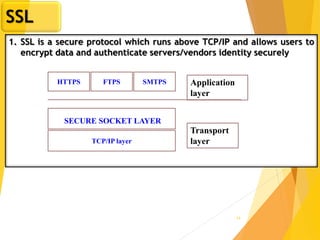
SSL
1. SSL is a secure protocol which runs above TCP/IP and allows users to
encrypt data and authenticate servers/vendors identity securely
Application
layer
Transport
layerTCP/IP layer
SMTPSFTPSHTTPS
SECURE SOCKET LAYER
15
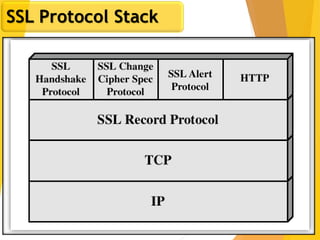
SSL Protocol Stack
16
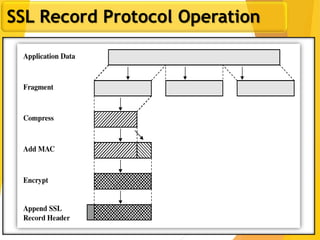
SSL Record Protocol Operation
17
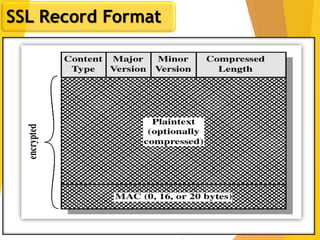
SSL Record Format
18
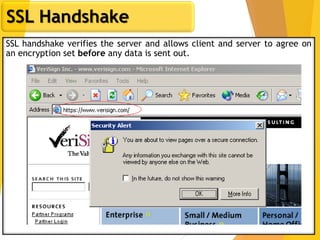
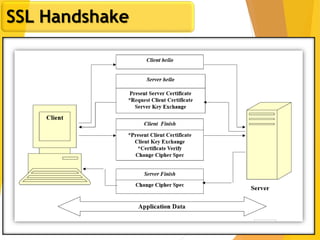
SSL Handshake
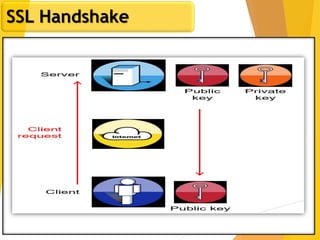
SSL handshake verifies the server and allows client and server to agree on
an encryption set before any data is sent out.
19
SSL Handshake
20
SSL Handshake
21
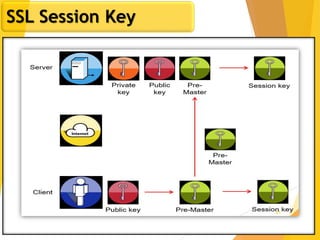
SSL Session Key
22
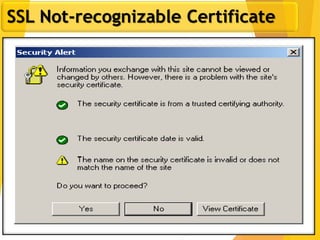
SSL Not-recognizable Certificate
23
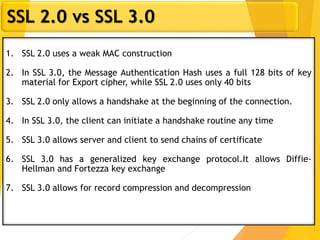
SSL 2.0 vs SSL 3.0
1. SSL 2.0 uses a weak MAC construction
2. In SSL 3.0, the Message Authentication Hash uses a full 128 bits of key
material for Export cipher, while SSL 2.0 uses only 40 bits
3. SSL 2.0 only allows a handshake at the beginning of the connection.
4. In SSL 3.0, the client can initiate a handshake routine any time
5. SSL 3.0 allows server and client to send chains of certificate
6. SSL 3.0 has a generalized key exchange protocol.It allows Diffie-
Hellman and Fortezza key exchange
7. SSL 3.0 allows for record compression and decompression
24
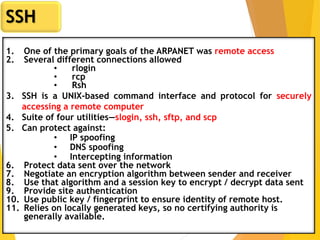
SSH
1. One of the primary goals of the ARPANET was remote access
2. Several different connections allowed
• rlogin
• rcp
• Rsh
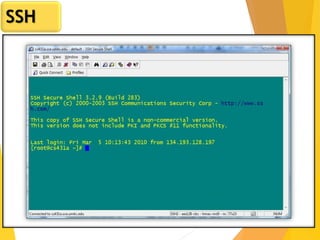
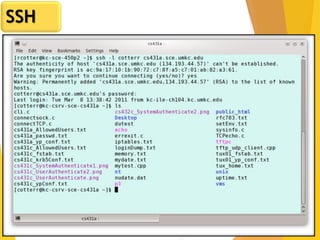
3. SSH is a UNIX-based command interface and protocol for securely
accessing a remote computer
4. Suite of four utilities—slogin, ssh, sftp, and scp
5. Can protect against:
• IP spoofing
• DNS spoofing
• Intercepting information
6. Protect data sent over the network
7. Negotiate an encryption algorithm between sender and receiver
8. Use that algorithm and a session key to encrypt / decrypt data sent
9. Provide site authentication
10. Use public key / fingerprint to ensure identity of remote host.
11. Relies on locally generated keys, so no certifying authority is
generally available.
25
SSH
26
SSH
27
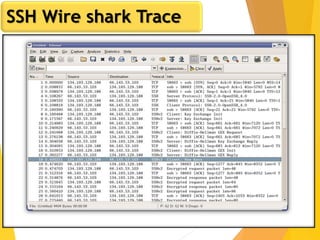
SSH Wire shark Trace
28
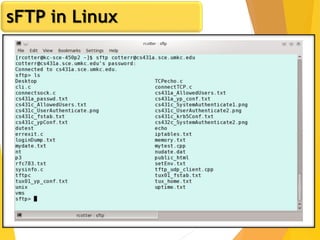
sFTP in Linux
29
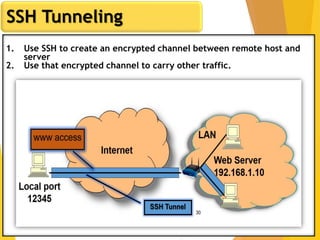
SSH Tunneling
1. Use SSH to create an encrypted channel between remote host and
server
2. Use that encrypted channel to carry other traffic.
Thank you
Image Source
searchenterpriseai.techtarget.com
wikipedia

Network Security CS2

  • 1.
    Network Security CS:2 (Security atthe Application Layer & Transport Layer ) By: Mr. Ganesh Ingle
  • 2.
    Session-2 objective CS-2 RevisionPrevious Session revision CS-2 E-Mail System Architecture CS-2 CS-2 PGP, MIME and MIME Headers CS -2 Review of SSL protocol CS-2 Secure Shell (SSH) Protocol for Secure Remote Login SUMMARY
  • 3.
    3 E-Mail System Architecture Amessage transfer agent (MTA) is a software application used within an Internet message handling system (MHS). It is responsible for transferring and routing an electronic mail message from the sender's computer to the recipient's computer.
  • 4.
    4 PGP There are twomain schemes which are especially designed to provide confidentiality and authentication for electronic mail systems. These are: 1. PGP :Pretty Good Privacy 2. S/MIME :Secure/Multipurpose Internet Mail Extension
  • 5.
    5 PGP Pretty Good Privacy(PGP) : PGP is an encryption program that provides cryptographic privacy and authentication for data communication. PGP is used for signing, encrypting, and decrypting texts, e-mails, files, directories, and whole disk partitions and to increase the security of e-mail communications. Phil Zimmermann developed PGP in 1991. 1. PGP fingerprint :A public key fingerprint is a shorter version of a public key. From a fingerprint, someone can get the right corresponding public key. A fingerprint like C3A6 5E46 7B54 77DF 3C4C 9790 4D22 B3CA 5B32 FF66 can be printed on a business card 2. Compatibility: As PGP evolves, versions that support newer features and algorithms are able to create encrypted messages that older PGP systems cannot decrypt, even with a valid private key. Therefore, it is essential that partners in PGP communication understand each other's capabilities or at least agree on PGP settings. 3. Digital signatures: PGP can be used to send messages confidentially. For this, PGP uses hybrid cryptosystem by combining symmetric-key encryption and public-key encryption. The message is encrypted using a symmetric encryption algorithm, which requires a symmetric key generated by the sender. The symmetric key is used only once and is also called a session key. The message and its session key are sent to the receiver. The session key must be sent to the receiver so they know how to decrypt the message, but to protect it during transmission it is encrypted with the receiver's public key. Only the private key belonging to the receiver can decrypt the session key, and use it to symmetrically decrypt the message.
  • 6.
    6 PGP 3. Web oftrust :PGP has always included provisions for distributing users' public keys in an 'identity certification', which is also constructed cryptographically so that any tampering (or accidental garble) is readily detectable. However, merely making a certificate which is impossible to modify without being detected is insufficient; this can prevent corruption only after the certificate has been created, not before. Users must also ensure by some means that the public key in a certificate actually does belong to the person or entity claimin 4. Certificates :In the (more recent) OpenPGP specification, trust signatures can be used to support creation of certificate authorities. A trust signature indicates both that the key belongs to its claimed owner and that the owner of the key is trustworthy to sign other keys at one level below their own. PGP offers 5 services: 1. Authentication 2. Confidentiality 3. Compression 4. E-mail compatibility 5. Segmentation
  • 7.
  • 8.
    8 Multipurpose Internet MailExtension(MIME) 1. Multipurpose Internet Mail Extension (MIME) is a standard which was proposed by Bell Communications in 1991 in order to expand limited capabilities of email. 2. MIME is a kind of add on or a supplementary protocol which allows non-ASCII data to be sent through SMTP. It allows the users to exchange different kinds of data files on the Internet: audio, video, images, application programs as well. Why do we need MIME?:Limitations of Simple Mail Transfer Protocol (SMTP): 1. SMTP has a very simple structure 2. It’s simplicity however comes with a price as it only send messages in NVT 7- bit ASCII format. 3. It cannot be used for languages that do not support 7-bit ASCII format such as- French, German, Russian, Chinese and Japanese, etc. so it cannot be transmitted using SMTP. So, in order to make SMTP more broad we use MIME. 4. It cannot be used to send binary files or video or audio data.
  • 9.
    9 MIME Header MIME withSMTP and POP – 1. SMTP transfers the mail being a message transfer agent from senders side to the mailbox of receiver side and stores it and MIME header is added to the original header and provides additional information. while POP being the message access agent organizes the mails from the mail server to the receivers computer. POP allows user agent to connect with the message transfer agent. It is added to the original e-mail header section to define transformation. There are five headers which we add to the original header: 1. MIME Version – Defines version of MIME protocol. It must have the parameter Value 1.0, which indicates that message is formatted using MIME. 2. Content Type – Type of data used in the body of message. They are of different types like text data (plain, HTML), audio content or video content. 3. Content Type/Transfer Encoding – It defines the method used for encoding the message. Like 7-bit encoding, 8-bit encoding, etc. 4. Content Id – It is used for uniquely identifying the message. 5. Content description – It defines whether the body is actually image, video or audio.
  • 10.
    10 Secure Multipurpose InternetMail Extension(S/MIME) 1. S/MIME uses public key certificates conforming to standard X.509 and signed by a certification agency. In other respects, S/MIME is quite similar to PGP.
  • 11.
    11 Secure Multipurpose InternetMail Extension(S/MIME) S/MIME incorporates three public-key algorithms: 1. DSS for digital signatures, 2. Diffie-Hellman for encrypting session keys, or RSA. 3. It uses SHA1 or MD5 for calculating digests, and 4. Three-key triple DES for message encryption. In an ideal situation, Certification : The crux of any secure email system is the distribution of public / private key pairs and certification. S/MIME is very liberal about certification. There are public certifiers, such as Verisign and VISA that distribute certificates at various levels of security. There are mail products that include certification authorities to be used within an organization. These products can be configured to accept these certificates. Finally, S/MIME is most frequently used without a directory for storing certificates and without a need for trusted certifiers. If Alice wants to sent an encrypted message to Bob, he first has to send her a signed message. The signed message contains his certificate that she accepts into her address book.
  • 12.
    12 Web Security -Threats, Challenges and Solutions. 1. Scenario of Security Attacks Let us consider a web application hosted on a server and no HTTPS ( HTTP over SSL ) enabled for the application. And a end user e.g. Bob is surfing the Web and arrives at the shopping cart application, web site, which is selling goods. For simplicity, I take a single form, let us consider a single form, shopping site displays a form in which Bob is supposed to enter the type of item and quantity, his address, and his payment card number. Bob enters this information, clicks on submit, and expects to receive the goods. Once Bob submitted, form information flow from client to server via HTTP protocol, assuming no SSL enable. What happened? 2. Security Attack Possibilities There could be a chances of any of the possible security attacks. These are the common day-to-day scenarios. The question is, how can we over come these scenarios. The different security Attack are: 1. Attack on Confidentiality: 2. Attack on Integrity: 3. Attack on Availability: 4. Attack on Authenticity: Solution : Use of SSL
  • 13.
    13 Introduction to SSL 1.SSL was first developed by Netscape in 1994 and became an internet standard in 1996 ( RFC 2246 – TLS V1.0) 2. SSL is a cryptographic protocol to secure network across a connection-oriented layer 3. Any program using TCP can be modified to use SSL connection 4. SSL connection uses a dedicated TCP/IP socket(e.g. port 443 for https) 5. SSL is flexible in choice of which symmetric encryption, message digest, and authentication can be used 6. SSL provides built in data compression 7. Authenticate the server to the client 8. Allow the client and server to select cryptographic algorithms, or ciphers, that they both support 9. Optionally authenticate the client to the server 10.Use public key encryption techniques to generate shared secret 11.Establish an encrypted SSL connection
  • 14.
    14 SSL 1. SSL isa secure protocol which runs above TCP/IP and allows users to encrypt data and authenticate servers/vendors identity securely Application layer Transport layerTCP/IP layer SMTPSFTPSHTTPS SECURE SOCKET LAYER
  • 15.
  • 16.
  • 17.
  • 18.
    18 SSL Handshake SSL handshakeverifies the server and allows client and server to agree on an encryption set before any data is sent out.
  • 19.
  • 20.
  • 21.
  • 22.
  • 23.
    23 SSL 2.0 vsSSL 3.0 1. SSL 2.0 uses a weak MAC construction 2. In SSL 3.0, the Message Authentication Hash uses a full 128 bits of key material for Export cipher, while SSL 2.0 uses only 40 bits 3. SSL 2.0 only allows a handshake at the beginning of the connection. 4. In SSL 3.0, the client can initiate a handshake routine any time 5. SSL 3.0 allows server and client to send chains of certificate 6. SSL 3.0 has a generalized key exchange protocol.It allows Diffie- Hellman and Fortezza key exchange 7. SSL 3.0 allows for record compression and decompression
  • 24.
    24 SSH 1. One ofthe primary goals of the ARPANET was remote access 2. Several different connections allowed • rlogin • rcp • Rsh 3. SSH is a UNIX-based command interface and protocol for securely accessing a remote computer 4. Suite of four utilities—slogin, ssh, sftp, and scp 5. Can protect against: • IP spoofing • DNS spoofing • Intercepting information 6. Protect data sent over the network 7. Negotiate an encryption algorithm between sender and receiver 8. Use that algorithm and a session key to encrypt / decrypt data sent 9. Provide site authentication 10. Use public key / fingerprint to ensure identity of remote host. 11. Relies on locally generated keys, so no certifying authority is generally available.
  • 25.
  • 26.
  • 27.
  • 28.
  • 29.
    29 SSH Tunneling 1. UseSSH to create an encrypted channel between remote host and server 2. Use that encrypted channel to carry other traffic.
  • 30.