Email Security & Threads,
PGP related Concepts
Presented by:
Areeba Riaz Abdul Manan
Muhammad Junaid Allah Ditta
Email Security
 it refers to secure the access and content of an email account or
service.
 multiple techniques used to secure an email service. From an
individual/end user standpoint, proactive email security measures
include:
 Strong passwords
 Password rotations
 Spam filters
 Desktop-based anti-virus/anti-spam applications
 a service provider ensures email security by
 Access control mechanisms on an email serve
 Encrypting
 firewall and software-based spam filtering
Threats
a person or thing likely to cause damage or danger.
Threats to the security of e-mail itself
Loss of confidentiality
E-mails are sent in clear over open networks
E-mails stored on potentially insecure clients and mail servers
Loss of integrity
No integrity protection on e-mails; body can be altered in transit or on mail
server
Lack of data origin authentication
Lack of non-repudiation
nonrepudiation refers to the ability to ensure that a party to a contract or a
communication cannot deny the authenticity of their signature on a
document or the sending of a message that they originated.
Lack of notification of receipt
Threats Enabled by E-mail
Disclosure of sensitive information
Exposure of systems to malicious code
Denial-of-Service (DoS)
Unauthorized accesses etc
Email Security Threats
Snowshoe spamming
Hacktivism
Data Breach
Snowshoe spamming
 Spam is irrelevant messages sent over the Internet, typically to
large numbers of users, for the purposes of advertising, spreading
malware etc.
 Snowshoe spamming is a spamming technique in which the
spammer uses a wide array of IP addresses in order to spread out
the spam load.
 The large spread of IP addresses makes it difficult to identify and
trap the spam, allowing at least some of it to reach email inboxes.
For companies which specialize in trapping spam, snowshoe
spamming is particularly noxious because it is difficult to trap it with
traditional spam filters.
Hacktivism
 Hacktivism is the act of hacking, or breaking into a computer
system, for a politically or socially motivated purpose. The
individual who performs an act of hacktivism is said to be a
hacktivist.
 A hacktivist uses the same tools and techniques as a hacker,
but does so in order to disrupt services and bring attention to
a political or social cause.
 For example, one might leave a highly visible message on the
home page of a Web site that gets a lot of traffic or which
embodies a point-of-view that is being opposed. Or one
might launch a denial-of-service attack to disrupt traffic to a
particular site.
Data Breach
 A data breach is an incident in which sensitive, protected or
confidential data has potentially been viewed, stolen or used
by an individual unauthorized to do so.
 Data breaches may involve personal health information
(PHI), personally identifiable information (PII), trade secrets or
intellectual property.
Email based Attacks
Active content attack
Buffer over-flow attack
Trojan Horse Attack
Web bugs
Active content attack
 which take advantage of various active HTML and scripting
features and bugs.
 a.k.a.(also known as) Browser Attacks, Active HTML Attacks or
Scripting Attacks.
 these attacks attempt to use the scripting features of HTML or
of the email client (typically Javascript or VBScript).
 Purpose is to retrieve private information from the victim's
computer or to execute code on the victim's computer
without the victim's permission (and possibly without the
victim's knowledge).
Buffer Overflow Attack
 A buffer is a sequential section of memory allocated to contain
anything from a character string to an array of integers.
 A buffer overflow, or “buffer overrun” occurs when more data is
put into a fixed-length buffer than the buffer can handle.
 Adjacent memory space becomes overwritten and corrupted.
 When this occurs – bad things happen. Usually system crashes,
but also the opportunity for an attacker to run arbitrary code.
 arbitrary code execution is used to describe an attacker's ability to
execute any commands of the attacker's choice on a target machine or
in a target process.
Trojan Horse Attack
 A Trojan horse is a program in which malicious or harmful code is
contained inside having harmful programming or data in such a
way that it can get control and do its chosen form of damage,
such as ruining the file allocation table on your hard disk.
 for example, by installing remote-access back door software.
 For this attack to succeed the victim must take action to run the
program that they've received. The attacker can use various
"social engineering" methods to convince the victim to run the
program.
 Windows' default configuration is to hide filename extensions from
the user, so in a directory listing a file named textfile.txt will
appear as just "textfile.
Trojan Horse Attack
 An attacker can take advantage of this combination of
things by sending an attachment named "attack.txt.exe" -
Windows will helpfully hide the .exe extension, making the
attachment appear to be a benign text file named
"attack.txt" instead of a program. However, if the user
forgets that Windows is hiding the actual filename extension
and double-clicks on the attachment, Windows will use the
full filename to decide what to do, and since .exe indicates
an executable program, Windows runs the attachment.
Web Bug
 A Web bug, also known as a Web beacon, is a file object
that is placed on a Web page or in an e-mail message to
monitor user behavior.
 A Web beacon is an often-transparent graphic image,
usually no larger than 1 pixel x 1 pixel, that is placed on a
Web site or in an email that is used to monitor the behavior
of the user visiting the Web site or sending the email. It is
often used in combination with cookies.
Web Bug
a Web bug can gather the following statistics:
 The IP address of the computer that fetched the Web bug.
 The URL of the page that the Web bug is located on.
 The URL of the Web bug.
 The time the Web bug was viewed.
 The type of browser that fetched the Web bug.
 A previously set cookie value.
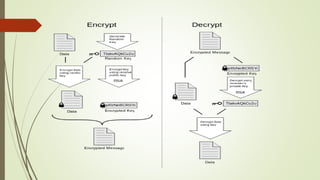
PGP
 Pretty Good Privacy (PGP) is a data encryption and
decryption computer program that
provides cryptographic privacy and authentication for data
communication.
 Developed by Phil Zimmerman in 1995.
 Used for encrypting, and decrypting texts, e-mails, files,
directories, and whole disk partitions and to increase the
security of e-mail communications.
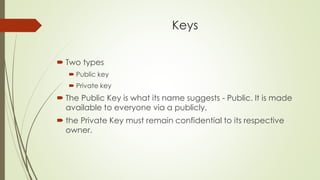
Keys
 Two types
 Public key
 Private key
 The Public Key is what its name suggests - Public. It is made
available to everyone via a publicly.
 the Private Key must remain confidential to its respective
owner.
Example
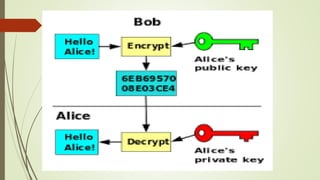
 if Bob wants to send sensitive data to Alice, and wants to be sure
that only Alice may be able to read it, he will encrypt the data with
Alice's Public Key. Only Alice has access to her corresponding
Private Key and as a result is the only person with the capability of
decrypting the encrypted data back into its original form.
 As only Alice has access to her Private Key, it is possible that only
Alice can decrypt the encrypted data. Even if someone else gains
access to the encrypted data, it will remain confidential as they
should not have access to Alice's Private Key.
Email security & threads

Email security & threads

  • 1.
    Email Security &Threads, PGP related Concepts Presented by: Areeba Riaz Abdul Manan Muhammad Junaid Allah Ditta
  • 2.
    Email Security  itrefers to secure the access and content of an email account or service.  multiple techniques used to secure an email service. From an individual/end user standpoint, proactive email security measures include:  Strong passwords  Password rotations  Spam filters  Desktop-based anti-virus/anti-spam applications  a service provider ensures email security by  Access control mechanisms on an email serve  Encrypting  firewall and software-based spam filtering
  • 3.
    Threats a person orthing likely to cause damage or danger. Threats to the security of e-mail itself Loss of confidentiality E-mails are sent in clear over open networks E-mails stored on potentially insecure clients and mail servers Loss of integrity No integrity protection on e-mails; body can be altered in transit or on mail server Lack of data origin authentication Lack of non-repudiation nonrepudiation refers to the ability to ensure that a party to a contract or a communication cannot deny the authenticity of their signature on a document or the sending of a message that they originated. Lack of notification of receipt
  • 4.
    Threats Enabled byE-mail Disclosure of sensitive information Exposure of systems to malicious code Denial-of-Service (DoS) Unauthorized accesses etc
  • 5.
    Email Security Threats Snowshoespamming Hacktivism Data Breach
  • 6.
    Snowshoe spamming  Spamis irrelevant messages sent over the Internet, typically to large numbers of users, for the purposes of advertising, spreading malware etc.  Snowshoe spamming is a spamming technique in which the spammer uses a wide array of IP addresses in order to spread out the spam load.  The large spread of IP addresses makes it difficult to identify and trap the spam, allowing at least some of it to reach email inboxes. For companies which specialize in trapping spam, snowshoe spamming is particularly noxious because it is difficult to trap it with traditional spam filters.
  • 7.
    Hacktivism  Hacktivism isthe act of hacking, or breaking into a computer system, for a politically or socially motivated purpose. The individual who performs an act of hacktivism is said to be a hacktivist.  A hacktivist uses the same tools and techniques as a hacker, but does so in order to disrupt services and bring attention to a political or social cause.  For example, one might leave a highly visible message on the home page of a Web site that gets a lot of traffic or which embodies a point-of-view that is being opposed. Or one might launch a denial-of-service attack to disrupt traffic to a particular site.
  • 8.
    Data Breach  Adata breach is an incident in which sensitive, protected or confidential data has potentially been viewed, stolen or used by an individual unauthorized to do so.  Data breaches may involve personal health information (PHI), personally identifiable information (PII), trade secrets or intellectual property.
  • 9.
    Email based Attacks Activecontent attack Buffer over-flow attack Trojan Horse Attack Web bugs
  • 10.
    Active content attack which take advantage of various active HTML and scripting features and bugs.  a.k.a.(also known as) Browser Attacks, Active HTML Attacks or Scripting Attacks.  these attacks attempt to use the scripting features of HTML or of the email client (typically Javascript or VBScript).  Purpose is to retrieve private information from the victim's computer or to execute code on the victim's computer without the victim's permission (and possibly without the victim's knowledge).
  • 11.
    Buffer Overflow Attack A buffer is a sequential section of memory allocated to contain anything from a character string to an array of integers.  A buffer overflow, or “buffer overrun” occurs when more data is put into a fixed-length buffer than the buffer can handle.  Adjacent memory space becomes overwritten and corrupted.  When this occurs – bad things happen. Usually system crashes, but also the opportunity for an attacker to run arbitrary code.  arbitrary code execution is used to describe an attacker's ability to execute any commands of the attacker's choice on a target machine or in a target process.
  • 12.
    Trojan Horse Attack A Trojan horse is a program in which malicious or harmful code is contained inside having harmful programming or data in such a way that it can get control and do its chosen form of damage, such as ruining the file allocation table on your hard disk.  for example, by installing remote-access back door software.  For this attack to succeed the victim must take action to run the program that they've received. The attacker can use various "social engineering" methods to convince the victim to run the program.  Windows' default configuration is to hide filename extensions from the user, so in a directory listing a file named textfile.txt will appear as just "textfile.
  • 13.
    Trojan Horse Attack An attacker can take advantage of this combination of things by sending an attachment named "attack.txt.exe" - Windows will helpfully hide the .exe extension, making the attachment appear to be a benign text file named "attack.txt" instead of a program. However, if the user forgets that Windows is hiding the actual filename extension and double-clicks on the attachment, Windows will use the full filename to decide what to do, and since .exe indicates an executable program, Windows runs the attachment.
  • 14.
    Web Bug  AWeb bug, also known as a Web beacon, is a file object that is placed on a Web page or in an e-mail message to monitor user behavior.  A Web beacon is an often-transparent graphic image, usually no larger than 1 pixel x 1 pixel, that is placed on a Web site or in an email that is used to monitor the behavior of the user visiting the Web site or sending the email. It is often used in combination with cookies.
  • 15.
    Web Bug a Webbug can gather the following statistics:  The IP address of the computer that fetched the Web bug.  The URL of the page that the Web bug is located on.  The URL of the Web bug.  The time the Web bug was viewed.  The type of browser that fetched the Web bug.  A previously set cookie value.
  • 16.
    PGP  Pretty GoodPrivacy (PGP) is a data encryption and decryption computer program that provides cryptographic privacy and authentication for data communication.  Developed by Phil Zimmerman in 1995.  Used for encrypting, and decrypting texts, e-mails, files, directories, and whole disk partitions and to increase the security of e-mail communications.
  • 18.
    Keys  Two types Public key  Private key  The Public Key is what its name suggests - Public. It is made available to everyone via a publicly.  the Private Key must remain confidential to its respective owner.
  • 19.
    Example  if Bobwants to send sensitive data to Alice, and wants to be sure that only Alice may be able to read it, he will encrypt the data with Alice's Public Key. Only Alice has access to her corresponding Private Key and as a result is the only person with the capability of decrypting the encrypted data back into its original form.  As only Alice has access to her Private Key, it is possible that only Alice can decrypt the encrypted data. Even if someone else gains access to the encrypted data, it will remain confidential as they should not have access to Alice's Private Key.