
Computer Memory
Types of
Programming Languages
By: Prof. Ganesh Ingle
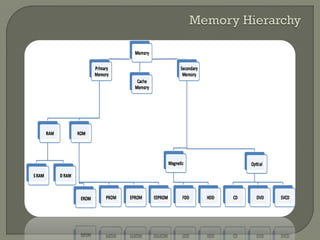
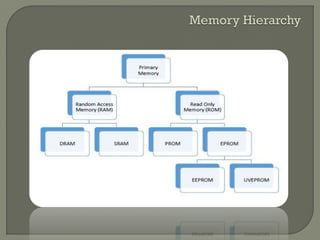
Memory Hierarchy
RAM
Memory Chip Organization
ROM
Flash Memory
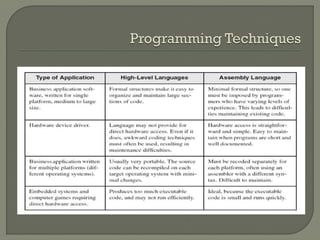
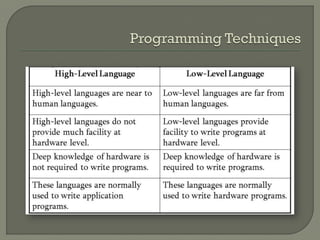
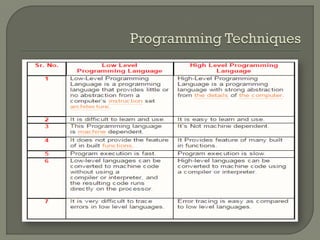
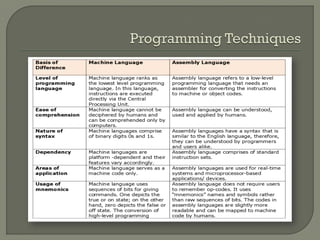
Types of Programming Languages
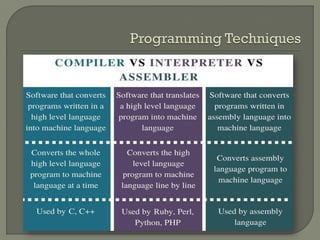
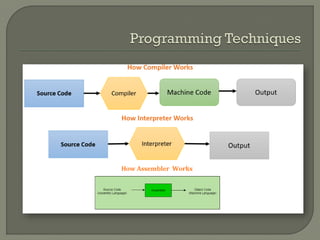
Compiler vs Interpreter vs Assembler
References
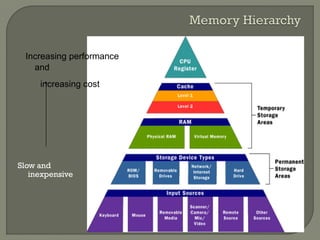
Slow and
inexpensive
Increasing performance
and
increasing cost
Registers
 top in the hierarchy
 matched in speed to the CPU
 but are large and consume significant power
 number of registers in a processor are small
Secondary and off-line storage devices
 at the bottom of the hierarchy
 cost per stored bit small in terms of money
and power
 but access time is very long compared to
registers
The term “random” means any memory
location can be accessed in the same
amount of time regardless of its position
in the memory.
Volatile memory
Types of RAM:
• SRAM
• DRAM
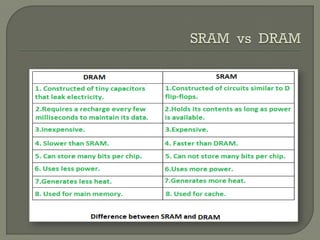
Static RAM (SRAM) based on flip flops
Contents of each location persist as long
as power is applied.
Fast but relatively large
Consume a lot of power
Used for memory applications that are
small but fast
Dynamic RAM (DRAM) employ capacitors
Capacitor stores electric charge whose
level represents a 1 or 0
Capacitors dissipate with time and hence
the charge must be restored frequently
DRAMs
smaller, slower than SRAMs
support low cost, low power and high density and
hence used in main memory
During read operation:
• Entire row is selected
• It is fed into the column MUX
• MUX selects a single bit for output
During write operation:
• Single bit to be written is distributed by the
DEMUX to the target column
• Row decoder selects the proper column to be
written
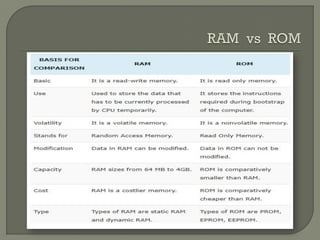
 Data stored in these chips is nonvolatile -
- it is not lost when power is turned off.
On turn on, the computer loads BIOS from
ROM
Data stored in these chips is either
unchangeable or requires a special
operation to change
Applications:Videogames, calculators,
microwave oven, etc
Lets see the circuit for a ROM that stores
four four-bit words(0101, 1011, 1110,
0000)
PROM burner allows contents of the ROM
to be overwritten only once
EPROMs – could be written several times
EEPROMs – allow the content to be
rewritten electrically
A section of memory cells can be erased
in a single step, or 'flash', thus the name
Nonvolatile memory
Flash memory is used for easy and fast
information storage in such devices as
digital cameras, mobile, video game
consoles
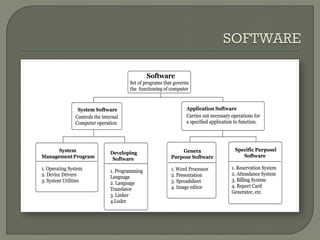
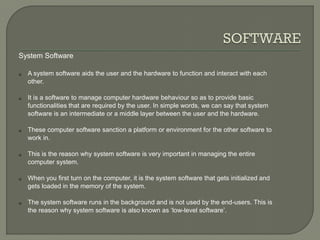
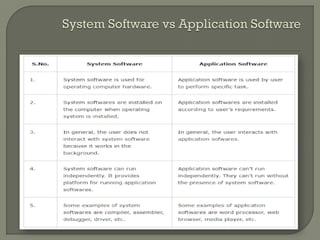
System Software
 A system software aids the user and the hardware to function and interact with each
other.
 It is a software to manage computer hardware behaviour so as to provide basic
functionalities that are required by the user. In simple words, we can say that system
software is an intermediate or a middle layer between the user and the hardware.
 These computer software sanction a platform or environment for the other software to
work in.
 This is the reason why system software is very important in managing the entire
computer system.
 When you first turn on the computer, it is the system software that gets initialized and
gets loaded in the memory of the system.
 The system software runs in the background and is not used by the end-users. This is
the reason why system software is also known as ‘low-level software’.
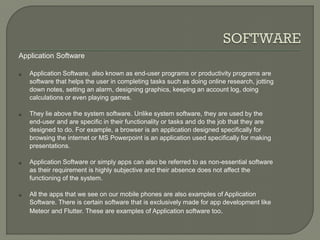
Application Software
 Application Software, also known as end-user programs or productivity programs are
software that helps the user in completing tasks such as doing online research, jotting
down notes, setting an alarm, designing graphics, keeping an account log, doing
calculations or even playing games.
 They lie above the system software. Unlike system software, they are used by the
end-user and are specific in their functionality or tasks and do the job that they are
designed to do. For example, a browser is an application designed specifically for
browsing the internet or MS Powerpoint is an application used specifically for making
presentations.
 Application Software or simply apps can also be referred to as non-essential software
as their requirement is highly subjective and their absence does not affect the
functioning of the system.
 All the apps that we see on our mobile phones are also examples of Application
Software. There is certain software that is exclusively made for app development like
Meteor and Flutter. These are examples of Application software too.
Computer memory, Types of programming languages

Computer memory, Types of programming languages

  • 1.
    Computer Memory Types of ProgrammingLanguages By: Prof. Ganesh Ingle
  • 2.
    Memory Hierarchy RAM Memory ChipOrganization ROM Flash Memory Types of Programming Languages Compiler vs Interpreter vs Assembler References
  • 3.
  • 6.
    Registers  top inthe hierarchy  matched in speed to the CPU  but are large and consume significant power  number of registers in a processor are small Secondary and off-line storage devices  at the bottom of the hierarchy  cost per stored bit small in terms of money and power  but access time is very long compared to registers
  • 7.
    The term “random”means any memory location can be accessed in the same amount of time regardless of its position in the memory. Volatile memory Types of RAM: • SRAM • DRAM
  • 8.
    Static RAM (SRAM)based on flip flops Contents of each location persist as long as power is applied. Fast but relatively large Consume a lot of power Used for memory applications that are small but fast
  • 9.
    Dynamic RAM (DRAM)employ capacitors Capacitor stores electric charge whose level represents a 1 or 0 Capacitors dissipate with time and hence the charge must be restored frequently DRAMs smaller, slower than SRAMs support low cost, low power and high density and hence used in main memory
  • 10.
    During read operation: •Entire row is selected • It is fed into the column MUX • MUX selects a single bit for output During write operation: • Single bit to be written is distributed by the DEMUX to the target column • Row decoder selects the proper column to be written
  • 11.
     Data storedin these chips is nonvolatile - - it is not lost when power is turned off. On turn on, the computer loads BIOS from ROM Data stored in these chips is either unchangeable or requires a special operation to change Applications:Videogames, calculators, microwave oven, etc
  • 12.
    Lets see thecircuit for a ROM that stores four four-bit words(0101, 1011, 1110, 0000) PROM burner allows contents of the ROM to be overwritten only once EPROMs – could be written several times EEPROMs – allow the content to be rewritten electrically
  • 13.
    A section ofmemory cells can be erased in a single step, or 'flash', thus the name Nonvolatile memory Flash memory is used for easy and fast information storage in such devices as digital cameras, mobile, video game consoles
  • 17.
    System Software  Asystem software aids the user and the hardware to function and interact with each other.  It is a software to manage computer hardware behaviour so as to provide basic functionalities that are required by the user. In simple words, we can say that system software is an intermediate or a middle layer between the user and the hardware.  These computer software sanction a platform or environment for the other software to work in.  This is the reason why system software is very important in managing the entire computer system.  When you first turn on the computer, it is the system software that gets initialized and gets loaded in the memory of the system.  The system software runs in the background and is not used by the end-users. This is the reason why system software is also known as ‘low-level software’.
  • 18.
    Application Software  ApplicationSoftware, also known as end-user programs or productivity programs are software that helps the user in completing tasks such as doing online research, jotting down notes, setting an alarm, designing graphics, keeping an account log, doing calculations or even playing games.  They lie above the system software. Unlike system software, they are used by the end-user and are specific in their functionality or tasks and do the job that they are designed to do. For example, a browser is an application designed specifically for browsing the internet or MS Powerpoint is an application used specifically for making presentations.  Application Software or simply apps can also be referred to as non-essential software as their requirement is highly subjective and their absence does not affect the functioning of the system.  All the apps that we see on our mobile phones are also examples of Application Software. There is certain software that is exclusively made for app development like Meteor and Flutter. These are examples of Application software too.