PRESENTED BY:-
                              DiwakER PaNT

October 9, 2012
                      Electronic Mail By   Diwaker Pant   1
 Introduction
      History of E-mail
      Comparison With Postal Mail
      Uses of E-mail
      Structure of E-mail
      Architecture of E-mail
      User agent
      Message Transfer agent
      Message Access agent


October 9, 2012                Electronic Mail By   Diwaker Pant   2
Electronic      mail, often abbreviated as E-mail, is a
       method of exchanging digital messages, designed
       primarily for human use.

   E-mail    systems are based on a store & forward model
       in which E-mail server systems accept, forward, deliver
       and store messages on behalf of users, who only need to
       connect to the e-mail infrastructure.


October 9, 2012                   Electronic Mail By   Diwaker Pant   3
   The foundation for today's global Internet e-mail service
    was created in the early ARPANET

   Standards for encoding of messages were proposed as early
    as, for example, in 1973 (RFC 561).

   An e-mail sent in the early 1970s looked very similar to one
    sent on the Internet today.

    Network-based email was initially exchanged on the
    ARPANET in extensions to the (FTP), but is today carried
    by the (SMTP).
                                 Electronic Mail By   Diwaker Pant   October 9, 2012   4
Mail From:-
                                       diwaker.pant@gmail.


                                                                                     Envelope
                    To:- (Address)
                                                com
                                                To:-
                       From:-          brattpitt@gmail.com
                           (Address)
                                           From : Diwaker


                                                                            Header
                                            To : Bob


                                                                                       Message
                  Subject:- Network         Date:………
                    Dear………..           Subject : Network

                     (Message)            Dear…………


                                                                            Body
                    Yours Truly:-             (Message)
                     ………….
                                            Yours Truly:


October 9, 2012                         Electronic Mail By   Diwaker Pant                        5
   We can send a message anytime anywhere.

   We can send the same message to several peoples at
    same time.

   We can forward the information to coworkers without
    retyping it.

   We can send the messages around the world as easily
    as to friend in the next cabin .


                             Electronic Mail By   Diwaker Pant   October 9, 2012   6
   We can save the time, E-mail is very fast, usually
    taking no more time than a few minutes to be received.

   We can mail Electronic documents and recipients can
    then edit and return revised versions.

   It is very fast as compare to postal mail.


                                Electronic Mail By   Diwaker Pant   October 9, 2012   7
An electronic mail message consists of two components

   Message header, The message header contains control
    information, including an originator's email address
    and one or more recipient addresses. Usually additional
    information is added, such as a subject header field.

   Message body which is the email's content.
                ,


                              Electronic Mail By   Diwaker Pant   October 9, 2012   8
The message header should include at least the following fields:

   From The e-m addresses, and optionally the name of the
         :          ail
    author or sender.

   To: The e-mail address of the message's recipient(s). Indicates
    primary recipients (multiple allowed), for secondary recipients
    see Cc: and Bcc.

   Bcc: Blind carbon copy addresses added to the SMTP
                              ;
    delivery list but not (usually) listed in the message data,
    remaining invisible to other recipients.

   Cc: Carbon copy Many e-mail clients will mark e-mail in
                     ;
    your inbox differently depending on whether you are in the
    To: or Cc: list.

October 9, 2012                     Electronic Mail By   Diwaker Pant   9
HEaDER FiElD
   Date: The local time and date when the message was
    written, automatically attached while sending.

   Subject: A brief summary of the topic of the message.

   Message-ID: Also an automatically generated field;
    used to prevent multiple delivery .

   Attachm ent: Attachment contain the name of files .
    That you want to send. example a world document.

                              Electronic Mail By   Diwaker Pant   October 9, 2012   10
    To deliver mail ,a system must use an addressing
     system with unique addresses

    Address consist two parts :

1. Local part
2. Domain name


    These are separated by @ sign.


                                   Electronic Mail By   Diwaker Pant   October 9, 2012   11
E-Mail aDDRESS


            Electronic Mail By   Diwaker Pant   October 9, 2012   12
There are four scenario most commonly used to
 exchange the E-MAIL.

1.   First scenario

2.   Second scenario

3.   Third scenario

4.   Fourth scenario


                       Electronic Mail By   Diwaker Pant   October 9, 2012   13
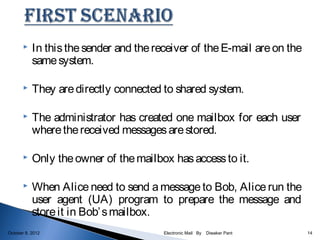
   In this the sender and the receiver of the E-mail are on the
           same system.

          They are directly connected to shared system.

          The administrator has created one mailbox for each user
           where the received messages are stored.

          Only the owner of the mailbox has access to it.

          When Alice need to send a message to Bob, Alice run the
           user agent (UA) program to prepare the message and
           store it in Bob’ s mailbox.
October 9, 2012                         Electronic Mail By   Diwaker Pant   14
UA: USER AGENT


                    UA                                            UA


                          SYSTEM


                  ALICE                                           BOB


October 9, 2012               Electronic Mail By   Diwaker Pant               15
   In this the sender and the receiver are users two different
            systems.

            The message needs to be send over the internet.

           Here we need UAs and MTAs.

           The sender needs to use a UA program to send her message to
            the system at her own site.

           The recipient needs a UA program to retrieve messages.

           Here two MTA are needed, one client and one server.


October 9, 2012                           Electronic Mail By   Diwaker Pant   16
MTA: message
         transfer agent


      UA                                                                         UA


                      MTA                                            MTA
                      client                                        server       BOB
                                     INTERNET
    ALICE


                       System                                      System
                     (Mail server)                              ( mail server)

October 9, 2012                            Electronic Mail By   Diwaker Pant           17
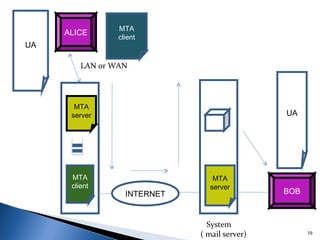
    In this the recipient as in the second scenario is
           directly connected to his system.

          Sender is connected to the system via point to point
           WAN such as dial-up modem, or a cable modem.

          Sender still needs a UA(User Agent) to prepare the
           message.

          Then through a pair of MTA(Mail Transfer Agent),
           send the message through the LAN or WAN.

October 9, 2012                     Electronic Mail By   Diwaker Pant   18
MTA
     ALICE
                 client
UA

         LAN or WAN


       MTA
      server                                   UA


      MTA                        MTA
      client                    server
                   INTERNET                    BOB


                                System
                              ( mail server)         19
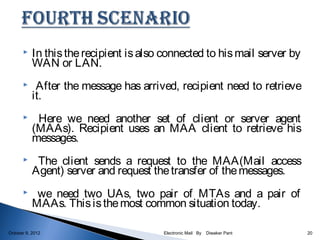
    In this the recipient is also connected to his mail server by
           WAN or LAN.
           After the message has arrived, recipient need to retrieve
           it.
           Here we need another set of client or server agent
           (MAAs). Recipient uses an MAA client to retrieve his
           messages.
           The client sends a request to the MAA(Mail access
           Agent) server and request the transfer of the messages.
           we need two UAs, two pair of MTAs and a pair of
           MAAs. This is the most common situation today.

October 9, 2012                         Electronic Mail By   Diwaker Pant   20
MTA                                  MTA
UA                                    UA
                       client                               client
        ALICE                                    BOB


                LAN or WAN                     LAN or WAN


      MTA                                     MAA
     server                                  server


     MTA                                       MTA
     client               INTERNET            server

       System                        System
       (Mail server)                 ( mail server)                  21
   The first component of E-mail is user agent(UA).

           It provide the services to user to make the process of
            sending & receiving a message easier.

           A UA is a software package(Program) that composes,
            read, replies to and forward messages.

           It also handles the Mailboxes.


October 9, 2012                        Electronic Mail By   Diwaker Pant   22
USER AGENT


     COMPOSING               READING                                  HANDLING
      MESSAGE                MESSAGE                                  MESSAGE


                  REPLYING                 FORWARDING
                  MESSAGE                   MESSAGE


                                  Electronic Mail By   Diwaker Pant              23
October 9, 2012
MIME ( Multipurpose Internet Mail Extensions) Protocol

                   UA                                         UA


                         Non –ASCII                                       Non –ASCII
                         code                                             code

                  MIME                                     MIME

                         7-bit ASCII                                     7-bit ASCII

                                 7-bit ASCII
                   MTA                                      MTA


October 9, 2012                        Electronic Mail By Diwaker Pant                 24
   The actual mail transfer is done through MTA.

       To send mail , a system must have client MTA.

       To receive mail ,a system must have server MTA.

       The protocol that define the MTA client & server in the
        internet is called SMTP (simple mail transfer protocols).

       SMTP define how commands & response must be sent back &
        forth.


October 9, 2012                      Electronic Mail By   Diwaker Pant   25
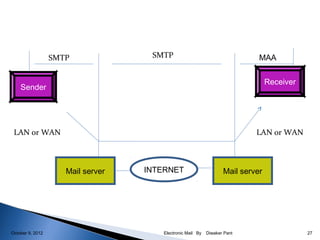
   The first and the second stages of mail delivery use
       SMTP.

      SMTP is a PUSH protocols.

      On the other hand, the third stage needs a pull
       protocol ; the client must pull messages from the server
       . The direction of the bulk data is from the server to the
       client . At this stage Message Access Agent is use.


October 9, 2012                    Electronic Mail By   Diwaker Pant   26
SMTP              SMTP                                    MAA


                                                                                Receiver
    Sender


 LAN or WAN                                                                LAN or WAN


                     Mail server   INTERNET                       Mail server


October 9, 2012                       Electronic Mail By   Diwaker Pant                    27
   UA prepares the messages, creates the envelopes, and
    puts the message in the envelope.

   Mail address is like localpart@domainname.

   Multipurpose Internet Mail Extensions (MIME) allows
    the transfer of multimedia messages.

   MTA transfer the mail across internet, a LAN or a
    WAN.


                             Electronic Mail By   Diwaker Pant   October 9, 2012   28
    SMTP uses commands and responses to the transfer
           messages between an MTA client and MTA server.

          Post Office Protocol, Version 3 (POP 3) and Internet
           Mail Access Protocol, Version 4 (IMAP 4) are used for
           pulling messages from a mail server.


October 9, 2012                      Electronic Mail By   Diwaker Pant   29
   Data communications and networking by Behrouz
           A.Forouzan (4th edition).

          http:/en.wikipedia.org/wiki/E-mail.

          Computer Networks, by A.S. Tanenbaum (4th Ed.)


October 9, 2012                       Electronic Mail By   Diwaker Pant   30
Electronic Mail By   Diwaker Pant   October 9, 2012   31

Electronic mail

  • 1.
    PRESENTED BY:- DiwakER PaNT October 9, 2012 Electronic Mail By Diwaker Pant 1
  • 2.
     Introduction  History of E-mail  Comparison With Postal Mail  Uses of E-mail  Structure of E-mail  Architecture of E-mail  User agent  Message Transfer agent  Message Access agent October 9, 2012 Electronic Mail By Diwaker Pant 2
  • 3.
    Electronic mail, often abbreviated as E-mail, is a method of exchanging digital messages, designed primarily for human use.  E-mail systems are based on a store & forward model in which E-mail server systems accept, forward, deliver and store messages on behalf of users, who only need to connect to the e-mail infrastructure. October 9, 2012 Electronic Mail By Diwaker Pant 3
  • 4.
    The foundation for today's global Internet e-mail service was created in the early ARPANET  Standards for encoding of messages were proposed as early as, for example, in 1973 (RFC 561).  An e-mail sent in the early 1970s looked very similar to one sent on the Internet today.  Network-based email was initially exchanged on the ARPANET in extensions to the (FTP), but is today carried by the (SMTP). Electronic Mail By Diwaker Pant October 9, 2012 4
  • 5.
    Mail From:- diwaker.pant@gmail. Envelope To:- (Address) com To:- From:- brattpitt@gmail.com (Address) From : Diwaker Header To : Bob Message Subject:- Network Date:……… Dear……….. Subject : Network (Message) Dear………… Body Yours Truly:- (Message) …………. Yours Truly: October 9, 2012 Electronic Mail By Diwaker Pant 5
  • 6.
    We can send a message anytime anywhere.  We can send the same message to several peoples at same time.  We can forward the information to coworkers without retyping it.  We can send the messages around the world as easily as to friend in the next cabin . Electronic Mail By Diwaker Pant October 9, 2012 6
  • 7.
    We can save the time, E-mail is very fast, usually taking no more time than a few minutes to be received.  We can mail Electronic documents and recipients can then edit and return revised versions.  It is very fast as compare to postal mail. Electronic Mail By Diwaker Pant October 9, 2012 7
  • 8.
    An electronic mailmessage consists of two components  Message header, The message header contains control information, including an originator's email address and one or more recipient addresses. Usually additional information is added, such as a subject header field.  Message body which is the email's content. , Electronic Mail By Diwaker Pant October 9, 2012 8
  • 9.
    The message headershould include at least the following fields:  From The e-m addresses, and optionally the name of the : ail author or sender.  To: The e-mail address of the message's recipient(s). Indicates primary recipients (multiple allowed), for secondary recipients see Cc: and Bcc.  Bcc: Blind carbon copy addresses added to the SMTP ; delivery list but not (usually) listed in the message data, remaining invisible to other recipients.  Cc: Carbon copy Many e-mail clients will mark e-mail in ; your inbox differently depending on whether you are in the To: or Cc: list. October 9, 2012 Electronic Mail By Diwaker Pant 9
  • 10.
    HEaDER FiElD  Date: The local time and date when the message was written, automatically attached while sending.  Subject: A brief summary of the topic of the message.  Message-ID: Also an automatically generated field; used to prevent multiple delivery .  Attachm ent: Attachment contain the name of files . That you want to send. example a world document. Electronic Mail By Diwaker Pant October 9, 2012 10
  • 11.
    To deliver mail ,a system must use an addressing system with unique addresses  Address consist two parts : 1. Local part 2. Domain name  These are separated by @ sign. Electronic Mail By Diwaker Pant October 9, 2012 11
  • 12.
    E-Mail aDDRESS Electronic Mail By Diwaker Pant October 9, 2012 12
  • 13.
    There are fourscenario most commonly used to exchange the E-MAIL. 1. First scenario 2. Second scenario 3. Third scenario 4. Fourth scenario Electronic Mail By Diwaker Pant October 9, 2012 13
  • 14.
    In this the sender and the receiver of the E-mail are on the same system.  They are directly connected to shared system.  The administrator has created one mailbox for each user where the received messages are stored.  Only the owner of the mailbox has access to it.  When Alice need to send a message to Bob, Alice run the user agent (UA) program to prepare the message and store it in Bob’ s mailbox. October 9, 2012 Electronic Mail By Diwaker Pant 14
  • 15.
    UA: USER AGENT UA UA SYSTEM ALICE BOB October 9, 2012 Electronic Mail By Diwaker Pant 15
  • 16.
    In this the sender and the receiver are users two different systems.  The message needs to be send over the internet.  Here we need UAs and MTAs.  The sender needs to use a UA program to send her message to the system at her own site.  The recipient needs a UA program to retrieve messages.  Here two MTA are needed, one client and one server. October 9, 2012 Electronic Mail By Diwaker Pant 16
  • 17.
    MTA: message transfer agent UA UA MTA MTA client server BOB INTERNET ALICE System System (Mail server) ( mail server) October 9, 2012 Electronic Mail By Diwaker Pant 17
  • 18.
    In this the recipient as in the second scenario is directly connected to his system.  Sender is connected to the system via point to point WAN such as dial-up modem, or a cable modem.  Sender still needs a UA(User Agent) to prepare the message.  Then through a pair of MTA(Mail Transfer Agent), send the message through the LAN or WAN. October 9, 2012 Electronic Mail By Diwaker Pant 18
  • 19.
    MTA ALICE client UA LAN or WAN MTA server UA MTA MTA client server INTERNET BOB System ( mail server) 19
  • 20.
    In this the recipient is also connected to his mail server by WAN or LAN.  After the message has arrived, recipient need to retrieve it.  Here we need another set of client or server agent (MAAs). Recipient uses an MAA client to retrieve his messages.  The client sends a request to the MAA(Mail access Agent) server and request the transfer of the messages.  we need two UAs, two pair of MTAs and a pair of MAAs. This is the most common situation today. October 9, 2012 Electronic Mail By Diwaker Pant 20
  • 21.
    MTA MTA UA UA client client ALICE BOB LAN or WAN LAN or WAN MTA MAA server server MTA MTA client INTERNET server System System (Mail server) ( mail server) 21
  • 22.
    The first component of E-mail is user agent(UA).  It provide the services to user to make the process of sending & receiving a message easier.  A UA is a software package(Program) that composes, read, replies to and forward messages.  It also handles the Mailboxes. October 9, 2012 Electronic Mail By Diwaker Pant 22
  • 23.
    USER AGENT COMPOSING READING HANDLING MESSAGE MESSAGE MESSAGE REPLYING FORWARDING MESSAGE MESSAGE Electronic Mail By Diwaker Pant 23 October 9, 2012
  • 24.
    MIME ( MultipurposeInternet Mail Extensions) Protocol UA UA Non –ASCII Non –ASCII code code MIME MIME 7-bit ASCII 7-bit ASCII 7-bit ASCII MTA MTA October 9, 2012 Electronic Mail By Diwaker Pant 24
  • 25.
    The actual mail transfer is done through MTA.  To send mail , a system must have client MTA.  To receive mail ,a system must have server MTA.  The protocol that define the MTA client & server in the internet is called SMTP (simple mail transfer protocols).  SMTP define how commands & response must be sent back & forth. October 9, 2012 Electronic Mail By Diwaker Pant 25
  • 26.
    The first and the second stages of mail delivery use SMTP.  SMTP is a PUSH protocols.  On the other hand, the third stage needs a pull protocol ; the client must pull messages from the server . The direction of the bulk data is from the server to the client . At this stage Message Access Agent is use. October 9, 2012 Electronic Mail By Diwaker Pant 26
  • 27.
    SMTP SMTP MAA Receiver Sender LAN or WAN LAN or WAN Mail server INTERNET Mail server October 9, 2012 Electronic Mail By Diwaker Pant 27
  • 28.
    UA prepares the messages, creates the envelopes, and puts the message in the envelope.  Mail address is like localpart@domainname.  Multipurpose Internet Mail Extensions (MIME) allows the transfer of multimedia messages.  MTA transfer the mail across internet, a LAN or a WAN. Electronic Mail By Diwaker Pant October 9, 2012 28
  • 29.
    SMTP uses commands and responses to the transfer messages between an MTA client and MTA server.  Post Office Protocol, Version 3 (POP 3) and Internet Mail Access Protocol, Version 4 (IMAP 4) are used for pulling messages from a mail server. October 9, 2012 Electronic Mail By Diwaker Pant 29
  • 30.
    Data communications and networking by Behrouz A.Forouzan (4th edition).  http:/en.wikipedia.org/wiki/E-mail.  Computer Networks, by A.S. Tanenbaum (4th Ed.) October 9, 2012 Electronic Mail By Diwaker Pant 30
  • 31.
    Electronic Mail By Diwaker Pant October 9, 2012 31