Sufia Khowaja
Abid Fakhre Alam
Introduction
Email can be sent internally to members of an
organization through their internal computer
network or they can be sent externally to anyone in
the world by using web based email services. It's
very similar to the traditional mail system with post
boxes, post offices, envelopes and addresses. The
difference is that here messages are sent
electronically to other computer users via Internet,
taking a fraction of the time to reach the recipient.
Also one can send computer documents, graphics,
software or anything else that can be turned into a
digital form attached to an email message.
In order for messages to be sent from one
computer to another, the message needs to be
converted into a digital form and forwarded to a
computer that acts as a mail server or post office.
This mail server sorts and directs mails to and
from the users. The only way this mail server can
direct mail though, to all users is by being
connected to a network that all the users are also
connected to.
Origin
The birth of electronic mail (email) occurred in the
1965 at Massachusetts Institute of Technology was
“mailbox”. Mailbox is a file in a user's home directory
that was readable only by that user. After that another
programs design called “SNGMSG” to send messages
on came computer. With the advancement of networks
technology, an electronic mail message file took place
in 1971 when a computer engineer named Ray
Tomlinson sent a test message between two machines
via ARPANET — the precursor to the Internet.
Cont.…
He use “@” symbol from keyboard to denote
sending messages from one to another computers.
Larry Robert invented “Email folder”. In 1975,
John Vittal developed software to organised
Email. Then further develop into “offline mode”
for “offline readers”. After that email had really
taken off and commercial packages began appear.
Definitions
 According to Merriam Webster:
“A means or system for transmitting messages
electronically (as between computers on a
network)”.
 According to Business dictionary:
“Almost instantaneous transfer of text, voice and
video messages from one computer to another,
typically over the internet”.
continued…
Definition
continues...
 According to technopedia:
“E-mail is a digital mechanism for exchanging
messages trough internet or intranet
communication platforms”.
Importance
 Saves Money
 Saves Time
 Instant Response
 Regular Communication
 Going Viral
 No need to speak to recipient
 Messages can be marked as urgent
continued…
Importance
continues…
 Messages can be read as convenient
 Incoming messages are saved
 E-mail reduces volume of paper
Types of E-mail
E-mails are broadly categories into three types
1. Marketing Emails
2. Notification Emails
3. Transactional Emails
Marketing Emails
Marketing (or Bulk) emails stimulate your clients
and leads. They contain informative / incentive
messages. The recipient must agree to receive
such emails: opt-in is mandatory. The recipient
does not make an explicit request for a message in
particular. There can be a periodicity, but the
message can also be sent to a segment in
particular. Nonetheless, the main point is that
messages are sent independently from specific
actions from the clients. For examples:
Newsletters, Flash sales and Sales/promotions
announcements etc.
Notification Emails
 Notification email are also known as trigger,
alert or auto-responder. They allow the user to
be notified each time a particular event happens
(or has happened). More generally, the
notification email may be used in order to
celebrate and/or mark an event. It is either the
recipients themselves, or the sender that will
establish criteria for an outgoing message to be
triggered by an event. For examples: Birthday,
status change, and Shopping etc.
Transactional Emails
This is an expected message and its content is
information that the client wishes to check or
confirm, and not "discover". This type of email is
not intended to optimize the customer relationship
but to define it and mark it out. It is a point of
reference in one’s CRM. Strong attention should be
paid to this kind of email. These emails must be
specifically dealt with: wrongly delivered
newsletters might impact leads, but an undelivered
transactional email will upset the customer. For
examples: Welcome message / Account opening,
Order shipment confirmation and Payment etc.
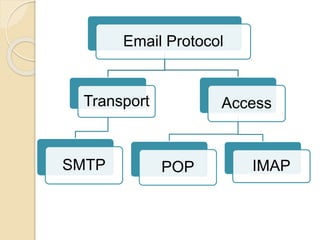
Email Protocol
Access
POP IMAP
Transport
SMTP
Mail Transport Protocols
(SMPT)
SMPT was first proposed in 1982, Mail delivery
from a client application to the server, and from an
originating server to the destination server, is
handled by the Simple Mail Transfer Protocol
(SMTP). The primary purpose is to transfer email
between mail servers. It does not require
authentication. This allows anyone on the Internet
to send email to anyone else or even to large
groups of people. It is this characteristic of SMTP
that makes junk email or spam possible.
Mail Access Protocols
There are two primary protocols used by email
client applications to retrieve email from mail
servers:
1. Post Office Protocol (POP)
2. Internet Message Access Protocol (IMAP).
Unlike SMTP, both of these protocols require
connecting clients to authenticate using a
username and password. By default, passwords for
both protocols are passed over the network
unencrypted.
POP
POP was first proposed in 1984. When using a
POP server, email messages are downloaded by
email client applications. By default, most POP
email clients are automatically configured to
delete the message on the email server after it has
been successfully transferred, however this setting
usually can be changed. POP is fully compatible
with important Internet messaging standards, such
as Multipurpose Internet Mail Extensions
(MIME), which allow for email attachments. The
most current version of the standard POP protocol
is POP3.
IMAP
IMAP was first proposed in 1986. When using an
IMAP mail server, email messages remain on the
server where users can read or delete them. IMAP
also allows client applications to create, rename,
or delete mail directories on the server to organize
and store email. IMAP is particularly useful for
those who access their email using multiple
machines. The protocol is also convenient for
users connecting to the mail server via a slow
connection, because only the email header
information is downloaded for messages until
opened, saving bandwidth. The user also has the
ability to delete messages without viewing or
downloading them.
E-Mail Message Format
It consists of two parts:
 Header (information about the message)
 Body (text field)
Header
Header contains information about:
 From (describe who sent the message)
 To (The addresses to which the mail is
sent)
 Date
 Subject (User's summary of the message
content)
 Cc (Carbon copy recipients)
 BCC (Blind carbon copy recipients)
Body
The body contains the text of the message and any
attachments to be sent.
Process of E-Mail
The e-mail works on the client-server model
E-Mail Clients are the users who wish to use the
e-mail facility.
The basic functionality of the client includes-
create new e-mail, address list of contacts, etc.
Both the sender of e-mail and the recipient of e-
mail are e-mail client.
continued…
Process of E-Mail
Continues…
E-Mail Server is a combination of processes
running on a server with a large storage
capacity- a list of users and rules, the capability
to receive, send and store e-mails and
attachments.
These servers are designed to operate without
constant user interaction.
Clients
POP3
SMTP
Server INTERNET
Clients
SMTP
Server
POP3
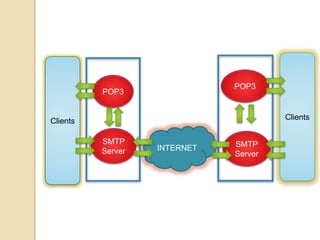
The E-Mail client-server works as
follows
 An e-mail client like Gmail, yahoo, outlook
etc is used to create or reply to an e-mail.
 Once the e-mail is drafted successfully, it is
sent using the e-mail client.
 This e-mail first goes to the SMTP server
(also known as MTA (Mail transfer agent) to
which the e-mail client is connected.
 The e-mail server looks out for the
recipients address. The address is of the
form <name>@domain.com
The E-Mail client-server works as
follows
 Next it sends the e-mail to this IP address over
the Internet.
 The e-mail server first uses the DNS technique
to resolve the domain name into a valid IP
address.
 Now the e-mail moves over the Internet in a
series of IP packets and reaches the
destination SMTP server.
 This server collects all the e-mails and places
them to appropriate location so that these are
accessible to your e-mail clients through POP
or IMAP services.
Services of E-mail Program
 On-line and Off-line text drafting
 Spell Checker
 Text Style Capabilities
 Expanded Text
 Clickable URLs
 Encoding Colours
 Draft save and text save
 Attachments with the e-mail
continued…
Services of E-mail Program
Continues…
 Voice recording for an E-mail attachment
 Scheduling delivery date and time
 The E-mail alerts
 Reminder
 Compressing an E-mail attachment
 Reply to all
 Forwarding a mail
 Reply to an incoming mail
Conclusion
 E-mail is a fast and effective method to
exchange the messages and other data.
 To interact through the e-mail one needs to have
an e-mail account.
 The messages are instantly delivered and it is
not necessary for the recipient to be present
while the mail is delivered to his/her mail box.
 The e-mail system allows a very easy merging
of a particular message.
Electronic mail

Electronic mail

  • 1.
  • 2.
    Introduction Email can besent internally to members of an organization through their internal computer network or they can be sent externally to anyone in the world by using web based email services. It's very similar to the traditional mail system with post boxes, post offices, envelopes and addresses. The difference is that here messages are sent electronically to other computer users via Internet, taking a fraction of the time to reach the recipient. Also one can send computer documents, graphics, software or anything else that can be turned into a digital form attached to an email message.
  • 3.
    In order formessages to be sent from one computer to another, the message needs to be converted into a digital form and forwarded to a computer that acts as a mail server or post office. This mail server sorts and directs mails to and from the users. The only way this mail server can direct mail though, to all users is by being connected to a network that all the users are also connected to.
  • 4.
    Origin The birth ofelectronic mail (email) occurred in the 1965 at Massachusetts Institute of Technology was “mailbox”. Mailbox is a file in a user's home directory that was readable only by that user. After that another programs design called “SNGMSG” to send messages on came computer. With the advancement of networks technology, an electronic mail message file took place in 1971 when a computer engineer named Ray Tomlinson sent a test message between two machines via ARPANET — the precursor to the Internet. Cont.…
  • 5.
    He use “@”symbol from keyboard to denote sending messages from one to another computers. Larry Robert invented “Email folder”. In 1975, John Vittal developed software to organised Email. Then further develop into “offline mode” for “offline readers”. After that email had really taken off and commercial packages began appear.
  • 6.
    Definitions  According toMerriam Webster: “A means or system for transmitting messages electronically (as between computers on a network)”.  According to Business dictionary: “Almost instantaneous transfer of text, voice and video messages from one computer to another, typically over the internet”. continued…
  • 7.
    Definition continues...  According totechnopedia: “E-mail is a digital mechanism for exchanging messages trough internet or intranet communication platforms”.
  • 8.
    Importance  Saves Money Saves Time  Instant Response  Regular Communication  Going Viral  No need to speak to recipient  Messages can be marked as urgent continued…
  • 9.
    Importance continues…  Messages canbe read as convenient  Incoming messages are saved  E-mail reduces volume of paper
  • 10.
    Types of E-mail E-mailsare broadly categories into three types 1. Marketing Emails 2. Notification Emails 3. Transactional Emails
  • 11.
    Marketing Emails Marketing (orBulk) emails stimulate your clients and leads. They contain informative / incentive messages. The recipient must agree to receive such emails: opt-in is mandatory. The recipient does not make an explicit request for a message in particular. There can be a periodicity, but the message can also be sent to a segment in particular. Nonetheless, the main point is that messages are sent independently from specific actions from the clients. For examples: Newsletters, Flash sales and Sales/promotions announcements etc.
  • 12.
    Notification Emails  Notificationemail are also known as trigger, alert or auto-responder. They allow the user to be notified each time a particular event happens (or has happened). More generally, the notification email may be used in order to celebrate and/or mark an event. It is either the recipients themselves, or the sender that will establish criteria for an outgoing message to be triggered by an event. For examples: Birthday, status change, and Shopping etc.
  • 13.
    Transactional Emails This isan expected message and its content is information that the client wishes to check or confirm, and not "discover". This type of email is not intended to optimize the customer relationship but to define it and mark it out. It is a point of reference in one’s CRM. Strong attention should be paid to this kind of email. These emails must be specifically dealt with: wrongly delivered newsletters might impact leads, but an undelivered transactional email will upset the customer. For examples: Welcome message / Account opening, Order shipment confirmation and Payment etc.
  • 14.
  • 15.
    Mail Transport Protocols (SMPT) SMPTwas first proposed in 1982, Mail delivery from a client application to the server, and from an originating server to the destination server, is handled by the Simple Mail Transfer Protocol (SMTP). The primary purpose is to transfer email between mail servers. It does not require authentication. This allows anyone on the Internet to send email to anyone else or even to large groups of people. It is this characteristic of SMTP that makes junk email or spam possible.
  • 16.
    Mail Access Protocols Thereare two primary protocols used by email client applications to retrieve email from mail servers: 1. Post Office Protocol (POP) 2. Internet Message Access Protocol (IMAP). Unlike SMTP, both of these protocols require connecting clients to authenticate using a username and password. By default, passwords for both protocols are passed over the network unencrypted.
  • 17.
    POP POP was firstproposed in 1984. When using a POP server, email messages are downloaded by email client applications. By default, most POP email clients are automatically configured to delete the message on the email server after it has been successfully transferred, however this setting usually can be changed. POP is fully compatible with important Internet messaging standards, such as Multipurpose Internet Mail Extensions (MIME), which allow for email attachments. The most current version of the standard POP protocol is POP3.
  • 18.
    IMAP IMAP was firstproposed in 1986. When using an IMAP mail server, email messages remain on the server where users can read or delete them. IMAP also allows client applications to create, rename, or delete mail directories on the server to organize and store email. IMAP is particularly useful for those who access their email using multiple machines. The protocol is also convenient for users connecting to the mail server via a slow connection, because only the email header information is downloaded for messages until opened, saving bandwidth. The user also has the ability to delete messages without viewing or downloading them.
  • 19.
    E-Mail Message Format Itconsists of two parts:  Header (information about the message)  Body (text field)
  • 20.
    Header Header contains informationabout:  From (describe who sent the message)  To (The addresses to which the mail is sent)  Date  Subject (User's summary of the message content)  Cc (Carbon copy recipients)  BCC (Blind carbon copy recipients)
  • 21.
    Body The body containsthe text of the message and any attachments to be sent.
  • 22.
    Process of E-Mail Thee-mail works on the client-server model E-Mail Clients are the users who wish to use the e-mail facility. The basic functionality of the client includes- create new e-mail, address list of contacts, etc. Both the sender of e-mail and the recipient of e- mail are e-mail client. continued…
  • 23.
    Process of E-Mail Continues… E-MailServer is a combination of processes running on a server with a large storage capacity- a list of users and rules, the capability to receive, send and store e-mails and attachments. These servers are designed to operate without constant user interaction.
  • 24.
  • 25.
    The E-Mail client-serverworks as follows  An e-mail client like Gmail, yahoo, outlook etc is used to create or reply to an e-mail.  Once the e-mail is drafted successfully, it is sent using the e-mail client.  This e-mail first goes to the SMTP server (also known as MTA (Mail transfer agent) to which the e-mail client is connected.  The e-mail server looks out for the recipients address. The address is of the form <name>@domain.com
  • 26.
    The E-Mail client-serverworks as follows  Next it sends the e-mail to this IP address over the Internet.  The e-mail server first uses the DNS technique to resolve the domain name into a valid IP address.  Now the e-mail moves over the Internet in a series of IP packets and reaches the destination SMTP server.  This server collects all the e-mails and places them to appropriate location so that these are accessible to your e-mail clients through POP or IMAP services.
  • 27.
    Services of E-mailProgram  On-line and Off-line text drafting  Spell Checker  Text Style Capabilities  Expanded Text  Clickable URLs  Encoding Colours  Draft save and text save  Attachments with the e-mail continued…
  • 28.
    Services of E-mailProgram Continues…  Voice recording for an E-mail attachment  Scheduling delivery date and time  The E-mail alerts  Reminder  Compressing an E-mail attachment  Reply to all  Forwarding a mail  Reply to an incoming mail
  • 29.
    Conclusion  E-mail isa fast and effective method to exchange the messages and other data.  To interact through the e-mail one needs to have an e-mail account.  The messages are instantly delivered and it is not necessary for the recipient to be present while the mail is delivered to his/her mail box.  The e-mail system allows a very easy merging of a particular message.