Log Analysis
NSConclave
Click to add text
Click to add text
By Ravi Kariya
31st March 2020/4th May 2020
Click to add text
Agenda
 Introduction
 How does it work?
 Why does it require?
 Use cases
 It's Demo Time
 Tools we can use
 Log Monitoring v/s Log Analysis
Ravi Kariya
imrkariya
rrkariya
2
Introduction
 Audit trail records
 Document activities
 Log analysis the evaluation of these records
 To mitigate a variety of risks
 To meet compliance regulations
3
How does it work?
 Where can logs created?
 Devices, Applications, OS, Smart Devices, etc...
 All of them are saved in disk, in files, or log collectors
 Consists a complete range of messages
 Should be cleaned, structured to analyze patterns and anomalies
 Can help to detect intrusions
4
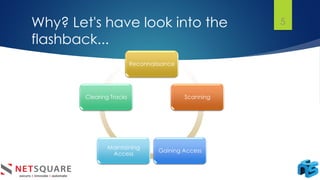
Why? Let's have look into the
flashback...
Reconnaissance
Scanning
Gaining Access
Maintaining
Access
Clearing Tracks
5
Use cases
 To comply with internal security policies and outside regulations and
audits
 To understand and respond to data breaches and other security
incidents
 To troubleshoot systems, computers, or networks
 To understand the behaviors of your users
 To conduct forensics in the event of an investigation
6
IT's Demo Time
7
Linux utilities we may need...
8
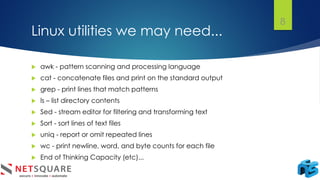
 awk - pattern scanning and processing language
 cat - concatenate files and print on the standard output
 grep - print lines that match patterns
 ls – list directory contents
 Sed - stream editor for filtering and transforming text
 Sort - sort lines of text files
 uniq - report or omit repeated lines
 wc - print newline, word, and byte counts for each file
 End of Thinking Capacity (etc)...
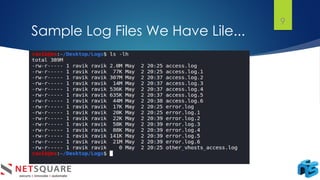
Sample Log Files We Have Lile...
9
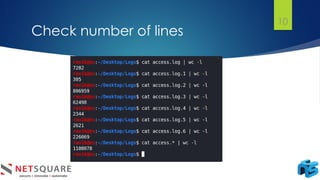
Check number of lines
10
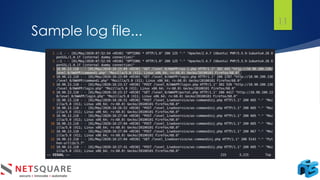
Sample log file...
11
Let's divide and rule the log file...
12
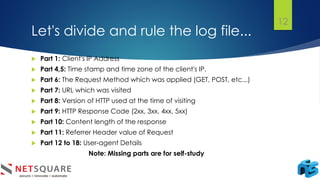
 Part 1: Client's IP Address
 Part 4,5: Time stamp and time zone of the client's IP.
 Part 6: The Request Method which was applied (GET, POST, etc...)
 Part 7: URL which was visited
 Part 8: Version of HTTP used at the time of visiting
 Part 9: HTTP Response Code (2xx, 3xx, 4xx, 5xx)
 Part 10: Content length of the response
 Part 11: Referrer Header value of Request
 Part 12 to 18: User-agent Details
Note: Missing parts are for self-study
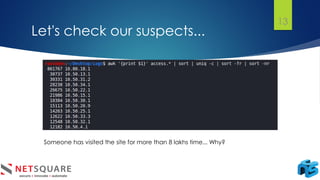
Let's check our suspects...
13
Someone has visited the site for more than 8 lakhs time... Why?
Let's check suspects one by one
14
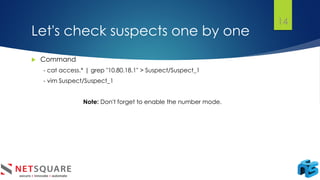
 Command
- cat access.* | grep "10.80.18.1" > Suspect/Suspect_1
- vim Suspect/Suspect_1
Note: Don't forget to enable the number mode.
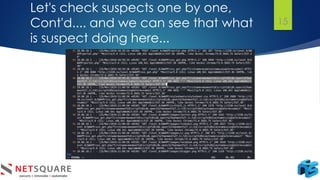
Let's check suspects one by one,
Cont'd.... and we can see that what
is suspect doing here...
15
Tools
 Graylog
 Nagios
 Elastic Stack (the "ELK Stack")
 LOGalyze
 Fluentd
16
Log Monitoring v/s Log Analysis
 Log monitoring is the act of reviewing collected logs as they are
recorded.
 Log analysis, on the other hand, is a process typically performed by
developers or other IT folks.
17
Quick Recap
 Logs are maintained to detect intrusion attacks as well as used for
trouble shooting purpose
 Logs can be saved at devices
 It is required to meet the compliance regulations
 Various tools are also available to analyse logs
 This is different than the log monitoring
18
Quick Recap
19
The End
Thank You
20
NSConclave

Log Analysis

  • 1.
    Log Analysis NSConclave Click toadd text Click to add text By Ravi Kariya 31st March 2020/4th May 2020 Click to add text
  • 2.
    Agenda  Introduction  Howdoes it work?  Why does it require?  Use cases  It's Demo Time  Tools we can use  Log Monitoring v/s Log Analysis Ravi Kariya imrkariya rrkariya 2
  • 3.
    Introduction  Audit trailrecords  Document activities  Log analysis the evaluation of these records  To mitigate a variety of risks  To meet compliance regulations 3
  • 4.
    How does itwork?  Where can logs created?  Devices, Applications, OS, Smart Devices, etc...  All of them are saved in disk, in files, or log collectors  Consists a complete range of messages  Should be cleaned, structured to analyze patterns and anomalies  Can help to detect intrusions 4
  • 5.
    Why? Let's havelook into the flashback... Reconnaissance Scanning Gaining Access Maintaining Access Clearing Tracks 5
  • 6.
    Use cases  Tocomply with internal security policies and outside regulations and audits  To understand and respond to data breaches and other security incidents  To troubleshoot systems, computers, or networks  To understand the behaviors of your users  To conduct forensics in the event of an investigation 6
  • 7.
  • 8.
    Linux utilities wemay need... 8  awk - pattern scanning and processing language  cat - concatenate files and print on the standard output  grep - print lines that match patterns  ls – list directory contents  Sed - stream editor for filtering and transforming text  Sort - sort lines of text files  uniq - report or omit repeated lines  wc - print newline, word, and byte counts for each file  End of Thinking Capacity (etc)...
  • 9.
    Sample Log FilesWe Have Lile... 9
  • 10.
  • 11.
  • 12.
    Let's divide andrule the log file... 12  Part 1: Client's IP Address  Part 4,5: Time stamp and time zone of the client's IP.  Part 6: The Request Method which was applied (GET, POST, etc...)  Part 7: URL which was visited  Part 8: Version of HTTP used at the time of visiting  Part 9: HTTP Response Code (2xx, 3xx, 4xx, 5xx)  Part 10: Content length of the response  Part 11: Referrer Header value of Request  Part 12 to 18: User-agent Details Note: Missing parts are for self-study
  • 13.
    Let's check oursuspects... 13 Someone has visited the site for more than 8 lakhs time... Why?
  • 14.
    Let's check suspectsone by one 14  Command - cat access.* | grep "10.80.18.1" > Suspect/Suspect_1 - vim Suspect/Suspect_1 Note: Don't forget to enable the number mode.
  • 15.
    Let's check suspectsone by one, Cont'd.... and we can see that what is suspect doing here... 15
  • 16.
    Tools  Graylog  Nagios Elastic Stack (the "ELK Stack")  LOGalyze  Fluentd 16
  • 17.
    Log Monitoring v/sLog Analysis  Log monitoring is the act of reviewing collected logs as they are recorded.  Log analysis, on the other hand, is a process typically performed by developers or other IT folks. 17
  • 18.
    Quick Recap  Logsare maintained to detect intrusion attacks as well as used for trouble shooting purpose  Logs can be saved at devices  It is required to meet the compliance regulations  Various tools are also available to analyse logs  This is different than the log monitoring 18
  • 19.
  • 20.