By : Foram Dave & Aman Barot
22 Feb 2020
Thick Client Testing Basics
Twitter : @iForamDave , @AmanBarot12
TOPICS
● Basic Introduction
● Difference between Thick-Client app & Thin-client App
● Difference between Thick-Client app & Web App
● Tools
● Vulnerabilities
● How to test?
● Demo
Introduction : What is thick client application?
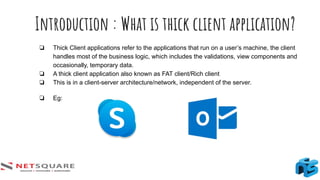
❏ Thick Client applications refer to the applications that run on a user’s machine, the client
handles most of the business logic, which includes the validations, view components and
occasionally, temporary data.
❏ A thick client application also known as FAT client/Rich client
❏ This is in a client-server architecture/network, independent of the server.
❏ Eg:
Introduction : Architecture
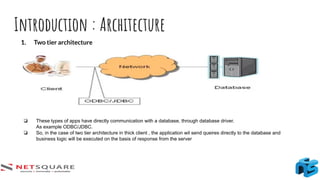
1. Two tier architecture
❏ These types of apps have directly communication with a database, through database driver.
As example ODBC/JDBC.
❏ So, in the case of two tier architecture in thick client , the application wil send queires directly to the database and
business logic will be executed on the basis of response from the server
Introduction : Architecture
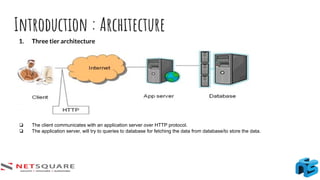
1. Three tier architecture
❏ The client communicates with an application server over HTTP protocol.
❏ The application server, will try to queries to database for fetching the data from database/to store the data.
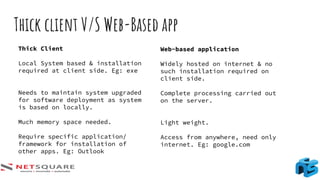
Thick client V/S Web-Based app
Thick Client
Local System based & installation
required at client side. Eg: exe
Needs to maintain system upgraded
for software deployment as system
is based on locally.
Much memory space needed.
Require specific application/
framework for installation of
other apps. Eg: Outlook
Web-based application
Widely hosted on internet & no
such installation required on
client side.
Complete processing carried out
on the server.
Light weight.
Access from anywhere, need only
internet. Eg: google.com
Thin client application
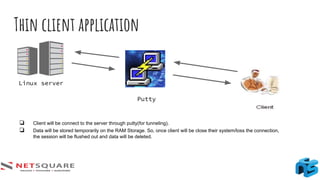
Linux server
Putty
❏ Client will be connect to the server through putty(for tunneling).
❏ Data will be stored temporarily on the RAM Storage. So, once client will be close their system/loss the connection,
the session will be flushed out and data will be deleted.
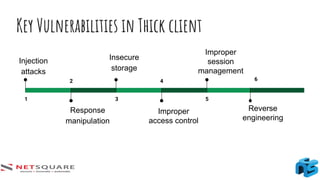
Key Vulnerabilities in Thick client
1
Injection
attacks
2
Response
manipulation
3
Insecure
storage
4
Improper
access control
5
Improper
session
management
6
Reverse
engineering
How to test?
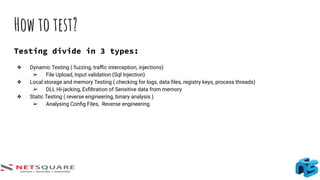
Testing divide in 3 types:
❖ Dynamic Testing ( fuzzing, traffic interception, injections)
➢ File Upload, Input validation (Sql Injection)
❖ Local storage and memory Testing ( checking for logs, data files, registry keys, process threads)
➢ DLL Hi-jacking, Exfiltration of Sensitive data from memory
❖ Static Testing ( reverse engineering, binary analysis )
➢ Analysing Config Files, Reverse engineering
Interception
Thick client classified in two part
1) Proxy-aware Thick Client
2) Proxy-unaware Thick Clients
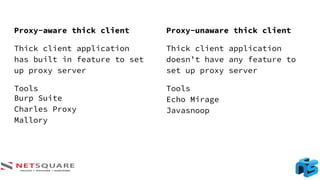
Proxy-aware thick client
Thick client application
has built in feature to set
up proxy server
Tools
Burp Suite
Charles Proxy
Mallory
Proxy-unaware thick client
Thick client application
doesn’t have any feature to
set up proxy server
Tools
Echo Mirage
Javasnoop
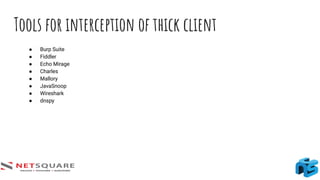
Tools for interception of thick client
● Burp Suite
● Fiddler
● Echo Mirage
● Charles
● Mallory
● JavaSnoop
● Wireshark
● dnspy
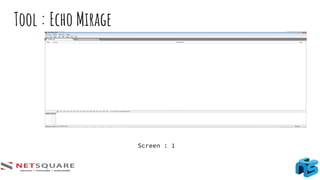
Tool : Echo Mirage
Screen : 1
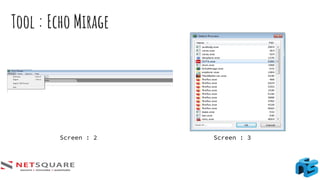
Tool : Echo Mirage
Screen : 2 Screen : 3
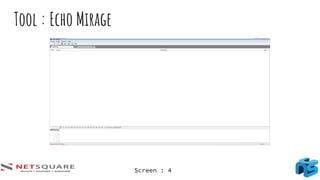
Tool : Echo Mirage
Screen : 4
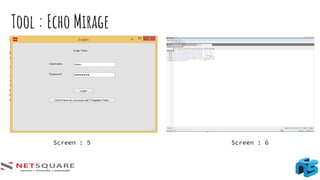
Screen : 5 Screen : 6
Tool : Echo Mirage
2. Local Storage and Memory Testing
Local Storage
➢ Unlike web applications Thick Clients tend to write/modify files and registry entries. Often the files
and registry entries contain sensitive data such as usernames, passwords, license keys, database
credentials, cryptographic keys, etc.
➢ If an adversary gains access to the sensitive data saved in the files and registry entries, the
application can be compromised. To evaluate how the application handles sensitive data, we need
to understand and monitor the files and registry entries made by the application which can be done
with the help of Sysinternal tool, Process Monitor.
Local Storage and Memory Testing
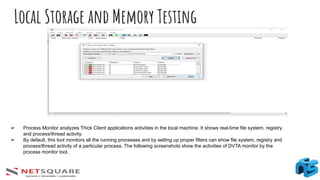
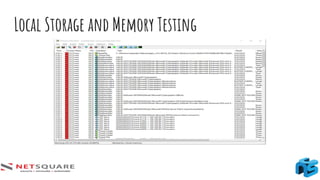
➢ Process Monitor analyzes Thick Client applications activities in the local machine. It shows real-time file system, registry,
and process/thread activity.
➢ By default, this tool monitors all the running processes and by setting up proper filters can show file system, registry and
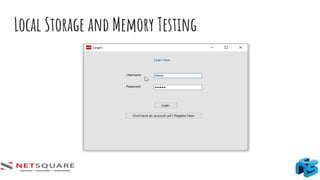
process/thread activity of a particular process. The following screenshots show the activities of DVTA monitor by the
process monitor tool.
Local Storage and Memory Testing
Sensitive data in registry
Registry
➢ “Sensitive data in registry” is one of the most common vulnerabilities seen in Windows desktop
applications. Developers often use the registry as a storage location for their client-side data storage
needs.
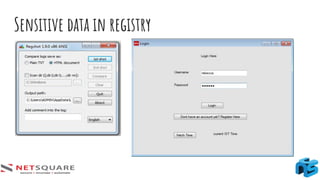
➢ regshot is a popular tool for analyzing registry modifications. This tool comes handy in
understanding registry changes in Windows machine before and after a specific instance. It is hard
for us to check the new registry entries added/modified without the help of such tool.
➢ After taking the 1st
shot, launch DVTA application and login as admin.
➢ The Windows Registry is a database of settings used by Microsoft Windows. It stores
configurations for hardware devices, installed applications, and the Windows operating system. The
Registry provides a centralized method of storing custom preferences for each Windows user,
rather than storing them as individual
Sensitive data in registry
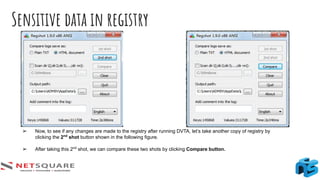
➢ Now, to see if any changes are made to the registry after running DVTA, let’s take another copy of registry by
clicking the 2nd
shot button shown in the following figure.
➢ After taking this 2nd
shot, we can compare these two shots by clicking Compare button.
Sensitive data in registry
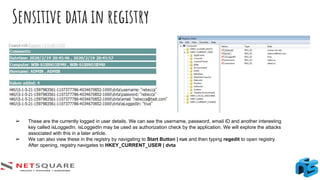
➢ These are the currently logged in user details. We can see the username, password, email ID and another interesting
key called isLoggedIn. isLoggedIn may be used as authorization check by the application. We will explore the attacks
associated with this in a later article.
➢ We can also view these in the registry by navigating to Start Button | run and then typing regedit to open registry.
After opening, registry navigates to HKEY_CURRENT_USER | dvta
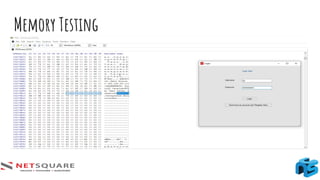
Memory Testing
Memory Testing
➢ Both web and Thick Client applications store data in the memory (Random Access Memory) for
further processing. Some applications may write sensitive information such as user credentials,
cryptographic keys or sensitive user data in the memory. An attacker can obtain access to this data
with the help of memory-reading tools like Winhex or HxD.
➢ The following screenshots show that user credentials entered in DVTA can be read from memory
with the help of Hxd.
3. Static testing :Decompiling and Reverse
Engineering
Tools
● dnSpy
● JetBrains dotpeek
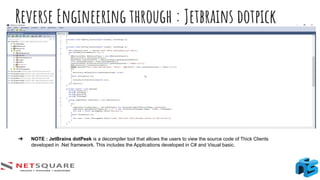
Reverse Engineering through : Jetbrains dotpick
➔ NOTE : JetBrains dotPeek is a decompiler tool that allows the users to view the source code of Thick Clients
developed in .Net framework. This includes the Applications developed in C# and Visual basic.
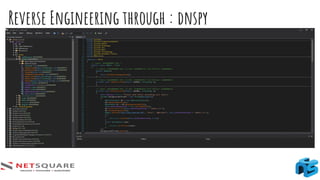
Reverse Engineering through : dnspy
dnSpy
➢ dnSpy is a debugger and .NET assembly editor.
➢ You can use it to edit and debug assemblies even if you don't have any source code available. Main features:
● Debug .NET and Unity assemblies
● Edit .NET and Unity assemblies
● Light and dark themes
● https://github.com/0xd4d/dnSpy
Thank you!

Thick Client Testing Basics

  • 1.
    By : ForamDave & Aman Barot 22 Feb 2020 Thick Client Testing Basics Twitter : @iForamDave , @AmanBarot12
  • 2.
    TOPICS ● Basic Introduction ●Difference between Thick-Client app & Thin-client App ● Difference between Thick-Client app & Web App ● Tools ● Vulnerabilities ● How to test? ● Demo
  • 3.
    Introduction : Whatis thick client application? ❏ Thick Client applications refer to the applications that run on a user’s machine, the client handles most of the business logic, which includes the validations, view components and occasionally, temporary data. ❏ A thick client application also known as FAT client/Rich client ❏ This is in a client-server architecture/network, independent of the server. ❏ Eg:
  • 4.
    Introduction : Architecture 1.Two tier architecture ❏ These types of apps have directly communication with a database, through database driver. As example ODBC/JDBC. ❏ So, in the case of two tier architecture in thick client , the application wil send queires directly to the database and business logic will be executed on the basis of response from the server
  • 5.
    Introduction : Architecture 1.Three tier architecture ❏ The client communicates with an application server over HTTP protocol. ❏ The application server, will try to queries to database for fetching the data from database/to store the data.
  • 6.
    Thick client V/SWeb-Based app Thick Client Local System based & installation required at client side. Eg: exe Needs to maintain system upgraded for software deployment as system is based on locally. Much memory space needed. Require specific application/ framework for installation of other apps. Eg: Outlook Web-based application Widely hosted on internet & no such installation required on client side. Complete processing carried out on the server. Light weight. Access from anywhere, need only internet. Eg: google.com
  • 7.
    Thin client application Linuxserver Putty ❏ Client will be connect to the server through putty(for tunneling). ❏ Data will be stored temporarily on the RAM Storage. So, once client will be close their system/loss the connection, the session will be flushed out and data will be deleted.
  • 8.
    Key Vulnerabilities inThick client 1 Injection attacks 2 Response manipulation 3 Insecure storage 4 Improper access control 5 Improper session management 6 Reverse engineering
  • 9.
    How to test? Testingdivide in 3 types: ❖ Dynamic Testing ( fuzzing, traffic interception, injections) ➢ File Upload, Input validation (Sql Injection) ❖ Local storage and memory Testing ( checking for logs, data files, registry keys, process threads) ➢ DLL Hi-jacking, Exfiltration of Sensitive data from memory ❖ Static Testing ( reverse engineering, binary analysis ) ➢ Analysing Config Files, Reverse engineering
  • 10.
    Interception Thick client classifiedin two part 1) Proxy-aware Thick Client 2) Proxy-unaware Thick Clients
  • 11.
    Proxy-aware thick client Thickclient application has built in feature to set up proxy server Tools Burp Suite Charles Proxy Mallory Proxy-unaware thick client Thick client application doesn’t have any feature to set up proxy server Tools Echo Mirage Javasnoop
  • 12.
    Tools for interceptionof thick client ● Burp Suite ● Fiddler ● Echo Mirage ● Charles ● Mallory ● JavaSnoop ● Wireshark ● dnspy
  • 13.
    Tool : EchoMirage Screen : 1
  • 14.
    Tool : EchoMirage Screen : 2 Screen : 3
  • 15.
    Tool : EchoMirage Screen : 4
  • 16.
    Screen : 5Screen : 6 Tool : Echo Mirage
  • 17.
    2. Local Storageand Memory Testing Local Storage ➢ Unlike web applications Thick Clients tend to write/modify files and registry entries. Often the files and registry entries contain sensitive data such as usernames, passwords, license keys, database credentials, cryptographic keys, etc. ➢ If an adversary gains access to the sensitive data saved in the files and registry entries, the application can be compromised. To evaluate how the application handles sensitive data, we need to understand and monitor the files and registry entries made by the application which can be done with the help of Sysinternal tool, Process Monitor.
  • 18.
    Local Storage andMemory Testing ➢ Process Monitor analyzes Thick Client applications activities in the local machine. It shows real-time file system, registry, and process/thread activity. ➢ By default, this tool monitors all the running processes and by setting up proper filters can show file system, registry and process/thread activity of a particular process. The following screenshots show the activities of DVTA monitor by the process monitor tool.
  • 19.
    Local Storage andMemory Testing
  • 20.
    Local Storage andMemory Testing
  • 21.
  • 22.
    Registry ➢ “Sensitive datain registry” is one of the most common vulnerabilities seen in Windows desktop applications. Developers often use the registry as a storage location for their client-side data storage needs. ➢ regshot is a popular tool for analyzing registry modifications. This tool comes handy in understanding registry changes in Windows machine before and after a specific instance. It is hard for us to check the new registry entries added/modified without the help of such tool. ➢ After taking the 1st shot, launch DVTA application and login as admin. ➢ The Windows Registry is a database of settings used by Microsoft Windows. It stores configurations for hardware devices, installed applications, and the Windows operating system. The Registry provides a centralized method of storing custom preferences for each Windows user, rather than storing them as individual
  • 23.
    Sensitive data inregistry ➢ Now, to see if any changes are made to the registry after running DVTA, let’s take another copy of registry by clicking the 2nd shot button shown in the following figure. ➢ After taking this 2nd shot, we can compare these two shots by clicking Compare button.
  • 24.
    Sensitive data inregistry ➢ These are the currently logged in user details. We can see the username, password, email ID and another interesting key called isLoggedIn. isLoggedIn may be used as authorization check by the application. We will explore the attacks associated with this in a later article. ➢ We can also view these in the registry by navigating to Start Button | run and then typing regedit to open registry. After opening, registry navigates to HKEY_CURRENT_USER | dvta
  • 25.
  • 26.
    Memory Testing ➢ Bothweb and Thick Client applications store data in the memory (Random Access Memory) for further processing. Some applications may write sensitive information such as user credentials, cryptographic keys or sensitive user data in the memory. An attacker can obtain access to this data with the help of memory-reading tools like Winhex or HxD. ➢ The following screenshots show that user credentials entered in DVTA can be read from memory with the help of Hxd.
  • 27.
    3. Static testing:Decompiling and Reverse Engineering Tools ● dnSpy ● JetBrains dotpeek
  • 28.
    Reverse Engineering through: Jetbrains dotpick ➔ NOTE : JetBrains dotPeek is a decompiler tool that allows the users to view the source code of Thick Clients developed in .Net framework. This includes the Applications developed in C# and Visual basic.
  • 29.
  • 30.
    dnSpy ➢ dnSpy isa debugger and .NET assembly editor. ➢ You can use it to edit and debug assemblies even if you don't have any source code available. Main features: ● Debug .NET and Unity assemblies ● Edit .NET and Unity assemblies ● Light and dark themes ● https://github.com/0xd4d/dnSpy
  • 31.