Subject: Mobile Forensics
Presented by: Abdullah Rumi
Presented to : Dr.balal Amro
1
Objectives
 Background
 Understanding Mobile Device Forensics
 Mobile Device Characteristics
 Memory Considerations
 Identity Module Characteristics
 Cellular Network Characteristics
 Mobile Device Tool Classification System
 Investigative Methods
 Preservation Methods
 Acquisition Methods
2
Understanding Mobile Device
Forensics
 People store a wealth of information on cell
phones
 People don’t think about securing their cell
phones
 Items stored on cell phones:
 Incoming, outgoing, and missed calls
 Text and Short Message Service (SMS)
messages
 E-mail
 Instant-messaging (IM) logs
–Web pages
–Pictures
3
Understanding Mobile Device
Forensics (cont’d)
 Items stored on cell phones:(continued)
 Personal calendars
 Address books
 Music files
 Voice
 recordings Investigating cell phones and
mobile devices is one of the most
challenging tasks in digital forensics
4
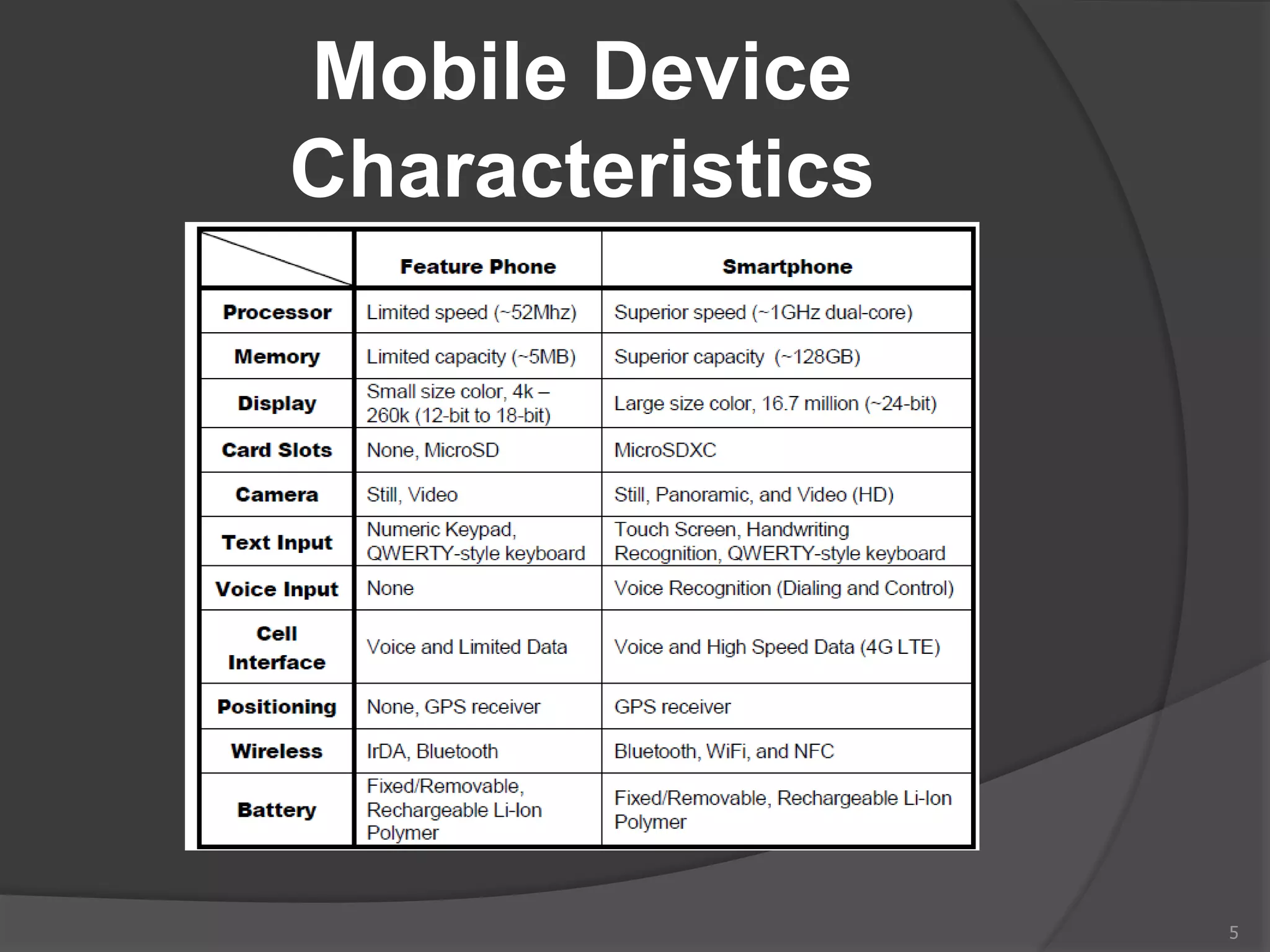
Mobile Device
Characteristics
5
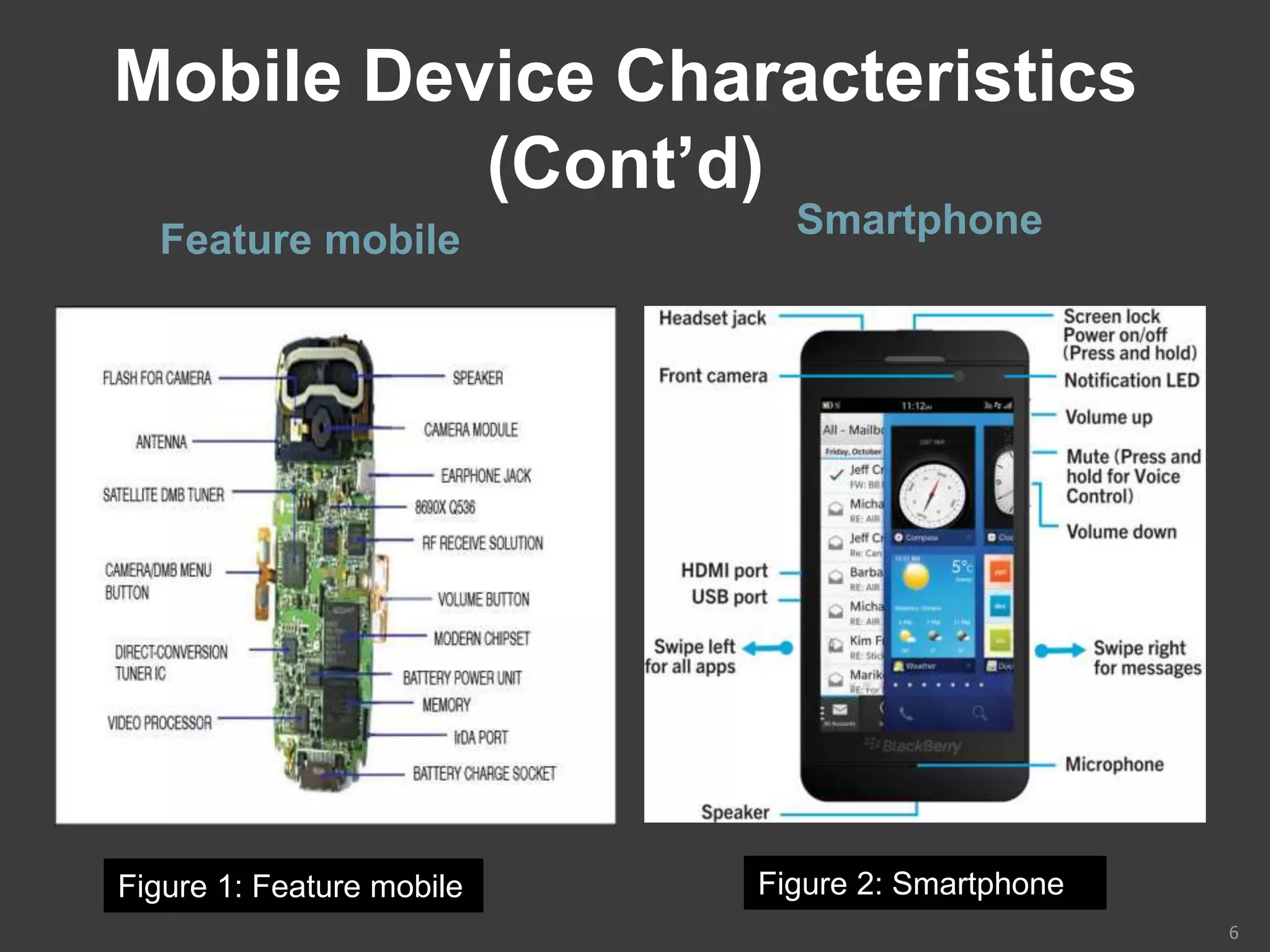
Mobile Device Characteristics
(Cont’d)
Feature mobile Smartphone
6
Figure 1: Feature mobile Figure 2: Smartphone
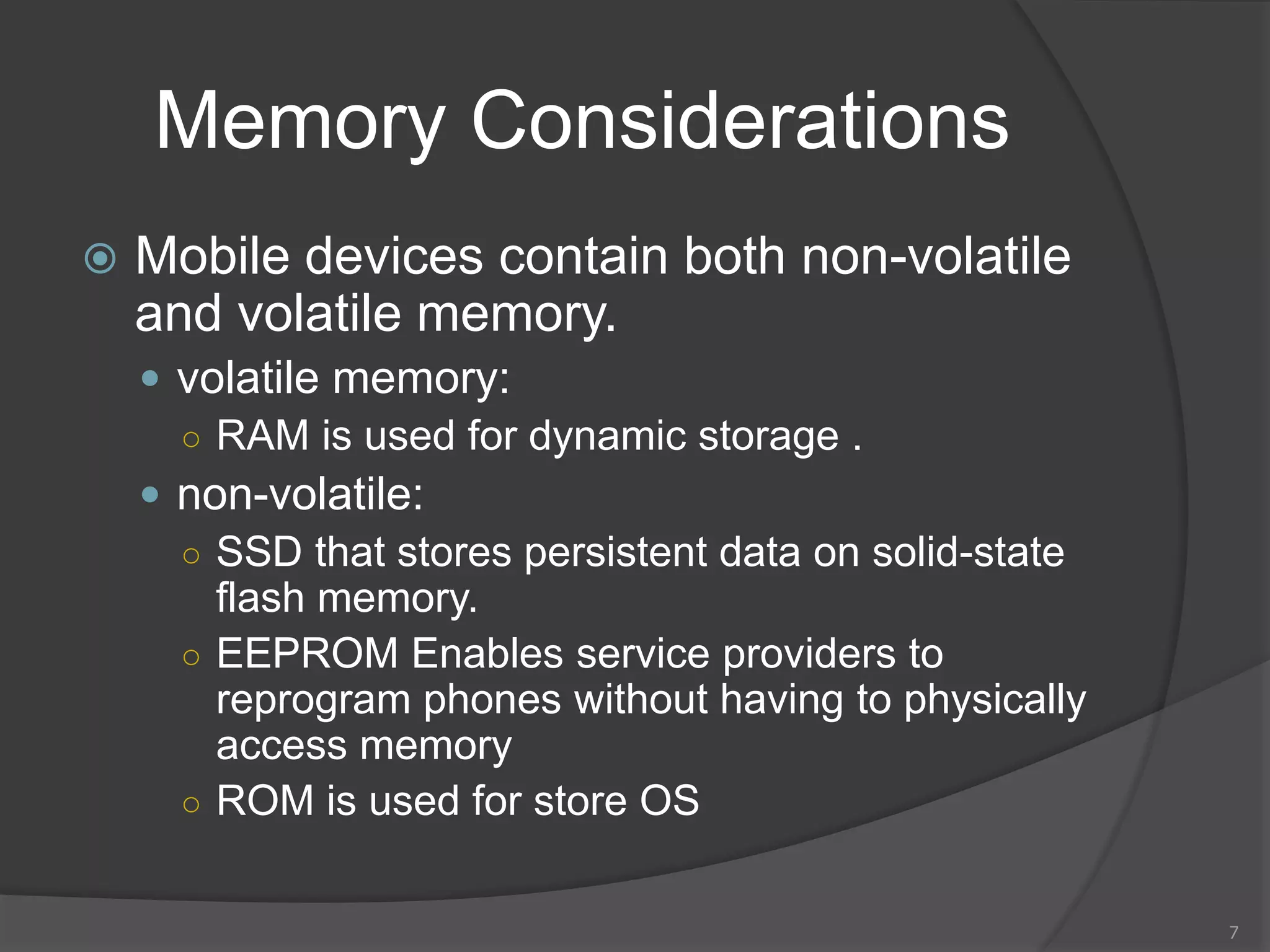
Memory Considerations
 Mobile devices contain both non-volatile
and volatile memory.
 volatile memory:
○ RAM is used for dynamic storage .
 non-volatile:
○ SSD that stores persistent data on solid-state
flash memory.
○ EEPROM Enables service providers to
reprogram phones without having to physically
access memory
○ ROM is used for store OS
7
Identity Module
Characteristics
 Subscriber identity module (SIM) cards
 Found most commonly in GSM devices
 Microprocessor and from 16 KB to 4 MB
EEPROM
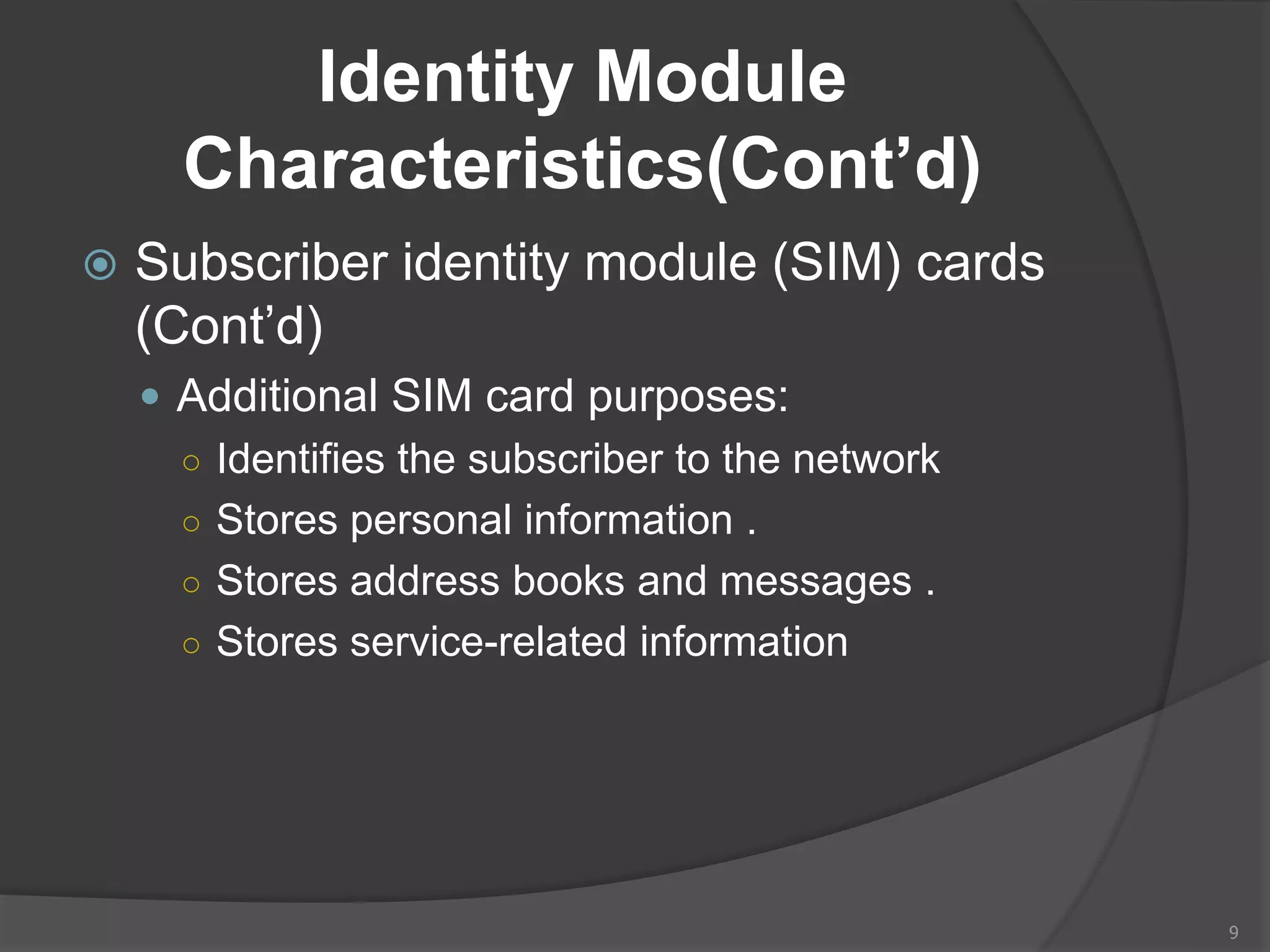
 GSM refers to mobile phones as “mobile
stations” and divides a station into two parts:
○ The SIM card and the mobile equipment (ME)
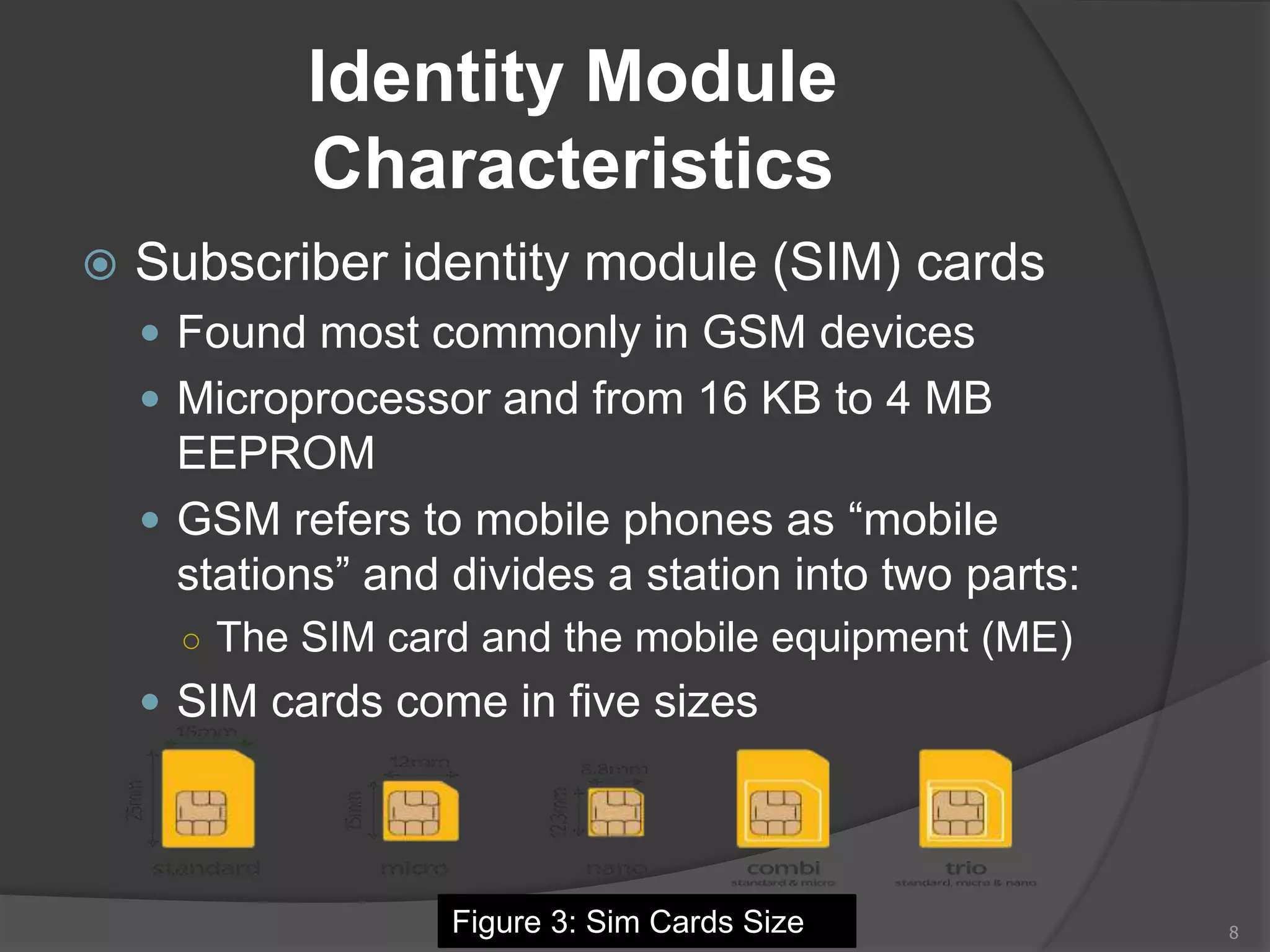
 SIM cards come in five sizes
8Figure 3: Sim Cards Size
Identity Module
Characteristics(Cont’d)
 Subscriber identity module (SIM) cards
(Cont’d)
 Additional SIM card purposes:
○ Identifies the subscriber to the network
○ Stores personal information .
○ Stores address books and messages .
○ Stores service-related information
9
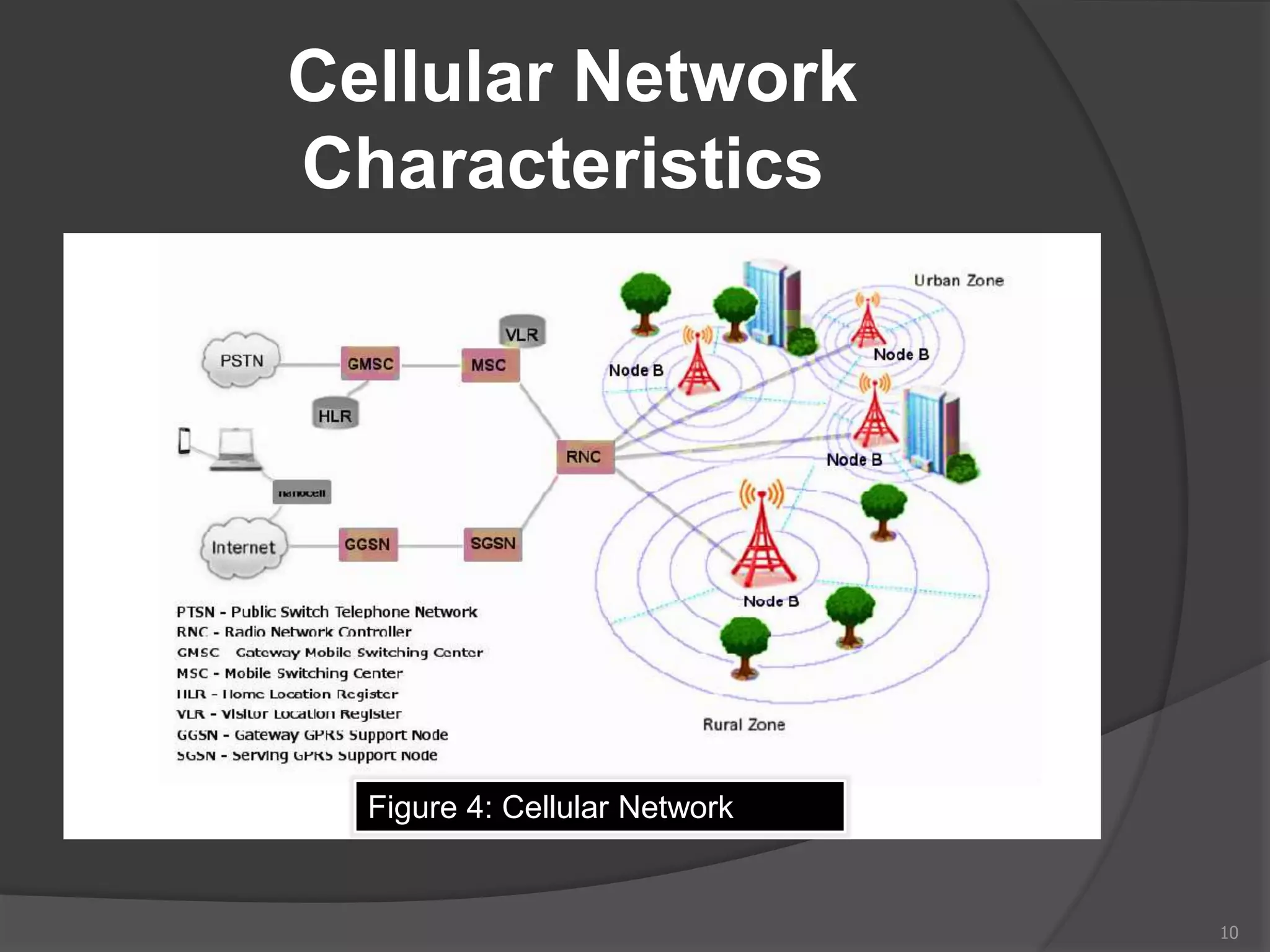
Cellular Network
Characteristics
10
Figure 4: Cellular Network
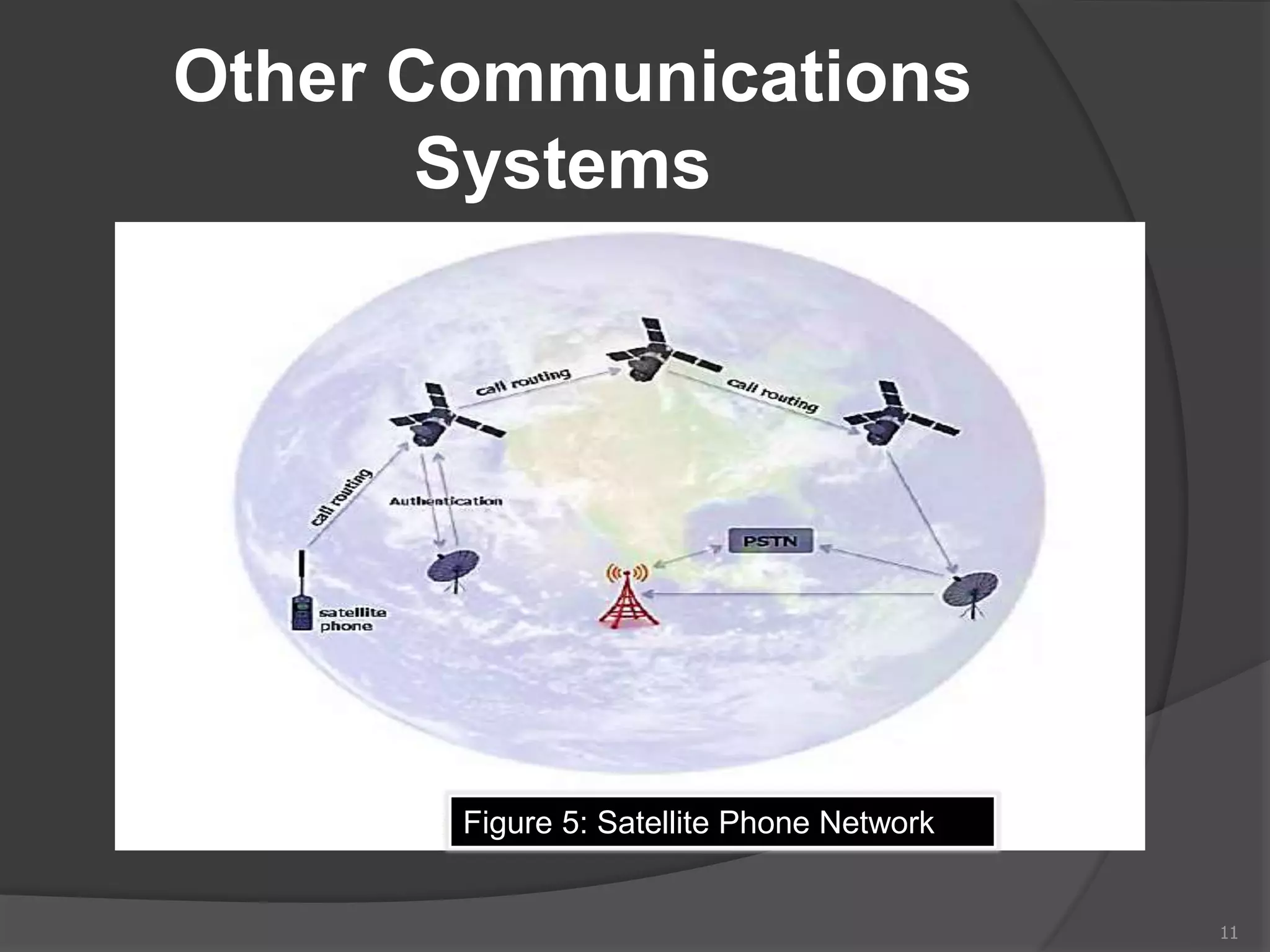
Other Communications
Systems
11
Figure 5: Satellite Phone Network
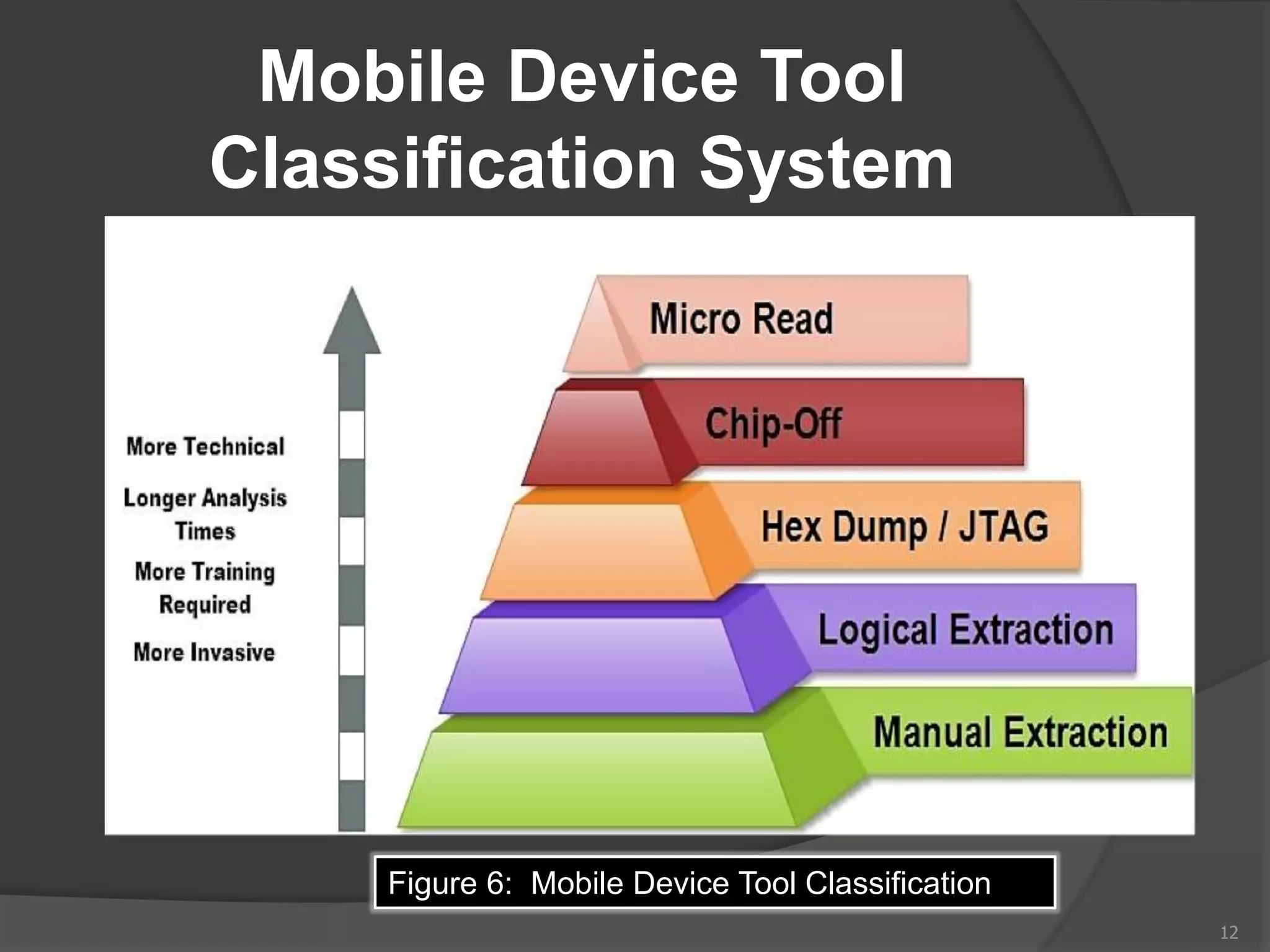
Mobile Device Tool
Classification System
12
Figure 6: Mobile Device Tool Classification
Mobile Device Tool
Classification System(Cont’d)
 Manual Extraction :
 A manual extraction method involves viewing
the data content stored on a mobile device.
 Disadvantage:
 it is impossible to recover deleted information.
 very time consuming
 data on the device may be modified, deleted or
overwritten
 the device is configured to display a language
unknown to the investigator.
13
Manual Extraction
Methods
14
Figure 7: Secure View Figure 8: video camera
Mobile Device Tool
Classification System(Cont’d)
 Logical Extraction:
 Connectivity between a mobile device and
the forensics workstation
 a connection using:
 Wired (e.g., USB or RS-232).
 Wireless (e.g., IrDA, WiFi, or Bluetooth)
15
Mobile Device Tool
Classification System
(Cont’d)
 Hex Dumping and JTAG:
 extraction methods afford the forensic
examiner more direct access to the raw
information stored in flash memory.
 One challenge with these extraction
methods is the ability of a given tool to parse
and decode the captured data.
 Methods used at this level require
connectivity (e.g., cable or WiFi).
16
Mobile Device Tool
Classification System(Cont’d)
 Chip-Off :
– Chip-Off methods refer to the acquisition of
data directly from a mobile device’s flash
memory.
 Chip-Off provides examiners to create a
binary image of the removed chip.
 the wear-leveling algorithm must be reverse
engineered.
17
Mobile Device Tool
Classification System(Cont’d)
 Micro Read:
 A Micro Read involves recording the physical
observation of the gates on a NAND or NOR
chip with the use of an electron microscope.
 It is used after all other acquisition techniques
have been exhausted.
 Successful acquisition requires a team of
○ experts
○ proper equipment,
○ time
○ in-depth knowledge of proprietary information
18
Investigative Methods
 Investigative methods require no
forensic software or hardware tools.
 The most obvious methods are the
following:
 Ask the owner :
If a device is protected with a
○ Password.
○ PIN .
○ other authentication mechanism .
19
Investigative
Methods(Cont’d)
 The most obvious methods are the
following:
 Review seized material :
○ Passwords or PINs may be written down on a
slip of paper and kept with or near the phone.
○ Packaging material for a UICC or a mobile
device may disclose a PIN Unlocking Key
(PUK) that may be used to reset the value of
the PIN.
○ Device specific vulnerabilities may also be
exploited, such as Smudge attacks.
20
Investigative
Methods(Cont’d)
 The most obvious methods are the
following:
 Ask the service provider:
○ request the PUK from the service provider and
reset the PIN.
○ information may be obtained by contacting the
device manufacturer (e.g., Apple).
21
Preservation Methods
 Securing and Evaluating the Scene
 Incorrect procedures or improper handling of
a mobile device during seizure may cause
loss of digital data.
 traditional forensic measures, such as
fingerprints or DNA testing, may need to be
applied to establish a link between a mobile
device and its owner or user.
22
Preservation
Methods(Cont’d)
 Sources of evidence include the device,
SIM and associated media
 Associated peripherals, cables, power
adapters, and other accessories are also of
interest.
 Mobile devices may be found in a
compromised state that may complicate
seizure , such as immersion in a liquid.
 forensic examiners should adhere to agency
specific procedures.
23
Preservation
Methods(Cont’d)
 Forensic examiners should adhere to agency
specific procedures (Cont’d):
○ removal of the battery preventing electrical
shorting.
○ the remainder of the mobile device is sealed in
an appropriate container filled with the same
liquid for transport to the lab.
 If the liquid is caustic:
○ a specialist should be consulted for specific
instructions or assistance
24
Preservation
Methods(Cont’d)
 Mobile devices and associated media may
be found in a damaged state, caused by
accidental or deliberate action.
 Damaged equipment should be taken back to
the lab for :
○ closer inspection.
○ Repairing damaged components on a mobile
device.
○ restoring the device to examination and analysis
may be possible.
 Documenting the Scene .
25
Preservation
Methods(Cont’d)
 Isolation
 Many mobile devices offer the user with
the ability to perform either a remote
lock or remote wipe by simply sending a
command (e.g., text message) to the
mobile device.
 Isolating the mobile device from other
devices used for data synchronization is
important to keep new data from
contaminating existing data.
26
Preservation
Methods(Cont’d)
 Three basic methods for isolating the
mobile device from network communication
 Enabling “Airplane Mode”
○ requires interaction with the mobile device using
the keypad, which poses some risk.
○ airplane mode does not prevent the system from
using other services such as GPS in all cases.
 Turn the device off.
○ may activate authentication codes , complicating
acquisition and delaying examination.
 Put the device in a shielded container.
27
Acquisition Methods
 Check these areas in the forensics lab :
 Internal memory
 SIM card
 Removable or external memory cards
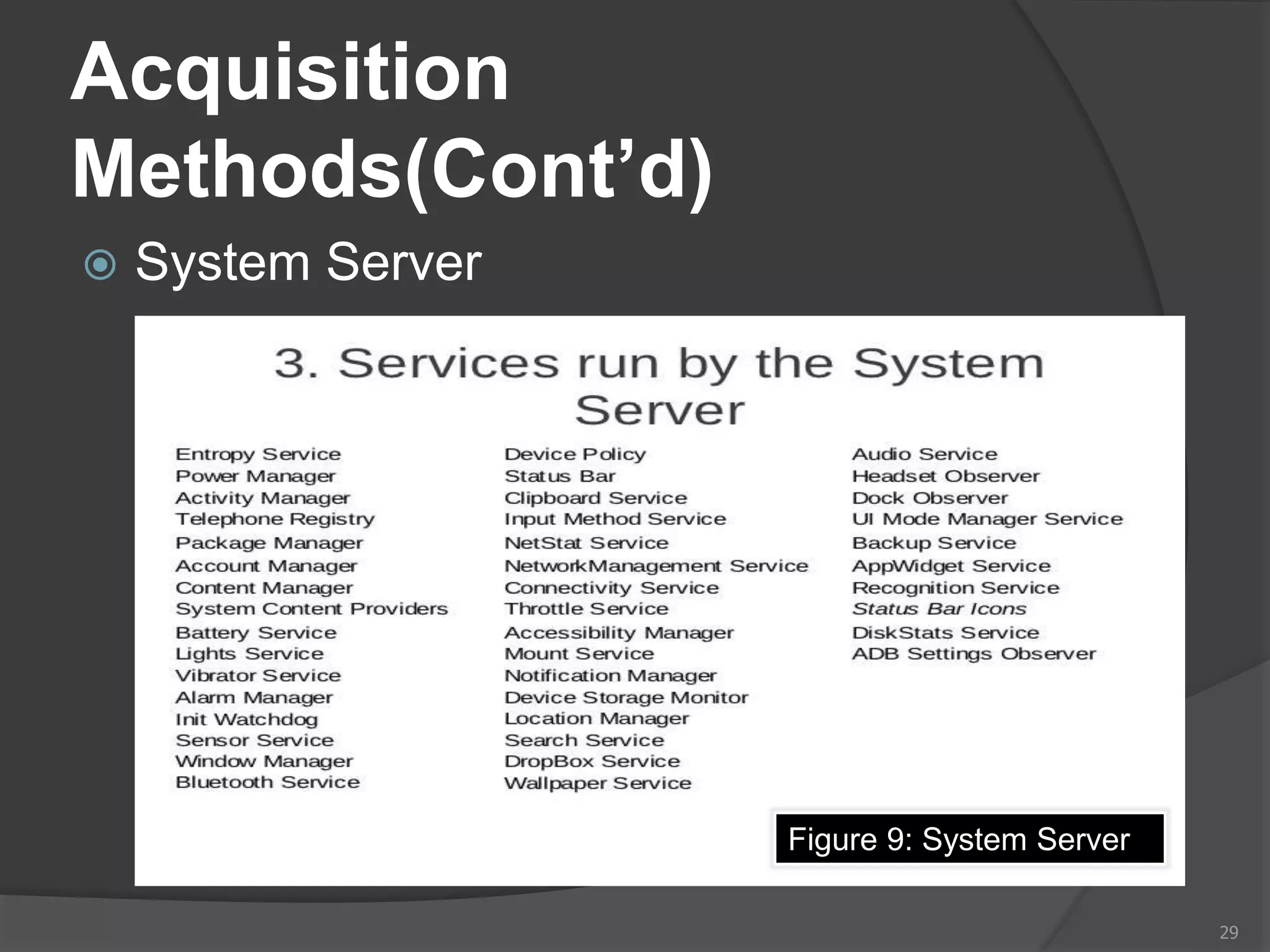
 System server
28
Acquisition
Methods(Cont’d)
 System Server
29
Figure 9: System Server
References
 Guide to Computer Forensics and Investigations Fourth Edition
by Bill Nelson,Amelia Phillips and Christopher Steuart
 http://ebook.eqbal.ac.ir/Security/Forensics/Guide%20to%20Computer%2
0Forensics%20and%20Investigations.pdf
 guidelines on Mobile Device Forensics by Rick Ayers,Sam
Brothers and Wayne Jansen .
 https://nvlpubs.nist.gov/nistpubs/specialpublications/nist.sp.800-
101r1.pdf
 Figure 1: Feature mobile
 https://www.google.ps/search?q=antenna+used+in+mobile&hl=ar-
PS&source=lnms&tbm=isch&sa=X&ved=0ahUKEwi96ufUi6HaAhUrLcAK
HcvFBxAQ_AUICigB&biw=1366&bih=662#imgdii=pgo3T-
aJyZm_VM:&imgrc=b-OjAxtur-Z5aM
 Figure 2: Smartphone
 https://www.google.ps/search?q=black+berry+z10+features&hl=ar-
PS&source=lnms&tbm=isch&sa=X&ved=0ahUKEwiLusySjKHaAhXHBZo
KHZDSD7IQ_AUICigB&biw=1366&bih=662#imgrc=E4gd0YHvjREDpM
30
References (Cont'd)
 Figure 3: Sim Cards Size
 https://www.google.ps/search?q=%D0%BE%D0%B1%D1%80%D0%B5%D
0%B7%D0%B0%D1%82%D1%8C+%D1%81%D0%B8%D0%BC+%D0%B
A%D0%B0%D1%80%D1%82%D1%83+%D0%BF%D0%BE%D0%B4+%D
0%BD%D0%B0%D0%BD%D0%BE&hl=ar-
PS&source=lnms&tbm=isch&sa=X&ved=0ahUKEwirrujXjKHaAhXB
x6YKHVVsBVwQ_AUICigB&biw=1366&bih=662#imgrc=eGPMqt2h
U807pM
 Figure 4: Cellular Network
• guidelines on Mobile Device Forensics by Rick Ayers, Sam
Brothers and Wayne Jansen ,Page 22,Figure 4 .
 Figure 5: Satellite Phone Network
○ guidelines on Mobile Device Forensics by Rick Ayers, Sam
Brothers and Wayne Jansen ,Page 23,Figure 5.
31
References (Cont'd)
 Figure 6: Mobile Device Tool
Classification
 https://www.google.ps/search?hl=ar-
PS&biw=1366&bih=662&tbm=isch&sa=1&ei=MAnFWuHGGcqQgAaD1b
WQCg&q=manual+extraction+computer+forensics&oq=manual+extracti
on+computer+forensics&gs_l=psy-
ab.3...14319.34364.0.34499.35.33.2.0.0.0.361.4393.0j20j1j2.25.0....0...1
c.1.64.psy-
ab..8.11.1757.0..0j0i67k1j0i30k1j0i5i30k1j0i8i30k1j0i19k1j0i8i13i30i19k1j
0i8i30i19k1.165.Vf9TcCUvFLw#imgrc=l3H0Lja7mEHMpM:
 Figure 7: Secure View
 https://www.google.ps/search?q=iphone+5+forensic&hl=ar-
PS&source=lnms&tbm=isch&sa=X&ved=0ahUKEwiq5bX3kKHaAhWHIJ
oKHYl6Cn4Q_AUICigB&biw=1366&bih=662#imgrc=EjdoI92dDUmrwM:
32
References (Cont'd)
 Figure 8: video camera
 https://encrypted-
tbn0.gstatic.com/images?q=tbn:ANd9GcQrT6eMM5CA26rE5prc
676DpSTE8xN4qnfI8qOawbp3ISIpe1dP
 Figure 9: System Server
 https://www.google.ps/search?q=system+server+android&tbm=i
sch&tbs=simg:CAQSlwEJW3qhdBv8L_18aiwELEKjU2AQaBAg
UCAoMCxCwjKcIGmIKYAgDEiiSE_1gHkRPBHY4TjxPCHZ8IkB
ONE-M94j3mPcg_15z3KP-
Q9yz_1LNuE9GjDRChqq57klJDAE74v1EWBDva1OrvznBdHEl4
IrqOtZZoTb6DtqXz4pvLDxstOvFuwgBAwLEI6u_1ggaCgoICAES
BN6JW-
UM&sa=X&ved=0ahUKEwjzgNDMhKHaAhXDxKYKHdNuDr8Qw
g4IIigA&biw=1366&bih=662#imgrc=By-nSh2emeIlGM:
33

Mobile Forensics

  • 1.
    Subject: Mobile Forensics Presentedby: Abdullah Rumi Presented to : Dr.balal Amro 1
  • 2.
    Objectives  Background  UnderstandingMobile Device Forensics  Mobile Device Characteristics  Memory Considerations  Identity Module Characteristics  Cellular Network Characteristics  Mobile Device Tool Classification System  Investigative Methods  Preservation Methods  Acquisition Methods 2
  • 3.
    Understanding Mobile Device Forensics People store a wealth of information on cell phones  People don’t think about securing their cell phones  Items stored on cell phones:  Incoming, outgoing, and missed calls  Text and Short Message Service (SMS) messages  E-mail  Instant-messaging (IM) logs –Web pages –Pictures 3
  • 4.
    Understanding Mobile Device Forensics(cont’d)  Items stored on cell phones:(continued)  Personal calendars  Address books  Music files  Voice  recordings Investigating cell phones and mobile devices is one of the most challenging tasks in digital forensics 4
  • 5.
  • 6.
    Mobile Device Characteristics (Cont’d) Featuremobile Smartphone 6 Figure 1: Feature mobile Figure 2: Smartphone
  • 7.
    Memory Considerations  Mobiledevices contain both non-volatile and volatile memory.  volatile memory: ○ RAM is used for dynamic storage .  non-volatile: ○ SSD that stores persistent data on solid-state flash memory. ○ EEPROM Enables service providers to reprogram phones without having to physically access memory ○ ROM is used for store OS 7
  • 8.
    Identity Module Characteristics  Subscriberidentity module (SIM) cards  Found most commonly in GSM devices  Microprocessor and from 16 KB to 4 MB EEPROM  GSM refers to mobile phones as “mobile stations” and divides a station into two parts: ○ The SIM card and the mobile equipment (ME)  SIM cards come in five sizes 8Figure 3: Sim Cards Size
  • 9.
    Identity Module Characteristics(Cont’d)  Subscriberidentity module (SIM) cards (Cont’d)  Additional SIM card purposes: ○ Identifies the subscriber to the network ○ Stores personal information . ○ Stores address books and messages . ○ Stores service-related information 9
  • 10.
  • 11.
  • 12.
    Mobile Device Tool ClassificationSystem 12 Figure 6: Mobile Device Tool Classification
  • 13.
    Mobile Device Tool ClassificationSystem(Cont’d)  Manual Extraction :  A manual extraction method involves viewing the data content stored on a mobile device.  Disadvantage:  it is impossible to recover deleted information.  very time consuming  data on the device may be modified, deleted or overwritten  the device is configured to display a language unknown to the investigator. 13
  • 14.
    Manual Extraction Methods 14 Figure 7:Secure View Figure 8: video camera
  • 15.
    Mobile Device Tool ClassificationSystem(Cont’d)  Logical Extraction:  Connectivity between a mobile device and the forensics workstation  a connection using:  Wired (e.g., USB or RS-232).  Wireless (e.g., IrDA, WiFi, or Bluetooth) 15
  • 16.
    Mobile Device Tool ClassificationSystem (Cont’d)  Hex Dumping and JTAG:  extraction methods afford the forensic examiner more direct access to the raw information stored in flash memory.  One challenge with these extraction methods is the ability of a given tool to parse and decode the captured data.  Methods used at this level require connectivity (e.g., cable or WiFi). 16
  • 17.
    Mobile Device Tool ClassificationSystem(Cont’d)  Chip-Off : – Chip-Off methods refer to the acquisition of data directly from a mobile device’s flash memory.  Chip-Off provides examiners to create a binary image of the removed chip.  the wear-leveling algorithm must be reverse engineered. 17
  • 18.
    Mobile Device Tool ClassificationSystem(Cont’d)  Micro Read:  A Micro Read involves recording the physical observation of the gates on a NAND or NOR chip with the use of an electron microscope.  It is used after all other acquisition techniques have been exhausted.  Successful acquisition requires a team of ○ experts ○ proper equipment, ○ time ○ in-depth knowledge of proprietary information 18
  • 19.
    Investigative Methods  Investigativemethods require no forensic software or hardware tools.  The most obvious methods are the following:  Ask the owner : If a device is protected with a ○ Password. ○ PIN . ○ other authentication mechanism . 19
  • 20.
    Investigative Methods(Cont’d)  The mostobvious methods are the following:  Review seized material : ○ Passwords or PINs may be written down on a slip of paper and kept with or near the phone. ○ Packaging material for a UICC or a mobile device may disclose a PIN Unlocking Key (PUK) that may be used to reset the value of the PIN. ○ Device specific vulnerabilities may also be exploited, such as Smudge attacks. 20
  • 21.
    Investigative Methods(Cont’d)  The mostobvious methods are the following:  Ask the service provider: ○ request the PUK from the service provider and reset the PIN. ○ information may be obtained by contacting the device manufacturer (e.g., Apple). 21
  • 22.
    Preservation Methods  Securingand Evaluating the Scene  Incorrect procedures or improper handling of a mobile device during seizure may cause loss of digital data.  traditional forensic measures, such as fingerprints or DNA testing, may need to be applied to establish a link between a mobile device and its owner or user. 22
  • 23.
    Preservation Methods(Cont’d)  Sources ofevidence include the device, SIM and associated media  Associated peripherals, cables, power adapters, and other accessories are also of interest.  Mobile devices may be found in a compromised state that may complicate seizure , such as immersion in a liquid.  forensic examiners should adhere to agency specific procedures. 23
  • 24.
    Preservation Methods(Cont’d)  Forensic examinersshould adhere to agency specific procedures (Cont’d): ○ removal of the battery preventing electrical shorting. ○ the remainder of the mobile device is sealed in an appropriate container filled with the same liquid for transport to the lab.  If the liquid is caustic: ○ a specialist should be consulted for specific instructions or assistance 24
  • 25.
    Preservation Methods(Cont’d)  Mobile devicesand associated media may be found in a damaged state, caused by accidental or deliberate action.  Damaged equipment should be taken back to the lab for : ○ closer inspection. ○ Repairing damaged components on a mobile device. ○ restoring the device to examination and analysis may be possible.  Documenting the Scene . 25
  • 26.
    Preservation Methods(Cont’d)  Isolation  Manymobile devices offer the user with the ability to perform either a remote lock or remote wipe by simply sending a command (e.g., text message) to the mobile device.  Isolating the mobile device from other devices used for data synchronization is important to keep new data from contaminating existing data. 26
  • 27.
    Preservation Methods(Cont’d)  Three basicmethods for isolating the mobile device from network communication  Enabling “Airplane Mode” ○ requires interaction with the mobile device using the keypad, which poses some risk. ○ airplane mode does not prevent the system from using other services such as GPS in all cases.  Turn the device off. ○ may activate authentication codes , complicating acquisition and delaying examination.  Put the device in a shielded container. 27
  • 28.
    Acquisition Methods  Checkthese areas in the forensics lab :  Internal memory  SIM card  Removable or external memory cards  System server 28
  • 29.
  • 30.
    References  Guide toComputer Forensics and Investigations Fourth Edition by Bill Nelson,Amelia Phillips and Christopher Steuart  http://ebook.eqbal.ac.ir/Security/Forensics/Guide%20to%20Computer%2 0Forensics%20and%20Investigations.pdf  guidelines on Mobile Device Forensics by Rick Ayers,Sam Brothers and Wayne Jansen .  https://nvlpubs.nist.gov/nistpubs/specialpublications/nist.sp.800- 101r1.pdf  Figure 1: Feature mobile  https://www.google.ps/search?q=antenna+used+in+mobile&hl=ar- PS&source=lnms&tbm=isch&sa=X&ved=0ahUKEwi96ufUi6HaAhUrLcAK HcvFBxAQ_AUICigB&biw=1366&bih=662#imgdii=pgo3T- aJyZm_VM:&imgrc=b-OjAxtur-Z5aM  Figure 2: Smartphone  https://www.google.ps/search?q=black+berry+z10+features&hl=ar- PS&source=lnms&tbm=isch&sa=X&ved=0ahUKEwiLusySjKHaAhXHBZo KHZDSD7IQ_AUICigB&biw=1366&bih=662#imgrc=E4gd0YHvjREDpM 30
  • 31.
    References (Cont'd)  Figure3: Sim Cards Size  https://www.google.ps/search?q=%D0%BE%D0%B1%D1%80%D0%B5%D 0%B7%D0%B0%D1%82%D1%8C+%D1%81%D0%B8%D0%BC+%D0%B A%D0%B0%D1%80%D1%82%D1%83+%D0%BF%D0%BE%D0%B4+%D 0%BD%D0%B0%D0%BD%D0%BE&hl=ar- PS&source=lnms&tbm=isch&sa=X&ved=0ahUKEwirrujXjKHaAhXB x6YKHVVsBVwQ_AUICigB&biw=1366&bih=662#imgrc=eGPMqt2h U807pM  Figure 4: Cellular Network • guidelines on Mobile Device Forensics by Rick Ayers, Sam Brothers and Wayne Jansen ,Page 22,Figure 4 .  Figure 5: Satellite Phone Network ○ guidelines on Mobile Device Forensics by Rick Ayers, Sam Brothers and Wayne Jansen ,Page 23,Figure 5. 31
  • 32.
    References (Cont'd)  Figure6: Mobile Device Tool Classification  https://www.google.ps/search?hl=ar- PS&biw=1366&bih=662&tbm=isch&sa=1&ei=MAnFWuHGGcqQgAaD1b WQCg&q=manual+extraction+computer+forensics&oq=manual+extracti on+computer+forensics&gs_l=psy- ab.3...14319.34364.0.34499.35.33.2.0.0.0.361.4393.0j20j1j2.25.0....0...1 c.1.64.psy- ab..8.11.1757.0..0j0i67k1j0i30k1j0i5i30k1j0i8i30k1j0i19k1j0i8i13i30i19k1j 0i8i30i19k1.165.Vf9TcCUvFLw#imgrc=l3H0Lja7mEHMpM:  Figure 7: Secure View  https://www.google.ps/search?q=iphone+5+forensic&hl=ar- PS&source=lnms&tbm=isch&sa=X&ved=0ahUKEwiq5bX3kKHaAhWHIJ oKHYl6Cn4Q_AUICigB&biw=1366&bih=662#imgrc=EjdoI92dDUmrwM: 32
  • 33.
    References (Cont'd)  Figure8: video camera  https://encrypted- tbn0.gstatic.com/images?q=tbn:ANd9GcQrT6eMM5CA26rE5prc 676DpSTE8xN4qnfI8qOawbp3ISIpe1dP  Figure 9: System Server  https://www.google.ps/search?q=system+server+android&tbm=i sch&tbs=simg:CAQSlwEJW3qhdBv8L_18aiwELEKjU2AQaBAg UCAoMCxCwjKcIGmIKYAgDEiiSE_1gHkRPBHY4TjxPCHZ8IkB ONE-M94j3mPcg_15z3KP- Q9yz_1LNuE9GjDRChqq57klJDAE74v1EWBDva1OrvznBdHEl4 IrqOtZZoTb6DtqXz4pvLDxstOvFuwgBAwLEI6u_1ggaCgoICAES BN6JW- UM&sa=X&ved=0ahUKEwjzgNDMhKHaAhXDxKYKHdNuDr8Qw g4IIigA&biw=1366&bih=662#imgrc=By-nSh2emeIlGM: 33

Editor's Notes

  • #21 Smudge attacks involved careful analysis of the surface of a touch screen device to determine the most recent gesture lock used .