
LMS Lessons Learned
CUE 2015
Dr. Michael Myers, PhD mmyers@nu.edu
Dr. Cynthia Sistek-Chandler, EdD
cchandler@nu.edu
http://tinyurl.com/LMSCUE2015
Lessons Learned from the LMS Review
 Process
 Vendor Selection
 Universal Attributes
 VoIP and Synchronous Discussion Tools
 Technical Support
 Professional Development
 Challenges
Re-”Vision”
LMS Evaluation Process
Questions we asked, why we asked them?
What we discovered along the way
LMS Migration
What will it look like, when will we get
there?
Restructure of resources
How we will get there?
Needs Assessment
 Rich engaging content designed around key educational
content and concepts (Content Management)
 Consistent high-quality student experience
 Focus on student learning outcomes- associated with
signature assignments and rubrics (Learning Analytics)
 Mobile experience
 Synchronous Tools
 Accessible courses (ADA Compliant)
 Professional Development
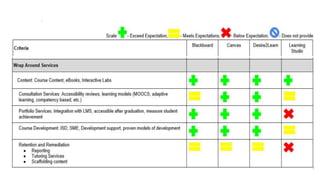
Final 4
Pearson Learning (eCollege)
Desire 2 Learn
Canvas by Instructure
Blackboard Learn
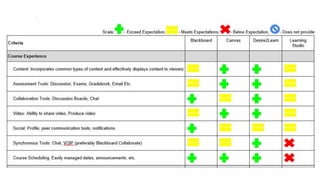
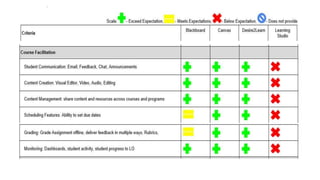
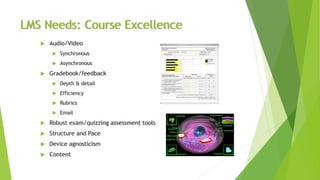
LMS Needs: Course Excellence
 Audio/Video
 Synchronous
 Asynchronous
 Gradebook/feedback
 Depth & detail
 Efficiency
 Rubrics
 Email
 Robust exam/quizzing assessment tools
 Structure and Pace
 Device agnosticism
 Content
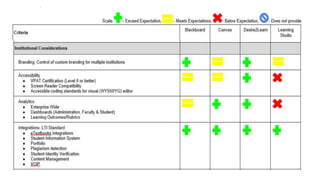
LMS Needs: Integration
 Course Content Management
 One to many
 Across systems
 “De-siloed” experience
 Faculty supplementation, collaboration
 Incorporation of e-text
 Single Sign On capabilities
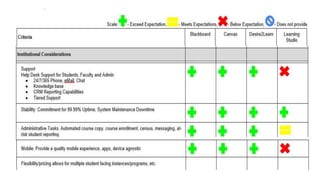
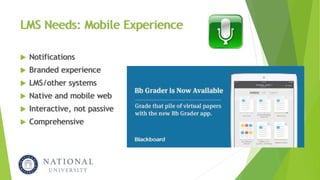
LMS Needs: Mobile Experience
 Notifications
 Branded experience
 LMS/other systems
 Native and mobile web
 Interactive, not passive
 Comprehensive
LMS Needs: Student Engagement
 Integration of Social tools
 Notifications
 Badging
 Adaptive learning
 MOOCs
 Program level spaces, cohorts,
student clubs, portfolio and
alumni
Blackboard Collaborate
 Approx. 2000 enterprise customers in Higher Ed worldwide.
 Running at a rate of about 2.5 billion minutes of web conferencing per
year.
 Based on decision, may be the synchronous tool
 In the near term
 Continue to explore other tools
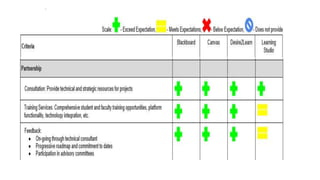
 Richer training, better support
Technical Support
 Quality support
 High touch, timely
 Metrics, reporting
 Transparency
 Nuanced understanding of us
 Fix in the near-term, preclude
in the long-term
Voice Over IP (VoIP Synchronous Tools)
Screen and Application Sharing
Real time breakouts
Java Independent
Mobile Access
MP4 Cloud-based conversion
Integrated Telephony
Migration Process
 30-40 courses developed by LMS vendors with NU faculty
 Building a repository of rich content models for reuse/repurposing in remainder of
courses
 Define style sheets, responsive design, html-5 principles to be used across all
courses
 Create best-in-show courses that reflect the leading edge of new LMS capabilities
 Refining automated process for migrating courses from legacy eCollege LMS
 “Training the Trainer”- Vendor providing close collaboration with NU staff as
courses developed so all future courses fully exploit LMS capabilities
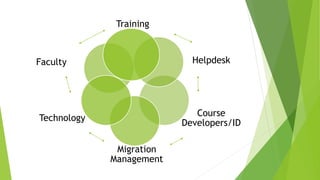
Training
Helpdesk
Course
Developers/ID
Migration
Management
Technology
Faculty
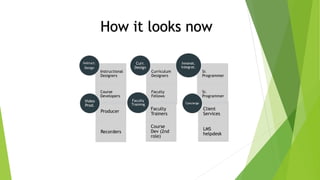
How it looks now
Instructional
Designers
Course
Developers
Instruct.
Design
Curriculum
Designers
Faculty
Fellows
Curr.
Design
Sr.
Programmer
Sr.
Programmer
Innovat.
Integrat.
Producer
Recorders
Video
Prod.
Faculty
Trainers
Course
Dev (2nd
role)
Faculty
Training
Client
Services
LMS
helpdesk
Concierge
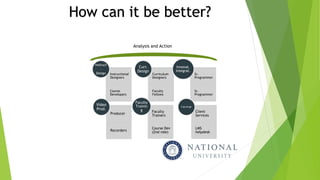
How can it be better?
Instructional
Designers
Course
Developers
Instruct
.
Design Curriculum
Designers
Faculty
Fellows
Curr.
Design
Sr.
Programmer
Sr.
Programmer
Innovat.
Integrat.
Producer
Recorders
Video
Prod.
Faculty
Trainers
Course Dev
(2nd role)
Faculty
Trainin
g Client
Services
LMS
helpdesk
Concierge
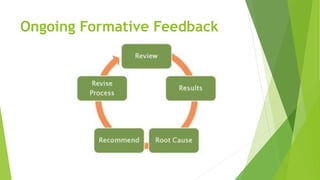
Analysis and Action
Ongoing Formative Feedback
Major Considerations
scale
success
market position
visibility across higher education
Lessons Learned: Scale
Video Conferencing
Migration
Community
Lessons Learned: Single Sign On
IT Managed
Occurred during LMS migration
Lessons Learned: Transparency
System Help Desk
Use of Faculty Community
Communication
Contact Us
 MPmyersPHD
 Tinyurl.com/cynthiachandler
 @cynthiachandler
 Zoom.us.com
 Dr. Michael Myers, PhD mmyers@nu.edu
 Dr. Cynthia Sistek-Chandler, EdD cchandler@nu.edu
 Evaluation in Sched

Lessons Learned from LMS

  • 1.
    LMS Lessons Learned CUE2015 Dr. Michael Myers, PhD mmyers@nu.edu Dr. Cynthia Sistek-Chandler, EdD cchandler@nu.edu http://tinyurl.com/LMSCUE2015
  • 2.
    Lessons Learned fromthe LMS Review  Process  Vendor Selection  Universal Attributes  VoIP and Synchronous Discussion Tools  Technical Support  Professional Development  Challenges
  • 3.
    Re-”Vision” LMS Evaluation Process Questionswe asked, why we asked them? What we discovered along the way LMS Migration What will it look like, when will we get there? Restructure of resources How we will get there?
  • 4.
    Needs Assessment  Richengaging content designed around key educational content and concepts (Content Management)  Consistent high-quality student experience  Focus on student learning outcomes- associated with signature assignments and rubrics (Learning Analytics)  Mobile experience  Synchronous Tools  Accessible courses (ADA Compliant)  Professional Development
  • 7.
    Final 4 Pearson Learning(eCollege) Desire 2 Learn Canvas by Instructure Blackboard Learn
  • 14.
    LMS Needs: CourseExcellence  Audio/Video  Synchronous  Asynchronous  Gradebook/feedback  Depth & detail  Efficiency  Rubrics  Email  Robust exam/quizzing assessment tools  Structure and Pace  Device agnosticism  Content
  • 15.
    LMS Needs: Integration Course Content Management  One to many  Across systems  “De-siloed” experience  Faculty supplementation, collaboration  Incorporation of e-text  Single Sign On capabilities
  • 16.
    LMS Needs: MobileExperience  Notifications  Branded experience  LMS/other systems  Native and mobile web  Interactive, not passive  Comprehensive
  • 17.
    LMS Needs: StudentEngagement  Integration of Social tools  Notifications  Badging  Adaptive learning  MOOCs  Program level spaces, cohorts, student clubs, portfolio and alumni
  • 18.
    Blackboard Collaborate  Approx.2000 enterprise customers in Higher Ed worldwide.  Running at a rate of about 2.5 billion minutes of web conferencing per year.  Based on decision, may be the synchronous tool  In the near term  Continue to explore other tools  Richer training, better support
  • 19.
    Technical Support  Qualitysupport  High touch, timely  Metrics, reporting  Transparency  Nuanced understanding of us  Fix in the near-term, preclude in the long-term
  • 20.
    Voice Over IP(VoIP Synchronous Tools) Screen and Application Sharing Real time breakouts Java Independent Mobile Access MP4 Cloud-based conversion Integrated Telephony
  • 21.
    Migration Process  30-40courses developed by LMS vendors with NU faculty  Building a repository of rich content models for reuse/repurposing in remainder of courses  Define style sheets, responsive design, html-5 principles to be used across all courses  Create best-in-show courses that reflect the leading edge of new LMS capabilities  Refining automated process for migrating courses from legacy eCollege LMS  “Training the Trainer”- Vendor providing close collaboration with NU staff as courses developed so all future courses fully exploit LMS capabilities
  • 22.
  • 23.
    How it looksnow Instructional Designers Course Developers Instruct. Design Curriculum Designers Faculty Fellows Curr. Design Sr. Programmer Sr. Programmer Innovat. Integrat. Producer Recorders Video Prod. Faculty Trainers Course Dev (2nd role) Faculty Training Client Services LMS helpdesk Concierge
  • 24.
    How can itbe better? Instructional Designers Course Developers Instruct . Design Curriculum Designers Faculty Fellows Curr. Design Sr. Programmer Sr. Programmer Innovat. Integrat. Producer Recorders Video Prod. Faculty Trainers Course Dev (2nd role) Faculty Trainin g Client Services LMS helpdesk Concierge Analysis and Action
  • 25.
  • 26.
  • 27.
    Lessons Learned: Scale VideoConferencing Migration Community
  • 28.
    Lessons Learned: SingleSign On IT Managed Occurred during LMS migration
  • 29.
    Lessons Learned: Transparency SystemHelp Desk Use of Faculty Community Communication
  • 30.
    Contact Us  MPmyersPHD Tinyurl.com/cynthiachandler  @cynthiachandler  Zoom.us.com  Dr. Michael Myers, PhD mmyers@nu.edu  Dr. Cynthia Sistek-Chandler, EdD cchandler@nu.edu  Evaluation in Sched

Editor's Notes

  • #5 Vision of What’s Possible?
  • #6 Chancellor of the NUS and NU President Vice Chancellor, Pre-College Programs, NUS Provost, NU President, SPL Vice President, Information Technology, NU Vice President, Student Services, NU Director, FCETT, NU Faculty- SOBM, NU Faculty-SETM, NU, Faculty Senate Officer Faculty-SOE, NU, Graduate Council Member Faculty-SOE, NU, Undergraduate Council Faculty-SOBM, NU Faculty-SHHS, NU, Council of Chairs Member
  • #15 Begets consistency One tool versus several Real uptime, history, legacy Vigilence Browsers, computers
  • #16 Syllabus AMS, catalogue Faculty collaboration Axciom, Biosign, exam proctoring Seamless, significant content, flexibility, analytics
  • #17 Differentiated experience Db content All LMS gps
  • #19 ADA Aduting Engenders adherence Twitter, etc Cost Co-linking/desiloed Adaptive learning- third party… open enrollment, rapid onboarding
  • #20 ADA Engenders adherence Twitter, etc Cost Co-linking/desiloed Adaptive learning- third party… open enrollment, rapid onboarding
  • #21 ADA Aduting Engenders adherence Twitter, etc Cost Co-linking/desiloed Adaptive learning- third party… open enrollment, rapid onboarding