Flow Charts
Flow Charts
•A diagrammatic representation that illustrates the
sequence of operations to be performed to get the solution
of a problem.
• Generally drawn in the early stages of formulating
computer solutions.
• Facilitate communication between programmers and
business people.
• Play a vital role in the programming of a problem and are
quite helpful in understanding the logic of complicated and
lengthy problems.
• Once the flowchart is drawn, it becomes easy to write the
program in any high level language.
• Must for the better documentation of a complex program.
Flow Charts
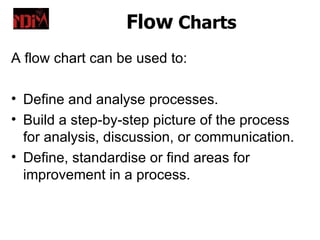
A flow chart can be used to:

• Define and analyse processes.
• Build a step-by-step picture of the process
  for analysis, discussion, or communication.
• Define, standardise or find areas for
  improvement in a process.
Flow Charts
Symbols for drawing a flowchart:


         Start or End of the program
Flow Charts
Symbols for drawing a flowchart:


Computational Steps or Processing Function
 of a program
Flow Charts
Symbols for drawing a flowchart:


           Input or output operation
Flow Charts
Symbols for drawing a flowchart:


       Decision Making and Branching
Flow Charts
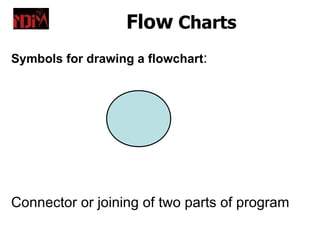
Symbols for drawing a flowchart:


Connector or joining of two parts of program
Flow Charts
Symbols for drawing a flowchart:


                Magnetic Tape
Flow Charts
Symbols for drawing a flowchart:


                Magnetic Disk
Flow Charts
Symbols for drawing a flowchart:


              Off-page connector
Flow Charts
Symbols for drawing a flowchart:


                  Flow lines
Flow Charts
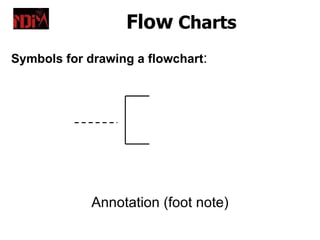
Symbols for drawing a flowchart:


             Annotation (foot note)
Flow Charts
Symbols for drawing a flowchart:


                    Display
Flow Charts
Guidelines in flowcharting -
• In drawing a proper flowchart, all necessary
   requirements should be listed out in logical order.
• The flowchart should be clear, neat and easy to
   follow. There should not be any room for
   ambiguity in understanding the flowchart.
• The usual direction of the flow of a procedure or
   system is from left to right or top to bottom.
Flow Charts
…Guidelines in flowcharting -
• Only one flow line should come out from a
  process symbol.


                  OR
Flow Charts
…Guidelines in flowcharting -
• Only one flow line should enter a decision
  symbol, but two or three flow lines, one for
  each possible answer, should leave the
  decision symbol.
Flow Charts

…Guidelines in flowcharting –
 Only one flow line is used in conjunction
 with terminal symbol.
Flow Charts

…Guidelines in flowcharting –
 Write within standard symbols briefly. As
 necessary, you can use the annotation
 symbol to describe data or computational
 steps more clearly.

                  This is confidential data
Flow Charts

…Guidelines in flowcharting –

•   In case of complex flowchart, it is better to use
    connector symbols to reduce the number of flow
    lines. Avoid the intersection of flow lines.
•   Ensure that the flowchart has a logical start and
    finish.
•   It is useful to test the validity of the flowchart by
    passing through it with a simple test data.
Flow Charts
Advantages Of Using Flowcharts :

•   Effective communication
•   Effective analysis
•   Proper documentation
•   Efficient Coding
•   Proper Debugging
•   Efficient Program Maintenance
Flow Charts
Limitations of using Flowcharts :

• Complex logic: Sometimes, the program
  logic is quite complicated.
• Alterations and Modifications:
  Alterations may require re-drawing
  completely.
• Reproduction: As the flowchart symbols
  cannot be typed, reproduction of flowchart
  becomes a problem.
Flow Charts


Example 1.

Draw a flowchart to find the sum of first 50 natural numbers.
Flow Charts

Example 2
 Draw a flowchart to find the largest of three
 numbers A,B and C.
Flow Charts

Example 3
 Draw a flowchart for computing factorial of a
 given number
Assignment
Fill in the blanks-
2. A program flowchart indicates the_________ to be performed and
     the __________ in which they occur.
3. A program flowchart is generally read from _____________ to
     ________________
4. Flowcharting symbols are connected together by means of
     ___________________
5. A decision symbol may be used in determining the ____________ or
     ___________ of two data items.
6. __________ are used to join remote portions of a flowchart
7. ____________ connectors are used when a flowchart ends on one
     page and begins again on other page
8. A ________ symbol is used at the beginning and end of a flowchart.
9. The flowchart is one of the best ways of ________ a program..
10. To construct a flowchart, one must adhere to prescribed symbols
     provided by the __________ .
11. The program uses a ____________ to aid it in drawing flowchart
     symbols.
Answers

•   Operations, sequence
•   Top, down
•   Flow line
•   Equality, inequality
•   connectors
•   Off -page
•   Terminal
•   documenting
•   ANSI (American National Standards Institute)
•   Flowcharting template
Structured English
Structured English
•   Structured English is a tool used to represent
    process logic.
•   Syntax rules are not very strict & an English
    statement is used to specify an action.
•   The main aim is to allow easy readability, which
    helps in documentation.

Two building blocks of Structured English:
6. Structured logic or instructions organized into
   nested or grouped procedures
7. Simple English statements such as add, multiply,
   move
Structured English
Four conventions to follow when using Structured
   English:

•   Express all logic in terms of sequential structures,
    decision structures, or iterations.
•   Use upper case for keywords such as: IF, THEN,
    ELSE, DO, DO WHILE, DO UNTIL, PERFORM
•   Indent blocks of statements to show their
    hierarchy (nesting) clearly.
•   When words or phrases have been defined,
    underline those words or phrases to indicate that
    they have a specialised, reserved meaning.
The Flow of Structured English


 Plain       Structured             Pseudocode    Programs
English        English


User                      Analyst                Programmer
…Structured English

The conventions are used in writing structured
   English:
• Imperative Sentences: Store the data in
   database.
• Arithmetic & Relational Operations :
   Common symbols of mathematics are used
   in structured English such as- + for add, - for
   subtraction etc. and =, >=, != etc. are used
   for relational operations.
…Structured English
3. Decision Structures: If Then Else, Select
    Case
4. Repetion: Loops

   There are various forms in which structured
   english can be implemented to solve the
   problem. e.g. Algorithm, Flowchart,
   pseudocode.
…Structured English
Writing Structured English
       Repetition              Conditions

                       IF … THEN …
DO
                               statements …
  statements …           ELSE
UNTIL end-condition            statements …
                       END IF
           or                       or
                      SELECT
                        CASE 1 (conditions)
DO WHILE
                              statements …
  statements …          CASE 2 …
END DO                        statements …
                       END SELECT
Pseudocode
Pseudocode


• An outline of a program, written in a
  form that can easily be converted into
  real programming statements.
• Pseudocode cannot be compiled nor
  executed, and there are no real
  formatting or syntax rules.
…Pseudocode

• It   enables     the   programmer     to
  concentrate on the algorithms without
  worrying about all the syntactic details
  of a particular programming language.

• Flowcharts can be thought of as a
  graphical form of pseudocode.
Example of Pseudocode
Regular code (written in PHP):
<?php
if (is_valid($cc_number))
{ execute_transaction($cc_number, $order); }
else { show_failure(); }
?>
Pseudocode:
if credit card number is valid
       execute transaction based on number and
       order
else show a generic failure message
end if

Lecture 4

  • 1.
  • 2.
    Flow Charts •A diagrammaticrepresentation that illustrates the sequence of operations to be performed to get the solution of a problem. • Generally drawn in the early stages of formulating computer solutions. • Facilitate communication between programmers and business people. • Play a vital role in the programming of a problem and are quite helpful in understanding the logic of complicated and lengthy problems. • Once the flowchart is drawn, it becomes easy to write the program in any high level language. • Must for the better documentation of a complex program.
  • 3.
    Flow Charts A flowchart can be used to: • Define and analyse processes. • Build a step-by-step picture of the process for analysis, discussion, or communication. • Define, standardise or find areas for improvement in a process.
  • 4.
    Flow Charts Symbols fordrawing a flowchart: Start or End of the program
  • 5.
    Flow Charts Symbols fordrawing a flowchart: Computational Steps or Processing Function of a program
  • 6.
    Flow Charts Symbols fordrawing a flowchart: Input or output operation
  • 7.
    Flow Charts Symbols fordrawing a flowchart: Decision Making and Branching
  • 8.
    Flow Charts Symbols fordrawing a flowchart: Connector or joining of two parts of program
  • 9.
    Flow Charts Symbols fordrawing a flowchart: Magnetic Tape
  • 10.
    Flow Charts Symbols fordrawing a flowchart: Magnetic Disk
  • 11.
    Flow Charts Symbols fordrawing a flowchart: Off-page connector
  • 12.
    Flow Charts Symbols fordrawing a flowchart: Flow lines
  • 13.
    Flow Charts Symbols fordrawing a flowchart: Annotation (foot note)
  • 14.
    Flow Charts Symbols fordrawing a flowchart: Display
  • 15.
    Flow Charts Guidelines inflowcharting - • In drawing a proper flowchart, all necessary requirements should be listed out in logical order. • The flowchart should be clear, neat and easy to follow. There should not be any room for ambiguity in understanding the flowchart. • The usual direction of the flow of a procedure or system is from left to right or top to bottom.
  • 16.
    Flow Charts …Guidelines inflowcharting - • Only one flow line should come out from a process symbol. OR
  • 17.
    Flow Charts …Guidelines inflowcharting - • Only one flow line should enter a decision symbol, but two or three flow lines, one for each possible answer, should leave the decision symbol.
  • 18.
    Flow Charts …Guidelines inflowcharting – Only one flow line is used in conjunction with terminal symbol.
  • 19.
    Flow Charts …Guidelines inflowcharting – Write within standard symbols briefly. As necessary, you can use the annotation symbol to describe data or computational steps more clearly. This is confidential data
  • 20.
    Flow Charts …Guidelines inflowcharting – • In case of complex flowchart, it is better to use connector symbols to reduce the number of flow lines. Avoid the intersection of flow lines. • Ensure that the flowchart has a logical start and finish. • It is useful to test the validity of the flowchart by passing through it with a simple test data.
  • 21.
    Flow Charts Advantages OfUsing Flowcharts : • Effective communication • Effective analysis • Proper documentation • Efficient Coding • Proper Debugging • Efficient Program Maintenance
  • 22.
    Flow Charts Limitations ofusing Flowcharts : • Complex logic: Sometimes, the program logic is quite complicated. • Alterations and Modifications: Alterations may require re-drawing completely. • Reproduction: As the flowchart symbols cannot be typed, reproduction of flowchart becomes a problem.
  • 23.
    Flow Charts Example 1. Drawa flowchart to find the sum of first 50 natural numbers.
  • 25.
    Flow Charts Example 2 Draw a flowchart to find the largest of three numbers A,B and C.
  • 27.
    Flow Charts Example 3 Draw a flowchart for computing factorial of a given number
  • 29.
    Assignment Fill in theblanks- 2. A program flowchart indicates the_________ to be performed and the __________ in which they occur. 3. A program flowchart is generally read from _____________ to ________________ 4. Flowcharting symbols are connected together by means of ___________________ 5. A decision symbol may be used in determining the ____________ or ___________ of two data items. 6. __________ are used to join remote portions of a flowchart 7. ____________ connectors are used when a flowchart ends on one page and begins again on other page 8. A ________ symbol is used at the beginning and end of a flowchart. 9. The flowchart is one of the best ways of ________ a program.. 10. To construct a flowchart, one must adhere to prescribed symbols provided by the __________ . 11. The program uses a ____________ to aid it in drawing flowchart symbols.
  • 30.
    Answers • Operations, sequence • Top, down • Flow line • Equality, inequality • connectors • Off -page • Terminal • documenting • ANSI (American National Standards Institute) • Flowcharting template
  • 31.
  • 32.
    Structured English • Structured English is a tool used to represent process logic. • Syntax rules are not very strict & an English statement is used to specify an action. • The main aim is to allow easy readability, which helps in documentation. Two building blocks of Structured English: 6. Structured logic or instructions organized into nested or grouped procedures 7. Simple English statements such as add, multiply, move
  • 33.
    Structured English Four conventionsto follow when using Structured English: • Express all logic in terms of sequential structures, decision structures, or iterations. • Use upper case for keywords such as: IF, THEN, ELSE, DO, DO WHILE, DO UNTIL, PERFORM • Indent blocks of statements to show their hierarchy (nesting) clearly. • When words or phrases have been defined, underline those words or phrases to indicate that they have a specialised, reserved meaning.
  • 34.
    The Flow ofStructured English Plain Structured Pseudocode Programs English English User Analyst Programmer
  • 35.
    …Structured English The conventionsare used in writing structured English: • Imperative Sentences: Store the data in database. • Arithmetic & Relational Operations : Common symbols of mathematics are used in structured English such as- + for add, - for subtraction etc. and =, >=, != etc. are used for relational operations.
  • 36.
    …Structured English 3. DecisionStructures: If Then Else, Select Case 4. Repetion: Loops There are various forms in which structured english can be implemented to solve the problem. e.g. Algorithm, Flowchart, pseudocode.
  • 37.
  • 38.
    Writing Structured English Repetition Conditions IF … THEN … DO statements … statements … ELSE UNTIL end-condition statements … END IF or or SELECT CASE 1 (conditions) DO WHILE statements … statements … CASE 2 … END DO statements … END SELECT
  • 39.
  • 40.
    Pseudocode • An outlineof a program, written in a form that can easily be converted into real programming statements. • Pseudocode cannot be compiled nor executed, and there are no real formatting or syntax rules.
  • 41.
    …Pseudocode • It enables the programmer to concentrate on the algorithms without worrying about all the syntactic details of a particular programming language. • Flowcharts can be thought of as a graphical form of pseudocode.
  • 42.
    Example of Pseudocode Regularcode (written in PHP): <?php if (is_valid($cc_number)) { execute_transaction($cc_number, $order); } else { show_failure(); } ?> Pseudocode: if credit card number is valid execute transaction based on number and order else show a generic failure message end if