WHAT IS A
FLOWCHART?
• Graphical representation of a step by
step program.
• Flowchart are another way to outline
your program.
• A diagrammatic or graphical
representation that illustrates the
sequence of operations to be performed
to get the solution of a problem.
TYPES OF FLOWCHART
• Program Flowchart
• System Flowchart
FLOWCHARTING SYMBOLS
• TERMINAL SYMBOL (OVAL)
-Elongated circles, which signify the
start or end of a process.
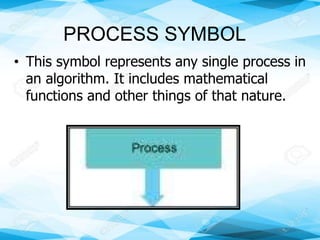
PROCESS SYMBOL
• This symbol represents any single process in
an algorithm. It includes mathematical
functions and other things of that nature.
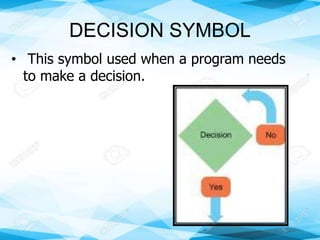
DECISION SYMBOL
• This symbol used when a program needs
to make a decision.
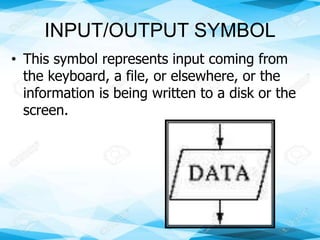
INPUT/OUTPUT SYMBOL
• This symbol represents input coming from
the keyboard, a file, or elsewhere, or the
information is being written to a disk or the
screen.
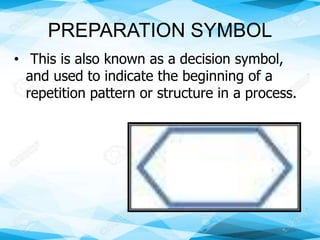
PREPARATION SYMBOL
• This is also known as a decision symbol,
and used to indicate the beginning of a
repetition pattern or structure in a process.
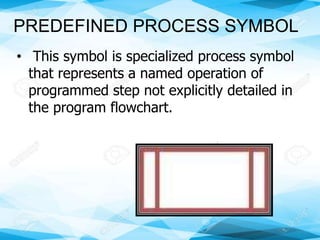
PREDEFINED PROCESS SYMBOL
• This symbol is specialized process symbol
that represents a named operation of
programmed step not explicitly detailed in
the program flowchart.
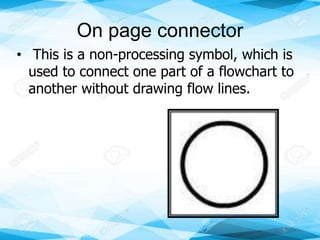
On page connector
• This is a non-processing symbol, which is
used to connect one part of a flowchart to
another without drawing flow lines.
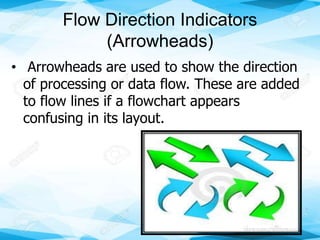
Flow Direction Indicators
(Arrowheads)
• Arrowheads are used to show the direction
of processing or data flow. These are added
to flow lines if a flowchart appears
confusing in its layout.
Guidelines in Flowcharting
1. A flowchart should always begin with a
start symbol and is completed by an end
symbol.
2. The flowchart should be clear, neat, and
easy to follow.
3. The sequence of symbols is important. It
indicates the step by step logic to follow.
4. The flow lines indicate the direction to be
followed. The direction of the flow of a
procedure is from left to right or top to
bottom.
5. Only one flow line is used in connection
with terminal symbol.
6. Only one flow line should come out from
the preparation, input/ output, and
process symbols.
7. Only one flow line should enter a decision
symbol, but two or three flow lines, one
for each possible selection or answer,
should leave the decision symbol.
8. A flowchart may contain as many
symbols as necessary in the solution of
the problem.
9. There may be varied flowcharts to solve
one problem. There is no one correct
flowchart.
10.A flowchart is efficient if it is clear,
simple, and contains the least possible
number of symbols to solve the problem.
11.If a flowchart becomes complex, use
connector symbols to reduce the number
of flow lines. Avoid intersecting flow lines
to make it more effective and easier to
follow.
12.Make sure that the flowchart has a
logical start and end.
13.It is always useful to test the validity of
the flowchart by passing through it within
a simple test data.
ASSIGNMENT
Cite 5 examples of flowcharting. Draw each
example in a yellow paper.

Flowchart Grade 10

  • 1.
  • 2.
    • Graphical representationof a step by step program. • Flowchart are another way to outline your program. • A diagrammatic or graphical representation that illustrates the sequence of operations to be performed to get the solution of a problem.
  • 3.
    TYPES OF FLOWCHART •Program Flowchart • System Flowchart
  • 4.
    FLOWCHARTING SYMBOLS • TERMINALSYMBOL (OVAL) -Elongated circles, which signify the start or end of a process.
  • 5.
    PROCESS SYMBOL • Thissymbol represents any single process in an algorithm. It includes mathematical functions and other things of that nature.
  • 6.
    DECISION SYMBOL • Thissymbol used when a program needs to make a decision.
  • 7.
    INPUT/OUTPUT SYMBOL • Thissymbol represents input coming from the keyboard, a file, or elsewhere, or the information is being written to a disk or the screen.
  • 8.
    PREPARATION SYMBOL • Thisis also known as a decision symbol, and used to indicate the beginning of a repetition pattern or structure in a process.
  • 9.
    PREDEFINED PROCESS SYMBOL •This symbol is specialized process symbol that represents a named operation of programmed step not explicitly detailed in the program flowchart.
  • 10.
    On page connector •This is a non-processing symbol, which is used to connect one part of a flowchart to another without drawing flow lines.
  • 11.
    Flow Direction Indicators (Arrowheads) •Arrowheads are used to show the direction of processing or data flow. These are added to flow lines if a flowchart appears confusing in its layout.
  • 12.
    Guidelines in Flowcharting 1.A flowchart should always begin with a start symbol and is completed by an end symbol. 2. The flowchart should be clear, neat, and easy to follow. 3. The sequence of symbols is important. It indicates the step by step logic to follow. 4. The flow lines indicate the direction to be followed. The direction of the flow of a procedure is from left to right or top to bottom.
  • 13.
    5. Only oneflow line is used in connection with terminal symbol. 6. Only one flow line should come out from the preparation, input/ output, and process symbols. 7. Only one flow line should enter a decision symbol, but two or three flow lines, one for each possible selection or answer, should leave the decision symbol. 8. A flowchart may contain as many symbols as necessary in the solution of the problem.
  • 14.
    9. There maybe varied flowcharts to solve one problem. There is no one correct flowchart. 10.A flowchart is efficient if it is clear, simple, and contains the least possible number of symbols to solve the problem. 11.If a flowchart becomes complex, use connector symbols to reduce the number of flow lines. Avoid intersecting flow lines to make it more effective and easier to follow.
  • 15.
    12.Make sure thatthe flowchart has a logical start and end. 13.It is always useful to test the validity of the flowchart by passing through it within a simple test data.
  • 16.
    ASSIGNMENT Cite 5 examplesof flowcharting. Draw each example in a yellow paper.