Computer Networks
Computer Network


A computer network is defined as the
interconnection of 2 or more independent computers
or/and peripherals.
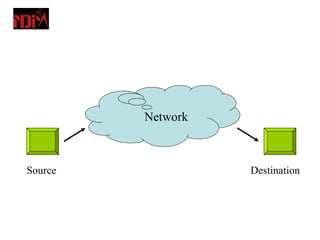
Network


Source             Destination
Need of Networks
– Communicate and collaborate
– Share information
– Share resources
– Sharing computer files and disk space
– Sharing high-quality printers
– Access to common fax machines
– Access to common modems
– Multiple access to the Internet
Classification of Networks
– Local Area Networks (LANs) - a computer
  network covering a small geographic area, like
  a home, office, or group of buildings. Typically
  within 5-mile radius.
– Metropolitan Area Networks (MANs)- are
  large computer networks usually spanning a
  city. (within 30 miles)
– Wide-Area Networks (WANs) - any network
  whose communications links cross
  metropolitan, regional, or national boundaries.
Network Topology

The way in which the computers are
interconnected together is known as
TOPOLOGY.
Types of topologies

• Physical topology
• Logical topology
Types of physical topologies

• Bus/Linear
• Star
• Ring
• Tree
• Mesh
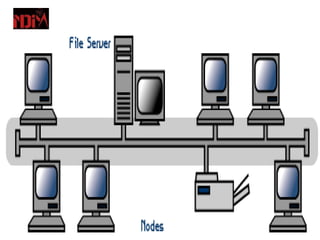
Linear or bus topology

• Consists of a main cable, known as
  backbone cable, with a terminator at
  each end .
• All nodes (file server, workstations,
  and peripherals) are connected to the
  cable.
• Ethernet and LocalTalk networks use
  bus topology.
Advantages of Bus Topology

• Easy to connect a computer or peripheral
  to a linear bus.
• Requires less cable length.
• Easy to extend.
• If one node of the N/W is faulty, the N/W
  can still remain working.
Disadvantages of Bus
                Topology
• Entire network shuts down if there is a
  break in the main cable.
• Terminators are required at both ends of
  the backbone cable.
• Difficult to identify the problem if the entire
  network shuts down.
• Not meant to be used as a stand-alone
  solution in a large building.
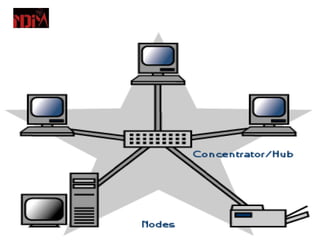
Star topology

• A star topology is designed with each node (file
  server, workstations, and peripherals) connected
  directly to a central network hub.
• Data on a star network passes through the hub
  before continuing to its destination.
• The hub manages and controls all functions of
  the network.
• It also acts as a repeater for the data flow.
Advantages of Star
                Topology
• Easy to install.
• No disruptions to the network other than
  connecting or removing devices.
• Easy to detect faults and to remove parts.
Disadvantages of Star
               Topology
• Requires more cable length than a bus
  topology.
• If the hub fails, nodes attached are
  disabled.
• More expensive than bus topology
  because of the cost of the hub.
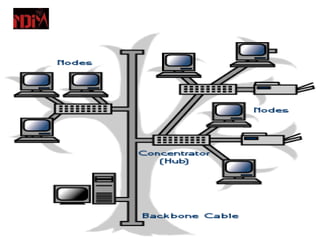
Tree Topology

• A tree topology combines characteristics
  of bus and star topologies.
• It consists of groups of star-configured
  workstations connected to a bus
  backbone cable.
• Tree topologies allow for the expansion of
  an existing network.
Advantages of a Tree
                Topology
• Point-to-point wiring for individual
  segments.
• Supported by several hardware and
  software venders.
Disadvantages of Tree
               Topology
• Overall length of each segment is limited
  by the type of cabling used.
• If the backbone line breaks, the entire
  segment goes down.
• More difficult to configure than other
  topologies.
Ring topology

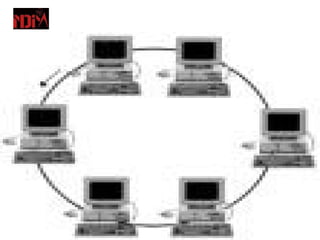
• Is a type of computer network configuration
  where each network computer and device are
  connect to each other forming A large circle.
• Data is divided into packets when transmitted.
• Packet is sent around the ring until it reaches
  its final destination.
Advantages of ring
                  topology
• Requires lesser amount of cable and there are
  not much of installation problems
• All stations have equal access
Disadvantages of ring
                   topology

• Failure of one computer may impact others
• Data transfer is slow
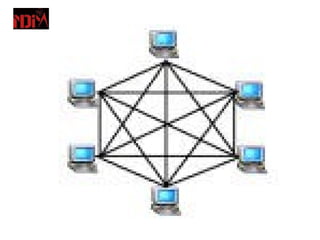
Mesh topology

• It requires that every terminal should be
  attached to each other.
• All the computers must have adequate
  number of interfaces for the connections
  to be made.
• Because of this requirement the
  installations is somewhat difficult.
• The length of cable required is quite
  higher as compared to other topologies.
Advantages of mesh
               topology
• Ease of troubleshooting.
• Data transfer is faster.
Disadvantages of mesh
              topology
• uses a lot of cabling.
• Complex
• Most expensive topology
Considerations When
           Choosing a Topology
• Money. A linear bus network may be the least
  expensive way to install a network; you do not
  have to purchase concentrators.
• Length of cable needed. The linear bus
  network uses shorter lengths of cable.
• Future growth. With a star topology, expanding
  a network is easily done by adding another
  concentrator.
• Cable type. The most common cable in schools
  is unshielded twisted pair, which is most often
  used with star topologies.
Transmission Technology

Two types of transmission technologies are
   there:
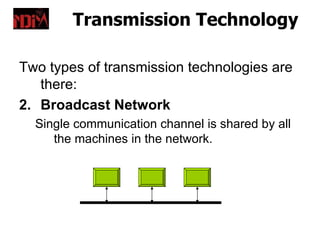
2. Broadcast Network
  Single communication channel is shared by all
     the machines in the network.
Transmission Technology

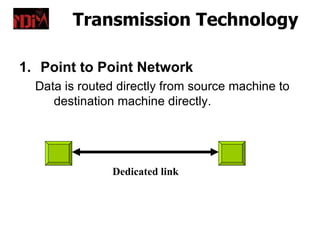
1. Point to Point Network
  Data is routed directly from source machine to
     destination machine directly.


               Dedicated link
Routing

•  When data is to be transmitted between two
   remote machines using intermediate machines,
   certain routing techniques have to be applied.
• The intermediate machines may be:
  1. Gateway
  2. Hub
  3. Router
  4. Repeater
  5. Bridge
Gateway
•   A gateway is a network point that acts as an
    entrance to another network.
•   Acts as a bridge between two networks so that
    data can be transferred between a number of
    computers.
•   In enterprises, the gateway is the computer that
    routes the traffic from a workstation to the outside
    network that is serving the Web pages.
•   In homes, the gateway is the ISP that connects
    the user to the internet.
•   For example, when you send an e-mail to a friend
    or when you log in to a Web site, there is a
    gateway that allows the connection take place.
Hub
•   A common connection point for devices in a
    network.
•   Hubs are commonly used to connect
    segments of a LAN.
•   A hub contains multiple ports.
•   When a packet arrives at one port, it is
    copied to the other ports so that all
    segments of the LAN can see all packets
Router
•   A router is a device that forwards data packets
    along networks.
•   A router is connected to at least two networks.
•   Routers are located at gateways.
•   Routers use headers and forwarding tables to
    determine the best path for forwarding the
    packets.
•   They use protocols to communicate with each
    other and configure the best route between any
    two hosts.
Switch
•   In networks, a device that filters and
    forwards packets between LAN segments.
•   LANs that use switches to join segments are
    called switched LANs.
Repeater
•   Repeaters are used in transmission systems
    to    regenerate   signals   distorted   by
    transmission loss.
•   Analog repeaters frequently can only amplify
    the signal while digital repeaters can
    reconstruct a signal to near its original
    quality.
Bridge
•   A device that connects two local-area
    networks (LANs), or two segments of the
    same LAN that use the same protocol is
    known as bridge.
More Concepts…
• Network protocols.
• Layering.
• Network/protocol architecture.
Network Protocols

• A communication protocol is a set of rules
  that specify the format and meaning of
  messages exchanged between computers
  across a network.
• A set of related protocols that are designed
  for compatibility are called protocol suite.
Human and Computer
                  Protocols
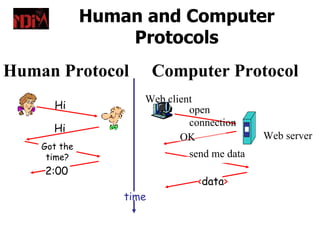
Human Protocol           Computer Protocol
                     Web client
      Hi                      open
                              connection
      Hi
                            OK               Web server
    Got the
     time?                    send me data
    2:00
                               <data>
                  time
Protocol Architecture
• Task of communication broken up into modules
• For example file transfer could use three
  modules
   – File transfer application
   – Communication service module
   – Network access module
Layers
• Layers are the different components that
  need to be designed/implemented when
  designing/implementing networks.
• Each layer responsible for a set of
  functions.
• Top layer relies on services provided by
  bottom layer.
• Layer makes it service available to higher
  layer through an interface.
Layering

• Building complex systems is hard!
   – Approach: “Divide and conquer”.
   – Split job into smaller jobs, or layers.
• Analogy to other fields.
   – Building a house: digging, foundation, framing, etc.
   – Car assembly line…
• Basic idea: each step dependent on the previous
  step but does not need to be aware of how the
  previous step was done.
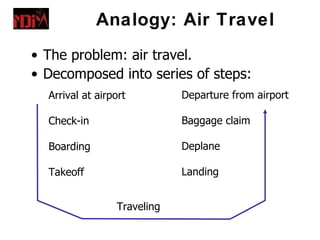
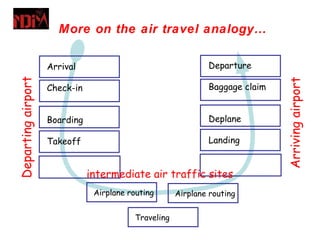
Analogy: Air Travel
• The problem: air travel.
• Decomposed into series of steps:
  Arrival at airport         Departure from airport

  Check-in                   Baggage claim

  Boarding                   Deplane

  Takeoff                    Landing


                 Traveling
More on the air travel analogy…

                    Arrival                                   Departure
Departing airport


                                                                              Arriving airport
                    Check-in                                  Baggage claim


                    Boarding                                  Deplane

                    Takeoff                                   Landing


                               intermediate air traffic sites
                                Airplane routing      Airplane routing


                                          Traveling
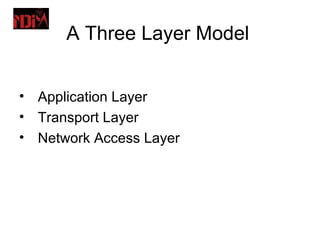
A Three Layer Model


• Application Layer
• Transport Layer
• Network Access Layer
Network Access Layer
• Exchange of data between the computer
  and the network
• Sending computer provides address of
  destination
• May invoke levels of service
• Dependent on type of network used (LAN,
  packet switched etc.)
Transport Layer
• Reliable data exchange
• Independent of network being used
• Independent of application
Application Layer
• Support for different user applications
• e.g. e-mail, file transfer
Layered Protocol Design
• Layering model is a solution to the problem
  of complexity in network protocols
• The model divides the network protocols into
  layers, each of which solves part of the
  network communication problem
  – Each layer has its own protocol!
• Each layer implements a service to the layer
  above
  – Relying on services provided by the layers
    below.
Network/Protocol Architecture
• Set of layers, what their functions are, the
  services each of them provide, and the
  interfaces between them.
• A.k.a, protocol architecture or protocol
  stack.
• Examples:
  – ISO-OSI 7 layer architecture.
  – TCP-IP architecture (Internet).
Protocol Data Units (PDU)
• At each layer, protocols are used to
  communicate.
• At the source, control information is added
  to user data at each layer, a.k.a.,
  encapsulation.
• At the receiver, control information is
  stripped off at each layer going up the
  stack, a.k.a., decapsulation.
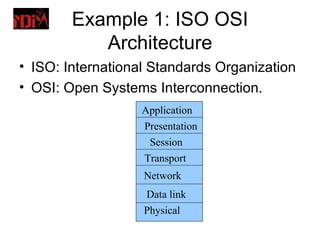
Example 1: ISO OSI
           Architecture
• ISO: International Standards Organization
• OSI: Open Systems Interconnection.
                   Application
                   Presentation
                    Session
                   Transport
                   Network
                   Data link
                   Physical
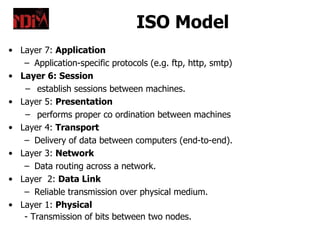
ISO Model
• Layer 7: Application
   – Application-specific protocols (e.g. ftp, http, smtp)
• Layer 6: Session
   − establish sessions between machines.
• Layer 5: Presentation
   − performs proper co ordination between machines
• Layer 4: Transport
   – Delivery of data between computers (end-to-end).
• Layer 3: Network
   – Data routing across a network.
• Layer 2: Data Link
   – Reliable transmission over physical medium.
• Layer 1: Physical
   - Transmission of bits between two nodes.
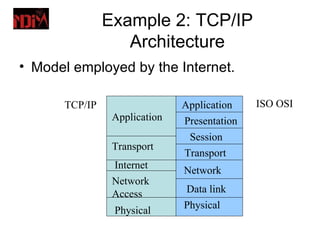
Example 2: TCP/IP
                  Architecture
• Model employed by the Internet.

      TCP/IP                  Application    ISO OSI
                Application   Presentation
                               Session
                Transport
                              Transport
                Internet      Network
                Network
                Access        Data link
                              Physical
                Physical
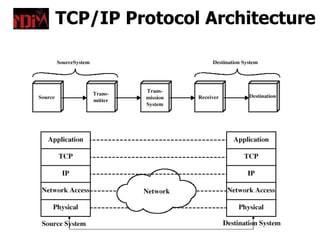
TCP/IP Protocol Architecture
Routing Technologies

•  Computer Networks may use the
   following routing technologies:
2. Circuit Switching
3. Packet Switching
4. Message Switching
Circuit Switching

•   A physical circuit is established between
    two machines.
•   Once the connection is established, the
    data transfer takes place and then the
    connection is released.
•   The data transfer rate is high but error
    prone.
Packet Switching

•   Data is divided into small, fixed size packets.
•   Each packet contains the address of destination.
•   All the intermediate machines inspect the address
    and route it to the right machine.
•   If any packet is missing, the destination machine can
    request the source machine to retransmit it.
Message Switching

•   Message as a whole is transmitted.
•   Each message contains the address of the
    destination.
•   Message switching N/W is “Store and Forward” N/W.
•   Once the message arrives at the intermediate
    machine, it is stored in it completely and transmitted
    when the line is free.

Unit2.2

  • 1.
  • 2.
    Computer Network A computernetwork is defined as the interconnection of 2 or more independent computers or/and peripherals.
  • 3.
    Network Source Destination
  • 4.
    Need of Networks –Communicate and collaborate – Share information – Share resources – Sharing computer files and disk space – Sharing high-quality printers – Access to common fax machines – Access to common modems – Multiple access to the Internet
  • 5.
    Classification of Networks –Local Area Networks (LANs) - a computer network covering a small geographic area, like a home, office, or group of buildings. Typically within 5-mile radius. – Metropolitan Area Networks (MANs)- are large computer networks usually spanning a city. (within 30 miles) – Wide-Area Networks (WANs) - any network whose communications links cross metropolitan, regional, or national boundaries.
  • 6.
    Network Topology The wayin which the computers are interconnected together is known as TOPOLOGY.
  • 7.
    Types of topologies •Physical topology • Logical topology
  • 8.
    Types of physicaltopologies • Bus/Linear • Star • Ring • Tree • Mesh
  • 9.
    Linear or bustopology • Consists of a main cable, known as backbone cable, with a terminator at each end . • All nodes (file server, workstations, and peripherals) are connected to the cable. • Ethernet and LocalTalk networks use bus topology.
  • 11.
    Advantages of BusTopology • Easy to connect a computer or peripheral to a linear bus. • Requires less cable length. • Easy to extend. • If one node of the N/W is faulty, the N/W can still remain working.
  • 12.
    Disadvantages of Bus Topology • Entire network shuts down if there is a break in the main cable. • Terminators are required at both ends of the backbone cable. • Difficult to identify the problem if the entire network shuts down. • Not meant to be used as a stand-alone solution in a large building.
  • 13.
    Star topology • Astar topology is designed with each node (file server, workstations, and peripherals) connected directly to a central network hub. • Data on a star network passes through the hub before continuing to its destination. • The hub manages and controls all functions of the network. • It also acts as a repeater for the data flow.
  • 15.
    Advantages of Star Topology • Easy to install. • No disruptions to the network other than connecting or removing devices. • Easy to detect faults and to remove parts.
  • 16.
    Disadvantages of Star Topology • Requires more cable length than a bus topology. • If the hub fails, nodes attached are disabled. • More expensive than bus topology because of the cost of the hub.
  • 17.
    Tree Topology • Atree topology combines characteristics of bus and star topologies. • It consists of groups of star-configured workstations connected to a bus backbone cable. • Tree topologies allow for the expansion of an existing network.
  • 19.
    Advantages of aTree Topology • Point-to-point wiring for individual segments. • Supported by several hardware and software venders.
  • 20.
    Disadvantages of Tree Topology • Overall length of each segment is limited by the type of cabling used. • If the backbone line breaks, the entire segment goes down. • More difficult to configure than other topologies.
  • 21.
    Ring topology • Isa type of computer network configuration where each network computer and device are connect to each other forming A large circle. • Data is divided into packets when transmitted. • Packet is sent around the ring until it reaches its final destination.
  • 23.
    Advantages of ring topology • Requires lesser amount of cable and there are not much of installation problems • All stations have equal access
  • 24.
    Disadvantages of ring topology • Failure of one computer may impact others • Data transfer is slow
  • 25.
    Mesh topology • Itrequires that every terminal should be attached to each other. • All the computers must have adequate number of interfaces for the connections to be made. • Because of this requirement the installations is somewhat difficult. • The length of cable required is quite higher as compared to other topologies.
  • 27.
    Advantages of mesh topology • Ease of troubleshooting. • Data transfer is faster.
  • 28.
    Disadvantages of mesh topology • uses a lot of cabling. • Complex • Most expensive topology
  • 29.
    Considerations When Choosing a Topology • Money. A linear bus network may be the least expensive way to install a network; you do not have to purchase concentrators. • Length of cable needed. The linear bus network uses shorter lengths of cable. • Future growth. With a star topology, expanding a network is easily done by adding another concentrator. • Cable type. The most common cable in schools is unshielded twisted pair, which is most often used with star topologies.
  • 30.
    Transmission Technology Two typesof transmission technologies are there: 2. Broadcast Network Single communication channel is shared by all the machines in the network.
  • 31.
    Transmission Technology 1. Pointto Point Network Data is routed directly from source machine to destination machine directly. Dedicated link
  • 32.
    Routing • Whendata is to be transmitted between two remote machines using intermediate machines, certain routing techniques have to be applied. • The intermediate machines may be: 1. Gateway 2. Hub 3. Router 4. Repeater 5. Bridge
  • 33.
    Gateway • A gateway is a network point that acts as an entrance to another network. • Acts as a bridge between two networks so that data can be transferred between a number of computers. • In enterprises, the gateway is the computer that routes the traffic from a workstation to the outside network that is serving the Web pages. • In homes, the gateway is the ISP that connects the user to the internet. • For example, when you send an e-mail to a friend or when you log in to a Web site, there is a gateway that allows the connection take place.
  • 34.
    Hub • A common connection point for devices in a network. • Hubs are commonly used to connect segments of a LAN. • A hub contains multiple ports. • When a packet arrives at one port, it is copied to the other ports so that all segments of the LAN can see all packets
  • 35.
    Router • A router is a device that forwards data packets along networks. • A router is connected to at least two networks. • Routers are located at gateways. • Routers use headers and forwarding tables to determine the best path for forwarding the packets. • They use protocols to communicate with each other and configure the best route between any two hosts.
  • 36.
    Switch • In networks, a device that filters and forwards packets between LAN segments. • LANs that use switches to join segments are called switched LANs.
  • 37.
    Repeater • Repeaters are used in transmission systems to regenerate signals distorted by transmission loss. • Analog repeaters frequently can only amplify the signal while digital repeaters can reconstruct a signal to near its original quality.
  • 38.
    Bridge • A device that connects two local-area networks (LANs), or two segments of the same LAN that use the same protocol is known as bridge.
  • 39.
    More Concepts… • Networkprotocols. • Layering. • Network/protocol architecture.
  • 40.
    Network Protocols • Acommunication protocol is a set of rules that specify the format and meaning of messages exchanged between computers across a network. • A set of related protocols that are designed for compatibility are called protocol suite.
  • 41.
    Human and Computer Protocols Human Protocol Computer Protocol Web client Hi open connection Hi OK Web server Got the time? send me data 2:00 <data> time
  • 42.
    Protocol Architecture • Taskof communication broken up into modules • For example file transfer could use three modules – File transfer application – Communication service module – Network access module
  • 43.
    Layers • Layers arethe different components that need to be designed/implemented when designing/implementing networks. • Each layer responsible for a set of functions. • Top layer relies on services provided by bottom layer. • Layer makes it service available to higher layer through an interface.
  • 44.
    Layering • Building complexsystems is hard! – Approach: “Divide and conquer”. – Split job into smaller jobs, or layers. • Analogy to other fields. – Building a house: digging, foundation, framing, etc. – Car assembly line… • Basic idea: each step dependent on the previous step but does not need to be aware of how the previous step was done.
  • 45.
    Analogy: Air Travel •The problem: air travel. • Decomposed into series of steps: Arrival at airport Departure from airport Check-in Baggage claim Boarding Deplane Takeoff Landing Traveling
  • 46.
    More on theair travel analogy… Arrival Departure Departing airport Arriving airport Check-in Baggage claim Boarding Deplane Takeoff Landing intermediate air traffic sites Airplane routing Airplane routing Traveling
  • 47.
    A Three LayerModel • Application Layer • Transport Layer • Network Access Layer
  • 48.
    Network Access Layer •Exchange of data between the computer and the network • Sending computer provides address of destination • May invoke levels of service • Dependent on type of network used (LAN, packet switched etc.)
  • 49.
    Transport Layer • Reliabledata exchange • Independent of network being used • Independent of application
  • 50.
    Application Layer • Supportfor different user applications • e.g. e-mail, file transfer
  • 51.
    Layered Protocol Design •Layering model is a solution to the problem of complexity in network protocols • The model divides the network protocols into layers, each of which solves part of the network communication problem – Each layer has its own protocol! • Each layer implements a service to the layer above – Relying on services provided by the layers below.
  • 52.
    Network/Protocol Architecture • Setof layers, what their functions are, the services each of them provide, and the interfaces between them. • A.k.a, protocol architecture or protocol stack. • Examples: – ISO-OSI 7 layer architecture. – TCP-IP architecture (Internet).
  • 53.
    Protocol Data Units(PDU) • At each layer, protocols are used to communicate. • At the source, control information is added to user data at each layer, a.k.a., encapsulation. • At the receiver, control information is stripped off at each layer going up the stack, a.k.a., decapsulation.
  • 54.
    Example 1: ISOOSI Architecture • ISO: International Standards Organization • OSI: Open Systems Interconnection. Application Presentation Session Transport Network Data link Physical
  • 55.
    ISO Model • Layer7: Application – Application-specific protocols (e.g. ftp, http, smtp) • Layer 6: Session − establish sessions between machines. • Layer 5: Presentation − performs proper co ordination between machines • Layer 4: Transport – Delivery of data between computers (end-to-end). • Layer 3: Network – Data routing across a network. • Layer 2: Data Link – Reliable transmission over physical medium. • Layer 1: Physical - Transmission of bits between two nodes.
  • 56.
    Example 2: TCP/IP Architecture • Model employed by the Internet. TCP/IP Application ISO OSI Application Presentation Session Transport Transport Internet Network Network Access Data link Physical Physical
  • 57.
  • 58.
    Routing Technologies • Computer Networks may use the following routing technologies: 2. Circuit Switching 3. Packet Switching 4. Message Switching
  • 59.
    Circuit Switching • A physical circuit is established between two machines. • Once the connection is established, the data transfer takes place and then the connection is released. • The data transfer rate is high but error prone.
  • 60.
    Packet Switching • Data is divided into small, fixed size packets. • Each packet contains the address of destination. • All the intermediate machines inspect the address and route it to the right machine. • If any packet is missing, the destination machine can request the source machine to retransmit it.
  • 61.
    Message Switching • Message as a whole is transmitted. • Each message contains the address of the destination. • Message switching N/W is “Store and Forward” N/W. • Once the message arrives at the intermediate machine, it is stored in it completely and transmitted when the line is free.