ALGORITHMS AND FLOW
CHARTS
By
Chinnu Edwin A
M.Tech. CS
Introduction
A typical programming task can be divided into two phases:
Problem solving phase
• produce an ordered sequence of steps that describe solution of
problem
• This sequence of steps is called an algorithm
Implementation phase
•to implement the program in some programming language
STEPS IN PROBLEM SOLVING
• First produce a general algorithm (one can use pseudocode)
• Refine the algorithm successively to get step by step detailed
algorithm that is very close to a computer language.
• Pseudocode is an artificial and informal language that helps
programmers develop algorithms.
• Pseudocode is very similar to everyday English.
Pseudocode Example
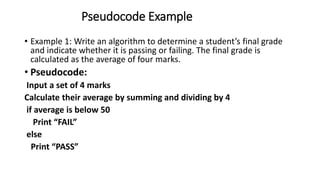
• Example 1: Write an algorithm to determine a student’s final grade
and indicate whether it is passing or failing. The final grade is
calculated as the average of four marks.
• Pseudocode:
Input a set of 4 marks
Calculate their average by summing and dividing by 4
if average is below 50
Print “FAIL”
else
Print “PASS”
ALGORITHMS
 Definition
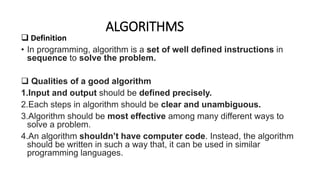
• In programming, algorithm is a set of well defined instructions in
sequence to solve the problem.
 Qualities of a good algorithm
1.Input and output should be defined precisely.
2.Each steps in algorithm should be clear and unambiguous.
3.Algorithm should be most effective among many different ways to
solve a problem.
4.An algorithm shouldn’t have computer code. Instead, the algorithm
should be written in such a way that, it can be used in similar
programming languages.
Examples Of Algorithms
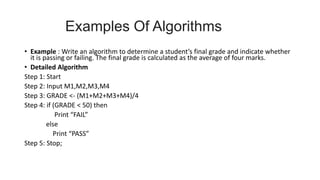
• Example : Write an algorithm to determine a student’s final grade and indicate whether
it is passing or failing. The final grade is calculated as the average of four marks.
• Detailed Algorithm
Step 1: Start
Step 2: Input M1,M2,M3,M4
Step 3: GRADE <- (M1+M2+M3+M4)/4
Step 4: if (GRADE < 50) then
Print “FAIL”
else
Print “PASS”
Step 5: Stop;
Examples Of Algorithms
(contd..)
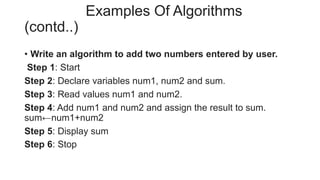
• Write an algorithm to add two numbers entered by user.
Step 1: Start
Step 2: Declare variables num1, num2 and sum.
Step 3: Read values num1 and num2.
Step 4: Add num1 and num2 and assign the result to sum.
sum←num1+num2
Step 5: Display sum
Step 6: Stop
Advantages of Algorithm
1.It is a step-wise representation of a solution to a given problem,
which makes it easy to understand.
2.An algorithm uses a definite procedure.
3.It is not dependent on any programming language, so it is
easy to understand for anyone even without programming
knowledge.
4.Every step in an algorithm has its own logical sequence so it
is easy to debug.
5.By using algorithm, the problem is broken down into smaller
pieces or steps hence, it is easier for programmer to
convert it into an actual program
Disadvantages of Algorithm
1.Writing algorithm takes a long time.
2.An Algorithm is not a computer program, it is rather a concept
of how a program should be.
FLOWCHART
• A flowchart is a type of diagram that represents an
algorithm, workflow or process
• The flowchart shows the steps as boxes of various kinds, and
their order by connecting the boxes with arrows.
• Flowcharts are used in analyzing, designing, documenting
or managing a process or program in various fields.
FLOWCHART SYMBOLS
• Flowcharts use special shapes to represent different types of
actions or steps in a process.
• Lines and arrows show the sequence of the steps, and the
relationships among them.
• These are known as flowchart symbols.
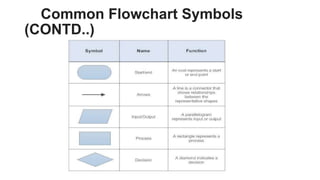
Common Flowchart Symbols
• Rectangle Shape – Represents a process
• Oval or Pill Shape – Represents the start or end
• Diamond Shape – Represents a decision
• Parallelogram – Represents input/output
Common Flowchart Symbols
(CONTD..)
Advantages of Flowchart
1.The Flowchart is an excellent way of communicating the logic of
a program.
2.It is easy and efficient to analyze problem using flowchart.
3.During program development cycle, the flowchart plays the role of
a guide or a blueprint which makes program development
process easier.
4.After successful development of a program, it needs continuous
timely maintenance during the course of its operation. The flowchart
makes program or system maintenance easier.
5.It helps the programmer to write the program code.
6.It is easy to convert the flowchart into any programming
language code as it does not use any specific programming
language concept.
Disadvantages of flowchart
1.The flowchart can be complex when the logic of a program is quite
complicated.
2.Drawing flowchart is a time-consuming task.
3.Difficult to alter the flowchart. Sometimes, the designer needs to
redraw the complete flowchart to change the logic of the flowchart or
to alter the flowchart.
4.Since it uses special sets of symbols for every action, it is quite a
tedious task to develop a flowchart as it requires special tools to
draw the necessary symbols.
5.In the case of a complex flowchart, other programmers might have
a difficult time understanding the logic and process of the
flowchart.
6.It is just a visualization of a program, it cannot function like an
actual program
Examples
Write a pseudocode, an algorithm and draw a flowchart that will read
the radius of a circle and calculate its area.
Pseudocode
• Input the radius of circle , r
• Calculate the Area by using the formula , Area= 3.14 * r *r
• Print Area
Examples (contd..)
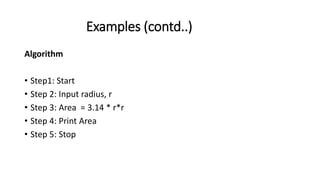
Algorithm
• Step1: Start
• Step 2: Input radius, r
• Step 3: Area = 3.14 * r*r
• Step 4: Print Area
• Step 5: Stop
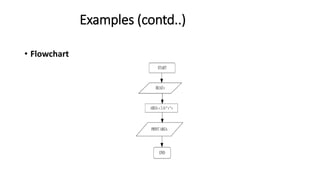
Examples (contd..)
• Flowchart
Algorithms and flow charts

Algorithms and flow charts

  • 1.
  • 2.
    Introduction A typical programmingtask can be divided into two phases: Problem solving phase • produce an ordered sequence of steps that describe solution of problem • This sequence of steps is called an algorithm Implementation phase •to implement the program in some programming language
  • 3.
    STEPS IN PROBLEMSOLVING • First produce a general algorithm (one can use pseudocode) • Refine the algorithm successively to get step by step detailed algorithm that is very close to a computer language. • Pseudocode is an artificial and informal language that helps programmers develop algorithms. • Pseudocode is very similar to everyday English.
  • 4.
    Pseudocode Example • Example1: Write an algorithm to determine a student’s final grade and indicate whether it is passing or failing. The final grade is calculated as the average of four marks. • Pseudocode: Input a set of 4 marks Calculate their average by summing and dividing by 4 if average is below 50 Print “FAIL” else Print “PASS”
  • 5.
    ALGORITHMS  Definition • Inprogramming, algorithm is a set of well defined instructions in sequence to solve the problem.  Qualities of a good algorithm 1.Input and output should be defined precisely. 2.Each steps in algorithm should be clear and unambiguous. 3.Algorithm should be most effective among many different ways to solve a problem. 4.An algorithm shouldn’t have computer code. Instead, the algorithm should be written in such a way that, it can be used in similar programming languages.
  • 6.
    Examples Of Algorithms •Example : Write an algorithm to determine a student’s final grade and indicate whether it is passing or failing. The final grade is calculated as the average of four marks. • Detailed Algorithm Step 1: Start Step 2: Input M1,M2,M3,M4 Step 3: GRADE <- (M1+M2+M3+M4)/4 Step 4: if (GRADE < 50) then Print “FAIL” else Print “PASS” Step 5: Stop;
  • 7.
    Examples Of Algorithms (contd..) •Write an algorithm to add two numbers entered by user. Step 1: Start Step 2: Declare variables num1, num2 and sum. Step 3: Read values num1 and num2. Step 4: Add num1 and num2 and assign the result to sum. sum←num1+num2 Step 5: Display sum Step 6: Stop
  • 8.
    Advantages of Algorithm 1.Itis a step-wise representation of a solution to a given problem, which makes it easy to understand. 2.An algorithm uses a definite procedure. 3.It is not dependent on any programming language, so it is easy to understand for anyone even without programming knowledge. 4.Every step in an algorithm has its own logical sequence so it is easy to debug. 5.By using algorithm, the problem is broken down into smaller pieces or steps hence, it is easier for programmer to convert it into an actual program
  • 9.
    Disadvantages of Algorithm 1.Writingalgorithm takes a long time. 2.An Algorithm is not a computer program, it is rather a concept of how a program should be.
  • 10.
    FLOWCHART • A flowchartis a type of diagram that represents an algorithm, workflow or process • The flowchart shows the steps as boxes of various kinds, and their order by connecting the boxes with arrows. • Flowcharts are used in analyzing, designing, documenting or managing a process or program in various fields.
  • 11.
    FLOWCHART SYMBOLS • Flowchartsuse special shapes to represent different types of actions or steps in a process. • Lines and arrows show the sequence of the steps, and the relationships among them. • These are known as flowchart symbols.
  • 12.
    Common Flowchart Symbols •Rectangle Shape – Represents a process • Oval or Pill Shape – Represents the start or end • Diamond Shape – Represents a decision • Parallelogram – Represents input/output
  • 13.
  • 14.
    Advantages of Flowchart 1.TheFlowchart is an excellent way of communicating the logic of a program. 2.It is easy and efficient to analyze problem using flowchart. 3.During program development cycle, the flowchart plays the role of a guide or a blueprint which makes program development process easier. 4.After successful development of a program, it needs continuous timely maintenance during the course of its operation. The flowchart makes program or system maintenance easier. 5.It helps the programmer to write the program code. 6.It is easy to convert the flowchart into any programming language code as it does not use any specific programming language concept.
  • 15.
    Disadvantages of flowchart 1.Theflowchart can be complex when the logic of a program is quite complicated. 2.Drawing flowchart is a time-consuming task. 3.Difficult to alter the flowchart. Sometimes, the designer needs to redraw the complete flowchart to change the logic of the flowchart or to alter the flowchart. 4.Since it uses special sets of symbols for every action, it is quite a tedious task to develop a flowchart as it requires special tools to draw the necessary symbols. 5.In the case of a complex flowchart, other programmers might have a difficult time understanding the logic and process of the flowchart. 6.It is just a visualization of a program, it cannot function like an actual program
  • 16.
    Examples Write a pseudocode,an algorithm and draw a flowchart that will read the radius of a circle and calculate its area. Pseudocode • Input the radius of circle , r • Calculate the Area by using the formula , Area= 3.14 * r *r • Print Area
  • 17.
    Examples (contd..) Algorithm • Step1:Start • Step 2: Input radius, r • Step 3: Area = 3.14 * r*r • Step 4: Print Area • Step 5: Stop
  • 18.