ICT Training
(UNESCO Participation Program)
Processing of Library Materials
(Data entry, Barcode creation, Call No., Printing, Testing, &
Pasting)
Library Association of Bangladesh
Md. Zahid Hossain Shoeb
Deputy Librarian (Systems)
Independent University, Bangladesh
15 March 2015
What is a library?
Library materials
 A library's material is its collection.
 Library collection are accumulation of books
and other materials owned by a library ,
cataloged and arranged for ease of access
 Materials can include books, periodicals,
newspapers, manuscripts, films, maps,
documents, microform, CDs, cassettes,
videotapes, DVDs, Blu-ray Discs, e-books,
audiobooks, databases, and other formats.
Processing of library materials
 Processing is a series of tasks or operations
 Before items can be shelved and then
circulated from the library, they need to be
physically prepared
 Library materials go through processing so that
they can be located, used, and returned to the
library from which they originated.
 Each item in the library must go through
physical processing
Processing includes mainly
 Accession numbers
 Circulation cards, pockets, date due slips
 Plastic covers, laminates, or cases to protect
materials
 Data entry
 Barcodes
 Detection strips
 Property stamps
Data entry
 Data entry is to enter or update data into a
computer system database, often from paper
documents using a keyboard, optical scanner, or
data recorder
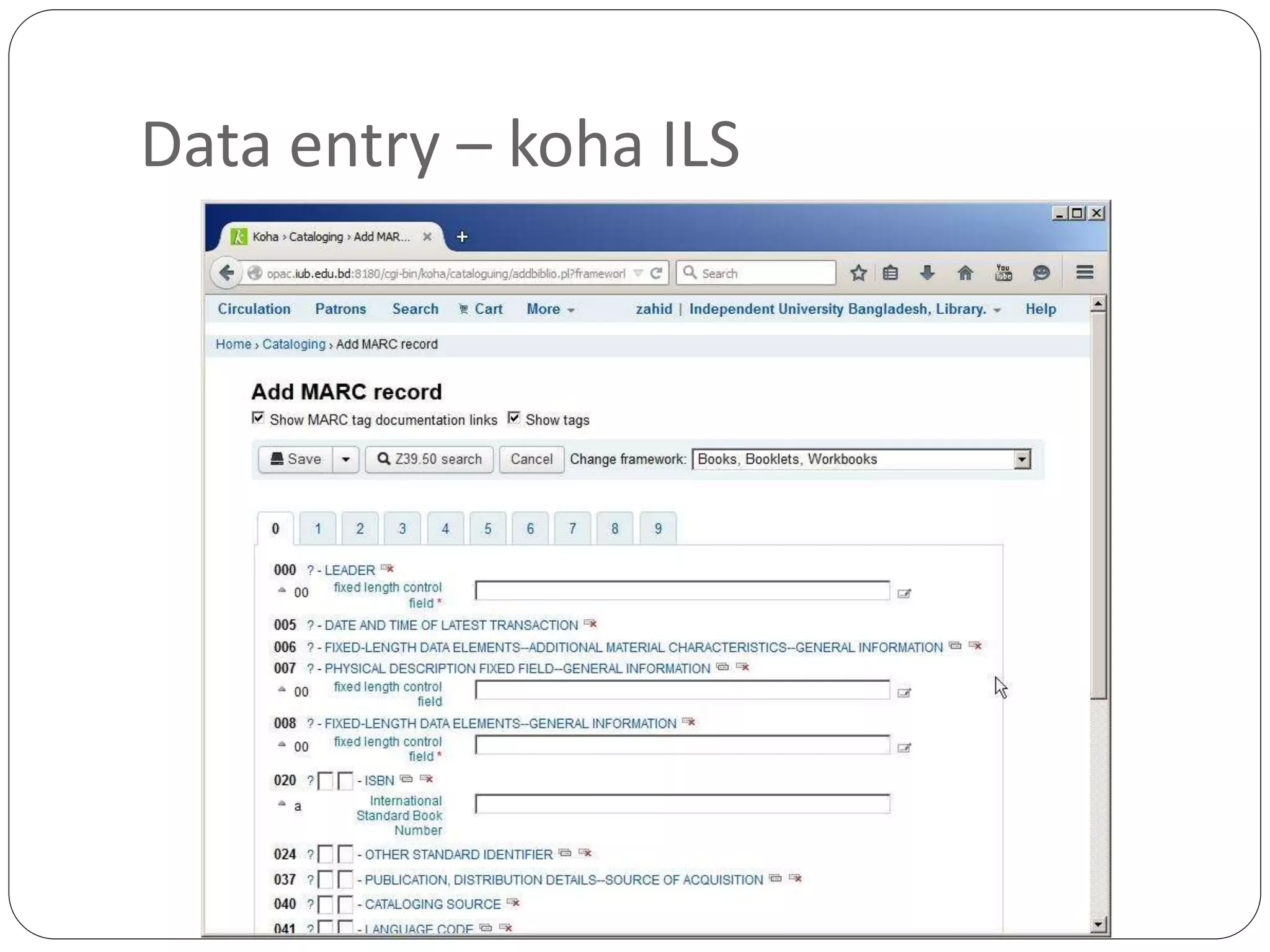
 At library bibliographic description is entered in
suitable database; Data is required for acquisition,
circulation, cataloguing, patron, report etc.
 Additional information related to library user
 Standard is preferred for bibliographic description
 Think about data interoperability, data exchange,
data migration, sustainability
Data entry – koha ILS
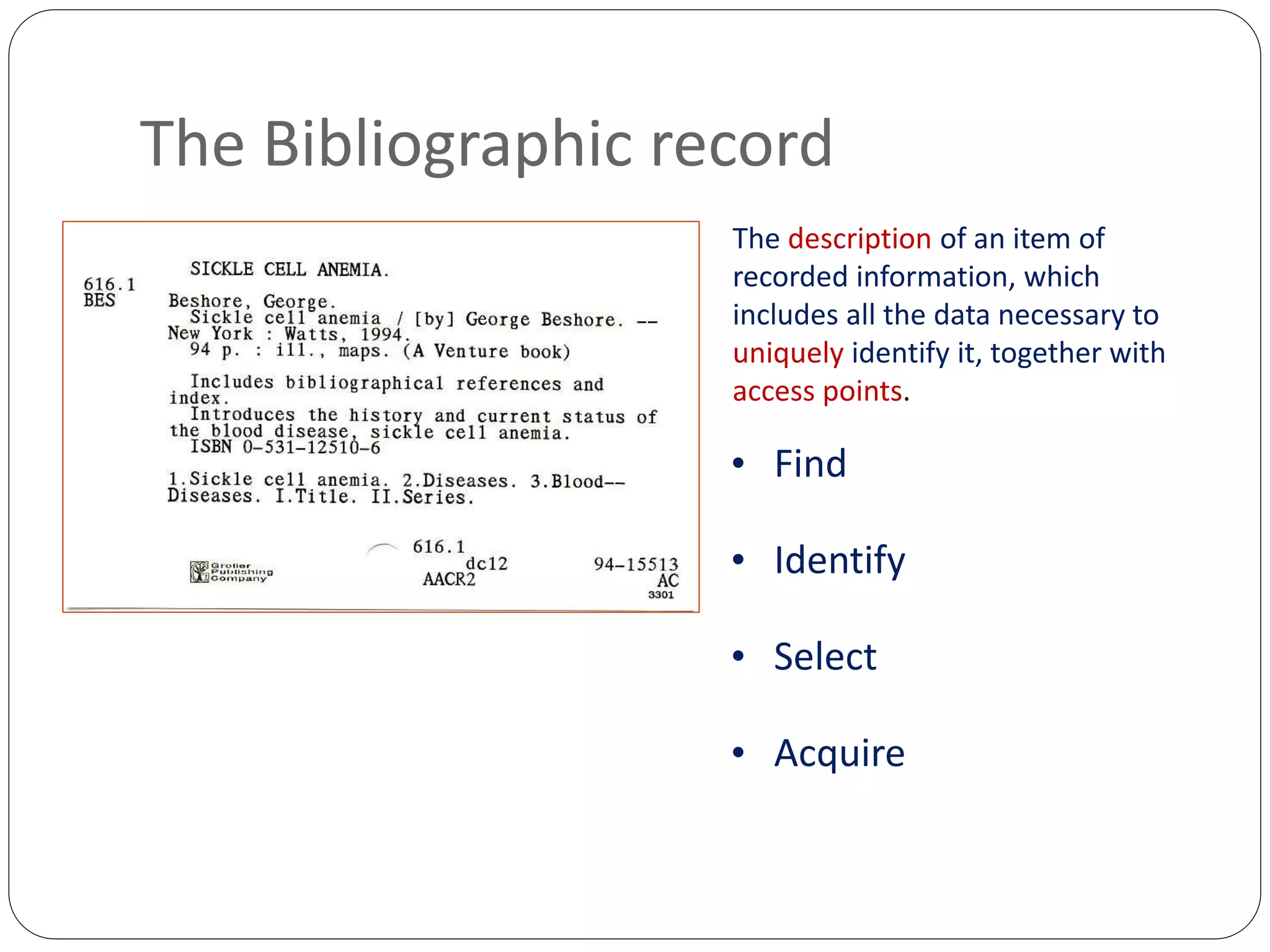
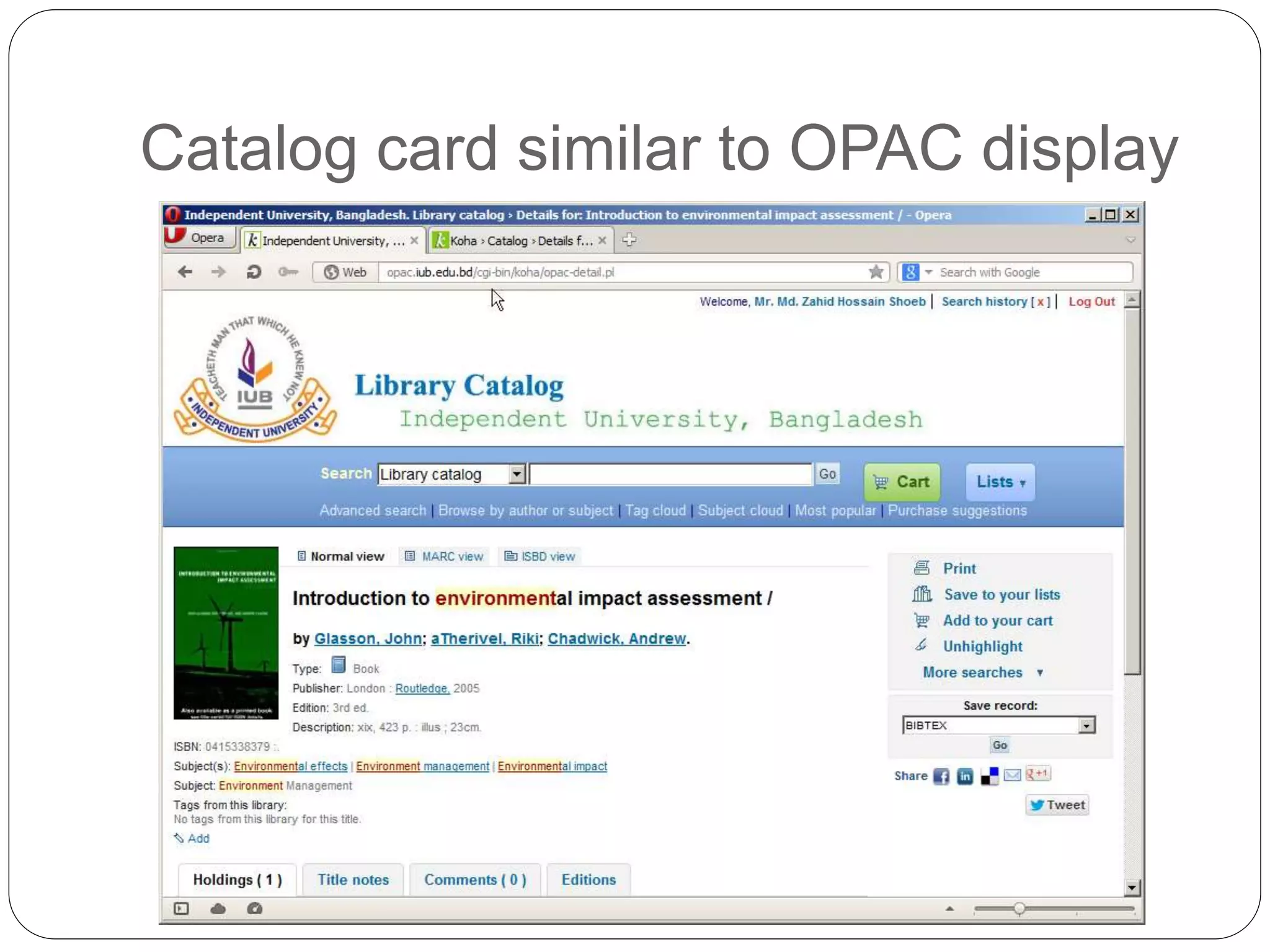
The Bibliographic record
The description of an item of
recorded information, which
includes all the data necessary to
uniquely identify it, together with
access points.
• Find
• Identify
• Select
• Acquire
Catalog card similar to OPAC display
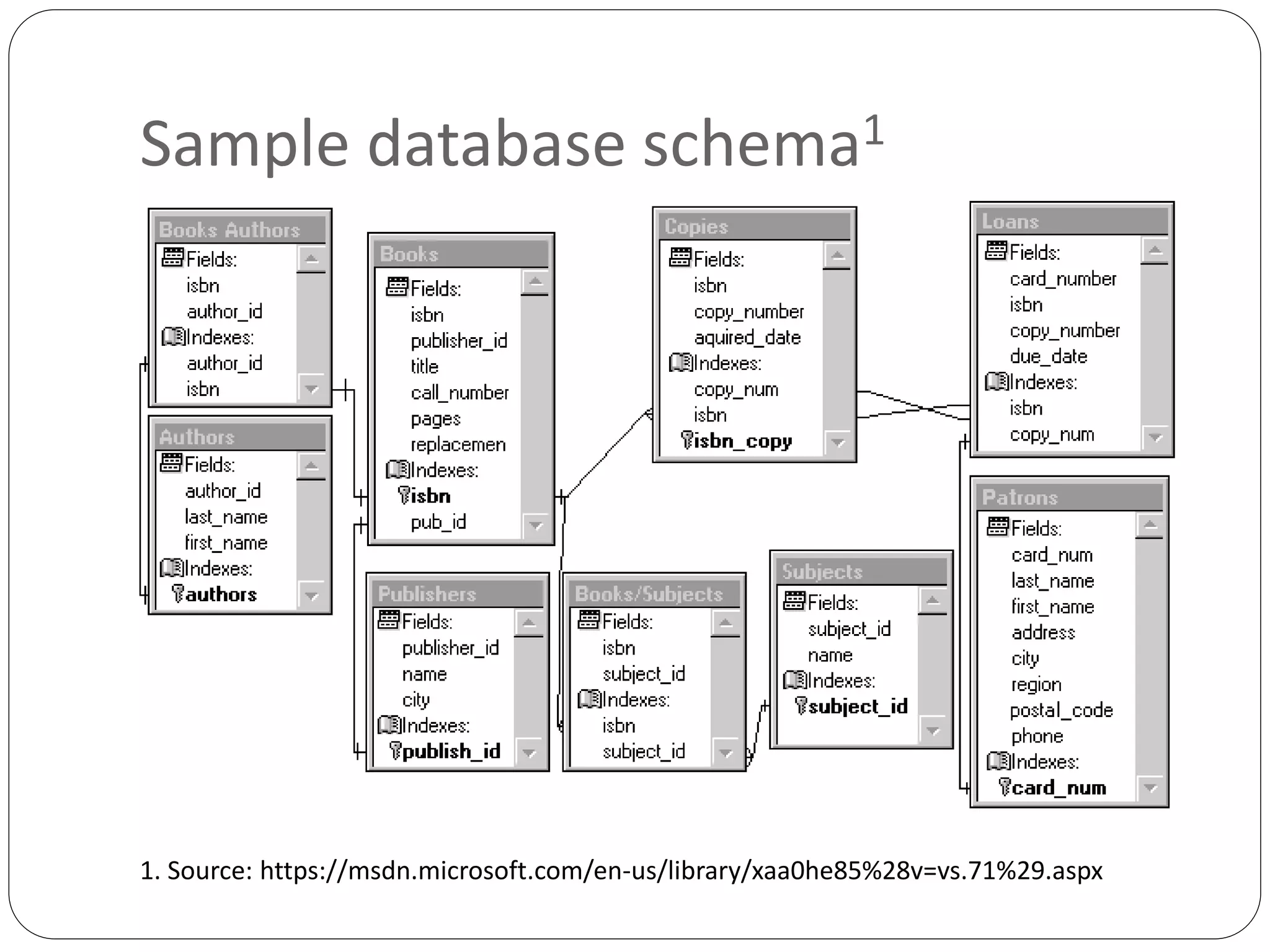
Sample database schema1
1. Source: https://msdn.microsoft.com/en-us/library/xaa0he85%28v=vs.71%29.aspx
Barcode creation
 A barcode is an optical machine-readable representation of
data relating to the object to which it is attached. A barcode
reader is an electronic device for reading printed barcodes.2
 Barcodes provide a unique accession number for an item.
 Barcode information comes from catalog data of database
 Free barcode fonts are available
 Barcode may be created by using integrated report of
database software or third party report software
 For ILS (Integrated Library System) barcode is created
through respective module
2. Source: http://en.wikipedia.org/wiki/Barcode
Barcode creation
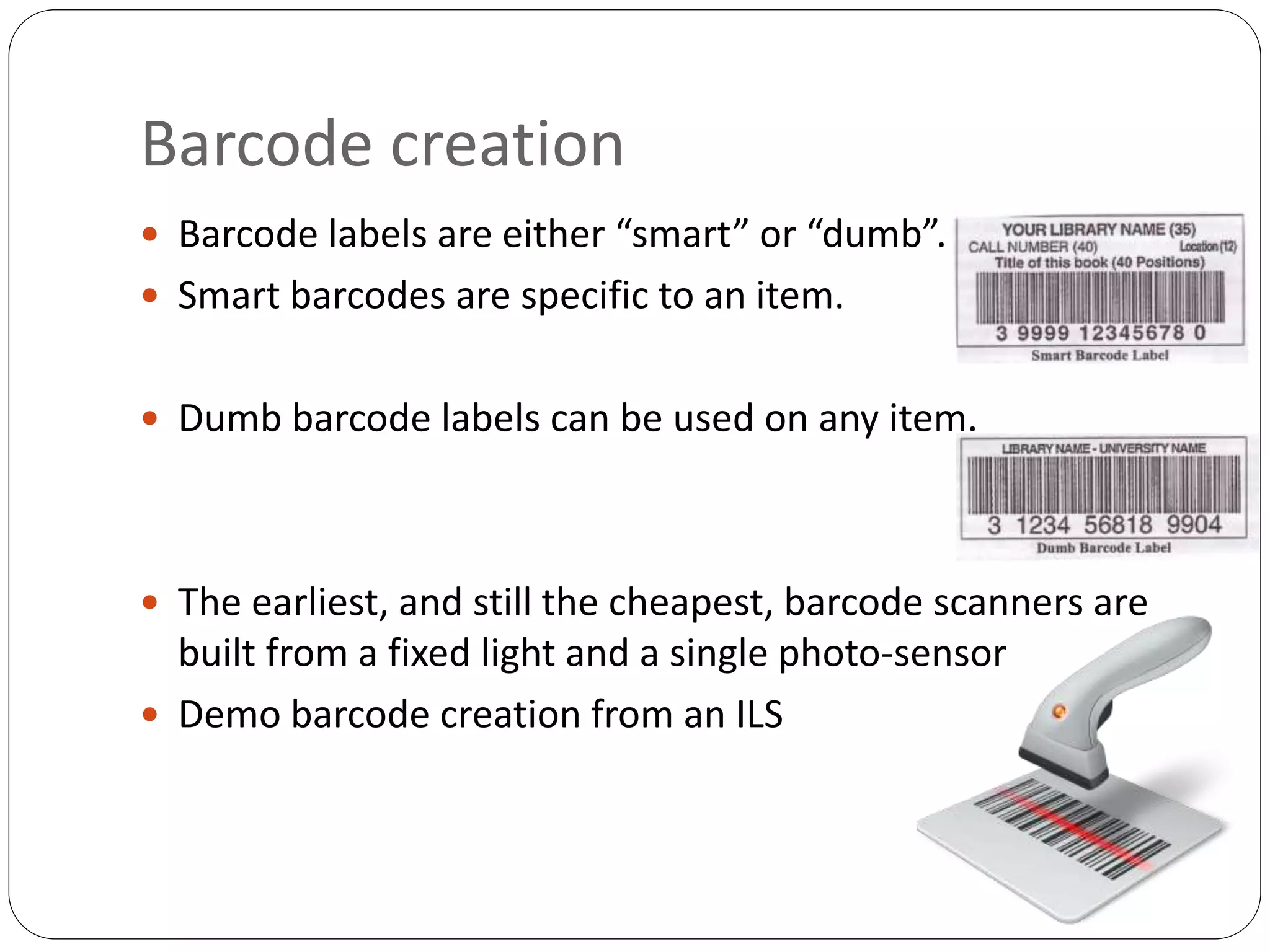
 Barcode labels are either “smart” or “dumb”.
 Smart barcodes are specific to an item.
 Dumb barcode labels can be used on any item.
 The earliest, and still the cheapest, barcode scanners are
built from a fixed light and a single photo-sensor
 Demo barcode creation from an ILS
Call number
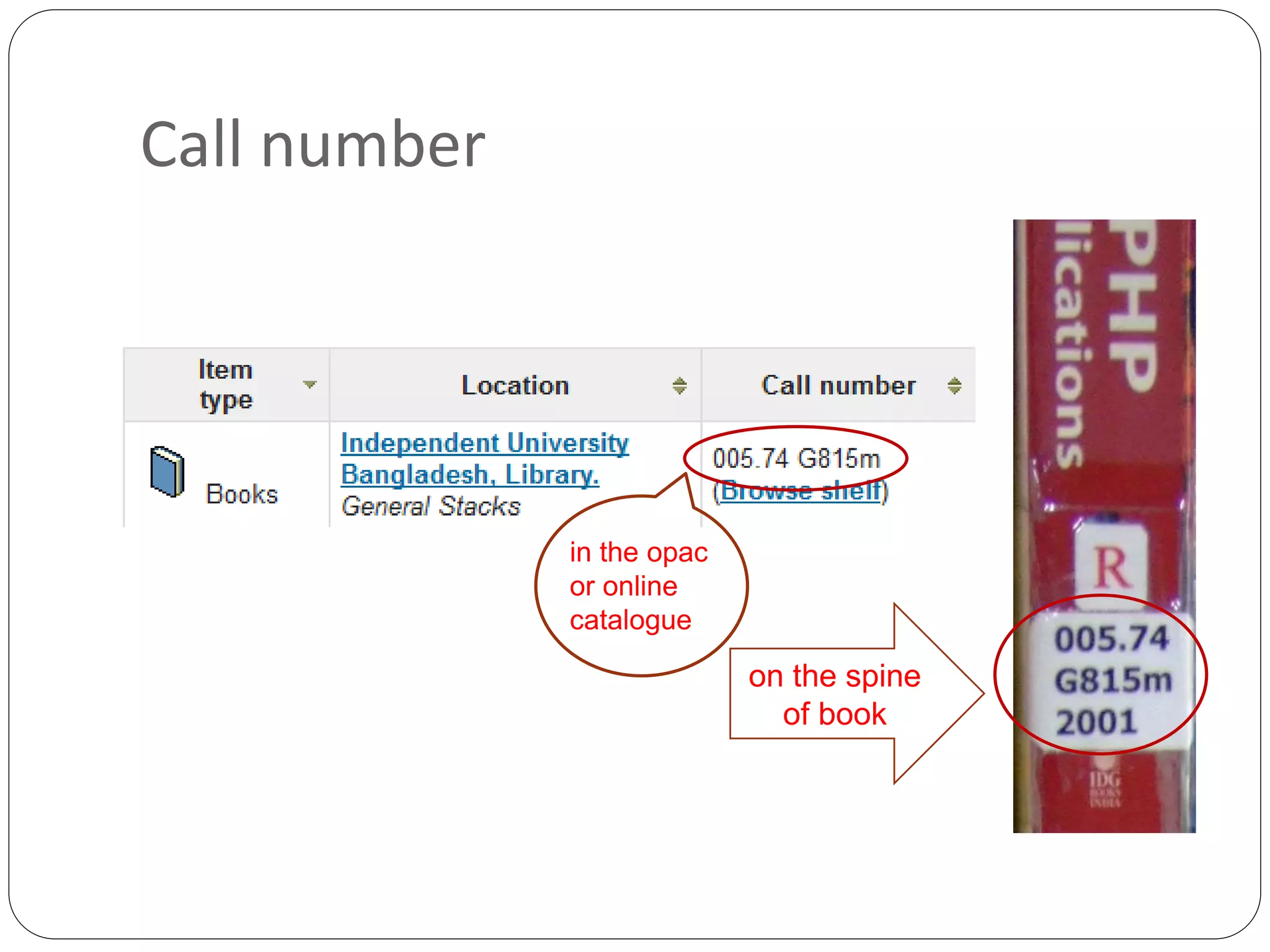
 A call number is a group of numbers and/or letters put
together to tell you where in the library to find your
book.
 Books (as well as journals and any materials that
accompany books) are arranged on the shelf by call
numbers.
 The call number is a unique identifier and is created
using the Dewey Decimal Classification (DDC), or
Dewey Decimal System; LC and UDC are also in
practice in Bangladesh
 The rationale behind this alphanumeric system is to
classify books by subject both broadly and specifically.
Call number
in the opac
or online
catalogue
on the spine
of book
Barcode printing, tasting & pasting
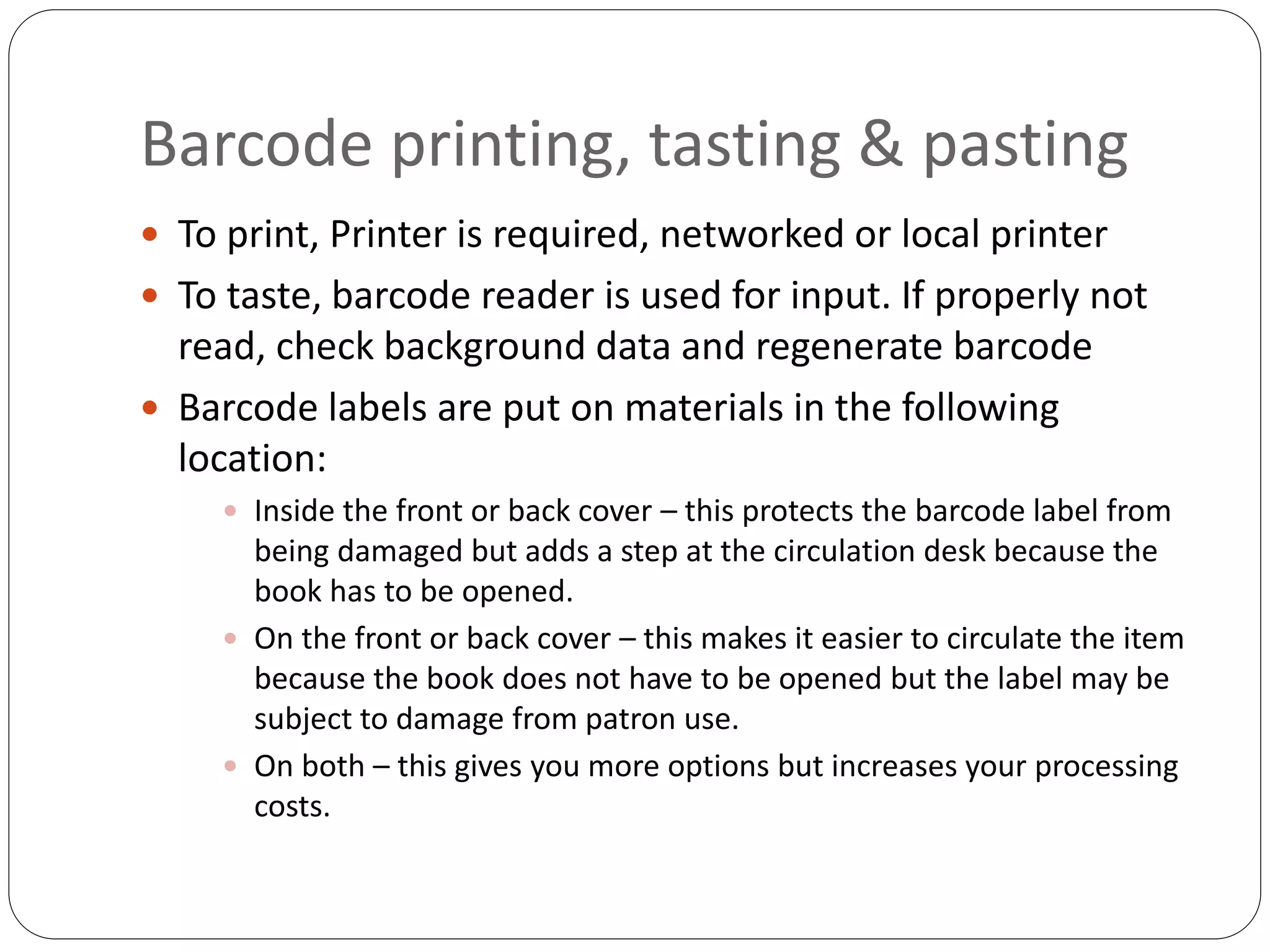
 To print, Printer is required, networked or local printer
 To taste, barcode reader is used for input. If properly not
read, check background data and regenerate barcode
 Barcode labels are put on materials in the following
location:
 Inside the front or back cover – this protects the barcode label from
being damaged but adds a step at the circulation desk because the
book has to be opened.
 On the front or back cover – this makes it easier to circulate the item
because the book does not have to be opened but the label may be
subject to damage from patron use.
 On both – this gives you more options but increases your processing
costs.
Finalize the process
 The processing steps will certainly vary by type of
library and within a library different types of material
may be processed in different ways.
 When all processing steps are completed, materials
are interfiled on a book cart, separated by department
or area, and set out for shelving.
Processing of Library Materials

Processing of Library Materials

  • 1.
    ICT Training (UNESCO ParticipationProgram) Processing of Library Materials (Data entry, Barcode creation, Call No., Printing, Testing, & Pasting) Library Association of Bangladesh Md. Zahid Hossain Shoeb Deputy Librarian (Systems) Independent University, Bangladesh 15 March 2015
  • 2.
    What is alibrary?
  • 3.
    Library materials  Alibrary's material is its collection.  Library collection are accumulation of books and other materials owned by a library , cataloged and arranged for ease of access  Materials can include books, periodicals, newspapers, manuscripts, films, maps, documents, microform, CDs, cassettes, videotapes, DVDs, Blu-ray Discs, e-books, audiobooks, databases, and other formats.
  • 4.
    Processing of librarymaterials  Processing is a series of tasks or operations  Before items can be shelved and then circulated from the library, they need to be physically prepared  Library materials go through processing so that they can be located, used, and returned to the library from which they originated.  Each item in the library must go through physical processing
  • 5.
    Processing includes mainly Accession numbers  Circulation cards, pockets, date due slips  Plastic covers, laminates, or cases to protect materials  Data entry  Barcodes  Detection strips  Property stamps
  • 6.
    Data entry  Dataentry is to enter or update data into a computer system database, often from paper documents using a keyboard, optical scanner, or data recorder  At library bibliographic description is entered in suitable database; Data is required for acquisition, circulation, cataloguing, patron, report etc.  Additional information related to library user  Standard is preferred for bibliographic description  Think about data interoperability, data exchange, data migration, sustainability
  • 7.
  • 8.
    The Bibliographic record Thedescription of an item of recorded information, which includes all the data necessary to uniquely identify it, together with access points. • Find • Identify • Select • Acquire
  • 9.
    Catalog card similarto OPAC display
  • 10.
    Sample database schema1 1.Source: https://msdn.microsoft.com/en-us/library/xaa0he85%28v=vs.71%29.aspx
  • 11.
    Barcode creation  Abarcode is an optical machine-readable representation of data relating to the object to which it is attached. A barcode reader is an electronic device for reading printed barcodes.2  Barcodes provide a unique accession number for an item.  Barcode information comes from catalog data of database  Free barcode fonts are available  Barcode may be created by using integrated report of database software or third party report software  For ILS (Integrated Library System) barcode is created through respective module 2. Source: http://en.wikipedia.org/wiki/Barcode
  • 12.
    Barcode creation  Barcodelabels are either “smart” or “dumb”.  Smart barcodes are specific to an item.  Dumb barcode labels can be used on any item.  The earliest, and still the cheapest, barcode scanners are built from a fixed light and a single photo-sensor  Demo barcode creation from an ILS
  • 13.
    Call number  Acall number is a group of numbers and/or letters put together to tell you where in the library to find your book.  Books (as well as journals and any materials that accompany books) are arranged on the shelf by call numbers.  The call number is a unique identifier and is created using the Dewey Decimal Classification (DDC), or Dewey Decimal System; LC and UDC are also in practice in Bangladesh  The rationale behind this alphanumeric system is to classify books by subject both broadly and specifically.
  • 14.
    Call number in theopac or online catalogue on the spine of book
  • 15.
    Barcode printing, tasting& pasting  To print, Printer is required, networked or local printer  To taste, barcode reader is used for input. If properly not read, check background data and regenerate barcode  Barcode labels are put on materials in the following location:  Inside the front or back cover – this protects the barcode label from being damaged but adds a step at the circulation desk because the book has to be opened.  On the front or back cover – this makes it easier to circulate the item because the book does not have to be opened but the label may be subject to damage from patron use.  On both – this gives you more options but increases your processing costs.
  • 16.
    Finalize the process The processing steps will certainly vary by type of library and within a library different types of material may be processed in different ways.  When all processing steps are completed, materials are interfiled on a book cart, separated by department or area, and set out for shelving.