CASE STUDY ON
BAR CODE READER 1
BAR CODE READER
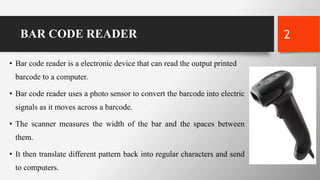
• Bar code reader is a electronic device that can read the output printed
barcode to a computer.
• Bar code reader uses a photo sensor to convert the barcode into electric
signals as it moves across a barcode.
• The scanner measures the width of the bar and the spaces between
them.
• It then translate different pattern back into regular characters and send
to computers.
2
BAR CODE
• It is a optical machine readable representation of data.
• It shows data about the object to which it is to be attached.
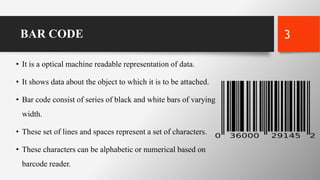
• Bar code consist of series of black and white bars of varying
width.
• These set of lines and spaces represent a set of characters.
• These characters can be alphabetic or numerical based on
barcode reader.
3
BAR CODE
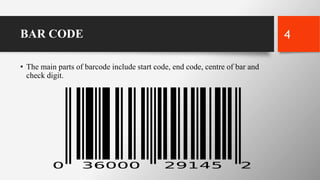
• The main parts of barcode include start code, end code, centre of bar and
check digit.
4
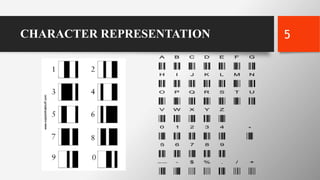
CHARACTER REPRESENTATION 5
BAR CODE : WORKING
• When the laser from barcode reader falls on barcode it actually passes through 95
evenly spaced column.
• Any of the column that does not reflects light (dark lines) are considered as binary
digit 1 by computer.
• Any of the column that reflects light (light lines) are considered as binary digit 0 by
computer.
• Every barcode starts with a special start character and stops with a special stop
character.
• This helps to detect whether barcode is being scanned forward or backward.
• The start code represent the coding scheme used in in barcode.
6
BAR CODE : WORKING
• Start code will be single digit for UPC (universal product coding) and 2 digit for
EAN (European article number).
• In UPC start code 0 shows grocery, 3 shows pharmaceuticals, 5 shows coupons.
• After start code we have 5 digit which represent the manufacturer. Each
manufacture has unique number.
• Then comes the centre of bar which is represented by 2 tall bars.
• Then followed by 5 digit number which represent the product.
• The final number shows the check digit which is used to check wheather the code
has been correctly used.
7
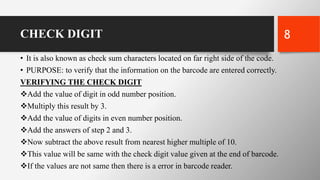
CHECK DIGIT
• It is also known as check sum characters located on far right side of the code.
• PURPOSE: to verify that the information on the barcode are entered correctly.
VERIFYING THE CHECK DIGIT
Add the value of digit in odd number position.
Multiply this result by 3.
Add the value of digits in even number position.
Add the answers of step 2 and 3.
Now subtract the above result from nearest higher multiple of 10.
This value will be same with the check digit value given at the end of barcode.
If the values are not same then there is a error in barcode reader.
8
ADVANTAGES
Cost efficient.
Accuracy of data input.
Labour and labour charge saving.
Rapid access to total production cost.
Represent unique identity of product
9
DISADVANTAGES
System failure may cost more delay.
Scratched or crumble barcode may cause problem.
Data must be coded in barcode.
10
APPLICATIONS
• Libraries- logging borrowers and books.
• Retails- speed up checkout and ordering.
• Office- recording transaction.
• Health- ensuring correct dosage and treatment.
• Industries and laboratories.
11

Bar code reader

  • 1.
    CASE STUDY ON BARCODE READER 1
  • 2.
    BAR CODE READER •Bar code reader is a electronic device that can read the output printed barcode to a computer. • Bar code reader uses a photo sensor to convert the barcode into electric signals as it moves across a barcode. • The scanner measures the width of the bar and the spaces between them. • It then translate different pattern back into regular characters and send to computers. 2
  • 3.
    BAR CODE • Itis a optical machine readable representation of data. • It shows data about the object to which it is to be attached. • Bar code consist of series of black and white bars of varying width. • These set of lines and spaces represent a set of characters. • These characters can be alphabetic or numerical based on barcode reader. 3
  • 4.
    BAR CODE • Themain parts of barcode include start code, end code, centre of bar and check digit. 4
  • 5.
  • 6.
    BAR CODE :WORKING • When the laser from barcode reader falls on barcode it actually passes through 95 evenly spaced column. • Any of the column that does not reflects light (dark lines) are considered as binary digit 1 by computer. • Any of the column that reflects light (light lines) are considered as binary digit 0 by computer. • Every barcode starts with a special start character and stops with a special stop character. • This helps to detect whether barcode is being scanned forward or backward. • The start code represent the coding scheme used in in barcode. 6
  • 7.
    BAR CODE :WORKING • Start code will be single digit for UPC (universal product coding) and 2 digit for EAN (European article number). • In UPC start code 0 shows grocery, 3 shows pharmaceuticals, 5 shows coupons. • After start code we have 5 digit which represent the manufacturer. Each manufacture has unique number. • Then comes the centre of bar which is represented by 2 tall bars. • Then followed by 5 digit number which represent the product. • The final number shows the check digit which is used to check wheather the code has been correctly used. 7
  • 8.
    CHECK DIGIT • Itis also known as check sum characters located on far right side of the code. • PURPOSE: to verify that the information on the barcode are entered correctly. VERIFYING THE CHECK DIGIT Add the value of digit in odd number position. Multiply this result by 3. Add the value of digits in even number position. Add the answers of step 2 and 3. Now subtract the above result from nearest higher multiple of 10. This value will be same with the check digit value given at the end of barcode. If the values are not same then there is a error in barcode reader. 8
  • 9.
    ADVANTAGES Cost efficient. Accuracy ofdata input. Labour and labour charge saving. Rapid access to total production cost. Represent unique identity of product 9
  • 10.
    DISADVANTAGES System failure maycost more delay. Scratched or crumble barcode may cause problem. Data must be coded in barcode. 10
  • 11.
    APPLICATIONS • Libraries- loggingborrowers and books. • Retails- speed up checkout and ordering. • Office- recording transaction. • Health- ensuring correct dosage and treatment. • Industries and laboratories. 11

Editor's Notes