



Kubernetes
#3. Security
조대협 (http://bcho.tistory.com)
Agenda
● Authentication & Authorization
● Network Policy
● Security Context
● Security best practice
Authentication &
Authorization
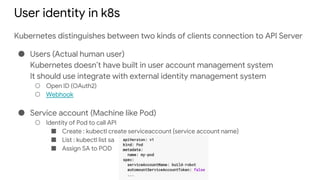
User identity in k8s
Kubernetes distinguishes between two kinds of clients connection to API Server
● Users (Actual human user)
Kubernetes doesn’t have built in user account management system
It should use integrate with external identity management system
○ Open ID (OAuth2)
○ Webhook
● Service account (Machine like Pod)
○ Identity of Pod to call API
■ Create : kubectl create serviceaccount {service account name}
■ List : kubectl list sa
■ Assign SA to POD
Authenticate
● User identity is used for authenticate request for API Server
● How to authenticate user request
○ Basic HTTP Auth
○ Access token via HTTP Header
○ Client cert
○ Custom made
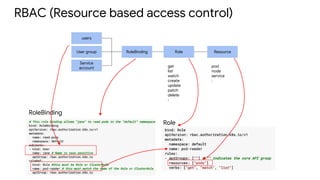
RBAC (Resource based access control)
Role ResourceRoleBinding
users
User group
Service
account get
list
watch
create
update
patch
delete
:
pod
node
service
:
Role
RoleBinding
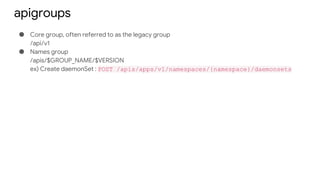
apigroups
● Core group, often referred to as the legacy group
/api/v1
● Names group
/apis/$GROUP_NAME/$VERSION
ex) Create daemonSet : POST /apis/apps/v1/namespaces/{namespace}/daemonsets
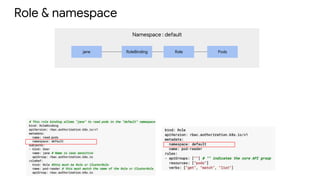
Namespace : default
Role & namespace
Role PodsRoleBindingjane
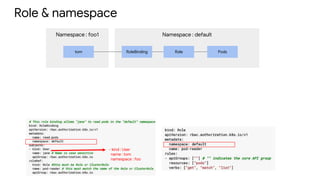
Namespace : foo1 Namespace : default
Role & namespace
Role PodsRoleBindingtom
- kind : User
name : tom
namespace : foo
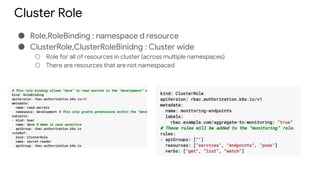
Cluster Role
● Role,RoleBinding : namespace d resource
● ClusterRole,ClusterRoleBinidng : Cluster wide
○ Role for all of resources in cluster (across multiple namespaces)
○ There are resources that are not namespaced
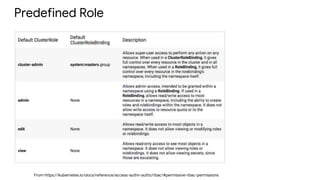
Predefined Role
From https://kubernetes.io/docs/reference/access-authn-authz/rbac/#permissive-rbac-permissions
Network Policy
Network Policy
● Network policy can control ingress & egress traffic for Pod
● It is based on
○ Label (label selector)
○ Protocol (TCP/UDP), Port
○ IP range (CIDR)
● Recipes
https://github.com/ahmetb/kubernetes-network-policy-recipes
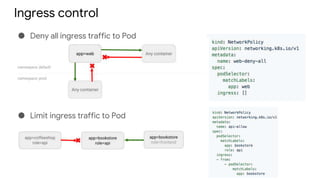
Ingress control
● Deny all ingress traffic to Pod
● Limit ingress traffic to Pod
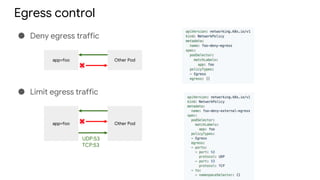
Egress control
● Deny egress traffic
app=foo Other Pod
● Limit egress traffic
app=foo Other Pod
UDP:53
TCP:53
Security Context
Security Context
● Security-related feature can be configured on Pod and its container
through-out security-Context properties
● It can
○ Specify the user under which the process in the container will run
○ Prevest the container from running as root
○ Privileged mode (full access to it’s node’s kernel)
○ Fine grained privileged mode (partial access for node’s kernel)
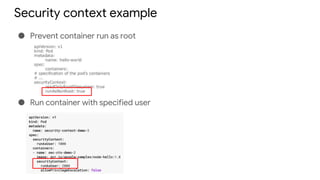
Security context example
● Prevent container run as root
● Run container with specified user
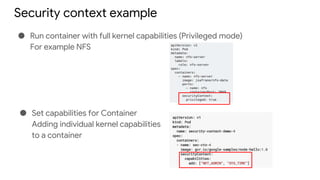
Security context example
● Run container with full kernel capabilities (Privileged mode)
For example NFS
● Set capabilities for Container
Adding individual kernel capabilities
to a container
Best practice
Security best practice
Reference
● https://kubernetes.io/blog/2016/08/security-best-practices-kubernetes-
deployment/
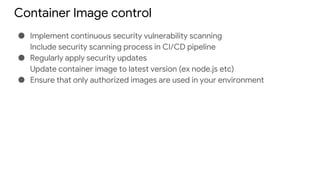
Container Image control
● Implement continuous security vulnerability scanning
Include security scanning process in CI/CD pipeline
● Regularly apply security updates
Update container image to latest version (ex node.js etc)
● Ensure that only authorized images are used in your environment
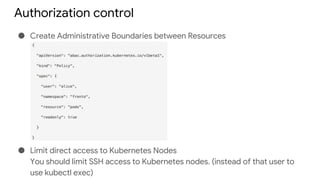
Authorization control
● Create Administrative Boundaries between Resources
● Limit direct access to Kubernetes Nodes
You should limit SSH access to Kubernetes nodes. (instead of that user to
use kubectl exec)
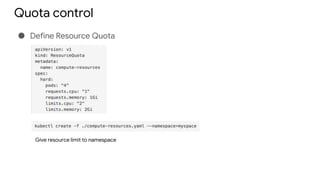
Quota control
● Define Resource Quota
Give resource limit to namespace
Network control
● Implement network segmentation
POST /apis/net.alpha.kubernetes.io/v1alpha1/namespaces/tenant-a/networkpolicys
{
"kind": "NetworkPolicy",
"metadata": {
"name": "pol1"
},
"spec": {
"allowIncoming": {
"from": [{
"pods": { "segment": "frontend" }
}],
"toPorts": [{
"port": 80,
"protocol": "TCP"
}]
},
"podSelector": {
"segment": "backend"
}
}
}
Security context for Pod
● SecurityContext->runAsNonRoot : Indicates that containers should run as non-root user
● SecurityContext->Capabilities : Controls the Linux capabilities assigned to the container.
● SecurityContext->readOnlyRootFilesystem : Controls whether a container will be able to write into
the root filesystem.
● PodSecurityContext->runAsNonRoot: Prevents running a container with ‘root’ user as part of the
pod
Log Cluster
● Build log system (ELK) and gather Log
End of document

Kubernetes #3 security

  • 1.
  • 2.
    Agenda ● Authentication &Authorization ● Network Policy ● Security Context ● Security best practice
  • 3.
  • 4.
    User identity ink8s Kubernetes distinguishes between two kinds of clients connection to API Server ● Users (Actual human user) Kubernetes doesn’t have built in user account management system It should use integrate with external identity management system ○ Open ID (OAuth2) ○ Webhook ● Service account (Machine like Pod) ○ Identity of Pod to call API ■ Create : kubectl create serviceaccount {service account name} ■ List : kubectl list sa ■ Assign SA to POD
  • 5.
    Authenticate ● User identityis used for authenticate request for API Server ● How to authenticate user request ○ Basic HTTP Auth ○ Access token via HTTP Header ○ Client cert ○ Custom made
  • 6.
    RBAC (Resource basedaccess control) Role ResourceRoleBinding users User group Service account get list watch create update patch delete : pod node service : Role RoleBinding
  • 7.
    apigroups ● Core group,often referred to as the legacy group /api/v1 ● Names group /apis/$GROUP_NAME/$VERSION ex) Create daemonSet : POST /apis/apps/v1/namespaces/{namespace}/daemonsets
  • 8.
    Namespace : default Role& namespace Role PodsRoleBindingjane
  • 9.
    Namespace : foo1Namespace : default Role & namespace Role PodsRoleBindingtom - kind : User name : tom namespace : foo
  • 10.
    Cluster Role ● Role,RoleBinding: namespace d resource ● ClusterRole,ClusterRoleBinidng : Cluster wide ○ Role for all of resources in cluster (across multiple namespaces) ○ There are resources that are not namespaced
  • 11.
  • 12.
  • 13.
    Network Policy ● Networkpolicy can control ingress & egress traffic for Pod ● It is based on ○ Label (label selector) ○ Protocol (TCP/UDP), Port ○ IP range (CIDR) ● Recipes https://github.com/ahmetb/kubernetes-network-policy-recipes
  • 14.
    Ingress control ● Denyall ingress traffic to Pod ● Limit ingress traffic to Pod
  • 15.
    Egress control ● Denyegress traffic app=foo Other Pod ● Limit egress traffic app=foo Other Pod UDP:53 TCP:53
  • 16.
  • 17.
    Security Context ● Security-relatedfeature can be configured on Pod and its container through-out security-Context properties ● It can ○ Specify the user under which the process in the container will run ○ Prevest the container from running as root ○ Privileged mode (full access to it’s node’s kernel) ○ Fine grained privileged mode (partial access for node’s kernel)
  • 18.
    Security context example ●Prevent container run as root ● Run container with specified user
  • 19.
    Security context example ●Run container with full kernel capabilities (Privileged mode) For example NFS ● Set capabilities for Container Adding individual kernel capabilities to a container
  • 20.
  • 21.
    Security best practice Reference ●https://kubernetes.io/blog/2016/08/security-best-practices-kubernetes- deployment/
  • 22.
    Container Image control ●Implement continuous security vulnerability scanning Include security scanning process in CI/CD pipeline ● Regularly apply security updates Update container image to latest version (ex node.js etc) ● Ensure that only authorized images are used in your environment
  • 23.
    Authorization control ● CreateAdministrative Boundaries between Resources ● Limit direct access to Kubernetes Nodes You should limit SSH access to Kubernetes nodes. (instead of that user to use kubectl exec)
  • 24.
    Quota control ● DefineResource Quota Give resource limit to namespace
  • 25.
    Network control ● Implementnetwork segmentation POST /apis/net.alpha.kubernetes.io/v1alpha1/namespaces/tenant-a/networkpolicys { "kind": "NetworkPolicy", "metadata": { "name": "pol1" }, "spec": { "allowIncoming": { "from": [{ "pods": { "segment": "frontend" } }], "toPorts": [{ "port": 80, "protocol": "TCP" }] }, "podSelector": { "segment": "backend" } } }
  • 26.
    Security context forPod ● SecurityContext->runAsNonRoot : Indicates that containers should run as non-root user ● SecurityContext->Capabilities : Controls the Linux capabilities assigned to the container. ● SecurityContext->readOnlyRootFilesystem : Controls whether a container will be able to write into the root filesystem. ● PodSecurityContext->runAsNonRoot: Prevents running a container with ‘root’ user as part of the pod
  • 27.
    Log Cluster ● Buildlog system (ELK) and gather Log
  • 28.