Kubernetes Basics
Simon Su @ 201907
https://shorturl.at/krCDF
Objective
● Learning Kubernetes concept
● Kubernetes components overview
● Command line hands on
● Experience share
Kubernetes Orchestration
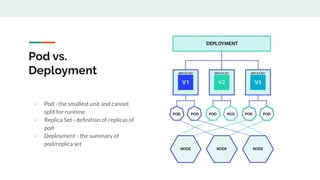
Pod vs.
Deployment
- Pod - the smallest unit and cannot
split for runtime
- Replica Set - definition of replicas of
pod
- Deployment - the summary of
pod/replica set
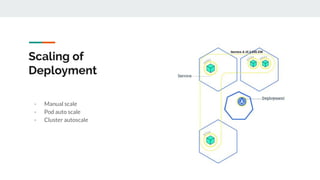
Scaling of
Deployment
- Manual scale
- Pod auto scale
- Cluster autoscale
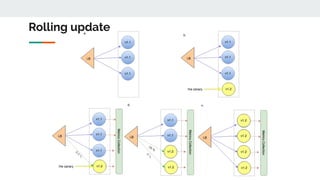
Rolling update
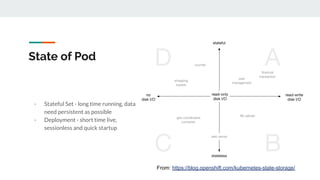
State of Pod
- Stateful Set - long time running, data
need persistent as possible
- Deployment - short time live,
sessionless and quick startup
From: https://blog.openshift.com/kubernetes-state-storage/
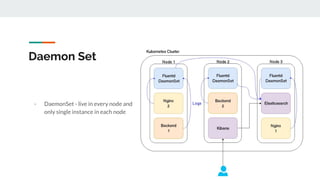
Daemon Set
- DaemonSet - live in every node and
only single instance in each node
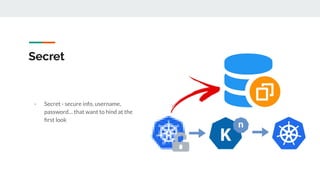
Secret
- Secret - secure info, username,
password… that want to hind at the
first look
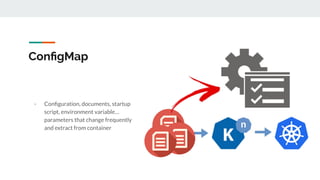
ConfigMap
- Configuration, documents, startup
script, environment variable…
parameters that change frequently
and extract from container
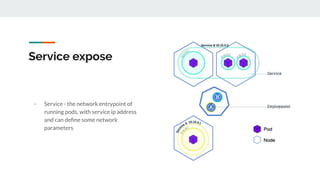
Service expose
- Service - the network entrypoint of
running pods, with service ip address
and can define some network
parameters
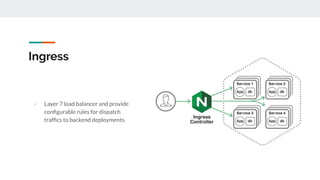
Ingress
- Layer 7 load balancer and provide
configurable rules for dispatch
traffics to backend deployments
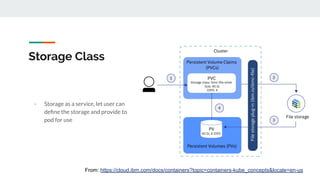
Storage Class
- Storage as a service, let user can
define the storage and provide to
pod for use
From: https://cloud.ibm.com/docs/containers?topic=containers-kube_concepts&locale=en-us
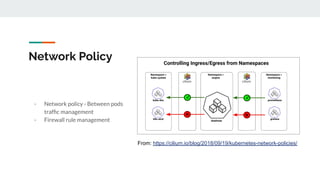
Network Policy
- Network policy - Between pods
traffic management
- Firewall rule management
From: https://cilium.io/blog/2018/09/19/kubernetes-network-policies/
Kubernetes CLI
kubectl commands
● run
● expose
● create
● apply
● delete
● get
● describe
● exec
● logs
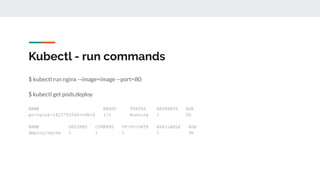
Kubectl - run commands
$ kubectl run nginx --image=image --port=80
$ kubectl get pods,deploy
NAME READY STATUS RESTARTS AGE
po/nginx-1423793266-svb16 1/1 Running 1 5h
NAME DESIRED CURRENT UP-TO-DATE AVAILABLE AGE
deploy/nginx 1 1 1 1 5h
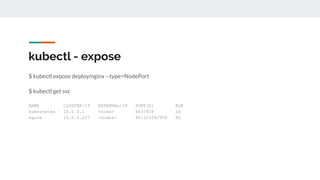
$ kubectl expose deploy/nginx --type=NodePort
$ kubectl get svc
NAME CLUSTER-IP EXTERNAL-IP PORT(S) AGE
kubernetes 10.0.0.1 <none> 443/TCP 2d
nginx 10.0.0.227 <nodes> 80:31659/TCP 5h
kubectl - expose
kubectl - delete
$ kubectl delete svc/nginx
$ kubectl delete deploy --all
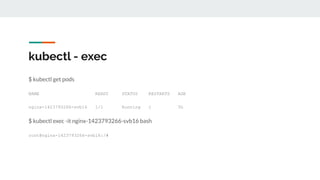
kubectl - exec
$ kubectl get pods
NAME READY STATUS RESTARTS AGE
nginx-1423793266-svb16 1/1 Running 1 5h
$ kubectl exec -it nginx-1423793266-svb16 bash
root@nginx-1423793266-svb16:/#
$ kubectl logs -f nginx-1423793266-svb16
172.17.0.1 - - [24/Oct/2017:17:24:15 +0000] "GET / HTTP/1.1" 200 612 "-" "curl/7.54.0" "-"
172.17.0.1 - - [24/Oct/2017:17:24:25 +0000] "GET / HTTP/1.1" 200 612 "-" "curl/7.54.0" "-"
$ kubectl logs -f nginx-1423793266-svb16 --tail 30
kubectl - logs
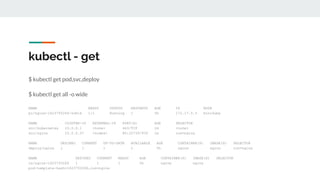
$ kubectl get pod,svc,deploy
$ kubectl get all -o wide
NAME READY STATUS RESTARTS AGE IP NODE
po/nginx-1423793266-svb16 1/1 Running 1 5h 172.17.0.3 minikube
NAME CLUSTER-IP EXTERNAL-IP PORT(S) AGE SELECTOR
svc/kubernetes 10.0.0.1 <none> 443/TCP 2d <none>
svc/nginx 10.0.0.37 <nodes> 80:32739/TCP 1m run=nginx
NAME DESIRED CURRENT UP-TO-DATE AVAILABLE AGE CONTAINER(S) IMAGE(S) SELECTOR
deploy/nginx 1 1 1 1 5h nginx nginx run=nginx
NAME DESIRED CURRENT READY AGE CONTAINER(S) IMAGE(S) SELECTOR
rs/nginx-1423793266 1 1 1 5h nginx nginx
pod-template-hash=1423793266,run=nginx
kubectl - get
$ kubectl get node
$ kubectl get event
$ kubectl get all --all-namespaces
$ kubectl get pod -l component=web
kubectl - get
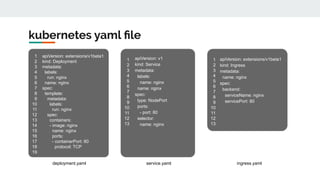
kubernetes yaml file
apiVersion: extensions/v1beta1
kind: Deployment
metadata:
labels:
run: nginx
name: nginx
spec:
template:
metadata:
labels:
run: nginx
spec:
containers:
- image: nginx
name: nginx
ports:
- containerPort: 80
protocol: TCP
1
2
3
4
5
6
7
8
9
10
11
12
13
14
15
16
17
18
19
1
2
3
4
5
6
7
8
9
10
11
12
13
apiVersion: v1
kind: Service
metadata:
labels:
name: nginx
name: nginx
spec:
type: NodePort
ports:
- port: 80
selector:
name: nginx
apiVersion: extensions/v1beta1
kind: Ingress
metadata:
name: nginx
spec:
backend:
serviceName: nginx
servicePort: 80
1
2
3
4
5
6
7
8
9
10
11
12
13
deployment.yaml service.yaml ingress.yaml
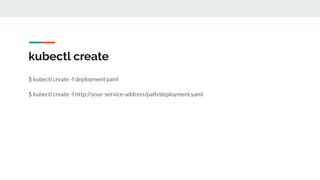
kubectl create
$ kubectl create -f deployment.yaml
$ kubectl create -f http://your-service-address/path/deployment.yaml
kubectl apply
$ kubectl apply -f deployment.yaml
$ kubectl apply -f http://your-service-address/path/deployment.yaml
Skills of Kubernetes Deployment
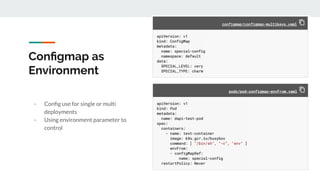
Configmap as
Environment
- Config use for single or multi
deployments
- Using environment parameter to
control
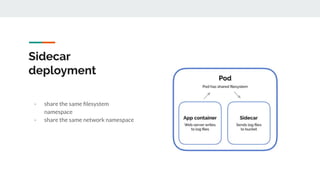
Sidecar
deployment
- share the same filesystem
namespace
- share the same network namespace
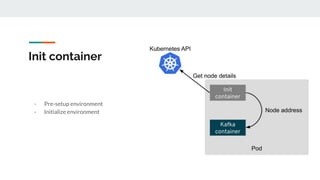
Init container
- Pre-setup environment
- Initialize environment
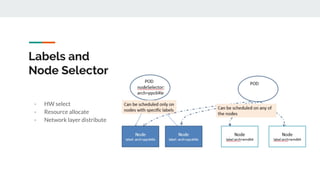
Labels and
Node Selector
- HW select
- Resource allocate
- Network layer distribute
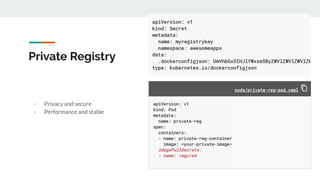
Private Registry
- Privacy and secure
- Performance and stable
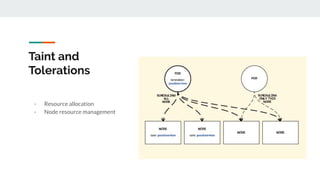
Taint and
Tolerations
- Resource allocation
- Node resource management
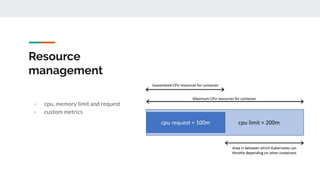
Resource
management
- cpu, memory limit and request
- custom metrics
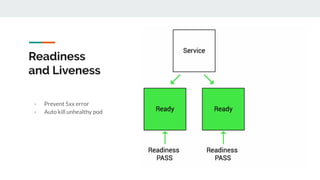
Readiness
and Liveness
- Prevent 5xx error
- Auto kill unhealthy pod
Q&A

Kubernetes Basic Operation

  • 1.
    Kubernetes Basics Simon Su@ 201907 https://shorturl.at/krCDF
  • 2.
    Objective ● Learning Kubernetesconcept ● Kubernetes components overview ● Command line hands on ● Experience share
  • 3.
  • 4.
    Pod vs. Deployment - Pod- the smallest unit and cannot split for runtime - Replica Set - definition of replicas of pod - Deployment - the summary of pod/replica set
  • 5.
    Scaling of Deployment - Manualscale - Pod auto scale - Cluster autoscale
  • 6.
  • 7.
    State of Pod -Stateful Set - long time running, data need persistent as possible - Deployment - short time live, sessionless and quick startup From: https://blog.openshift.com/kubernetes-state-storage/
  • 8.
    Daemon Set - DaemonSet- live in every node and only single instance in each node
  • 9.
    Secret - Secret -secure info, username, password… that want to hind at the first look
  • 10.
    ConfigMap - Configuration, documents,startup script, environment variable… parameters that change frequently and extract from container
  • 11.
    Service expose - Service- the network entrypoint of running pods, with service ip address and can define some network parameters
  • 12.
    Ingress - Layer 7load balancer and provide configurable rules for dispatch traffics to backend deployments
  • 13.
    Storage Class - Storageas a service, let user can define the storage and provide to pod for use From: https://cloud.ibm.com/docs/containers?topic=containers-kube_concepts&locale=en-us
  • 14.
    Network Policy - Networkpolicy - Between pods traffic management - Firewall rule management From: https://cilium.io/blog/2018/09/19/kubernetes-network-policies/
  • 15.
  • 16.
    kubectl commands ● run ●expose ● create ● apply ● delete ● get ● describe ● exec ● logs
  • 17.
    Kubectl - runcommands $ kubectl run nginx --image=image --port=80 $ kubectl get pods,deploy NAME READY STATUS RESTARTS AGE po/nginx-1423793266-svb16 1/1 Running 1 5h NAME DESIRED CURRENT UP-TO-DATE AVAILABLE AGE deploy/nginx 1 1 1 1 5h
  • 18.
    $ kubectl exposedeploy/nginx --type=NodePort $ kubectl get svc NAME CLUSTER-IP EXTERNAL-IP PORT(S) AGE kubernetes 10.0.0.1 <none> 443/TCP 2d nginx 10.0.0.227 <nodes> 80:31659/TCP 5h kubectl - expose
  • 19.
    kubectl - delete $kubectl delete svc/nginx $ kubectl delete deploy --all
  • 20.
    kubectl - exec $kubectl get pods NAME READY STATUS RESTARTS AGE nginx-1423793266-svb16 1/1 Running 1 5h $ kubectl exec -it nginx-1423793266-svb16 bash root@nginx-1423793266-svb16:/#
  • 21.
    $ kubectl logs-f nginx-1423793266-svb16 172.17.0.1 - - [24/Oct/2017:17:24:15 +0000] "GET / HTTP/1.1" 200 612 "-" "curl/7.54.0" "-" 172.17.0.1 - - [24/Oct/2017:17:24:25 +0000] "GET / HTTP/1.1" 200 612 "-" "curl/7.54.0" "-" $ kubectl logs -f nginx-1423793266-svb16 --tail 30 kubectl - logs
  • 22.
    $ kubectl getpod,svc,deploy $ kubectl get all -o wide NAME READY STATUS RESTARTS AGE IP NODE po/nginx-1423793266-svb16 1/1 Running 1 5h 172.17.0.3 minikube NAME CLUSTER-IP EXTERNAL-IP PORT(S) AGE SELECTOR svc/kubernetes 10.0.0.1 <none> 443/TCP 2d <none> svc/nginx 10.0.0.37 <nodes> 80:32739/TCP 1m run=nginx NAME DESIRED CURRENT UP-TO-DATE AVAILABLE AGE CONTAINER(S) IMAGE(S) SELECTOR deploy/nginx 1 1 1 1 5h nginx nginx run=nginx NAME DESIRED CURRENT READY AGE CONTAINER(S) IMAGE(S) SELECTOR rs/nginx-1423793266 1 1 1 5h nginx nginx pod-template-hash=1423793266,run=nginx kubectl - get
  • 23.
    $ kubectl getnode $ kubectl get event $ kubectl get all --all-namespaces $ kubectl get pod -l component=web kubectl - get
  • 24.
    kubernetes yaml file apiVersion:extensions/v1beta1 kind: Deployment metadata: labels: run: nginx name: nginx spec: template: metadata: labels: run: nginx spec: containers: - image: nginx name: nginx ports: - containerPort: 80 protocol: TCP 1 2 3 4 5 6 7 8 9 10 11 12 13 14 15 16 17 18 19 1 2 3 4 5 6 7 8 9 10 11 12 13 apiVersion: v1 kind: Service metadata: labels: name: nginx name: nginx spec: type: NodePort ports: - port: 80 selector: name: nginx apiVersion: extensions/v1beta1 kind: Ingress metadata: name: nginx spec: backend: serviceName: nginx servicePort: 80 1 2 3 4 5 6 7 8 9 10 11 12 13 deployment.yaml service.yaml ingress.yaml
  • 25.
    kubectl create $ kubectlcreate -f deployment.yaml $ kubectl create -f http://your-service-address/path/deployment.yaml
  • 26.
    kubectl apply $ kubectlapply -f deployment.yaml $ kubectl apply -f http://your-service-address/path/deployment.yaml
  • 27.
  • 28.
    Configmap as Environment - Configuse for single or multi deployments - Using environment parameter to control
  • 29.
    Sidecar deployment - share thesame filesystem namespace - share the same network namespace
  • 30.
    Init container - Pre-setupenvironment - Initialize environment
  • 31.
    Labels and Node Selector -HW select - Resource allocate - Network layer distribute
  • 32.
    Private Registry - Privacyand secure - Performance and stable
  • 33.
    Taint and Tolerations - Resourceallocation - Node resource management
  • 34.
    Resource management - cpu, memorylimit and request - custom metrics
  • 35.
    Readiness and Liveness - Prevent5xx error - Auto kill unhealthy pod
  • 36.