Google Cloud Developers Expert
KUBERNETES
Jerry Jalava, @W_I | 28.08.2018
SECURITY JOURNEY
AGENDA
● Who is who - audience introduction
● History of Docker
● Where is Docker Now
● History of Kubernetes
● Where is Kubernetes Now
● What does Security mean
● Who should I contact about my security needs
JUST
KIDDING!
@QVIK
I TRUST ALL OF YOU
What is Kubernetes, What are Container
ALREADY KNOW THESE
IN SOME LEVEL
Containers themselves allows you to adopt a fundamentally
different security model
● Short lived and frequently re-deployed, you can be
constantly patching
● Immutable, you can control what is deployed in your
environment
● With technology like gVisor, you can isolate at a sub-VM
level
● Good security defaults are usually one line changes
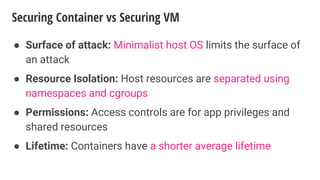
Securing Container vs Securing VM
● Surface of attack: Minimalist host OS limits the surface of
an attack
● Resource Isolation: Host resources are separated using
namespaces and cgroups
● Permissions: Access controls are for app privileges and
shared resources
● Lifetime: Containers have a shorter average lifetime
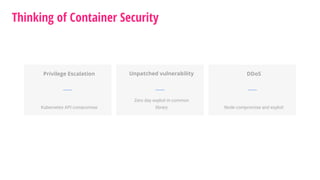
Thinking of Container Security
Privilege Escalation
Kubernetes API compromise
Unpatched vulnerability
Zero day exploit in common
library
DDoS
Node compromise and exploit
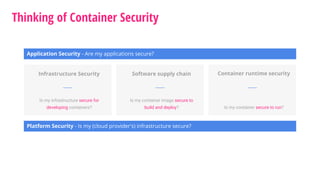
Thinking of Container Security
Application Security - Are my applications secure?
Platform Security - Is my (cloud provider's) infrastructure secure?
Infrastructure Security
Is my infrastructure secure for
developing containers?
Software supply chain
Is my container image secure to
build and deploy?
Container runtime security
Is my container secure to run?
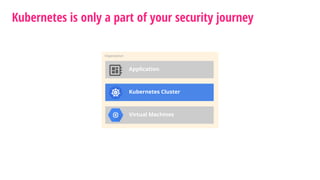
Kubernetes is only a part of your security journey
Organization
Kubernetes Cluster
Application
Virtual Machines
Kubernetes has some great features built-in
● Logging and Monitoring
● Debugging and Introspection
● Identity and Authorization
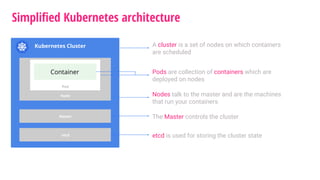
Simplified Kubernetes architecture
Kubernetes Cluster
Node
Master
etcd
Pod
Container
A cluster is a set of nodes on which containers
are scheduled
Pods are collection of containers which are
deployed on nodes
Nodes talk to the master and are the machines
that run your containers
The Master controls the cluster
etcd is used for storing the cluster state
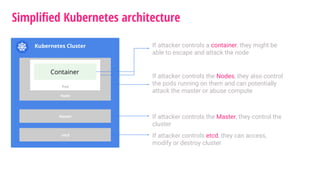
Simplified Kubernetes architecture
Kubernetes Cluster
Node
Master
etcd
Pod
Container
If attacker controls a container, they might be
able to escape and attack the node
If attacker controls the Nodes, they also control
the pods running on them and can potentially
attack the master or abuse compute
If attacker controls the Master, they control the
cluster
If attacker controls etcd, they can access,
modify or destroy cluster
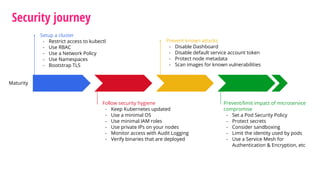
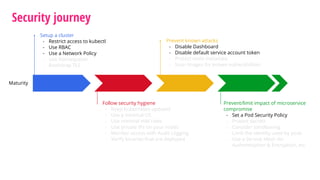
Security journey
Maturity
Setup a cluster
- Restrict access to kubectl
- Use RBAC
- Use a Network Policy
- Use Namespaces
- Bootstrap TLS
Prevent known attacks
- Disable Dashboard
- Disable default service account token
- Protect node metadata
- Scan images for known vulnerabilities
Follow security hygiene
- Keep Kubernetes updated
- Use a minimal OS
- Use minimal IAM roles
- Use private IPs on your nodes
- Monitor access with Audit Logging
- Verify binaries that are deployed
Prevent/limit impact of microservice
compromise
- Set a Pod Security Policy
- Protect secrets
- Consider sandboxing
- Limit the identity used by pods
- Use a Service Mesh for
Authentication & Encryption, etc
Security journey
Maturity
Setup a cluster
- Restrict access to kubectl
- Use RBAC
- Use a Network Policy
- Use Namespaces
- Bootstrap TLS
Prevent known attacks
- Disable Dashboard
- Disable default service account token
- Protect node metadata
- Scan images for known vulnerabilities
Follow security hygiene
- Keep Kubernetes updated
- Use a minimal OS
- Use minimal IAM roles
- Use private IPs on your nodes
- Monitor access with Audit Logging
- Verify binaries that are deployed
Prevent/limit impact of microservice
compromise
- Set a Pod Security Policy
- Protect secrets
- Consider sandboxing
- Limit the identity used by pods
- Use a Service Mesh for
Authentication & Encryption, etc
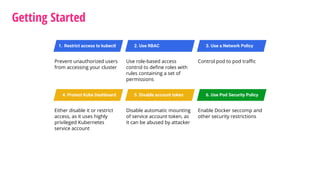
Getting Started
Prevent unauthorized users
from accessing your cluster
1. Restrict access to kubectl 2. Use RBAC
Use role-based access
control to define roles with
rules containing a set of
permissions
3. Use a Network Policy
Control pod to pod traffic
4. Protect Kube Dashboard
Either disable it or restrict
access, as it uses highly
privileged Kubernetes
service account
5. Disable account token
Disable automatic mounting
of service account token, as
it can be abused by attacker
6. Use Pod Security Policy
Enable Docker seccomp and
other security restrictions
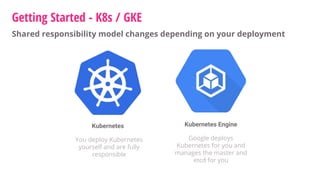
Getting Started - K8s / GKE
Shared responsibility model changes depending on your deployment
Kubernetes Kubernetes Engine
You deploy Kubernetes
yourself and are fully
responsible
Google deploys
Kubernetes for you and
manages the master and
etcd for you
● If an attacker can run kubectl commands, they can effectively control
your cluster
Getting Started 1. Restrict access to kubectl
K8s
name: kubernetes-allow-ssh-to-controller-api
type: compute.v1.firewall
properties:
allowed:
- IPProtocol: tcp
ports: ["6443"]
sourceTags: ["ssh-bastion"]
sourceRanges: ["10.10.0.0/16"]
targetTags: ["k8s-controller"]
network: global/networks/default
● Enforce Bastion model via Firewall
● In GCP, Firewall definition would look something like this:
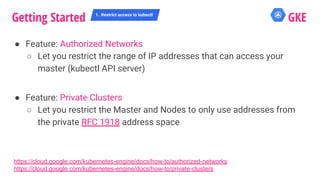
● Feature: Authorized Networks
○ Let you restrict the range of IP addresses that can access your
master (kubectl API server)
● Feature: Private Clusters
○ Let you restrict the Master and Nodes to only use addresses from
the private RFC 1918 address space
Getting Started 1. Restrict access to kubectl
GKE
https://cloud.google.com/kubernetes-engine/docs/how-to/authorized-networks
https://cloud.google.com/kubernetes-engine/docs/how-to/private-clusters
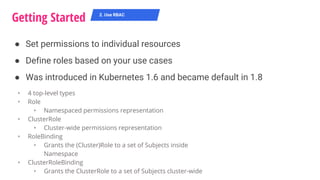
● Set permissions to individual resources
● Define roles based on your use cases
● Was introduced in Kubernetes 1.6 and became default in 1.8
Getting Started 2. Use RBAC
‣ 4 top-level types
‣ Role
‣ Namespaced permissions representation
‣ ClusterRole
‣ Cluster-wide permissions representation
‣ RoleBinding
‣ Grants the (Cluster)Role to a set of Subjects inside
Namespace
‣ ClusterRoleBinding
‣ Grants the ClusterRole to a set of Subjects cluster-wide
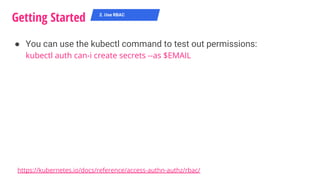
● You can use the kubectl command to test out permissions:
kubectl auth can-i create secrets --as $EMAIL
Getting Started 2. Use RBAC
https://kubernetes.io/docs/reference/access-authn-authz/rbac/
Getting Started K8s
● Enable it on creation time with flag --authorization-mode=RBAC
● Example Role and ClusterRole definitions
● As of 1.9 you can also create ClusterRoles by aggregating roles
together using aggregationRule
2. Use RBAC
kind: Role
apiVersion: rbac.authorization.k8s.io/v1
metadata:
namespace: default
name: pod-reader
rules:
- apiGroups: [""] # "" indicates the core API group
resources: ["pods", "pods/logs"]
verbs: ["get", "watch", "list"]
kind: ClusterRole
apiVersion: rbac.authorization.k8s.io/v1
metadata:
# "namespace" omitted since ClusterRoles are not
namespaced
name: secret-reader
rules:
- apiGroups: [""]
resources: ["secrets"]
verbs: ["get", "watch", "list"]
Getting Started K8s
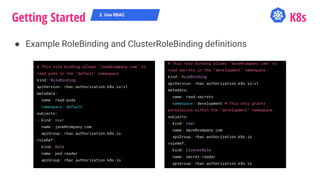
● Example RoleBinding and ClusterRoleBinding definitions
2. Use RBAC
# This role binding allows "jane@company.com" to
read pods in the "default" namespace.
kind: RoleBinding
apiVersion: rbac.authorization.k8s.io/v1
metadata:
name: read-pods
namespace: default
subjects:
- kind: User
name: jane@company.com
apiGroup: rbac.authorization.k8s.io
roleRef:
kind: Role
name: pod-reader
apiGroup: rbac.authorization.k8s.io
# This role binding allows "dave@company.com" to
read secrets in the "development" namespace.
kind: RoleBinding
apiVersion: rbac.authorization.k8s.io/v1
metadata:
name: read-secrets
namespace: development # This only grants
permissions within the "development" namespace.
subjects:
- kind: User
name: dave@company.com
apiGroup: rbac.authorization.k8s.io
roleRef:
kind: ClusterRole
name: secret-reader
apiGroup: rbac.authorization.k8s.io
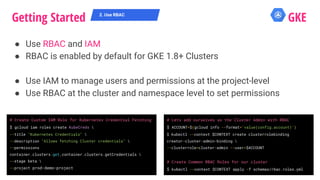
● Use RBAC and IAM
● RBAC is enabled by default for GKE 1.8+ Clusters
● Use IAM to manage users and permissions at the project-level
● Use RBAC at the cluster and namespace level to set permissions
Getting Started GKE2. Use RBAC
# Lets add ourselves as the Cluster Admin with RBAC
$ ACCOUNT=$(gcloud info --format='value(config.account)')
$ kubectl --context $CONTEXT create clusterrolebinding
creator-cluster-admin-binding 
--clusterrole=cluster-admin --user=$ACCOUNT
# Create Common RBAC Roles for our cluster
$ kubectl --context $CONTEXT apply -f schemas/rbac.roles.yml
# Create Custom IAM Role for Kubernetes Credential Fetching
$ gcloud iam roles create KubeCreds 
--title "Kubernetes Credentials" 
--description "Allows fetching Cluster credentials" 
--permissions
container.clusters.get,container.clusters.getCredentials 
--stage beta 
--project prod-demo-project
Getting Started 3. Use a Network Policy
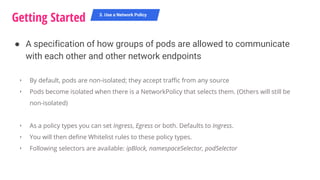
‣ By default, pods are non-isolated; they accept traffic from any source
‣ Pods become isolated when there is a NetworkPolicy that selects them. (Others will still be
non-isolated)
‣ As a policy types you can set Ingress, Egress or both. Defaults to Ingress.
‣ You will then define Whitelist rules to these policy types.
‣ Following selectors are available: ipBlock, namespaceSelector, podSelector
● A specification of how groups of pods are allowed to communicate
with each other and other network endpoints
Getting Started K8s
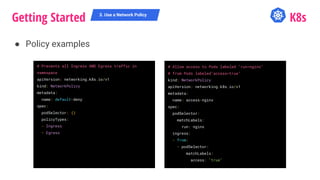
● Policy examples
3. Use a Network Policy
# Prevents all Ingress AND Egress traffic in
namespace
apiVersion: networking.k8s.io/v1
kind: NetworkPolicy
metadata:
name: default-deny
spec:
podSelector: {}
policyTypes:
- Ingress
- Egress
# Allow access to Pods labeled "run=nginx"
# from Pods labeled"access=true"
kind: NetworkPolicy
apiVersion: networking.k8s.io/v1
metadata:
name: access-nginx
spec:
podSelector:
matchLabels:
run: nginx
ingress:
- from:
- podSelector:
matchLabels:
access: "true"
@QVIK
# Allow DNS inside the cluster for all namespaces by default
$ kubectl --context $CONTEXT label namespace kube-system name=kube-system
$ for ns in "${NAMESPACES[@]}"; do
kubectl --context $CONTEXT --namespace $ns apply -f - <<EOF
apiVersion: networking.k8s.io/v1
kind: NetworkPolicy
metadata:
name: allow-dns-access
spec:
podSelector:
matchLabels: {}
policyTypes:
- Egress
egress:
- to:
- namespaceSelector:
matchLabels:
name: kube-system
ports:
- protocol: UDP
port: 53
EOF
done
● Create a cluster with NetworkPolicy enabled using flag
--enable-network-policy
● Currently supports only Project Calico
Getting Started GKE3. Use a Network Policy
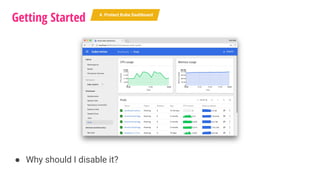
● Why should I disable it?
Getting Started 4. Protect Kube Dashboard
Tesla Kube Dashboard was hacked
‣ Hackers accessed the K8s Console, which was not password
protected and discovered on public internet
‣ Console contained privileged cloud account credentials
‣ Used credentials to access resources and mine cryptocurrency
Getting Started 4. Protect Kube Dashboard
http://fortune.com/2018/02/20/tesla-hack-amazon-cloud-cryptocurrency-mining/
Getting Started K8s
● Obviously, the solution here is to have literally any kind of security
Fixing it:
‣ Don’t deploy it at all
‣ Reduce its permissions
‣ Reduce its permissions and add authentication
4. Protect Kube Dashboard
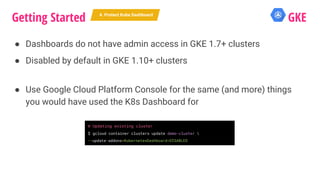
● Dashboards do not have admin access in GKE 1.7+ clusters
● Disabled by default in GKE 1.10+ clusters
● Use Google Cloud Platform Console for the same (and more) things
you would have used the K8s Dashboard for
Getting Started GKE4. Protect Kube Dashboard
# Updating existing cluster
$ gcloud container clusters update demo-cluster 
--update-addons=KubernetesDashboard=DISABLED
● Every namespace has a default (Kubernetes) service account
● Pods use service accounts to assert their identity to other workloads,
including to the API server
● When you create a pod, if you do not specify a service account, the pod
will assign to default service account for that NS.
● The pod mounts these service account credentials, which are
authorized to talk to the API server, if pod is compromised, these
credentials can be used to perform arbitrary operations.
Getting Started 5. Disable account token
Getting Started K8s
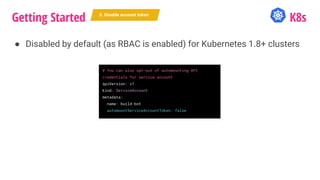
● Disabled by default (as RBAC is enabled) for Kubernetes 1.8+ clusters
5. Disable account token
# You can also opt-out of automounting API
credentials for service account
apiVersion: v1
kind: ServiceAccount
metadata:
name: build-bot
automountServiceAccountToken: false
● The default service account has no privileges if ABAC is disabled
● RBAC is enabled by default (and ABAC disabled) in GKE 1.8+ clusters
Getting Started GKE5. Disable account token
● AppArmor
○ Linux Security Module that lets you restrict your program’s actions
○ Controls and Audits various process actions, e.g. file functions, like
read, write, execute
● Seccomp
○ Filters a process’ syscalls to limit what syscalls the process allows
○ Puts application in “secure” state with whitelist of allowed syscalls
○ Docker seccomp default denies ~150 uncommon or potentially
unsafe syscalls
Getting Started 6. Use Pod Security Policy
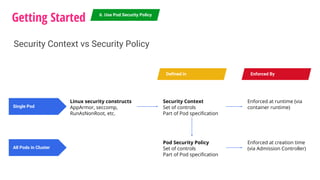
Security Context vs Security Policy
Security Context
Set of controls
Part of Pod specification
Linux security constructs
AppArmor, seccomp,
RunAsNonRoot, etc.
Single Pod
All Pods in Cluster
Defined in Enforced By
Enforced at runtime (via
container runtime)
Enforced at creation time
(via Admission Controller)
Pod Security Policy
Set of controls
Part of Pod specification
Getting Started K8s
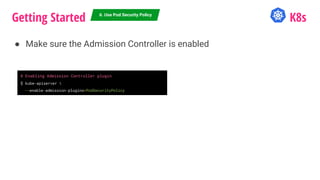
● Make sure the Admission Controller is enabled
6. Use Pod Security Policy
# Enabling Admission Controller plugin
$ kube-apiserver 
--enable-admission-plugins=PodSecurityPolicy
Getting Started K8s
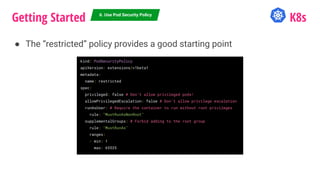
● The “restricted” policy provides a good starting point
6. Use Pod Security Policy
kind: PodSecurityPolicy
apiVersion: extensions/v1beta1
metadata:
name: restricted
spec:
privileged: false # Don’t allow privileged pods!
allowPrivilegedEscalation: false # Don’t allow privilege escalation
runAsUser: # Require the container to run without root privileges
rule: "MustRunAsNonRoot"
supplementalGroups: # Forbid adding to the root group
rule: "MustRunAs"
ranges:
- min: 1
max: 65535
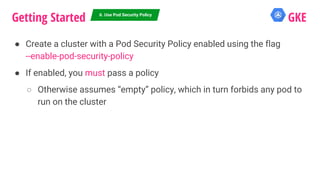
● Create a cluster with a Pod Security Policy enabled using the flag
--enable-pod-security-policy
● If enabled, you must pass a policy
○ Otherwise assumes “empty” policy, which in turn forbids any pod to
run on the cluster
Getting Started GKE6. Use Pod Security Policy
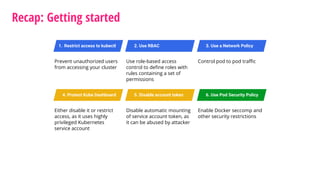
Recap: Getting started
Prevent unauthorized users
from accessing your cluster
1. Restrict access to kubectl 2. Use RBAC
Use role-based access
control to define roles with
rules containing a set of
permissions
3. Use a Network Policy
Control pod to pod traffic
4. Protect Kube Dashboard
Either disable it or restrict
access, as it uses highly
privileged Kubernetes
service account
5. Disable account token
Disable automatic mounting
of service account token, as
it can be abused by attacker
6. Use Pod Security Policy
Enable Docker seccomp and
other security restrictions
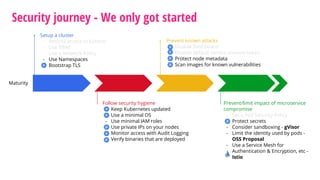
Security journey - We only got started
Maturity
Setup a cluster
- Restrict access to kubectl
- Use RBAC
- Use a Network Policy
- Use Namespaces
- Bootstrap TLS
Prevent known attacks
- Disable Dashboard
- Disable default service account token
- Protect node metadata
- Scan images for known vulnerabilities
Follow security hygiene
- Keep Kubernetes updated
- Use a minimal OS
- Use minimal IAM roles
- Use private IPs on your nodes
- Monitor access with Audit Logging
- Verify binaries that are deployed
Prevent/limit impact of microservice
compromise
- Set a Pod Security Policy
- Protect secrets
- Consider sandboxing - gVisor
- Limit the identity used by pods -
OSS Proposal
- Use a Service Mesh for
Authentication & Encryption, etc -
Istio
Learn More
● https://cloud.google.com/kubernetes-engine/docs/concepts/security-
overview
● https://cloud.google.com/kubernetes-engine/docs/how-to/hardening-
your-cluster
● https://kubernetes.io/blog/2018/07/18/11-ways-not-to-get-hacked/
THANK YOU
qvik.fi

Kubernetes - Security Journey

  • 1.
    Google Cloud DevelopersExpert KUBERNETES Jerry Jalava, @W_I | 28.08.2018 SECURITY JOURNEY
  • 2.
    AGENDA ● Who iswho - audience introduction ● History of Docker ● Where is Docker Now ● History of Kubernetes ● Where is Kubernetes Now ● What does Security mean ● Who should I contact about my security needs JUST KIDDING!
  • 3.
    @QVIK I TRUST ALLOF YOU What is Kubernetes, What are Container ALREADY KNOW THESE IN SOME LEVEL
  • 4.
    Containers themselves allowsyou to adopt a fundamentally different security model ● Short lived and frequently re-deployed, you can be constantly patching ● Immutable, you can control what is deployed in your environment ● With technology like gVisor, you can isolate at a sub-VM level ● Good security defaults are usually one line changes
  • 5.
    Securing Container vsSecuring VM ● Surface of attack: Minimalist host OS limits the surface of an attack ● Resource Isolation: Host resources are separated using namespaces and cgroups ● Permissions: Access controls are for app privileges and shared resources ● Lifetime: Containers have a shorter average lifetime
  • 6.
    Thinking of ContainerSecurity Privilege Escalation Kubernetes API compromise Unpatched vulnerability Zero day exploit in common library DDoS Node compromise and exploit
  • 7.
    Thinking of ContainerSecurity Application Security - Are my applications secure? Platform Security - Is my (cloud provider's) infrastructure secure? Infrastructure Security Is my infrastructure secure for developing containers? Software supply chain Is my container image secure to build and deploy? Container runtime security Is my container secure to run?
  • 8.
    Kubernetes is onlya part of your security journey Organization Kubernetes Cluster Application Virtual Machines
  • 9.
    Kubernetes has somegreat features built-in ● Logging and Monitoring ● Debugging and Introspection ● Identity and Authorization
  • 10.
    Simplified Kubernetes architecture KubernetesCluster Node Master etcd Pod Container A cluster is a set of nodes on which containers are scheduled Pods are collection of containers which are deployed on nodes Nodes talk to the master and are the machines that run your containers The Master controls the cluster etcd is used for storing the cluster state
  • 11.
    Simplified Kubernetes architecture KubernetesCluster Node Master etcd Pod Container If attacker controls a container, they might be able to escape and attack the node If attacker controls the Nodes, they also control the pods running on them and can potentially attack the master or abuse compute If attacker controls the Master, they control the cluster If attacker controls etcd, they can access, modify or destroy cluster
  • 12.
    Security journey Maturity Setup acluster - Restrict access to kubectl - Use RBAC - Use a Network Policy - Use Namespaces - Bootstrap TLS Prevent known attacks - Disable Dashboard - Disable default service account token - Protect node metadata - Scan images for known vulnerabilities Follow security hygiene - Keep Kubernetes updated - Use a minimal OS - Use minimal IAM roles - Use private IPs on your nodes - Monitor access with Audit Logging - Verify binaries that are deployed Prevent/limit impact of microservice compromise - Set a Pod Security Policy - Protect secrets - Consider sandboxing - Limit the identity used by pods - Use a Service Mesh for Authentication & Encryption, etc
  • 13.
    Security journey Maturity Setup acluster - Restrict access to kubectl - Use RBAC - Use a Network Policy - Use Namespaces - Bootstrap TLS Prevent known attacks - Disable Dashboard - Disable default service account token - Protect node metadata - Scan images for known vulnerabilities Follow security hygiene - Keep Kubernetes updated - Use a minimal OS - Use minimal IAM roles - Use private IPs on your nodes - Monitor access with Audit Logging - Verify binaries that are deployed Prevent/limit impact of microservice compromise - Set a Pod Security Policy - Protect secrets - Consider sandboxing - Limit the identity used by pods - Use a Service Mesh for Authentication & Encryption, etc
  • 14.
    Getting Started Prevent unauthorizedusers from accessing your cluster 1. Restrict access to kubectl 2. Use RBAC Use role-based access control to define roles with rules containing a set of permissions 3. Use a Network Policy Control pod to pod traffic 4. Protect Kube Dashboard Either disable it or restrict access, as it uses highly privileged Kubernetes service account 5. Disable account token Disable automatic mounting of service account token, as it can be abused by attacker 6. Use Pod Security Policy Enable Docker seccomp and other security restrictions
  • 15.
    Getting Started -K8s / GKE Shared responsibility model changes depending on your deployment Kubernetes Kubernetes Engine You deploy Kubernetes yourself and are fully responsible Google deploys Kubernetes for you and manages the master and etcd for you
  • 16.
    ● If anattacker can run kubectl commands, they can effectively control your cluster Getting Started 1. Restrict access to kubectl
  • 17.
    Getting Started 1.Restrict access to kubectl K8s name: kubernetes-allow-ssh-to-controller-api type: compute.v1.firewall properties: allowed: - IPProtocol: tcp ports: ["6443"] sourceTags: ["ssh-bastion"] sourceRanges: ["10.10.0.0/16"] targetTags: ["k8s-controller"] network: global/networks/default ● Enforce Bastion model via Firewall ● In GCP, Firewall definition would look something like this:
  • 18.
    ● Feature: AuthorizedNetworks ○ Let you restrict the range of IP addresses that can access your master (kubectl API server) ● Feature: Private Clusters ○ Let you restrict the Master and Nodes to only use addresses from the private RFC 1918 address space Getting Started 1. Restrict access to kubectl GKE https://cloud.google.com/kubernetes-engine/docs/how-to/authorized-networks https://cloud.google.com/kubernetes-engine/docs/how-to/private-clusters
  • 19.
    ● Set permissionsto individual resources ● Define roles based on your use cases ● Was introduced in Kubernetes 1.6 and became default in 1.8 Getting Started 2. Use RBAC ‣ 4 top-level types ‣ Role ‣ Namespaced permissions representation ‣ ClusterRole ‣ Cluster-wide permissions representation ‣ RoleBinding ‣ Grants the (Cluster)Role to a set of Subjects inside Namespace ‣ ClusterRoleBinding ‣ Grants the ClusterRole to a set of Subjects cluster-wide
  • 20.
    ● You canuse the kubectl command to test out permissions: kubectl auth can-i create secrets --as $EMAIL Getting Started 2. Use RBAC https://kubernetes.io/docs/reference/access-authn-authz/rbac/
  • 21.
    Getting Started K8s ●Enable it on creation time with flag --authorization-mode=RBAC ● Example Role and ClusterRole definitions ● As of 1.9 you can also create ClusterRoles by aggregating roles together using aggregationRule 2. Use RBAC kind: Role apiVersion: rbac.authorization.k8s.io/v1 metadata: namespace: default name: pod-reader rules: - apiGroups: [""] # "" indicates the core API group resources: ["pods", "pods/logs"] verbs: ["get", "watch", "list"] kind: ClusterRole apiVersion: rbac.authorization.k8s.io/v1 metadata: # "namespace" omitted since ClusterRoles are not namespaced name: secret-reader rules: - apiGroups: [""] resources: ["secrets"] verbs: ["get", "watch", "list"]
  • 22.
    Getting Started K8s ●Example RoleBinding and ClusterRoleBinding definitions 2. Use RBAC # This role binding allows "jane@company.com" to read pods in the "default" namespace. kind: RoleBinding apiVersion: rbac.authorization.k8s.io/v1 metadata: name: read-pods namespace: default subjects: - kind: User name: jane@company.com apiGroup: rbac.authorization.k8s.io roleRef: kind: Role name: pod-reader apiGroup: rbac.authorization.k8s.io # This role binding allows "dave@company.com" to read secrets in the "development" namespace. kind: RoleBinding apiVersion: rbac.authorization.k8s.io/v1 metadata: name: read-secrets namespace: development # This only grants permissions within the "development" namespace. subjects: - kind: User name: dave@company.com apiGroup: rbac.authorization.k8s.io roleRef: kind: ClusterRole name: secret-reader apiGroup: rbac.authorization.k8s.io
  • 23.
    ● Use RBACand IAM ● RBAC is enabled by default for GKE 1.8+ Clusters ● Use IAM to manage users and permissions at the project-level ● Use RBAC at the cluster and namespace level to set permissions Getting Started GKE2. Use RBAC # Lets add ourselves as the Cluster Admin with RBAC $ ACCOUNT=$(gcloud info --format='value(config.account)') $ kubectl --context $CONTEXT create clusterrolebinding creator-cluster-admin-binding --clusterrole=cluster-admin --user=$ACCOUNT # Create Common RBAC Roles for our cluster $ kubectl --context $CONTEXT apply -f schemas/rbac.roles.yml # Create Custom IAM Role for Kubernetes Credential Fetching $ gcloud iam roles create KubeCreds --title "Kubernetes Credentials" --description "Allows fetching Cluster credentials" --permissions container.clusters.get,container.clusters.getCredentials --stage beta --project prod-demo-project
  • 24.
    Getting Started 3.Use a Network Policy ‣ By default, pods are non-isolated; they accept traffic from any source ‣ Pods become isolated when there is a NetworkPolicy that selects them. (Others will still be non-isolated) ‣ As a policy types you can set Ingress, Egress or both. Defaults to Ingress. ‣ You will then define Whitelist rules to these policy types. ‣ Following selectors are available: ipBlock, namespaceSelector, podSelector ● A specification of how groups of pods are allowed to communicate with each other and other network endpoints
  • 25.
    Getting Started K8s ●Policy examples 3. Use a Network Policy # Prevents all Ingress AND Egress traffic in namespace apiVersion: networking.k8s.io/v1 kind: NetworkPolicy metadata: name: default-deny spec: podSelector: {} policyTypes: - Ingress - Egress # Allow access to Pods labeled "run=nginx" # from Pods labeled"access=true" kind: NetworkPolicy apiVersion: networking.k8s.io/v1 metadata: name: access-nginx spec: podSelector: matchLabels: run: nginx ingress: - from: - podSelector: matchLabels: access: "true"
  • 26.
    @QVIK # Allow DNSinside the cluster for all namespaces by default $ kubectl --context $CONTEXT label namespace kube-system name=kube-system $ for ns in "${NAMESPACES[@]}"; do kubectl --context $CONTEXT --namespace $ns apply -f - <<EOF apiVersion: networking.k8s.io/v1 kind: NetworkPolicy metadata: name: allow-dns-access spec: podSelector: matchLabels: {} policyTypes: - Egress egress: - to: - namespaceSelector: matchLabels: name: kube-system ports: - protocol: UDP port: 53 EOF done
  • 27.
    ● Create acluster with NetworkPolicy enabled using flag --enable-network-policy ● Currently supports only Project Calico Getting Started GKE3. Use a Network Policy
  • 28.
    ● Why shouldI disable it? Getting Started 4. Protect Kube Dashboard
  • 29.
    Tesla Kube Dashboardwas hacked ‣ Hackers accessed the K8s Console, which was not password protected and discovered on public internet ‣ Console contained privileged cloud account credentials ‣ Used credentials to access resources and mine cryptocurrency Getting Started 4. Protect Kube Dashboard http://fortune.com/2018/02/20/tesla-hack-amazon-cloud-cryptocurrency-mining/
  • 30.
    Getting Started K8s ●Obviously, the solution here is to have literally any kind of security Fixing it: ‣ Don’t deploy it at all ‣ Reduce its permissions ‣ Reduce its permissions and add authentication 4. Protect Kube Dashboard
  • 31.
    ● Dashboards donot have admin access in GKE 1.7+ clusters ● Disabled by default in GKE 1.10+ clusters ● Use Google Cloud Platform Console for the same (and more) things you would have used the K8s Dashboard for Getting Started GKE4. Protect Kube Dashboard # Updating existing cluster $ gcloud container clusters update demo-cluster --update-addons=KubernetesDashboard=DISABLED
  • 32.
    ● Every namespacehas a default (Kubernetes) service account ● Pods use service accounts to assert their identity to other workloads, including to the API server ● When you create a pod, if you do not specify a service account, the pod will assign to default service account for that NS. ● The pod mounts these service account credentials, which are authorized to talk to the API server, if pod is compromised, these credentials can be used to perform arbitrary operations. Getting Started 5. Disable account token
  • 33.
    Getting Started K8s ●Disabled by default (as RBAC is enabled) for Kubernetes 1.8+ clusters 5. Disable account token # You can also opt-out of automounting API credentials for service account apiVersion: v1 kind: ServiceAccount metadata: name: build-bot automountServiceAccountToken: false
  • 34.
    ● The defaultservice account has no privileges if ABAC is disabled ● RBAC is enabled by default (and ABAC disabled) in GKE 1.8+ clusters Getting Started GKE5. Disable account token
  • 35.
    ● AppArmor ○ LinuxSecurity Module that lets you restrict your program’s actions ○ Controls and Audits various process actions, e.g. file functions, like read, write, execute ● Seccomp ○ Filters a process’ syscalls to limit what syscalls the process allows ○ Puts application in “secure” state with whitelist of allowed syscalls ○ Docker seccomp default denies ~150 uncommon or potentially unsafe syscalls Getting Started 6. Use Pod Security Policy
  • 36.
    Getting Started 6.Use Pod Security Policy Security Context vs Security Policy Security Context Set of controls Part of Pod specification Linux security constructs AppArmor, seccomp, RunAsNonRoot, etc. Single Pod All Pods in Cluster Defined in Enforced By Enforced at runtime (via container runtime) Enforced at creation time (via Admission Controller) Pod Security Policy Set of controls Part of Pod specification
  • 37.
    Getting Started K8s ●Make sure the Admission Controller is enabled 6. Use Pod Security Policy # Enabling Admission Controller plugin $ kube-apiserver --enable-admission-plugins=PodSecurityPolicy
  • 38.
    Getting Started K8s ●The “restricted” policy provides a good starting point 6. Use Pod Security Policy kind: PodSecurityPolicy apiVersion: extensions/v1beta1 metadata: name: restricted spec: privileged: false # Don’t allow privileged pods! allowPrivilegedEscalation: false # Don’t allow privilege escalation runAsUser: # Require the container to run without root privileges rule: "MustRunAsNonRoot" supplementalGroups: # Forbid adding to the root group rule: "MustRunAs" ranges: - min: 1 max: 65535
  • 39.
    ● Create acluster with a Pod Security Policy enabled using the flag --enable-pod-security-policy ● If enabled, you must pass a policy ○ Otherwise assumes “empty” policy, which in turn forbids any pod to run on the cluster Getting Started GKE6. Use Pod Security Policy
  • 40.
    Recap: Getting started Preventunauthorized users from accessing your cluster 1. Restrict access to kubectl 2. Use RBAC Use role-based access control to define roles with rules containing a set of permissions 3. Use a Network Policy Control pod to pod traffic 4. Protect Kube Dashboard Either disable it or restrict access, as it uses highly privileged Kubernetes service account 5. Disable account token Disable automatic mounting of service account token, as it can be abused by attacker 6. Use Pod Security Policy Enable Docker seccomp and other security restrictions
  • 41.
    Security journey -We only got started Maturity Setup a cluster - Restrict access to kubectl - Use RBAC - Use a Network Policy - Use Namespaces - Bootstrap TLS Prevent known attacks - Disable Dashboard - Disable default service account token - Protect node metadata - Scan images for known vulnerabilities Follow security hygiene - Keep Kubernetes updated - Use a minimal OS - Use minimal IAM roles - Use private IPs on your nodes - Monitor access with Audit Logging - Verify binaries that are deployed Prevent/limit impact of microservice compromise - Set a Pod Security Policy - Protect secrets - Consider sandboxing - gVisor - Limit the identity used by pods - OSS Proposal - Use a Service Mesh for Authentication & Encryption, etc - Istio
  • 42.
    Learn More ● https://cloud.google.com/kubernetes-engine/docs/concepts/security- overview ●https://cloud.google.com/kubernetes-engine/docs/how-to/hardening- your-cluster ● https://kubernetes.io/blog/2018/07/18/11-ways-not-to-get-hacked/
  • 43.