Docker 1.5
Overview
Author : Rajdeep Dua
Date : March 2015
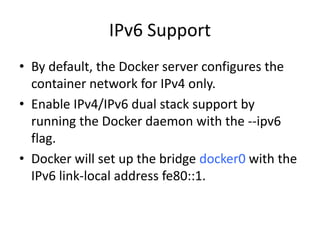
IPv6 Support
• By default, the Docker server configures the
container network for IPv4 only.
• Enable IPv4/IPv6 dual stack support by
running the Docker daemon with the --ipv6
flag.
• Docker will set up the bridge docker0 with the
IPv6 link-local address fe80::1.
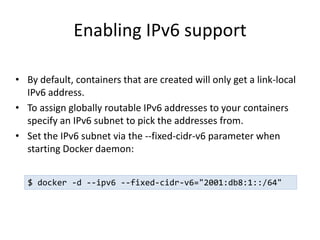
Enabling IPv6 support
• By default, containers that are created will only get a link-local
IPv6 address.
• To assign globally routable IPv6 addresses to your containers
specify an IPv6 subnet to pick the addresses from.
• Set the IPv6 subnet via the --fixed-cidr-v6 parameter when
starting Docker daemon:
$ docker -d --ipv6 --fixed-cidr-v6="2001:db8:1::/64"
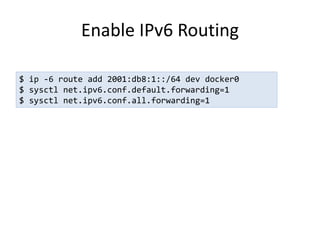
Enable IPv6 Routing
$ ip -6 route add 2001:db8:1::/64 dev docker0
$ sysctl net.ipv6.conf.default.forwarding=1
$ sysctl net.ipv6.conf.all.forwarding=1
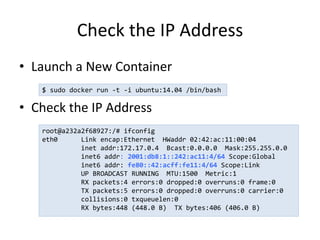
Check the IP Address
• Launch a New Container
• Check the IP Address
$ sudo docker run -t -i ubuntu:14.04 /bin/bash
root@a232a2f68927:/# ifconfig
eth0 Link encap:Ethernet HWaddr 02:42:ac:11:00:04
inet addr:172.17.0.4 Bcast:0.0.0.0 Mask:255.255.0.0
inet6 addr: 2001:db8:1::242:ac11:4/64 Scope:Global
inet6 addr: fe80::42:acff:fe11:4/64 Scope:Link
UP BROADCAST RUNNING MTU:1500 Metric:1
RX packets:4 errors:0 dropped:0 overruns:0 frame:0
TX packets:5 errors:0 dropped:0 overruns:0 carrier:0
collisions:0 txqueuelen:0
RX bytes:448 (448.0 B) TX bytes:406 (406.0 B)
Read Only Containers
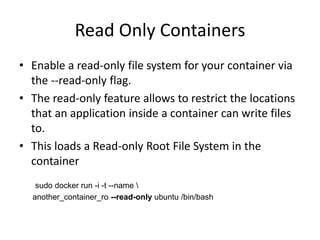
• Enable a read-only file system for your container via
the --read-only flag.
• The read-only feature allows to restrict the locations
that an application inside a container can write files
to.
• This loads a Read-only Root File System in the
container
sudo docker run -i -t --name 
another_container_ro --read-only ubuntu /bin/bash
Read Only Containers
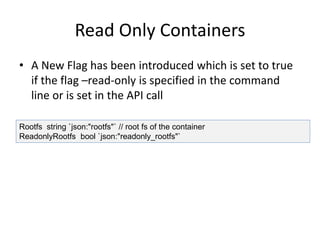
• A New Flag has been introduced which is set to true
if the flag –read-only is specified in the command
line or is set in the API call
Rootfs string `json:"rootfs"` // root fs of the container
ReadonlyRootfs bool `json:"readonly_rootfs"`
Docker Stats
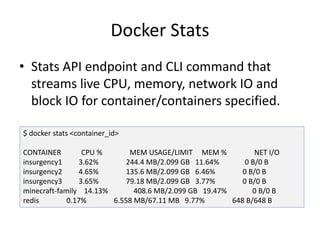
• Stats API endpoint and CLI command that
streams live CPU, memory, network IO and
block IO for container/containers specified.
$ docker stats <container_id>
CONTAINER CPU % MEM USAGE/LIMIT MEM % NET I/O
insurgency1 3.62% 244.4 MB/2.099 GB 11.64% 0 B/0 B
insurgency2 4.65% 135.6 MB/2.099 GB 6.46% 0 B/0 B
insurgency3 3.65% 79.18 MB/2.099 GB 3.77% 0 B/0 B
minecraft-family 14.13% 408.6 MB/2.099 GB 19.47% 0 B/0 B
redis 0.17% 6.558 MB/67.11 MB 9.77% 648 B/648 B
Docker Image Spec
• A Docker Image is an ordered collection of
root file system changes and the
corresponding execution parameters for use
within a container runtime.
• Docker Image specification outlines the
format of these file system changes
• It Describes how to create and use them for
use with a container runtime and execution
tool.
Docker Image Spec
• Layer
• Image JSON
• Image File System Change set
• Image ID
• Tag Repository
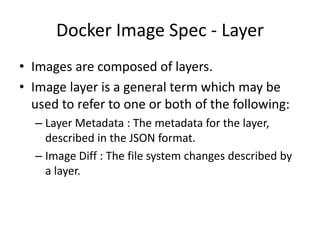
Docker Image Spec - Layer
• Images are composed of layers.
• Image layer is a general term which may be
used to refer to one or both of the following:
– Layer Metadata : The metadata for the layer,
described in the JSON format.
– Image Diff : The file system changes described by
a layer.
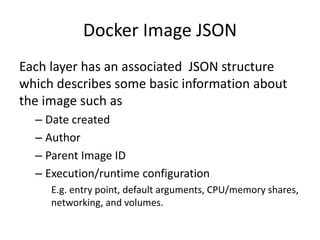
Docker Image JSON
Each layer has an associated JSON structure
which describes some basic information about
the image such as
– Date created
– Author
– Parent Image ID
– Execution/runtime configuration
E.g. entry point, default arguments, CPU/memory shares,
networking, and volumes.
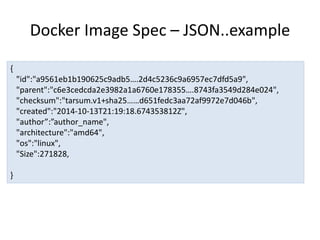
Docker Image Spec – JSON..example
{
"id":"a9561eb1b190625c9adb5….2d4c5236c9a6957ec7dfd5a9",
"parent":"c6e3cedcda2e3982a1a6760e178355….8743fa3549d284e024",
"checksum":"tarsum.v1+sha25……d651fedc3aa72af9972e7d046b",
"created":"2014-10-13T21:19:18.674353812Z",
"author”:”author_name",
"architecture":"amd64",
"os":"linux",
"Size":271828,
}
Docker Image Spec – JSON ..example
{
…
"config":{
"User":"alice",
"Memory":2048,
"MemorySwap":4096,
"CpuShares":8,
"ExposedPorts":{
"8080/tcp":{
}
},
"Env":[ ],
"Entrypoint":[ ],
"Cmd":[ ],
"Volumes":{ },
"WorkingDir":"/home/alice”,
}
Image Tag
• A tag serves to map a descriptive, user-given
name to any single image ID.
• An image name suffix (the name component
after :) is often referred to as a tag.
• Acceptable values for a tag suffix are
implementation specific
• SHOULD be limited to
– set of alphanumeric characters [a-zA-z0-9]
– punctuation characters [._-]
– MUST NOT contain a : character.
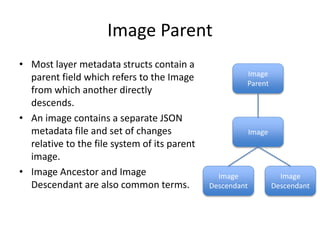
Image Parent
• Most layer metadata structs contain a
parent field which refers to the Image
from which another directly
descends.
• An image contains a separate JSON
metadata file and set of changes
relative to the file system of its parent
image.
• Image Ancestor and Image
Descendant are also common terms.
Image
Image
Parent
Image
Descendant
Image
Descendant

Docker 1.5

  • 1.
    Docker 1.5 Overview Author :Rajdeep Dua Date : March 2015
  • 2.
    IPv6 Support • Bydefault, the Docker server configures the container network for IPv4 only. • Enable IPv4/IPv6 dual stack support by running the Docker daemon with the --ipv6 flag. • Docker will set up the bridge docker0 with the IPv6 link-local address fe80::1.
  • 3.
    Enabling IPv6 support •By default, containers that are created will only get a link-local IPv6 address. • To assign globally routable IPv6 addresses to your containers specify an IPv6 subnet to pick the addresses from. • Set the IPv6 subnet via the --fixed-cidr-v6 parameter when starting Docker daemon: $ docker -d --ipv6 --fixed-cidr-v6="2001:db8:1::/64"
  • 4.
    Enable IPv6 Routing $ip -6 route add 2001:db8:1::/64 dev docker0 $ sysctl net.ipv6.conf.default.forwarding=1 $ sysctl net.ipv6.conf.all.forwarding=1
  • 5.
    Check the IPAddress • Launch a New Container • Check the IP Address $ sudo docker run -t -i ubuntu:14.04 /bin/bash root@a232a2f68927:/# ifconfig eth0 Link encap:Ethernet HWaddr 02:42:ac:11:00:04 inet addr:172.17.0.4 Bcast:0.0.0.0 Mask:255.255.0.0 inet6 addr: 2001:db8:1::242:ac11:4/64 Scope:Global inet6 addr: fe80::42:acff:fe11:4/64 Scope:Link UP BROADCAST RUNNING MTU:1500 Metric:1 RX packets:4 errors:0 dropped:0 overruns:0 frame:0 TX packets:5 errors:0 dropped:0 overruns:0 carrier:0 collisions:0 txqueuelen:0 RX bytes:448 (448.0 B) TX bytes:406 (406.0 B)
  • 6.
    Read Only Containers •Enable a read-only file system for your container via the --read-only flag. • The read-only feature allows to restrict the locations that an application inside a container can write files to. • This loads a Read-only Root File System in the container sudo docker run -i -t --name another_container_ro --read-only ubuntu /bin/bash
  • 7.
    Read Only Containers •A New Flag has been introduced which is set to true if the flag –read-only is specified in the command line or is set in the API call Rootfs string `json:"rootfs"` // root fs of the container ReadonlyRootfs bool `json:"readonly_rootfs"`
  • 8.
    Docker Stats • StatsAPI endpoint and CLI command that streams live CPU, memory, network IO and block IO for container/containers specified. $ docker stats <container_id> CONTAINER CPU % MEM USAGE/LIMIT MEM % NET I/O insurgency1 3.62% 244.4 MB/2.099 GB 11.64% 0 B/0 B insurgency2 4.65% 135.6 MB/2.099 GB 6.46% 0 B/0 B insurgency3 3.65% 79.18 MB/2.099 GB 3.77% 0 B/0 B minecraft-family 14.13% 408.6 MB/2.099 GB 19.47% 0 B/0 B redis 0.17% 6.558 MB/67.11 MB 9.77% 648 B/648 B
  • 9.
    Docker Image Spec •A Docker Image is an ordered collection of root file system changes and the corresponding execution parameters for use within a container runtime. • Docker Image specification outlines the format of these file system changes • It Describes how to create and use them for use with a container runtime and execution tool.
  • 10.
    Docker Image Spec •Layer • Image JSON • Image File System Change set • Image ID • Tag Repository
  • 11.
    Docker Image Spec- Layer • Images are composed of layers. • Image layer is a general term which may be used to refer to one or both of the following: – Layer Metadata : The metadata for the layer, described in the JSON format. – Image Diff : The file system changes described by a layer.
  • 12.
    Docker Image JSON Eachlayer has an associated JSON structure which describes some basic information about the image such as – Date created – Author – Parent Image ID – Execution/runtime configuration E.g. entry point, default arguments, CPU/memory shares, networking, and volumes.
  • 13.
    Docker Image Spec– JSON..example { "id":"a9561eb1b190625c9adb5….2d4c5236c9a6957ec7dfd5a9", "parent":"c6e3cedcda2e3982a1a6760e178355….8743fa3549d284e024", "checksum":"tarsum.v1+sha25……d651fedc3aa72af9972e7d046b", "created":"2014-10-13T21:19:18.674353812Z", "author”:”author_name", "architecture":"amd64", "os":"linux", "Size":271828, }
  • 14.
    Docker Image Spec– JSON ..example { … "config":{ "User":"alice", "Memory":2048, "MemorySwap":4096, "CpuShares":8, "ExposedPorts":{ "8080/tcp":{ } }, "Env":[ ], "Entrypoint":[ ], "Cmd":[ ], "Volumes":{ }, "WorkingDir":"/home/alice”, }
  • 15.
    Image Tag • Atag serves to map a descriptive, user-given name to any single image ID. • An image name suffix (the name component after :) is often referred to as a tag. • Acceptable values for a tag suffix are implementation specific • SHOULD be limited to – set of alphanumeric characters [a-zA-z0-9] – punctuation characters [._-] – MUST NOT contain a : character.
  • 16.
    Image Parent • Mostlayer metadata structs contain a parent field which refers to the Image from which another directly descends. • An image contains a separate JSON metadata file and set of changes relative to the file system of its parent image. • Image Ancestor and Image Descendant are also common terms. Image Image Parent Image Descendant Image Descendant