Attacking and Defending Kubernetes
A Brief Overview
Copyright - we45, 2020
Nithin Jois
Copyright - we45, 2020
● Senior Security Solutions Engineer at we45
● DevOps, Security Engineering and DevSecOps for clients
● Co-lead developer - ThreatPlaybook
● Core-developer - Orchestron
● Speaker/Trainer at multiple security and industry events
Twitter : @bondijois
LinkedIn : https://www.linkedin.com/in/bondijois/
E-mail : nithin.jois@we45.com
Copyright - we45, 2020
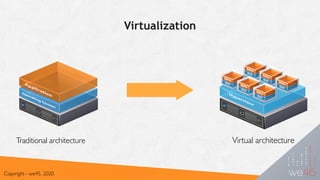
Virtualization
Copyright - we45, 2020
Traditional architecture Virtual architecture
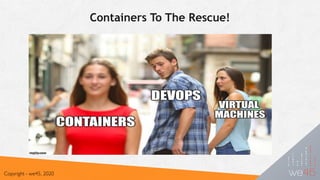
Containers To The Rescue!
Copyright - we45, 2020
Containers What??..
● OS level virtualization for running
multiple isolated* systems using
host resources
● Abstraction layer that packages
code and dependencies together
Copyright - we45, 2020
Container Orchestration
Copyright - we45, 2020
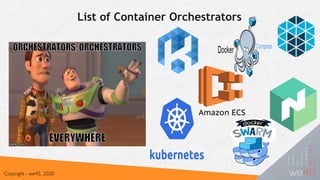
List of Container Orchestrators
Copyright - we45, 2020
Copyright - we45, 2019
Copyright - we45, 2020
Image Registry
Node 4
Node 3
Node 2
Node 1
API
CLI
UI
User 

Interface
Command Line

Interface
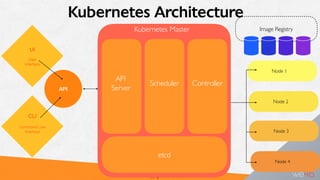
Kubernetes Master
API
Server
Scheduler Controller
etcd
Kubernetes Architecture
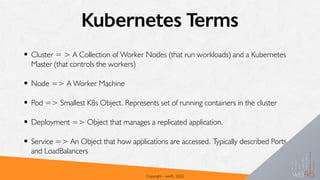
Kubernetes Terms
• Cluster = > A Collection of Worker Nodes (that run workloads) and a Kubernetes
Master (that controls the workers)
• Node => A Worker Machine
• Pod => Smallest K8s Object. Represents set of running containers in the cluster
• Deployment => Object that manages a replicated application.
• Service => An Object that how applications are accessed. Typically described Ports
and LoadBalancers
Copyright - we45, 2020
Demo: Setting up a K8s cluster
Copyright - we45, 2020
An Attacker’s View of K8s
Copyright - we45, 2020
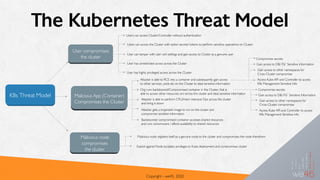
The Kubernetes Threat Model
Copyright - we45, 2020
K8s Threat Model
User compromises
the cluster
Users can access Cluster/Controller without authentication
Users can access the Cluster with stolen secrets/ tokens to perform sensitive operations on Cluster
User can tamper with user cert settings and gain access to Cluster as a genuine user
User has unrestricted access across the Cluster
User has highly privileged access across the Cluster
Malicious App (Container)
Compromises the Cluster
Attacker is able to RCE into a container and subsequently gain access
to other services, pods etc on the Cluster to steal sensitive information
Org runs backdoored/Compromised container in the Cluster, that is
able to access other resources on/ across the cluster and steal sensitive information
Attacker is able to perform CPU/mem intensive Ops across the cluster
and bring it down
Attacker gets a trojanized image to run on the cluster and
compromise sensitive information
Backdoored/ compromised container accesses shared resources
and runs ransomware / affects availability to shared resources
Compromise secrets
Gain access to DB/ FS/ Sensitive Information
Gain access to other namespaces for
Cross-Cluster compromise
Access Kube API and Controller to access
K8s Management Sensitive Info
Compromise secrets
Gain access to DB/ FS/ Sensitive Information
Gain access to other namespaces for
Cross-Cluster compromise
Access Kube API and Controller to access
K8s Management Sensitive Info
Malicious node
compromises
the cluster
Malicious node registers itself as a genuine node to the cluster and compromises the node therefrom
Exploit against Node escalates privileges to Kube deployment and compromises cluster
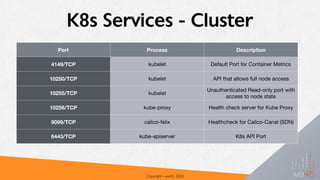
K8s Services - Cluster
Copyright - we45, 2020
Port Process Description
4149/TCP kubelet Default Port for Container Metrics
10250/TCP kubelet API that allows full node access
10255/TCP kubelet
Unauthenticated Read-only port with
access to node state
10256/TCP kube-proxy Health check server for Kube Proxy
9099/TCP calico-felix Healthcheck for Calico-Canal (SDN)
6443/TCP kube-apiserver K8s API Port
Demo: Attacking a K8s Cluster
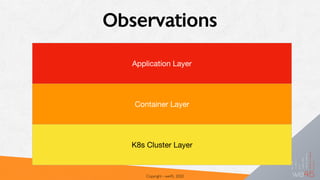
Observations
Copyright - we45, 2020
Application Layer
Container Layer
K8s Cluster Layer
Application Layer
• Vulnerable Application - Insecure Deserialization
• Insecure Secrets Management - No Protection of
Encryption Key
• Redis - No Authentication
Container Layer
• Running as “root"
• No Hardening of Container Runtime
• Insecure Secrets in Container Environment
Variables
K8s Cluster Layer
• No Network Policy
• Especially Egress Controls
• No Authentication or Access Control
• No Logical Segmentation - Namespaces
• No Pod Security Controls
• Lack of Monitoring
Securing K8s (Container
Orchestration)
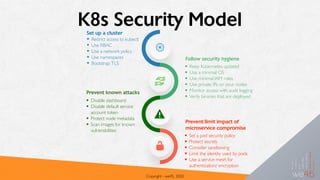
K8s Security Model
Copyright - we45, 2020
• Restrict access to kubectl
• Use RBAC
• Use a network policy
• Use namespaces
• Bootstrap TLS
Set up a cluster
Follow security hygiene
• Keep Kubernetes updated
• Use a minimal OS
• Use minimal IAM roles
• Use private IPs on your nodes
• Monitor access with audit logging
• Verify binaries that are deployed
• Disable dashboard
• Disable default service
account token
• Protect node metadata
• Scan images for known
vulnerabilities
Prevent known attacks
• Set a pod security policy
• Protect secrets
• Consider sandboxing
• Limit the identity used by pods
• Use a service mesh for
authentication/ encryption
Prevent/limit impact of
microservice compromise
K8s Authentication and Access Control
•Authentication
•Access Control
•Admission Controller
Copyright - we45, 2020
K8s Authentication - Users
• Kubernetes has two types of users:
• Service Accounts => Managed by Kubernetes
• Managed by the K8s API, bound to specific namespaces
• Normal Users => Managed by an outside service
• The user typing kubectl must authenticate or be an anonymous user
Copyright - we45, 2020
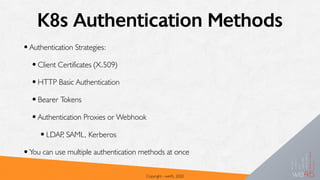
K8s Authentication Methods
•Authentication Strategies:
•Client Certificates (X.509)
•HTTP Basic Authentication
•Bearer Tokens
•Authentication Proxies or Webhook
•LDAP, SAML, Kerberos
•You can use multiple authentication methods at once
Copyright - we45, 2020
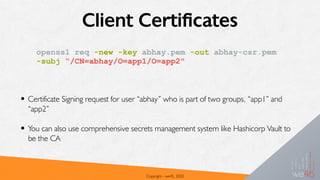
Client Certificates
• Certificate Signing request for user “abhay” who is part of two groups, “app1” and
“app2”
• You can also use comprehensive secrets management system like Hashicorp Vault to
be the CA
Copyright - we45, 2020
openssl req -new -key abhay.pem -out abhay-csr.pem
-subj “/CN=abhay/O=app1/O=app2"
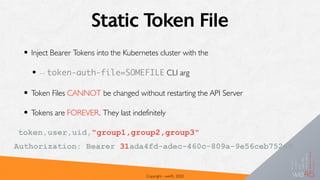
Static Token File
• Inject Bearer Tokens into the Kubernetes cluster with the
• -- token-auth-file=SOMEFILE CLI arg
• Token Files CANNOT be changed without restarting the API Server
• Tokens are FOREVER. They last indefinitely
Copyright - we45, 2020
token,user,uid,"group1,group2,group3"
Authorization: Bearer 31ada4fd-adec-460c-809a-9e56ceb75269
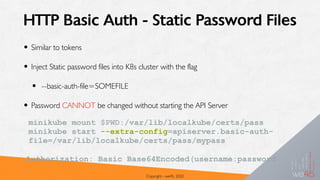
HTTP Basic Auth - Static Password Files
• Similar to tokens
• Inject Static password files into K8s cluster with the flag
• --basic-auth-file=SOMEFILE
• Password CANNOT be changed without starting the API Server
Copyright - we45, 2020
minikube mount $PWD:/var/lib/localkube/certs/pass
minikube start --extra-config=apiserver.basic-auth-
file=/var/lib/localkube/certs/pass/mypass
Authorization: Basic Base64Encoded(username:password)
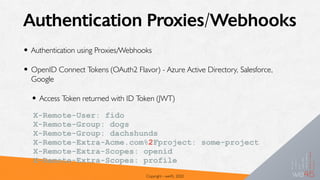
Authentication Proxies/Webhooks
• Authentication using Proxies/Webhooks
• OpenID Connect Tokens (OAuth2 Flavor) - Azure Active Directory, Salesforce,
Google
• Access Token returned with ID Token (JWT)
Copyright - we45, 2020
X-Remote-User: fido
X-Remote-Group: dogs
X-Remote-Group: dachshunds
X-Remote-Extra-Acme.com%2Fproject: some-project
X-Remote-Extra-Scopes: openid
X-Remote-Extra-Scopes: profile
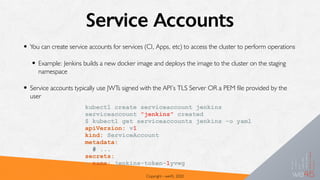
Service Accounts
• You can create service accounts for services (CI, Apps, etc) to access the cluster to perform operations
• Example: Jenkins builds a new docker image and deploys the image to the cluster on the staging
namespace
• Service accounts typically use JWTs signed with the API’s TLS Server OR a PEM file provided by the
user
Copyright - we45, 2020
kubectl create serviceaccount jenkins
serviceaccount "jenkins" created
$ kubectl get serviceaccounts jenkins -o yaml
apiVersion: v1
kind: ServiceAccount
metadata:
# ...
secrets:
- name: jenkins-token-1yvwg
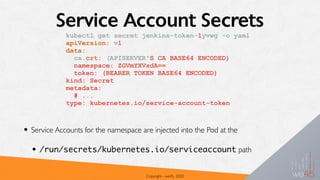
Service Account Secrets
• Service Accounts for the namespace are injected into the Pod at the
• /run/secrets/kubernetes.io/serviceaccount path
Copyright - we45, 2020
kubectl get secret jenkins-token-1yvwg -o yaml
apiVersion: v1
data:
ca.crt: (APISERVER'S CA BASE64 ENCODED)
namespace: ZGVmYXVsdA==
token: (BEARER TOKEN BASE64 ENCODED)
kind: Secret
metadata:
# ...
type: kubernetes.io/service-account-token
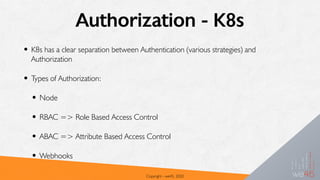
Authorization - K8s
• K8s has a clear separation between Authentication (various strategies) and
Authorization
• Types of Authorization:
• Node
• RBAC => Role Based Access Control
• ABAC => Attribute Based Access Control
• Webhooks
Copyright - we45, 2020
RBAC K8s Authorization
• RBAC Authorization refers to Roles that contain
rules of Permissions
• Permissions are only additive (No Deny)
• Easy to manage, when you have a a clearly defined
set of privileges for the roles
• Two Types:
• ClusterRole => Role that applies across the
Cluster (across Namespaces)
• Role => applies to Permissions that work
across a single namespace
kind: Role
apiVersion:
rbac.authorization.k8s.io/
v1
metadata:
namespace: default
name: pod-reader
rules:
- apiGroups: [""] # ""
indicates the core API
group
resources: ["pods"]
verbs: ["get", "watch",
"list"]
Demo: Role Based Access Control
Copyright - we45, 2020
ABAC Authorization
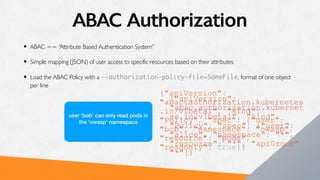
• ABAC == “Attribute Based Authentication System”
• Simple mapping (JSON) of user access to specific resources based on their attributes
• Load the ABAC Policy with a --authorization-policy-file=SomeFile, format of one object
per line
{"apiVersion":
"abac.authorization.kubernet
es.io/v1beta1", "kind":
"Policy", "spec": {"user":
"alice", "namespace": "*",
"resource": "*", "apiGroup":
"*"}}
user ‘alice’ has access to all
namespaces/resources in the
cluster
{"apiVersion":
"abac.authorization.kubernetes
.io/v1beta1", "kind":
"Policy", "spec": {"user":
"bob", "namespace": "owasp",
"resource": "pods",
"readonly": true}}
user ‘bob’ can only read pods in
the ‘owasp’ namespace
Admission Controllers
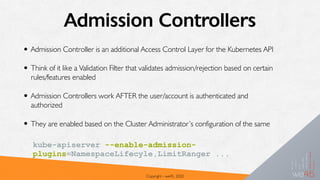
• Admission Controller is an additional Access Control Layer for the Kubernetes API
• Think of it like a Validation Filter that validates admission/rejection based on certain
rules/features enabled
• Admission Controllers work AFTER the user/account is authenticated and
authorized
• They are enabled based on the Cluster Administrator’s configuration of the same
Copyright - we45, 2020
kube-apiserver --enable-admission-
plugins=NamespaceLifecyle,LimitRanger ...
Useful Admission Controller Plugins
• AlwaysPullImages => forces the pod image pull policy to always. Ensures that
private images are authenticated when there’s a pull.
• DenyEscalatingExec => Deny ‘exec’ or ‘attach’ operations to Pods that run
with elevated privileges (host access). Pods => Privileges, Host IPC Namespace, Host
PID Namespace
• EventRateLimit => Rate Limit for K8s API. Prevents DoS
• LimitRanger => Enforce the LimitRange directive to protect against excessive
consumption by Pod
Copyright - we45, 2020
Useful Admission Controller Plugins - 2
• PodSecurityPolicy => Multiple Configuration Parameters (including Seccomp,
AppArmor), etc to protect Pod against attacks (rule based)
• NamespaceLifecycle => Prevents against loading resources in “to-be-deleted”
namespaces. Also prevents against resources being allocated in default, kube-system
and kube-public namespaces
• NodeRestriction => Node Authorization Privileges for the kubelet
• ResourceQuota => Enforces Consumable Resources by a Pod
Copyright - we45, 2020
Other Access Control Good Practices
• Secure/Disable Dashboard
• Never run LoadBalancer on Dashboard Service
• Leverage RBAC
• Create and Enforce controls on Namespaces
• Logical Segmentation (however weak)
• Better way to think about Access Control
Copyright - we45, 2020
K8s Pod Security
Pod Security Policy
•Ruleset that defines specific rules for a
Pod to run in a K8s cluster
•Optional, but highly recommended
•Admission Controller - Disallows
containers from being loaded on the
Pod, if it violates the rules
Pod Security Policy - Parameters
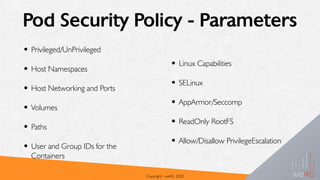
• Privileged/UnPrivileged
• Host Namespaces
• Host Networking and Ports
• Volumes
• Paths
• User and Group IDs for the
Containers
Copyright - we45, 2020
• Linux Capabilities
• SELinux
• AppArmor/Seccomp
• ReadOnly RootFS
• Allow/Disallow PrivilegeEscalation
Copyright - we45, 2020
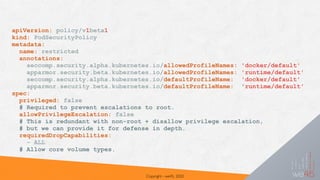
apiVersion: policy/v1beta1
kind: PodSecurityPolicy
metadata:
name: restricted
annotations:
seccomp.security.alpha.kubernetes.io/allowedProfileNames: 'docker/default'
apparmor.security.beta.kubernetes.io/allowedProfileNames: 'runtime/default'
seccomp.security.alpha.kubernetes.io/defaultProfileName: 'docker/default'
apparmor.security.beta.kubernetes.io/defaultProfileName: 'runtime/default'
spec:
privileged: false
# Required to prevent escalations to root.
allowPrivilegeEscalation: false
# This is redundant with non-root + disallow privilege escalation,
# but we can provide it for defense in depth.
requiredDropCapabilities:
- ALL
# Allow core volume types.
Copyright - we45, 2020
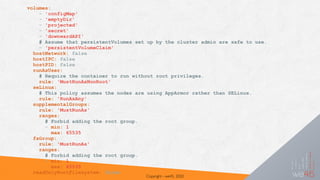
volumes:
- 'configMap'
- 'emptyDir'
- 'projected'
- 'secret'
- 'downwardAPI'
# Assume that persistentVolumes set up by the cluster admin are safe to use.
- 'persistentVolumeClaim'
hostNetwork: false
hostIPC: false
hostPID: false
runAsUser:
# Require the container to run without root privileges.
rule: 'MustRunAsNonRoot'
seLinux:
# This policy assumes the nodes are using AppArmor rather than SELinux.
rule: 'RunAsAny'
supplementalGroups:
rule: 'MustRunAs'
ranges:
# Forbid adding the root group.
- min: 1
max: 65535
fsGroup:
rule: 'MustRunAs'
ranges:
# Forbid adding the root group.
- min: 1
max: 65535
readOnlyRootFilesystem: false
Demo: Pod Security Policy
Copyright - we45, 2020
Pod Security Policy - Gotchas
•AppArmor/Seccomp is not a silver-bullet! Attackers can still perform
Network Layer Attacks, if your apps are vulnerable
•Profiling Syscalls for appropriate restrictions - especially of interpreted
languages, is 😥
•Doesn’t protect against Network Layer Attacks
Copyright - we45, 2020
K8s - Protecting Secrets
K8s Secrets
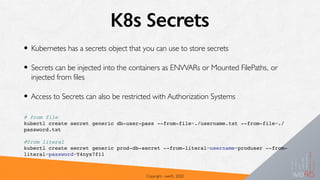
• Kubernetes has a secrets object that you can use to store secrets
• Secrets can be injected into the containers as ENVVARs or Mounted FilePaths, or
injected from files
• Access to Secrets can also be restricted with Authorization Systems
Copyright - we45, 2020
# from file
kubectl create secret generic db-user-pass --from-file=./username.txt --from-file=./
password.txt
#from literal
kubectl create secret generic prod-db-secret --from-literal=username=produser --from-
literal=password=Y4nys7f11
Points to Ponder…
• Secrets are NOT encrypted at rest
• Not in Memory
• Not in etcd
• Injected Secrets (into Container) are in plaintext/base64encoded
• K8s has an experimental plugin that encrypts secrets in etcd:
• But, they are still decrypted and injected to the container in plaintext
Copyright - we45, 2020
Secret Input/Output
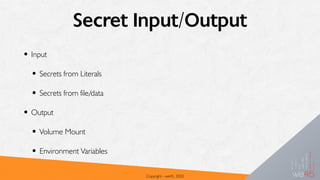
• Input
• Secrets from Literals
• Secrets from file/data
• Output
• Volume Mount
• Environment Variables
Copyright - we45, 2020
Secrets Gotchas
• Secrets get committed to repos (sometimes, public ones)
• Secrets can get exposed to unauthorized users within the cluster
• Secrets are available unencrypted in etcd and to cluster resources
Copyright - we45, 2020
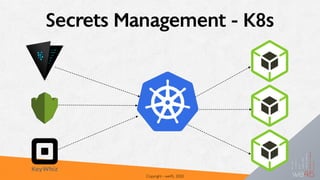
Secrets Management - K8s
Copyright - we45, 2020
Common Characteristics
• Secrets Management Solutions
• Centralized Storehouse of secrets and encrypted
datasets
• Secrets Management solutions in the cloud -
Plethora of APIs and reousrces to handle this
requirement
• Data is decrypted before being injected into the
cluster
• Data is (usually) stored in etcd with encryption
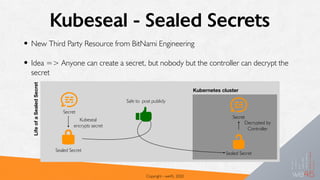
Kubeseal - Sealed Secrets
• New Third Party Resource from BitNami Engineering
• Idea => Anyone can create a secret, but nobody but the controller can decrypt the
secret
Copyright - we45, 2020
LifeofaSealedSecret
Secret
Sealed Secret
Kubeseal
encrypts secret
Safe to post publicly
Secret
Sealed Secret
Kubernetes cluster
Decrypted by
Controller
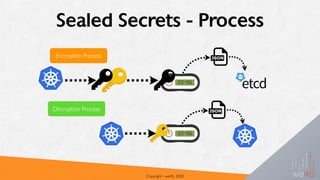
Sealed Secrets - Process
Copyright - we45, 2020
Encryption Process
Decryption Process
Demo: Kubeseal - Shared Secrets
Copyright - we45, 2020
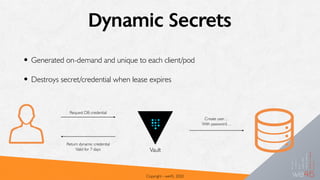
Dynamic Secrets
• Generated on-demand and unique to each client/pod
• Destroys secret/credential when lease expires
Copyright - we45, 2020
Vault
Request DB credential
Return dynamic credential
Valid for 7 days
Create user…
With password…
Auditing K8s
Copyright - we45, 2020
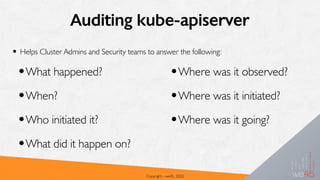
Auditing kube-apiserver
• Helps Cluster Admins and Security teams to answer the following:
Copyright - we45, 2020
•What happened?
•When?
•Who initiated it?
•What did it happen on?
•Where was it observed?
•Where was it initiated?
•Where was it going?
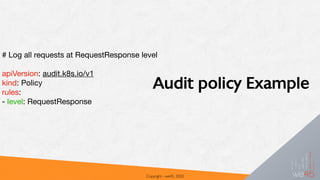
Audit policy Example
Copyright - we45, 2020
# Log all requests at RequestResponse level 


apiVersion: audit.k8s.io/v1

kind: Policy

rules:

- level: RequestResponse
Copyright - we45, 2020
{
"kind":"Event",
"apiVersion":"audit.k8s.io/v1beta1",
"metadata":{ "creationTimestamp":"2019-03-21T14:30:12Z" },
"level":"Metadata",
“timestamp":"2019-03-21T14:30:12Z",
"auditID":"442d9cc4-bfc5-4a59-b688-dcebe905ce55",
"stage":"RequestReceived",
"requestURI":"/api/v1/namespaces/default/services",
"verb":"list",
"user": {
"username":"example@example.org",
"groups":[ "system:authenticated" ]
},
"sourceIPs":[ "192.168.1.139" ],
"objectRef": {
"resource":"services",
"namespace":"default",
"apiVersion":"v1"
},
"requestReceivedTimestamp":"2019-03-21T14:30:12.720183Z",
"stageTimestamp":"2019-03-21T14:30:12.720183Z"
Audit Log Example
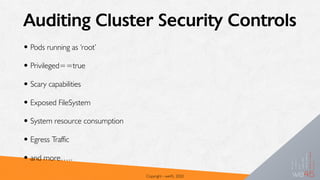
Auditing Cluster Security Controls
• Pods running as ‘root’
• Privileged==true
• Scary capabilities
• Exposed FileSystem
• System resource consumption
• Egress Traffic
• and more…..
Copyright - we45, 2020
Demo: KubeAudit
Copyright - we45, 2020
K8s Vulnerability Assessment
Copyright - we45, 2020
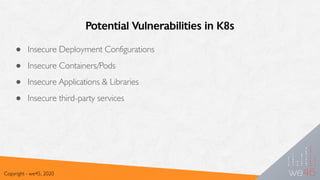
Potential Vulnerabilities in K8s
● Insecure Deployment Configurations
● Insecure Containers/Pods
● Insecure Applications & Libraries
● Insecure third-party services
Copyright - we45, 2020
Potential flaws in K8s YAML Spec
● Storage of Sensitive Info in YAML resources
● Using unencrypted ENV vars and secrets
● Insecure Network, Volume/mountPath configurations
● Lack of resource limits in place
● Privileged access to pods
● Extensive Kernel Capabilities
Copyright - we45, 2020
K8s CIS-Benchmark Checks
● Setup Authentication and Authorization
● Secure Data in Transit
● Secure Data at Rest
● Employ Least Privileges
● Additional Runtime Controls
Copyright - we45, 2020
CIS Best-Practices - kube-bench
● Checks if K8s deployment is secure by
running checks documented in CIS-K8s-
Benchmark.
● Checks can be performed on both Master
and Node machines
● Checks performed are stored as YAML specs,
making it easy to modify
● Results are given in Pass, Fail and Info format
Copyright - we45, 2020
Scanning K8s Cluster - kube-hunter
● Scans for security issues on K8s clusters
● Has three scanning options
○ Remote Scanning: kube-hunter.py --remote some.node.com
○ Internal Scanning : kube-hunter.py --internal
○ Network Scanning: kube-hunter.py --cidr 192.168.0.0/24
● For a more ‘Attack’ like scan, ‘--active’ flag can be used.
○ Exploits vulnerabilities found to explore further
○ kube-hunter.py --remote some.domain.com --active
■ Can change state of the cluster, which could be harmful
Copyright - we45, 2020
Demo: Kube-Hunter
Copyright - we45, 2020
Kubernetes CI/CD
Copyright - we45, 2020
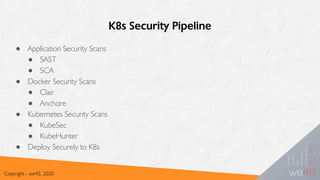
K8s Security Pipeline
● Application Security Scans
● SAST
● SCA
● Docker Security Scans
● Clair
● Anchore
● Kubernetes Security Scans
● KubeSec
● KubeHunter
● Deploy Securely to K8s
Copyright - we45, 2020
Demo: K8s Security Pipeline
Copyright - we45, 2020
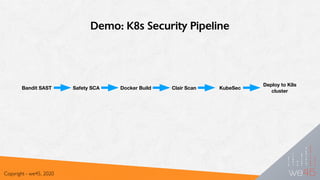
Bandit SAST Safety SCA Docker Build Clair Scan KubeSec
Deploy to K8s
cluster
Thank You!
Copyright - we45, 2020
@bondijois
https://linkedin.com/in/bondijois

Attacking and Defending Kubernetes - Nithin Jois

  • 1.
    Attacking and DefendingKubernetes A Brief Overview Copyright - we45, 2020
  • 2.
    Nithin Jois Copyright -we45, 2020 ● Senior Security Solutions Engineer at we45 ● DevOps, Security Engineering and DevSecOps for clients ● Co-lead developer - ThreatPlaybook ● Core-developer - Orchestron ● Speaker/Trainer at multiple security and industry events Twitter : @bondijois LinkedIn : https://www.linkedin.com/in/bondijois/ E-mail : nithin.jois@we45.com
  • 3.
  • 4.
    Virtualization Copyright - we45,2020 Traditional architecture Virtual architecture
  • 5.
    Containers To TheRescue! Copyright - we45, 2020
  • 6.
    Containers What??.. ● OSlevel virtualization for running multiple isolated* systems using host resources ● Abstraction layer that packages code and dependencies together Copyright - we45, 2020
  • 7.
  • 8.
    List of ContainerOrchestrators Copyright - we45, 2020
  • 9.
  • 10.
    Copyright - we45,2020 Image Registry Node 4 Node 3 Node 2 Node 1 API CLI UI User Interface Command Line Interface Kubernetes Master API Server Scheduler Controller etcd Kubernetes Architecture
  • 11.
    Kubernetes Terms • Cluster= > A Collection of Worker Nodes (that run workloads) and a Kubernetes Master (that controls the workers) • Node => A Worker Machine • Pod => Smallest K8s Object. Represents set of running containers in the cluster • Deployment => Object that manages a replicated application. • Service => An Object that how applications are accessed. Typically described Ports and LoadBalancers Copyright - we45, 2020
  • 12.
    Demo: Setting upa K8s cluster Copyright - we45, 2020
  • 13.
    An Attacker’s Viewof K8s Copyright - we45, 2020
  • 14.
    The Kubernetes ThreatModel Copyright - we45, 2020 K8s Threat Model User compromises the cluster Users can access Cluster/Controller without authentication Users can access the Cluster with stolen secrets/ tokens to perform sensitive operations on Cluster User can tamper with user cert settings and gain access to Cluster as a genuine user User has unrestricted access across the Cluster User has highly privileged access across the Cluster Malicious App (Container) Compromises the Cluster Attacker is able to RCE into a container and subsequently gain access to other services, pods etc on the Cluster to steal sensitive information Org runs backdoored/Compromised container in the Cluster, that is able to access other resources on/ across the cluster and steal sensitive information Attacker is able to perform CPU/mem intensive Ops across the cluster and bring it down Attacker gets a trojanized image to run on the cluster and compromise sensitive information Backdoored/ compromised container accesses shared resources and runs ransomware / affects availability to shared resources Compromise secrets Gain access to DB/ FS/ Sensitive Information Gain access to other namespaces for Cross-Cluster compromise Access Kube API and Controller to access K8s Management Sensitive Info Compromise secrets Gain access to DB/ FS/ Sensitive Information Gain access to other namespaces for Cross-Cluster compromise Access Kube API and Controller to access K8s Management Sensitive Info Malicious node compromises the cluster Malicious node registers itself as a genuine node to the cluster and compromises the node therefrom Exploit against Node escalates privileges to Kube deployment and compromises cluster
  • 15.
    K8s Services -Cluster Copyright - we45, 2020 Port Process Description 4149/TCP kubelet Default Port for Container Metrics 10250/TCP kubelet API that allows full node access 10255/TCP kubelet Unauthenticated Read-only port with access to node state 10256/TCP kube-proxy Health check server for Kube Proxy 9099/TCP calico-felix Healthcheck for Calico-Canal (SDN) 6443/TCP kube-apiserver K8s API Port
  • 16.
    Demo: Attacking aK8s Cluster
  • 17.
    Observations Copyright - we45,2020 Application Layer Container Layer K8s Cluster Layer
  • 18.
    Application Layer • VulnerableApplication - Insecure Deserialization • Insecure Secrets Management - No Protection of Encryption Key • Redis - No Authentication
  • 19.
    Container Layer • Runningas “root" • No Hardening of Container Runtime • Insecure Secrets in Container Environment Variables
  • 20.
    K8s Cluster Layer •No Network Policy • Especially Egress Controls • No Authentication or Access Control • No Logical Segmentation - Namespaces • No Pod Security Controls • Lack of Monitoring
  • 21.
  • 22.
    K8s Security Model Copyright- we45, 2020 • Restrict access to kubectl • Use RBAC • Use a network policy • Use namespaces • Bootstrap TLS Set up a cluster Follow security hygiene • Keep Kubernetes updated • Use a minimal OS • Use minimal IAM roles • Use private IPs on your nodes • Monitor access with audit logging • Verify binaries that are deployed • Disable dashboard • Disable default service account token • Protect node metadata • Scan images for known vulnerabilities Prevent known attacks • Set a pod security policy • Protect secrets • Consider sandboxing • Limit the identity used by pods • Use a service mesh for authentication/ encryption Prevent/limit impact of microservice compromise
  • 23.
    K8s Authentication andAccess Control •Authentication •Access Control •Admission Controller Copyright - we45, 2020
  • 24.
    K8s Authentication -Users • Kubernetes has two types of users: • Service Accounts => Managed by Kubernetes • Managed by the K8s API, bound to specific namespaces • Normal Users => Managed by an outside service • The user typing kubectl must authenticate or be an anonymous user Copyright - we45, 2020
  • 25.
    K8s Authentication Methods •AuthenticationStrategies: •Client Certificates (X.509) •HTTP Basic Authentication •Bearer Tokens •Authentication Proxies or Webhook •LDAP, SAML, Kerberos •You can use multiple authentication methods at once Copyright - we45, 2020
  • 26.
    Client Certificates • CertificateSigning request for user “abhay” who is part of two groups, “app1” and “app2” • You can also use comprehensive secrets management system like Hashicorp Vault to be the CA Copyright - we45, 2020 openssl req -new -key abhay.pem -out abhay-csr.pem -subj “/CN=abhay/O=app1/O=app2"
  • 27.
    Static Token File •Inject Bearer Tokens into the Kubernetes cluster with the • -- token-auth-file=SOMEFILE CLI arg • Token Files CANNOT be changed without restarting the API Server • Tokens are FOREVER. They last indefinitely Copyright - we45, 2020 token,user,uid,"group1,group2,group3" Authorization: Bearer 31ada4fd-adec-460c-809a-9e56ceb75269
  • 28.
    HTTP Basic Auth- Static Password Files • Similar to tokens • Inject Static password files into K8s cluster with the flag • --basic-auth-file=SOMEFILE • Password CANNOT be changed without starting the API Server Copyright - we45, 2020 minikube mount $PWD:/var/lib/localkube/certs/pass minikube start --extra-config=apiserver.basic-auth- file=/var/lib/localkube/certs/pass/mypass Authorization: Basic Base64Encoded(username:password)
  • 29.
    Authentication Proxies/Webhooks • Authenticationusing Proxies/Webhooks • OpenID Connect Tokens (OAuth2 Flavor) - Azure Active Directory, Salesforce, Google • Access Token returned with ID Token (JWT) Copyright - we45, 2020 X-Remote-User: fido X-Remote-Group: dogs X-Remote-Group: dachshunds X-Remote-Extra-Acme.com%2Fproject: some-project X-Remote-Extra-Scopes: openid X-Remote-Extra-Scopes: profile
  • 30.
    Service Accounts • Youcan create service accounts for services (CI, Apps, etc) to access the cluster to perform operations • Example: Jenkins builds a new docker image and deploys the image to the cluster on the staging namespace • Service accounts typically use JWTs signed with the API’s TLS Server OR a PEM file provided by the user Copyright - we45, 2020 kubectl create serviceaccount jenkins serviceaccount "jenkins" created $ kubectl get serviceaccounts jenkins -o yaml apiVersion: v1 kind: ServiceAccount metadata: # ... secrets: - name: jenkins-token-1yvwg
  • 31.
    Service Account Secrets •Service Accounts for the namespace are injected into the Pod at the • /run/secrets/kubernetes.io/serviceaccount path Copyright - we45, 2020 kubectl get secret jenkins-token-1yvwg -o yaml apiVersion: v1 data: ca.crt: (APISERVER'S CA BASE64 ENCODED) namespace: ZGVmYXVsdA== token: (BEARER TOKEN BASE64 ENCODED) kind: Secret metadata: # ... type: kubernetes.io/service-account-token
  • 32.
    Authorization - K8s •K8s has a clear separation between Authentication (various strategies) and Authorization • Types of Authorization: • Node • RBAC => Role Based Access Control • ABAC => Attribute Based Access Control • Webhooks Copyright - we45, 2020
  • 33.
    RBAC K8s Authorization •RBAC Authorization refers to Roles that contain rules of Permissions • Permissions are only additive (No Deny) • Easy to manage, when you have a a clearly defined set of privileges for the roles • Two Types: • ClusterRole => Role that applies across the Cluster (across Namespaces) • Role => applies to Permissions that work across a single namespace kind: Role apiVersion: rbac.authorization.k8s.io/ v1 metadata: namespace: default name: pod-reader rules: - apiGroups: [""] # "" indicates the core API group resources: ["pods"] verbs: ["get", "watch", "list"]
  • 34.
    Demo: Role BasedAccess Control Copyright - we45, 2020
  • 35.
    ABAC Authorization • ABAC== “Attribute Based Authentication System” • Simple mapping (JSON) of user access to specific resources based on their attributes • Load the ABAC Policy with a --authorization-policy-file=SomeFile, format of one object per line {"apiVersion": "abac.authorization.kubernet es.io/v1beta1", "kind": "Policy", "spec": {"user": "alice", "namespace": "*", "resource": "*", "apiGroup": "*"}} user ‘alice’ has access to all namespaces/resources in the cluster {"apiVersion": "abac.authorization.kubernetes .io/v1beta1", "kind": "Policy", "spec": {"user": "bob", "namespace": "owasp", "resource": "pods", "readonly": true}} user ‘bob’ can only read pods in the ‘owasp’ namespace
  • 36.
  • 37.
    Admission Controllers • AdmissionController is an additional Access Control Layer for the Kubernetes API • Think of it like a Validation Filter that validates admission/rejection based on certain rules/features enabled • Admission Controllers work AFTER the user/account is authenticated and authorized • They are enabled based on the Cluster Administrator’s configuration of the same Copyright - we45, 2020 kube-apiserver --enable-admission- plugins=NamespaceLifecyle,LimitRanger ...
  • 38.
    Useful Admission ControllerPlugins • AlwaysPullImages => forces the pod image pull policy to always. Ensures that private images are authenticated when there’s a pull. • DenyEscalatingExec => Deny ‘exec’ or ‘attach’ operations to Pods that run with elevated privileges (host access). Pods => Privileges, Host IPC Namespace, Host PID Namespace • EventRateLimit => Rate Limit for K8s API. Prevents DoS • LimitRanger => Enforce the LimitRange directive to protect against excessive consumption by Pod Copyright - we45, 2020
  • 39.
    Useful Admission ControllerPlugins - 2 • PodSecurityPolicy => Multiple Configuration Parameters (including Seccomp, AppArmor), etc to protect Pod against attacks (rule based) • NamespaceLifecycle => Prevents against loading resources in “to-be-deleted” namespaces. Also prevents against resources being allocated in default, kube-system and kube-public namespaces • NodeRestriction => Node Authorization Privileges for the kubelet • ResourceQuota => Enforces Consumable Resources by a Pod Copyright - we45, 2020
  • 40.
    Other Access ControlGood Practices • Secure/Disable Dashboard • Never run LoadBalancer on Dashboard Service • Leverage RBAC • Create and Enforce controls on Namespaces • Logical Segmentation (however weak) • Better way to think about Access Control Copyright - we45, 2020
  • 41.
  • 42.
    Pod Security Policy •Rulesetthat defines specific rules for a Pod to run in a K8s cluster •Optional, but highly recommended •Admission Controller - Disallows containers from being loaded on the Pod, if it violates the rules
  • 43.
    Pod Security Policy- Parameters • Privileged/UnPrivileged • Host Namespaces • Host Networking and Ports • Volumes • Paths • User and Group IDs for the Containers Copyright - we45, 2020 • Linux Capabilities • SELinux • AppArmor/Seccomp • ReadOnly RootFS • Allow/Disallow PrivilegeEscalation
  • 44.
    Copyright - we45,2020 apiVersion: policy/v1beta1 kind: PodSecurityPolicy metadata: name: restricted annotations: seccomp.security.alpha.kubernetes.io/allowedProfileNames: 'docker/default' apparmor.security.beta.kubernetes.io/allowedProfileNames: 'runtime/default' seccomp.security.alpha.kubernetes.io/defaultProfileName: 'docker/default' apparmor.security.beta.kubernetes.io/defaultProfileName: 'runtime/default' spec: privileged: false # Required to prevent escalations to root. allowPrivilegeEscalation: false # This is redundant with non-root + disallow privilege escalation, # but we can provide it for defense in depth. requiredDropCapabilities: - ALL # Allow core volume types.
  • 45.
    Copyright - we45,2020 volumes: - 'configMap' - 'emptyDir' - 'projected' - 'secret' - 'downwardAPI' # Assume that persistentVolumes set up by the cluster admin are safe to use. - 'persistentVolumeClaim' hostNetwork: false hostIPC: false hostPID: false runAsUser: # Require the container to run without root privileges. rule: 'MustRunAsNonRoot' seLinux: # This policy assumes the nodes are using AppArmor rather than SELinux. rule: 'RunAsAny' supplementalGroups: rule: 'MustRunAs' ranges: # Forbid adding the root group. - min: 1 max: 65535 fsGroup: rule: 'MustRunAs' ranges: # Forbid adding the root group. - min: 1 max: 65535 readOnlyRootFilesystem: false
  • 46.
    Demo: Pod SecurityPolicy Copyright - we45, 2020
  • 47.
    Pod Security Policy- Gotchas •AppArmor/Seccomp is not a silver-bullet! Attackers can still perform Network Layer Attacks, if your apps are vulnerable •Profiling Syscalls for appropriate restrictions - especially of interpreted languages, is 😥 •Doesn’t protect against Network Layer Attacks Copyright - we45, 2020
  • 48.
  • 49.
    K8s Secrets • Kuberneteshas a secrets object that you can use to store secrets • Secrets can be injected into the containers as ENVVARs or Mounted FilePaths, or injected from files • Access to Secrets can also be restricted with Authorization Systems Copyright - we45, 2020 # from file kubectl create secret generic db-user-pass --from-file=./username.txt --from-file=./ password.txt #from literal kubectl create secret generic prod-db-secret --from-literal=username=produser --from- literal=password=Y4nys7f11
  • 50.
    Points to Ponder… •Secrets are NOT encrypted at rest • Not in Memory • Not in etcd • Injected Secrets (into Container) are in plaintext/base64encoded • K8s has an experimental plugin that encrypts secrets in etcd: • But, they are still decrypted and injected to the container in plaintext Copyright - we45, 2020
  • 51.
    Secret Input/Output • Input •Secrets from Literals • Secrets from file/data • Output • Volume Mount • Environment Variables Copyright - we45, 2020
  • 52.
    Secrets Gotchas • Secretsget committed to repos (sometimes, public ones) • Secrets can get exposed to unauthorized users within the cluster • Secrets are available unencrypted in etcd and to cluster resources Copyright - we45, 2020
  • 53.
    Secrets Management -K8s Copyright - we45, 2020
  • 54.
    Common Characteristics • SecretsManagement Solutions • Centralized Storehouse of secrets and encrypted datasets • Secrets Management solutions in the cloud - Plethora of APIs and reousrces to handle this requirement • Data is decrypted before being injected into the cluster • Data is (usually) stored in etcd with encryption
  • 55.
    Kubeseal - SealedSecrets • New Third Party Resource from BitNami Engineering • Idea => Anyone can create a secret, but nobody but the controller can decrypt the secret Copyright - we45, 2020 LifeofaSealedSecret Secret Sealed Secret Kubeseal encrypts secret Safe to post publicly Secret Sealed Secret Kubernetes cluster Decrypted by Controller
  • 56.
    Sealed Secrets -Process Copyright - we45, 2020 Encryption Process Decryption Process
  • 57.
    Demo: Kubeseal -Shared Secrets Copyright - we45, 2020
  • 58.
    Dynamic Secrets • Generatedon-demand and unique to each client/pod • Destroys secret/credential when lease expires Copyright - we45, 2020 Vault Request DB credential Return dynamic credential Valid for 7 days Create user… With password…
  • 59.
  • 60.
    Auditing kube-apiserver • HelpsCluster Admins and Security teams to answer the following: Copyright - we45, 2020 •What happened? •When? •Who initiated it? •What did it happen on? •Where was it observed? •Where was it initiated? •Where was it going?
  • 61.
    Audit policy Example Copyright- we45, 2020 # Log all requests at RequestResponse level apiVersion: audit.k8s.io/v1 kind: Policy rules: - level: RequestResponse
  • 62.
    Copyright - we45,2020 { "kind":"Event", "apiVersion":"audit.k8s.io/v1beta1", "metadata":{ "creationTimestamp":"2019-03-21T14:30:12Z" }, "level":"Metadata", “timestamp":"2019-03-21T14:30:12Z", "auditID":"442d9cc4-bfc5-4a59-b688-dcebe905ce55", "stage":"RequestReceived", "requestURI":"/api/v1/namespaces/default/services", "verb":"list", "user": { "username":"example@example.org", "groups":[ "system:authenticated" ] }, "sourceIPs":[ "192.168.1.139" ], "objectRef": { "resource":"services", "namespace":"default", "apiVersion":"v1" }, "requestReceivedTimestamp":"2019-03-21T14:30:12.720183Z", "stageTimestamp":"2019-03-21T14:30:12.720183Z" Audit Log Example
  • 63.
    Auditing Cluster SecurityControls • Pods running as ‘root’ • Privileged==true • Scary capabilities • Exposed FileSystem • System resource consumption • Egress Traffic • and more….. Copyright - we45, 2020
  • 64.
  • 65.
  • 66.
    Potential Vulnerabilities inK8s ● Insecure Deployment Configurations ● Insecure Containers/Pods ● Insecure Applications & Libraries ● Insecure third-party services Copyright - we45, 2020
  • 67.
    Potential flaws inK8s YAML Spec ● Storage of Sensitive Info in YAML resources ● Using unencrypted ENV vars and secrets ● Insecure Network, Volume/mountPath configurations ● Lack of resource limits in place ● Privileged access to pods ● Extensive Kernel Capabilities Copyright - we45, 2020
  • 68.
    K8s CIS-Benchmark Checks ●Setup Authentication and Authorization ● Secure Data in Transit ● Secure Data at Rest ● Employ Least Privileges ● Additional Runtime Controls Copyright - we45, 2020
  • 69.
    CIS Best-Practices -kube-bench ● Checks if K8s deployment is secure by running checks documented in CIS-K8s- Benchmark. ● Checks can be performed on both Master and Node machines ● Checks performed are stored as YAML specs, making it easy to modify ● Results are given in Pass, Fail and Info format Copyright - we45, 2020
  • 70.
    Scanning K8s Cluster- kube-hunter ● Scans for security issues on K8s clusters ● Has three scanning options ○ Remote Scanning: kube-hunter.py --remote some.node.com ○ Internal Scanning : kube-hunter.py --internal ○ Network Scanning: kube-hunter.py --cidr 192.168.0.0/24 ● For a more ‘Attack’ like scan, ‘--active’ flag can be used. ○ Exploits vulnerabilities found to explore further ○ kube-hunter.py --remote some.domain.com --active ■ Can change state of the cluster, which could be harmful Copyright - we45, 2020
  • 71.
  • 72.
  • 73.
    K8s Security Pipeline ●Application Security Scans ● SAST ● SCA ● Docker Security Scans ● Clair ● Anchore ● Kubernetes Security Scans ● KubeSec ● KubeHunter ● Deploy Securely to K8s Copyright - we45, 2020
  • 74.
    Demo: K8s SecurityPipeline Copyright - we45, 2020 Bandit SAST Safety SCA Docker Build Clair Scan KubeSec Deploy to K8s cluster
  • 75.
    Thank You! Copyright -we45, 2020 @bondijois https://linkedin.com/in/bondijois