Michael Furman
Kubernetes Security
Act Now
Before It’s Too Late
What will we cover today?
• What is Kubernetes
• What is OWASP Kubernetes Top Ten
• How to protect Kubernetes Control Plane
• How to protect Workloads and Nodes
• Securing Cloud Provider Integrations
• Managed Kubernetes: Pros and Cons
About Me
• >18 yr. in application security
• >10 yr. with Tufin – Director of Application Security
• www.linkedin.com/in/furmanmichael/
• Blog https://ultimatesecurity.pro/
• Twitter @ultimatesecpro
• I like to travel, read books and listen to music
About
●Market Leader in Security Policy Automation
●Tufin is used by >2000 enterprises
 To segment networks and connect applications
●We are the Security Policy Company!
What is Kubernetes?
• Kubernetes is an open-source platform
• Managing containerized applications
• The name Kubernetes originates from Greek,
meaning helmsman or pilot
• K8s is a common abbreviation:
the 'K', eight letters, and the 's’
• Google open-sourced the K8s project in 2014
Why Kubernetes?
• Managing many containers manually is complex
– K8s: Automates operational tasks
• Deploying and updating applications is tricky
– K8s: Enables automated deployments & rollbacks
• Handling changing traffic and resource needs
– K8s: Provides automatic scaling (up and down)
• What happens when a container or server fails?
– K8s: Automatically recovers from failures
• The de facto standard for container orchestration
Why Is Kubernetes Security Critical?
• "One YAML Away From Disaster“
– Incorrect settings in configuration files (like YAML) can
expose sensitive data or grant excessive permissions
https://www.aquasec.com/blog/kubernetes-exposed-one-yaml-away-from-disaster/
• “IngressNightmare”
– Essential components, such as Ingress Controllers, can
contain vulnerabilities
– These flaws could lead to complete cluster takeover
https://www.wiz.io/blog/ingress-nginx-kubernetes-vulnerabilities
The Impact of K8s Security Incidents
• Unauthorized access to your cluster and applications
• Data breaches and data loss
• Service disruption or denial-of-service
• Malicious code execution within your cluster
Addressing K8s Security:
OWASP Kubernetes Top Ten
• We covered the Why: Risks and Impacts
• Now, the How: Securing K8s effectively
• Using the OWASP Kubernetes Top Ten as our guide
What is OWASP Kubernetes Top Ten?
• A project by the OWASP
• Identifies the 10 most critical security risks in K8s
• A key resource for anyone working with K8s security
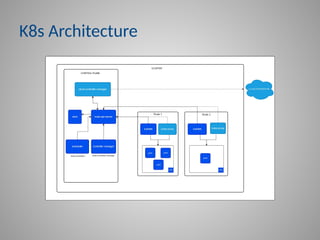
K8s Architecture
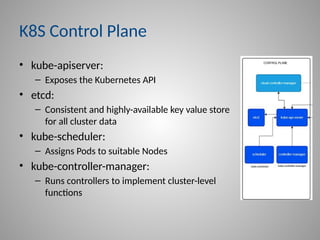
K8S Control Plane
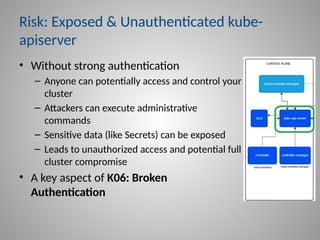
• kube-apiserver:
– Exposes the Kubernetes API
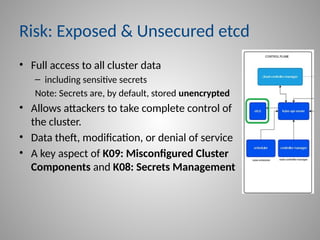
• etcd:
– Consistent and highly-available key value store
for all cluster data
• kube-scheduler:
– Assigns Pods to suitable Nodes
• kube-controller-manager:
– Runs controllers to implement cluster-level
functions
Risk: Exposed & Unauthenticated kube-
apiserver
• Without strong authentication
– Anyone can potentially access and control your
cluster
– Attackers can execute administrative
commands
– Sensitive data (like Secrets) can be exposed
– Leads to unauthorized access and potential full
cluster compromise
• A key aspect of K06: Broken
Authentication
Protecting kube-apiserver
• Configure Authentication to the Kubernetes API
– Focus on secure methods; avoid rolling your own
– Prioritize OpenID Connect (OIDC) for human users
• Enforce Multi-Factor Authentication (MFA)
– Use short-lived Service Account tokens for in-cluster
workloads
– Avoid long-lived credentials where possible
– Do not use certificates for human end-user auth, as they
are difficult to revoke
Risk: Exposed & Unsecured etcd
• Full access to all cluster data
– including sensitive secrets
Note: Secrets are, by default, stored unencrypted
• Allows attackers to take complete control of
the cluster.
• Data theft, modification, or denial of service
• A key aspect of K09: Misconfigured Cluster
Components and K08: Secrets Management
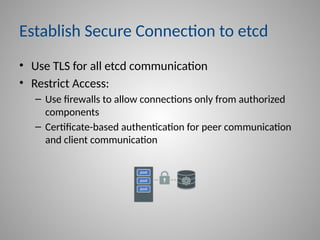
Establish Secure Connection to etcd
• Use TLS for all etcd communication
• Restrict Access:
– Use firewalls to allow connections only from authorized
components
– Certificate-based authentication for peer communication
and client communication
Encrypting Data at Rest for etcd
• Use Kubernetes built-in encryption providers
– Recommended: aesgcm
• Rotate encryption keys regularly
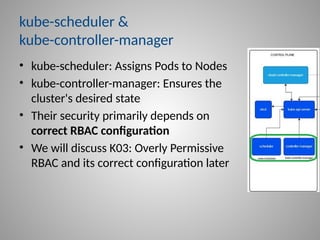
kube-scheduler &
kube-controller-manager
• kube-scheduler: Assigns Pods to Nodes
• kube-controller-manager: Ensures the
cluster's desired state
• Their security primarily depends on
correct RBAC configuration
• We will discuss K03: Overly Permissive
RBAC and its correct configuration later
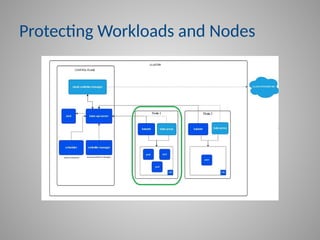
Protecting Workloads and Nodes
• Disallowing privileged containers
• Preventing a process to gain more privileges than its
parent process
• Preventing applications from running as root
• Implementing read-only filesystems
• Directly relates to K01: Excessive Permissions
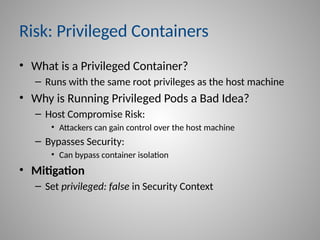
Risk: Privileged Containers
• What is a Privileged Container?
– Runs with the same root privileges as the host machine
• Why is Running Privileged Pods a Bad Idea?
– Host Compromise Risk:
• Attackers can gain control over the host machine
– Bypasses Security:
• Can bypass container isolation
• Mitigation
– Set privileged: false in Security Context
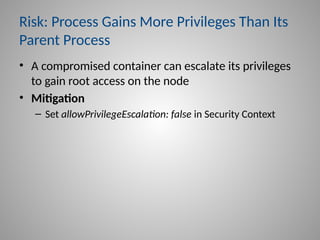
Risk: Process Gains More Privileges Than Its
Parent Process
• A compromised container can escalate its privileges
to gain root access on the node
• Mitigation
– Set allowPrivilegeEscalation: false in Security Context
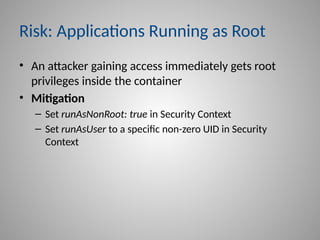
Risk: Applications Running as Root
• An attacker gaining access immediately gets root
privileges inside the container
• Mitigation
– Set runAsNonRoot: true in Security Context
– Set runAsUser to a specific non-zero UID in Security
Context
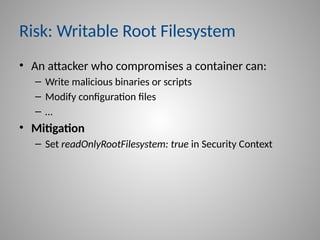
Risk: Writable Root Filesystem
• An attacker who compromises a container can:
– Write malicious binaries or scripts
– Modify configuration files
– …
• Mitigation
– Set readOnlyRootFilesystem: true in Security Context
Introduction of Pod Security Admission
• Pod Security Admission (PSA)
– Introduced in Kubernetes 1.25+
– Enforces pod-level security policies
– Replaces deprecated PodSecurityPolicy (PSP)
• Recommended: use restricted profile that enforces
– Secure Security Context settings
– Additional hardening such as:
• All Linux capabilities dropped
• …
Risk: Overly Permissive RBAC (K03)
• Too many permissions to users or Service Accounts
• Risks
– Escalate privileges to gain more control
– Access sensitive data they shouldn’t
– Potentially lead to cluster takeover
• Targets: high-privilege accounts
– cluster-admin
– kube-scheduler
– kube-controller-manager
Mitigation: Overly Permissive RBAC
• Grant only essential permissions
• Use granular verbs and resources
• Restrict permissions to specific namespaces
• Do not use cluster-admin for daily operations
Risk: Missing Network Policies
• Unrestricted communication between all pods by
default
• A compromised pod can easily access other pods
• Attackers can access other containers or private APIs
• A key aspect of K07: Network Segmentation
Configure Network Policies
• Default Deny Approach
– Explicitly allow only needed communication
• Apply Policies per Namespace:
– Isolate applications and environments
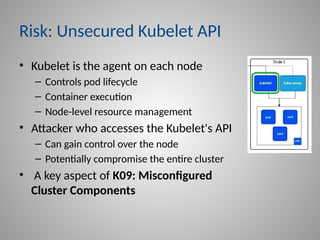
Risk: Unsecured Kubelet API
• Kubelet is the agent on each node
– Controls pod lifecycle
– Container execution
– Node-level resource management
• Attacker who accesses the Kubelet's API
– Can gain control over the node
– Potentially compromise the entire cluster
• A key aspect of K09: Misconfigured
Cluster Components
Protecting Kubelet API
• Disable Anonymous Access
– Set --anonymous-auth=false
• Configure Authentication
– Either client certificate authentication
– Or API bearer tokens
• Delegate Authorization to API Server
– Configure --authorization-mode=Webhook and --kubeconfig
• Configure RBAC
– Necessary attributes like nodes/proxy, nodes/stats, nodes/log
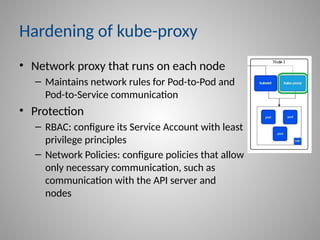
Hardening of kube-proxy
• Network proxy that runs on each node
– Maintains network rules for Pod-to-Pod and
Pod-to-Service communication
• Protection
– RBAC: configure its Service Account with least
privilege principles
– Network Policies: configure policies that allow
only necessary communication, such as
communication with the API server and
nodes
Risk: Insufficient Audit Logs
• Prevent early detection of security incidents
• Attackers can operate undetected for longer periods
• Difficult to investigate security breaches
• Non-compliance with regulatory requirements
• A key aspect of K05: Inadequate Logging
Mitigation: Insufficient Audit Logs
• Enable and collect audit logs
– API Server audit logs
– Kubelet logs
– Container logs
– Network Policy logs
• Aggregate logs into a secure logging solution
• Protect logs from tampering
• Store logs for an appropriate, defined period of time
Securing Supply Chain & Maintenance
• Cluster Hardening Achieved
• Let’s Now Focus on What Runs Inside the Cluster
• Next, we will cover:
– Disallow Images from Untrusted Registries (K04: Policy
Enforcement)
– K02: Supply Chain Vulnerabilities
– K10: Vulnerable Components
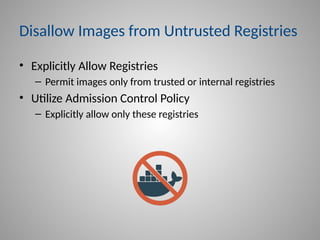
Disallow Images from Untrusted Registries
• Explicitly Allow Registries
– Permit images only from trusted or internal registries
• Utilize Admission Control Policy
– Explicitly allow only these registries
K02: Supply Chain Vulnerabilities
• Validate Image Integrity through each build phase
• Enforce use of signed container images
• Prevent unapproved images with Admission Control
Policy
– Have not been scanned for vulnerabilities
– Not signed
– Use a base image that’s not explicitly allowed
– Don’t have an approved Software Bill of Materials (SBOM)
K10: Vulnerable Components
• Scan for Known Vulnerabilities
• Apply Regular Patching and Updates
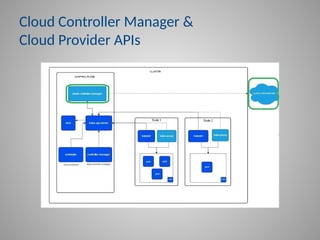
Cloud Controller Manager &
Cloud Provider APIs
Cloud Controller Manager (CCM)
• Component that embeds cloud-specific control logic
• Connects Kubernetes to cloud provider APIs
CCM Risks
• Infrastructure Manipulation
– Compromise allows attackers to manipulate cloud
infrastructure
• Cloud Credential Exposure
– Grant direct access to the cloud environment
• Cloud Pivot Point
– Gain access and control over your entire cloud
infrastructure
Mitigation: CCM Risks
• Least Privilege IAM Roles
– Configure CCM with essential IAM roles
• Secure Credentials
– Secure and rotate cloud credentials
• Enable CCM's Own Audit Logging
– Specifically for its interactions with cloud provider APIs
• Monitor for Anomalies
– Actively review logs for suspicious activity
• Restrict Network Access
– Limit network access to required cloud APIs only
Cloud Provider APIs
• The programmatic interfaces exposed by cloud
service providers (like AWS, Azure, Google Cloud,
etc.)
• K8s uses APIs through the CCM to provision and
manage infrastructure dynamically
Risks: Cloud Provider APIs
• Weak/Absent Authentication
– Allows unauthorized interaction with cloud resources
• Excessive Permissions
– Breach can lead to full control over cloud infrastructure
• Insufficient Logging
– Prevents early detection of abuse or misconfigurations
Mitigation: Cloud Provider APIs Risks
• Strong Authentication
– Implement robust authentication for all API access
• Least Privilege
– Grant only essential permissions to credentials accessing
APIs
• Enable Audit Logging of Cloud Provider APIs
• Monitor for Anomalies
– Actively review logs for suspicious activity
Simplifying K8s with Cloud Providers
• Major Cloud Providers offering Managed Kubernetes
– Google Kubernetes Engine (GKE)
– Amazon Elastic Kubernetes Service (EKS)
– Azure Kubernetes Service (AKS)
– …
Benefits of Managed Kubernetes
• Implement K8s security best practices
– Harden your GKE's security
– Security in Amazon EKS
– AKS Best Practices
• Manages upgrades and patching
• Seamless integration with other cloud services
• …
Disadvantages of Managed Kubernetes
• Cost
– Can be more expensive than self-managed clusters at scale
• Less Control and Customization
• Complexity (Still Exists)
– Handling security within the cluster still requires expertise
• Dependency on Provider Updates
• …
Takeaways
• You know that K8s security is critical
• You know how to achieve K8s cluster hardening
Thank you!
• Contact me
– www.linkedin.com/in/furmanmichael/
– https://ultimatesecurity.pro/
– @ultimatesecpro

Kubernetes Security Act Now Before It’s Too Late

  • 1.
    Michael Furman Kubernetes Security ActNow Before It’s Too Late
  • 2.
    What will wecover today? • What is Kubernetes • What is OWASP Kubernetes Top Ten • How to protect Kubernetes Control Plane • How to protect Workloads and Nodes • Securing Cloud Provider Integrations • Managed Kubernetes: Pros and Cons
  • 3.
    About Me • >18yr. in application security • >10 yr. with Tufin – Director of Application Security • www.linkedin.com/in/furmanmichael/ • Blog https://ultimatesecurity.pro/ • Twitter @ultimatesecpro • I like to travel, read books and listen to music
  • 4.
    About ●Market Leader inSecurity Policy Automation ●Tufin is used by >2000 enterprises  To segment networks and connect applications ●We are the Security Policy Company!
  • 5.
    What is Kubernetes? •Kubernetes is an open-source platform • Managing containerized applications • The name Kubernetes originates from Greek, meaning helmsman or pilot • K8s is a common abbreviation: the 'K', eight letters, and the 's’ • Google open-sourced the K8s project in 2014
  • 6.
    Why Kubernetes? • Managingmany containers manually is complex – K8s: Automates operational tasks • Deploying and updating applications is tricky – K8s: Enables automated deployments & rollbacks • Handling changing traffic and resource needs – K8s: Provides automatic scaling (up and down) • What happens when a container or server fails? – K8s: Automatically recovers from failures • The de facto standard for container orchestration
  • 7.
    Why Is KubernetesSecurity Critical? • "One YAML Away From Disaster“ – Incorrect settings in configuration files (like YAML) can expose sensitive data or grant excessive permissions https://www.aquasec.com/blog/kubernetes-exposed-one-yaml-away-from-disaster/ • “IngressNightmare” – Essential components, such as Ingress Controllers, can contain vulnerabilities – These flaws could lead to complete cluster takeover https://www.wiz.io/blog/ingress-nginx-kubernetes-vulnerabilities
  • 8.
    The Impact ofK8s Security Incidents • Unauthorized access to your cluster and applications • Data breaches and data loss • Service disruption or denial-of-service • Malicious code execution within your cluster
  • 9.
    Addressing K8s Security: OWASPKubernetes Top Ten • We covered the Why: Risks and Impacts • Now, the How: Securing K8s effectively • Using the OWASP Kubernetes Top Ten as our guide
  • 10.
    What is OWASPKubernetes Top Ten? • A project by the OWASP • Identifies the 10 most critical security risks in K8s • A key resource for anyone working with K8s security
  • 11.
  • 12.
    K8S Control Plane •kube-apiserver: – Exposes the Kubernetes API • etcd: – Consistent and highly-available key value store for all cluster data • kube-scheduler: – Assigns Pods to suitable Nodes • kube-controller-manager: – Runs controllers to implement cluster-level functions
  • 13.
    Risk: Exposed &Unauthenticated kube- apiserver • Without strong authentication – Anyone can potentially access and control your cluster – Attackers can execute administrative commands – Sensitive data (like Secrets) can be exposed – Leads to unauthorized access and potential full cluster compromise • A key aspect of K06: Broken Authentication
  • 14.
    Protecting kube-apiserver • ConfigureAuthentication to the Kubernetes API – Focus on secure methods; avoid rolling your own – Prioritize OpenID Connect (OIDC) for human users • Enforce Multi-Factor Authentication (MFA) – Use short-lived Service Account tokens for in-cluster workloads – Avoid long-lived credentials where possible – Do not use certificates for human end-user auth, as they are difficult to revoke
  • 15.
    Risk: Exposed &Unsecured etcd • Full access to all cluster data – including sensitive secrets Note: Secrets are, by default, stored unencrypted • Allows attackers to take complete control of the cluster. • Data theft, modification, or denial of service • A key aspect of K09: Misconfigured Cluster Components and K08: Secrets Management
  • 16.
    Establish Secure Connectionto etcd • Use TLS for all etcd communication • Restrict Access: – Use firewalls to allow connections only from authorized components – Certificate-based authentication for peer communication and client communication
  • 17.
    Encrypting Data atRest for etcd • Use Kubernetes built-in encryption providers – Recommended: aesgcm • Rotate encryption keys regularly
  • 18.
    kube-scheduler & kube-controller-manager • kube-scheduler:Assigns Pods to Nodes • kube-controller-manager: Ensures the cluster's desired state • Their security primarily depends on correct RBAC configuration • We will discuss K03: Overly Permissive RBAC and its correct configuration later
  • 19.
  • 20.
    Protecting Workloads andNodes • Disallowing privileged containers • Preventing a process to gain more privileges than its parent process • Preventing applications from running as root • Implementing read-only filesystems • Directly relates to K01: Excessive Permissions
  • 21.
    Risk: Privileged Containers •What is a Privileged Container? – Runs with the same root privileges as the host machine • Why is Running Privileged Pods a Bad Idea? – Host Compromise Risk: • Attackers can gain control over the host machine – Bypasses Security: • Can bypass container isolation • Mitigation – Set privileged: false in Security Context
  • 22.
    Risk: Process GainsMore Privileges Than Its Parent Process • A compromised container can escalate its privileges to gain root access on the node • Mitigation – Set allowPrivilegeEscalation: false in Security Context
  • 23.
    Risk: Applications Runningas Root • An attacker gaining access immediately gets root privileges inside the container • Mitigation – Set runAsNonRoot: true in Security Context – Set runAsUser to a specific non-zero UID in Security Context
  • 24.
    Risk: Writable RootFilesystem • An attacker who compromises a container can: – Write malicious binaries or scripts – Modify configuration files – … • Mitigation – Set readOnlyRootFilesystem: true in Security Context
  • 25.
    Introduction of PodSecurity Admission • Pod Security Admission (PSA) – Introduced in Kubernetes 1.25+ – Enforces pod-level security policies – Replaces deprecated PodSecurityPolicy (PSP) • Recommended: use restricted profile that enforces – Secure Security Context settings – Additional hardening such as: • All Linux capabilities dropped • …
  • 26.
    Risk: Overly PermissiveRBAC (K03) • Too many permissions to users or Service Accounts • Risks – Escalate privileges to gain more control – Access sensitive data they shouldn’t – Potentially lead to cluster takeover • Targets: high-privilege accounts – cluster-admin – kube-scheduler – kube-controller-manager
  • 27.
    Mitigation: Overly PermissiveRBAC • Grant only essential permissions • Use granular verbs and resources • Restrict permissions to specific namespaces • Do not use cluster-admin for daily operations
  • 28.
    Risk: Missing NetworkPolicies • Unrestricted communication between all pods by default • A compromised pod can easily access other pods • Attackers can access other containers or private APIs • A key aspect of K07: Network Segmentation
  • 29.
    Configure Network Policies •Default Deny Approach – Explicitly allow only needed communication • Apply Policies per Namespace: – Isolate applications and environments
  • 30.
    Risk: Unsecured KubeletAPI • Kubelet is the agent on each node – Controls pod lifecycle – Container execution – Node-level resource management • Attacker who accesses the Kubelet's API – Can gain control over the node – Potentially compromise the entire cluster • A key aspect of K09: Misconfigured Cluster Components
  • 31.
    Protecting Kubelet API •Disable Anonymous Access – Set --anonymous-auth=false • Configure Authentication – Either client certificate authentication – Or API bearer tokens • Delegate Authorization to API Server – Configure --authorization-mode=Webhook and --kubeconfig • Configure RBAC – Necessary attributes like nodes/proxy, nodes/stats, nodes/log
  • 32.
    Hardening of kube-proxy •Network proxy that runs on each node – Maintains network rules for Pod-to-Pod and Pod-to-Service communication • Protection – RBAC: configure its Service Account with least privilege principles – Network Policies: configure policies that allow only necessary communication, such as communication with the API server and nodes
  • 33.
    Risk: Insufficient AuditLogs • Prevent early detection of security incidents • Attackers can operate undetected for longer periods • Difficult to investigate security breaches • Non-compliance with regulatory requirements • A key aspect of K05: Inadequate Logging
  • 34.
    Mitigation: Insufficient AuditLogs • Enable and collect audit logs – API Server audit logs – Kubelet logs – Container logs – Network Policy logs • Aggregate logs into a secure logging solution • Protect logs from tampering • Store logs for an appropriate, defined period of time
  • 35.
    Securing Supply Chain& Maintenance • Cluster Hardening Achieved • Let’s Now Focus on What Runs Inside the Cluster • Next, we will cover: – Disallow Images from Untrusted Registries (K04: Policy Enforcement) – K02: Supply Chain Vulnerabilities – K10: Vulnerable Components
  • 36.
    Disallow Images fromUntrusted Registries • Explicitly Allow Registries – Permit images only from trusted or internal registries • Utilize Admission Control Policy – Explicitly allow only these registries
  • 37.
    K02: Supply ChainVulnerabilities • Validate Image Integrity through each build phase • Enforce use of signed container images • Prevent unapproved images with Admission Control Policy – Have not been scanned for vulnerabilities – Not signed – Use a base image that’s not explicitly allowed – Don’t have an approved Software Bill of Materials (SBOM)
  • 38.
    K10: Vulnerable Components •Scan for Known Vulnerabilities • Apply Regular Patching and Updates
  • 39.
    Cloud Controller Manager& Cloud Provider APIs
  • 40.
    Cloud Controller Manager(CCM) • Component that embeds cloud-specific control logic • Connects Kubernetes to cloud provider APIs
  • 41.
    CCM Risks • InfrastructureManipulation – Compromise allows attackers to manipulate cloud infrastructure • Cloud Credential Exposure – Grant direct access to the cloud environment • Cloud Pivot Point – Gain access and control over your entire cloud infrastructure
  • 42.
    Mitigation: CCM Risks •Least Privilege IAM Roles – Configure CCM with essential IAM roles • Secure Credentials – Secure and rotate cloud credentials • Enable CCM's Own Audit Logging – Specifically for its interactions with cloud provider APIs • Monitor for Anomalies – Actively review logs for suspicious activity • Restrict Network Access – Limit network access to required cloud APIs only
  • 43.
    Cloud Provider APIs •The programmatic interfaces exposed by cloud service providers (like AWS, Azure, Google Cloud, etc.) • K8s uses APIs through the CCM to provision and manage infrastructure dynamically
  • 44.
    Risks: Cloud ProviderAPIs • Weak/Absent Authentication – Allows unauthorized interaction with cloud resources • Excessive Permissions – Breach can lead to full control over cloud infrastructure • Insufficient Logging – Prevents early detection of abuse or misconfigurations
  • 45.
    Mitigation: Cloud ProviderAPIs Risks • Strong Authentication – Implement robust authentication for all API access • Least Privilege – Grant only essential permissions to credentials accessing APIs • Enable Audit Logging of Cloud Provider APIs • Monitor for Anomalies – Actively review logs for suspicious activity
  • 46.
    Simplifying K8s withCloud Providers • Major Cloud Providers offering Managed Kubernetes – Google Kubernetes Engine (GKE) – Amazon Elastic Kubernetes Service (EKS) – Azure Kubernetes Service (AKS) – …
  • 47.
    Benefits of ManagedKubernetes • Implement K8s security best practices – Harden your GKE's security – Security in Amazon EKS – AKS Best Practices • Manages upgrades and patching • Seamless integration with other cloud services • …
  • 48.
    Disadvantages of ManagedKubernetes • Cost – Can be more expensive than self-managed clusters at scale • Less Control and Customization • Complexity (Still Exists) – Handling security within the cluster still requires expertise • Dependency on Provider Updates • …
  • 49.
    Takeaways • You knowthat K8s security is critical • You know how to achieve K8s cluster hardening
  • 50.
    Thank you! • Contactme – www.linkedin.com/in/furmanmichael/ – https://ultimatesecurity.pro/ – @ultimatesecpro

Editor's Notes

  • #2 Before I will continue, I want to ask you questions. By a show of hands, who here has experience with Kubernetes deployment and management? Who here has experience in hardening Kubernetes clusters?
  • #15 Let me tell you a little secret that might surprise some: Kubernetes Secrets, by default, are stored in plain text, only base64 encoded! I repeat: unencrypted!
  • #18 Key Control Plane components
  • #19 We've discussed securing the Control Plane (the "brain"). Now, let's focus on the Worker Nodes and the Workloads (Pods and Containers) they run. This is where your applications live, and they present a significant attack surface.
  • #21 Host Compromise Risk: Attackers can gain control over the host machine if a privileged container is compromised Bypasses Security: Can bypass container isolation and other security restrictions Breaks Isolation: Undermines core container security and allows impact on other workloads Violates Least Privilege: Grants far more permissions than necessary for container function
  • #27 Apply Principle of Least Privilege: Grant only essential permissions for users and Service Accounts Be Specific with Permissions: Use granular verbs and resources instead of broad wildcards Scope Access: Restrict permissions to specific namespaces wherever possible Avoid cluster-admin Role: Do not use cluster-admin for daily operations or for Service Accounts unless absolutely critical
  • #30 Key Control Plane components
  • #32 Key Control Plane components
  • #35 You've Hardened the Cluster: We've covered securing core components, access, and visibility Now, Focus on What Runs Inside: Ensuring the integrity and security of your applications and their components
  • #50 Thank you for participating in my lecture! Please contact me if you need any additional information, or if you want to send me your resume.