12 ways NOT TO GET ‘HACKED’ your
$whoami
• Suman Chakraborty - Senior Devops Engineer @SAP
Labs
• Community member & Speaker - Docker
Bangalore, CNCF Bangalore group
• Tech Blogger on PaaS, Cloud-Native & Microservices
https://www.linkedin.com/in/schakraborty007/
@itsmesumanc
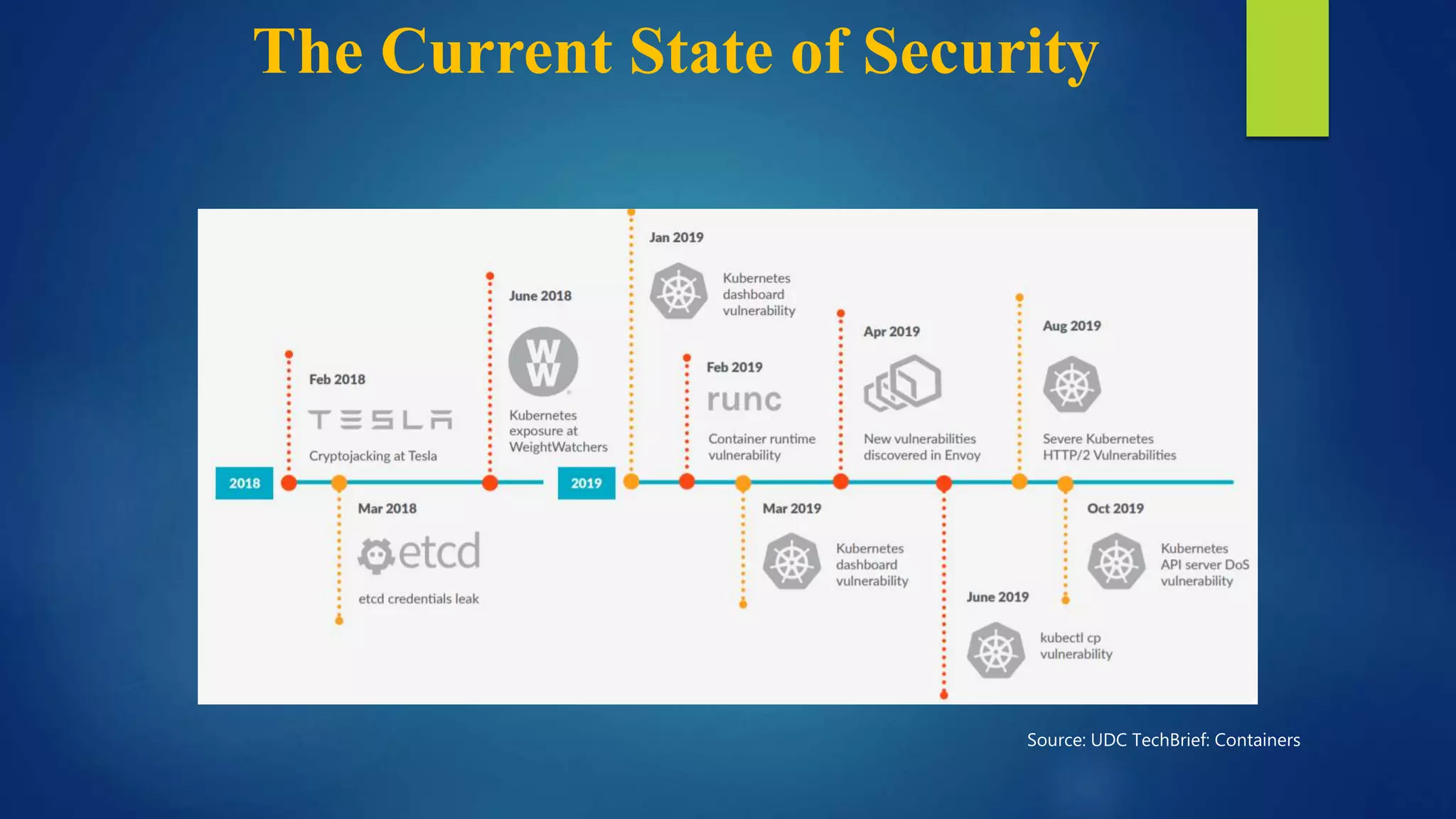
The Current State of Security
Source: UDC TechBrief: Containers
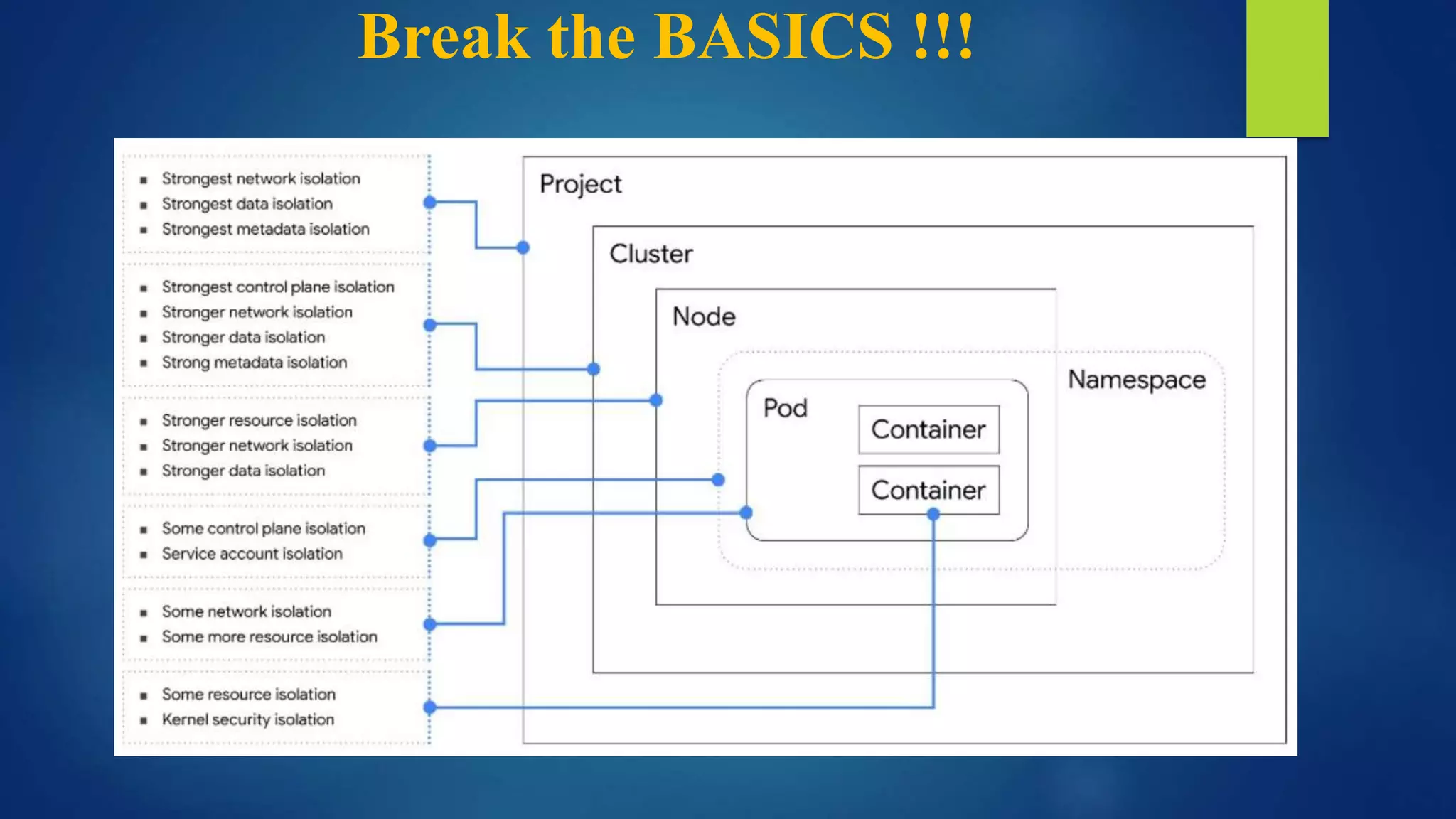
Break the BASICS !!!
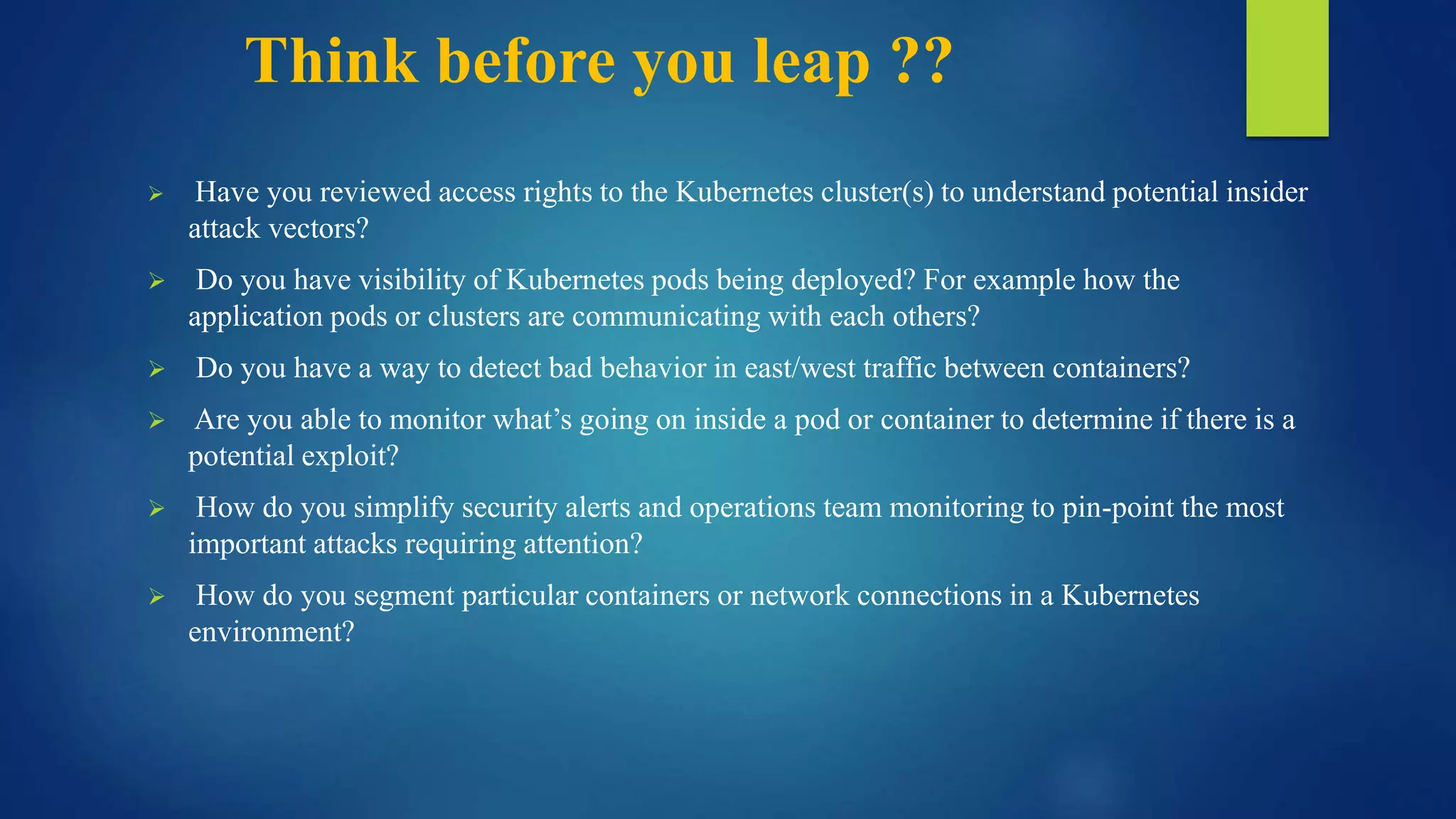
Think before you leap ??
 Have you reviewed access rights to the Kubernetes cluster(s) to understand potential insider
attack vectors?
 Do you have visibility of Kubernetes pods being deployed? For example how the
application pods or clusters are communicating with each others?
 Do you have a way to detect bad behavior in east/west traffic between containers?
 Are you able to monitor what’s going on inside a pod or container to determine if there is a
potential exploit?
 How do you simplify security alerts and operations team monitoring to pin-point the most
important attacks requiring attention?
 How do you segment particular containers or network connections in a Kubernetes
environment?
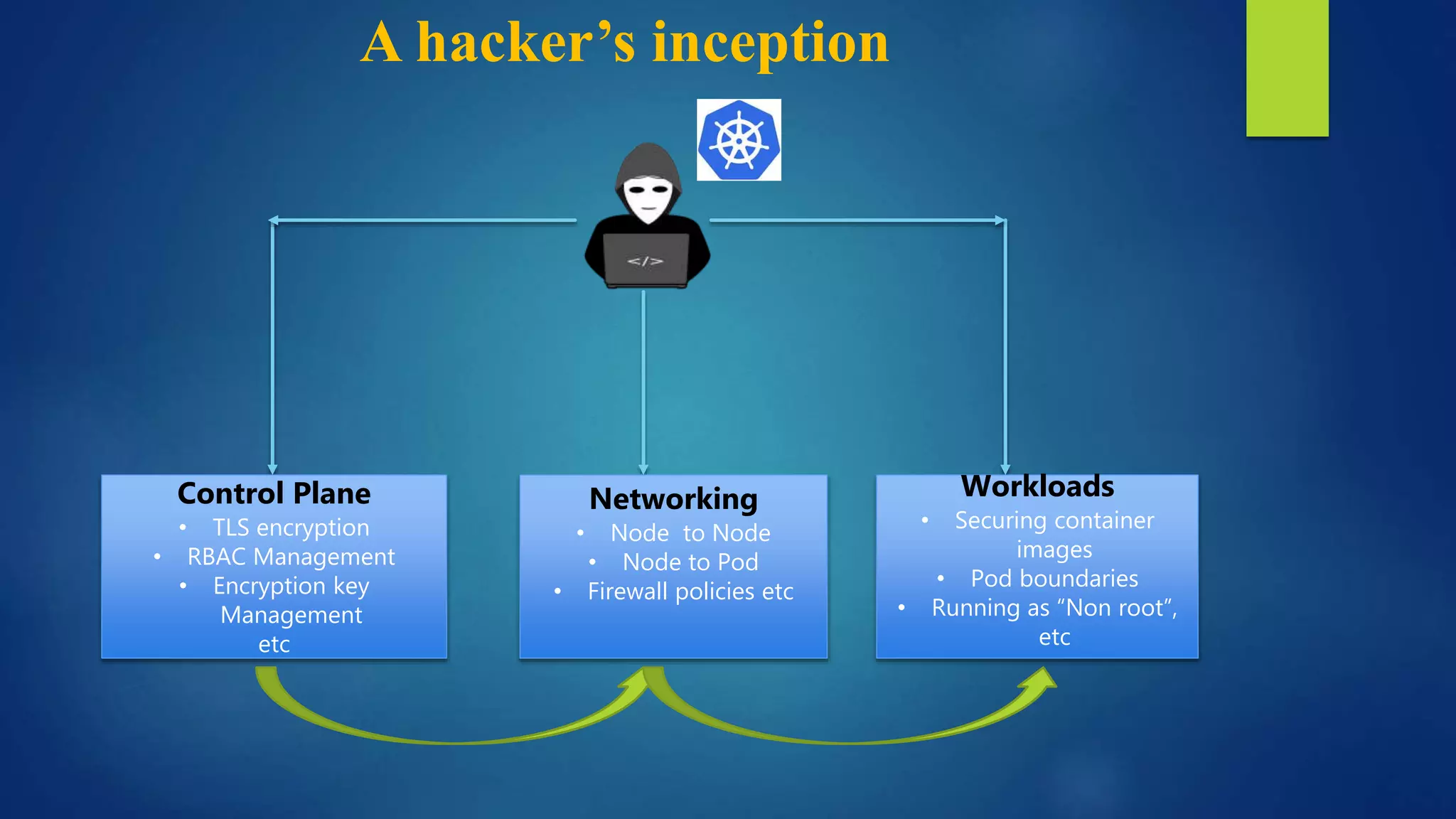
A hacker’s inception
Control Plane
• TLS encryption
• RBAC Management
• Encryption key
Management
etc
Workloads
• Securing container
images
• Pod boundaries
• Running as “Non root”,
etc
Networking
• Node to Node
• Node to Pod
• Firewall policies etc
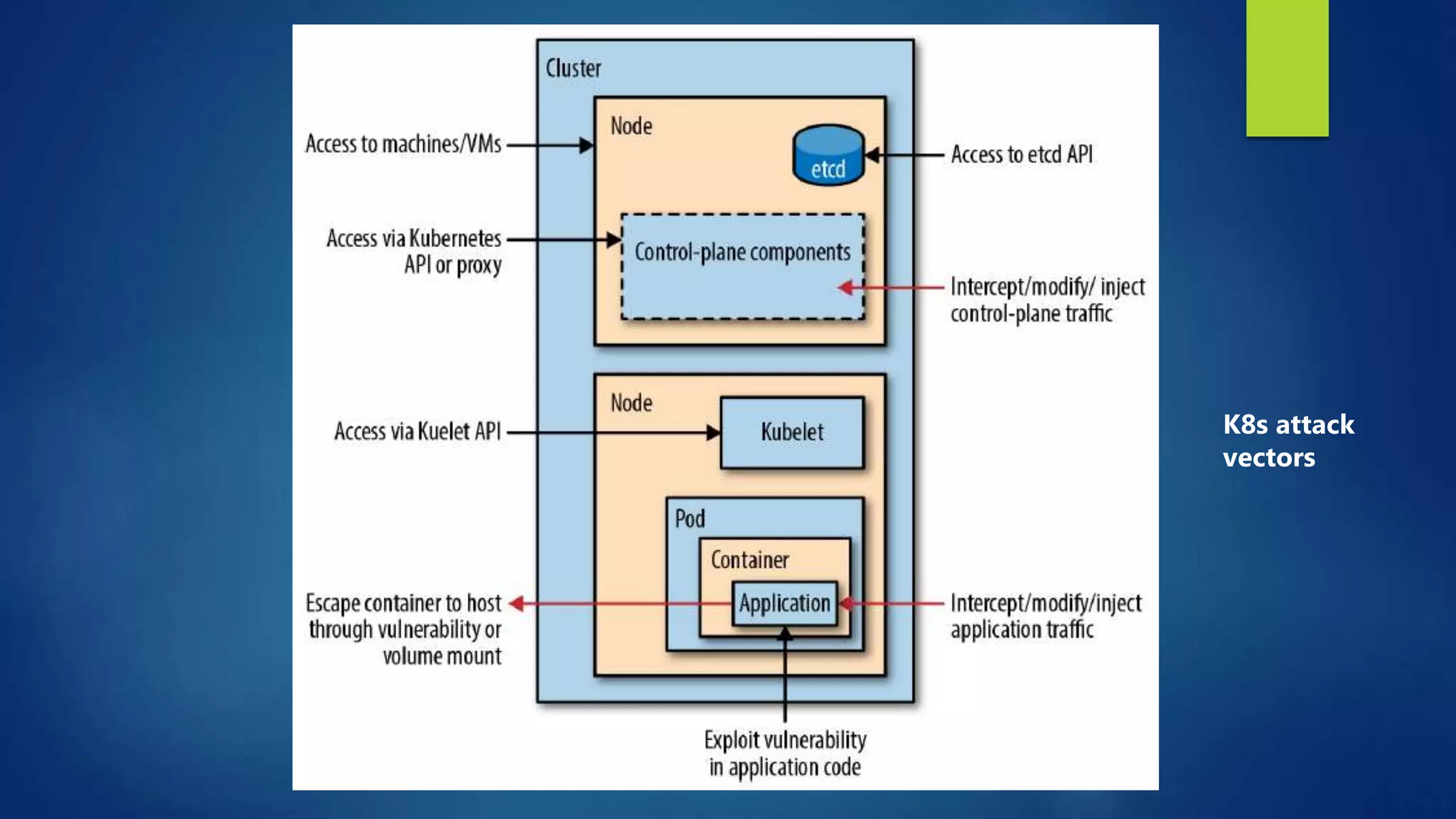
K8s attack
vectors
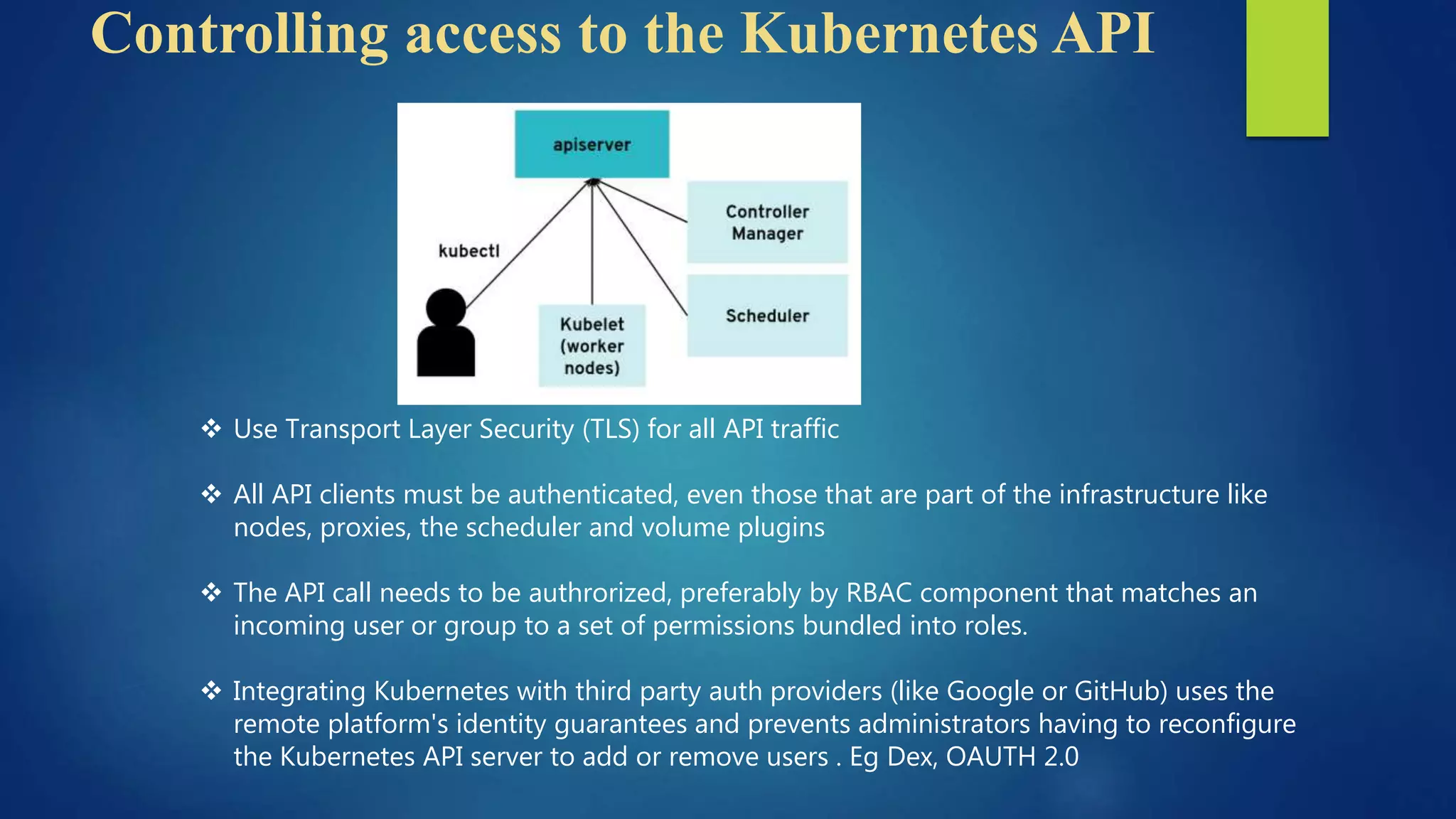
Controlling access to the Kubernetes API
 Use Transport Layer Security (TLS) for all API traffic
 All API clients must be authenticated, even those that are part of the infrastructure like
nodes, proxies, the scheduler and volume plugins
 The API call needs to be authrorized, preferably by RBAC component that matches an
incoming user or group to a set of permissions bundled into roles.
 Integrating Kubernetes with third party auth providers (like Google or GitHub) uses the
remote platform's identity guarantees and prevents administrators having to reconfigure
the Kubernetes API server to add or remove users . Eg Dex, OAUTH 2.0
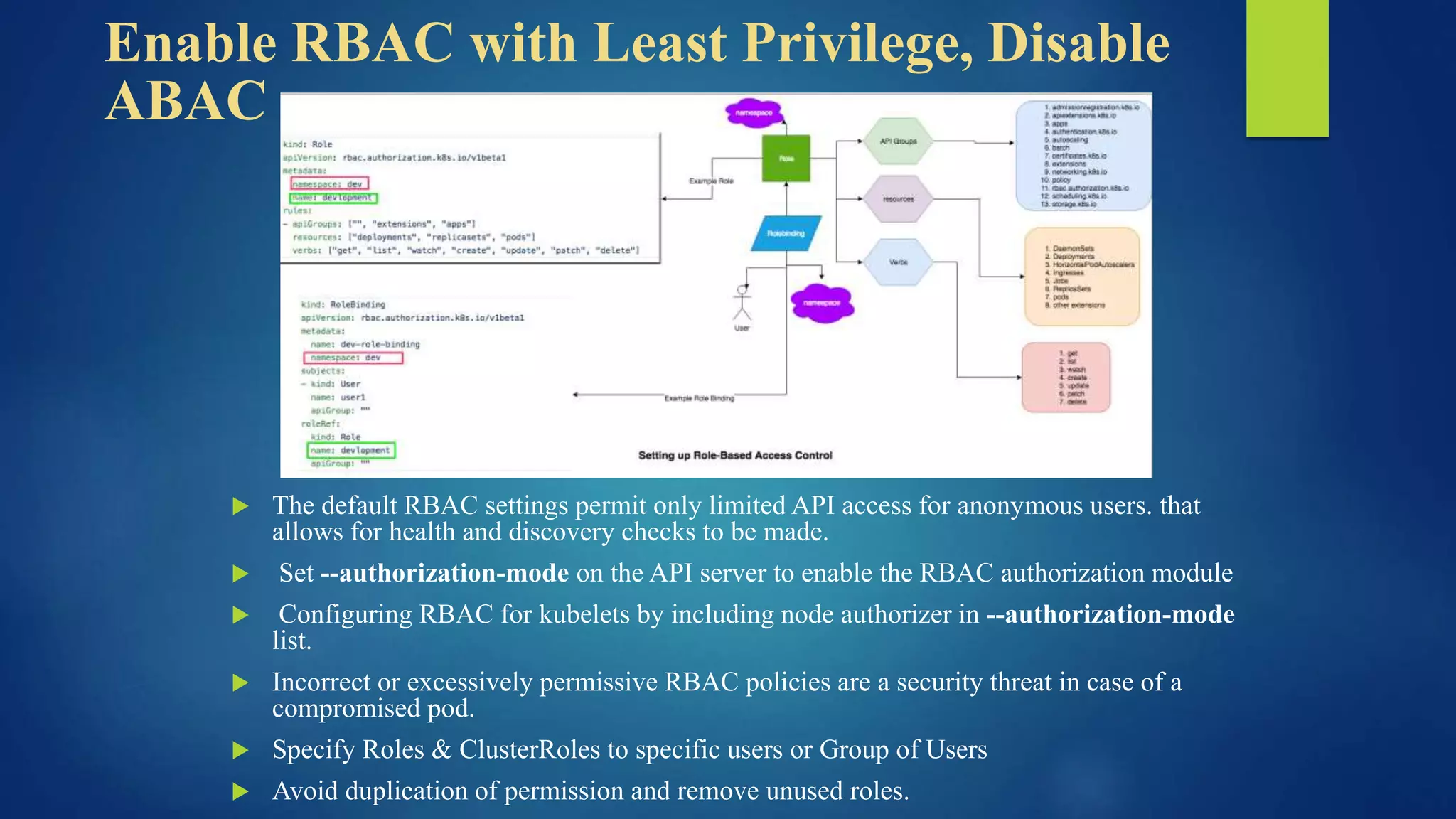
Enable RBAC with Least Privilege, Disable
ABAC
 The default RBAC settings permit only limited API access for anonymous users. that
allows for health and discovery checks to be made.
 Set --authorization-mode on the API server to enable the RBAC authorization module
 Configuring RBAC for kubelets by including node authorizer in --authorization-mode
list.
 Incorrect or excessively permissive RBAC policies are a security threat in case of a
compromised pod.
 Specify Roles & ClusterRoles to specific users or Group of Users
 Avoid duplication of permission and remove unused roles.
Securing Kubelet
 The Kubelet gives one of the entry point, if compromised for an anuthorized user who can
run malicious code to gain control of the cluster
 Disable anonymous access with --anonymous-auth=false, so that unauthenticated requests
will receive unauthorized access error responses.
 Ensure that requests are authorized by setting –authorizationmode to something other than
AlwaysAllow
 Limit the permissions of kubelets by including NodeRestriction in the --admission-control
settings on the API server. This restricts a kubelet so that it can modify only pods that are
bound to it and its own Node object.
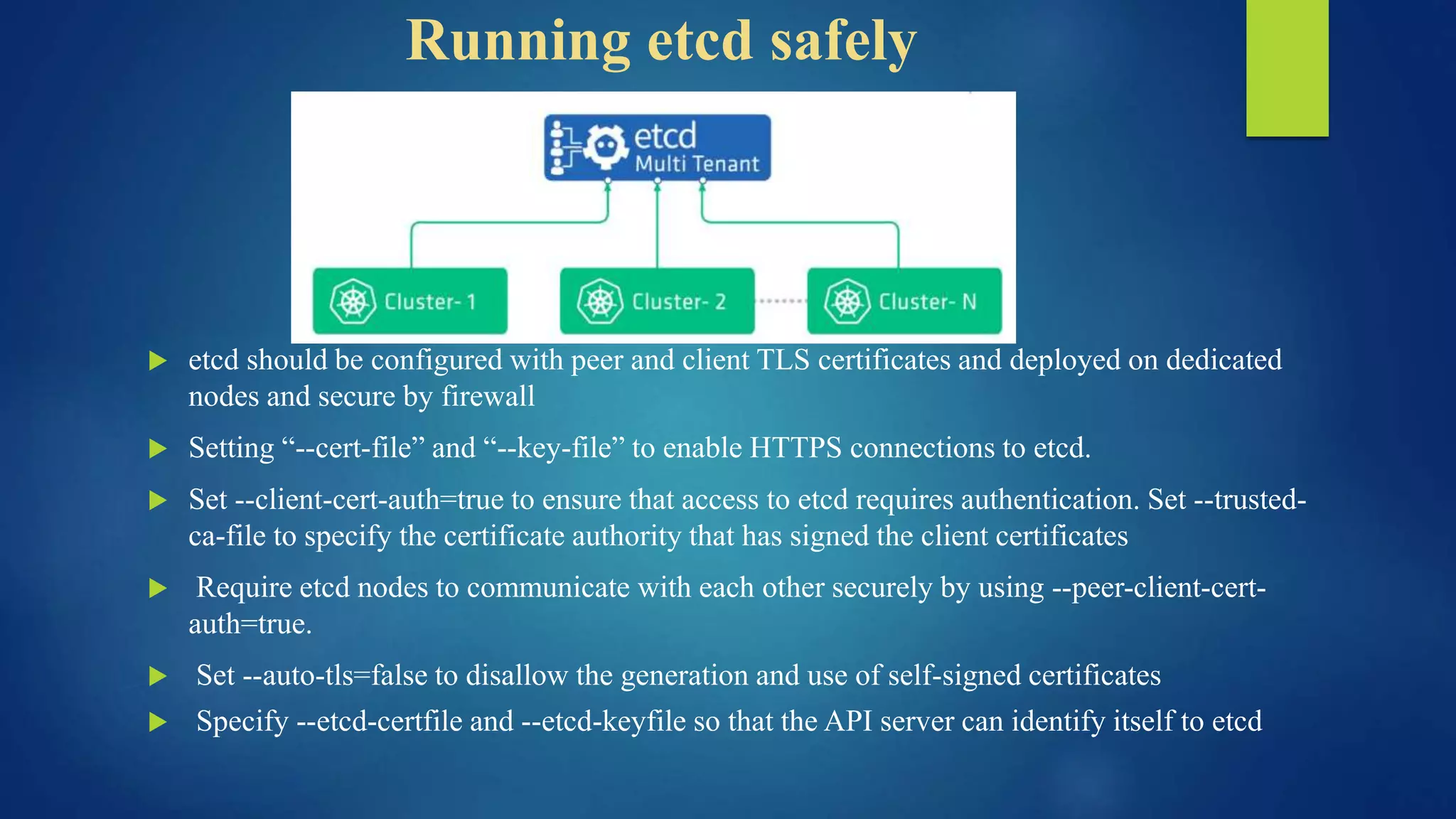
Running etcd safely
 etcd should be configured with peer and client TLS certificates and deployed on dedicated
nodes and secure by firewall
 Setting “--cert-file” and “--key-file” to enable HTTPS connections to etcd.
 Set --client-cert-auth=true to ensure that access to etcd requires authentication. Set --trusted-
ca-file to specify the certificate authority that has signed the client certificates
 Require etcd nodes to communicate with each other securely by using --peer-client-cert-
auth=true.
 Set --auto-tls=false to disallow the generation and use of self-signed certificates
 Specify --etcd-certfile and --etcd-keyfile so that the API server can identify itself to etcd
Managing Service Account
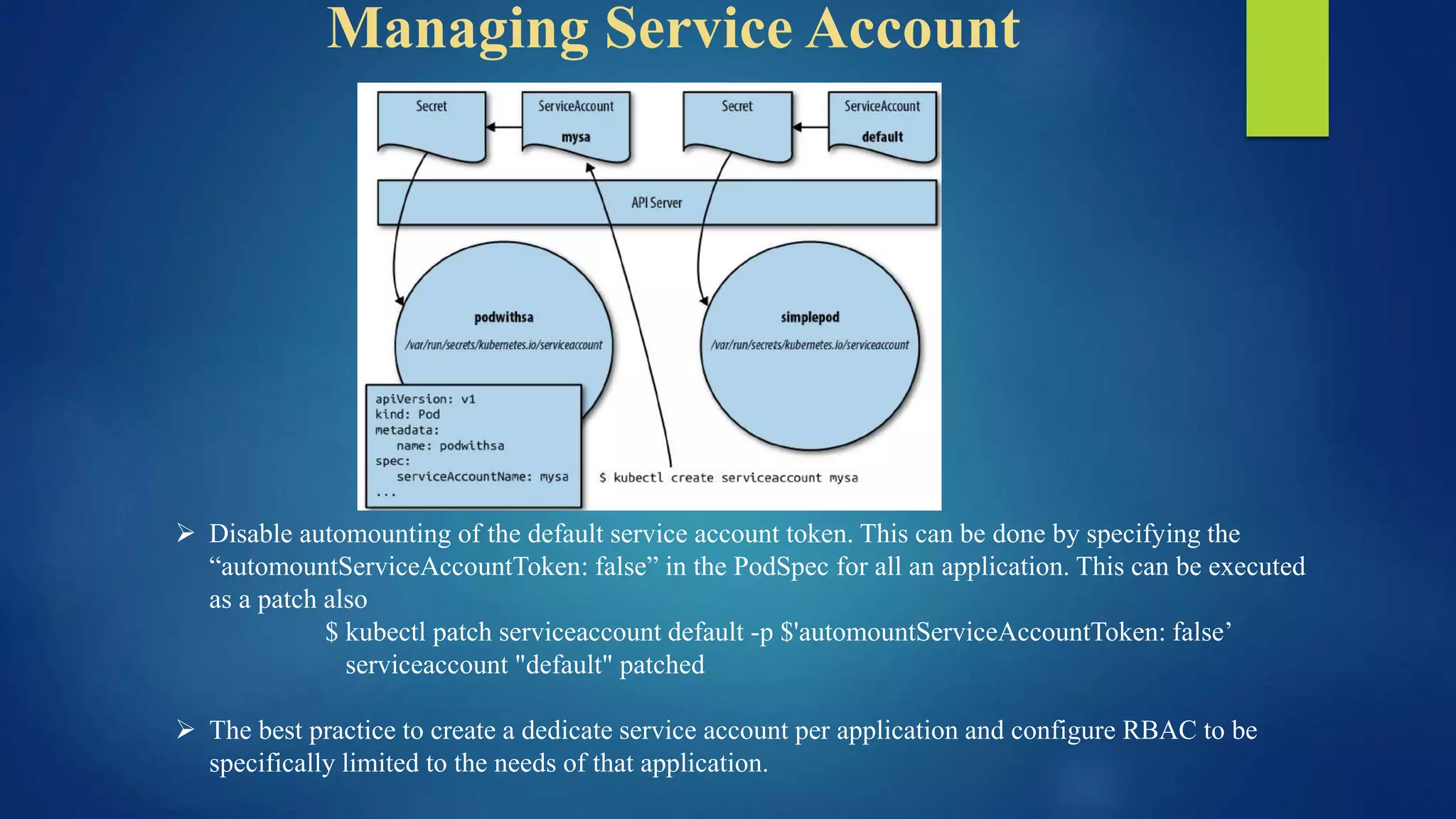
 Disable automounting of the default service account token. This can be done by specifying the
“automountServiceAccountToken: false” in the PodSpec for all an application. This can be executed
as a patch also
$ kubectl patch serviceaccount default -p $'automountServiceAccountToken: false’
serviceaccount "default" patched
 The best practice to create a dedicate service account per application and configure RBAC to be
specifically limited to the needs of that application.
Restricting Network access
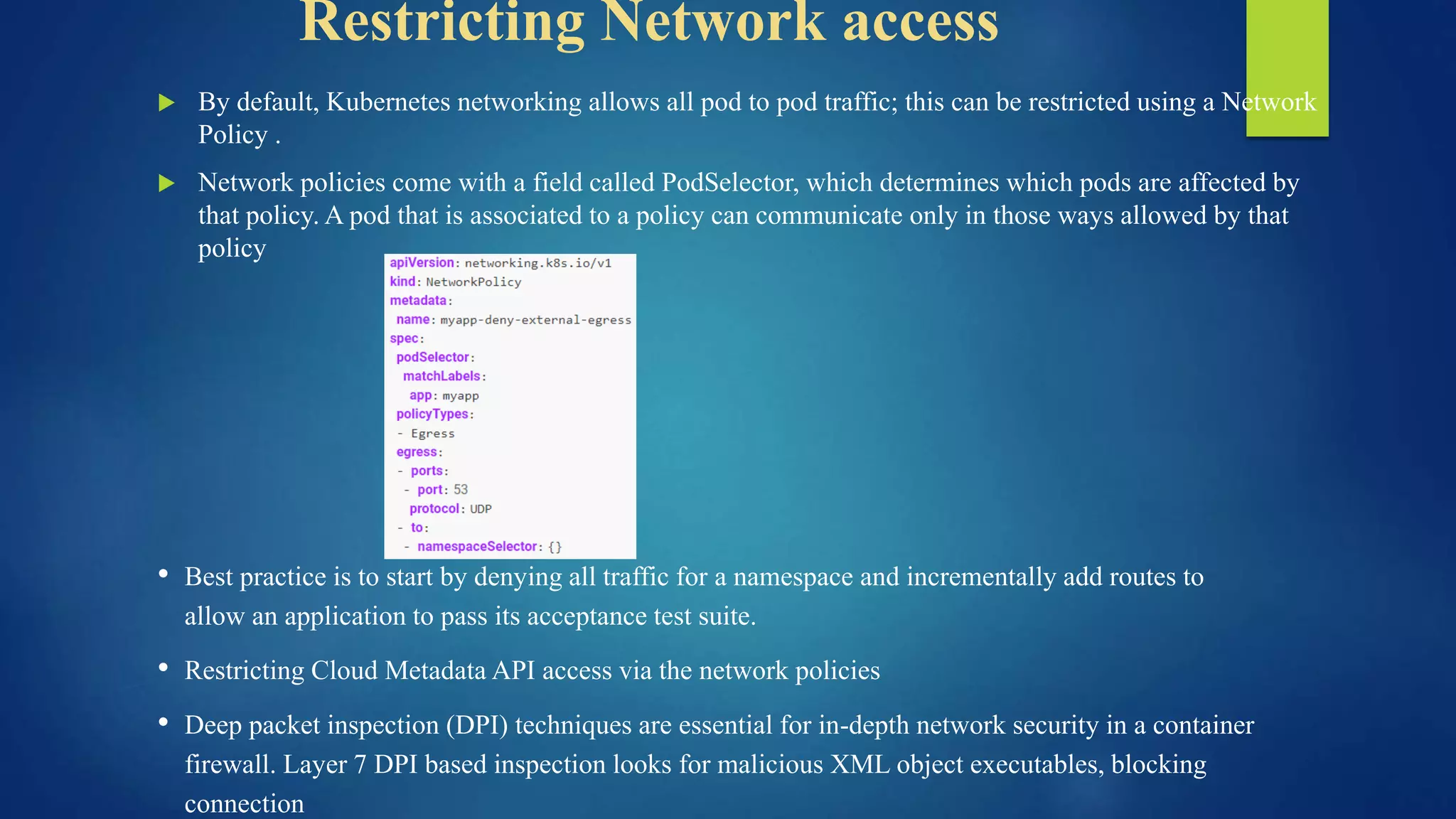
 By default, Kubernetes networking allows all pod to pod traffic; this can be restricted using a Network
Policy .
 Network policies come with a field called PodSelector, which determines which pods are affected by
that policy. A pod that is associated to a policy can communicate only in those ways allowed by that
policy
• Best practice is to start by denying all traffic for a namespace and incrementally add routes to
allow an application to pass its acceptance test suite.
• Restricting Cloud Metadata API access via the network policies
• Deep packet inspection (DPI) techniques are essential for in-depth network security in a container
firewall. Layer 7 DPI based inspection looks for malicious XML object executables, blocking
connection
Running Workloads with least privilege
 Linux kernel has a number of overlapping security extensions (capabilities, SELinux,
AppArmor, seccomp-bpf) that can be configured to provide least privilege to
applications and harden the runtime configuration
 Limiting Resource usage on a cluster through Resource Quota.
 Limit Ranges can restrict the maximum or minimum size of some of the resources to
prevent users from requesting unreasonably high or low values for commonly reserved
resources like memory.
 Utilize Seccomp, have R/O Mount access, using minimal OS to reduce the surface area
for attack
 Update System pactches and run CIS benchmark security tests
Securing Container Images
 Web servers present an attack surface to the network they're attached to: scanning an image's
installed files ensures the absence of known vulnerabilities that an attacker could exploit to
gain remote access to the container
 Scanning container images for known vulnerabilities can reduce the window of time that an
attacker can exploit a disclosed CVE. Tools such as “Clair” provides image scanning,
“Notary” uses signing to preserve the integrity
 Whichever registry solution are being used for public images, it’s a good practice to use “read-
only” account for the purpose (DTR, Elastic Container Registry, Quay from RedHat)
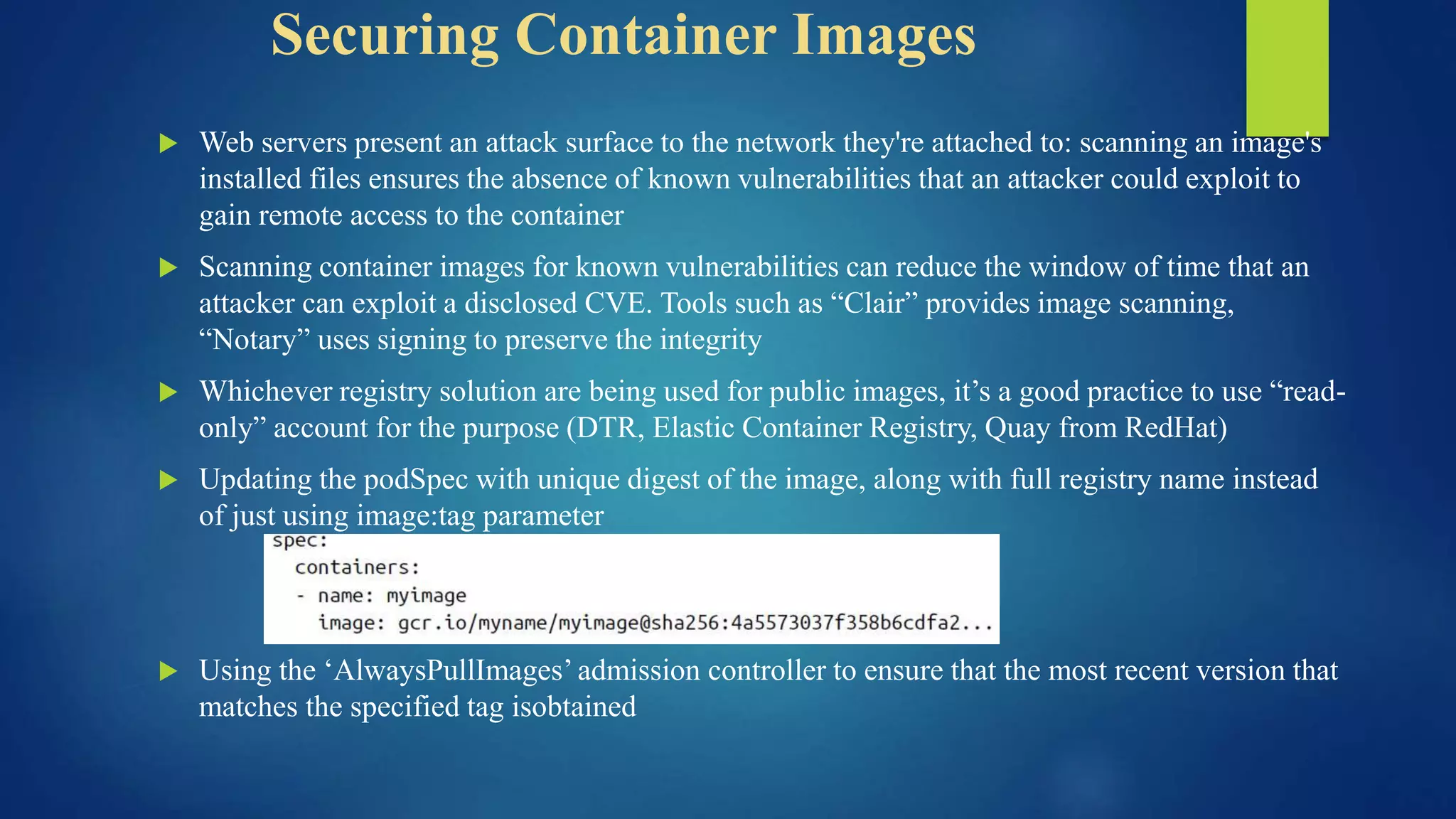
 Updating the podSpec with unique digest of the image, along with full registry name instead
of just using image:tag parameter
 Using the ‘AlwaysPullImages’ admission controller to ensure that the most recent version that
matches the specified tag isobtained
Running Containers securely
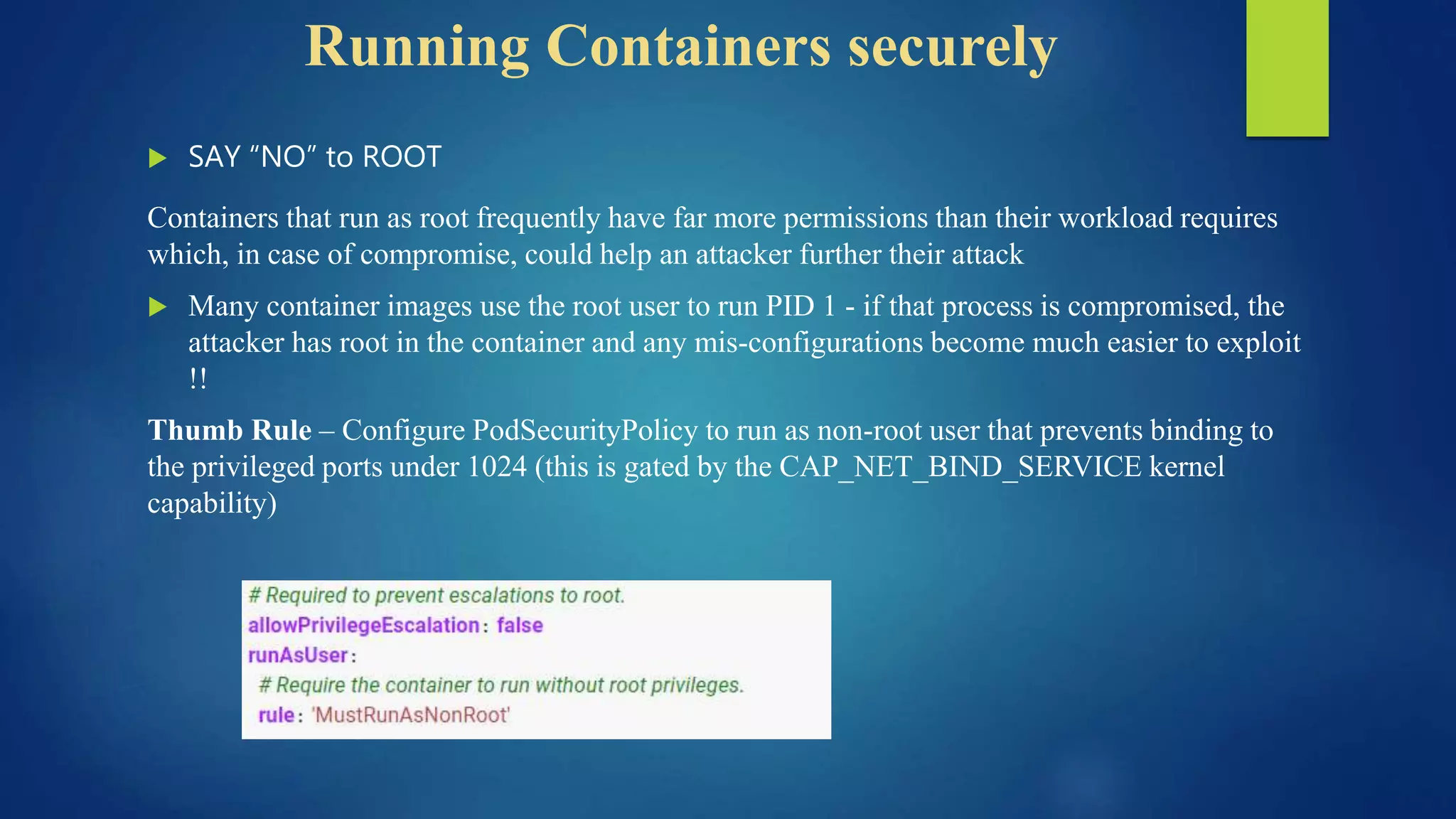
 SAY “NO” to ROOT
Containers that run as root frequently have far more permissions than their workload requires
which, in case of compromise, could help an attacker further their attack
 Many container images use the root user to run PID 1 - if that process is compromised, the
attacker has root in the container and any mis-configurations become much easier to exploit
!!
Thumb Rule – Configure PodSecurityPolicy to run as non-root user that prevents binding to
the privileged ports under 1024 (this is gated by the CAP_NET_BIND_SERVICE kernel
capability)
Managing secrets effectively
 Kubernetes Secret values protecting sensitive data that is bound to the application source
code.
 Encryption is done both ‘at Rest’ and ‘in Transit’
 Secret values are stored alongside other configuration information in the etcd database; they
are simply base64 encoded. Some are stored in third-party stores (HashiCorp KeyVault /
CyberArk Conjur) along with being stored in etcd.
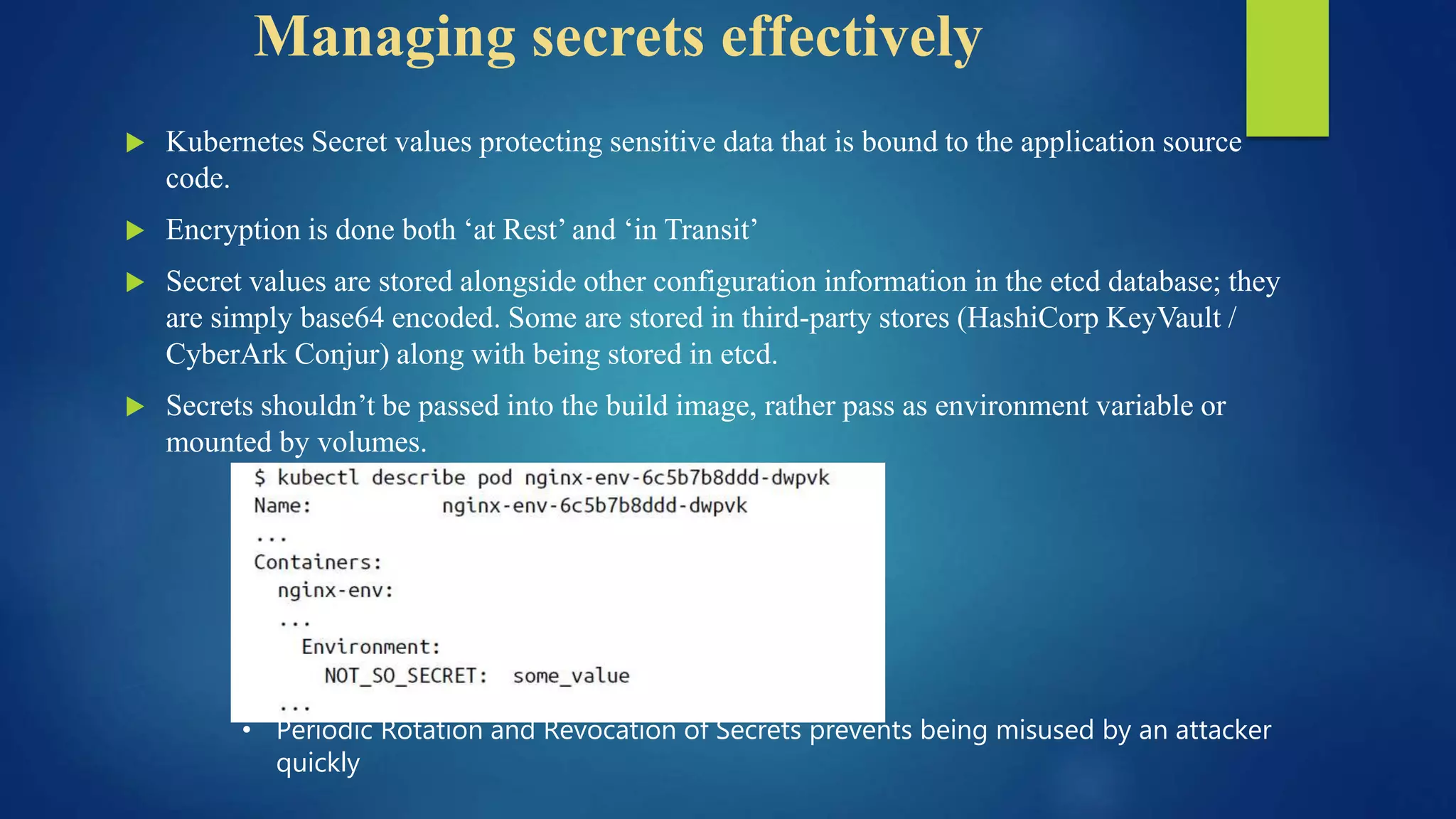
 Secrets shouldn’t be passed into the build image, rather pass as environment variable or
mounted by volumes.
• Periodic Rotation and Revocation of Secrets prevents being misused by an attacker
quickly
Securing Host Machines
 If the host (e.g. Kubernetes worker node) on which containers run is compromised, all kinds
of bad things can happen !!!!
 Privilege escalations to root
 Stealing of secrets used for secure application or infrastructure access
 Changing of cluster admin privileges
 Host resource damage or hijacking (e.g. crypto mining software)
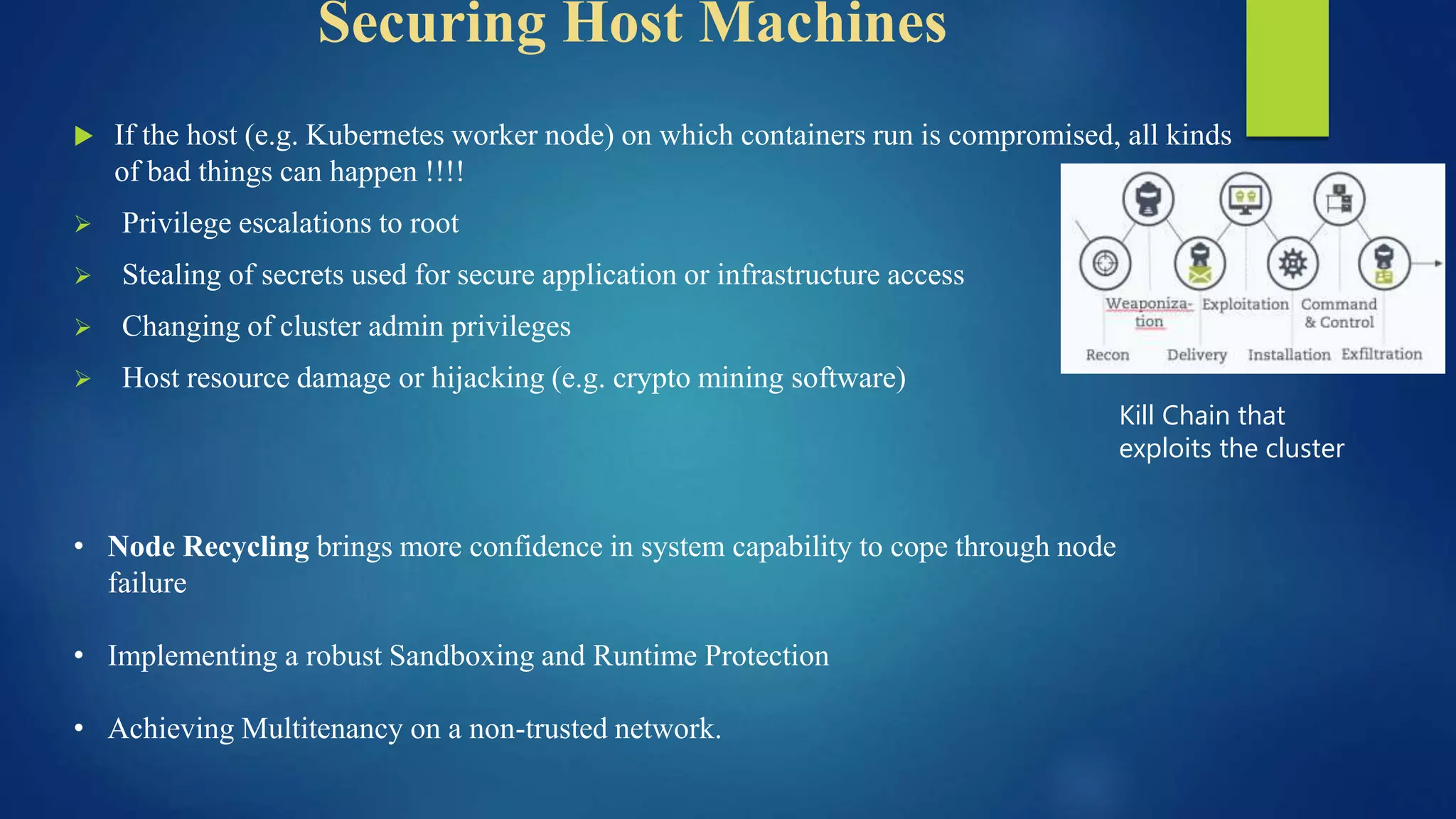
Kill Chain that
exploits the cluster
• Node Recycling brings more confidence in system capability to cope through node
failure
• Implementing a robust Sandboxing and Runtime Protection
• Achieving Multitenancy on a non-trusted network.
Service Mesh : the future
 Service Mesh offers the possibility offloading microservice security and networking from the
application over a secure TLS mutual connection end to end
 In "Zero Trust" networks there may be no need for traditional firewalling or Kubernetes network
policy, as every interaction occurs over mTLS (mutual TLS), ensuring that both parties are not only
communicating securely, but that the identity of both services is known.
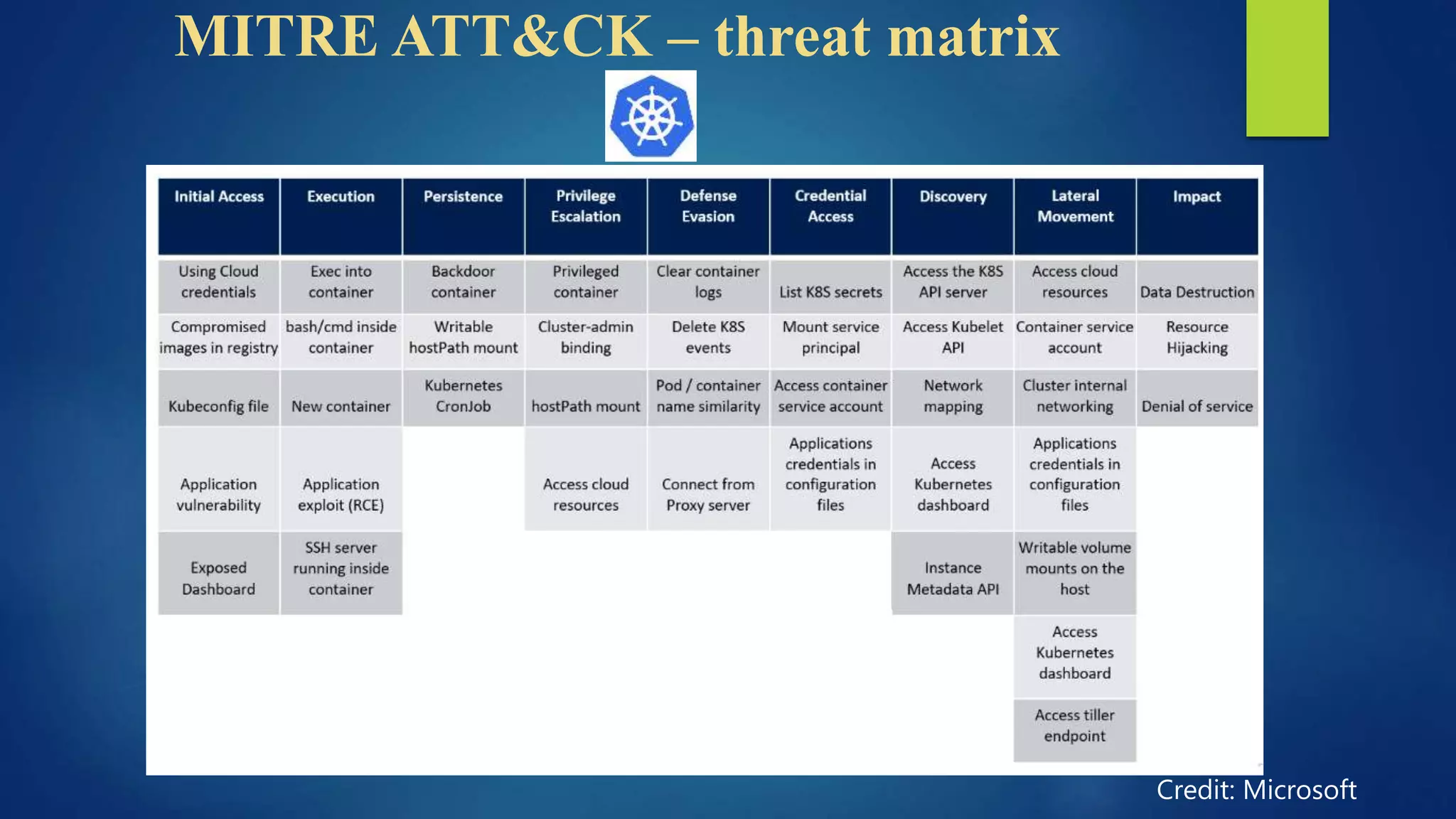
MITRE ATT&CK – threat matrix
Credit: Microsoft
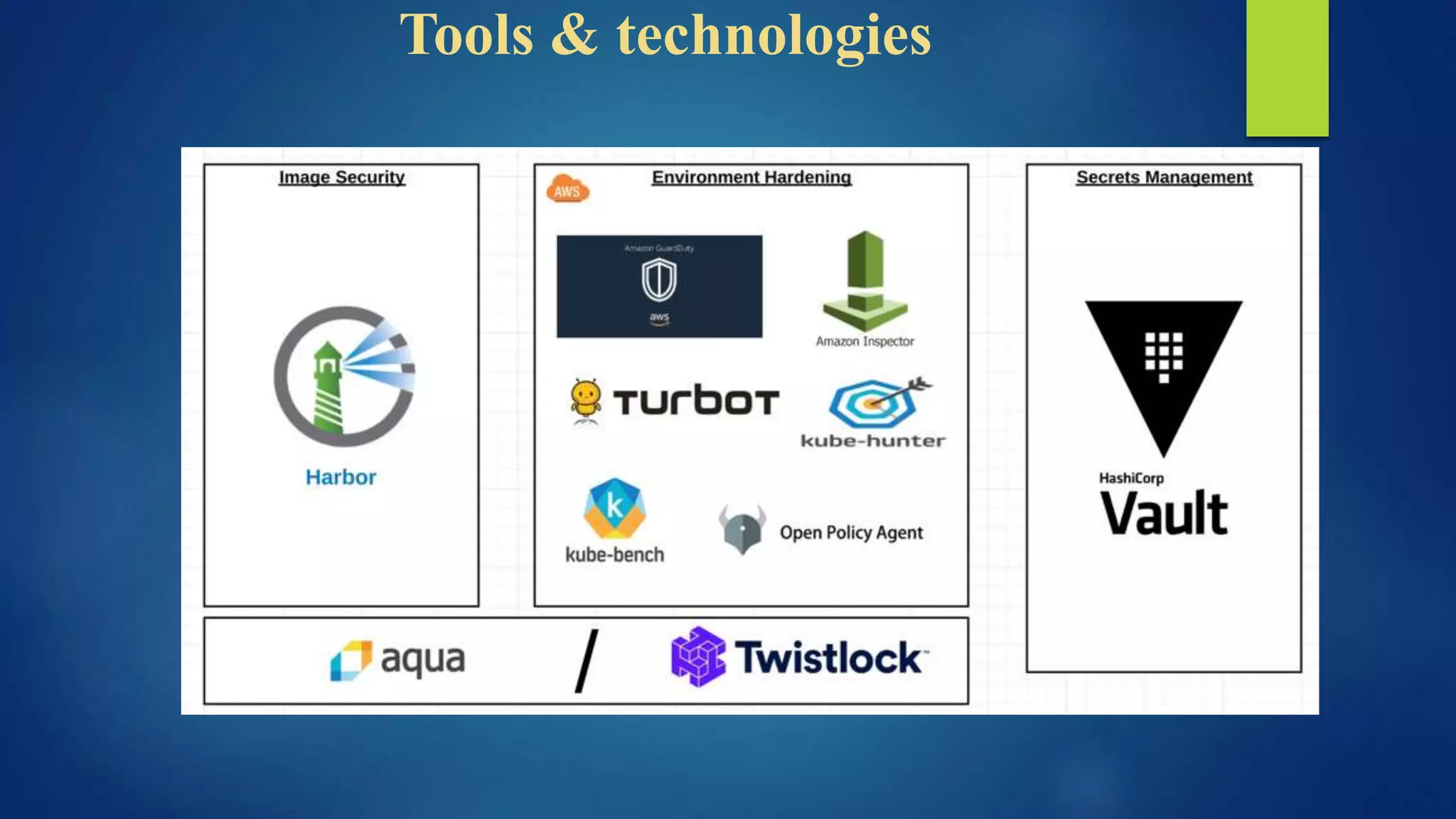
Tools & technologies
References
List of all tools used in security and penetration testing
https://collabnix.github.io/kubetools/
Blogs:
https://kubernetes.io/blog/
http://techgenix.com/kubernetes-security-tools/
Thank You !!!
……Questions Please??

12 Ways Not to get 'Hacked' your Kubernetes Cluster

  • 1.
    12 ways NOTTO GET ‘HACKED’ your
  • 2.
    $whoami • Suman Chakraborty- Senior Devops Engineer @SAP Labs • Community member & Speaker - Docker Bangalore, CNCF Bangalore group • Tech Blogger on PaaS, Cloud-Native & Microservices https://www.linkedin.com/in/schakraborty007/ @itsmesumanc
  • 3.
    The Current Stateof Security Source: UDC TechBrief: Containers
  • 4.
  • 5.
    Think before youleap ??  Have you reviewed access rights to the Kubernetes cluster(s) to understand potential insider attack vectors?  Do you have visibility of Kubernetes pods being deployed? For example how the application pods or clusters are communicating with each others?  Do you have a way to detect bad behavior in east/west traffic between containers?  Are you able to monitor what’s going on inside a pod or container to determine if there is a potential exploit?  How do you simplify security alerts and operations team monitoring to pin-point the most important attacks requiring attention?  How do you segment particular containers or network connections in a Kubernetes environment?
  • 7.
    A hacker’s inception ControlPlane • TLS encryption • RBAC Management • Encryption key Management etc Workloads • Securing container images • Pod boundaries • Running as “Non root”, etc Networking • Node to Node • Node to Pod • Firewall policies etc
  • 8.
  • 9.
    Controlling access tothe Kubernetes API  Use Transport Layer Security (TLS) for all API traffic  All API clients must be authenticated, even those that are part of the infrastructure like nodes, proxies, the scheduler and volume plugins  The API call needs to be authrorized, preferably by RBAC component that matches an incoming user or group to a set of permissions bundled into roles.  Integrating Kubernetes with third party auth providers (like Google or GitHub) uses the remote platform's identity guarantees and prevents administrators having to reconfigure the Kubernetes API server to add or remove users . Eg Dex, OAUTH 2.0
  • 10.
    Enable RBAC withLeast Privilege, Disable ABAC  The default RBAC settings permit only limited API access for anonymous users. that allows for health and discovery checks to be made.  Set --authorization-mode on the API server to enable the RBAC authorization module  Configuring RBAC for kubelets by including node authorizer in --authorization-mode list.  Incorrect or excessively permissive RBAC policies are a security threat in case of a compromised pod.  Specify Roles & ClusterRoles to specific users or Group of Users  Avoid duplication of permission and remove unused roles.
  • 11.
    Securing Kubelet  TheKubelet gives one of the entry point, if compromised for an anuthorized user who can run malicious code to gain control of the cluster  Disable anonymous access with --anonymous-auth=false, so that unauthenticated requests will receive unauthorized access error responses.  Ensure that requests are authorized by setting –authorizationmode to something other than AlwaysAllow  Limit the permissions of kubelets by including NodeRestriction in the --admission-control settings on the API server. This restricts a kubelet so that it can modify only pods that are bound to it and its own Node object.
  • 12.
    Running etcd safely etcd should be configured with peer and client TLS certificates and deployed on dedicated nodes and secure by firewall  Setting “--cert-file” and “--key-file” to enable HTTPS connections to etcd.  Set --client-cert-auth=true to ensure that access to etcd requires authentication. Set --trusted- ca-file to specify the certificate authority that has signed the client certificates  Require etcd nodes to communicate with each other securely by using --peer-client-cert- auth=true.  Set --auto-tls=false to disallow the generation and use of self-signed certificates  Specify --etcd-certfile and --etcd-keyfile so that the API server can identify itself to etcd
  • 13.
    Managing Service Account Disable automounting of the default service account token. This can be done by specifying the “automountServiceAccountToken: false” in the PodSpec for all an application. This can be executed as a patch also $ kubectl patch serviceaccount default -p $'automountServiceAccountToken: false’ serviceaccount "default" patched  The best practice to create a dedicate service account per application and configure RBAC to be specifically limited to the needs of that application.
  • 14.
    Restricting Network access By default, Kubernetes networking allows all pod to pod traffic; this can be restricted using a Network Policy .  Network policies come with a field called PodSelector, which determines which pods are affected by that policy. A pod that is associated to a policy can communicate only in those ways allowed by that policy • Best practice is to start by denying all traffic for a namespace and incrementally add routes to allow an application to pass its acceptance test suite. • Restricting Cloud Metadata API access via the network policies • Deep packet inspection (DPI) techniques are essential for in-depth network security in a container firewall. Layer 7 DPI based inspection looks for malicious XML object executables, blocking connection
  • 15.
    Running Workloads withleast privilege  Linux kernel has a number of overlapping security extensions (capabilities, SELinux, AppArmor, seccomp-bpf) that can be configured to provide least privilege to applications and harden the runtime configuration  Limiting Resource usage on a cluster through Resource Quota.  Limit Ranges can restrict the maximum or minimum size of some of the resources to prevent users from requesting unreasonably high or low values for commonly reserved resources like memory.  Utilize Seccomp, have R/O Mount access, using minimal OS to reduce the surface area for attack  Update System pactches and run CIS benchmark security tests
  • 16.
    Securing Container Images Web servers present an attack surface to the network they're attached to: scanning an image's installed files ensures the absence of known vulnerabilities that an attacker could exploit to gain remote access to the container  Scanning container images for known vulnerabilities can reduce the window of time that an attacker can exploit a disclosed CVE. Tools such as “Clair” provides image scanning, “Notary” uses signing to preserve the integrity  Whichever registry solution are being used for public images, it’s a good practice to use “read- only” account for the purpose (DTR, Elastic Container Registry, Quay from RedHat)  Updating the podSpec with unique digest of the image, along with full registry name instead of just using image:tag parameter  Using the ‘AlwaysPullImages’ admission controller to ensure that the most recent version that matches the specified tag isobtained
  • 17.
    Running Containers securely SAY “NO” to ROOT Containers that run as root frequently have far more permissions than their workload requires which, in case of compromise, could help an attacker further their attack  Many container images use the root user to run PID 1 - if that process is compromised, the attacker has root in the container and any mis-configurations become much easier to exploit !! Thumb Rule – Configure PodSecurityPolicy to run as non-root user that prevents binding to the privileged ports under 1024 (this is gated by the CAP_NET_BIND_SERVICE kernel capability)
  • 18.
    Managing secrets effectively Kubernetes Secret values protecting sensitive data that is bound to the application source code.  Encryption is done both ‘at Rest’ and ‘in Transit’  Secret values are stored alongside other configuration information in the etcd database; they are simply base64 encoded. Some are stored in third-party stores (HashiCorp KeyVault / CyberArk Conjur) along with being stored in etcd.  Secrets shouldn’t be passed into the build image, rather pass as environment variable or mounted by volumes. • Periodic Rotation and Revocation of Secrets prevents being misused by an attacker quickly
  • 19.
    Securing Host Machines If the host (e.g. Kubernetes worker node) on which containers run is compromised, all kinds of bad things can happen !!!!  Privilege escalations to root  Stealing of secrets used for secure application or infrastructure access  Changing of cluster admin privileges  Host resource damage or hijacking (e.g. crypto mining software) Kill Chain that exploits the cluster • Node Recycling brings more confidence in system capability to cope through node failure • Implementing a robust Sandboxing and Runtime Protection • Achieving Multitenancy on a non-trusted network.
  • 20.
    Service Mesh :the future  Service Mesh offers the possibility offloading microservice security and networking from the application over a secure TLS mutual connection end to end  In "Zero Trust" networks there may be no need for traditional firewalling or Kubernetes network policy, as every interaction occurs over mTLS (mutual TLS), ensuring that both parties are not only communicating securely, but that the identity of both services is known.
  • 21.
    MITRE ATT&CK –threat matrix Credit: Microsoft
  • 22.
  • 23.
    References List of alltools used in security and penetration testing https://collabnix.github.io/kubetools/ Blogs: https://kubernetes.io/blog/ http://techgenix.com/kubernetes-security-tools/
  • 24.