Kasun Madura Rathnayaka
Cloud/DevOps Solution Architect
BSc (Hons)Electrical and Information Engineering AMIE(SL),
CCIP,RHCE,RHCSA,CCNA.ITIL,AWS-SA-PRO, AWS-DEVPOPS-PRO, AWS-DVA AWS-SOP,CKA
Kubernetes Security
With AWS
● DevOps Engineer / Solution Architect
● Help industry for the Digital Transformation
○ Lankacom,Lanka Government Cloud - ICTA, WSO2 ,Pearson
○ EROAD, Fishpond, FoodStuff North Island New Zealand
○ Part Time Consultant - Celigo, Fishpond, Clientskey, SoftNet,
● Linkedin : https://www.linkedin.com/in/kasunr/
● GitHub : https://github.com/Kasunmadura
● Blog : https://medium.com/@kasunmaduraeng
● Twitter : http://twitter.com/kasunmadurar
About Me
Kubernetes with AWS
● Kops - an open source tool you can use to automate the provisioning and management of clusters in AWS.
Although not a managed tool, kops does enable you to simplify deployment and maintenance processes. It is
officially supported by AWS.
● Kubespray - an open source tool you can use to automate the provisioning and management of clusters in
AWS,AWS, GCE, Azure, OpenStack, vSphere, Packet (bare metal), Oracle Cloud Infrastructure (Experimental), or
Baremetal Which use ansible for the automation
● AWS EKS - a managed service offered by AWS. EKS uses automatically provisioned instances and
provides a managed control plane for your deployment
○ eksctl
○ Rancher
○ Terraform
Kubernetes with AWS
● Infrastructure Security
● Pod Security
● Runtime Security
● Network Security
● Multi-tenancy
● Identity and Access Management
● Detective Controls
● Data Encryption and Secrets Management
● Regulatory Compliance
● Incident Response and Forensics
● Image Security
● Pipeline Security
Kubernetes Security Pain point and
Best Practices
1. Update Kubernetes in
Latest Stable Version
● Recommended Latest three version.
● including security patches for newly disclosed vulnerabilities.
● 2018 CVE 1002105 : In all Kubernetes versions prior to v1.10.11, v1.11.5, and v1.12.3, incorrect
handling of error responses to proxied upgrade requests in the kube-apiserver allowed specially
crafted requests to establish a connection through the Kubernetes API server to backend servers,
then send arbitrary requests over the same connection directly to the backend, authenticated with
the Kubernetes API server's TLS credentials used to establish the backend connection
● How we plan to do the updates
○ Kops
○ EKS - eksctl.
2 .Harden Node Security
● Ensure the host is secure and configured correctly
○ One way to do so is to check your configuration against CIS Benchmarks; many products
feature an autochecker that will assess conformance with these standards automatically
○ AWS inspector , Tenable IO .etc
● Control network access to sensitive ports.
○ Make sure that your network blocks access to ports used by kubelet, including 10250 and
10255. Consider limiting access to the Kubernetes API server except from trusted
networks. Malicious users have abused access
○ Use AWS Network ACls/Sg
○ Use different node group depend on the application behavior
○ Proper Alert and monitoring nodes and VPC flow logs : Prometheus,ELK, Newrelic, Datadog
○ Separate VPN and VPC segmenting for the node management
● Minimize administrative access to Kubernetes nodes.
○ Access to the nodes in your cluster should generally be restricted — debugging and other
tasks can usually be handled without direct access to the node
.
2 .Harden Node Security
● Securely configure the Kubernetes API server
○ Make sure you’re disabling unauthenticated/anonymous access and using TLS encryption for connections
between the kubelets and the API server
○ https://www.stackrox.com/post/2019/09/12-kubernetes-configuration-best-practices/#6-securely-configure-the-
kubernetes-api-server
● Secure etcd
○ etcd is a key-value store (a CNCF project) used by Kubernetes for data access.
○ etcd is considered the source of truth for Kubernetes, and you can read data from and write into it as
needed. Make sure client connections are served only over TLS.
● Secure the kubelet
○ As the main node agent running on each node, misconfiguring kubelet exposes you to backdoor access
through the kubelet. Make sure you’ve disabled anonymous access to the kubelet by starting the kubelet
with the --anonymous-auth=false flag and leverage the NodeRestriction admission controller to limit what
the kubelet can access.
○ Kubernetes includes many more components, many more components, including the kube-scheduler, kube-
controller-manager, the configuration files on the master node and work nodeld generally be restricted —
debugging and other tasks can usually be handled without direct access to the node.
.
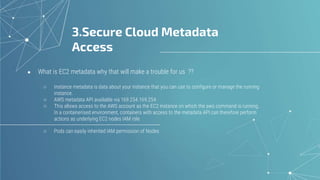
3.Secure Cloud Metadata
Access
● What is EC2 metadata why that will make a trouble for us ??
○ Instance metadata is data about your instance that you can use to configure or manage the running
instance.
○ AWS metadata API available via 169.254.169.254
○ This allows access to the AWS account as the EC2 instance on which the aws command is running.
In a containerised environment, containers with access to the metadata API can therefore perform
actions as underlying EC2 nodes IAM role
○ Pods can easily inherited IAM permission of Nodes
3.Secure Cloud Metadata
Access
3.Secure Cloud Metadata
Access
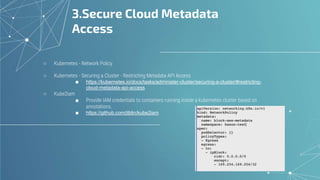
○ Kubernetes - Network Policy
○ Kubernetes - Securing a Cluster - Restricting Metadata API Access
■ https://kubernetes.io/docs/tasks/administer-cluster/securing-a-cluster/#restricting-
cloud-metadata-api-access
○ Kube2iam
■ Provide IAM credentials to containers running inside a kubernetes cluster based on
annotations.
■ https://github.com/jtblin/kube2iam
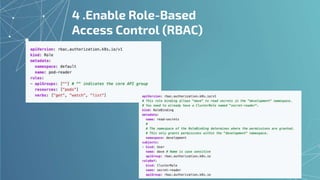
4 .Enable Role-Based
Access Control (RBAC)
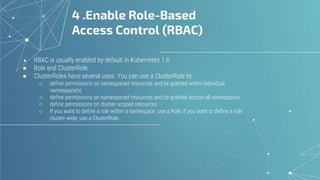
● RBAC is usually enabled by default in Kubernetes 1.6
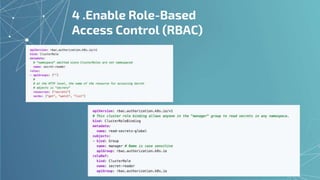
● Role and ClusterRole :
● ClusterRoles have several uses. You can use a ClusterRole to:
○ define permissions on namespaced resources and be granted within individual
namespace(s)
○ define permissions on namespaced resources and be granted across all namespaces
○ define permissions on cluster-scoped resources
○ If you want to define a role within a namespace, use a Role; if you want to define a role
cluster-wide, use a ClusterRole.
4 .Enable Role-Based
Access Control (RBAC)
4 .Enable Role-Based
Access Control (RBAC)
5 .Secure Tiller or Helm 3
○ Tiller, the server portion of Helm, typically runs inside of your Kubernetes cluster. But for development, it can also be
run locally, and configured to talk to a remote Kubernetes cluster.
○ Tiller with no auth :(
5. Secure Tiller or Helm 3
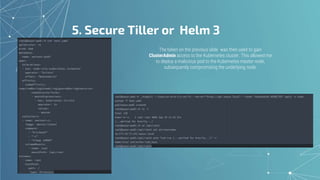
The token on the previous slide was then used to gain
ClusterAdmin access to the Kubernetes cluster. This allowed me
to deploy a malicious pod to the Kubernetes master node,
subsequently compromising the underlying node.
5.Secure Tiller or Helm 3
● Tiller with SSL
○ https://v2.helm.sh/docs/tiller_ssl/
● Helm 3
○ Removal of Tiller:
○ Replaces client/server with client/library architecture (helm binary only)
○ Security is now on per user basis (delegated to Kubernetes user cluster
security)
○ Releases are now stored as in-cluster secrets and the release object
metadata has changed
○ Releases are persisted on a release namespace basis and not in the Tiller
namespace anymore
● Helm 2 to helm 3 conversion
○ https://github.com/helm/helm-2to3
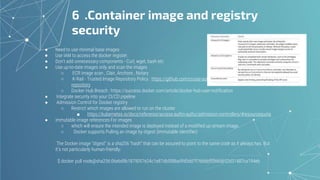
6 .Container image and registry
security
● Need to use minimal base images
● Use IAM to access the docker register.
● Don’t add unnecessary components - Curl, wget, bash etc
● Use up-to-date images only and scan the images
○ ECR image scan , Clair, Anchore , Notary
○ K-Rail - Trusted Image Repository Policy : https://github.com/cruise-automation/k-rail#trusted-image-
repository
○ Docker Hub Breach : https://success.docker.com/article/docker-hub-user-notification
● Integrate security into your CI/CD pipeline
● Admission Control for Docker registry
○ Restrict which images are allowed to run on the cluster
■ https://kubernetes.io/docs/reference/access-authn-authz/admission-controllers/#resourcequota
● immutable image references For images
○ which will ensure the intended image is deployed instead of a modified up-stream image.
○ Docker supports Pulling an image by digest (immutable identifier)
The Docker image “digest” is a sha256 “hash” that can be assured to point to the same code as it always has. But
it’s not particularly human-friendly:
$ docker pull node@sha256:06ebd9b1879057e24c1e87db508ba9fd0dd7f766bbf55665652d31487ca194eb
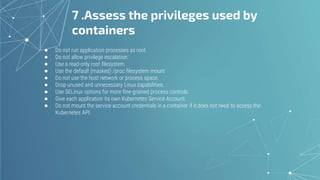
7 .Assess the privileges used by
containers
● Do not run application processes as root.
● Do not allow privilege escalation.
● Use a read-only root filesystem.
● Use the default (masked) /proc filesystem mount
● Do not use the host network or process space.
● Drop unused and unnecessary Linux capabilities.
● Use SELinux options for more fine-grained process controls.
● Give each application its own Kubernetes Service Account.
● Do not mount the service account credentials in a container if it does not need to access the
Kubernetes API.
8 .Audit logging and Alerts
● Turn on Audit log
○ EKS audit logs
○ K8s Audit
■ https://kubernetes.io/docs/tasks/debug-application-cluster/audit/
○ Audit log policy
● Setup Audit tools
○ Sysdig
○ New Relic Events
○ Sumo logic
○ ELK
○ Inspektor gadget : network traffic analysi
■ https://github.com/kinvolk/inspektor-gadget
● Monitoring Alerts
○ Api error
○ Timeouts
○ Error logs
○ Event triggers
● Setup proper Alerting systems per activity base
9 Kubernetes Deploy phase and
Runtime Security
● Use namespaces to isolate sensitive workloads
● Pipeline security for the deployment process
○ Pass credentials Env variables
○ Pipeline permission and ACL
○ Secure log outputs
● Resource Limit and Hpa Limits
● Use Kubernetes network policies to control traffic between pods and clusters
○ Ingress and API gateway integration
○ Network policy review
■ https://orca.tufin.io/netpol/
● Proper network segment for 3rd party access and other resource access
○ AWS Controller for K8s
■ https://aws.amazon.com/blogs/containers/aws-controllers-for-kubernetes-ack/
○ External API Access
○ API Gateways
○ Other AWS resource access
■ IAM
■ ACL/SG
■ VPC peering
■ Private Link
10 .Credential and Secret
management
● Built-in Kubernetes secrets
○ They can be access controlled to specific namespaces, and their contents are not shown by default in kubectl get or
describe output.
○ They are base64 encoded, so the contents are not immediately apparent even when you pull them directly from
kubectl. Of course, base64 decoding is trivial..
● Cloud managed secret stores
○ AWS Secrets Manager
○ Cloud KMS
○ zure Key Vault
● Open source secrets managers
○ Vault
○ Sealed Secrets
○ credstash
● Implement proper Pipeline Security and Source control security for the credentials
○ Better to scan the source control repo regular - git commit/ git history
■ https://github.com/awslabs/git-secrets
● Secret Rotation Police and MFA Admins
● Review the IAM permission, Network policy and Pod access for Secrets
○ AWS Config
○ Audit2rbac
■ https://github.com/liggitt/audit2rbac
○ Prowler
■ https://github.com/toniblyx/prowler
Kubernetes security with AWS

Kubernetes security with AWS

  • 1.
    Kasun Madura Rathnayaka Cloud/DevOpsSolution Architect BSc (Hons)Electrical and Information Engineering AMIE(SL), CCIP,RHCE,RHCSA,CCNA.ITIL,AWS-SA-PRO, AWS-DEVPOPS-PRO, AWS-DVA AWS-SOP,CKA Kubernetes Security With AWS
  • 2.
    ● DevOps Engineer/ Solution Architect ● Help industry for the Digital Transformation ○ Lankacom,Lanka Government Cloud - ICTA, WSO2 ,Pearson ○ EROAD, Fishpond, FoodStuff North Island New Zealand ○ Part Time Consultant - Celigo, Fishpond, Clientskey, SoftNet, ● Linkedin : https://www.linkedin.com/in/kasunr/ ● GitHub : https://github.com/Kasunmadura ● Blog : https://medium.com/@kasunmaduraeng ● Twitter : http://twitter.com/kasunmadurar About Me
  • 3.
    Kubernetes with AWS ●Kops - an open source tool you can use to automate the provisioning and management of clusters in AWS. Although not a managed tool, kops does enable you to simplify deployment and maintenance processes. It is officially supported by AWS. ● Kubespray - an open source tool you can use to automate the provisioning and management of clusters in AWS,AWS, GCE, Azure, OpenStack, vSphere, Packet (bare metal), Oracle Cloud Infrastructure (Experimental), or Baremetal Which use ansible for the automation ● AWS EKS - a managed service offered by AWS. EKS uses automatically provisioned instances and provides a managed control plane for your deployment ○ eksctl ○ Rancher ○ Terraform
  • 4.
    Kubernetes with AWS ●Infrastructure Security ● Pod Security ● Runtime Security ● Network Security ● Multi-tenancy ● Identity and Access Management ● Detective Controls ● Data Encryption and Secrets Management ● Regulatory Compliance ● Incident Response and Forensics ● Image Security ● Pipeline Security
  • 5.
    Kubernetes Security Painpoint and Best Practices
  • 6.
    1. Update Kubernetesin Latest Stable Version ● Recommended Latest three version. ● including security patches for newly disclosed vulnerabilities. ● 2018 CVE 1002105 : In all Kubernetes versions prior to v1.10.11, v1.11.5, and v1.12.3, incorrect handling of error responses to proxied upgrade requests in the kube-apiserver allowed specially crafted requests to establish a connection through the Kubernetes API server to backend servers, then send arbitrary requests over the same connection directly to the backend, authenticated with the Kubernetes API server's TLS credentials used to establish the backend connection ● How we plan to do the updates ○ Kops ○ EKS - eksctl.
  • 7.
    2 .Harden NodeSecurity ● Ensure the host is secure and configured correctly ○ One way to do so is to check your configuration against CIS Benchmarks; many products feature an autochecker that will assess conformance with these standards automatically ○ AWS inspector , Tenable IO .etc ● Control network access to sensitive ports. ○ Make sure that your network blocks access to ports used by kubelet, including 10250 and 10255. Consider limiting access to the Kubernetes API server except from trusted networks. Malicious users have abused access ○ Use AWS Network ACls/Sg ○ Use different node group depend on the application behavior ○ Proper Alert and monitoring nodes and VPC flow logs : Prometheus,ELK, Newrelic, Datadog ○ Separate VPN and VPC segmenting for the node management ● Minimize administrative access to Kubernetes nodes. ○ Access to the nodes in your cluster should generally be restricted — debugging and other tasks can usually be handled without direct access to the node .
  • 8.
    2 .Harden NodeSecurity ● Securely configure the Kubernetes API server ○ Make sure you’re disabling unauthenticated/anonymous access and using TLS encryption for connections between the kubelets and the API server ○ https://www.stackrox.com/post/2019/09/12-kubernetes-configuration-best-practices/#6-securely-configure-the- kubernetes-api-server ● Secure etcd ○ etcd is a key-value store (a CNCF project) used by Kubernetes for data access. ○ etcd is considered the source of truth for Kubernetes, and you can read data from and write into it as needed. Make sure client connections are served only over TLS. ● Secure the kubelet ○ As the main node agent running on each node, misconfiguring kubelet exposes you to backdoor access through the kubelet. Make sure you’ve disabled anonymous access to the kubelet by starting the kubelet with the --anonymous-auth=false flag and leverage the NodeRestriction admission controller to limit what the kubelet can access. ○ Kubernetes includes many more components, many more components, including the kube-scheduler, kube- controller-manager, the configuration files on the master node and work nodeld generally be restricted — debugging and other tasks can usually be handled without direct access to the node. .
  • 9.
    3.Secure Cloud Metadata Access ●What is EC2 metadata why that will make a trouble for us ?? ○ Instance metadata is data about your instance that you can use to configure or manage the running instance. ○ AWS metadata API available via 169.254.169.254 ○ This allows access to the AWS account as the EC2 instance on which the aws command is running. In a containerised environment, containers with access to the metadata API can therefore perform actions as underlying EC2 nodes IAM role ○ Pods can easily inherited IAM permission of Nodes
  • 10.
  • 11.
    3.Secure Cloud Metadata Access ○Kubernetes - Network Policy ○ Kubernetes - Securing a Cluster - Restricting Metadata API Access ■ https://kubernetes.io/docs/tasks/administer-cluster/securing-a-cluster/#restricting- cloud-metadata-api-access ○ Kube2iam ■ Provide IAM credentials to containers running inside a kubernetes cluster based on annotations. ■ https://github.com/jtblin/kube2iam
  • 12.
    4 .Enable Role-Based AccessControl (RBAC) ● RBAC is usually enabled by default in Kubernetes 1.6 ● Role and ClusterRole : ● ClusterRoles have several uses. You can use a ClusterRole to: ○ define permissions on namespaced resources and be granted within individual namespace(s) ○ define permissions on namespaced resources and be granted across all namespaces ○ define permissions on cluster-scoped resources ○ If you want to define a role within a namespace, use a Role; if you want to define a role cluster-wide, use a ClusterRole.
  • 13.
  • 14.
  • 15.
    5 .Secure Tilleror Helm 3 ○ Tiller, the server portion of Helm, typically runs inside of your Kubernetes cluster. But for development, it can also be run locally, and configured to talk to a remote Kubernetes cluster. ○ Tiller with no auth :(
  • 16.
    5. Secure Tilleror Helm 3 The token on the previous slide was then used to gain ClusterAdmin access to the Kubernetes cluster. This allowed me to deploy a malicious pod to the Kubernetes master node, subsequently compromising the underlying node.
  • 17.
    5.Secure Tiller orHelm 3 ● Tiller with SSL ○ https://v2.helm.sh/docs/tiller_ssl/ ● Helm 3 ○ Removal of Tiller: ○ Replaces client/server with client/library architecture (helm binary only) ○ Security is now on per user basis (delegated to Kubernetes user cluster security) ○ Releases are now stored as in-cluster secrets and the release object metadata has changed ○ Releases are persisted on a release namespace basis and not in the Tiller namespace anymore ● Helm 2 to helm 3 conversion ○ https://github.com/helm/helm-2to3
  • 18.
    6 .Container imageand registry security ● Need to use minimal base images ● Use IAM to access the docker register. ● Don’t add unnecessary components - Curl, wget, bash etc ● Use up-to-date images only and scan the images ○ ECR image scan , Clair, Anchore , Notary ○ K-Rail - Trusted Image Repository Policy : https://github.com/cruise-automation/k-rail#trusted-image- repository ○ Docker Hub Breach : https://success.docker.com/article/docker-hub-user-notification ● Integrate security into your CI/CD pipeline ● Admission Control for Docker registry ○ Restrict which images are allowed to run on the cluster ■ https://kubernetes.io/docs/reference/access-authn-authz/admission-controllers/#resourcequota ● immutable image references For images ○ which will ensure the intended image is deployed instead of a modified up-stream image. ○ Docker supports Pulling an image by digest (immutable identifier) The Docker image “digest” is a sha256 “hash” that can be assured to point to the same code as it always has. But it’s not particularly human-friendly: $ docker pull node@sha256:06ebd9b1879057e24c1e87db508ba9fd0dd7f766bbf55665652d31487ca194eb
  • 19.
    7 .Assess theprivileges used by containers ● Do not run application processes as root. ● Do not allow privilege escalation. ● Use a read-only root filesystem. ● Use the default (masked) /proc filesystem mount ● Do not use the host network or process space. ● Drop unused and unnecessary Linux capabilities. ● Use SELinux options for more fine-grained process controls. ● Give each application its own Kubernetes Service Account. ● Do not mount the service account credentials in a container if it does not need to access the Kubernetes API.
  • 20.
    8 .Audit loggingand Alerts ● Turn on Audit log ○ EKS audit logs ○ K8s Audit ■ https://kubernetes.io/docs/tasks/debug-application-cluster/audit/ ○ Audit log policy ● Setup Audit tools ○ Sysdig ○ New Relic Events ○ Sumo logic ○ ELK ○ Inspektor gadget : network traffic analysi ■ https://github.com/kinvolk/inspektor-gadget ● Monitoring Alerts ○ Api error ○ Timeouts ○ Error logs ○ Event triggers ● Setup proper Alerting systems per activity base
  • 21.
    9 Kubernetes Deployphase and Runtime Security ● Use namespaces to isolate sensitive workloads ● Pipeline security for the deployment process ○ Pass credentials Env variables ○ Pipeline permission and ACL ○ Secure log outputs ● Resource Limit and Hpa Limits ● Use Kubernetes network policies to control traffic between pods and clusters ○ Ingress and API gateway integration ○ Network policy review ■ https://orca.tufin.io/netpol/ ● Proper network segment for 3rd party access and other resource access ○ AWS Controller for K8s ■ https://aws.amazon.com/blogs/containers/aws-controllers-for-kubernetes-ack/ ○ External API Access ○ API Gateways ○ Other AWS resource access ■ IAM ■ ACL/SG ■ VPC peering ■ Private Link
  • 22.
    10 .Credential andSecret management ● Built-in Kubernetes secrets ○ They can be access controlled to specific namespaces, and their contents are not shown by default in kubectl get or describe output. ○ They are base64 encoded, so the contents are not immediately apparent even when you pull them directly from kubectl. Of course, base64 decoding is trivial.. ● Cloud managed secret stores ○ AWS Secrets Manager ○ Cloud KMS ○ zure Key Vault ● Open source secrets managers ○ Vault ○ Sealed Secrets ○ credstash ● Implement proper Pipeline Security and Source control security for the credentials ○ Better to scan the source control repo regular - git commit/ git history ■ https://github.com/awslabs/git-secrets ● Secret Rotation Police and MFA Admins ● Review the IAM permission, Network policy and Pod access for Secrets ○ AWS Config ○ Audit2rbac ■ https://github.com/liggitt/audit2rbac ○ Prowler ■ https://github.com/toniblyx/prowler

Editor's Notes

  • #4  Kubespray is a composition of Ansible playbooks, inventory, provisioning tools, and domain knowledge for generic OS/Kubernetes clusters configuration management tasks
  • #5  Kubespray is a composition of Ansible playbooks, inventory, provisioning tools, and domain knowledge for generic OS/Kubernetes clusters configuration management tasks
  • #6  Kubespray is a composition of Ansible playbooks, inventory, provisioning tools, and domain knowledge for generic OS/Kubernetes clusters configuration management tasks
  • #7  including security patches for newly disclosed vulnerabilities. So, if a high-severity vulnerability is discovered in Kubernetes and you are four versions behind, your version will not receive the patch.
  • #8 This allows access to the AWS account as the EC2 instance on which the aws command is running. In a containerised environment, containers with access to the metadata API can therefore perform actions as underlying EC2 nodes IAM role
  • #9 This allows access to the AWS account as the EC2 instance on which the aws command is running. In a containerised environment, containers with access to the metadata API can therefore perform actions as underlying EC2 nodes IAM role
  • #10 This allows access to the AWS account as the EC2 instance on which the aws command is running. In a containerised environment, containers with access to the metadata API can therefore perform actions as underlying EC2 nodes IAM role
  • #13 This allows access to the AWS account as the EC2 instance on which the aws command is running. In a containerised environment, containers with access to the metadata API can therefore perform actions as underlying EC2 nodes IAM role
  • #14 This allows access to the AWS account as the EC2 instance on which the aws command is running. In a containerised environment, containers with access to the metadata API can therefore perform actions as underlying EC2 nodes IAM role
  • #15 This allows access to the AWS account as the EC2 instance on which the aws command is running. In a containerised environment, containers with access to the metadata API can therefore perform actions as underlying EC2 nodes IAM role
  • #16 This allows access to the AWS account as the EC2 instance on which the aws command is running. In a containerised environment, containers with access to the metadata API can therefore perform actions as underlying EC2 nodes IAM role
  • #17 This allows access to the AWS account as the EC2 instance on which the aws command is running. In a containerised environment, containers with access to the metadata API can therefore perform actions as underlying EC2 nodes IAM role
  • #18 This allows access to the AWS account as the EC2 instance on which the aws command is running. In a containerised environment, containers with access to the metadata API can therefore perform actions as underlying EC2 nodes IAM role
  • #19 This allows access to the AWS account as the EC2 instance on which the aws command is running. In a containerised environment, containers with access to the metadata API can therefore perform actions as underlying EC2 nodes IAM role
  • #20 This allows access to the AWS account as the EC2 instance on which the aws command is running. In a containerised environment, containers with access to the metadata API can therefore perform actions as underlying EC2 nodes IAM role