Audio Production Basics
Presented by
Brett Atwood
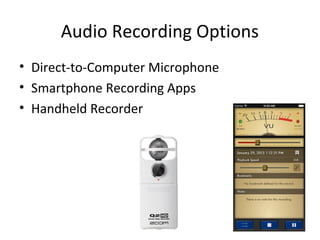
Audio Recording Options
• Direct-to-Computer Microphone
• Smartphone Recording Apps
• Handheld Recorder
Audio Recording Format
• What file format does your audio format save
in?
• Audacity supports .wav, .aiff and .mp3
– Note: For .mp3 format, Audacity users have to
install the free LAME plugin
Popping the “P’s”
• Announcing words that emphasize p, b, or t
sounds naturally produce a sharp puff of air
• This can result in a pop or thumb in your
recording if you speak too close to the
microphone
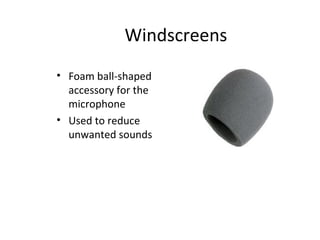
• A windscreen on the mic can help
Windscreens
• Foam ball-shaped
accessory for the
microphone
• Used to reduce
unwanted sounds
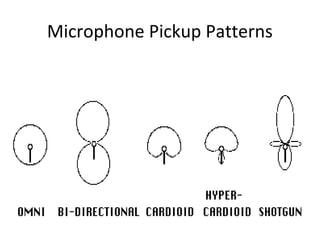
Microphone Pickup Patterns
General Mic Tips
• Get your microphone as close to the source as
possible.
• Even directional microphones pick up a little
sound from most directions, so the closer the
better - as long as you're not getting negative
effects (plosives, mouth noises, etc)
General Mic Tips
• Eliminate the Competition: Think about the OTHER
sounds in the room where you are recording. Two main
sources of unwanted sound are:
– noise : this can be the noisy air conditioner, traffic outside,
crowds in the hall.
– ambience : may be the "live nature" of the room you're in,
the unwanted echo.
• Do what you can to eliminate the problem and place
your mic as close to your subject as possible.

Audio Production Basics

  • 1.
  • 2.
    Audio Recording Options •Direct-to-Computer Microphone • Smartphone Recording Apps • Handheld Recorder
  • 3.
    Audio Recording Format •What file format does your audio format save in? • Audacity supports .wav, .aiff and .mp3 – Note: For .mp3 format, Audacity users have to install the free LAME plugin
  • 4.
    Popping the “P’s” •Announcing words that emphasize p, b, or t sounds naturally produce a sharp puff of air • This can result in a pop or thumb in your recording if you speak too close to the microphone • A windscreen on the mic can help
  • 5.
    Windscreens • Foam ball-shaped accessoryfor the microphone • Used to reduce unwanted sounds
  • 6.
  • 7.
    General Mic Tips •Get your microphone as close to the source as possible. • Even directional microphones pick up a little sound from most directions, so the closer the better - as long as you're not getting negative effects (plosives, mouth noises, etc)
  • 8.
    General Mic Tips •Eliminate the Competition: Think about the OTHER sounds in the room where you are recording. Two main sources of unwanted sound are: – noise : this can be the noisy air conditioner, traffic outside, crowds in the hall. – ambience : may be the "live nature" of the room you're in, the unwanted echo. • Do what you can to eliminate the problem and place your mic as close to your subject as possible.