Pakistan Students Association (PSA – AIT)Fawad and Adnan
DSLR Photography, Videography and
Photo/Video Editing
A Workshop on
Why this Workshop?
Note: Our prior apology from those who find the contents too basic.
Workshop Contents
Part 1: DSLR Photography
Part 2: Photo Editing (Adobe Lightroom)
Part 3: DSLR Video Shooting
Part 4: Video Editing (Cyberlink Power Director)
Workshop Contents
Part 1: DSLR Photography
Part 2: Photo Editing (Adobe Lightroom)
Part 3: DSLR Video Shooting
Part 4: Video Editing (Cyberlink Power Director)
Part 1: DSLR Photography
▪ The basics and 3 Elements of Exposure (shutter
speed, aperture and ISO)
▪ Lenses and Focal Lengths
▪ Summary
▪ A Quick “Settings” Slideshow
Part 1: DSLR Photography
▪ The basics and 3 Elements of Exposure (shutter
speed, aperture and ISO)
▪ Lenses and Focal Lengths
▪ Summary
▪ A Quick “Settings” Slideshow
Types of Digital Cameras
▪ 3 Main classifications
– Point and Shoot
– Prosumer
– Digital SLR
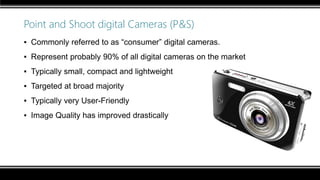
Point and Shoot digital Cameras (P&S)
▪ Commonly referred to as “consumer” digital cameras.
▪ Represent probably 90% of all digital cameras on the market
▪ Typically small, compact and lightweight
▪ Targeted at broad majority
▪ Typically very User-Friendly
▪ Image Quality has improved drastically
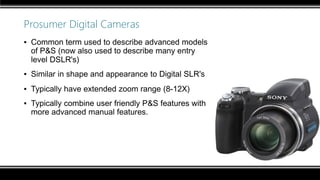
Prosumer Digital Cameras
▪ Common term used to describe advanced models
of P&S (now also used to describe many entry
level DSLR's)
▪ Similar in shape and appearance to Digital SLR's
▪ Typically have extended zoom range (8-12X)
▪ Typically combine user friendly P&S features with
more advanced manual features.
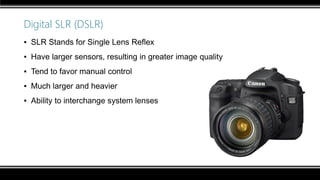
Digital SLR (DSLR)
▪ SLR Stands for Single Lens Reflex
▪ Have larger sensors, resulting in greater image quality
▪ Tend to favor manual control
▪ Much larger and heavier
▪ Ability to interchange system lenses
Entry Level DSLRs
▪ Canon EOS 100D
▪ Canon EOS 1200D
▪ Canon EOS 600D
▪ Canon EOS 650D
▪ Canon EOS 700D
▪ Canon EOS 60D
▪ Nikon D3200
▪ Nikon D3300
▪ Nikon D5200
▪ Nikon D5300
▪ Nikon D5500
▪ Olympus E-PL6
▪ Fujifilm X-A1
▪ Sony a3000
▪ Sony α5000
▪ Sony α5100
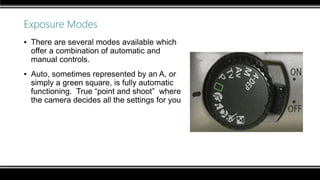
Exposure Modes
▪ There are several modes available which
offer a combination of automatic and
manual controls.
▪ Auto, sometimes represented by an A, or
simply a green square, is fully automatic
functioning. True “point and shoot” where
the camera decides all the settings for you
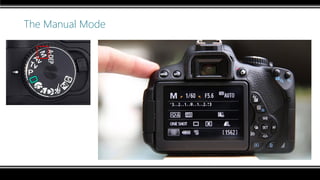
The Manual Mode
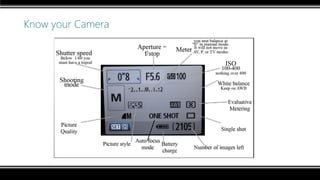
Know your Camera
The Manual Mode
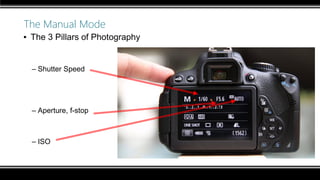
▪ The 3 Pillars of Photography
– Shutter Speed
– Aperture, f-stop
– ISO
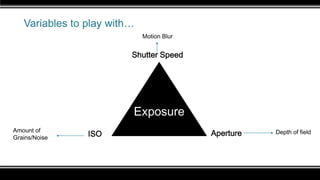
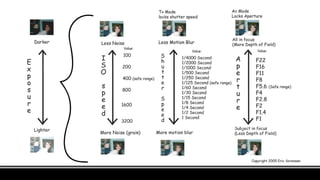
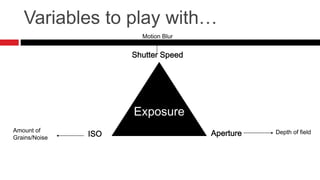
Variables to play with…
Exposure
Shutter Speed
ISO ApertureAmount of
Grains/Noise
Depth of field
Motion Blur
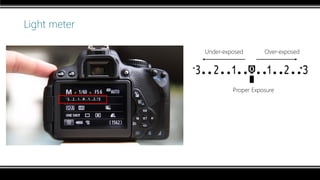
Light meter
Proper Exposure
Under-exposed Over-exposed
The 3 Pillars of Photography
–Shutter Speed
–Aperture, f-stop
–ISO
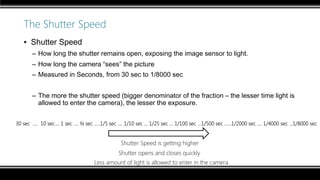
The Shutter Speed
▪ Shutter Speed
– How long the shutter remains open, exposing the image sensor to light.
– How long the camera “sees” the picture
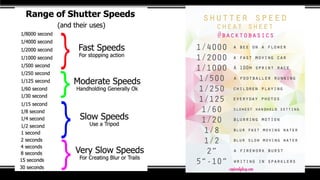
– Measured in Seconds, from 30 sec to 1/8000 sec
– The more the shutter speed (bigger denominator of the fraction – the lesser time light is
allowed to enter the camera), the lesser the exposure.
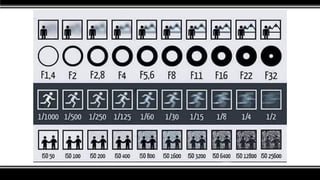
30 sec …. 10 sec…. 1 sec …. ½ sec …..1/5 sec …. 1/10 sec … 1/25 sec ... 1/100 sec ...1/500 sec ……1/2000 sec …. 1/4000 sec …1/8000 sec
Shutter Speed is getting higher
The image is getting darker
Less amount of light is allowed to enter in the camera
Shutter opens and closes quickly
Shutter Speed
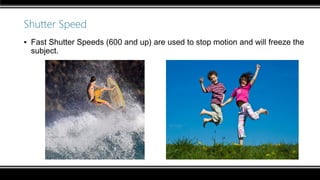
▪ Fast Shutter Speeds (600 and up) are used to stop motion and will freeze the
subject.
Shutter Speed
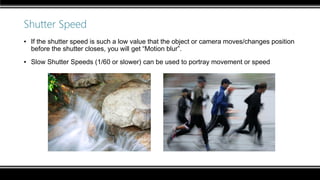
▪ If the shutter speed is such a low value that the object or camera moves/changes position
before the shutter closes, you will get “Motion blur”.
▪ Slow Shutter Speeds (1/60 or slower) can be used to portray movement or speed
Shutter Speed
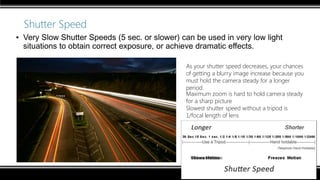
▪ Very Slow Shutter Speeds (5 sec. or slower) can be used in very low light
situations to obtain correct exposure, or achieve dramatic effects.
As your shutter speed decreases, your chances
of getting a blurry image increase because you
must hold the camera steady for a longer
period.
Maximum zoom is hard to hold camera steady
for a sharp picture
Slowest shutter speed without a tripod is
1/focal length of lens
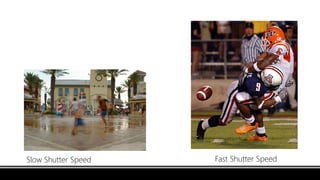
Slow Shutter Speed Fast Shutter Speed
Slow shutter speed Fast shutter speed
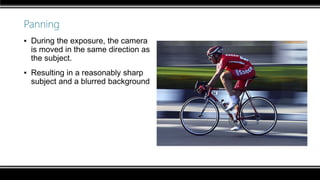
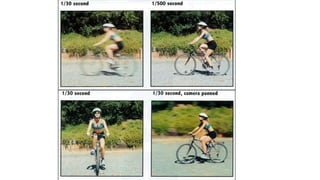
Panning
▪ During the exposure, the camera
is moved in the same direction as
the subject.
▪ Resulting in a reasonably sharp
subject and a blurred background
Movement Compensation
▪ Refers to the cameras ability to correct small movements by the user while
taking a picture, in order to reduce the blur caused by camera shake.
▪ Represented differently by different companies:
– Nikon – VR – Vibration Reduction
– Canon – IS – Image Stabilization
– Pentax – SR – Shake Reduction
– Sony – SSS – Super Steady-Shot
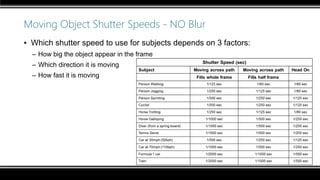
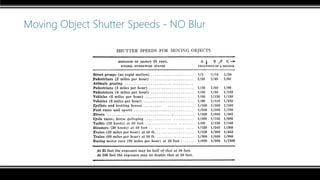
Moving Object Shutter Speeds - NO Blur
▪ Which shutter speed to use for subjects depends on 3 factors:
– How big the object appear in the frame
– Which direction it is moving
– How fast it is moving
Moving Object Shutter Speeds - NO Blur
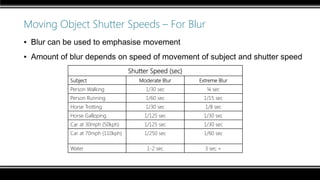
Moving Object Shutter Speeds – For Blur
▪ Blur can be used to emphasise movement
▪ Amount of blur depends on speed of movement of subject and shutter speed
Shutter Speed (sec)
Subject Moderate Blur Extreme Blur
Person Walking 1/30 sec ¼ sec
Person Running 1/60 sec 1/15 sec
Horse Trotting 1/30 sec 1/8 sec
Horse Galloping 1/125 sec 1/30 sec
Car at 30mph (50kph) 1/125 sec 1/30 sec
Car at 70mph (110kph) 1/250 sec 1/60 sec
Water 1-2 sec 3 sec +
The 3 Pillars of Photography
–Shutter Speed
–Aperture, f-stop
–ISO
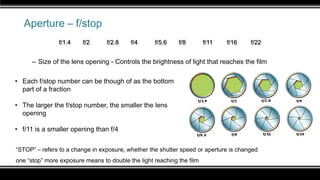
Aperture – f/stop
– Size of the lens opening - Controls the brightness of light that reaches the film
“STOP” – refers to a change in exposure, whether the shutter speed or aperture is changed
one “stop” more exposure means to double the light reaching the film
one “stop” less exposure means to half the light reaching the film
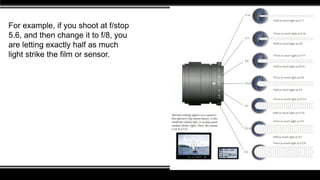
• Each f/stop number can be though of as the bottom
part of a fraction
• The larger the f/stop number, the smaller the lens
opening
• f/11 is a smaller opening than f/4
f/1.4 f/2 f/2.8 f/4 f/5.6 f/8 f/11 f/16 f/22
For example, if you shoot at f/stop
5.6, and then change it to f/8, you
are letting exactly half as much
light strike the film or sensor.
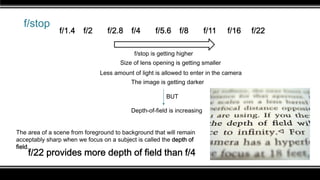
f/stop
f/stop is getting higher
The image is getting darker
Less amount of light is allowed to enter in the camera
Size of lens opening is getting smaller
f/1.4 f/2 f/2.8 f/4 f/5.6 f/8 f/11 f/16 f/22
Depth-of-field is increasing
BUT
The area of a scene from foreground to background that will remain
acceptably sharp when we focus on a subject is called the depth of
field.
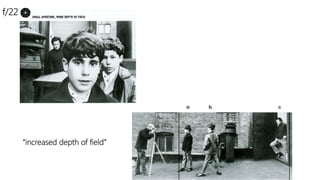
f/22 provides more depth of field than f/4
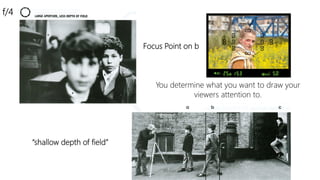
You determine what you want to draw your
viewers attention to.
“shallow depth of field”
f/4
Focus Point on b
“increased depth of field”
f/22
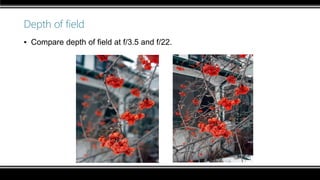
Depth of field
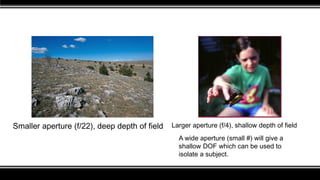
▪ Compare depth of field at f/3.5 and f/22.
Smaller aperture (f/22), deep depth of field Larger aperture (f/4), shallow depth of field
A wide aperture (small #) will give a
shallow DOF which can be used to
isolate a subject.
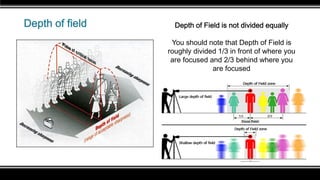
Depth of field Depth of Field is not divided equally
You should note that Depth of Field is
roughly divided 1/3 in front of where you
are focused and 2/3 behind where you
are focused
The 3 Pillars of Photography
–Shutter Speed
–Aperture, f-stop
–ISO
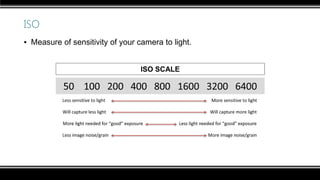
ISO
▪ Measure of sensitivity of your camera to light.
ISO: General Rules and tips
▪ ISO settings are often rated at 100, 200, 400, 800, 1600, and even 3200 on
some models
▪ Use an ISO of 100 or 200 when taking photographs outside in sunny
conditions.
▪ If the sky is overcast or it is evening time, or in a darkened room, then use an
ISO within the range of 400 to 800.
▪ Night time or in cases of low light you might need to set your digital camera
ISO to 1600. If not your photo will appear too dark, if at all.
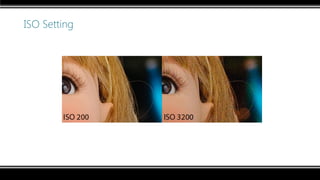
Using High ISO values causes the sensor to produce
much more heat, which creates digital “noise” in images.
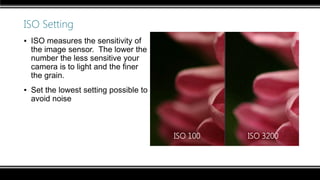
ISO Setting
▪ ISO measures the sensitivity of
the image sensor. The lower the
number the less sensitive your
camera is to light and the finer
the grain.
▪ Set the lowest setting possible to
avoid noise
ISO 100 ISO 3200
ISO Setting
The fourth Element - White Balance
▪ White Balance is essentially the camera compensating for the color cast of
the light in order to reproduce the “correct” colors.
▪ The color cast of light is referred to as its Color Temperature and is rated in
degrees Kelvin
▪ Ranges from “Cool” to “Warm”
▪ Most Digital cameras have Automatic White Balance, but also specific
options for different sources of light.
Part 1: DSLR Photography
▪ The basics and 3 Elements of Exposure (shutter
speed, aperture and ISO)
▪ Lenses and Focal Lengths
▪ Summary
▪ A Quick “Settings” Slideshow
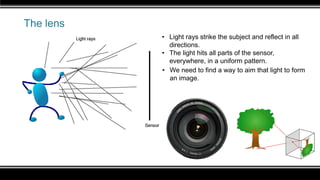
The lens
• Light rays strike the subject and reflect in all
directions.
• The light hits all parts of the sensor,
everywhere, in a uniform pattern.
• We need to find a way to aim that light to form
an image.
The focal plane
▪ A central question for photographers: do you want your subject to be a larger
part of the frame, or a smaller part?
▪ One way to change this is to move forward or backward.
▪ A second way is to change the focal length of the lens.
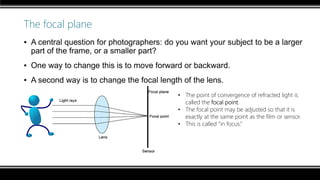
• The point of convergence of refracted light is
called the focal point.
• The focal point may be adjusted so that it is
exactly at the same point as the film or sensor.
• This is called “in focus.”
Refraction points
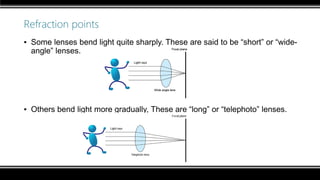
▪ Some lenses bend light quite sharply. These are said to be “short” or “wide-
angle” lenses.
▪ Others bend light more gradually, These are “long” or “telephoto” lenses.
Zoom lens
▪ Focal length is the measurement of the space between the lens and the focal plane,
expressed in millimeters.
– 18-55 mm lens
– 55-250mm lens
– 18-135mm lens
▪ A lens that is capable of changing focal length is called a “zoom lens.”
▪ A fixed focal length lens is sometimes called a “prime” lens.
– 50mm lens
– 70mm lens
– 300mm lens
▪ Most zoom lenses sacrifice speed for flexibility. Also, they may be less sharp.
Focal length and Zoom
▪ If a focal length is short, the image takes up less space on the focal plane
(sensor or film).
▪ If it is long, the image takes up more space.
▪ Therefore, a long lens brings us closer to the subject, like a binoculars.
▪ The focal length of the lens is usually stamped on the lens barrel or ring.
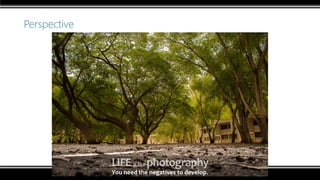
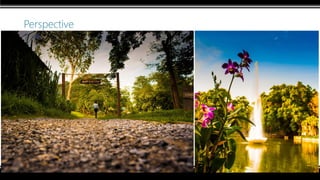
Perspective
▪ Here is a comparison of perspectives.
Wide angle and telephoto
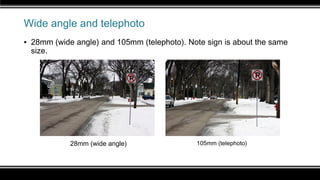
▪ 28mm (wide angle) and 105mm (telephoto). Note sign is about the same
size.
28mm (wide angle) 105mm (telephoto)
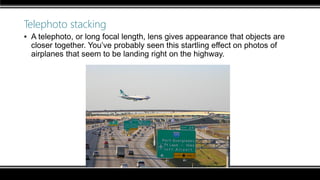
Telephoto stacking
▪ A telephoto, or long focal length, lens gives appearance that objects are
closer together. You’ve probably seen this startling effect on photos of
airplanes that seem to be landing right on the highway.
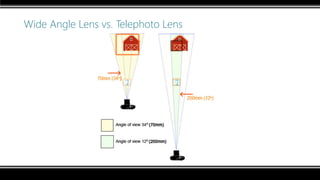
Wide Angle Lens vs. Telephoto Lens
Focal Length
Depth of field (Effect of focal length and distance)
▪ Depth of field is directly affected by three things:
– F/stop
– Focal length
– Camera-to-subject distance
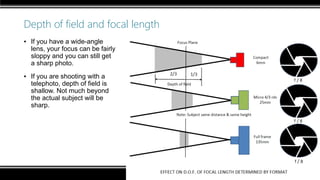
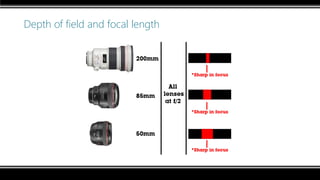
Depth of field and focal length
▪ If you have a wide-angle
lens, your focus can be fairly
sloppy and you can still get
a sharp photo.
▪ If you are shooting with a
telephoto, depth of field is
shallow. Not much beyond
the actual subject will be
sharp.
Depth of field and focal length
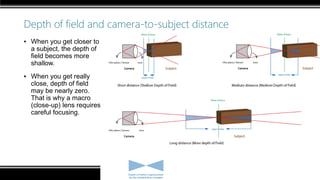
Depth of field and camera-to-subject distance
▪ When you get closer to
a subject, the depth of
field becomes more
shallow.
▪ When you get really
close, depth of field
may be nearly zero.
That is why a macro
(close-up) lens requires
careful focusing.
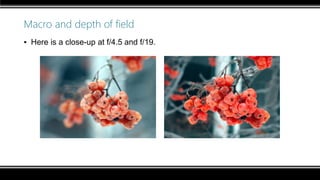
Macro and depth of field
▪ Here is a close-up at f/4.5 and f/19.
Depth of field in P&S Cameras
▪ Simple point-and-shoot cameras without a focus mechanism often have
normal or wide-angle lenses.
▪ This is because with these lenses depth of field is large, commonly between
5 feet and 15 feet (1.5 meters to 4.5 meters).
▪ This means you can snap a subject anywhere in that area and be confident it
will look sharp.
The Lens Specifications - f/stops and focal lengths
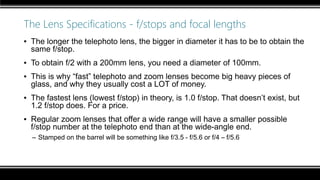
▪ The longer the telephoto lens, the bigger in diameter it has to be to obtain the
same f/stop.
▪ To obtain f/2 with a 200mm lens, you need a diameter of 100mm.
▪ This is why “fast” telephoto and zoom lenses become big heavy pieces of
glass, and why they usually cost a LOT of money.
▪ The fastest lens (lowest f/stop) in theory, is 1.0 f/stop. That doesn’t exist, but
1.2 f/stop does. For a price.
▪ Regular zoom lenses that offer a wide range will have a smaller possible
f/stop number at the telephoto end than at the wide-angle end.
– Stamped on the barrel will be something like f/3.5 - f/5.6 or f/4 – f/5.6
The Lens Specifications - f/stops and focal lengths
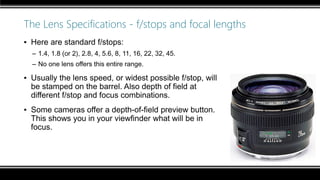
▪ Here are standard f/stops:
– 1.4, 1.8 (or 2), 2.8, 4, 5.6, 8, 11, 16, 22, 32, 45.
– No one lens offers this entire range.
▪ Usually the lens speed, or widest possible f/stop, will
be stamped on the barrel. Also depth of field at
different f/stop and focus combinations.
▪ Some cameras offer a depth-of-field preview button.
This shows you in your viewfinder what will be in
focus.
Aperture: General Rules and tips
▪ A larger lens opening (f1.8-3.5) offers the following advantages:
– Allows you to shoot more often with just natural lighting  helps to reduce harsh shadows
and red-eye caused by flash.
– Allows more light to pass through, the camera will be able to choose a slightly higher
shutter speed  helps to reduce motion blur.
– Helps to reduce "depth-of-field“ (for effect).
How to read a lens
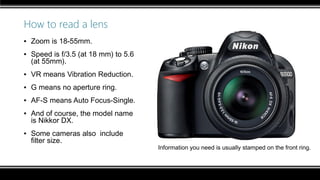
▪ Zoom is 18-55mm.
▪ Speed is f/3.5 (at 18 mm) to 5.6
(at 55mm).
▪ VR means Vibration Reduction.
▪ G means no aperture ring.
▪ AF-S means Auto Focus-Single.
▪ And of course, the model name
is Nikkor DX.
▪ Some cameras also include
filter size.
Information you need is usually stamped on the front ring.
Why a fixed focal length?
▪ Most of us use zoom lenses nowadays, but fixed focal lengths (prime) have
advantages:
– They tend to be sharper.
– They tend to be more simple in construction, so more trouble-free.
– They are cheaper.
– They are usually faster—the biggest reason they remain popular.
– What is “fast?” Anything lower than about f/4.
Part 1: DSLR Photography
▪ The basics and 3 Elements of Exposure (shutter
speed, aperture and ISO)
▪ Lenses and Focal Lengths
▪ Summary
▪ A Quick “Settings” Slideshow
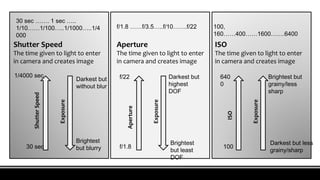
Shutter Speed
The time given to light to enter
in camera and creates image
Aperture
The time given to light to enter
in camera and creates image
ISO
The time given to light to enter
in camera and creates image
30 sec ……. 1 sec …..
1/10……1/100…..1/1000…..1/4
000
f/1.8 ……f/3.5…..f/10…….f/22 100,
160……400……1600…….6400ShutterSpeed
Exposure
30 sec
1/4000 sec
Darkest but
without blur
Aperture
Exposure
f/1.8
f/22
Brightest
but blurry
Darkest but
highest
DOF
Brightest
but least
DOF
ISO
Exposure
100
640
0
Brightest but
grainy/less
sharp
Darkest but less
grainy/sharp
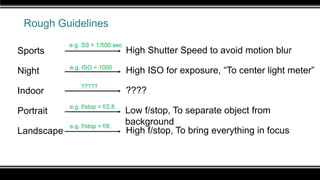
Rough Guidelines
Sports
Night
Indoor
Portrait
Landscape
High Shutter Speed to avoid motion blur
High ISO for exposure, “To center light meter”
????
Low f/stop, To separate object from
background
High f/stop, To bring everything in focus
e.g. SS = 1/500 sec
e.g. ISO = 1000
?????
e.g. f/stop = f/2.8
e.g. f/stop = f/8
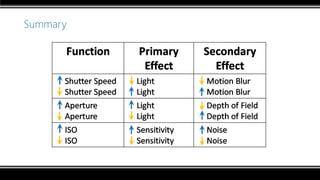
Summary
Summary
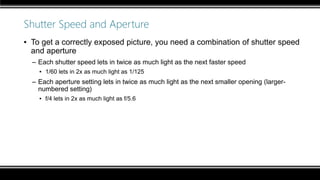
Shutter Speed and Aperture
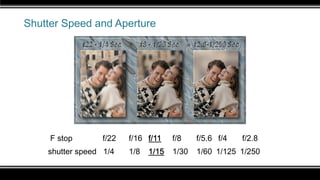
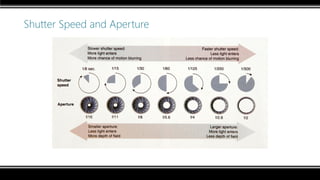
▪ To get a correctly exposed picture, you need a combination of shutter speed
and aperture
– Each shutter speed lets in twice as much light as the next faster speed
▪ 1/60 lets in 2x as much light as 1/125
– Each aperture setting lets in twice as much light as the next smaller opening (larger-
numbered setting)
▪ f/4 lets in 2x as much light as f/5.6
Shutter Speed and Aperture
F stop f/22 f/16 f/11 f/8 f/5.6 f/4 f/2.8
shutter speed 1/4 1/8 1/15 1/30 1/60 1/125 1/250
Shutter Speed and Aperture
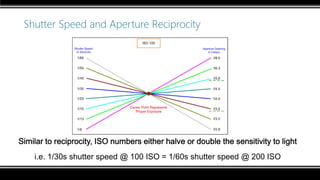
Shutter Speed and Aperture Reciprocity
Similar to reciprocity, ISO numbers either halve or double the sensitivity to light
i.e. 1/30s shutter speed @ 100 ISO = 1/60s shutter speed @ 200 ISO
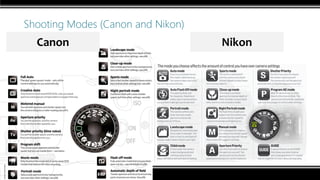
Shooting Modes (Canon and Nikon)
Canon Nikon
Scene Modes
▪ Scene Modes are basically fully automatic modes designed specifically for a
certain situation.
▪ They typically place emphasis on one or more settings based on the typical
circumstances of the situation chosen.
– Portrait – large aperture, small DOF
– Landscape / Mountains – small aperture, large DOF, focused around infinity
– Sports – Short shutter speeds to freeze movement, probably large aperture
Camera Exposure Modes
▪ Auto / Program – Not the best for low light
▪ Shutter Priority – Tv or Shutter Priority allows you to choose the shutter
speed while the camera chooses the aperture which would produce the
correct exposure
▪ Aperture priority – Av or Aperture Priority allows you to choose the aperture
value while the camera chooses the shutter speed required to obtain a
correct exposure
▪ Manual – Full creative control! :)
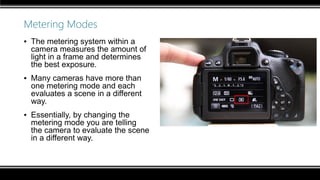
Metering Modes
▪ The metering system within a
camera measures the amount of
light in a frame and determines
the best exposure.
▪ Many cameras have more than
one metering mode and each
evaluates a scene in a different
way.
▪ Essentially, by changing the
metering mode you are telling
the camera to evaluate the scene
in a different way.
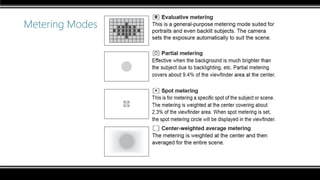
Metering Modes
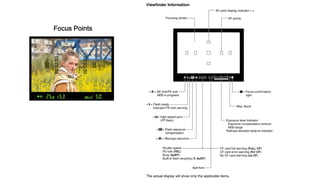
Focus Points
Part 1: DSLR Photography
▪ The basics and 3 Elements of Exposure (shutter
speed, aperture and ISO)
▪ Lenses and Focal Lengths
▪ Summary
▪ A Quick “Settings” Slideshow
Note: All photos shown are taken using Canon EOS 650D
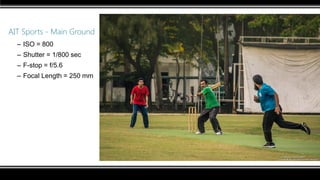
AIT Sports - Main Ground
– ISO = 800
– Shutter = 1/800 sec
– F-stop = f/5.6
– Focal Length = 250 mm
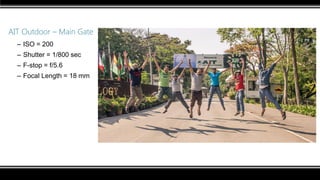
AIT Outdoor – Main Gate
– ISO = 200
– Shutter = 1/800 sec
– F-stop = f/5.6
– Focal Length = 18 mm
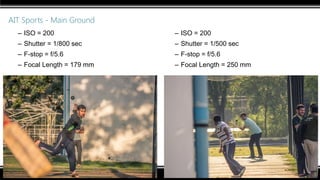
AIT Sports - Main Ground
– ISO = 200
– Shutter = 1/800 sec
– F-stop = f/5.6
– Focal Length = 179 mm
– ISO = 200
– Shutter = 1/500 sec
– F-stop = f/5.6
– Focal Length = 250 mm
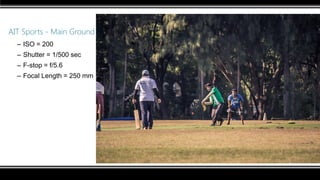
AIT Sports - Main Ground
– ISO = 200
– Shutter = 1/500 sec
– F-stop = f/5.6
– Focal Length = 250 mm
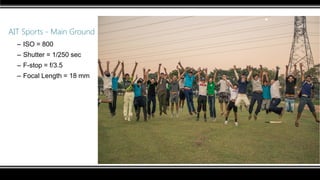
AIT Sports - Main Ground
– ISO = 800
– Shutter = 1/250 sec
– F-stop = f/3.5
– Focal Length = 18 mm
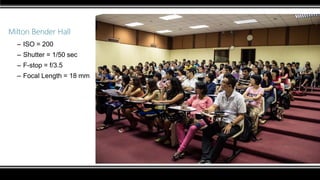
Milton Bender Hall
– ISO = 200
– Shutter = 1/50 sec
– F-stop = f/3.5
– Focal Length = 18 mm
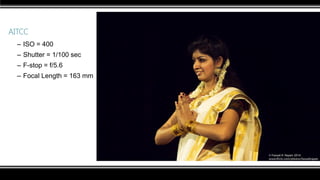
AITCC
– ISO = 400
– Shutter = 1/100 sec
– F-stop = f/5.6
– Focal Length = 163 mm
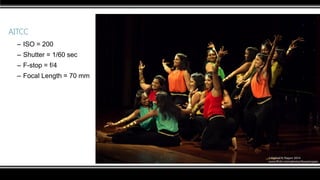
AITCC
– ISO = 200
– Shutter = 1/60 sec
– F-stop = f/4
– Focal Length = 70 mm
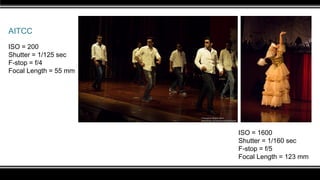
AITCC
ISO = 200
Shutter = 1/125 sec
F-stop = f/4
Focal Length = 55 mm
ISO = 1600
Shutter = 1/160 sec
F-stop = f/5
Focal Length = 123 mm
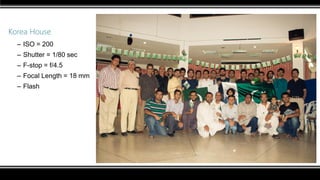
Korea House
– ISO = 200
– Shutter = 1/80 sec
– F-stop = f/4.5
– Focal Length = 18 mm
– Flash
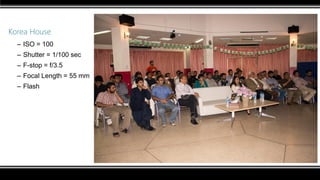
Korea House
– ISO = 100
– Shutter = 1/100 sec
– F-stop = f/3.5
– Focal Length = 55 mm
– Flash
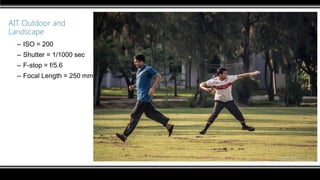
AIT Outdoor and
Landscape
– ISO = 200
– Shutter = 1/1000 sec
– F-stop = f/5.6
– Focal Length = 250 mm
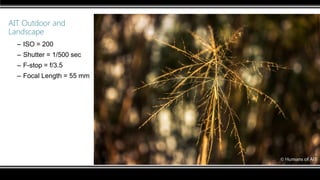
AIT Outdoor and
Landscape
– ISO = 200
– Shutter = 1/500 sec
– F-stop = f/3.5
– Focal Length = 55 mm
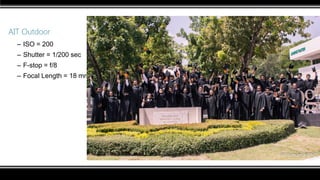
AIT Outdoor
– ISO = 200
– Shutter = 1/200 sec
– F-stop = f/8
– Focal Length = 18 mm
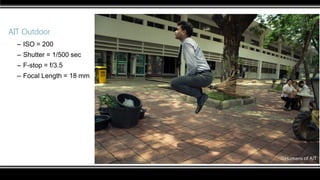
AIT Outdoor
– ISO = 200
– Shutter = 1/500 sec
– F-stop = f/3.5
– Focal Length = 18 mm
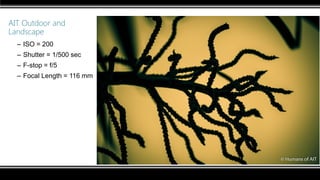
AIT Outdoor and
Landscape
– ISO = 200
– Shutter = 1/500 sec
– F-stop = f/5
– Focal Length = 116 mm
AIT at Night
(Long Exposure)
– ISO = 100
– Shutter = 30 sec
– F-stop = f/3.5
– Focal Length = 18 mm
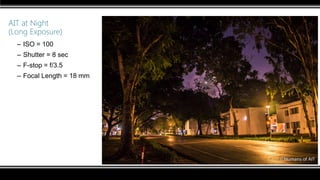
AIT at Night
(Long Exposure)
– ISO = 100
– Shutter = 8 sec
– F-stop = f/3.5
– Focal Length = 18 mm
AIT at Night
(Long Exposure)
– ISO = 100
– Shutter = 8 sec
– F-stop = f/3.5
– Focal Length = 18 mm
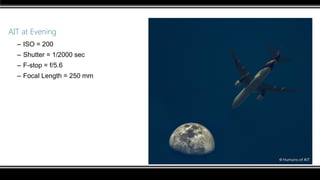
AIT at Evening
– ISO = 200
– Shutter = 1/2000 sec
– F-stop = f/5.6
– Focal Length = 250 mm
AIT at Evening
(Going to the very limits
of my machine)
– ISO = 200
– Shutter = 1/4000 sec
– F-stop = f/20
– Focal Length = 250 mm
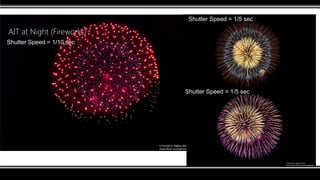
AIT at Night (Fireworks)
Shutter Speed = 1/5 sec
Shutter Speed = 1/10 sec
Shutter Speed = 1/5 sec
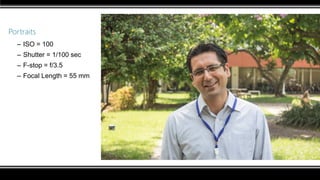
Portraits
– ISO = 100
– Shutter = 1/100 sec
– F-stop = f/3.5
– Focal Length = 55 mm
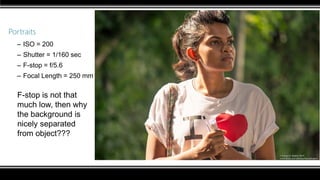
Portraits
– ISO = 200
– Shutter = 1/160 sec
– F-stop = f/5.6
– Focal Length = 250 mm
F-stop is not that
much low, then why
the background is
nicely separated
from object???
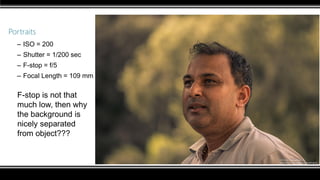
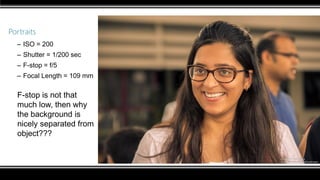
Portraits
– ISO = 200
– Shutter = 1/200 sec
– F-stop = f/5
– Focal Length = 109 mm
F-stop is not that
much low, then why
the background is
nicely separated
from object???
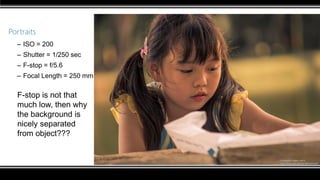
Portraits
– ISO = 200
– Shutter = 1/250 sec
– F-stop = f/5.6
– Focal Length = 250 mm
F-stop is not that
much low, then why
the background is
nicely separated
from object???
Portraits
– ISO = 200
– Shutter = 1/200 sec
– F-stop = f/5
– Focal Length = 109 mm
F-stop is not that
much low, then why
the background is
nicely separated from
object???
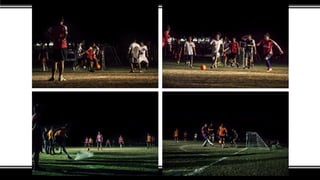
Now what about…….
“Sports”….. in….. “Night”….. ????
“Landscape” ….. with People ….. “Jumping”
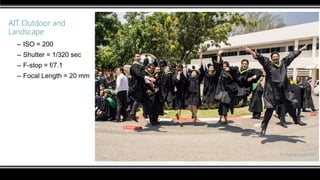
AIT Outdoor and
Landscape
– ISO = 200
– Shutter = 1/320 sec
– F-stop = f/7.1
– Focal Length = 20 mm
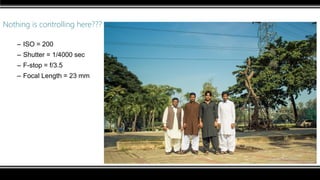
Nothing is controlling here???
– ISO = 200
– Shutter = 1/4000 sec
– F-stop = f/3.5
– Focal Length = 23 mm
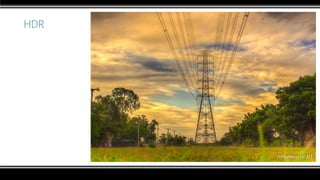
HDR
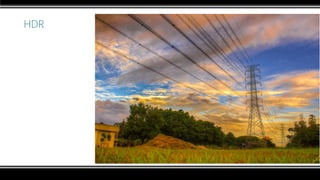
HDR
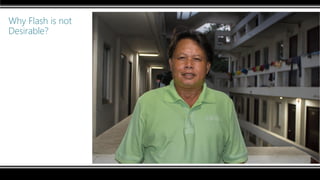
Why Flash is not
Desirable?
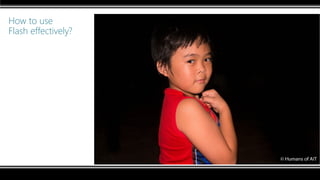
How to use
Flash effectively?
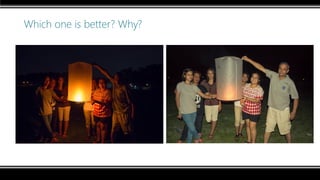
Which one is better? Why?
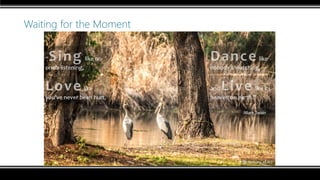
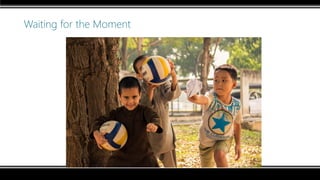
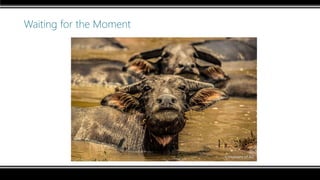
Waiting for the Moment
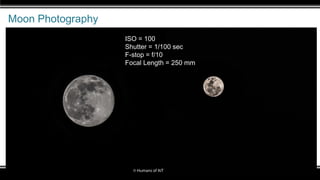
Moon Photography
ISO = 100
Shutter = 1/100 sec
F-stop = f/10
Focal Length = 250 mm
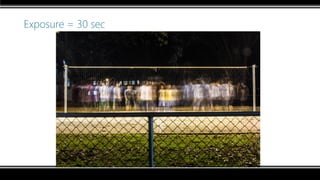
Exposure = 30 sec
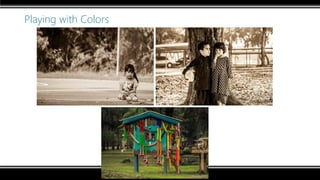
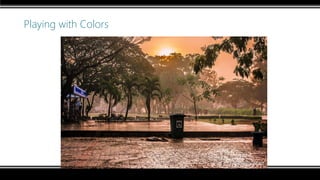
Playing with Colors
Playing with Colors
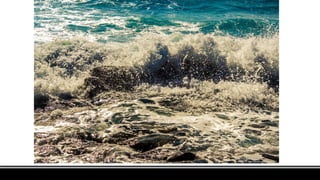
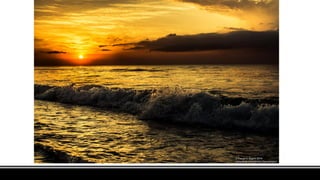
Quiz
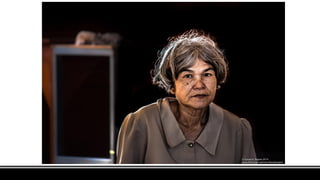
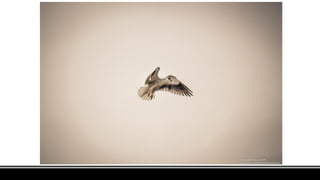
Guess the settings in terms of “HIGH”,
“LOW” and “Not a Controlling Factor” you
would use to take these photos?
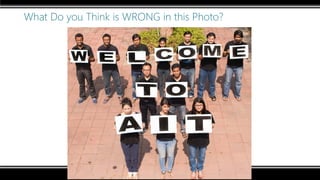
What Do you Think is WRONG in this Photo?
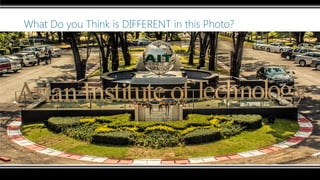
What Do you Think is DIFFERENT in this Photo?
Perspective
Perspective
Perspective
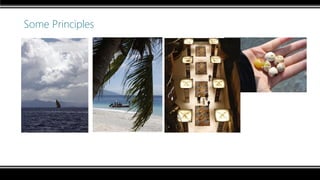
Some Principles
– Un-clutter the picture. Zoom in.
– Put subject off-center / Rule of thirds
– Use of frames, lines & diagonals
– Dramatic Perspective
– Unusual camera angles
– Frame your photo with foreground
objects.
Some Principles
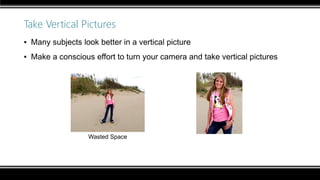
Take Vertical Pictures
▪ Many subjects look better in a vertical picture
▪ Make a conscious effort to turn your camera and take vertical pictures
Wasted Space
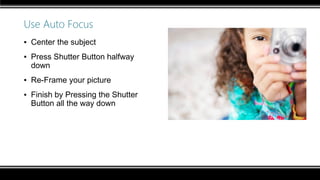
Use Auto Focus
▪ Center the subject
▪ Press Shutter Button halfway
down
▪ Re-Frame your picture
▪ Finish by Pressing the Shutter
Button all the way down
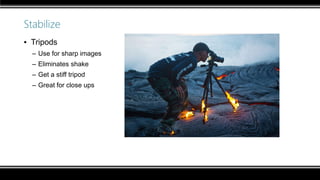
Stabilize
▪ Tripods
– Use for sharp images
– Eliminates shake
– Get a stiff tripod
– Great for close ups
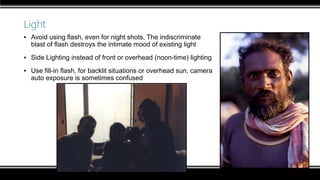
Light
▪ Avoid using flash, even for night shots, The indiscriminate
blast of flash destroys the intimate mood of existing light
▪ Side Lighting instead of front or overhead (noon-time) lighting
▪ Use fill-in flash, for backlit situations or overhead sun, camera
auto exposure is sometimes confused
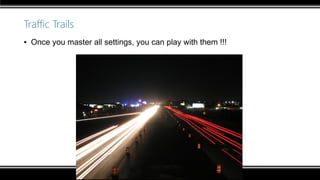
Traffic Trails
▪ Once you master all settings, you can play with them !!!
Light Explosion
▪ Light Explosion / Motion blur
With an SLR – zoom the lens during a long exposure
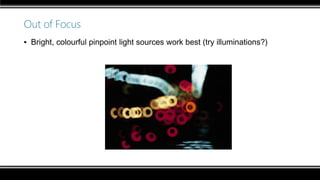
Out of Focus
▪ Bright, colourful pinpoint light sources work best (try illuminations?)
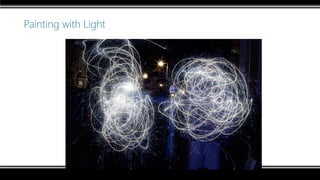
Painting with Light
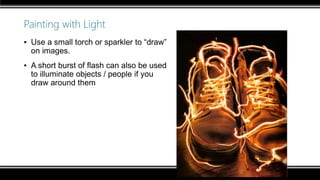
Painting with Light
▪ Use a small torch or sparkler to “draw”
on images.
▪ A short burst of flash can also be used
to illuminate objects / people if you
draw around them
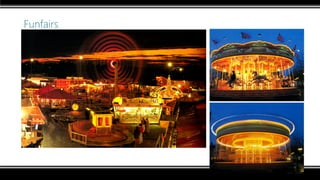
Funfairs
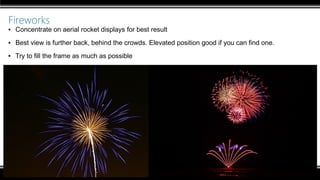
Fireworks
▪ Concentrate on aerial rocket displays for best result
▪ Best view is further back, behind the crowds. Elevated position good if you can find one.
▪ Try to fill the frame as much as possible
Recommended Settings for Fireworks
▪ Set small aperture, e.g. f/16
▪ Use a wide angle (28-35mm) to capture the whole of the display
▪ Use a telephoto (50mm+) to fill the frame with firework explosions
▪ Using the Bulb setting, open the shutter for 2-60 seconds - hopefully to
capture multiple fireworks
▪ Can open the shutter for longer if you block the light with your hand or a
black card between fireworks – longer gives a much more impressive picture
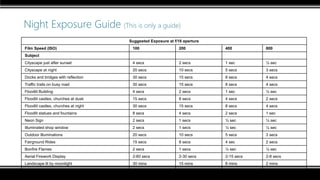
Night Exposure Guide (This is only a guide)
Suggested Exposure at f/16 aperture
Film Speed (ISO) 100 200 400 800
Subject
Cityscape just after sunset 4 secs 2 secs 1 sec ½ sec
Cityscape at night 20 secs 10 secs 5 secs 3 secs
Docks and bridges with reflection 30 secs 15 secs 8 secs 4 secs
Traffic trails on busy road 30 secs 15 secs 8 secs 4 secs
Floodlit Building 4 secs 2 secs 1 sec ½ sec
Floodlit castles, churches at dusk 15 secs 8 secs 4 secs 2 secs
Floodlit castles, churches at night 30 secs 15 secs 8 secs 4 secs
Floodlit statues and fountains 8 secs 4 secs 2 secs 1 sec
Neon Sign 2 secs 1 secs ½ sec ¼ sec
Illuminated shop window 2 secs 1 secs ½ sec ¼ sec
Outdoor Illuminations 20 secs 10 secs 5 secs 3 secs
Fairground Rides 15 secs 8 secs 4 sec 2 secs
Bonfire Flames 2 secs 1 secs ½ sec ¼ sec
Aerial Firework Display 2-60 secs 2-30 secs 2-15 secs 2-8 secs
Landscape lit by moonlight 30 mins 15 mins 8 mins 2 mins
Landscape at twilight 1 min 30 sec 15 secs 8 secs
Domestic Interior (tungsten) 8 secs 4 secs 2 secs 1 sec
Workshop Contents
Part 1: DSLR Photography
Part 2: Photo Editing (Adobe Lightroom)
Part 3: DSLR Video Shooting
Part 4: Video Editing (Cyberlink Power Director)
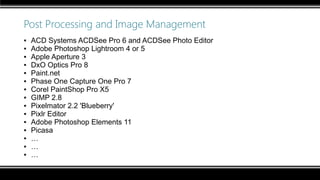
Post Processing and Image Management
▪ ACD Systems ACDSee Pro 6 and ACDSee Photo Editor
▪ Adobe Photoshop Lightroom 4 or 5
▪ Apple Aperture 3
▪ DxO Optics Pro 8
▪ Paint.net
▪ Phase One Capture One Pro 7
▪ Corel PaintShop Pro X5
▪ GIMP 2.8
▪ Pixelmator 2.2 'Blueberry'
▪ Pixlr Editor
▪ Adobe Photoshop Elements 11
▪ Picasa
▪ …
▪ …
▪ …
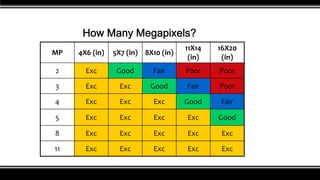
How Many Megapixels?
MP 4X6 (in) 5X7 (in) 8X10 (in)
11X14
(in)
16X20
(in)
2 Exc Good Fair Poor Poor
3 Exc Exc Good Fair Poor
4 Exc Exc Exc Good Fair
5 Exc Exc Exc Exc Good
8 Exc Exc Exc Exc Exc
11 Exc Exc Exc Exc Exc
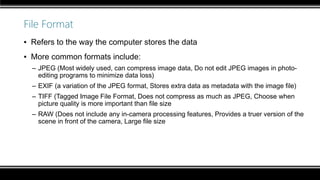
File Format
▪ Refers to the way the computer stores the data
▪ More common formats include:
– JPEG (Most widely used, can compress image data, Do not edit JPEG images in photo-
editing programs to minimize data loss)
– EXIF (a variation of the JPEG format, Stores extra data as metadata with the image file)
– TIFF (Tagged Image File Format, Does not compress as much as JPEG, Choose when
picture quality is more important than file size
– RAW (Does not include any in-camera processing features, Provides a truer version of the
scene in front of the camera, Large file size
Camera RAW
▪ An important feature of DSLRs is the ability to store images in RAW format.
▪ JPEG format color corrects, sharpens and compresses the image
information and so takes some control away from the photographer.
▪ RAW records image directly as the sensor sees it, without processing.
▪ It allows photographers to use all the digital information gathered by the
sensor.
▪ The photographer does the processing in Photoshop.
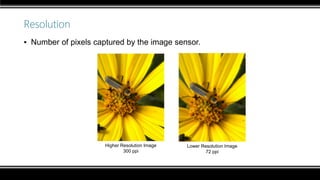
Resolution
▪ Number of pixels captured by the image sensor.
Higher Resolution Image
300 ppi
Lower Resolution Image
72 ppi
A Quick Lightroom Demonstration
Workshop Contents
Part 1: DSLR Photography
Part 2: Photo Editing (Adobe Lightroom)
Part 3: DSLR Video Shooting
Part 4: Video Editing (Cyberlink Power Director)
Variables to play with…
Exposure
Shutter Speed
ISO ApertureAmount of
Grains/Noise
Depth of field
Motion Blur
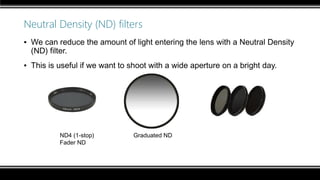
Neutral Density (ND) filters
▪ We can reduce the amount of light entering the lens with a Neutral Density
(ND) filter.
▪ This is useful if we want to shoot with a wide aperture on a bright day.
ND4 (1-stop) Graduated ND
Fader ND
What Shutter Speed should be used for Film Making?
▪ The shutter speed of each frame is limited by the frame rate. (Shooting) at 24
fps, the LONGEST exposure possible is 1/24s.
▪ To mimic the appearance of film, shoot as close as possible to half your
frame rate. E.g. at 24 fps, set your shutter to 1/50s.
▪ You can increase your shutter speed, for a stroboscopic, choppy appearance
(e.g. Gladiator).
What f-stop should be used for Film Making?
▪ Depends on how far your subject or you will move in that particular scene.
– Interviews
– Parties
– Sports
– Presentations and Class Lectures
– …
– …
– …
Some Considerations
▪ Focus in motion - Auto Servo Focus
▪ Audio issues
▪ Zooming
Fawad and Adnan
Thank you
Now go out and take some pictures!!!

Basic DSLR Photography and Videography for AITians

  • 1.
    Pakistan Students Association(PSA – AIT)Fawad and Adnan DSLR Photography, Videography and Photo/Video Editing A Workshop on
  • 2.
    Why this Workshop? Note:Our prior apology from those who find the contents too basic.
  • 3.
    Workshop Contents Part 1:DSLR Photography Part 2: Photo Editing (Adobe Lightroom) Part 3: DSLR Video Shooting Part 4: Video Editing (Cyberlink Power Director)
  • 4.
    Workshop Contents Part 1:DSLR Photography Part 2: Photo Editing (Adobe Lightroom) Part 3: DSLR Video Shooting Part 4: Video Editing (Cyberlink Power Director)
  • 5.
    Part 1: DSLRPhotography ▪ The basics and 3 Elements of Exposure (shutter speed, aperture and ISO) ▪ Lenses and Focal Lengths ▪ Summary ▪ A Quick “Settings” Slideshow
  • 6.
    Part 1: DSLRPhotography ▪ The basics and 3 Elements of Exposure (shutter speed, aperture and ISO) ▪ Lenses and Focal Lengths ▪ Summary ▪ A Quick “Settings” Slideshow
  • 7.
    Types of DigitalCameras ▪ 3 Main classifications – Point and Shoot – Prosumer – Digital SLR
  • 8.
    Point and Shootdigital Cameras (P&S) ▪ Commonly referred to as “consumer” digital cameras. ▪ Represent probably 90% of all digital cameras on the market ▪ Typically small, compact and lightweight ▪ Targeted at broad majority ▪ Typically very User-Friendly ▪ Image Quality has improved drastically
  • 9.
    Prosumer Digital Cameras ▪Common term used to describe advanced models of P&S (now also used to describe many entry level DSLR's) ▪ Similar in shape and appearance to Digital SLR's ▪ Typically have extended zoom range (8-12X) ▪ Typically combine user friendly P&S features with more advanced manual features.
  • 10.
    Digital SLR (DSLR) ▪SLR Stands for Single Lens Reflex ▪ Have larger sensors, resulting in greater image quality ▪ Tend to favor manual control ▪ Much larger and heavier ▪ Ability to interchange system lenses
  • 11.
    Entry Level DSLRs ▪Canon EOS 100D ▪ Canon EOS 1200D ▪ Canon EOS 600D ▪ Canon EOS 650D ▪ Canon EOS 700D ▪ Canon EOS 60D ▪ Nikon D3200 ▪ Nikon D3300 ▪ Nikon D5200 ▪ Nikon D5300 ▪ Nikon D5500 ▪ Olympus E-PL6 ▪ Fujifilm X-A1 ▪ Sony a3000 ▪ Sony α5000 ▪ Sony α5100
  • 12.
    Exposure Modes ▪ Thereare several modes available which offer a combination of automatic and manual controls. ▪ Auto, sometimes represented by an A, or simply a green square, is fully automatic functioning. True “point and shoot” where the camera decides all the settings for you
  • 13.
  • 14.
  • 15.
    The Manual Mode ▪The 3 Pillars of Photography – Shutter Speed – Aperture, f-stop – ISO
  • 16.
    Variables to playwith… Exposure Shutter Speed ISO ApertureAmount of Grains/Noise Depth of field Motion Blur
  • 17.
  • 18.
    The 3 Pillarsof Photography –Shutter Speed –Aperture, f-stop –ISO
  • 19.
    The Shutter Speed ▪Shutter Speed – How long the shutter remains open, exposing the image sensor to light. – How long the camera “sees” the picture – Measured in Seconds, from 30 sec to 1/8000 sec – The more the shutter speed (bigger denominator of the fraction – the lesser time light is allowed to enter the camera), the lesser the exposure. 30 sec …. 10 sec…. 1 sec …. ½ sec …..1/5 sec …. 1/10 sec … 1/25 sec ... 1/100 sec ...1/500 sec ……1/2000 sec …. 1/4000 sec …1/8000 sec Shutter Speed is getting higher The image is getting darker Less amount of light is allowed to enter in the camera Shutter opens and closes quickly
  • 20.
    Shutter Speed ▪ FastShutter Speeds (600 and up) are used to stop motion and will freeze the subject.
  • 21.
    Shutter Speed ▪ Ifthe shutter speed is such a low value that the object or camera moves/changes position before the shutter closes, you will get “Motion blur”. ▪ Slow Shutter Speeds (1/60 or slower) can be used to portray movement or speed
  • 22.
    Shutter Speed ▪ VerySlow Shutter Speeds (5 sec. or slower) can be used in very low light situations to obtain correct exposure, or achieve dramatic effects. As your shutter speed decreases, your chances of getting a blurry image increase because you must hold the camera steady for a longer period. Maximum zoom is hard to hold camera steady for a sharp picture Slowest shutter speed without a tripod is 1/focal length of lens
  • 23.
    Slow Shutter SpeedFast Shutter Speed
  • 24.
    Slow shutter speedFast shutter speed
  • 25.
    Panning ▪ During theexposure, the camera is moved in the same direction as the subject. ▪ Resulting in a reasonably sharp subject and a blurred background
  • 27.
    Movement Compensation ▪ Refersto the cameras ability to correct small movements by the user while taking a picture, in order to reduce the blur caused by camera shake. ▪ Represented differently by different companies: – Nikon – VR – Vibration Reduction – Canon – IS – Image Stabilization – Pentax – SR – Shake Reduction – Sony – SSS – Super Steady-Shot
  • 29.
    Moving Object ShutterSpeeds - NO Blur ▪ Which shutter speed to use for subjects depends on 3 factors: – How big the object appear in the frame – Which direction it is moving – How fast it is moving
  • 30.
    Moving Object ShutterSpeeds - NO Blur
  • 31.
    Moving Object ShutterSpeeds – For Blur ▪ Blur can be used to emphasise movement ▪ Amount of blur depends on speed of movement of subject and shutter speed Shutter Speed (sec) Subject Moderate Blur Extreme Blur Person Walking 1/30 sec ¼ sec Person Running 1/60 sec 1/15 sec Horse Trotting 1/30 sec 1/8 sec Horse Galloping 1/125 sec 1/30 sec Car at 30mph (50kph) 1/125 sec 1/30 sec Car at 70mph (110kph) 1/250 sec 1/60 sec Water 1-2 sec 3 sec +
  • 32.
    The 3 Pillarsof Photography –Shutter Speed –Aperture, f-stop –ISO
  • 33.
    Aperture – f/stop –Size of the lens opening - Controls the brightness of light that reaches the film “STOP” – refers to a change in exposure, whether the shutter speed or aperture is changed one “stop” more exposure means to double the light reaching the film one “stop” less exposure means to half the light reaching the film • Each f/stop number can be though of as the bottom part of a fraction • The larger the f/stop number, the smaller the lens opening • f/11 is a smaller opening than f/4 f/1.4 f/2 f/2.8 f/4 f/5.6 f/8 f/11 f/16 f/22
  • 34.
    For example, ifyou shoot at f/stop 5.6, and then change it to f/8, you are letting exactly half as much light strike the film or sensor.
  • 35.
    f/stop f/stop is gettinghigher The image is getting darker Less amount of light is allowed to enter in the camera Size of lens opening is getting smaller f/1.4 f/2 f/2.8 f/4 f/5.6 f/8 f/11 f/16 f/22 Depth-of-field is increasing BUT The area of a scene from foreground to background that will remain acceptably sharp when we focus on a subject is called the depth of field. f/22 provides more depth of field than f/4
  • 36.
    You determine whatyou want to draw your viewers attention to. “shallow depth of field” f/4 Focus Point on b
  • 37.
    “increased depth offield” f/22
  • 38.
    Depth of field ▪Compare depth of field at f/3.5 and f/22.
  • 39.
    Smaller aperture (f/22),deep depth of field Larger aperture (f/4), shallow depth of field A wide aperture (small #) will give a shallow DOF which can be used to isolate a subject.
  • 40.
    Depth of fieldDepth of Field is not divided equally You should note that Depth of Field is roughly divided 1/3 in front of where you are focused and 2/3 behind where you are focused
  • 41.
    The 3 Pillarsof Photography –Shutter Speed –Aperture, f-stop –ISO
  • 42.
    ISO ▪ Measure ofsensitivity of your camera to light.
  • 43.
    ISO: General Rulesand tips ▪ ISO settings are often rated at 100, 200, 400, 800, 1600, and even 3200 on some models ▪ Use an ISO of 100 or 200 when taking photographs outside in sunny conditions. ▪ If the sky is overcast or it is evening time, or in a darkened room, then use an ISO within the range of 400 to 800. ▪ Night time or in cases of low light you might need to set your digital camera ISO to 1600. If not your photo will appear too dark, if at all. Using High ISO values causes the sensor to produce much more heat, which creates digital “noise” in images.
  • 44.
    ISO Setting ▪ ISOmeasures the sensitivity of the image sensor. The lower the number the less sensitive your camera is to light and the finer the grain. ▪ Set the lowest setting possible to avoid noise ISO 100 ISO 3200
  • 45.
  • 46.
    The fourth Element- White Balance ▪ White Balance is essentially the camera compensating for the color cast of the light in order to reproduce the “correct” colors. ▪ The color cast of light is referred to as its Color Temperature and is rated in degrees Kelvin ▪ Ranges from “Cool” to “Warm” ▪ Most Digital cameras have Automatic White Balance, but also specific options for different sources of light.
  • 47.
    Part 1: DSLRPhotography ▪ The basics and 3 Elements of Exposure (shutter speed, aperture and ISO) ▪ Lenses and Focal Lengths ▪ Summary ▪ A Quick “Settings” Slideshow
  • 48.
    The lens • Lightrays strike the subject and reflect in all directions. • The light hits all parts of the sensor, everywhere, in a uniform pattern. • We need to find a way to aim that light to form an image.
  • 49.
    The focal plane ▪A central question for photographers: do you want your subject to be a larger part of the frame, or a smaller part? ▪ One way to change this is to move forward or backward. ▪ A second way is to change the focal length of the lens. • The point of convergence of refracted light is called the focal point. • The focal point may be adjusted so that it is exactly at the same point as the film or sensor. • This is called “in focus.”
  • 50.
    Refraction points ▪ Somelenses bend light quite sharply. These are said to be “short” or “wide- angle” lenses. ▪ Others bend light more gradually, These are “long” or “telephoto” lenses.
  • 51.
    Zoom lens ▪ Focallength is the measurement of the space between the lens and the focal plane, expressed in millimeters. – 18-55 mm lens – 55-250mm lens – 18-135mm lens ▪ A lens that is capable of changing focal length is called a “zoom lens.” ▪ A fixed focal length lens is sometimes called a “prime” lens. – 50mm lens – 70mm lens – 300mm lens ▪ Most zoom lenses sacrifice speed for flexibility. Also, they may be less sharp.
  • 52.
    Focal length andZoom ▪ If a focal length is short, the image takes up less space on the focal plane (sensor or film). ▪ If it is long, the image takes up more space. ▪ Therefore, a long lens brings us closer to the subject, like a binoculars. ▪ The focal length of the lens is usually stamped on the lens barrel or ring.
  • 53.
    Perspective ▪ Here isa comparison of perspectives.
  • 54.
    Wide angle andtelephoto ▪ 28mm (wide angle) and 105mm (telephoto). Note sign is about the same size. 28mm (wide angle) 105mm (telephoto)
  • 55.
    Telephoto stacking ▪ Atelephoto, or long focal length, lens gives appearance that objects are closer together. You’ve probably seen this startling effect on photos of airplanes that seem to be landing right on the highway.
  • 56.
    Wide Angle Lensvs. Telephoto Lens
  • 57.
  • 58.
    Depth of field(Effect of focal length and distance) ▪ Depth of field is directly affected by three things: – F/stop – Focal length – Camera-to-subject distance
  • 59.
    Depth of fieldand focal length ▪ If you have a wide-angle lens, your focus can be fairly sloppy and you can still get a sharp photo. ▪ If you are shooting with a telephoto, depth of field is shallow. Not much beyond the actual subject will be sharp.
  • 60.
    Depth of fieldand focal length
  • 61.
    Depth of fieldand camera-to-subject distance ▪ When you get closer to a subject, the depth of field becomes more shallow. ▪ When you get really close, depth of field may be nearly zero. That is why a macro (close-up) lens requires careful focusing.
  • 62.
    Macro and depthof field ▪ Here is a close-up at f/4.5 and f/19.
  • 63.
    Depth of fieldin P&S Cameras ▪ Simple point-and-shoot cameras without a focus mechanism often have normal or wide-angle lenses. ▪ This is because with these lenses depth of field is large, commonly between 5 feet and 15 feet (1.5 meters to 4.5 meters). ▪ This means you can snap a subject anywhere in that area and be confident it will look sharp.
  • 64.
    The Lens Specifications- f/stops and focal lengths ▪ The longer the telephoto lens, the bigger in diameter it has to be to obtain the same f/stop. ▪ To obtain f/2 with a 200mm lens, you need a diameter of 100mm. ▪ This is why “fast” telephoto and zoom lenses become big heavy pieces of glass, and why they usually cost a LOT of money. ▪ The fastest lens (lowest f/stop) in theory, is 1.0 f/stop. That doesn’t exist, but 1.2 f/stop does. For a price. ▪ Regular zoom lenses that offer a wide range will have a smaller possible f/stop number at the telephoto end than at the wide-angle end. – Stamped on the barrel will be something like f/3.5 - f/5.6 or f/4 – f/5.6
  • 65.
    The Lens Specifications- f/stops and focal lengths ▪ Here are standard f/stops: – 1.4, 1.8 (or 2), 2.8, 4, 5.6, 8, 11, 16, 22, 32, 45. – No one lens offers this entire range. ▪ Usually the lens speed, or widest possible f/stop, will be stamped on the barrel. Also depth of field at different f/stop and focus combinations. ▪ Some cameras offer a depth-of-field preview button. This shows you in your viewfinder what will be in focus.
  • 66.
    Aperture: General Rulesand tips ▪ A larger lens opening (f1.8-3.5) offers the following advantages: – Allows you to shoot more often with just natural lighting  helps to reduce harsh shadows and red-eye caused by flash. – Allows more light to pass through, the camera will be able to choose a slightly higher shutter speed  helps to reduce motion blur. – Helps to reduce "depth-of-field“ (for effect).
  • 67.
    How to reada lens ▪ Zoom is 18-55mm. ▪ Speed is f/3.5 (at 18 mm) to 5.6 (at 55mm). ▪ VR means Vibration Reduction. ▪ G means no aperture ring. ▪ AF-S means Auto Focus-Single. ▪ And of course, the model name is Nikkor DX. ▪ Some cameras also include filter size. Information you need is usually stamped on the front ring.
  • 68.
    Why a fixedfocal length? ▪ Most of us use zoom lenses nowadays, but fixed focal lengths (prime) have advantages: – They tend to be sharper. – They tend to be more simple in construction, so more trouble-free. – They are cheaper. – They are usually faster—the biggest reason they remain popular. – What is “fast?” Anything lower than about f/4.
  • 69.
    Part 1: DSLRPhotography ▪ The basics and 3 Elements of Exposure (shutter speed, aperture and ISO) ▪ Lenses and Focal Lengths ▪ Summary ▪ A Quick “Settings” Slideshow
  • 70.
    Shutter Speed The timegiven to light to enter in camera and creates image Aperture The time given to light to enter in camera and creates image ISO The time given to light to enter in camera and creates image 30 sec ……. 1 sec ….. 1/10……1/100…..1/1000…..1/4 000 f/1.8 ……f/3.5…..f/10…….f/22 100, 160……400……1600…….6400ShutterSpeed Exposure 30 sec 1/4000 sec Darkest but without blur Aperture Exposure f/1.8 f/22 Brightest but blurry Darkest but highest DOF Brightest but least DOF ISO Exposure 100 640 0 Brightest but grainy/less sharp Darkest but less grainy/sharp
  • 71.
    Rough Guidelines Sports Night Indoor Portrait Landscape High ShutterSpeed to avoid motion blur High ISO for exposure, “To center light meter” ???? Low f/stop, To separate object from background High f/stop, To bring everything in focus e.g. SS = 1/500 sec e.g. ISO = 1000 ????? e.g. f/stop = f/2.8 e.g. f/stop = f/8
  • 72.
  • 73.
  • 75.
    Shutter Speed andAperture ▪ To get a correctly exposed picture, you need a combination of shutter speed and aperture – Each shutter speed lets in twice as much light as the next faster speed ▪ 1/60 lets in 2x as much light as 1/125 – Each aperture setting lets in twice as much light as the next smaller opening (larger- numbered setting) ▪ f/4 lets in 2x as much light as f/5.6
  • 76.
    Shutter Speed andAperture F stop f/22 f/16 f/11 f/8 f/5.6 f/4 f/2.8 shutter speed 1/4 1/8 1/15 1/30 1/60 1/125 1/250
  • 77.
  • 78.
    Shutter Speed andAperture Reciprocity Similar to reciprocity, ISO numbers either halve or double the sensitivity to light i.e. 1/30s shutter speed @ 100 ISO = 1/60s shutter speed @ 200 ISO
  • 79.
    Shooting Modes (Canonand Nikon) Canon Nikon
  • 80.
    Scene Modes ▪ SceneModes are basically fully automatic modes designed specifically for a certain situation. ▪ They typically place emphasis on one or more settings based on the typical circumstances of the situation chosen. – Portrait – large aperture, small DOF – Landscape / Mountains – small aperture, large DOF, focused around infinity – Sports – Short shutter speeds to freeze movement, probably large aperture
  • 81.
    Camera Exposure Modes ▪Auto / Program – Not the best for low light ▪ Shutter Priority – Tv or Shutter Priority allows you to choose the shutter speed while the camera chooses the aperture which would produce the correct exposure ▪ Aperture priority – Av or Aperture Priority allows you to choose the aperture value while the camera chooses the shutter speed required to obtain a correct exposure ▪ Manual – Full creative control! :)
  • 82.
    Metering Modes ▪ Themetering system within a camera measures the amount of light in a frame and determines the best exposure. ▪ Many cameras have more than one metering mode and each evaluates a scene in a different way. ▪ Essentially, by changing the metering mode you are telling the camera to evaluate the scene in a different way.
  • 83.
  • 84.
  • 85.
    Part 1: DSLRPhotography ▪ The basics and 3 Elements of Exposure (shutter speed, aperture and ISO) ▪ Lenses and Focal Lengths ▪ Summary ▪ A Quick “Settings” Slideshow Note: All photos shown are taken using Canon EOS 650D
  • 86.
    AIT Sports -Main Ground – ISO = 800 – Shutter = 1/800 sec – F-stop = f/5.6 – Focal Length = 250 mm
  • 87.
    AIT Outdoor –Main Gate – ISO = 200 – Shutter = 1/800 sec – F-stop = f/5.6 – Focal Length = 18 mm
  • 88.
    AIT Sports -Main Ground – ISO = 200 – Shutter = 1/800 sec – F-stop = f/5.6 – Focal Length = 179 mm – ISO = 200 – Shutter = 1/500 sec – F-stop = f/5.6 – Focal Length = 250 mm
  • 89.
    AIT Sports -Main Ground – ISO = 200 – Shutter = 1/500 sec – F-stop = f/5.6 – Focal Length = 250 mm
  • 90.
    AIT Sports -Main Ground – ISO = 800 – Shutter = 1/250 sec – F-stop = f/3.5 – Focal Length = 18 mm
  • 91.
    Milton Bender Hall –ISO = 200 – Shutter = 1/50 sec – F-stop = f/3.5 – Focal Length = 18 mm
  • 92.
    AITCC – ISO =400 – Shutter = 1/100 sec – F-stop = f/5.6 – Focal Length = 163 mm
  • 93.
    AITCC – ISO =200 – Shutter = 1/60 sec – F-stop = f/4 – Focal Length = 70 mm
  • 94.
    AITCC ISO = 200 Shutter= 1/125 sec F-stop = f/4 Focal Length = 55 mm ISO = 1600 Shutter = 1/160 sec F-stop = f/5 Focal Length = 123 mm
  • 95.
    Korea House – ISO= 200 – Shutter = 1/80 sec – F-stop = f/4.5 – Focal Length = 18 mm – Flash
  • 96.
    Korea House – ISO= 100 – Shutter = 1/100 sec – F-stop = f/3.5 – Focal Length = 55 mm – Flash
  • 97.
    AIT Outdoor and Landscape –ISO = 200 – Shutter = 1/1000 sec – F-stop = f/5.6 – Focal Length = 250 mm
  • 98.
    AIT Outdoor and Landscape –ISO = 200 – Shutter = 1/500 sec – F-stop = f/3.5 – Focal Length = 55 mm
  • 99.
    AIT Outdoor – ISO= 200 – Shutter = 1/200 sec – F-stop = f/8 – Focal Length = 18 mm
  • 100.
    AIT Outdoor – ISO= 200 – Shutter = 1/500 sec – F-stop = f/3.5 – Focal Length = 18 mm
  • 101.
    AIT Outdoor and Landscape –ISO = 200 – Shutter = 1/500 sec – F-stop = f/5 – Focal Length = 116 mm
  • 102.
    AIT at Night (LongExposure) – ISO = 100 – Shutter = 30 sec – F-stop = f/3.5 – Focal Length = 18 mm
  • 103.
    AIT at Night (LongExposure) – ISO = 100 – Shutter = 8 sec – F-stop = f/3.5 – Focal Length = 18 mm
  • 104.
    AIT at Night (LongExposure) – ISO = 100 – Shutter = 8 sec – F-stop = f/3.5 – Focal Length = 18 mm
  • 105.
    AIT at Evening –ISO = 200 – Shutter = 1/2000 sec – F-stop = f/5.6 – Focal Length = 250 mm
  • 106.
    AIT at Evening (Goingto the very limits of my machine) – ISO = 200 – Shutter = 1/4000 sec – F-stop = f/20 – Focal Length = 250 mm
  • 107.
    AIT at Night(Fireworks) Shutter Speed = 1/5 sec Shutter Speed = 1/10 sec Shutter Speed = 1/5 sec
  • 108.
    Portraits – ISO =100 – Shutter = 1/100 sec – F-stop = f/3.5 – Focal Length = 55 mm
  • 109.
    Portraits – ISO =200 – Shutter = 1/160 sec – F-stop = f/5.6 – Focal Length = 250 mm F-stop is not that much low, then why the background is nicely separated from object???
  • 110.
    Portraits – ISO =200 – Shutter = 1/200 sec – F-stop = f/5 – Focal Length = 109 mm F-stop is not that much low, then why the background is nicely separated from object???
  • 111.
    Portraits – ISO =200 – Shutter = 1/250 sec – F-stop = f/5.6 – Focal Length = 250 mm F-stop is not that much low, then why the background is nicely separated from object???
  • 112.
    Portraits – ISO =200 – Shutter = 1/200 sec – F-stop = f/5 – Focal Length = 109 mm F-stop is not that much low, then why the background is nicely separated from object???
  • 113.
    Now what about……. “Sports”…..in….. “Night”….. ???? “Landscape” ….. with People ….. “Jumping”
  • 115.
    AIT Outdoor and Landscape –ISO = 200 – Shutter = 1/320 sec – F-stop = f/7.1 – Focal Length = 20 mm
  • 116.
    Nothing is controllinghere??? – ISO = 200 – Shutter = 1/4000 sec – F-stop = f/3.5 – Focal Length = 23 mm
  • 117.
  • 118.
  • 119.
    Why Flash isnot Desirable?
  • 120.
    How to use Flasheffectively?
  • 121.
    Which one isbetter? Why?
  • 122.
  • 123.
  • 124.
  • 125.
  • 126.
    Moon Photography ISO =100 Shutter = 1/100 sec F-stop = f/10 Focal Length = 250 mm
  • 127.
  • 128.
  • 129.
  • 130.
    Quiz Guess the settingsin terms of “HIGH”, “LOW” and “Not a Controlling Factor” you would use to take these photos?
  • 141.
    What Do youThink is WRONG in this Photo?
  • 142.
    What Do youThink is DIFFERENT in this Photo?
  • 143.
  • 144.
  • 145.
  • 146.
    Some Principles – Un-clutterthe picture. Zoom in. – Put subject off-center / Rule of thirds – Use of frames, lines & diagonals – Dramatic Perspective – Unusual camera angles – Frame your photo with foreground objects.
  • 147.
  • 148.
    Take Vertical Pictures ▪Many subjects look better in a vertical picture ▪ Make a conscious effort to turn your camera and take vertical pictures Wasted Space
  • 149.
    Use Auto Focus ▪Center the subject ▪ Press Shutter Button halfway down ▪ Re-Frame your picture ▪ Finish by Pressing the Shutter Button all the way down
  • 150.
    Stabilize ▪ Tripods – Usefor sharp images – Eliminates shake – Get a stiff tripod – Great for close ups
  • 151.
    Light ▪ Avoid usingflash, even for night shots, The indiscriminate blast of flash destroys the intimate mood of existing light ▪ Side Lighting instead of front or overhead (noon-time) lighting ▪ Use fill-in flash, for backlit situations or overhead sun, camera auto exposure is sometimes confused
  • 152.
    Traffic Trails ▪ Onceyou master all settings, you can play with them !!!
  • 153.
    Light Explosion ▪ LightExplosion / Motion blur With an SLR – zoom the lens during a long exposure
  • 154.
    Out of Focus ▪Bright, colourful pinpoint light sources work best (try illuminations?)
  • 155.
  • 156.
    Painting with Light ▪Use a small torch or sparkler to “draw” on images. ▪ A short burst of flash can also be used to illuminate objects / people if you draw around them
  • 157.
  • 158.
    Fireworks ▪ Concentrate onaerial rocket displays for best result ▪ Best view is further back, behind the crowds. Elevated position good if you can find one. ▪ Try to fill the frame as much as possible
  • 159.
    Recommended Settings forFireworks ▪ Set small aperture, e.g. f/16 ▪ Use a wide angle (28-35mm) to capture the whole of the display ▪ Use a telephoto (50mm+) to fill the frame with firework explosions ▪ Using the Bulb setting, open the shutter for 2-60 seconds - hopefully to capture multiple fireworks ▪ Can open the shutter for longer if you block the light with your hand or a black card between fireworks – longer gives a much more impressive picture
  • 160.
    Night Exposure Guide(This is only a guide) Suggested Exposure at f/16 aperture Film Speed (ISO) 100 200 400 800 Subject Cityscape just after sunset 4 secs 2 secs 1 sec ½ sec Cityscape at night 20 secs 10 secs 5 secs 3 secs Docks and bridges with reflection 30 secs 15 secs 8 secs 4 secs Traffic trails on busy road 30 secs 15 secs 8 secs 4 secs Floodlit Building 4 secs 2 secs 1 sec ½ sec Floodlit castles, churches at dusk 15 secs 8 secs 4 secs 2 secs Floodlit castles, churches at night 30 secs 15 secs 8 secs 4 secs Floodlit statues and fountains 8 secs 4 secs 2 secs 1 sec Neon Sign 2 secs 1 secs ½ sec ¼ sec Illuminated shop window 2 secs 1 secs ½ sec ¼ sec Outdoor Illuminations 20 secs 10 secs 5 secs 3 secs Fairground Rides 15 secs 8 secs 4 sec 2 secs Bonfire Flames 2 secs 1 secs ½ sec ¼ sec Aerial Firework Display 2-60 secs 2-30 secs 2-15 secs 2-8 secs Landscape lit by moonlight 30 mins 15 mins 8 mins 2 mins Landscape at twilight 1 min 30 sec 15 secs 8 secs Domestic Interior (tungsten) 8 secs 4 secs 2 secs 1 sec
  • 161.
    Workshop Contents Part 1:DSLR Photography Part 2: Photo Editing (Adobe Lightroom) Part 3: DSLR Video Shooting Part 4: Video Editing (Cyberlink Power Director)
  • 187.
    Post Processing andImage Management ▪ ACD Systems ACDSee Pro 6 and ACDSee Photo Editor ▪ Adobe Photoshop Lightroom 4 or 5 ▪ Apple Aperture 3 ▪ DxO Optics Pro 8 ▪ Paint.net ▪ Phase One Capture One Pro 7 ▪ Corel PaintShop Pro X5 ▪ GIMP 2.8 ▪ Pixelmator 2.2 'Blueberry' ▪ Pixlr Editor ▪ Adobe Photoshop Elements 11 ▪ Picasa ▪ … ▪ … ▪ …
  • 188.
    How Many Megapixels? MP4X6 (in) 5X7 (in) 8X10 (in) 11X14 (in) 16X20 (in) 2 Exc Good Fair Poor Poor 3 Exc Exc Good Fair Poor 4 Exc Exc Exc Good Fair 5 Exc Exc Exc Exc Good 8 Exc Exc Exc Exc Exc 11 Exc Exc Exc Exc Exc
  • 189.
    File Format ▪ Refersto the way the computer stores the data ▪ More common formats include: – JPEG (Most widely used, can compress image data, Do not edit JPEG images in photo- editing programs to minimize data loss) – EXIF (a variation of the JPEG format, Stores extra data as metadata with the image file) – TIFF (Tagged Image File Format, Does not compress as much as JPEG, Choose when picture quality is more important than file size – RAW (Does not include any in-camera processing features, Provides a truer version of the scene in front of the camera, Large file size
  • 190.
    Camera RAW ▪ Animportant feature of DSLRs is the ability to store images in RAW format. ▪ JPEG format color corrects, sharpens and compresses the image information and so takes some control away from the photographer. ▪ RAW records image directly as the sensor sees it, without processing. ▪ It allows photographers to use all the digital information gathered by the sensor. ▪ The photographer does the processing in Photoshop.
  • 191.
    Resolution ▪ Number ofpixels captured by the image sensor. Higher Resolution Image 300 ppi Lower Resolution Image 72 ppi
  • 192.
    A Quick LightroomDemonstration
  • 193.
    Workshop Contents Part 1:DSLR Photography Part 2: Photo Editing (Adobe Lightroom) Part 3: DSLR Video Shooting Part 4: Video Editing (Cyberlink Power Director)
  • 194.
    Variables to playwith… Exposure Shutter Speed ISO ApertureAmount of Grains/Noise Depth of field Motion Blur
  • 195.
    Neutral Density (ND)filters ▪ We can reduce the amount of light entering the lens with a Neutral Density (ND) filter. ▪ This is useful if we want to shoot with a wide aperture on a bright day. ND4 (1-stop) Graduated ND Fader ND
  • 196.
    What Shutter Speedshould be used for Film Making? ▪ The shutter speed of each frame is limited by the frame rate. (Shooting) at 24 fps, the LONGEST exposure possible is 1/24s. ▪ To mimic the appearance of film, shoot as close as possible to half your frame rate. E.g. at 24 fps, set your shutter to 1/50s. ▪ You can increase your shutter speed, for a stroboscopic, choppy appearance (e.g. Gladiator).
  • 197.
    What f-stop shouldbe used for Film Making? ▪ Depends on how far your subject or you will move in that particular scene. – Interviews – Parties – Sports – Presentations and Class Lectures – … – … – …
  • 198.
    Some Considerations ▪ Focusin motion - Auto Servo Focus ▪ Audio issues ▪ Zooming
  • 199.
    Fawad and Adnan Thankyou Now go out and take some pictures!!!