Video Production Basics
Presented by
Brett Atwood
Video Recording Apps
• Most Smartphones have a built-in video
recording app
– There are also additional video apps available in
the App Store and Google Play
• Consumer-grade video recorders are also an
option for recording video for the web
Lighting
• Three purposes of lighting:
– Provide adequate illumination for the picture to
be processed correctly by the camera
– To tell us what the objects on the screen look like,
including space/depth relationships and time of
day
– To establish the mood of a scene
Hard and Soft Light
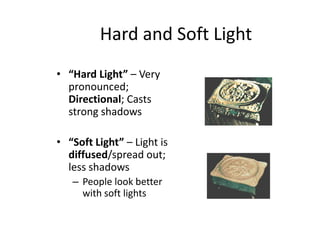
• “Hard Light” – Very
pronounced;
Directional; Casts
strong shadows
• “Soft Light” – Light is
diffused/spread out;
less shadows
– People look better
with soft lights
Directional vs. Diffused Light
• Example:
Directional Diffused
Directional light
• Hard light casts a sharp, clearly defined shadow.
• When hard light is used to illuminate a face,
imperfections in the skin stand out. The result is less than
flattering.
• But in other applications, such as bringing out the texture
in leather, or the engraving on a piece of jewelry, this can
be an advantage.
Diffused light
• Soft (diffused) light has
the opposite effect.
• It tends to hide surface
irregularities and detail.
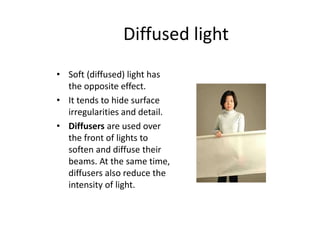
• Diffusers are used over
the front of lights to
soften and diffuse their
beams. At the same time,
diffusers also reduce the
intensity of light.
Soft Lighting
• Since soft light is
more scattered, you
may need more light
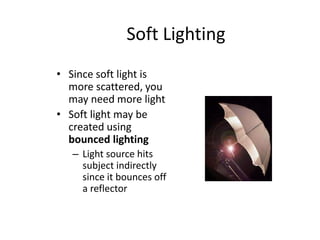
• Soft light may be
created using
bounced lighting
– Light source hits
subject indirectly
since it bounces off
a reflector
White Balance
• White Balance – Used to balance the color of
your shot.
– Point the camera at a white object (piece of blank
paper or white wall)
– Object should be in the same light that you will
use in shooting
– Press “white balance” button to adjust the
sensitivity of the camera to the current light
source
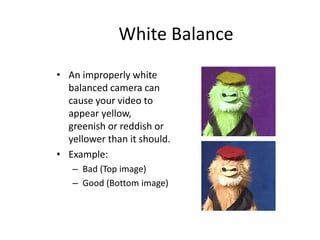
White Balance
• An improperly white
balanced camera can
cause your video to
appear yellow,
greenish or reddish or
yellower than it should.
• Example:
– Bad (Top image)
– Good (Bottom image)
White Balance
• If you move the camera into different light or
the light source changes, then you will need to
redo the white balance setting
• Some cameras do automatically re-balance
the white
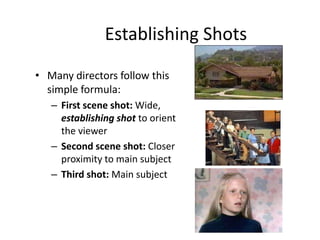
Establishing Shots
• Many directors follow this
simple formula:
– First scene shot: Wide,
establishing shot to orient
the viewer
– Second scene shot: Closer
proximity to main subject
– Third shot: Main subject
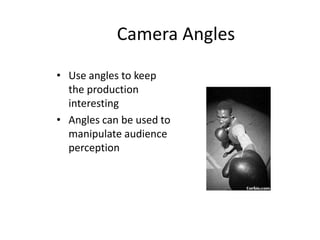
Camera Angles
• Use angles to keep
the production
interesting
• Angles can be used to
manipulate audience
perception
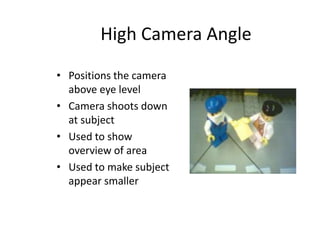
High Camera Angle
• Positions the camera
above eye level
• Camera shoots down
at subject
• Used to show
overview of area
• Used to make subject
appear smaller
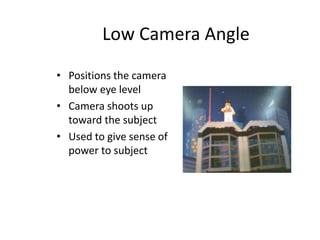
Low Camera Angle
• Positions the camera
below eye level
• Camera shoots up
toward the subject
• Used to give sense of
power to subject
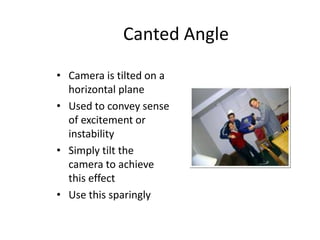
Canted Angle
• Camera is tilted on a
horizontal plane
• Used to convey sense
of excitement or
instability
• Simply tilt the
camera to achieve
this effect
• Use this sparingly
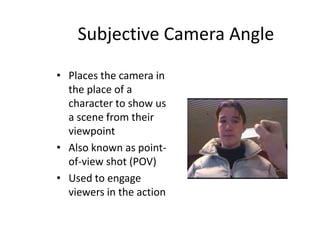
Subjective Camera Angle
• Places the camera in
the place of a
character to show us
a scene from their
viewpoint
• Also known as point-
of-view shot (POV)
• Used to engage
viewers in the action
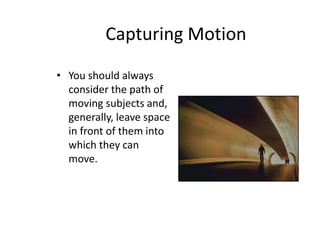
Capturing Motion
• You should always
consider the path of
moving subjects and,
generally, leave space
in front of them into
which they can
move.
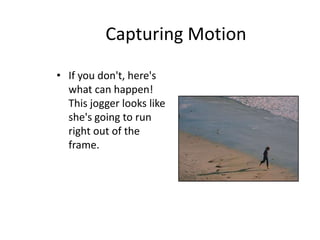
Capturing Motion
• If you don't, here's
what can happen!
This jogger looks like
she's going to run
right out of the
frame.
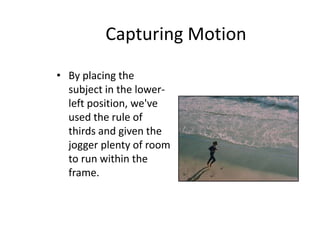
Capturing Motion
• By placing the
subject in the lower-
left position, we've
used the rule of
thirds and given the
jogger plenty of room
to run within the
frame.

Video Production Basics

  • 1.
  • 2.
    Video Recording Apps •Most Smartphones have a built-in video recording app – There are also additional video apps available in the App Store and Google Play • Consumer-grade video recorders are also an option for recording video for the web
  • 3.
    Lighting • Three purposesof lighting: – Provide adequate illumination for the picture to be processed correctly by the camera – To tell us what the objects on the screen look like, including space/depth relationships and time of day – To establish the mood of a scene
  • 4.
    Hard and SoftLight • “Hard Light” – Very pronounced; Directional; Casts strong shadows • “Soft Light” – Light is diffused/spread out; less shadows – People look better with soft lights
  • 5.
    Directional vs. DiffusedLight • Example: Directional Diffused
  • 6.
    Directional light • Hardlight casts a sharp, clearly defined shadow. • When hard light is used to illuminate a face, imperfections in the skin stand out. The result is less than flattering. • But in other applications, such as bringing out the texture in leather, or the engraving on a piece of jewelry, this can be an advantage.
  • 7.
    Diffused light • Soft(diffused) light has the opposite effect. • It tends to hide surface irregularities and detail. • Diffusers are used over the front of lights to soften and diffuse their beams. At the same time, diffusers also reduce the intensity of light.
  • 8.
    Soft Lighting • Sincesoft light is more scattered, you may need more light • Soft light may be created using bounced lighting – Light source hits subject indirectly since it bounces off a reflector
  • 9.
    White Balance • WhiteBalance – Used to balance the color of your shot. – Point the camera at a white object (piece of blank paper or white wall) – Object should be in the same light that you will use in shooting – Press “white balance” button to adjust the sensitivity of the camera to the current light source
  • 10.
    White Balance • Animproperly white balanced camera can cause your video to appear yellow, greenish or reddish or yellower than it should. • Example: – Bad (Top image) – Good (Bottom image)
  • 11.
    White Balance • Ifyou move the camera into different light or the light source changes, then you will need to redo the white balance setting • Some cameras do automatically re-balance the white
  • 12.
    Establishing Shots • Manydirectors follow this simple formula: – First scene shot: Wide, establishing shot to orient the viewer – Second scene shot: Closer proximity to main subject – Third shot: Main subject
  • 13.
    Camera Angles • Useangles to keep the production interesting • Angles can be used to manipulate audience perception
  • 14.
    High Camera Angle •Positions the camera above eye level • Camera shoots down at subject • Used to show overview of area • Used to make subject appear smaller
  • 15.
    Low Camera Angle •Positions the camera below eye level • Camera shoots up toward the subject • Used to give sense of power to subject
  • 16.
    Canted Angle • Camerais tilted on a horizontal plane • Used to convey sense of excitement or instability • Simply tilt the camera to achieve this effect • Use this sparingly
  • 17.
    Subjective Camera Angle •Places the camera in the place of a character to show us a scene from their viewpoint • Also known as point- of-view shot (POV) • Used to engage viewers in the action
  • 18.
    Capturing Motion • Youshould always consider the path of moving subjects and, generally, leave space in front of them into which they can move.
  • 19.
    Capturing Motion • Ifyou don't, here's what can happen! This jogger looks like she's going to run right out of the frame.
  • 20.
    Capturing Motion • Byplacing the subject in the lower- left position, we've used the rule of thirds and given the jogger plenty of room to run within the frame.