SHUTTER SPEED
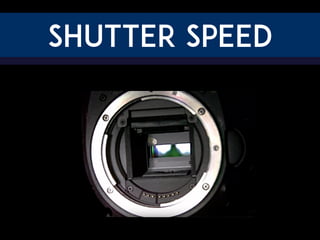
The shutter is a tiny door inside your
camera. When you press the shutter
button, the shutter opens quickly which
allows light to enter the camera and
strike the mirror inside.
Let’s watch the shutter in slow motion...
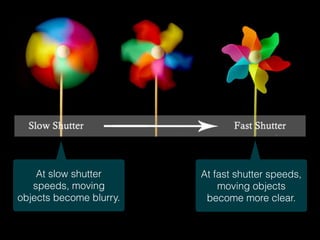
At slow shutter
speeds, moving
objects become blurry.
At fast shutter speeds,
moving objects
become more clear.
HOW TO READ SHUTTER SPEED
Shutter speed is usually written as a
fraction of a second.
1/4 means the shutter will open for one
fourth of a second.
1/4
1”
This means the shutter will open for one
five-hundredth of a second. 1/500
This means the shutter will open for
one second.
HOW TO READ SHUTTER SPEED
This is the fastest speed our
DSLRs can take a picture. 1/4000
This is the slowest speed our
DSLRs can take a picture. 30”
1/4000 30”
Sports and action photos look clearest
between 1/500 and 1/1000.
Which shutter speed should I use?
For people who are standing still, a shutter
speed of 1/80 - 1/200 works well.
Which shutter speed should I use?
To intentionally create motion blur,
experiment with slower shutter speeds.
1” - 1/30 can create blurry water.
Which shutter speed should I use?
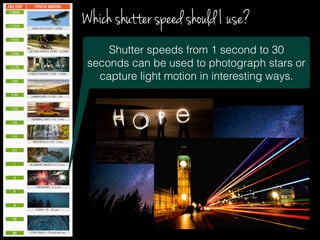
Shutter speeds from 1 second to 30
seconds can be used to photograph stars or
capture light motion in interesting ways.
Which shutter speed should I use?
If you leave the
shutter open for a
long time, you
MUST use a tripod
or the entire scene
will be blurry.
Shooting Modes
Basic
Modes
Creative
Modes
(Advanced / Manual)
TV mode allows you
to manually control
the shutter speed.
TV stands for
“time value.”
SET THE SHUTTER SPEED
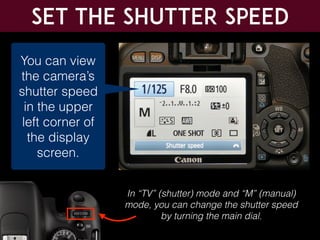
You can view
the camera’s
shutter speed
in the upper
left corner of
the display
screen.
In “TV” (shutter) mode and “M” (manual)
mode, you can change the shutter speed
by turning the main dial.
Pay attention to the light
The longer you leave the shutter open,
the more light enters the camera.
For this reason, use slow shutter
speeds in low-light conditions, and
use fast shutter speeds in bright light
conditions.
If you set a slow shutter
speed in a bright light
condition, you will get a
white photo!
Pay attention to the light
In TV mode, if your photos are too dark
because you increased the shutter
speed, there are a few strategies you
can try to make them brighter:
1. Go to a more brightly-lit location
or make the room brighter
2. Increase the exposure
compensation
3. Increase the ISO
Setting a fast shutter speed will
make your images less blurry, but
will also make them darker.
EXPOSURE COMPENSATION
Use the “Q” button to switch
between settings to select
the exposure compensation.
Next, turn the main dial left to make
the image darker, or turn it right to
make the image brighter.
Increase ISO
Photo too dark? Use the
“Q” button to select the
ISO setting. Next, turn the
main dial to increase the
ISO number.
Increasing the ISO number
makes your camera sensor
more sensitive to light.
This means that a high
ISO number results in
brighter photos, and a low
ISO number results in
darker photos.
Light COntroL
There are three settings that help you control the way that light
is captured in your photos: shutter speed, ISO, and aperture.
Shutter speed
ISO Aperture
Changing any one of them will make your photo brighter or
darker. Master photographers can control all three to get the
perfect lighting while taking photos.
Manual Shooting Modes
Shutter Speed + ISO
Aperture + ISO
Shutter Speed +
Aperture + ISO
Shutter Priority
Aperture Priority
Full Manual
There are three settings that help you control the way that light
is captured in your photos: shutter speed, ISO, and aperture.
Most cameras have an ISO range of 100 - 3200. Each time you
increase ISO, the sensitivity of the camera doubles.
Increase ISO
Most cameras have an ISO range of 100 - 3200. Each time
you increase ISO, the light sensitivity of the camera doubles,
which makes the image brighter.
Increase ISO, Increase Noise
Warning! When you increase ISO, you also increase noise (the
grainy pixels) in the image. Noise is bad! It reduces image clarity.
Don’t increase the ISO so high that is creates noise.
High
Noise
Level
Increase ISO, Increase Noise
Review:
Increase the shutter speed to get
clearer action shots.
If your image is too dark,
increase exposure compensation
or ISO to make it brighter.

Shutter Speed

  • 1.
  • 2.
    The shutter isa tiny door inside your camera. When you press the shutter button, the shutter opens quickly which allows light to enter the camera and strike the mirror inside.
  • 3.
    Let’s watch theshutter in slow motion...
  • 4.
    At slow shutter speeds,moving objects become blurry. At fast shutter speeds, moving objects become more clear.
  • 5.
    HOW TO READSHUTTER SPEED Shutter speed is usually written as a fraction of a second. 1/4 means the shutter will open for one fourth of a second. 1/4 1” This means the shutter will open for one five-hundredth of a second. 1/500 This means the shutter will open for one second.
  • 6.
    HOW TO READSHUTTER SPEED This is the fastest speed our DSLRs can take a picture. 1/4000 This is the slowest speed our DSLRs can take a picture. 30” 1/4000 30”
  • 8.
    Sports and actionphotos look clearest between 1/500 and 1/1000. Which shutter speed should I use?
  • 9.
    For people whoare standing still, a shutter speed of 1/80 - 1/200 works well. Which shutter speed should I use?
  • 10.
    To intentionally createmotion blur, experiment with slower shutter speeds. 1” - 1/30 can create blurry water. Which shutter speed should I use?
  • 11.
    Shutter speeds from1 second to 30 seconds can be used to photograph stars or capture light motion in interesting ways. Which shutter speed should I use?
  • 12.
    If you leavethe shutter open for a long time, you MUST use a tripod or the entire scene will be blurry.
  • 13.
    Shooting Modes Basic Modes Creative Modes (Advanced /Manual) TV mode allows you to manually control the shutter speed. TV stands for “time value.”
  • 14.
    SET THE SHUTTERSPEED You can view the camera’s shutter speed in the upper left corner of the display screen. In “TV” (shutter) mode and “M” (manual) mode, you can change the shutter speed by turning the main dial.
  • 15.
    Pay attention tothe light The longer you leave the shutter open, the more light enters the camera. For this reason, use slow shutter speeds in low-light conditions, and use fast shutter speeds in bright light conditions. If you set a slow shutter speed in a bright light condition, you will get a white photo!
  • 16.
    Pay attention tothe light In TV mode, if your photos are too dark because you increased the shutter speed, there are a few strategies you can try to make them brighter: 1. Go to a more brightly-lit location or make the room brighter 2. Increase the exposure compensation 3. Increase the ISO Setting a fast shutter speed will make your images less blurry, but will also make them darker.
  • 17.
    EXPOSURE COMPENSATION Use the“Q” button to switch between settings to select the exposure compensation. Next, turn the main dial left to make the image darker, or turn it right to make the image brighter.
  • 18.
    Increase ISO Photo toodark? Use the “Q” button to select the ISO setting. Next, turn the main dial to increase the ISO number. Increasing the ISO number makes your camera sensor more sensitive to light. This means that a high ISO number results in brighter photos, and a low ISO number results in darker photos.
  • 19.
    Light COntroL There arethree settings that help you control the way that light is captured in your photos: shutter speed, ISO, and aperture. Shutter speed ISO Aperture Changing any one of them will make your photo brighter or darker. Master photographers can control all three to get the perfect lighting while taking photos.
  • 20.
    Manual Shooting Modes ShutterSpeed + ISO Aperture + ISO Shutter Speed + Aperture + ISO Shutter Priority Aperture Priority Full Manual There are three settings that help you control the way that light is captured in your photos: shutter speed, ISO, and aperture.
  • 21.
    Most cameras havean ISO range of 100 - 3200. Each time you increase ISO, the sensitivity of the camera doubles. Increase ISO Most cameras have an ISO range of 100 - 3200. Each time you increase ISO, the light sensitivity of the camera doubles, which makes the image brighter.
  • 22.
    Increase ISO, IncreaseNoise Warning! When you increase ISO, you also increase noise (the grainy pixels) in the image. Noise is bad! It reduces image clarity. Don’t increase the ISO so high that is creates noise. High Noise Level
  • 23.
  • 24.
    Review: Increase the shutterspeed to get clearer action shots. If your image is too dark, increase exposure compensation or ISO to make it brighter.