Introduction to Machine Vision Zeeshan Zia, M.Sc. (EE) [email_address] ,  [email_address]
Objective To give you lots of ideas… Give you a feel for extracting information from images…
Syllabus Day 1: - Introduction, Demos (30 minutes) - MATLAB Basics (30 minutes) - Image Processing Basics (30 minutes) - Project 1 : Content Based Image Retrieval (30 minutes) Day 2: - Project 2: Depth from Stereo and Optical Flow (40 minutes) - Project 3: Segmentation (30 minutes) - Project 4: Object Recognition (40 minutes) - Conclusion and Research Paper Writing ( 20 minutes)
Machine Vision / Computer Vision / Image Understanding / Photogrammetry Trying to make  Computers extract some useful information from images… Recognize faces, finger prints, other biometrics… Detect anamolies in X-Rays, Ultrasounds, … Point out suspicious human activity like fighting (surveillance) Use ‚vision‘ as a sensor in Control Systems… Make truly ‚autonomous‘ and ‚mobile‘ robots possible… Sophisticated special effects in movies… New and friendlier interfaces to Computers and other machines…
Applications Medical Imaging People tracking Biometrics Vehicle  automation  (cars, airplanes) Plant automation 3d reconstruction Computer Graphics Biological and genetics research Showbiz and Augmented Reality City Modelling Lots of engineering applications…
Demo (Obama-Kanade)
Demo (Mount Everest – ETHZ)
Demo (Car and Pedestrian detection)
Demo (First-person action recognition) My Master thesis – report available on my webpage…
Demo (Sport events analysis – TUM)
Demo (Gaze Tracking from outside)
Demo (Robotic Arm)
Demo (India Driving Challenge)
Demo (Cell Tracking)
MATLAB and Basic Image Manipulation MATLAB is a programming language for technical computing. MATLAB stands for MATrix LABoratory Very easy to learn Very complicated mathematical operations provided built-in
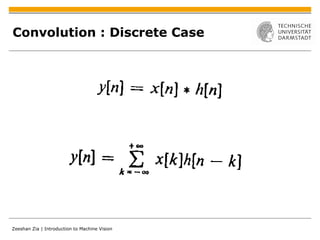
LTI/LSI Systems: Convolution Continuous System : h(t) is the system‘s IMPULSE RESPONSE (1D case),  x(t) is the input, and y(t) is the output.
Convolution : Discrete Case
Convolution : 2D discrete
Averaging Filter 1/9  1/9 1/9 h  = 1/9 1/9 1/9 1/9 1/9 1/9 MATLAB:  new_image = imfilter(old_image,h,’conv’);
Horizontal Edge Detector 1  1 1 h  = 0  0  0 -1 -1 -1
Vertical Edge Detector 1  0 -1 h  = 1  0  -1 1 0 -1
Day 2 0. Brief Review 1. Project 1: Content Based Image Retrieval (30 minutes) 2. Project 2: Depth from Stereo and Optical Flow (40 minutes) 3. Project 3: Segmentation (20 minutes) 4. Project 4: Object Recognition (20 minutes) 5. Conclusion and Research Paper Writing ( 20 minutes) Projects, actually sub-fields / important problems of Computer Vision…people have spent their lives working on every one of these problems!
Review Computer Vision :   Trying to make  Computers extract some useful information from images...similar terms are Machine Vision, Image Understanding, Photogrammetry Inverse problem of Computer Graphics!
Review Computer Vision :   Trying to make  Computers extract some useful information from images...similar terms are Machine Vision, Image Understanding, Photogrammetry Inverse problem of Computer Graphics! Image Processing :  Restoring, enhancing, compressing images (no extraction of information from the image) Computer Vision = Image Processing + Machine Learning + Mathematics
Review Computer Vision :   Trying to make  Computers extract some useful information from images...similar terms are Machine Vision, Image Understanding, Photogrammetry Inverse problem of Computer Graphics! Image Processing :  Restoring, enhancing, compressing images (no extraction of information from the image) Computer Vision = Image Processing + Machine Learning + Mathematics Applications areas: Although somewhat immature in the wild… Machine Vision can be very useful and accurate in controlled environments like industrial plants or laboratories
References MATLAB (easy to follow tutorial, takes 4-5 hours in total) Digital Signal Processing Workbook of Electronics Department, NEDUET  Best (very easy to follow) textbook for Image Processing: Digital Image Processing using MATLAB (Gonzalez and Woods) For Computer Vision: www.videolectures.net Think of a problem, consult me (Google my name for my email address) on how much time it will take and which techniques are good candidates for trying out first, directly start working on the project!
Review MATLAB is a programming language for technical computing. Mathematical operations: sin(50 * pi/180), sqrt(9) etc.. Matrix operations, accessing matrix elements Images in MATLAB represented as matrices Color Channels Red, Green, and Blue represented as separate channels (accessed by third matrix element) Basic Image Manipulation Commands a = imread(‘myimage.jpg’); imshow(a);
Project 1:  Content Based Image Retrieval We implement this using only Intensity Histograms (for color images). Many other techniques available which give better results. A complete area of research…extends to finding movie snippets, or short description of clips by a few key-frames, or automatic story understanding.
Intensity Histograms There can be other histograms also…(histogram of edges!)
Euclidean Distance Remember the distance between two vectors in Cartesian coordinates? A = [2,7,9] B = [1,6,4] |AB| = ? |AB| = square root of (2-1) 2  +  (7-6) 2  + (9-4) 2
Project 2: Depth from Stereo Image 2 Image 1 W (X,Y,Z) BaseLine distance y x x y (x2,y2) (x1,y1) Optical Axis
Relating Depth to Image Coordinates
By Similar Triangles
How does the computer know which point is which?
Steps 1. Find matching points on the two images. 2. Calculate disparity and visualize it. Note: Unfortunately, depth can only be reconstructed upto a multiplying factor unless focal length of the camera is known (camera calibration, not considered here).
Step 1: Finding Correspondences A common approach to finding correspondences is to search for local regions that appear similar We try to match a window of pixels on the left image with a corresponding sized window on the right image, using CORRELATION.
Cross-Correlation as a distance measure Remember Example 3.6-2 of Bruce Carlson???
Step 2: Disparity Map Based on the calculated disparities a disparity map is obtained. The disparity map is a gray scale map where the intensity represents depth. The lighter shades (greater disparities) represent regions with less depth as opposed to the darker regions which are further away from us.
Examples Matlab code…again much better code is possible (faster and accurate)…this is just for understanding the basic idea.
Optic Flow Optic flow is the apparent visual motion that we experience as we move through the world.
Optic Flow Optic flow is the apparent visual motion that we experience as we move through the world.  Very fast  MATLAB  Implementation of Depth from  Stereo and Optic Flow available online.
Optic Flow – uses/assignments? Write a program that uses your webcam to detect the number of people passing by the camera. Write a program that performs visual surveillance of a road. Place two cameras and a laptop on a toy cars, and use depth from stereo to automatically navigate the car to a final destination. Bees use Optic Flow…they have eyes that have very poor resolution…because of this ‚poor resolution‘ (=less number of pixels / data)…they can process the data very fast, even though they have compound eyes. A lot of work is being done in this area….special ultra-small cameras have been developed that give only the optic flow. Ever killed a fly with a slow and steady hand???
Project 3: Segmentation What do we mean by segmentation and why do we need it? Segmentation can roughly be described as grouping of similar  information  in an image. Instead of having to work with all the pixels, a segmentation allows us to work with a much more compact representation. Sometimes, we are interested in the segmentation itself. - Especially in medical image analysis (e.g., segmenting out a tumor)
Segmentation : some examples
Figure-Ground Separation
Super-Pixels
Project 3: Segmentation by Clustering One simple way of performing segmentation is to use  clustering algorithms:
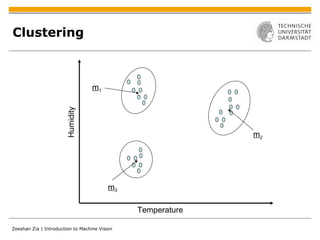
Project 3: Segmentation by Clustering One simple way of performing segmentation is to use  clustering algorithms: Clustering (a problem from machine learning) tries to group data points together. The points are usually vectors in some vector space.
Project 3: Segmentation by Clustering One simple way of performing segmentation is to use  clustering algorithms: Clustering (a problem from machine learning) tries to group data points together. The points are usually vectors in some vector space. We can apply this to the problem of segmentation by identifying each pixel with a feature vector and clustering these. This feature vector may include: - The pixel’s position - Pixel intensity or color - etc…..a description of local texture
Clustering Temperature Humidity
Clustering Temperature Humidity m 1 m 2 m 3
Clustering of pixels in image Make one vector per pixel of the image, X i  = [x, y, R, G,  B] Apply clustering on these vectors…call all pixels that end up in the same  cluster as one segment! WHY  ?
K-Means Clustering Algorithm Step 1: Determine number of clusters K Step 2: Randomly choose K different mean vectors: m 1 , m 2 , …, m K Step 3: Choose a data vector X i,  and calculate Euclidean distance between  this vector and all the mean vectors one-by-one. Step 4: Assign this data vector to the cluster with the minimum distance Step 5: Set i to i + 1, and go back to step 3 Step 6: Calculate new mean vectors based on assignments Step 7: Set i = 0, and go back to step 3
K-Means Clustering: Example
Discussion Apply segmentation to optical flow, to find segments of high motion!!!
Project 4: Object Recognition Most active area of Computer Vision research Involves many many challenges – next slides… ‘ Object’ here is taken in a very general sense, and includes everything from cars and chairs, to trees and animals or birds, or faces, or pedestrians…
Project 4: Object Recognition
Project 4: Object Recognition Challenges 4: Scale variation
Project 4: Object Recognition
Project 4: Object Recognition Challenges 6: Background Clutter Find  the  dustbin…
Project 4: Object Recognition Single Object Recognition A solved problem!
Project 4: Object Recognition Challenges 7: Intra-class  variation
Project 4: Object Recognition Challenges 7: Intra-class  variation My PhD focus is intra-class and viewpoint invariance – alongwith all the other problems..
Project 4 : SIFT Based Object Recognition
Scale Invariance
Rotational Invariance
Steps TRAINING Step 1: Take TRAINING IMAGE, identify strong scale and rotation invariance features. Step 2: Form histograms for each feature (128 numbers), and store these histograms DETECTION Step 1: Take TEST IMAGE (unseen), obtain features from it, and form histograms. Step 2: Match ( euclidean distance ) each feature of TEST IMAGE with that of TRAINING IMAGE. If a lot of features match, the object is present at the position of the matches!
Results Optimized code available online,  very easy to use. Advantages: Scale and Rotation invariant Very robust for well textured  objects. 3. Real-time implementations  Disadvantages: Not viewpoint invariant. Not category invariant.
Conclusions MATLAB discussed For faster (and possibly real-time implementations) use C or C++. OpenCV library… Delve right into projects instead of spending too much time on theory (advice for undergraduate students). Feel free to contact me for project ideas, pointers…
Research Papers How does science work?  Scientists do experiments, publish their results in papers, others read those papers… Who are scientists? Usually academic Professors doing research… How is the performance of a scientist measured? By quantity and quality of her research papers… How can you convince a foreign university professor to give you scholarships? By showing potential for publishing research papers! IEEE Conferences, paper format, ieeexplore.ieee.org, scholar.google.com,  Go home and search for the topics we covered today!

Introduction to Machine Vision

  • 1.
    Introduction to MachineVision Zeeshan Zia, M.Sc. (EE) [email_address] , [email_address]
  • 2.
    Objective To giveyou lots of ideas… Give you a feel for extracting information from images…
  • 3.
    Syllabus Day 1:- Introduction, Demos (30 minutes) - MATLAB Basics (30 minutes) - Image Processing Basics (30 minutes) - Project 1 : Content Based Image Retrieval (30 minutes) Day 2: - Project 2: Depth from Stereo and Optical Flow (40 minutes) - Project 3: Segmentation (30 minutes) - Project 4: Object Recognition (40 minutes) - Conclusion and Research Paper Writing ( 20 minutes)
  • 4.
    Machine Vision /Computer Vision / Image Understanding / Photogrammetry Trying to make Computers extract some useful information from images… Recognize faces, finger prints, other biometrics… Detect anamolies in X-Rays, Ultrasounds, … Point out suspicious human activity like fighting (surveillance) Use ‚vision‘ as a sensor in Control Systems… Make truly ‚autonomous‘ and ‚mobile‘ robots possible… Sophisticated special effects in movies… New and friendlier interfaces to Computers and other machines…
  • 5.
    Applications Medical ImagingPeople tracking Biometrics Vehicle automation (cars, airplanes) Plant automation 3d reconstruction Computer Graphics Biological and genetics research Showbiz and Augmented Reality City Modelling Lots of engineering applications…
  • 6.
  • 7.
  • 8.
    Demo (Car andPedestrian detection)
  • 9.
    Demo (First-person actionrecognition) My Master thesis – report available on my webpage…
  • 10.
    Demo (Sport eventsanalysis – TUM)
  • 11.
    Demo (Gaze Trackingfrom outside)
  • 12.
  • 13.
  • 14.
  • 15.
    MATLAB and BasicImage Manipulation MATLAB is a programming language for technical computing. MATLAB stands for MATrix LABoratory Very easy to learn Very complicated mathematical operations provided built-in
  • 16.
    LTI/LSI Systems: ConvolutionContinuous System : h(t) is the system‘s IMPULSE RESPONSE (1D case), x(t) is the input, and y(t) is the output.
  • 17.
  • 18.
  • 19.
    Averaging Filter 1/9 1/9 1/9 h = 1/9 1/9 1/9 1/9 1/9 1/9 MATLAB: new_image = imfilter(old_image,h,’conv’);
  • 20.
    Horizontal Edge Detector1 1 1 h = 0 0 0 -1 -1 -1
  • 21.
    Vertical Edge Detector1 0 -1 h = 1 0 -1 1 0 -1
  • 22.
    Day 2 0.Brief Review 1. Project 1: Content Based Image Retrieval (30 minutes) 2. Project 2: Depth from Stereo and Optical Flow (40 minutes) 3. Project 3: Segmentation (20 minutes) 4. Project 4: Object Recognition (20 minutes) 5. Conclusion and Research Paper Writing ( 20 minutes) Projects, actually sub-fields / important problems of Computer Vision…people have spent their lives working on every one of these problems!
  • 23.
    Review Computer Vision: Trying to make Computers extract some useful information from images...similar terms are Machine Vision, Image Understanding, Photogrammetry Inverse problem of Computer Graphics!
  • 24.
    Review Computer Vision: Trying to make Computers extract some useful information from images...similar terms are Machine Vision, Image Understanding, Photogrammetry Inverse problem of Computer Graphics! Image Processing : Restoring, enhancing, compressing images (no extraction of information from the image) Computer Vision = Image Processing + Machine Learning + Mathematics
  • 25.
    Review Computer Vision: Trying to make Computers extract some useful information from images...similar terms are Machine Vision, Image Understanding, Photogrammetry Inverse problem of Computer Graphics! Image Processing : Restoring, enhancing, compressing images (no extraction of information from the image) Computer Vision = Image Processing + Machine Learning + Mathematics Applications areas: Although somewhat immature in the wild… Machine Vision can be very useful and accurate in controlled environments like industrial plants or laboratories
  • 26.
    References MATLAB (easyto follow tutorial, takes 4-5 hours in total) Digital Signal Processing Workbook of Electronics Department, NEDUET Best (very easy to follow) textbook for Image Processing: Digital Image Processing using MATLAB (Gonzalez and Woods) For Computer Vision: www.videolectures.net Think of a problem, consult me (Google my name for my email address) on how much time it will take and which techniques are good candidates for trying out first, directly start working on the project!
  • 27.
    Review MATLAB isa programming language for technical computing. Mathematical operations: sin(50 * pi/180), sqrt(9) etc.. Matrix operations, accessing matrix elements Images in MATLAB represented as matrices Color Channels Red, Green, and Blue represented as separate channels (accessed by third matrix element) Basic Image Manipulation Commands a = imread(‘myimage.jpg’); imshow(a);
  • 28.
    Project 1: Content Based Image Retrieval We implement this using only Intensity Histograms (for color images). Many other techniques available which give better results. A complete area of research…extends to finding movie snippets, or short description of clips by a few key-frames, or automatic story understanding.
  • 29.
    Intensity Histograms Therecan be other histograms also…(histogram of edges!)
  • 30.
    Euclidean Distance Rememberthe distance between two vectors in Cartesian coordinates? A = [2,7,9] B = [1,6,4] |AB| = ? |AB| = square root of (2-1) 2 + (7-6) 2 + (9-4) 2
  • 31.
    Project 2: Depthfrom Stereo Image 2 Image 1 W (X,Y,Z) BaseLine distance y x x y (x2,y2) (x1,y1) Optical Axis
  • 32.
    Relating Depth toImage Coordinates
  • 33.
    Relating Depth toImage Coordinates
  • 34.
  • 35.
    How does thecomputer know which point is which?
  • 36.
    Steps 1. Findmatching points on the two images. 2. Calculate disparity and visualize it. Note: Unfortunately, depth can only be reconstructed upto a multiplying factor unless focal length of the camera is known (camera calibration, not considered here).
  • 37.
    Step 1: FindingCorrespondences A common approach to finding correspondences is to search for local regions that appear similar We try to match a window of pixels on the left image with a corresponding sized window on the right image, using CORRELATION.
  • 38.
    Cross-Correlation as adistance measure Remember Example 3.6-2 of Bruce Carlson???
  • 39.
    Step 2: DisparityMap Based on the calculated disparities a disparity map is obtained. The disparity map is a gray scale map where the intensity represents depth. The lighter shades (greater disparities) represent regions with less depth as opposed to the darker regions which are further away from us.
  • 40.
    Examples Matlab code…againmuch better code is possible (faster and accurate)…this is just for understanding the basic idea.
  • 41.
    Optic Flow Opticflow is the apparent visual motion that we experience as we move through the world.
  • 42.
    Optic Flow Opticflow is the apparent visual motion that we experience as we move through the world. Very fast MATLAB Implementation of Depth from Stereo and Optic Flow available online.
  • 43.
    Optic Flow –uses/assignments? Write a program that uses your webcam to detect the number of people passing by the camera. Write a program that performs visual surveillance of a road. Place two cameras and a laptop on a toy cars, and use depth from stereo to automatically navigate the car to a final destination. Bees use Optic Flow…they have eyes that have very poor resolution…because of this ‚poor resolution‘ (=less number of pixels / data)…they can process the data very fast, even though they have compound eyes. A lot of work is being done in this area….special ultra-small cameras have been developed that give only the optic flow. Ever killed a fly with a slow and steady hand???
  • 44.
    Project 3: SegmentationWhat do we mean by segmentation and why do we need it? Segmentation can roughly be described as grouping of similar information in an image. Instead of having to work with all the pixels, a segmentation allows us to work with a much more compact representation. Sometimes, we are interested in the segmentation itself. - Especially in medical image analysis (e.g., segmenting out a tumor)
  • 45.
  • 46.
  • 47.
  • 48.
    Project 3: Segmentationby Clustering One simple way of performing segmentation is to use clustering algorithms:
  • 49.
    Project 3: Segmentationby Clustering One simple way of performing segmentation is to use clustering algorithms: Clustering (a problem from machine learning) tries to group data points together. The points are usually vectors in some vector space.
  • 50.
    Project 3: Segmentationby Clustering One simple way of performing segmentation is to use clustering algorithms: Clustering (a problem from machine learning) tries to group data points together. The points are usually vectors in some vector space. We can apply this to the problem of segmentation by identifying each pixel with a feature vector and clustering these. This feature vector may include: - The pixel’s position - Pixel intensity or color - etc…..a description of local texture
  • 51.
  • 52.
  • 53.
  • 54.
    Clustering of pixelsin image Make one vector per pixel of the image, X i = [x, y, R, G, B] Apply clustering on these vectors…call all pixels that end up in the same cluster as one segment! WHY ?
  • 55.
    K-Means Clustering AlgorithmStep 1: Determine number of clusters K Step 2: Randomly choose K different mean vectors: m 1 , m 2 , …, m K Step 3: Choose a data vector X i, and calculate Euclidean distance between this vector and all the mean vectors one-by-one. Step 4: Assign this data vector to the cluster with the minimum distance Step 5: Set i to i + 1, and go back to step 3 Step 6: Calculate new mean vectors based on assignments Step 7: Set i = 0, and go back to step 3
  • 56.
  • 57.
    Discussion Apply segmentationto optical flow, to find segments of high motion!!!
  • 58.
    Project 4: ObjectRecognition Most active area of Computer Vision research Involves many many challenges – next slides… ‘ Object’ here is taken in a very general sense, and includes everything from cars and chairs, to trees and animals or birds, or faces, or pedestrians…
  • 59.
    Project 4: ObjectRecognition
  • 60.
    Project 4: ObjectRecognition
  • 61.
    Project 4: ObjectRecognition
  • 62.
    Project 4: ObjectRecognition Challenges 4: Scale variation
  • 63.
    Project 4: ObjectRecognition
  • 64.
    Project 4: ObjectRecognition Challenges 6: Background Clutter Find the dustbin…
  • 65.
    Project 4: ObjectRecognition Single Object Recognition A solved problem!
  • 66.
    Project 4: ObjectRecognition Challenges 7: Intra-class variation
  • 67.
    Project 4: ObjectRecognition Challenges 7: Intra-class variation My PhD focus is intra-class and viewpoint invariance – alongwith all the other problems..
  • 68.
    Project 4 :SIFT Based Object Recognition
  • 69.
  • 70.
  • 71.
    Steps TRAINING Step1: Take TRAINING IMAGE, identify strong scale and rotation invariance features. Step 2: Form histograms for each feature (128 numbers), and store these histograms DETECTION Step 1: Take TEST IMAGE (unseen), obtain features from it, and form histograms. Step 2: Match ( euclidean distance ) each feature of TEST IMAGE with that of TRAINING IMAGE. If a lot of features match, the object is present at the position of the matches!
  • 72.
    Results Optimized codeavailable online, very easy to use. Advantages: Scale and Rotation invariant Very robust for well textured objects. 3. Real-time implementations Disadvantages: Not viewpoint invariant. Not category invariant.
  • 73.
    Results Optimized codeavailable online, very easy to use. Advantages: Scale and Rotation invariant Very robust for well textured objects. 3. Real-time implementations Disadvantages: Not viewpoint invariant. Not category invariant.
  • 74.
    Conclusions MATLAB discussedFor faster (and possibly real-time implementations) use C or C++. OpenCV library… Delve right into projects instead of spending too much time on theory (advice for undergraduate students). Feel free to contact me for project ideas, pointers…
  • 75.
    Research Papers Howdoes science work? Scientists do experiments, publish their results in papers, others read those papers… Who are scientists? Usually academic Professors doing research… How is the performance of a scientist measured? By quantity and quality of her research papers… How can you convince a foreign university professor to give you scholarships? By showing potential for publishing research papers! IEEE Conferences, paper format, ieeexplore.ieee.org, scholar.google.com, Go home and search for the topics we covered today!