• Image processing involves processing or
altering an existing image in a desired
manner.
• The next step is obtaining an image in a
readable format.
• The Internet and other sources provide
countless images in standard formats.
Image processing are of two aspects
• improving the visual appearance of images to
a human viewer.
• preparing images for measurement of the
features and structures present.
WHY DO WE NEED IMAGE
PROCESSING?
• Since the digital image is “invisible” it must be
prepared for viewing on one or more output device
(laser printer, monitor, etc)
• The digital image can be optimized for the application
by enhancing or altering the appearance of structures
within it (based on: body part, diagnostic task, viewing
preferences, etc)
• It might be possible to analyze the image in the
computer and provide cues to the radiologists to help
detect important/suspicious structures (e.g.:
Computed Aided Diagnosis, CAD)
ACQUIRING IMAGE
• Scientific instruments commonly produce
images to communicate results to the
operator, rather than generating an audible
tone or emitting a smell.
• Space missions to other planets and Comet
Halley always include cameras as major
components, and we judge the success of
those missions by the quality of the images
returned.
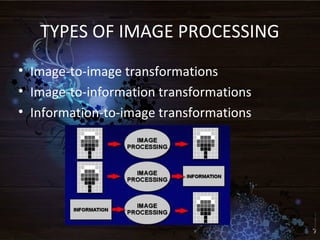
TYPES OF IMAGE PROCESSING
• Image-to-image transformations
• Image-to-information transformations
• Information-to-image transformations
IMAGE-TO-IMAGE
TRANSFORMATIONS
•Enhancement
(make image more useful, pleasing)
•Restoration
Egg. deblurring ,grid line removal
•Geometry
(scaling, sizing , Zooming, Morphing one object to
another).
IMAGE-TO-INFORMATION TRANSFORMATIONS
•Image statistics (histograms)
Histogram is the fundamental tool for analysis
and image processing
•Image compression
Image analysis (image segmentation, feature
extraction, pattern recognition)
•computer-aided detection and diagnosis
(CAD)
INFORMATION-TO-IMAGE TRANSFORMATIONS
•Decompression of compressed image data.
•Reconstruction of image slices from CT or
MRI raw data.
•Computer graphics, animations and virtual
reality (synthetic objects).
HIGH RESOLUTION IMAGING
•The process of obtaining an high resolution (HR) image
or a sequence of HR images from a set of low resolution
(LR) observations.
•HR techniques are being applied to a variety of fields,
such as obtaining
improved still images, high definition television,
high performance color liquid crystal display (LCD) screens,
video surveillance, remote sensing, and medical imaging.
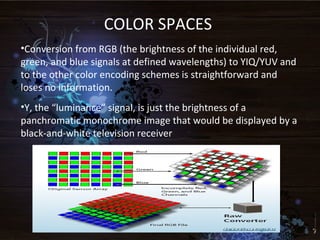
COLOR SPACES
•Conversion from RGB (the brightness of the individual red,
green, and blue signals at defined wavelengths) to YIQ/YUV and
to the other color encoding schemes is straightforward and
loses no information.
•Y, the “luminance” signal, is just the brightness of a
panchromatic monochrome image that would be displayed by a
black-and-white television receiver
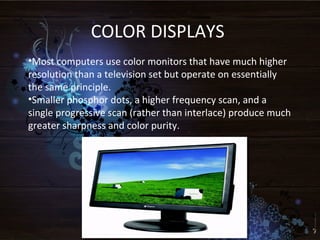
COLOR DISPLAYS
•Most computers use color monitors that have much higher
resolution than a television set but operate on essentially
the same principle.
•Smaller phosphor dots, a higher frequency scan, and a
single progressive scan (rather than interlace) produce much
greater sharpness and color purity.
IMAGE SENSORS
Digital processing requires images to be
obtained in the form of electrical signals.
These signals can be digitized into
sequences of numbers which then can be
processed by a computer. There are many
ways to convert images into digital
numbers. Here, we will focus on video
technology, as it is the most common and
affordable approach.
MULTIPLE IMAGES
•Multiple images may constitute a series of views of the
same area, using different wavelengths of light or other
signals.
• Examples include the images produced by satellites,
such as
the various visible and infrared wavelengths
recorded by the Landsat Thematic Mapper(TM), and
images from the Scanning Electron Microscope (SEM)
in which as many as a dozen different elements may
be represented by their X-ray intensities.
•These images may each require processing.
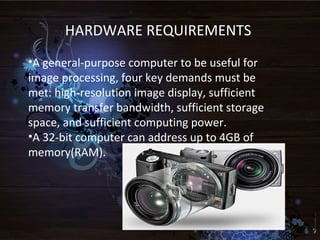
HARDWARE REQUIREMENTS
•A general-purpose computer to be useful for
image processing, four key demands must be
met: high-resolution image display, sufficient
memory transfer bandwidth, sufficient storage
space, and sufficient computing power.
•A 32-bit computer can address up to 4GB of
memory(RAM).
SOFTWARE REQUIREMENTS
•Adobe Photoshop
•Corel Draw
•Serif Photoplus
“Things that think…
don’t make sense unless they
link.”
Image processing
Image processing

Image processing

  • 3.
    • Image processinginvolves processing or altering an existing image in a desired manner. • The next step is obtaining an image in a readable format. • The Internet and other sources provide countless images in standard formats.
  • 4.
    Image processing areof two aspects • improving the visual appearance of images to a human viewer. • preparing images for measurement of the features and structures present.
  • 5.
    WHY DO WENEED IMAGE PROCESSING? • Since the digital image is “invisible” it must be prepared for viewing on one or more output device (laser printer, monitor, etc) • The digital image can be optimized for the application by enhancing or altering the appearance of structures within it (based on: body part, diagnostic task, viewing preferences, etc) • It might be possible to analyze the image in the computer and provide cues to the radiologists to help detect important/suspicious structures (e.g.: Computed Aided Diagnosis, CAD)
  • 6.
    ACQUIRING IMAGE • Scientificinstruments commonly produce images to communicate results to the operator, rather than generating an audible tone or emitting a smell. • Space missions to other planets and Comet Halley always include cameras as major components, and we judge the success of those missions by the quality of the images returned.
  • 7.
    TYPES OF IMAGEPROCESSING • Image-to-image transformations • Image-to-information transformations • Information-to-image transformations
  • 8.
    IMAGE-TO-IMAGE TRANSFORMATIONS •Enhancement (make image moreuseful, pleasing) •Restoration Egg. deblurring ,grid line removal •Geometry (scaling, sizing , Zooming, Morphing one object to another).
  • 9.
    IMAGE-TO-INFORMATION TRANSFORMATIONS •Image statistics(histograms) Histogram is the fundamental tool for analysis and image processing •Image compression Image analysis (image segmentation, feature extraction, pattern recognition) •computer-aided detection and diagnosis (CAD)
  • 10.
    INFORMATION-TO-IMAGE TRANSFORMATIONS •Decompression ofcompressed image data. •Reconstruction of image slices from CT or MRI raw data. •Computer graphics, animations and virtual reality (synthetic objects).
  • 11.
    HIGH RESOLUTION IMAGING •Theprocess of obtaining an high resolution (HR) image or a sequence of HR images from a set of low resolution (LR) observations. •HR techniques are being applied to a variety of fields, such as obtaining improved still images, high definition television, high performance color liquid crystal display (LCD) screens, video surveillance, remote sensing, and medical imaging.
  • 12.
    COLOR SPACES •Conversion fromRGB (the brightness of the individual red, green, and blue signals at defined wavelengths) to YIQ/YUV and to the other color encoding schemes is straightforward and loses no information. •Y, the “luminance” signal, is just the brightness of a panchromatic monochrome image that would be displayed by a black-and-white television receiver
  • 13.
    COLOR DISPLAYS •Most computersuse color monitors that have much higher resolution than a television set but operate on essentially the same principle. •Smaller phosphor dots, a higher frequency scan, and a single progressive scan (rather than interlace) produce much greater sharpness and color purity.
  • 14.
    IMAGE SENSORS Digital processingrequires images to be obtained in the form of electrical signals. These signals can be digitized into sequences of numbers which then can be processed by a computer. There are many ways to convert images into digital numbers. Here, we will focus on video technology, as it is the most common and affordable approach.
  • 15.
    MULTIPLE IMAGES •Multiple imagesmay constitute a series of views of the same area, using different wavelengths of light or other signals. • Examples include the images produced by satellites, such as the various visible and infrared wavelengths recorded by the Landsat Thematic Mapper(TM), and images from the Scanning Electron Microscope (SEM) in which as many as a dozen different elements may be represented by their X-ray intensities. •These images may each require processing.
  • 16.
    HARDWARE REQUIREMENTS •A general-purposecomputer to be useful for image processing, four key demands must be met: high-resolution image display, sufficient memory transfer bandwidth, sufficient storage space, and sufficient computing power. •A 32-bit computer can address up to 4GB of memory(RAM).
  • 17.
  • 19.
    “Things that think… don’tmake sense unless they link.”