Submitted To: Submitted By:
RUNJHUN MA’AM GAURANSH GOYAL
Input/Output And
Secondary Devices
Table Contents
Definition
Introduction
Input Devices
Output Devices
Secondary Devices
2
Definition
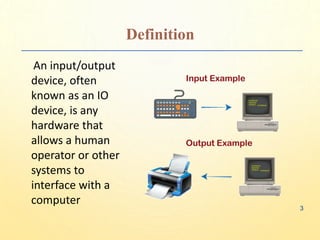
An input/output
device, often
known as an IO
device, is any
hardware that
allows a human
operator or other
systems to
interface with a
computer
3
Introduction
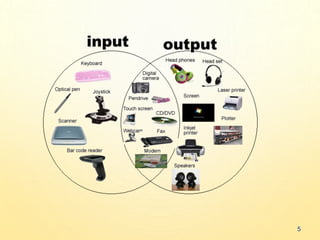
• Input/output devices, as the name implies,
are capable of delivering data (output) to
and receiving data from a computer (input).
• An input/output (I/O) device is a piece of
hardware that can take, output, or process
data. It receives data as input and provides it
to a computer, as well as sends computer
data to storage media as a storage output.
4
5
INPUT DEVICES
Keyboard
• The keyboard is the most frequent and widely used
input device for entering data into a computer.
Although there are some additional keys for
performing other operations, the keyboard layout is
similar to that of a typical typewriter.
• Generally, keyboards come in two sizes: 84 keys or
101/102 keys, but currently keyboards with 104
keys or 108 keys are also available for Windows and
the Internet.
●●●
6
INPUT DEVICES
Mouse
• The most common pointing device is the mouse. The
mouse is used to move a little cursor across the
screen while clicking and dragging.
• A mouse is an input device that lets you move the
mouse on a flat surface to control the coordinates
and movement of the on-screen cursor/pointer.
• The left mouse button can be used to select or move
items, while the right mouse button when clicked
displays extra menus.
●●●
7
INPUT DEVICES
Joystick
• A joystick is a pointing device that is used to move
the cursor on a computer screen.
• A spherical ball is attached to both the bottom and
top ends of the stick. In a socket, the lower spherical
ball slides. You can move the joystick in all four
directions.
• The joystick’s function is comparable to that of a
mouse. It is primarily used in CAD (Computer-Aided
Design) and playing video games on the computer.
●●●
8
INPUT DEVICES
Light Pen
• A light pen is a type of pointing device that looks like
a pen. It can be used to select a menu item or to
draw on the monitor screen. A photocell and an
optical system are enclosed in a tiny tube.
• When the tip of a light pen is moved across a
monitor screen while the pen button is pushed, the
photocell sensor element identifies the screen
location and provides a signal to the CPU.
●●●
9
INPUT DEVICES
Scanner
• A scanner is an input device that functions similarly
to a photocopier. It’s employed when there’s
information on paper that needs to be transferred to
the computer’s hard disc for subsequent
manipulation.
• Scanner collects images from the source and
converts them to a digital format that may be saved
on a disc. Before they are printed, these images can
be modified.
●●●
10
INPUT DEVICES
OCR ( Optical Character Reader)
• OCR stands for optical character recognition, and
it is a device that reads printed text.
• OCR optically scans the text, character by
character, turns it into a machine-readable code,
and saves it to the system memory.
●●●
11
INPUT DEVICES
Bar Code Reader
• A bar code reader is a device that reads data that is
bar-coded (data that is represented by light and dark
lines).
• Bar-coded data is commonly used to mark things,
number books, and so on. It could be a handheld
scanner or part of a stationary scanner.
12
OUTPUT DEVICES
Monitor
• Monitors, also known as Visual Display Units
(VDUs), are a computer’s primary output
device.
• It creates images by arranging small dots,
known as pixels, in a rectangular pattern. The
amount of pixels determines the image’s
sharpness.
●●●
13
OUTPUT DEVICES
Printer
• Printers are output devices that allow you to print
information on paper. There are two types of printers:
Impact Printer:
• Characters are printed on the ribbon, which is
subsequently crushed against the paper, in impact
printers.
Non-Impact Printers:
• Characters are printed without the need for a ribbon
in non-impact printers.
14
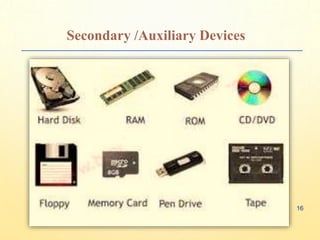
Secondary /Auxiliary Devices
• Secondary storage, sometimes termed
auxiliary storage, refers to the storage of
data that is not accessed frequently as the
data in primary storage.
• It is a non-volatile memory medium that
preserves data until and unless it has been
deleted or overwritten times termed
auxiliary storage.
15
Secondary /Auxiliary Devices
16
Secondary /Auxiliary Devices
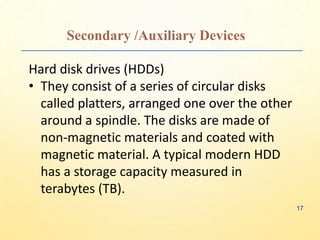
Hard disk drives (HDDs)
• They consist of a series of circular disks
called platters, arranged one over the other
around a spindle. The disks are made of
non-magnetic materials and coated with
magnetic material. A typical modern HDD
has a storage capacity measured in
terabytes (TB).
17
Secondary /Auxiliary Devices
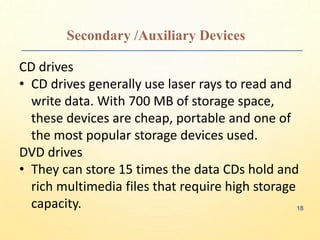
CD drives
• CD drives generally use laser rays to read and
write data. With 700 MB of storage space,
these devices are cheap, portable and one of
the most popular storage devices used.
DVD drives
• They can store 15 times the data CDs hold and
rich multimedia files that require high storage
capacity. 18
Secondary /Auxiliary Devices
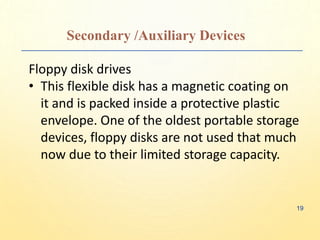
Floppy disk drives
• This flexible disk has a magnetic coating on
it and is packed inside a protective plastic
envelope. One of the oldest portable storage
devices, floppy disks are not used that much
now due to their limited storage capacity.
19
Secondary /Auxiliary Devices
USB drives
• USB flash drives are essential for quickly
moving files from one system to another.
They can now hold up to 2TB of storage and
are a convenient medium to store and
transfer smaller files.
20
THANK YOU

Inout/outputandSecondaryDEVICESexplain.pptx

  • 1.
    Submitted To: SubmittedBy: RUNJHUN MA’AM GAURANSH GOYAL Input/Output And Secondary Devices
  • 2.
  • 3.
    Definition An input/output device, often knownas an IO device, is any hardware that allows a human operator or other systems to interface with a computer 3
  • 4.
    Introduction • Input/output devices,as the name implies, are capable of delivering data (output) to and receiving data from a computer (input). • An input/output (I/O) device is a piece of hardware that can take, output, or process data. It receives data as input and provides it to a computer, as well as sends computer data to storage media as a storage output. 4
  • 5.
  • 6.
    INPUT DEVICES Keyboard • Thekeyboard is the most frequent and widely used input device for entering data into a computer. Although there are some additional keys for performing other operations, the keyboard layout is similar to that of a typical typewriter. • Generally, keyboards come in two sizes: 84 keys or 101/102 keys, but currently keyboards with 104 keys or 108 keys are also available for Windows and the Internet. ●●● 6
  • 7.
    INPUT DEVICES Mouse • Themost common pointing device is the mouse. The mouse is used to move a little cursor across the screen while clicking and dragging. • A mouse is an input device that lets you move the mouse on a flat surface to control the coordinates and movement of the on-screen cursor/pointer. • The left mouse button can be used to select or move items, while the right mouse button when clicked displays extra menus. ●●● 7
  • 8.
    INPUT DEVICES Joystick • Ajoystick is a pointing device that is used to move the cursor on a computer screen. • A spherical ball is attached to both the bottom and top ends of the stick. In a socket, the lower spherical ball slides. You can move the joystick in all four directions. • The joystick’s function is comparable to that of a mouse. It is primarily used in CAD (Computer-Aided Design) and playing video games on the computer. ●●● 8
  • 9.
    INPUT DEVICES Light Pen •A light pen is a type of pointing device that looks like a pen. It can be used to select a menu item or to draw on the monitor screen. A photocell and an optical system are enclosed in a tiny tube. • When the tip of a light pen is moved across a monitor screen while the pen button is pushed, the photocell sensor element identifies the screen location and provides a signal to the CPU. ●●● 9
  • 10.
    INPUT DEVICES Scanner • Ascanner is an input device that functions similarly to a photocopier. It’s employed when there’s information on paper that needs to be transferred to the computer’s hard disc for subsequent manipulation. • Scanner collects images from the source and converts them to a digital format that may be saved on a disc. Before they are printed, these images can be modified. ●●● 10
  • 11.
    INPUT DEVICES OCR (Optical Character Reader) • OCR stands for optical character recognition, and it is a device that reads printed text. • OCR optically scans the text, character by character, turns it into a machine-readable code, and saves it to the system memory. ●●● 11
  • 12.
    INPUT DEVICES Bar CodeReader • A bar code reader is a device that reads data that is bar-coded (data that is represented by light and dark lines). • Bar-coded data is commonly used to mark things, number books, and so on. It could be a handheld scanner or part of a stationary scanner. 12
  • 13.
    OUTPUT DEVICES Monitor • Monitors,also known as Visual Display Units (VDUs), are a computer’s primary output device. • It creates images by arranging small dots, known as pixels, in a rectangular pattern. The amount of pixels determines the image’s sharpness. ●●● 13
  • 14.
    OUTPUT DEVICES Printer • Printersare output devices that allow you to print information on paper. There are two types of printers: Impact Printer: • Characters are printed on the ribbon, which is subsequently crushed against the paper, in impact printers. Non-Impact Printers: • Characters are printed without the need for a ribbon in non-impact printers. 14
  • 15.
    Secondary /Auxiliary Devices •Secondary storage, sometimes termed auxiliary storage, refers to the storage of data that is not accessed frequently as the data in primary storage. • It is a non-volatile memory medium that preserves data until and unless it has been deleted or overwritten times termed auxiliary storage. 15
  • 16.
  • 17.
    Secondary /Auxiliary Devices Harddisk drives (HDDs) • They consist of a series of circular disks called platters, arranged one over the other around a spindle. The disks are made of non-magnetic materials and coated with magnetic material. A typical modern HDD has a storage capacity measured in terabytes (TB). 17
  • 18.
    Secondary /Auxiliary Devices CDdrives • CD drives generally use laser rays to read and write data. With 700 MB of storage space, these devices are cheap, portable and one of the most popular storage devices used. DVD drives • They can store 15 times the data CDs hold and rich multimedia files that require high storage capacity. 18
  • 19.
    Secondary /Auxiliary Devices Floppydisk drives • This flexible disk has a magnetic coating on it and is packed inside a protective plastic envelope. One of the oldest portable storage devices, floppy disks are not used that much now due to their limited storage capacity. 19
  • 20.
    Secondary /Auxiliary Devices USBdrives • USB flash drives are essential for quickly moving files from one system to another. They can now hold up to 2TB of storage and are a convenient medium to store and transfer smaller files. 20
  • 21.