CHAPTER FOUR
Information System
Development
Outline
 IS Development Life Cycle(SDLC)
 Problem Definition
 Feasibility Study
 System Analysis
 System Design
 System Development
 System implementation
 Maintenance and review
 Database Management system
 Basic concepts
 Why DBMS
2
Definition of Information System Lifecycle
 Is a logical process for planning, creating, testing,
and deploying an information system.
 Several phases – the progress of system analysis and design
 Step-by-step activities for each phase
 Individual & group roles
 Deliverables
 Tools and techniques
 As a project management tool – plan, execute &
control
3
Problem
Definition
Maintenance &
Review
Feasibility
Study
System
Implementation
System
Analysis
System
Development
System
Design
Identification of
Problems &
Opportunities
Utility and acceptability
(Economic, Technical,
Behavioral, Operational…)
Study the existing system,
determine user requirement,
propose solution
Design new/alternative system –
components, I/O relationships
data, program, interfaces,
“As Is”
“To Be”
Develop Programs, test
programs, documentation
space, personnel, HW, Install
& test new system, train &
migrate to new system
post-implementation review, identify
errors & enhancements, fix them,
monitor system performance
Chapter IV
4
 3 levels in which IS evolves
Conceptual Systems
 Idea to have a particular system for the organization
 Logical System
 Idea changed into design (logical model) – flow of data,
logic of processing & I/O relationship
Physical System
 The logical design/model is changed into programs, data
files, documentation (to be tested & implemented)
5
Cont.
 System Stakeholders (Beneficiaries – directly or
indirectly)
 Users (interact with the system)
 Managers (initiate and maintain change)
 Systems development specialists
 Project leader
 Systems analyst (analysis & designing)
 Software engineer or computer programmer
 Computer systems management (CIO)
Participants in System Development
6
Problem Definition
 Identify problems and/or opportunities
 What Problems to solve? (bottlenecks, failures, inefficiencies,
etc.)
 What Opportunities to provide? (expanding performance,
improving customer service, etc.)
 Sets general direction to solve problems & take advantages of
opportunities
 E.g. replace manual with automated system – speed, better
communication, reduce cost, etc.
7
Cont.
 Define project boundaries
Part of a system to be changed, parts outside its control
 Develop terms of reference (TOR) & define resource to
be availed.
 Final output:
Terms of Reference (goals, bounds & resource requirements)
8
Feasibility Study
 The practical utility & acceptability of the proposed
system
 Can it be done?
 Can we afford it?
 Will the proposed new system fit in with existing procedures?
 Will it benefit the intended users?
 Whether there is a preferred alternative?
 Economic, Technical, Behavioral, Operational,
Organizational, Legal
9
Feasibility
 Key feasibility considerations
 Economic – cost/benefit analysis
 Costs projection – development, hardware, facilities
operational, manpower, maintenance
 Tangible & intangible benefits projections
 Tangible – speed of processing/efficiency, reduced cost/error,
increase in sales, reduced inventory …
 Intangible – access to information timely, better Decision
Making, transparency & accountability, improved customer
response; better staff morale, Customer goodwill, etc.
10
Development costs
Development and purchasing costs:
Cost of development team
Consultant fees
software used (buy or build)?
hardware (what to buy, buy/lease)?
facilities (site, communications, power,...)
Installation and conversion costs:
installing the system,
training personnel,
file conversion,....
11
Operational costs (on-going)
System Maintenance:
hardware (repairs, lease, supplies,...),
software (licenses and contracts),
facilities
Personnel:
For operation (data entry, backups,…)
For support (user support, hardware and
software maintenance, supplies,…)
On-going training costs 12
 Tangible Benefit: Automated ordering and
payment, lowering payment processing and paper
costs; Faster product / service look-up and
ordering saving time and money
 Intangible Benefit: Saves enormous time and
effort in data entry; More controls thereby
lowering the risk of mis-utilization of resources;
Facilitates strategic planning; Uniform reporting
according to global standards
13
Technical – HW & SW (procuring/installing)
technological requirements – storage, processing,
communication, output
Availability
Within budget
Matching present & future needs
Sophistication
The skill needed (hiring extra staff, consultant firm)
Behavioral – user reaction (employee rejection, management
resistance);
Feasibility
14
Operational
Required speed, volume, usability and reliability
To what extent the system becomes operational when
implemented?
Organizational = work patterns, users skills, strategic plan
Legal: whether laws or regulations may prevent or limit
Copyright, data capture, data transfer
 Final Output:
•Feasibility report - GO / NOT GO decision must be made
Feasibility
15
System Analysis and Design
16
 Study of the existing system: Deals with “the way
things are”/ “as is”
 How is the current system working?
 I/O, components, boundary, interrelationships,
constraints, Interface, feedback and control, purpose
and other system concepts.
 What information needs?
 information sources, storage pattern and requirements
 Data type & information flow
 inputs and outputs
 procedures
Problems with present working condition
What the new system should do?  User requirement
System Analysis
17
 Tools for extracting data for system analysis:
 Review of documents (Objectives, Organizational structure, JD,
reports, procedures, system documentation)
 Observation
 Conducting interview – with top mgt and users
 Questionnaire
Cont.
18
 Results of System Analysis Existing System Description
which is a detailed documentation of:
 How the existing system works
 Requirements for the new system
 System analysis phase is also called logical design
 general specification for how the IS can meet end user
requirements
 An input for the physical design (program development)
 System Analyst is responsible
 Analyzing the existing system
 Liaison between user & IT professionals (programmers)
Cont.
19
System Design
 Deals with “the way things should be”/ “to be”
 Input: Specifications from system analysis
 Design processes
 Input definition – defining input formats
 Process Definition- defining processes using Data Flow Diagram (DFD)
 Output definition – reports, screen & file layout
 Data dictionary – details of data (name, description, source, usage,
maintenance, storage, organization)
 Program specifications – Documenting logic of processing in each
program.
 System Specifications – description of relationship between various
modules & b/n programs
Chapter IV
20
 Final output –design specification report
Description of proposed system including:
Input/output
 Form design
 Report layouts
Processing
 System flow charts
Storage & Backup
 Data file designs
 Entity Relationship Diagram: to determine relationship
between entities/ data items
Cont.
21
System Development
 Actual Development of the SW
The programmer converts the design specifications into
computer instructions (programs).
Programs:
 Coordinate the data movements and
 Control the entire process in a system
Programming language (C++, Java, Python, Ruby, R, etc.)
Skill & experience
22
 Steps
Checking system specifications
Breaking system modules into smaller
programs
 programs must be modular in
nature - fast development,
maintenance and future change
Developing program code
Defining interfaces b/n various
programs
Ensuring data availability for testing
Cont.
System Modules
23
 Testing of programs with test
data – at different level
 Unit Testing- Individual program
 Integration Testing: Individual program as
part of the system modules
 System Testing: The entire system
 User Acceptance Testing: Testing the
finished software with respect to the user
perception
 Debugging (error corrections)
Cont.
24
 System/Technical Documentation
Preparing documentation for each program
 Requirement documentation
 Design and architecture
 Source code
 Testing
 Installation and maintenance guide
 User Documentation
Create manual for users and operators
Cont.
25
System Implementation
 Converting from old to new system
 Major activities
 Planning for implementation
 Preparing schedule for implementation
 Procurement of HW
 Installation of SW
 Operation & testing of HW & SW
 Recruitment of operating personnel
 Site and data preparation
26
 Motivation and training of selected personnel and users
Training – how to use the system, how to enter data, how to
process and generate reports
Ease into system, make them comfortable, and gain their
support
 Conversion of data files from old system to the new
system
Cont.
27
Cont.
 Final switch – approaches
 Direct/plunge/crash approach
 entire new system completely replaces entire old system, in one step
 Parallel approach
 both systems are operated side by side until the new system proves itself
 Pilot approach
 new system launched for only one group within the business -- once new
system is operating smoothly, implementation goes company-wide
 Phased/incremental approach
 individual parts of new system are gradually implemented over time,
using either crash or parallel for each piece.
28
29
Post-implementation maintenance & review
 Types of Changes:
 Physical repair of the system
 Correction of new bugs/errors found (corrective)
 System adjustments to environmental changes (adaptive)
 Adjustments for users’ changing needs (adaptive)
 Changes to user better techniques when they become available (perfective)
 Revision of formats – report/data input
 ongoing throughout the useful life of the system
 Evaluation Methods
 Systems audit - performance compared to original specifications
 Periodic evaluation - “checkups” from time to time, modifications if
necessary
30
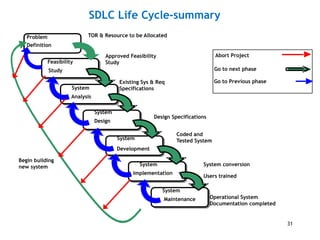
Begin building
new system System conversion
Users trained
Coded and
Tested System
Design Specifications
Feasibility
Study
System
Analysis
System
Design
System
Implementation
System
Development
System
Maintenance
Approved Feasibility
Study
Operational System
Documentation completed
Abort Project
Go to next phase
Go to Previous phase
Existing Sys & Req
Specifications
Problem
Definition
TOR & Resource to be Allocated
Chapter IV
31
SDLC Life Cycle-summary
 Increasing cost of errors
Cost incurred to fix an error increases as we move
from earlier to advanced stage
Late detection – revision of all steps back
Chapter IV
32
Cont.
DATABASE MANAGEMENT SYSTEM
(DBMS)
Chapter IV
33
 Database
 A collection of related data
 one or more related tables (files) used to organize data
 Entity
 thing about which data are to be collected and stored (e.g. student, customer,
product, etc.)
 Attribute = column of the table
 a characteristic of an entity (ID, name, department, year)
 Record = Row of the table
 set of values for each attribute for one entity (e.g. student)
Chapter IV
Basic Definition
34
Cont.
 Basic Concepts
Relationship
describes an association among entities
Depositor associates customers with accounts
Constraint
restrictions placed on the data
35
 Database Schema: descriptions of the
database structure (data types,
relationships) and the constraints that
should hold on the database.
 Change infrequently
 Database Instance: The actual data
stored in a database at a particular
moment in time
 Change every time the database
is updated
36
Cont.
 Database Management System (DBMS): software package/ system
to facilitate the creation and maintenance of a computerized
database. It:
defines structures (data types, relationships, etc.),
store data on some storage medium
manipulate (querying, update, report generation)
37
Cont.
DBMS – manages interaction between end users and database
Chapter IV
38
Cont.
Why Database Management System?
 It is due to the weakness of the file system (Customer File, Sales
File, Personnel File, etc.)
 Problems
 Duplication
 same data may be stored in multiple files
 Inconsistency
 same data may be stored by different names in different format
Implications
 Waste of space
 Data inaccuracies
 High overhead of data manipulation and maintenance
39
Benefits of Database Technology
 Controlling redundancy in data storage
 Sharing of data among multiple users.
 Restricting unauthorized access to data.
 Providing multiple interfaces to different classes of users.
 Representing complex relationships among data.
 Providing backup and recovery services.
 Potential for enforcing standards.
 Flexibility to change data structures.
 Availability of up-to-date information.
40
Thank you !!!!
41

BIS Ch 4.ppt

  • 1.
  • 2.
    Outline  IS DevelopmentLife Cycle(SDLC)  Problem Definition  Feasibility Study  System Analysis  System Design  System Development  System implementation  Maintenance and review  Database Management system  Basic concepts  Why DBMS 2
  • 3.
    Definition of InformationSystem Lifecycle  Is a logical process for planning, creating, testing, and deploying an information system.  Several phases – the progress of system analysis and design  Step-by-step activities for each phase  Individual & group roles  Deliverables  Tools and techniques  As a project management tool – plan, execute & control 3
  • 4.
    Problem Definition Maintenance & Review Feasibility Study System Implementation System Analysis System Development System Design Identification of Problems& Opportunities Utility and acceptability (Economic, Technical, Behavioral, Operational…) Study the existing system, determine user requirement, propose solution Design new/alternative system – components, I/O relationships data, program, interfaces, “As Is” “To Be” Develop Programs, test programs, documentation space, personnel, HW, Install & test new system, train & migrate to new system post-implementation review, identify errors & enhancements, fix them, monitor system performance Chapter IV 4
  • 5.
     3 levelsin which IS evolves Conceptual Systems  Idea to have a particular system for the organization  Logical System  Idea changed into design (logical model) – flow of data, logic of processing & I/O relationship Physical System  The logical design/model is changed into programs, data files, documentation (to be tested & implemented) 5 Cont.
  • 6.
     System Stakeholders(Beneficiaries – directly or indirectly)  Users (interact with the system)  Managers (initiate and maintain change)  Systems development specialists  Project leader  Systems analyst (analysis & designing)  Software engineer or computer programmer  Computer systems management (CIO) Participants in System Development 6
  • 7.
    Problem Definition  Identifyproblems and/or opportunities  What Problems to solve? (bottlenecks, failures, inefficiencies, etc.)  What Opportunities to provide? (expanding performance, improving customer service, etc.)  Sets general direction to solve problems & take advantages of opportunities  E.g. replace manual with automated system – speed, better communication, reduce cost, etc. 7
  • 8.
    Cont.  Define projectboundaries Part of a system to be changed, parts outside its control  Develop terms of reference (TOR) & define resource to be availed.  Final output: Terms of Reference (goals, bounds & resource requirements) 8
  • 9.
    Feasibility Study  Thepractical utility & acceptability of the proposed system  Can it be done?  Can we afford it?  Will the proposed new system fit in with existing procedures?  Will it benefit the intended users?  Whether there is a preferred alternative?  Economic, Technical, Behavioral, Operational, Organizational, Legal 9
  • 10.
    Feasibility  Key feasibilityconsiderations  Economic – cost/benefit analysis  Costs projection – development, hardware, facilities operational, manpower, maintenance  Tangible & intangible benefits projections  Tangible – speed of processing/efficiency, reduced cost/error, increase in sales, reduced inventory …  Intangible – access to information timely, better Decision Making, transparency & accountability, improved customer response; better staff morale, Customer goodwill, etc. 10
  • 11.
    Development costs Development andpurchasing costs: Cost of development team Consultant fees software used (buy or build)? hardware (what to buy, buy/lease)? facilities (site, communications, power,...) Installation and conversion costs: installing the system, training personnel, file conversion,.... 11
  • 12.
    Operational costs (on-going) SystemMaintenance: hardware (repairs, lease, supplies,...), software (licenses and contracts), facilities Personnel: For operation (data entry, backups,…) For support (user support, hardware and software maintenance, supplies,…) On-going training costs 12
  • 13.
     Tangible Benefit:Automated ordering and payment, lowering payment processing and paper costs; Faster product / service look-up and ordering saving time and money  Intangible Benefit: Saves enormous time and effort in data entry; More controls thereby lowering the risk of mis-utilization of resources; Facilitates strategic planning; Uniform reporting according to global standards 13
  • 14.
    Technical – HW& SW (procuring/installing) technological requirements – storage, processing, communication, output Availability Within budget Matching present & future needs Sophistication The skill needed (hiring extra staff, consultant firm) Behavioral – user reaction (employee rejection, management resistance); Feasibility 14
  • 15.
    Operational Required speed, volume,usability and reliability To what extent the system becomes operational when implemented? Organizational = work patterns, users skills, strategic plan Legal: whether laws or regulations may prevent or limit Copyright, data capture, data transfer  Final Output: •Feasibility report - GO / NOT GO decision must be made Feasibility 15
  • 16.
  • 17.
     Study ofthe existing system: Deals with “the way things are”/ “as is”  How is the current system working?  I/O, components, boundary, interrelationships, constraints, Interface, feedback and control, purpose and other system concepts.  What information needs?  information sources, storage pattern and requirements  Data type & information flow  inputs and outputs  procedures Problems with present working condition What the new system should do?  User requirement System Analysis 17
  • 18.
     Tools forextracting data for system analysis:  Review of documents (Objectives, Organizational structure, JD, reports, procedures, system documentation)  Observation  Conducting interview – with top mgt and users  Questionnaire Cont. 18
  • 19.
     Results ofSystem Analysis Existing System Description which is a detailed documentation of:  How the existing system works  Requirements for the new system  System analysis phase is also called logical design  general specification for how the IS can meet end user requirements  An input for the physical design (program development)  System Analyst is responsible  Analyzing the existing system  Liaison between user & IT professionals (programmers) Cont. 19
  • 20.
    System Design  Dealswith “the way things should be”/ “to be”  Input: Specifications from system analysis  Design processes  Input definition – defining input formats  Process Definition- defining processes using Data Flow Diagram (DFD)  Output definition – reports, screen & file layout  Data dictionary – details of data (name, description, source, usage, maintenance, storage, organization)  Program specifications – Documenting logic of processing in each program.  System Specifications – description of relationship between various modules & b/n programs Chapter IV 20
  • 21.
     Final output–design specification report Description of proposed system including: Input/output  Form design  Report layouts Processing  System flow charts Storage & Backup  Data file designs  Entity Relationship Diagram: to determine relationship between entities/ data items Cont. 21
  • 22.
    System Development  ActualDevelopment of the SW The programmer converts the design specifications into computer instructions (programs). Programs:  Coordinate the data movements and  Control the entire process in a system Programming language (C++, Java, Python, Ruby, R, etc.) Skill & experience 22
  • 23.
     Steps Checking systemspecifications Breaking system modules into smaller programs  programs must be modular in nature - fast development, maintenance and future change Developing program code Defining interfaces b/n various programs Ensuring data availability for testing Cont. System Modules 23
  • 24.
     Testing ofprograms with test data – at different level  Unit Testing- Individual program  Integration Testing: Individual program as part of the system modules  System Testing: The entire system  User Acceptance Testing: Testing the finished software with respect to the user perception  Debugging (error corrections) Cont. 24
  • 25.
     System/Technical Documentation Preparingdocumentation for each program  Requirement documentation  Design and architecture  Source code  Testing  Installation and maintenance guide  User Documentation Create manual for users and operators Cont. 25
  • 26.
    System Implementation  Convertingfrom old to new system  Major activities  Planning for implementation  Preparing schedule for implementation  Procurement of HW  Installation of SW  Operation & testing of HW & SW  Recruitment of operating personnel  Site and data preparation 26
  • 27.
     Motivation andtraining of selected personnel and users Training – how to use the system, how to enter data, how to process and generate reports Ease into system, make them comfortable, and gain their support  Conversion of data files from old system to the new system Cont. 27
  • 28.
    Cont.  Final switch– approaches  Direct/plunge/crash approach  entire new system completely replaces entire old system, in one step  Parallel approach  both systems are operated side by side until the new system proves itself  Pilot approach  new system launched for only one group within the business -- once new system is operating smoothly, implementation goes company-wide  Phased/incremental approach  individual parts of new system are gradually implemented over time, using either crash or parallel for each piece. 28
  • 29.
  • 30.
    Post-implementation maintenance &review  Types of Changes:  Physical repair of the system  Correction of new bugs/errors found (corrective)  System adjustments to environmental changes (adaptive)  Adjustments for users’ changing needs (adaptive)  Changes to user better techniques when they become available (perfective)  Revision of formats – report/data input  ongoing throughout the useful life of the system  Evaluation Methods  Systems audit - performance compared to original specifications  Periodic evaluation - “checkups” from time to time, modifications if necessary 30
  • 31.
    Begin building new systemSystem conversion Users trained Coded and Tested System Design Specifications Feasibility Study System Analysis System Design System Implementation System Development System Maintenance Approved Feasibility Study Operational System Documentation completed Abort Project Go to next phase Go to Previous phase Existing Sys & Req Specifications Problem Definition TOR & Resource to be Allocated Chapter IV 31 SDLC Life Cycle-summary
  • 32.
     Increasing costof errors Cost incurred to fix an error increases as we move from earlier to advanced stage Late detection – revision of all steps back Chapter IV 32 Cont.
  • 33.
  • 34.
     Database  Acollection of related data  one or more related tables (files) used to organize data  Entity  thing about which data are to be collected and stored (e.g. student, customer, product, etc.)  Attribute = column of the table  a characteristic of an entity (ID, name, department, year)  Record = Row of the table  set of values for each attribute for one entity (e.g. student) Chapter IV Basic Definition 34
  • 35.
    Cont.  Basic Concepts Relationship describesan association among entities Depositor associates customers with accounts Constraint restrictions placed on the data 35
  • 36.
     Database Schema:descriptions of the database structure (data types, relationships) and the constraints that should hold on the database.  Change infrequently  Database Instance: The actual data stored in a database at a particular moment in time  Change every time the database is updated 36 Cont.
  • 37.
     Database ManagementSystem (DBMS): software package/ system to facilitate the creation and maintenance of a computerized database. It: defines structures (data types, relationships, etc.), store data on some storage medium manipulate (querying, update, report generation) 37 Cont.
  • 38.
    DBMS – managesinteraction between end users and database Chapter IV 38 Cont.
  • 39.
    Why Database ManagementSystem?  It is due to the weakness of the file system (Customer File, Sales File, Personnel File, etc.)  Problems  Duplication  same data may be stored in multiple files  Inconsistency  same data may be stored by different names in different format Implications  Waste of space  Data inaccuracies  High overhead of data manipulation and maintenance 39
  • 40.
    Benefits of DatabaseTechnology  Controlling redundancy in data storage  Sharing of data among multiple users.  Restricting unauthorized access to data.  Providing multiple interfaces to different classes of users.  Representing complex relationships among data.  Providing backup and recovery services.  Potential for enforcing standards.  Flexibility to change data structures.  Availability of up-to-date information. 40
  • 41.

Editor's Notes

  • #4 Although the life cycle appears to a sequentially ordered phases, in practice they are not necessarily sequential in that the project can return to an earlier phase if necessary.
  • #16 Usability is the ease of use and learnability of a system - the degree to which a software can be used by specified consumers to achieve quantified objectives with effectiveness, efficiency, and satisfaction. Reliability: whether the system satisfactorily perform the task for which it was designed or intended, for a specified time and in a specified environment.
  • #19 Internal Sources: Users and Documents in the Organization External Sources: Customers, Suppliers, Stakeholders, Government, Competitors, Associations, Books, Journals, Consultants, etc.
  • #26 A system architecture can consist of system components and the sub-systems developed, that will work together to implement the overall system.