The document outlines the system development life cycle (SDLC), which includes 7 phases: 1) system study, 2) system analysis, 3) system design, 4) system development, 5) system testing, 6) implementation, and 7) maintenance and review. Key aspects of each phase are discussed at a high level, such as conducting a feasibility study in system analysis or different types of testing in system testing. The overall SDLC process from initial study through ongoing maintenance is summarized.
Prepared by: PrabinBista
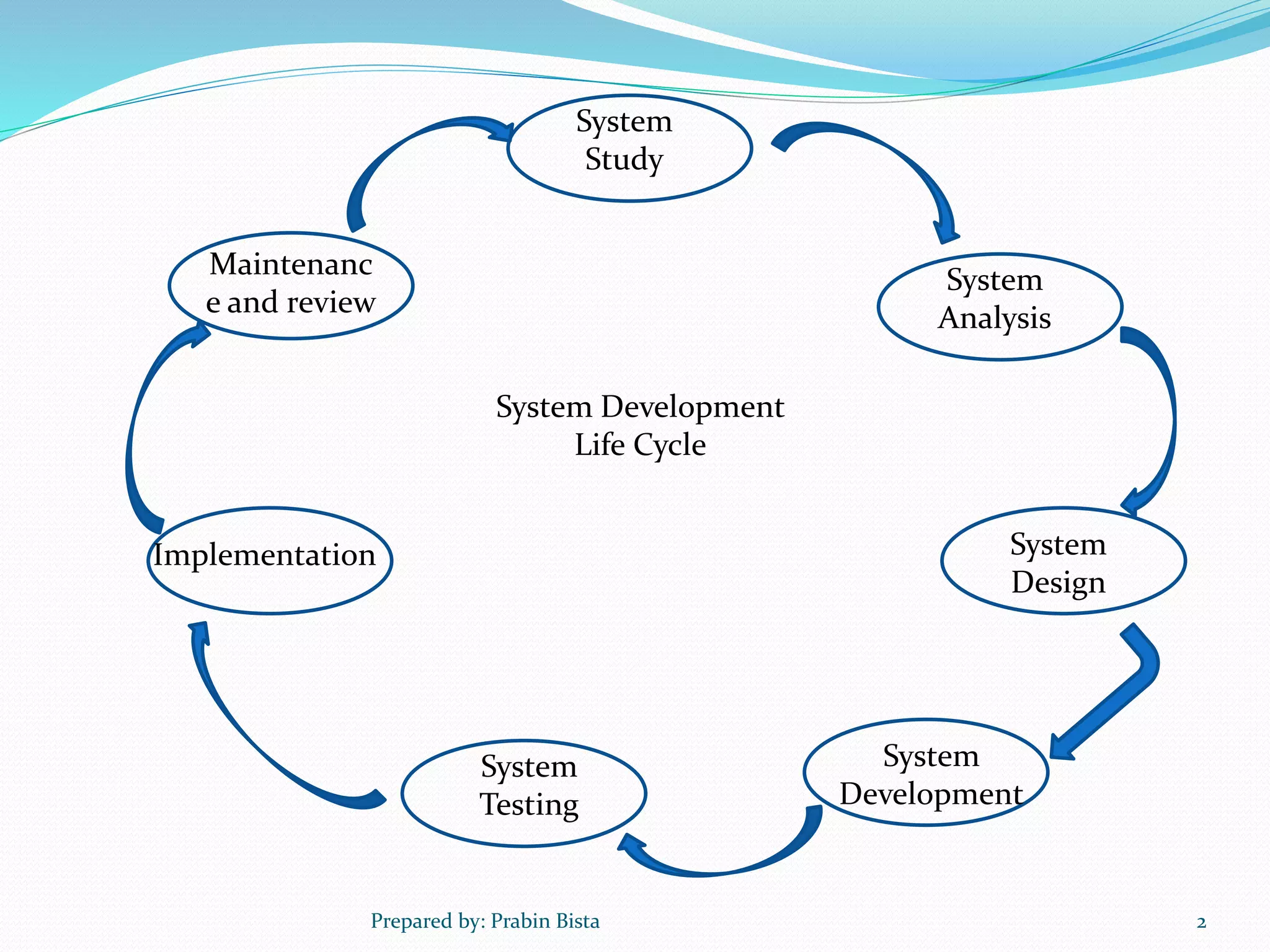
System
Analysis
System
Study
Maintenanc
e and review
Implementation
System
Development
System
Testing
System
Design
System Development
Life Cycle
2
3.
1. System Study
System study is very essential to meet users/
organization’s needs and requirements.
System analyst consults with the managers and
users of the organization to know their
requirements.
System analyst study the existing system and also
understands the organization by means of
discussion.
The objectives of the new system are identified.
Prepared by: Prabin Bista 3
4.
Contd………………
In summary,system study is done to find our answer
of:
What is to be done in future?
How to do it?
When to do it?
Who is to do it?
Prepared by: Prabin Bista 4
5.
2. System Analysis
It is the early phase of system development
System analysis is
1. The survey and planning of the system and project
2. The study and analysis of the existing business and
information system
3. The definition of business requirements and priorities for a
new system
Prepared by: Prabin Bista 5
6.
Feasibility Study
Itis the most important activity during system analysis
phase which analyze different aspects of the proposed
system.
It is predefined activity in SDLC that determines
various scopes and future prospective for the
development of new system.
It tells us whether the system is feasible to design or
not.
It deals with economic, technical, operational,
behaviour and legal aspects of new system
Prepared by: Prabin Bista 6
7.
Types of Feasibilitystudy
1. Economical Feasibility
It is popularly known as cost benefit analysis.
It concerns with cost effectiveness of the system and
calculates approximate cost for both development
and operation of the system.
Developers always develop system that is
economically feasible for the organization.
Prepared by: Prabin Bista 7
8.
2. Technical Feasibility
It deals with the availability of hardware and
software that are needed to develop system.
It also deals with other requirements like power
supply, internet connection and network.
It also deals with technical manpower to develop and
operate the new system.
Prepared by: Prabin Bista 8
9.
3. Operational Feasibility
It deals with the problems that may occur during the
operation of the new system
It ensures smooth operation of the system, for that
there are different factors such as accuracy, response
time, security, efficiency of system etc.
Most of the clients wants user friendly system which is
the key factor for smooth operation of the system.
Prepared by: Prabin Bista 9
10.
4. Legal Feasibility
It deals with the legal issue that is related to the new
system being developed.
Illegal systems can not be developed
It considers copyright law, lbour law, foreign trade, tax
etc
Prepared by: Prabin Bista 10
11.
5. Behaviour Feasibility
It deals with the behaviour of users towards new
system
Behaviour feasibility is key factor for effective
operation of new system because most of the
traditional employees are not easily ready to upgrade
old system with new system, they feel difficult to use
new system and they feel that their job is insecure.
Prepared by: Prabin Bista 11
12.
6. Schedule Feasibility
It is the study and estimate of time and resources that
are required to complete new system.
It determines the deadline to complete system and
schedule task according to it.
It new system is completed within given deadline, it is
good system, else it affect other feasibility such as
economic, technical, operational etc
Prepared by: Prabin Bista 12
13.
Need/importance of Feasibility
Study
Determines whether the system meets objectives of
clients or not.
Determine strength and limitations of system before
developing it.
Provides quality documentation of the proposed
system.
Study all the factors that may affect the system before
and after developing it.
Provides quality information about the system.
Prepared by: Prabin Bista 13
14.
3. System Design
It is the most creative and challenging phase which is
concerned with design of final system.
System design should begin from the objectives of the
system and the information requirements of users
should be addressed properly.
During this phase, designer must design all the aspects
of the system by using different tools like Flow Chart,
DFD, ER- Diagram etc.
Prepared by: Prabin Bista 14
15.
System design methodologies
1.Top-down methodology:
Design begins with specifying complex or large piece
and then divide them into smaller pieces and move
to details
2. Bottom-up methodology:
Small base elements are first designed in detail and
then combined together to form a large system.
Prepared by: Prabin Bista 15
16.
4. System Development
After logically designing the system, the programmers
then develop the system using programming language.
Required database for the system is also created
Technical/Internal documentation is also created
during this phase which contains all detail information
about the system.
Programmers play key role in developing and
documentation of the system.
Prepared by: Prabin Bista 16
17.
5. System Testing
In system testing the behavior of whole
system/product is tested
It is the process of performing a variety of tests on a
system to explore functionality or to identify problems.
System testing is usually required before and after a
system is put in place.
A series of systematic procedures is done while testing
is being performed.
These procedures tell how the system perform and
where common mistakes may be found
Prepared by: Prabin Bista 17
18.
Types of systemtesting
There are two basics of software testing: blackbox testing
and whitebox testing.
There are many types of testing like
Unit Testing
Integration Testing
Functional Testing
System Testing
Performance Testing
Usability Testing
Acceptance Testing
Regression Testing
Beta Testing
Prepared by: Prabin Bista 18
19.
Blackbox Testing
Black box testing is a testing technique that ignores the
internal mechanism of the system and focuses on the
output generated against any input and execution of the
system. It is also called functional testing.
Whitebox Testing
White box testing is a testing technique that tests the
internal mechanism of a system. It is also called
structural testing and glass box testing.
Prepared by: Prabin Bista 19
20.
Unit Testing
Unit testing is the testing of an individual unit or group
of related units. It falls under the class of white box
testing
Integration Testing
Integration testing is testing in which a group of
components are combined to produce output
the interaction between software and hardware is tested
in integration testing if software and hardware
components have any relation.
It may fall under both white box testing and black box
testing.
Prepared by: Prabin Bista 20
21.
System Testing
System testing is the testing to ensure that by putting
the software in different environments (e.g., Operating
Systems) it still works.
It falls under the class of black box testing.
Performance Testing
Performance testing is the testing to assess the speed
and effectiveness of the system and to make sure it is
generating results within a specified time as in
performance requirements.
It falls under the class of black box testing.
Prepared by: Prabin Bista 21
22.
Acceptance Testing
Acceptance testing is often done by the customer to
ensure that the delivered system meets the requirements
and works as the customer expected.
It falls under the class of black box testing.
Beta Testing
Beta testing is the testing which is done by end users
The aim of beta testing is to cover unexpected errors.
It falls under the class of black box testing.
Prepared by: Prabin Bista 22
23.
6.Implementation
It isthe way of converting a newly developed system
into working system.
It involves testing, debugging, distributing system to
user sites and training users.
The new system replace the existing system and this
process is called system conversion
Prepared by: Prabin Bista 23
24.
Types of systemconversion
a. Direct Conversion
b. Parallel Conversion
c. Phased Conversion
d. Pilot Conversion
Prepared by: Prabin Bista 24
25.
a. Direct Conversion
The new system directly replace the old system and all
the users start using new system
This conversion method is fast but it may be quite
difficult for users to use new system because they may
not have sufficient knowledge about new system.
Prepared by: Prabin Bista 25
26.
b. Parallel Conversion
In this method, both old and new system are used
parallely and users make comparative analysis between
two systems.
If users are satisfied with the new system and if
system works without any errors, then new system
replaces old system
Prepared by: Prabin Bista 26
27.
c. Phased Conversion
Users start using the system partially one after another,
component by component
This method works if system have subsystems
In this method, if mistakes occurred, it can be correct
immediately
Prepared by: Prabin Bista 27
28.
d. Pilot Conversion
In this method, the new system is first installed to
small unit of organization and a few number of users
use it
Each and every components of system are used and
checked carefully by those users
They evaluate and decide whether the new system can
totally replace the old system or not.
Prepared by: Prabin Bista 28
29.
7. Maintenance andReview
After the system is installed and became a working
system, maintenance and modification begins.
Correcting and upgrading process of the system is
called system maintenance.
Maintenance is very necessary to correct errors in the
working system during its working period
The system developers corrects all mistakes and makes
the required changes according to the specification
Prepared by: Prabin Bista 29
30.
Types of Maintenance
a.Corrective Maintenance:
It corrects the errors that are found during the
operation of the system
b. Adaptive Maintenance:
It modifies or adds new features to the system
according to the environment change
c. Perfective Maintenance:
It makes the system perfect, updated and improve its
performance
Prepared by: Prabin Bista 30
31.
System Review
Itis last phase of SDLC whose propose is to see if the
system has met all the requirements and objectives set
for it or not.
Prepared by: Prabin Bista 31