Major Topics Information systems Integrating New Technology Phases of analysis and design System maintenance CASE tools
Information Information is an organizational resource which must be managed as carefully as other resources Costs are associated with information processing Information processing must be managed to take full advantage of its potential
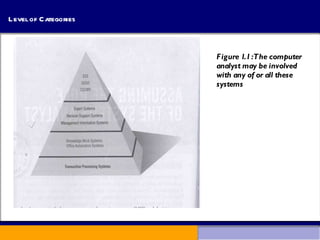
Categories Eight categories of Information systems: Transaction processing systems (TPS) Office automation systems (OAS) Knowledge work systems (KWS) Management information systems (MIS) Decision support systems (DSS) Expert systems (ES) Group decision support systems (GDSS) Executive support systems (EES)
Level of Categories Figure 1.1 :The computer analyst may be involved  with any of or all these  systems
Transaction Processing Systems (TPS) TPS are computerized information systems developed to  process large amount of data for routine business transactions TPS reduces the time once required to perform the task manually TPS permits the organization to interact with external environment Example: Inventory or Payroll system
Office Automation Systems (OAS) and Knowledge Work Systems (KWS) Office Automation Systems (OAS): Includes analysis of information so as to transform data or manipulate it in some way before sharing or formally disseminating it Example: Word processing, spreadsheets, desktop publishing, electronic scheduling, communication through voice email, email and voice conference etc. Knowledge Work Systems (KWS): Supports professionals (scientists, engineers, doctors) by aiding them to create new knowledge Example: Scientific analysis
Management Information Systems (MIS) MIS supports broader spectrum of organizational tasks than TPS, including decision analysis and decision making MIS users share a common database to access information MIS outputs information that is used in decision making Example: Account management system of    Internet users
Decision Support systems (DSS) DSS is similar to the traditional MIS because they both depend on a database as a source of data Again, DSS departs from MIS in that DSS emphasizes the support of decision making in all its phases Example: Production increase decision by    trend analysis
Expert Systems Expert system is a very special class of information system which is capable of generating solutions to problems with the aid of Artificial Intelligence (AI) An expert system (also called a knowledge based system) uses the knowledge of an expert for solving a particular problem Example: News Categorization software
Group Decision Support Systems (GDSS) and  Computer Supported Collaborative Work Systems (CSCWS)  Group Decision Support Systems  GDSS are intended to bring a group together to solve a problem with the help of various support such as polling, questionnaires, brainstorming etc.  Computer Supported Collaborative Work Systems CDCWS is a more general term of GDSS CSCWS may include software support called “ groupware ” for team collaboration via network computers Example: video conferencing and web survey system
Executive Support Systems (ESS) It helps executives to make decisions on strategic level It may provide graphical representation and communication support at board meeting required to make strategic decision Example: New product launching decision
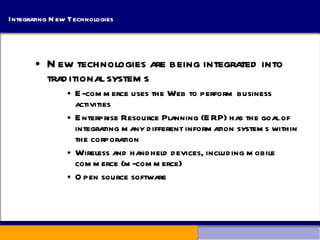
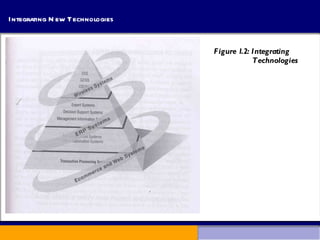
Integrating New Technologies New technologies are being integrated into traditional systems E-commerce uses the Web to perform business activities Enterprise Resource Planning (ERP) has the goal of integrating many different information systems within the corporation Wireless and handheld devices, including mobile commerce (m-commerce) Open source software
Integrating New Technologies Figure 1.2: Integrating  Technologies
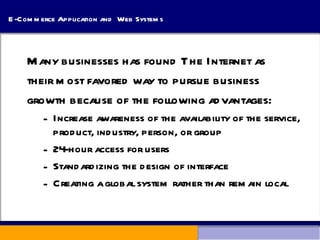
E-Commerce Application and  Web Systems Many businesses has found The Internet as  their most favored way to pursue business  growth because of the following advantages: Increase awareness of the availability of the service, product, industry, person, or group 24-hour access for users Standardizing the design of interface Creating a global system rather than remain local
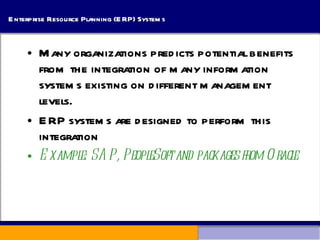
Enterprise Resource Planning (ERP) Systems Many organizations predicts potential benefits from the integration of many information systems existing on different management levels.  ERP systems are designed to perform this integration Example: SAP, PeopleSoft and packages from Oracle
Systems for Wireless and Handheld Devices System analyst may be asked to design standard or wireless communication network that integrate voice, video and email into organizational intranet System analyst may also be asked to develop intelligent agents to assist the user of PDA or cell phone Wireless communication is referred as m-commerce (mobile commerce)
Open Source Software An alternative of traditional software development (where proprietary code is hidden from the users) is called open source software Open source software is free to distribute, share and modify its source code It makes money by providing services, customized program and support. Open source software are widely used in handheld and mobile devices. Example: Linux Operating System   Apache Web Server
Nature of Analysis and Design A systematic approach to: identify problems, opportunities, and objectives;  analyze the information flows in organizations; and  design computerized information systems to solve a problem.
Systems Analyst Systems analysts act as: Outside consultants to businesses Supporting experts within a business Change agents Analysts are problem solvers, and require communication skills Analysts must be ethical with users and customers
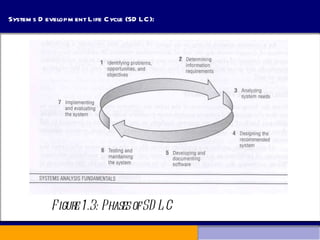
Systems Development Life Cycle (SDLC): SDLC is a systematic approach for solving business problems. It is divided into seven phases. Although each phase is presented discretely, it is never accomplished as a separate step. Instead separate activity can occur simultaneously
Systems Development Life Cycle (SDLC): Figure 1.3: Phases of SDLC
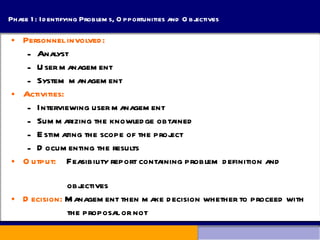
Phase 1: Identifying Problems, Opportunities and Objectives Personnel involved: Analyst  User management System management Activities: Interviewing user management Summarizing the knowledge obtained Estimating the scope of the project Documenting the results Output:   Feasibility report containing problem definition and  objectives Decision:  Management then make decision whether to proceed with  the proposal or not
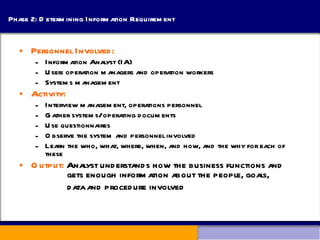
Phase 2: Determining Information Requirement Personnel Involved: Information Analyst (IA) User: operation managers and operation workers Systems management Activity: Interview management, operations personnel Gather systems/operating documents Use questionnaires Observe the system and personnel involved Learn the who, what, where, when, and how, and the why for each of these Output:  Analyst understands how the business functions and    gets enough information about the people, goals,  data and procedure involved
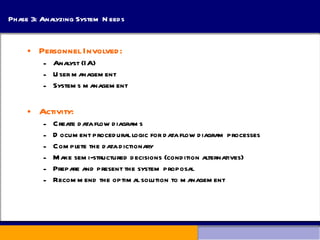
Phase 3: Analyzing System Needs Personnel Involved: Analyst (IA) User management Systems management Activity: Create data flow diagrams  Document procedural logic for data flow diagram processes Complete the data dictionary Make semi-structured decisions (condition alternatives) Prepare and present the system proposal Recommend the optimal solution to management
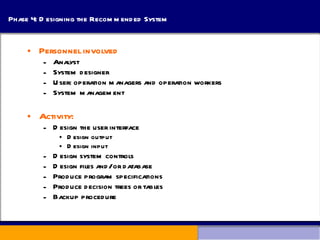
Phase 4: Designing the Recommended System Personnel involved Analyst System designer User: operation managers and operation workers System management Activity: Design the user interface Design output Design input Design system controls Design files and/or database Produce program specifications Produce decision trees or tables Backup procedure
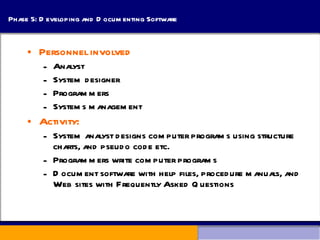
Phase 5: Developing and Documenting Software Personnel involved Analyst System designer Programmers Systems management Activity: System analyst designs computer programs using structure charts, and pseudo code etc. Programmers write computer programs Document software with help files, procedure manuals, and Web sites with Frequently Asked Questions
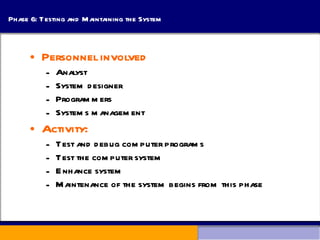
Phase 6: Testing and Maintaining the System Personnel involved Analyst System designer Programmers Systems management Activity: Test and debug computer programs Test the computer system Enhance system Maintenance of the system begins from this phase
Phase 7: Implementing and Evaluating the System Personnel involved: Analyst System designer Programmers User: operation managers and operation workers Systems management Activity: Train users Analyst plans smooth conversion from old system to new system Purchase and install new equipment Install system Review and evaluate system
Maintenance Maintenance is performed for 2 reasons: System maintenance Removing undetected errors, and Enhancing existing software Systems are enhanced for the following reasons: Adding additional features to the system Business and governmental requirements change over time Technology, hardware, and software are rapidly changing
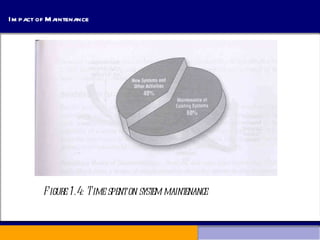
Impact of Maintenance Figure 1.4: Time spent on system maintenance
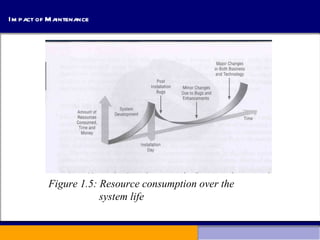
Impact of Maintenance Figure 1.5: Resource consumption over the  system life
CASE Tools CASE tools are automated, microcomputer-based software packages for systems analysis and design Four reasons for using CASE tools are: To increase analyst productivity Facilitate communication among analysts and users Providing continuity and integrity among life cycle phases To assess the maintenance changes
CASE Tool Categories CASE tools may be divided into several categories Upper CASE (also called front-end CASE) tools, used to perform analysis and design Lower CASE (also called back-end CASE).  These tools generate computer language source code from CASE design. Integrated CASE, performing both upper and lower CASE functions.
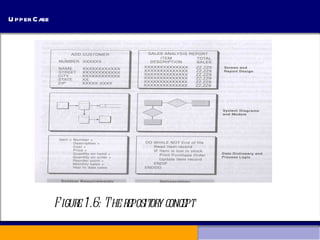
Upper CASE Upper CASE tools Create and modify the system design Store data in a project repository The repository is a collection of records, elements, diagrams, screens, reports, and other project information These CASE tools model organizational requirements and define system boundaries
Upper Case Figure 1.6: The repository concept
Lower CASE Lower CASE tools generate computer source code from the CASE design Source code may usually be generated in several languages Advantages of generation code: decrease development time More programming language support Free from program coding error
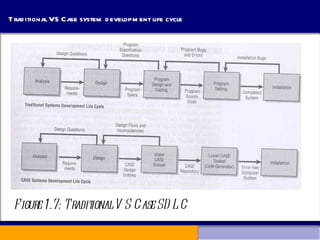
Traditional VS Case system development life cycle Figure 1.7: Traditional VS Case SDLC
Reverse Engineering Reverse engineering is generating the CASE design from computer program code Source code is examined, analyzed, and converted into repository entities
Advantages of Reverse Engineering Reduced system maintenance time, freeing up time for new development Program documentation is produced for loosely documented programs Structured programs may be generated from unstructured, older programs Future system maintenance is easier to implement Unused portions of programs may be eliminated
Object-Oriented Analysis and Design Object-oriented (O-O) analysis and design is used to build object-oriented programs This includes not only data but the instructions about operations that manipulate the data
Alternative Methodologies Alternatives to SDLC: Prototyping ETHICS Soft System Methodology Multiview 1.

Information systems

  • 1.
    Major Topics Informationsystems Integrating New Technology Phases of analysis and design System maintenance CASE tools
  • 2.
    Information Information isan organizational resource which must be managed as carefully as other resources Costs are associated with information processing Information processing must be managed to take full advantage of its potential
  • 3.
    Categories Eight categoriesof Information systems: Transaction processing systems (TPS) Office automation systems (OAS) Knowledge work systems (KWS) Management information systems (MIS) Decision support systems (DSS) Expert systems (ES) Group decision support systems (GDSS) Executive support systems (EES)
  • 4.
    Level of CategoriesFigure 1.1 :The computer analyst may be involved with any of or all these systems
  • 5.
    Transaction Processing Systems(TPS) TPS are computerized information systems developed to process large amount of data for routine business transactions TPS reduces the time once required to perform the task manually TPS permits the organization to interact with external environment Example: Inventory or Payroll system
  • 6.
    Office Automation Systems(OAS) and Knowledge Work Systems (KWS) Office Automation Systems (OAS): Includes analysis of information so as to transform data or manipulate it in some way before sharing or formally disseminating it Example: Word processing, spreadsheets, desktop publishing, electronic scheduling, communication through voice email, email and voice conference etc. Knowledge Work Systems (KWS): Supports professionals (scientists, engineers, doctors) by aiding them to create new knowledge Example: Scientific analysis
  • 7.
    Management Information Systems(MIS) MIS supports broader spectrum of organizational tasks than TPS, including decision analysis and decision making MIS users share a common database to access information MIS outputs information that is used in decision making Example: Account management system of Internet users
  • 8.
    Decision Support systems(DSS) DSS is similar to the traditional MIS because they both depend on a database as a source of data Again, DSS departs from MIS in that DSS emphasizes the support of decision making in all its phases Example: Production increase decision by trend analysis
  • 9.
    Expert Systems Expertsystem is a very special class of information system which is capable of generating solutions to problems with the aid of Artificial Intelligence (AI) An expert system (also called a knowledge based system) uses the knowledge of an expert for solving a particular problem Example: News Categorization software
  • 10.
    Group Decision SupportSystems (GDSS) and Computer Supported Collaborative Work Systems (CSCWS) Group Decision Support Systems GDSS are intended to bring a group together to solve a problem with the help of various support such as polling, questionnaires, brainstorming etc. Computer Supported Collaborative Work Systems CDCWS is a more general term of GDSS CSCWS may include software support called “ groupware ” for team collaboration via network computers Example: video conferencing and web survey system
  • 11.
    Executive Support Systems(ESS) It helps executives to make decisions on strategic level It may provide graphical representation and communication support at board meeting required to make strategic decision Example: New product launching decision
  • 12.
    Integrating New TechnologiesNew technologies are being integrated into traditional systems E-commerce uses the Web to perform business activities Enterprise Resource Planning (ERP) has the goal of integrating many different information systems within the corporation Wireless and handheld devices, including mobile commerce (m-commerce) Open source software
  • 13.
    Integrating New TechnologiesFigure 1.2: Integrating Technologies
  • 14.
    E-Commerce Application and Web Systems Many businesses has found The Internet as their most favored way to pursue business growth because of the following advantages: Increase awareness of the availability of the service, product, industry, person, or group 24-hour access for users Standardizing the design of interface Creating a global system rather than remain local
  • 15.
    Enterprise Resource Planning(ERP) Systems Many organizations predicts potential benefits from the integration of many information systems existing on different management levels. ERP systems are designed to perform this integration Example: SAP, PeopleSoft and packages from Oracle
  • 16.
    Systems for Wirelessand Handheld Devices System analyst may be asked to design standard or wireless communication network that integrate voice, video and email into organizational intranet System analyst may also be asked to develop intelligent agents to assist the user of PDA or cell phone Wireless communication is referred as m-commerce (mobile commerce)
  • 17.
    Open Source SoftwareAn alternative of traditional software development (where proprietary code is hidden from the users) is called open source software Open source software is free to distribute, share and modify its source code It makes money by providing services, customized program and support. Open source software are widely used in handheld and mobile devices. Example: Linux Operating System Apache Web Server
  • 18.
    Nature of Analysisand Design A systematic approach to: identify problems, opportunities, and objectives; analyze the information flows in organizations; and design computerized information systems to solve a problem.
  • 19.
    Systems Analyst Systemsanalysts act as: Outside consultants to businesses Supporting experts within a business Change agents Analysts are problem solvers, and require communication skills Analysts must be ethical with users and customers
  • 20.
    Systems Development LifeCycle (SDLC): SDLC is a systematic approach for solving business problems. It is divided into seven phases. Although each phase is presented discretely, it is never accomplished as a separate step. Instead separate activity can occur simultaneously
  • 21.
    Systems Development LifeCycle (SDLC): Figure 1.3: Phases of SDLC
  • 22.
    Phase 1: IdentifyingProblems, Opportunities and Objectives Personnel involved: Analyst User management System management Activities: Interviewing user management Summarizing the knowledge obtained Estimating the scope of the project Documenting the results Output: Feasibility report containing problem definition and objectives Decision: Management then make decision whether to proceed with the proposal or not
  • 23.
    Phase 2: DeterminingInformation Requirement Personnel Involved: Information Analyst (IA) User: operation managers and operation workers Systems management Activity: Interview management, operations personnel Gather systems/operating documents Use questionnaires Observe the system and personnel involved Learn the who, what, where, when, and how, and the why for each of these Output: Analyst understands how the business functions and gets enough information about the people, goals, data and procedure involved
  • 24.
    Phase 3: AnalyzingSystem Needs Personnel Involved: Analyst (IA) User management Systems management Activity: Create data flow diagrams Document procedural logic for data flow diagram processes Complete the data dictionary Make semi-structured decisions (condition alternatives) Prepare and present the system proposal Recommend the optimal solution to management
  • 25.
    Phase 4: Designingthe Recommended System Personnel involved Analyst System designer User: operation managers and operation workers System management Activity: Design the user interface Design output Design input Design system controls Design files and/or database Produce program specifications Produce decision trees or tables Backup procedure
  • 26.
    Phase 5: Developingand Documenting Software Personnel involved Analyst System designer Programmers Systems management Activity: System analyst designs computer programs using structure charts, and pseudo code etc. Programmers write computer programs Document software with help files, procedure manuals, and Web sites with Frequently Asked Questions
  • 27.
    Phase 6: Testingand Maintaining the System Personnel involved Analyst System designer Programmers Systems management Activity: Test and debug computer programs Test the computer system Enhance system Maintenance of the system begins from this phase
  • 28.
    Phase 7: Implementingand Evaluating the System Personnel involved: Analyst System designer Programmers User: operation managers and operation workers Systems management Activity: Train users Analyst plans smooth conversion from old system to new system Purchase and install new equipment Install system Review and evaluate system
  • 29.
    Maintenance Maintenance isperformed for 2 reasons: System maintenance Removing undetected errors, and Enhancing existing software Systems are enhanced for the following reasons: Adding additional features to the system Business and governmental requirements change over time Technology, hardware, and software are rapidly changing
  • 30.
    Impact of MaintenanceFigure 1.4: Time spent on system maintenance
  • 31.
    Impact of MaintenanceFigure 1.5: Resource consumption over the system life
  • 32.
    CASE Tools CASEtools are automated, microcomputer-based software packages for systems analysis and design Four reasons for using CASE tools are: To increase analyst productivity Facilitate communication among analysts and users Providing continuity and integrity among life cycle phases To assess the maintenance changes
  • 33.
    CASE Tool CategoriesCASE tools may be divided into several categories Upper CASE (also called front-end CASE) tools, used to perform analysis and design Lower CASE (also called back-end CASE). These tools generate computer language source code from CASE design. Integrated CASE, performing both upper and lower CASE functions.
  • 34.
    Upper CASE UpperCASE tools Create and modify the system design Store data in a project repository The repository is a collection of records, elements, diagrams, screens, reports, and other project information These CASE tools model organizational requirements and define system boundaries
  • 35.
    Upper Case Figure1.6: The repository concept
  • 36.
    Lower CASE LowerCASE tools generate computer source code from the CASE design Source code may usually be generated in several languages Advantages of generation code: decrease development time More programming language support Free from program coding error
  • 37.
    Traditional VS Casesystem development life cycle Figure 1.7: Traditional VS Case SDLC
  • 38.
    Reverse Engineering Reverseengineering is generating the CASE design from computer program code Source code is examined, analyzed, and converted into repository entities
  • 39.
    Advantages of ReverseEngineering Reduced system maintenance time, freeing up time for new development Program documentation is produced for loosely documented programs Structured programs may be generated from unstructured, older programs Future system maintenance is easier to implement Unused portions of programs may be eliminated
  • 40.
    Object-Oriented Analysis andDesign Object-oriented (O-O) analysis and design is used to build object-oriented programs This includes not only data but the instructions about operations that manipulate the data
  • 41.
    Alternative Methodologies Alternativesto SDLC: Prototyping ETHICS Soft System Methodology Multiview 1.