KNOWLEDGE CREATION AND KNOWLEDGE ARCHITECTURE
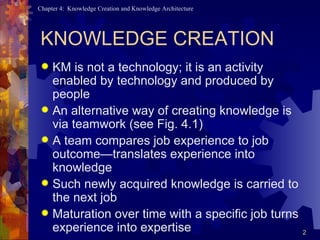
KNOWLEDGE CREATION KM is not a technology; it is an activity enabled by technology and produced by people An alternative way of creating knowledge is via teamwork (see Fig. 4.1) A team compares job experience to job outcome—translates experience into knowledge Such newly acquired knowledge is carried to the next job Maturation over time with a specific job turns experience into expertise
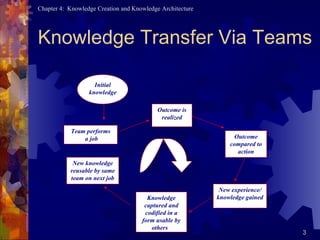
Knowledge Transfer Via Teams Team performs a job Knowledge captured and codified in a form usable by others  New experience/ knowledge gained Outcome compared to action Outcome is realized Initial knowledge New knowledge reusable by same team on next job
Impediments to Knowledge Sharing Personality Attitude based on mutual trust Vocational reinforcers Work norms
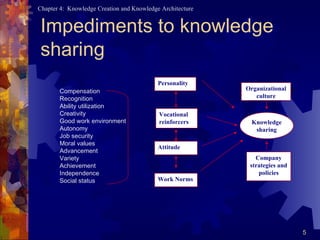
Impediments to knowledge sharing Vocational reinforcers Attitude Personality Company strategies and policies Organizational culture Knowledge sharing Work Norms Compensation Recognition Ability utilization Creativity Good work environment Autonomy Job security Moral values Advancement Variety Achievement Independence Social status
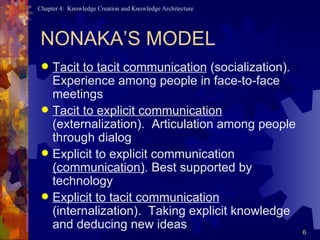
NONAKA’S MODEL Tacit to tacit communication  (socialization). Experience among people in face-to-face meetings Tacit to explicit communication  (externalization).  Articulation among people through dialog Explicit to explicit communication  (communication) . Best supported by technology Explicit to tacit communication  (internalization).  Taking explicit knowledge and deducing new ideas
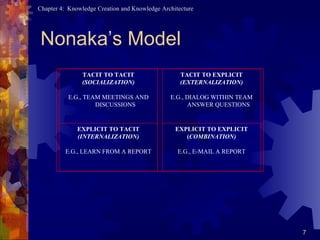
Nonaka’s Model TACIT TO TACIT (SOCIALIZATION)   E.G., TEAM MEETINGS AND DISCUSSIONS   TACIT TO EXPLICIT (EXTERNALIZATION)   E.G., DIALOG WITHIN TEAM ANSWER QUESTIONS EXPLICIT TO TACIT (INTERNALIZATION)   E.G., LEARN FROM A REPORT   EXPLICIT TO EXPLICIT ( COMBINATION)   E.G., E-MAIL A REPORT
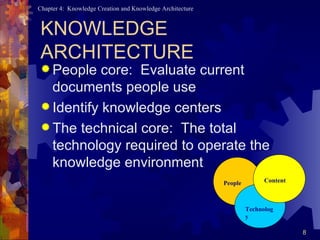
KNOWLEDGE ARCHITECTURE People core:  Evaluate current documents people use Identify knowledge centers The technical core:  The total technology required to operate the knowledge environment People Technology Content
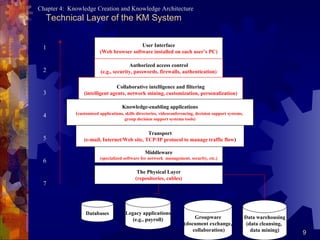
Technical Layer of the KM System User Interface (Web browser software installed on each user’s PC) Authorized access control (e.g., security, passwords, firewalls, authentication) Collaborative intelligence and filtering (intelligent agents, network mining, customization, personalization) Knowledge-enabling applications ( customized applications, skills directories, videoconferencing, decision support systems,  group decision support systems tools) Transport (e-mail, Internet/Web site, TCP/IP protocol to manage traffic flow ) Middleware (specialized software for network  management, security, etc.) The Physical Layer (repositories, cables) . . . . . Databases Data warehousing (data cleansing,  data mining) Groupware (document exchange, collaboration) Legacy applications (e.g., payroll) 1 2 3 4 5 6 7
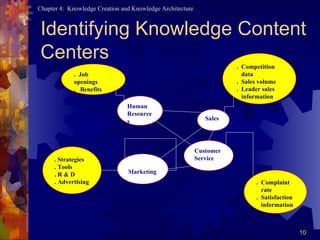
Identifying Knowledge Content Centers Marketing Human Resources Customer Service Sales .  Strategies . Tools . R & D . Advertising .  Complaint  rate .  Satisfaction information .  Job openings .  Benefits .  Competition data .  Sales volume .  Leader sales information
The User Interface Layer Tacit knowledge should be made available face-to-face, e-mail, or by other media User interface design focuses on  consistency, relevancy, visual clarity, navigation, and usability
Technical Access Layer Intranet :  The internal network of communication systems modified around the Internet Extranet :  An intranet with extensions that allow clearly identified customers or suppliers to reach company-related technical educational information (see Figure 4.9)
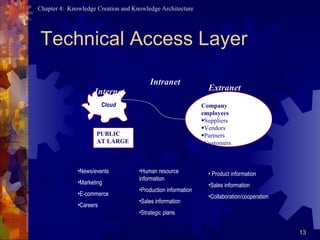
Technical Access Layer PUBLIC AT LARGE Company employees Suppliers Vendors Partners Customers Internet Intranet Extranet   Cloud News/events Marketing E-commerce Careers Human resource information Production information Sales information Strategic plans Product information  Sales information Collaboration/cooperation
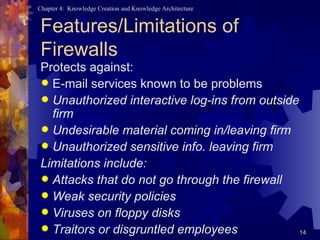
Features/Limitations of Firewalls Protects against: E-mail services known to be problems Unauthorized interactive log-ins from outside firm Undesirable material coming in/leaving firm Unauthorized sensitive info. leaving firm Limitations include: Attacks that do not go through the firewall Weak security policies Viruses on floppy disks Traitors or disgruntled employees
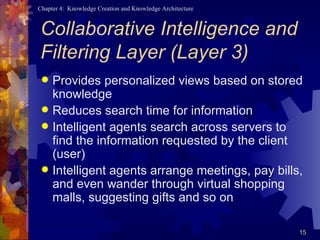
Collaborative Intelligence and Filtering Layer (Layer 3) Provides personalized views based on stored knowledge Reduces search time for information  Intelligent agents search across servers to find the information requested by the client (user) Intelligent agents arrange meetings, pay bills, and even wander through virtual shopping malls, suggesting gifts and so on
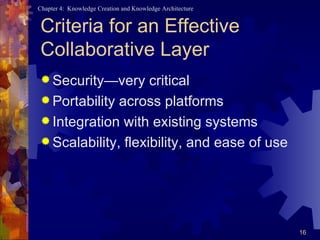
Criteria for an Effective Collaborative Layer Security—very critical Portability across platforms Integration with existing systems Scalability, flexibility, and ease of use
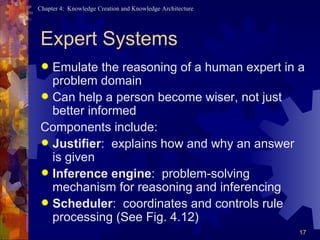
Expert Systems Emulate the reasoning of a human expert in a problem domain Can help a person become wiser, not just better informed Components include: Justifier :  explains how and why an answer is given Inference engine :  problem-solving mechanism for reasoning and inferencing Scheduler :  coordinates and controls rule processing (See Fig. 4.12)
Knowledge-Enabling Application Layer Often referred to as  value-added layer Creates a competitive edge for the learning organization Provides knowledge bases, discussion databases, sales force automation tools, imaging tools, etc.  Ultimate goal: show how knowledge sharing could improve the lot of employees
Transport Layer Most technical layer to implement Ensures that the company will become a network of relationships Includes LANs, WANs, intranets, extranets, and the Internet Considers multimedia, URLs, graphics, connectivity speeds, and bandwidths
Middleware Layer Focus on interfacing with legacy systems and programs residing on other platforms Designer should address databases and applications with which KM system interfaces Contains a cluster of programs to provide connections between legacy applications and existing systems Makes it possible to connect between old and new data formats
Repositories Layer Bottom layer in the KM architecture Represents the physical layer where repositories are installed Includes intelligent data warehouses, legacy applications, operational databases, and special applications for security and traffic management
Build In-House, Buy, or Outsource? Trend is toward ready-to-use, generalized software packages Outsourcing is also a trend, releasing technological design to outsiders Regardless of choice, it is important to set criteria for the selection Question of who owns the KM system should be seriously considered
KNOWLEDGE CREATION AND KNOWLEDGE ARCHITECTURE CHAPTER 4

Knowledge creation and knowledge architecture

  • 1.
    KNOWLEDGE CREATION ANDKNOWLEDGE ARCHITECTURE
  • 2.
    KNOWLEDGE CREATION KMis not a technology; it is an activity enabled by technology and produced by people An alternative way of creating knowledge is via teamwork (see Fig. 4.1) A team compares job experience to job outcome—translates experience into knowledge Such newly acquired knowledge is carried to the next job Maturation over time with a specific job turns experience into expertise
  • 3.
    Knowledge Transfer ViaTeams Team performs a job Knowledge captured and codified in a form usable by others New experience/ knowledge gained Outcome compared to action Outcome is realized Initial knowledge New knowledge reusable by same team on next job
  • 4.
    Impediments to KnowledgeSharing Personality Attitude based on mutual trust Vocational reinforcers Work norms
  • 5.
    Impediments to knowledgesharing Vocational reinforcers Attitude Personality Company strategies and policies Organizational culture Knowledge sharing Work Norms Compensation Recognition Ability utilization Creativity Good work environment Autonomy Job security Moral values Advancement Variety Achievement Independence Social status
  • 6.
    NONAKA’S MODEL Tacitto tacit communication (socialization). Experience among people in face-to-face meetings Tacit to explicit communication (externalization). Articulation among people through dialog Explicit to explicit communication (communication) . Best supported by technology Explicit to tacit communication (internalization). Taking explicit knowledge and deducing new ideas
  • 7.
    Nonaka’s Model TACITTO TACIT (SOCIALIZATION)   E.G., TEAM MEETINGS AND DISCUSSIONS   TACIT TO EXPLICIT (EXTERNALIZATION)   E.G., DIALOG WITHIN TEAM ANSWER QUESTIONS EXPLICIT TO TACIT (INTERNALIZATION)   E.G., LEARN FROM A REPORT   EXPLICIT TO EXPLICIT ( COMBINATION)   E.G., E-MAIL A REPORT
  • 8.
    KNOWLEDGE ARCHITECTURE Peoplecore: Evaluate current documents people use Identify knowledge centers The technical core: The total technology required to operate the knowledge environment People Technology Content
  • 9.
    Technical Layer ofthe KM System User Interface (Web browser software installed on each user’s PC) Authorized access control (e.g., security, passwords, firewalls, authentication) Collaborative intelligence and filtering (intelligent agents, network mining, customization, personalization) Knowledge-enabling applications ( customized applications, skills directories, videoconferencing, decision support systems, group decision support systems tools) Transport (e-mail, Internet/Web site, TCP/IP protocol to manage traffic flow ) Middleware (specialized software for network management, security, etc.) The Physical Layer (repositories, cables) . . . . . Databases Data warehousing (data cleansing, data mining) Groupware (document exchange, collaboration) Legacy applications (e.g., payroll) 1 2 3 4 5 6 7
  • 10.
    Identifying Knowledge ContentCenters Marketing Human Resources Customer Service Sales . Strategies . Tools . R & D . Advertising . Complaint rate . Satisfaction information . Job openings . Benefits . Competition data . Sales volume . Leader sales information
  • 11.
    The User InterfaceLayer Tacit knowledge should be made available face-to-face, e-mail, or by other media User interface design focuses on consistency, relevancy, visual clarity, navigation, and usability
  • 12.
    Technical Access LayerIntranet : The internal network of communication systems modified around the Internet Extranet : An intranet with extensions that allow clearly identified customers or suppliers to reach company-related technical educational information (see Figure 4.9)
  • 13.
    Technical Access LayerPUBLIC AT LARGE Company employees Suppliers Vendors Partners Customers Internet Intranet Extranet Cloud News/events Marketing E-commerce Careers Human resource information Production information Sales information Strategic plans Product information Sales information Collaboration/cooperation
  • 14.
    Features/Limitations of FirewallsProtects against: E-mail services known to be problems Unauthorized interactive log-ins from outside firm Undesirable material coming in/leaving firm Unauthorized sensitive info. leaving firm Limitations include: Attacks that do not go through the firewall Weak security policies Viruses on floppy disks Traitors or disgruntled employees
  • 15.
    Collaborative Intelligence andFiltering Layer (Layer 3) Provides personalized views based on stored knowledge Reduces search time for information Intelligent agents search across servers to find the information requested by the client (user) Intelligent agents arrange meetings, pay bills, and even wander through virtual shopping malls, suggesting gifts and so on
  • 16.
    Criteria for anEffective Collaborative Layer Security—very critical Portability across platforms Integration with existing systems Scalability, flexibility, and ease of use
  • 17.
    Expert Systems Emulatethe reasoning of a human expert in a problem domain Can help a person become wiser, not just better informed Components include: Justifier : explains how and why an answer is given Inference engine : problem-solving mechanism for reasoning and inferencing Scheduler : coordinates and controls rule processing (See Fig. 4.12)
  • 18.
    Knowledge-Enabling Application LayerOften referred to as value-added layer Creates a competitive edge for the learning organization Provides knowledge bases, discussion databases, sales force automation tools, imaging tools, etc. Ultimate goal: show how knowledge sharing could improve the lot of employees
  • 19.
    Transport Layer Mosttechnical layer to implement Ensures that the company will become a network of relationships Includes LANs, WANs, intranets, extranets, and the Internet Considers multimedia, URLs, graphics, connectivity speeds, and bandwidths
  • 20.
    Middleware Layer Focuson interfacing with legacy systems and programs residing on other platforms Designer should address databases and applications with which KM system interfaces Contains a cluster of programs to provide connections between legacy applications and existing systems Makes it possible to connect between old and new data formats
  • 21.
    Repositories Layer Bottomlayer in the KM architecture Represents the physical layer where repositories are installed Includes intelligent data warehouses, legacy applications, operational databases, and special applications for security and traffic management
  • 22.
    Build In-House, Buy,or Outsource? Trend is toward ready-to-use, generalized software packages Outsourcing is also a trend, releasing technological design to outsiders Regardless of choice, it is important to set criteria for the selection Question of who owns the KM system should be seriously considered
  • 23.
    KNOWLEDGE CREATION ANDKNOWLEDGE ARCHITECTURE CHAPTER 4