Management  Information  Systems -   Chap 2   By:  Prof. Y. Peter Chiu  2 / 2009
Chap 2  Information Systems in the Enterprise 2.1  Key System Applications in the Organization 2.2  Systems from a Functional Perspective 2.3  Integrating Functions and Business  Processes 2.4  International Information Systems
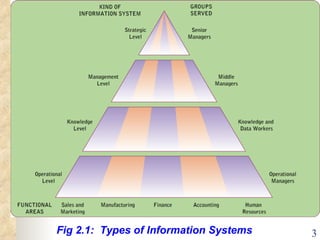
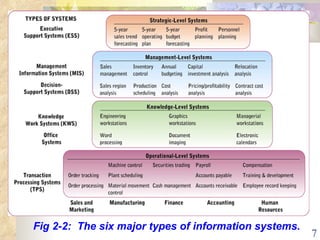
Fig 2.1:  Types of Information Systems
Different kinds of systems Information systems that   monitor the elementary activities and transactions   of the organization  . Information systems that   support knowledge and data workers   in an organization. 1 / 2    Operational-level systems    Knowledge-level systems 2.1
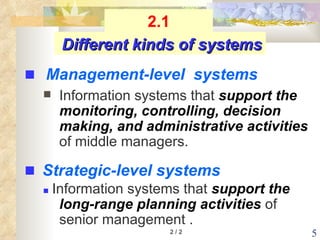
Information systems that  support the monitoring, controlling, decision  making, and administrative activities  of middle managers.    Information systems that  support the long-range planning activities  of senior management . 2 / 2 Different kinds of systems    Strategic-level systems    Management-level  systems 2.1
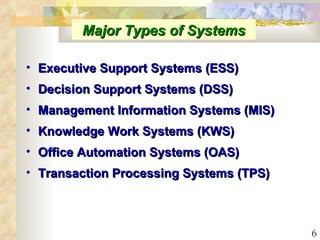
Major Types of Systems Executive Support Systems (ESS) Decision Support Systems (DSS) Management Information Systems (MIS) Knowledge Work Systems (KWS) Office Automation Systems (OAS) Transaction Processing Systems (TPS)
Fig 2-2:  The six major types of information systems.
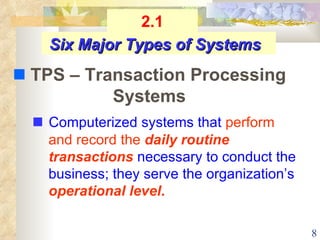
   Computerized systems that  perform and record the   daily routine transactions  necessary to conduct the business; they serve the organization’s  operational level . Six Major Types of Systems    TPS – Transaction Processing Systems 2.1
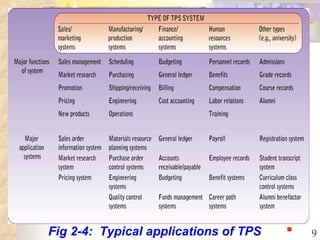
Fig 2-4:  Typical applications of TPS ■
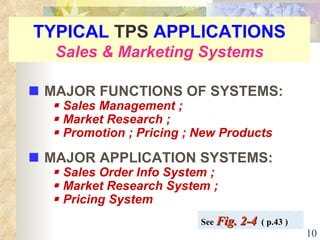
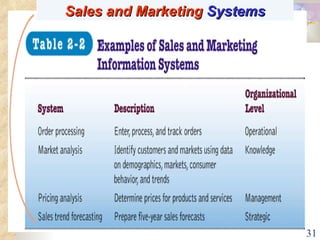
TYPICAL  TPS  APPLICATIONS Sales & Marketing Systems    MAJOR FUNCTIONS OF SYSTEMS:    Sales Management ;    Market Research ;    Promotion ; Pricing ; New Products    MAJOR APPLICATION SYSTEMS:    Sales Order Info System ;     Market Research System ;    Pricing System See  Fig. 2-4   ( p.43 )
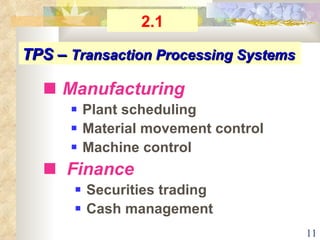
TPS –  Transaction Processing Systems    Manufacturing      Plant scheduling    Material movement control    Machine control    Finance      Securities trading     Cash management 2.1
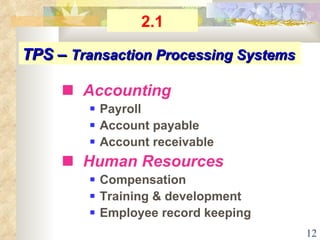
   Accounting    Payroll    Account payable    Account receivable    Human Resources    Compensation    Training & development    Employee record keeping TPS –  Transaction Processing Systems 2.1
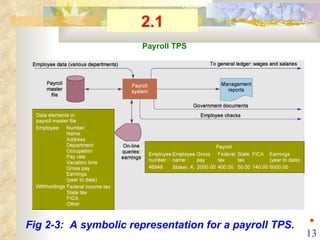
Fig 2-3:  A symbolic representation for a payroll TPS. Payroll TPS 2.1 ◆
   Information systems that  aid knowledge workers  in the  creation and integration of new knowledge  in the organization . Six Major Types of Systems    KWS – knowledge work systems 2.1 Example: Engineering work station
   Computer systems, such as word processing, electronic mail systems, and scheduling systems, that are  designed to  increase the productivity of data workers  in the office . Six Major Types of Systems    OAS – office automation systems 2.1
   Information systems at the  management level  of organization that  serve the functions of  planning, controlling, and decision making   by providing  routine  summary and exception   reports .   Six Major Types of Systems    MIS – Management Information Systems 2.1 Example: Annual budgeting
Structured and semi-structured decisions Report control oriented Past and present data Internal orientation MIS 2.1
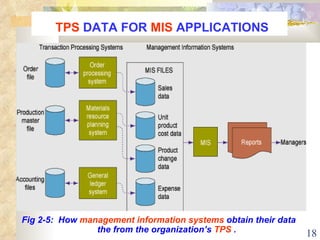
TPS  DATA FOR  MIS  APPLICATIONS Fig 2-5:  How  management information systems  obtain their data the from the organization’s  TPS  .
   Information systems  at the  management level  of an organization that  combine data and sophisticated analytical models   to support  non-routine  decision making . Six Major Types of Systems    DSS – Decision Support Systems 2.1 Example:   Contract cost analysis
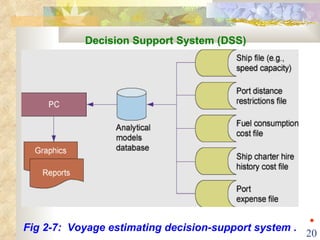
Fig 2-7:  Voyage estimating decision-support system . Decision Support System (DSS) ◆
   Sales and marketing        Sales management    Sales region analysis Manufacturing    Inventory control    Production scheduling MIS  &  DSS 2.1
   Finance    Annual budgeting    Cost analysis    Accounting    Capital investment analysis    Pricing / profitability analysis    Human Resource    Relocation analysis    Contract cost analysis MIS & DSS 2.1
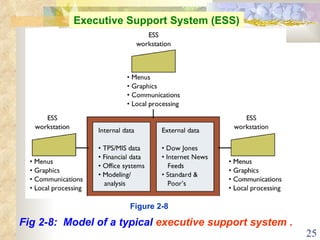
   Information system at the  organization’s  strategic level  designed  to address  unstructured decision making  through  advanced graphics   and communications.   Six Major Types of Systems    ESS  –  Executive Support  Systems 2.1 Example: 5-year operating plan
Top level management Designed to the individual Ties CEO to all levels Very expensive to keep up Extensive support staff ESS 2.1
Fig 2-8:  Model of a typical  executive support system . Executive Support System (ESS) Figure 2-8
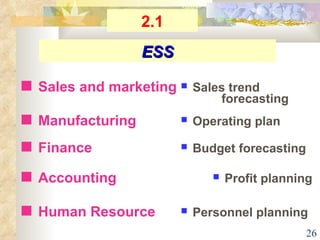
   Sales and marketing   Sales trend  forecasting    Manufacturing   Operating plan    Finance   Budget forecasting    Accounting   Profit planning    Human Resource   Personnel planning ESS 2.1
Characteristics of  Different Types of Information  Systems    Information inputs    Processing    Information outputs    Users See  Table 2-1   ( p.41 ) 2.1
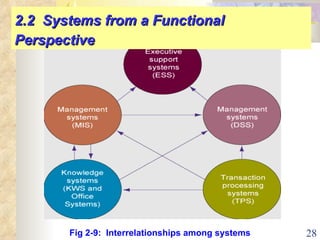
Fig 2-9:  Interrelationships among systems 2.2  Systems from a Functional Perspective
   SALES & MARKETING SYSTEMS    MANUFACTURING &  PRODUCTION  SYSTEMS    FINANCE & ACCOUNTING SYSTEMS    HUMAN RESOURCES SYSTEMS 2.2  Systems from a Functional Perspective
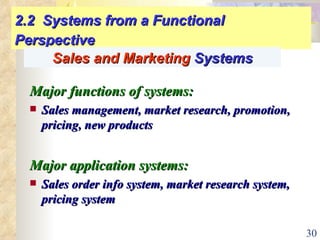
2.2  Systems from a Functional Perspective Major functions of systems: Sales management, market research, promotion, pricing, new products Major application systems: Sales order info system, market research system, pricing system Sales and Marketing  Systems
Sales and Marketing  Systems
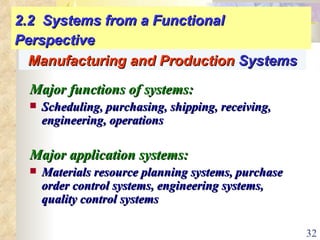
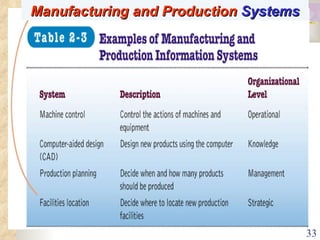
2.2  Systems from a Functional Perspective Major functions of systems: Scheduling, purchasing, shipping, receiving, engineering, operations Major application systems: Materials resource planning systems, purchase order control systems, engineering systems, quality control systems Manufacturing and Production  Systems
Manufacturing and Production  Systems
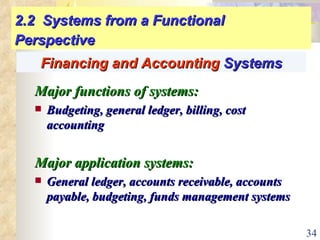
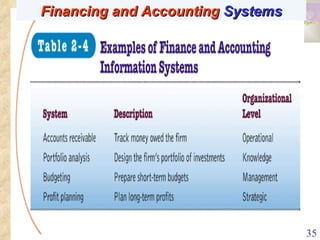
2.2  Systems from a Functional Perspective Major functions of systems: Budgeting, general ledger, billing, cost accounting Major application systems: General ledger, accounts receivable, accounts payable, budgeting, funds management systems Financing and Accounting  Systems
Financing and Accounting  Systems
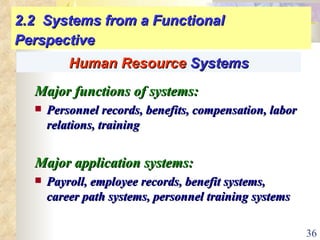
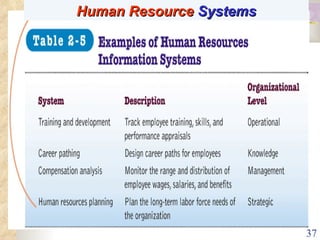
2.2  Systems from a Functional Perspective Major functions of systems: Personnel records, benefits, compensation, labor relations, training Major application systems: Payroll, employee records, benefit systems, career path systems, personnel training systems Human Resource  Systems
Human Resource  Systems
Business processes  Manner in which work is organized, coordinated, and focused to produce a valuable product or service Concrete work flows of material, information, and knowledge—sets of activities Unique ways to coordinate work, information, and knowledge Ways in which management chooses to coordinate work 2.3  Business Processes and    Information Systems
Manufacturing and production:  Assembling product, checking quality, producing bills of materials Sales and marketing:  Identifying customers, creating customer awareness, selling Examples of Business Processes 2.3  Business Processes and Information Systems
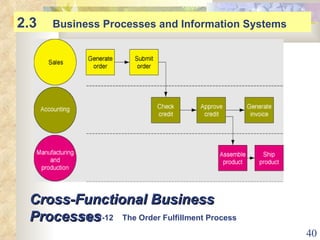
Cross-Functional Business Processes 2.3  Business Processes and Information Systems Fig. 2-12  The Order Fulfillment Process
Information systems help organizations   Achieve great efficiencies by automating  parts of processes  Rethink and streamline processes 2.3  Business Processes and Information Systems
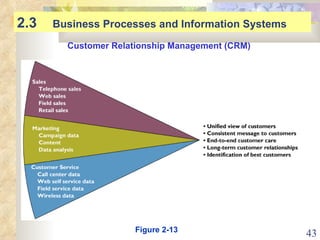
Customer Relationship Management (CRM) Manages all  ways used by firms to deal with existing and potential new customers Uses information system to coordinate entire business  processes of a firm Provides  end-to-end customer care Provides a unified view of customer across the company Consolidates customer data from multiple sources and  provides analytical tools for answering questions 2.3  Business Processes and Information Systems
2.3  Business Processes and Information Systems Customer Relationship Management (CRM) Figure 2-13
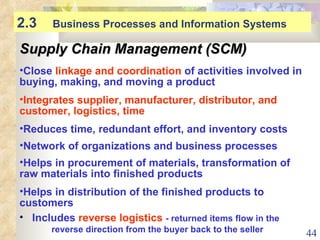
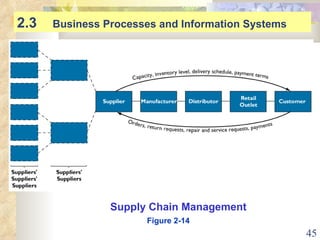
2.3  Business Processes and Information Systems Supply Chain Management (SCM) Close  linkage and coordination  of activities involved in buying, making, and moving a product Integrates supplier, manufacturer, distributor, and customer, logistics, time   Reduces time, redundant effort, and inventory costs Network of organizations and business processes Helps in procurement of materials, transformation of raw materials into finished products Helps in distribution of the finished products to customers Includes  reverse logistics   - returned items flow in the  reverse direction from the buyer back to the seller
2.3  Business Processes and Information Systems Supply Chain Management Figure 2-14
Decide when, what to produce, store, move Rapidly communicate orders  Communicate orders, track order status Check inventory availability, monitor levels Track shipments  Plan production based on actual demand  Rapidly communicate product design change Provide product specifications Share information about defect rates, returns 2.3  How Information Systems Facilitate  Supply Chain  Management
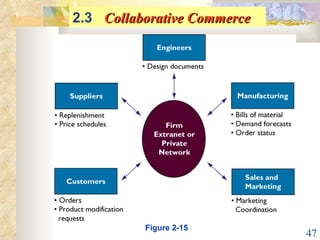
2.3  Collaborative Commerce   Figure 2-15
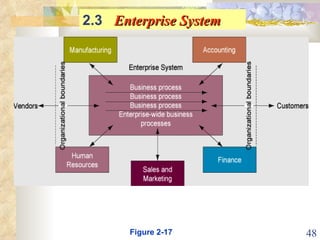
2.3  Enterprise System   Figure 2-17
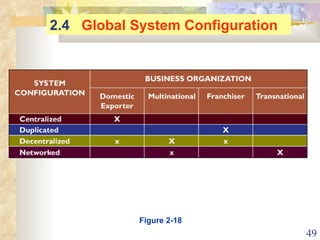
Figure 2-18 2.4  Global System Configuration
HOMEWORK  Chap.2 # 1  # 2  # 3 #  7  # 8  # 9   #  10:  What is CRM?   #  11:  What is SCM? #  12  ~  THE  END  ~

Information systems in the enterprise

  • 1.
    Management Information Systems - Chap 2 By: Prof. Y. Peter Chiu 2 / 2009
  • 2.
    Chap 2 Information Systems in the Enterprise 2.1 Key System Applications in the Organization 2.2 Systems from a Functional Perspective 2.3 Integrating Functions and Business Processes 2.4 International Information Systems
  • 3.
    Fig 2.1: Types of Information Systems
  • 4.
    Different kinds ofsystems Information systems that monitor the elementary activities and transactions of the organization . Information systems that support knowledge and data workers in an organization. 1 / 2  Operational-level systems  Knowledge-level systems 2.1
  • 5.
    Information systems that support the monitoring, controlling, decision making, and administrative activities of middle managers.  Information systems that support the long-range planning activities of senior management . 2 / 2 Different kinds of systems  Strategic-level systems  Management-level systems 2.1
  • 6.
    Major Types ofSystems Executive Support Systems (ESS) Decision Support Systems (DSS) Management Information Systems (MIS) Knowledge Work Systems (KWS) Office Automation Systems (OAS) Transaction Processing Systems (TPS)
  • 7.
    Fig 2-2: The six major types of information systems.
  • 8.
    Computerized systems that perform and record the daily routine transactions necessary to conduct the business; they serve the organization’s operational level . Six Major Types of Systems  TPS – Transaction Processing Systems 2.1
  • 9.
    Fig 2-4: Typical applications of TPS ■
  • 10.
    TYPICAL TPS APPLICATIONS Sales & Marketing Systems  MAJOR FUNCTIONS OF SYSTEMS:  Sales Management ;  Market Research ;  Promotion ; Pricing ; New Products  MAJOR APPLICATION SYSTEMS:  Sales Order Info System ;  Market Research System ;  Pricing System See Fig. 2-4 ( p.43 )
  • 11.
    TPS – Transaction Processing Systems  Manufacturing  Plant scheduling  Material movement control  Machine control  Finance  Securities trading  Cash management 2.1
  • 12.
    Accounting  Payroll  Account payable  Account receivable  Human Resources  Compensation  Training & development  Employee record keeping TPS – Transaction Processing Systems 2.1
  • 13.
    Fig 2-3: A symbolic representation for a payroll TPS. Payroll TPS 2.1 ◆
  • 14.
    Information systems that aid knowledge workers in the creation and integration of new knowledge in the organization . Six Major Types of Systems  KWS – knowledge work systems 2.1 Example: Engineering work station
  • 15.
    Computer systems, such as word processing, electronic mail systems, and scheduling systems, that are designed to increase the productivity of data workers in the office . Six Major Types of Systems  OAS – office automation systems 2.1
  • 16.
    Information systems at the management level of organization that serve the functions of planning, controlling, and decision making by providing routine summary and exception reports . Six Major Types of Systems  MIS – Management Information Systems 2.1 Example: Annual budgeting
  • 17.
    Structured and semi-structureddecisions Report control oriented Past and present data Internal orientation MIS 2.1
  • 18.
    TPS DATAFOR MIS APPLICATIONS Fig 2-5: How management information systems obtain their data the from the organization’s TPS .
  • 19.
    Information systems at the management level of an organization that combine data and sophisticated analytical models to support non-routine decision making . Six Major Types of Systems  DSS – Decision Support Systems 2.1 Example: Contract cost analysis
  • 20.
    Fig 2-7: Voyage estimating decision-support system . Decision Support System (DSS) ◆
  • 21.
    Sales and marketing  Sales management  Sales region analysis Manufacturing  Inventory control  Production scheduling MIS & DSS 2.1
  • 22.
    Finance  Annual budgeting  Cost analysis  Accounting  Capital investment analysis  Pricing / profitability analysis  Human Resource  Relocation analysis  Contract cost analysis MIS & DSS 2.1
  • 23.
    Information system at the organization’s strategic level designed to address unstructured decision making through advanced graphics and communications. Six Major Types of Systems  ESS – Executive Support Systems 2.1 Example: 5-year operating plan
  • 24.
    Top level managementDesigned to the individual Ties CEO to all levels Very expensive to keep up Extensive support staff ESS 2.1
  • 25.
    Fig 2-8: Model of a typical executive support system . Executive Support System (ESS) Figure 2-8
  • 26.
    Sales and marketing  Sales trend forecasting  Manufacturing  Operating plan  Finance  Budget forecasting  Accounting  Profit planning  Human Resource  Personnel planning ESS 2.1
  • 27.
    Characteristics of Different Types of Information Systems  Information inputs  Processing  Information outputs  Users See Table 2-1 ( p.41 ) 2.1
  • 28.
    Fig 2-9: Interrelationships among systems 2.2 Systems from a Functional Perspective
  • 29.
    SALES & MARKETING SYSTEMS  MANUFACTURING & PRODUCTION SYSTEMS  FINANCE & ACCOUNTING SYSTEMS  HUMAN RESOURCES SYSTEMS 2.2 Systems from a Functional Perspective
  • 30.
    2.2 Systemsfrom a Functional Perspective Major functions of systems: Sales management, market research, promotion, pricing, new products Major application systems: Sales order info system, market research system, pricing system Sales and Marketing Systems
  • 31.
  • 32.
    2.2 Systemsfrom a Functional Perspective Major functions of systems: Scheduling, purchasing, shipping, receiving, engineering, operations Major application systems: Materials resource planning systems, purchase order control systems, engineering systems, quality control systems Manufacturing and Production Systems
  • 33.
  • 34.
    2.2 Systemsfrom a Functional Perspective Major functions of systems: Budgeting, general ledger, billing, cost accounting Major application systems: General ledger, accounts receivable, accounts payable, budgeting, funds management systems Financing and Accounting Systems
  • 35.
  • 36.
    2.2 Systemsfrom a Functional Perspective Major functions of systems: Personnel records, benefits, compensation, labor relations, training Major application systems: Payroll, employee records, benefit systems, career path systems, personnel training systems Human Resource Systems
  • 37.
  • 38.
    Business processes Manner in which work is organized, coordinated, and focused to produce a valuable product or service Concrete work flows of material, information, and knowledge—sets of activities Unique ways to coordinate work, information, and knowledge Ways in which management chooses to coordinate work 2.3 Business Processes and Information Systems
  • 39.
    Manufacturing and production: Assembling product, checking quality, producing bills of materials Sales and marketing: Identifying customers, creating customer awareness, selling Examples of Business Processes 2.3 Business Processes and Information Systems
  • 40.
    Cross-Functional Business Processes2.3 Business Processes and Information Systems Fig. 2-12 The Order Fulfillment Process
  • 41.
    Information systems helporganizations Achieve great efficiencies by automating parts of processes Rethink and streamline processes 2.3 Business Processes and Information Systems
  • 42.
    Customer Relationship Management(CRM) Manages all ways used by firms to deal with existing and potential new customers Uses information system to coordinate entire business processes of a firm Provides end-to-end customer care Provides a unified view of customer across the company Consolidates customer data from multiple sources and provides analytical tools for answering questions 2.3 Business Processes and Information Systems
  • 43.
    2.3 BusinessProcesses and Information Systems Customer Relationship Management (CRM) Figure 2-13
  • 44.
    2.3 BusinessProcesses and Information Systems Supply Chain Management (SCM) Close linkage and coordination of activities involved in buying, making, and moving a product Integrates supplier, manufacturer, distributor, and customer, logistics, time Reduces time, redundant effort, and inventory costs Network of organizations and business processes Helps in procurement of materials, transformation of raw materials into finished products Helps in distribution of the finished products to customers Includes reverse logistics - returned items flow in the reverse direction from the buyer back to the seller
  • 45.
    2.3 BusinessProcesses and Information Systems Supply Chain Management Figure 2-14
  • 46.
    Decide when, whatto produce, store, move Rapidly communicate orders Communicate orders, track order status Check inventory availability, monitor levels Track shipments Plan production based on actual demand Rapidly communicate product design change Provide product specifications Share information about defect rates, returns 2.3 How Information Systems Facilitate Supply Chain Management
  • 47.
    2.3 CollaborativeCommerce Figure 2-15
  • 48.
    2.3 EnterpriseSystem Figure 2-17
  • 49.
    Figure 2-18 2.4 Global System Configuration
  • 50.
    HOMEWORK Chap.2# 1 # 2 # 3 # 7 # 8 # 9 # 10: What is CRM? # 11: What is SCM? # 12 ~ THE END ~