Systems Analysis and Design
9th Edition
Chapter 1
Introduction to Systems Analysis and
Design
Chapter Objectives
• Discuss the impact of information technology on
business strategy and success
• Define an information system and describe its
components
• Explain how profiles and models can represent
business functions and operations
• Explain how the Internet has affected business
strategies and relationships
• Identify various types of information systems and
explain who uses them
Chapter Objectives
• Distinguish between structured analysis, object-
oriented analysis, and agile methods
• Compare the traditional waterfall model with
agile methods and models
• Apply five basic guidelines for systems
development
• Discuss the role of the information technology
department and the systems analysts who work
there
Introduction
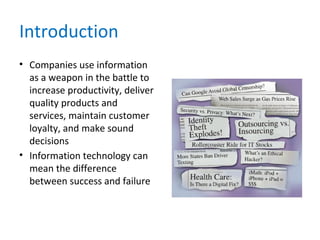
• Companies use information
as a weapon in the battle to
increase productivity, deliver
quality products and
services, maintain customer
loyalty, and make sound
decisions
• Information technology can
mean the difference
between success and failure
The Impact of Information Technology
• Information Technology (IT)
– Combination of hardware and software products
and services that companies use to manage,
access, communicate, and share information
• The Future
– Three issues that will shape the future
– Changes in world
– Changes in technology
– Changes in client demand
The Impact of Information Technology
• Systems Development
– Business information systems are developed by
people who are technically qualified, business-
oriented, and highly motivated
– Must be good communicators with strong
analytical and critical thinking skills
The Impact of Information Technology
• Systems Analysis and Design
– Systems Analysis and Design
– Step-by-step process for developing high-quality
information systems
– Systems Analyst
– Plan, develop, and maintain information systems
The Impact of Information Technology
• Who develops Information Systems?
– In-house applications
– Software packages
– Internet-based application services
– Outsourcing
– Custom solutions
– Enterprise-wide software strategies
– How versus What
Information System Components
• A system is a set of related components that produces
specific results
• A Mission-critical system is one that is vital to a
company’s operations
• Data consists of basic facts that are the system’s raw
material
• Information is data that has been transformed into
output that is valuable to users
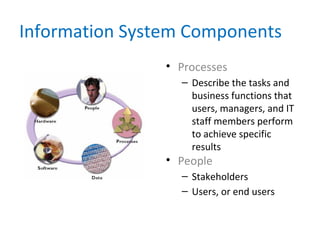
• Information systems have five key components:
hardware, software, data, processes, and people
Information System Components
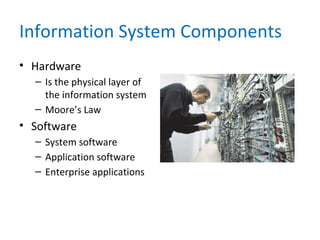
• Hardware
– Is the physical layer of
the information system
– Moore’s Law
• Software
– System software
– Application software
– Enterprise applications
Information System Components
• Software
– Horizontal system
– Vertical system
– Legacy systems
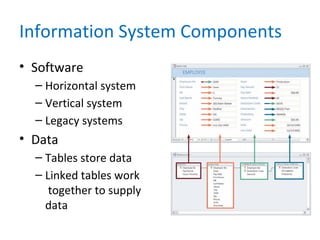
• Data
– Tables store data
– Linked tables work
together to supply
data
Information System Components
• Processes
– Describe the tasks and
business functions that
users, managers, and IT
staff members perform
to achieve specific
results
• People
– Stakeholders
– Users, or end users
Understanding The Business
• Business Process Modeling
• Business Profile
• Business Models
– Business model
– Business process
– Business process reengineering (BPR)
Understanding The Business
• New Kinds of
Companies
– Production-oriented
– Service-oriented
– Internet-dependent
– Dot-com (.com)
– Brick-and-mortar
Impact of the Internet
• E-Commerce or I-Commerce
• B2C (Business-to-Consumer)
• B2B (Business-to-Business)
– EDI
– Extensible markup language (XML)
– Supply chain management (SCM)
– Supplier relationship management (SRM)
Business Information Systems
• In the past, IT managers divided systems into
categories based on the user group the
system served
– Office systems
– Operational systems
– Decision support systems
– Executive information systems
Business Information Systems
• Today, identify a system by its functions and
features, rather than by its users
– Enterprise computing systems
– Transaction processing systems
– Business support systems
– Knowledge management systems
– User productivity systems
Business Information Systems
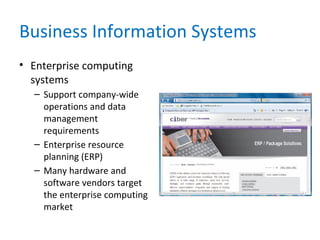
• Enterprise computing
systems
– Support company-wide
operations and data
management
requirements
– Enterprise resource
planning (ERP)
– Many hardware and
software vendors target
the enterprise computing
market
Business Information Systems
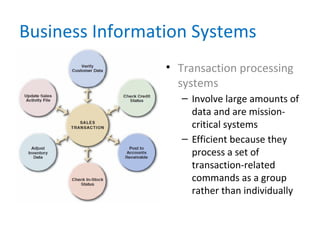
• Transaction processing
systems
– Involve large amounts of
data and are mission-
critical systems
– Efficient because they
process a set of
transaction-related
commands as a group
rather than individually
Business Information Systems
• Business support systems
– Provide job-related information to users at all
levels of a company
– Management information systems (MIS)
– Radio frequency identification (RFID)
– What-if
Business Information Systems
• Knowledge management systems
– Called expert systems
– Simulate human reasoning by combining a
knowledge base and inference rules
– Many knowledge management systems use a
technique called fuzzy logic
Business Information Systems
• User productivity systems
– Technology that improves productivity
– Groupware
• Information systems integration
– Most large companies require systems that
combine transaction processing, business support,
knowledge management, and user productivity
features
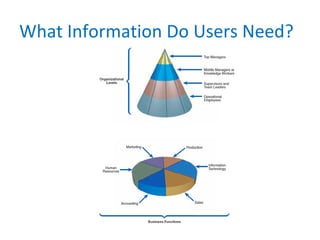
What Information Do Users Need?
Systems Development Tools
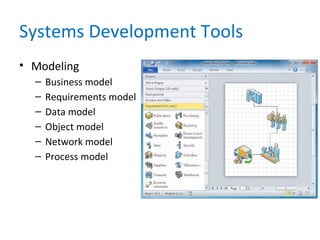
• Modeling
– Business model
– Requirements model
– Data model
– Object model
– Network model
– Process model
Systems Development Tools
• Prototyping
– Prototype
– Speeds up the development process significantly
– Important decisions might be made too early,
before business or IT issues are thoroughly
understood
– Can be an extremely valuable tool
Systems Development Tools
• Computer-Aided Systems Engineering (CASE)
Tools
– Also called computer-aided software engineering
– CASE tools
– Can generate program code, which speeds the
implementation process
Systems Development Methods
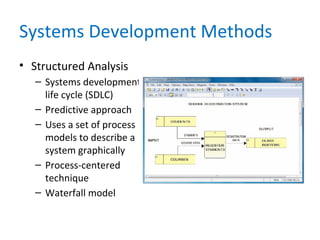
• Structured Analysis
– Systems development
life cycle (SDLC)
– Predictive approach
– Uses a set of process
models to describe a
system graphically
– Process-centered
technique
– Waterfall model
Systems Development Methods
• Structured Analysis
– Deliverable or end product
– Disadvantage in the built-in structure of the SDLC,
because the waterfall model does not emphasize
interactivity among the phases
– This criticism can be valid if the SDLC phases are
followed too rigidly
– Adjacent phases usually interact
Systems Development Methods
• Structured Analysis
– The SDLC model usually includes five steps
– Systems planning
– Systems analysis
– Systems design
– Systems implementation
– Systems support and security
Systems Development Methods
• Structured Analysis
– Systems Planning
– Systems planning phase
– Systems request – begins the process & describes
problems or desired changes
– Purpose of this phase is to perform a preliminary
investigation
– Key part of preliminary investigation is a feasibility study
Systems Development Methods
• Structured Analysis
– Systems Analysis
– Deliverable is the System requirements document
– Systems Design
– Deliverable is system design specification
– Management and user involvement is critical
Systems Development Methods
• Structured Analysis
– Systems Implementation
– New system is constructed
– Systems Support and Security
– A well-designed system must be secure, reliable,
maintainable, and scalable
– Most information systems need to be updated significantly
or replaced after several years of operation
Systems Development Methods
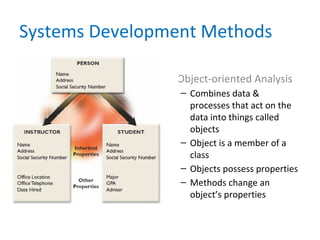
• Object-oriented Analysis
– Combines data &
processes that act on the
data into things called
objects
– Object is a member of a
class
– Objects possess properties
– Methods change an
object’s properties
Systems Development Methods
• Object-Oriented Analysis
– A message requests specific behavior or
information from another object
– Usually follow a series of analysis and design
phases that are similar to the SDLC
– Interactive model
Systems Development Methods
• Agile Methods
– Are the newest development
– Emphasize continuous feedback
– Iterative development
– Agile community has published the Agile
Manifesto
– Spiral model
Systems Development Methods
• Agile Methods
– Agile process determines the end result
– Other adaptive variations and related methods
exist
– Two examples are Scrum and Extreme
Programming (XP)
– Analysts should understand the pros and cons of
any approach before selecting a development
method
Systems Development Methods
• Other Development Methods
– Joint application development (JAD)
– Rapid application development (RAD)
– Might encounter other systems development
techniques
– Rational Unified Process (RUP®)
– Microsoft Solutions Framework (MSF)
Systems Development Guidelines
• Develop a project plan
• Involve users and listen carefully to them
• Use project management tools to identify
tasks and milestones
• Develop accurate cost and benefit information
• Remain flexible
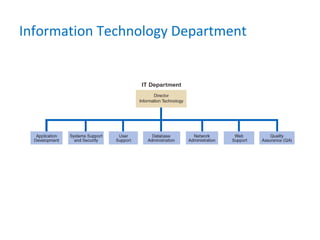
Information Technology Department
The Systems Analyst
• Responsibilities
– Translate business requirements into IT projects
• Knowledge, Skills, and Education
• Needs technical knowledge, strong oral and
written communication skills and analytic ability,
an understanding of business operations, and
critical thinking skills
• Certification
– Important credential
The Systems Analyst
• Career Opportunities
– Job titles
– Company organization
– Company size
– Corporate culture
– Salary, location, and future growth
Chapter Summary
• IT refers to the combination of hardware and
software resources that companies use to manage,
access, communicate, and share information
• The essential components of an information system
are hardware, software, data, processes, and people
• Successful companies offer a mix of products,
technical and financial services, consulting, and
customer support
Chapter Summary
• Information systems are identified as
enterprise computing systems, transaction
processing systems, business support systems,
knowledge management systems, or user
productivity systems
• Organization structure includes top managers,
middle managers and knowledge workers,
supervisors and team leaders
Chapter Summary
• The IT department develops, maintains and
operates a company’s information systems
• Systems analysts need a combination of
technical and business knowledge, analytical
ability, and communication skills
• Systems analysts need to consider salary,
location, and future growth potential when
making a career decision
Chapter Summary
• Chapter 1 complete

Sadchap01

  • 1.
    Systems Analysis andDesign 9th Edition Chapter 1 Introduction to Systems Analysis and Design
  • 2.
    Chapter Objectives • Discussthe impact of information technology on business strategy and success • Define an information system and describe its components • Explain how profiles and models can represent business functions and operations • Explain how the Internet has affected business strategies and relationships • Identify various types of information systems and explain who uses them
  • 3.
    Chapter Objectives • Distinguishbetween structured analysis, object- oriented analysis, and agile methods • Compare the traditional waterfall model with agile methods and models • Apply five basic guidelines for systems development • Discuss the role of the information technology department and the systems analysts who work there
  • 4.
    Introduction • Companies useinformation as a weapon in the battle to increase productivity, deliver quality products and services, maintain customer loyalty, and make sound decisions • Information technology can mean the difference between success and failure
  • 5.
    The Impact ofInformation Technology • Information Technology (IT) – Combination of hardware and software products and services that companies use to manage, access, communicate, and share information • The Future – Three issues that will shape the future – Changes in world – Changes in technology – Changes in client demand
  • 6.
    The Impact ofInformation Technology • Systems Development – Business information systems are developed by people who are technically qualified, business- oriented, and highly motivated – Must be good communicators with strong analytical and critical thinking skills
  • 7.
    The Impact ofInformation Technology • Systems Analysis and Design – Systems Analysis and Design – Step-by-step process for developing high-quality information systems – Systems Analyst – Plan, develop, and maintain information systems
  • 8.
    The Impact ofInformation Technology • Who develops Information Systems? – In-house applications – Software packages – Internet-based application services – Outsourcing – Custom solutions – Enterprise-wide software strategies – How versus What
  • 9.
    Information System Components •A system is a set of related components that produces specific results • A Mission-critical system is one that is vital to a company’s operations • Data consists of basic facts that are the system’s raw material • Information is data that has been transformed into output that is valuable to users • Information systems have five key components: hardware, software, data, processes, and people
  • 10.
    Information System Components •Hardware – Is the physical layer of the information system – Moore’s Law • Software – System software – Application software – Enterprise applications
  • 11.
    Information System Components •Software – Horizontal system – Vertical system – Legacy systems • Data – Tables store data – Linked tables work together to supply data
  • 12.
    Information System Components •Processes – Describe the tasks and business functions that users, managers, and IT staff members perform to achieve specific results • People – Stakeholders – Users, or end users
  • 13.
    Understanding The Business •Business Process Modeling • Business Profile • Business Models – Business model – Business process – Business process reengineering (BPR)
  • 14.
    Understanding The Business •New Kinds of Companies – Production-oriented – Service-oriented – Internet-dependent – Dot-com (.com) – Brick-and-mortar
  • 15.
    Impact of theInternet • E-Commerce or I-Commerce • B2C (Business-to-Consumer) • B2B (Business-to-Business) – EDI – Extensible markup language (XML) – Supply chain management (SCM) – Supplier relationship management (SRM)
  • 16.
    Business Information Systems •In the past, IT managers divided systems into categories based on the user group the system served – Office systems – Operational systems – Decision support systems – Executive information systems
  • 17.
    Business Information Systems •Today, identify a system by its functions and features, rather than by its users – Enterprise computing systems – Transaction processing systems – Business support systems – Knowledge management systems – User productivity systems
  • 18.
    Business Information Systems •Enterprise computing systems – Support company-wide operations and data management requirements – Enterprise resource planning (ERP) – Many hardware and software vendors target the enterprise computing market
  • 19.
    Business Information Systems •Transaction processing systems – Involve large amounts of data and are mission- critical systems – Efficient because they process a set of transaction-related commands as a group rather than individually
  • 20.
    Business Information Systems •Business support systems – Provide job-related information to users at all levels of a company – Management information systems (MIS) – Radio frequency identification (RFID) – What-if
  • 21.
    Business Information Systems •Knowledge management systems – Called expert systems – Simulate human reasoning by combining a knowledge base and inference rules – Many knowledge management systems use a technique called fuzzy logic
  • 22.
    Business Information Systems •User productivity systems – Technology that improves productivity – Groupware • Information systems integration – Most large companies require systems that combine transaction processing, business support, knowledge management, and user productivity features
  • 23.
  • 24.
    Systems Development Tools •Modeling – Business model – Requirements model – Data model – Object model – Network model – Process model
  • 25.
    Systems Development Tools •Prototyping – Prototype – Speeds up the development process significantly – Important decisions might be made too early, before business or IT issues are thoroughly understood – Can be an extremely valuable tool
  • 26.
    Systems Development Tools •Computer-Aided Systems Engineering (CASE) Tools – Also called computer-aided software engineering – CASE tools – Can generate program code, which speeds the implementation process
  • 27.
    Systems Development Methods •Structured Analysis – Systems development life cycle (SDLC) – Predictive approach – Uses a set of process models to describe a system graphically – Process-centered technique – Waterfall model
  • 28.
    Systems Development Methods •Structured Analysis – Deliverable or end product – Disadvantage in the built-in structure of the SDLC, because the waterfall model does not emphasize interactivity among the phases – This criticism can be valid if the SDLC phases are followed too rigidly – Adjacent phases usually interact
  • 29.
    Systems Development Methods •Structured Analysis – The SDLC model usually includes five steps – Systems planning – Systems analysis – Systems design – Systems implementation – Systems support and security
  • 30.
    Systems Development Methods •Structured Analysis – Systems Planning – Systems planning phase – Systems request – begins the process & describes problems or desired changes – Purpose of this phase is to perform a preliminary investigation – Key part of preliminary investigation is a feasibility study
  • 31.
    Systems Development Methods •Structured Analysis – Systems Analysis – Deliverable is the System requirements document – Systems Design – Deliverable is system design specification – Management and user involvement is critical
  • 32.
    Systems Development Methods •Structured Analysis – Systems Implementation – New system is constructed – Systems Support and Security – A well-designed system must be secure, reliable, maintainable, and scalable – Most information systems need to be updated significantly or replaced after several years of operation
  • 33.
    Systems Development Methods •Object-oriented Analysis – Combines data & processes that act on the data into things called objects – Object is a member of a class – Objects possess properties – Methods change an object’s properties
  • 34.
    Systems Development Methods •Object-Oriented Analysis – A message requests specific behavior or information from another object – Usually follow a series of analysis and design phases that are similar to the SDLC – Interactive model
  • 35.
    Systems Development Methods •Agile Methods – Are the newest development – Emphasize continuous feedback – Iterative development – Agile community has published the Agile Manifesto – Spiral model
  • 36.
    Systems Development Methods •Agile Methods – Agile process determines the end result – Other adaptive variations and related methods exist – Two examples are Scrum and Extreme Programming (XP) – Analysts should understand the pros and cons of any approach before selecting a development method
  • 37.
    Systems Development Methods •Other Development Methods – Joint application development (JAD) – Rapid application development (RAD) – Might encounter other systems development techniques – Rational Unified Process (RUP®) – Microsoft Solutions Framework (MSF)
  • 38.
    Systems Development Guidelines •Develop a project plan • Involve users and listen carefully to them • Use project management tools to identify tasks and milestones • Develop accurate cost and benefit information • Remain flexible
  • 39.
  • 40.
    The Systems Analyst •Responsibilities – Translate business requirements into IT projects • Knowledge, Skills, and Education • Needs technical knowledge, strong oral and written communication skills and analytic ability, an understanding of business operations, and critical thinking skills • Certification – Important credential
  • 41.
    The Systems Analyst •Career Opportunities – Job titles – Company organization – Company size – Corporate culture – Salary, location, and future growth
  • 42.
    Chapter Summary • ITrefers to the combination of hardware and software resources that companies use to manage, access, communicate, and share information • The essential components of an information system are hardware, software, data, processes, and people • Successful companies offer a mix of products, technical and financial services, consulting, and customer support
  • 43.
    Chapter Summary • Informationsystems are identified as enterprise computing systems, transaction processing systems, business support systems, knowledge management systems, or user productivity systems • Organization structure includes top managers, middle managers and knowledge workers, supervisors and team leaders
  • 44.
    Chapter Summary • TheIT department develops, maintains and operates a company’s information systems • Systems analysts need a combination of technical and business knowledge, analytical ability, and communication skills • Systems analysts need to consider salary, location, and future growth potential when making a career decision
  • 45.