SDLC
Information – A Key Resource
1-1
• Fuels business and can be the critical
factor in determining the success or
failure of a business
• Needs to be managed correctly
• Managing computer-generated
information differs from handling
manually produced data
Major Topics
1-2
• Fundamentals of different kinds of
information systems
• Roles of systems analysts
• Phases in the systems development life
cycle as they relate to Human- Computer
Interaction (HCI) factors
• Computer-Aided Software Engineering
(CASE) tools
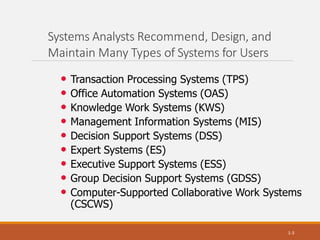
Systems Analysts Recommend, Design, and
Maintain Many Types of Systems for Users
1-3
• Transaction Processing Systems (TPS)
• Office Automation Systems (OAS)
• Knowledge Work Systems (KWS)
• Management Information Systems (MIS)
• Decision Support Systems (DSS)
• Expert Systems (ES)
• Executive Support Systems (ESS)
• Group Decision Support Systems (GDSS)
• Computer-Supported Collaborative Work Systems
(CSCWS)
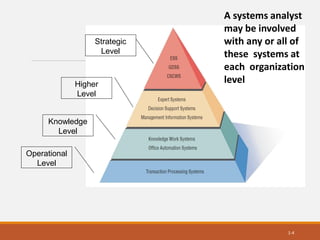
Strategic
Level
Operational
Level
1-4
Knowledge
Level
Higher
Level
A systems analyst
may be involved
with any or all of
these systems at
each organization
level
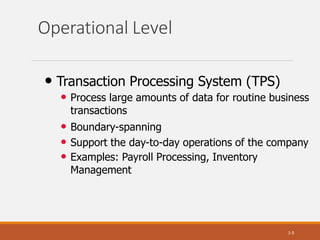
Operational Level
1-5
• Transaction Processing System (TPS)
• Process large amounts of data for routine business
transactions
• Boundary-spanning
• Support the day-to-day operations of the company
• Examples: Payroll Processing, Inventory
Management
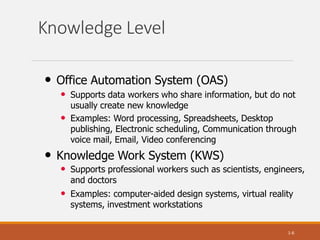
Knowledge Level
1-6
• Office Automation System (OAS)
• Supports data workers who share information, but do not
usually create new knowledge
• Examples: Word processing, Spreadsheets, Desktop
publishing, Electronic scheduling, Communication through
voice mail, Email, Video conferencing
• Knowledge Work System (KWS)
• Supports professional workers such as scientists, engineers,
and doctors
• Examples: computer-aided design systems, virtual reality
systems, investment workstations
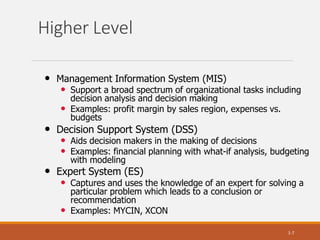
Higher Level
1-7
• Management Information System (MIS)
• Support a broad spectrum of organizational tasks including
decision analysis and decision making
• Examples: profit margin by sales region, expenses vs.
budgets
• Decision Support System (DSS)
• Aids decision makers in the making of decisions
• Examples: financial planning with what-if analysis, budgeting
with modeling
• Expert System (ES)
• Captures and uses the knowledge of an expert for solving a
particular problem which leads to a conclusion or
recommendation
• Examples: MYCIN, XCON
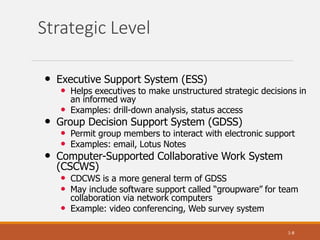
Strategic Level
1-8
• Executive Support System (ESS)
• Helps executives to make unstructured strategic decisions in
an informed way
• Examples: drill-down analysis, status access
• Group Decision Support System (GDSS)
• Permit group members to interact with electronic support
• Examples: email, Lotus Notes
• Computer-Supported Collaborative Work System
(CSCWS)
• CDCWS is a more general term of GDSS
• May include software support called “groupware” for team
collaboration via network computers
• Example: video conferencing, Web survey system
Integrating New Technologies into
Traditional Systems
1-9
• Ecommerce and Web Systems
• Enterprise Resource Planning Systems
• Wireless Systems
• Open Source Software
• Need for Systems Analysis and Design
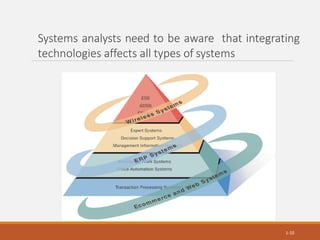
Systems analysts need to be aware that integrating
technologies affects all types of systems
1-10
Ecommerce and Web Systems
1-11
• Benefits
• Increasing user awareness of the availability of a
service, product, industry, person, or group
• The possibility of 24-hour access for users
• Improving the usefulness and usability of interface
design
• Creating a system that can extend globally rather
than remain local, thus reaching people in remote
locations without worry of the time zone in which
they are located
Enterprise Resource Planning
Systems (ERP)
1-12
• Performs integration of many information
systems existing on different management
levels and within different functions
• Example: SAP, Oracle
Wireless Systems
1-13
• System analyst may be asked to design
standard or wireless communication networks
that integrate voice, video and email into
organizational intranets or industry extranets
• System analyst may also be asked to develop
intelligent agents
• Example: Microsoft's new software based on
Bayesian statistics
• Wireless communication is referred as m-
commerce (mobile commerce)
Open Source Software
1-14
• An alternative of traditional software
development where proprietary code is
hidden from the users
• Open source software is free to distribute,
share and modify
• Characterized as a philosophy rather than
simply the process of creating new software
• Example: Linux Operating System, Apache
Web Server, Mozilla Firefox Web browser
Need for Systems Analysis and
Design
• Installing a system without proper
planning leads to great user dissatisfaction
and frequently causes the system to fall
into disuse
• Lends structure to the analysis and design
of information systems
• A series of processes systematically
undertaken to improve a business through
the use of computerized information
systems
1-15
Roles of the Systems Analyst
1-16
• The analyst must be able to work with
people of all descriptions and be
experienced in working with computers
• Three primary roles:
• Consultant
• Supporting Expert
• Agent of change
Qualities of the Systems Analyst
1-17
• Problem solver
• Communicator
• Strong personal and professional ethics
• Self-disciplined and self-motivated
Systems Development Life Cycle
(SDLC)
1-18
• The systems development life cycle is a
phased approach to solving business
problems
• Developed through the use of a specific
cycle of analyst and user activities
• Each phase has unique user activities
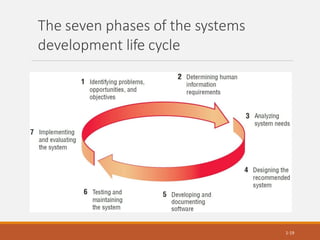
The seven phases of the systems
development life cycle
1-19
Incorporating Human-Computer
Interaction (HCI) Considerations
1-20
• The demand for analysts who are
capable of incorporating HCI into the
systems development process keeps
increasing, as companies begin to
realize that the quality of systems and
the quality of work life can be improved
by taking a human-centered approach
at the outset of a project
Identifying Problems,
Opportunities, and Objectives
1-21
• Activity:
• Interviewing user management
• Summarizing the knowledge obtained
• Estimating the scope of the project
• Documenting the results
• Output:
• Feasibility report containing problem definition
and objective summaries from which management
can make a decision on whether to proceed with
the proposed project
Determining Human Information
Requirements
1-22
• Activity:
• Interviewing
• Sampling and investing hard data
• Questionnaires
• Observe the decision maker’s behavior and environment
• Prototyping
• Learn the who, what, where, when, how, and why of the
current system
• Output:
• Analyst understands how users accomplish their work when
interacting with a computer; and begin to know how to
make the new system more useful and usable. The analyst
should also know the business functions and have complete
information on the people, goals, data and procedure
involved
Analyzing System Needs
1-23
• Activity:
• Create data flow diagrams
• Complete the data dictionary
• Analyze the structured decisions made
• Prepare and present the system proposal
• Output:
• Recommendation on what, if anything, should
be done
Designing the Recommended
System
1-24
• Activity:
• Design procedures for data entry
• Design the human-computer interface
• Design system controls
• Design files and/or database
• Design backup procedures
• Output
• Model of the actual system
Developing and Documenting
Software
1-25
• Activity:
• System analyst works with programmers to develop any
original software
• Works with users to develop effective documentation
• Programmers design, code, and remove syntactical errors
from computer programs
• Document software with help files, procedure manuals,
and Web sites with Frequently Asked Questions
• Output:
• Computer programs
• System documentation
Testing and Maintaining the
System
1-26
• Activity:
• Test the information system
• System maintenance
• Maintenance documentation
• Output:
• Problems, if any
• Updated programs
• Documentation
Implementing and
Evaluating the System
1-27
• Activity:
• Train users
• Analyst plans smooth conversion from old
system to new system
• Review and evaluate system
• Output:
• Trained personnel
• Installed system
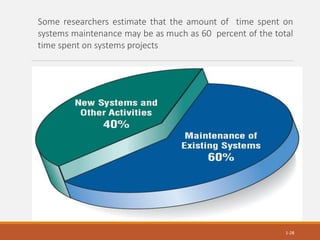
Some researchers estimate that the amount of time spent on
systems maintenance may be as much as 60 percent of the total
time spent on systems projects
1-28
The Impact of Maintenance
1-29
• Maintenance is performed for two
reasons
• Removing software errors, and
• Enhancing existing software
• Over time the cost of continued
maintenance will be greater than that of
creating an entirely new system. At that
point it becomes more feasible to
perform a new systems study
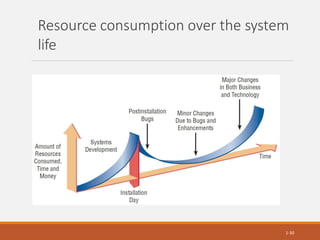
Resource consumption over the system
life
1-30
Approaches to Structured Analysis and Design
and to the Systems Development Life Cycle
1-31
•Traditional systems development life
cycle
•CASE systems development life
cycle
•Object-Oriented Systems Analysis
and Design
Case Tools
• CASE tools are productivity tools for
systems analysts that have been
created explicitly to improve their
routine work through the use of
automated support
• Reasons for using CASE tools
• Increasing Analyst Productivity
• Improving Analyst-User Communication
• Integrating Life Cycle Activities
• Accurately Assessing Maintenance Changes
1-32
Case Tool Classifications
1-33
• Upper CASE tools perform analysis
and design
• Lower CASE tools generate
programs from CASE design
• Integrated CASE tools perform both
upper and lower CASE functions
Upper CASE Tools
1-34
• Create and modify the system
design
• Help in modeling organizational
requirements and defining system
boundaries
• Can also support prototyping of
screen and report designs
Lower CASE Tools
1-35
• Lower CASE tools generate
computer source code from the
CASE design
• Source code is usually generated in
several languages
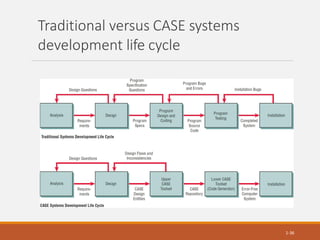
Traditional versus CASE systems
development life cycle
1-36
Object-Oriented Systems
Analysis and Design
1-37
• Alternate approach to the structured approach of the
SDLC that is intended to facilitate the development
of systems that must change rapidly in response to
dynamic business environments
• Analysis is performed on a small part of the system
followed by design and implementation. The cycle
repeats with analysis, design and implementation
of the next part and this repeats until the project is
complete
Alternate Approaches to Structured Analysis
and Design and to the Systems Development
Life Cycle
•Agile approach
• Prototyping
• ETHICS
• Project champion
• Soft Systems Methodology
• Multiview
1-38
Summary
1-39
• Information is a key resource
• Systems analysts deal with many types of
information systems
• Integration of traditional systems with new
technologies
• Roles and qualities of the systems analyst
• The systems Development Life Cycle
• CASE tools
• Alternatives to structured analysis and design and to
the SDLC

SDLC 21.11.2022.pdf

  • 1.
    SDLC Information – AKey Resource 1-1 • Fuels business and can be the critical factor in determining the success or failure of a business • Needs to be managed correctly • Managing computer-generated information differs from handling manually produced data
  • 2.
    Major Topics 1-2 • Fundamentalsof different kinds of information systems • Roles of systems analysts • Phases in the systems development life cycle as they relate to Human- Computer Interaction (HCI) factors • Computer-Aided Software Engineering (CASE) tools
  • 3.
    Systems Analysts Recommend,Design, and Maintain Many Types of Systems for Users 1-3 • Transaction Processing Systems (TPS) • Office Automation Systems (OAS) • Knowledge Work Systems (KWS) • Management Information Systems (MIS) • Decision Support Systems (DSS) • Expert Systems (ES) • Executive Support Systems (ESS) • Group Decision Support Systems (GDSS) • Computer-Supported Collaborative Work Systems (CSCWS)
  • 4.
    Strategic Level Operational Level 1-4 Knowledge Level Higher Level A systems analyst maybe involved with any or all of these systems at each organization level
  • 5.
    Operational Level 1-5 • TransactionProcessing System (TPS) • Process large amounts of data for routine business transactions • Boundary-spanning • Support the day-to-day operations of the company • Examples: Payroll Processing, Inventory Management
  • 6.
    Knowledge Level 1-6 • OfficeAutomation System (OAS) • Supports data workers who share information, but do not usually create new knowledge • Examples: Word processing, Spreadsheets, Desktop publishing, Electronic scheduling, Communication through voice mail, Email, Video conferencing • Knowledge Work System (KWS) • Supports professional workers such as scientists, engineers, and doctors • Examples: computer-aided design systems, virtual reality systems, investment workstations
  • 7.
    Higher Level 1-7 • ManagementInformation System (MIS) • Support a broad spectrum of organizational tasks including decision analysis and decision making • Examples: profit margin by sales region, expenses vs. budgets • Decision Support System (DSS) • Aids decision makers in the making of decisions • Examples: financial planning with what-if analysis, budgeting with modeling • Expert System (ES) • Captures and uses the knowledge of an expert for solving a particular problem which leads to a conclusion or recommendation • Examples: MYCIN, XCON
  • 8.
    Strategic Level 1-8 • ExecutiveSupport System (ESS) • Helps executives to make unstructured strategic decisions in an informed way • Examples: drill-down analysis, status access • Group Decision Support System (GDSS) • Permit group members to interact with electronic support • Examples: email, Lotus Notes • Computer-Supported Collaborative Work System (CSCWS) • CDCWS is a more general term of GDSS • May include software support called “groupware” for team collaboration via network computers • Example: video conferencing, Web survey system
  • 9.
    Integrating New Technologiesinto Traditional Systems 1-9 • Ecommerce and Web Systems • Enterprise Resource Planning Systems • Wireless Systems • Open Source Software • Need for Systems Analysis and Design
  • 10.
    Systems analysts needto be aware that integrating technologies affects all types of systems 1-10
  • 11.
    Ecommerce and WebSystems 1-11 • Benefits • Increasing user awareness of the availability of a service, product, industry, person, or group • The possibility of 24-hour access for users • Improving the usefulness and usability of interface design • Creating a system that can extend globally rather than remain local, thus reaching people in remote locations without worry of the time zone in which they are located
  • 12.
    Enterprise Resource Planning Systems(ERP) 1-12 • Performs integration of many information systems existing on different management levels and within different functions • Example: SAP, Oracle
  • 13.
    Wireless Systems 1-13 • Systemanalyst may be asked to design standard or wireless communication networks that integrate voice, video and email into organizational intranets or industry extranets • System analyst may also be asked to develop intelligent agents • Example: Microsoft's new software based on Bayesian statistics • Wireless communication is referred as m- commerce (mobile commerce)
  • 14.
    Open Source Software 1-14 •An alternative of traditional software development where proprietary code is hidden from the users • Open source software is free to distribute, share and modify • Characterized as a philosophy rather than simply the process of creating new software • Example: Linux Operating System, Apache Web Server, Mozilla Firefox Web browser
  • 15.
    Need for SystemsAnalysis and Design • Installing a system without proper planning leads to great user dissatisfaction and frequently causes the system to fall into disuse • Lends structure to the analysis and design of information systems • A series of processes systematically undertaken to improve a business through the use of computerized information systems 1-15
  • 16.
    Roles of theSystems Analyst 1-16 • The analyst must be able to work with people of all descriptions and be experienced in working with computers • Three primary roles: • Consultant • Supporting Expert • Agent of change
  • 17.
    Qualities of theSystems Analyst 1-17 • Problem solver • Communicator • Strong personal and professional ethics • Self-disciplined and self-motivated
  • 18.
    Systems Development LifeCycle (SDLC) 1-18 • The systems development life cycle is a phased approach to solving business problems • Developed through the use of a specific cycle of analyst and user activities • Each phase has unique user activities
  • 19.
    The seven phasesof the systems development life cycle 1-19
  • 20.
    Incorporating Human-Computer Interaction (HCI)Considerations 1-20 • The demand for analysts who are capable of incorporating HCI into the systems development process keeps increasing, as companies begin to realize that the quality of systems and the quality of work life can be improved by taking a human-centered approach at the outset of a project
  • 21.
    Identifying Problems, Opportunities, andObjectives 1-21 • Activity: • Interviewing user management • Summarizing the knowledge obtained • Estimating the scope of the project • Documenting the results • Output: • Feasibility report containing problem definition and objective summaries from which management can make a decision on whether to proceed with the proposed project
  • 22.
    Determining Human Information Requirements 1-22 •Activity: • Interviewing • Sampling and investing hard data • Questionnaires • Observe the decision maker’s behavior and environment • Prototyping • Learn the who, what, where, when, how, and why of the current system • Output: • Analyst understands how users accomplish their work when interacting with a computer; and begin to know how to make the new system more useful and usable. The analyst should also know the business functions and have complete information on the people, goals, data and procedure involved
  • 23.
    Analyzing System Needs 1-23 •Activity: • Create data flow diagrams • Complete the data dictionary • Analyze the structured decisions made • Prepare and present the system proposal • Output: • Recommendation on what, if anything, should be done
  • 24.
    Designing the Recommended System 1-24 •Activity: • Design procedures for data entry • Design the human-computer interface • Design system controls • Design files and/or database • Design backup procedures • Output • Model of the actual system
  • 25.
    Developing and Documenting Software 1-25 •Activity: • System analyst works with programmers to develop any original software • Works with users to develop effective documentation • Programmers design, code, and remove syntactical errors from computer programs • Document software with help files, procedure manuals, and Web sites with Frequently Asked Questions • Output: • Computer programs • System documentation
  • 26.
    Testing and Maintainingthe System 1-26 • Activity: • Test the information system • System maintenance • Maintenance documentation • Output: • Problems, if any • Updated programs • Documentation
  • 27.
    Implementing and Evaluating theSystem 1-27 • Activity: • Train users • Analyst plans smooth conversion from old system to new system • Review and evaluate system • Output: • Trained personnel • Installed system
  • 28.
    Some researchers estimatethat the amount of time spent on systems maintenance may be as much as 60 percent of the total time spent on systems projects 1-28
  • 29.
    The Impact ofMaintenance 1-29 • Maintenance is performed for two reasons • Removing software errors, and • Enhancing existing software • Over time the cost of continued maintenance will be greater than that of creating an entirely new system. At that point it becomes more feasible to perform a new systems study
  • 30.
    Resource consumption overthe system life 1-30
  • 31.
    Approaches to StructuredAnalysis and Design and to the Systems Development Life Cycle 1-31 •Traditional systems development life cycle •CASE systems development life cycle •Object-Oriented Systems Analysis and Design
  • 32.
    Case Tools • CASEtools are productivity tools for systems analysts that have been created explicitly to improve their routine work through the use of automated support • Reasons for using CASE tools • Increasing Analyst Productivity • Improving Analyst-User Communication • Integrating Life Cycle Activities • Accurately Assessing Maintenance Changes 1-32
  • 33.
    Case Tool Classifications 1-33 •Upper CASE tools perform analysis and design • Lower CASE tools generate programs from CASE design • Integrated CASE tools perform both upper and lower CASE functions
  • 34.
    Upper CASE Tools 1-34 •Create and modify the system design • Help in modeling organizational requirements and defining system boundaries • Can also support prototyping of screen and report designs
  • 35.
    Lower CASE Tools 1-35 •Lower CASE tools generate computer source code from the CASE design • Source code is usually generated in several languages
  • 36.
    Traditional versus CASEsystems development life cycle 1-36
  • 37.
    Object-Oriented Systems Analysis andDesign 1-37 • Alternate approach to the structured approach of the SDLC that is intended to facilitate the development of systems that must change rapidly in response to dynamic business environments • Analysis is performed on a small part of the system followed by design and implementation. The cycle repeats with analysis, design and implementation of the next part and this repeats until the project is complete
  • 38.
    Alternate Approaches toStructured Analysis and Design and to the Systems Development Life Cycle •Agile approach • Prototyping • ETHICS • Project champion • Soft Systems Methodology • Multiview 1-38
  • 39.
    Summary 1-39 • Information isa key resource • Systems analysts deal with many types of information systems • Integration of traditional systems with new technologies • Roles and qualities of the systems analyst • The systems Development Life Cycle • CASE tools • Alternatives to structured analysis and design and to the SDLC