Systems Planning and Development
Planning Information Systems
• Enterprise ISs are gaining in popularity
• However, they:
– Require a substantial investment
– Carry a high risk in implementation
• Successful integration of the system is vital
– Must align IT strategies with the overall
organization strategies
• Careful planning of an IS implementation is
necessary
Steps in Planning Information Systems
• IT planning includes several key steps:
– Create a corporate and IT mission statement
– Articulate the vision for IT within the organization
– Create IT strategic and tactical plans
– Create a plan for operations to achieve the
mission and vision
– Create a budget to ensure that resources are
available to achieve the mission and vision
Steps in Planning Information Systems
(continued)
• Mission statement: communicates the most
important overarching goal of organization
– Includes how the goals will be achieved
• IS mission statement: describes the role of IT in
the organization
– Should be compatible with the organizational
mission statement
– Includes the ideal combination of hardware,
software, and networking to support the mission
Steps in Planning Information Systems
(continued)
• CIO develops a strategic plan for
implementation of IT in the organization:
– What technology will be used by employees,
customers, and suppliers
• Goals in the plan are broken down into
objectives, such as:
– Resources to be acquired or developed
– Timetables for acquiring and implementing
resources
– Training
The Benefits of Standardization
in Planning
• One major goal and advantage of planning is
standardization
• Benefits include:
– Cost savings: better bargaining power in
purchasing and leasing hardware and software
– Efficient training: a smaller variety of software
reduces employee training needs
– Efficient support: enables more staff
specialization
From Planning to Development
• After planning, management must decide how to
obtain the systems (usually software)
• Two general approaches:
– Systems development life cycle (SDLC), the
traditional approach
– Nontraditional methods, including agile methods
• Prototyping: fast development of an application
based on initial user requirements
The Systems Development Life Cycle
• Large ISs are conceived, planned, and
developed within the systems development life
cycle (SDLC) framework
• Also known as waterfall development
• Consists of four major sequential phases:
– Analysis
– Design
– Implementation
– Support
Analysis
• Systems analysis: a five-step process
– Investigation
– Technical feasibility study
– Economic feasibility study
– Operational feasibility study
– Requirements definition
Analysis (continued)
• Investigation
– Is a system really necessary?
– Is the system, as conceived, feasible?
• Small ad hoc team usually performs a
preliminary investigation by interviewing
employees
• Feasibility studies: a larger analysis conducted
after preliminary results indicate an IS is
warranted
Analysis (continued)
• Technical feasibility study:
– Determines if components exist or can be
developed
– Determines if the organization has adequate
hardware
• Economic feasibility study:
– Determines if the new IS is economically justified
– Cost/benefit analysis: spreadsheet showing all
costs and benefits of the proposed system
– Benefits must outweigh the costs over the life of
the system
Design
• Design: the second phase in systems
development
• Systems design: includes three steps for
devising the means to meet all the requirements
– Description of the components
– Construction
– Testing
• If purchasing a system:
– Design phase determines how to adapt the
existing software
– Construction: actual changes in program code
Design (continued)
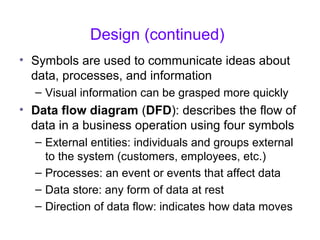
• Symbols are used to communicate ideas about
data, processes, and information
– Visual information can be grasped more quickly
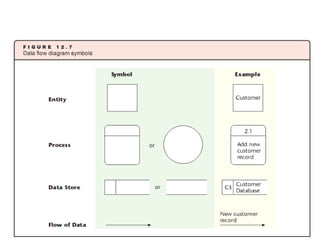
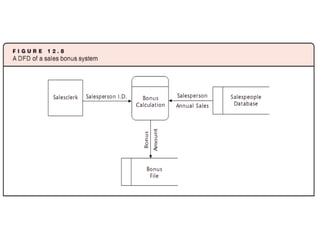
• Data flow diagram (DFD): describes the flow of
data in a business operation using four symbols
– External entities: individuals and groups external
to the system (customers, employees, etc.)
– Processes: an event or events that affect data
– Data store: any form of data at rest
– Direction of data flow: indicates how data moves
Design (continued)
• Construction
– Consists of mostly programming activities
– May take months or years
– Completed modules are tested via a walk-through of
the program logic or a simulation of actual program
execution
• System testing
– Tests the entire integrated system, comparing
results to the system requirements
Implementation
• Implementation: delivery of a new system
– Consists of two steps:
• Conversion
• Training
– Training may or may not precede conversion
• Conversion: switching from the old system to
the new system
– Can be a very difficult time
Implementation (continued)
• Four basic conversion strategies:
– Parallel conversion: the old system is used
simultaneously with the new system at first
– Phased conversion: breaks the new IS into
modules and integrates one at a time
• Reduces risk but delays some benefits
– Cut-over conversion (or flash cut conversion):
immediately replaces all modules
• Risky but may be inexpensive
– Pilot conversion: introduces the IS into one
business unit at a time
• Beta site: a site that tests the new system
Agile Methods
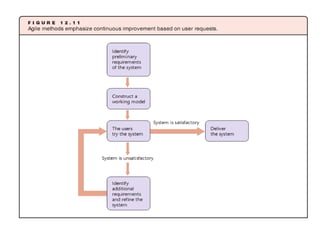
• Agile methods: alternative development
methods
– Treat software development as series of contacts
with users
– Goal: fast development of software
– Improve software after user requests for
modifications received
• Agile methods use iterative programming
Agile Methods (continued)
• Popular agile methods include:
– Extreme programming (XP)
– Adaptive software development (ASD)
– Lean development (LD)
– Rational unified process (RUP)
– Feature driven development (FDD)
– Dynamic systems development method (DSDM)
– Scrum
– Crystal
Agile Methods (continued)
• Major advantage of agile methods:
– Fast development of application software
• Agile method risks include:
– Analysis phase is limited or eliminated, increasing
the risk of incompatibilities
– More emphasis on programming, resulting in less
documentation, which may make it difficult or
impossible to make later modifications
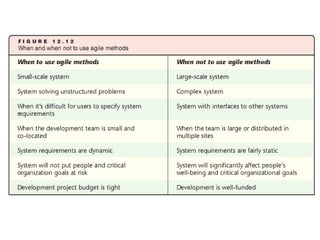
When to Use Agile Methods
• Agile methods are best used:
– When a desired system is small
• Analysis is less important
• Requires a smaller investment of resources
– For unstructured problems
– For developing user interfaces
– When users cannot specify all requirements at
the start of the project.
When Not to Use Agile Methods
• Do not use agile methods when:
– The desired system is large or complex
• System failure entails great financial loss
– The desired system must interface with other
systems
• SDLC recommended for complex systems
• Documentation is key for integration
Mis 9

Mis 9

  • 1.
  • 2.
    Planning Information Systems •Enterprise ISs are gaining in popularity • However, they: – Require a substantial investment – Carry a high risk in implementation • Successful integration of the system is vital – Must align IT strategies with the overall organization strategies • Careful planning of an IS implementation is necessary
  • 3.
    Steps in PlanningInformation Systems • IT planning includes several key steps: – Create a corporate and IT mission statement – Articulate the vision for IT within the organization – Create IT strategic and tactical plans – Create a plan for operations to achieve the mission and vision – Create a budget to ensure that resources are available to achieve the mission and vision
  • 4.
    Steps in PlanningInformation Systems (continued) • Mission statement: communicates the most important overarching goal of organization – Includes how the goals will be achieved • IS mission statement: describes the role of IT in the organization – Should be compatible with the organizational mission statement – Includes the ideal combination of hardware, software, and networking to support the mission
  • 5.
    Steps in PlanningInformation Systems (continued) • CIO develops a strategic plan for implementation of IT in the organization: – What technology will be used by employees, customers, and suppliers • Goals in the plan are broken down into objectives, such as: – Resources to be acquired or developed – Timetables for acquiring and implementing resources – Training
  • 6.
    The Benefits ofStandardization in Planning • One major goal and advantage of planning is standardization • Benefits include: – Cost savings: better bargaining power in purchasing and leasing hardware and software – Efficient training: a smaller variety of software reduces employee training needs – Efficient support: enables more staff specialization
  • 7.
    From Planning toDevelopment • After planning, management must decide how to obtain the systems (usually software) • Two general approaches: – Systems development life cycle (SDLC), the traditional approach – Nontraditional methods, including agile methods • Prototyping: fast development of an application based on initial user requirements
  • 8.
    The Systems DevelopmentLife Cycle • Large ISs are conceived, planned, and developed within the systems development life cycle (SDLC) framework • Also known as waterfall development • Consists of four major sequential phases: – Analysis – Design – Implementation – Support
  • 9.
    Analysis • Systems analysis:a five-step process – Investigation – Technical feasibility study – Economic feasibility study – Operational feasibility study – Requirements definition
  • 10.
    Analysis (continued) • Investigation –Is a system really necessary? – Is the system, as conceived, feasible? • Small ad hoc team usually performs a preliminary investigation by interviewing employees • Feasibility studies: a larger analysis conducted after preliminary results indicate an IS is warranted
  • 11.
    Analysis (continued) • Technicalfeasibility study: – Determines if components exist or can be developed – Determines if the organization has adequate hardware • Economic feasibility study: – Determines if the new IS is economically justified – Cost/benefit analysis: spreadsheet showing all costs and benefits of the proposed system – Benefits must outweigh the costs over the life of the system
  • 12.
    Design • Design: thesecond phase in systems development • Systems design: includes three steps for devising the means to meet all the requirements – Description of the components – Construction – Testing • If purchasing a system: – Design phase determines how to adapt the existing software – Construction: actual changes in program code
  • 13.
    Design (continued) • Symbolsare used to communicate ideas about data, processes, and information – Visual information can be grasped more quickly • Data flow diagram (DFD): describes the flow of data in a business operation using four symbols – External entities: individuals and groups external to the system (customers, employees, etc.) – Processes: an event or events that affect data – Data store: any form of data at rest – Direction of data flow: indicates how data moves
  • 16.
    Design (continued) • Construction –Consists of mostly programming activities – May take months or years – Completed modules are tested via a walk-through of the program logic or a simulation of actual program execution • System testing – Tests the entire integrated system, comparing results to the system requirements
  • 17.
    Implementation • Implementation: deliveryof a new system – Consists of two steps: • Conversion • Training – Training may or may not precede conversion • Conversion: switching from the old system to the new system – Can be a very difficult time
  • 18.
    Implementation (continued) • Fourbasic conversion strategies: – Parallel conversion: the old system is used simultaneously with the new system at first – Phased conversion: breaks the new IS into modules and integrates one at a time • Reduces risk but delays some benefits – Cut-over conversion (or flash cut conversion): immediately replaces all modules • Risky but may be inexpensive – Pilot conversion: introduces the IS into one business unit at a time • Beta site: a site that tests the new system
  • 19.
    Agile Methods • Agilemethods: alternative development methods – Treat software development as series of contacts with users – Goal: fast development of software – Improve software after user requests for modifications received • Agile methods use iterative programming
  • 20.
    Agile Methods (continued) •Popular agile methods include: – Extreme programming (XP) – Adaptive software development (ASD) – Lean development (LD) – Rational unified process (RUP) – Feature driven development (FDD) – Dynamic systems development method (DSDM) – Scrum – Crystal
  • 22.
    Agile Methods (continued) •Major advantage of agile methods: – Fast development of application software • Agile method risks include: – Analysis phase is limited or eliminated, increasing the risk of incompatibilities – More emphasis on programming, resulting in less documentation, which may make it difficult or impossible to make later modifications
  • 23.
    When to UseAgile Methods • Agile methods are best used: – When a desired system is small • Analysis is less important • Requires a smaller investment of resources – For unstructured problems – For developing user interfaces – When users cannot specify all requirements at the start of the project.
  • 24.
    When Not toUse Agile Methods • Do not use agile methods when: – The desired system is large or complex • System failure entails great financial loss – The desired system must interface with other systems • SDLC recommended for complex systems • Documentation is key for integration